I just ordered the cheapest Surface Pro option — why I (probably) won’t regret it

Surface Pro

Microsoft and its partner OEMs announced their long-awaited lineup of PCs powered by the new Qualcomm Snapdragon X processors this week. This generation is an absolute game-changer in the history of PCs, with the potential to increase battery life on mobile devices by 60%-100% over comparable Intel CPUs, while also ratcheting up performance. And, as a major bonus, this should all happen without generating the heat that makes it uncomfortable to use a laptop on your lap.

MacBooks powered by Apple's own M-series processors have already proven what a dramatic difference the shift to an ARM architecture can make. Although it's too early to say whether these new Copilot+ PCs can truly outrun the competition from Cupertino, there's no question that they'll make it an exciting race.

Also: Microsoft's Surface Pro and Laptop are the ultimate 'AI PCs', and I'm worried for Apple

So, when the preorder window for the new Surface Pro models opened this week, I had my credit card at the ready. After I studied all the options, I did something I'd never done before: I placed my order for the absolute minimum configuration.

If you dig deep into the purchase details, you'll see this is a Surface Pro, 11th Edition. But we'll go with Copilot+ PC.

Before I made my final decision, I ran through a four-question checklist. Your answers (and thus your decision) might differ from mine, so allow me to explain how I got to my final choice.

How much hardware do I need?

Manufacturers usually offer a minimum configuration for a new PC model in order to brag about a low, low starting price. Historically, they hit that number by cutting corners in every spec that matters, resulting in an unsatisfactory experience on Day 1.

In this case, though, the entry-level specs are more than acceptable. The model I chose has 16GB of RAM and 256GB of NVMe storage. I won't run VMs on this machine, so 16GB should be more than adequate. As for storage, I just checked my well-used Surface Pro X and discovered that I'm using only 143GB of its 1TB storage capacity, so 256GB will satisfy my requirements. Additionally, the storage should be easily upgradeable if I change my mind, thanks to the form factor that modern Surface devices use.

Unlike previous generations of cheap PCs, this series has only two processor options, and even the lesser of the two is likely to be an excellent performer.

Also: Windows 11 FAQ: ZDNET's upgrade guide and everything else you need to know

The basic model has an LED screen instead of an OLED display. I intend to use the PC as a lightweight secondary device away from my desktop, both in the living room and on road trips. That LED display should be fine for my purposes.

Will Windows on Arm work for me?

This one's easy. I've been using a first-generation Surface Pro X (purchased used on eBay) for nearly three years, and it's been an excellent traveling machine. There are plenty of native 64-bit ARM-compiled apps for the device (including Google Chrome, WhatsApp, and Spotify), and the only compatibility issues I've had with it have involved drivers.

Also: Every Copilot+ PC Microsoft just announced to take on Apple's M3 MacBooks

My Surface Pro X wouldn't work with a VPN app that I tried to use in Europe (which required a special network driver), and I've encountered a few other oddball devices that fail because their driver packages are compiled for x86 and won't work in the ARM environment. Thankfully, none of these devices are mission-critical for me, and the VPN issue was easy to work around by switching to a different provider.

If you or your organization require a specific device or service that doesn't work with an ARM-powered device, that might be a dealbreaker, but my experience says I have nothing to worry about.

Do I need any extras?

As mentioned above, I can keep the Type Cover and Surface Pen from my current Surface Pro X, so I don't need to buy new ones. The new Flex Keyboard, which offers the option to work as an external Bluetooth keyboard when detached, sounds cool but costs $350 or more. So, I'll pass.

The Microsoft Complete extended warranty, on the other hand, is available for half-price as part of the preorder program. It covers manufacturing defects and accidental damage from dropping the device, spilling liquids on it, or cracking the screen. I normally don't pay for that option, but at $109.50 for three years of coverage, I couldn't say no.

Also: 3 AI features coming to Copilot+ PCs that I wish were on my MacBook

Is the price fair?

I'm still shaking my head in disbelief (the good kind) at the final price tag I am paying for this machine.

The base configuration comes in four colors. The Sapphire, Dune, and Black options look very slick, but they come only in configurations with 512GB of storage and start at $1,200. The Platinum model offers a 256GB option for $1,000. I will take the $200 in savings.

Oh, and I qualify for a $100 discount available through employer programs, to customers who are in the military, and to students and teachers. On top of that, my American Express Business Cash card will give me a $175 rebate if I spend over $1,000 at the Microsoft Store before June 30. (My purchase qualifies, because the device and warranty together add up to $1009.49; sales tax adds another $73.19, for a total of $1082.68.)

Also: I demoed every new AI feature coming to Copilot+ PCs, and I'm nearly sold on the hype

Finally, the preorder program offers an enhanced trade-in, which means I can turn in my Surface Pro X (but keep the Type Cover) and get a $510 credit.

I am swapping a three-year-old ARM device for a sleek new one that should be worlds faster, with a three-year warranty, and after sales tax and all those credits, my out-of-pocket cost will be $398. That's pretty hard to resist.

Will I regret this purchase? I don't think so. In fact, the only thing I'm likely to miss is the collection of stickers on the back of my current Surface Pro X. Oh well, time to start fresh.

Featured

Navigating Your Data Science Career: From Learning to Earning

Navigating Your Data Science Career

Image by author

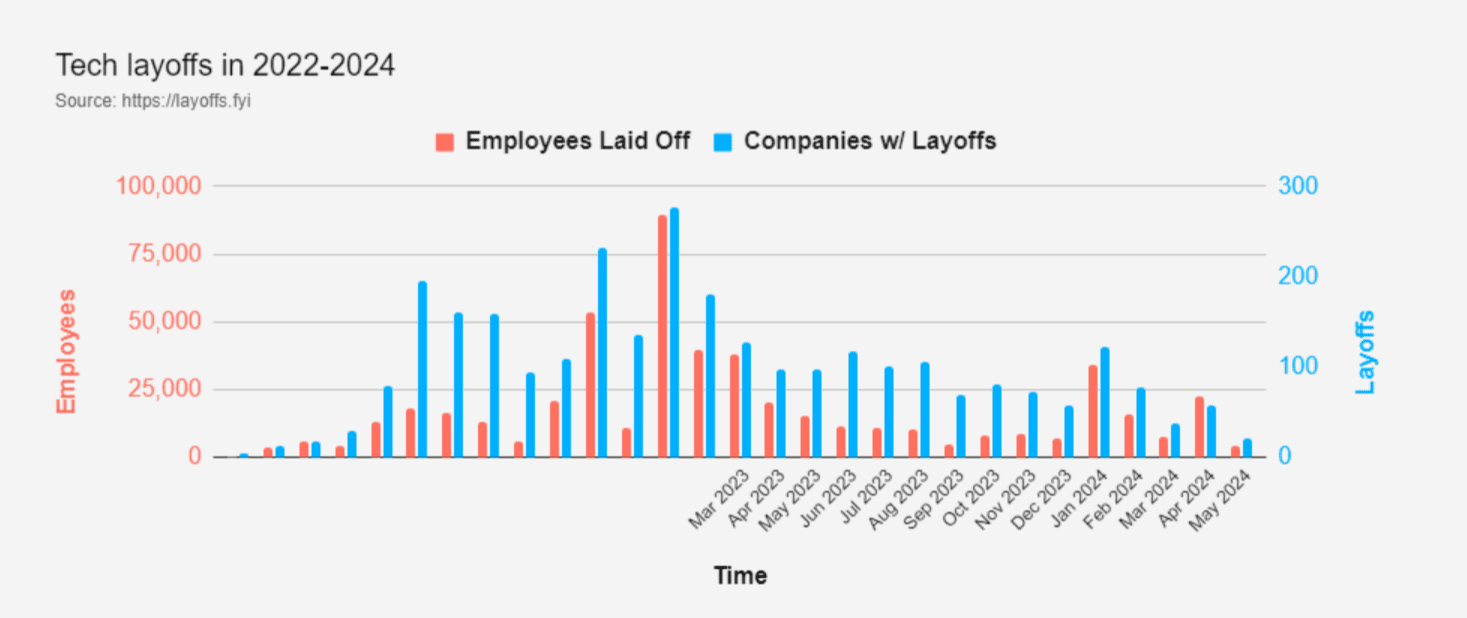
With 281 tech companies that laid off 80,628 people, why would you be interested in starting a data science career?

It might seem this is not a good moment, with companies downsizing. Yes, there are layoffs, but the chart below shows recent layoffs are nothing compared to the end of 2022 and the beginning of 2023. So, it’s not that bad!

Navigating Your Data Science Career

Source: layoffs.fyi

Another perspective makes it even more positive: companies are still employing data scientists. In fact, in the last month, there have been almost 5,500 job ads on Glassdoor only in the US.

There’s a rather vibrant job market for data scientists. Only now are the companies more demanding. They are looking more for data science specialists than generalists. On top of that, embracing AI tools is what’s now required from data scientists. Here’s how you can approach the challenges and still come on top in the job market.

1. Educational Pathways

There are always two distinct approaches when it comes to learning data science:

  • Academic education
  • Self-learning

Ideally, you would combine both.

Academic education

Academic education is not necessary to become a data scientist, but it does give you broad and structured knowledge. It’s much easier to build on this knowledge later than to become a data scientist from scratch.

Data scientists usually have a Bachelor’s degree in quantitative fields, such as computer science, statistics, mathematics, or even economics.

Having a master's degree is an excellent idea to boost your chances of getting a job. With it, you can specialize. Some examples of specializations are machine learning, data analysis, business intelligence, etc.

Going for a PhD is usually unnecessary, except if you’re interested in research-oriented roles in companies or academia.

Self-Learning

You can become a data scientist by creating a curriculum for yourself. This can include anything from the (non-exhaustive) list:

  • Certifications
  • Online courses
  • Bootcamps
  • YT videos
  • Books
  • Blog articles
  • Community forums

If time and finances allow, I recommend you focus on certifications, online courses, and bootcamps. Then, complement them with other resources.

Some of the certifications, courses, and bootcamps I suggest are:

  • Certified Analytics Professional (CAP) – a vendor- and technology-neutral certification of data science skills
  • Google Professional Data Engineer Certification – certifies your data engineering knowledge using Google Cloud
  • IBM Machine Learning Professional Certificate – obviously, an ML certification by IBM
  • Microsoft Azure Data Engineering Associate (DP-203) Professional Certificate – a certificate of data engineering in Microsoft Azure
  • Associate Big Data Analyst – vendor-neutral certification in big data analysis
  • Data Science Specialization on Coursera – a 10-course data science specialization by Johns Hopkins University
  • MicroMasters Program in Statistics and Data Science on edX – an MIT education in data science
  • Machine Learning Specialization on Coursera – an ML specialization provided by Stanford University and DeepLearning.AI, taught by Andrew Ng
  • Data Science Bootcamp – a bootcamp by Springboard with a 1-on-1 mentorship and a guarantee of getting a job (how about that!)
  • Machine Learning and Deep Learning Bootcamp in Python – learn ML and DL in Keras and TensorFlow

2. Skills

A data scientist's skills can be categorized into technical and soft skills.

Technical Skills

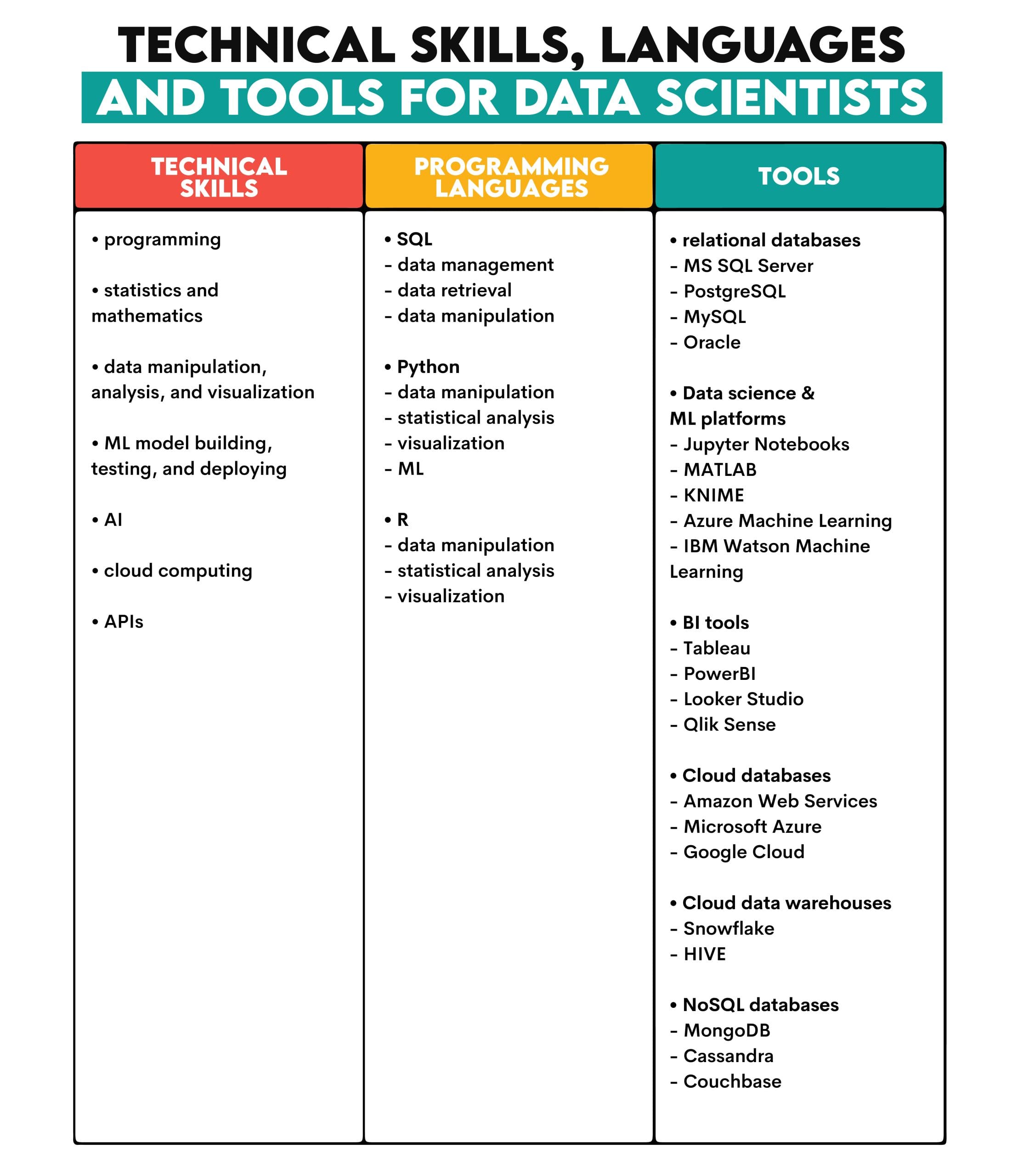
They stem from the main data scientist’s tasks: extracting and manipulating data, building, testing, and deploying ML models.

Data scientists must use various programming languages and tools to put all this knowledge into practice.

Here’s an overview.

Navigating Data Science Career

This should be your starting point for further specialization. For example, you can specialize in BI tools or focus on data engineering tools, such as Apache Kafka, Apache Spark, Talend, Airflow, etc.

Soft Skills

The technical skills have to be complemented by the soft skills given below.

Navigating Your Data Science Career

Communication Skills

These include both listening to others’ thoughts and communicating your own.

Your work as a data scientist starts by listening to other people’s problems. You’re the kind of psychotherapist that helps others solve their problems using data. Data therapist? By understanding business problems, you can shape your technical solution to the users’ needs.

Data scientists also must be able to translate the technical complexity of their work to non-technical audiences. They help themselves with visualization tools, meaning effectively visualizing and presenting your work is mandatory.

Analytical Thinking

Business problems that you need to solve will often be explained to you in a very non-technical way: “Oh, God, our customer retention is bombing! Heeeelp! You, the data science guy, come up with something. ”

This calls for the ability to break down the problem into logical blocks and solve it systematically. Also, creativity needs to be sprinkled around, as many problems require finding novel solutions.

Collaboration Skills

Data scientists’ ideal work day would be to be left alone, work on their models, and talk softly to it (in Gollum’s voice): It is mine, I tell you. My own. My precious. Yes, my precious.

Unfortunately, data scientists very often have to collaborate with other colleagues from data team. Projects also include cross-departmental teams.

Being adaptable and flexible, creating a good working atmosphere, and solving conflicts effectively and respectfully? Yes, my precious!

Project Management

Working on a data science project requires project management ability, including prioritizing tasks, coordinating a project team, and tracking project progress and deadlines.

Add to that mentoring junior staff and juggling between several projects, and this skill becomes crucial.

Business Acumen

All data projects are designed to solve business problems. To make them so, you need to have a solid understanding of your company’s business and industry. This makes it easier to understand the business problem and design a solution considering dependencies that may not have been explicitly mentioned.

3. Career Path and Salary

Navigating Your Data Science Career

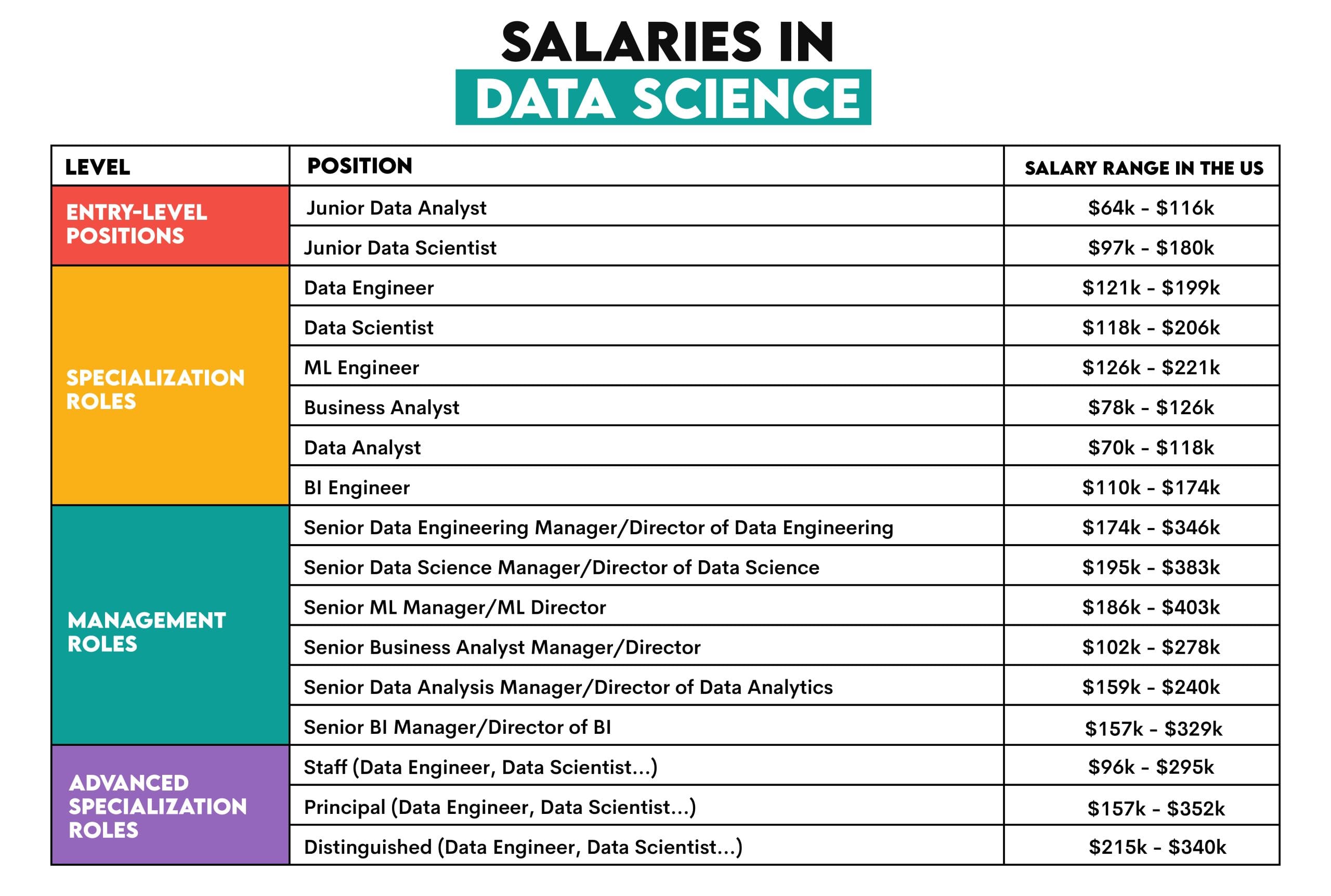
The data science career usually starts with landing a junior data analyst or junior data scientist job.

From there, I suggest you go into one of the specialization roles. Some of the examples are data engineers, ML engineers, business analysts, data analysts, or BI engineers. The data scientist position today is also increasingly a specialist role – more focused on using statistics in data exploration and initial model development rather than doing end-to-end projects.

Depending on the number of years you spend in a specific specialistic position and your interests, you could go into two distinct directions: management roles or advanced specialization roles.

For example, management roles can include a senior manager or director in any of the specializations mentioned earlier. This path takes you away from the technical part of your job, and managing people and departments becomes your focal point.

The other option is to remain an individual contributor and go even deeper into your specialization. These are advanced specialization roles. For any of the specializations mentioned, the titles are usually Staff, Principal, Distinguished, and Fellow.

4. Salary

Data science is still a very well-paying profession. This shouldn’t be overlooked when choosing your career path. Here’s the overview of the salaries for the previously mentioned roles.

Navigating Your Data Science Career

Image by author, source of salary data: Glassdoor

5. Getting a Job

Now, the question is how to transition from learning data science to earning all this money, otherwise known as getting a job.

I wouldn’t say anything new if I said: find the job ads you like, apply, kick ass on the interview, get a job. There you go, you’re welcome!

There are, however, two things that can distinguish you from other applicants:

  • An outstanding portfolio
  • Experience of the job interviews

An outstanding portfolio means having a solid number of data projects relevant to the job. Data projects are the best way to comprehensively build up and showcase your data science skills, as doing them requires a high level of each skill. Of course, you can also work on specialized projects focusing on specific skills, e.g., machine learning, data engineering, etc.

Experience of the job interviews can be gained in two ways. The first is to fail a lot of interviews before you get a job. This is a legitimate way many of us have experienced. I’m not joking; gaining experience makes you more used to the interview process, approaches, topics tested, and, especially, coding under time pressure.

However, there’s also a less painful way to achieve the same: solving the actual coding and other technical interview questions on the platforms that provide them.

Conclusion

While it might not seem like it, now is the ideal time to get into data science. Two reasons. First, if you’re thinking about starting your data science education, go for it. It will take some time. By the time you finish, data science might again be booming.

Second, if you already have all the requirements, apply for the jobs, as there are plenty of them, despite the layoffs.

Let's remember that data science is still one of the most attractive jobs there, despite all the shake-ups.

Nate Rosidi is a data scientist and in product strategy. He's also an adjunct professor teaching analytics, and is the founder of StrataScratch, a platform helping data scientists prepare for their interviews with real interview questions from top companies. Nate writes on the latest trends in the career market, gives interview advice, shares data science projects, and covers everything SQL.

More On This Topic

  • Navigating the Data Revolution: Exploring the Booming Trends in…
  • Navigating Data Science Job Titles: Data Analyst vs. Data Scientist…
  • Tips for Successfully Navigating Beginner Data Science Job Interviews
  • More Tips for Successfully Navigating Beginner Data Science Job Interviews
  • Navigating Today’s Data and AI Market Uncertainty
  • Elevate Math Efficiency: Navigating Numpy Array Operations

Microsoft’s Copilot Enhances AI Accessibility for Everyone, with Special Focus on the Disabled

A senior graphic and visual designer at Accenture, Sai Kaustuv Dasgupta, aka the Wheelchair Warrior of India, told AIM how he has been using Microsoft Copilot to generate commands and content-related tasks.

Dasgupta lives with osteogenesis imperfecta (OI), a rare genetic disorder that has caused over 50 fractures, 90% locomotor impairment, and 80% hearing loss.

He is not alone in using this tool; many users with disabilities rely on it.

Microsoft’s chief accessibility officer, Jenny Lay-Flurrie, stated, “Accessibility is about more than just technology; it’s about creating a culture of inclusion. When we design with accessibility in mind, we create better experiences for everyone.”

The 2022 Global Report on Assistive Technology, jointly published by WHO and UNICEF, reveals that only 3% of people in some low-income countries have the assistive products they need, compared to 90% in some high-income countries.

Historically, products like Microsoft Office and Windows have incorporated accessibility features after years of development. However, Copilot was designed with accessibility from the beginning, reshaping human-computer interactions to be more inclusive.

Integrated into Microsoft 365’s core apps, Copilot supports assistive technologies such as screen readers, magnifiers, contrast themes, and voice input, providing a seamless user experience.

For example, it helps users with disabilities by quickly drafting emails, creating PowerPoint presentations via voice commands, and assisting neurodiverse users with organising thoughts, writing tasks, and processing information, thus enhancing communication and productivity.

The Accessibility Assistant in Word, Outlook, and PowerPoint helps authors create accessible content by detecting and resolving issues early on. It also features in-canvas notifications for readability, quick-fix cards, and per-slide toggles for PowerPoint.

Making AI Accessible for Shared Humanity

Microsoft’s commitment to making generative AI accessible to all, especially disabled individuals, is longstanding.

Five years ago, at Microsoft Build, the company announced ‘AI for Accessibility,’ a $25 million five-year program to inspire developers to create AI-based products for the disabled.

“Accessibility is not a bolt-on. It’s something that must be built into every product we make so that our products work for everyone. Only then will we empower every person and every organisation on the planet to achieve more. This is the inclusive culture we aspire to create,” said Microsoft CEO Satya Nadella.

This year at Microsoft Build, the company announced that the US-based AI startup From Your Eyes won the 2024 Imagine Cup student competition. The startup developed a mobile app and API using GPT-4 and image recognition technology to provide real-time visual explanations for users with impaired vision.

From Your Eyes was created out of a profound personal need and a visionary goal. “After losing my vision completely at the age of ten, I knew I would never be able to see biologically again, but I believed it could be possible with technology,” says From Your Eyes founder and CEO Zülal Tannur.

Through Microsoft’s Seeing AI initiative, Zülal met visually impaired developers worldwide, inspiring her to learn to code. SeeingAI, which debuted in 2017, is a free app from Microsoft designed for the visually impaired. Enhanced video descriptions, facilitated by GPT-4 Turbo with Vision, and alternative communication methods like Cboard’s picture board app powered by Azure Neural Voices expand the breadth of impact.

The event’s runners-up, JRE and PlanRoadmap, are using cutting-edge AI to create a greener steel industry and creating an AI productivity coach to help people with ADHD overcome task paralysis, respectively.

Similarly, the company is also working with global advertising giant WPP to improve opportunities for individuals with visual impairments. It has built an application that allows you to upload videos, and with OpenAI’s GPT-4 Vision and Azure AI services, you get your video back with spoken descriptions over the top.

“The first time I heard audio descriptions, it just brought me to light. It was this opportunity of ‘Oh my gosh, I’m seeing!’ Through the power of AI, we’ll be able to do things we only dreamt about until recently,” said WPP global head of inclusive design Josh Loebner.

However, besides Microsoft, its competitors also take accessibility seriously. This was evident a week ago when Google introduced new features for Maps, Lookout, and Android. Lookout now allows users to search for specific objects and get distance information. Look to Speak lets users select phrases with their eyes and customise symbols. At the same time, Project Gameface, which uses facial gestures to control the mouse cursor, is now on Android.

Google Maps will also offer detailed walking instructions and screen reader capabilities. Android’s updated sound notifications alert users to sounds like fire alarms.

Similarly, Apple introduced new accessibility features for iPads and iPhones to support users with diverse needs better. These include eye tracking, music haptics, vocal shortcuts, vehicle motion cues, and major updates to Apple Vision Pro’s visionOS.

Tim Cook once said, “When we work on making our devices accessible by the blind, I don’t consider the bloody ROI.” So for Microsoft, Apple and others, designing for diverse needs is about creating real, tangible impact, not just ticking boxes.

The post Microsoft’s Copilot Enhances AI Accessibility for Everyone, with Special Focus on the Disabled appeared first on AIM.

Google Have Just Dropped a New Course: AI Essentials

Google AI Course
Image by Author

As the days go by, more and more people are finding new ways to use AI in their day-to-day lives. Some are on top of the game and have been able to be more productive through it. Some are still trying to learn the ropes and even get their head around where and how to use it.

This new course offered by Google is for those who need guidance on making the most out of AI.

Google: AI Essentials

Link: Google AI Essentials Course

With no prior experience about the world of AI required, this course is for beginners looking for a quick flexible course to get them kickstarted with the world of AI and how to implement it into their workflow.

This course will take you 9 hours to complete. Get it done in a weekend or get it done over 2 weeks — it’s totally up to you!

There are 5 modules to this course:

  • Introduction to AI
  • Maximise Productivity with AI Tools
  • Discover the Art of Prompt Engineering
  • Use AI Reponsibly
  • Stay Ahead of the AI Curve

In this 5 modules, you will learn how to:

  • Use generative AI tools to help develop ideas and content, make more informed decisions, and speed up daily work tasks
  • Write clear and specific prompts to get the output you want — you’ll apply prompting techniques to help summarise, create tag lines, and more
  • Use AI responsibly by identifying AI’s potential biases and avoiding harm
  • Develop strategies to stay up-to-date in the emerging landscape of AI

But your learning does not have to stop there. Here are a few other courses we would recommend if you’re looking to implement AI into your workload:

Wrapping it Up

Learning about the world of AI does not mean you have to go back to study at university or learn how to program. You can learn how to leverage AI with these short courses, regardless of your experience or sector.

Nisha Arya is a data scientist, freelance technical writer, and an editor and community manager for KDnuggets. She is particularly interested in providing data science career advice or tutorials and theory-based knowledge around data science. Nisha covers a wide range of topics and wishes to explore the different ways artificial intelligence can benefit the longevity of human life. A keen learner, Nisha seeks to broaden her tech knowledge and writing skills, while helping guide others.

More On This Topic

  • New Tech Courses That Have Just Landed
  • Meta’s New Data Analyst Professional Certification Has Dropped!
  • KDnuggets News March 30: The Most Popular Intro to Programming…
  • Does ChatGPT Have The Potential To Become A New Chess Super Grandmaster?
  • New Poll: What Percentage of Your Machine Learning Models Have Been…
  • What Google Recommends You do Before Taking Their Machine Learning…

Microsoft launches an AI-powered copy-and-paste tool. Here’s how you can use it

microsoft-windows-keyboard

Copying and pasting text in Windows has stayed largely the same over the years. Now, Microsoft is expanding the feature with a hefty dose of AI. Added to the free PowerToys utility on Tuesday, the new Advanced Paste tool not only lets you choose the format for pasted text, but offers AI powers to summarize, rewrite, or translate the text.

To take Advanced Paste for a spin, you'll need the latest version of PowerToys. If you don't yet have the program, browse to Microsoft's Learn page for PowerToys, the Microsoft Store page for PowerToys, or the GitHub page, and install it. If you already have the utility, open it from the Windows System Tray and install the latest update, to get version 0.80.1.

In PowerToys, open the settings page for Advanced Paste. Make sure the switch is turned on for "Enable Advanced Paste." The switch for Clipboard history should also be on. Using the tool's built-in AI skills requires an API key from OpenAI, so we'll get to that shortly. Right off the bat, though, you can access a menu that lets you choose how you want to paste any copied text.

Open a plain text file or document and copy some text. Next, press the default shortcut of Windows key + Shift + V. The Advanced Paste menu gives you three choices: 1) Paste as plain text, 2) Paste as markdown, and 3) Paste as JSON.

Pasting as plain text removes any formatting. Pasting as markdown preserves the formatting for HTML content by converting it into the Markdown format. This option is helpful if you write web-based content that you need to use in an application or system that supports Markdown.

Also: How to remap keys using Keyboard Manager in Microsoft's PowerToys

Pasting as JSON converts the text into the JSON (JavaScript Object Notation) format used in many programming languages and files. Unless you're working with HTML or programming languages, you'll likely find plain text the most useful.

Another option lets you access your clipboard history, which ties into the cloud-based universal clipboard built into Windows 10 and Windows 11. Click this option to see a list of recent items that you've copied. Select the one you want to paste and then choose Paste as plain text from the menu.

The real power of Advanced Paste comes from its AI capabilities. To set this up, you'll need that API key from OpenAI as well as available credits in your account. If you don't already have a spare key, browse to the OpenAI API Keys page. Sign in with your account or create one if necessary.

Click the button for "Create new secret key." At the secret key window, click the button for "Create secret key." You can also name the key if you wish. Clip Copy to copy the key to the clipboard.

Return to the PowerToys settings screen for Advanced Paste. Click the Enable button next to Enable Paste with AI. Paste the API key and click Save. Now you're ready to try the tool's AI skills.

Open a text file or document and copy some text. Press Windows key + Shift + V to display the Advanced Paste menu. In the field for "Describe what format you want," you can now type a request that makes use of the AI features. Here are a few examples from Microsoft:

  • Summarize text: Copy lengthy text from the clipboard and ask the tool to summarize it.
  • Translate text: Copy the text from the clipboard in one language and ask the tool to translate it into another language.
  • Generate code: Copy a description of a function from the clipboard and ask the tool to generate the code for it.
  • Transform text: Copy text from the clipboard and ask the tool to rewrite it in a specific style, such as a professional email or a casual message.
  • Stylize text: Copy text from the clipboard and ask the tool to rewrite it in the style of a well-known author, book, or speaker. For this example, Microsoft suggested that you ask the tool to paste the text as if it were written by Mark Twain or Shakespeare.

After you submit your request, the generated text should appear in the field, from where you can paste it into your current file or document.

I ran a few requests. In one, I asked Advanced Paste to summarize an article. In another, I asked it to translate an article from English into Italian. And in a third, I asked it to rewrite the text as if it were written by Shakespeare. In each case, the results were interesting, amusing, and potentially useful. You should try Advanced Paste for its AI skills alone.

Featured

Women in AI: Arati Prabhakar thinks it’s crucial to get AI ‘right’

Arati Prabhakar

To give AI-focused women academics and others their well-deserved — and overdue — time in the spotlight, TechCrunch has been publishing a series of interviews focused on remarkable women who’ve contributed to the AI revolution. We’re publishing these pieces throughout the year as the AI boom continues, highlighting key work that often goes unrecognized. Read more profiles here.

Arati Prabhakar is director of the White House Office of Science and Technology Policy and the science adviser to President Joe Biden. Previously, she served as director of the National Institute of Standards and Technology (NIST) — the first woman to hold the position — and director of DARPA, the U.S. Defense Advanced Research Projects Agency.

Prabhakar has a bachelor’s degree in electrical engineering from Texas Tech University and earned her master’s in electrical engineering from the California Institute of Technology. In 1984, she because the first woman to earn a doctorate in applied physics from Caltech.

Briefly, how did you get your start in AI?

I came in to lead DARPA in 2012, and that was a moment where machine learning-based AI was burgeoning. We did amazing work with AI, and it was everywhere, so that was the first clue that something big was afoot. I came into this role at the White House in October 2022, and a month later, ChatGPT came out and captured everyone’s imagination with generative AI. That created a moment that President Biden and Vice President Kamala Harris seized upon to get AI on the right track, and that’s been the work that we’ve done over the last year.

What attracted you to the field?

I love big, powerful technologies. They always bring a bright side and a dark side, and that’s certainly the case here. The most interesting work I get to do as a technical person is creating, wrangling and driving these technologies, because ultimately — if we get it right — that’s where progress comes from.

What advice would you give to women seeking to enter the AI field?

It’s the same advice that I would give anyone who wants to participate in AI. There are so many ways to make a contribution, from getting steeped in the technology and building it, to using it for so many different applications, to doing the work to make sure we manage AI’s risks and harms. Whatever you do, understand that this is a technology that brings bright and dark sides. Most of all, go do something big and useful, because this is the time!

What are some of the most pressing issues facing AI as it evolves?

What I am really interested in is: What are the most pressing issues for us as a nation as we drive this technology forward? So much good work has been done to get AI on the right track and manage risks. We have a lot more to do, but the president’s executive order and White House Office of Management and Budget’s guidance to agencies about how to use AI responsibly are extremely important steps that put us on the right course.

And now I think the job is twofold. One is to make sure that AI does unfold in a responsible way so that it is safe, effective and trustworthy. The second is to use it to go big and to solve some of our great challenges. It has that potential for everything from health, to education, to decarbonizing our economy, to predicting the weather and so much more. That’s not going to happen automatically, but I think it’s going to be well worth the journey.

What are some issues AI users should be aware of?

AI is already in our lives. AI is serving up the ads that we see online and deciding what’s next in our feed. It’s behind the price you pay for an airline ticket. It might be behind the “yes” or “no” to your mortgage application. So the first thing is, just be aware of how much it is already in our environment. That can be good because of the creativity and the scale that’s possible. But that also comes with significant risks, and we all need to be smart users in a world that’s empowered — or driven, now — by AI.

What is the best way to responsibly build AI?

Like any potent technology, if your ambition is to use it to do something, you have to be responsible. That starts by recognizing that the power of these AI systems comes with enormous risks, and different kinds of risks depending on the application. We know you can use generative AI, for example, to boost creativity. But we also know it can warp our information environment. We know it can create safety and security problems.

There are many applications where AI allows us to be much more efficient and have scope, scale and reach that we’ve never had before. But you better make sure that it’s not embedding bias or destroying privacy along the way before you hit scale. And it has huge implications for work and for workers. If we get this right, it can empower workers by enabling them to do more and earn more, but that won’t happen unless we pay attention. And that’s what President Biden has been clear we must achieve: making sure that these technologies enable, not displace, workers.

HCLTech Partners with Arm to Build Custom Silicon Chips for AI workloads

HCLTech has announced a collaboration with Arm, a leading technology provider of processor IP, to augment custom silicon chips that support AI-driven business operations.

The partnership will bring to market solutions that enable semiconductor manufacturers, system OEMs and cloud services providers to enhance the computing efficiency of their data centre environments and meet evolving customer demands.

HCLTech will leverage pre-integrated Arm® Neoverse™ Compute Subsystems (CSS) to help clients minimise development risks and swiftly deliver innovative, market-customized solutions geared toward improved performance and scalability for AI workloads.

HCLTech has preferential access to Neoverse CSS as a member of Arm Total Design, an ecosystem that brings together industry leaders to accelerate frictionless delivery of Arm-based custom silicon chips.

This access empowers HCLTech to stay at the forefront of cutting-edge technologies designed to efficiently manage AI workloads, including meeting the future demands of data center environments.

“HCLTech’s collaboration with Arm will contribute to the development of industry-leading custom AI silicon solutions that will revolutionize the way AI workloads are addressed in data center environments. Together, we look forward to spearheading technology advancement and innovation in the semiconductor industry,” said Ameer Saithu, executive vice president, engineering and R&D services, HCLTech.

“Through Arm Total Design, our partners can leverage the expertise and support of other industry leaders to bring custom silicon solutions to market faster. HCLTech is a welcome addition to the ecosystem, and we are excited to see how they leverage their custom AI silicon capabilities and Arm Neoverse CSS to innovate next-generation solutions,” said Guru Ganesean, president of Arm India.

The post HCLTech Partners with Arm to Build Custom Silicon Chips for AI workloads appeared first on AIM.

Introducing DataCamps AI-Powered Chat Interface: DataLab

DataCamp DataLab
Image by Author

With the rise of Generative AI, more and more people have found new ways and methods to make their data analytics process easier and easier. A lot of people have turned to using ChatGPT to answer their data questions, but now there’s Data Lab — DataCamps AI-Powered Chat Interface.

A simpler way to answer your data questions without having to ask your analyst team.

What is DataLab?

Link: Try Out DataLab!

If you have used the DataCamp platform before, you would have come across their ‘Workspace’ platform. This has now become DataLab.

DataLab is an AI-powered chat interface specifically tailored for data analytics. There are not many steps involved for you to get your answer. All you have to do is attach your data source, ask a question, and iterate it to get the insights you need.

DataCamp DataLab
DataCamp DataLab

Key features include:

  • Powered by code: Trust the insights you’re uncovering by seamlessly switching to a fully featured notebook with all of the generated code.
  • Easy data access: Connect all of your data sources, regardless of where they live.
  • Built-in reporting: Accumulate a live-updating report as you retrieve your findings.

DataCamp DataLab
DataCamp DataLab Features

Want to try it out?

You can use DataLab for free. This includes three workbooks, and 20 AI Assistant prompts on basic hardware. All you need is a DataCamp account.

If you have been using Workspace on the DataCamp platform and are worried about where your work will go. Don’t worry, all your workbooks will stay available and continue to function. Users on the existing Workspace Premium subscription get access to DataLab Premium, which includes unlimited workbooks, unlimited AI Assistant prompts, powerful hardware, and more.

Wrapping Up

We can see how the world of Generative AI is being integrated into different platforms providing more catered solutions. Try out the DataLab workspace and let us know what you think of it in the comments!

Nisha Arya is a data scientist, freelance technical writer, and an editor and community manager for KDnuggets. She is particularly interested in providing data science career advice or tutorials and theory-based knowledge around data science. Nisha covers a wide range of topics and wishes to explore the different ways artificial intelligence can benefit the longevity of human life. A keen learner, Nisha seeks to broaden her tech knowledge and writing skills, while helping guide others.

More On This Topic

  • ChatGPT CLI: Transform Your Command-Line Interface Into ChatGPT
  • Baize: An Open-Source Chat Model (But Different?)
  • Meet Gorilla: UC Berkeley and Microsoft’s API-Augmented LLM…
  • Your Ultimate Guide to Chat GPT and Other Abbreviations
  • Building Microservice for Multi-Chat Backends Using Llama and ChatGPT
  • What Can AI-Powered RPA and IA Mean For Businesses?

How to use ChatGPT Plus: From GPT-4o to interactive tables

ChatGPT Plus

You signed up for ChatGPT Plus to get more out of the artificial intelligence (AI) chatbot, but now OpenAI has launched GPT-4o, an all-in-one model, with the "o" standing for "omni." The new GPT-4o model is available to free and paid users, as are most of the benefits that were previously included only with a ChatGPT Plus subscription. This means that Advanced Data Analysis, custom GPTs, and internet access all are available if you don't pay for ChatGPT.

Also: How to use ChatGPT (and how to access GPT-4o)

So what's the point of paying $20 per month for a Plus subscription? For starters, GPT-4o is only available to free users on the desktop, not in the ChatGPT mobile app. Generating interactive tables and charts is also only available for ChatGPT Plus subscribers. Free ChatGPT users also see intermittent GPT-4o availability, as OpenAI restricts its use during peak times, reverting free users to GPT-3.5. Finally, Plus users have up to five times the message limit of free users, with up to 80 messages every three hours on GPT-4o and 40 messages every three hours on GPT-4.

Let's go through how to use all the benefits of your ChatGPT Plus subscription.

How to use ChatGPT Plus

ChatGPT Plus is easy to use, and OpenAI has made it even easier by combining many tools into GPT-4 and GPT-4o. To use ChatGPT Plus, you'll need a Plus subscription, which gives you priority access to new features, and access to GPT-4. To upgrade to ChatGPT Plus, you can log in to your OpenAI account and click on Upgrade in the lower left corner of the screen.

Also: ChatGPT vs. ChatGPT Plus: Is it worth the subscription fee?

Navigate the table of contents on the left of this page if you're looking for a specific feature.

Using GPT-4 and GPT4-o: Web browsing, DALL-E 3, and data analysis

A ChatGPT Plus subscription plan gives you access to GPT-4, which is the same model that powers Microsoft Copilot. OpenAI recently released GPT-4o, a multimodal model that has the combined functionality of multiple individual models. While GPT-4o has many of the same capabilities as GPT-4, it is faster and smarter.

GPT-4 and GPT-4o: Attaching images and files

GPT-4 and GPT-4o can process images and files on all platforms for Plus users: the web, iOS, and Android. ChatGPT Plus' Code Interpreter was recently renamed Advanced Data Analysis, an OpenAI plugin that lets users upload files to create and interpret code, analyze data, and more. Image and file analysis is now folded into GPT-4 and GPT-4o.

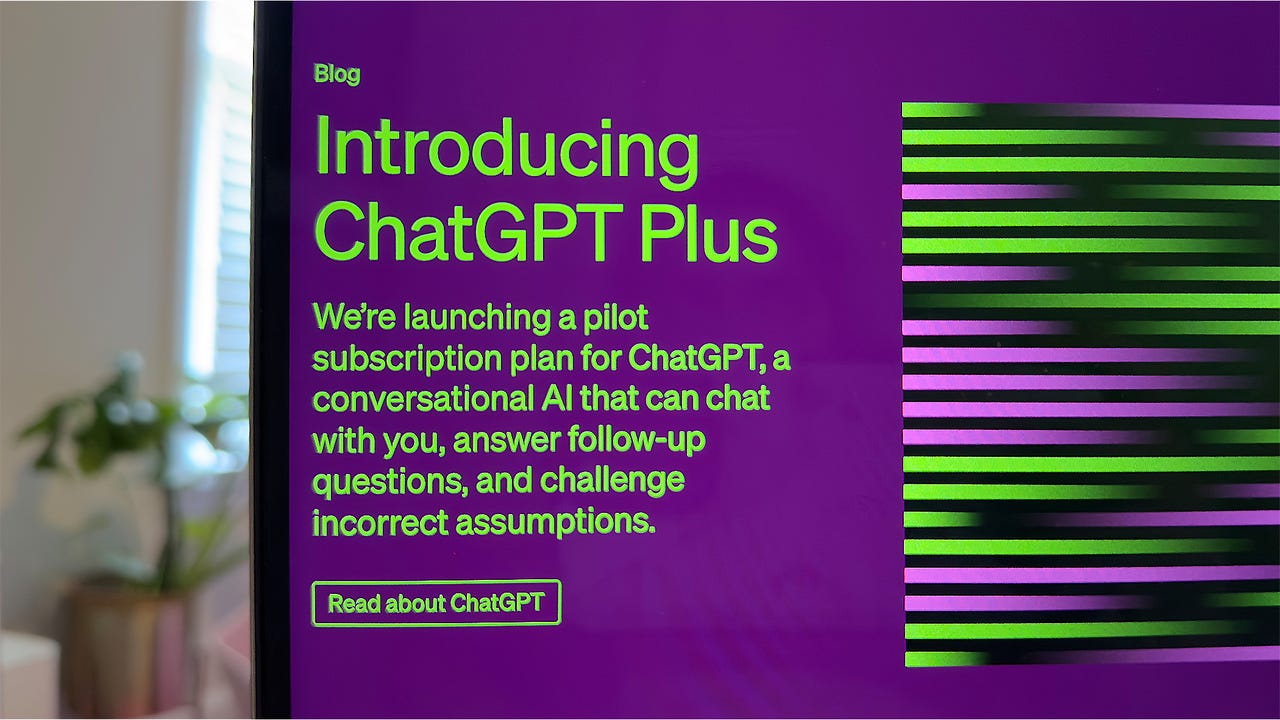
I uploaded an older ChatGPT Plus screenshot and simply asked GPT-4 to "tell me about this image."

GPT-4: Image generation with DALL-E 3

ChatGPT Plus subscribers can ask the chatbot to create images at any time while using GPT-4 and GPT-4o — there's no need to enable the AI image generator. Free users cannot generate images outside of GPT-4o using the custom DALL-E GPT, available in the GPT Store, which is subject to availability during non-peak times.

Also: DALL-E 3 in ChatGPT Plus is helpful but also gave me images of laptops from 1900

Giving DALL-E 3 prompts works just like chatting with ChatGPT. Simply enter your prompt and send.

GPT-4 generated this image with the prompt, "Create a photo of a red octopus riding a blue cruiser bicycle along the California shoreline." The hat was a nice touch.

Using GPT-4o: Generating interactive tables & charts

One of the few GPT-4o features exclusive to Plus subscribers lets you generate interactive tables and graphics in a chat. Here's how to do that:

This is what your spreadsheet will look like after you upload the file.

ChatGPT creates interactive charts.

My GPTs

One of the biggest upgrades OpenAI has made to its ChatGPT Plus subscription is the ability to create custom GPT bots, dubbed My GPTs. The feature was so overwhelmingly popular that it forced OpenAI to temporarily halt new subscriptions. Since then, OpenAI has made GPTs and the GPT Store available to free users.

You can learn how to create your own custom GPT-4 bots here, but we'll show you how to access this feature.

Voice chatting with ChatGPT

ChatGPT can now also process voice inputs and respond in an astonishingly natural manner, filler words included. The voice feature is available for iOS and Android users with a Plus subscription using GPT-4o and GPT-4 and users in the free tier using GPT-3.5. OpenAI is launching a new Voice Mode for GPT-4o initially for Plus users over the coming months.

ChatGPT will respond to you when there's a gap in speech.

FAQ

What is a Temporary Chat?

Think of a Temporary Chat as opening an Incognito tab on Google Chrome (hopefully with less drama): Each is a one-off conversation that won't appear in your chat history. OpenAI will also not use a Temporary Chat to train its models nor save its transcript to ChatGPT's memory. You can start a Temporary Chat by clicking on the ChatGPT version in the top-left corner of the chat window and then choosing the Temporary Chat option.

What is included in ChatGPT Plus?

A ChatGPT Plus subscription gives you access to a higher limit for GPT-4o, the GPT-4o voice feature on mobile, the ability to generate interactive tables and charts, and priority access to new releases. Plus is different from a ChatGPT Team subscription and a ChatGPT Enterprise subscription, which are business services.

Also: ChatGPT Enterprise vs. ChatGPT Team: Which is the best for your business?

Here's a breakdown of the different features for each tier:

Comparison

Features ChatGPT ChatGPT Plus ChatGPT Team ChatGPT Enterprise
Cost Free $20/month $25/month, 2 user minimum Depends on org size, 150 user minimum
Access to GPT-3.5
Access to GPT-4o
Access to GPT-4
Limits Depends on peak times Unlimited GPT-3.5 | 80 messages/3 hours for GPT-4o | 40 messages/3 hours for GPT-4 Unlimited GPT-3.5 | 100 messages per three hours for GPT-4 Unlimited
Internet browsing Yes, with GPT-4o
Custom Instructions
Code Interpreter Yes, with GPT-4o
Voice feature
Image processing Yes, with GPT-4o
Early access to new features
Interactive tables/charts
32k-token context
Chat templates
Admin Console
API credits

What are Custom Instructions?

Custom Instructions are a way to tailor ChatGPT's responses to your preferences. You can add instructions to your account that will determine how the AI chatbot will respond to each of your prompts.

Also: 6 helpful ways to use ChatGPT's Custom Instructions

For example, I prefer getting my summaries in bullet points, highlighting the most important information, so I added this to my Custom Instructions. Each time ChatGPT responds to me with explanations or summaries, it does so in bullet points.

Custom Instructions was originally launched as a feature exclusive to ChatGPT Plus subscribers, but the capability is now available to all free users.

Where are the ChatGPT Plugins?

ChatGPT Plugins were removed from ChatGPT entirely after OpenAI added custom GPTs. GPT bots work very much like plugins, so OpenAI replaced them with GPTs.

When did OpenAI release an all-in-one GPT-4 experience?

OpenAI, the maker of ChatGPT, released an all-in-one experience for ChatGPT Plus subscribers, automatically switching tools for them after its DevDay developers conference.

Also: Can ChatGPT predict the future? Training AI to figure out what happens next

This experience means subscribers can now access DALL-E 3, Browse with Bing, and use Advanced Data Analysis by just selecting GPT-4 without having to switch between each tool before sending a prompt.

Artificial Intelligence

Coforge Builds GenAI Platform Quasar, Powered by 23 LLMs

Coforge Quasar

Though Indian IT companies do not extensively disclose specific revenue figures related to generative AI, analysts approximate its current contribution to be between 1% and 3% of their total revenue.

The figures are, of course, estimated to only increase in the coming years. We have seen numerous examples of generative AI integration and reskilling efforts by Indian IT giants.

Coforge has developed an AI platform called Quasar, powered by 23 LLMs, which includes commercially available models, such as OpenAI’s GPT series models and Google’s Gemini, as well as open-source LLMs like LLaMA.

Quasar offers six accelerators tailored to specific AI capabilities – Quasar Document AI, Quasar Speech AI, Quasar Predict AI, Quasar Vision AI, Quasar Graph AI, and Quasar Conversational AI – available on the Microsoft Azure Marketplace.

“It’s crazy. Quasar is not one solution platform but has over 100 solutions and capabilities built into it,” John Speight, the customer success officer at Coforge, told AIM in an exclusive interaction.

It boasts a collection of over 100 APIs, featuring a modular and scalable architecture. Additionally, it offers a library of more than 100 pre-built cognitive and generative use cases.

“Quasar is not only packaged with generative AI capabilities, which we have built with our IP, but also other aspects of AI like vision models,” Speight said.

The second aspect is the wide array of capabilities it offers across various domains of AI expertise. It allows users to leverage the models of their choice and build their own use cases.

This includes document processing, image analysis, and speech recognition. It can also develop predictive and prescriptive models.

Biggest GenAI challenge is not tech

When leveraging an LLM, there could be a multitude of challenges associated with it, for instance, keeping the models grounded and reducing hallucinations. However, Deepak Bagchi, vice president – AI Practice at Coforge, said technology-related challenges are not their biggest issues.

“The real challenge lies in addressing the discussions surrounding AI capabilities. Customers often harbour concerns about AI’s impact and which models to employ, whether from hyperscalars or open-source platforms, while also factoring in cost implications,” he told AIM.

Indeed, the primary challenge for SaaS or IT companies integrating AI into their product remains change management. The experts AIM spoke to earlier, too, indicated something similar.

“Convincing users and decision-makers, who may fear job displacement or the perceived omnipotence of AI, poses the greatest challenge,” Bagchi pointed out.

Using generative AI for onboarding

Nonetheless, despite the apprehension, we are also seeing great adoption. Generative AI today is a part of most IT companies’ projects and so is the case with Coforge. The Noida-based IT company is helping a lot of customers in the contact centre space.

One of Coforge’s major offerings is contact centre automation for banks, covering multi-channel communications like voice, text messages, and emails.

“Our generative AI-powered solution analyses incoming queries, provides insights, and enables self-assist, reducing the need for human agents. This helps in cost optimisation by lowering the number of support tickets raised, which comes at a cost,” Bagchi said.

Moreover, Coforge is leveraging generative AI to assist clients in onboarding both customers and employees. At the time of this discussion, Bagchi was in France helping a large client develop a generative AI-powered solution for their onboarding processes.

As a result of this, according to Bagchi, accessibility has increased for their customers. Generative AI reduces the need for direct human involvement in many onboarding tasks.

For instance, generative AI can facilitate the process without requiring direct person-to-person interaction when transferring knowledge or providing information about products to new employees.

“This improves accessibility, allowing individuals to learn at their own pace and ask questions as needed. New employees or customers facing challenges can utilise generative AI to get timely assistance and information about products,” Bagchi added.

Speight added that Bagchi has trained over 100 senior leaders on generative AI while working for a big customer in France. “He is utilising Quasar to help them contextualise the technology and build their own AI solutions.”

Does Indian IT need to build LLM from scratch?

While Quasar leverages the most advanced LLMs available, the question arises of whether Indian IT firms must develop their own foundational model. Bagchi’s outright answer is no.

First, it’s a huge investment, and second, IT companies often deal with customers from multiple industries.

“The domains we work with are quite diverse. Building a specific LLM from scratch isn’t practical, so we focus on enhancing existing open-source LLMs like LLaMA. Our investment lies in fine-tuning and retraining these models for specific purposes,” he said.

However, a few IT firms are building their own LLMs from scratch for different reasons.

Hinduja Global Solutions, the IT management division of the billion-dollar Hinduja Group, for instance, is building its own industry-specific proprietary foundational models, which it will use for various internal and external requirements.

Moreover, Tech Mahindra is also building Indic LLMs from scratch in languages such as Hindi and Bengali, called Project Indus. The company’s desire to develop LLMs stems from former head CP Gurnani’s desire to develop a foundational language model deeply rooted in Indian culture and languages.

The post Coforge Builds GenAI Platform Quasar, Powered by 23 LLMs appeared first on AIM.