Google’s Duet AI can now write your emails for you

Google’s Duet AI can now write your emails for you Sarah Perez @sarahintampa / 11 hours

Gmail’s new AI companion will be able to help you draft and customize your emails, Google announced as part of this week’s news from its Google Cloud Next ’23 event. The company had shared a number of updates about its AI-powered companion, Duet AI, which is becoming generally available for Workspace users, aiding them with various tasks across meetings, documents, Google Chat and more.

The company also said that Duet AI would enhance Gmail’s existing smart reply feature by allowing users to draft longer, more personalized emails with a tap.

Now, Google has shared more on how that will actually work in an update for Workspace users. On both web and mobile, Gmail users trialing Duet AI will gain access to a “Help me write” button that will offer them a variety of options for writing assistance.

For instance, Duet AI can now use your own words to draft an email message, as it can understand the context from previous emails in a thread to create replies that are relevant to the current conversation.

You also can use the AI feature to make the tone of your drafted email sound more formal or elaborate on the draft by adding more detail to the message.

Image Credits: Google

Alternatively, you can opt to decrease the length of your drafted email if you’re looking for brevity.

Plus, Google added a fun (though likely not as helpful), feature “I’m feeling Lucky” — a throwback to the Google button that would take you directly to the first search result when you typed a query into the Google search box.

In this case, however, the “I’m feeling Lucky” option provided by the AI lets you choose from a number of fun variations on tone and style for the email content you’ve drafted.

A similar “Help me write” feature will also come to Docs, Google noted, letting you change the tone of your content, summarize sections, add bullets, elaborate or shorten your text, receive a different generated draft if you didn’t like the first (“retry”) and more.

You also can provide your own instructions on how you want your content refined through a custom option, Google said.

Read more about Google Cloud Next 2023 on TechCrunch

Auto-GPT & GPT-Engineer: An In-depth Guide to Today’s Leading AI Agents

When comparing ChatGPT with Autonomous AI agents such as Auto-GPT and GPT-Engineer, a significant difference emerges in the decision-making process. While ChatGPT requires active human involvement to drive the conversation, providing guidance based on user prompts, the planning process is predominantly dependent on human intervention.

Generative AI models like transformers are the State-of-the-Art core technology, driving these autonomous AI agents. These transformers are trained on large datasets, allowing them to simulate complex reasoning and decision-making capabilities.

Open-Source Roots of Autonomous Agents: Auto-GPT and GPT-Engineer

Many of these autonomous AI agents stem from open-source initiatives led by innovative individuals transforming conventional workflows. Rather than just offering suggestions, agents such as Auto-GPT can independently handle tasks, from online shopping to constructing basic apps. OpenAI's Code Interpreter aims to upgrade ChatGPT from just suggesting ideas to actively solving problems with those ideas.

Both Auto-GPT and GPT-Engineer are equipped with the power of GPT 3.5 and GPT-4. It grasps code logic, combines multiple files, and accelerates the development process.

The crux of Auto-GPT's functionality lies in its AI agents. These agents are programmed to execute specific tasks, from mundane ones like scheduling to more complex tasks that require strategic decision-making. However, these AI agents operate within the boundaries set by users. By controlling their access via APIs, users can determine the depth and scope of actions the AI can perform.

For instance, if tasked with creating a chat web app integrated with ChatGPT, Auto-GPT autonomously breaks down the goal into actionable steps, like creating an HTML front-end or scripting a Python back-end. While the application autonomously produces these prompts, users can still monitor and modify them. As shown by the creator of AutoGPT @SigGravitas, it is able to build and execute a test program based on Python.

Massive Update for Auto-GPT: Code Execution! 🤖💻

Auto-GPT is now able to write it's own code using #gpt4 and execute python scripts!

This allows it to recursively debug, develop and self-improve… 🤯 👇 pic.twitter.com/GEkMb1LyxV

— Significant Gravitas (@SigGravitas) April 1, 2023

While the below diagram describes a more general architecture of an Autonomous AI agent, it offers valuable insight into the processes behind the scenes.
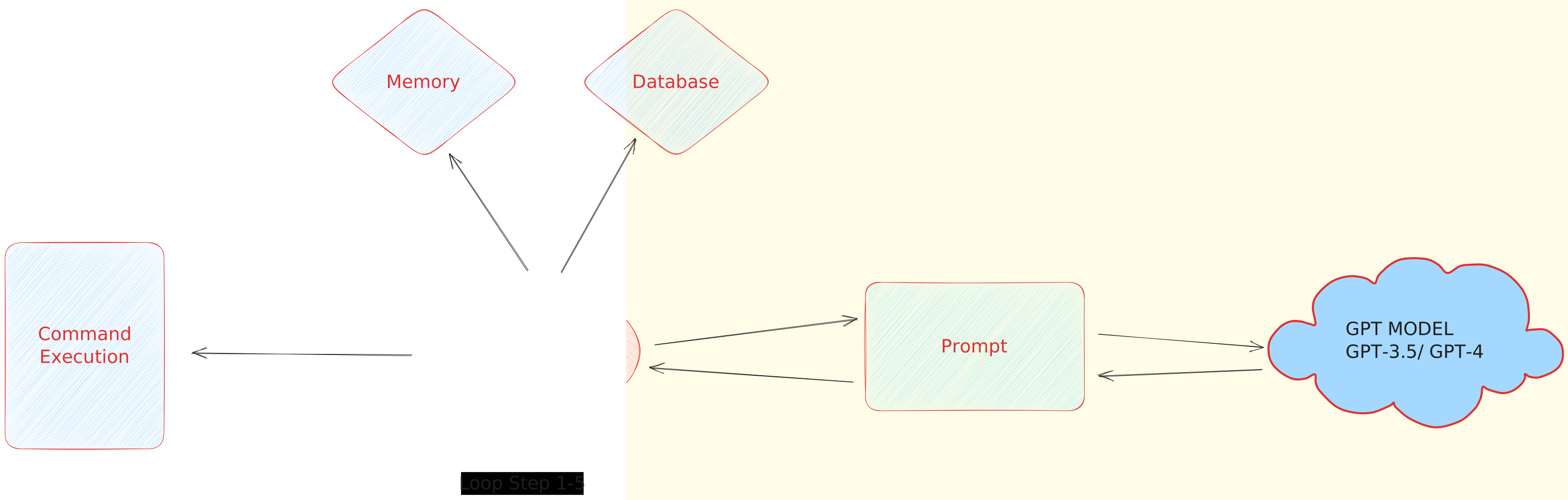
AI Agent Architecture like Autogpt, GPT Engineer

Autonomous AI Agent Architecture

The process is initiated by verifying the OpenAI API Key and initializing various parameters, including short-term memory and database contents. Once the key data is passed to the Agent, the model interacts with the GPT3.5/GPT4 to retrieve a response. This response is then transformed into a JSON format, which the Agent interprets to execute a variety of functions, like conducting online searches, reading or writing files, or even running code. Auto-GPT employs a pre-trained model to store these responses in a database, and future interactions use this stored information for reference. The loop continues until the task is deemed complete.

Setup Guide for Auto-GPT and GPT-Engineer

Setting up cutting-edge tools like GPT-Engineer and Auto-GPT can streamline your development process. Below is a structured guide to help you install and configure both tools.

Auto-GPT

Setting up Auto-GPT can appear complex, but with the right steps, it becomes straightforward. This guide covers the procedure to set up Auto-GPT and offers insights into its diverse scenarios.

1. Prerequisites:

  1. Python Environment: Ensure you have Python 3.8 or later installed. You can obtain Python from its official website.
  2. If you plan to clone repositories, install Git.
  3. OpenAI API Key: To interact with OpenAI, an API key is necessary. Get the key from your OpenAI account

Open AI API Key

Open AI API Key Generation

Memory Backend Options: A memory backend serves as a storage mechanism for AutoGPT to access essential data for its operations. AutoGPT employs both short-term and long-term storage capabilities. Pinecone, Milvus, Redis, and others are some options that are available.

2. Setting up your Workspace:

  1. Create a virtual environment: python3 -m venv myenv
  2. Activate the environment:
    1. MacOS or Linux: source myenv/bin/activate

3. Installation:

  1. Clone the Auto-GPT repository (ensure you have Git installed): git clone https://github.com/Significant-Gravitas/Auto-GPT.git
  2. To ensure you are working with version 0.2.2 of Auto-GPT, you'll want to checkout to that particular version: git checkout stable-0.2.2
  3. Navigate to the downloaded repository: cd Auto-GPT
  4. Install the required dependencies: pip install -r requirements.txt

4. Configuration:

  1. Locate .env.template in the main /Auto-GPT directory. Duplicate and rename it to .env
  2. Open .env and set your OpenAI API Key next to OPENAI_API_KEY=
  3. Similarly, to use Pinecone or other memory backends update the .env file with your Pinecone API key and region.

5. Command Line Instructions:

The Auto-GPT offers a rich set of command-line arguments to customize its behavior:

  • General Usage:
    • Display Help: python -m autogpt --help
    • Adjust AI Settings: python -m autogpt --ai-settings <filename>
    • Specify a Memory Backend: python -m autogpt --use-memory <memory-backend>

AutoGPT CLI

AutoGPT in CLI

6. Launching Auto-GPT:

Once configurations are complete, initiate Auto-GPT using:

  • Linux or Mac: ./run.sh start
  • Windows: .run.bat

Docker Integration (Recommended Setup Approach)

For those looking to containerize Auto-GPT, Docker provides a streamlined approach. However, be mindful that Docker's initial setup can be slightly intricate. Refer to Docker's installation guide for assistance.

Proceed by following the steps below to modify the OpenAI API key. Make sure Docker is running in the background. Now go to the main directory of AutoGPT and follow the below steps on your terminal

  • Build the Docker image: docker build -t autogpt .
  • Now Run: docker run -it --env-file=./.env -v$PWD/auto_gpt_workspace:/app/auto_gpt_workspace autogpt

With docker-compose:

  • Run: docker-compose run --build --rm auto-gpt
  • For supplementary customization, you can integrate additional arguments. For instance, to run with both –gpt3only and –continuous: docker-compose run --rm auto-gpt --gpt3only--continuous
  • Given the extensive autonomy Auto-GPT possesses in generating content from large data sets, there's a potential risk of it unintentionally accessing malicious web sources.

To mitigate risks, operate Auto-GPT within a virtual container, like Docker. This ensures that any potentially harmful content stays confined within the virtual space, keeping your external files and system untouched. Alternatively, Windows Sandbox is an option, though it resets after each session, failing to retain its state.

For security, always execute Auto-GPT in a virtual environment, ensuring your system remains insulated from unexpected outputs.

Given all this, there is still a chance that you will not be able to get your desired results. Auto-GPT Users reported recurring issues when trying to write to a file, often encountering failed attempts due to problematic file names. Here is one such error: Auto-GPT (release 0.2.2) doesn't append the text after error "write_to_file returned: Error: File has already been updated

Various solutions to address this have been discussed on the associated GitHub thread for reference.

GPT-Engineer

GPT-Engineer Workflow:

  1. Prompt Definition: Craft a detailed description of your project using natural language.
  2. Code Generation: Based on your prompt, GPT-Engineer gets to work, churning out code snippets, functions, or even complete applications.
  3. Refinement and Optimization: Post-generation, there's always room for enhancement. Developers can modify the generated code to meet specific requirements, ensuring top-notch quality.

The process of setting up GPT-Engineer has been condensed into an easy-to-follow guide. Here's a step-by-step breakdown:

1. Preparing the Environment: Before diving in, ensure you have your project directory ready. Open a terminal and run the below command

  • Create a new directory named ‘website': mkdir website
  • Move to the directory: cd website

2. Clone the Repository: git clone https://github.com/AntonOsika/gpt-engineer.git .

3. Navigate & Install Dependencies: Once cloned, switch to the directory cd gpt-engineer and install all necessary dependencies make install

4. Activate Virtual Environment: Depending on your operating system, activate the created virtual environment.

  • For macOS/Linux: source venv/bin/activate
  • For Windows, it's slightly different due to API key setup: set OPENAI_API_KEY=[your api key]

5. Configuration – API Key Setup: To interact with OpenAI, you'll need an API key. If you don't have one yet, sign up on the OpenAI platform, then:

  • For macOS/Linux: export OPENAI_API_KEY=[your api key]
  • For Windows (as mentioned earlier): set OPENAI_API_KEY=[your api key]

6. Project Initialization & Code Generation: GPT-Engineer's magic starts with the main_prompt file found in the projects folder.

  • If you wish to kick off a new project: cp -r projects/example/ projects/website

Here, replace ‘website' with your chosen project name.

  • Edit the main_prompt file using a text editor of your choice, penning down your project's requirements.

  • Once you're satisfied with the prompt run: gpt-engineer projects/website

Your generated code will reside in the workspace directory within the project folder.

7. Post-Generation: While GPT-Engineer is powerful, it might not always be perfect. Inspect the generated code, make any manual changes if needed, and ensure everything runs smoothly.

Example Run

Prompt:

“I want to develop a basic Streamlit app in Python that visualizes user data through interactive charts. The app should allow users to upload a CSV file, select the type of chart (e.g., bar, pie, line), and dynamically visualize the data. It can use libraries like Pandas for data manipulation and Plotly for visualization.”Setting Up and Running Engineering-GPT
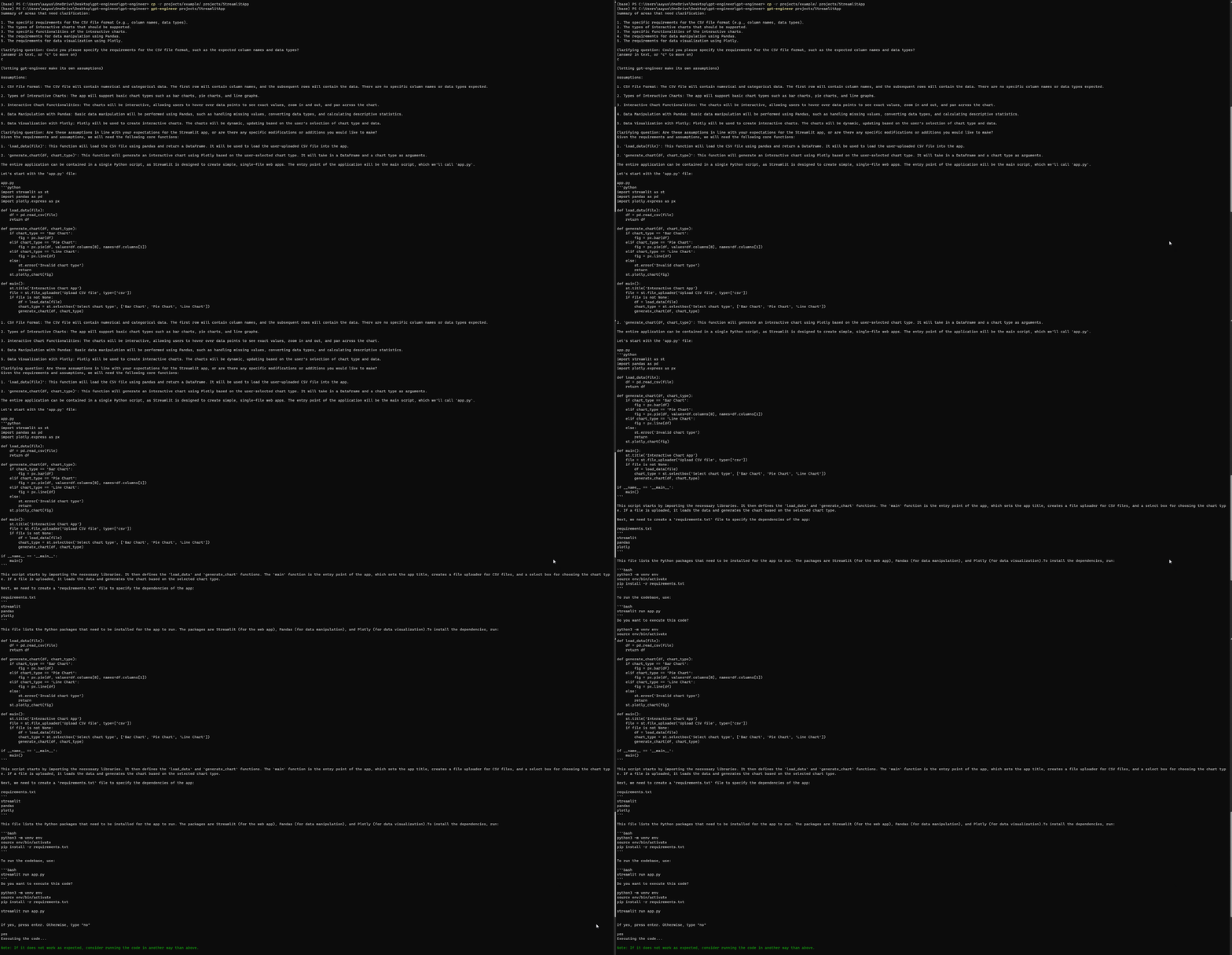
Setting Up and Running GPT-Engineer

Much like Auto-GPT, GPT-Engineer can sometimes encounter errors even after a complete setup. However, on my third attempt, I successfully accessed the following streamlit webpage. Ensure you review any errors on the official GPT-Engineer repository's issue page.

Streamlit App generated using Engineering-GPT

Streamlit App generated using GPT-Engineer

Current Bottlenecks of AI Agents

Operational Expenses

A single task executed by Auto-GPT might involve numerous steps. Importantly, each of these steps could be billed individually, increasing the costs. Auto-GPT can become trapped in repetitive loops, failing to deliver promised outcomes. Such occurrences compromise its reliability and undermine the investment.

Imagine wanting to create a short essay with Auto-GPT. The essay's ideal length is 8K tokens, but during the creation process, the model delves into multiple intermediary steps to finalize the content. If you're using GPT-4 with 8k context length then for the input, you would be billed $0.03. And for the output, the cost would be $0.06. Now, let's say the model runs into an unforeseen loop, redoing certain parts multiple times. Not only does the process become longer, but each repetition also adds to the cost.

To safeguard against this:

Set usage limits at OpenAI Billing & Limits:

  • Hard Limit: Restricts usage beyond your set threshold.
  • Soft Limit: Sends you an email alert once the threshold is met.

Functionality Limitations

Auto-GPT's capabilities, as depicted in its source code, come with certain boundaries. Its problem-solving strategies are governed by its intrinsic functions and the accessibility provided by GPT-4's API. For in-depth discussions and possible workarounds, consider visiting: Auto-GPT Discussion.

AI's Impact on the Labor Market

The dynamic between AI and labor markets is ever-evolving and is documented extensively in this research paper. A key takeaway is that while technological progress often benefits skilled workers, it poses risks to those engaged in routine tasks. As a matter of fact, technological advancements might displace certain tasks but simultaneously pave the way for diverse, labor-intensive tasks.

AI Labour market Autonomous Agents overtake

An estimated 80% of American workers might find that LLMs (Language Learning Models) influence around 10% of their day-to-day tasks. This statistic underlines the merging of AI and human roles.

AI's dual-faceted role in the workforce:

  • Positive Aspects: AI can automate plenty of tasks, from customer service to financial advice, granting a reprieve to small enterprises that lack funds for dedicated teams.
  • Concerns: The boon of automation raises eyebrows about potential job losses, particularly in sectors where human involvement is paramount, such as customer support. Along with this is the ethical maze tied to AI accessing confidential data. This calls for a strong infrastructure ensuring transparency, accountability, and ethical use of AI.

Conclusion

Clearly, tools such as ChatGPT, Auto-GPT, and GPT-Engineer stand at the forefront of reshaping the interaction between technology and its users. With roots in open-source movements, these AI agents manifest the possibilities of machine autonomy, streamlining tasks from scheduling to software development.

As we propel into a future where AI integrates deeper into our daily routines, a balance between embracing AI's capabilities and safeguarding human roles becomes pivotal. On the broader spectrum, the AI-labor market dynamic paints a dual image of growth opportunities and challenges, demanding a conscious integration of tech ethics and transparency.


I needed a mechanic. Here’s how ChatGPT Plus helped me skip reading online reviews

mechanic-gettyimages-535654513

A good car mechanic is hard to find. Could AI help me locate one? It was worth a shot.

First, a note about the tool I used: There are a few differences between the publicly available free ChatGPT and the $20/month subscription service, ChatGPT Plus. In addition to ChatGPT Plus being based on the GPT-4 model, I find the biggest differences to be the availability of Code Interpreter (which offers a lot of neat analytics) and ChatGPT plugins.

Also: The 10 best ChatGPT plugins right now

The plugins are something of a game-changer because they enable — among many other things — ChatGPT to do its magic using current data available on the web. Sans plugins, everything ChatGPT knows ends in 2021. For this project, I used the WebPilot plugin.

About the car: Our 13-year-old Fordhas reached the point where it needs a lot of work. It's a heck of a car, and we hope to have it for many more years, which means that every so often it needs some tending to.

We didn't want to take it to the dealer but preferred to find a mechanic locally, here in town. I used ChatGPT Plus to help identify the person to whom we eventually brought our car. It turns out he's a guy who does not own a cell phone and refuses to use email. (So he's clearly a much happier and smarter person than you or I will ever be.)

To protect his identity, as well as to repeat the experiment, I decided to run the same queries using Melbourne, Florida, a town on the other side of the country, as an example.

Also: 7 advanced ChatGPT prompt-writing tips you need to know

The plan was simple: get ChatGPT to analyze Yelp and Google reviews to find out which mechanic local residents seem to like best.

With ChatGPT Plus, you have to enable plugins at the start of a session. So, to start, I enabled WebPilot.

One quick note: Previously, I tried to get ChatGPT to scan both Yelp and Google reviews at the same time and the AI always got confused. So, for this demonstration, I'm separating those queries. (And it still gets a little lost.)

Also: How this simple ChatGPT prompt tweak can refine your AI-generated content

Here was my first prompt:

Use WebPilot to scan Yelp reviews for car repair shops local to Melbourne, Florida. Aggregate the review results and let me know which repair shops, based on the average review value and the number of reviews, produce the highest level of customer satisfaction. Do not include any car dealers or repair shops that are part of car dealers, and be sure to stay solely within Melbourne.

I got back a fairly useful response:

Then I told it:

Do the same for Google reviews.

As you can see, it got lost, confusing LA Fitness and Home Depot with auto mechanics. I then tried to get it to re-run the search, but I explicitly told it to substitute Google for Yelp:

Do the same, but use Google reviews instead of Yelp reviews

This time it just failed. Rather than looking up results, it told me how to search for them myself. Sometimes when the AI gets confused, a more comprehensive prompt can help. So I fed it the original prompt I used above, but with "Google" in place of "Yelp":

Use Webpilot to scan Google reviews for car repair shops local to Melbourne, Florida. Aggregate the review results and let me know which repair shops, based on the average review value and the number of revews, produce the highest level of customer satisfaction. Do not include any car dealers or repair shops that are part of car dealers, and be sure to stay solely within Melbourne.

As you can see, that worked. Next, I asked it to do a sentiment analysis:

Now perform a sentiment analysis on both sets of shops based on their Yelp and Google reviews and rank them in terms of how customers rate them, along with a short descriptive summary that reflects overall customer satisfaction or lack of satisfaction. Present the shops in order of their overall ranking, with the most positive sentiment as the first shop presented.

This did not result in an aggregated ranking. I decided again to add more specificity to my prompt. Here's the prompt that yielded the best results:

Now perform a sentiment analysis on both sets of shops based on their COMBINED Yelp and Google reviews (REVIEW COUNT AND NUMBER OF STARS), AS WELL AS ALL THE CUSTOMER COMMENTS, and rank them in terms of how customers rate them OVERALL, along with a short descriptive summary that reflects overall customer satisfaction or lack of satisfaction.

Also: We're not ready for the impact of generative AI on elections

The all-caps words are words I added that gave the prompt more clarity. They're upper-cased for you to see my changes (ChatGPT doesn't pay attention to case). I also modified this sentence as shown in all-caps:

Present the top five shops in order of their overall ranking ACROSS BOTH YELP AND GOOGLE, with the most positive sentiment as the first shop presented.

The results were much more in line with what I wanted. First, it presented a combined detailed report:

Then, as part of the same answer, it presented an overall ranking.

When I did this here, locally, the repair shop recommended by ChatGPT Plus is the one we took the Ford to. So far, it's been a very satisfying experience. Among other things, something another shop quoted as costing more than $2,000 to fix wound up costing about $250 with the mechanic recommended by AI.

Also: These are my 5 favorite AI tools for work

I took one final step, which I hadn't tried before. As a college professor, I often told my students to show their work, to help me see how they got to their conclusions. I did the same with ChatGPT Plus. It was interesting.

Show your work

Overall, I'm pretty intrigued by the possibility of letting the AI aggregate public sentiment data. But it's important to be careful because this data is hard to confirm. And, as we've seen, the AI regularly loses the thread, so you really never know how reliable its conclusions will be.

Also: Everyone wants responsible AI, but few people are doing anything about it

As an experiment, though, it was fun. And, fortunately for our over-the-hill Ford, it's proving to be a good result.

You can follow my day-to-day project updates on social media. Be sure to subscribe to my weekly update newsletter on Substack, and follow me on Twitter at @DavidGewirtz, on Facebook at Facebook.com/DavidGewirtz, on Instagram at Instagram.com/DavidGewirtz, and on YouTube at YouTube.com/DavidGewirtzTV.

Artificial Intelligence

Google’s Duet AI can now write your emails for you

Google’s Duet AI can now write your emails for you Sarah Perez @sarahintampa / 9 hours

Gmail’s new AI companion will be able to help you draft and customize your emails, Google announced as part of this week’s news from its Google Cloud Next ’23 event. The company had shared a number of updates about its AI-powered companion, Duet AI, which is becoming generally available for Workspace users, aiding them with various tasks across meetings, documents, Google Chat and more.

The company also said that Duet AI would enhance Gmail’s existing smart reply feature by allowing users to draft longer, more personalized emails with a tap.

Now, Google has shared more on how that will actually work in an update for Workspace users. On both web and mobile, Gmail users trialing Duet AI will gain access to a “Help me write” button that will offer them a variety of options for writing assistance.

For instance, Duet AI can now use your own words to draft an email message, as it can understand the context from previous emails in a thread to create replies that are relevant to the current conversation.

You also can use the AI feature to make the tone of your drafted email sound more formal or elaborate on the draft by adding more detail to the message.

Image Credits: Google

Alternatively, you can opt to decrease the length of your drafted email if you’re looking for brevity.

Plus, Google added a fun (though likely not as helpful), feature “I’m feeling Lucky” — a throwback to the Google button that would take you directly to the first search result when you typed a query into the Google search box.

In this case, however, the “I’m feeling Lucky” option provided by the AI lets you choose from a number of fun variations on tone and style for the email content you’ve drafted.

A similar “Help me write” feature will also come to Docs, Google noted, letting you change the tone of your content, summarize sections, add bullets, elaborate or shorten your text, receive a different generated draft if you didn’t like the first (“retry”) and more.

You also can provide your own instructions on how you want your content refined through a custom option, Google said.

Read more about Google Cloud Next 2023 on TechCrunch

Google Assistant and Alexa finally play nicely together — but only on one speaker lineup

Google Assistant and Alexa finally play nicely together — but only on one speaker lineup Kyle Wiggers 7 hours

After years of fierce brawling, Google Assistant and Alexa are finally playing nicely together.

Harman today announced new additions to its JBL Authentics speaker lineup that integrate both Google Assistant and Alexa — the first devices on the market to do so. The Authentics 200, Authentics 300 and Authentics 500, all of which sport automatic self-tuning, Bluetooth and multi-room playback, will be available starting on September 17.

For years, Google has resisted enabling manufacturers to build devices featuring both Google Assistant and Alexa.

That’s led Amazon to ramp up the pressure — not necessarily out of a sense of altruism, but to level what it perceived as an uneven playing field.

While Alexa has a respectable install base — about 500 million devices as of early this year — Google’s long benefited from shipping Google Assistant as the default assistant on Android smartphones. (This preferential treatment was once the subject of an EU antitrust investigation.) In 2019, Google said that Google Assistant was available on more than 1 billion devices.

So in 2020, Amazon launched the Voice Interoperability Initiative, a program aimed at ensuring voice-enabled products such as smart speakers, smartphones and smart displays let users choose among multiple voice assistants. Google, along with Samsung and Apple, declined to join. But now the search giant’s changing its tune.

Why? In an email interview, Marissa Chacko, director of product management of Google Assistant, glossed over Amazon and Google’s contemptuous history and seemed to say, in so many words, “why not?”

“Voice assistants have become part of our everyday lives,” she said. “Both Google and Amazon wanted to make it easy for users to access either of these voice services simultaneously … We aren’t trying to compensate for capability gaps, but rather give users choice.”

On the new JBL Authentics speakers, Google Assistant and Alexa will work interchangeably. Users will be able to ask Alexa to set a timer, for example, and, when it rings, ask Google Assistant to stop it (and vice versa).

That’s thanks to what Amazon calls universal device commands (UDC), functionality driven by Amazon’s Multi-Agent Experience Toolkit, which was borne out of the Voice Interoperability Initiative. With UDC, a user can ask Alexa and Google Assistant to stop certain tasks — like music, timers, reminders and alarms — without having to remember which assistant started the request or ask for the request to be handed off to the other assistant.

Perhaps just as importantly, the assistants won’t try to speak over one another. The Authentics speakers will automatically change the “audio focus” in the appropriate moment to prevent, for instance, Alexa from speaking over a Google Assistant timer.

Amazon and Google have been testing UDC during beta trials, Aaron Rubenson, VP of Alexa, told me via email.

“Customers might prefer to access Alexa or Google Assistant to use their favorite Amazon and Google services,” he said. “You might ask Google Assistant for a good substitute for milk, and then ask Alexa to buy it from Amazon.com. Or, get an Amazon package delivery notification from Alexa, and then ask Google Assistant to add a reminder about the delivery to your Google Calendar.”

But aren’t Google and Amazon concerned about engagement with either Google Assistant or Alexa suffering now that both assistants are on one device? Apparently, no. In a remarkable change in tune, Rubenson and Chacko say that they see the assistants as being “complementary” rather than competitive with each other.

“While we of course want to increase engagement with Alexa, the focus of this integration is to create a great customer experience where customers have seamless access to both assistants,” Rubenson said. “We fully expect customers to use Alexa and Google Assistant on their own or alongside each other on the JBL Authentics 200, 300, and 500 speakers.”

Chacko added: “We believe in creating a strong smart home ecosystem, and ultimately want to make it easier for people to have access to their preferred assistants … We know that many households have mixed voice assistant preferences and several devices, which can be difficult to manage. Along with Amazon and Harman, we had a shared vision for this integration to provide users value and choice by delivering simultaneous access to multiple voice assistants on a single device.”

But there’s important subtext.

Smart speaker sales have been in decline for some time. Shipments were down 30% in Q1 2023, the sixth quarterly consecutive dip. And according to a survey by UpCity, a business-to-business service directory, only half of U.S. consumers are using voice search daily.

The stakes are lower than they used to be, simply put — especially in light of both Amazon and Google internally scaling back their voice assistant efforts.

Amazon was reportedly on pace to lose about $10 billion on Alexa and other devices in 2022 alone. And Google has ramped down its investments in Google Assistant both for third-party devices and its own hardware lineup, recently stripping third-party voice games and apps from Nest hub smart displays.

Declining sales likely aren’t the only reason to blame for the shifting corporate priorities. As it turns out, it’s hard to make money with voice assistants. Amazon is said to have raked in less than $2 million on Alexa apps in 2019, falling well short of the company’s $5 million target.

But be all this as it may, the Harman/Amazon collaboration could end up being a one-off. Chacko wouldn’t commit to future Google Assistant and Alexa integrations, implying that it’ll depend on how this one’s received.

“It’s early to determine this integration’s impact,” she said. “While we don’t have any plans to share about future integrations, we’re excited to see how …. [users] utilize having simultaneous access to both Google Assistant and Alexa at home.”

In other words, it’s a temporary alliance — not a lasting truce.

The Ultimate Guide to Mastering Seasonality and Boosting Business Results

The Ultimate Guide to Mastering Seasonality and Boosting Business Results
Image by upklyak on Freepik

Businesses spend billions annually on advertising to increase their product awareness and interest among consumers leading to more purchases. Targeted advertisements or campaigns are launched to reach a broader audience in order to acquire new customers for their products. Advertisements are broadcasted through multiple media, it can be broadcasted on television, radio, magazines, online, through social media, and even in stores to reach a wide audience. Due to the abundance of options and the imperative to maximize return on investment (ROI), efficient allocation of advertising resources presents a significant challenge. This is where media mix modeling becomes paramount for businesses to optimize their advertisement spending and maximize their RoI. By estimating how much money should be spent on certain media channels to achieve specific goals (such as increased sales or brand awareness), media mix modeling is a useful tool for businesses. This allows them to compare various channels' performance and identify where there are opportunities for improvement, and spend resources sensibly. Data-driven insights allow businesses to fine-tune their marketing approaches, increase the value of their spending, and accelerate the process of reaching their business objectives. Media mix modeling is a statistical analysis technique where one analyzes historical advertisement data including spend, ad impressions or clicks delivered, product sales, new customers acquired, etc. in order to understand the impact of different media channels on business outcomes. This allows businesses to perform their advertisement budget portfolio optimization and increase their RoI.

In addition to the impact of media channels, media mix modeling also takes into account external factors such as if the business ran any promotions, holidays, or any special event which might have impacted the sales. This is done in order to avoid any form of overestimation of the impact of the media channels' performance.

But one of the most critical factors that businesses need to address and incorporate into their media mix models is Seasonality.

What is Seasonality and Why is it Important for Media Advertising

In simple terms, we can define seasonality as a characteristic of time series data in which we can observe predictable and regular behavior that gets repeated annually. Thus, we can say that any behavioral fluctuation that is predictable and recurs every year is a seasonal behavior.

But, how does seasonality differ from cyclical effect? Cyclical effects are the ones that can span over varying time periods. They may last longer or shorter than one year such as boosted sales of water filtration devices in a region due to some fault that might have occurred in the water pipeline. This kind of effect isn’t regular or predictable and might not repeat every year. Whereas, a boost in sales of flu medications due to flu season can be characterized as seasonal since it repeats every year from December to February and can be predicted.

But why is seasonality important for media advertising? Seasonality primarily affects media mix modeling in two ways. Firstly, a change in media consumption patterns, and secondly a shift in advertising effectiveness is observed. As we discussed above how media mix modeling can help marketers understand the impact of various media channels on their sales or other key performance indicators such as new customer acquisitions. The incorporation of seasonality into these models enables advertisers to more accurately reflect the shifts in advertising performance that occur throughout the year. For instance, during the holiday seasons, various media channels may observe increased viewership or higher engagement, which makes them more successful in reaching their respective target audiences. Advertisers are able to maximize the effectiveness of their media allocation plans when they acknowledge and take into account seasonality. They are able to modify their advertising budgets, campaigns, and channel selection in order to align themselves with seasonal trends and the demand of consumers. This guarantees that marketing efforts are concentrated during times when they are most likely to generate maximum impact, hence optimizing the return on advertising investments.

What does Seasonality look like in Time Series Data?

We can incorporate seasonality into media mix models by using seasonal factors or dummy variables to represent specific seasonal events such as holidays. These factors capture the influence of different time periods on media response and help adjust the model's predictions accordingly. These variables capture the impact of different time periods on media response and aid in the model's prediction.

In Python, we have a Statsmodel library known as seasonal_decompose, that can help generate seasonality variables for us. The library splits a time series into three components namely, trend, seasonality, and the residuals. Seasonality can be represented by two kinds of models, either additive or multiplicative.

For simplicity, let us assume we are dealing with an additive model. An additive model can be used when the variance of the time series doesn't change over different values of the time series. Mathematically we can represent an additive model as follows where the individual components of trend, seasonality, and residual are added together.

The Ultimate Guide to Mastering Seasonality and Boosting Business Results
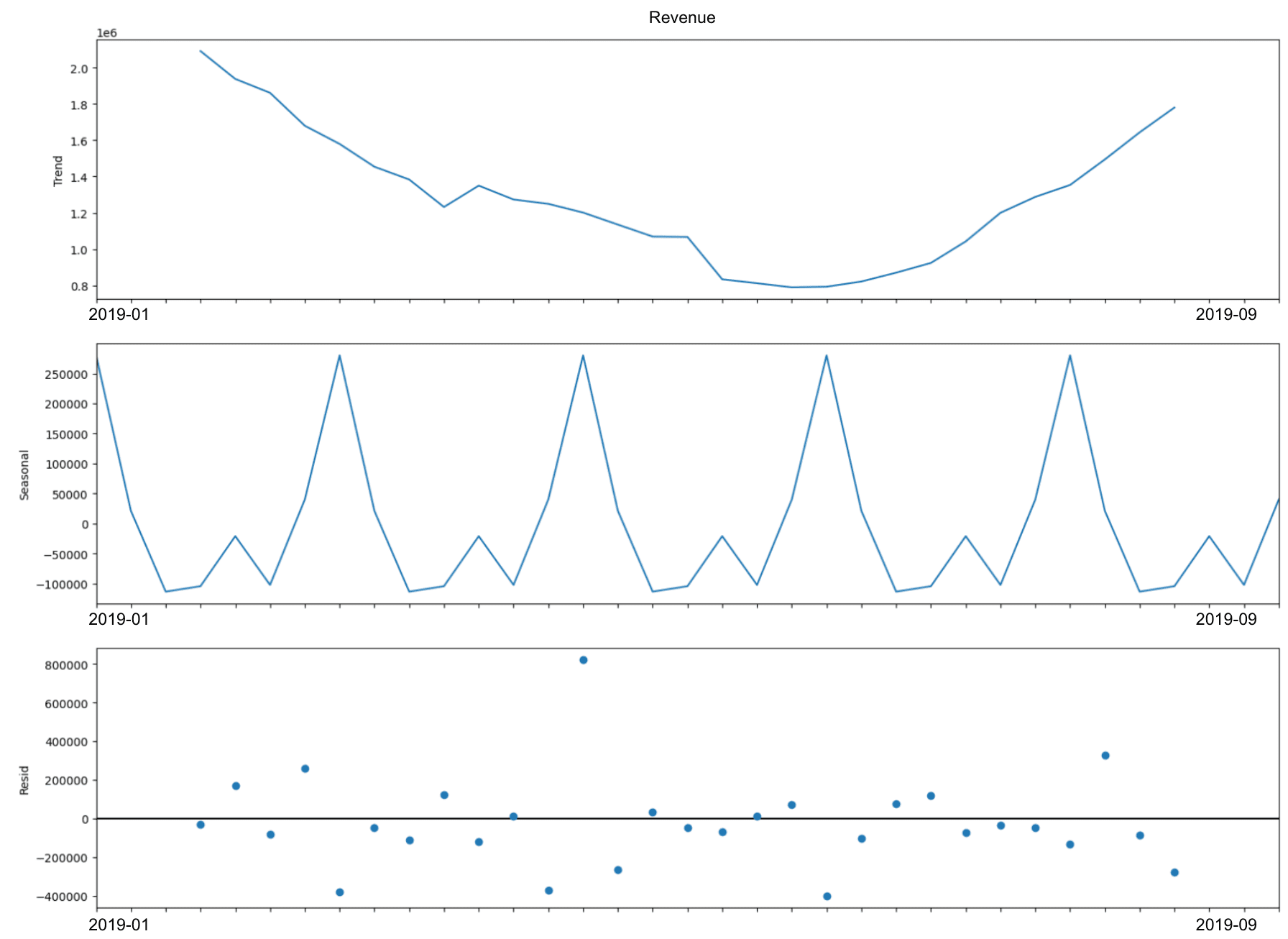
Figure 1: Seasonality decomposition of revenue over 8 months

Trend Factor

The trend component describes the change in the time series that occurs over a longer period of time and is more systematic. It reflects the fundamental increase or decrease in the series and provides an indication of the overall trend as well as the magnitude of the data collected over a prolonged time period. It is helpful in determining the underlying pattern of the data as well as the directionality of the data. In Figure 1, we have the seasonality decomposition of revenue over 8 months, and if we look at the trend we observe that there is a decline in revenue during the summer months of the year. This insight can be crucial for advertisers as they can devise a change in strategy or their spending pattern.

Seasonality Factor

The seasonality factor refers to recurrent patterns that take place over shorter periods of time, often within the span of one year. It is a representation of the frequent oscillations that occur as a result of external influences such as the weather, holidays, or other cultural events. The recurrent peaks and valleys that are characteristic of seasonality are a reflection of the regularities that can be anticipated within the data. In Figure 1 above we can see that there are peaks every alternate month which can help guide businesses to identify some external influences having an impact on revenue.

Residual Factor

The random and unexplained variations that cannot be attributed to the trend or seasonality are represented by the residual component, which is also known as the error or noise component. It takes into account any fluctuations or anomalies that are still present after the trend and seasonality components have been taken into consideration. The fraction of the data that is unpredictable and lacks a systematic pattern is denoted by the residual component.

Challenges faced in seasonality analysis

  1. Multiple seasonalities: In certain time series data one can observe multiple seasonality patterns at a daily, weekly as well as monthly level which is difficult to capture with a simple seasonal decomposition and may require more complex processes.
  2. Data sparsity: If we do not have evenly distributed data over a period of time i.e., if we have infrequently sampled data or very few data points then it might impact the seasonality estimation. Hence, it is recommended to have a daily or weekly level dataset for at least 2 years for better quality seasonality estimation.
  3. Non-stationarity: In case the time series data has a changing variance then will impact seasonality estimation.

    Limited or sparse data points within a particular season can hinder the accurate estimation of seasonal effects, especially when dealing with shorter time series or infrequently sampled data.

  4. Irregularities: Often times we have outliers in data due to some external factors which can distort the seasonality analysis. It is advised to perform data screening prior to performing seasonality analysis such as outlier detection and removal.

Finally, we saw how seasonality influences media mix modeling and drives strategic business decisions. Marketers can optimize their advertising tactics and budget allocation based on swings in consumer behavior and market dynamics throughout the year by including seasonality in media mix models. Understanding seasonal patterns allows firms to target the correct demographic, choose the best media channels, and time their advertising campaigns for maximum impact. Companies may improve the efficiency and efficacy of their advertising activities, increase customer engagement, generate sales, and ultimately improve their return on investments by employing seasonality analysis information. Seasonality enables firms to adjust and tailor their marketing tactics to correspond with shifting consumer demands and preferences, giving them a competitive advantage in a volatile environment.
Mayukh Maitra is a Data Scientist at Walmart working in the media mix modeling space with more than 5 years of industry experience. From building Markov process based outcomes research models for healthcare to performing genetic algorithm based media mix modeling, I've been involved in not only making an impact in the lives of people but also taking businesses to the next level through meaningful insights. Prior to joining Walmart, I've had the opportunity to work as a Data Science Manager in GroupM in the ad tech space, Senior Associate of Decision Science in Axtria working in the domain of health economics and outcomes research, and as a Technology Analyst in ZS Associates. In addition to my professional roles, I’ve been part of jury and technical committee for multiple peer reviewed conferences, have had the opportunity to judge multiple tech awards and hackathons as well.

More On This Topic

  • Your Ultimate Guide to Chat GPT and Other Abbreviations
  • The Ultimate Guide to Acing Coding Interviews for Data Scientists
  • The Ultimate Guide to Data Engineer Interviews
  • The Ultimate Guide To Different Word Embedding Techniques In NLP
  • An introduction to Explainable AI (XAI) and Explainable Boosting Machines…
  • Mastering the Art of Data Storytelling: A Guide for Data Scientists

ChatGPT Plus vs ChatGPT Enterprise

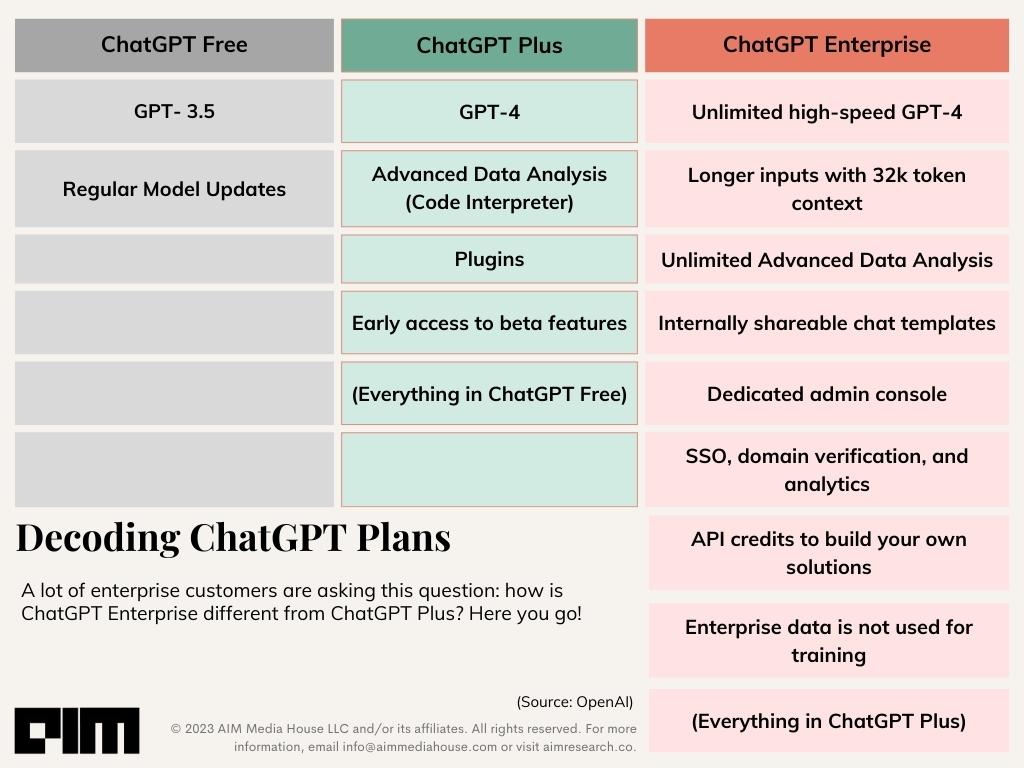
Four months after announcing plans to launch ChatGPT Business, OpenAI has finally released ChatGPT Enterprise. By offering top-tier security and privacy for enterprises, and serving as an AI assistant for companies, the product is considered a threat for SaaS startups that have developed products around ChatGPT or created wrappers around ChatGPT APIs to cater to business customers.

With ChatGPT Plus also offering additional features, how different are both the products? Let’s find out.

Features After Features

When ChatGPT Plus subscription was launched in February at $20/month, the subscribers were said to receive a number of benefits such as general access to ChatGPT (even during peak times), faster response time and priority access to new features and improvements. OpenAI also called out saying that it will refine and expand its offering based on feedback, and explore lower-cost plans, business plans, and data packs. While nothing on low cost plans materialised, they did launch GPT-4 the following month, whose access differentiated ChatGPT Plus users from free users.

In addition to GPT-4, ChatGPT Plus users have access to Advanced Data Analysis (previously known as Code Interpreter), plugins and early access to beta features. However, the usage for them is capped at 50 messages every three hours.

ChatGPT Enterprise, termed as the ‘most powerful version of ChatGPT yet’ by the company, is said to offer everything ChatGPT Plus does along with a list of features that are catered to enterprises. The main focus is on data security and privacy, something that has always been the point of debate when it comes to OpenAI’s data training techniques.

Heightened Data Security

OpenAI has explicitly stated that customer prompts and company data will not be used for training OpenAI models. ChatGPT Enterprise is SOC 2 compliant, which implies that it has been audited and verified to meet specific criteria in terms of security and privacy practices. The data is both securely encrypted and stored with data encryption at rest (AES 256) and in transit (TLS 1.2+).

On the other hand, ChatGPT Plus users can choose to fill a form to opt out of having one’s data from being used for improving the models. There is also an option to disable ‘chat history’ which will not save chats nor be used for training their models. These options are to be manually selected by the user.

Unlimited GPT-4

Though ChatGPT Enterprise is offering unlimited high-speed GPT-4, OpenAI has put a fine print stating that the actual speed will depend on the utilisation of their systems. However, there are no usage caps on GPT-4 access. The same applies to unlimited usage access to Advanced Data Analysis.

Enterprise Centric

Catering to enterprises, there is a 32k token context window for 4x longer inputs, files or follow-ups. To allow smoother workflow and better collaboration within an organisation, shareable chat templates will be offered. Furthermore, to enhance custom solutions, free credits to use OpenAI APIs will be offered. The product will also offer a dedicated admin console and an analytics dashboard for effective management.

OpenAI also mentioned that there are other features in the pipeline and will continue to work based on feedback as well. Some of the features in the pipeline include customisation where ChatGPT’s knowledge can be enhanced via integration of company applications, solutions for specific functions such as marketers, data analysts, etc., a ChatGPT business for smaller teams, better versions of Advanced Data Analysis and browsing optimised for work.

Interestingly, last month, the browse feature was removed from the ChatGPT application owing to data leak.

ChatGPT Plus Migration?

According to Information, in March there were 1 to 2 million ChatGPT Plus users. The number would have gone up in the months that followed considering how additional features were launched and enterprises were making do with GPT 3.5 API’s with the available setup. However, it cannot be conclusively said if all these users will migrate to the new enterprise model.

While ChatGPT Enterprise offers an array of features that are highly specific for organisations, as of now, there are no details on the subscription charges for ChatGPT Enterprise. Those interested can enquire by filling OpenAI’s sales form. It is possible that small-scale companies may deter from switching based on the price model.

While both the products are hugely different in terms of functionality and target audience, the long-term goal of OpenAI seems two-pronged. One route is through appeasing the people by offering advanced ChatGPT features through ChatGPT Plus. The second route is through catering to the large population of enterprises. By dipping feet in both waters, OpenAI is probably securing itself in a fail-safe way. However, with the price point still under wraps, it is hard to know how enterprises will adopt it when compared to other existing enterprise products offered by Microsoft and Google.

The post ChatGPT Plus vs ChatGPT Enterprise appeared first on Analytics India Magazine.

Cerebras and G42’s Inception Unveil Jais: A 13B Parameter Arabic LLM Trained on Condor Galaxy

Cerebras and G42’s Inception Unveil Jais: A 13B Parameter Arabic LLM Trained on Condor Galaxy August 30, 2023 by Jaime Hampton

Condor Galaxy is an AI system recently debuted by Cerebras Systems and Middle Eastern cloud provider G42. The system has already been busy with training Jais, a 13-billion parameter Arabic large language model trained on a 395-billion-word Arabic and English dataset.

Named after Jebel Jais, the UAE’s highest mountain, the Jais LLM is a collaboration between G42’s Inception, Mohamed bin Zayed University of Artificial Intelligence (MBZUAI), and Cerebras. The open source model was trained on a purpose-built dataset of 116 billion Arabic tokens which the companies say was designed to capture the complexity, nuance, and richness of Arabic.

Inception says the Jais model’s release marks a significant milestone in the realm of AI for the Arabic world, as it was homegrown in Abu Dhabi and was built to empower the 400 million Arabic-speaking individuals across the globe with the potential of generative AI.

“By open sourcing Jais, Inception aims to engage the scientific, academic, and developer communities to accelerate the growth of a vibrant Arabic language AI ecosystem. This can serve as a model for other languages currently underrepresented in mainstream AI,” the company said in a statement.

Inception CEO Andrew Jackson says innovation thrives with collaboration, and this release sets a new standard for AI advancement in the Middle East, to ensure “the Arabic language, with its depth and heritage, finds its voice within the AI landscape. Jais is a testament to our commitment to excellence and our dedication to democratizing AI and promoting innovation.”

The company claims Jais is outperforming existing Arabic models by a sizable margin. Jais’s training data also included 279 billion English word tokens aimed at increasing the model’s performance through cross-language transfer. Inception also claims it competes with similarly sized English models, although it was trained with much less English data.

“This interesting result shows that the model’s English component learned from the Arabic data and vice versa, opening a new era in LLM’s development and training,” Inception said in a release.

Jais is now being utilized by organizations including the UAE Ministry of Foreign Affairs, the UAE Ministry of Industry and Advanced Technology, Department of Health – Abu Dhabi, Abu Dhabi National Oil Company (ADNOC), and Etihad Airways, according to Inception.

Condor Galaxy is a network of nine interconnected supercomputers (with a planned capacity of 36 exaflops) that promises to reduce AI model training time. The first AI supercomputer on this network is the Condor Galaxy 1 (CG-1) which has four exaflops and 54 million cores. CG-1 links 64 Cerebras CS-2 systems into a single system that is offered by Cerebras and G42 as a cloud service.

The companies’ shared vision is to use Condor Galaxy to address pressing challenges across healthcare, energy, and climate action, said G42 Cloud CEO Alkaissi. “Collaborating with Cerebras to rapidly deliver the world’s fastest AI training supercomputer and laying the foundation for interconnecting a constellation of these supercomputers across the world has been enormously exciting. This partnership brings together Cerebras’ extraordinary compute capabilities, together with G42’s multi-industry AI expertise.”

MBZUAI is a graduate research university dedicated to AI. MBZUAI President and University Professor Eric Xing said: “Developing such a high-caliber Arabic LLM demanded cutting-edge AI research in addition to an in-depth and nuanced understanding of the Arabic language, its diversity and heritage, and the growing importance of LLMs across all echelons of society. Thanks to our research and partnerships with Inception and other top regional and global organizations, MBZUAI will continue pioneering the development of LLMs that are efficient, effective, and accurate.”

Inception and MBZUAI say they will continue to expand and refine Jais as its user community grows. The model will be available for download on Hugging Face.

Related

Google Cloud Next ’23: New Generative AI-Powered Services

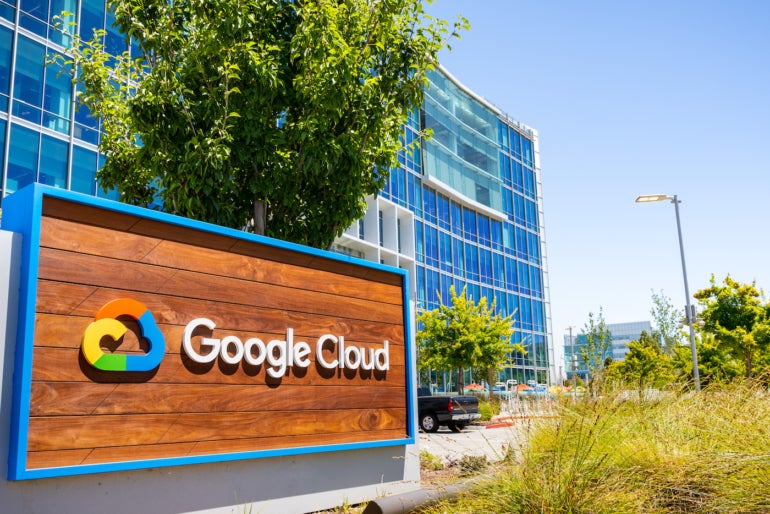
The Google Cloud outside their headquarters.
Image: Sundry Photography/Adobe Stock

Google unveiled a wide array of new generative AI-powered services at its Google Cloud Next 2023 conference in San Francisco on August 29. At the pre-briefing, we got an early look at Google’s new Cloud TPU, A4 virtual machines powered by NVIDIA H100 GPUs and more.

Jump to:

  • Vertex AI increases capacity, adds other improvements
  • BigQuery and AlloyDB upgrades are ready for preview
  • A3 virtual machine supercomputing with NVIDIA for AI training revealed
  • Cloud TPU v5E is optimized for generative AI inferencing
  • Introducing Google Kubernetes Engine Enterprise edition

Vertex AI increases capacity, adds other improvements

June Yang, vice president of cloud AI and industry solutions at Google Cloud, announced improvements to Vertex AI, the company’s generative AI platform that helps enterprises train their own AI and machine learning models.

Customers have asked for the ability to input larger amounts of content into PaLM, a foundation model under the Vertex AI platform, Yang said, which led Google to increase its capacity from 4,000 tokens to 32,000 tokens.

Customers have also asked for more languages to be supported in Vertex AI. At the Next ’23 conference, Yang announced PaLM, which resides within the Vertex AI platform, is now available in Arabic, Chinese, Japanese, German, Spanish and more. That’s a total of 38 languages for public use; 100 additional languages are now options in private preview.

SEE: Google opened up its PaLM large language model with an API in March. (TechRepublic)

Vertex AI Search, which lets users create a search engine inside their AI-powered apps, is available today. “Think about this like Google Search for your business data,” Yang said.

Also available today is Vertex AI Conversation, which is a tool for building chatbots. Search and Conversion were previously available under different product names in Google’s Generative AI App Builder.

Improvements to the Codey foundation model

Codey, the text-to-code model inside Vertex AI, is getting an upgrade. Although details on this upgrade are sparse, Yang said developers should be able to work more efficiently on code generation and code chat.

“​​Leveraging our Codey foundation model, partners like GitLab are helping developers to stay in the flow by predicting and completing lines of code, generating test cases, explaining code and many more use cases,” Yang noted.

Match your business’ art style with text-to-image AI

Vertex’s text-to-image model will now be able to perform style tuning, or matching a company’s brand and creative guidelines. Organizations need to provide just 10 reference images for Vertex to begin to work within their house style.

New additions to Model Garden, Vertex AI’s model library

Google Cloud has added Meta’s Llama 2 and Anthropic’s Claude 2 to Vertex AI’s model library. The decision to add Llama 2 and Claude 2 to the Google Cloud AI Model Garden is “in line with our commitment to foster an open ecosystem,” Yang said.

“With these additions compared with other hyperscalers, Google Cloud now provides the widest variety of models to choose from, with our first-party Google models, third-party models from partners, as well as open source models on a single platform,” Yang said. “With access to over 100 curated models on Vertex AI, customers can now choose models based on modality, size, performance latency and cost considerations.”

BigQuery and AlloyDB upgrades are ready for preview

Google’s BigQuery Studio — which is a workbench platform for users who work with data and AI — and AlloyDB both have upgrades now available in preview.

BigQuery Studio added to cloud data warehouse preview

BigQuery Studio will be rolled out to Google’s BigQuery cloud data warehouse in preview this week. BigQuery Studio assists with analyzing and exploring data and integrates with Vertex AI. BigQuery Studio is designed to bring data engineering, analytics and predictive analysis together, reducing the time data analytics professionals need to spend switching between tools.

Users of BigQuery can also add Duet AI, Google’s AI assistant, starting now.

AlloyDB enhanced with generative AI

Andy Goodman, vice president and general manager for databases at Google, announced the addition of generative AI capabilities to AlloyDB — Google’s PostgreSQL-compatible database for high-end enterprise workloads — at the pre-brief. AlloyDB includes capabilities for organizations building enterprise AI applications, such as vector search capabilities up to 10 times faster than standard PostgreSQL, Goodman said. Developers can generate vector embeddings within the database to streamline their work. AlloyDB AI integrates with Vertex AI and open source tool ecosystems such as LangChain.

“Databases are at the heart of gen AI innovation, as they help bridge the gap between LLMs and enterprise gen AI apps to deliver accurate, up to date and contextual experiences,” Goodman said.

AlloyDB AI is now available in preview through AlloyDB Omni.

A3 virtual machine supercomputing with NVIDIA for AI training revealed

General availability of the A3 virtual machines running on NVIDIA H100 GPU as a GPU supercomputer will open next month, announced Mark Lohmeyer, vice president general manager for compute and machine learning infrastructure at Google Cloud, during the pre-brief.

The A3 supercomputers’ custom-made 200 Gbps virtual machine infrastructure has GPU-to-GPU data transfers, enabling it to bypass the CPU host. The GPU-to-GPU data transfers power AI training, tuning and scaling with up to 10 times more bandwidth than the previous generation, A2. The training will be three times faster, Lohmeyer said.

NVIDIA “enables us to offer the most comprehensive AI infrastructure portfolio of any cloud,” said Lohmeyer.

Cloud TPU v5e is optimized for generative AI inferencing

Google introduced Cloud TPU v5e, the fifth generation of cloud TPUs optimized for generative AI inferencing. A TPU, or Tensor Processing Unit, is a machine learning accelerator hosted on Google Cloud. The TPU handles the massive amounts of data needed for inferencing, which is a logical process that helps artificial intelligence systems make predictions.

Cloud TPU v5e boasts two times faster performance per dollar for training and 2.5 times better performance per dollar for inferencing compared to the previous-generation TPU, Lohmeyer said.

“(With) the magic of that software and hardware working together with new software technologies like multi-slice, we’re enabling our customers to easily scale their [generative] AI models beyond the physical boundaries of a single TPU pod or a single TPU cluster,” said Lohmeyer. “In other words, a single large AI workload can now span multiple physical TPU clusters, scaling to literally tens of thousands of chips and doing so very cost effectively.”

The new TPU is generally available in preview starting this week.

Introducing Google Kubernetes Engine Enterprise edition

Google Kubernetes Engineer, which many customers use for AI workloads, is getting a boost. The GKE Enterprise edition will include muti-cluster horizontal scaling and GKE’s existing services running across both cloud GPUs and cloud TPUs. Early reports from customers have shown productivity gains of up to 45%, Google said, and reduced software deployment times by more than 70%.

GKE Enterprise Edition will be available in September.

Subscribe to the Innovation Insider Newsletter

Catch up on the latest tech innovations that are changing the world, including IoT, 5G, the latest about phones, security, smart cities, AI, robotics, and more.

Delivered Tuesdays and Fridays Sign up today

Modular’s Attempt to Steal NVIDIA’s Mojo

AI startup Modular recently raised $100 million in a recent funding round, led by General Catalyst, Google Ventures, SV Angel, Greylock, and Factory.

The 20-month-old startup by former Google and Apple alumnus, Tim Davis and Chris Lattner is making waves in the AI industry, offering software that aims to challenge the dominance of NVIDIA’s CUDA and similar alternatives, providing developers with a more accessible and efficient solution for building and combining AI applications.

“Modular’s technology scales across a wide range of hardware and devices, which gives users more flexibility as their needs evolve,” said Modular CEO and co-founder, Chris Lattner, in an exclusive interaction with AIM.

NVIDIA’s CUDA software, used for machine learning, only supports its own GPUs, whereas Modular’s software aims to enable developers to run models on non-NVIDIA servers like those from AMD, Intel, and Google—potentially providing a solution to the GPU crunch as the demand by companies like Microsoft, Google, OpenAI, xAI and Meta strain supply.

Lattner explained saying that their Modular’s AI engine and Mojo have been designed with ease of use in mind, catering to machine learning engineers by employing a Python-based approach rather than a more intricate C++ foundation, as seen in CUDA. “When compared to CUDA for GPU programming, Modular’s engine and Mojo are easier to use and more familiar to ML engineers, notably being Python-based instead of C++ based,” he added.

He said that Modular exhibits remarkable scalability across an expansive spectrum of hardware and devices giving users a higher degree of flexibility, ensuring that their AI solutions can evolve with their requirements. The AI engine builds on these strengths to provide higher performance and productivity by combining individual operations into an efficient optimised execution environment,” said Lattner.

Modular’s tools seamlessly integrate into existing workflows, negating the need for wholesale rearchitecting or code rewriting in C++ or CUDA. This affords developers a frictionless transition and empowers them to unlock heightened productivity and performance without incurring exorbitant costs.

A cornerstone of Modular’s arsenal is the Mojo toolkit, which represents a concerted effort to simplify AI development across diverse hardware platforms. The Mojo programming language, blends the ease of use associated with Python with features like caching and adaptive compilation techniques, targeting improved performance and scalability in AI development.

Towards an AI Future

In an era where tech alumni-founded startups command high valuations, Modular’s approach to validating its commercial momentum and proving its value proposition to investors remains crucial.

Modular’s journey is not without challenges. The adoption of a new programming language like Mojo can be hindered by Python’s established status in the machine-learning landscape. However, Lattner’s conviction in Mojo’s distinct advantages and its potential to revolutionize AI development processes remains unshaken.

Given the duo’s experience, the venture exhibits potential to make it big. For instance, Lattner has led the creation of Swift, a programming language by Apple, while Davis has led Google’s machine-learning product efforts, focusing on getting the models working directly on devices.

With a rapidly growing community of over 120,000 developers, Modular claims that it has gauged demand from thousands of prominent enterprises that are excited to deploy its infrastructure.

“We have been able to achieve tremendous momentum in only 20 months,” said Davis, Modular co-founder and President. “The financing will allow us to accelerate our momentum even more, scaling to meet the incredible demand we have seen since our launch,” he added, talking about the recent funding that it raised.

Competition Galore

Lattner acknowledged that while Modular faces competition, a lot of companies are offering point solutions that fail to resolve the challenges across the AI infrastructure stack for developers and enterprises. Besides NVIDIA, some of its competitors include Cerebras and Rain among others.

“There is no solution in the market that unifies the frameworks and compute architectures, and supports all their weird and wonderful features with really minimal migration pain,” said Lattner, stating the USP of the company.

Further, he said that while others allege that they are fast, deeper dive forces one to change application or model-specific codes, and they don’t scale across different hardware types either.

Lattner also said that Modular’s technologies are designed to complement NVIDIA’s existing AI infrastructures and that the chip giant is an important partner in this endeavour. The overarching mission is to facilitate broader adoption of hardware among AI developers by unifying technology stacks, simplifying complexities, and making the process more accessible, he said.

Simply put, Modular’s strategy hinges on its holistic approach, which seeks to unify frameworks and compute architectures with minimal migration challenges. Unlike some competitors, Modular’s solutions aim to address end-to-end challenges, fostering accessibility, innovation, and ethical considerations in AI technology.

NVIDIA vs the World

Modular is not alone, there are several other startups challenging Nvidia’s dominance in GPU manufacturing and the associated software that binds users to its chips. Notable companies in this competition include d-Matrix, Rain Neuromorphics, and Tiny Corp. The collective aim is to transform the AI chip landscape by providing alternatives to NVIDIA’s products, which can be expensive for training and running machine-learning models. These startups are focusing on designing chips and software that they claim offer improved efficiency compared to Nvidia’s GPUs.

Rain Neuromorphics, now known as Rain AI, is addressing the high costs of training and running machine-learning models on conventional GPUs. Their approach combines memory and processing, similar to human synapses, resulting in cooler and energy-efficient operation compared to Nvidia’s GPUs, which require continuous cooling and drive up electricity costs.

Tiny Corp, founded by George Hotz, the former CEO of Comma AI, focuses on open-source deep-learning tools named tinygrad. These tools aim to accelerate the training and running of machine-learning models.

However, NVIDIA stands apart and according to Databricks CEO Naveen Rao, has separated itself from competitors. Despite the challenges and past bankruptcies of startups attempting to compete with Nvidia, these companies are betting on the transformative potential of AI to gain traction in the competitive AI chip sector.

The post Modular’s Attempt to Steal NVIDIA’s Mojo appeared first on Analytics India Magazine.