Australia Is Adapting Fast to a Generative AI World

Generative AI has been the talk of the business and technology world since the explosion of ChatGPT onto the market in late 2022. In Australia, there’s been a frantic whole-of-nation effort to understand the implications for business, government, workforces and communities.

IT professionals are at the centre of the storm. We find Australia balancing a combined potential AU $115 billion (US $74 billion) opportunity with significant risks, including data privacy and security. IT leaders are advised to educate stakeholders and be guided by business goals as they create processes for exploring and realising AI use cases.

Jump to:

  • What are the potential benefits of AI for the Australian economy?
  • What risks does generative AI bring for the Australian economy?
  • Australian businesses are already embracing generative AI in some form
  • What are businesses using generative AI for?
  • Generative AI guidance has been provided to public sector agencies in Australia
  • Australian Government is taking steps to ensure ethical use of generative AI
  • What should IT leaders do to capitalise on generative AI?

What are the potential benefits of AI for the Australian economy?

The Australian economy is well positioned to gain from generative AI technology. The Tech Council of Australia has predicted generative AI could deliver between AU $45 billion (US $28.9 billion) and AU $115 billion (US $74 billion) in value to the Australian economy by 2030.

In its Australia’s Generative AI Opportunity report in collaboration with Microsoft, it predicted:

  • Up to AU $80 billion (US $51.5 billion) in value could come from increased productivity as workers use AI for some existing tasks to complete more work in less time.
  • Additional value would come from the increased quality of work outputs as well as from creating new jobs and businesses — such as software exports — across the economy.

Healthcare, manufacturing, retail and financial services have been nominated as industries that could significantly benefit. Australia’s large existing tech talent pool, relatively high levels of cloud adoption and investments in digital infrastructure are expected to support AI’s growth (Figure A).

Figure A
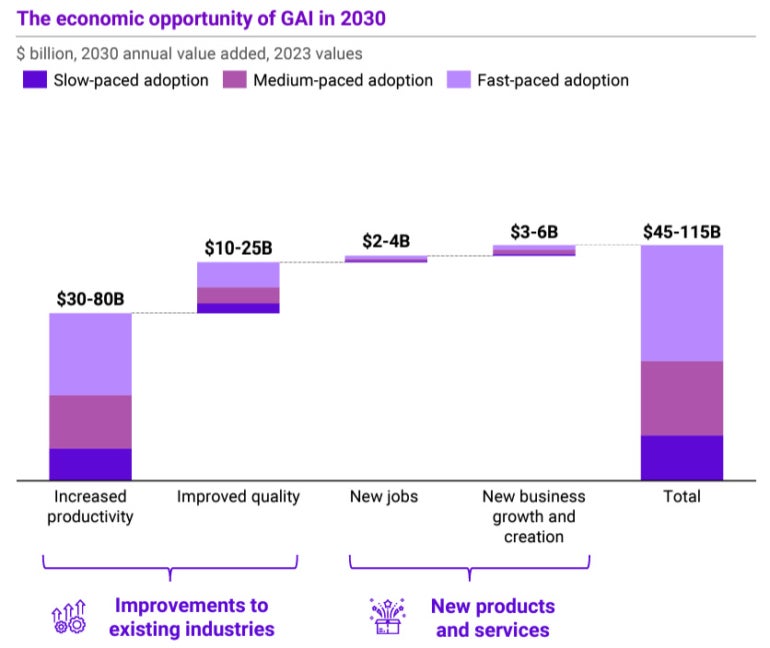
The economic opportunity of GAI in 2030 graph.
The Australian economy could benefit from generative AI. Image: Tech Council of Australia

What risks does generative AI bring for the Australian economy?

One of generative AI’s better-understood risks is workforce disruption, as it may require large numbers of employees to either learn new skills or retrain. In Generation AI: Ready or not, here we come! Deloitte claimed 26% of jobs already faced “significant and imminent” disruption:

  • Administration and operations roles have been identified as most vulnerable to the new technology, while sales, IT, human resources and talent roles will be impacted in select industries.
  • The industries facing higher levels of disruption in the shorter term include financial services, information and communication technologies and media, professional services, education and wholesale trade.

Putting existential risks aside, Australian Government research also named a number of “contextual and social risks” and “systemic social and economic risks,” ranging from the use of AI in high stakes contexts like health to the erosion of public discourse or more inequality.

What are the risks and challenges facing Australian business AI users?

Australian business and IT leaders, as well as employees, agree the deployment of generative AI tools comes with significant risks. According to Deloitte’s survey, three quarters of respondents (75%) were concerned about leaks of personal, confidential or sensitive information, and a similar number (73%) were concerned about factual errors or hallucinations (Figure B). Other concerns included regulatory uncertainty, copyright infringement and racial or gender bias.

Figure B

Concerns about Gen AI risks chart.
Businesses and employees are concerned about some AI risks. Image: Deloitte

The consensus seems to be that business approaches to the use of generative AI have been lagging behind adoption, leaving a “gap” that is introducing risks and that could hold businesses back from capitalising on opportunities. For example, Deloitte’s report found 70% of employers had yet to take action to prepare themselves and their employees for generative AI, while GetApp’s survey found only about half (52%) of employers had policies in place to govern their use.

Senior IT leaders have their own technical and ethical concerns with generative AI. A Salesforce survey of IT leaders found 79% had concerns about the creation of security risks and 73% with bias. Other concerns raised included:

  • Generative AI would not integrate into the current tech stack (60%).
  • Employees did not have the skills to leverage it successfully (66%).
  • IT leaders had no unified data strategy (59%).
  • Generative AI would increase the company’s carbon footprint (71%).

Australian businesses are already embracing generative AI in some form

Despite some of the concerns surrounding generative AI, businesses of all sizes have been enthusiastic experimenters with generative AI tools.

A recent Datacom survey of 318 business leaders in Australian companies with 200 or more employees found 72% of businesses are already utilising AI in some form. The survey also found the vast majority expected AI to bring significant changes to their organisation, with 86% of leaders believing AI integration will impact operations and workplace structures.

However, the formal adoption of generative AI has been more tentative in some larger businesses, as they experiment with the potential while weighing up or guarding against the risks. Of the businesses with over 200 employees Deloitte surveyed for Generation AI: Ready or not, here we come! only 9.5% had officially adopted AI in their businesses.

SEE: Boost your AI knowledge with our artificial intelligence cheat sheet.

Whether or not it is official, businesses are using AI organically through their employees. One survey found that two-thirds (67%) of Australian employees frequently use generative AI tools at work at least a few times a week. Another survey from software firm Salesforce found that 90% of employees were using AI tools, including 68% who were using generative AI tools.

Generative AI is expected to become a standard resource for businesses the more it is embedded into the products they use. In the marketing domain, for example, design software firm Adobe recently made its productised generative AI tool, Firefly, generally available, while competitor Canva has introduced image and text generation as well as translation within its products (Figure C).

Figure C

Promotional image for Adobe Firefly.
Users of Adobe will benefit from the new generative AI tool Firefly. Image: Adobe

What are Australian businesses using generative AI for?

There have been an abundance of use cases identified for generative AI. Global research from McKinsey early this year explored 63 use cases across 16 business functions where the application of the tools can produce one or more measurable outcomes. However, much of the initial interest in generative AI in larger organisations is focused on the areas of marketing and sales, product and service development, service operations and software engineering.

In marketing and sales, top use cases include generating the first drafts of documents or presentations, personalising marketing and summarising documents. In product development, generative AI is used in identifying trends in customer needs, drafting technical documents and even generating new product designs. The potential to utilise it in customer service for chatbots is a popular use case, while its ability to write code is being explored in software development.

One of Australia’s largest banks, Commonwealth Bank, is a pioneering big business user of new generative AI technologies. In May, it was reported that the bank was already using it in call centres to answer complex questions by finding answers from 4,500 documents’ worth of bank policies in real time. Generative AI was also helping the bank’s 7,000 software engineers write code, improve its apps and create more tailored offerings for its customers.

Generative AI guidance has been provided to public sector agencies in Australia

Public sector agencies have been provided with high-level guidance. Prepared by the Digital Transformation Agency and the Department of Industry, Science and Resources, it suggests agencies only deploy AI responsibly in low-risk situations while keeping in mind known problems like inaccuracy, the nature and potential bias of training data, data privacy and security, and the importance of transparency and explainability in decision making.

Practically, the guidance suggested implementing an enrolment mechanism to register and approve staff user accounts to access AI — with appropriate approval processes through CISOs and CIOs — as well as establishing avenues for staff to report exceptions. It warned agencies off high-risk use cases, like coding outputs being used in government systems. It also suggested agencies move to commercial arrangements for AI solutions as soon as possible.

Australian Government is taking steps to ensure ethical use of generative AI

The Australian Government commissioned the production of a Generative AI Rapid Research Information Report in early 2023 to assess the opportunities and risks of generative AI models. This was followed by the release of a public discussion paper, Safe and Responsible AI In Australia, which invited submissions and feedback from businesses and the community.

The Government also committed AU $41.2 million (US $26.53 million) to support the responsible deployment of AI in the national economy as part of its 2023-24 Federal Budget. This included funding for the National Artificial Intelligence Centre to support the Responsible AI Network, a significant collaboration aimed at uplifting the practice of responsible AI across the commercial sector.

Aside from urgent recent action to ban AI-generated child abuse material in search engine results, the government has been working with stakeholders, including tech firms, to evaluate how to approach any AI regulation. Australia’s set of existing laws is expected to cover many possible AI scenarios, though gaps may exist that new regulation will need to fill.

What should IT leaders do to capitalise on generative AI?

Analysis from Gartner suggests the ongoing shift to digital in Australia will drive increasing investment in generative AI technologies in 2024, with a particular focus on tools for software development and code generation. However, Gartner also notes that generative AI and foundation models have reached the Peak of Inflated Expectations in Gartner’s 2023 Hype Cycle, which foreshadows a potential Trough of Disillusionment coming in the future.

At Gartner’s recent Symposium/Xpo on Australia’s Gold Coast, Distinguished VP Analyst Arun Chandrasekaran told IT leaders they were likely to encounter “…a host of trust, risk, security, privacy and ethical questions” with generative AI, and they would need to “…balance business value with risks.”

Chandrasekaran said leaders should consider creating a position paper outlining the benefits, risks, opportunities and deployment roadmap, as well as ensure strategy and use cases align with business goals, with clear assigned ownership and business metrics for measurement.

Chandrasekaran suggested IT create “tiger teams” that could work with business units on ideation, prototyping and demonstration of the value of generative AI. These teams could also be tasked with monitoring industry developments and sharing valuable lessons learned from pilots across the company.

However, Chandrasekaran warned IT would also need to foster responsible AI practices throughout to promote the ethical and safe use of generative AI. Employees should be prepared for this period of upheaval through skills retraining, career mapping and emotional support resources.

Subscribe to the Daily Tech Insider AU Newsletter

Stay up to date on the latest in technology with Daily Tech Insider Australian Edition. We bring you news on industry-leading companies, products, and people, as well as highlighted articles, downloads, and top resources. You’ll receive primers on hot tech topics that are most relevant to AU markets that will help you stay ahead of the game.

Delivered Thursdays Sign up today

6 IDEs Built for Rust

For eight years in a row now, Rust has been voted the most-admired programming language. The language, which has a moderate learning curve, lives in between high-level and low-level languages. Yet, Rust is relevant as it writes systems software, compiles embedded devices to x86 ARM, and is also used for front-end technologies, thanks to WebAssembly.

The language has excellent tools to improve efficiency. Recently, JetBrains, a Czech software company that offers integrated development environments (IDEs), released a new IDE (Integrated Development Environment) — RustRover — for the programming language Rust. It improves the efficiency of coding with Rust with its range of features like debugging, syntax highlighting, and error checking.

Here is a list of six IDEs that work on Rust.

RustRover

RustRover, developed by JetBrains, is an emerging IDE tailored for Rust development currently in its early access stage. Despite its early status, it has garnered positive feedback from users. RustRover is a standalone IDE dedicated to Rust, offering features such as comprehensive syntax highlighting, autocompletion, code navigation, and safe refactoring. Its static analysis capabilities facilitate error checking and linting, promoting code quality.

The IDE is equipped with a powerful debugger, seamless integration with various tools, and specific Rust-focused features like macro support and integration with the Rust compiler and Cargo build tool. Overall, RustRover holds promise in enhancing productivity, code quality, and the developer experience for Rust developers, making it a valuable tool worth exploring.

IntelliJ IDEA

The IntelliJ Rust IDE, is another JetBrains plugin for Rust, which provides a solid support for Rust development. Equipped with crucial features like syntax highlighting, autocompletion, code navigation, and debugging, this IDE is highly favoured by Rust developers for its tailored functionalities.

Integrated seamlessly with IntelliJ IDEA, it allows leveraging the comprehensive feature set of IntelliJ IDEA for Rust. With complete Rust language support, seamless Cargo integration, efficient debugging, and streamlined code navigation and refactoring, the IntelliJ Rust IDE proves to be a powerhouse empowering efficient and effective Rust development.

Visual Studio Code

Visual Studio Code (VS Code) is a widely used, lightweight code editor that’s easy to use and customize. It’s like a toolbox that can turn into a complete coding powerhouse for Rust with the right add-ons. VS Code has a special Rust extension built in, bringing a bunch of helpful tools for Rust developers.

These tools include things like making your code look colorful (syntax highlighting), helping you type faster (autocompletion), letting you move around and change your code safely (code navigation and refactoring), and finding mistakes before you run your code (error checking and linting). It’s like having a smart assistant that knows Rust really well.

Overall, using VS Code for Rust makes coding quicker, helps users write better code, and just makes the whole coding experience more fun and efficient. It’s all about making Rust coding easier and more enjoyable.

Eclipse

Eclipse is a popular code editor mainly used for Java, but it also supports Rust development via the Eclipse Rust plugin. This plugin adds essential Rust development features like syntax highlighting, code navigation, error checking, and debugging. It’s a handy tool for Rust developers, making the coding experience smoother and more enjoyable. However, keep in mind that the Rust plugin for Eclipse is still in development and may not have all the features of other Rust IDEs.

CLion

CLion is a versatile IDE made by JetBrains for coding in C and C++. It’s also useful for Rust programming when paired with the IntelliJ Rust plugin. This combination gives user features like highlighting code, helping them find their way around the code, spotting errors, debugging, and working well with other tools.

On top of that, CLion offers special Rust-focused features like handling Rust macros and connecting with the Rust compiler and Cargo. Overall, if the user is keen on coding in Rust and needs a powerful coding tool, CLion is a solid choice. It can boost the user’s productivity, improve code quality by catching errors early, and make the coding experience smoother. However, do keep in mind that CLion is a paid IDE, so it might not be the right fit for everyone.

Fleet

Fleet, an online IDE by JetBrains, supports Rust development with key features like syntax highlighting, code navigation, debugging, and integration with other tools. It’s cloud-based, enabling work from any device with a browser, and ideal for on-the-go developers. Specifically tailored for Rust, it offers support for macros, Rust compiler integration, and Cargo support. Fleet improves productivity, code quality, and enhances the developer experience. However, being in early access, it might lack some features compared to other established Rust IDEs like IntelliJ IDEA or Visual Studio Code.

The post 6 IDEs Built for Rust appeared first on Analytics India Magazine.

AI is a lot like streaming. The add-ons add up fast

calculator

How many video-streaming services do you subscribe to? For me, it's a lot. I ditched cable TV service way back in 2015, so my wife and I rely on streaming for all our TV-based entertainment.

Back then, we achieved considerable cost savings by keeping our internet feed and dropping cable TV. Over time, though, we've added many streaming channels in order to get our favorite shows and we're spending about the same as we would with cable. At the end of the year, we're going to do our annual TV-streaming service audit and see what we can drop.

Also: The best live TV streaming services

To be fair, the streaming-only channels are producing some truly exceptional content. It's another golden age for television entertainment: Paramount+ has Strange New Worlds; Apple TV+ has For All Mankind and Foundation; Disney+ has The Mandalorian and the rest of the Star Wars TV shows; and Netflix, Prime Video, and Hulu have excellent exclusive programs. In short, keeping up adds up.

Now, we're starting to see the same trend with video-streaming services in the world of AI — many services, each with their own fees. There are two classes of AI you're going to be paying for in the coming years (if you're not, like me, already shelling out for AI right now). You'll be paying for standalone AI services, such as ChatGPT Plus and Midjourney, and you'll be paying for AI add-ons for any cloud service that can find an excuse to bolt AI on to their offerings.

Also: How (and why) to subscribe to ChatGPT Plus

In this article, I'm not going to look at the standalone AI services and their pricing models. Instead, I'll look at a few of the more traditional services we all use, and how they're pitching their AI add-ons to their existing users.

Show me the money

Coming up with a comprehensive list of AI upsells isn't practical right now. Many companies are starting to experiment with beta AI offerings, where they're seeing how much value they can add and how popular those add-ons are with users. But we do have some information on some of the most popular services, which will give you an indication of what to expect over the coming year.

Photoshop — Generative Fill credits

A great example of this trend is Photoshop. For the past four months or so, Generative Fill has been a free, new feature in Photoshop, as long as you've downloaded and installed the Photoshop beta release.

Also: How to use Photoshop's Generative Fill AI tool

Although the tool has limits, it's still really useful. I certainly wouldn't want to have to give up Generative Fill now that I've started to use it. And there's the hook. Much like drug dealers are willing to share a first taste to get you hooked, the "first one's free" technique has long worked for software vendors.

Generative Fill is now out of beta and has been released in Photoshop 2024. The catch is that you can only use an undefined number of so-called "free" credits before you're charged extra. Now, let's be clear. Photoshop is far from free, so getting "free" credits simply means those uses come with the plan you're already paying for.

By the way, now that AI is available, that plan will be more expensive. Adobe announced that its Creative Cloud plans will all be going up in price in November.

Also: These 3 AI tools made my short how-to video way more fun and engaging

For now, one generative task is equal to one credit, so depending on what plan you have, you'll either have plenty of credits to play with, or not enough. Keep in mind that AI-based Generative Fill doesn't always generate what you want. You might have to take 10 or 20 tries to get it to play along. Each of those tries will use up a credit.

Effectively, Adobe is double-charging for its AI upsell. You're going to be paying more for the plan you're already using. And if you use Generative Fill just a bit too enthusiastically, you'll be paying for usage credits as well.

If you run out of credits, Adobe says you can still use the Generative Fill feature. It's just that it'll slow down your generation process. So, how slow is slow? I've no idea. As for buying new credits, the company hasn't been definitive on this, but my guess is it'll be something in the five-bucks-per-hundred-generations range.

Notion — AI adds up fast

Notion has a free tier, and back when I started to pay for it, the service had a $48/year tier, which was good enough for most work. That plan is no longer available, so a paid plan that includes unlimited uploads and custom database automations (which is worth it) is $96/year per user.

Also: Notion app review: Why (and how) I rely on this powerful productivity tool

Notion lists Notion AI as being $10/month, or $8/month if you bill annually. The gotcha is that if you have an annual Notion plan, you'll also have to pay for a full year of AI (another $96).

If you have multiple users on your plan — even if only one person uses the AI features — you'll also have to pay for all the users. That kind of extra usage adds up very quickly.

Also: Can Notion AI writing helper write this article?

Worse, Notion may throttle your AI usage even if you're paying for it. Here's what its pricing Q&A says: "To ensure optimal performance and fair usage across all Notion AI users, your access to AI features can be reduced depending on your usage."

Office 365 — $30/month for enterprise users

Microsoft has been touting its Copilot service for Office 365 users. It uses the same basic large language model found in the Bing AI tools.

Also: How to use ChatGPT to do research for papers, presentations, studies, and more

Unfortunately, there are two gotchas. First, it costs an additional $30/month per user for enterprise and business plans. And second, users of individual or family Office 365 plans don't have access to the service (at least, not yet).

Google Duet AI — $30/month for business users

Microsoft and Google appear to be in lockstep when it comes to office AI assistant plans and pricing. Google also intends to charge $30/month per user.

Now, think for a minute about what this pricing means. My Google Workspace enterprise plan costs $100/month for five users.

So, for everything Google, including terabytes of storage, I'm already paying $20/user. Just adding AI features adds another $30/user. That's a wow, right there.

Divi WordPress theme — $18/month AI add-on

I use the Divi theme from Elegant Themes for most of my main WordPress websites. There are a ton of theme makers out there, but Divi is quite popular.

Also: I asked ChatGPT to write a WordPress plugin I needed. It did it in less than 5 minutes

Divi, with all its features and capabilities, is $89/year. The AI add-on, Divi AI, which does text and image generation, is an additional $18/month. Yeah, the main product is $89/year, but the add-on alone is an additional $216/year.

Some other products

I took a quick look at a few other familiar products, to see their pricing approaches for AI.

MailChimp: MailChimp, the email marketing company owned by Intuit, has a whole series of AI tools. Right now, they're in beta, with no pricing details.

Evernote: The struggling note-taking company was recently bought out by Bending Spoons (yeah, I know, head scratch on that one). In April, the company announced AI beta features and a price increase.

HelpScout: HelpScout, the customer support cloud service, is now offering AI features. So far, there's been no price increase. In an email conversation with the company, I was told that the company currently plans to fold AI features into its main price offering. Whether that price will go up or not remains to be seen.

The bottom line

Let's acknowledge one very important fact about generative AI: it uses a lot of computing resources. Providing generative AI is not like adding just another feature. It's a very big challenge to build something that provides universal value.

Companies offering AI services will either need to build out the technology and infrastructure themselves, or license it. Either way, offering an AI upsell isn't a cheap endeavor. It's going to cost the vendors money.

Also: How I used ChatGPT and AI art tools to launch my Etsy business fast

But will it cost the vendors as much cash as they're asking? Right now, the answer depends on the vendor. Licensing API calls from companies such as OpenAI will have a far more predictable cost structure than vendors who choose to build out their own AI infrastructure.

Even so, I don't think the current trend of two-to-three times the cost of the main service for the AI add-on is sustainable. Cloud spending is already through the roof. My cloud services budget is crazy, and I run a two-person company.

Also: The moment I realized ChatGPT Plus was a game-changer for my business

Expecting customers to double or triple their cloud expenditures to gain access to AI features will probably break down over time. Right now, customers are likely to spend more for major features, but cloud services are competitive. I'm sure we'll start to see some services bake in AI pricing. We'll also see the cost of entry to AI services drop.

While I'm sure companies will try to sustain their AI upsell revenues, it may not hold.

For me, personally, I'm not buying any of the AI add-on services. I pay for ChatGPT Plus and Midjourney, which covers me nicely for text and image generation. If I have to, I'll probably pay for Photoshop credits because I've been a Photoshop user since before the pyramids were built, and it's a big time saver. But beyond that, none of the add-on upsells will get my money, at least for now.

Also: How AI helped get my music on all the major streaming services

What about you? Do you expect to pay for the AI upsells? Do you pay for standalone AI services? Let us know in the comments below.

You can follow my day-to-day project updates on social media. Be sure to subscribe to my weekly update newsletter on Substack, and follow me on Twitter at @DavidGewirtz, on Facebook at Facebook.com/DavidGewirtz, on Instagram at Instagram.com/DavidGewirtz, and on YouTube at YouTube.com/DavidGewirtzTV.

Outschool launches an AI-powered tool to help teachers write progress reports

Outschool launches an AI-powered tool to help teachers write progress reports Lauren Forristal 14 hours

Outschool, the online learning platform that offers kid-friendly academic and interest-based classes, announced today the launch of its AI Teaching Assistant, a tool for tutors to generate progress reports for their students. The platform – mainly popular for its small group class offerings — also revealed that it’s venturing into one-on-one tutoring, putting it in direct competition with companies like Varsity Tutors, Tutor.com and Preply.

Outschool partnered with OpenAI to power the AI Teaching Assistant, co-founder and CEO of Outschool Amir Nathoo, told TechCrunch. OpenAI has been the center of an intense debate among educators ever since it launched ChatGPT in 2022, with many fearing that the technology will promote new cheating and plagiarism techniques. However, others see its potential to help teachers complete administrative tasks more efficiently.

Outschool’s new AI tool is designed to help teachers save time on writing progress reports as well as encourage better communication with the learner’s parent or caregiver. After every learning session, tutors enter bullet points into the AI Teaching Assistant detailing how the learner did in class. The AI then generates a few paragraphs that give parents an overview of what the student did that day and how well they performed. Tutors can choose from either a descriptive message or a concise version.

We spoke with Melanie Pauli, a piano teacher with over 25 years of experience who joined Outschool in 2020. Pauli was among the select educators who tried the AI tool when it was in beta. She found that creating a few paragraphs took less than five minutes, helping her save time between lessons.

“[Before] I was communicating these things directly with students,” Pauli told us. “Sending messages directly to parents may, in turn, keep them as customers longer. They feel like they’re part of the learning process.”

One caveat is that the feature is only available for tutors that offer private lessons. However, the company told us that Outschool may adapt the tool for its group class format if there’s enough engagement.

Image Credits: Outschool

The platform also launched one-on-one tutoring, which is a smart move since online tutoring continues to surge in popularity post-COVID. The market size is anticipated to reach $23.73 billion by 2030, per Grand View Research.

“It has been a challenge for parents and teachers to help students to close learning gaps after the Covid-19 pandemic,” Nathoo said. “One-on-one tutoring is a powerful tool for parents to get their children the academic support they may need.”

Since Outschool launched in 2015, the platform has had more than one million learners attending over 100,000 live online classes. Its learners range from ages three to 18 years old.

The new offering will allow Outschool tutors to earn more revenue since they can charge a higher price for one-on-one sessions. Outschool boasts over 4,000 educators who teach various subjects, from English, reading and writing to math, art, music, and vocal lessons.

Outschool, which raised a Series B, C and D in 12 months, lays off 18% of workforce

The Rise and Fall of JS Frameworks

Rise and Fall of JS Frameworks

In the ever-evolving landscape of programming languages and technologies, JavaScript has maintained its prominence for more than two decades. Why would it not? Everyone needs to build a backend for their websites. But then came in Node.js that introduced to the developer world the real ease of doing this.

But then, in the last few years, there have been a lot of “Node.js alternatives” in the ecosystem. These languages such as Astro, Deno, or Bun, aim to address specific challenges and introduce novel features to the JavaScript ecosystem, more specifically, Node.js. People have been questioning the relevance of all the other frameworks that either tweak or just act like a wrapper around Node.js.

Node.js, too good to be fixed

Firstly, let’s talk about the advantages of using Node.js and why no one would ever want to shift to anything apart from it. Node.js revolutionised server-side development by allowing developers to write JavaScript on the server. It has become a popular choice for developing web servers and APIs.

Node.js is also known for its event-driven, non-blocking I/O model, making it highly performant for building scalable, real-time applications. Developers can now use JavaScript on both the client and server sides, enabling them to share code and logic seamlessly between frontend and backend components.

Furthermore, Node.js has the Node Package Manager (NPM), which is one of the largest ecosystems of open-source libraries and packages. This vast collection of modules simplifies development and speeds up project delivery. The language is designed to handle a large number of concurrent connections efficiently, making it suitable for building applications that require high levels of scalability.

Many tech giants and startups alike, such as Netflix, PayPal, and LinkedIn rely on Node.js for their server-side needs, cementing its relevance in the industry. To bring in the relevance of AI, newer languages such as Astro, Deno, and Bun have emerged on the scene post-LLMs. Does anyone use these languages at all, given Node.js can also work well along with AI models as models such as GPT are trained until September 2021, without the data of the newer languages?

What do these exactly offer?

We will stick to three “almost popular” frameworks for JavaScript or alternatives to Node.js — Astro, Deno, and Bun.

Astro is a static site generator (SSG) that focuses on performance and developer experience. It allows developers to build websites with the performance benefits of static site generators while maintaining the dynamic capabilities of a traditional web application. It prioritises speed and optimal performance by compiling your web application into highly optimised, minimal JavaScript, and utilising server-rendered HTML. This results in faster page loads and improved SEO.

Astro supports multiple front-end frameworks, enabling developers to work with their preferred tools like React, Vue, and Svelte while maintaining a unified and efficient build process. Undoubtedly, it seems like a good alternative to Node.js given its speed, while also supporting Node runtime. On GitHub, Astro has more than 35k stars.

Bun, on similar lines, is a bundler for modern JavaScript applications. It also focuses on optimising the build process for web applications, aiming to reduce bundle sizes and improve loading performance. It leverages advanced tree shaking and code-splitting techniques to create smaller and more efficient bundles, reducing page load times and improving the overall user experience. Moreover, Bun’s plugin-based architecture allows developers to customise the bundling process and integrate with various tools and frameworks, making it a specialised choice for those seeking an efficient and highly customizable bundler for modern web development.

As web performance becomes increasingly important, Bun’s approach resonated with developers looking to optimise their applications. It has around 61k starts on GitHub.

Then there is Deno, a runtime for JavaScript and TypeScript that aims to address some of the limitations of Node.js. It prioritises security, ease of use, and improved developer ergonomics. Deno’s module system relies on ES Modules, and it has its own package manager for streamlined module management. Additionally, Deno offers built-in tools like a formatter, linter, and test runner.

Deno’s unique features, such as built-in TypeScript support and enhanced security mechanisms, have garnered interest from a huge developer community with 90K GitHub stars.

Undoubtedly, the adoption of new frameworks can be a slow process, especially when established options like Node.js have such a strong presence. Moreover, since each of these frameworks have specialised use cases, the adoption numbers are obviously not going to be as huge as Node.js.

Can’t fix what isn’t broken

The biggest factor for not enough adoption of course is the Node.js dominance. Node.js has a well-established ecosystem of packages, libraries, and a vast community. Developers are often reluctant to switch to new platforms when Node.js already meets their needs. Compare this to why someone would shift from Python to C++ given that everyone is building AI models on it.

Astro, Deno, and Bun are still relatively young and lack the extensive ecosystem of packages and tooling available for Node.js. This can be a significant hurdle for adoption. Building a robust developer community takes time. Node.js’s massive community offers extensive support, while these alternatives are still working to cultivate a similar following.

Migrating existing projects from Node.js to Astro, Deno, or Bun can be challenging due to compatibility issues, leading developers to stick with what they know. Though the newer ones have made it a little easier to use other runtimes in the language, it is still not useful for developers.

Add all of this to the fact that everyone in the industry is looking for Node.js in your resume and not any of the other frameworks.

The post The Rise and Fall of JS Frameworks appeared first on Analytics India Magazine.

Don’t Miss Out! Enroll in FREE Courses Before 2023 Ends

Don't Miss Out! Enroll in FREE Courses Before 2023 Ends
Image by Author

The last quarter of the year is when people come alive. You have your final push to achieve your yearly goals so that you can hit your 2024 goals. Whether it’s starting a new career in the tech industry or developing your current skills, self-development is important.

The continuous improvement in technology is causing there to be a rush to get into the industry. People from all walks of life want to get involved. The aim of the blog is to provide you with a list of excellent FREE courses that you can take to help you get there. I will break it down into sections by topic to make it easier for you to navigate towards your area of focus.

These free courses are all available on YouTube, making it feel like you are enrolled on an actual course. It is difficult to find the right content on YouTube because there’s so much of it! Hopefully, this article makes your search easier, so let’s get into it.

Machine Learning

1. Introduction to Machine Learning, 2020/21

Link: Introduction to Machine Learning, Dmitry Kobak, 2020/21

2. Stanford CS229: Machine Learning

Link: Stanford CS229: Machine Learning Full Course taught by Andrew Ng

3. Cornell Tech CS 5787: Applied Machine Learning

Link: Applied Machine Learning (Cornell Tech CS 5787, Fall 2020)

4. Making Friends with Machine Learning

Link: Making Friends with Machine Learning, Cassie Kozyrkov

5. Foundation Models

Link: Foundation Models

Statistics

1. Statistical Machine Learning

Link: Statistical Machine Learning

Deep Learning

Beginners:

1. MIT 6.S191: Introduction to Deep Learning

Link: Introduction to Deep Learning

2. CMU Introduction to Deep Learning

Link: Introduction to Deep Learning: 11785 Spring 2023 Lectures

3. MIT: Introduction to Deep Learning

Link: Introduction to Deep Learning

4. Neural Networks: Zero to Hero

Link: Neural Networks: Zero to Hero

5. Foundations of Deep RL

Link: Foundations of Deep RL

Intermediate:

1. Stanford CS230: Deep Learning

Link: Stanford CS230: Deep Learning, Autumn 2018

2. Stanford CS25 — Transformers United

Link: Transformers United

3. MIT 6.S192: Deep Learning for Art, Aesthetics, and Creativity

Link: Deep Learning for Art, Aesthetics, and Creativity

4. CS 285: Deep Reinforcement Learning

Link: Deep Reinforcement Learning

5. Stanford: Reinforcement Learning

Link: Reinforcement Learning

6. Berkeley: Deep Unsupervised Learning

Link: Deep Unsupervised Learning, Spring 2020

7. NYU Deep Learning

Link: Deep Learning SP21

8. Full Stack Deep Learning

Link: Full Stack Deep Learning 2021

9. Deep Learning for Computer Vision

Link: Deep Learning for Computer Vision

NLP

1. Hugging Face Course: NLP

Link: NLP: Hugging Face Course

2. Stanford CS224U: Natural Language Understanding

Link: Natural Language Understanding

3. CMU Advanced NLP

Link: Advanced NLP, 2022

4. CMU Multilingual NLP

Link: Multilingual NLP

5. UMass CS685: Advanced Natural Language Processing

Link: Advanced Natural Language Processing

Practical

1. Practical Deep Learning for Coders

Link: Practical Deep Learning for Coders

2. Machine Learning Engineering for Production (MLOps)

Link: Machine Learning Engineering for Production

And that’s it!

Wrapping it up

As I mentioned before, there are a lot of courses out there and it can be difficult to stick to one. There may be a particular lecturer's voice you prefer over another or the way a lecturer presents. There are so many things you take into consideration.

I have provided an extensive list in each section to help you choose which one you prefer and can continue your learning with.

Hope this list has helped you. And if you know of any good resources, please drop them in the comments to share with the learning community — thank you!

Happy Learning!
Nisha Arya is a Data Scientist, Freelance Technical Writer and Community Manager at KDnuggets. She is particularly interested in providing Data Science career advice or tutorials and theory based knowledge around Data Science. She also wishes to explore the different ways Artificial Intelligence is/can benefit the longevity of human life. A keen learner, seeking to broaden her tech knowledge and writing skills, whilst helping guide others.

More On This Topic

  • 8 Best Data Science Courses to Enroll in 2022 For Steep Career Advancement
  • Leaders at Allstate, eBay & Red Bull Agree: Don’t Miss the Rev 3 Enterprise…
  • Top Free Data Science Online Courses for 2023
  • Ready for #2022Analytics in Houston? The Networking, Connections, and…
  • Nine Tools I Wish I Mastered Before My PhD in Machine Learning
  • What Google Recommends You do Before Taking Their Machine Learning or Data…

Oracle Introduces Generative AI Features to Enhance Customer Service

​​Oracle today announced the addition of generative AI-powered capabilities within Oracle Fusion Cloud Customer Experience (CX). These AI-powered features, integrated into existing Oracle Fusion Service processes, are set to optimise customer service delivery, boost productivity, and elevate overall customer satisfaction.

Rob Tarkoff, the executive vice president and general manager of Oracle Cloud CX, emphasized the importance of quick access to accurate information for creating exceptional customer experiences.

“The new capabilities in Oracle Cloud CX will help organizations resolve customer service issues quicker and more efficiently by increasing service agent and field technician productivity, optimizing self-service and automating traditional tasks that are manual and time-consuming,” said Tarkoff.

The generative AI capabilities in Oracle Cloud CX are built on Oracle Cloud Infrastructure (OCI) and are designed to prioritize data security and privacy. Oracle ensures that customer data remains protected and is not shared with third parties.

Role-based security within Oracle Fusion Service workflows ensures that sensitive information is safeguarded, and content recommendations are restricted to authorized personnel.

Benefits of generative AI in Oracle Fusion Service

Firstly, with “Assisted Agent Responses,” service agents receive support in composing responses by utilizing past interactions as a foundation. This not only accelerates response times but also maintains quality as responses can be reviewed and edited before sending.

Secondly, the “Assisted Knowledge Articles” feature reduces the workload on service teams by employing generative AI to craft articles for emerging service issues. This ensures quick and accurate documentation of standard procedures, particularly beneficial in complex sectors like high technology and medical devices.

Thirdly, “Search Augmentation” improves efficiency for both service agents and customers by integrating short-form responses into search and chat interfaces. This enhancement facilitates swift access to answers, simplifying issue resolution.

Moreover, “Customer Engagement Summaries” provide summaries of key information within service requests. This feature aids service agents and administrators in comprehending customer issues and making informed decisions, especially when dealing with intricate requests.

Additionally, “Assisted Guidance Authoring” empowers experts to create structured troubleshooting guidance for service agents, ensuring a consistent approach to issue resolution.

Lastly, “Field Service Recommendations” boost field service technician efficiency by offering contextually relevant content suggestions during troubleshooting. This capability can reduce the necessity for on-site visits, making service delivery more efficient.

The post Oracle Introduces Generative AI Features to Enhance Customer Service appeared first on Analytics India Magazine.

Google’s new Bard extensions link Gmail, Docs, Maps, and more to its AI chatbot

Bard AI logo

Google is expanding the reach of its Bard AI tool to integrate directly with many of the company's core apps and services. Announced on Tuesday, a new feature known as Bard extensions can link up with Gmail, Docs, Google Drive, Google Maps, YouTube, and even Google Flights and Hotels. The idea is to use Bard as a one-stop shop to grab information across these different services.

By using Bard extensions, you can ask questions and submit requests that tie into any or all of Google's various apps.

Also: How to use Google Bard now

As one example, maybe you're planning a trip to Tokyo with other family members and want some help from Bard. You could ask the tool to scan for dates that work for everyone based on their Gmail messages, search for flight and hotel information, find Google Maps directions to the airport, and check out YouTube videos about Tokyo. And you can do all of that in one single conversation with Bard.

As another example, maybe you're looking for a new job and need Bard's assistance to find a specific resume saved in Google Drive. You could ask for the resume by name or date and ask Bard to summarize it to help you create a cover letter for the position.

Bard extensions are opt-in, so you can turn them on or off for each application. Any personal information grabbed from Gmail, Docs, or Drive is unseen by human reviewers, won't be used to generate ads, and won't be used to train Bard, promises Google.

Also: Google's Bard AI says urgent action should be taken to limit (*checks notes*) Google's power

To try Bard extensions, fire up Chrome and head to the extensions page. Here, you can enable or disable the extensions for Google Flights, Google Hotels, Google Maps, Google Workspace (Gmail, Docs, Drive), and YouTube. Enabling Google Workspace will prompt you to connect to your Google Workspace account. This page lists a few examples for each app so you can go for a test drive before submitting your own queries.

Next, head to Bard and enter your question or request at the prompt. If your request contains a word such as "hotels," "flights," or "directions," Bard will automatically tap into the correct extension to form its response. Otherwise, you can reference the service you wish to use with the "@" symbol. Start typing "@" followed by the service in question, such as "@hotels," "@flights," or "@maps," and Bard will choose the correct one. Bard will then use the appropriate service to generate and display its response.

And there's more in store for Bard users. One of the problems with today's AI chatbots is that they're prone to misinformation, or hallucinations, as the developers call it.

Also: The best AI chatbots

To try to guard against these snafus, Bard now offers a way to double-check any responses in English. After the response appears, click the Google icon.

Bard then evaluates its own response and scans the web for sources to verify the information. Each sentence or phrase in the response is then highlighted. Clicking on a highlighted section displays the source of the information.

As one more new feature in Bard, Google now lets you build on shared conversations. Share a Bard chat with someone else through a link. That person can then continue the conversation to ask Bard more questions related to the subject. In this respect, you can both use Bard collaboratively to explore the same topic.

"All of these new features are possible because of updates we've made to our PaLM 2 model, our most capable yet," Google said in a blog post about the Bard updates. "Based on your feedback, we've applied state-of-the-art reinforcement learning techniques to train the model to be more intuitive and imaginative. So, whether you want to collaborate on something creative, start in one language and continue in one of 40+ others, or ask for in-depth coding assistance, Bard can now respond with even greater quality and accuracy."

HiddenLayer raises $50M for its AI-defending cybersecurity tools

HiddenLayer raises $50M for its AI-defending cybersecurity tools Kyle Wiggers 10 hours

HiddenLayer, a security startup focused on protecting AI systems from adversarial attacks, today announced that it raised $50 million in a funding round co-led by M12 and Moore Strategic Ventures with participation from Booz Allen Hamilton, IBM, Capital One and TenEleven.

Bringing the company’s total raised to $56 million, the new funds will be put toward supporting HiddenLayer’s go-to-market efforts, expanding its headcount from 50 employees to 90 by the end of the year and further investing in R&D, co-founder and CEO Chris Sestito told TechCrunch via email.

“HiddenLayer is a cybersecurity company focused on protecting AI from adversarial attacks. Specifically, we extend detection and response to AI,” Sestito said. “We’re scaling quickly to meet market demand for our machine learning security platform which is coming from all industries across the globe.”

Sestito co-founded HiddenLayer with Jim Ballard and Tanner Burns in 2019. Shortly before, Sestito was leading threat research at Cylance, the antivirus startup later acquired by BlackBerry.

HiddenLayer’s platform provides tools to protect AI models against adversarial attacks, vulnerabilities and malicious code injections. It monitors the inputs and outputs of AI systems, testing models’ integrities prior to deployment.

“Many data scientists rely on pre-trained, open source or proprietary machine learning models to shorten analysis time and simplify the testing effort before gleaning insight from complex datasets.” Sestito said. “This involves using pre-trained, open-source models available for public use – exposing organizations to transfer learning attacks from tampered publicly available models.”

Lest customers be concerned HiddenLayer has access to their proprietary models, the company claims it uses techniques to observe only vectors — or mathematical representations — of inputs to models and the outputs reslting from them.

“The system learns what’s normal for a unique AI application without ever needing to be explicitly told,” Sestito said.

HiddenLayer also contributes to the MITRE ATLAS, a knowledge base of adversarial AI tactics and techniques maintained by the not-for-profit MITRE corporqation. Sestito claims that HiddenLaycer can protect against all 64 unique attack types listed in ATLAS, including IP theft, model extraction, inferencing attacks, model evasion and data poisoning.

When I last spoke to an expert — AI researcher Mike Cook at the Knives and Paintbrushes collective — about what HiddenLayer’s doing, they said it’s unclear whether the platform’s “truly groundbreaking or new.” But the expert did point out that there’s a benefit to the platform’s packaging up of knowledge about attacks on AI to make them more widely accessible

It’s difficult to pin down real-world examples of attacks at scale against AI. Research into the topic has exploded, with more than 1,500 papers on AI security published in 2019 on the scientific publishing site Arxiv.org, up from 56 in 2016, according to a study from Adversara. But there’s little public reporting on attempts by hackers to, for example, attack commercial facial recognition systems — assuming such attempts are happening in the first place.

On the other hand, some government agencies are sounding the alarm over potential attacks on AI systems.

Recently, the National Cyber Security Center, the U.K.’s cybersecurity governing body, warned of threat actors manipulating the tech behind large language model chatbots (e.g. ChatGPT) to access confidential information, generate offensive content and “trigger unintended consequences.” Elsewhere, last year, the U.S. Government’s Office of Science and Technology Policy published an “AI Bills of Rights,” which recommends that AI systems undergo pre-deployment testing, risk identification and mitigation and ongoing monitoring to demonstrate that they’re safe and effective based on their intended use.

Companies are coming around to this viewpoint, as well — allegedly.

In a Forrester study commission by HiddenLayer (and thus to be taken with a grain of salt), the majority of companies responding said they currently rely on manual processes to address AI model threats and 86% were “extremely concerned or concerned” about their organization’s machine learning model security. Meanwhile, Gartner reported in 2022 that 2 in 5 organizations had an AI privacy breach or security incident within the past year and that 1 in 4 of those attacks were malicious.

Sestito asserts the threat — regardless of its size today — will grow with the AI market, implicitly to the advantage of HiddenLayer. He acknowledges that several startups already offer products designed to make AI systems more robust, including Robust Intelligence, CalypsoAI and Troj.ai. But Sestito claims that HiddenLayer stands alone in its AI-driven detection and response approach.

The platform’s gained traction, certainly. Beyond partnerships with Databricks and Intel, HiddenLayer claims to have Fortune 100 customers in the financial, government and defense — including the U.S. Air Force and Space Force — and cybersecurity industries.

“The breakneck pace of AI adoption has left many organizations struggling to put in place the proper processes, people, and controls necessary to protect against the risks and attacks inherent to machine learning.” Sestito said. “The risk of implementing AI and machine learning into an organization only continues to grow … We are scaling quickly to meet market demand for our platform, which is coming from all industries across the globe.”

Why Time is Ripe for the ‘Real’ GPT-4

We had previously asked the question “What happened to multimodal-GPT-4.” Six months later, it appears that Google’s Gemini has compelled OpenAI to strongly consider expediting the release of GPT-4 with multimodal capabilities. According to reports, Google will be releasing Gemini anytime soon and OpenAI has to buckle up.

OpenAI is currently in the process of integrating GPT-4 with multimodal capabilities, much like what Google is planning with Gemini. This integrated model is expected to be named GPT-Vision, as per a recent report. The timing appears to be quite opportune, as both Gemini and GPT-Vision are expected to enter the scene and potentially compete against each other this fall.

Although Sam Altman had earlier made it clear that one shouldn’t expect GPT-5 or GPT- 4.5 in the near future, however, as per the Information article, OpenAI might follow up GPT-Vision with an even more powerful multimodal model, codenamed Gobi. Unlike GPT-4, Gobi is being designed as multimodal from the start.

It needs to be seen if OpenAI makes the right decision by clashing with Gemini. Many are eagerly anticipating that OpenAI may introduce a multimodal GPT-4 during their first-ever developer’s conference. OpenAI DevDay is set to take place on November 6th in San Francisco.

Fingers crossed for multimodal GPT-4! https://t.co/6PWadNnmsj

— monarchwadia (@monarchwadia) September 10, 2023

Is GPT-Vision better than Gemini?

OpenAI’s decision to withhold the multimodal capabilities may not stem from an inability to develop them. ChatGPT creator has collaborated with a startup called Be My Eyes, which is developing an app to describe images to the blind users, helping them interpret their surroundings so that they can interact with the world more independently.

During this collaboration, OpenAI recognised that adding multimodal capabilities to GPT-4 at this stage might be premature as the integration of images could potentially raise privacy concerns. Moreover, there’s a risk of misinterpreting facial features such as gender or emotional state, which could result in harmful or inappropriate responses.

Meanwhile, OpenAI has got its bases covered. Few months earlier reports came out that OpenAI is working on Dall E-3. Early samples leaked by YouTuber MattVidPro indicate that this model did much better than other image generators, including Midjourney, which is usually seen as the best for making realistic images.

Interestingly, in a recent interview, Google’s chief Sundar Pichai, when asked what edge Gemini have over ChatGPT, he replied, “Today you have separate text models and image-generation models and so on. With Gemini, these will converge.” This means that the most we can anticipate from Gemini is its ability to generate text and images based on user prompts.

If OpenAI combines the capabilities of Dall E-3 and ChatGPT Plus, it is pretty much good to go against Gemini.

To have an edge over GPT-4, Gemini is being trained on YouTube videos and would be the first multi-modal model being trained on video rather than just text (or in GPT-4’s case text plus images). Moreover, Demis Hassabis recently claimed that engineers at DeepMind are using techniques from AlphaGo for Gemini

On the other hand, Google’s Bard hasn’t been able to make a strong impression and falls short of ChatGPT when it comes to generating text. Thus, placing hope on Gemini to turn Google’s fortunes around is a huge bet.

OpenAI can afford to risk it

OpenAI’s process of shipping products is different from that of Google. Google, being an old and reputable player in the market with 4.3 billion customers worldwide, thinks twice, or even more times, before launching any product. It has to make sure that its products are fully furnished and do not have any loose ends.

On the other hand, OpenAI has shipped products in the past, even though they are not fully finished in the hope that consumer reviews will help them in making the necessary changes.

Consider the example of GPT-4. When OpenAI initially introduced it , they mentioned it would be multimodal. However, this didn’t turn out to be the case. Moreover, OpenAI openly acknowledged the limitations of GPT-4, stating that it still isn’t entirely dependable, often generating inaccurate information and making reasoning errors.

Pichai expressed similar views during a recent interview when he noted that ChatGPT’s launch before LaMDA signaled Google that the technology of LLMs is well-suited for the market.

He stated, “credit to OpenAI for the launch of ChatGPT, which showed a product-market fit and that people are ready to understand and play with the technology”.

It would be safe to say that with both Google and OpenAI striving to take the lead in the multimodal war, this fall surely has become more interesting.

The post Why Time is Ripe for the ‘Real’ GPT-4 appeared first on Analytics India Magazine.