Canva Partners With Runway to Create Generative AI Videos  

Runway AI , a leading platform in AI video generation announced that it is partnering with Canva. This collaboration brings Runway’s cutting-edge Gen-2 AI technology directly into Canva’s ecosystem, making it accessible to Canva’s extensive user base of 150 million monthly users worldwide.

Canva, the online design platform, is launching Magic Studio as part of its 10th birthday celebration. Magic Studio includes easy-to-use design tools powered by AI. The aim is to make content creation accessible to everyone, even if they don’t have design experience.

With the introduction of the new Magic Media app, on Magic Studio, Canva users now have seamless access to Runway’s advanced AI video generation model. Using Runway AI, this new feature in Canva allows users to create brief videos either from text prompts or by uploading existing images to Canva’s library. These videos can be utilized within the platform or saved as MP4 or GIF files for other projects.

This partnership aims to democratize access to state-of-the-art AI tools, catering to a diverse audience of teams, creators, artists, and individuals looking for innovative ways to visually express their ideas.

Runway, driven by the mission to enable storytelling for everyone, aligns perfectly with Canva’s goal to empower the world in the field of design. By integrating Gen-2 AI capabilities into Canva’s platform, users can enhance their designs with the dynamic element of video. This collaboration represents a significant leap toward transforming the landscape of art, creativity, and design tools.

Both Runway and Canva share a vision of leveraging deep learning techniques to revolutionize audiovisual content creation. By providing users with the ability to seamlessly integrate video elements into their designs, this partnership opens up new avenues for creative expression.

The post Canva Partners With Runway to Create Generative AI Videos appeared first on Analytics India Magazine.

Limited Time Price Drop: Create Realistic Voice Over Content with Micmonster for $50

A voice artists speaking in a mic.
Image: StackCommerce

Do you run a web-based business? Then your social media and digital marketing plan should be emphasizing video content. Unfortunately, videos are time-consuming to produce, especially when it comes to voice overs. If you want to save time, you should check out a tool like Micmonster. With its lifetime subscriptions on sale during our Deal Days, it’s more budget-friendly than ever.

Micmonster is a popular AI-assisted voice over tool that simplifies the process of recording and editing voice overs. You simply type in your text, select a voice and the app converts it into an audio file that you can easily apply to your video. It’s perfect for social media marketing, podcasts, YouTube videos and basically anything else that requires audio content.

Sure, there are other tools out there that claim to do the same thing. But, while they do convert text into spoken words, they often sound robotic. Because Micmonster is AI-assisted, however, it records voice overs that sound like they were spoken by a real person, complete with inflection and emotion — important qualities to have if you really want to connect with people.

Micmonster offers a library of over 600 voices that can record audio in 140 different languages. You can use a variety of voices for each project to keep things interesting, customize individual pronunciations, preview how something sounds before you render it, and fine-tune everything to make sure your finished product sounds exactly the way you want.

Although video production can be difficult and time-consuming, it becomes more manageable with Micmonster AI Voice Overs. And since the price of a lifetime subscription has dropped to just $49.97, this tool will fit within even the tightest of budgets. But Hurry! Offer is valid until October 15.

Prices and availability are subject to change.

Person using a laptop computer.

Subscribe to the Daily Tech Insider Newsletter

Stay up to date on the latest in technology with Daily Tech Insider. We bring you news on industry-leading companies, products, and people, as well as highlighted articles, downloads, and top resources. You’ll receive primers on hot tech topics that will help you stay ahead of the game.

Delivered Weekdays Sign up today

Google Assistant is finally getting the AI upgrades it deserves. Here’s what’s new

Google Assistant Screen Read Feature

Voice assistants were the pinnacle of AI about a decade ago, but with the rise of generative AI, they have remained somewhat obsolete. Despite needing an upgrade, Google has neglected its voice assistant to pursue more ambitious projects like its Google Bard chatbot — until now.

Also: Every product unveiled at the Made by Google event today

At its Made by Google event on Wednesday, the company gave some much-needed TLC to its Google Assistant, infusing it with new AI features that expand its capabilities for users. The new features even make Google Assistant stand out from those found on other smartphones.

Don't believe me? I rounded them up for you.

The biggest announcement of the event was that Google Assistant is going to be infused with Bard to become a more personalized digital assistant — Assistant with Bard.

With this upgrade, instead of just being limited to voice commands, Google Assitant will be able to help users complete tasks.

For example, Google says that the upgraded Google Assistant will be able to help plan your next trip, help sort through your inbox, complete tasks in Google Docs, or simply send a text.

Also: Your phone will emit a blaring emergency alert today — unless you do this

The demo shows a user asking where their friend's party is and Assistant with Bard populating the address quickly in Maps by searching through the user's emails.

The capabilities of the Assistant with Bard will be even more integrated for Android devices, allowing for more contextual experiences. The Assistant with Bard conversational overlay feature will be able to use visual cues to provide users with the answers they need, serving a variety of use cases.

For example, a user will be able to float the Assistant with Bard overlay on top of a photo and ask it to come up with a social media caption.

Assistant with Bard will be available to both iOS and Android users in the next few months, and because it's still in its early stages, it will roll out to early testers soon to get their feedback before the public launch. Details on how to opt-in to early testing are not yet available, but Google says to "stay tuned" for that information.

Next, Google tackles one of the most annoying problems with voice assistants — its failure to understand what users say when dictating a text. This issue typically forces users to use very calculated, almost robotic speech when dictating a text to ensure they are understood.

Now, Google Assistant understands more natural conversation and can even pick up on natural pauses such as "ums" without including them in the final transcription.

Also: Less typing, fewer mistakes: How Gmail Snippets can save you time and effort

In addition, when you are dictating your message, you will be able to write messages twice as fast, eliminating the typical lag there is between you speaking and the assistant processing what you said.

Google Assistant will also optimize your phone call experience with Pixel Call Assist, which can even answer calls for you (sort of).

Via Pixel Call Assist, when phone calls are initially screened, Google Assistant can listen to the person talking and give you suggestions with auto-responses using the context of a call.

Also: How to use Google Bard: What to do and what not to do

Then, when you select a response, the Google Assistant will use a natural, realistic-sounding voice to speak to your caller.

For example, if your doctor's office calls to confirm an appointment, the Assistant may generate an option allowing it to say, "Yes, I will be there" for you when selected, without you even having to answer the call yourself.

Google Assistant has also been optimized to detect and filter more spam calls, giving you a heads-up of which phone calls you may want to avoid.

Lastly, to help you browse the internet, Google Assistant can take webpages and summarize them into key points, read them aloud, and translate them for you.

Although the ability to have a webpage read to you may not sound groundbreaking, Google AI allows the Assistant to understand what elements of the webpage are a logo and which are ads, so that they are omitted when read aloud or in summaries.

Google

Google Assistant gets a host of upgrades on the Pixel 8 and Pixel 8 Pro

Google Assistant gets a host of upgrades on the Pixel 8 and Pixel 8 Pro Kyle Wiggers 7 hours

At a hardware event this morning, Google announced the Pixel 8 and Pixel 8 Pro, its latest flagship smartphones. Among the highlights are a temperature sensor, off-device video processing and enhanced photo editing tools. But both also pack a significantly upgraded set of AI features courtesy Google Assistant, Google’s AI-powered assistant tech.

On the Pixel 8 and Pixel 8 Pro, Google Assistant can summarize, read aloud and translate web pages — an improved version of the “read aloud” feature that Google introduced on Android several years ago. Whereas Assistant previously read aloud every word on a webpage, including unrelated content above and below articles, Google’s AI can now paraphrase what’s on screen into key points leveraging generative models (albeit not in every language or country just yet).

We’ll have to see just how accurate those summaries are — this reporter is a tad skeptical of AI’s summarization skills. But if it works as advertised, Assistant-driven summarization could be a useful, time-saving feature indeed.

Meanwhile, Assistant voice typing on the Pixel 8 and Pixel 8 Pro is twice as fast in English (Google claims) and allows you to type, edit and send messages across multiple languages. Assistant automatically detects — and switches to — the language you’re speaking when transcribing voices. And Assistant now understands more natural conversations, picking up on pauses and disfluencies (e.g., “ahs” and “ums”) for English users in the U.S. to start.

Speaking of more natural conversations, the Pixel 8 and Pixel 8 Pro are among the first to benefit from Assistant’s more “realistic-sounding” voice, which will engage with callers that users screen via Google’s Call Screen feature. (Call Screen, launched several years ago on the Pixel 6, can answer phone calls on a user’s behalf and provides features and options to deal with those calls.) The upgraded Call Screen, underpinned by “multi-step, multi-turn conversational AI,” employs a “more natural-sounding series of voice prompts” to determine who’s calling and why — initially available for English-language callers.

Clear Calling, the background-noise-reduction feature that debuted on the Pixel 7, has been improved for clearer-sounding calls. And Call Screen is also now better at detecting and filtering out spam calls, Google says.

During a demo at today’s event, Google showed the Assistant silently answering a call from an unknown number, having a back-and-forth conversation to determine if the call might be from a spammer. This will be extended further soon, Google says, with contextual replies that’ll let users navigate phone trees via the Assistant without having to take a call. And Call Screen will come to the Pixel Watch later this year.

Elsewhere on the Pixel 8 and Pixel 8 Pro, the Assistant-powered At a Glance widget on the home screen has been updated with a new design. It also shows more “useful info,” Google says, including updates on travel, event tickets and more.

The enhancements, taken together, are the first visible sign of Google’s new generative-AI-first strategy with Google Assistant. Axios reported earlier this year that Google intended to “reboot” Assistant, focusing on developing new capabilities for Assistant that use generative AI — including capabilities that integrate with Bard, Google’s answer to OpenAI’s viral ChatGPT chatbot. (To that end, Google unveiled a range of new Assistant tie-ins with Bard during today’s event.)

As with other Assistant features that’ve launched on new Pixel devices first, we’d expect more than a few to come to previous-gen Pixel smartphones in the coming months.

Read more about Google's 2023 Pixel Event on TechCrunch

AI Bias & Cultural Stereotypes: Effects, Limitations, & Mitigation

AI Bias & Cultural Stereotypes: Effects, Limitations, & Mitigation

Artificial Intelligence (AI), particularly Generative AI, continues to exceed expectations with its ability to understand and mimic human cognition and intelligence. However, in many cases, the outcomes or predictions of AI systems can reflect various types of AI bias, such as cultural and racial.

Buzzfeed’s “Barbies of the World” blog (which is now deleted) clearly manifests these cultural biases and inaccuracies. These ‘barbies’ were created using Midjourney – a leading AI image generator, to find out what barbies would look like in every part of the world. We’ll talk more about this later on.

But this isn’t the first time AI has been “racist” or produced inaccurate results. For example, in 2022, Apple was sued over allegations that the Apple Watch’s blood oxygen sensor was biased against people of color. In another reported case, Twitter users found that Twitter’s automatic image-cropping AI favored the faces of white people over black individuals and women over men. These are critical challenges, and addressing them is significantly challenging.

In this article, we’ll look at what AI bias is, how it impacts our society, and briefly discuss how practitioners can mitigate it to address challenges like cultural stereotypes.

What is AI Bias?

AI bias occurs when AI models produce discriminatory results against certain demographics. Several types of biases can enter AI systems and produce incorrect results. Some of these AI biases are:

  • Stereotypical Bias: Stereotypical bias refers to the phenomenon where the results of an AI model consist of stereotypes or perceived notions about a certain demographic.
  • Racial Bias: Racial bias in AI happens when the outcome of an AI model is discriminatory and unfair to an individual or group based on their ethnicity or race.
  • Cultural Bias: Cultural bias comes into play when the results of an AI model favor a certain culture over another.

Apart from biases, other issues can also hinder the results of an AI system, such as:

  • Inaccuracies: Inaccuracies occur when the results produced by an AI model are incorrect due to inconsistent training data.
  • Hallucinations: Hallucinations occur when AI models produce fictional and false results that are not based on factual data.

The Impact of AI Bias on Society

The impact of AI bias on society can be detrimental. Biased AI systems can produce inaccurate results that amplify the prejudice already existing in society. These results can increase discrimination and rights violations, affect hiring processes, and reduce trust in AI technology.

Also, biased AI results often lead to inaccurate predictions that can have severe consequences for innocent individuals. For example, in August 2020, Robert McDaniel became the target of a criminal act due to the Chicago Police Department’s predictive policing algorithm labeling him as a “person of interest.”

Similarly, biased healthcare AI systems can have acute patient outcomes. In 2019, Science discovered that a widely used US medical algorithm was racially biased against people of color, which led to black patients getting less high-risk care management.

Barbies of the World

In July 2023, Buzzfeed published a blog comprising 194 AI-generated barbies from all over the world. The post went viral on Twitter. Although Buzzfeed wrote a disclaimer statement, it didn’t stop the netizens from pointing out the racial and cultural inaccuracies. For instance, the AI-generated image of German Barbie was wearing the uniform of a SS Nazi general.

Barbies of the World-image5

Similarly, the AI-generated image of a South Sudan Barbie was shown holding a gun at her side, reflecting the deeply rooted bias in AI algorithms.

Barbies of the World-image4

Apart from this, several other images showed cultural inaccuracies, such as the Qatar Barbie wearing a Ghutra, a traditional headdress worn by Arab men.

Barbies of the World-image3

This blog post received a massive backlash for cultural stereotyping and bias. The London Interdisciplinary School (LIS) called this representational harm that must be kept in check by imposing quality standards and establishing AI oversight bodies.

Limitations of AI Models

AI has the potential to revolutionize many industries. But, if scenarios like the ones mentioned above proliferate, it can lead to a drop in general AI adoption, resulting in missed opportunities. Such cases typically occur due to significant limitations in AI systems, such as:

  • Lack of Creativity: Since AI can only make decisions based on the given training data, it lacks the creativity to think outside the box, which hinders creative problem-solving.
  • Lack of Contextual Understanding: AI systems face difficulty understanding contextual nuances or language expressions of a region, which often leads to errors in results.
  • Training Bias: AI relies on historical data that can contain all sorts of discriminatory samples. During training, the model can easily learn discriminatory patterns to produce unfair and biased outcomes.

How to Reduce Bias in AI Models

Experts estimate that by 2026, 90% of the online content could be synthetically generated. Hence, it is vital to rapidly minimize issues present in Generative AI technologies.

Several key strategies can be implemented to reduce bias in AI models. Some of these are:

  • Ensure Data Quality: Ingesting complete, accurate, and clean data into an AI model can help reduce bias and produce more accurate results.
  • Diverse Datasets: Introducing diverse datasets into an AI system can help mitigate bias as the AI system becomes more inclusive over time.
  • Feedback Loops: With a constant feedback and learning loop, AI models can gradually improve their outcomes
  • Increased Regulations: Global AI regulations are crucial for maintaining the quality of AI systems across borders. Hence, international organizations must work together to ensure AI standardization.
  • Increased Adoption of Responsible AI: Responsible AI strategies contribute positively toward mitigating AI bias, cultivating fairness and accuracy in AI systems, and ensuring they serve a diverse user base while striving for ongoing improvement.

By incorporating diverse datasets, ethical responsibility, and open communication mediums, we can ensure that AI is a source of positive change worldwide.

If you want to learn more about bias and the role of Artificial Intelligence in our society, read the following blogs.

  • How Cities Are Deploying Leading Technologies Leveraging Unbiased AI Algorithms
  • AI Can Combat Misinformation and Bias in News
  • Bias and Fairness of AI-Based Systems Within Financial Crime
  • An AI-Driven Bias Checker for News Articles, Available in Python

Google DeepMind Open-Sources Largest-Ever Robotics Dataset

Google’s AI research counterpart DeepMind has launched a new set of resources for general-purpose robotics learning after teaming up with 33 academic labs.

It made a big collection of data called the Open X-Embodiment dataset which includes information pooled from 22 different types of robots. These robots performed 527 different things and completed more than 150,000 tasks, all during more than a million episodes. Notably, this dataset is the biggest of its kind and a step towards making a computer program that can understand and control many different types of robots – a generalised model.

The dataset is the need of the hour since robotics particularly deals with a data problem. On one hand, large and diverse datasets outperform models with a narrow dataset in their own areas of expertise. On the other hand, building massive data sets is a tedious resource and time consuming procedure. Moreover, maintaining its quality and relevance is challenging.

“Today may be the ImageNet moment for robotics,” tweeted Jim Fan, a research scientist at NVIDIA AI. He further pointed out that 11 years ago, ImageNet kicked off the deep learning revolution which eventually led to the first GPT and diffusion models. “I think 2023 is finally the year for robotics to scale up,” he added.

Source: Google DeepMind

The researchers used the latest Open X-Embodiment dataset to train two new generalist models. One, called RT-1-X, is a transformer model designed to control robots. The model performs tasks with a 50% higher average success rate like opening doors better than purpose-built models made just for that.

The other, RT-2-X, a vision-language-action model understands what it sees and hears and also uses information from the internet for training. These programs are better than their predecessors RT-1 and RT-2, even though they have the same foundational architecture. It is important to note that the former models were trained on narrower datasets.

The robots also learned to perform tasks that they had never been trained to do. These emergent skills were learned because of the knowledge encoded in the range of experiences captured from other types of robots. While experimenting, the DeepMind team found this to be true when it came to tasks that require a better spatial understanding.

The team has open-sourced both the dataset and the trained models for other researchers to continue building on the work.

The post Google DeepMind Open-Sources Largest-Ever Robotics Dataset appeared first on Analytics India Magazine.

SQL in Pandas with Pandasql

XXXXX
Image by Author

If you can add only one skill—and inarguably the most important—to your data science toolbox, it is SQL. In the Python data analysis ecosystem, however, pandas is a powerful and popular library.

But, if you are new to pandas, learning your way around pandas functions—for grouping, aggregation, joins, and more—can be overwhelming. It would be much easier to query your dataframes with SQL instead. The pandasql library lets you do just that!

So let’s learn how to use the pandasql library to run SQL queries on a pandas dataframe on a sample dataset.

First Steps with Pandasql

Before we go any further, let’s set up our working environment.

Installing pandasql

If you’re using Google Colab, you can install pandasql using `pip` and code along:

pip install pandasql

If you’re using Python on your local machine, ensure that you have pandas and Seaborn installed in a dedicated virtual environment for this project. You can use the built-in venv package to create and manage virtual environments.

I’m running Python 3.11 on Ubuntu LTS 22.04. So the following instructions are for Ubuntu (should also work on a Mac). If you’re on a Windows machine, follow these instructions to create and activate virtual environments.

To create a virtual environment (v1 here), run the following command in your project directory:

python3 -m venv v1

Then activate the virtual environment:

source v1/bin/activate

Now install pandas, seaborn, and pandasql:

pip3 install pandas seaborn pandasql

Note: If you don’t already have `pip` installed, you can update the system packages and install it by running: apt install python3-pip.

The `sqldf` Function

To run SQL queries on a pandas dataframe, you can import and use sqldf with the following syntax:

from pandasql import sqldf  sqldf(query, globals())

Here,

  • query represents the SQL query that you want to execute on the pandas dataframe. It should be a string containing a valid SQL query.
  • globals() specifies the global namespace where the dataframe(s) used in the query are defined.

Querying a Pandas DataFrame with Pandasql

Let’s start by importing the required packages and the sqldf function from pandasql:

import pandas as pd  import seaborn as sns  from pandasql import sqldf

Because we’ll run several queries on the dataframe, we can define a function so we can call it by passing in the query as the argument:

# Define a reusable function for running SQL queries  run_query = lambda query: sqldf(query, globals())

For all the examples that follow, we’ll run the run_query function (that uses sqldf() under the hood) to execute the SQL query on the tips_df dataframe. We’ll then print out the returned result.

Loading the Dataset

For this tutorial, we’ll use the "tips" dataset built into the Seaborn library. The "tips" dataset contains information about restaurant tips, including the total bill, tip amount, gender of the payer, day of the week, and more.

Lload the “tip” dataset into the dataframe tips_df:

# Load the "tips" dataset into a pandas dataframe  tips_df = sns.load_dataset("tips")

Example 1 – Selecting Data

Here’s our first query—a simple SELECT statement:

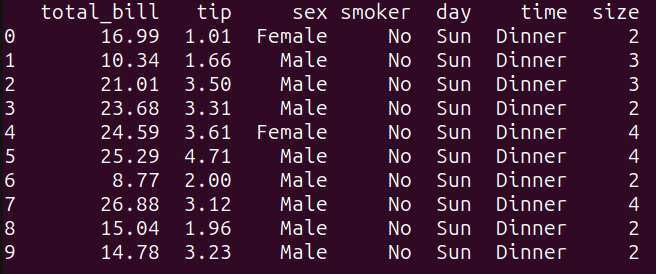
# Simple select query  query_1 = """  SELECT *  FROM tips_df  LIMIT 10;  """  result_1 = run_query(query_1)  print(result_1)

As seen, this query selects all the columns from the tips_df dataframe, and limits the output to the first 10 rows using the `LIMIT` keyword. It is equivalent to performing tips_df.head(10) in pandas:

XXXXX
Output of query_1

Example 2 – Filtering Based on a Condition

Next, let’s write a query to filter the results based on conditions:

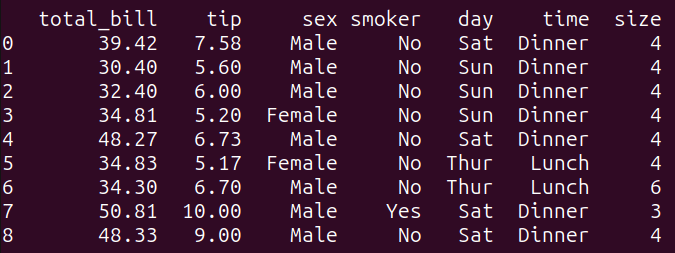
# filtering based on a condition  query_2 = """  SELECT *  FROM tips_df  WHERE total_bill > 30 AND tip > 5;  """    result_2 = run_query(query_2)  print(result_2)

This query filters the tips_df dataframe based on the condition specified in the WHERE clause. It selects all columns from the tips_df dataframe where the ‘total_bill’ is greater than 30 and the ‘tip’ amount is greater than 5.

Running query_2 gives the following result:

XXXXX
Output of query_2

Example 3 – Grouping and Aggregation

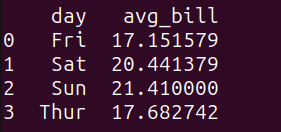
Let’s run the following query to get the average bill amount grouped by the day:

# grouping and aggregation  query_3 = """  SELECT day, AVG(total_bill) as avg_bill  FROM tips_df  GROUP BY day;  """    result_3 = run_query(query_3)  print(result_3)

Here’s the output:

XXXXX
Output of query_3

We see that the average bill amount on weekends is marginally higher.

Let’s take another example for grouping and aggregations. Consider the following query:

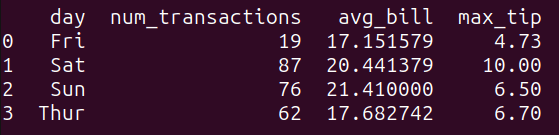
query_4 = """  SELECT day, COUNT(*) as num_transactions, AVG(total_bill) as avg_bill, MAX(tip) as max_tip  FROM tips_df  GROUP BY day;  """    result_4 = run_query(query_4)  print(result_4)

The query query_4 groups the data in the tips_df dataframe by the ‘day’ column and calculates the following aggregate functions for each group:

  • num_transactions: the count of transactions,
  • avg_bill: the average of the ‘total_bill’ column, and
  • max_tip: the maximum value of the ‘tip’ column.

As seen, we get the above quantities grouped by the day:

XXXXX
Output of query_4

Example 4 – Subqueries

Let’s add an example query that uses a subquery:

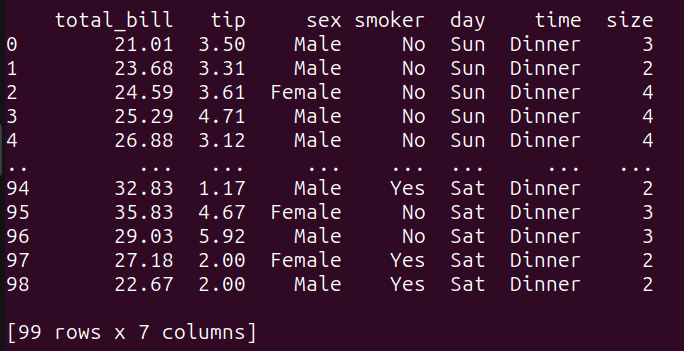
# subqueries  query_5 = """  SELECT *  FROM tips_df  WHERE total_bill > (SELECT AVG(total_bill) FROM tips_df);  """    result_5 = run_query(query_5)  print(result_5)

Here,

  • The inner subquery calculates the average value of the ‘total_bill’ column from the tips_df dataframe.
  • The outer query then selects all columns from the tips_df dataframe where the ‘total_bill’ is greater than the calculated average value.

Running query_5 gives the following:

XXXXX
Output of query_5

Example 5 – Joining Two DataFrames

We only have one dataframe. To perform a simple join, let’s create another dataframe like so:

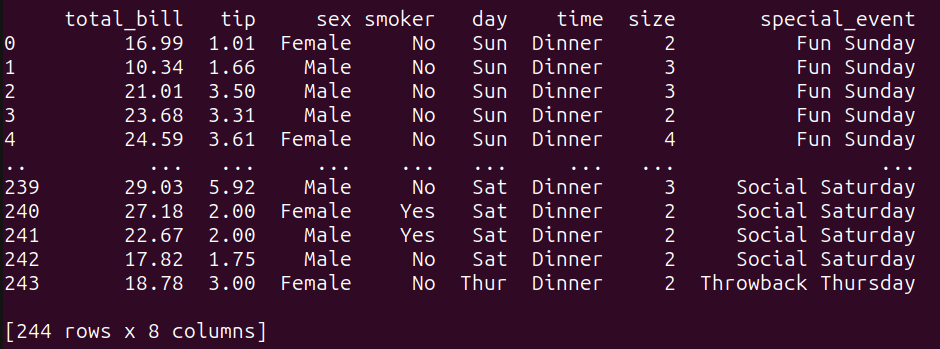
# Create another DataFrame to join with tips_df  other_data = pd.DataFrame({      'day': ['Thur','Fri', 'Sat', 'Sun'],      'special_event': ['Throwback Thursday', 'Feel Good Friday', 'Social Saturday','Fun Sunday', ]  })

The other_data dataframe associates each day with a special event.

Let’s now perform a LEFT JOIN between the tips_df and the other_data dataframes on the common ‘day’ column:

query_6 = """  SELECT t.*, o.special_event  FROM tips_df t  LEFT JOIN other_data o ON t.day = o.day;  """    result_6 = run_query(query_6)  print(result_6)

Here’s the result of the join operation:

XXXXX
Output of query_6 Wrap-Up and Next Steps

In this tutorial, we went over how to run SQL queries on pandas dataframes using pandasql. Though pandasql makes querying dataframes with SQL super simple, there are some limitations.

The key limitation is that pandasql can be several orders slower than native pandas. So what should you do? Well, if you need to perform data analysis with pandas, you can use pandasql to query dataframes when you are learning pandas—and ramping up quickly. You can then switch to pandas or another library like Polars once you’re comfortable with pandas.

To take the first steps in this direction, try writing and running the pandas equivalents of the SQL queries that we’ve run so far. All the code examples used in this tutorial are on GitHub. Keep coding!
Bala Priya C is a developer and technical writer from India. She likes working at the intersection of math, programming, data science, and content creation. Her areas of interest and expertise include DevOps, data science, and natural language processing. She enjoys reading, writing, coding, and coffee! Currently, she's working on learning and sharing her knowledge with the developer community by authoring tutorials, how-to guides, opinion pieces, and more.

More On This Topic

  • Query Your Pandas DataFrames with SQL
  • Pandas vs SQL: When Data Scientists Should Use Each Tool
  • Cleaner Data Analysis with Pandas Using Pipes
  • Pandas Profiling: One-Line Magical Code for EDA
  • How to Speed Up Pandas with Modin
  • How to Query Your Pandas Dataframe

All is Not Lost for Samsung in Chipmaking Business

In early April this year, Samsung decided to cut down on chip manufacturing after its semiconductor division caused the biggest fall in profits for the company since 2009. This cut came after the firm announced their results for the first quarter of 2023. Its semiconductor business reported a $3.4 billion loss, and its total operating profit was just $479 million, which was at the lowest profit in 14 years.

Samsung has a history of loading up their inventories when the global economy is down. They do this as the company wants to be prepared to supply its customers when demand picks up after the economic crisis is over. It did the same thing during COVID-19, and it ended with an oversupply of chips. It’s not selling as fast as they thought.

The demand for memory chips slowed down and the prices for semiconductors plummeted.

“We are lowering the production of memory chips by a meaningful level, especially that of products with supply secured,” Samsung said in a statement.

Samsung’s performance in the second quarter of 2023 was not impressive either as low demand for memory chips persisted. Its operating profit fell 96% compared to last year. It incurred losses worth $7 billion from its semiconductor business in the first 6 months of 2023.

Due to this, the South Korean giant decided to extend their cut in chip production as demand for chips still remained lukewarm. There was a recovery that occurred only in high-end chips which was driven by the AI-boom.

AI Saved Samsung

The demand recovery for lesser advanced chips has been going at a snail’s pace, but the demand for AI-chips sky-rocketed. The annual growth rate was at 30%, according to StraView.

However, Samsung fell short in this area as well as sales for SK Hynix, it’s direct competitor, was better prepared for the AI demand and led the market in DRAM high-end chips.

“Although Samsung was first in these high-density chips, it didn’t anticipate these markets will grow so fast, and was superseded by SK Hynix in speed and yield,” Lee Min-hee, an analyst at BNK Investment & Securities told Reuters.

New Partnerships Open Opportunities

South Korean tech giant Samsung just got a new customer for its chip making business. Tenstorrent, a Canadian start-up gave an order to Samsung’s chip manufacturing arm to make AI chips.

However, the details of the value of the deal or the number of chips ordered remain undisclosed. Samsung had earlier invested in the Canadian firm, which aimed at raising $100 million.

Samsung is also seeking partnership with NVIDIA to manufacture its chip as the GPU giant is ‘too reliant’ on TSMC. NVIDIA is looking to diversify their supply-chain with Samsung as the South Korean firm is no stranger to NVIDIA’s GPUs. It made all of the RTX 3000 gaming GPUs during the pandemic and the GTX 150 mobile GPUs in 2017.

Samsung’s chairman, Lee-Jae-yong met Elon Musk the first week of May this year to discuss cooperation to develop autonomous driving semiconductor production. This was the first time the two had a private meeting. Musk owns Starlink, Tesla, Neuralink and Hyperloop and the possibilities for Samsung to collaborate is endless. The two firms are promoting exchanges for the development of next-gen IT.

It’s not just corporations, the government of South Korea is also equally helping Samsung catch-up with TSMC.

Samsung faced challenges in its semiconductor business due to a decline in demand for memory chips and increased competition in the AI chip market. To address these challenges, Samsung is investing heavily in capacity expansion and advanced chip manufacturing, while also exploring potential partnerships with key players in the industry.

Setting up Foundry for Top Clients

After going through poor quarterly performances due to lack of demand, drop in sales and supply-chain shortages, Samsung has already implemented plans to safeguard their dominance in the semiconductor business.

Amid plummeting prices of semiconductors and dismal earnings of the company, it has been working from ground up on its foundry business–making custom chipsets for customers like Tesla, Intel and Qualcomm etc.

Samsung is building a fabrication plant worth $17 billion, in the quint town of Taylor, Texas. The plant will go online sometime in early 2024.

Not just that, the company is also expanding capacity by building a mega cluster of 5 new fabs for a whopping $228 billion in South Korea. This new cluster is Samsung’s bet to be the top manufacturer of the world’s most advanced chips. At the moment, it is second to TSMC beating Intel at third.

“We do not settle to be No. 2,” Jon Taylor, Samsung’s corporate vice president of fab engineering, told CNBC in an interview.

The company announced in late 2022 their roadmap, which states that they plan to triple their capacity and make 2 nm chips by 2025 and 1.4 nm by 2027.

Dylan Patel from research and consulting firm SemiAnalysis told CNBC, “If Samsung hits their targets, they’ll leapfrog ahead of TSMC, but that’s a big if”.

In order to fund such large projects, Samsung has been utilising its cash reserves and also sold shares of ASML, the only company in the world which makes machines that make chips. Samsung sold 3.5 million shares, worth about $2.29 billion. It plans to spend these funds on new plants and memory chip production lines.

The post All is Not Lost for Samsung in Chipmaking Business appeared first on Analytics India Magazine.

IBM Quantum Calls for Interns

IBM Quantum Calls for Interns

IBM Quantum has initiated the application process for its summer internships in 2024. The internship offers candidates a unique opportunity to work in a field that addresses previously unsolvable challenges with quantum technology.

Click here to learn more and apply for the internship

Summer internships at IBM Quantum are part of the IBM Research Global Internship Program, providing interns with a chance to contribute to the IBM Quantum Development Roadmap. Since 2020, IBM Quantum has trained over 400 interns across various education levels. Many of these interns have built careers at IBM Quantum or in the broader quantum field after graduation. Interns collaborate with researchers, developers, and business experts dedicated to advancing quantum computing.

The recruitment is open for three roles: software developer, hardware engineer, and research scientist. These internships will take place in the summer of 2024. In the US, interns can choose between locations in New York and California, with varying internship periods. International opportunities will be announced soon.

While prior quantum computing knowledge is not required, candidates are encouraged to familiarise themselves with Qiskit. IBM Quantum has revamped its IBM Quantum Learning platform, providing easier access to quantum computing skills development and enhancing candidates’ competitiveness.

IBM Quantum’s internship program equips students with skills, networks, and career pathways in the quantum field. Past internships included the Qiskit Global Summer School, poster sessions, and fireside chats with IBM Quantum’s Jay Gambetta.

Former interns have praised the program for its skill-building opportunities. Arian Noori, a graduate student from the University of Wisconsin, highlighted practical skills and insights gained during his quantum hardware engineering internship. Danielle Odigie, an undergraduate from Columbia University, found fulfilment as a quantum software intern, contributing to software development connecting programmers to quantum technology.

Read: IBM Leads the Quantum Realm

The post IBM Quantum Calls for Interns appeared first on Analytics India Magazine.

Leveraging GPT Models to Transform Natural Language to SQL Queries

Leveraging GPT Models to Transform Natural Language to SQL Queries
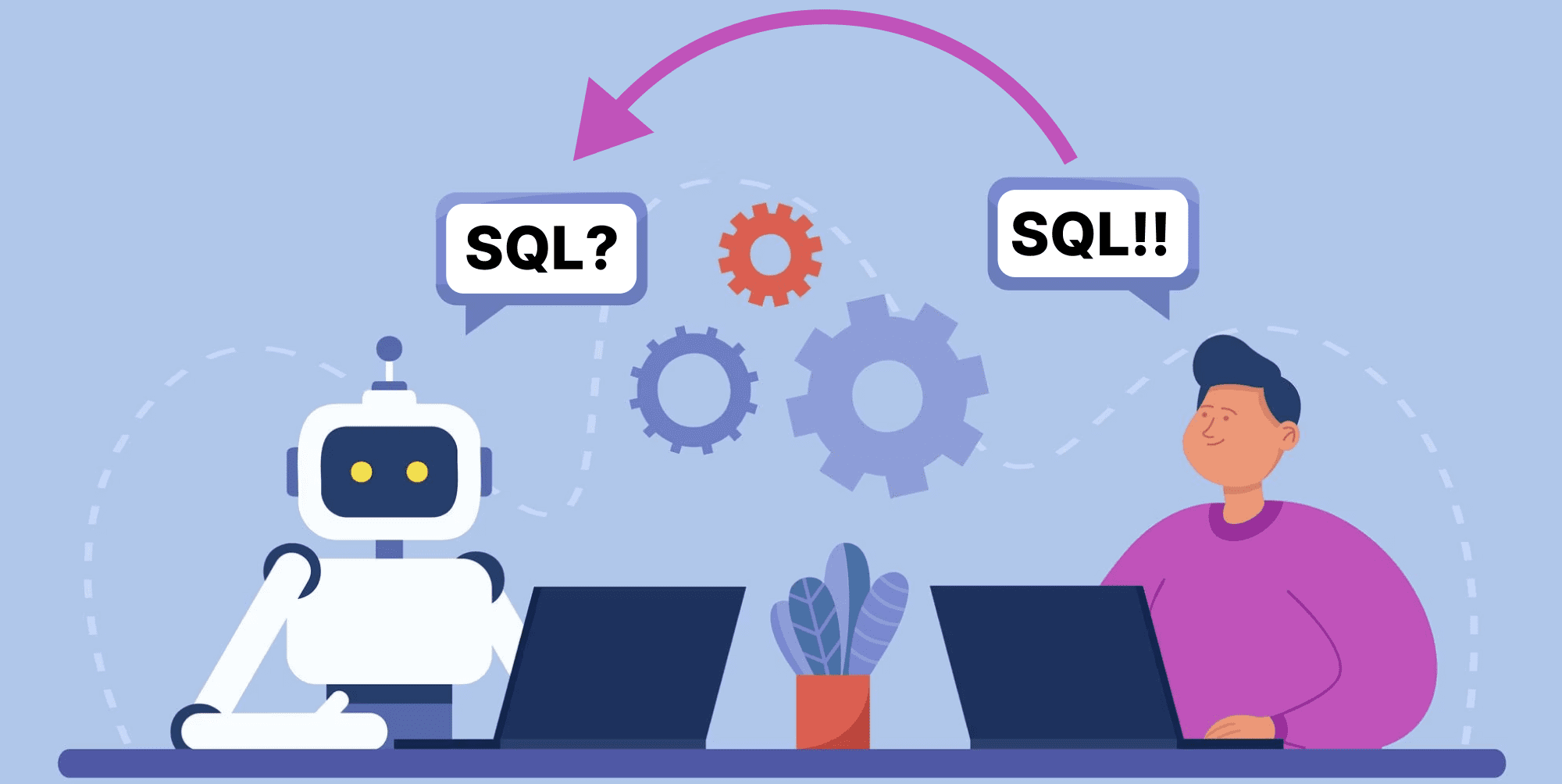
Image by Author. Base image from pch-vector.

Natural Language Processing —or NLP-has evolved enormously, and GPT models are at the forefront of this revolution.

Today LLM models can be used in a wide variety of applications.

To avoid unnecessary tasks and enhance my workflow, I began exploring the possibility of training GPT to formulate SQL queries for me.

And this is when a brilliant idea appeared:

Using the power of GPT models in interpreting natural language and transforming it into structured SQL queries.

Could this be possible?

Let’s discover it all together!

So let’s start from the beginning…

The concept of “Few Shot Prompting”

Some of you might be already familiar with the concept of few shot prompting, while others might have not heard of it never before.

So…What is it?

The basic idea here is to use some explicit examples-or shots-to guide the LLM to respond in a specific way.

This is why it is called Few Shot prompting.

To put it simply, by showcasing a few examples of the user input-sample prompts-along with the desired LLM output, we can teach the model to deliver some enhanced output that follows our preferences.

By doing so we are expanding the knowledge of the model on some specific domain to generate some output that aligns better with our desired task.

So let’s exemplify this!

Throughout this tutorial, I’ll be using a predefined function called chatgpt_call() to prompt the GPT model. If you want to further understand it, you go check the following article.

Imagine I want ChatGPT to describe the term optimism.

If I simply ask GPT to describe it, I will obtain a serious-and boring-description.

## Code Block  response = chatgpt_call("Teach me about optimism. Keep it short.")  print(response)

With the corresponding output:

Leveraging GPT Models to Transform Natural Language to SQL Queries
Screenshot of my Jupyter Notebook. Prompting GPT.

However, imagine I would rather like to get something more poetic. I can add to my prompt some more detail specifying that I want a poetic definition.

## Code Block  response = chatgpt_call("Teach me about optimism. Keep it short. Try to create a poetic definition.")  print(response)

But this second output looks just like a poem and has nothing to do with my desired output.
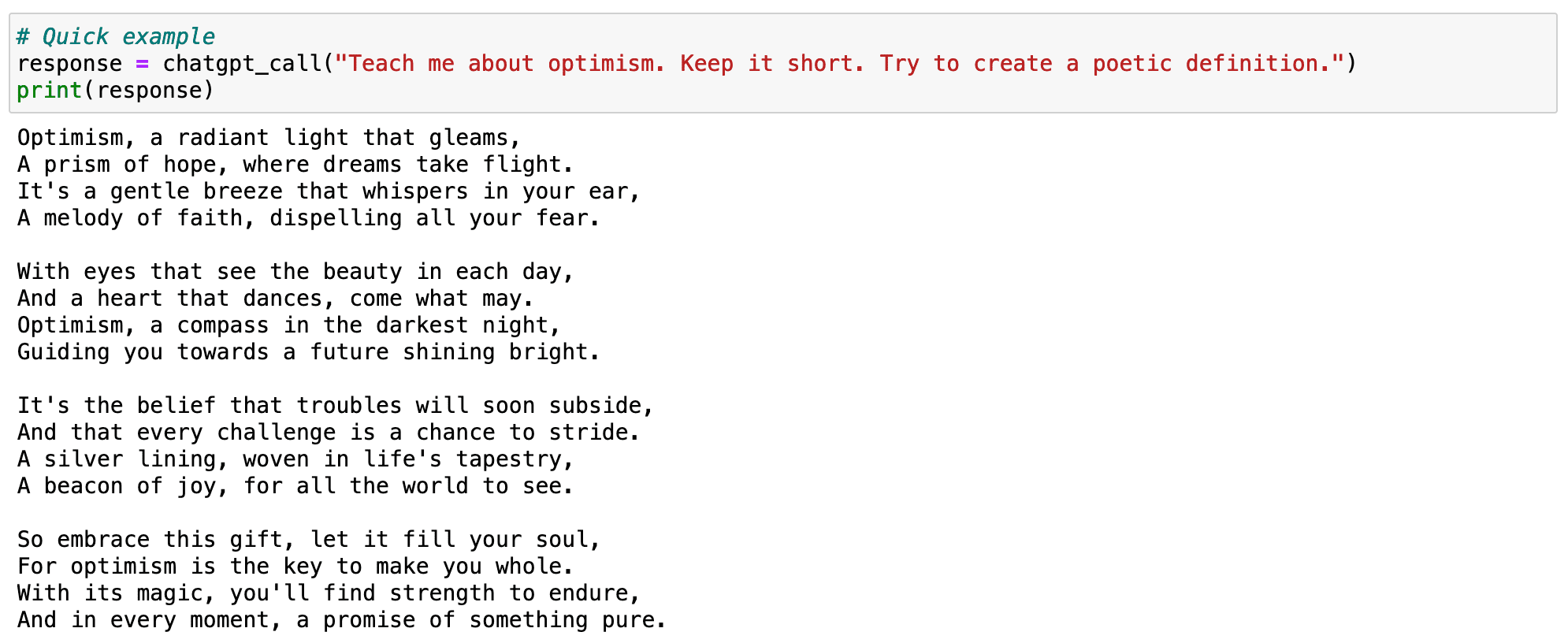
Leveraging GPT Models to Transform Natural Language to SQL Queries
Screenshot of my Jupyter Notebook. Prompting GPT.

What can I do?

I could detail even more the prompt, and keep iterating until I receive some good output. However, this would take a lot of time.

Instead, I can show the model what the kind of poetic description I prefer designing an example and showing it to the model.

## Code Block  prompt = """    Your task is to answer in a consistent style aligned with the following style.     : Teach me about resilience.    : Resilience is like a tree that bends with the wind but never breaks.   It is the ability to bounce back from adversity and keep moving forward.    : Teach me about optimism.  """  response = chatgpt_call(prompt)  print(response)

And the output is exactly what I was looking for.
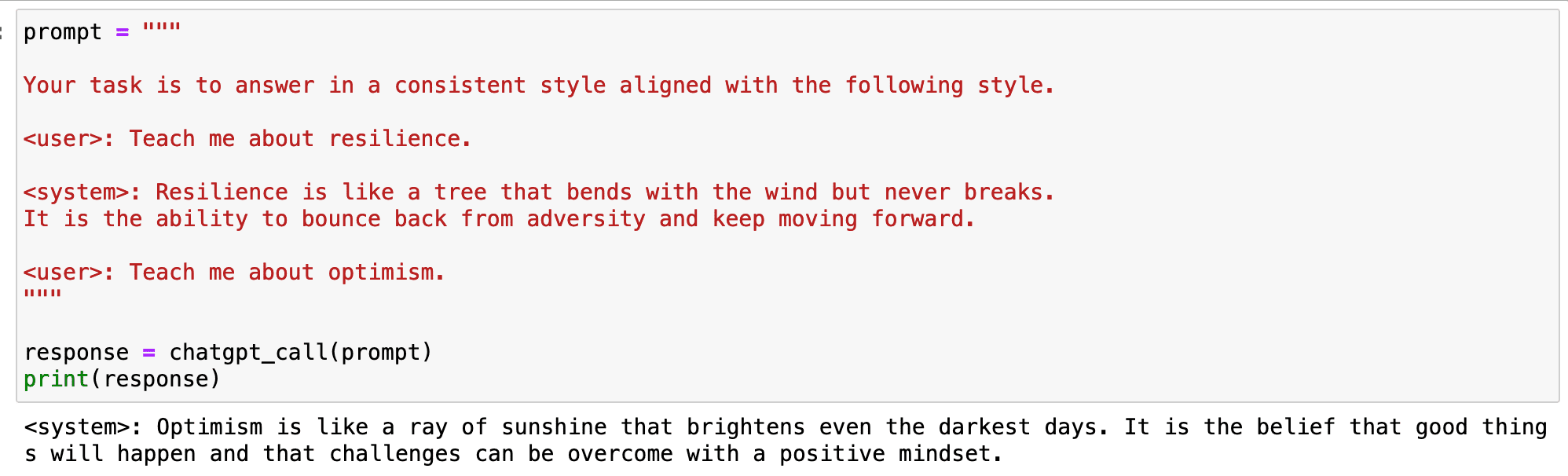
Leveraging GPT Models to Transform Natural Language to SQL Queries
Screenshot of my Jupyter Notebook. Prompting GPT.

So… how can we translate this into our specific case of SQL queries?

Using NLP for SQL generation

ChatGPT is already capable of generating SQL queries out of Natural Language prompts. We do not even have to show the model any table, just formulate a hypothetical computation and it will do it for us.

## Code Block  user_input = """  Assuming I have both product and order tables, could you generate a single table that contained all the info   of every product together with how many times has it been sold?  """    prompt = f"""  Given the following natural language prompt, generate a hypothetical query that fulfills the required task in SQL.  {user_input}  """  response = chatgpt_call(prompt)  print(response)

However, and as you already know, the more context we give to the model, the better outputs it will generate.
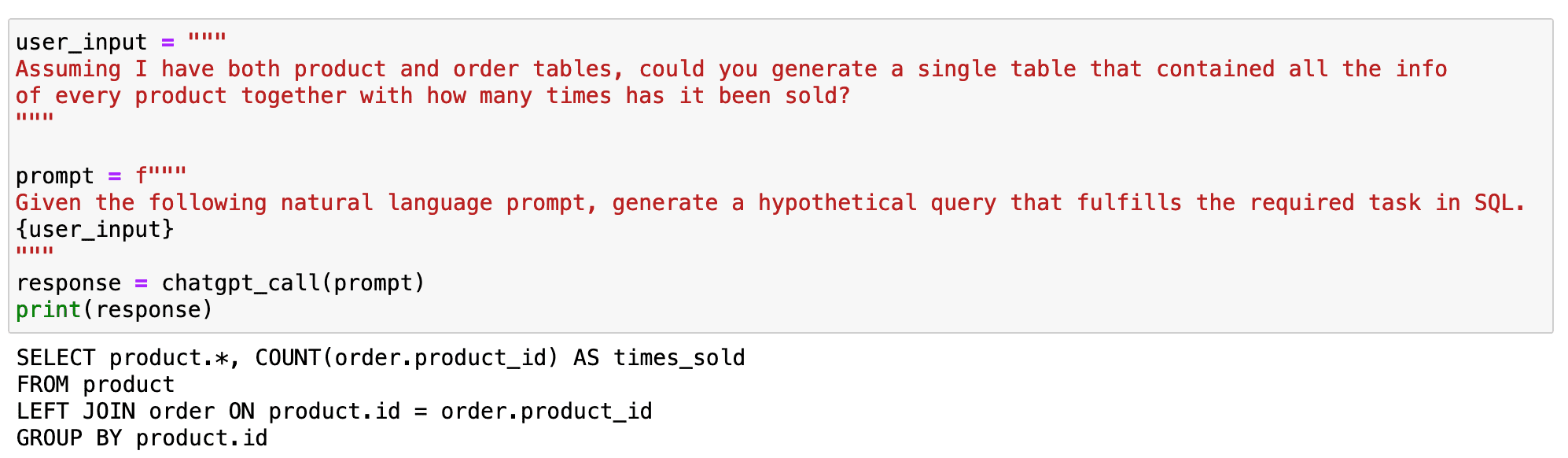
Leveraging GPT Models to Transform Natural Language to SQL Queries
Screenshot of my Jupyter Notebook. Prompting GPT.

Throughout this tutorial I am splitting the input prompts into the specific demand of the user and the high-level behaviour expected from the model. This is a good practice to improve our interaction with the LLM and be more concise in our prompts. You can learn more in the following article.

So let’s imagine I am working with two main tables: PRODUCTS and ORDERS
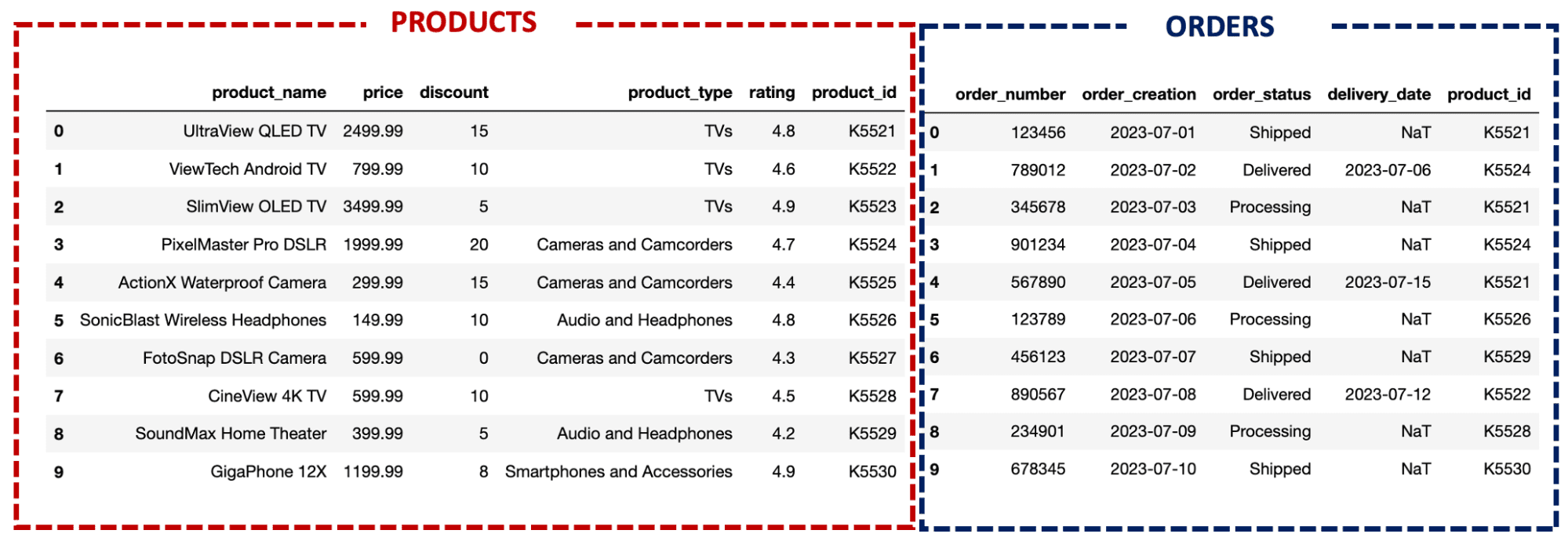
Leveraging GPT Models to Transform Natural Language to SQL Queries
Image by Author. Tables to be used throughout the tutorial.

If I ask GPT for a simple query, the model will give a solution right away, just as it did in the beginning, but with specific tables for my case.

## Code Block  user_input = """  What model of TV has been sold the most in the store?  """    prompt = f"""  Given the following SQL tables, your job is to provide the required SQL queries to fulfil any user request.    Tables: <{sql_tables}>    User request: ```{user_input}```  """  response = chatgpt_call(prompt)  print(response)

You can find the sql_tables in the end of this article!

And the output looks like as follows!
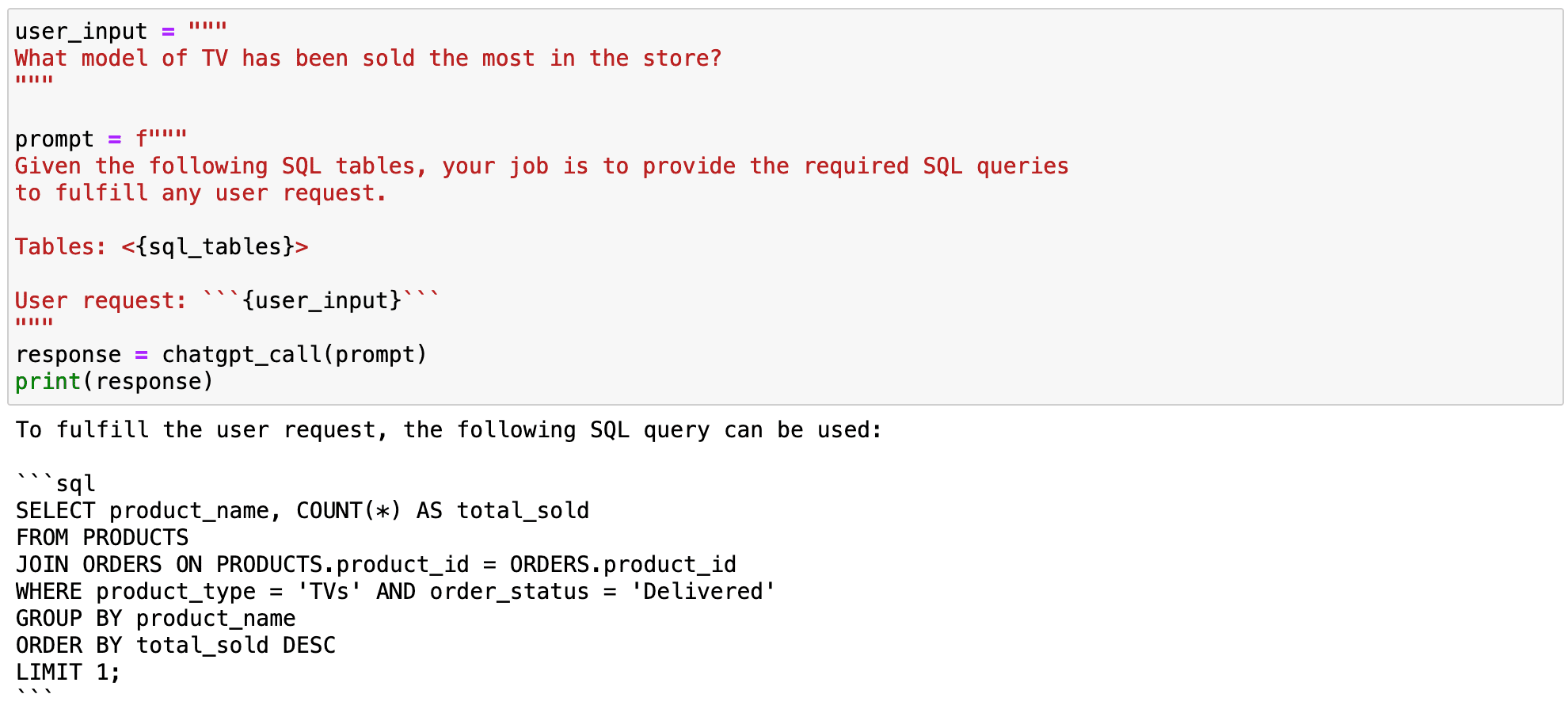
Leveraging GPT Models to Transform Natural Language to SQL Queries
Screenshot of my Jupyter Notebook. Prompting GPT.

However, we can observe some problems in the previous output.

  1. The computation is partially wrong, as it is only considering those TVs that have been already delivered. And any issued order-be it delivered or not-should be considered as a sale.
  2. The query is not formatted as I would like it to be.

So first let’s focus on showing the model how to compute the required query.

#1. Fixing some misunderstandings of the model

In this first case, the model considers only those products that have been delivered as sold, but this is not true. We can simply fix this misunderstanding by displaying two different examples where I compute similar queries.

## Few_shot examples    fewshot_examples = """  -------------- FIRST EXAMPLE  User: What model of TV has been sold the most in the store when considering all issued orders.   System: You first need to join both orders and products tables, filter only those orders that correspond to TVs   and count the number of orders that have been issued:     SELECT P.product_name AS model_of_tv, COUNT(*) AS total_sold  FROM products AS P  JOIN orders   AS O ON P.product_id = O.product_id  WHERE P.product_type = 'TVs'  GROUP BY P.product_name  ORDER BY total_sold DESC  LIMIT 1;    -------------- SECOND EXAMPLE  User: What's the sold product that has been already delivered the most?  System: You first need to join both orders and products tables, count the number of orders that have   been already delivered and just keep the first one:     SELECT P.product_name AS model_of_tv, COUNT(*) AS total_sold  FROM products AS P  JOIN orders   AS O ON P.product_id = O.product_id  WHERE P.order_status = 'Delivered'  GROUP BY P.product_name  ORDER BY total_sold DESC  LIMIT 1;  """

And now if we prompt again the model and include the previous examples on it, one can see that the corresponding query will not be only correct-the previous query was already working-but will also consider sales as we want it to!

## Code Block  user_input = """  What model of TV has been sold the most in the store?  """    prompt = f"""  Given the following SQL tables, your job is to provide the required SQL tables  to fulfill any user request.    Tables: <{sql_tables}>. Follow those examples the generate the answer, paying attention to both  the way of structuring queries and its format:  <{fewshot_examples}>    User request: ```{user_input}```  """  response = chatgpt_call(prompt)  print(response)

With the following output:
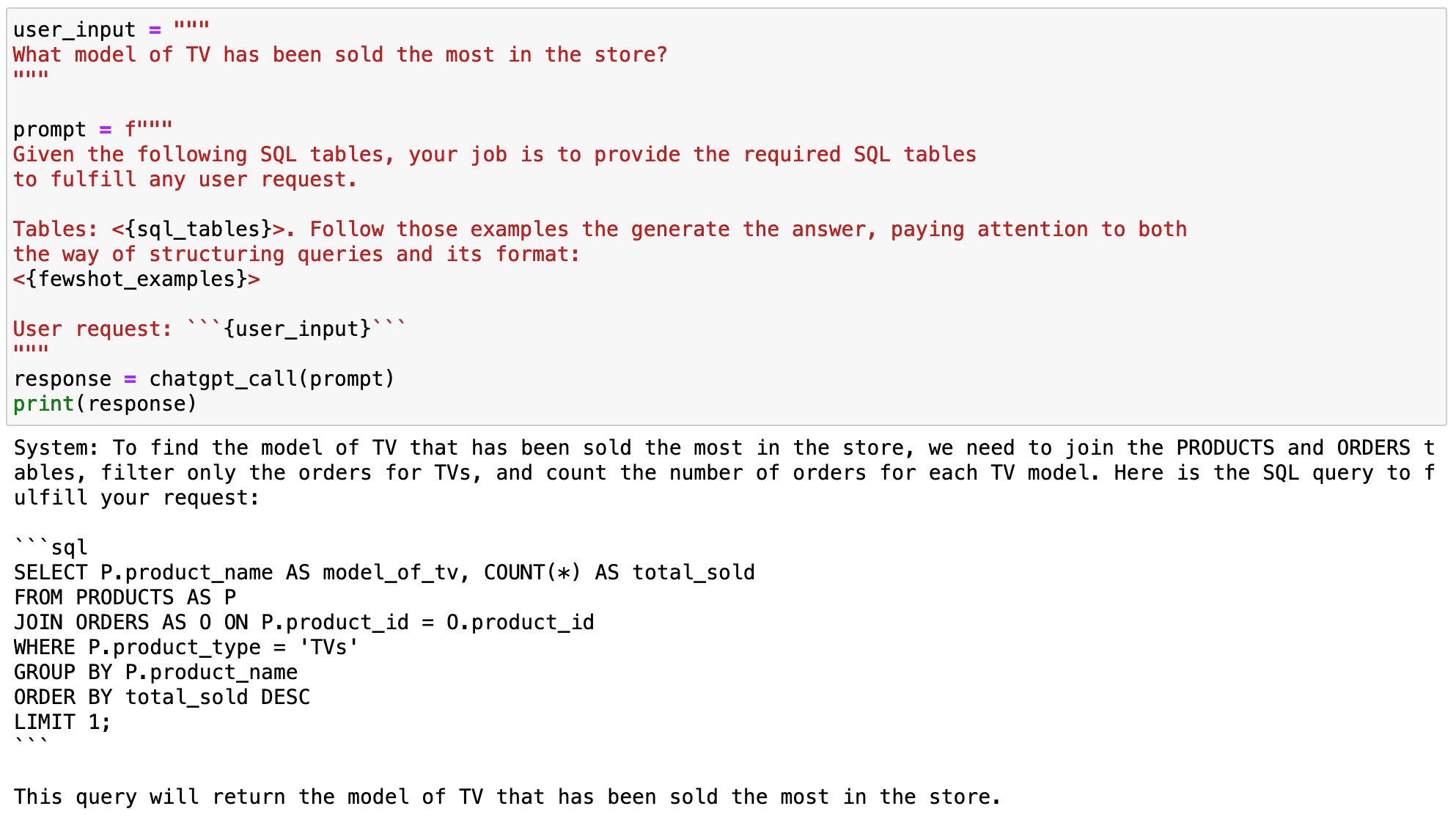
Leveraging GPT Models to Transform Natural Language to SQL Queries
Screenshot of my Jupyter Notebook. Prompting GPT.

Now if we check the corresponding query…

## Code Block    pysqldf("""  SELECT P.product_name AS model_of_tv, COUNT(*) AS total_sold  FROM PRODUCTS AS P  JOIN ORDERS AS O ON P.product_id = O.product_id  WHERE P.product_type = 'TVs'  GROUP BY P.product_name  ORDER BY total_sold DESC  LIMIT 1;  """)

It works perfectly!
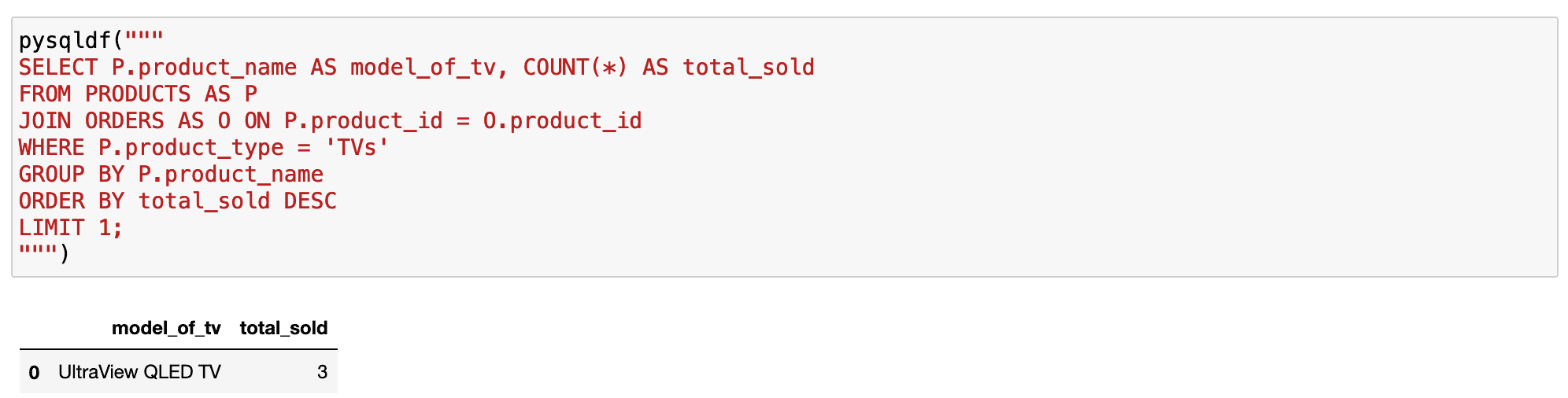
Leveraging GPT Models to Transform Natural Language to SQL Queries
Screenshot of my Jupyter Notebook. Prompting GPT.

#2. Formatting SQL Queries

Few-short prompting can also be a way to customise the model for our own purpose or style.

If we go back to the examples before, the queries had no format at all. And we all know there are some good practices-together with some personal oddities-that allow us to better read SQL queries.

This is why we can use few-shot prompting to show the model the way we like to query — with our good practices or just our oddities-and train the model to give us our formatted desired SQL queries.

So, now I will prepare the same examples as before but following my format preferences.

## Code Block  fewshot_examples = """  ---- EXAMPLE 1  User: What model of TV has been sold the most in the store when considering all issued orders.   System: You first need to join both orders and products tables, filter only those orders that correspond to TVs   and count the number of orders that have been issued:     SELECT          P.product_name AS model_of_tv,          COUNT(*)       AS total_sold  FROM products AS P  JOIN orders   AS O    ON P.product_id = O.product_id      WHERE P.product_type = 'TVs'  GROUP BY P.product_name  ORDER BY total_sold DESC  LIMIT 1;    ---- EXAMPLE 2  User: What is the latest order that has been issued?  System: You first need to join both orders and products tables and filter by the latest order_creation datetime:     SELECT         P.product_name AS model_of_tv  FROM products AS P  JOIN orders AS O     ON P.product_id = O.product_id      WHERE O.order_creation = (SELECT MAX(order_creation) FROM orders)  GROUP BY p.product_name  LIMIT 1;  """

Once the examples have been defined, we can input them into the model so that it can mimic the style showcased.

As you can observe in the following code box, after showing GPT what we expect from it, it replicates the style of the given examples to produce any new output accordingly.

## Code Block    user_input = """  What is the most popular product model of the store?  """    prompt = f"""  Given the following SQL tables, your job is to provide the required SQL tables  to fulfill any user request.    Tables: <{sql_tables}>. Follow those examples the generate the answer, paying attention to both  the way of structuring queries and its format:  <{fewshot_examples}>    User request: ```{user_input}```  """  response = chatgpt_call(prompt)  print(response)

And as you can observe in the following output, it worked!
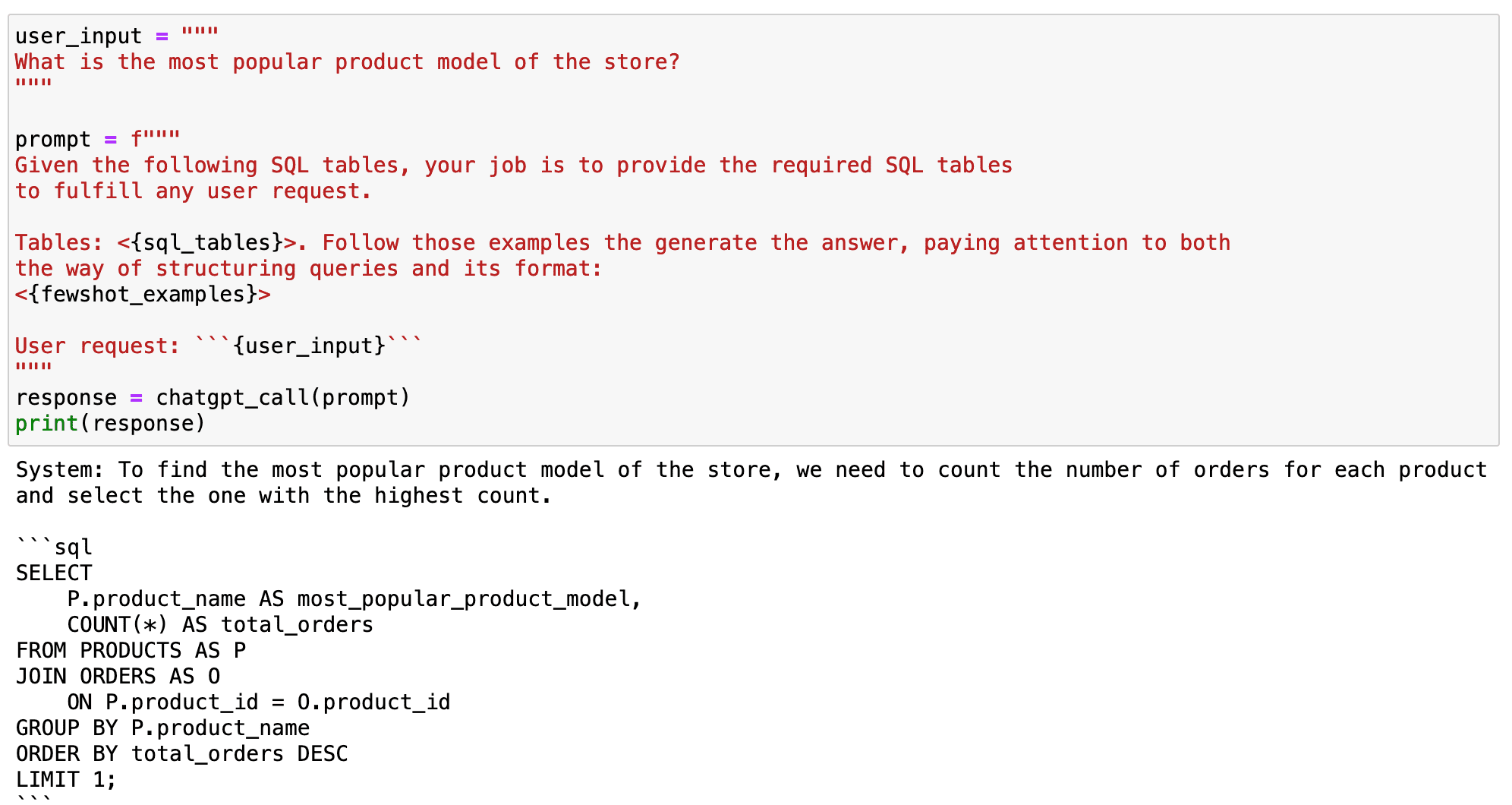
Leveraging GPT Models to Transform Natural Language to SQL Queries
Screenshot of my Jupyter Notebook. Prompting GPT.

#3. Training the model to compute some specific variable.

Let’s dive deeper into an illustrative scenario. Suppose we aim to compute which product takes the longest to deliver. We pose this question to the model in natural language, expecting a correct SQL query.

## Code Block    user_input = """  What product is the one that takes longer to deliver?  """    prompt = f"""  Given the following SQL tables, your job is to provide the required SQL tables  to fulfill any user request.    Tables: <{sql_tables}>. Follow those examples the generate the answer, paying attention to both  the way of structuring queries and its format:  <{fewshot_examples}>    User request: ```{user_input}```  """  response = chatgpt_call(prompt)  print(response)

Yet, the answer we receive is far from correct.
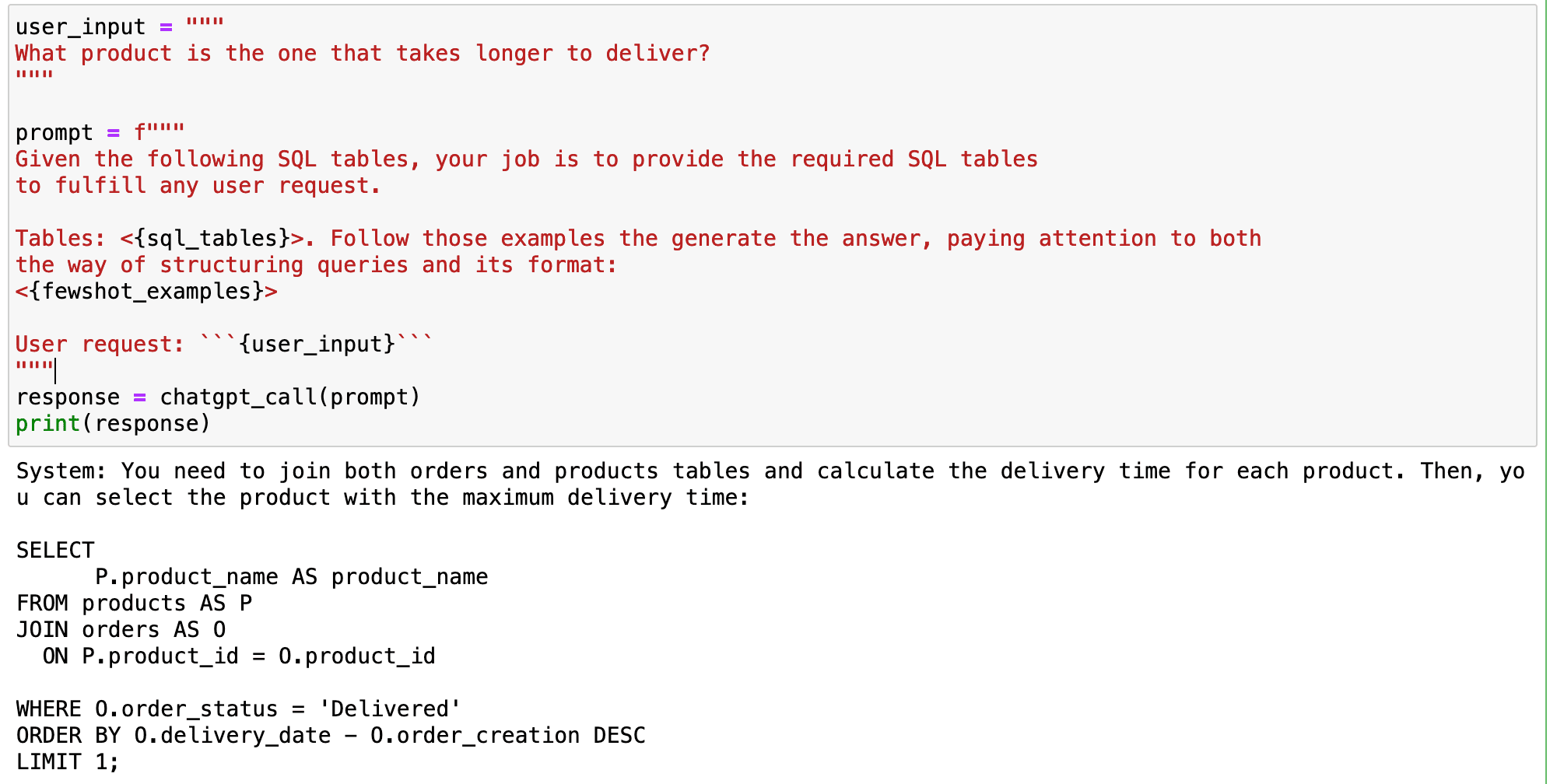
Leveraging GPT Models to Transform Natural Language to SQL Queries
Screenshot of my Jupyter Notebook. Prompting GPT.

What went wrong?

The GPT model attempts to calculate the difference between two datetime SQL variables directly. This computation is incompatible with most SQL versions, creating an issue, especially for SQLite users.

How do we rectify this problem?

The solution is right under our noses-we resort back to few-shot prompting.

By demonstrating to the model how we typically compute time variables-in this case, the delivery time-we train it to replicate the process whenever it encounters similar variable types.

For example, SQLite users may use the julianday() function. This function converts any date into the number of days that have elapsed since the initial epoch in the Julian calendar.

This could help GPT model to handle date differences in SQLite database better.

## Adding one more example  fewshot_examples += """  ------ EXAMPLE 4  User: Compute the time that it takes to delivery every product?  System: You first need to join both orders and products tables, filter only those orders that have   been delivered and compute the difference between both order_creation and delivery_date.:     SELECT       P.product_name AS product_with_longest_delivery,      julianday(O.delivery_date) - julianday(O.order_creation) AS TIME_DIFF        FROM       products AS P  JOIN       orders AS O ON P.product_id = O.product_id  WHERE       O.order_status = 'Delivered';  """

When we use this method as an example for the model, it learns our preferred way of computing the delivery time. This makes the model better suited to generate functional SQL queries that are customised to our specific environment.

If we use the previous example as an input, the model will replicate the way we compute the delivery time and will provide functional queries for our concrete environment from now on.

## Code Block    user_input = """  What product is the one that takes longer to deliver?  """    prompt = f"""  Given the following SQL tables, your job is to provide the required SQL tables  to fulfill any user request.    Tables: <{sql_tables}>. Follow those examples the generate the answer, paying attention to both  the way of structuring queries and its format:  <{fewshot_examples}>    User request: ```{user_input}```  """  response = chatgpt_call(prompt)  print(response)
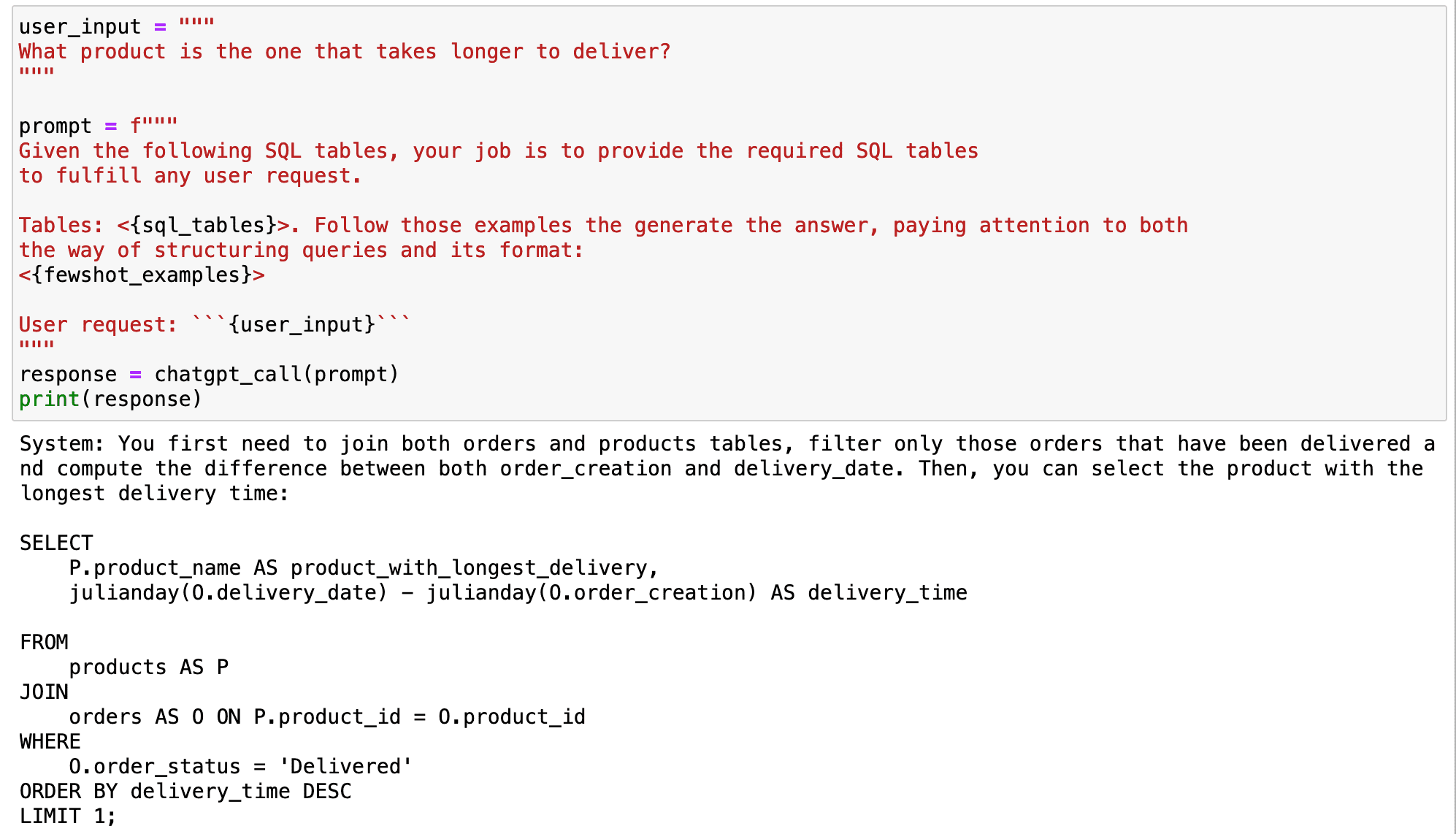
Leveraging GPT Models to Transform Natural Language to SQL Queries
Screenshot of my Jupyter Notebook. Prompting GPT. Summary

In conclusion, the GPT model is an excellent tool for converting natural language into SQL queries.

However, it’s not perfect.

The model may not be able to understand context-aware queries or specific operations without proper training.

By using few-shot prompting, we can guide the model to understand our query style and computing preferences.

This allows us to fully harness the power of the GPT model in our data science workflows, turning the model into a powerful tool that adapts to our unique needs.

From unformatted queries to perfectly customised SQL queries, GPT models bring the magic of personalization to our fingertips!

You can go check my code directly in my GitHub.

## SQL TABLES    sql_tables = """  CREATE TABLE PRODUCTS (      product_name VARCHAR(100),      price DECIMAL(10, 2),      discount DECIMAL(5, 2),      product_type VARCHAR(50),      rating DECIMAL(3, 1),      product_id VARCHAR(100)  );    INSERT INTO PRODUCTS (product_name, price, discount, product_type, rating, product_id)  VALUES      ('UltraView QLED TV', 2499.99, 15, 'TVs', 4.8, 'K5521'),      ('ViewTech Android TV', 799.99, 10, 'TVs', 4.6, 'K5522'),      ('SlimView OLED TV', 3499.99, 5, 'TVs', 4.9, 'K5523'),      ('PixelMaster Pro DSLR', 1999.99, 20, 'Cameras and Camcorders', 4.7, 'K5524'),      ('ActionX Waterproof Camera', 299.99, 15, 'Cameras and Camcorders', 4.4, 'K5525'),      ('SonicBlast Wireless Headphones', 149.99, 10, 'Audio and Headphones', 4.8, 'K5526'),      ('FotoSnap DSLR Camera', 599.99, 0, 'Cameras and Camcorders', 4.3, 'K5527'),      ('CineView 4K TV', 599.99, 10, 'TVs', 4.5, 'K5528'),      ('SoundMax Home Theater', 399.99, 5, 'Audio and Headphones', 4.2, 'K5529'),      ('GigaPhone 12X', 1199.99, 8, 'Smartphones and Accessories', 4.9, 'K5530');      CREATE TABLE ORDERS (      order_number INT PRIMARY KEY,      order_creation DATE,      order_status VARCHAR(50),      product_id VARCHAR(100)  );    INSERT INTO ORDERS (order_number, order_creation, order_status, delivery_date, product_id)  VALUES      (123456, '2023-07-01', 'Shipped','', 'K5521'),      (789012, '2023-07-02', 'Delivered','2023-07-06', 'K5524'),      (345678, '2023-07-03', 'Processing','', 'K5521'),      (901234, '2023-07-04', 'Shipped','', 'K5524'),      (567890, '2023-07-05', 'Delivered','2023-07-15', 'K5521'),      (123789, '2023-07-06', 'Processing','', 'K5526'),      (456123, '2023-07-07', 'Shipped','', 'K5529'),      (890567, '2023-07-08', 'Delivered','2023-07-12', 'K5522'),      (234901, '2023-07-09', 'Processing','', 'K5528'),      (678345, '2023-07-10', 'Shipped','', 'K5530');  """

Josep Ferrer is an analytics engineer from Barcelona. He graduated in physics engineering and is currently working in the Data Science field applied to human mobility. He is a part-time content creator focused on data science and technology. You can contact him on LinkedIn, Twitter or Medium.

More On This Topic

  • N-gram Language Modeling in Natural Language Processing
  • 7 Top Open Source Datasets to Train Natural Language Processing (NLP) &…
  • In-Database Analytics: Leveraging SQL's Analytic Functions
  • SQL For Data Science: Understanding and Leveraging Joins
  • 4 Useful Intermediate SQL Queries for Data Science
  • 5 Tricky SQL Queries Solved