Meet Silicon Valley’s Generative AI Darling

Meet Silicon Valley's Generative AI Darling

Looks like the entire Silicon Valley is head over heels for Anthropic. According to recent reports, the company is ready to raise another round of funding. One of the main independent rivals of OpenAI, the company is talking to investors to raise around $2 billion in funding. This is just a week after the company made a commitment of $1.25 billion from Amazon. The best part is that Google is expected to be a part of this round again.

Interestingly, Google already made a $300 million investment in Anthropic, acquiring a 10% stake in the company. The two-year old startup that is building Claude, its rival to ChatGPT now aims to get a valuation between $20 billion to $30 billion, making its valuation around ten times more than the current one, which is $4 billion after the investment in March.

To put this in perspective, OpenAI has roughly a valuation of around $28 billion after raising several rounds of funds. This makes Anthropic one of the closest competitors to OpenAI.

CEO of Anthropic Dario Amodei, said in a recent interview with Andreessen Horowitz, that the biggest thing that the company wants to do is make Claude have infinite context windows. The only things holding it back, according to Amodei, “at some point, it just becomes too expensive in terms of compute.”

It is clear that Anthropic has high expectations when it comes to what it wants to achieve. But it seems like the current funds are holding the company back from its ambitions. It is only fair for the company to go around and look for more funds, and raise the stakes for the big-tech.

A tussle with Google?

Interestingly, there are some other rumours. A senior Google engineer delivered some challenging news to over fifty colleagues. A segment of the company’s cloud services, crucial for Anthropic, was experiencing issues, necessitating overtime efforts to rectify the situation. To address the problems in their service, specifically, an underperforming and unstable NVIDIA H100 cluster, Google Cloud leadership initiated a month-long, seven-day-per-week sprint.

The consequences of not resolving this issue were deemed substantial, affecting Anthropic primarily but also casting an adverse impact on Google Cloud and Google as a whole, as per documents examined by Big Technology.

Just one week after Google launched the sprint, Anthropic announced its deal with Amazon, designating Amazon Web Services as its primary cloud provider for mission-critical workloads. It’s worth noting that the Amazon deal had been in the works for a while and was unrelated to Google Cloud’s performance problems.

Nevertheless, for Google, this development must have been unsettling, especially considering Google had invested all this money into the company. Nevertheless, Anthropic’s newfound funding from Amazon is undoubtedly a benefit for Amazon and may leave Google somewhat perplexed.

On the other hand, Google is already developing its own AI models with Google DeepMind. Its Gemini, which seems to be arriving soon, might be the biggest bet the company has made.

While Google may have the capability to manage these endeavours simultaneously, it faces the risk of being outpaced by competitors with fewer complicated trade-offs. Notably, Google Cloud’s performance issues with Anthropic appear to be stabilising, albeit not without requiring engineers to engage in a rare phenomenon at Google—weekend work.

OpenAI went from $25m run rate to $1bn in a year, Anthropic from < $10m to $200m this year, $500m next year
It looks like they are raising at 100x sales, but have you ever seen sales growth that high?
And the enterprise market hasn't even started yet, gen AI will be everywhere

— Emad (@EMostaque) October 4, 2023

Everyone loves Anthropic

Even though OpenAI is not profitable yet, it is still generating revenue through its offerings. Anthropic also has plans to make its generative AI capabilities generate revenue for itself, and aims for an annualised pace of $200 million. It also hopes to generate a $500 million annualised rate, according to a person with knowledge.

Anthropic believes that these AI models from companies like OpenAI would be ahead of everything in the next few years, and it would be impossible to catch up with them. This is clearly why every AI startup in the world wants its valuation to be the highest at the moment, to stay ahead in the race.

Generative AI startups are all the fun now for investors and cloud providers. Emerging startups such as Mistral AI, Reka AI, Cohere AI, and Inflection AI, all have been raising funds, and have their own strategies for making bucks. Amidst all this, the investors and big-tech are running for their money. Anthropic has raised the stakes even more, as in the end, the only moat that generative AI companies have is money.

On a very interesting note, FTX, had a $500 million stakeholder in Anthropic. But even after its bankruptcy, Sam Bankman-Fried led company stopped the sale of its shares. Now, three months later, the stakes would be worth $2 billion, effectively making its customers very happy. How could someone not love Anthropic?

With Anthropic rumoured to be raising at a $20-30B valuation, FTX’s stake in it could be worth ~$3B+
That may be enough to make all of FTX’s creditors whole🤣

— Tanay Jaipuria (@tanayj) October 4, 2023

The post Meet Silicon Valley’s Generative AI Darling appeared first on Analytics India Magazine.


Rabbit is building an AI model that understands how software works

Rabbit is building an AI model that understands how software works Kyle Wiggers 21 hours

What if you could interact with any piece of software using natural language? Imagine typing in a prompt and having AI translate the instructions into machine-comprehensible commands, executing tasks on a PC or phone to accomplish the goal that you just described?

That’s the idea behind Rabbit, a rebranding of Cyber Manufacture Co., which is building a custom, AI-powered UI layer designed to sit between a user and any operating system.

Founded by Jesse Lyu, who holds a bachelor’s degree in mathematics from the University of Liverpool, and Alexander Liao, previously a researcher at Carnegie Mellon, Rabbit is creating a platform, Rabbit OS, underpinned by an AI model that can — so Lyu and Liao claim — see and act on desktop and mobile interfaces the same ways that humans can.

“The advancements in generative AI have ignited a wide range of initiatives within the technology industry to define and establish the next level of human-machine interaction,” Lyu told TechCrunch in an email interview. “Our perspective is that the ultimate determinant of success lies in delivering an exceptional end-user experience. Drawing upon our past endeavors and experiences, we’ve realized that revolutionizing the user experience necessitates a bespoke and dedicated platform and device. This fundamental principle underpins the current product and technical stack chosen by Rabbit.”

Rabbit — which has $20 million in funding contributed by Khosla Ventures, Synergis Capital and Kakao Investment, which a source familiar with the matter says values the startup at between $100 million and $150 million — isn’t the first to attempt layering a natural language interface on top of existing software.

Google’s AI research lab, DeepMind, has explored several approaches for teaching AI to control computers, for example having an AI observe keyboard and mouse commands from people completing “instruction-following” tasks such as booking a flight. Researchers at Shanghai Jiao Tong University recently open sourced a web-navigating AI agent that they claim can figure out how to do things like use a search engine and order items online. Elsewhere, there are apps like the viral Auto-GPT, which tap AI startup OpenAI’s text-generating models to act “autonomously,” interacting with apps, software and services both online and local, like web browsers and word processors.

But if Rabbit has a direct rival, it’s probably Adept, a startup training a model, called ACT-1, that can understand and execute commands such as “generate a monthly compliance report” or “draw stairs between these two points in this blueprint” using existing software like Airtable, Photoshop, Tableau and Twilio. Co-founded by former DeepMind, OpenAI and Google engineers and researchers, Adept has raised hundreds of millions of dollars from strategic investors including Microsoft, Nvidia, Atlassian and Workday at a valuation of around $1 billion.

So how does Rabbit hope to compete in the increasingly crowded field? By taking a different technical tack, Lyu says.

While it might sound like what Rabbit’s creating is akin to robotic process automation (RPA), or software robots that leverage a combination of automation, computer vision and machine learning to automate repetitive tasks like filling out forms and responding to emails, Lyu insists that it’s more sophisticated. Rabbit’s core interaction model can “comprehend complex user intentions” and “operating user interfaces,” he says, to ultimately (and maybe a little hyperbolically) “understand human intentions on computers.”

“The model can already interact with high-frequency, major consumer applications — including Uber, DoorDash, Expedia, Spotify, Yelp, OpenTable and Amazon — across Android and the web,” Lyu said. “We seek to extend this support to all platforms (e.g. Windows, Linux, MacOS, etc.) and niche consumer apps next year.”

Rabbit’s model can do things like book a flight or make a reservation. And it can edit images in Photoshop, using the appropriate built-in tools.

Or rather, it will be able to someday. I tried a demo on Rabbit’s website and the model’s a bit limited in functionality at the moment — and it seems to get confused by this fact. I prompted the model to edit a photo and it instructed me to specify which one — an impossibility given that the demo UI lacks an upload button or even a field to paste in an image URL.

The Rabbit model can indeed, though, answer questions that require canvassing the worldwide web, à la ChatGPT with web access. I asked it for the cheapest flights available from New York to San Francisco on October 5, and — after about 20 seconds — it gave me an answer that appeared to be factually accurate, or at least plausible. And the model correctly listed at least a few TechCrunch podcasts (e.g. “Chain Reaction”) when asked to do so, beating an early version of Bing Chat in that regard.

Rabbit’s model was less inclined to respond to more problematic prompts such as instructions for making a dirty bomb and one questioning the validity of the Holocaust. Clearly, the team’s learned from some of the mistakes of large language models past (see: the early Bing Chat’s tendency to go off the rails) — at least judging by my very brief testing.

Rabbit

The demo model on Rabbit’s site, which is a bit limited in functionality. Image Credits: Rabbit

“By leveraging [our model], the Rabbit platform empowers any user, regardless of their professional skills, to teach the system how to achieve specific goals on applications,” Lyu explains. “[The model] continuously learns and imitates from aggregated demonstrations and available data on the internet, creating a ‘conceptual blueprint’ for the underlying services of any application.”

Rabbit’s model is robust to a degree to “perturbations,” Lyu added, like interfaces that aren’t presented in a consistent way or that change over time. It simply has to “observe,” via a screen-recording app, a person using a software interface at least once.

Now, it’s not clear just how robust the Rabbit model is. In fact, the Rabbit team doesn’t know itself — at least not precisely. And that’s not terribly surprising, considering the countless edge cases that can crop up in navigating a desktop, smartphone or web UI. That’s why, in addition to building the model, the company’s architecting a framework to test, observe and refine the model as well as infrastructure to validate and run future versions of the model in the cloud.

Rabbit also plans to release dedicated hardware to host its platform. I question the wisdom of that strategy, given how difficult scaling hardware manufacturing tends to be, the consumer hostility of vendor lock-in and the fact that the device might have to eventually compete against whatever OpenAI’s planning. But Lyu — who curiously wouldn’t tell me exactly what the hardware will do or why it’s necessary — admits that the roadmap’s a bit in flux at the moment.

“We are building a new, very affordable, and dedicated form factor for a mobile device to run our platform for natural language interactions,” Lyu said. “It’ll be the first device to access our platform … We believe that a unique form factor allows us to design new interaction patterns that are more intuitive and delightful, offering us the freedom to run our software and models that the existing platforms are unable to or don’t allow.”

Hardware isn’t Rabbit’s only scaling challenge, should it decide to pursue its proposed hardware strategy. A model like the one Rabbit’s building presumably needs a lot of examples of successfully completed tasks in apps. And collecting that sort of data can be a laborious — not to mention costly — process.

For example, in one of the DeepMind studies, the researchers wrote that, in order to collect training data for their system, they had to pay 77 people to complete over 2.4 million demonstrations of computer tasks. Extrapolate that out, and the sheer magnitude of the problem comes into sharp relief.

Now, $20 million can go a long way — especially since Rabbit’s a small team (nine people) currently working out of Lyu’s house. (He estimates the burn rate at around $250,000/year.) I wonder, though, whether Rabbit will be able to keep up with the more established players in the space — and how it’ll combat new challengers like Microsoft’s Copilot for Windows and OpenAI’s efforts to foster a plug-in ecosystem for ChatGPT.

Rabbit is nothing if not ambitious, though — and is confident it can make business-sustaining money through licensing its platform, continuing to refine its model and selling custom devices. Time will tell.

“We haven’t released a product yet, but our early demos have attracted tens and thousands of users,” Lyu said. “The eventual mature form of models that the Rabbit team will be developing will work with data that they have yet to collect and will be evaluated on benchmarks that they have yet to design. This is why the Rabbit team is not building the model alone, but the full stack of necessary apparatus in the operating system to support it … The Rabbit team believes that the best way to realize the value of cutting-edge research is by focusing on the end users and deploying hardened and safeguarded systems into production quickly.”

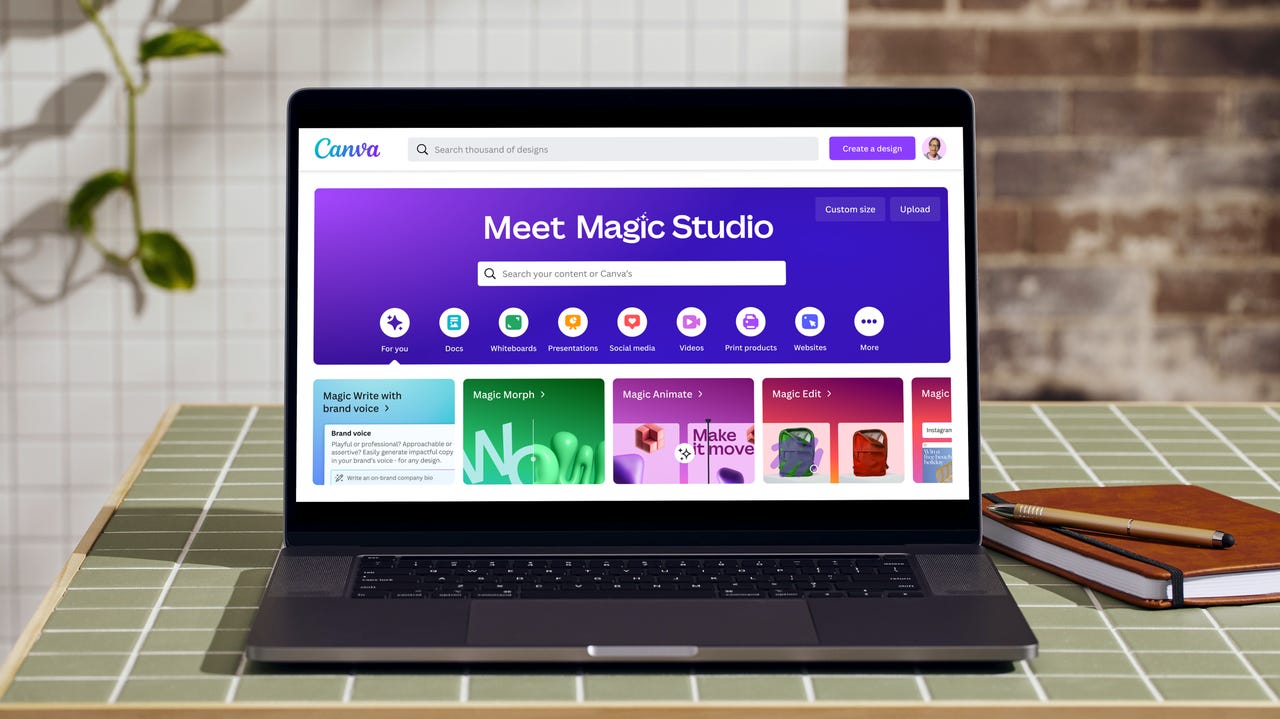
Canva unveils Magic Studio, its AI-infused design platform

meet-magic-studio.png

Canva has become a go-to graphic design platform for many people because of its intuitiveness and vast range of services. Now, Canva is celebrating its tenth anniversary by launching an AI-infused design platform — Magic Studio.

Magic Studio infuses AI across every part of Canva. It includes a suite of AI features that can do everything from creating an entire design for you to editing a short-form video from a few clips.

Also: LinkedIn just added AI-powered coaching and recruiting tools to make your job easier

The suite of tools in Magic Studio includes Magic Switch, Magic Media, Magic Design, Brand Voice, Magic Morph, Magic Grab, Magic Expand, AI Apps on Canva, and more, according to the release.

With Magic Switch, users can take a given piece of content and ask Canva to instantaneously convert it to a different format. For example, a user could take a whiteboard of ideas and ask Canva to turn it into a presentation.

Magic Media gives users the ability to generate images and videos from a simple text prompt. The video-generation capabilities are supported by Runway's Gen-2 model.

Also: How AI can turn any photo into a professional headshot

The Magic Design feature is similar to Magic Media, except that instead of turning your text prompt into an image or video, the tool turns it into a design.

All a user needs to do is type an idea and select a color scheme to have an entire design generated in seconds. These designs can range from from a poster to a full presentation on a specific topic.

The Magic Design feature will be helpful for professionals who are working on a project, such as a presentation on the fly, or for an inexperienced user who lacks the skill to generate a design that is visually appealing.

Magic Design also works with video. It can take a couple of your video clips and images, and generate a short video clip that even includes music recommendations.

Magic Morph uses a text prompt to transform the appearance of words and shapes into anything the user would like to see, including new colors, textures, and more.

To help transform your photos into what you wish they looked like initially, Canva has Magic Grab, which allows you to select and separate any object in a picture, and Magic Expand, which can recover whatever is outside the frame, similar to Adobe's Generative Fill.

Also: ChatGPT's new web browsing feature is a big disappointment. Use this plugin instead

In addition to helping with visual needs, Canva is supercharging its Magic Write copywriting expert to be aware of Brand Voice, which can help you insert your brand's voice into any design or document.

Both Magic Write and Brand Voice can be combined to help produce text for the various stages of copywriting, from the brainstorming process, to the first-draft generation, and all the way through to completion.

Lastly, AI Apps on Canva groups all the existing AI productivity tools and puts them in one place, allowing users to access tools such as OpenAI's DALL-E and Imagen by Google.

All of the Magic Studio products will be available at no additional cost for unlimited use in Canva Pro and Canva for Teams. Free users can experience some of the Magic Studio products without charge.

To further its commitment to ethical AI, Canva announced a Creator Compensation Program, which will give $200 million during the next three years in content and AI royalties to Canva Creators whose content was used to train the company's AI models. Creators will also be given the ability to opt out of having their content used for training.

Also: Beware: Your Bing Chat responses may include links to malware

Recently, many companies with AI models, such as Adobe and Getty Images, have taken the route of paying contributors in royalties for their contributions to model training.

Artificial Intelligence

Meta debuts generative AI features for advertisers

Meta debuts generative AI features for advertisers Sarah Perez @sarahintampa / 18 hours

Meta announced today it’s rolling out its first generative AI features for advertisers, allowing them to use AI to create backgrounds, expand images and generate multiple versions of ad text based on their original copy. The launch of the new tools follows the company’s Meta Connect event last week where the social media giant debuted its Quest 3 mixed-reality headset and a host of other generative AI products, including stickers and editing tools, as well as AI-powered smart glasses.

In the case of AI tools for the ad industry, the new products may not be as wild as the celebrity AIs that let you chat with virtual versions of people like MrBeast or Paris Hilton, but they showcase how Meta believes generative AI can assist the brands and businesses that are responsible for delivering the majority of Meta’s revenue.

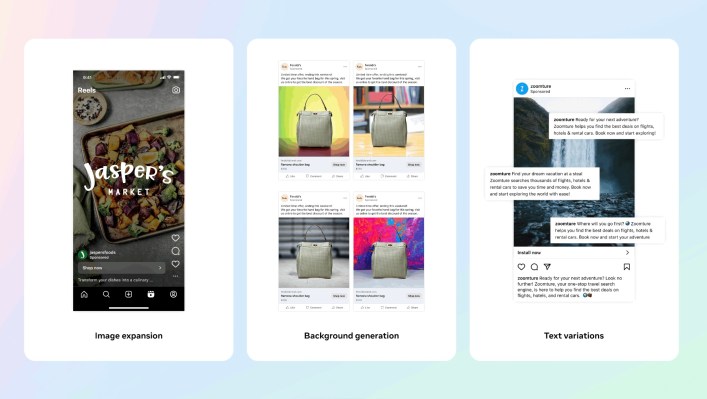
The first among the trio of new features allows an advertiser to customize their creative assets by generating multiple different backgrounds to change the look of their product images. This is similar to the technology that Meta used to create the consumer-facing tool Backdrop, which allows users to change the scene or the background of their image by using prompts. However, in the ad toolkit, the backgrounds are generated for the advertiser based on their original product images and will tend to be “simple backgrounds with colors and patterns,” Meta explains. The feature is available to those advertisers using the company’s Advantage+ catalog to create their sales ads.

Another feature, image expansion, allows advertisers to adjust their assets to fit different aspect ratios required across various products, like Feed or Reels, for example. Also available to Advantage+ creative in Meta’s Mads Manager, the AI feature would allow advertisers to spend less time repurposing their creative assets, including images and video, for different surfaces, Meta claims.

With the text variations feature in Meta Ads Manager, the AI can generate up to six different variations of text based on the advertiser’s original copy. These variations can highlight specific keywords and input phrases the advertiser wants to emphasize, and advertisers can edit the generated output or simply choose the best one or ones that fit their goals. During the campaign, Meta can also display different combinations of text to different people to see which ones drive better responses. However, Meta won’t showcase the performance details for each specific text variation, it says, as the reporting is currently based on a single ad. However, the more options the advertiser selects to run, the more opportunities they’ll have to improve their ad performance, Meta informs them.

Meta says it’s already tested these AI features with a small but diverse set of advertisers earlier this year, and their early results indicate that generative AI will save them five or more hours per week, or a total of one month per year. However, the company admits that there’s still work ahead to better customize the generative AI output to match each advertiser’s style.

In addition, Meta says there are more AI features to come, noting it’s working on new ways to generate ad copy to highlight selling points or generative backgrounds with tailored themes. Plus, as it announced at Meta Connect, businesses will be able to use AI for messaging on WhatsApp and Messenger to chat with customers for e-commerce, engagement and support.

KDnuggets News, October 5: 5 Free Books to Help You Master Python • Top 7 Free Cloud Notebooks for Data Science

Featured Posts

  • 5 Free Books to Help You Master Python
  • Top 7 Free Cloud Notebooks for Data Science

From Our Partners

  • Unify Batch and ML Systems with Feature/Training/Inference Pipelines from Hopsworks

This Week's Posts

  • Deploying Your First Machine Learning Model
  • Investing In AI? Here Is What To Consider
  • Synapse CoR: ChatGPT with a Revolutionary Twist
  • Diving into the Pool: Unraveling the Magic of CNN Pooling Layers
  • Introduction to Cloud Computing for Data Science
  • A Comparative Overview of the Top 10 Open Source Data Science Tools in 2023
  • Getting Started with PyTorch in 5 Steps
  • Deploying Your ML Model to Production in the Cloud
  • Getting Started with Google Cloud Platform in 5 Steps
  • Parallel Processing in Prompt Engineering: The Skeleton-of-Thought Technique
  • The Quest for Model Confidence: Can You Trust a Black Box?
  • Want to Become a Data Scientist? Part 2: 10 Soft Skills You Need
  • Automate Graphic Design Activity with ChatGPT Canva Plugin
  • Tips for Successfully Navigating Beginner Data Science Job Interviews
  • Job Trends in Data Analytics: NLP for Job Trend Analysis
  • Top 5 Data Management Tools You Should Know

From Around The Web

  • Statistical Tests in R via Machine Learning Mastery
  • 10 Must-Know Machine Learning Algorithms via Data Science Horizons
  • Mastering Language Models via Towards Data Science

More On This Topic

  • 5 Free Books to Help You Master Python
  • Top 7 Free Cloud Notebooks for Data Science
  • Top 5 Free Cloud Notebooks in 2022
  • KDnuggets News, June 22: Primary Supervised Learning Algorithms Used in…
  • New From Anaconda! Data Science Training and Cloud Hosted Notebooks
  • KDnuggets News, October 5: Top Free Git GUI Clients for Beginners • A Day…

Made by Google: Pixel 8 Available October 12

Google announced the release date and prices of the Pixel 8 and Pixel 8 Pro phones and the Pixel Watch 2 during its Made By Google keynote presentation today. Generative AI natural language capabilities for Assistant with Bard were also announced.

The Pixel 8 and Pixel 8 Pro will be available on October 12. The Pixel 8 starts at $699. The Pixel 8 Pro starts at $999.

Google’s second-generation Pixel Watch will be available for purchase on October 12 for $349.99 for Bluetooth/Wi-Fi or $399 for 4G LTE.

Jump to:

  • Pixel 8 and Pixel 8 Pro specs and machine learning features
  • Google Pixel Watch 2 specs and more battery life, fitness tools
  • Generative AI added to Google Assistant

Pixel 8 and Pixel 8 Pro specs and machine learning features

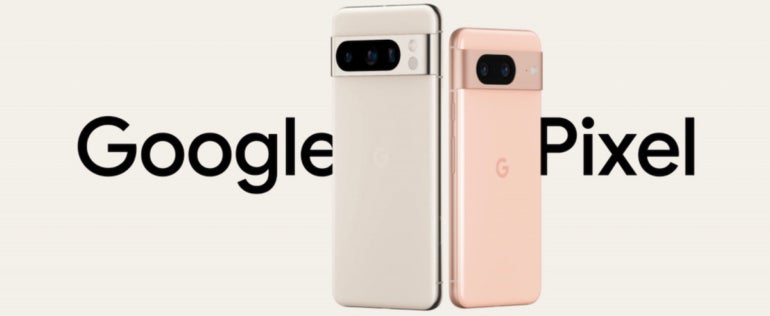
The Pixel 8 and Pixel 8 Pro (Figure A) will ship with the Android 14 operating system. Google expanded Pixel 8 and Pixel 8 Pro support to seven years. The Pixel 8 will have 8GB of RAM, while the Pixel 8 Pro has 12GB.

Figure A

The Pixel 8 and Pixel 8 Pro phones, side by side with Google Pixel inscription on background.
The Pixel 8 and Pixel 8 Pro phones. Image: Google

Pixel 8 boasts the 6.2″ Actua display for 42% increased brightness compared to Pixel 7. Pixel 8 Pro uses the 6.7″ Super Actua Display for maximum brightness and realism.

Pixel 8 Pro includes a new temperature sensor. For now, the temperature sensor is useful for checking whether a surface is hot enough to start cooking; Google has submitted an application to the FDA to allow it to be certified for use in checking body temperature as well.

Machine learning features enabled by the Google Tensor G3 chip

Both versions of the Pixel 8 run on the Google Tensor G3 chipset, which enables Pixel 8’s AI experiences by utilizing the following:

  • ARM CPUs.
  • An upgraded GPU.
  • A new image signal processor.
  • New imaging graph signal processing.
  • The TPU, the on-device AI processor.

The Google Tensor G3 runs twice as many machine learning models on-device compared to the Pixel 6. Google Tensor G3 can run machine learning models concurrently, enabling the new camera capabilities. Pixel 8 can send voice-to-text messages in multiple languages at the same time, and can read web pages out loud. Google Speech enables Call Assist, which removes background noise, helps navigate phone trees or screens spam calls. The Tensor chip enables improvements in video quality, including low-light video performance.

SEE: Google’s Vertex AI platform enables a variety of uses for the PaLM large language model (TechRepublic)

Google Pixel 8 Pro can run more generative AI processes on-device compared to Pixel 7; this helps with image editing when using Magic Eraser, which can crop unwanted elements from photos. An upcoming update to Recorder will have on-device generative AI in Pixel 8 Pro for summaries of the recordings that recap the highlights.

In the coming months, Pixel 8 Pro’s on-device large language model will provide smart replies in Gboard. Pixel 8 Pro will have a custom generative AI image model on-device, which will enable Zoom Enhance, a generative function that invents details on distant images when you zoom in. All of these features are enabled by Tensor G3 and will either ship with Pixel 8 Pro or come in a December feature drop on Pixel 8 Pro.

The Titan M2 security chip provides security enhancements by storing and verifying security keys. The chip hardware is made to be tamper-resistant as well.

Google Pixel Buds improvements

Pixel Buds, the earbuds that pair with Google Pixel phones, are getting enhancements that will start to roll out as software updates today.

  • Bluetooth Super Wideband on Pixel Buds Pro for Pixel 8 and Pixel 8 Pro will improve clarity during calls and enhance Clear Calling, which dampens down background noise.
  • Conversation Detection will automatically pause audio content when someone is speaking.
  • Google Pixel Buds Pro features reduced latency with Bluetooth for gaming.

Countries where you can buy the Pixel 8/Pro

Google Pixel 8 and Pixel 8 Pro will be available in Austria, Australia, Belgium, Canada, Denmark, Ireland, France, Germany, Italy, Japan, Netherlands, Norway, Portugal, Singapore, Spain, Sweden, Switzerland, Taiwan, U.K. and U.S.

Competitors to the Pixel 8

Google Pixel 8 and Pixel 8 Pro compete in the smartphone space primarily with the Samsung Galaxy S23 and Apple’s iPhone 15.

Google Pixel Watch 2 specs and more battery life, fitness tools

Google Pixel Watch 2 runs on a Quad Core CPU and has improved battery life: 24 hours of battery life and a 12-hour charge in 30 minutes. Pixel Watch 2 runs on Wear OS 4.

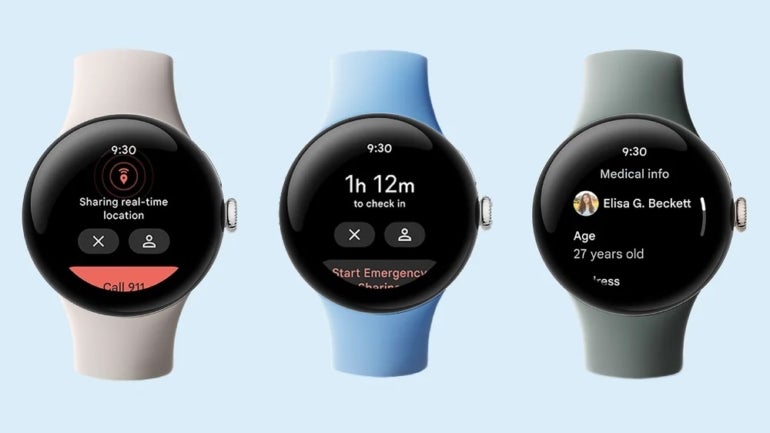
The Google Pixel Watch 2 has a variety of health-tracking features (Figure B), including a multi-path heart rate sensor, a skin temperature sensor and an electro-dermal activity sensor, which detects stress and prompts stress management techniques.

Figure B

Series of Pixel Watch 2s with health and safety features on display.
Pixel Watch 2 demonstrates health and safety features. Image: Google

Google Pixel Watch 2 has a low-profile design similar to the first-generation Pixel Watch, with a recycled aluminum housing, Fitbit CEO and cofounder James Park pointed out during the Made by Google presentation.

Park also highlighted generative AI features on the Fitbit app; it will be able to answer natural language questions about the activities the app records and generate charts showing relevant data. The generative AI capabilities will come to trusted testers in the Fitbit Lab program early next year, with priority access for Pixel phone owners.

Countries where you can buy the Pixel Watch 2

Google Pixel Watch 2 will be available in Australia, Austria, Belgium, Canada, Denmark, France, Germany, Ireland, Italy, Netherlands, Norway, Portugal, Spain, Sweden, Switzerland, Japan, Taiwan, U.K. and U.S.

Competitors

The two main alternatives to the Google Pixel Watch 2 are the Apple Watch Series 9 and the Samsung Galaxy Watch 6.

Generative AI added to Google Assistant

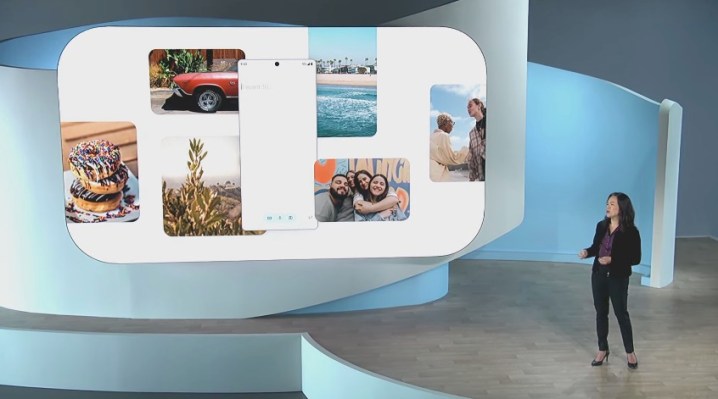
Sissie Hsiao, vice president and general manager of Google Assistant and Bard, announced Google Assistant is getting a generative AI enhancement. Google Assistant with Bard can interpret and respond to text, voice or images. It can scan emails for the most important information and respond to natural language questions about the emails. Hsiao demonstrated asking Google Assistant with Bard to create a social media post based on an image.

Google Assistant with Bard will soon be in beta testing with select users and will be generally available on Android or iOS mobile devices in the next few months.

Editor’s note: This article was updated after first publication.

Google Weekly

Subscribe to the Google Weekly Newsletter

Learn how to get the most out of Google Docs, Google Cloud Platform, Google Apps, Chrome OS, and all the other Google products used in business environments.

Delivered Fridays Sign up today

Arc browser is offering the most truly helpful spin on AI I’ve seen so far

Arc of light

I'm not a fan of AI. At least not when it comes to certain things, such as art (in any of its forms). I believe such technology has no place in the artistic realm.

But as far as helping to improve technology and how users work with applications, AI does have a number of important use cases.

Also: Why Safari is no longer my browser of choice on MacOS — and what I use instead

Most web browser companies are going for the typical AI sidebars, which is all fine and good because it can seriously empower web searches (so long as you vet the responses you receive for accuracy).

But when it came time to decide to add AI to Arc browser, the company behind the software decided it wanted to take a very different approach. What it's adding to the browser is not only unique but could help to level up Arc browser until it's perfectly capable of standing with the biggest competitors in the market.

Introducing Arc Max

Arc Max is a collection of five AI-powered features, powered by a combination of GPT-3.5 and Anthropic. Those features are:

  • Ask ChatGPT — this will allow you to ask ChatGPT your questions directly from the Arc Command Line, which can be brought up with the Command+L keyboard shortcut.
  • Tidy Tab Title — if you've ever pinned a tab, you might have experienced an instance where the title of the tab is too lengthy to be of any help. With Tidy Tab Title, Arc browser uses AI to rename the tab to make it easier to locate.
  • Tidy Downloads — this is similar to Tidy Tab Title, only AI will be used to rename downloaded files to an actual descriptive title.
  • Five-Second Previews — If you hover over any link in Arc browser and press the Shift key, Arc browser will fetch a brief summary and preview of the link in question.
  • Ask On Page — When you use the Find feature (Command+F) to locate a word or phrase on a website, if your keyword (or phrase) isn't found, Arc will lean into AI to find an answer for you.

The goal of Arc browser is not to force AI into the faces of users but to take a more subtle approach and add features that are actually useful on a daily basis.

Also: Firefox vs Opera: Which web browser is best for you?

It's my humble opinion that this is exactly the approach all web browser makers should take. Give the users tools that can leverage AI and have real-world, everyday applications. Instead of giving users the tools to "cheat" with AI (such as writing papers, articles, and books for them), give them something that makes using a web browser more efficient and helpful.

Another reason why I really appreciate Arc browser's take on AI is that it won't make the browser feel bloated. I've experimented with some browsers that have opted to go all in on AI and I wind up disabling those features because the "browser as everything" never works well. Think of Firefox in the early 2000s and how bloated and slow it became.

Also: Chrome is the top browser, but you won't believe what's (a distant) second

Given that the majority of users on the planet spend the majority of their time in a web browser, those tools need to not be weighed down by features they'll only use on occasion. With Arc browser's take on AI, users will actually use the features daily and won't feel as if the browser has been hindered by the addition. Browsers need to be fast and useful, not slow and useless. Every browser maker on the market should take a lesson from what Arc browser is about to release.

Speaking of which, you can download Arc Max for MacOS now or put yourself on the waitlist for the Windows version.

Featured

Google Assistant is getting AI capabilities with Bard

Google Assistant is getting AI capabilities with Bard Sarah Perez @sarahintampa / 16 hours

Google Assistant is getting an AI-powered update. At today’s Made By Google live event, the company introduced Assistant with Bard, a new version of its popular mobile personal assistant that’s now powered by generative AI technologies. Essentially a combination of Google Assistant and Bard for mobile devices, the new assistant will be able to handle a broader range of questions and tasks, ranging from simple requests like “what’s the weather?,” “set an alarm” or “text Jenny,” as before, to now more intelligent responses provided by Google’s Bard AI.

This includes being able to dive into your own Google apps, like Gmail and Google Drive, to offer personalized responses to queries on an opt-in basis. That means you could do things like ask Google Assistant questions like “catch me up on my important emails I’ve missed this week,” and the digital helper can dig up emails you need to know about.

This feature builds on the update Bard released in mid-September, which allows the AI chatbot and ChatGPT rival the ability to integrate with Google’s own apps and services, including Gmail, Docs, Drive, Maps, YouTube and Google Flights and hotels, through “Bard extensions.” Users who have already opted in to allow Bard to access their Gmail, Drive and Docs won’t have to do so again when using the feature in Assistant, but those who haven’t yet tried extensions would need to give Bard permission before it could respond to those personal queries in the Assistant app.

In addition to finding things in your inbox, Google suggests the expanded capabilities could be used for personal tasks, like trip planning, creating a grocery list or writing a caption for social media, for example. With the launch of the new experiment, Google aims to examine how people use Assistant with Bard before launching the functionality broadly to the general public across Android and iOS.

And because Bard is now on mobile devices, users can interact with it in a variety of ways.

“It can hear through the microphone. It can speak to you through voice output. It can see through your camera. And it can even take actions to help you out,” explains Sissie Hsiao, vice president of Google Bard and Assistant, in an interview about the new functionality. “And of course it’s on the device that you have with you at all times, which is your phone,” she says.

The exec positions the expansion as a major leap for the company’s digital assistant, which has before been limited to more basic tasks.

Image Credits: Google

“Google Assistant, over the past seven years, has been helping hundreds of millions of people get things done through natural and conversational methods. So things like setting alarms, asking for weather, or making quick calls using a simple ‘Hey, Google.’ And now with generative AI coming there’s new opportunities to deliver an even more intelligent, more personalized, more intuitive digital assistant. And we think it should extend beyond voice.”

In fact, users can interact with Google Assistant with Bard in three ways. They can ask it questions and follow-ups with their voice, type in their queries, or they can leverage the camera through Bard’s Google Lens integration. The latter allows users to take or upload pictures to accompany their queries.

Hsiao says people have been using this feature in a number of unique ways — like taking pictures of their clothes and shoes and asking Bard how to style them, taking pictures of apps and asking Bard to write the code scaffolding.

“We want Bard to be multimodal,” she explains. “It can see. It can hear. It can speak to you.”

In addition, on Pixel devices and select Samsung phones, you can long-press on the power or home button, respectively, to bring up a pop-up, floating window that offers a conversational overlay on the page you’re viewing, allowing Bard to respond to what you’re seeing on the screen. For example, you could pull up Bard over a picture of a hotel and ask it if the hotel is available to book this weekend.

Image Credits: Google

With Bard’s integration into Google Assistant, it’s not limited in any way from the web version — which means it can now also double-check your answers if there’s concern about AI hallucinations — a problem modern AIs face as they construct incorrect answers based on false information. That feature was also rolled out in mid-September.

Google says Assistant with Bard will initially launch in a limited set of markets — and not only English-speaking ones. It hasn’t yet determined which markets or languages will be first to receive the update, however. In the coming months, it will roll out more broadly to iOS and Android mobile users before exploring the possibility of bringing the upgraded Assistant functionality to other platforms.

Read more about Google's 2023 Pixel Event on TechCrunch

Zoom unveils an AI-powered collaborative workplace, Zoom Docs

zoom-docs-in-meeting-collaboration.png

Since Zoom first became a cornerstone of hybrid workflows with the onset of the pandemic, generative AI rose to fame. As a result, Zoom has been finding ways to incorporate the technology into its platform, and its latest attempt is through Zoom Docs.

Zoom Docs is an AI-supported, collaborative document workspace tightly integrated into Zoom that gives users a space to create and collaborate on projects.

Also: Hurtling toward generative AI adoption? Why skepticism is your best protection

Zoom's take on traditional document editors like Google Docs or Microsoft Word has the same formatting options, including text formatting, chart and table options, and more.

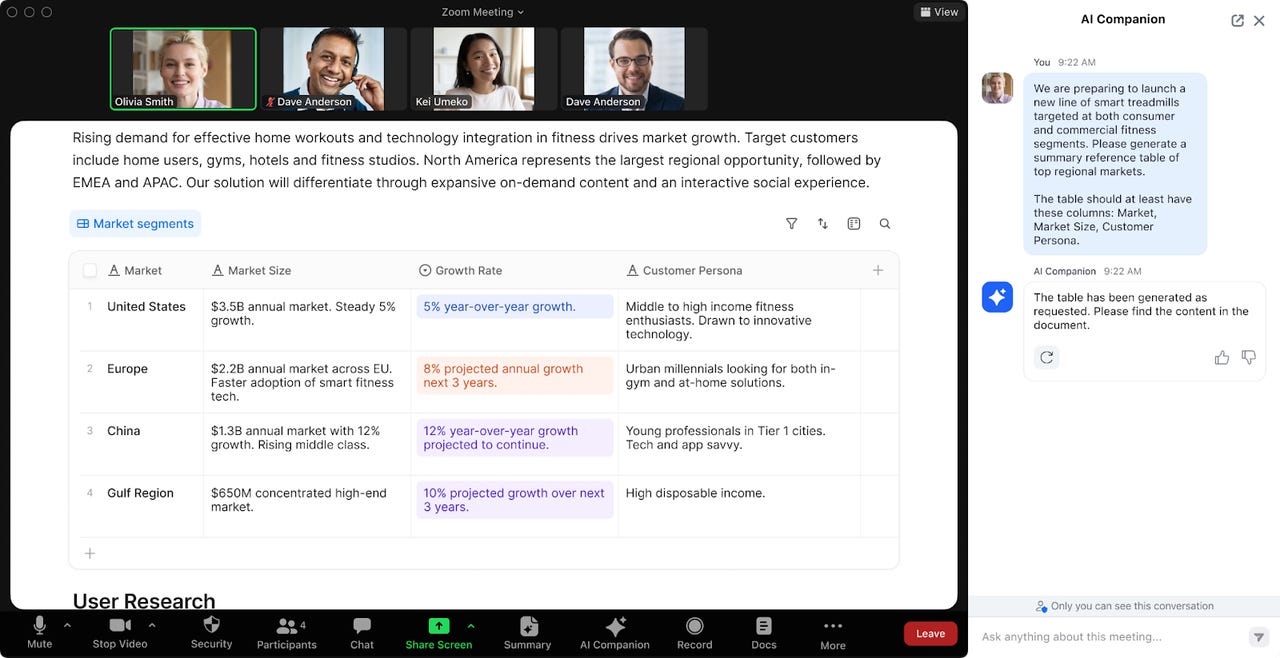
However, what makes it stand out is its integration with Zoom, which allows users to leverage Zoom's AI Companion to accomplish a series of tasks, such as populating the Doc with content from Zoom Meetings or Team Chat messages.

Zoom's AI Companion can also assist with the Doc editing process by editing for Doc tones, summarizing Doc content, brainstorming and generating Doc text, and more.

Because Zoom Doc is natively embedded into Zoom, it is easier to access than using a third-party application, which involves having to screen share and toggle to different screens at the same time.

Zoom Docs can be found across Zoom's workspace, including Meetings, Team Chat, desktop, web, and mobile apps, according to the release.

To foster a collaborative workspace environment, Zoom Docs also features ways to assign tasks, mention colleagues, add comments, and more.

Also: Google Assistant is finally getting the AI upgrades it deserves. Here's what's new

"Zoom is helping our customers by bringing the definition of a 'doc' into 2023 — with powerful document authoring and collaboration capabilities, modern collaboration tools, and a next-gen workspace built from the ground up with AI at its heart; Zoom Docs is that solution," said Smita Hashim, chief product officer at Zoom.

Zoom Docs is not available yet but is expected to be generally available in 2024, according to the company.

Pixel 8 Pro runs Google’s generative AI models on-device

Pixel 8 Pro runs Google’s generative AI models on-device Kyle Wiggers 13 hours

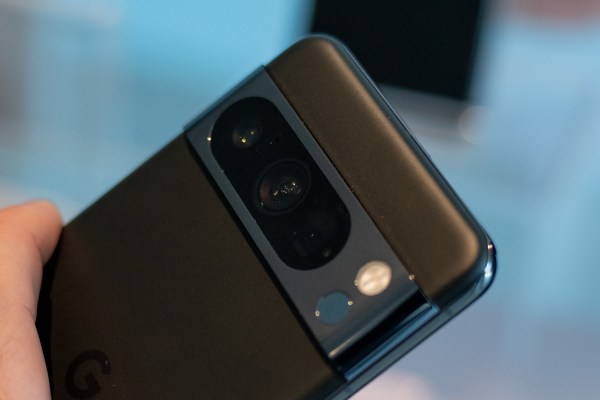
Google’s newly announced Pixel 8 Pro will be the first hardware to run Google’s generative AI models on-device, according to Rick Osterloh, SVP of devices and services at Google.

Onstage at an event today, Osterloh said that the Pixel 8 Pro’s custom-built Tensor G3 chip, which is designed to accelerate AI workloads, can run “distilled” versions of Google’s text- and image-generating models to power a range of applications, like image editing.

“We’ve worked closely with our research teams across Google to take advantage of their most advanced foundation models and distill them into a version efficient enough to run on our flagship Pixel,” Osterloh said.

Thanks to the on-device models, Google’s managed to improve Magic Eraser, its post-processing tool for touching up photos, so that it can remove larger objects and people smudge-free. This enhanced Magic Eraser generates new pixels to fill in the spaces left by anything removed from a shot, Osterloh says, resulting in a higher-quality finished image.

Zoom will get better, too, Osterloh claims, thanks to a new on-device model that can “intelligently” sharpen and enhance the details of photos.

And the benefits of on-device processing extend to audio recording. Soon, the Pixel 8 Pro’s recording app will deliver summaries of recordings that recap the highlights of meetings.

Elsewhere, a large language model running on the Pixel 8 Pro will power smart replies in Google’s keyboard app, Gboard. Osterloh says that the upgraded Gboard will generate “higher-quality” reply suggestions with better overall conversational awareness.

With the exception of Magic Eraser, which is available on the Pixel 8 Pro at launch, the on-device generative AI features will arrive in December via an update, Osterloh said.

Read more about Google's 2023 Pixel Event on TechCrunch