Duet AI: What Google Workspace Admins Need to Know to Add This Service

Google announced in late August 2023 that Duet AI for Google Workspace had been made generally available as an add-on service. The key features of this AI service are detailed below, along with the steps a Google Workspace administrator will need to take to make Duet AI available to people in their organization.

Pricing and general deployment guidance are also covered, as the price of a Duet AI license may exceed the cost of many Workspace licenses. As always, make sure any usage of AI complies with your organization’s policies.

Visit Duet AI

Jump to:

  • What features does Duet AI include?
  • How much does Duet AI cost?
  • How to add Duet AI in Google Workspace
  • Duet AI’s business benefits and deployment guidance

What features does Duet AI include?

Duet AI for Google Workspace offers a variety of features in each of the following applications, including:

  • Google Docs
    • Help me write (generate text)
    • Editing help: Tone, Summarize, Bulletize, Elaborate, Shorten, Rephrase.
    • Proofread: Conciseness, Active voice, Wording, Sentence split
  • Gmail
    • Help me write (generate email text)
    • Editing help: Formalize, Elaborate, Shorten, I’m feeling lucky (add creative details)
  • Google Slides
    • Help me visualize (listed as a Labs feature)
  • Google Sheets
    • Help me organize (generate sheet content)
  • Google Meet
    • Generate a background (generate images)
    • Translated captions in various additional languages
    • Studio look

Google plans to provide more features and functions to Duet AI customers in the future. Keep in mind that the generative AI features are still in development and will not necessarily deliver factual content.

Visit Google Workspace

How much does Duet AI cost?

As of September 2023, Duet AI is available as a paid add-on service for the following editions of Google Workspace:

  • Business Standard or Plus.
  • Enterprise Essentials, Standard or Plus.
  • Education Fundamentals, Standard or Plus.
  • Frontline Starter or Standard.

A free trial is available if you wish to experiment with Duet AI for 14 days.

Duet AI costs $36 per account when paid monthly, which gives you the greatest month-to-month flexibility and annualizes to an expenditure of $432 per account per year. If you pay once a year, you will pay $360 per account per year, which gives you a bit of savings when calculated monthly (e.g., the equivalent of $30 per month).

Note: To use Duet AI, you must be at least 18 years old.

How to add Duet AI in Google Workspace

If you’re a Google Workspace administrator, you will need to complete two sets of steps to activate Duet AI for people in your organization. You first select the service and payment plan, and then add the service to one or more accounts.

Select your Duet AI plan

Before you can assign Duet AI licenses to accounts, you first need to add Duet AI as a subscription option.

  1. Sign in to the Admin console.
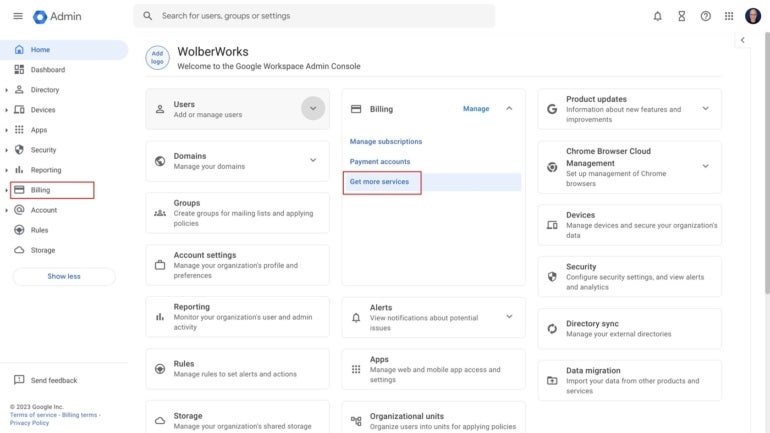
  2. Select Billing | Get More Services (Figure A).

Figure A

In the Admin console, select Billing, then Get More Services.
In the Admin console, select Billing, then Get More Services. Image: Andy Wolber/TechRepublic
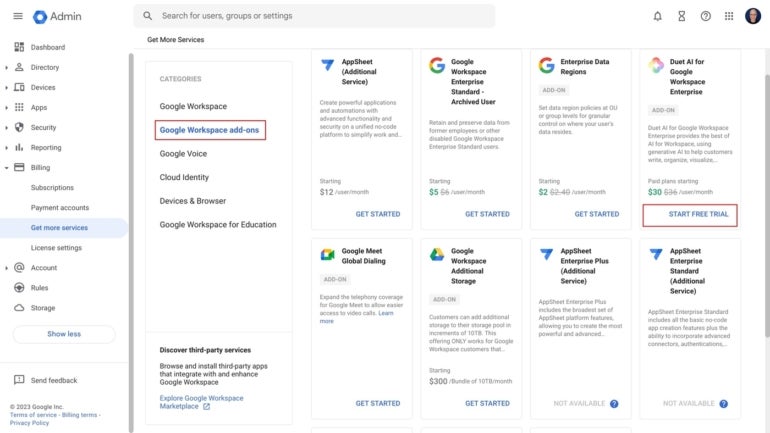
  1. From the Google Workspace add-ons category, choose Duet AI for Google Workspace Enterprise (Figure B). The Start Free Trial option offers access to the free trial and paid options.

Figure B

Select Duet AI from the Google Workspace add-ons area.
Select Duet AI from the Google Workspace add-ons area. Image: Andy Wolber/TechRepublic
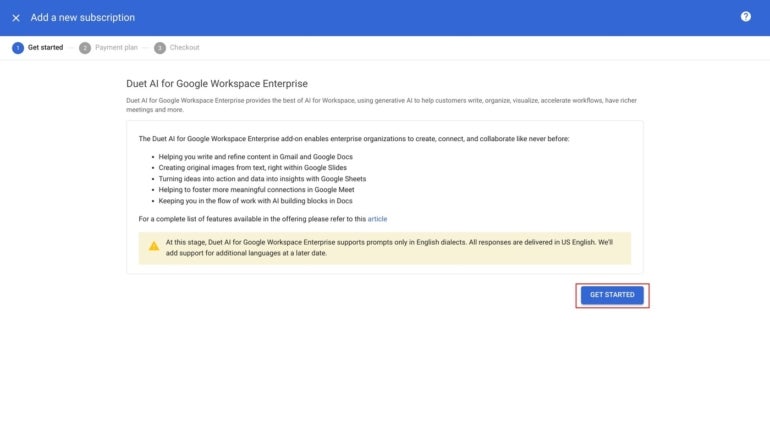
  1. Review the general information provided about Duet AI, and then select Get Started (Figure C).

Figure C

Review the brief description of Duet AI, then select the Get Started button.
Review the brief description of Duet AI, then select the Get Started button. Image: Andy Wolber/TechRepublic
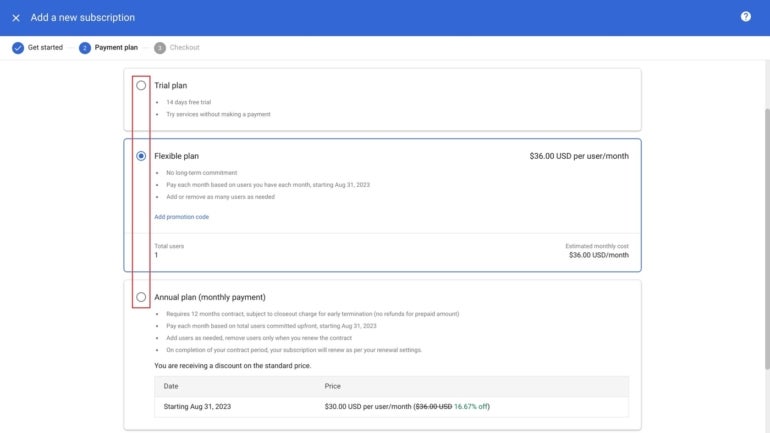
  1. Select one of the three options: Trial plan, Flexible plan or Annual plan (Figure D).

Figure D

Choose one of the three Duet AI subscription options. This shows the flexible plan, at a rate of $36 per user/month, selected.
Choose one of the three Duet AI subscription options. This shows the flexible plan, at a rate of $36 per user/month, selected. Image: Andy Wolber/TechRepublic
  1. Scroll to the bottom of the screen and select Checkout (Figure E).

Figure E

After selecting a plan, select Checkout to continue.
After selecting a plan, select Checkout to continue. Image: Andy Wolber/TechRepublic
  1. Review your selected plan, and then select Place Order (Figure F).

Figure F

Select the Place Order button. This enables the Duet AI license as an option for your account; however, no charges will occur yet, as no licenses have been assigned.
Select the Place Order button. This enables the Duet AI license as an option for your account; however, no charges will occur yet, as no licenses have been assigned. Image: Andy Wolber/TechRepublic
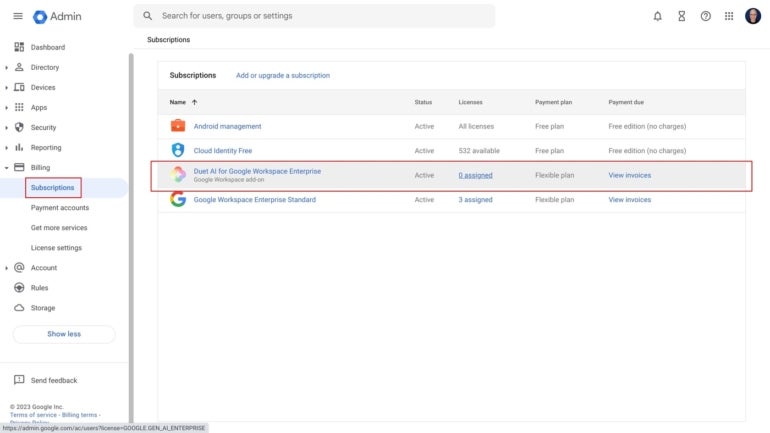
  1. You may review available licenses in the Admin console’s Billing | Subscriptions section (Figure G).

Figure G

Duet AI for Google Workspace Enterprise should now display as a subscription option.
Duet AI for Google Workspace Enterprise should now display as a subscription option. Image: Andy Wolber/TechRepublic

Assign Duet AI licenses

Next, you may add the Duet AI license to your Google Workspace accounts. As usual with Google Workspace licenses, you may add licenses to all accounts, to all accounts within an organizational unit or to individually selected accounts. The following shows how to add the Duet AI to an individual account.

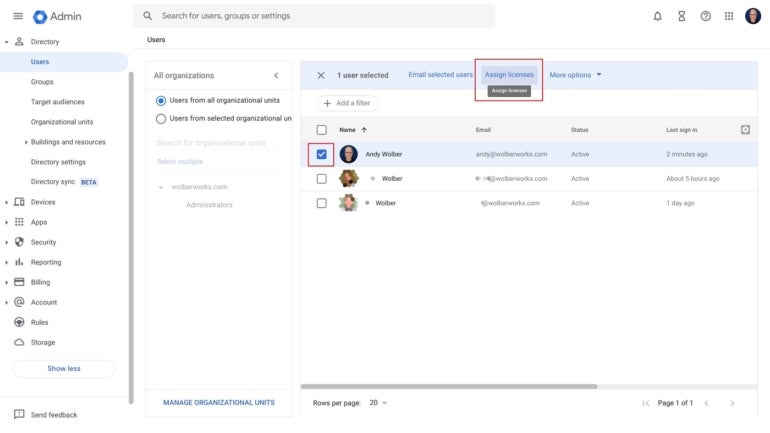
  1. Select one or more accounts to which you want to add a Duet AI license (e.g., check the box to the left of the account, as shown) and then select the Assign Licenses button from the menu (Figure H).

Figure H

Select accounts to receive Duet AI and then choose Assign Licenses.
Select accounts to receive Duet AI and then choose Assign Licenses. Image: Andy Wolber/TechRepublic
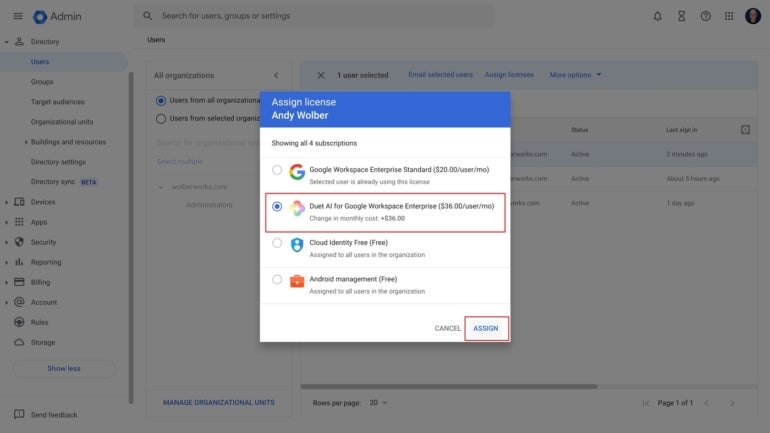
  1. From the menu that displays, choose Duet AI for Google Workspace Enterprise and then Assign (Figure I); this adds the service to the account. You will be billed based on the license you selected earlier, as indicated.

Figure I

Choose Duet AI from the available licenses and then Assign.
Choose Duet AI from the available licenses and then Assign. Image: Andy Wolber/TechRepublic

The Duet AI service will be added to the account. Once it is active, a brief Duet AI informational box will display when a person goes to each of the activated Duet AI applications on the web (e.g., Gmail, Google Docs, Google Slides, Google Sheets and Google Meet). People may then use Duet AI features.

Duet AI’s business benefits and deployment guidance

If cost is not a concern, go ahead and deploy Duet AI to everyone in your organization immediately. This lets people take advantage of all Duet AI features.

Most IT leaders will likely want to deploy some Duet AI licenses so that people in the organization can experiment and learn what Duet AI adds to standard Google Workspace functionality. For this purpose, you would budget for a number of monthly Duet AI licenses, assign the licenses to people for short-term testing, and then re-assign the licenses to different people after a month or months of testing.

As of September 2023, the strongest business case can be made for Duet AI writing and translation features. Anyone who writes with Google Docs or Gmail will likely find the editing and generative text features helpful. And people who otherwise might rely on different translation methods may value the expanded language translation capabilities in Google Meet. Organizations might prioritize the deployment of Duet AI for people and teams who need translation services and for people who write on a regular basis (e.g., PR, marketing and grant writers).

Mention or message me on Mastodon (@awolber) to let me know if your organization has activated Duet AI. If so, is Duet AI available to everyone? What features of Duet AI do you find most useful?

Google Weekly

Subscribe to the Google Weekly Newsletter

Learn how to get the most out of Google Docs, Google Cloud Platform, Google Apps, Chrome OS, and all the other Google products used in business environments.

Delivered Fridays Sign up today

DALL-E 3, OpenAI’s most advanced text-to-image model, is rolling out in beta now

DALL-E 3 versus DALL-E 2

If you have ever used an AI text-to-image generator, you are likely familiar with DALL-E, OpenAI's model that originally sparked the image generator interest. Last month, OpenAI announced an even more advanced DALL-E, and now it's here.

On Monday, OpenAI shared via its release notes that DALLE-3 is rolling out in beta, making DALL-E 3 available directly from ChatGPT on web and mobile for select users.

Also: China's Ernie AI is just as good as — or better than — ChatGPT, say its creators

Although the release notes didn't specify who DALLE-3 was rolling out to, when OpenAI originally announced the model in September, the company shared it would be rolling out to ChatGPT Plus and Enterprise customers in October.

To access DALL-E 3 in ChatGPT, users will have to choose DALLE-3 from the dropdown selector under the GPT-4 option.

Once selected, users can type in text descriptions as short as a sentence or as detailed as a paragraph to describe the new art they want to see depicted right into ChatGPT, where DALLE-3 will generate the image in seconds.

When first announced, OpenAI shared that DALLE-3 would be able to surpass DALLE-2 capabilities by creating more accurate images and better capturing the prompt's nuances.

Also: DALL-E 3 is now available for free in Bing Chat

If you want to test the difference for yourself, DALLE-3 is already available in Bing Chat for free. As seen by ZDNET's experience with DALLE-3 in Bing Chat, the images rendered are of higher quality, with more attention to detail.

The release notes also revealed that Browsing, which relaunched at the end of September after being removed from the platform due to user misuse, is moving out of beta.

This means that Plus and Enterprise users will be able to choose "Browse with Bing" from the GPT-4 model selector without having to switch the beta toggle.

Artificial Intelligence

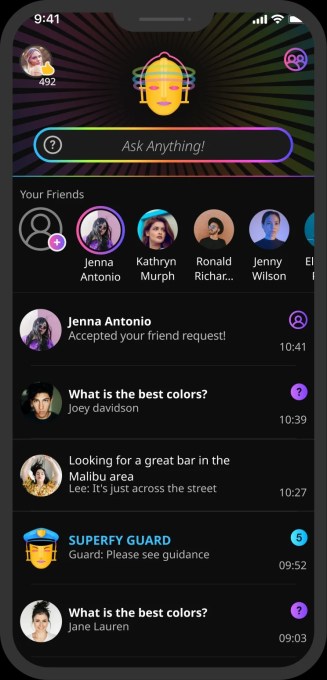
Anti-ChatGPT app Superfly uses AI to match people for live chats and answers to queries

Anti-ChatGPT app Superfly uses AI to match people for live chats and answers to queries Sarah Perez @sarahintampa / 7 hours

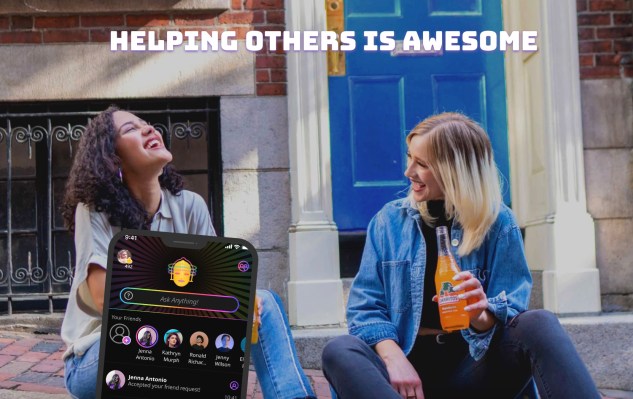
There are some things an AI chatbot can’t reliably answer, like how to solve a problem in your relationship, what outfit looks best, advice on a problem you’re facing, or maybe a list of personal recommendations about what movies or shows to watch, among other things. For these types of questions, users today still turn to other people — and online, that means using platforms like Reddit or Quora to get answers from other humans, not AI bots. Now, a mobile app called Superfly is looking to use AI to better connect its users to other people for answers to these types of questions in a new live chat social experience.

Originally envisioned as a sort of “Quora on steroids,” Tel Aviv-based Superfly was first launched in 2021 by married couple Michal Tamir and Gil Schoenberg, who had previously worked together at the Israeli-based data analytics company Treato. They imagined a way to use AI technology to match users in real-time with relevant people to answer their questions — that is, instead of typing questions into a search engine or chatting with ChatGPT, Superfly users could talk to real people to get answers and advice.

Image Credits: Superfly

The system uses a fully proprietary AI technology, Matchpoint AI, built on top of open-source LLMs to enable the matches. Its machine learning algorithms and AI models match users based on a variety of factors, including not only who’s online right now, but also if they typically use the app at a certain time of time, if they tend to answer a lot of questions, and if they have expertise that’s relevant to the specific query. For example, if someone asks “Should I buy an Ibanez or a Gibson guitar?,” the AI would try to match them to a user that has knowledge of instruments and music. But for queries asking for recommendations, the AI will match users based on the personal relevance of the reply to the user who posted the question.

The system involves an auto-generated dynamic database that identifies patterns within users’ discussions, instead of using classic NLP (Natural Language Processing) methods and pre-indexed dictionaries, the company explains. Over time, the engine learns from users’ behaviors about their interests, knowledge, and usage patterns to better connect them with relevant queries. The new LLM-based Matchpont AI also considers topic-related understanding and users’ shared interests, as well as “personal chemistry” when matching.

Image Credits: Superfly

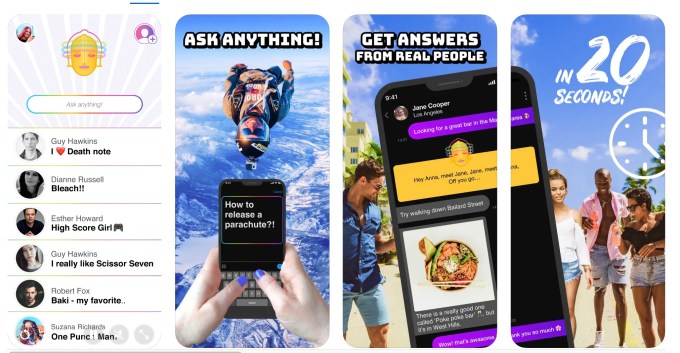
The startup claims that only 10% of posts are niche questions that don’t get answered fast enough by real people. In those cases, the Superfly bot will offer an automatic answer while users wait for human responses. The median time to get the first response from a real person is just around 20 seconds, Superfly’s founders tell TechCrunch.

The app will also send out push notifications to users who are not online to solicit more answers.

Although only available on iOS, Superfly claims to have 550,000 registered users and 85,000 monthly active users who engage with its app — primarily a young, Gen Z audience based in the U.S., Canada, and the U.K.

“For them, all of their popular social networks — TikTok, Instagram — are more about watching content and none of them fulfills one of the original purposes of the internet — which was connecting with other people from around the world,” the founders wrote in response to an email Q&A with TechCrunch. (A live interview was not possible as the founders are based in Tel Aviv, facing air raid sirens and school closures as a result of the Israel-Hamas war.)

“Add to that the fact that they don’t use Quora or forums, and also don’t use Google anymore to search because they want to hear from real people — Superfy in their eyes is something completely new, and the only place where they can instantly connect with relevant people and discuss everything on their mind,” they responded.

In time, however, they foresee Superfly expanding to reach a broader audience beyond Gen Z.

Image Credits: Superfly

In the months since its launch, the app has evolved from being an easy way to get quick answers to questions, like a live Quora, to become more of a place for users to have meaningful conversations with relevant people, the founders said. Plus, unlike sites like Quora and Reddit where only a small percentage of users contribute content, around 85% of Superfly’s users actively engage with the app by asking or answering questions. That has to do with the app’s chat-like interface which creates a more personal experience, the AI matching, and its accuracy in connecting the right people, Tamir and Schoenberg told TechCrunch.

This experience leads to more subjective answers, where users contribute their own ideas, tips, recommendations, and support, not necessarily the “right” answer, like AI chatbots aim to produce. This also leads to users spending more time in the app — the average time spent is now 31 minutes per day, as users engage in multiple chats and sessions per day, of approximately 160 seconds per session across an average of 16 chats per day. In total, users send over 10.5 million messages per month, the founders said.

As for what’s next for Superfly, the team said they’re trying to continue to work, despite the situation in Israel.

“It’s definitely not an easy situation, but we try to get back to routine and keep working. Our users are from the U.S. and around the world, so they are not impacted, and so it’s business as usual as much as possible,” they told us.

Superfly is backed by $5 million in funding plus an additional $1.5 million in grants from the Israeli Innovation Authority (IIA). The funding was across three rounds, most recently in September 2022, and they’re currently raising a post-seed round. Investors include friends and family, and private angel investors, such as Alon Matas, founder and President of BetterHelp, and the founders of an Israeli casual gaming company, Ilyon acquired by Miniclip.

The app is a free download on iOS, currently without in-app purchases.

Zoho’s Bid to Rival GitHub Copilot

Zoho's Bid to Rival GitHub Copilot

Zoho is building its own version of GitHub Copilot alternative. While speaking to the media last week in Bengaluru, Sridhar Vembu, co-founder and CEO of Zoho Corporation, announced the company’s plans to work on ‘Programmer Productivity’ – a platform that will focus on code generation.

Prioritising accurate results, Vembu is personally involved in the project and aims to create a product that is unlike ChatGPT, which Vembu believes generates hallucinatory answers 20% of the time.

“In business, you cannot make facts up,” said Vembu, while explaining Zoho’s new coding product that is in development. He believes that models that generate incorrect answers limit business usage, “If you generate code out of it, that limits the usage of the code too.” With the new coding product, Zoho looks to eliminate inaccuracy.

Zoho Enters The Coding Ring

In an exclusive interaction with AIM last week, Vembu highlighted AI neural network’s capability to regurgitate memorised information, which can also lead to hallucinated output. Overcoming faulty output is Vembu’s biggest priority in the upcoming product, as he believes that fixing bugs is where a developer spends most of their time. Furthermore, security is another concern area that will be addressed as well.

Concoction of Training Methods

While the how part of it is not fully detailed, Vembu confirmed that there would be a combination of training methods. “I am not taking the conventional, ‘training a billion parameter’ approach, although that will go in parallel. We are investing in compiler technology,” said Vembu.

A compiler translates high-level programming languages into machine code or lower-level codes for executing into a computer’s hardware. As explained by Vembu, any form of java code, c-code, etc. goes through a compiler. He believes that this technology has huge potential but it is not fully explored as many companies do not invest in the same. “Microsoft and Google have invested in it, but Salesforce will not have.”

Vembu also said that Zoho is investing in this technology owing to security. “If we ensure correctness, the compiler can ensure correctness, and we can also ensure that you are secure.” There are 20 people working with Vembu on the R&D of this project, and he has personally filed 10 patents in the last few years.

An Unconventional Move To Take on Others

Pioneering as a SaaS company providing a number of CRM-based products and services, the company is probably moving to an approach that integrates the best of two worlds. With the integration of ChatGPT in their product suite, Zoho has been embracing AI extensively. The company recently announced additional features such as Cliq Rooms, to their existing AI-enabled Zoho Cliq platform.

However, the foray into coding assistance for programmers is an unconventional development for the company.

With major players already in the market, such as Replit, GitHub Copilot, and the recent Code Interpreter from ChatGPT, Zoho’s entry in a similar segment is probably a push to utilise their current customer-enterprise base of 100 million users.

Microsoft’s GitHub Copilot is being used by a million developers across 20,000 organisations today and is considered the world’s most widely adopted AI developer tool. The platform is powered by generative AI developed by GitHub, OpenAI and Microsoft.

Closely competing with each other is Replit. The company recently made their suite of AI products called Replit AI, accessible to all. The coding assistance feature will be open to over 23 million developers. There are also other players such as AmazonCode Whisperer in the race.

Relatively new to the coding assistance game is ChatGPT Code Interpreter. However, there is no information available about exclusive developer communities for the product, similar to the communities established by GitHub, Replit and other platforms.

Closer to its home turf, Zoho’s competitor Salesforce has also entered the same segment. Salesforce, another cloud-based CRM software company, recently announced its coding copilot platform ‘Anypoint Code Builder‘. The integrated development environment (IDE) enables developers to create APIs, simplifies and enables coding for developers. It is currently in beta and will be available in the second quarter of 2024.

While Zoho may be late in the game, the different training approaches adopted by the company for building the product will probably determine its success. “Correct by design is where the action is and that’s where we are investing in,” said Vembu about the programmer productivity product goal.

The post Zoho’s Bid to Rival GitHub Copilot appeared first on Analytics India Magazine.

40% of Labour Force Will be Affected by AI in 3 Years

40% of Labour Force Will be Affected by AI in 3 Years
Image by Editor

Over the past decade or two, we have seen a rise in e-learning platforms to meet the demand in the technology sector. Many people delved into it as it seemed at the time to be the next big thing to get into. The salaries were generous and there was always room for growth. At that point, it seemed like a win-win.

However, with the rise of Generative AI having a significant impact in today’s various industries, a big concern for many of these mature organizations is being able to fill up the skill gap. If organizations want to remain competitive, they need to have a skilled team behind them.

AI can automate various tasks, naturally pushing certain job roles out of the door. So where does that leave us?

So is it still a win-win situation anymore, or is it do or die? A bit dramatic, I know.

Let’s Check the Stats

According to The World Economic Forum (WEF), the new technologies that are amongst us and their continuous growth will disrupt 85 million jobs globally between 2020 and 2025—and create 97 million new job roles. Yikes, only 2 more years to go. This was posted in 2020, with them also stating that analytical thinking, creativity and flexibility are among the top skills that will be needed for the year 2025.

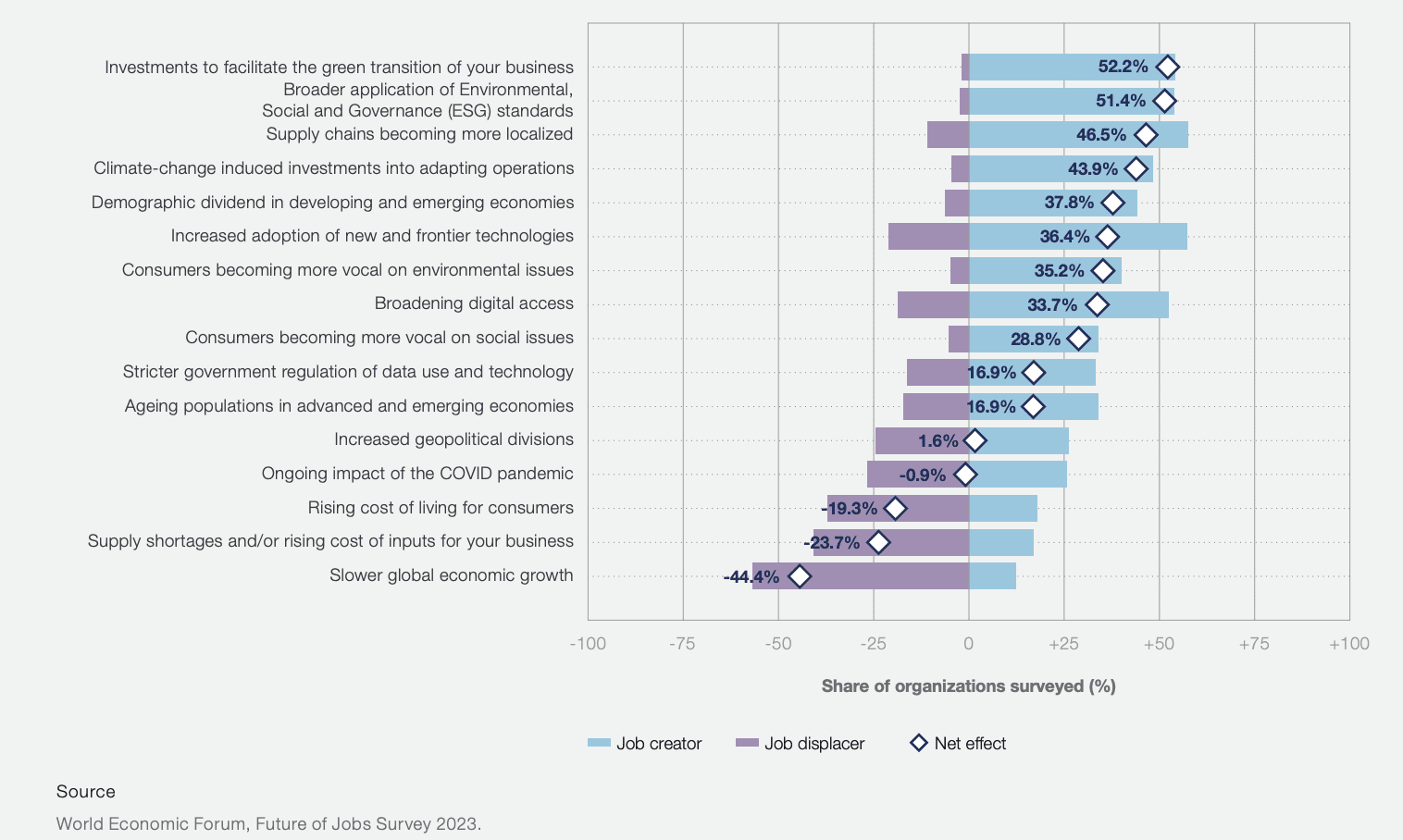
As you can see from the image from The World Economic Forum (WEF) report below, this is the expected impact of macrotrends on jobs between the years 2023 to 2027. On the left-hand side, you can see how expected trends will create or displace jobs.

40% of Labour Force Will be Affected by AI in 3 Years
Image by WEF

To have a look at the full report, please refer to here.

Another study from the IBM Institute for Business Value stated that

“4 in 5 executives say generative AI will change employee roles and skills. While workers at all levels will feel the effects of generative AI, lower-level employees are expected to see the biggest shift.”

It seems that Gen Z who had more access to technology growing up and who would have probably felt the effects of recessions, will also have the greatest impact when it comes to Generative AI and finding jobs.

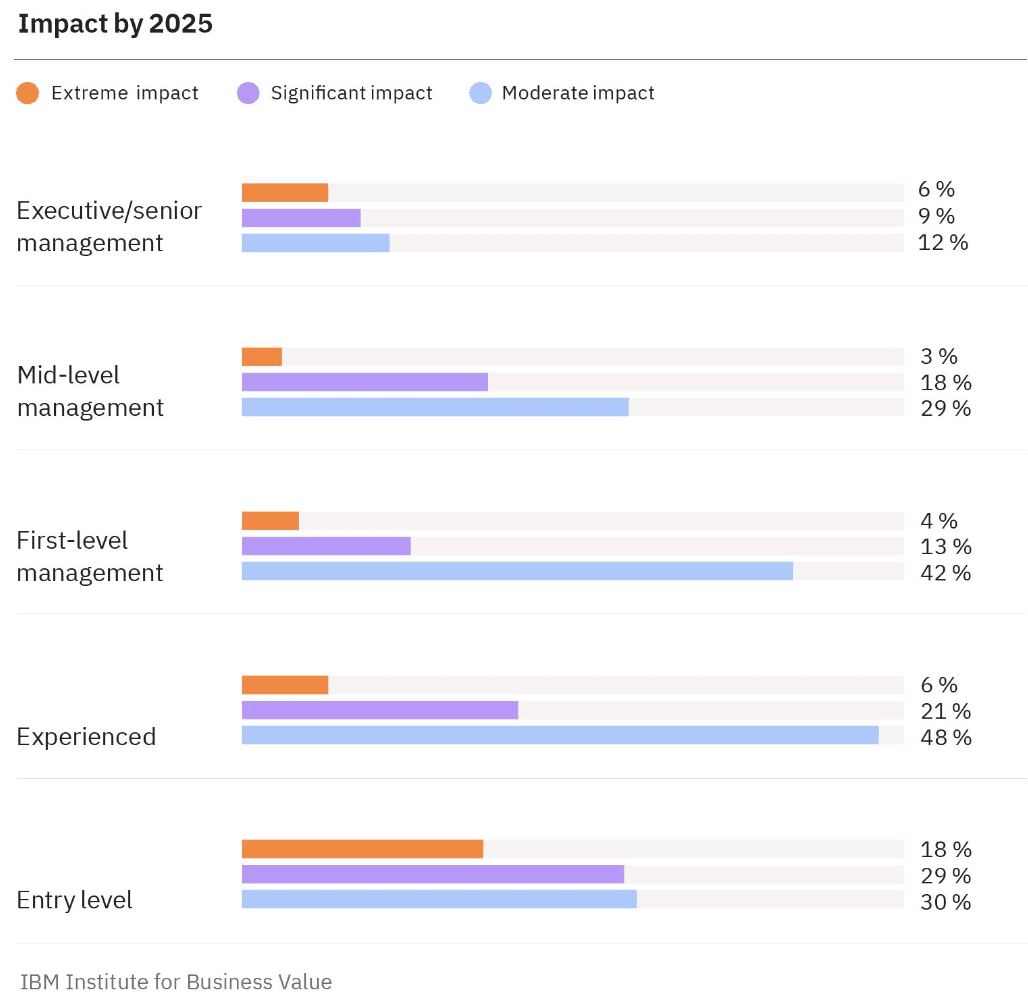
Looking at the image below from the IBM report, as we expected, executives and senior management will have the least impact. But as you have less experience, the impact becomes greater. Entry-level employees will have less impact than experienced and first-level management, which may contradict the above statement.

Is this due to the ability to upskill entry-level more swiftly than experienced and first-level management employees?

40% of Labour Force Will be Affected by AI in 3 Years
Image by IBM report

The New Skills Paradigm

A part of the IBM report which was interesting to me was the new skills paradigm. When we’re thinking about keeping up with technology, the majority of people are thinking about learning hard skills such as coding or getting into tech product management. This IBM report shows that executives estimate that 40% of their workforce will need to reskill due to AI and automation.

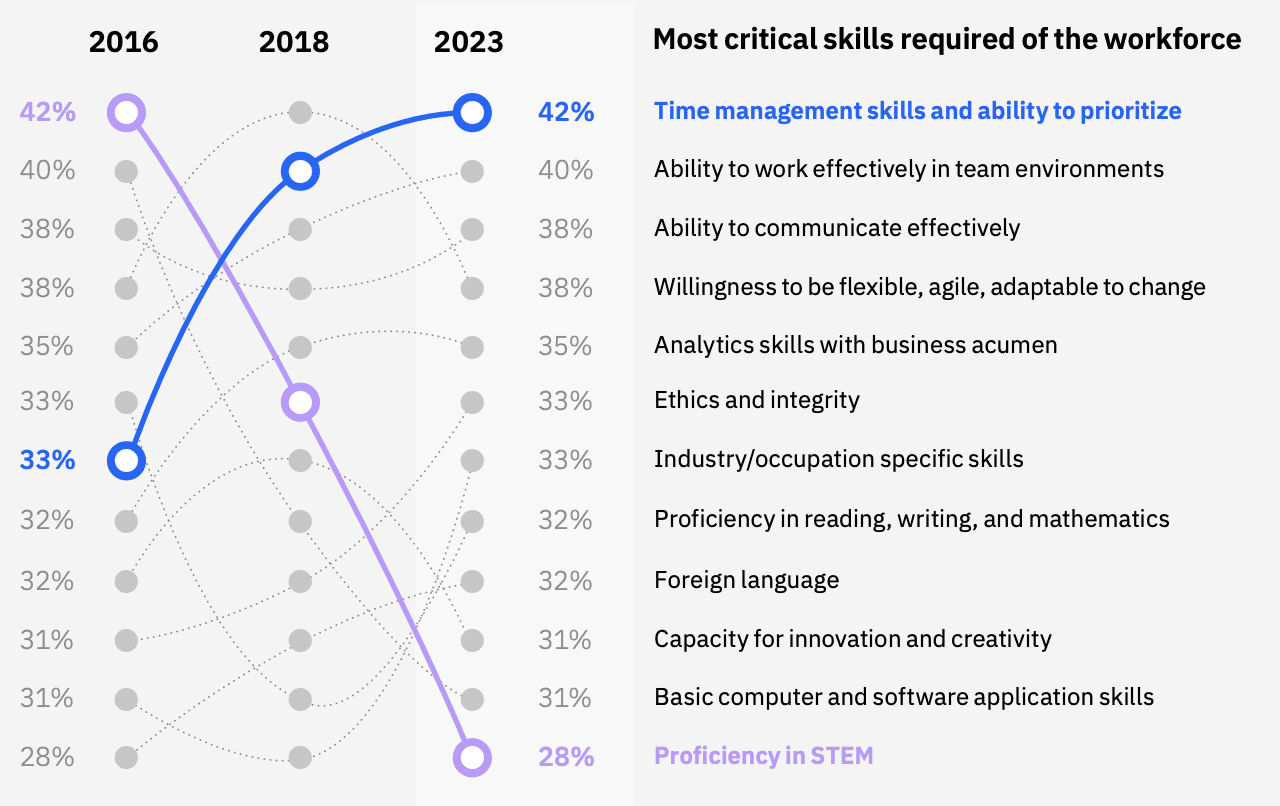
The new skills paradigm focuses on soft skills and how they have changed from the year 2016 to 2023. As we can see in the images below, skills such as proficiency in STEM and basic computer and software applications which we all deemed highly desirable over the years have shown to plummet in importance. Skills such as time management, working effectively in a team and communication are at the lead.

40% of Labour Force Will be Affected by AI in 3 Years
Image by IBM report

The IBM report also stated that on average, 87% of executives expect job roles to be augmented, rather than replaced, by generative AI. 87% is a lot.

What this means is that close to three-quarters in marketing (73%) and customer service (77%) and more than 90% in procurement (97%), risk and compliance (93%), and finance (93%) roles and tasks will be augmented.

Does this mean that the workforce will work hand-in-hand with technology swiftly, or will it still require us to upskill?

The answer to that living in this day and age will always be to up-skill.

Conclusion

So what should you take from this?

A lot is changing, and it’s changing fast. To keep up with the movements, you will need to embrace reskilling or upskilling aswell as harness AI tools to enhance your capabilities, rather than be replaced.

You should take solace in knowing that executives have stated that upskilling whilst the generative AI does not mean learning how to code, but more so time management and collaboration.

Nisha Arya is a Data Scientist and Freelance Technical Writer. She is particularly interested in providing Data Science career advice or tutorials and theory based knowledge around Data Science. She also wishes to explore the different ways Artificial Intelligence is/can benefit the longevity of human life. A keen learner, seeking to broaden her tech knowledge and writing skills, whilst helping guide others.

More On This Topic

  • How Has the Adoption of AI in Algorithmic Trading Affected the Finance…
  • Will There Be a Shortage of Data Science Jobs in the Next 5 Years?
  • Data Science is Not Becoming Extinct in 10 Years, Your Skills Might
  • Ten Years of AI in Review
  • What will the demand for Data Scientists be in 10 years? Will Data…
  • How a Single Mistake Wasted 3 Years of My Data Science Journey

Square’s new AI features include a website and restaurant menu generator

Square’s new AI features include a website and restaurant menu generator Kyle Wiggers 7 hours

Square, the financial services platform, is embracing generative AI in a very visible way.

After announcing earlier this year that it would bring AI features to drive retail sales, Square this morning took the wraps off of new ten — count ’em, ten — generative AI capabilities focused on customer content creation, onboarding and setup.

All are available as of today, albeit some gated behind Square’s beta program

The push, it might be said, is an attempt by Square — and parent company Block — to reinvigorate the Square platform after a difficult, downward-trending year and change.

Revenues from Block’s Cash App, the peer-to-peer payments service, have declined steeply. Meanwhile, the buy now, pay later service Afterpay, which Block acquired in 2021 for $29 billion, has posted serious losses. Block’s Bitcoin revenue has fallen corresponding with the fall in the price of the cryptocurrency last year. And Square faces growing competition on multiple fronts. including from Fiserv’s Clover, Toast and Stripe.

Investors are displeased. Square stock has retreated around 30% so far in 2023, as Block founder Jack Dorsey prepares to take the reigns from former Square head Alyssa Henry.

So Square’s giving stockholders generative AI.

One of the new AI-powered features, Menu Generator, allows restaurants to create a “full menu” on Square in “just minutes,” the platform promises in a press release.

“This is a valuable tool in particular for new restaurant sellers who don’t have or aren’t ready to upload a menu during onboarding,” a Square clarified to me via email. “With Menu Generator, restaurants can now create a full menu on Square … with the flexibility to come back and change or update that menu later after they’ve finished other set-up tasks. This gives them — or any business looking to expand into food and drink offerings — valuable momentum when launching operations on Square.”

Given generative AI’s tendency to go off the rails, I’d be wary of using it to publish a menu — particularly considering that gross inaccuracies could land restaurants on the hook for lawsuits over false advertising. But Square emphasizes that the process — which relies on a range of third-party generative AI models including OpenAI’s GPT-3, GPT-3.5 and GPT-4 — isn’t fully automated and that customers are afforded the chance to make edits before a menu hits the web.

“All of our AI-generated content is offered as suggestions to sellers, giving them the ability to save as-is or make further edits,” the spokesperson said. “The human review process comes from sellers themselves, who approve or modify all copy created to ensure it helps them meet their business goals.”

Human review is also baked into Square’s new generative email copy feature, according to the spokesperson, which taps generative AI to create personalized email messages to customers. And it’s a component of Square’s newly-launched website copy generator, which writes headlines — and entire blogs — given a brief text prompt.

I asked Square whether it’d taken steps to ensure that copy from its website tool wouldn’t result in downranking by search engines who don’t look kindly on certain, obviously duplicative forms of AI-generated content. In response, the spokesperson pointed to Square’s partnerships and integrations with Google to “help small businesses overcome … discoverability hurdles” — but didn’t answer the question directly.

As a part of the raft of new generative AI capabilities, Square’s point of sales system can now auto-generate item descriptions for seller catalogs. Square pitches this as a massive time saver — but color me skeptical. eBay recently rolled out a similar item description generator and the feedback has been less than stellar, with users complaining about repetitiveness and fluff in the AI-generated descriptions.

When presented with these concerns, the Square spokesperson noted that item descriptions from the generator are created “based on inputs from sellers, including keywords to keep descriptions focused, and length and tone guidelines to avoid overly verbose or fluffy results.” But it remains to be seen if sellers adhere to these guidelines.

Elsewhere on the AI front (not necessarily generative AI, despite how Square refers to them in the press release), the Kitchen Display System, Square’s kiosk for restaurant order management, can now auto-assign menu items to kitchen categories and station screens. Square’s scheduling system, Appointments, can automatically import service names, descriptions, durations and prices during onboarding, meanwhile. And Square’s namesake point-of-sales platform now suggests items for sellers to adopt “based on insights about their business.” (It’s not clear exactly which insights — the press release doesn’t specify.)

Square Team Communication, which adds announcements and messaging to Square Team, Square’s app for employee scheduling and time tracking, is now able to generate and send out announcements to let employees know about new products and upcoming promotions. (The topic, length and tone are adjustable, Square says.) And Square Messages, Square’s business-customer messaging platform, can now suggest “sophisticated” AI responses, with the ability to personalize messages with replies that prepopulate customer names. (This upgrades Square Messages’ existing reply generator, which Square claims is generating 450,000 messages per month.)

In the press release, Saumil Mehta, Square’s head of point of sale, is quoted as saying that the new generative AI capabilities put Square “at the forefront of technology.”

“Square is uniquely positioned to be the technology partner that enables the most seamless, intuitive applications of AI,” Mehta said.

Me, I’m not so sure. But if the sheer breadth of today’s rollout is any indication, Square’s ambitious if nothing else.

IBM to Boost India’s AI, Semiconductor, Quantum Computing Research

IBM India AI

IBM is ready to make its way back to India in the technology realm. It has forged three Memoranda of Understanding (MoUs) with the Indian government, focusing on AI, semiconductors, and quantum computing. The aim behind these strategic collaborations is to expedite research and development (R&D) efforts in India and enhance the workforce’s expertise in these key domains.

IBM, in partnership with Digital India Corporation, is set to establish a National AI Innovation Platform (AIIP) with a primary focus on AI skill development, fostering ecosystem growth, and incorporating advanced foundational models and generative AI capabilities.

Read: IBM Should Help India in its AI Mission

The AIIP will serve as an accelerator, nurturing competencies in AI technologies and their applications for nationally significant use cases. It will also gain access to IBM’s WatsonX platform capabilities, including the utilisation of models in language, code, and geospatial science to facilitate model training for various domains.

Rajeev Chandrasekhar, minister of State for Electronics and IT, emphasised the significance of these technological areas, stating, “These are technologies that will shape the future of tech. The MoUs represent tremendous opportunities for academia, startups, innovation ecosystems, and the broader opportunity of creating global standard talent.”

Additionally, IBM will act as a knowledge partner for the India Semiconductor Mission (ISM) in the establishment of a semiconductor research centre. This strategic collaboration will see IBM sharing its expertise with ISM in the domains of intellectual property, tools, and skills development, all aimed at fostering innovation in semiconductor technologies, including logic, advanced packaging, and chip design technologies.

The Development of Advanced Computing (C-DAC) is also exploring opportunities for collaboration, particularly in supporting India’s National Quantum Mission. Their joint efforts will focus on creating applications in areas of national interest and cultivating a highly skilled quantum workforce.

Sandip Patel, Managing Director of IBM India & South Asia, expressed his commitment to these initiatives, stating, “This collaboration reinforces our commitment to be the trusted partner for India in enhancing its innovation capabilities. Supporting the government’s efforts in building infrastructure, enhancing human capital, and promoting knowledge creation in these three technological areas is integral to India’s digital transformation and economic growth.”

Recently, IBM has also announced an initiative to train a whopping two million learners in artificial intelligence by the end of 2026. The main objective of this step is to focus on underrepresented communities and help close the global AI skills gap.

The post IBM to Boost India’s AI, Semiconductor, Quantum Computing Research appeared first on Analytics India Magazine.

Infosys expands Google Cloud partnership to boost AI solutions

Infosys announced today that it was expanding its alliance with Google Cloud to help enterprises build AI-powered experiences using Infosys Topaz offerings and Google Cloud’s generative AI solutions.

Infosys will create the new global Generative AI Labs to develop industry specific AI solutions and platforms, which will help enterprises infuse generative AI into their business processes, the company said in a statement.

The company will also train 20,000 practitioners on Google Cloud’s gen AI solutions, including Vertex AI and Duet AI in Google Workspace, to ensure organisations have the professional services expertise and resources to successfully develop, implement, and manage any type of generative AI project.

This alliance between Infosys and Google Cloud builds on Infosys’ existing data, analytics and AI expertise on Google Cloud. Infosys is actively working with Google Cloud to develop a suite of transformative AI platforms and industry solutions for a range of business scenarios, including consumer AI, autonomous supply chain, autonomous marketing, anti-money laundering and customer services transformation.

A wide range of its existing platforms and solutions are being enhanced with Infosys Topaz and Google Cloud generative AI capabilities. These include Infosys Live Enterprise Application Management Platform, Infosys Applied AI Platform, Infosys Customer Intelligence Platform, Infosys Data Streams, and Infosys Supply Chain AI Platform among others.

The joint capabilities will help create a strong foundation for enterprises towards AI-enabled transformation. For example, Infosys Topaz and Google Cloud generative AI recently helped a leading consumer goods company in successfully launching an AI Twin to assist in real time planning of marketing spend, promotion, and product supply across markets.

“Infosys has been making investments in the AI space for a long time. The combined strength of Google Cloud’s generative AI capabilities and Infosys will help enterprises transform and future-proof their business, built on strong digital, cloud, and next-generation AI capabilities.” said Salil Parekh, CEO, Infosys.

Infosys AI-powered solutions use insights to improve customer experience, drive sales, and redefine client’s digital business strategy for long term success. The Indian IT giant is on an overdrive mode when it comes to AI. It has been partnering up with global firms like NVIDIA and Microsoft to expand it’s AI capabilities to boost it’s revenue and keep up with the AI-boom.

The post Infosys expands Google Cloud partnership to boost AI solutions appeared first on Analytics India Magazine.

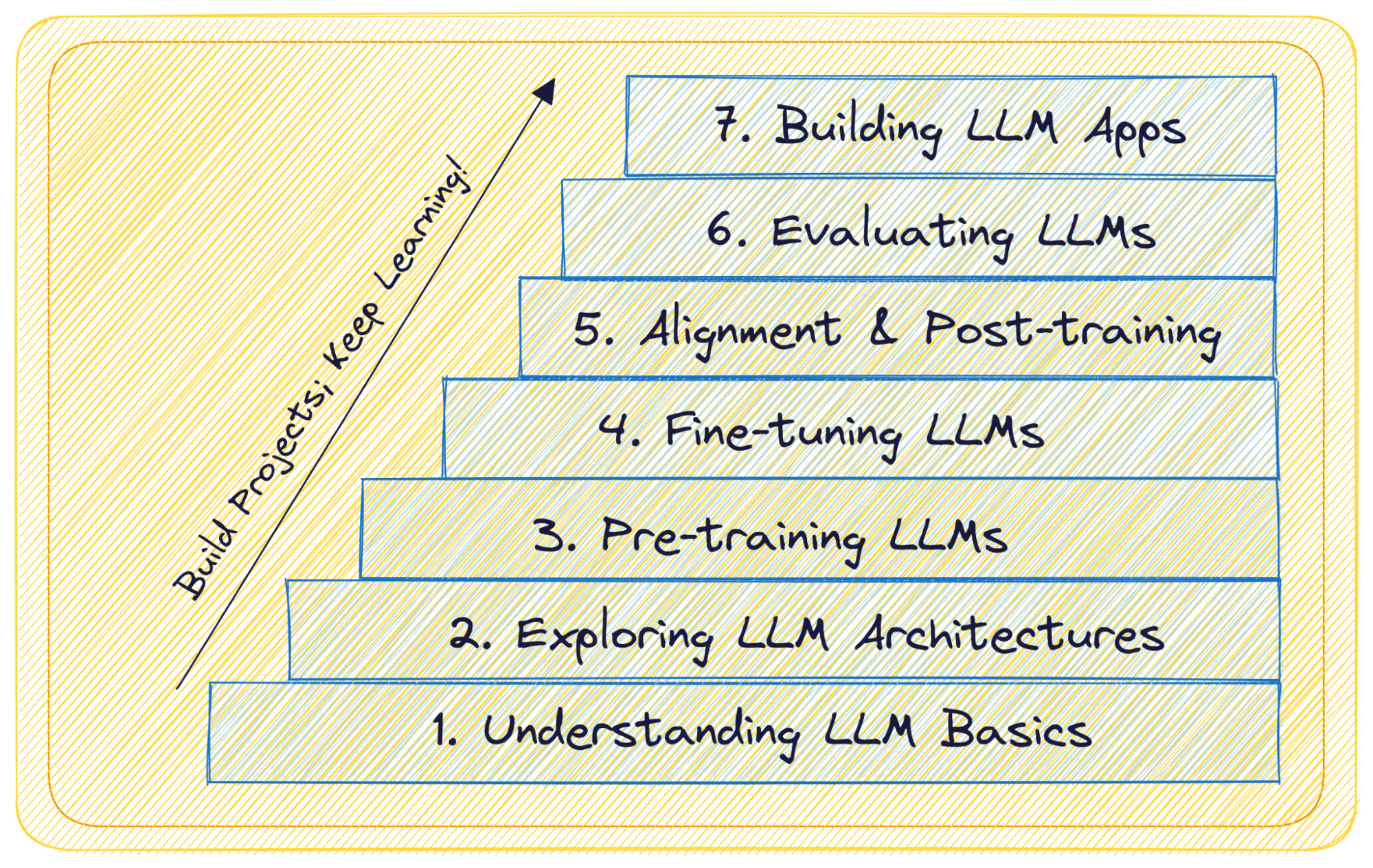
7 Steps to Mastering Large Language Models (LLMs)

7 Steps to Mastering Large Language Models (LLMs)
Image by Author

GPT-4, Llama, Falcon, and many more—Large Language Models—LLMs—are literally the talk of the town year. And if you’re reading this chances are you’ve already used one or more of these large language models through a chat interface or an API.

If you’ve ever wondered what LLMs really are, how they work, and what you can build with them, this guide is for you. Whether you’re a data professional interested in large language models or someone just curious about them, this is a comprehensive guide to navigating the LLM landscape.

From what LLMs are to building and deploying applications with LLMs, we breakdown—into 7 easy steps—learning all about large language models covering:

  • What you should know
  • An overview of the concepts
  • Learning resources

Let’s get started!

Step 1: Understanding LLM Basics

If you’re new to large language models, it’s helpful to start with a high-level overview of LLMs and what makes them so powerful. Start by trying to answer these questions:

  • What are LLMs anyways?
  • Why are they so popular?
  • How are LLMs different from other deep learning models?
  • What are the common LLM use cases? (You’d be familiar with this already; still a good exercise to list them down)

Were you able to answer them all? Well, let’s do it together!

What are LLMs?

Large Language Models—or LLMs—are a subset of deep learning models trained on massive corpus of text data. They’re large—with tens of billions of parameters—and perform extremely well on a wide range of natural language tasks.

Why Are They Popular?

LLMs have the ability to understand and generate text that is coherent, contextually relevant, and grammatically accurate. Reasons for their popularity and wide-spread adoption include:

  • Exceptional performance on a wide range of language tasks
  • Accessibility and availability of pre-trained LLMs, democratizing AI-powered natural language understanding and generation

So How Are LLMs Different from Other Deep Learning Models?

LLMs stand out from other deep learning models due to their size and architecture, which includes self-attention mechanisms. Key differentiators include:

  • The Transformer architecture, which revolutionized natural language processing and underpins LLMs (coming up next in our guide)
  • The ability to capture long-range dependencies in text, enabling better contextual understanding
  • Ability to handle a wide variety of language tasks, from text generation to translation, summarization and question-answering

What Are the Common Use Cases of LLMs?

LLMs have found applications across language tasks, including:

  • Natural Language Understanding: LLMs excel at tasks like sentiment analysis, named entity recognition, and question answering.
  • Text Generation: They can generate human-like text for chatbots and other content generation tasks. (Shouldn’t be surprising at all if you’ve ever used ChatGPT or its alternatives).
  • Machine Translation: LLMs have significantly improved machine translation quality.
  • Content Summarization: LLMs can generate concise summaries of lengthy documents. Ever tried summarizing YouTube video transcripts?

Now that you have a cursory overview of LLMs and their capabilities, here are a couple of resources if you’re interested in exploring further:

  • Introduction to Generative AI
  • Introduction to Large Language Models

Step 2: Exploring LLM Architectures

Now that you know what LLMs are, let’s move on to learning the transformer architecture that underpins these powerful LLMs. So in this step of your LLM journey, Transformers need all your attention (no pun intended).

The original Transformer architecture, introduced in the paper "Attention Is All You Need," revolutionized natural language processing:

  • Key Features: Self-attention layers, multi-head attention, feed-forward neural networks, encoder-decoder architecture.
  • Use Cases: Transformers are the basis for notable LLMs like BERT and GPT.

The original Transformer architecture uses an encoder-decoder architecture; but encore-only and decoded-only variants exist. Here’s a comprehensive overview of these along with their features, notable LLMs, and use cases:

Architecture Key Features Notable LLMs Use Cases
Encoder-only Captures bidirectional context; suitable for natural language understanding
  • BERT
  • Also BERT architecture based RoBERTa, XLNet
  • Text classification
  • Question answering
Decoder-only Unidirectional language model; Autoregressive generation
  • GPT
  • PaLM
  • Text generation (variety of content creation tasks)
  • Text completion
Encoder-Decoder Input text to target text; any text-to-text task
  • T5
  • BART
  • Summarization
  • Translation
  • Question answering
  • Document classification

The following are great resources to learn about transformers:

  • Attention Is All You Need (must read)
  • The Illustrated Transformer by Jay Alammar
  • Module on Modeling from Stanford CS324: Large Language Models
  • HuggingFace Transformers Course

Step 3: Pre-training LLMs

Now that you’re familiar with the fundamentals of Large Language Models (LLMs) and the transformer architecture, you can proceed to learn about pre-training LLMs. Pre-training forms the foundation of LLMs by exposing them to a massive corpus of text data, enabling them to understand the aspects and nuances of the language.

Here’s an overview of concepts you should know:

  • Objectives of Pre-training LLMs: Exposing LLMs to massive text corpora to learn language patterns, grammar, and context. Learn about the specific pre-training tasks, such as masked language modeling and next sentence prediction.
  • Text Corpus for LLM Pre-training: LLMs are trained on massive and diverse text corpora, including web articles, books, and other sources. These are large datasets—with billions to trillions of text tokens. Common datasets include C4, BookCorpus, Pile, OpenWebText, and more.
  • Training Procedure: Understand the technical aspects of pre-training, including optimization algorithms, batch sizes, and training epochs. Learn about challenges such as mitigating biases in data.

If you’re interested in learning further, refer to the module on LLM training from CS324: Large Language Models.

Such pre-trained LLMs serve as a starting point for fine-tuning on specific tasks. Yes, fine-tuning LLMs is our next step!

Step 4: Fine-Tuning LLMs

After pre-training LLMs on massive text corpora, the next step is to fine-tune them for specific natural language processing tasks. Fine-tuning allows you to adapt pre-trained models to perform specific tasks like sentiment analysis, question answering, or translation with higher accuracy and efficiency.

Why Fine-Tune LLMs

Fine-tuning is necessary for several reasons:

  • Pre-trained LLMs have gained general language understanding but require fine-tuning to perform well on specific tasks. And fine-tuning helps the model learn the nuances of the target task.
  • Fine-tuning significantly reduces the amount of data and computation needed compared to training a model from scratch. Because it leverages the pre-trained model's understanding, the fine-tuning dataset can be much smaller than the pre-training dataset.

How to Fine-Tune LLMs

Now let's go over the how of fine-tuning LLMs:

    • Choose the Pre-trained LLM: Choose the pre-trained LLM that matches your task. For example, if you're working on a question-answering task, select a pre-trained model with the architecture that facilitates natural language understanding.
    • Data Preparation: Prepare a dataset for the specific task you want the LLM to perform. Ensure it includes labeled examples and is formatted appropriately.
  • Fine-Tuning: After you’ve chosen the base LLM and prepared the dataset, it’s time to actually fine-tune the model.
  • But how?
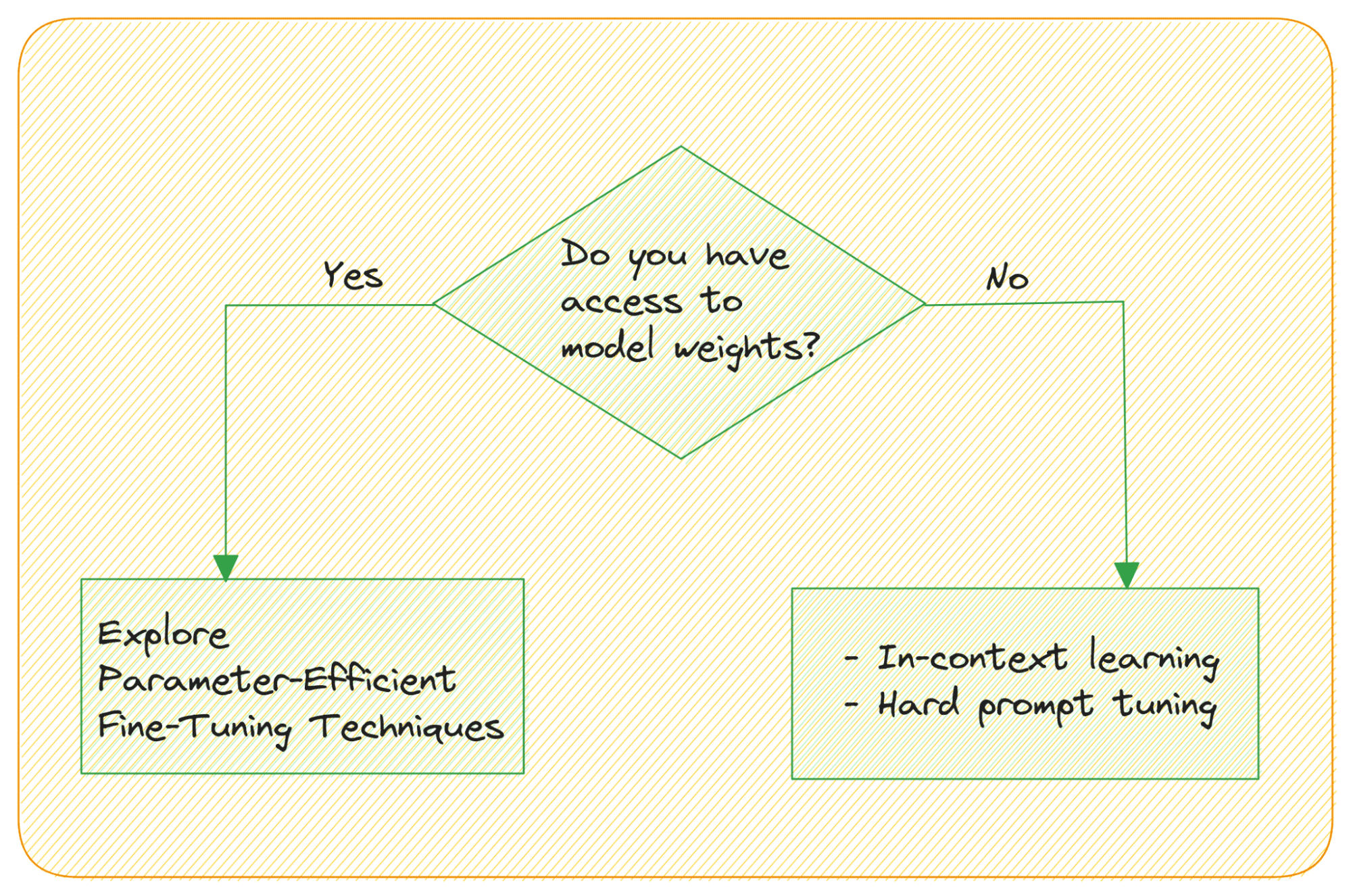
  • Are there parameter-efficient techniques? Remember, LLMs have 10s of billions of parameters. And the weight matrix is huge!
  • What if you don’t have access to the weights?
7 Steps to Mastering Large Language Models (LLMs)
Image by Author

How do you fine-tune an LLM when you don't have access to the model’s weights and accessing the model through an API? Large Language Models are capable of in-context learning—without the need for an explicit fine-tuning step. you can leverage their ability to learn from analogy by providing input; sample output examples of the task.

Prompt tuning—modifying the prompts to get more helpful outputs—can be: hard prompt tuning or (soft) prompt tuning.

Hard prompt tuning involves modifying the input tokens in the prompt directly; so it doesn’t update the model's weights.

Soft prompt tuning concatenates the input embedding with a learnable tensor. A related idea is prefix tuning where learnable tensors are used with each Transformer block as opposed to only the input embeddings.

As mentioned, large language models have tens of billions of parameters. So fine-tuning the weights in all the layers is a resource-intensive task. Recently, Parameter-Efficient Fine-Tuning Techniques (PEFT) like LoRA and QLoRA have become popular. With QLoRA you can fine-tune a 4-bit quantized LLM—on a single consumer GPU—without any drop in performance.

These techniques introduce a small set of learnable parameters—adapters—are tuned instead of the entire weight matrix. Here are useful resources to learn more about fine-tuning LLMs:

  • QLoRA is all you need — Sentdex
  • Making LLMs even more accessible with bitsandbytes, 4-bit quantization, and QLoRA

Step 5: Alignment and Post-Training in LLMs

Large Language models can potentially generate content that may be harmful, biased, or misaligned with what users actually want or expect. Alignment refers to the process of aligning an LLM's behavior with human preferences and ethical principles. It aims to mitigate risks associated with model behavior, including biases, controversial responses, and harmful content generation.

You can explore techniques like:

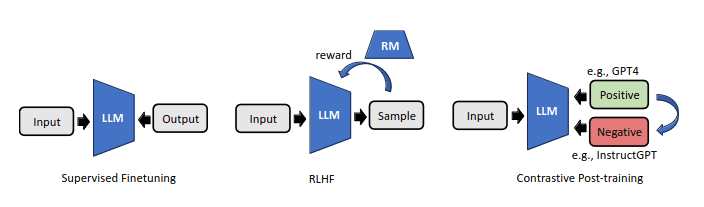
  • Reinforcement Learning from Human feedback (RLHF)
  • Contrastive Post-training

RLHF uses human preference annotations on LLM outputs and fits a reward model on them. Contrastive post-training aims at leveraging contrastive techniques to automate the construction of preference pairs.
7 Steps to Mastering Large Language Models (LLMs)
Techniques for Alignment in LLMs | Image Source

To learn more, check out the following resources:

  • Illustrating Reinforcement Learning from Human Feedback (RLHF)
  • Contrastive Post-training Large Language Models on Data Curriculum

Step 6: Evaluation and Continuous Learning in LLMs

Once you've fine-tuned an LLM for a specific task, it's essential to evaluate its performance and consider strategies for continuous learning and adaptation. This step ensures that your LLM remains effective and up-to-date.

Evaluation of LLMs

Evaluate the performance to assess their effectiveness and identify areas for improvement. Here are key aspects of LLM evaluation:

  • Task-Specific Metrics: Choose appropriate metrics for your task. For example, in text classification, you may use conventional evaluation metrics like accuracy, precision, recall, or F1 score. For language generation taks, metrics like perplexity and BLEU scores are common.
  • Human Evaluation: Have experts or crowdsourced annotators assess the quality of generated content or the model's responses in real-world scenarios.
  • Bias and Fairness: Evaluate LLMs for biases and fairness concerns, particularly when deploying them in real-world applications. Analyze how models perform across different demographic groups and address any disparities.
  • Robustness and Adversarial Testing: Test the LLM's robustness by subjecting it to adversarial attacks or challenging inputs. This helps uncover vulnerabilities and enhances model security.

Continuous Learning and Adaptation

To keep LLMs updated with new data and tasks, consider the following strategies:

  • Data Augmentation: Continuously augment your data store to avoid performance degradation due to lack of up-to-date info.
  • Retraining: Periodically retrain the LLM with new data and fine-tune it for evolving tasks. Fine-tuning on recent data helps the model stay current.
  • Active Learning: Implement active learning techniques to identify instances where the model is uncertain or likely to make errors. Collect annotations for these instances to refine the model.

Another common pitfall with LLMs is hallucinations. Be sure to explore techniques like Retrieval augmentation to mitigate hallucinations.

Here are some helpful resources:

  • A Survey on Evaluation of large Language Models
  • Best Practices for Evaluation of RAG Applications

Step 7: Building and Deploying LLM Apps

After developing and fine-tuning an LLM for specific tasks, start building and deploying applications that leverage the LLM's capabilities. In essence, use LLMs to build useful real-world solutions.
7 Steps to Mastering Large Language Models (LLMs)
Image by Author

Building LLM Applications

Here are some considerations:

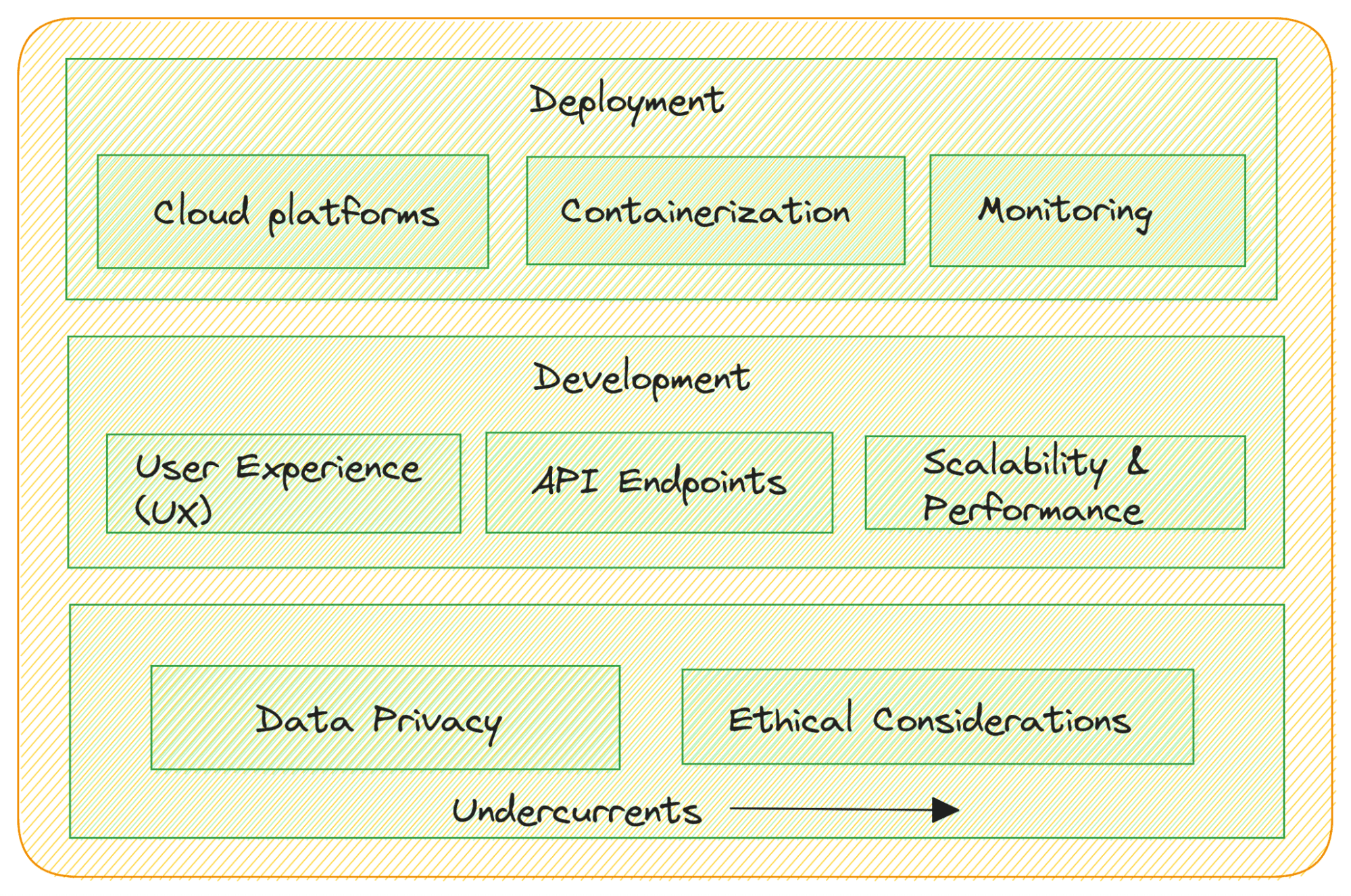
  • Task-Specific Application Development: Develop applications tailored to your specific use cases. This may involve creating web-based interfaces, mobile apps, chatbots, or integrations into existing software systems.
  • User Experience (UX) Design: Focus on user-centered design to ensure your LLM application is intuitive and user-friendly.
  • API Integration: If your LLM serves as a language model backend, create RESTful APIs or GraphQL endpoints to allow other software components to interact with the model seamlessly.
  • Scalability and Performance: Design applications to handle different levels of traffic and demand. Optimize for performance and scalability to ensure smooth user experiences.

Deploying LLM Applications

You’ve developed your LLM app and are ready to deploy them to production. Here’s what you should consider:

  • Cloud Deployment: Consider deploying your LLM applications on cloud platforms like AWS, Google Cloud, or Azure for scalability and easy management.
  • Containerization: Use containerization technologies like Docker and Kubernetes to package your applications and ensure consistent deployment across different environments.
  • Monitoring: Implement monitoring to track the performance of your deployed LLM applications and detect and address issues in real time.

Compliance and Regulations

Data privacy and ethical considerations are undercurrents:

  • Data Privacy: Ensure compliance with data privacy regulations when handling user data and personally identifiable information (PII).
  • Ethical Considerations: Adhere to ethical guidelines when deploying LLM applications to mitigate potential biases, misinformation, or harmful content generation.

You can also use frameworks like LlamaIndex and LangChain to help you build end-to-end LLM applications. Some useful resources:

  • Full Stack LLM Bootcamp
  • Development with Large Language Models — freeCodeCamp

Wrapping Up

We started our discussion by defining what large language models are, why they are popular, and gradually delved into the technical aspects. We’ve wrapped up our discussion with building and deploying LLM applications requiring careful planning, user-focused design, robust infrastructure, while prioritizing data privacy and ethics.

As you might have realized, it’s important to stay updated with the recent advances in the field and keep building projects. If you have some experience and natural language processing, this guide builds on the foundation. Even if not, no worries. We’ve got you covered with our 7 Steps to Mastering Natural Language Processing guide. Happy learning!

Bala Priya C is a developer and technical writer from India. She likes working at the intersection of math, programming, data science, and content creation. Her areas of interest and expertise include DevOps, data science, and natural language processing. She enjoys reading, writing, coding, and coffee! Currently, she's working on learning and sharing her knowledge with the developer community by authoring tutorials, how-to guides, opinion pieces, and more.

More On This Topic

  • Top Open Source Large Language Models
  • More Free Courses on Large Language Models
  • Learn About Large Language Models
  • Introducing Healthcare-Specific Large Language Models from John Snow Labs
  • What are Large Language Models and How Do They Work?
  • AI: Large Language & Visual Models
Inflection AI is Making Generative AI Friendly 

While top AI firms like OpenAI, Microsoft and Google are spending billions of dollars on increasing the length of responses of chatbots, a Palo Alto based AI firm is spending billions on something different.

Meet Inflection’s Pi, the AI chatbot, designed to be friendly, warm and supportive.

It’s your friend when you need one. But it does have its boundaries and usually won’t cross the line. In the ocean of general-purpose chatbots, Pi is something different, something more personal.

The friendly way forward

Pi has all the features of a general purpose chatbot like OpenAI’s ChatGPT, but there are some things that set it apart from the rest. It is said to have more human-like conversations and a high level of emotional intelligence.

Pi, standing for personal intelligence, provides a shorter response, just like how you chat with your friend. It’s inquisitive. Imagine spilling the beans on some hot gossip, Pi wants to know more, and leads the conversation forward by continuously asking follow up questions–Unlike ChatGPT, which gives a close-ended response.

It’s what users call “engaging”–more human-like interaction. Anyone would love a conversation which is engaging. Pi, doesn’t stop here. It’s also funny, adding humour to conversations. To make it even more human, it uses filler words like “Hmm” or “Uh-huh”.

The output of Pi is ‘memeish’, often using emojis and trying to tell jokes, according to a comparison study.

“It’s very balanced and even-handed on political issues or sensitive topics, but also sometimes it can be funny and silly and creative,” said Mustafa Suleyman, the co-founder of Inflexion AI and the man who led the team of Google’s DeepMind.

The chatbot “Pi” was released in May this year, and is prioritising to be a personal assistant for day-to-day tasks. Not suitable for long-form answers–one cannot ask Pi to write an essay, or an email.

What Makes it Human?

It is the data that it’s trained on. Inflection AI has said that its LLM is trained only using publicly available data and its proprietary data. The chatbot was made to generate text like a human. That is why it’s a little longer to generate a response compared to ChatGPT. It’s thinking!

ChatGPT is under criticism for stealing user data to train its large language models. It’s facing a class action lawsuit for this matter. Pi learnt from OpenAI’s mistakes and trained its LLM accordingly.

The one-year old start-up making generative AI more friendly, has huge backers. Tech behemoths like Microsoft and NVIDIA have recently invested in the AI firm’s fundraising round led by Microsoft, Redd Hoffmen, Bill Gates and Eric Schmidt.

The company raised around $1.5 billion, and is valued at $4 billion.

Building Bridges

With its new investor, NVIDIA, the company plans to induct around 22,000 H100 GPUs to build one of the largest AI training facilities in the world. This is 3 times more compute power that was used to train GPT-4.

Inflection AI now has the money to do that. Most of the funding will be used to build a much more powerful foundation model.

They’re building a community of investors. The company does not want to take the conventional approach to raise money. They want to take a more personal approach by raising money from individuals and not VCs.

That’s why the majority of the stakes are held by the founders Mustafa Suleyman and Reif Hoffmen.

Although the company is in the big billion dollar club, it has a small team of 35 employees.

The team is infectious. It has fans from Microsoft and NVIDIA for their hard work and dedication on continuously improving Pi and releasing a much bigger one.

Nvidia CEO Jensen Huang is extremely supportive of Inflection AI’s work, he said “the world-class team” at Inflection would help usher in “amazing personal digital assistants.”

Mustafa Suleyman, the CEO and co-founder of inflection AI sums up his sentiment about Artificial intelligence like how fans of basketball superstar, LeBron James feel about him when they watch him play—”“You can’t stop him, you can only hope to contain him.”

Suleyman was the co-founder of DeepMind–Google’s artificial intelligence lab.

Last year, he left Google and went on to start inflection AI with Linkedin’s co-founder, Reid Hoffman.

Reid Hoffman doesn’t need an introduction. A founding investor in OpenAI, co-founder of Deepmind and after investing in at least 37 AI startups, he began his next journey with inflection AI.

Users are already loving Pi for its friendly personality, helpful features, and seamless integration with other devices. inflection AI has the money, the people, and the support of the AI community to make their vision a reality. They are working hard to release the next generation of Pi, which will be smarter, faster, and more personalized than ever before. inflection AI is not just creating an AI assistant, they are creating a new way of living.

The post Inflection AI is Making Generative AI Friendly appeared first on Analytics India Magazine.