AGI Startup QX Lab Releases Multilingual AI Platform that Supports 12 Indic Languages

QX Lab AI, which calls itself an Artificial General Intelligence (AGI) company, has come out of stealth to announce Ask QX, a generative AI platform, at an event in Dubai.

The platform supports 12 Indic languages, including Hindi, Bengali, Telugu, Marathi, Tamil, Urdu, Gujarati, Kannada, Malayalam, Odia, Punjabi & Assamese.

Ask QX is also available in Arabic, French, Spanish, Japanese, German, Italian, Korean, Portuguese, Russian and Sinhala amongst other global languages.

According to the company, Ask QX, is the first to have a node-based architecture and their model has 372 billion parameters. Its neurologically trained algorithms are built on a hybrid model i.e.; 30% Large Language Model (LLM) and 70% Neural Network Architecture, setting a new benchmark in language comprehension and user interaction, the startup said.

While the platform has a chat interface for now, like OpenAI’s ChatGPT, the startup plans to launch text-to-image, text-to-code, text-to-video, for business-to-consumer (B2C), business-to-business (B2B), and business-to-institution (B2I) cohorts with use cases in diverse sectors like healthcare, education and legal services among others.

“The unique node-based infrastructure and data residence within India not only enhance security but also operate more cost-effectively, showcasing our commitment to offering subscription models tailored to different user segments.

The B2C paid version, which features the cutting-edge neural network-based version, is competitively priced and significantly lower than other platforms available, while the free version provides access to the Ask QX generative AI neural engine,” Tathagat Prakash, co-founder & chief scientist at QX Lab AI, said.

Founded in 2018, QX Lab AI is driven by the belief that AI should not only be powerful but also accessible to people from all walks of life, contributing to the betterment of society as a whole.

The post AGI Startup QX Lab Releases Multilingual AI Platform that Supports 12 Indic Languages appeared first on Analytics India Magazine.

5 reasons to sign up for Google Labs and how to do it

Google Labs

When you think of Google's AI developments, you may only think of Google Bard. However, the company has many other generative AI experiments under wraps that can accomplish different purposes, such as optimizing your workflow, helping you generate music, optimizing your search experience, and more. Although these projects haven't been officially released yet, you can try them out via Google Labs.

Also: Google's AI image generator finally rolls out to the public — how to try it

Google Labs is Google's platform where users can test out the company's early ideas for features and products, as well as provide feedback that affects whether the experiments are deployed and what changes are made before they are released. Currently available on Google Labs are some of the company's latest projects, meaning you are able to start tinkering with Google's latest technology today.

Not convinced? Keep reading to learn about some of the reasons you should join Google Labs and how to access them.

Artificial Intelligence

Hire mindset over skill set

Hire mindset over skill set Joshua Wöhle 10 hours Joshua Wöhle Contributor Joshua Wöhle is CEO at Mindstone, transforming daily learning from articles, podcasts, and videos into a quantifiable skills profile, much like LinkedIn. He personalizes your learning experience but also aligns it with your career goals or your company's objectives, making every learning moment count.

My career is rooted in the tech industry, but the lessons learned there are universally applicable across all sectors. Tech has always been synonymous with a frantic pace of change; the industry conjures up images of engineers working at breakneck speed to deploy new version after new version, with stagnation being a dirty word.

AI is spreading this speed of innovation further and accelerating the workplace cadence across all sectors. As company founders, this allows us to look closely at the trends and strategies within the tech industry and use these insights to predict what will happen everywhere, shaping our hiring approaches for the next few years.

CTOs (chief technology officers), often responsible for the hiring and firing of talent in tech, are the canaries in the coal mine when it comes to future-proof recruitment. They have been operating in a high-speed moving environment for longer than most. As the pace of change accelerates for all of us, they’ve uniquely positioned to identify emerging trends and shifts, particularly in skills and roles that are gaining or losing relevance. Their decisions and insights, therefore, provide valuable foresight into the new demands of the tech industry.

In a recent survey I conducted with leading CTOs, a consensus emerged in hiring for longevity rather than immediacy, not prioritizing traditional skills but instead placing emphasis on adaptability and problem-solving acumen. I know this firsthand, having dropped out of university twice due to its rigid structure. Only later in life did I understand the key to success, and it’s not about formal qualifications but rather a willingness to learn and adapt. In engineering teams, it’s not just conventional technical skills, such as coding in the case of tech, but rather the aptitude for learning, teamwork, and proactive problem-solving.

Only later in life did I understand the key to success, and it’s not about formal qualifications but rather a willingness to learn and adapt.

Generative AI making more inroads into workflows, as seen recently in companies like Duolingo, is a timely reminder that the need to adapt is now here. The company cut its contractor workforce by 10%, using AI to fulfill some of its duties, hinting that imminent change is here. This move signals a broader trend: The ability to adapt swiftly and proficiently utilize new technological tools is becoming indispensable.

The shift toward AI-driven changes in the workforce underlines the importance of upskilling. More importance should be placed on upskilling existing employees rather than recycling workforces. Telecom giant AT&T is an excellent example; after conducting a skill gap analysis, they found that almost half of their employees needed more adaptable skills for the company’s future needs. Instead of extensive recruitment, AT&T focused on upskilling and reskilling initiatives, particularly in areas like AI. In 2022, the company spent $135 million on employee learning and development, providing online education platforms for convenient learning opportunities.

What does this mean for startups? Upskilling, especially in fields like AI, is more than just a remedy for skill shortages. It is a strategic long-term investment and will help cultivate a dynamic, adaptable workforce, which is crucial for driving innovation and growth in your business.

OpenAI API for Beginners: Your Easy-to-Follow Starter Guide

OpenAI API for Beginners: Your Easy-to-Follow Starter Guide
Image by Author

In this tutorial, we will learn how to set up and use the OpenAI API for various use cases. The tutorial is designed to be easy to follow, even for those with limited knowledge of Python programming. We'll explore how anyone can generate responses and access high-quality large language models.

What is OpenAI API?

The OpenAI API allows developers to easily access a wide range of AI models developed by OpenAI. It provides a user-friendly interface that enables developers to incorporate intelligent features powered by state-of-the-art OpenAI models into their applications. The API can be used for various purposes, including text generation, multi-turn chat, embeddings, transcription, translation, text-to-speech, image understanding, and image generation. Additionally, the API is compatible with curl, Python, and Node.js.

Getting Started

To get started with OpenAI API, you first need to create an account on openai.com. Previously, every user was given free credit, but now new users are required to purchase credit.

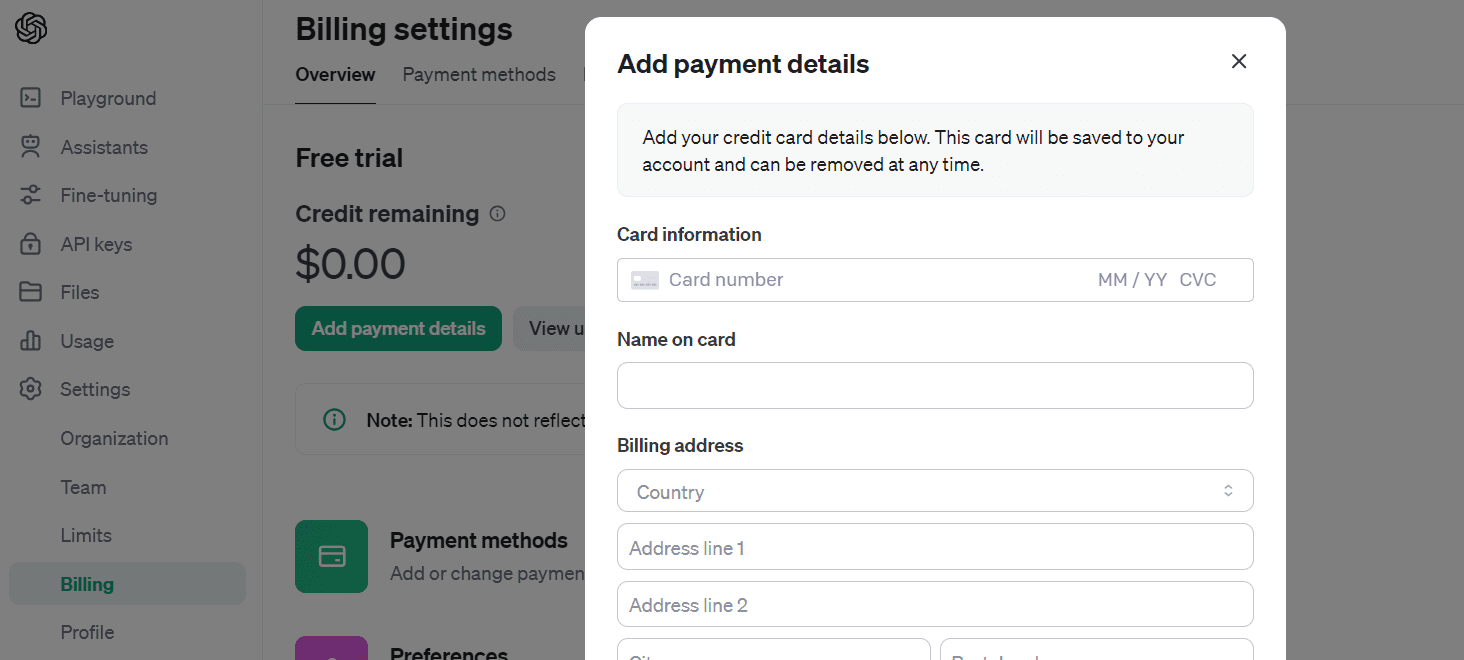
To purchase credit, go to "Settings," then "Billing," and finally, "Add Payment Details." Enter your debit or credit card information, and make sure to disable auto-recharge. Once you have loaded 10 USD, you can use it for a year.
OpenAI API for Beginners: Your Easy-to-Follow Starter Guide

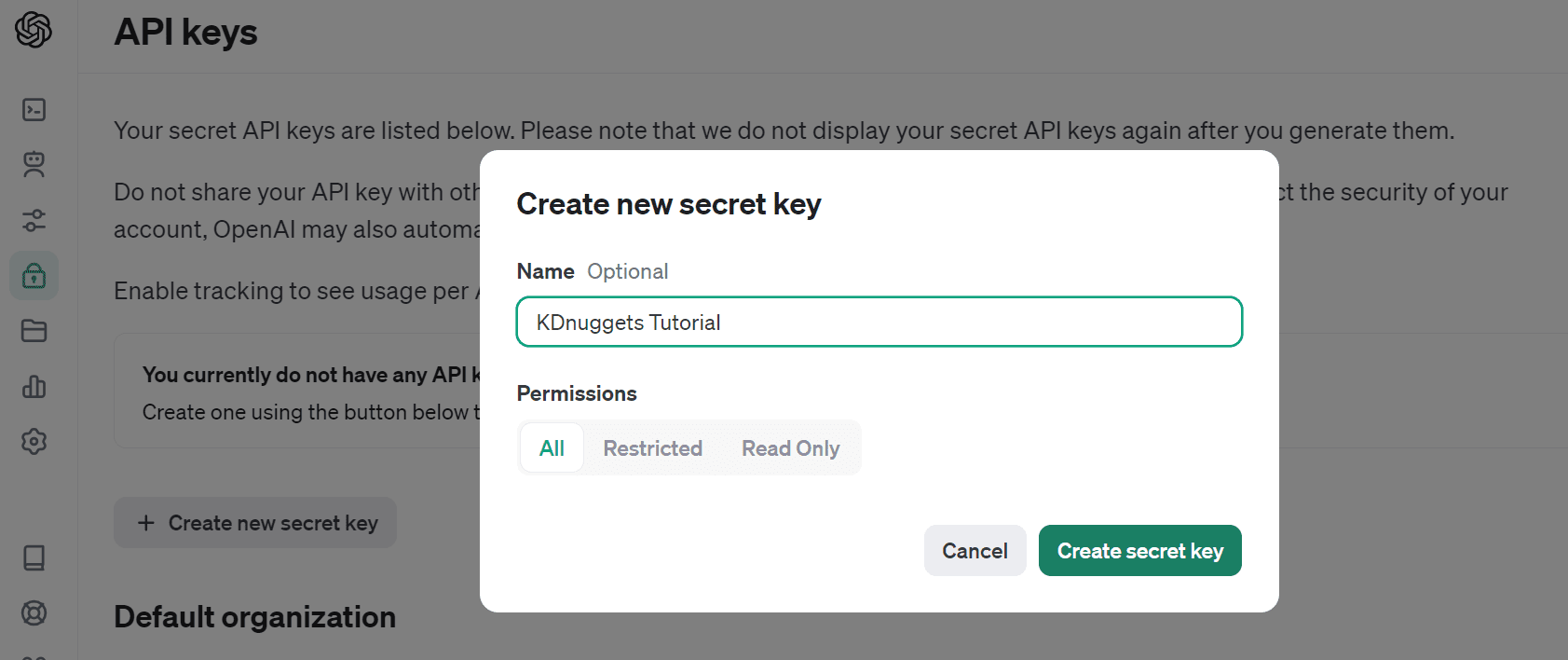
Let's create the API key by navigating to "API keys" and selecting "Create new secret key". Give it a name and click on "Create secret key".
OpenAI API for Beginners: Your Easy-to-Follow Starter Guide

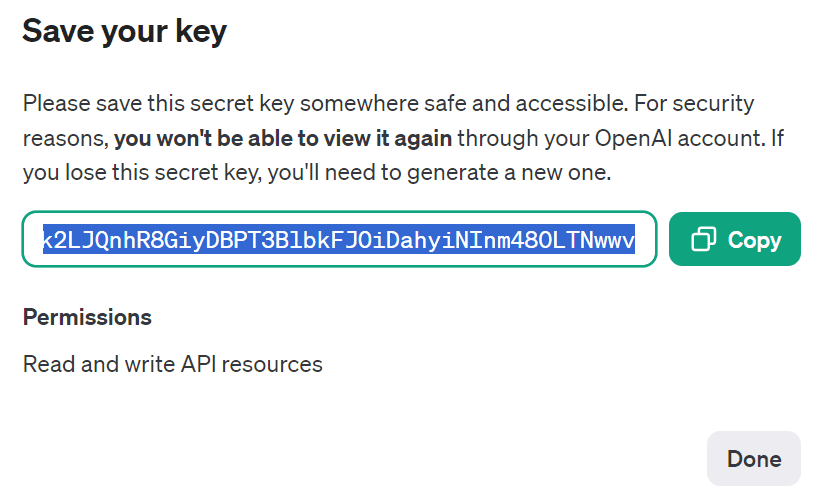
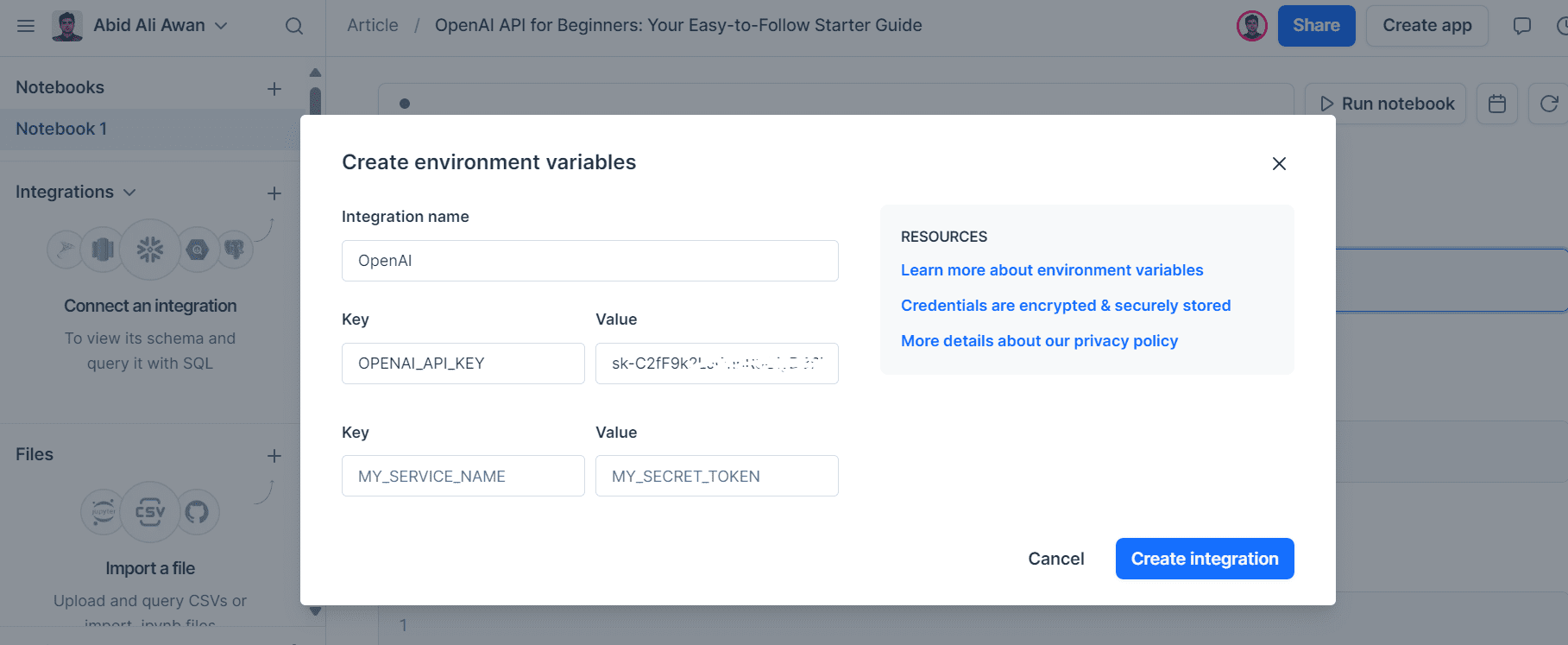
Copy the API and create an Environment variable at the local machine.
OpenAI API for Beginners: Your Easy-to-Follow Starter Guide

I use Deepnote as my IDE. It's easy to create environment variables. Simply go to "Integration", select "create environment variable", provide a name and value for the key, and create the integration.
OpenAI API for Beginners: Your Easy-to-Follow Starter Guide

Next, we will Install the OpenAI Python package using pip.

%pip install --upgrade openai

We will now create a client that can access various types of models globally.

If you have set your environment variable with the name "OPENAI_API_KEY", you don't need to provide the OpenAI client with an API key.

from openai import OpenAI    client = OpenAI()

Please note that you should only provide an API key if the name of your environment variable is different from the default one.

import os  from openai import OpenAI    client = OpenAI(    api_key=os.environ.get("SECRET_KEY"),   )

Text Generation

We will use a legacy function to generate the response. The completion function requires the model name, prompt, and other arguments to generate the reply.

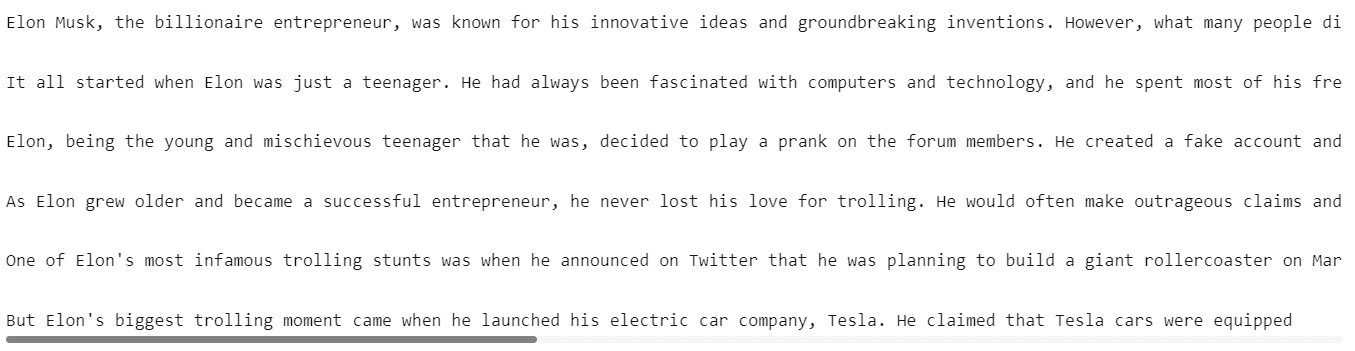
completion = client.completions.create(      model="gpt-3.5-turbo-instruct",      prompt="Write a short story about Elon Musk being the biggest troll.",      max_tokens=300,      temperature=0.7,  )  print(completion.choices[0].text)

The GPT3.5 model have generate amazing story about Elon Musk.
OpenAI API for Beginners: Your Easy-to-Follow Starter Guide

We can also stream our response by providing an extra argument `stream`.

Instead of waiting for the complete response, the stream feature enables processing of output as soon as it's generated. This approach helps to reduce perceived latency by returning the output of the language model token by token rather than all at once.

stream = client.completions.create(      model="gpt-3.5-turbo-instruct",      prompt="Write a Python code for accessing the REST API securely.",      max_tokens=300,      temperature=0.7,      stream = True  )  for chunk in stream:          print(chunk.choices[0].text, end="")

OpenAI API for Beginners: Your Easy-to-Follow Starter Guide Chat

The model used API chat completion. Before generating the response, let’s explore the available models.

You can view the list of all models available or read the Models page on the official documentation.

print(client.models.list())

OpenAI API for Beginners: Your Easy-to-Follow Starter Guide

We will use the latest version of GPT-3.5 and provide it with a list of a dictionary for system prompts and user messages. Make sure to follow the same message pattern.

completion = client.chat.completions.create(      model="gpt-3.5-turbo-1106",      messages=[          {              "role": "system",              "content": "You are an experienced data scientist, adept at presenting complex data concepts with creativity.",          },          {              "role": "user",              "content": "What is Feature Engineering, and what are some common methods?",          },      ],  )    print(completion.choices[0].message.content)  

As we can see, we have generated a similar result as the legacy API. So, why use this API? Next, we will learn why the chat completion API is more flexible and easier to use.

Feature engineering is the process of selecting, creating, or transforming features (variables) in a dataset to improve the performance of machine learning models. It involves identifying the most relevant and informative features and preparing them for model training. Effective feature engineering can significantly enhance the predictive power of a model and its ability to generalize to new data.    Some common methods of feature engineering include:    1. Imputation: Handling missing values in features by filling them in with meaningful values such as the mean, median, or mode of the feature.    2. One-Hot Encoding: Converting categorical variables into binary vectors to represent different categories as individual features.    3. Normalization/Standardization: Scaling numerical features to bring t.........

We will now learn how to have a multi-turn conversation with our AI model. To do this, we will add the assistant's response to the previous conversation and also include the new prompt in the same message format. After that, we will provide a list of dictionaries to the chat completion function.

chat=[      {"role": "system", "content": "You are an experienced data scientist, adept at presenting complex data concepts with creativity."},      {"role": "user", "content": "What is Feature Engineering, and what are some common methods?"}    ]  chat.append({"role": "assistant", "content": str(completion.choices[0].message.content)})  chat.append({"role": "user", "content": "Can you summarize it, please?"})    completion = client.chat.completions.create(    model="gpt-3.5-turbo-1106",    messages=chat  )    print(completion.choices[0].message.content)

The model has understood the context and summarized the feature engineering for us.

Feature engineering involves selecting, creating, or transforming features in a dataset to enhance the performance of machine learning models. Common methods include handling missing values, converting categorical variables, scaling numerical features, creating new features using interactions and polynomials, selecting important features, extracting time-series and textual features, aggregating information, and reducing feature dimensionality. These techniques aim to improve the model's predictive power by refining and enriching the input features.

Embeddings

To develop advanced applications, we need to convert text into embeddings. These embeddings are used for similarity search, semantic search, and recommendation engines. We can generate embeddings by providing the API text and model name. It’s that simple.

text = "Data Engineering is a rapidly growing field that focuses on the collection, storage, processing, and analysis of large volumes of structured and unstructured data. It involves various tasks such as data extraction, transformation, loading (ETL), data modeling, database design, and optimization to ensure that data is accessible, accurate, and relevant for decision-making purposes."    DE_embeddings = client.embeddings.create(input=text, model="text-embedding-3-small")  print(chat_embeddings.data[0].embedding)
[0.0016297283582389355, 0.0013418874004855752, 0.04802832752466202, -0.041273657232522964, 0.02150309458374977, 0.004967313259840012,.......]

Audio

Now, we can convert text to speech, speech to text, and also translate it using audio API.

Transcriptions

We will be using the Wi-Fi 7 Will Change Everything YouTube video and convert it into mp3. After that, we will open the file and provide it to the audio transcript API.

audio_file= open("Data/techlinked.mp3", "rb")  transcript = client.audio.transcriptions.create(    model="whisper-1",    file=audio_file  )  print(transcript.text)

The Whisper model is amazing. It has a perfect transcript the the audio.

The Consumer Electronics Show has officially begun in Las Vegas and we'll be bringing you all the highlights from right here in our regular studio where it's safe and clean and not a desert. I hate sand. The Wi-Fi Alliance announced that they have officially confirmed the Wi-Fi 7 standard and they've already started to certify devices to ensure they work together. Unlike me and Selena, that was never gonna last. The new standard will have twice the channel bandwidth of Wi-Fi 5, 6, and 6E, making it better for, surprise,......

Translation

We can also transcribe the English audio into another language. In our case, we will be converting it into Urdu language. We will just make add another argument `language` and provide it with ISO language code “ur”.

translations = client.audio.transcriptions.create(      model="whisper-1",      response_format="text",      language="ur",      file=audio_file,  )    print(translations)

The translation for non-Latin languages is imperfect, but usable for a minimum viable product.

کنسومر ایلیکٹرانک شاہی نے لاس بیگیس میں شامل شروع کیا ہے اور ہم آپ کو جمہوری بہترین چیزیں اپنے ریگلر سٹوڈیو میں یہاں جارہے ہیں جہاں یہ آمید ہے اور خوبصورت ہے اور دنیا نہیں ہے مجھے سانڈ بھولتا ہے وائ فائی آلائنٹس نے اعلان کیا کہ انہوں نے وائ فائی سیبن سٹانڈرڈ کو شامل شروع کیا اور انہوں ن........  

Text to Speech

To convert your text into natural-sounding audio, we will use speech API and provide it with the model name, voice actor name, and input text. Next, we will save the audio file to our “Data” folder.

response = client.audio.speech.create(    model="tts-1",    voice="alloy",    input= '''I see skies of blue and clouds of white              The bright blessed days, the dark sacred nights              And I think to myself              What a wonderful world           '''  )    response.stream_to_file("Data/song.mp3")

To listen to the audio file within the Deepnote Notebook, we will use the IPython Audio function.

from IPython.display import Audio  Audio("Data/song.mp3")

OpenAI API for Beginners: Your Easy-to-Follow Starter Guide Vision

The OpenAI API provides users with access to a multimodal model through the chat completion function. To comprehend images, we can use the latest GPT-4 vision model.

In the message argument, we have provided a prompt for asking questions about the image and the image URL. The image is sourced from Pixabay. Please ensure that you follow the same message format to avoid any errors.

response = client.chat.completions.create(      model="gpt-4-vision-preview",      messages=[          {              "role": "user",              "content": [                  {                      "type": "text",                      "text": "Could you please identify this image's contents and provide its location?",                  },                  {                      "type": "image_url",                      "image_url": {                          "url": "https://images.pexels.com/photos/235731/pexels-photo-235731.jpeg?auto=compress&cs=tinysrgb&w=1260&h=750&dpr=2",                      },                  },              ],          }      ],      max_tokens=300,  )    print(response.choices[0].message.content)

The output perfectly explain the image.

This is an image of a person carrying a large number of rice seedlings on a carrying pole. The individual is wearing a conical hat, commonly used in many parts of Asia as protection from the sun and rain, and is walking through what appears to be a flooded field or a wet area with lush vegetation in the background. The sunlight filtering through the trees creates a serene and somewhat ethereal atmosphere.    It's difficult to determine the exact location from the image alone, but this type of scene is typically found in rural areas of Southeast Asian countries like Vietnam, Thailand, Cambodia, or the Philippines, where rice farming is a crucial part of the agricultural industry and landscape.

Instead of providing an image URL, we can also load a local image file and provide it to the chat completion API. To do this, we first need to download the image by Manjeet Singh Yadav from pexels.com.

!curl -o /work/Data/indian.jpg "https://images.pexels.com/photos/1162983/pexels-photo-1162983.jpeg?auto=compress&cs=tinysrgb&w=1260&h=750&dpr=2"

Then, we will load the image and encode in base64 format.

import base64    def encode_image(image_path):    with open(image_path, "rb") as image_file:      return base64.b64encode(image_file.read()).decode('utf-8')    image_path = "Data/indian.jpg"    # generating the base64 string  base64_image = encode_image(image_path)

Instead of providing the image URL, we will provide the metadata and the image’s base64 string.

response = client.chat.completions.create(      model="gpt-4-vision-preview",      messages=[          {              "role": "user",              "content": [                  {                      "type": "text",                      "text": "Could you please identify this image's contents.",                  },                  {                      "type": "image_url",                      "image_url": {                          "url": f"data:image/jpeg;base64,{base64_image}"                      },                  },              ],          }      ],      max_tokens=100,  )    print(response.choices[0].message.content)

The model has successfully analyzed the image and provided a detailed explanation about it.

The image shows a woman dressed in traditional Indian attire, specifically a classical Indian saree with gold and white colors, which is commonly associated with the Indian state of Kerala, known as the Kasavu saree. She is adorned with various pieces of traditional Indian jewelry including a maang tikka (a piece of jewelry on her forehead), earrings, nose ring, a choker, and other necklaces, as well as bangles on her wrists.    The woman's hairstyle features jasmine flowers arranged in

Image Generation

We can also generate images using the DALLE-3 model. We just have to provide model name, prompt, size, quality, and number of images to the images API.

response = client.images.generate(    model="dall-e-3",    prompt="a young woman sitting on the edge of a mountain",    size="1024x1024",    quality="standard",    n=1,  )    image_url = response.data[0].url

The generated image is saved online, and you can download it to view it locally. To do this, we will download the image with the `request` function, providing the image URL and the local directory where you want to save it. After that, we will use the Pillow library's Image function to open and show the image.

import urllib.request    from PIL import Image    urllib.request.urlretrieve(image_url, '/work/Data/woman.jpg')    img = Image.open('/work/Data/woman.jpg')    img.show()

We have received a high-quality generated image. It is simply amazing!

OpenAI API for Beginners: Your Easy-to-Follow Starter Guide

If you are struggling to run any of the OpenAI Python APIs, feel free to check out my project on Deepnote.

Conclusion

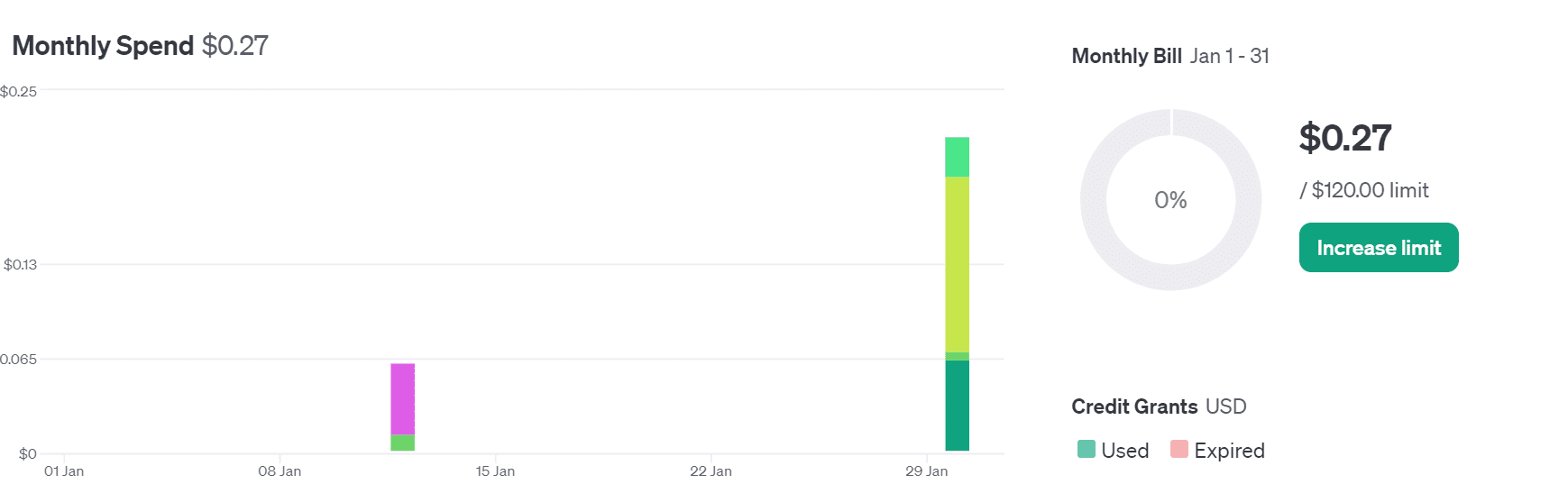
I've been experimenting with OpenAPI for some time now, and we ended up using only 0.22 dollars in credit, which I find quite affordable. With my guide, even beginners can start building their own AI applications. It's a simple process — you don't have to train your own model or deploy it. You can access state-of-the-art models using the API, which is continually improving with each new release.
OpenAI API for Beginners: Your Easy-to-Follow Starter Guide

In this guide, we cover how to set up the OpenAI Python API and generate simple text responses. We also learn about multiturn chat, embeddings, transcription, translation, text-to-speech, vision, and image generation APIs.

Do let me know If you want me to use these APIs to build an advanced AI application.

Thank you for reading.

Abid Ali Awan (@1abidaliawan) is a certified data scientist professional who loves building machine learning models. Currently, he is focusing on content creation and writing technical blogs on machine learning and data science technologies. Abid holds a Master's degree in Technology Management and a bachelor's degree in Telecommunication Engineering. His vision is to build an AI product using a graph neural network for students struggling with mental illness.

More On This Topic

  • Free ChatGPT Course: Use The OpenAI API to Code 5 Projects
  • OpenAI’s Whisper API for Transcription and Translation
  • An Easy Guide to Choose the Right Machine Learning Algorithm
  • Easy Guide To Data Preprocessing In Python
  • Supercharge Your AI Journey! Join Uplimit's Free Building AI…
  • Best Instagram Accounts to Follow for Data Science, Machine Learning & AI

Meet Rufus: Amazon launches an AI chatbot to help shoppers

Amazon Rufus

An example of conversations with Amazon Rufus.

Amazon has been working on artificial intelligence (AI) solutions and foundational models for years, and now the company is launching Rufus, a generative AI-powered chatbot that's specifically built for its customers.

Rufus works much like ChatGPT. The AI-enabled technology is capable of having text conversations with users, providing them with personalized information while maintaining context, so shoppers can ask follow-up questions. The biggest difference between Rufus and ChatGPT is that Rufus is more of a shopping assistant, which is trained on Amazon's product catalog, customer reviews, Q&A, and information that's available online.

Also: Google Maps is getting a generative AI boost. Here's what that will look like

Using Rufus, customers can narrow searches using terms specific to their situation, but which don't always appear in a filter menu when combing over search results. Rufus can also answer questions in a similar way to ChatGPT, Copilot, and Bard. For example, shoppers can ask Rufus, 'What should I consider if I want to start an indoor herb garden?' or 'What should I consider when buying USB-C cables?'

Customers can also use Rufus to ask for product or category comparisons, to raise specific questions about a product while on the product listing page, and to seek recommendations.

Also: ChatGPT Enterprise vs. ChatGPT Team: Which is the best for your business?

Rufus is launching today in beta on the Amazon shopping mobile app to a small number of customers and will roll out to additional shoppers in the US progressively over the coming weeks.

Amazon has been gradually adding AI features to its shopping platform, including AI-generated review highlights, Fit Review Highlights for personalized size guidance, and AI assistance for sellers to create engaging product listings.

Amazon hopes integrating generative AI into its shopping experience will enhance the decision-making process and boost customer confidence. The company will improve Rufus based on customer experience, and it plans to test new features and expand the availability of the AI chatbot.

Featured

Converting JSONs to Pandas DataFrames: Parsing Them the Right Way

Converting JSONs to Pandas DataFrames: Parsing Them the Right Way
Image by Author

Diving into the world of data science and machine learning, one of the fundamental skills you'll encounter is the art of reading data. If you have already some experience with it, you're probably familiar with JSON (JavaScript Object Notation) — a popular format for both storing and exchanging data.

Think of how NoSQL databases like MongoDB love to store data in JSON, or how REST APIs often respond in the same format.

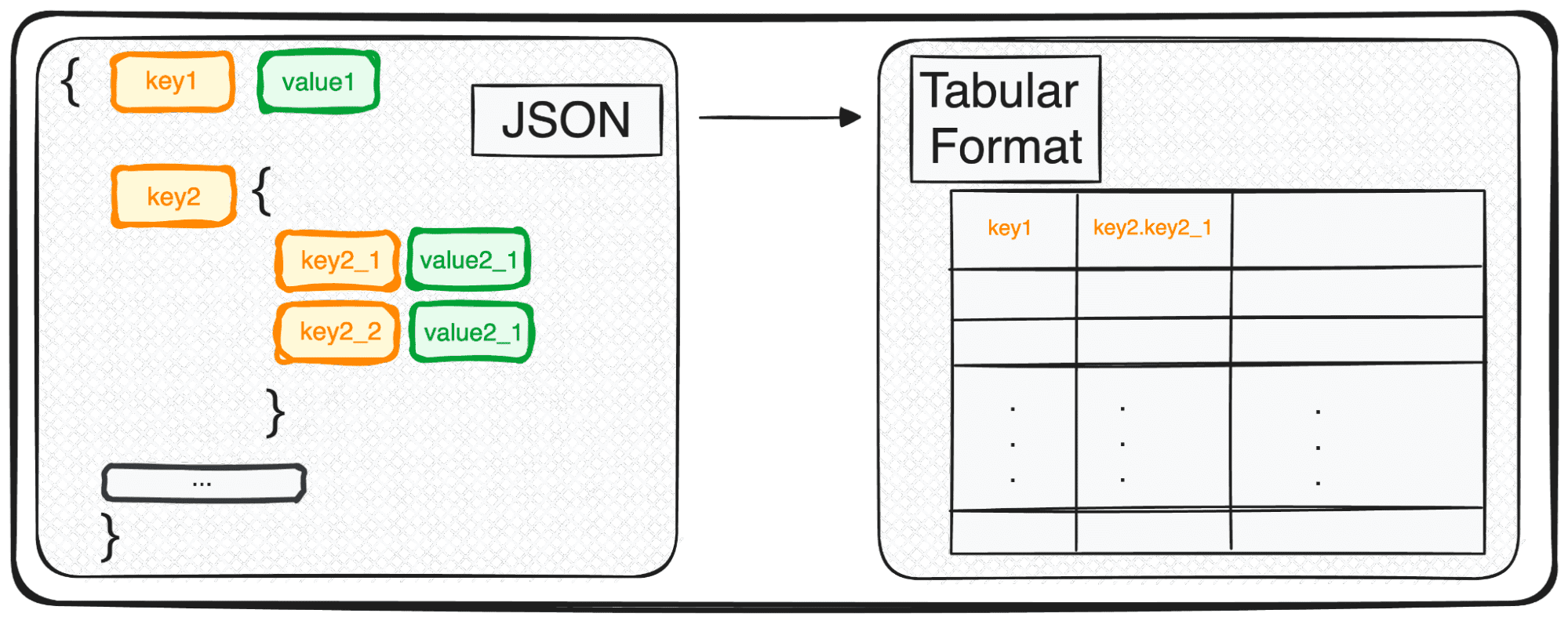
However, JSON, while perfect for storage and exchange, isn't quite ready for in-depth analysis in its raw form. This is where we transform it into something more analytically friendly – a tabular format.

So, whether you're dealing with a single JSON object or a delightful array of them, in Python's terms, you're essentially handling a dict or a list of dicts.

Let's explore together how this transformation unfolds, making our data ripe for analysis ????

Today I’ll be explaining a magic command that allows us to easily parse any JSON into a tabular format in seconds.

And it is… pd.json_normalize()

So let’s see how it works with different types of JSONs.

1. Dealing with simple JSONs and lists of JSONs

The first type of JSON that we can work with is single-leveled JSONs with a few keys and values. We define our first simple JSONs as follows:

Code by Author

So let’s simulate the need to work with these JSON. We all know there’s not much to do in their JSON format. We need to transform these JSONs into some readable and modifiable format… which means Pandas DataFrames!

1.1 Dealing with simple JSON structures

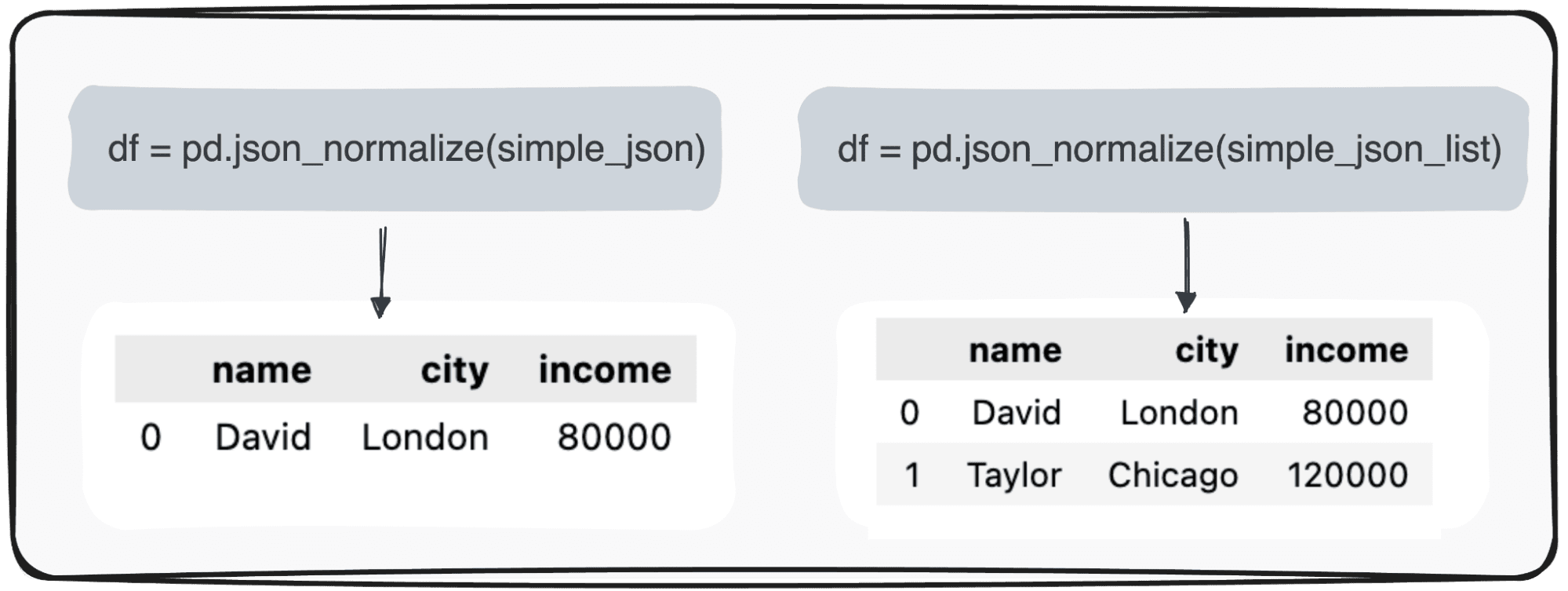
First, we need to import the pandas library and then we can use the command pd.json_normalize(), as follows:

import pandas as pd  pd.json_normalize(json_string)

By applying this command to a JSON with a single record, we obtain the most basic table. However, when our data is a little bit more complex and presents a list of JSONs, we can still use the same command with no further complications and the output will correspond to a table with multiple records.

Converting JSONs to Pandas DataFrames: Parsing Them the Right Way
Image by Author

Easy… right?

The next natural question is what happens when some of the values are missing.

1.2 Dealing with null values

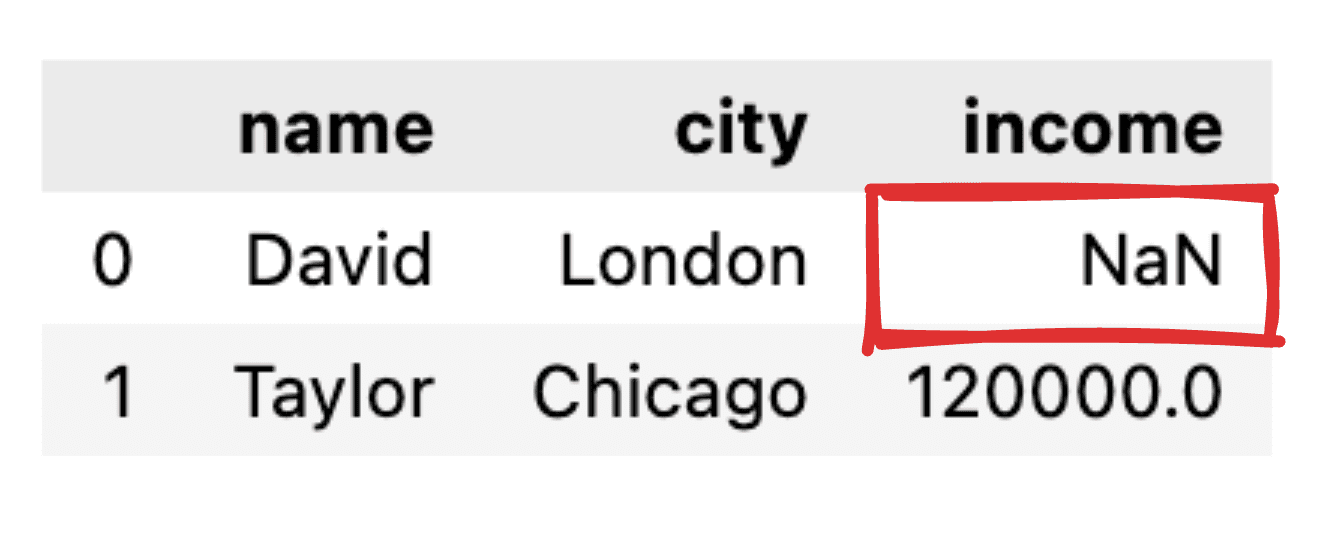
Imagine some of the values are not informed, like for instance, the Income record for David is missing. When transforming our JSON into a simple pandas dataframe, the corresponding value will appear as NaN.

Converting JSONs to Pandas DataFrames: Parsing Them the Right Way
Image by Author
And what about if I only want to get some of the fields?

1.3 Selecting only those columns of interest

In case we just want to transform some specific fields into a tabular pandas DataFrame, the json_normalize() command does not allow us to choose what fields to transform.

Therefore, a small preprocessing of the JSON should be performed where we filter just those columns of interest.

# Fields to include  fields = ['name', 'city']    # Filter the JSON data  filtered_json_list = [{key: value for key, value in item.items() if key in fields} for item in simple_json_list]    pd.json_normalize(filtered_json_list)  

So, let’s move to some more advanced JSON structure.

2. Dealing with multiple-level JSONs

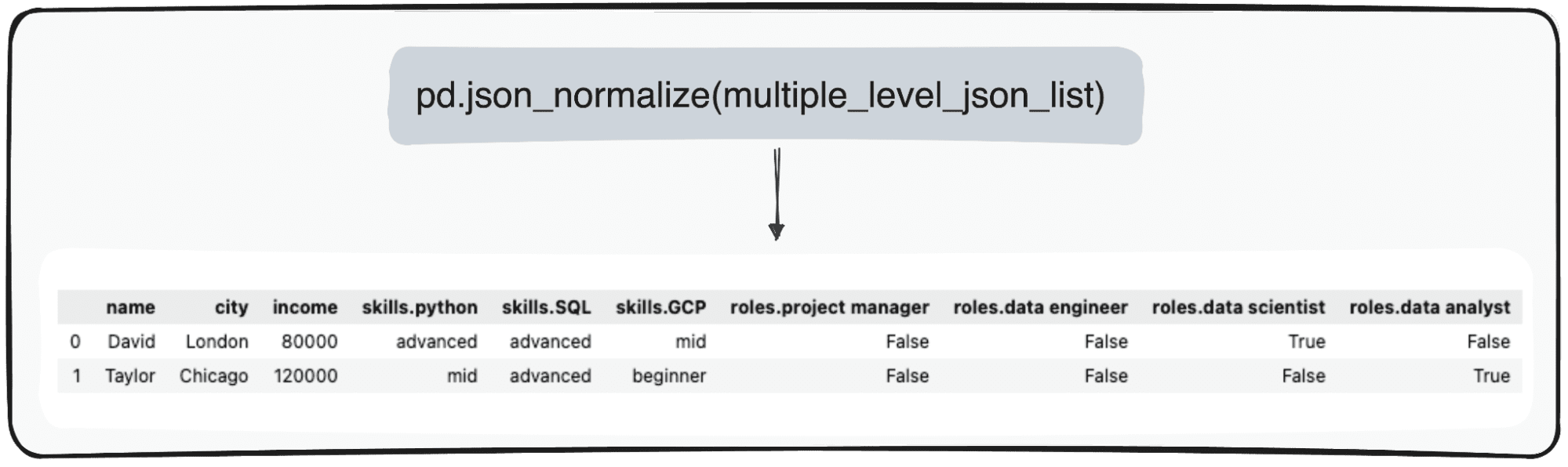
When dealing with multiple-leveled JSONs we find ourselves with nested JSONs within different levels. The procedure is the same as before, but in this case, we can choose how many levels we want to transform. By default, the command will always expand all levels and generate new columns containing the concatenated name of all the nested levels.

So if we normalize the following JSONs.

Code by Author

We would get the following table with 3 columns under the field skills:

  • skills.python
  • skills.SQL
  • skills.GCP

and 4 columns under the field roles

  • roles.project manager
  • roles.data engineer
  • roles.data scientist
  • roles.data analyst

Converting JSONs to Pandas DataFrames: Parsing Them the Right Way
Image by Author

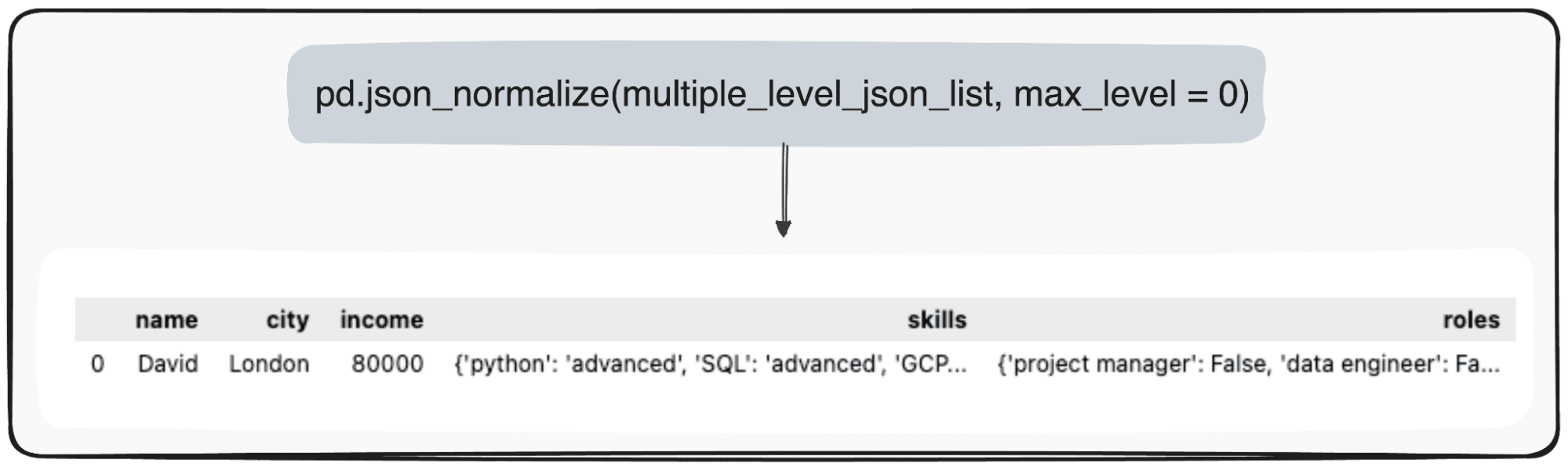
However, imagine we just want to transform our top level. We can do so by specifically defining the parameter max_level to 0 (the max_level we want to expand).

pd.json_normalize(mutliple_level_json_list, max_level = 0)

The pending values will be maintained within JSONs within our pandas DataFrame.

Converting JSONs to Pandas DataFrames: Parsing Them the Right Way
Image by Author 3. Dealing with a nested List JSON

The last case we can find is having a nested List within a JSON field. So we first define our JSONs to use.

Code by Author

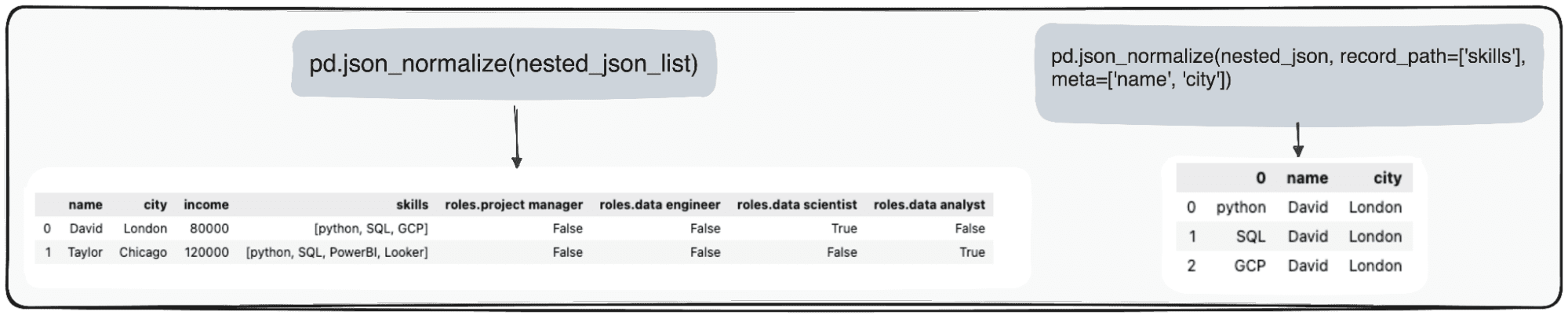
We can effectively manage this data using Pandas in Python. The pd.json_normalize() function is particularly useful in this context. It can flatten the JSON data, including the nested list, into a structured format suitable for analysis. When this function is applied to our JSON data, it produces a normalized table that incorporates the nested list as part of its fields.

Moreover, Pandas offers the capability to further refine this process. By utilizing the record_path parameter in pd.json_normalize(), we can direct the function to specifically normalize the nested list.

This action results in a dedicated table exclusively for the list's contents. By default, this process will only unfold the elements within the list. However, to enrich this table with additional context, such as retaining an associated ID for each record, we can use the meta parameter.

Converting JSONs to Pandas DataFrames: Parsing Them the Right Way
Image by Author Conclusion

In summary, the transformation of JSON data into CSV files using Python's Pandas library is easy and effective.

JSON is still the most common format in modern data storage and exchange, notably in NoSQL databases and REST APIs. However, it presents some important analytic challenges when dealing with data in its raw format.

The pivotal role of Pandas' pd.json_normalize() emerges as a great way to handle such formats and convert our data into pandas DataFrame.

I hope this guide was useful, and next time you are dealing with JSON, you can do it in a more effective way.

You can go check the corresponding Jupyter Notebook in the following GitHub repo.

Josep Ferrer is an analytics engineer from Barcelona. He graduated in physics engineering and is currently working in the Data Science field applied to human mobility. He is a part-time content creator focused on data science and technology. You can contact him on LinkedIn, Twitter or Medium.

More On This Topic

  • Query Your Pandas DataFrames with SQL
  • Using the apply() Method with Pandas Dataframes
  • How to Merge Pandas DataFrames
  • 3 Ways to Merge Pandas DataFrames
  • 3 Ways to Append Rows to Pandas DataFrames
  • Combining Pandas DataFrames Made Simple

IBM says generative AI can help automate business actions

IBM logo on phone with AI in background

A big focus of enterprise work these days is to automate human tasks for greater efficiency. Computer giant IBM asks in its most recent research whether generative artificial intelligence (AI), such as large language models (LLMs), can be a stepping stone to automation.

Called "SNAP", IBM's proposed software framework trains an LLM to generate a prediction of the next action to take place in a business process given all of the events that have come before. Those predictions, in turn, can serve as suggestions for what steps a business can take.

Also: Can ChatGPT predict the future? Training AI to figure out what happens next

"SNAP can improve the next activity prediction performance for various BPM [business process management] datasets," write Alon Oved and colleagues at IBM Research in a new paper, SNAP: Semantic Stories for Next Activity Prediction, published this week on the arXiv pre-print server.

IBM's work is just one example of a trend toward using LLMs to try to predict a next event or action in a series. Scholars have been doing work with what's called time series data — data that measures the same variables at different points in time to spot trends. The IBM work doesn't use time series data, but it does focus on the notion of events in sequence, and likely outcomes.

Also: AI is outperforming our best weather forecasting tech, thanks to DeepMind

SNAP is an acronym for "semantic stories for the next activity prediction". Next-activity proediction (the NAP part of SNAP) is an existing, decades-old area of systems research. NAP typically uses older forms of AI to predict what will happen next after all the steps up to that point have been input, usually from a log of the business, which is a practice known as "process mining".

The semantic stories element of SNAP is the part that IBM adds to the framework. The idea is to use the richness of language in programs such as GPT-3 to go beyond the activities of traditional AI programs. The language models can capture more details of a business process, and turn them it into a coherent "story" in natural language.

Older AI programs can't handle all the data about business processes, write Oved and team. They "utilize only the sequence of activities as input to generate a classification model," and, "Rarely are the additional numerical and categorical attributes taken into account within such a framework for predictions."

Also: Why Nvidia is teaching robots to twirl pens and how generative AI is helping

An LLM, in contrast, can pick out many more details and mold them into a story. An example is a loan application. The application process contains several steps. The LLM can be fed various items from the database about the loan amount, such as "amount = $20,000" and "request start date = Aug 20, 2023".

Those data items can be automatically fashioned by the LLM into a natural language narrative, such as:

"The requested loan amount was 20,000$, and it was requested by the customer. The activity "Register Application" took place on turn 6, which occurred 12 days after the case started […]"

The SNAP system involves three steps. First, a template for a story is created. Then, that template is used to build a full narrative. And lastly, the stories are used to train the LLM to predict the next event that will happen in the story.

IBM's SNAP can take a list of attributes of a business process and turn them into a narrative via generative AI, which can then be used to predict the next most likely development.

In the first step, the attributes — such as loan amount — are fed to the language model prompt, along with an example of how they can be turned into a template, which is a scaffold for a story. The language model is told to do the same for a new set of attributes, and it spits out a new template.

In step two, that new template is fed into the language model and filled out by the model as a finished story in natural language.

The final step is to feed many such stories into an LLM to train it to predict what will happen next. The conclusion of this combination of stories is the "ground truth" training examples.

Also: Generative AI can't find its own errors. Do we need better prompts?

In their research, Oved and team test out whether SNAP is better at next-action prediction than older AI programs. They use four publicly available data sets, including car-maker Volvo's actual database of IT incidents, a database of environmental permitting process records, and a collection of imaginary human resources cases.

The authors use three different "language foundational models": OpenAI's GPT-3, Google's BERT, and Microsoft's DeBERTa. They say all three "yield superior outcomes compared to the established benchmarks".

Interestingly, although GPT-3 is more powerful than the other two models, its performance on the tests is relatively modest. They conclude that "even relatively small open-source LFMs like BERT have solid SNAP results compared to large models."

The authors also find that the full sentences of the language models seem to matter for performance.

"Does semantic story structure matter?" they ask, before concluding: "Design of coherent and grammatically correct semantic stories from business process logs constitutes a key step in the SNAP algorithm."

Also: Five ways to use AI responsibly

They compare the stories from GPT-3 and the other models with a different approach where they simply combine the same information into one, long text string. They find the former approach, which uses full, grammatical sentences, has far greater accuracy than a mere string of attributes.

The authors conclude generative AI is useful in helping to mine all the data about processes that traditional AI can't capture: "That is particularly useful where the categorical feature space is huge, such as user utterances and other free-text attributes."

On the flip side, the advantages of SNAP decrease when it uses data sets that don't have much semantic information — in other words, written detail.

"A central finding in this work is that the performance of SNAP increases with the amount of semantic information within the dataset," they write.

Importantly for the SNAP approach, the authors suggest it's possible that data sets will increasingly be enhanced by newer technologies, such as robotic process automation, "where the user and system utterances often contain rich semantic information that can be used to improve the accuracy of predictions."

Artificial Intelligence

Sustainability in AI is the Need of the Hour

“The data-centric approach to machine learning is far more sustainable than the model-centric one,” said Ayon Roy, the executive data scientist for NielsenIQ, at MLDS 2024. AI and sustainability is continuously debated, trying to quantify how much energy the model uses and what are the environmental benefits to it.

Artificial intelligence is being used to address climate change by improving climate predictions, energy efficiency, and monitoring environmental health. However, the AI industry’s growth raises ethical concerns due to its substantial carbon and water footprints.

We know that the production of AI systems requires significant computational power, contributing to carbon emissions and water usage, and necessitates mining for rare earth minerals, causing soil and air pollution.

A study by Hugging Face revealed that their language model BLOOM generated over 50 metric tons of CO2, equivalent to 60 flights from London to New York. The shocking energy cost of these models only increases with their increasing size. Roy explained that trying out different approaches in training and fine tuning the model makes a difference. “Like a lot of people, I believed that the model-centric approach was efficient, but over time I’ve seen how the data-centric approach really optimises my processes better.”

Andrew Ng backs this approach and stressed on the importance of improving data quality to achieve desired performance in AI systems. This not only increases the accuracy of the models but is also more compute efficient, saving energy and financial costs.

Ayon Roy also works on projects that help studying the environmental trends and its impact. “We have to consistently be mindful of aligning AI development with sustainability and responsible AI principles that includes fairness, safety, and reduced biases,” he said.

The post Sustainability in AI is the Need of the Hour appeared first on Analytics India Magazine.

Jaspreet Bindra on Generative AI and the Road to Singularity

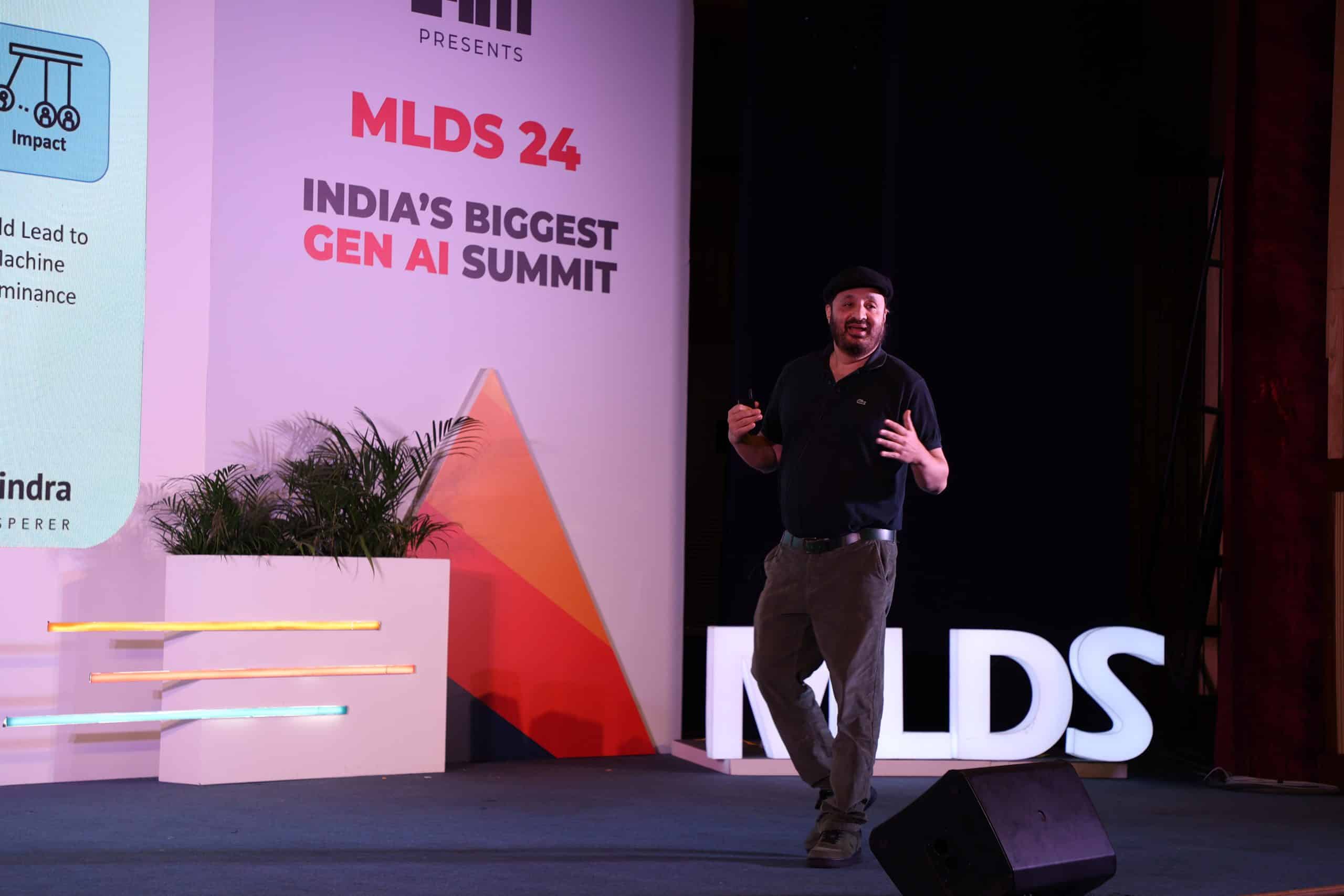
At India’s biggest generative AI summit, MLDS 2024, founder and MD of Tech Whisperer Ltd., Jaspreet Bindra kick-started the keynote by delving into the history of AI, alongside providing an in-depth explanation of the origin of the concept of singularity.

“Are we kind of moving towards this Promethean future where we have the creatures that we have created, become superior to us and don’t need us any longer?” asked Bindra, before going on to explain singularity and how AGI is far from our current technological reality.

The Varying AGI

He highlighted the varying AGI timelines that AI experts and scientists often discuss about. “People have started saying that between 2026 to 2030 is when we will get some definition of AGI. However, that definition is changing,” he added.

Bindra called out OpenAI’s approach to AGI as one that suits them. “Sam Altman has a different definition of AGI in every interview of his. He is bringing the definition down to make it more and more achievable.”

Citing futurist and AI expert Ray Kurzweil, who wrote his first book titled ‘The Singularity Is Near,’ Bindra humorously said he is now writing a second book, which is called ‘The Singularity Is Nearer.’

Setting aside varying AGI timelines predicted by various AI experts, Bindra expressed his profound respect for Geoffrey Hinton, the godfather of AI, who he believes to be conservative. He quoted Hinton, who when asked if AGI will happen in five years, he said it’s a “non-zero probability.”

Language is Key

Bindra brought up the discussion of generative AI that expedited last year, with people assuming the path to AGI is generative intelligence. He clearly stated that GAI≄AGI. “Generative Artificial Intelligence is not Artificial General Intelligence. Is it a path to that? Absolutely, absolutely not,” he ascertained. “Large language models are optimised for plausibility. believability, rather than the truth.

He noted the importance of language that brings a familiarity between people and machines. “Language is the core of humanity, and language is the core of large language models,” which is why Bindra believes that humans and ChatGPT get along well, ‘because we are the same thing.’

Deep-rooted Singularity ॐ

“Technology, science and philosophy are one. Singularity is more a philosophy than a precise decision,” said Bindra at MLDS 2024. “The origin of the word singularity is very different.”

Giving a cautionary message of taking the listeners through a non-technical session, and even calling singularity as a philosophy, Bindra spoke about the relevance of singularity and super intelligence, rooting it back to old mythologies.

Narrating a story of Zeus and Prometheus from Greek mythology, where Prometheus gave a ‘spark’ to human beings (their creation) that fuelled their intelligence, and ‘super-intelligence’, as per Zeus, the concept of scaling intelligence is nothing new.

“Once we have an intelligence which is superior to us, that will create more AI rather than us creating, and we will become like the gods of Prometheus and Zeus,” he said.

He also drew parallels to Hindu mythology, where he equated singularity to the word ‘Om’ which depicts the beginning of the universe. “It was the beginning of everything, like a big bang.”

Bindra’s session on singularity heavily focussed on the philosophy side of things : a perfect shade to start the biggest generative AI conference where insightful generative AI sessions, workshops and presentations are lined up for two days.

The post Jaspreet Bindra on Generative AI and the Road to Singularity appeared first on Analytics India Magazine.

Amazon Introduces Rufus, Generative AI Shopping Assistant

Amazon has introduced Rufus, a shopping assistant powered by generative AI. Rufus aims to simplify the Amazon shopping process by providing intelligent assistance, personalised recommendations, and seamless product discovery for users.

Key features of Rufus include the ability to guide customers on what to look for in various product categories, helping them shop by occasion or purpose, facilitating comparisons between product categories, and providing personalised recommendations based on specific queries.

Moreover, customers can also use Rufus to ask questions about individual products while viewing their detail pages. For instance, “is this pickleball paddle good for beginners?”, or “is this jacket machine washable?”

Trained on Amazon’s extensive product catalog, customer reviews, community Q&As, and web information, Rufus is designed to answer a variety of customer queries, offer product comparisons, and provide tailored recommendations.

The rollout begins with a beta release to a small subset of U.S. customers using Amazon’s mobile app, with a progressive expansion to additional users in the coming weeks.

To access Rufus, beta customers can update their Amazon Shopping app, type or speak their questions into the search bar, and a Rufus chat dialog box will appear at the bottom of their screen, offering answers and suggestions.

Users are encouraged to provide feedback by rating answers with a thumbs up or down and offering freeform feedback to contribute to the continuous improvement of Rufus.

The post Amazon Introduces Rufus, Generative AI Shopping Assistant appeared first on Analytics India Magazine.