New AI Patent Study Shows IBM Leads Google and Microsoft in GenAI Race

New AI Patent Study Shows IBM Leads Google and Microsoft in GenAI Race February 7, 2024 by Ali Azhar

The meteoric rise of artificial intelligence over the last year has sent tech companies scrambling to find new ways to develop and deploy AI technology in their products and processes. Companies that have developed or are in the process of developing something unique or innovative that uses AI technology often seek patents to protect their invention in this promising frontier.

A new patent study by IFI Claims has revealed that the U.S. tech giants IBM, Google, and Microsoft lead the way as the companies with most GenAI patent applications. IBM is not only leading the GenAI race with 1,591 applications, but they have three times more applications than Google, which is at second spot. Other firms in the top 10 include Samsung, Adobe, Intel, Capital One, and Baidu.

IFI Claims, a Digital Science company, is one of the most trusted patent data providers in the industry. It tracks and compiles data from the U.S. Patent and Trademark Office (USPTO) and other patent-issuing agencies around the globe.

For their methodology to analyze patent applications, IFI Claims noted that with newer technologies, such as GenAI, it can take time for new patent classifications to emerge. However, for the purpose of this study, IFI Claims created a system to identify AI and generative AI-related patent filings. This included tailoring a query that uses technologies currently in play for GenAI — currently the most popular form of AI.

According to the IFI Claims study, one in five AI-related patent applications deals with GenAI. IFI Claims reported that GenAI applications have grown at a compound annual rate of 31 percent over the past five years, while the granted applications have grown at 16 percent.

As a patent leader for various applications for almost three decades, IBM has been an intellectual property powerhouse. However, in 2020 the tech giant shared that they would no longer pursue patent leadership. They would focus on key areas rather than patenting all its inventions. AI was marked as one of the key areas.

Surprisingly, ChatGPT owner and AI pioneer OpenAI is not even in the top 25 companies on the list. According to the IFI Claims, OpenAI has only one patent application. You would expect a knowledge-based AI company to have more patent applications, however, OpenAI may have recent filings that have not yet been made public or could be protecting its intellectual property through trade secrets.

(amgun/Shutterstock)

While AI-related patent applications are just one indicator of innovation, it does show the research intensity and interest of a company in artificial intelligence. It also shows that the great AI push is more than just marketing.

Moreover, patent applications are strong indicators of where businesses see future innovation and technological value. While the overall AI adoption rates are still low, the high number of patent applications highlights that we can expect more AI innovation from companies in the future.

All the patents analyzed by IFI Claims are for a human-made invention. One of the big emerging questions is how we would handle inventions produced by AI itself. Traditional patent laws and processes are unlikely to be adequate or efficient. Perhaps this is a question for the future when AI becomes more advanced. However, with the rapid pace that the technology is growing, that time might come sooner than expected.

Related Items

Two-Thirds of Organizations Already Using GenAI, O’Reilly Says

2024 GenAI Predictions

Will GenAI Take Traditional AI Along for the Ride?

Related

Microsoft brings new design-focused features to Copilot

Microsoft brings new design-focused features to Copilot Kyle Wiggers 9 hours

Copilot, Microsoft’s family of AI-powered chatbots and assistants, is getting a few new upgrades timed with a flashy Superbowl LVIII ad campaign.

In a post on the official Microsoft blog, Yusuf Mehdi, Microsoft’s chief marketing officer, outlined what users can expect.

“Today marks exactly one year since our entry into AI-powered experiences for people with Bing Chat,” he wrote. “In that year, we’ve learned so many new things, and seen the use of our Copilot experiences explode with over 5 billion chats and 5 billion images created to date … Now, with Copilot as our singular experience, for people looking to get more out of AI creation, we’re introducing further … capabilities.”

We have also now fully shipped Deucalion, a fine tuned model that makes Balanced mode for @Microsoft Copilot richer and faster. pic.twitter.com/pGrrhVnTYS

— Jordi Ribas (@JordiRib1) February 7, 2024

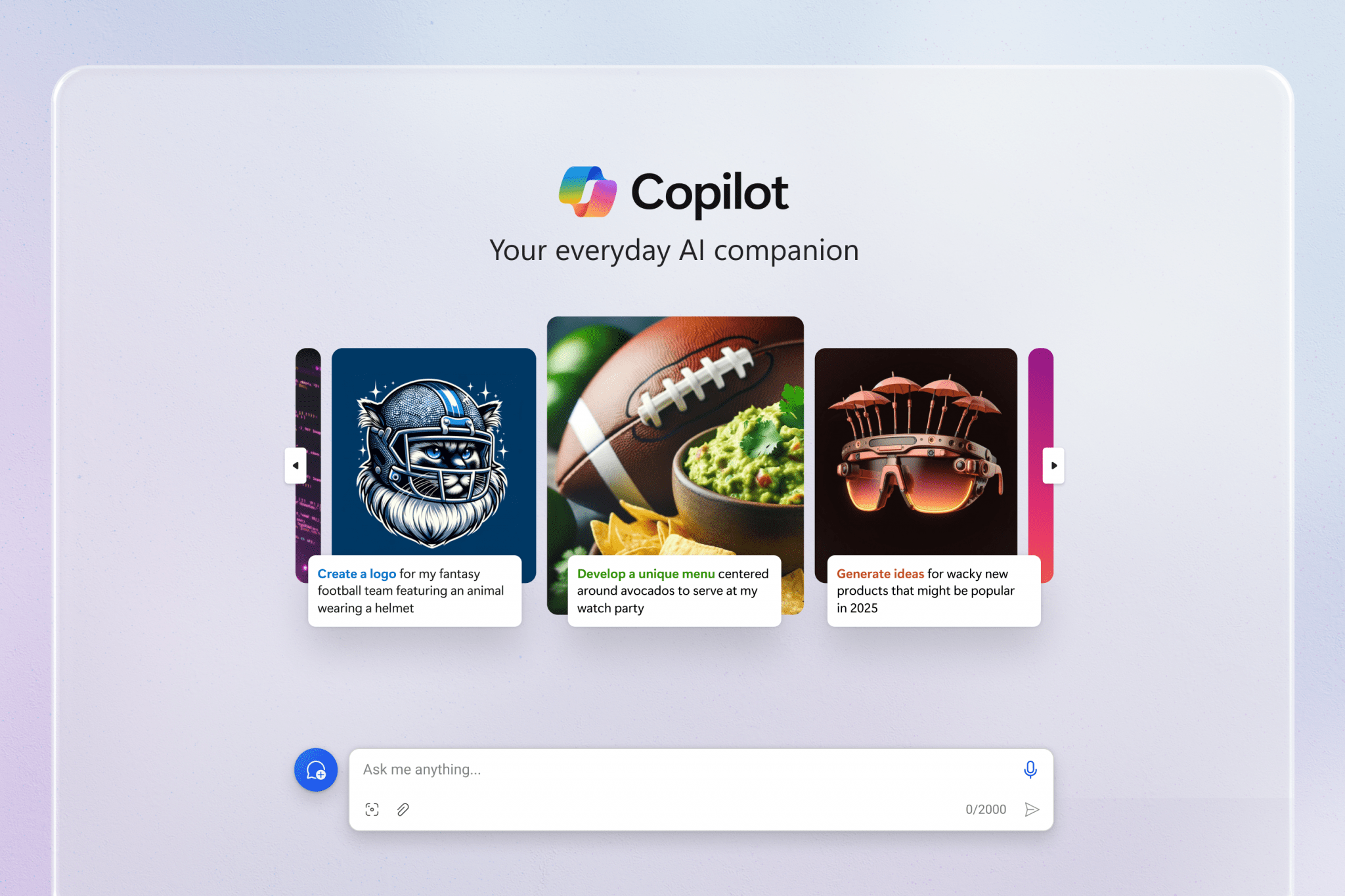
The Copilot experience on the web, Android and iOS now features an improved AI model, Deucalion, along with a more “streamlined look and feel,” Mehdi said — with a cleaner style for answers and a carousel of suggested prompts to feed Copilot (e.g. “How would you explain AI to a sixth grader?”).

Designer in Copilot, meanwhile — a tool that taps GenAI models like OpenAI’s DALL-E 3 to turn prompts into images — has new editing capabilities.

Microsoft Copilot

The upgraded Copilot experience on the web.

All English-speaking Copilot users in the U.S., U.K., Australia, India and New Zealand can now edit images in-line in the flow of a chat, for example colorizing an object, blurring an image background or changing the style of the image (to pixel art, say). And subscribers to Copilot Pro, Microsoft’s $20-per-month premium Copilot plan, can resize and regenerate images between “square” (i.e. portrait) and landscape.

Coming soon to Copilot is Designer GPT, Mehdi said, which will offer a more “immersive, dedicated canvas” inside Copilot where users can “visualize their ideas.”

Designer caused quite a stir earlier this year when malicious users, mostly from the image board 4chan, used the tool to create pornographic deepfakes of Taylor Swift — and spread them across X (formerly Twitter). Designer had guardrails designed to prevent inappropriate prompts, Microsoft claimed — but users found loopholes like misspelling names and describing images that didn’t explicitly use sexual terms but generated the same result.

Last month, Microsoft said that it addressed the Designer loopholes by making it impossible to generate celebrity images. But, as with all GenAI tools, it’s likely to be a never-ending cat and mouse game between bad actors and vendors.

“Microsoft’s advancements in AI align with our company mission to empower every person and organization on the planet to achieve more,” Mehdi continued. “With Copilot, we’re democratizing our breakthroughs in AI to help make the promise of AI real for everyone.”

Mehdi didn’t address the performance issues with Copilot Pro — a common complaint among early subscribers.

Copilot Pro is supposed to come with priority access to the underlying OpenAI models powering Copilot even during peak times, but users report dealing with exceptionally long generation times and other, potentially related bugs. Windows Central speculates that the root of the problem is insufficient server capacity, but lacking official comment, it’s impossible to know for certain.

LLMOps: The Next Frontier for Machine Learning Operations

Explore LLMOps: The essential guide to efficiently managing Large Language Models in production. Maximize benefits, mitigate risks

Machine learning (ML) is a powerful technology that can solve complex problems and deliver customer value. However, ML models are challenging to develop and deploy. They need a lot of expertise, resources, and coordination. This is why Machine Learning Operations (MLOps) has emerged as a paradigm to offer scalable and measurable values to Artificial Intelligence (AI) driven businesses.

MLOps are practices that automate and simplify ML workflows and deployments. MLOps make ML models faster, safer, and more reliable in production. MLOps also improves collaboration and communication among stakeholders. But more than MLOps is needed for a new type of ML model called Large Language Models (LLMs).

LLMs are deep neural networks that can generate natural language texts for various purposes, such as answering questions, summarizing documents, or writing code. LLMs, such as GPT-4, BERT, and T5, are very powerful and versatile in Natural Language Processing (NLP). LLMs can understand the complexities of human language better than other models. However, LLMs are also very different from other models. They are huge, complex, and data-hungry. They need a lot of computation and storage to train and deploy. They also need a lot of data to learn from, which can raise data quality, privacy, and ethics issues.

Moreover, LLMs can generate inaccurate, biased, or harmful outputs, which need careful evaluation and moderation. A new paradigm called Large Language Model Operations (LLMOps) becomes more essential to handle these challenges and opportunities of LLMs. LLMOps are a specialized form of MLOps that focuses on LLMs in production. LLMOps include the practices, techniques, and tools that make LLMs efficient, effective, and ethical in production. LLMOps also help mitigate the risks and maximize the benefits of LLMs.

LLMOps Benefits for Organizations

LLMOps can bring many benefits to organizations that want to utilize the full potential of LLMs.

One of the benefits is enhanced efficiency, as LLMOps provides the necessary infrastructure and tools to streamline the development, deployment, and maintenance of LLMs.

Another benefit is lowered costs, as LLMOps provides techniques to reduce the computing power and storage required for LLMs without compromising their performance.

In addition, LLMOps provides techniques to improve the data quality, diversity, and relevance and the data ethics, fairness, and accountability of LLMs.

Moreover, LLMOps offers methods to enable the creation and deployment of complex and diverse LLM applications by guiding and enhancing LLM training and evaluation.

Principles and Best Practices of LLMOps

Below, the fundamental principles and best practices of LLMOps are briefly presented:

Fundamental Principles of LLMOPs

LLMOPs consist of seven fundamental principles that guide the entire lifecycle of LLMs, from data collection to production and maintenance.

  1. The first principle is to collect and prepare diverse text data that can represent the domain and the task of the LLM.
  2. The second principle is to ensure the quality, diversity, and relevance of the data, as they affect the performance of the LLM.
  3. The third principle is to craft effective input prompts to elicit the desired output from the LLM using creativity and experimentation.
  4. The fourth principle is to adapt pre-trained LLMs to specific domains by selecting the appropriate data, hyperparameters, and metrics and avoiding overfitting or underfitting.
  5. The fifth principle is to send fine-tuned LLMs into production, ensuring scalability, security, and compatibility with the real-world environment.
  6. The sixth principle is to track the performance of the LLMs and update them with new data as the domain and the task may evolve.
  7. The seventh principle is establishing ethical policies for LLM use, complying with the legal and social norms, and building trust with the users and the stakeholders.

LLMOPs Best Practices

Effective LLMOps rely on a robust set of best practices. These include version control, experimentation, automation, monitoring, alerting, and governance. These practices serve as essential guidelines, ensuring the efficient and responsible management of LLMs throughout their lifecycle. Each of the practices is briefly discussed below:

  • Version control— the practice of tracking and managing the changes in the data, code, and models throughout the lifecycle of LLMs.
  • Experimentation—refers to testing and evaluating different versions of the data, code, and models to find the optimal configuration and performance of LLMs.
  • Automation— the practice of automating and orchestrating the different tasks and workflows involved in the lifecycle of LLMs.
  • Monitoring— collecting and analyzing the metrics and feedback related to LLMs’ performance, behavior, and impact.
  • Alerting— the setting up and sending alerts and notifications based on the metrics and feedback collected from the monitoring process.
  • Governance— establishing and enforcing the policies, standards, and guidelines for LLMs' ethical and responsible use.

Tools and Platforms for LLMOps

Organizations need to use various tools and platforms that can support and facilitate LLMOps to utilize the full potential of LLMs. Some examples are OpenAI, Hugging Face, and Weights & Biases.

OpenAI, an AI research company, offers various services and models, including GPT-4, DALL-E, CLIP, and DINOv2. While GPT-4 and DALL-E are examples of LLMs, CLIP, and DINOv2 are vision-based models designed for tasks like image understanding and representation learning. OpenAI API, provided by OpenAI, supports the Responsible AI Framework, emphasizing ethical and responsible AI use.

Likewise, Hugging Face is an AI company that provides an NLP platform, including a library and a hub of pre-trained LLMs, such as BERT, GPT-3, and T5. The Hugging Face platform supports integrations with TensorFlow, PyTorch, or Amazon SageMaker.

Weights & Biases is an MLOps platform that provides tools for experiment tracking, model visualization, dataset versioning, and model deployment. The Weights & Biases platform supports various integrations, such as Hugging Face, PyTorch, or Google Cloud.

These are some of the tools and platforms that can help with LLMOps, but many more are available in the market.

Use Cases of LLMs

LLMs can be applied to various industries and domains, depending on the needs and goals of the organization. For example, in healthcare, LLMs can help with medical diagnosis, drug discovery, patient care, and health education by predicting the 3D structure of proteins from their amino acid sequences, which can help understand and treat diseases like COVID-19, Alzheimer’s, or cancer.

Likewise, in education, LLMs can enhance teaching and learning through personalized content, feedback, and assessment by tailoring the language learning experience for each user based on their knowledge and progress.

In e-commerce, LLMs can create and recommend products and services based on customer preferences and behavior by providing personalized mix-and-match suggestions on an intelligent mirror with augmented reality, providing a better shopping experience.

Challenges and Risks of LLMs

LLMs, despite their advantages, have several challenges demanding careful consideration. First, the demand for excessive computational resources raises cost and environmental concerns. Techniques like model compression and pruning alleviate this by optimizing size and speed.

Secondly, the strong desire for large, diverse datasets introduces data quality challenges, including noise and bias. Solutions such as data validation and augmentation enhance data robustness.

Thirdly, LLMs threaten data privacy, risking the exposure of sensitive information. Techniques like differential privacy and encryption help protect against breaches.

Lastly, ethical concerns arise from the potential generation of biased or harmful outputs. Techniques involving bias detection, human oversight, and intervention ensure adherence to ethical standards.

These challenges necessitate a comprehensive approach, encompassing the entire lifecycle of LLMs, from data collection to model deployment and output generation.

The Bottom Line

LLMOps is a new paradigm focusing on the operational management of LLMs in production environments. LLMOps encompasses the practices, techniques, and tools that enable the efficient development, deployment, and maintenance of LLMs, as well as the mitigation of their risks and the maximization of their benefits. LLMOps is essential for unlocking the full potential of LLMs and leveraging them for various real-world applications and domains.

However, LLMOps is challenging, requiring much expertise, resources, and coordination across different teams and stages. LLMOps also requires a careful assessment of the needs, goals, and challenges of each organization and project, as well as the selection of the appropriate tools and platforms that can support and facilitate LLMOps.

Generative AI Playground: LLMs with Camel-5b and Open LLaMA 3B on the Latest Intel® GPU

Sponsored Content

Generative AI Playground: LLMs with Camel-5b and Open LLaMA 3B on the Latest Intel® GPU

Intel offers a thrilling glimpse into the next generation of AI, showcasing the power of Camel-5b and Open LLaMA 3B LLMs. Energized by Intel's advanced GPU technology, these models construct useful language modeling tasks, even with very complex prompts. To find out more about these developments, check out the article below, and you can even try them out yourself on the Intel Developer Cloud. Because these models are general language models, they have potential across a variety of sectors, including financial, energy, stock trading, and others.

Discover more: Generative AI Playground: LLMs with Camel-5b and Open LLaMA 3B on the Latest Intel® GPU.

More On This Topic

  • Building a GPU Machine vs. Using the GPU Cloud
  • Unveiling the Power of Meta's Llama 2: A Leap Forward in Generative AI?
  • RedPajama Project: An Open-Source Initiative to Democratizing LLMs
  • Falcon LLM: The New King of Open-Source LLMs
  • Introducing OpenLLM: Open Source Library for LLMs
  • Building Microservice for Multi-Chat Backends Using Llama and ChatGPT

Colossyan uses GenAI to create corporate training videos

Colossyan uses GenAI to create corporate training videos Kyle Wiggers 2 days

Most people don’t watch corporate training videos — or, in cases where the training’s mandatory, don’t give them their full attention. According to a recent poll from Kaltura, the video tech provider, 75% of staffers admit to skimming through training videos, watching them without sound or listening to them while multitasking.

So, given that training videos aren’t cheap to produce, is there a way to make them more engaging and thus less of a money sink? Dominik Mate Kovacs, the co-founder and CEO of Colossyan, thinks there is — and it involves generative AI.

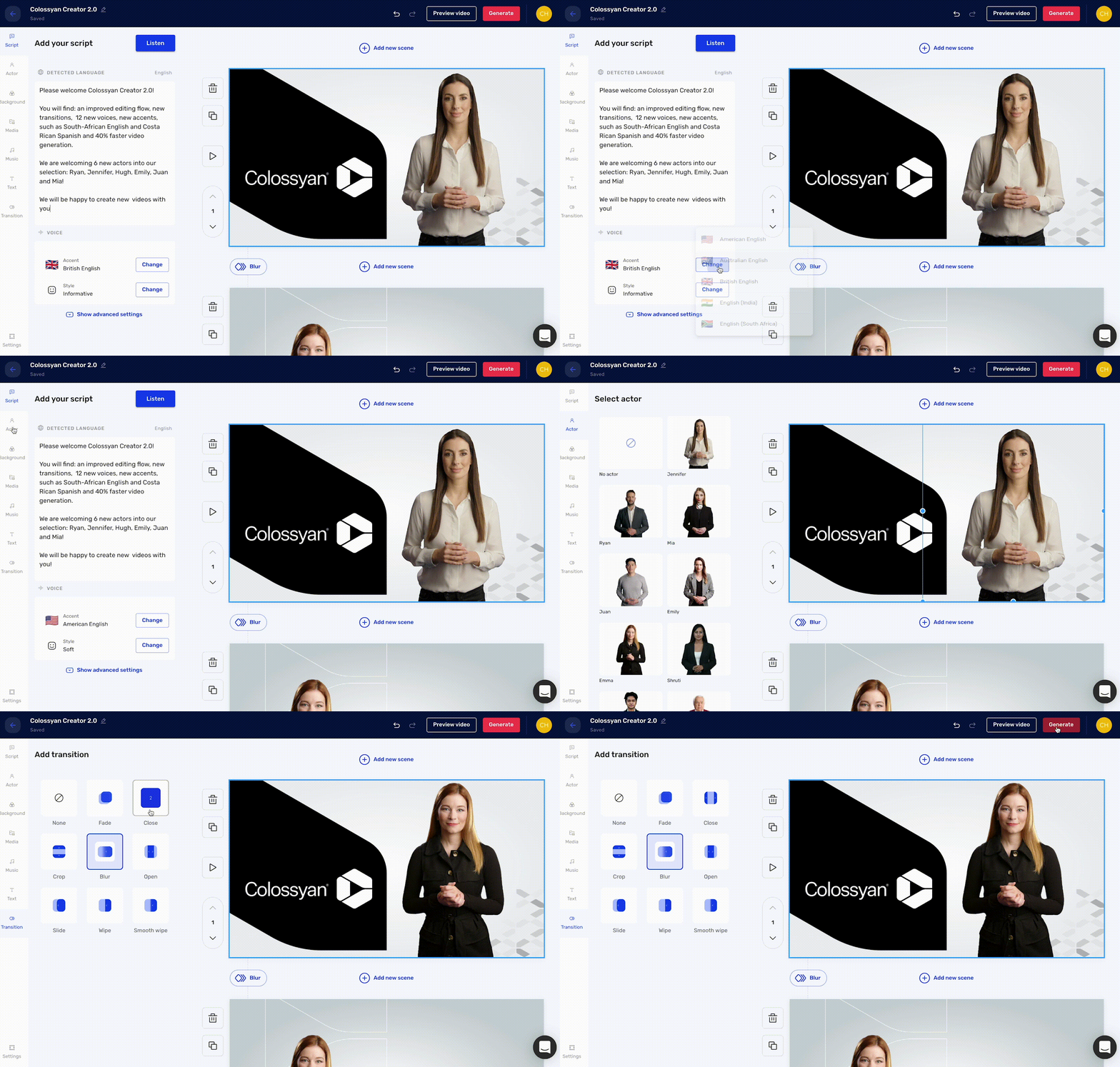
Colossyan taps AI to generate workplace learning videos, remixing, re-animating and editing footage of one of several virtual avatars against changeable backdrops. Users can enter a script to have it “read” aloud by Colossyan’s text-to-speech (TTS) engine, which also translates the script into over 70 languages.

Colossyan

Image Credits: Colossyan

“To generate a video with Colossyan’s AI video platform, all you have to do is input a script and select from a diverse range of avatars,” Kovacs told TechCrunch in an email interview. “Any company can create a video about almost anything efficiently, without the need for conventional filming resources.”

Kovacs founded Colossyan in 2020 after leaving Defudger, a deepfakes detection platform, which he helped to co-launch. An engineer and data scientist by training, Kovacs says that he was inspired to start Colossyan by the budding corporate interest in GenAI.

“Enterprises are leveraging AI in diverse areas such as IT automation, customer care and digital labor — highlighting the broad applicability and potential impact of AI technologies in streamlining operations and enhancing service delivery,” Kovacs said. “The barriers to AI adoption, such as limited AI skills and data complexity, are significant yet surmountable challenges that many organizations are actively working to overcome.”

For the heck of it, I gave Colossyan’s platform, which offers a free trial, a go to see if I could make a training video that’d successfully hold the attention of my ADHD brain — admittedly a high bar. The avatars were a bit too stiff and cartoonish for my liking and the TTS engine too robotic, at least compared to some of the more sophisticated GenAI tools out there (e.g., ElevenLabs). But I’ve certainly seen worse corporate videos.

Colossyan also doesn’t generate videos as quickly as I’d expect — a 38-second clip takes ~11 minutes. Granted, that’s a lot faster than creating trainings from scratch. But frankly, faced with the prospect of generating more than a handful of videos for whatever purpose, I’d be tempted to go the PowerPoint or Canva route instead.

I’m not Colossyan’s target market, of course. And it seems that several household brands are happy to pay for a subscription to Colossyan as it exists today, including Novartis, Porsche, Vodafone, HPE and Paramount, claims Kovacs.

Kovacs attributes the customer traction to features like integrations with learning management systems and a “conversation mode” that allows two avatars to hold a dialogue with each other. He doesn’t deny that there’s a fair amount of competition in the GenAI video space — see CommonGround, Synthesia and Surge plus solutions from tech giants like Microsoft — but he thinks that Colossyan’s focus on “interactivity and engagement,” as he puts it, will continue to set the platform apart.

Perhaps he’s right. Colossyan today announced that it raised $22 million in a funding round led by Lakestar with participation from Launchub, Day One Capital and Emerge Education. The proceeds will be put toward tripling Colossyan’s headcount across its New York, London and Budapest offices, Kovacs says, and developing new capabilities like branching videos and knowledge checks.

“For C-suite and IT department leaders, our platform represents a scalable, cost-efficient solution to training and development challenges,” he added.

Sentiment Analysis in Python: Going Beyond Bag of Words

Sentiment Analysis in Python: Going Beyond Bag of Words
Image created on DALL-E

Do you know that election results can be predicted to some extent by doing sentiment analysis? Data science can be both amusing and very useful when applied to real-life situations rather than working with mock datasets.

In this article, we will conduct a brief case study using Twitter data. In the end, you will see a case study that has a significant impact on real life, which will surely pique your interest. But first, let's start with the basics.

What is Sentiment Analysis?

Sentiment analysis is a method, used to predict feelings, like digital psychologists. With this, psychologist you created, the destiny of the text you’ll analyze will be in your hands. You can do it like the famous psychologist Freud, or you can just be there like a psychologist, charging 10 dollars per session.

Just like your psychologist listens and understands your emotions, sentiment analysis does the same things on text, like reviews, comments, or tweets, as we will do in the next section. To do that, let’s start doing a case study on the ready dataset.

Case Study: Sentiment Analysis on Twitter Data

To do sentiment analysis, we will use datasets from Kaggle. Here this dataset was collected by using twitter api. Here is the link to this dataset: https://www.kaggle.com/datasets/kazanova/sentiment140

Now, let’s start exploring the dataset.

Explore Dataset

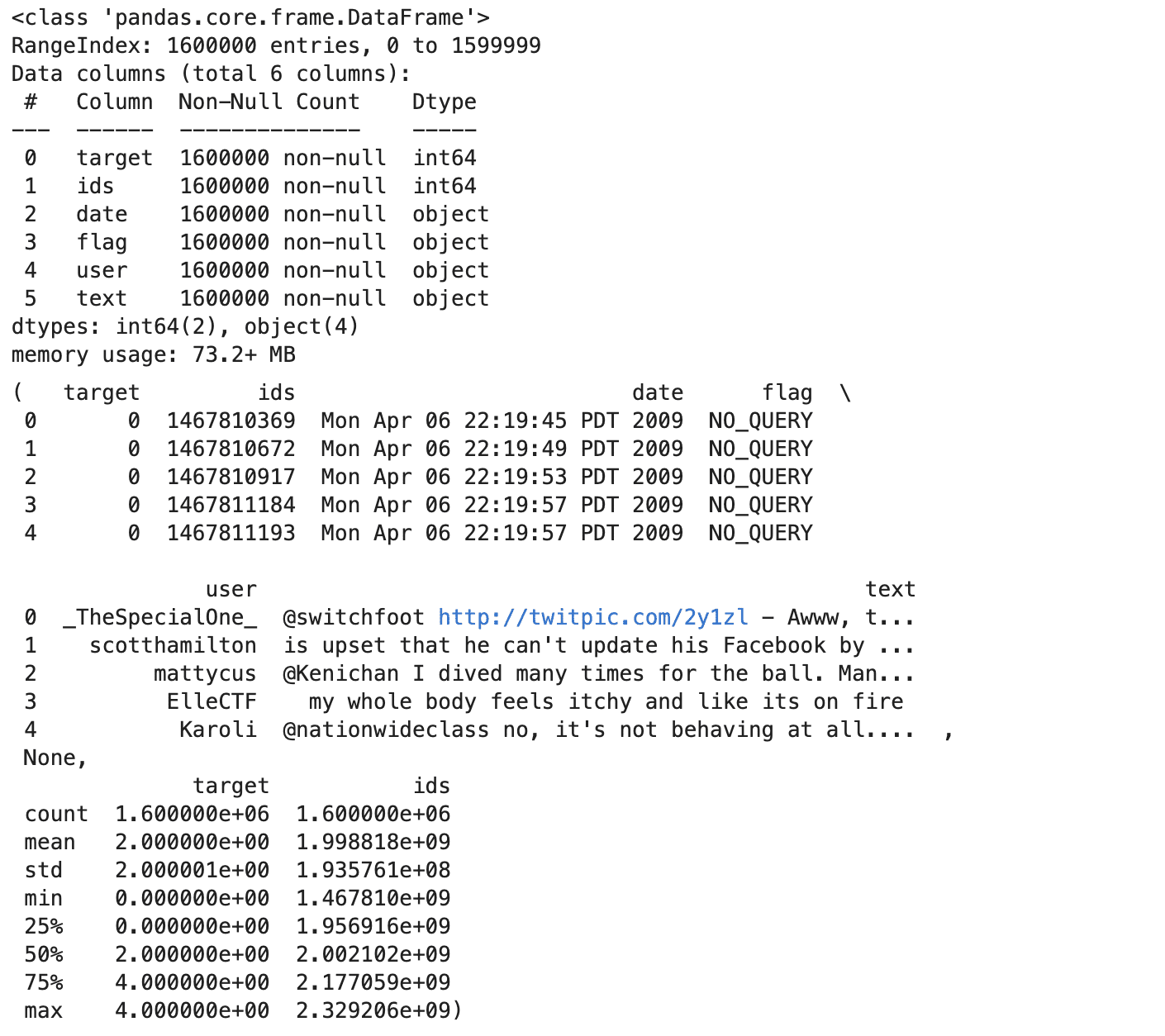
Now, before doing sentiment analysis, let’s explore our dataset. To read it, use encoding. Because of this, we will add column names afterwards. You can increase the methods to do data exploration. Head, info, and describe method will give you a great heads up; let’s see the code.

import pandas as pd    data = pd.read_csv('training.csv', encoding='ISO-8859-1', header=None)  column_names = ['target', 'ids', 'date', 'flag', 'user', 'text']  data.columns = column_names  head = data.head()  info = data.info()  describe = data.describe()  head, info, describe  

Here is the output.
Sentiment Analysis in Python: Going Beyond Bag of Words

Of coure, you can run these methods one by one if you don’t have image limit on your project. Let’s see the insights we collect from these exploration methods above.

Insights

  • The dataset has 1.6 million tweets, with no missing values in any column.
  • Each tweet has a target sentiment (0 for negative,2 neutral, 4 for positive), an ID, a timestamp, a flag (query or 'NO_QUERY'), the username, and the text.
  • The sentiment targets are balanced, with an equal number of positive and negative labels.

Visualize the Dataset

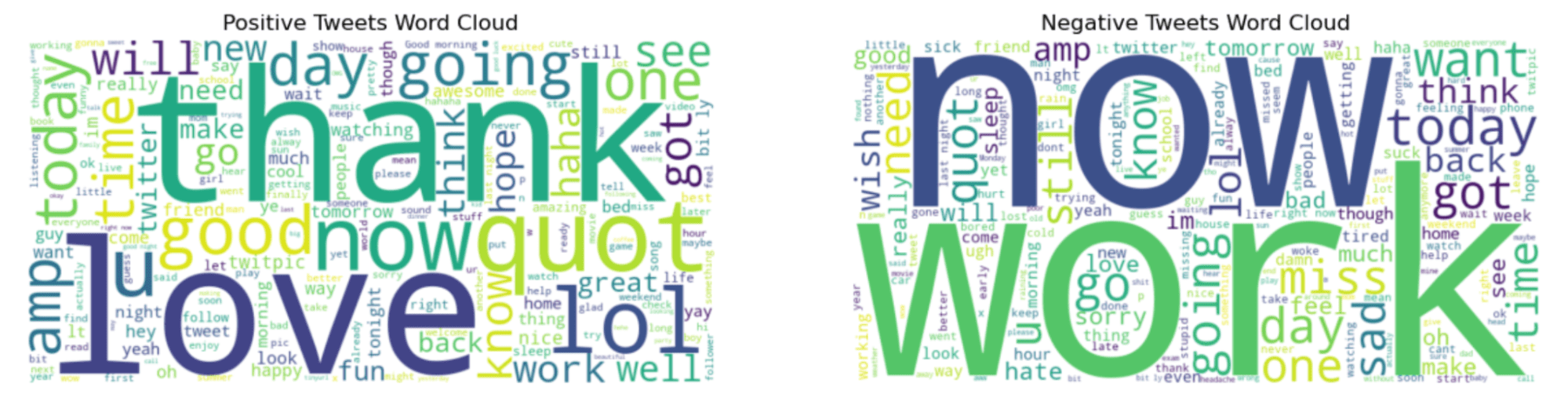
Wonderful, we have both statistical and structural knowledge about our dataset. Now, let’s create some visualizations to picture it. Now, we all know the sharpest sentiments, positive and negative. To see which words will be using for that, we will be using one of the python libraries called wordcloud.

This library will visualize your datasets according to the frequency of the words in it. If words are used frequently, you will understand it by looking at their size of it, there is a positive relation, if the word is bigger, it should be used a lot.

But first, we should select positive and negative tweets and combine them together by using python join method afterwards. Let’s see the code.

# Separate positive and negative tweets based on the 'target' column  positive_tweets = data[data['target'] == 4]['text']  negative_tweets = data[data['target'] == 0]['text']    # Sample some positive and negative tweets to create word clouds  sample_positive_text = " ".join(text for text in positive_tweets.sample(frac=0.1, random_state=23))  sample_negative_text = " ".join(text for text in negative_tweets.sample(frac=0.1, random_state=23))    # Generate word cloud images for both positive and negative sentiments  wordcloud_positive = WordCloud(width=800, height=400, max_words=200, background_color="white").generate(sample_positive_text)  wordcloud_negative = WordCloud(width=800, height=400, max_words=200, background_color="white").generate(sample_negative_text)    # Display the generated image using matplotlib  plt.figure(figsize=(15, 7.5))    # Positive word cloud  plt.subplot(1, 2, 1)  plt.imshow(wordcloud_positive, interpolation='bilinear')  plt.title('Positive Tweets Word Cloud')  plt.axis("off")    # Negative word cloud  plt.subplot(1, 2, 2)  plt.imshow(wordcloud_negative, interpolation='bilinear')  plt.title('Negative Tweets Word Cloud')  plt.axis("off")    plt.show()  

Here is the output.
Sentiment Analysis in Python: Going Beyond Bag of Words

“Thank” and “now” words in the graph left sound more positive. However, “work” and “now” look like interesting because these words look like often be in negative tweets.

Sentiment Analysis

To perform sentiment analysis, here are the steps we will follow;

  1. Preprocess the text data
  2. Split the dataset
  3. Vectorize the dataset
  4. Data Conversion
  5. Label Encoding
  6. Train a Neural Networks
  7. Train the model
  8. Evaluate the Model ( With Plotting)

Now, working on 1.6 million tweets might be a great workload for your computer or platform; that’s why I selected 50K positive and 50K negative tweets at first.

# Since we need to use a smaller dataset due to resource constraints, let's sample 100k tweets  # Balanced sampling: 50k positive and 50k negative  sample_size_per_class = 50000    positive_sample = data[data['target'] == 4].sample(n=sample_size_per_class, random_state=23)  negative_sample = data[data['target'] == 0].sample(n=sample_size_per_class, random_state=23)    # Combine the samples into one dataset  balanced_sample = pd.concat([positive_sample, negative_sample])    # Check the balance of the sampled data  balanced_sample['target'].value_counts()  

Next, let’s build our neural nets.

import tensorflow as tf  import matplotlib.pyplot as plt  from sklearn.preprocessing import LabelEncoder  from tensorflow.keras.models import Sequential  from tensorflow.keras.layers import Dense  from tensorflow.keras.utils import to_categorical  from sklearn.model_selection import train_test_split  from sklearn.feature_extraction.text import TfidfVectorizer      vectorizer = TfidfVectorizer(max_features=10000, ngram_range=(1, 2))    # Train and test split  X_train, X_val, y_train, y_val = train_test_split(balanced_sample['text'], balanced_sample['target'], test_size=0.2, random_state=23)    # After vectorizing the text data using TF-IDF  X_train_vectorized = vectorizer.fit_transform(X_train)  X_val_vectorized = vectorizer.transform(X_val)    # Convert the sparse matrix to a dense matrix  X_train_vectorized = X_train_vectorized.todense()  X_val_vectorized = X_val_vectorized.todense()      # Convert labels to one-hot encoding  encoder = LabelEncoder()  y_train_encoded = to_categorical(encoder.fit_transform(y_train))  y_val_encoded = to_categorical(encoder.transform(y_val))    # Define a simple neural network model  model = Sequential()  model.add(Dense(512, input_shape=(X_train_vectorized.shape[1],), activation='relu'))  model.add(Dense(2, activation='softmax'))  # 2 because we have two classes    # Compile the model  model.compile(optimizer='adam', loss='categorical_crossentropy', metrics=['accuracy'])    # Train the model over epochs  history = model.fit(X_train_vectorized, y_train_encoded, epochs=10, batch_size=128,                       validation_data=(X_val_vectorized, y_val_encoded), verbose=1)    # Plotting the model accuracy over epochs  plt.figure(figsize=(10, 6))  plt.plot(history.history['accuracy'], label='Train Accuracy', marker='o')  plt.plot(history.history['val_accuracy'], label='Validation Accuracy', marker='o')  plt.title('Model Accuracy over Epochs')  plt.xlabel('Epoch')  plt.ylabel('Accuracy')  plt.legend()  plt.grid(True)  plt.show()  

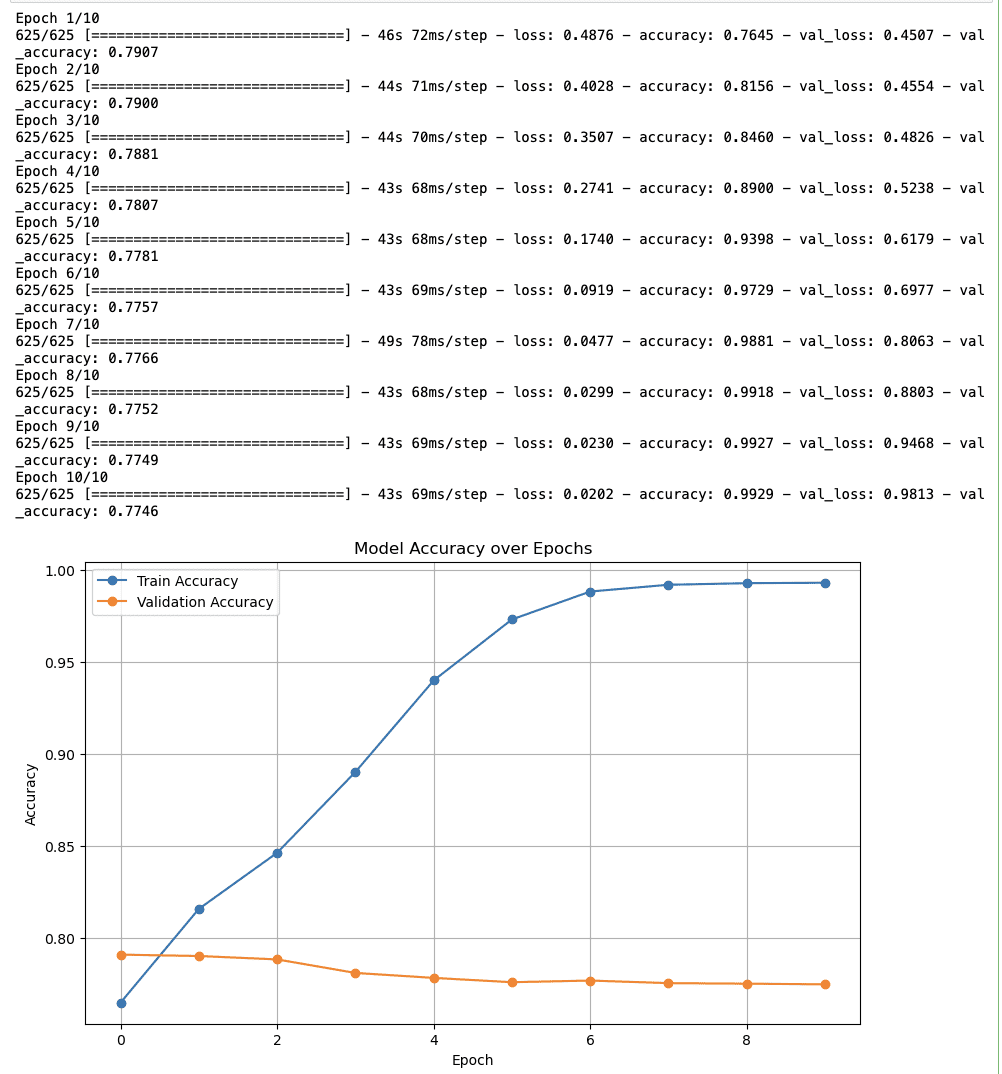
Here is the output.
Sentiment Analysis in Python: Going Beyond Bag of Words

Final Insights About Sentiment Analysis

  • Training Accuracy: The accuracy starts at nearly 80% and constantly increases to near 100% by the tenth epoch. So, it looks like the model is effectively learning.
  • Validation Accuracy: The validation accuracy again starts around 80% and continues steadily quickly, which could indicate that the model is not generalizing to unseen data.

Case Study Suggestion: Sentiment Analysis for President Selection

At the beginning of this article, your interest was piqued. And let’s now explain the real story behind this.

The paper from Predicting Election Results from Twitter Using Machine Learning Algorithms,

published in "Recent Advances in Computer Science and Communications", presents a machine learning-based method for predicting election results. Here you can read the whole.

In summary, they did sentiment analysis, and achieved 94.2 % accuracy, on the AP Assembly Election 2019. It looks like they really got close.

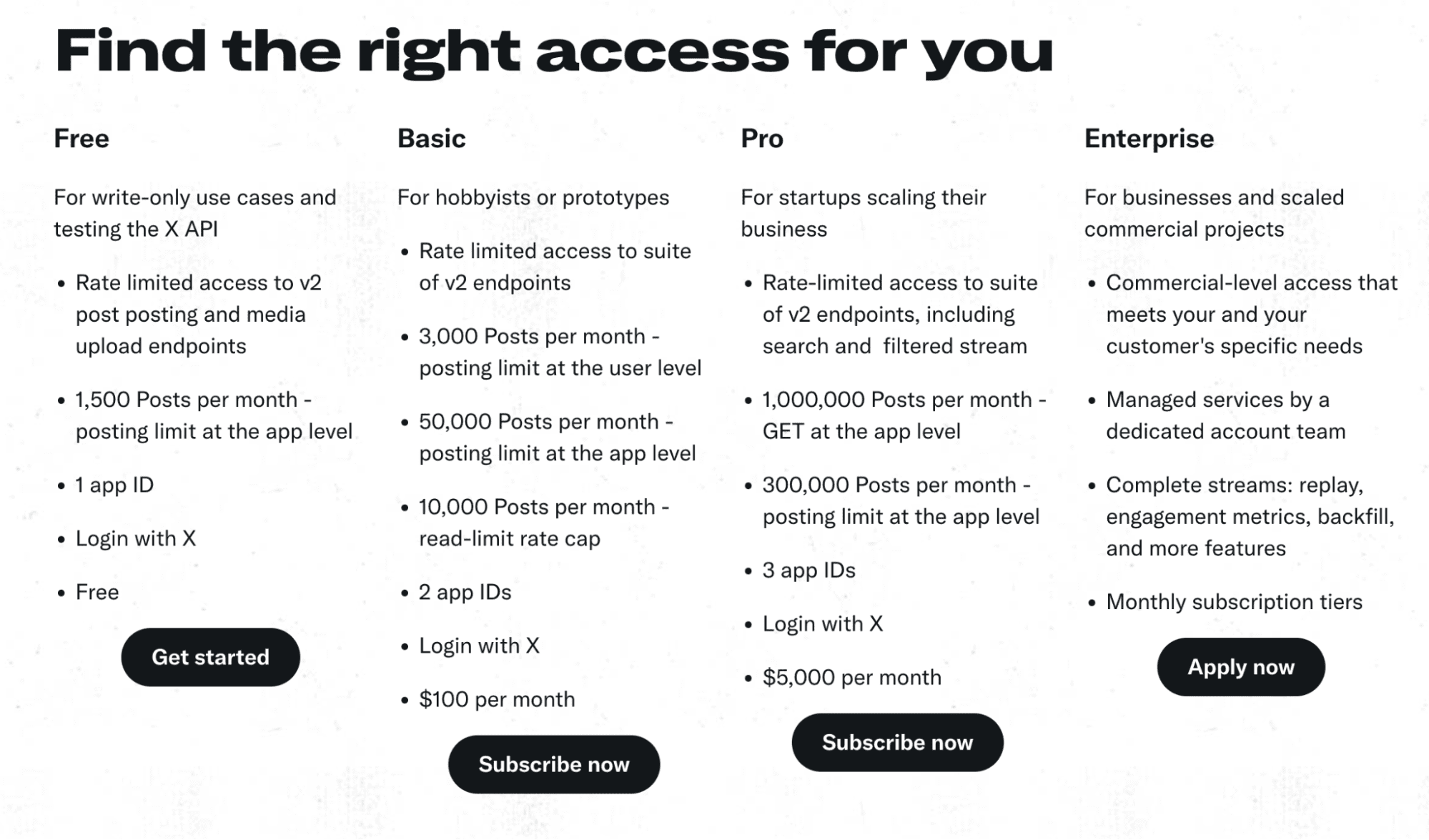
If you plan to do a portfolio project, research like this, or intend to go further from this case study, you can use Twitter API, or x API. Here are the plans: https://developer.twitter.com/en/products/twitter-api
Sentiment Analysis in Python: Going Beyond Bag of Words

You can do hashtag sentiment analysis on Twitter after major sports or political events. In 2024, there will be an election in a bunch of countries like the United States, where you can check the news.

Final Thoughts

The power of Data Science can really be seen in this example. This year, we will witness numerous elections worldwide, so if you aim to draw attention to your project, this might be a good idea. If you are a beginner searching for ways to learn data science, you can find many real-life projects, data science interview questions, and blog posts featuring data science projects like this on StrataScratch.

Nate Rosidi is a data scientist and in product strategy. He's also an adjunct professor teaching analytics, and is the founder of StrataScratch, a platform helping data scientists prepare for their interviews with real interview questions from top companies. Connect with him on Twitter: StrataScratch or LinkedIn.

More On This Topic

  • How to Stay on Top of What's Going on in the AI World
  • Sentiment Analysis with KNIME
  • Sentiment Analysis API vs Custom Text Classification: Which one to choose?
  • How to Create and Deploy a Simple Sentiment Analysis App via API
  • How To Collect Data For Customer Sentiment Analysis
  • Sentiment Analysis on Encrypted Data with Homomorphic Encryption

3D scanning app Polycam gets backing from YouTube co-founder

3D scanning app Polycam gets backing from YouTube co-founder Kyle Wiggers 8 hours

Polycam, an app that uses a smartphone’s sensors to capture 3D scans of objects, is raising cash from prominent investors including Adobe and YouTube co-founder Chad Hurley.

Polycam today announced that it closed an $18 million Series A round led by Left Lane Capital with participation from Adobe Ventures, Hurley and others. Chris Heinrich, Polycam’s co-founder and CEO, says that the capital will support new 3D editing and collaboration features, training AI models for rendering 3D objects and new market expansion.

Polycam was founded in early 2021 by Heinrich and Elliott Spelman, who’d met while working together at Ubiquity6, a startup developing mobile 3D scanning and AR tech. Both Heinrich and Spelman believed that 3D capture, enabled by hardware like the lidar sensor on more recent iPhones, could unlock 3D content creation for the masses.

“One of the challenges and opportunities of the 3D modeling space is that the core technology for 3D capture is far from perfect, and it’s not nearly as easy as snapping a photo with an iPhone,” Heinrich told TechCrunch in an email interview. “The good news is that advances in AI-driven 3D capture, when paired with the type of data that Polycam has in droves, are set to dramatically improve quality and ease-of-use over the next few years, which will unlock more use cases and increase adoption.”

Polycam offers a suite of 3D capture and modeling tools, each designed to address a different use case.

Polycam

Image Credits: Polycam

On iPhones with a lidar sensor, Polycam can scan a user’s surroundings, like the rooms in their home, in 3D. The app’s “Photo Mode,” available on mobile devices and the web, employs photogrammetry — capturing images and stitching them together — to create 3D models of objects. Polycam can capture “photo spheres” and 360-degree skybox images from smartphone cameras. And — for users looking to incorporate models into a project (a video game, say) without having to capture them — the app hosts a library of free 3D models shared from the Polycam community.

Polycam earns money by charging a $100-per-year subscription for advanced features aimed at pro users.

Now, there’s a number of apps on the market for smartphone-based 3D object capture. (See Luma, for one.) But it’s true that Polycam’s benefitted from market consolidation in the last few years, with Niantic snatching up Scaniverse, Discord acquiring Ubiquity6 and Snap buying Th3rd.

Today, Polycam has nearly 100,000 paying customers, Heinrich tells me, and its iPhone and Android apps have been downloaded over 10 million times.

“Polycam was cash flow positive for numerous months in 2023 and has strong revenue growth,” he added. “We’ve not been noticeably affected by the slowdown in tech, achieving strong revenue growth despite the difficult macro economic environment.”

So why raise outside capital? To “expand more aggressively,” Heinrich said — including through new AI-powered capabilities, launching enterprise subscription tiers and doubling its 22-person workforce by 2025.

Polycam

Image Credits: Polycam

To that end, Polycam’s expanding to the Vision Pro, Apple’s AR headset, which will become a key area of the company’s focus in the next few months, Heinrich says. Polycam’s also training AI models to fill in gaps missed in the 3D object scanning process — an investment that’ll increase the overall fidelity of Polycam’s scans, according to Heinrich.

“Even the best scans suffer from bad and incomplete data — for example an inability to scan the underside of a sofa or car,” he said. “This is where AI comes in.”

5 Free Courses to Master Python for Data Science

5 Free Courses to Master Python for Data Science
Image by Author

Learning Python is super helpful if you’re looking to switch to a data career. But there is a lot to learn: from the basics of Python programming to data analysis, machine learning, and cracking coding interviews. So how do you find the best resources to learn them all?

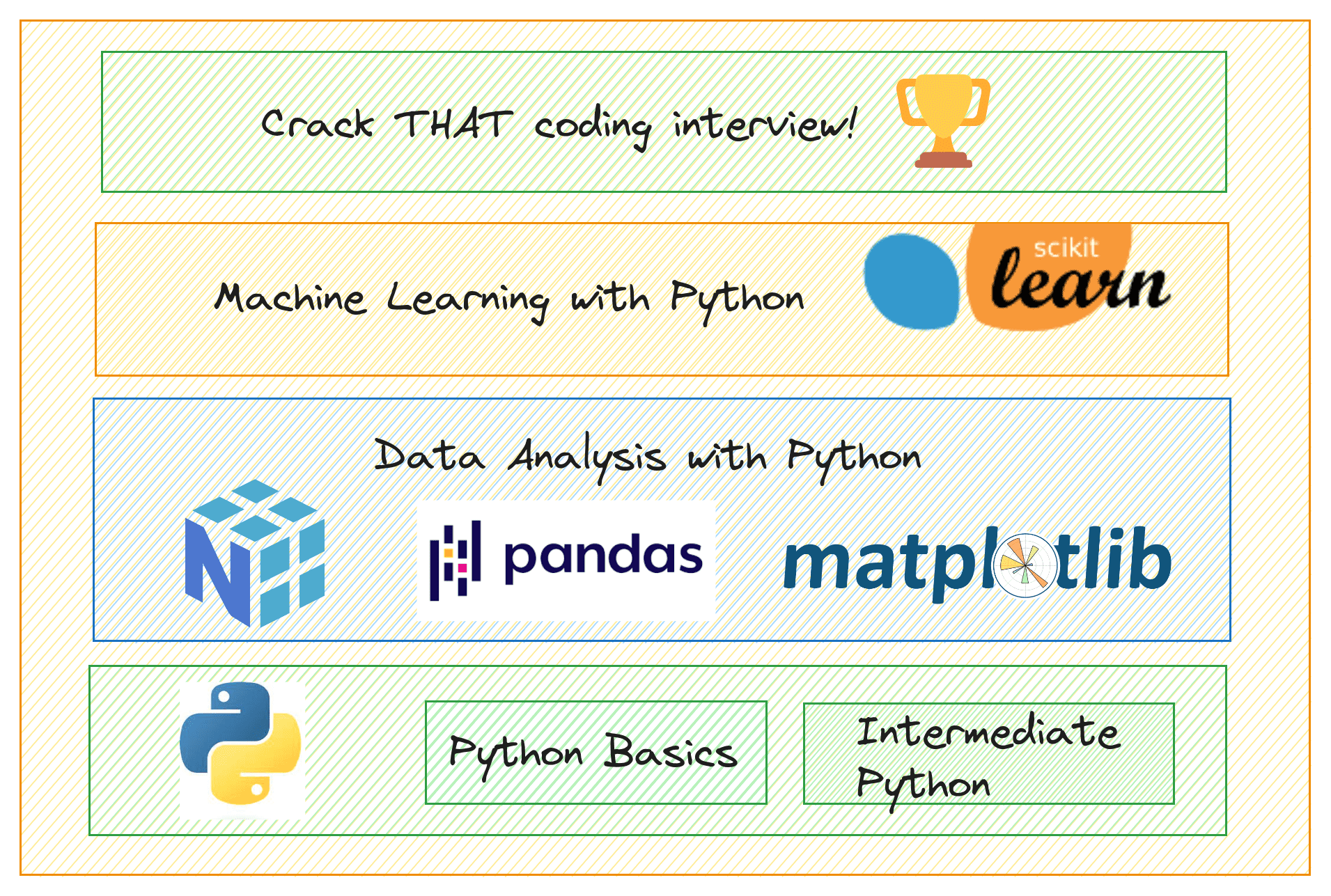
To help you, we’ve compiled a list of courses to help you master Python for data science. Whether you are a beginner or an experienced professional looking to refresh your Python skills, these courses are for you. The suggested courses will help you learn the following:

  • Basics of Python
  • Python data science libraries
  • Data analysis and machine learning with Python
  • Data structures and algorithms with Python

Let’s get started.

1. Python for Beginners

The Python for Beginners course from Mosh will help you become familiar with the absolute basics of Python programming.

In about an hour, you can get up in running with the following basics:

  • Variables
  • Receiving input
  • Type conversions
  • Strings
  • Operators and operator precedence
  • If statements
  • While and for loops
  • Lists and tuples

Link: Python for Beginners

2. Intermediate Python Programming

Now that you know the basics, you can take this Intermediate Python Programming course. This course starts out by discussing the various Python built-in data structures. And proceeds to more advanced features of the language.

The topics covered in this course include:

  • Python’s built-in data structures
  • Collections
  • Itertools
  • Lambda functions
  • Exceptions and errors
  • Logging
  • Working with JSON
  • Random number generation
  • Decorators
  • Generators
  • Multithreading and multiprocessing
  • Function arguments
  • Shallow vs. deep copy
  • Context managers

Link: Intermediate Python Programming

3. Data Analysis with Python

Once you have a good grasp of Python, you can proceed to learn about the various Python data science libraries.

The Data Analysis with Python certification from freeCodeCamp will help you learn all the necessary Python data science libraries:

  • NumPy
  • Pandas
  • Matplotlib
  • Seaborn

You will also get to build a few data analysis projects. Which you should complete to receive the Data Analysis with Python certification.

Link: Data Analysis with Python Certification

4. Machine Learning with Python and Scikit-Learn

You should now be comfortable programming with Python and working with Python data science libraries. And you can now start exploring machine learning.

Machine Learning with Python and Scikit-Learn will help you learn about the theory (how machine learning algorithms work) and the implementation of machine learning algorithms with scikit-learn. This course will also learn how to approach and plan machine learning project, build, and deploy machine learning applications.

Here’s an overview of the topics covered:

  • Linear regression and gradient descent
  • Logistic regression for classification
  • Decision trees and random forests
  • How to approach machine learning projects
  • Gradient boosting machines with XGBoost
  • Machine learning project from scratch
  • Deploying a machine learning project with class

Link: Machine Learning with Python and Scikit-Learn

5. Data Structures and Algorithms in Python

In the data science interview process, you should first crack coding interviews to proceed to the next stages. To crack them and to make your coding practice sessions more effective, you should first have a strong foundation in data structures in algorithms.

Data Structures and Algorithms in Python is a free course that’ll help you learn the essential data structures and algorithms—with focus on Python.

Just take a structures this data structures in algorithm scores the following this Data Structures and Algorithm Sports will help you learn the following topics

  • Binary search, linked lists, and complexity
  • Binary search trees, traversal, and recursion
  • Hash tables and Python dictionaries
  • Sorting algorithms, divide and conquer
  • Recursion and dynamic programming
  • Graph algorithms
  • Python interview questions, tips, and advice

Link: Data Structures and Algorithms in Python

Wrapping Up

Hope you find these courses helpful. We’ve put together a list of courses that are both comprehensive and will help you become proficient in Python for data science.

If you can recall we had courses that started from the very basics of Python programming up to data analysis and machine learning with Python. We’ve also included a course to help you learn the foundations of data structures in algorithms—to prepare for coding interviews. Happy learning and coding!

Bala Priya C is a developer and technical writer from India. She likes working at the intersection of math, programming, data science, and content creation. Her areas of interest and expertise include DevOps, data science, and natural language processing. She enjoys reading, writing, coding, and coffee! Currently, she's working on learning and sharing her knowledge with the developer community by authoring tutorials, how-to guides, opinion pieces, and more.

More On This Topic

  • 25 Free Courses to Master Data Science, Data Engineering, Machine…
  • 5 Free Courses to Master Data Science
  • 5 Free Courses to Master Data Engineering
  • 5 Free Courses to Master Generative AI
  • 5 Free Courses to Master MLOps
  • 5 Free Courses to Master Machine Learning

How to use Google Bard: Everything you should know

Google Bard

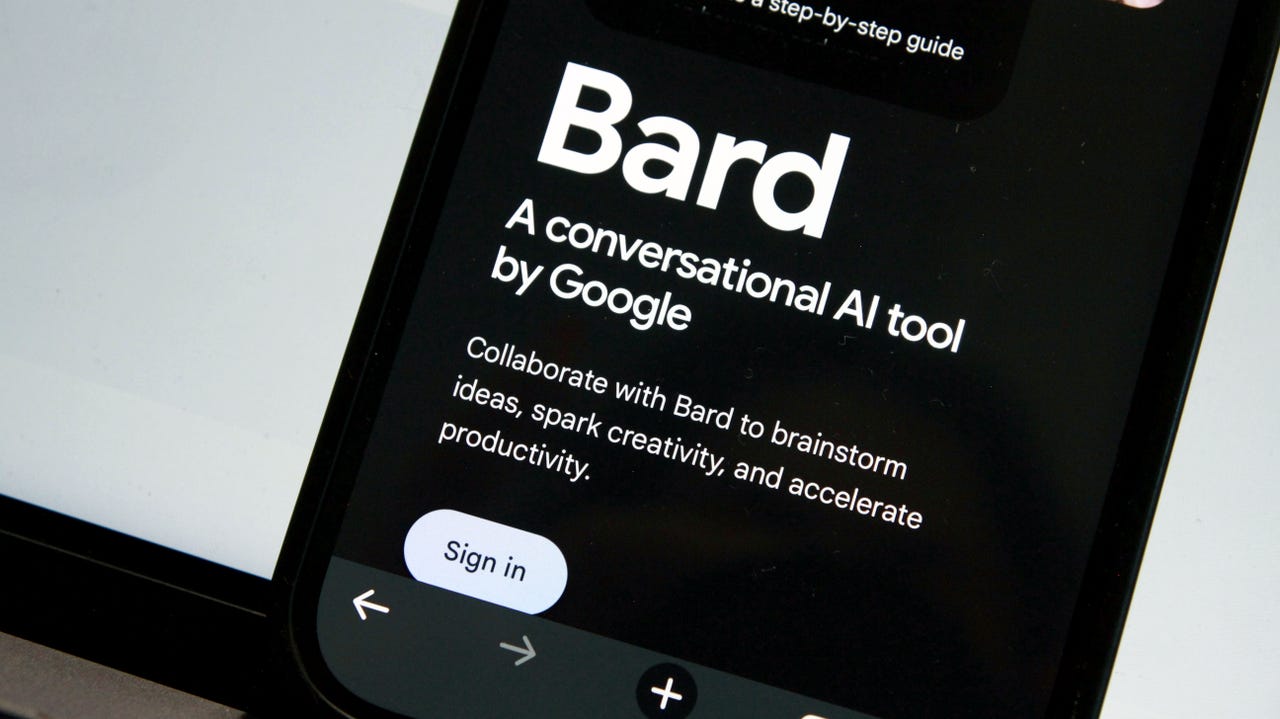
At the same time that new artificial intelligence (AI) tools were dominating headlines with their innovative ideas and captivating abilities, Google's own creation was gaining attention for entirely different reasons. Bard's initial performance was originally found lacking on more than one occasion. From its abysmal opening debut to its official launch, users struggled to get the chatbot to provide accurate information or even follow along with a conversation without hallucinating.

But Google has made some large improvements to Bard since then, including replacing its large language model (LLM), which is like the engine that powers the chatbot, with Gemini Pro, the company's most advanced LLM yet. The Bard from a year ago isn't the same Bard that you can access today: Bard can hold helpful conversations that rival those of ChatGPT, can generate images, and provides a smooth integration with Google Workspace.

Also: Google reportedly rebranding Bard to Gemini, adding 'Advanced' subscription service

Google Bard is now a great assistive AI chatbot; a generative AI tool that can generate text for everything from cover letters and homework to computer code and Excel formulas, question answers, and detailed translations. Similar to ChatGPT, Bard uses AI to provide human-like conversational responses when prompted by a user.

How to use Google Bard

Here's what the chat window looks like before sending any prompts.

Here's an example of a response from Bard.

FAQ

What can I ask Google Bard?

The Bard AI chatbot can answer most questions you ask since it uses search tools from Google. This capability is something the free version of ChatGPT can't do, since it's limited to knowing information up to January 2022. Bard's AI-based answers can serve many purposes, from giving you recipes to helping you debug code.

Also: How to write better ChatGPT prompts (and this applies to most other text-based AIs, too)

Here are some examples of prompts you can ask the bot:

  • Write two to-do lists, one for daily household cleaning and another for maintenance
  • Write a —- plugin that does ——
  • What is at the center of the Earth?
  • Write a poem for a trashbag that fell in love with a reusable water bottle
  • Define XML

As with all AI chatbots, it's important to refrain from giving Bard any personally identifiable information or private data you don't want to be shared. Even if generative AI tools say they are private, personal information isn't something that should be used to test that claim.

Does Bard provide inaccurate answers?

When Bard AI was announced last year, it faced scrutiny after factual mistakes made during its demo. Users have subsequently wondered whether Google's new chatbot still continues to provide inaccurate or inappropriate responses, and whether it can be trusted, as some have come to trust other AI tools.

Also: How does ChatGPT actually work?

Google has reiterated that Bard is an experiment capable of making mistakes. The company upgraded Bard to use its latest-generation LLM, Gemini Pro — after launching the AI chatbot with its earlier model, LaMDA, and then updating it to PaLM 2 — and has made significant upgrades to the user experience through integrations with Gmail, Maps, Lens, and more.

Having tested Bard often in the past year, I believe it's a great AI chatbot, offering a pretty similar experience to ChatGPT and Copilot. It's worth noting that all AI chatbots can provide inaccurate information, make mistakes, and have hallucinations.

Does Bard AI save my conversations?

Google doesn't save your entire interaction each time you chat with its chatbot, but it does save the prompts and questions you asked.

Also: Your Bard conversations are someone else's Google results

That being said, as a search engine, Google is known for being one of the largest trackers in the world, so giving its chatbot private information is probably not a great idea.

Does Bard AI use GPT-4?

Bard uses Google's proprietary LLM named Gemini Pro, instead of the GPT series, which is the technology that many popular AI chatbots are using.

Will Bard AI replace Google Search?

Google Bard and other AI chatbots, such as Bing Chat (aka Copilot) and ChatGPT, certainly have the potential to replace search engines. These AI tools are trained on information available on the web to provide answers to users' queries, but instead of giving them a list of websites where that answer may or may not be found, these tools generate a textual response in a conversational manner. The drawback is that these answers may not always be accurate.

Also: 4 things Claude AI can do that ChatGPT can't

Some people might use AI chatbots in place of Google Search, especially since the added abilities of asking follow-up questions and generating text make it more functional for some use cases than a search engine.

Does Google Bard have a waitlist?

For months after its launch, Bard AI was only accessible through a waitlist. But in May, Google announced during its Google I/O event that it's ending the waitlist access program and opening up its new AI tool to over 180 countries and territories. Now, anyone who logs in with their Google account can access Bard — no need to wait.

More on AI tools

Colossyan uses GenAI to create corporate training videos

Colossyan uses GenAI to create corporate training videos Kyle Wiggers 2 days

Most people don’t watch corporate training videos — or, in cases where the training’s mandatory, don’t give them their full attention. According to a recent poll from Kaltura, the video tech provider, 75% of staffers admit to skimming through training videos, watching them without sound or listening to them while multitasking.

So, given that training videos aren’t cheap to produce, is there a way to make them more engaging and thus less of a money sink? Dominik Mate Kovacs, the co-founder and CEO of Colossyan, thinks there is — and it involves generative AI.

Colossyan taps AI to generate workplace learning videos, remixing, re-animating and editing footage of one of several virtual avatars against changeable backdrops. Users can enter a script to have it “read” aloud by Colossyan’s text-to-speech (TTS) engine, which also translates the script into over 70 languages.

Colossyan

Image Credits: Colossyan

“To generate a video with Colossyan’s AI video platform, all you have to do is input a script and select from a diverse range of avatars,” Kovacs told TechCrunch in an email interview. “Any company can create a video about almost anything efficiently, without the need for conventional filming resources.”

Kovacs founded Colossyan in 2020 after leaving Defudger, a deepfakes detection platform, which he helped to co-launch. An engineer and data scientist by training, Kovacs says that he was inspired to start Colossyan by the budding corporate interest in GenAI.

“Enterprises are leveraging AI in diverse areas such as IT automation, customer care and digital labor — highlighting the broad applicability and potential impact of AI technologies in streamlining operations and enhancing service delivery,” Kovacs said. “The barriers to AI adoption, such as limited AI skills and data complexity, are significant yet surmountable challenges that many organizations are actively working to overcome.”

For the heck of it, I gave Colossyan’s platform, which offers a free trial, a go to see if I could make a training video that’d successfully hold the attention of my ADHD brain — admittedly a high bar. The avatars were a bit too stiff and cartoonish for my liking and the TTS engine too robotic, at least compared to some of the more sophisticated GenAI tools out there (e.g., ElevenLabs). But I’ve certainly seen worse corporate videos.

Colossyan also doesn’t generate videos as quickly as I’d expect — a 38-second clip takes ~11 minutes. Granted, that’s a lot faster than creating trainings from scratch. But frankly, faced with the prospect of generating more than a handful of videos for whatever purpose, I’d be tempted to go the PowerPoint or Canva route instead.

I’m not Colossyan’s target market, of course. And it seems that several household brands are happy to pay for a subscription to Colossyan as it exists today, including Novartis, Porsche, Vodafone, HPE and Paramount, claims Kovacs.

Kovacs attributes the customer traction to features like integrations with learning management systems and a “conversation mode” that allows two avatars to hold a dialogue with each other. He doesn’t deny that there’s a fair amount of competition in the GenAI video space — see CommonGround, Synthesia and Surge plus solutions from tech giants like Microsoft — but he thinks that Colossyan’s focus on “interactivity and engagement,” as he puts it, will continue to set the platform apart.

Perhaps he’s right. Colossyan today announced that it raised $22 million in a funding round led by Lakestar with participation from Launchub, Day One Capital and Emerge Education. The proceeds will be put toward tripling Colossyan’s headcount across its New York, London and Budapest offices, Kovacs says, and developing new capabilities like branching videos and knowledge checks.

“For C-suite and IT department leaders, our platform represents a scalable, cost-efficient solution to training and development challenges,” he added.