Apple’s latest acquisition hints at AI-powered iPhone plans

Siri on a phone screen

Apple's latest acquisition of yet another AI startup provides insight into the tech giant's plans for artificial intelligence in 2024. The startup, DarwinAI, is a Canadian visual quality inspection business that has developed ways to make AI systems smaller and more efficient.

Apple CEO Tim Cook has vowed to share more details about the company's AI advancements in 2024, and this latest acquisition of a company that makes AI systems run efficiently on smaller devices could reinforce the idea that Apple plans to run AI models on-device.

Also: 3 AI features iOS 18 needs to catch up with Android

Executing AI algorithms on-device would align with Apple's privacy-focused view, as this process keeps the user's information on the device rather than sending it to cloud servers. This approach not only gives the user the benefit of added privacy but also results in lower latency and the ability to run AI tools without internet connectivity.

Siri already runs on-device on the iPhone, so Apple isn't diving into a novel concept with on-device AI. However, Apple has fallen behind in creating and launching generative AI tools, which require large language models (LLMs) and systems capable of generating content based on these models.

Smaller, pre-trained models that run efficiently would be best for running AI on-device. This may require optimization to reduce AI models' size and complexity without compromising performance. GPUs and specialized chips — such as Apple's Neural Engine — are also ways to speed up AI computations.

Also: You can now try Copilot Pro for free, and here's why you'll want to

From what little we know about DarwinAI, it appears that this optimization for on-device execution is, in part, what the company was focusing on when Apple bought it.

Since Apple purchased DarwinAI earlier this year, dozens of the startup's employees have joined Apple's AI division, as reported by Bloomberg sources who asked not to be identified because neither party has publicly announced the deal.

One of DarwinAI's co-founders, Dr. Alexander Wong, has been the director of Machine Learning Research at Apple since January, potentially giving some indication of when the deal happened.

Also: Apple research reveals some dazzling AI tech could be headed to your iPhone

Apple has been buying more and more startups in order to fold their respective tech advancements, research, and talent into its operations. In 2023, Apple was the leader among its competitors in AI acquisition, taking over as many as 32 AI startups. In the same year, Google acquired 21 AI startups, Meta acquired 18, and Microsoft acquired 17.

Because Apple is so behind on the AI race and so secretive about its plans, our ears perk up each time it makes a new acquisition of an AI startup or when a morsel of a rumor trickles out.

Featured

India drops plan to require approval for AI model launches

India drops plan to require approval for AI model launches Manish Singh 8 hours

India is walking back on a recent AI advisory after receiving criticism from many local and global entrepreneurs and investors.

The Ministry of Electronics and IT shared an updated AI advisory with industry stakeholders on Friday that no longer asked them to take the government approval before launching or deploying an AI model to users in the South Asian market.

Under the revised guidelines, firms are instead advised to label under-tested and unreliable AI models to inform users of their potential fallibility or unreliability.

The revision follows India’s IT ministry receiving severe criticism earlier this month from many high-profile individuals. Martin Casado, a partner at venture firm Andreessen Horowitz, had called India’s move “a travesty.”

The March 1 advisory also marked a reversal of India’s previous hands-off approach to AI regulation. Less than a year ago, the ministry had declined to regulate AI growth, identifying the sector as vital to India’s strategic interests.

The new advisory, like the original earlier this month, hasn’t been published online, but TechCrunch has reviewed a copy of it.

The ministry said earlier this month that though the advisory wasn’t legally binding, it signals that it’s the “future of regulation” and that the government required compliance.

The advisory emphasizes that AI models should not be used to share unlawful content under Indian law and should not permit bias, discrimination, or threats to the integrity of the electoral process. Intermediaries are also advised to use “consent popups” or similar mechanisms to explicitly inform users about the unreliability of AI-generated output.

The ministry has retained its emphasis on ensuring that deepfakes and misinformation are easily identifiable, advising intermediaries to label or embed content with unique metadata or identifiers. It no longer requires firms to devise a technique to identify the “originator” of any particular message.

The 10 Best AI Search Engines to Try in 2024

In 2024, the digital world is swiftly growing, challenging traditional search engines to meet the rising demand for precise and relevant findings. This problem is highlighted by an extensive study that reviewed 7,392 product review queries on Google, Bing, and DuckDuckGo, which revealed a worrying decline in the quality of search results. Consequently, AI search engines are stepping onto the scene as a revolutionary answer. They introduce cutting-edge features like AI reverse and product searches to offer more profound, meaningful insights. Accordingly, these new AI search engines have markedly improved the user experience.

Let's discuss the leading AI search engines making an impact in 2024.

1. YOU

Introducing: PersonalizationIntroducing: Personalization
Watch this video on YouTube

You.com is an AI-powered search engine focusing on privacy while providing detailed and personalized search results. For those interested, You.com is accessible at no cost for basic usage. However, a premium subscription is available for users seeking more advanced features at $20 per month or $180 annually. The search engine uses a proprietary language model, ensuring unique and effective search capabilities.

Features

  • AI tools: Moreover, You.com presents a variety of AI-enhanced tools, including an image generator, a chatbot, and a writer.
  • Privacy: You.com doesn't sell your data to advertisers, aiming to be a leader in user privacy.
  • YouAgent: This AI Search engine lets you write and run code directly, making searches interactive and packed with insights.

2. Andi Search

Andi — AI Search Engine taking on Google!Andi - AI Search Engine taking on Google!
Watch this video on YouTube

Andi Search is a free, AI search engine that highlights privacy and improves search experience. It uses advanced AI and semantic search technologies to transform online search. Furthermore, basic access to Andi Search is completely free. Moreover, the search engine uses LLM combined with live data to answer questions and summarize information based on the top sources.

Features

  • Ad-Free: Providing a clean, ad-free reading experience.
  • AI Summaries: Provides AI generated summaries with images and videos for insights.
  • Privacy First: Providing user privacy and focusing on delivering a user-friendly search experience.

3. Exa.ai (formerly Metaphor.ai)

EXA AI: Your Gateway to a World of Creativity, Productivity, and EntertainmentEXA AI: Your Gateway to a World of Creativity, Productivity, and Entertainment
Watch this video on YouTube

Exa is an AI search engine that uses a Large Language Model (LLM). This search engine filters content based on meaning instead of keywords. By using transformers, Exa can provide relevant search results. Exa offers several pricing plans: Basic access is free, the Wanderer plan costs $100/month for starter projects, the Wanderer+ plan at $250/month for researchers, and the Enterprise plan provides custom solutions with pricing on request.

Features

  • Customizability: Users can filter their searches by date, website, and topic, finding as many as 10 million results.
  • Similarity search: Users can search using examples of what they want, including URLs or paragraphs of text.
  • Categorical Searches: Users can search within categories such as tweets, papers, or blogs for more targeted and effective searching.

4. Brave Leo AI

Brave's Leo Is a Private AI Assistant for Desktop and MobileBrave's Leo Is a Private AI Assistant for Desktop and Mobile
Watch this video on YouTube

Brave Leo is an intelligent AI assistant inside the Brave browser. It's designed to make your searches quicker and more efficient while keeping your private info secure. Leo has you covered whether you're looking for websites, images, patents, products, or study materials. You can use it for free or opt for extra features at $15 a month. Anthropic's AI Claude's technology powers it.

Features

  • Chat Anywhere: With Leo, you can start a chat on any website. This means you can get fast answers without leaving the page you're on.
  • Privacy: Leo also makes sure your chats stay private, protecting your conversations.
  • Fast Search: Leo is good at understanding, translating, and rephrasing content on web pages. This makes your search experience much faster.

5. Phind.com

Phind model V7 IntroductionPhind model V7 Introduction
Watch this video on YouTube

Phind is an AI search engine for developers. It finds code and solutions with references. Like many AI tools, it has a free basic option and paid upgrades. Premium subscriptions provide additional features like more processing power, image analysis, etc. This AI search engine is free for basic use, or you can pay $10.00 a month or $200 per year for more features.

Features

  • Coding Assistance: Firstly, Phind is optimized for code generation and trained on extended code datasets and documentation.
  • Pair Programmer: Phind offers real-time AI assistance and is perfect for guiding coding projects.
  • Advanced Search Capabilities: Phind's searches are rapid because of high computing power.

6. Perplexity.ai

What is Perplexity Copilot?What is Perplexity Copilot?
Watch this video on YouTube

Perplexity, an AI-powered search engine, excels in delivering relevant results for complex queries, including AI job search tools, AI product search, or AI for literature search. You can use the basic access for free, but if you're looking for additional features, it's $20 per month or $200 annually. The basic package uses OpenAI's ChatGPT-3.5, while the pro package upgrades to more refined AI, featuring Anthropic's Claude-2 and OpenAI's ChatGPT-4, guaranteeing better search results.

Features

  • Personalized Search: Personalize your searches with the “focus” option to make results more relevant to you.
  • Document Analysis: Perplexity allows users to upload PDFs to get detailed insights and essential information.
  • Live Conversational Interaction: Enhance your search experience with the Copilot feature, which offers more detailed search assistance and summaries.

7. Microsoft Bing

How to use Bing AI in Microsoft Edge to get inspired and boost creativityHow to use Bing AI in Microsoft Edge to get inspired and boost creativity
Watch this video on YouTube

Bing has just launched Copilot, a new AI search engine that understands written and spoken questions. Copilot is very flexible, adept at solving math problems, searching for books and articles, and easily functioning as an AI website finder. Its flexibility and proficiency extend to AI for patent search, making it an invaluable resource for those looking for patents. It's also good at looking up patents and creating pictures. This tool uses the newest technology from OpenAI to make searching online better. It's free to use, but you must have a Microsoft account.

Features

  • Multilingual: Bing helps people who speak different languages find information fast.
  • Choose Your Chat Style: You can pick from “More Creative,” “More Balanced,” or “More Precise” to get just the right kind of help.
  • Trustworthy Answers: It gives you citations, so you know the information is reliable. This is super helpful for school or work research.

8. Waldo

Getting Started with Waldo!Getting Started with Waldo!
Watch this video on YouTube

Waldo makes looking things up online easy and fast. Plus, you can precisely choose the type of files, which helps you find things quicker and with less hassle! To start, Waldo offers a free trial. Firstly, freelancers can sign up for $199 a month. Secondly, for teams, it's $899 a month, and thirdly, big companies need to pay $1,494. Additionally, Waldo uses smart AI to ensure you find the best search results.

Features

  • Pick Your View: You can set up filters and use special “lenses” to make sure you find what you want. This feature is handy because it tailors your search results exactly to your needs.
  • Quick Look Around: With keyboard shortcuts, you can quickly peek at data without opening many tabs. Consequently, this saves a lot of time and makes research smoother.
  • Study Helpers: Waldo has built-in tools for taking notes and quickly making documents, which is great for research. Moreover, these tools simplify the process of gathering and organizing information.

9. Google Gemini (formerly Bard)

Google's newest AI in 90 seconds | GeminiGoogle's newest AI in 90 seconds | Gemini
Watch this video on YouTube

Google has launched Gemini, a new AI model that changes how we use the internet. Gemini can understand many data types, including text, code, sounds, and pictures. It's excellent for finding patents, jobs, and images, marking a big step forward in AI. As an AI for searching images, it has become a crucial tool for visual content creators and marketers. Although the basic version is free for everyone, accessing the advanced features requires a monthly fee of $19.99. The language model Gemini, named “Gemini-1.0-Pro,” makes it an ideal AI search engine for everyone.

Features

  • Flexibility: Gemini is optimized for various platforms, from personal computers to mobile devices.
  • Enhanced Understanding: Even when queries are complex or phrased imperfectly, Gemini's advanced understanding ensures it delivers accurate and relevant responses.
  • AI Reverse Search: This feature supports reverse image searches, helping identify sources and find similar content.

10. Komo

Komo the AI-Powered Search Engine | Komo DemoKomo the AI-Powered Search Engine | Komo Demo
Watch this video on YouTube

Komo AI is a new AI search engine for everyone, aiming to change how we search. It lets users dive deep into topics and connect with various online groups to see different views. You can use the basic service for free. Also, Komo has a Basic plan for $8 a month and a Premium plan for $15 a month. Businesses can ask for special plans, but they need to contact Komo to get the details.

Features

  • AI Search: Offers fast and private searches customized to your interests, ensuring relevant results.
  • Chat Feature: Users can get fast and clear answers from Komo's chatbot, which helps them find information.
  • Discoverability: It's easy to see what's trending and what people are talking about on social media.

Stay informed on the latest AI and machine learning developments at Unite.ai.

You can now try Copilot Pro for free, and here’s why you’ll want to

Copilot Pro

The free version of Microsoft Copilot already offers many features typically reserved for premium subscriptions, such as access to the internet and OpenAI's most advanced large language model. If the free tier's robustness has kept you from trying the premium plan, Copilot Pro, the following might change your mind.

On Thursday, Microsoft announced several updates to its chatbot that make the Copilot Pro subscription more attractive. First and foremost, Microsoft finally added a way for users to try Copilot Pro without paying for the $20-per-month subscription.

Also: You can now make your own custom Copilot GPT. Here's how

After downloading the free Copilot mobile app on iOS or Android, users now get a one-month free trial to Copilot Pro. With the Copilot app, users can quickly access the AI assistant on the go from the convenience of their phones, without having to repeatedly open it in a browser and sign in.

Google also offers a one-month free trial to its premium tier, the Google One AI Premium Plan, which is also $20 per month. ChatGPT does not offer free trials for ChatGPT Plus; however, the premium tier is also $20 per month.

Microsoft also unveiled that Copilot Pro subscribers can now use Copilot in free Microsoft 365 web apps, such as Word and Outlook, at no additional cost as part of their subscription.

This is a major perk. Copilot Pro users can experience Copilot in some of the most popular Microsoft apps without having to shell out the extra money for a Microsoft 365 subscription—which starts at $70 per year—like they had to prior to this update.

Also: The best AI chatbots of 2024: ChatGPT and alternatives

Copilot Pro subscribers also now have the ability to create custom, task-specific Copilot GPT chatbots. I tested the feature, and found it easy to use and helpful for repetitive tasks, with no coding skills necessary. ChatGPT Plus users have been able to create custom GPTs for months, so adding this feature to Copilot finally closes that gap.

These new features build on the perks that Copilot Pro already offers its users, including priority access during peak times, the ability to toggle between GPT-4 Turbo and GPT-4, and 100 daily boosts that users can use to enhance generated images in Designer. The free trial means you really have nothing to lose by checking out Copilot Pro to see what all the hype is about.

Artificial Intelligence

KissanAI Unveils Dhenu Vision LLMs for Crop Disease Detection

In a major step forward for AI in agriculture, agri-tech startup KissanAI today announced the launch of Dhenu, a series of fine-tuned vision language models (VLMs) aimed at revolutionising disease detection in crops. The first model in the series, Dhenu-vision-lora-0.1, is built on Alibaba’s Qwen-VL-Chat and delivers a 2x performance boost in identifying diseases in rice, maize, and wheat.

KissanAI founder Pratik Desai revealed that Dhenu-vision-lora-0.1 was trained on a synthetic dataset of 9,000 images covering 10 common diseases in the three crops. The model leverages low-rank adaptation (LoRA) techniques to enable efficient fine-tuning for agricultural applications.

Here’s the link to the Hugging Face repository: https://huggingface.co/KissanAI/Dhenu-vision-lora-0.1

Conversational Insights for Farmers

Beyond just identifying diseases from leaf images, Dhenu engages in dialogue to provide farmers with key information on:

  • Disease symptoms
  • Severity assessment
  • Treatment and prevention methods

“Dhenu merges the depth of agricultural practices with modern AI capabilities to enrich the farming community with actionable insights,” Desai explained. “It embodies the fusion of tradition and technology.”

Outperforming Industry Benchmarks

In initial evaluations on 500 images, Dhenu-vision-lora-0.1 achieved 36.13% accuracy – double that of the base Qwen-VL-Chat model at 17.95%. While still trailing OpenAI’s GPT-4 (51.59%), KissanAI is confident its tailored approach will yield superior results for the ag sector.

The startup plans to expand Dhenu’s capabilities to over 15 crops and 80 diseases in future releases. With this transformative technology, KissanAI aims to guide farmers toward greater prosperity and sustainability.

The post KissanAI Unveils Dhenu Vision LLMs for Crop Disease Detection appeared first on Analytics India Magazine.

What to Expect From GPT-5

GPT-5

It’s been exactly one year since Sam Altman posted a photo with his blue backpack and launched GPT-4. Cut to present, “Patience jimmy. It would be worth the wait,” was all Altman said in a response to a post on Xl ast week, asking OpenAI to release GPT-5. Nothing has happened since then.

After releasing ChatGPT based on GPT-3.5 in November 2022, it took OpenAI five months more to release GPT-4. And now, people have been speculating what the next version of OpenAI’s GPT will include and when it will drop.

Logan Kilpatrick, who recently left OpenAI, posted on X that many reporters have been reaching out to him to share the release date along with the weights.

First and foremost, the most obvious prediction for GPT-5 is that it will be multimodal, supporting text, image, audio, and video from the ground up. This has already been evident since the release of Sora. Mira Murati, the CTO of OpenAI, has said that Sora will be available for general use by the end of this year. Hopefully, it will be integrated within GPT-5 as well.

In the episode of Unconfuse Me with Bill Gates, Altman pointed out that OpenAI is on ‘this long, continuous curve’ to create newer and better models. He highlighted the importance of multimodality as the key aspect of GPT-5 that enables it to process video input and generate new videos while confirming that the work on the model has already begun.

Personalised and Better Reasonability

Altman also spoke at length with Gates about how GPT-5 would emphasise on customisation and personalisation. “The ability to know about you, your email, your calendar, how you like appointments booked, connected to other outside data sources—all of that. Those will be some of the most important areas of improvement,” said Altman.

Furthermore, he claimed that GPT-5 would have much better reasoning capabilities. “GPT-4 can reason in only extremely limited ways. Also, reliability is a concern. If you ask GPT-4 most questions 10,000 times, one of those 10,000 is probably pretty good, but it doesn’t always know which one. You’d like to get the best response of 10,000 each time,” said Altman.

“Coding is probably the only area for which we’re most excited about productivity gain today. It’s deployed massively and used at scale at this point,” said Altman, which could also be linked with the leaked Q* model, which had very high mathematical capabilities.

Smarter Than Ever Before

Altman at the recent World Government Summit in Dubai also said, “we’re going to make the model smarter, it’s going to be better at everything across the board,” talking about how GPT-5 would be faster and smarter at every general task, instead of being good at single ones.

Furthermore, it can be said that GPT-5 might have agentic capabilities and support several autonomous frameworks. This would also help OpenAI further improve on its recent collaboration with Figure, which gave ChatGPT a voice and body, further improving on-device capabilities for several edge use cases.

Increased Context Length

Given the current developments by its competitors, OpenAI should improve upon its AI models’ context length. Currently, GPT-4 has a maximum context length of 32k, and GPT-4 Turbo has increased it to 128k. On the other hand, Claude 3 Opus, which is the strongest model released by Anthropic, offers a 200k context window, and Google’s Gemini 1.5 has a 1 million tokens context window.

This is apart from the increase in the model’s parameter size. GPT-3 had 175 billion parameters, and the size of GPT-4 was speculated to be around the 1.7 trillion mark, but nothing was confirmed. People have funnily speculated that GPT -5 will have around 69 quadrillion parameters.

Sets AGI Benchmark

Speaking of Claude 3, the different models from Anthropic have been outperforming GPT-4 on several benchmarks, including MMLU and HumanEval. It also encompasses several improved capabilities in multilingual use cases.

This is where GPT-5 is expected to take the biggest stride. Discussions on X, Reddit, and HackerNews extensively discuss how OpenAI should be able to achieve near-perfect scores on several current existing benchmarks. This would also include the capabilities of incorporating techniques like internal RAG and definitely taking care of the dreaded hallucinations.

This brings up the conversation about AGI and the much-discussed job displacements that come along with AI. Altman said GPT-4.5 might automate 100 million jobs globally. But it was misconstrued as AI replacing jobs when he was indeed talking about augmenting human intelligence. Possibly, GPT-5 might augment the intelligence of 1 billion users.

The post What to Expect From GPT-5 appeared first on Analytics India Magazine.

Apple acquires DarwinAI in a bid to push ahead in the AI Race

Apple’s quiet progress in AI has taken another step forward. The iPhone-maker has acquired a Canadian AI startup called DarwinAI. The acquisition happened earlier this year, and a number of employees from the startup have already joined Apple’s AI division.

Founded in 2017, DarwinAI is an AI tech startup that specialises in visual quality inspection offering manufacturers an end-to-end solution to improve product quality and production efficiency.

Apple has not given any clarification regarding the deal and continues the narration of how Apple buys small companies from time to time, but doesn’t discuss its plans. Apple chief, Tim Cook had earlier said in an interview that the company doesn’t buy competitors, but rather buys companies that have products or technology that can be turned into features.

Apple’s Generative AI Push

Apple may have been slow when it comes to adoption of generative AI when compared to other big tech companies, however the company has been steadily progressing, in a secretive way.

“I won’t delve into specifics, as our policy is to keep development details confidential but rest assured we are heavily invested in this area,” said Apple chief, Tim Cook, during the Q3 earnings call last year. Apple is also planning to bring generative AI to its voice-assistant Siri.

It is possible that with the recent shelving of Apple’s $10 billion EV venture, the company will look to make it up with its generative AI push.

AI in Phones

The move comes at a time, when big tech companies are rushing to bring generative AI features on devices. Apple’s close rival Samsung has already brought generative AI on their latest Samsung Galaxy AI phones. Google’s AI model Gemini (Nano) has been integrated onto the smartphone.

The post Apple acquires DarwinAI in a bid to push ahead in the AI Race appeared first on Analytics India Magazine.

OpenAI to Receive UAE Backing for AI Chip Venture

MGX, the newly launched AI-focused investment company in Abu Dhabi is in talks to invest in OpenAI’s chip venture. This development comes a month after OpenAI chief Sam Altman spoke about his ambition of raising $7 trillion for his AI chip venture. This is in a bid to reduce dependency on the current semiconductor giants of the world.

UAE company MGX is state funded and is led by UAE’s national security advisor Sheikh Tahnoon bin Zayed-al-Nahyan. The funding move will also boost UAE’s market presence in the AI world as it looks to take on the big tech companies of the West. Sheikh Tahnoon also chairs G42, an AI holding company in the UAE.

Big Tech – Emirati Collaboration

Abu Dhabi’s interest in OpenAI or rather the other way round has been happening for over months now. Last year, OpenAI partnered with G42, where the latter will leverage OpenAI’s generative AI models for UAE’s industrial sectors including energy, healthcare and more. On the other hand, OpenAI will benefit by expanding its presence in UAE, and even utilise G42’s Arabic language model.

It was reported that tech mogul, Elon Musk, is also looking to have strategic partnerships with the UAE. Musk’s ambitious plans to expand in the AI market is nothing new, considering how he is trying to get ahead of OpenAI with whom he is having a continuous beef with. Additionally, xAI, his AI company will need a bigger market, and UAE could fit the bill.

Altman’s dream of raising trillions of dollars involves forward-year planning to disrupt the current AI chip market, which is predominantly dominated by Intel and TSMC. While this development happens on one side, OpenAI’s GPT-5 is highly anticipated considering how it is exactly one year since GPT-4’s launch.

The post OpenAI to Receive UAE Backing for AI Chip Venture appeared first on Analytics India Magazine.

5 Ways To Use LLMs On Your Laptop

5 Ways To Use LLMs On Your Laptop
Image by Author

Accessing ChatGPT online is very simple — all you need is an internet connection and a good browser. However, by doing so, you may be compromising your privacy and data. OpenAI stores your prompt responses and other metadata to retrain the models. While this might not be a concern for some, others who are privacy-conscious may prefer to use these models locally without any external tracking.

In this post, we will discuss five ways to use large language models (LLMs) locally. Most of the software is compatible with all major operating systems and can be easily downloaded and installed for immediate use. By using LLMs on your laptop, you have the freedom to choose your own model. You just need to download the model from the HuggingFace hub and start using it. Additionally, you can grant these applications access to your project folder and generate context-aware responses.

1. GPT4All

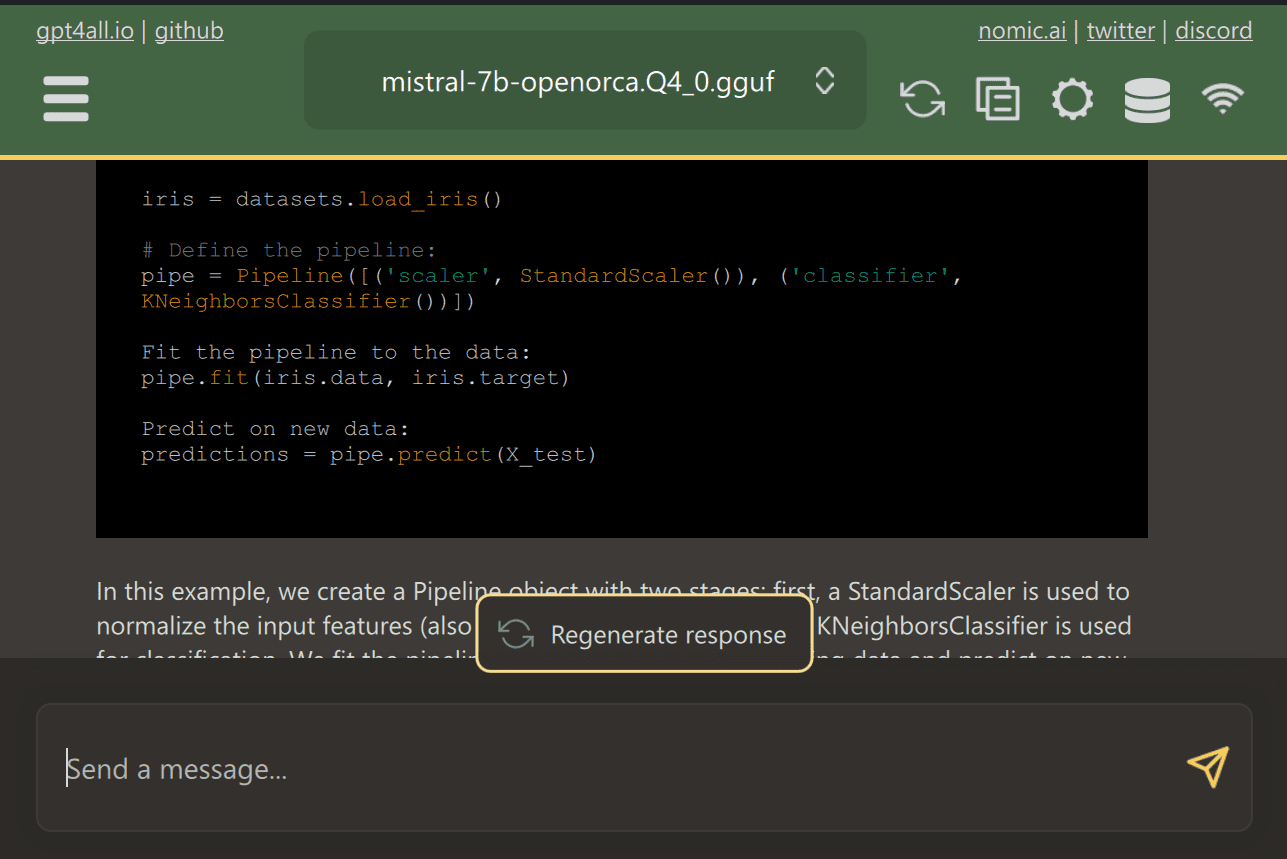
GPT4All is a cutting-edge open-source software that enables users to download and install state-of-the-art open-source models with ease.

Simply download GPT4ALL from the website and install it on your system. Next, choose the model from the panel that suits your needs and start using it. If you have CUDA (Nvidia GPU) installed, GPT4ALL will automatically start using your GPU to generate quick responses of up to 30 tokens per second.

5 Ways To Use LLMs On Your Laptop

You can provide access to multiple folders containing important documents and code, and GPT4ALL will generate responses using Retrieval-Augmented Generation. GPT4ALL is user-friendly, fast, and popular among the AI community.

Read the blog about GPT4ALL to learn more about features and use cases: The Ultimate Open-Source Large Language Model Ecosystem.

2. LM Studio

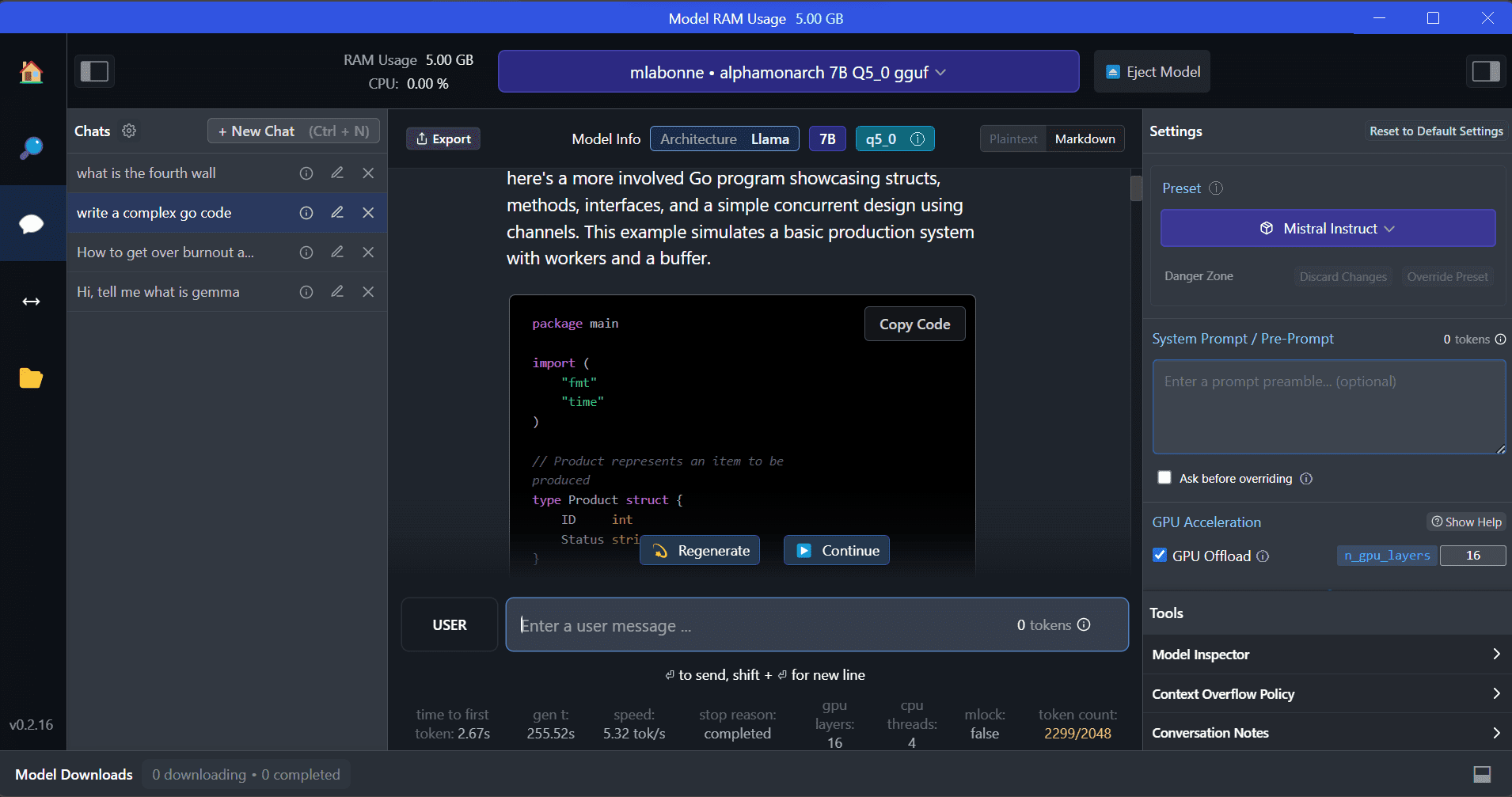
LM Studio is a new software that offers several advantages over GPT4ALL. The user interface is excellent, and you can install any model from Hugging Face Hub with a few clicks. Additionally, it provides GPU offloading and other options that are not available in GPT4ALL. However, LM Studio is a closed source, and it doesn't have the option to generate context-aware responses by reading project files.

5 Ways To Use LLMs On Your Laptop

LM Studio offers access to thousands of open-source LLMs, allowing you to start a local inference server that behaves like OpenAI's API. You can modify your LLM's response through the interactive user interface with multiple options.

Also, read Run an LLM Locally with LM Studio to learn more about LM Studio and its key features.

3. Ollama

Ollama is a command-line interface (CLI) tool that enables speedy operation for large language models such as Llama 2, Mistral, and Gemma. If you are a hacker or developer, this CLI tool is a fantastic option. You can download and install the software and use `the llama run llama2` command to start using the LLaMA 2 model. You can find other model commands in the GitHub repository.

5 Ways To Use LLMs On Your Laptop

It also allows you to start a local HTTP server that can be integrated with other applications. For instance, you can use the Code GPT VSCode extension by providing the local server address and start using it as an AI coding assistant.

Improve your coding and data workflow with these Top 5 AI Coding Assistants.

4. LLaMA.cpp

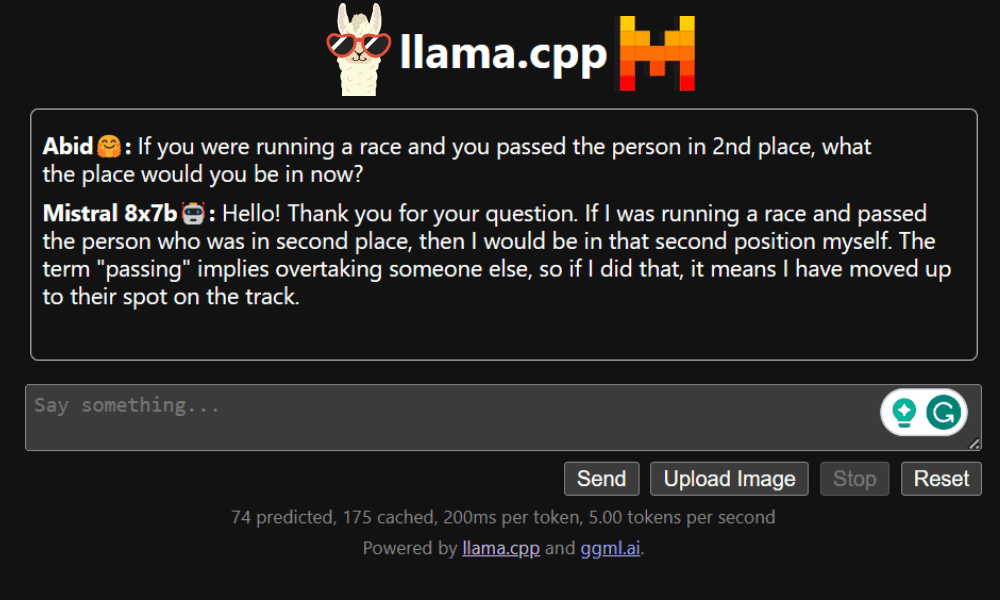
LLaMA.cpp is a tool that offers both a CLI and a Graphical User Interface (GUI). It allows you to use any open-source LLMs locally without any hassle. This tool is highly customizable and provides fast responses to any query, as it is entirely written in pure C/C++.

5 Ways To Use LLMs On Your Laptop

LLaMA.cpp supports all types of operating systems, CPUs, and GPUs. You can also use multimodal models such as LLaVA, BakLLaVA, Obsidian, and ShareGPT4V.

Learn how to Run Mixtral 8x7b On Google Colab For Free using LLaMA.cpp and Google GPUs.

5. NVIDIA Chat with RTX

To use NVIDIA Chat with RTX, you need to download and install the Windows 11 application on your laptop. This application is compatible with laptops that have a 30 series or 40 series RTX NVIDIA graphics card with at least 8GB of RAM and 50GB of free storage space. Additionally, your laptop should have at least 16GB of RAM to run Chat with RTX smoothly.

5 Ways To Use LLMs On Your Laptop

With Chat with RTX, you can run LLaMA and Mistral models locally on your laptop. It's a fast and efficient application that can even learn from documents you provide or YouTube videos. However, it's important to note that Chat with RTX relies on TensorRTX-LLM, which is only supported on 30 series GPUs or newer.

Conclusion

If you want to take advantage of the latest LLMs while keeping your data safe and private, you can use tools like GPT4All, LM Studio, Ollama, LLaMA.cpp, or NVIDIA Chat with RTX. Each tool has its own unique strengths, whether it's an easy-to-use interface, command-line accessibility, or support for multimodal models. With the right setup, you can have a powerful AI assistant that generates customized context-aware responses.

I suggest starting with GPT4All and LM Studio as they cover most of the basic needs. After that, you can try Ollama and LLaMA.cpp, and finally, try Chat with RTX.

Abid Ali Awan (@1abidaliawan) is a certified data scientist professional who loves building machine learning models. Currently, he is focusing on content creation and writing technical blogs on machine learning and data science technologies. Abid holds a Master's degree in Technology Management and a bachelor's degree in Telecommunication Engineering. His vision is to build an AI product using a graph neural network for students struggling with mental illness.

More On This Topic

  • Explore LLMs Easily on Your Laptop with openplayground
  • Turn Your Laptop Into a Personal Analytics Engine with DuckDB and…
  • 5 Ways of Converting Unstructured Data into Structured Insights with LLMs
  • How to Use Hugging Face AutoTrain to Fine-tune LLMs
  • eBook: 101 Ways to Use Third-Party Data to Make Smarter Decisions
  • 5 Ways To Use AI For Supply Chain Management