Navigating the complex landscape of API ecosystems

1_DLk2F57pKkZaOPl8Hn2ZoA

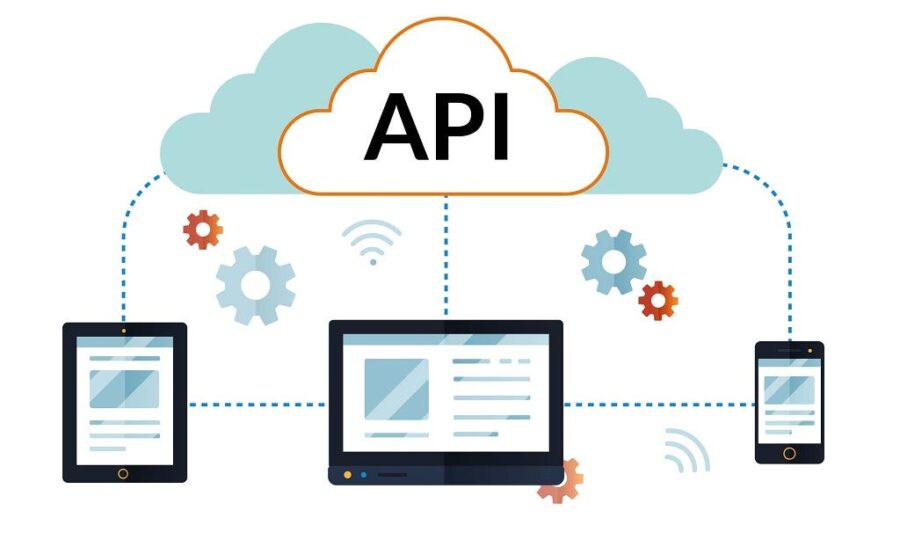
In today’s tech landscape, Application Programming Interfaces (APIs) are indispensable for software interaction. Beyond individual APIs lies a more complex system: the API ecosystem. This ecosystem, a network of interlinked APIs, is integral to modern digital infrastructures. For professionals in data and technology fields, navigating this ecosystem is not just about understanding individual APIs, but grasping the entirety of their interactions, dependencies, and impacts on digital operations.

This article dives into the intricacies of API ecosystems. We’ll dissect their structure, pinpoint common challenges, and outline effective management strategies. The focus is on equipping data practitioners with practical insights to adeptly manage and optimize these ecosystems for enhanced performance and innovation. As we explore the critical aspects of API ecosystems, the aim is to provide a toolkit for navigating and exploiting these networks to drive technological advancement and business efficiency.

Understanding API ecosystems

At the core of digital innovation, API ecosystems are more than just collections of APIs. They represent a symbiotic network where data, services, and functions interact seamlessly. In an API ecosystem, each API connects disparate systems, allowing them to communicate and exchange data. This interconnectedness is crucial in today’s data-driven environments, where agility and responsiveness are key.

Components of an API ecosystem

  • Public and private APIs: Public APIs are accessible to external developers, fostering innovation and collaboration. Private APIs, on the other hand, are confined within an organization, ensuring secure and efficient internal data exchange.
  • Third-party integrations: These are external services or systems integrated into the ecosystem through APIs, enriching the platform with additional capabilities.
  • User interfaces: The front-end components that interact with APIs, providing an accessible way for users to engage with the system.

Role in digital transformation

API ecosystems are pivotal in digital transformation. They enable organizations to be more agile, responsive, and adaptable to changing market needs. By facilitating integration and communication between different software systems, API ecosystems break down data silos, streamline workflows, and unlock new opportunities for innovation.

The evolving landscape

The landscape of API ecosystems is continuously evolving, driven by emerging technologies like AI and machine learning. This evolution demands a dynamic approach to API management, ensuring that ecosystems not only respond to current needs but are also scalable and adaptable for future challenges.

Understanding the composition and dynamics of API ecosystems is foundational for data professionals. It’s about recognizing the potential of these networks to transform digital strategies and operations, laying the groundwork for the next sections where we delve into the challenges and strategies for effective API ecosystem management.

The challenges of API ecosystem management

Effectively managing an API ecosystem involves navigating a series of complex challenges. These challenges range from ensuring security and scalability to maintaining a consistent and user-friendly experience across various API integrations. For data professionals, understanding and addressing these challenges is crucial for the smooth functioning of an API ecosystem.

Security concerns

  • Data privacy and protection: As APIs facilitate data exchange, they become prime targets for security breaches. Implementing robust authentication and authorization protocols is essential.
  • Vulnerability to attacks: APIs exposed to external environments can be vulnerable to attacks. Regular security audits and adopting best practices in API security are vital.

Scalability issues

  • Handling increased traffic: As an organization grows, its APIs must efficiently handle increased loads without performance degradation.
  • Adapting to evolving needs: An API ecosystem must be flexible enough to incorporate new technologies and adapt to changing business requirements.

Maintaining consistency

  • Integration complexity: With a multitude of APIs, ensuring seamless integration while maintaining a consistent experience across different platforms can be challenging.
  • API versioning: Managing different versions of APIs without disrupting existing functionalities requires careful planning and execution.

Monitoring and Performance

  • Real-time monitoring: Continuously tracking API performance and usage is essential to identify and resolve issues promptly.
  • Optimizing API calls: Efficiently managing the number and types of API calls to balance load and prevent bottlenecks.

Key Strategies for Effective API Ecosystem Management

Navigating the intricacies of an API ecosystem requires a blend of technical acumen and strategic foresight. Effective management is not just about solving immediate challenges; it’s about setting up a resilient, scalable, and secure infrastructure that aligns with long-term business objectives. Here, we explore key strategies that data professionals can employ to manage API ecosystems effectively.

Standardization and Best Practices

  • API design and protocols: Establishing clear API design standards and protocols ensures consistency and eases integration challenges.
  • Documentation: Comprehensive and up-to-date documentation is crucial for effective communication and usage of APIs across teams and external users.

Security and Compliance

  • Implement robust security measures: Employ advanced authentication mechanisms, encryption, and regular security audits to safeguard the ecosystem.
  • Regulatory compliance: Stay abreast of and comply with relevant data protection and privacy regulations to avoid legal pitfalls.

Monitoring and Analytics

  • Real-time monitoring: Utilize tools for continuous monitoring of API performance, traffic, and usage patterns.
  • Data analytics: Leverage analytics to gain insights into API usage, helping in making informed decisions about optimization and future developments.

Scalability and Flexibility

  • Cloud-based solutions: Consider cloud-based API management solutions for greater scalability and flexibility.
  • Microservices architecture: Adopt a microservices architecture to enhance scalability and ease the management of complex API ecosystems.

User-Centric Approach

  • Understanding user needs: Regularly gather feedback from both internal and external API users to understand their needs and pain points.
  • User-friendly design: Ensure that APIs are intuitive and easy to use, enhancing the overall user experience.

Continuous Improvement

  • Iterative development: Embrace an iterative approach to API development, allowing for continuous refinement and adaptation.
  • Stay informed on trends: Keep up with the latest trends and technologies in API development to ensure the ecosystem remains relevant and efficient.

The role of API management tools

In the complex terrain of API ecosystems, API management tools emerge as essential allies. These tools are not just facilitators; they are the backbone that strengthens and streamlines the entire ecosystem. For data professionals and developers alike, understanding and utilizing these tools can markedly elevate the efficiency, security, and scalability of their API operations.

Streamlining operations

  • Automated workflows: API management tools automate various aspects of API lifecycle management, from deployment to retirement, reducing manual overhead and the potential for errors.
  • Centralized control: They provide a centralized platform for managing all APIs in the ecosystem, offering a unified view and control point for various API-related activities.

Enhancing security

  • Advanced security features: These tools come equipped with robust security features like OAuth, JWT, and API gateways, ensuring secure API access and data protection.
  • Consistent security policies: They allow for the implementation of consistent security policies across all APIs, simplifying compliance and governance.

Improving user experience

  • Developer portals: API management tools often include developer portals, which offer resources, documentation, and testing tools to help developers effectively utilize the APIs.
  • API analytics: These tools provide detailed analytics on API usage, performance, and errors, enabling continuous optimization for better user experiences.

Scalability and flexibility

  • Handling increased load: API management tools are designed to efficiently handle increased traffic, ensuring that the ecosystem scales seamlessly with the growth of the business.
  • Adaptability: They allow for easy integration of new technologies and approaches, such as microservices, facilitating adaptability in the evolving digital landscape.

Case studies: Successful API ecosystem management

To illustrate the practical applications and benefits of effective API ecosystem management, let’s examine a couple of fictitious case studies with practical use-cases. These examples underscore how strategic management, and the use of advanced tools can transform API ecosystems, driving innovation and business growth.

Case study 1: E-commerce platform

  • Background: A leading e-commerce company faced challenges with its sprawling API ecosystem, which included numerous third-party integrations and a rapidly expanding customer base.
  • Challenge: The primary issues were managing the growing traffic, ensuring data security, and maintaining a consistent user experience across various platforms.
  • Solution: The company implemented a robust API management tool that provided centralized control, advanced security features, and scalable infrastructure.
  • Outcome: This led to a significant improvement in handling increased traffic, enhanced security measures, and seamless user experience. The platform could now easily integrate new services and adapt to changing market demands, resulting in increased customer satisfaction and business growth.

Case study 2: Healthcare data management

  • Background: A healthcare organization needed to manage a complex API ecosystem that included sensitive patient data and various healthcare services.
  • Challenge: Key challenges were ensuring the privacy and security of health data, integrating various systems seamlessly, and complying with strict regulatory standards.
  • Solution: The organization adopted an API management tool that offered robust security protocols, compliance with healthcare regulations, and efficient data integration capabilities.
  • Outcome: The implementation streamlined data flow between systems, improved patient data security, and enhanced the overall efficiency of healthcare services. The tool’s analytics capabilities also provided valuable insights for further improving patient care services.

Conclusion

Navigating the complex landscape of API ecosystems is a challenging yet rewarding endeavor. As we have explored, effective management of these ecosystems is pivotal for utilizing their full potential in driving digital innovation and operational efficiency. The strategies discussed, from standardization and robust security measures to the implementation of API management tools, provide a roadmap for managing these intricate networks.

In conclusion, navigating the complexities of API ecosystems can be challenging. However, the right approach and tools transform this journey into a conduit for digital transformation and sustained business growth. Despite its intricacies, mastering this path is essential for maintaining competitiveness in our progressively interconnected digital world.


The Genius Behind Salesforce Data Cloud

In the Magic Quadrant for Customer Data Platforms 2024, Gartner evaluated 18 vendors, and among them was Salesforce Data Cloud which clinched the position as a leader.

It was unveiled at Dreamforce 2022 as Salesforce’s new real-time data platform, Genie. The company later rebranded it as Data Cloud, launching it officially in 2023.

At TrailblazerDX 2024, Salesforce’s developer conference in San Francisco, co-founder Parker Harris introduced the audience to Muralidhar Krishnaprasad as the genius behind Data Cloud.

Krishnaprasad, also called MK by his colleagues, has been with Salesforce for over five years and currently serves as the EVP of software engineering. At the event, referring to a report, Krishnaprasad said that 81% of IT leaders are of the opinion that data silos hinder their AI and digital transformation, and this is why Salesforce came up with Data Cloud.

“We built Data Cloud to help you unlock all the trapped data and bring it into our ecosystem so that you can use it in your line of work,” he said.

Demand for Salesforce Data Cloud

Data Cloud allows Salesforce customers to bring their sales, marketing, and real-time web engagement data, besides data stored in Snowflake and DataBricks, etc. But most importantly, they can add Salesforce’s metadata to it.

On the sidelines of TrailblazerDX, in an exclusive interaction with AIM, Krishnaprasad said that Data Cloud is one of the fastest, if not the fastest growing, organic innovation to come out of Salesforce.

In the Q4 earnings call, the company revealed that Data Cloud is approaching USD 400 million in ARR, growing at nearly 90% year over year. “In fact, we are approaching half a billion dollars in two years and this is because Data Cloud bridges the gap between IT and the business,” Krishnaprasad said.

However, Salesforce’s endeavours to create a unified data platform are not new. The CRM leader has played around with sales and service cloud and has tried to use MuleSoft to integrate silos of data, but all past efforts have not been as successful as Data Cloud.

To enable access to data across multiple platforms without the need for data migration, Salesforce collaborated with DataBricks and hyperscalers as part of its Data Cloud initiative. This enabled Salesforce customers to access their data sitting on those platforms on Data Cloud, without the necessity to move them.

“It acts as a bridge allowing businesses to access and harmonise their existing data seamlessly. Whether you choose to ingest or federate your data, Data Cloud ensures that it’s unified and available for use across all platforms,” Krishnaprasad added.

Here, it is important to note that despite having over 150,000 customers globally, Data Cloud’s adoption has been limited to reportedly just over 1,000 customers.

The half-a-billion dollar figure projected by Krishnaprasad could be because those adopting Data Cloud are also Salesforce’s largest customers.

Nonetheless, with Salesforce now throwing AI into the mix, its customers will be able to run AI models on their data to derive value. Recently, Salesforce also rebranded its low-code platform Einstein Studio, which was introduced last September. Now called Einstein 1 Studio, it offers newer capabilities and is bundled with Data Cloud at no additional cost.

Data Cloud Adoption in India

At TrailblazerDX, Salesforce emphasised the significance of fostering trust in AI to encourage broader adoption of AI tools among enterprises. With the introduction of Data Cloud, Salesforce encourages enterprises to centralise all their data within the Salesforce platform.

However, the integration of AI raises pertinent concerns regarding data security and privacy.

According to Krishnaprasad, Data Cloud has seen good adoption among Salesforce’s customers globally as well as in India. Non-banking financial giant Bajaj Finance, which has a customer base of 73 million and holds assets under management worth INR 270,050 crore, is also leveraging Data Cloud.

It helped them consolidate the data that was sitting in different places. They accomplished this on a large scale, allowing marketers and others to create segments and target customers for loans and upselling.

“Especially during festivals like Diwali, where they reportedly process millions of loans per hour. This level of operation necessitates accurate data. Consequently, they have succeeded in gathering data from across the enterprise, consolidating it in the Data Cloud, harmonising it, and allowing different departments to analyse it in distinct ways,” Krishnaprasad said.

He pointed out that Air India is yet another Indian company that has truly transformed its business operations with the Data Cloud. “They brought all their data to the Data Cloud and have grand plans to go even broader.”

Data Cloud is Not Just for Large Enterprises

While Data Cloud has seen good adoption among Salesforce’s large enterprise customers, Krishnaprasad argues that it is also very useful for smaller businesses.

“If you look at it, the starter version we shipped with marketing cloud has Data Cloud built at scale. So we have scaled it down to horizontal as well,” he added.

Moreover, Krishnaprasad believes that not only Salesforce’s services are competitively priced, it allows small businesses to scale easily, as they make their journey from small businesses to large enterprises.

The post The Genius Behind Salesforce Data Cloud appeared first on Analytics India Magazine.

Saving hours of work with AI: How ChatGPT became my virtual assistant for a data project

cover

There's certainly been a lot of golly-wow, gee-whiz press about generative artificial intelligence (AI) over the past year or so. I'm certainly guilty of producing some of it myself. But tools like ChatGPT are also just that: tools. They can be used to help out with projects just like other productivity software.

Today, I'll walk you through a quick project where ChatGPT saved me a few hours of grunt work. While you're unlikely to need to do the same project, I'll share my thinking for the prompts, which may inspire you to use ChatGPT as a workhorse tool for some of your projects.

Also: 4 generative AI tools your enterprise can leverage to boost productivity

This is just the sort of project I would have assigned to a human assistant, back when I had human assistants. I'm telling you this fact because I structured the assignments for ChatGPT similarly to how I would have for someone working for me, back when I was sitting in a cubicle as a managerial cog of a giant corporation.

The project

In a month or so, I'll post what I like to call a "stunt article." Stunt articles are projects I come up with that are fun and that I know readers will be interested in. The article I'm working on is a rundown of how much computer gear I can buy from Temu for under $100 total. I came in at $99.77.

Putting this article together involved looking on the Temu site for items to spotlight. For example, I found an iPad keyboard and mouse that cost about $6.

Also: Is Temu legit? What to know before you place an order

To stay under my $100 budget, I wanted to add all the Temu links to a spreadsheet, find each price, and then move things around until I got the exact total budget I wanted to spend.

The challenge was converting the Temu links into something useful. That's where ChatGPT came in.

Phase 1: Gathering the links

The first thing I did was gather all my links. For each product, I copied the link from Temu and pasted it into a Notion page. When pasting a URL, Notion gives you the option to create bookmark blocks that not only contain links but also contain, crucially, product names. Here's a snapshot of that page:

As you can see, I've started selecting the blocks. Once you select all the blocks, you can copy them. I just pasted the entire set into a text editor, which looked like this:

The page looks ugly, but the result is useful.

Phase 2: Identifying the data

Let's take a look at one of the data blocks. I switched my editor out of dark mode so it's easier for you to see the data elements in the block:

There are three key elements. The gold text shows the name of the product, surrounded by braces. The green text is the base URL of the product, surrounded by parenthesis. There's a question mark that separates the main page URL from all the random tracking data passed to the Temu page. I just wanted the main URL. The purple sections highlight the delimiters — this is the data we're going to feed into ChatGPT.

Phase 3: Teaching ChatGPT to recognize the data

I first fed ChatGPT this prompt:

Accept the following data and await further instructions.

Then I copied all the information from the text editor and pasted it into ChatGPT. At this point, ChatGPT knew to wait for more details.

The next step is where the meat of the project took place. I wanted ChatGPT to pull out the titles and the links, and leave the rest behind. Here's that prompt:

The data above consists of a series of blocks of data. At the beginning of each block is a section within [] brackets. For each block, designate this as TITLE.

Following the [] brackets is an open paren (followed by a web URL). For each block, extract that URL, but dispose of everything following the question mark, and also dispose of the question mark. Most URLs will then end in .html. We will designate this as URL.

For each block, display the TITLE followed by a carriage return, followed by the URL, followed by two newlines.

This process accomplished two things. It allowed me to name the data, so I could refer to it later. The process also allowed me to test whether ChatGPT understood the assignment.

Also: How to use ChatGPT

ChatGPT did the assignment correctly but stopped about two-thirds through when its buffer ran out. I told the bot to continue and got the rest of the data.

Doing this process by hand would have involved lots of annoying cutting and pasting. ChatGPT did the work in less than a minute.

Phase 4: Cleaning up Temu's overly complex titles

For my project, Temu's titles are just too much. Instead of:

10 Inch LCD Writing Tablet, Electronis Memo With Leather Protective Case, Electronic Drawing Board For Digital Handwriting Pad Doodle Board, Gifts For

I wanted something more like:

LCD writing tablet with case

I gave this assignment to ChatGPT as well. I reminded the tool that it had previously parsed and identified the data. I find that reminding ChatGPT about a previous step helps it more reliably incorporate that step into subsequent steps. Then I told it to give me titles. Here's that prompt:

You just created a list with TITLE and URL. Do you remember? For the above items, please summarize the TITLE items in 4-6 words each. Only capitalize proper words and the first word. Give it back to me in a bullet list.

I got back a list like this, but for all 26 items:

  • LCD writing tablet with case
  • 360-degree rotating tablet stand
  • 1080p video capture device
  • USB 3.0 HDMI capture card
  • Advanced sound card for professionals
  • USB 3.0 expansion card

Phase 5: Create a list with links

My goal was to copy and paste this list of clickable links into Excel so I could use column math to play around with the items I planned to order, adding and removing items until I got to my $100 budget. I wanted the names clickable in the spreadsheet because it would be much easier to manage and jump back and forth between Temu and my project spreadsheet.

So, my final ChatGPT task was to turn the list above into a set of clickable links. Again, I started by reminding the tool of the work it had completed. Then I told it to create a list with links:

Do you see the bulleted list you just created? That is a list of summarized titles.

Okay, make the same list again, but turn each summarized title into a live web link with its corresponding URL.

And that was that. I got all the links I needed and ChatGPT did all the grunt work. I pasted the results into my spreadsheet, chose the products, and placed the order.

Also: 6 ways ChatGPT can make your everyday life easier

This is the final spreadsheet. There were more products when I started the process, but I added and removed them from the REMAINING column until I got the budget I was aiming for:

The benefit of ChatGPT as a tool

This was a project I could have done myself. But it would have required a ton of cutting and pasting, and a reasonable amount of extra thought to summarize all the product titles. It would have taken me two or three hours of grunt work and probably added to my wrist pain.

But by thinking this work through as an assignment that could be delegated, the entire ChatGPT experience took me less than 10 minutes. It probably took me less time to use ChatGPT to do all that grunt work and write this article than it would have taken me to do all that cutting, pasting, and summarizing.

Also: Thanks to my 5 favorite AI tools, I'm working smarter now

This sort of project isn't fancy and it isn't sexy. But it saved me a few hours of work I would have found tedious and unpleasant. Next time you have a data-parsing project, consider using ChatGPT.

Oh, and stay tuned. As soon as Temu sends me their haul, I'll post the detailed article about how much tech gear you can get for under $100. It'll be fun. See you there.

You can follow my day-to-day project updates on social media. Be sure to subscribe to my weekly update newsletter, and follow me on Twitter/X at @DavidGewirtz, on Facebook at Facebook.com/DavidGewirtz, on Instagram at Instagram.com/DavidGewirtz, and on YouTube at YouTube.com/DavidGewirtzTV.

Krutrim, Bhavish Aggarwal’s AI Unicorn, Partners with Databricks

Ola Copies OpenAI’s ChatGPT, Calls it Krutrim AI

Krutrim, the AI company founded by Ola’s Bhavish Aggarwal, has announced a strategic partnership with Databricks to pre-train and fine-tune their foundational model and to develope generative AI models tailored for the Indian market.

The collaboration will leverage Databricks’ data and AI platform to train and fine-tune Krutrim’s foundational large language model (LLM) focused on Indian languages. This move is set to benefit Krutrim, as the model was previously on the receiving end of a lot of criticism for its performance and responses—like the model itself claiming to be built on top of OpenAI’s model.

“We’re excited to be at the forefront of building foundational LLMs trained on Indian languages to better serve our customers in India,” said Ravi Jain, Vice President at Krutrim. “We have been working closely with the Databricks team to pre-train and fine-tune our foundational LLM.”

Krutrim recently achieved unicorn status after a $50 million funding round led by Matrix Partners. The partnership with Databricks, which combines data engineering, data science, machine learning, and analytics capabilities, aims to accelerate the development and deployment of generative AI solutions in India.

The companies plan to create AI-powered products like conversational assistants, content generation tools, and customised offerings across industries. Krutrim intends to democratise advanced AI access for businesses of all sizes using Databricks’ scalable platform.

Databricks has rapidly expanded its presence in India’s growing AI market. “Databricks remains committed to driving the data and AI transformation in India, enabling more businesses to become data-forward and unlocking new opportunities,” the company stated.

At Databricks’ recent Data + AI Summit, Krutrim also won the GenAI Innovation Award for “using generative AI to transform their products, processes and tools.”

The post Krutrim, Bhavish Aggarwal’s AI Unicorn, Partners with Databricks appeared first on Analytics India Magazine.

Become a Business Intelligence Analyst in Less Than 6 Months

Become a Business Intelligence Analyst in Less Than 6 Months
Image by Author

Many people who have been in the tech industry transition into different domains. Business intelligence is one of them. People with no experience with software development or coding love analyzing data to help businesses make the right decisions.

There’s a reason why you stumbled on this article and it has to be one of the two reasons above.

When it comes to business intelligence analysis, the main thing is learning the foundations and being an expert at using the tools. This is why I have created a list of courses with top providers, where some or even all of them are currently dominating the business intelligence market.

The purpose of this article is that you can choose which certification is right for you based on which tool you want to learn. For example, is it Looker or is it Tableau?

Google Business Intelligence Certificate

Link: Google Business Intelligence Professional Certificate

Google is well known for its comprehensive certifications that have helped a lot of people land high-paying jobs without having to go back to university.

Made up of 3 courses and aimed at people seeking advanced knowledge, this course can be completed in 2 months if you commit 10 hours a week.

In this business intelligence certification, you will explore the roles of business intelligence professionals, and learn and practice data modeling, extraction, transformation, and loading (ETL). You will then dive deeper into taking your data findings and creating data visualizations and dashboards that will answer business questions that can be effectively communicated to stakeholders.

IBM Business Intelligence (BI) Analyst Certificate

Link: IBM Business Intelligence (BI) Analyst Certificate

IBM is also another organization well known for its variety of certifications. This certification is aimed at beginners and consists of 10 courses which can be completed at your own pace.

In this comprehensive 10-course certification, you will build skills in SQL queries, and relational databases, gather and clean data, and learn about data warehousing. You will apply statistical analysis methods to identify trends, create data visualizations, and build dashboards using popular tools such as Tableau, Excel, Cognos, and Looker. Using these tools, you will generate valuable insights which will aid the decision-making process.

Microsoft Power BI Data Analyst Certificate

Link: Microsoft Power BI Data Analyst Professional Certificate

Another amazing provider — Microsoft! This professional certificate is aimed at beginners and consists of 8 courses and can be completed in 5 months if you commit 10 hours a week.

Specific to Microsoft, in this course you will learn how to use Power BI to connect data sources and transform them into valuable insights. You will start with preparing Excel data for analysis by learning best practices of common formulas and functions. You will then learn about the capabilities of Power BI to create data visualizations, reports and dashboards.

If you want to be job-ready, you can demonstrate your skills with a project and the Microsoft PL-300 Certification exam.

Tableau Business Intelligence Analyst Certificate

Link: Tableau Business Intelligence Analyst Professional Certificate

A course coming from one of the best business intelligence tools out there! This course is aimed at beginners and consists of 8 courses and can be completed in 8 months if you commit 10 hours a week.

In this Tableau-specific course, you will gain the essential skills that every entry-level business intelligence analyst needs. You will learn how to use Tableau Public to prepare and manipulate data for the analysis process and then go into creating data visualizations that will reveal meaningful and actionable insights.

Wrapping it up

And that’s all you need. These 4 courses will provide you with the necessary skills and experience to become a successful business intelligence analyst. All you have to do is determine which tool you want to be an expert in.

Happy learning!

Nisha Arya is a data scientist, freelance technical writer, and an editor and community manager for KDnuggets. She is particularly interested in providing data science career advice or tutorials and theory-based knowledge around data science. Nisha covers a wide range of topics and wishes to explore the different ways artificial intelligence can benefit the longevity of human life. A keen learner, Nisha seeks to broaden her tech knowledge and writing skills, while helping guide others.

More On This Topic

  • Machine Learning Algorithms Explained in Less Than 1 Minute Each
  • KDnuggets News, July 20: Machine Learning Algorithms Explained in…
  • Multi-modal deep learning in less than 15 lines of code
  • 3 mindset changes to become a better analyst
  • Become Data-Driven Faster with DataCamp’s Analyst Takeover
  • Black Friday Deal — Master Machine Learning for Less with DataCamp

The Future of AI in India is Not That Bleak!

The Future of AI in India is Not That Bleak!

A recent claim by Gaurav Aggarwal, a former Google Research employee who is building an AI startup called Ananas Labs in India, has been doing the rounds on the internet. Aggarwal says that it is extremely difficult to raise capital in India for a deep-tech research startup.

“After about seven months since leaving Google to start an AI research company in India, I have to unfortunately cut-short my adventure due to various reasons,” he said in a post on X, talking about stress taking a toll on his health. He later explained in an interview that VCs are not ready to put money in deep-tech startups, but are only interested in OpenAI wrappers and the so-called consumer-tech startups.

Arguably, Aggarwal’s point of view does make sense. India’s generative AI scene is on an upswing, but the investors are cautious when it comes to investing in research startups. Interestingly, there are not many research-based startups in India.

Moreover, according to Databricks, India is one of the highest adopters of AI solutions in various industries. It claims that a significant 80% growth in its India business over the past two fiscal years was fueled by the rising demand for data and AI capabilities among Indian enterprises.

Should the Focus be on Foundational Models?

Nikhil Malhotra, the chief innovation officer at Tech Mahindra’s Maker’s Lab, which is building the Project Indus, weighed in on the debate. “Most LLMs produced in India are built on top of the already-available LLMs. They cannot be called fundamental research or foundational LLMs,” he said.

Malhotra also added that for Project Indus, his team is building a multilingual model from scratch, which is comparatively tougher than building on top of models from OpenAI or Meta. This also tells us why a lot of Indian startups are still experimenting with Llama, Mistral, or other GPT models, as building models from scratch requires a lot of computation and AI expertise, which are still lacking in India.

Malhotra gives us a hopeful picture of why India should focus on foundational research. Meanwhile, Pratik Desai, the founder of KissanAI, also contributed to the discussion and shared similar thoughts while also questioning the need for building models from scratch.

“Training something from scratch and turning it into the 10th best foundation model that no one will use in production is the wealth a few companies with deep pockets can afford, even spending millions on failed training runs,” said Desai, adding that India has so many unique use cases that don’t need foundational model research and using models such as Phi, Orca, or Llama is enough.

“India has never led any fundamental research, but we have a golden opportunity as AI can be a levelling field,” added Desai. “However, this requires a fundamental shift from coaching, and academia to a change in mindset from parents, and founders to investors.”

Both Malhotra and Desai agree that it is a marathon for AI research and not a sprint anymore.

Anubhav Mishra, the co-founder of ZuAI, believes that “India and the resources which are here, should focus on foundational research, on large models which are more useful and logical to build”, such as Transformers. “We have lost the race and lack resources, at most, to build a frontier model,” he added.

A Mix of Both is the Future

Ankush Sabharwal, founder and CEO of CoRover.ai, the silent winner of the Indian AI race and the creator of BharatGP, also shared similar thoughts. “We are building something out of open source, fine-tuning it on our data, and making it proprietary,” Sabharwal told AIM.

“We have all these foundational models that are good enough to build virtual assistants for specific use cases. That is what we are doing by building models for specific use cases, instead of a broad generalised model,” said Sabharwal, highlighting how CoRover.ai believes in solving focused and accurate problems in different sectors and domains.

“If we don’t work on our own AI infrastructure, in the next 5-10 years, like we import oil, we will have to import AI,” said Aggarwal. He added that it pains him to see that India is not producing AI experts, just “slightly glorified engineers” who have no clue what they are building.

There have been several Indian researchers from Indian premier institutes who are building Indic language models on top of Llama and Mistral, but nothing foundational has been built yet. Even the most successful AI startup, Sarvam AI and its LLM OpenHathi are building on top of Llama.

The much-hyped Bhavish Aggarwal’s Ola Krutrim, whose architecture has not yet been revealed yet, has been a little bit of a disappointment since its launch. Meanwhile, initiatives such as IIT Bombay-led BharatGPT have been focused on building foundational multilingual models in India, and are also headed the open-source way. The same is the case with Vizzhy, which recently launched Hanooman, a foundational AI model which was built from scratch.

Though it is rare to find any other initiative that is being built from scratch, the lack of VCs’ interest in investing in such initiatives also shows a lack of understanding of the field. Hopefully, that will change with time. The research also focuses on foundation models that leverage India’s diverse culture.
Not to forget that, “AI is the future, and the future of AI is India.”

The post The Future of AI in India is Not That Bleak! appeared first on Analytics India Magazine.

NVIDIA Unleashes Quantum Computing Prowess With a CUDA Q-wist

NVIDIA Unleashes Quantum Computing Prowess With a CUDA Q-wist

Quantum computing, once a realm confined to theoretical speculation, is now transitioning into practical reality, thanks to NVIDIA’s pioneering efforts. Through a series of developments announced at GTC 2024, NVIDIA is not just envisioning the future of computing, but actively shaping it.

In Canada and the US, scientists employed LLMs to streamline quantum simulations, aiding in the exploration of molecular structures. “This new quantum algorithm opens the avenue to a new way of combining quantum algorithms with machine learning,” said Alan Aspuru-Guzik, a professor of chemistry and computer science at the University of Toronto, who led the team.

The team was the first to discover a lead candidate by using a quantum computer and classical computer. The endeavour employed NVIDIA’s CUDA-Q, a hybrid programming model designed for GPUs, CPUs, and the QPUs utilised by quantum systems. The research team conducted their experiments on Eos, which is NVIDIA’s H100 GPU supercomputer.

At GTC, Aspuru-Guzik revealed the algorithm that he developed, which employs machine learning and quantum computing to simulate chemical systems. This algorithm is now available for research and is helping in healthcare and chemistry. He added that if we continued using GPT-like models and these algorithms for quantum computing, we can have a GPT-like model for quantum computing.

NVIDIA introduced the NVIDIA Quantum Cloud at GTC, aimed at supporting researchers in fields like biopharma and various scientific disciplines in pushing forward quantum computing and algorithmic research.

According to NVIDIA, this cloud platform enables users to develop and experiment with novel quantum algorithms and applications, such as simulators and tools for hybrid quantum-classical computer programming, marking a significant advancement in accessibility and capabilities.

Fraud detection and hybrid computing

An interesting client leveraging and spearheading NVIDIA’s quantum dream is HSBC, which is one of the largest banks of the world. Researchers developed a quantum machine learning application capable of identifying fraudulent activity in digital payment systems.

Using NVIDIA GPUs, the bank’s quantum machine learning algorithm simulated an impressive 165 qubits. Typically, research papers focus on fewer than 40 of these quantum computing units.

Mekena Metcalf, a quantum computing research scientist at HSBC discussed her findings during a session at GTC. HSBC employed machine learning methodologies integrated with CUDA-Q and cuTensorNet software on NVIDIA GPUs to tackle the difficulties of scaling quantum circuit simulations. The focus was on applying these models to classify fraudulent transactions in digital payments.

Moreover, at GTC, two recent deployments showcased the expanding landscape for hybrid quantum-classical computing.

The first, ABCI-Q at Japan’s National Institute of Advanced Industrial Science and Technology, is one of the largest supercomputers solely dedicated to quantum computing research. It leverages CUDA-Q on NVIDIA H100 GPUs to bolster the nation’s endeavours in this field.

Meanwhile, in Denmark, the Novo Nordisk Foundation is spearheading the deployment of an NVIDIA DGX SuperPOD, with a significant portion allocated to quantum computing research, aligning with the country’s strategic plan to advance the technology.

These new systems complement Australia’s Pawsey Supercomputing Research Centre, which recently announced its adoption of CUDA-Q on NVIDIA Grace Hopper Superchips at its National Supercomputing and Quantum Computing Innovation Hub.

The Partner and Collaboration Work

At the heart of NVIDIA’s quantum computing journey lies a dedication to research excellence and collaboration. By forging strategic partnerships with leading academic institutions, NVIDIA is cultivating the next generation of quantum scientists and engineers.

For example, Israeli startup Classiq unveiled a new integration with CUDA-Q at GTC. Classiq‘s quantum circuit synthesis enables the automatic generation of optimised quantum programs from high-level functional models. This advancement empowers researchers to maximise the efficiency of current quantum hardware and expand the scope of their work towards future algorithms.

Rolls Royce, the aviation company also simulated the world’s largest circuit for computational fluid dynamics using cuQuantum multi-node QC simulation. This was done through a partnership with NVIDIA and Classiq. Another great example is QC Ware, a software and service provider, which is integrating its Promethium quantum chemistry package with the recently announced NVIDIA Quantum Cloud.

ORCA Computing, headquartered in London and specialising in quantum systems development, showcased results of running quantum machine learning on its photonics processor using CUDA-Q. Additionally, ORCA has been chosen to construct and supply a quantum computing testbed for the UK’s National Quantum Computing Centre, which will feature an NVIDIA GPU cluster utilising CUDA-Q.

NVIDIA also partnered with Inflection, a leader in quantum technology, to deliver cutting-edge quantum-enabled solutions for Europe’s largest cyber-defense exercise through the NVIDIA-enabled Superstaq software.

qBraid, a cloud-based platform for quantum computing, is integrating CUDA-Q into its developer environment. Furthermore, California-based BlueQubit detailed in a blog post how NVIDIA’s quantum technology, utilised in its research and GPU service, facilitates the fastest and most extensive quantum emulations feasible on GPUs.

All of these are just a few developments announced at GTC. As the quantum revolution unfolds, NVIDIA stands as a beacon of progress, leading the charge towards a future where the impossible becomes achievable.

The post NVIDIA Unleashes Quantum Computing Prowess With a CUDA Q-wist appeared first on Analytics India Magazine.

Pydantic Tutorial: Data Validation in Python Made Simple

Pydantic Tutorial: Data Validation in Python Made Simple
Image by Author Why use Pydantic?

Python is a dynamically typed language. So you can create variables without explicitly specifying the data type. And you can always assign a completely different value to the same variable. While this makes things easier for beginners, it also makes it just as easy to create invalid objects in your Python application.

Well, you can create data classes which allow defining fields with type hints. But they do not offer direct support for validating data. Enter Pydantic, a popular data validation and serialization library. Pydantic offers out-of-the-box support for data validation and serialization. Meaning you can:

  • leverage Python’s type hints to validate fields,
  • use the custom fields and built-in validators Pydantic offers, and
  • define custom validators as needed.

In this tutorial, we’ll model a simple ‘Employee’ class and validate the values of the different fields using the data validation functionality of Pydantic. Let’s get started!

Installing Pydantic

If you have Python 3.8 or a later version, you can install Pydantic using pip:

$ pip install pydantic

If you need email validation in your application, you can install the optional email-validator dependency when installing Pydantic like so:

$ pip install pydantic[email]

Alternatively, you can run the following command to install email-validator:

$ pip install email-validator

Note: In our example, we’ll use email validation. So please install the dependency if you’d like to code along.

Creating a Basic Pydantic Model

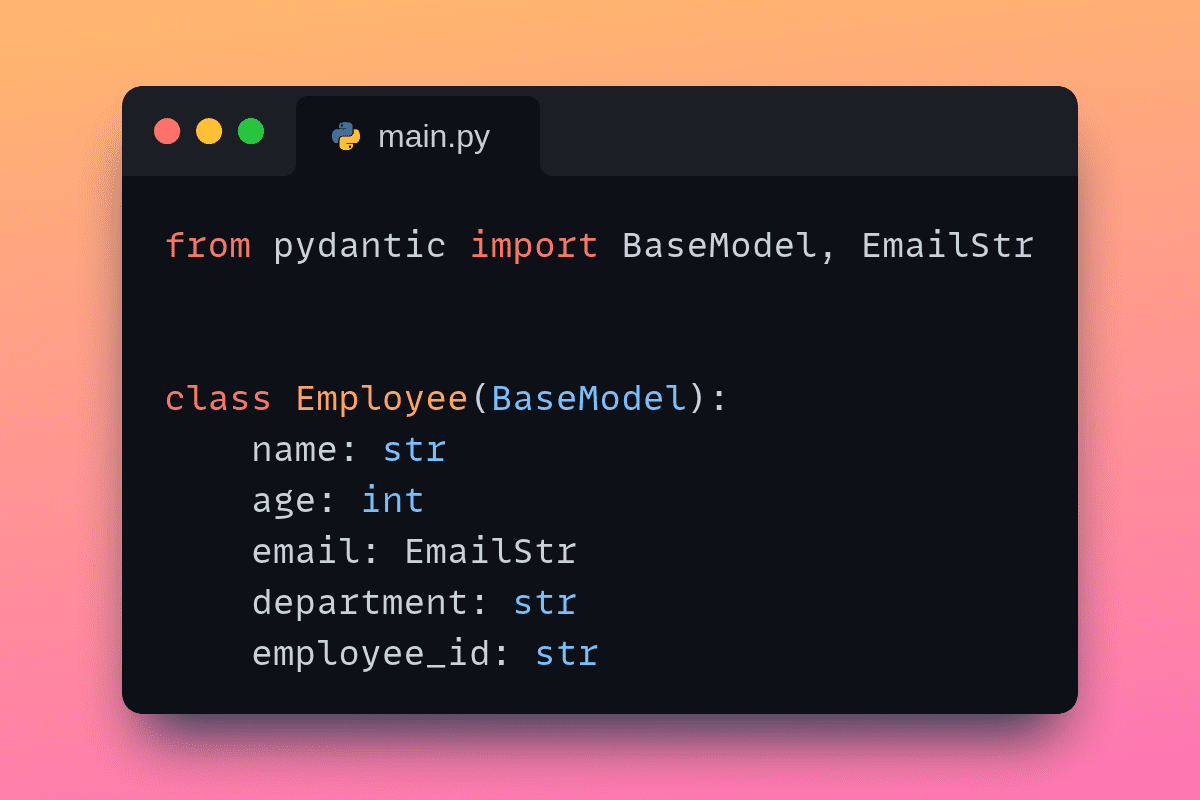
Now let's create a simple Employee class. FIrst, we create a class that inherits from the BaseModel class. The various fields and the expected types are specified as shown:

# main.py    from pydantic import BaseModel, EmailStr    class Employee(BaseModel):      name: str      age: int      email: EmailStr      department: str      employee_id: str

Notice that we’ve specified email to be of the EmailStr type that Pydantic supports instead of a regular Python string. This is because all valid strings may not be valid emails.

Validating Fields in the Employee Model

Because the Employee class is simple, let's add validation for the following fields:

  • email: should be a valid email. Specifying the EmailStr accounts for this, and we run into errors creating objects with invalid email.
  • employee_id: should be a valid employee ID. We’ll implement a custom validation for this field.

Implementing Custom Validation

For this example, let's say the employee_id should be a string of length 6 containing only alphanumeric characters.

We can use the @validator decorator with the employee_id field at the argument and define the validate_employee_id method as shown:

# main.py     from pydantic import BaseModel, EmailStr, validator    ...    @validator("employee_id")      def validate_employee_id(cls, v):          if not v.isalnum() or len(v) != 6:              raise ValueError("Employee ID must be exactly 6 alphanumeric characters")          return v

Now this method checks if the employee_id is valid for the Employee objects we try to create.

At this point, your script should look like so:

# main.py    from pydantic import BaseModel, EmailStr, validator    class Employee(BaseModel):      name: str      age: int      email: EmailStr      department: str      employee_id: str        @validator("employee_id")       def validate_employee_id(cls, v):           if not v.isalnum() or len(v) != 6:               raise ValueError("Employee ID must be exactly 6 alphanumeric characters")           return v

Loading and Parsing JSON Data Using Pydantic Models

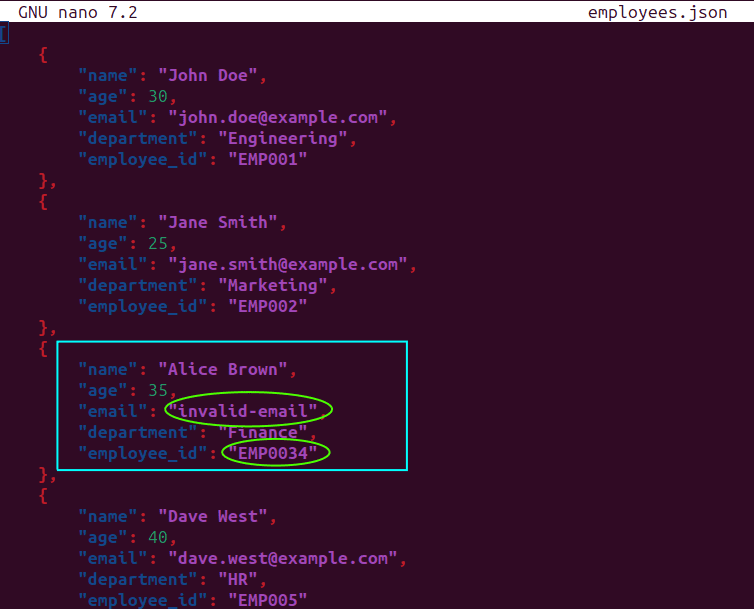
In practice, it's very common to parse JSON responses from APIs into data structures like Python dictionaries. Say we have an ‘employees.json’ file (in the current directory) with the following records:

# employees.json    [  	{      	"name": "John Doe",      	"age": 30,      	"email": "john.doe@example.com",      	"department": "Engineering",      	"employee_id": "EMP001"  	},  	{      	"name": "Jane Smith",      	"age": 25,      	"email": "jane.smith@example.com",      	"department": "Marketing",      	"employee_id": "EMP002"  	},  	{      	"name": "Alice Brown",      	"age": 35,      	"email": "invalid-email",      	"department": "Finance",      	"employee_id": "EMP0034"  	},  	{      	"name": "Dave West",      	"age": 40,      	"email": "dave.west@example.com",      	"department": "HR",      	"employee_id": "EMP005"  	}  ]

We can see that in the third record corresponding to ‘Alice Brown’, we have two fields that are invalid: the email and the employee_id:

Pydantic Tutorial: Data Validation in Python Made Simple

Because we’ve specified that email should be EmailStr, the email string will be automatically validated. We’ve also added the validate_employee_id class method to check if the objects have a valid employee ID.

Now let's add the code to parse the JSON file and create employee objects (we’ll use the built-in json module for this). We also import the ValidationError class from Pydantic. In essence, we try to create objects, handle ValidationError exceptions when the data validation fails, and also print out the errors:

# main.py    import json  from pydantic import BaseModel, EmailStr, ValidationError, validator  ...    # Load and parse the JSON data  with open("employees.json", "r") as f:      data = json.load(f)    # Validate each employee record  for record in data:      try:          employee = Employee(**record)          print(f"Valid employee record: {employee.name}")      except ValidationError as e:          print(f"Invalid employee record: {record['name']}")          print(f"Errors: {e.errors()}")

When you run the script, you should see a similar output:

Output >>>    Valid employee record: John Doe  Valid employee record: Jane Smith  Invalid employee record: Alice Brown  Errors: [{'type': 'value_error', 'loc': ('email',), 'msg': 'value is not a valid email address: The email address is not valid. It must have exactly one @-sign.', 'input': 'invalid-email', 'ctx': {'reason': 'The email address is not valid. It must have exactly one @-sign.'}}, {'type': 'value_error', 'loc': ('employee_id',), 'msg': 'Value error, Employee ID must be exactly 6 alphanumeric characters', 'input': 'EMP0034', 'ctx': {'error': ValueError('Employee ID must be exactly 6 alphanumeric characters')}, 'url': 'https://errors.pydantic.dev/2.6/v/value_error'}]  Valid employee record: Dave West

As expected, only the record corresponding to ‘Alice Brown’ is not a valid employee object. Zooming in to the relevant part of the output, you can see a detailed message on why the email and employee_id fields are invalid.

Here’s the complete code:

# main.py    import json  from pydantic import BaseModel, EmailStr, ValidationError, validator    class Employee(BaseModel):      name: str      age: int      email: EmailStr      department: str      employee_id: str        @validator("employee_id")       def validate_employee_id(cls, v):           if not v.isalnum() or len(v) != 6:               raise ValueError("Employee ID must be exactly 6 alphanumeric characters")           return v    # Load and parse the JSON data  with open("employees.json", "r") as f:      data = json.load(f)    # Validate each employee record  for record in data:      try:          employee = Employee(**record)          print(f"Valid employee record: {employee.name}")      except ValidationError as e:          print(f"Invalid employee record: {record['name']}")          print(f"Errors: {e.errors()}")

Wrapping Up

That's all for this tutorial! This is an introductory tutorial to Pydantic. I hope you learned the basics of modeling your data, and using both built-in and custom validations that Pydantic offers. All the code used in this tutorial is on GitHub.

Next, you may try using Pydantic in your Python projects and also explore serialization capabilities. Happy coding!

Bala Priya C is a developer and technical writer from India. She likes working at the intersection of math, programming, data science, and content creation. Her areas of interest and expertise include DevOps, data science, and natural language processing. She enjoys reading, writing, coding, and coffee! Currently, she's working on learning and sharing her knowledge with the developer community by authoring tutorials, how-to guides, opinion pieces, and more. Bala also creates engaging resource overviews and coding tutorials.

More On This Topic

  • Combining Pandas DataFrames Made Simple
  • Personalized AI Made Simple: Your No-Code Guide to Adapting GPTs
  • Data Validation for PySpark Applications using Pandera
  • Why Use k-fold Cross Validation?
  • Full cross-validation and generating learning curves for time-series models
  • Data Lakes and SQL: A Match Made in Data Heaven

Zoom Unveils AI-Powered Collaboration Platform Zoom Workplace to Boost Productivity

Leading video communications platform, Zoom has introduced Zoom Workplace, an AI-powered collaboration platform to enhance teamwork and productivity. The platform includes 40 new features, such as Zoom AI Companion updates for Zoom Phone, Team Chat, Events, Contact Centre, and Ask AI Companion.

These innovations are set to roll out gradually over April and May, with regional and industry-specific availability varying.

Last year, the company partnered with OpenAI to bring generative AI into its platform.

Zoom Workplace

Zoom Workplace integrates various AI-powered tools into a single platform, providing users with a comprehensive solution for modern work. This initiative aims to streamline workflows and improve efficiency within the familiar Zoom interface. It integrates Zoom AI Companion to enhance employee effectiveness and foster improved collaboration.

The platform prioritises flexibility, offering open integration through APIs, SDKs, and over 2,500 integrations in the Zoom App Marketplace. A refreshed user experience introduces customisation options, including four colour themes and personalised virtual meeting backgrounds. These features enhance user engagement and tailor the meeting environment to specific needs.

Additionally, meetings in Zoom Workplace offer better collaboration tools, such as a dedicated Meetings tab for pre, during, and post-meeting activities. Continuous meeting chat ensures collaboration continuity beyond meetings, fostering asynchronous collaboration throughout projects. The new meeting features include a multi-speaker view for improved discussion tracking and AI-powered portrait lighting for enhanced visibility in low-light conditions. Customisable toolbars, multi-share capabilities, and streamlined document collaboration further enhance meeting efficiency.

In Zoom Team Chat, features like Team Chat tabs, shared spaces, and workflow automation streamline communication and organisation. The introduction of a Workspaces tab simplifies office navigation for hybrid and onsite organisations, integrating workspace reservation and visitor management. Zoom Rooms has also gotten AI upgrades, including smart name tags for inclusive meetings and the option to expand with companion devices for additional collaboration screens.

AI Companion

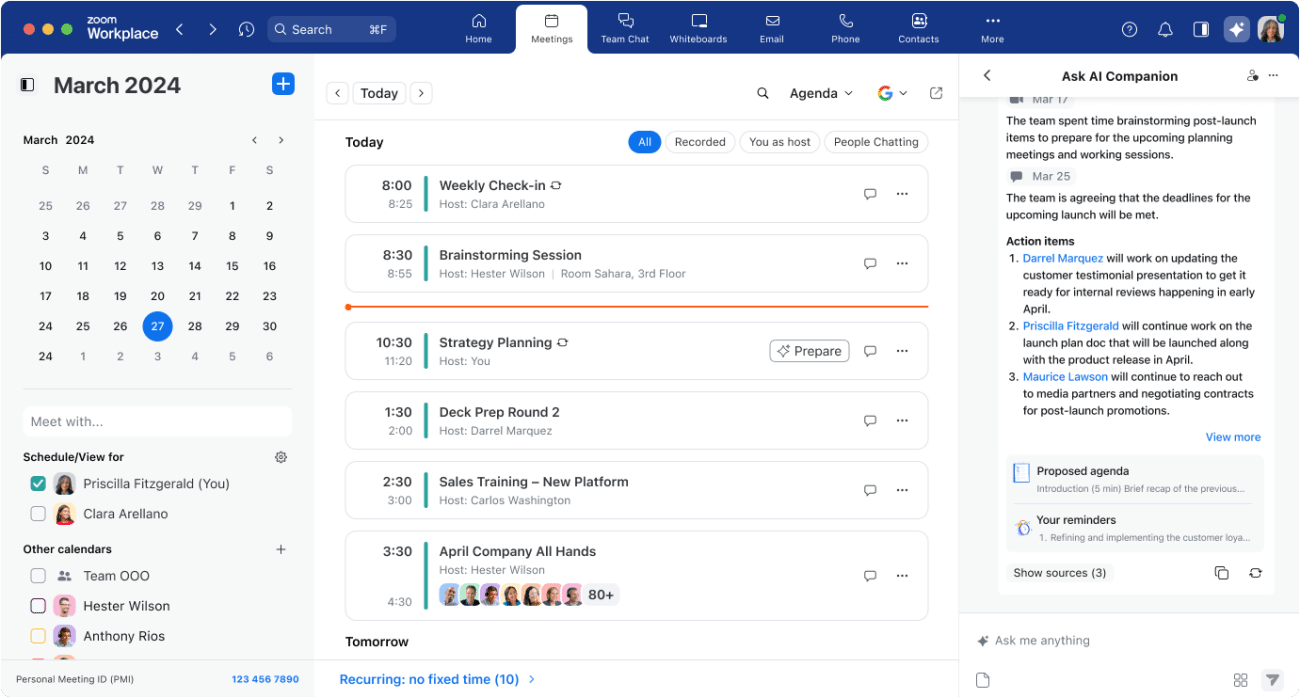
The new AI Companion expansions, including Ask AI Companion, offer assistance across the Zoom platform. This feature aggregates and shares information from various sources like Zoom Meetings, Mail, Team Chat, Notes, and Docs, helping users prepare for meetings, summarise discussions, and manage tasks effectively.

In Zoom Phone, AI Companion capabilities enhance call management by providing post-call summaries, prioritising voicemails, and extracting actionable tasks from messages. Additionally, Team SMS thread summaries offer a quick overview of conversations, enabling users to catch up efficiently.

Furthermore, AI Companion enhancements extend to Team Chat and Whiteboard functionalities. In Team Chat, smart scheduling suggests meeting times based on chat discussions, while future updates will support multiple languages for chat features. Zoom Whiteboard facilitates brainstorming by generating flowcharts and mind maps with simple prompts.

With AI Companion features included in paid Zoom services, users can leverage these tools without additional costs.

Business Service

This includes over 40 new innovations, including new Zoom AI Companion features for Zoom Phone, Team Chat, Events, and Contact Center.

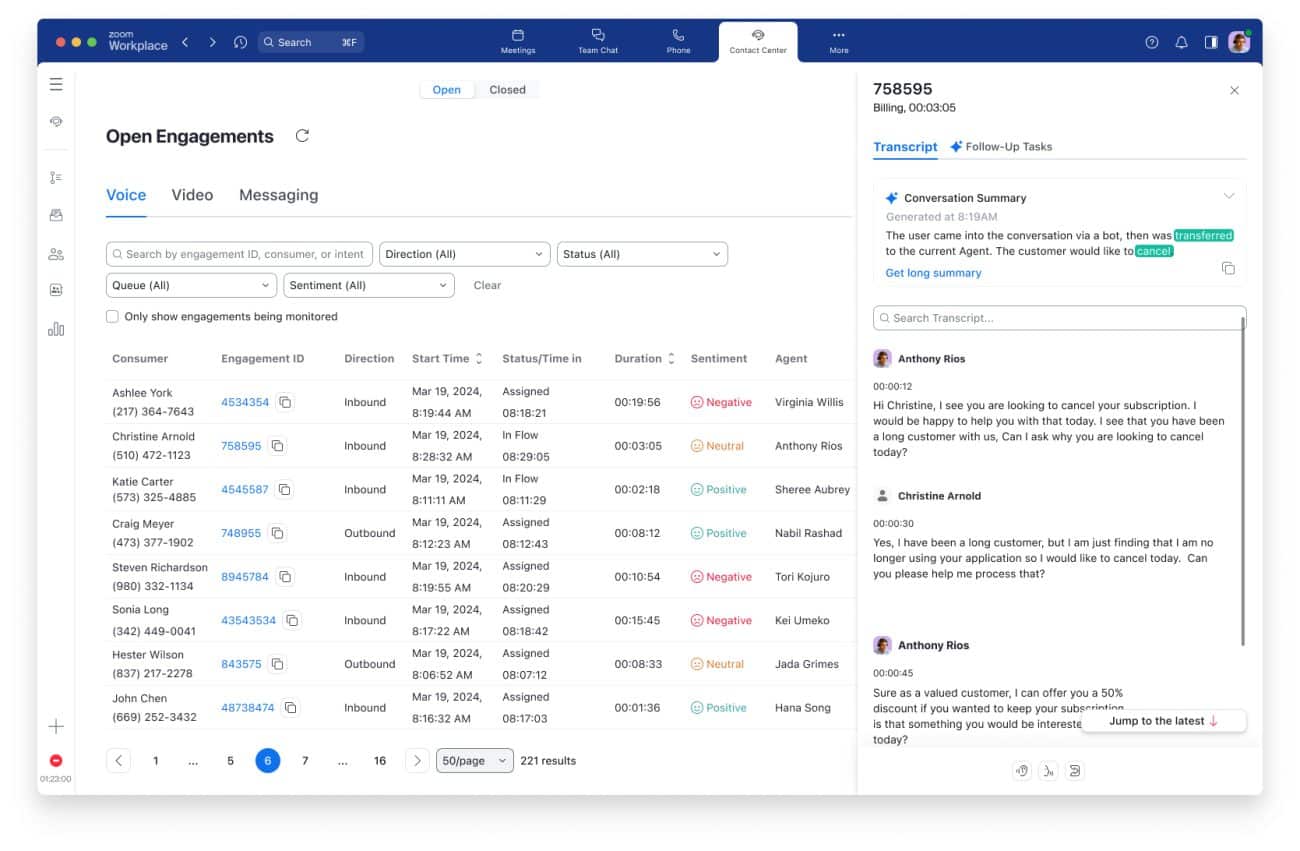
Integrated with Zoom Workplace, Zoom Business Services claims to empower customer-facing teams with AI-driven marketing, customer care, and sales solutions. In the Zoom Contact Center, AI Companion enhancements now offer supervisors real-time insights into live engagements, including customer sentiment and conversation summaries, facilitating better agent management and support.

It has expanded its digital communication channels to include WhatsApp and inbound email, enhancing customer flexibility and agent responsiveness. Custom app integration within the Zoom framework enables agents to access relevant customer data directly, streamlining workflows and improving resolution times. Additionally, Zoom Contact Center and Zoom Phone now integrate with PCI Pal for secure payment data capture and compliance.

Revenue organisations using Zoom Revenue Accelerator can now leverage deal memos and automated scorecards to enhance sales conversations and improve outcomes. Marketing professionals benefit from Zoom Events enhancements, including AI Companion image generation and the Swoogo integration, enabling more engaging hybrid events.

For marketing professionals, Zoom Events enhancements include AI Companion image generation, enabling hosts to create custom images for event registration pages, virtual backgrounds, and marketing emails. The Swoogo integration allows event professionals to expand their reach to broader audiences, bridging the gap between hybrid and in-person events.

The post Zoom Unveils AI-Powered Collaboration Platform Zoom Workplace to Boost Productivity appeared first on Analytics India Magazine.

Microsoft Researchers Introduce AllHands, An LLM Framework for Large-Scale Feedback Analysis

A team of Microsoft researchers, in collaboration with researchers from ZJU-UIUC Institute and the National University of Singapore, recently introduced AllHands, a comprehensive analytic framework designed to handle large-scale verbatim feedback using a natural language interface powered by large language models (LLMs).

AllHands provides software developers with a user-friendly solution for extracting valuable insights from extensive verbatim feedback. The framework follows a conventional feedback analytic workflow, first classifying the feedback and modelling topics to convert the data into a structured format. LLMs are integrated here to improve accuracy and generalisation.

An LLM agent then translates user questions about the feedback into Python code, executes it, and provides multi-modal responses, including text, code, tables, and images.

The researchers evaluated AllHands on three diverse feedback datasets. In each stage, the framework outperformed baselines at each stage, from classification and topic modelling to providing comprehensive, correct answers to user queries. The framework handled a wide range of common feedback-related questions and could be extended with custom plugins for more complex analyses.

The authors mention that existing solutions for feedback classification and topic modelling have limitations, such as requiring substantial human-labelled data, lacking generalisation, and struggling with challenges like polysemy and multilingual scenarios.

The paper also noted that while various tools have been developed to support specific feedback analysis objectives, a flexible and unified framework cannot accommodate a wide array of analyses. AllHands aims to bridge this gap by leveraging the capabilities of LLMs. The authors present AllHands as a new approach to address the limitations of existing methods such as the reliance on supervised machine learning models.

The post Microsoft Researchers Introduce AllHands, An LLM Framework for Large-Scale Feedback Analysis appeared first on Analytics India Magazine.