Getting Started with PyTest: Effortlessly Write and Run Tests in Python

Getting Started with PyTest
Image by Author

Have you ever encountered software that didn't work as expected? Maybe you clicked a button, and nothing happened, or a feature you were excited about turned out to be buggy or incomplete. These issues can be frustrating for users and can even lead to financial losses for businesses.

To address these challenges, developers follow a programming approach called test-driven development. TDD is all about minimizing software failures and ensuring that the software meets the intended requirements. These test cases describe the expected behavior of the code. By writing these tests upfront, developers get a clear understanding of what they want to achieve. Test pipelines are an essential part of the software development process for any organization. Whenever we make changes to our codebase, we need to ensure that they don't introduce new bugs. This is where test pipelines come in to help us.

Now, let's talk about PyTest. PyTest is a Python package that simplifies the process of writing and running test cases. This full-featured testing tool has matured to become the de facto standard for many organizations, as it easily scales for complex codebases and functionalities.

Benefits of the PyTest Module

  • Improved Logging and Test Reports
    Upon the execution of tests, we receive a complete log of all executed tests and the status of each test case. In the event of failure, a complete stack trace is provided for each failure, along with the exact values that caused an assert statement to fail. This is extremely beneficial for debugging and makes it easier to trace the exact issue in our code to solve the bugs.
  • Automatic Discovery of Test Cases
    We do not have to manually configure any test case to be executed. All files are recursively scanned, and all function names prefixed with "test" are executed automatically.
  • Fixtures and Parametrization
    During test cases, specific requirements may not always be accessible. For example, it is inefficient to fetch a resource from the network for testing, and internet access may not be available when running a test case. In such scenarios, if we want to execute a test that makes internet requests, we will need to add stubs that create a dummy response for that specific part. Moreover, it may be necessary to execute a function multiple times with different arguments to cover all possible edge cases. PyTest makes it simple to implement this using fixtures and parametrization decorators.

Installation

PyTest is available as a PyPI package that can be easily installed using the Python package manager. To set up PyTest, it is good to start with a fresh environment. To create a new Python virtual environment, use the below commands:

python3 -m venv venv  source venv/bin/activate  

To set up the PyTest module, you can install the official PyPI package using pip:

pip install pytest

Running your First Test Case

Let’s dive into writing and running your very first test case in Python using PyTest. We'll start from scratch and build a simple test to get a feel for how it works.

Structuring a Python Project

Before we start writing tests, it's essential to organize our project properly. This helps keep things tidy and manageable, especially as our projects grow. We'll follow a common practice of separating our application code from our test code.

Here's how we'll structure our project:

pytest_demo/  │  ├── src/  │   ├── __init__.py  │   ├── sorting.py  │  ├── tests/  │   ├── __init__.py  │   ├── test_sorting.py  │  ├── venv/

Our root directory pytest_demo contains separate src and tests directories. Our application code resides in src, while our test code lives in tests.

Writing a Simple Program and Its Associated Test Case

Now, let’s create a basic sorting program using the bubble sort algorithm. We'll place this in src/sorting.py:

# src/sorting.py    def bubble_sort(arr):      for n in range(len(arr)-1, 0, -1):          for i in range(n):              if arr[i] > arr[i + 1]:                  arr[i], arr[i + 1] = arr[i + 1], arr[i]        	return arr

We've implemented a basic Bubble Sort algorithm, a simple yet effective way to sort elements in a list by repeatedly swapping adjacent elements if they are in the wrong order.

Now, let's ensure our implementation works by writing comprehensive test cases.

# tests/test_sorting.py    import pytest  from src.sorting import bubble_sort      def test_always_passes():  	assert True    def test_always_fails():  	assert False    def test_sorting():  	assert bubble_sort([2,3,1,6,4,5,9,8,7]) == [1,2,3,4,5,6,7,8,9]

In our test file, we've written three different test cases. Note how each function name starts with the test prefix, which is a rule PyTest follows to recognize test functions.

We import the bubble sort implementation from the source code in the test file. This can now be used in our test cases. Each test must have an "assert" statement to check if it works as expected. We give the sorting function a list that's not in order and compare its output with what we expect. If they match, the test passes; otherwise, it fails.

In addition, We've also included two simple tests, one that always passes and another that always fails. These are just placeholder functions that are useful for checking if our testing setup is working correctly.

Executing Tests and Understanding the Output

We can now run our tests from the command line. Navigate to your project root directory and run:

pytest tests/

This will recursively search all files in the tests directory. All functions and classes that start with the test prefix will be automatically recognized as a test case. From our tests directory, it will search in the test_sorting.py file and run all three test functions.

After running the tests, you’ll see an output similar to this:

===================================================================      test session starts ====================================================================  platform darwin -- Python 3.11.4, pytest-8.1.1, pluggy-1.5.0  rootdir: /pytest_demo/  collected 3 items                                                                                                                                     	     tests/test_sorting.py .F.                                                                                                                     [100%]    ========================================================================= FAILURES  =========================================================================  ____________________________________________________________________ test_always_fails _____________________________________________________________________    	def test_always_fails():  >   	assert False  E   	assert False    tests/test_sorting.py:22: AssertionError  =================================================================      short test summary info ==================================================================  FAILED tests/test_sorting.py::test_always_fails - assert False  ===============================================================           1 failed, 2 passed in 0.02s ================================================================

When running the PyTest command line utility, it displays the platform metadata and the total test cases that will be run. In our example, three test cases were added from the test_sorting.py file. Test cases are executed sequentially. A dot (".") represents that the test case passed whereas an “F” represents a failed test case.

If a test case fails, PyTest provides a traceback, which shows the specific line of code and the arguments that caused the error. Once all the test cases have been executed, PyTest presents a final report. This report includes the total execution time and the number of test cases that passed and failed. This summary gives you a clear overview of the test results.

Function Parametrization for Multiple Test Cases

In our example, we test only one scenario for the sorting algorithm. Is that sufficient? Obviously not! We need to test the function with multiple examples and edge cases to ensure there are no bugs in our code.

PyTest makes this process easy for us. We use the parametrization decorator provided by PyTest to add multiple test cases for a single function. The code appears as follows:

@pytest.mark.parametrize(  	"input_list, expected_output",  	[      	    ([], []),      	    ([1], [1]),      	    ([53,351,23,12], [12,23,53,351]),      	    ([-4,-6,1,0,-2], [-6,-4,-2,0,1])  	]  )  def test_sorting(input_list, expected_output):  	assert bubble_sort(input_list) == expected_output

In the updated code, we have modified the test_sorting function using the pytest.mark.parametrize decorator. This decorator allows us to pass multiple sets of input values to the test function. The decorator expects two parameters: a string representing the comma-separated names of the function parameters, and a list of tuples where each tuple contains the input values for a specific test case.

Note that the function parameters have the same names as the string passed to the decorator. This is a strict requirement to ensure the correct mapping of input values. If the names don't match, an error will be raised during test case collection.

With this implementation, the test_sorting function will be executed four times, once for each set of input values specified in the decorator. Now, let's take a look at the output of the test cases:

===================================================================   test session starts   ====================================================================  platform darwin -- Python 3.11.4, pytest-8.1.1, pluggy-1.5.0  rootdir: /pytest_demo  collected 6 items                                                                                                                                     	     tests/test_sorting.py .F....                                                                                                                     	[100%]    =======================================================================  FAILURES ========================================================================  ____________________________________________________________________ test_always_fails _____________________________________________________________________    	def test_always_fails():  >   	assert False  E   	assert False    tests/test_sorting.py:11: AssertionError  =================================================================   short test summary info ==================================================================  FAILED tests/test_sorting.py::test_always_fails - assert False  ===============================================================   1 failed, 5 passed in 0.03s ================================================================

In this run, a total of six test cases were executed, including four from the test_sorting function and two dummy functions. As expected, only the dummy test case failed.

We can now confidently say that our sorting implementation is correct 🙂

Fun Practice Task

In this article, we have introduced the PyTest module and demonstrated its usage by testing a bubble sort implementation with multiple test cases. We covered the basic functionality of writing and executing test cases using the command line utility. This should be enough to get you started with implementing testing for your own code bases. To make your understanding of PyTest better, here's a fun practice task for you:

Implement a function called validate_password that takes a password as input and checks if it meets the following criteria:

  • Contains at least 8 characters
  • Contains at least one uppercase letter
  • Contains at least one lowercase letter
  • Contains at least one digit
  • Contains at least one special character (e.g., !, @, #, $, %)

Write PyTest test cases to validate the correctness of your implementation, covering various edge cases. Good Luck!

Kanwal Mehreen Kanwal is a machine learning engineer and a technical writer with a profound passion for data science and the intersection of AI with medicine. She co-authored the ebook "Maximizing Productivity with ChatGPT". As a Google Generation Scholar 2022 for APAC, she champions diversity and academic excellence. She's also recognized as a Teradata Diversity in Tech Scholar, Mitacs Globalink Research Scholar, and Harvard WeCode Scholar. Kanwal is an ardent advocate for change, having founded FEMCodes to empower women in STEM fields.

More On This Topic

  • Find the Best-Matching Distribution for Your Data Effortlessly
  • Learn how to design, measure and implement trustworthy A/B tests…
  • How to Use Permutation Tests
  • How to Make Python Code Run Incredibly Fast
  • Prefect: How to Write and Schedule Your First ETL Pipeline with Python
  • Write Clean Python Code Using Pipes

“I don’t care if we burn $50 billion a year, we’re building AGI,” says Sam Altman

"I don't care if we burn $50 billion a year, we're building AGI," says Sam Altman

Sam Altman, the CEO of OpenAI recently came on Stanford eCorner’s talk and said, “Whether we burn $500 million, $5 billion, or $50 billion a year, I don’t care. I genuinely don’t as long as we can stay on a trajectory where eventually we create way more value for society than that and as long as we can figure out a way to pay the bills,” he said.

“We are making AGI, and it is going to be expensive and totally worth it,” he added.

When asked about ChatGPT, Altman said that is embarrassing. “GPT-4 is the dumbest model anyone of you will ever have to use,” he added, saying that it is important to ship early and often and the company believes in deploying iteratively.

“If we go build AGI in the basement, then the world is walking blissfully blindfolded,” he added, saying that it would not make OpenAI good neighbours and it is going to happen.

He also added that GPT-5 is going to be a lot smarter than GPT-4 and GPT-6 is going to be smarter than GPT-5. “We are not near the top of this curve…and it is always going to get better,” he added.

Altman said that when he started out with OpenAI, he didn’t realise that they would need so much money for compute. “We didn’t know that we are going to have this nice business,” he said, further adding that the goal for starting was just to push AI research forward.

On X, there have been a lot of discussions around Altman’s stance on burning so much money for building AGI, which is more than some countries’ GDP. “He knows money no longer has value when they have achieved AGI,” said a user. Another said, “It would be a minuscule price to pay for something that could transform humanity.”

Earlier this year, Altman was looking for someone to invest $5 – $7 trillion (as per sources) to “reshape the business of chips and AI”.

The post “I don’t care if we burn $50 billion a year, we’re building AGI,” says Sam Altman appeared first on Analytics India Magazine.

Soket AI Labs Becomes the First Indian Startup to Build Solutions Towards Ethical AGI 

Soket AI Labs Becomes the First Indian Startup to Build Solutions Towards Ethical AGI

India now has a company building solutions to achieve AGI and beyond. Soket AI Labs, the latest entrant, has taken everyone by surprise. This AI research lab plans to do this by starting with smaller language models and eventually building advanced AI systems capable of achieving human-level intelligence.

“We are a research-first company, technically building products for enterprises. But our primary thesis is that we want to converge towards AGI,” said Abhishek Upperwal, the founder and CEO of Soket AI Labs, adding that artificial general intelligence (AGI) might be born out of India, and NOT just ‘A Guy in India’.

Founded in 2019 by Upperwal, Soket AI Labs’ focus was on building a decentralised data exchange for smart cities. However, things changed significantly after OpenAI CEO Sam Altman’s visit to India, which motivated him and his team to build the best AI models in the country.

The company is part of NVIDIA’s Inception Programme and AWS Activate for training compute access. Upperwal said that the company plans to obtain access to compute from other cloud providers, without revealing their names. It also made it to Nasscom’s GenAI Founder Programme, alongside getting exclusive access to CDAC’s GPU cluster in Pune.

A data scientist himself, Upperwal did his master’s at IISc Bangalore with a specialisation in high-performance computing (HPC) and distributed systems and has worked with the ministry of housing and urban affairs on Smart Cities project, where he used to work with a lot of diverse data.

This expertise led him to experiment with transfer learning for building Pragna-1B, India’s first open-source multilingual model designed to cater to India’s linguistic diversity. Available in Hindi, Gujarati, Bangla, and English, the model comes with 1.25 billion parameters and a context length of 2048 tokens.

It was easier said than done

“The only thing lacking for Indic language models is the availability of data,” said Upperwal.

Upperwal said that it took the company six months to train the model, which involved many experiments with different models and a total of 150 billion tokens.

“We found that TinyLlama was an amazing model offered under the Apache 2.0 licence,” said Upperwal, but only for English, while also highlighting that the Llama 2 is only an open model and is not the best for Indic languages. The same goes for Llama 3, which struggles to efficiently tokenise Indic languages.

Upperwal also noted that transfer learning using TinyLlama (which uses Llama 2’s architecture) did not work as efficiently as he expected for Indian languages. That is when the team decided to build from scratch and pre-train the model.

It took close to 8000 GPU hours on NVIDIA A100s to train the model on 150 billion tokens, which Upperwal said are all fresh and in Indic language.

“When we take a large corpus of mixed-language data, the dominant language is best compressed, but the languages underrepresented are not compressed well,” he explained. That is why Soket AI Labs trained each tokeniser individually for each language separately, and then merged them to get the maximum efficiency.

To ensure that the quality and quantity of data are enough, Soket AI Labs embarked on the journey to create Bhasha-Wiki, a translation of 6.3 million Wikipedia articles into six languages for training Indic models.

“One thing is absolutely critical for us: We want to keep the form factor small for all generative AI models,” said Upperwal.

Towards AGI and beyond

Bengaluru and Gurugram-based Soket AI Labs is not alone in the generative AI race. Other companies building full-stack AI solutions for India include Hanooman, Krutrim, and Sarvam AI. Surprisingly, most of them are building solutions focussed on enterprise AI.

Soket AI Labs, on the other hand, claimed it is not just building full-stack AI solutions for enterprises and Indian customers, but also aiming to achieve AGI. The company recently built the first-of-its-kind GenAI Studio, which offers a unified stack for fine-tuning and building AI models completely in-house.

Questioning the narrative that India does not need to build its foundational models, Upperwal said even though India is touted as a service provider, AI is about building a sovereign technology. “I think it is really important and because I have worked with the government, I know how necessary it is,” he explained.

“I think a majority of people working on AGI in the western world are of Indian origin,” quipped Upperwal, cautiously adding that he is not discrediting anyone’s effort. He’s a big fan of Ilya Sutskever and Mustafa Suleyman, after all.

The post Soket AI Labs Becomes the First Indian Startup to Build Solutions Towards Ethical AGI appeared first on Analytics India Magazine.

Tata Technologies Builds First-of-its-Kind Design Studio Using Llama 2 and Stable Diffusion 3

Tata Technologies has cracked the code on generative AI. Recently, the company told AIM that it has built a solution (design studio for automotive selling) using Llama 2 and Stable Diffusion 3 which will revolutionise the design process for automotive companies. This new solution is expected to enable rapid prototyping and visualisation of design changes, reducing the time for design iterations.

During the design process of an automobile, it’s common to undergo multiple changes before finalising one. “With this solution, engineers won’t need to use design softwares like Autodesk Maya, which can be quite expensive and cumbersome,” said Santosh Singh, executive vice president at Tata Technologies, adding that their solution is much more cost-effective and simple to use.

“The team uses generative AI to develop multiple design options on the fly. It helps reduce design time, engineering time, and product development time,” he added.

Singh said that car manufacturers can effortlessly introduce new models by modifying the existing design, like altering the front section, using generative AI. They simply need to mask the desired area of the vehicle for changes and input the prompt describing the new design.

He further said that Tata Technologies is working with Azure and AWS to build the tech stack and is utilising Meta’s Llama 2. “We are using open-source models because we can fine-tune them based on the requirement. With Llama 2, we have the base model ready; we just need to fine-tune and connect it with our internal data,” he added.

“We don’t run a model where we have to expose customer data to the cloud. The way we have designed our model is simple. It’s on the cloud only for LLM capabilities, the rest is within the premises, and we have a connector to train the data,” he explained.

Better than Autodesk Maya?

Industry-standard software like Autodesk Maya, CATIA, or Siemens NX are highly sophisticated. These programs offer a vast array of features for 3D modelling, simulation, and rendering, requiring significant training and practice to master effectively. Moreover, they can be expensive, making them less accessible to hobbyists or beginners.

Last year, Autodesk announced its plans to add generative AI capabilities across its suite of products. Its acquisition of Blank.AI’s generative AI capabilities enables rapid conceptual design exploration in the automotive sector. This allows for real-time creation, exploration, and editing of 3D models using natural language and semantic controls, eliminating the need for advanced technical skills.

Singh said that a major challenge Tata Technologies is facing today is to not be able to integrate its generative AI solutions to existing software like Siemens, Dassault, and Autodesk, which are used for designing vehicles. “These are all closed proprietary software systems, so they don’t allow external software to penetrate inside and access the designs,” he explained, saying this is where its Design Studio platform is quite flexible to use for companies.

What’s Next?

Tata Technologies has also built a Virtual Sales Assistant which helps people in sales to increase productivity by 15-20%. This AI-powered tool streamlines the sales process and optimises customer engagement. Moreover, the company is currently working on two projects –Factory Copilot and Warranty Analysis using generative AI.

Factory Copilot aims to enhance productivity and quality in manufacturing plants by providing real-time support to workers through phone-based assistance, digital displays, and multilingual support.

“We are working with one of the biggest manufacturers in India to develop this. It’s currently in the R&D stage. We hope that in the next three months, we will have some clarity on how to make this happen,” said Singh.

On the other hand, Warranty Analysis and Repair Solutions leverage AI to optimise after-sales services, improving efficiency and customer satisfaction in warranty-related processes. “Through this solution, we are trying to reduce the analysis time and make it more accurate so that the team on the ground can get clear and correct insights on the problem,” said Singh.

The post Tata Technologies Builds First-of-its-Kind Design Studio Using Llama 2 and Stable Diffusion 3 appeared first on Analytics India Magazine.

Gyan AI Unveils Smaller-Scale Maths LLM, Paramanu-Ganita, Outperforming LLama, Falcon

Gyan AI has recently unveiled Paramanu-Ganita – a mathematical language model of 208 million parameters.

Despite its relatively modest size—35 times smaller than bigger LLMs—it outshines its counterparts, including generalist models like LLama and Falcon and specialised models like Minerva, by significant margins in the GSM8k benchmark.

The model’s success highlights the efficiency of developing domain-specific models from scratch rather than adapting general LLMs to specific domains.

The research team consists of Mitodru Niyogi, founder and chief executive officer of Gyan AI, and Arnab Bhattacharya, computer science and engineering professor at IIT Kanpur, India, and AI advisor at Gyan AI. Niyogi is also associated with Abu Dhabi’s MBZUAI as an AI Researcher.

Training Method

The model was trained on a unique, high-quality mathematical corpus curated by the researchers, consisting of textbooks, lecture notes, and web-sourced materials. It was trained only for 146 hours of A100.

Paramanu-Ganita’s success can be attributed to its training regimen and its specialisation in mathematics. The model utilises an Auto-Regressive (AR) decoder that processes information sequentially, making it particularly adept at solving complex mathematical problems through logical reasoning. Its training was executed on various mathematical texts and source codes, ensuring a comprehensive understanding and application of mathematical logic and problem-solving.

The model’s performance was rigorously evaluated using perplexity metrics and benchmarks, confirming its effectiveness in handling complex mathematical problems efficiently.

The implications of such a specialised tool are vast. Paramanu-Ganita offers a reliable, efficient, and less resource-intensive alternative to larger, more generalised language models for industries and sectors relying heavily on mathematical calculations and modelling.

It also shows that smaller, domain-focused models can match or even exceed the performance of their larger counterparts without the need for massive computational power or financial investment.

Previously, the researchers had come up with Paramanu, a series of language models tailored for ten Indian languages, including Assamese, Bangla, Hindi, and others, using five different scripts. These models range from 13.29M to 367.5M parameters and were developed on a single GPU with a context size of 1024. The lineup features monolingual, bilingual, and multilingual configurations, the latter avoiding the “curse of multilinguality” by using typologically similar corpora.

The post Gyan AI Unveils Smaller-Scale Maths LLM, Paramanu-Ganita, Outperforming LLama, Falcon appeared first on Analytics India Magazine.

SML Unveils Hanooman, Sets Ola Krutrim On Fire

SML Unveils Hanooman, Sets Ola Krutrim On Fire

The much awaited Indic AI chatbot to compete with OpenAI’s ChatGPT and Ola’s Krutrim is finally here. SML has silently released Hanooman.ai chatbot, which is surprisingly fast.

Click here to chat with Hanooman.

The model is very fast and gives quick and crisp responses to asked questions. Currently released in Alpha, the model also allows users to select between nine languages.

Upon testing, AIM found that the responses it generates are very short even after specific prompts. It also sometimes auto translates languages even while the prompt was different.

Given the shorter context length, it also can’t keep track of a conversation as it replies to each question independently which defeats the purpose of a personal AI assistant.

Moreover, the current cut-off data of the model is also April 2022, which is a little outdated.

SML’s Hanooman is named after the Hindu deity Hanuman. “Hanuman is a great example of responsible power. Despite being the most-powerful entity, he never used his power for selfish needs,” said Vishnu Vardhan, founder of SML and Vizzhy, in an exclusive interview with AIM.

“We don’t want it to be like ChatGPT, which suffers from the ‘I’m God and I know everything’ syndrome. We don’t want to simply replicate its success [but be more than that],”said Vardhan, adding that they are currently focusing on specific use cases for Hanooman.

Meanwhile, Ola’s Krutrim chatbot is unable to respond to a lot of queries and still hallucinates a lot. It does not give responses to several questions citing the reason that it is an AI model without up to date information.

Vardhan had also promised that Hanooman will come out as an open source model in several different sizes, which is still awaited.

The post SML Unveils Hanooman, Sets Ola Krutrim On Fire appeared first on Analytics India Magazine.

Bengaluru-based Robotics Company CynLr Unveils Semi-Humanoid ‘CyRo’

CynLr CyRo robotics

Deep-tech robotics startup CynLr, founded in 2019. that specialises in visual object intelligence robotics and cybernetics recently launched and showcased its semi-humanoid, ‘CyRo’ at the world’s leading robotics developments event Robotics Summit & Expo in Boston.

The all-purpose, reusable visual robot platform, is a multi-arm vision guided robotic manipulator that can intuitively grasp objects under variable lighting conditions and can even handle complexities such as reflective objects.

Cyro at the Robotics Summit & Expo in Boston

Intuitive Robots

CyRo’s framework works on a human-eye inspired vision and intelligence hardware and software stack which makes it natively intuitive about objects without having to see or train on them before. Thus the robots are easily repurposable for various tasks with no hardware customisation or modification.

“Today, there is a very big bottleneck or a chasm to cross for the technology, where you’re stuck with having to engineer the environment, so that without the awareness of what has been presented, the machine can go, and robotic arms are not robots anymore. They don’t justify the word robot. That’s how they lack perception in a large way,” said Gokul NA, founder – design, product & brand at CynLr, in an exclusive interaction with AIM.

“So we build that whole intelligence and perception stack so that you don’t have to do that custom engineering and customisation of the environment, or extensive training that you have to go through to be able to go pick them,” he said.

Speaking about the robotics advancements and the kind of models robotics companies are mainly focusing on, Gokul believes that most are not approaching the problem the right way.

“In most cases where you want to practically and commercially deploy these robots, you don’t need legs, wheels are more than enough, but you need more capability with the hands. Today they are more pragmatic, they realise that there is so much more manipulation that is missing, but what they are not focusing on is perception. It is missing. There’s very little investment that is going into perception,” he said.

Crossing Borders

Nikhil Ramaswamy, co-founder & CEO at CynLr said, “We are already getting positive feedback for CyRo in the US. We recently opened a hardware design facility in Switzerland where we are developing these visual robots using the skilled talent & advanced research facilities available there. The technology has been designed in India in our state-of-the-art R&D centre (H.I.V.E) in Bengaluru.”

“We envision that CyRo has the potential to change the future of industrial automation, ushering in an era of ‘Universal Factories -product agnostic factories,” said Ramaswamy.

CynLr is piloting these visual robots with General Motors & Denso.

The post Bengaluru-based Robotics Company CynLr Unveils Semi-Humanoid ‘CyRo’ appeared first on Analytics India Magazine.

Airbnb releases group booking features as it taps into AI for customer service

Airbnb releases group booking features as it taps into AI for customer service Ivan Mehta 7 hours

Airbnb’s summer release is usually a grand affair with tons of updates for guests and a few for hosts. This time, however, the company is introducing just a few updates for group booking along with a new category called “Icons,” which are experiences hosted by celebrated names in music, film, TV and sports.

Group booking features, which are probably the only update that will reach all users, allow people to create shared wishlists, and there are trip invitations for the group with details of the property.

Users can now invite friends or family to a wishlist through contacts on their phone or a link. Group members can add properties to a list, leave notes about a property, or vote on them to decide on the booking.

Image Credits: Airbnb

After the primary member books the property, they have to invite people to travel with them again on the trip with a postcard. The invitation card also has details like address, check-in instructions, and Wi-Fi passwords.

Airbnb is also introducing a new message tab where all travelers can chat with the host and react to messages. Hosts can use AI-powered suggestions to reply to questions, such as sending the guests the property’s checkout guide.

AI-suggested Quick Reply

Image Credits: Airbnb

Nathan Blecharczyk, Airbnb’s co-founder and chief strategy officer, said that the company built group features as more than 80% of trips on the platform involve more than one person. Plus, there is a lot of back-and-forth between the group members in terms of making decisions.

Apart from group features, Airbnb is releasing a new earnings dashboard for hosts with better insights and an experience category called “Icons,” which features properties like the X-Men mansion, the Ferrari museum, Prince’s Purple Rain House, and living room sessions with Doja Cat. These experiences will be available for a short time, and users will need to apply for them to get in. Airbnb is planning to accept 4,000 people across 11 experiences.

Using AI on Airbnb

Last November, in a conversation with TechCrunch, Airbnb CEO Brian Chesky mentioned that the company is testing generative AI-powered review summaries. While Airbnb hasn’t made public announcements in this area, Blecharczyk told TechCrunch that the platform plans to use AI in multiple areas, including customer support.

“We are increasingly using AI to streamline our customer support to make sure that customers are routed to the right agents or to have tickets automatically resolved with AI-generated responses,” he said.

The Airbnb co-founder noted that AI-powered responses are applicable only to certain scenarios, and the company has been testing them in limited production.

“I think there is a lot of potential for applying AI to the business. We think a lot about how AI is going to change the experience at the consumer layer over time,” Blecharczyk said without sharing specifics of the company’s roadmap.

“We have a lot of reviews, and we sit on top of a lot of customer service data. So we are thinking about how we can use AI to succinctly give a better picture of a listing and its information.”

In November 2023, Airbnb acquired a stealth startup called GamePlanner, which was launched by Siri co-founder Adam Cheyer. Earlier this year, Chesky mentioned that the GamePlanner acquisition was part of the travel platform’s plan to create an “ultimate concierge.” Using AI-powered replies to solve customer queries is probably the first step toward that.

Atlassian launches Rovo, its new AI teammate

Atlassian launches Rovo, its new AI teammate Frederic Lardinois @fredericl / 8 hours

During its Team ’24 conference in Las Vegas, Atlassian today launched Rovo, its new AI assistant. Rovo can take data from first- and third-party tools and make it easily accessible through a new AI-powered search tool and other integrations into Atlassian’s products. The most interesting part, though, may be the new Rovo Agents, which can be used to automate workflows in tools like Jira and Confluence. One nifty aspect of these agents: anyone can build them using a natural language interface. No programming required.

“We like to think of Rovo as a large knowledge model for organizations. It’s a knowledge discovery product for every knowledge worker,” Sherif Mansour, Atlassian’s head of product for Atlassian Intelligence, told TechCrunch. “When you look at what a knowledge worker has to do, they sort of go through this process of: I need to find a piece of work. I need to learn and understand it. And then I take an action. Most people that have some sort of desk job go through that loop. I think what’s exciting about Rovo is that we’re finally at the genesis of generative AI landing that that helps accelerate what we can do in that area for teams.”

Atlassian Team `24 Las Vegas

The basis for Rovo is Atlassian’s ‘cloud teamwork graph,’ the same graph that also forms the foundation of Atlassian Intelligence, the company’s year-old effort of bringing an AI teammate to its products. That graph brings together data from Atlassian’s own products and a number of third-party SaaS tools. And in a way, it’s the proliferation of SaaS tools that necessitates applications like Rovo, because every tool tends to have its own data silo, making it harder for employees to find the information they need.

Image Credits: Atlassian

Rovo, Mansour said, revolves around three pillars of teamwork: helping teams find and connect with their work, helping those teams learn, and then helping them take action.

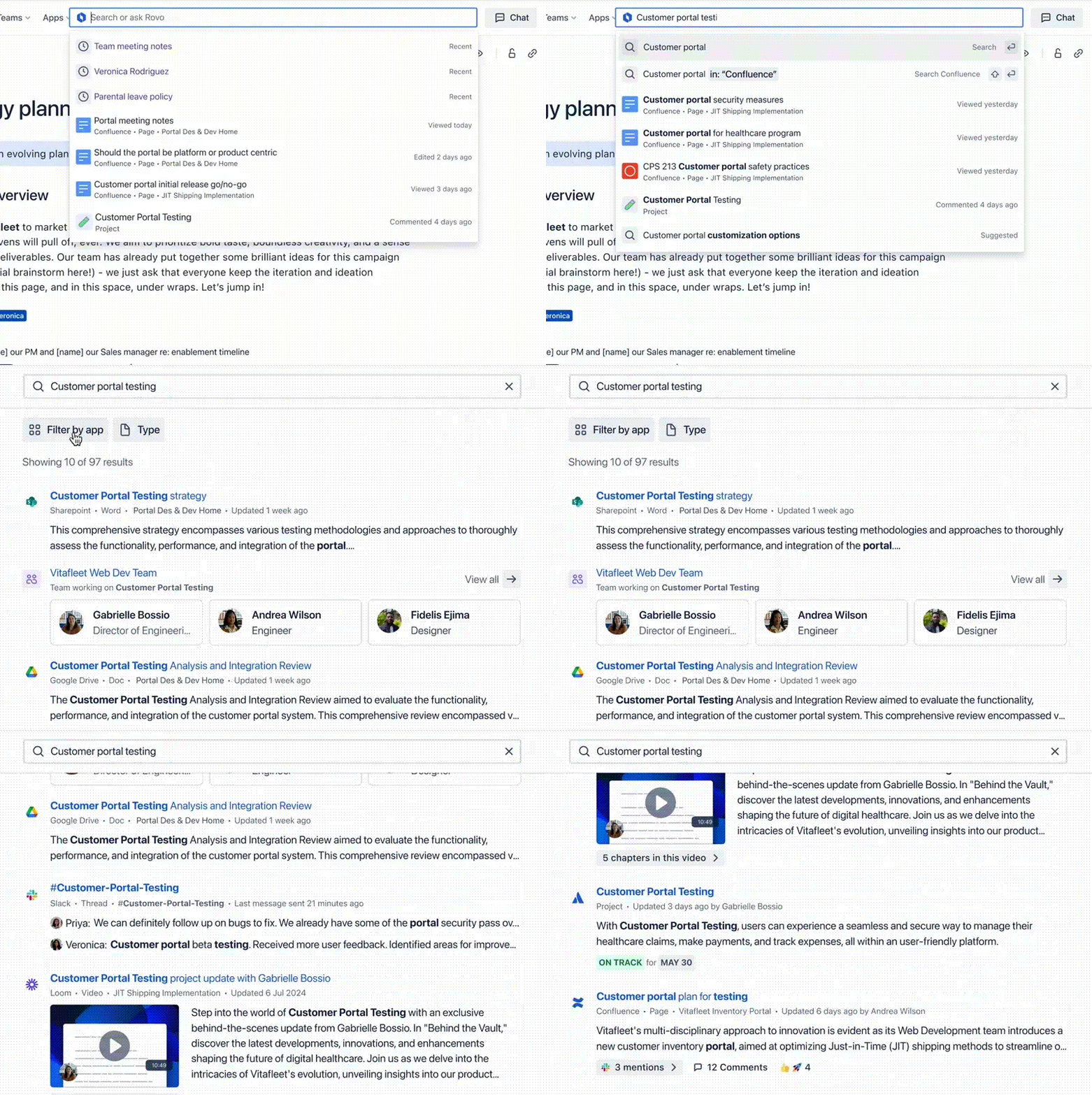
In a way, enterprise search is the low-hanging fruit here, since Atlassian is already aggregating all of this data. But it’s also a tool that should prove immediately useful for its users and keep them from having to constantly switch contexts to find information. Some of the third-party tools that are supported out of the box include Google Drive, Microsoft SharePoint, Microsoft Teams, GitHub, Slack, and Figma.

Enterprises, which often have lots of custom tools, can also build their own connectors. Atlassian itself, for example, built a connector that brings in its internal developer documentation. Simply making that documentation available in Rovo, Mansour said, saved developers an hour or two every week — a higher time savings than what those same developers report from using an AI code generation tool.

As Mansour stressed, the biggest technical challenge — aside from building the AI infrastructure to power Rovo — is building all of these connectors and ensuring that they respect the access permission set by a company’s IT and security teams. “When you search, you get a different set of results to my search. We make sure that it’s tailored to you and respects your permissions — and only [shows] what you have access to.”

Image Credits: Atlassian

It wouldn’t be 2024 if Rovo didn’t also come as a chat service. Since it also has access to all of this data, it’s a relatively easy task to use retrieval-augmented generation (RAG) to feed a large language model with it and have the model provide customized answers.

Even when using RAG, large language models are still susceptible to hallucinations (though RAG greatly reduces the chances of the model going off script). To ensure that users can trust the results, Rovo always cites its sources, and most of the time (with slideshows and Figma designs, for example), there is even an interactive preview.

One interesting feature Atlassian also built into Rovo is its ability to detect and explain company jargon. There is even a Chrome extension for this that will automatically underline and explain a certain company-specific term as you read a Google Doc, for example. This feature is powered by Rovo’s semantic search engine.

Virtual Teammates

It’s one thing to find information. It’s another to take action on it. That’s where Rovo Agents comes in. In a way, this is an extension of what the company did with Atlassian Intelligence. Indeed, the company describes Rovo Agents as “virtual teammates,” too.

“Rovo Agents will transform teamwork with their ability to synthesize large volumes of enterprise data, break down complex tasks, learn as they take action, and partner with their human teammates to make critical and complex decisions,” Mansour writes in today’s announcement. “Agents aren’t just some souped-up version of chatbots. They bring specialized knowledge and skills to a wide variety of workflows and processes.”

Image Credits: Atlassian

That means they can generate, review and edit content for for marketing use, product specs or Jira issues. Users can also build agents that answer specific questions or recommend best practices. But more importantly, they can automate tasks based on when a Jira issue progresses, for example, or help users clean up their Jira backlogs or organize Confluence pages — all with humans in the loop.

“We have a strong belief that the future of teamwork is teammates working alongside virtual teammates — agents,” Mansour said. “There’ll be many of them and you’ll be interacting with them in your day-to-day workflows.”

Anthropic Unveils Claude 3 Team Plan for Enterprise Collaboration

AI startup Anthropic has introduced a team plan and an iOS app for the Claude 3 family of models. The plan is available for $30 per user per month and grants access to the full suite of Claude 3 model family, including Opus, Sonnet, and Haiku, tailored for diverse business needs. The plan requires a minimum of 5 seats.

Key features of the Team plan include increased usage per user compared to the Pro plan, a 200K context window for processing complex documents and maintaining multi-step conversations, admin tools for streamlined management, and all features from the Pro plan.

In addition to the Team plan, Claude is also launching its iOS app, available for free to all users. The app mirrors the seamless experience of the mobile web, enabling users to sync chat history, upload photos, and access vision capabilities for real-time image analysis.

In the upcoming weeks, Anthropc plans to roll out enhanced collaboration capabilities. These include the ability to incorporate citations from trusted sources for validating AI-generated assertions, integrating with data repositories such as codebases or CRMs, and collaborating with colleagues on AI-generated documents or projects—all while upholding top-tier standards of security and safety.

Earlier, OpenAI also introduced ChatGPT Team, which includes features such as access to GPT-4 with a 32K context window, tools like DALL·E 3, GPT-4 with Vision, Browsing, and Advanced Data Analysis, along with higher message caps. ChatGPT Team costs $25 per month per user when billed annually or $30 per month per user when billed monthly.

The post Anthropic Unveils Claude 3 Team Plan for Enterprise Collaboration appeared first on Analytics India Magazine.