Persistent Systems has announced the launch of GenAI Hub, an innovative platform designed to accelerate the creation and deployment of Generative AI (GenAI) applications within enterprises.
This platform seamlessly integrates with an organisation’s existing infrastructure, applications, and data, enabling the rapid development of tailored, industry-specific GenAI solutions.
GenAI Hub supports the adoption of GenAI across various large language models (LLMs) and clouds without provider lock-in.
This platform simplifies the development and management of multiple GenAI models, expediting market readiness through pre-built software components, all while upholding responsible AI principles.
The GenAI Hub is comprised of five major components:
Playground is a no-code tool for domain experts to explore and apply GenAI with LLMs on enterprise data without the need for programming skills. It provides a single uniform interface to LLMs from private providers like Azure OpenAI, AWS Bedrock, and Google Gemini, and open models from Hugging Face like LLaMA2 and Mistral.
Agents Framework provides a versatile architecture for GenAI application development, leveraging libraries like LangChain and LlamaIndex for innovative solutions, including Retrieval Augmented Generation (RAG).
Evaluation Framework uses an “AI to validate AI” approach and can auto-generate ground-truth questions to be verified by a human-in-the-loop. It employs metrics to track application performance and measures any drift and bias that can be addressed.
Gateway serves as a router across LLMs, enabling application compatibility and improving the management of service priorities and load balancing. It also offers detailed insights into token consumption and associated costs.
Custom Model Pipelines facilitate the creation and integration of bespoke LLMs and Small Language Models (SLMs) into the GenAI ecosystem, supporting a streamlined process for data preparation and model fine-tuning suitable for both cloud and on-premises deployments.
The GenAI Hub streamlines the development of use cases for enterprises, offering step-by-step guidance and seamless integration of data in LLMs, enabling the rapid creation of efficient and secure GenAI solutions at scale, whether for end users, customers, or employees.
Praveen Bhadada, Global Business Head – AI, Persistent:
“With the Persistent GenAI Hub, clients can embrace a “GenAI-First” strategy, delivering AI-powered applications and services at scale. They can accelerate innovation while practicing responsible AI, leveraging pre-built accelerators and evaluation frameworks, and optimizing costs with a cross-LLM strategy. The GenAI Hub enables enterprises to streamline operations, enhance customer experiences, and identify new avenues for growth,” Praveen Bhadada, Global Business Head – AI, Persistent, said.
The post Persistent Systems Launches GenAI Hub To Accelerate AI Adoption appeared first on AIM.
Singapore and the US are widening their collaboration on artificial intelligence (AI) to focus on building up talent among youth and women.
A new AI Talent Bridge initiative expands on the US-Singapore Women in Tech Partnership Program that the two countries introduced in 2022. The latest plan aims to bolster talent in emerging technology, including AI, with an emphasis on youth and women, according to a joint statement released by US Secretary of Commerce Gina Raimondo and Singapore's Deputy Prime Minister and Minister for Trade and Industry Gan Kim Yong.
Also: Transparency is sorely lacking amid growing AI interest
To be rolled out in the coming months, efforts here are part of the Partnership for Growth and Innovation pact that the two nations launched in October 2021 to identify bilateral trade opportunities, in particular across these four areas: digital economy and smart cities, supply chain, healthcare, and clean energy and environmental technology.
The pact encompasses shared objectives to tap the benefits of AI and "harness its potential for good," the two government agencies said. "The US and Singapore have prioritized development and adoption of interoperable governance frameworks for the trusted, safe, secure, and responsible development, deployment, and evaluation of AI technologies," they said.
Last October, Singapore's Infocomm Media Development Authority (IMDA) and the US National Institute of Standards and Technology (NIST) said both countries had synced up their respective AI frameworks to ease compliance and will continue to drive "safe, trustworthy, and responsible" AI developments.
The mapping exercise between IMDA's AI Verify and NIST's AI Risk Management Framework aims to harmonize international AI governance frameworks, offer greater clarity on requirements, and reduce compliance costs.
Moving forward, Singapore's Ministry of Communications and Information (MCI) will organize an AI dialog with industry and government representatives to discuss the two nations' investments, governance models, and workforce development in AI.
Also: Microsoft wants to arm 2.5 million people in Asean with AI skills
With the new AI Talent Bridge plan, the Ministry and the US Department of Commerce aim to continue their AI partnership to advance "an inclusive and forward-looking agenda" for economic growth and to boost AI competitiveness for both countries.
"We believe the rise of AI, including generative AI (GenAI), brings with it new and developing opportunities, including the ability to enhance economic and social welfare and digital inclusion, to accelerate and advance socially beneficial research and scientific discovery, to support more competitive and environmentally sustainable economic growth, and to promote fair and competitive markets," MCI said.
The ministry said almost 6,000 US organizations currently operate in Singapore, with bilateral trade supporting nearly 250,000 jobs across the US.
Also: Tech giants hatch a plan for AI job losses: Reskill 95 million in 10 years
According to MCI, technology spending in Singapore tipped at SG$22 billion (USD$16.3 billion) last year, while US companies' existing and committed capital investments in AI over the next few years, alongside Singapore business partners, have exceeded SG$50 billion (USD$37 billion). Organizations from both nations also have pledged to boost the AI capabilities of more than 130,000 workers in Singapore.
Their joint efforts in AI governance further indicate a need to mitigate the challenges that come with the rapid adoption of AI.
"Both sides recognize that the testing and evaluation of AI technologies should take into account trustworthiness considerations that can support the objectives of AI governance frameworks," MCI said.
"We believe AI governance should take into consideration relevant international standards and internationally recognized principles and guidelines, including those on explainability, transparency, accountability, fairness, inclusivity, robustness, reproducibility, security, safety, data governance, human-AI configuration, inclusive growth, and societal and environmental well-being."
Also: Singapore looks to boost AI with plans for quantum computing and data centers
NIST and IMDA will continue to collaborate on the next generation of AI, including mapping their respective frameworks for GenAI, spanning testing, guidelines, and benchmarks,
Also, the US AI Safety Institute, which sits under NIST, and Singapore's Digital Trust Centre, which is funded by IMDA and National Research Foundation, will work jointly to advance the science of AI safety. This will provide a critical link in a global network of AI safety institutes and other government-supported scientific institutions, MCI said.
Juniper Networks has announced a new Routing Assurance product, the first in the industry to bring AI-Native automation and insight to traditional edge routing topologies.
The company also announced that its WAN Assurance, Premium Analytics, and Marvis® Virtual Network Assistant (VNA) products have been augmented with new and unique AI for Networking capabilities that deliver simple, seamless, and secure SD-WAN and SASE experiences.
With these latest platform enhancements, Juniper is the only vendor with a single AI-Native Platform that reduces operational expenditures by up to 85 percent in some instances across the entire networking footprint.
The augmented Juniper solution leverages AI for Networking to drive even more value to enterprise WAN environments:
Marvis Minis, Juniper’s digital experience twin solution that improves network ops by diagnosing real authentication issues without requiring users/devices, has been extended to SD-WAN.
New WAN speed tests can be continuously run (without users having to be present) to verify link speeds and take proactive actions if problems are detected.
With this latest Marvis Minis expansion, Juniper is the first vendor to span wired, wireless and WAN with a single AI-Native digital experience twin solution, enabling exceptional end-to-end user experiences.
In addition, existing WAN service level expectations (SLEs) for WAN edge health, link health and application health have been augmented with a new SLE that tracks WAN congestion.
The new WAN Congestion SLE alerts operators when their network interfaces are being over-utilised, which causes poor user experiences. Juniper has expanded its unique streaming dynamic packet capture (dPCAP) solution for wireless and wired to now include WAN.
With WAN dPCAP, the Juniper WAN Assurance solution proactively captures packets during a bad incident to help identify and fix hard-to-find issues, avoiding expensive and time-consuming site visits.
Finally, new application insights offer network operators a user-friendly visualization of the traffic traversing the SD-WAN, enabling them to see bandwidth-intensive applications and enable accurate planning and problem remediation.
“Since the launch of our AI-Native Networking Platform in January, Juniper has delivered on the promise to build out our industry-leading AIOps across all enterprise network domains. Now embracing routing, these latest innovations enable simplified, fast assurance, monitoring, troubleshooting and issue resolution across multiple branch office, WAN Edge and peering locations.
We are also uniquely combining the security and networking domains operationally, enabling insight-driven, holistic security management and audit within the broader networking context, replacing silos with collaboration. All these new innovations further enable exceptional, secure user experiences for the enterprise,” Sunalini Sankhavaram, vice president, product development, Juniper Networks said.
The post Juniper Networks Brings Industry’s First AIOps to WAN Routing appeared first on AIM.
As a product manager, I have closely worked with data engineering teams and witnessed the fantastic ways to transform raw web data into insights, products, data models, and more. Data cleaning consistently stands out as a vital component.
In this article, we’ll delve into the role that data cleaning, also referred to as data cleansing or scrubbing, plays within the data processing chain and its contribution to the success of utilizing the potential of web data to the fullest.
The data processing chain
Before exploring the depths of data processing and cleaning, let’s get a better handle on these concepts. Processing is a broader definition while cleaning is a particular step.
The data processing cycle, also known as the data lifecycle, refers to the steps involved in transforming raw data into readable and usable information. It typically begins with data collection from various sources such as sensors, surveys, or publicly available online data sources. The next stage involves data preparation, where the collected data is cleaned, structured, and enriched to make it suitable for analysis.
Data analysis follows, where statistical techniques and machine learning algorithms are employed to extract meaningful patterns and insights from the data. Finally, the processed data informs decision-making, improves products and services, or creates new business opportunities.
Consider a scenario where a company collects web data to create a B2B software product. If a company relies on scraped web data, this raw data is often unstructured or semi-structured and contains errors and inconsistencies.
Enter data cleaning. Data cleaning ensures the quality and reliability of the data before it moves to the next stage. This step removes most errors and irrelevant data, and inconsistencies are fixed.
Next, the cleaned data undergoes feature engineering, transforming it into a format suitable for analysis and modeling. Lastly, processed data must be stored in a way that allows for easy retrieval and analysis.
Ultimately, this chain of processes enables businesses to create data-driven insights and products.
The importance of data cleaning
Data cleaning is a crucial step that eliminates irrelevant data, identifies outliers and duplicates, and fixes missing values. It involves removing errors, inconsistencies, and, sometimes, even biases from raw data to make it usable. While buying pre-cleaned data can save resources, understanding the importance of data cleaning is still essential.
Inaccuracies can significantly impact results. In many cases, before the removal of low-value data, the rest is still hardly usable. Cleaning works as a filter, ensuring that data passes through to the next step, which is more refined and relevant to your goals.
Besides enabling you to work with more readable, accurate, and reliable data, here are a couple of other reasons why data cleaning is essential:
It helps to uncover hidden patterns and trends in data;
It significantly improves the speed and reduces the complexity of data analysis.
The importance of data cleaning for AI
As in recent years the development of AI-based solutions keeps accelerating, it poses many challenges, such as how to ensure their reliability in terms of accuracy. It requires large amounts of data. Flawed data can lead to flawed AI models, so cleaning is essential in developing AI applications because it ensures that the data used for training AI models is accurate and consistent.
For instance, in the healthcare industry, AI models diagnose diseases and recommend treatments. If the data used to train these models contains errors, such as duplicate or outdated patient records, the models may make incorrect diagnoses or prescribe inappropriate treatments.
Furthermore, data cleaning is pivotal in uncovering hidden patterns and relationships in complex datasets. It makes it possible to extract meaningful insights from data by eliminating irrelevant or redundant information.
For example, AI algorithms are employed in the finance sector to predict market trends and optimize portfolio allocation. Cleaning the financial data removes noise and outliers that may distort or confound the models, leading to more precise predictions and informed investment decisions.
At its core, data cleaning is the backbone of robust and reliable AI applications. It helps guard against inaccurate and biased data, ensuring AI models and their findings are on point. Data scientists depend on data cleaning techniques to transform raw data into a high-quality, trustworthy asset. AI systems can effectively leverage the data to generate valuable insights and achieve game-changing outcomes.
Data cleaning ensures ethical and high-quality large language models
Another example of the importance of data cleaning is in developing large language models (LLMs). LLMs are used in various applications, including NLP, machine translation, and dialogue generation.
Suppose the processed data used to train LLMs contains inconsistencies and errors. The models may inherit these flaws and produce incorrect output. Data cleaning helps to remove these impurities from the training data, ensuring that LLMs are trained on reliable information.
Interestingly, LLMs that have been properly trained on clean data can play a significant role in the data cleaning process itself. Their advanced capabilities enable them to automate and enhance various data cleaning tasks, making the process more efficient and effective.
How LLMs can be used to clean data:
Deduplication of textual datasets: LLMs can identify and remove duplicates. This eliminates redundancy and ensures the accuracy of the dataset;
Data Standardization: LLMs can transform data into a consistent format by correcting spelling errors, converting units, and normalizing values. This simplifies data analysis and improves model performance;
Data Enrichment: LLMs can enhance data by filling in missing values, generating new data points, and providing context. This improves the completeness and quality of the dataset, leading to more robust AI models.
By leveraging these capabilities, LLMs can significantly enhance data cleaning processes and benefit businesses that need to speed up or improve their data engineering workflows.
Conclusion
Data cleaning is a critical step in the data processing cycle that can significantly impact the quality of data-driven initiatives. It is not just about removing errors and inconsistencies but also about ensuring the accuracy and reliability of data.
Businesses can make better decisions, gain improved insights, and enhance their predictive capabilities by investing in data cleaning or buying already cleaned datasets. I encourage readers to explore opportunities to use pre-cleaned data in their work and experience the benefits of cleaner, more reliable data firsthand.
Moonlighting is not new; in fact many people admire those who manage to juggle multiple jobs. Although popular opinion often deems it completely unethical, others argue that the same criticism applies to AI.
And it turns out that AI is actually helping people tackle different jobs at the same time and call themselves over-employed software engineers. Indians are also increasingly getting interested in this.
The interesting part is, they seem to be getting away with it. One could say, as long as they perform their tasks well, why shouldn’t they be ‘getting away with it’?
The trend of overemployment started last year, which was a continuation from the COVID times. ChatGPT has enabled it for a lot more people and the concerning part is that their employers have no idea!
Debarghya Das from Menlo Ventures posted that there is a rise in the number of overemployed software engineers, working multiple jobs at the same time. He pointed out that communities on Reddit are even advising people on how to do it without getting caught.
Stealing Jobs?
An important thing to note is that there are people occupying multiple job roles at a time when there aren’t many, and people are scared of AI taking over jobs. Also, data suggests that there are only about 2000 senior AI engineers in India, so what would happen if the top skilled engineers occupied most of the existing jobs, leaving next to nothing for others joining the field?
Last year, one of the users said, “ChatGPT does 80% of my job,” which allows him to apply for multiple positions, and finish the work in half the time. Moreover, there is a complete Reddit thread where “overemployed” people talk about how they are landing different jobs, working on more than two jobs at the same time, and looking for even more opportunities.
This morning I rediscovered a shocking community called "Overemployed" It's a bunch of people scheming how to get away with working a 2nd or even 3rd job during their normal work hours. While this scenario isn't nearly as common as Redditors would have you believe, it can be… pic.twitter.com/uAl1WVNOGF
— Nathan Fales (@NathanFales) May 24, 2024
Roles that would have been filled by another person are now getting filled by a single person, thanks to ChatGPT and similar AI products. It’s almost as if Richard Baldwin’s quote from the 2023 World Economic Forum, “AI won’t take your job, it’s somebody using AI that will take your job”, is coming true.
Coding too is slowly facing the brunt of its own development, with a lot of auto code generators shrinking from a 10-people job to just one human and AI partnership.
Allie K Miller posted on LinkedIn a list of jobs that are paying big bucks to people working with AI. She said that AI will not replace jobs but actually enable employees. One of the startups she invested in told her: “We’d rather hire one software engineer who knows how to use AI than five who don’t, even if it’s the same cost.”
Not a ‘Job Well Done’
Another thing to note is that Indian engineers are very well versed in moonlighting. A user pointed out on a Hacker News discussion that he used to work with some Indians in senior positions, but the output with these overemployed people was “junior level at best”.
“They either needed constant hand-holding or disappeared for weeks, then reappeared with half-baked solutions right before deadlines. Obviously overemployed. Eventually, I left the team because I was tired of doing their work,” explained the users.
A reason for a lot of people working multiple jobs is because of lower salary packages in their primary job. This is not to endorse multiple jobs, but the situation for software engineers is dire in India, unless they are not working with AI.
A user on the Reddit community said that it is important to complete the work of both jobs while only working 40 hours, and not doubling the amount of working time, to get double pay for the same amount of time. This definitely points out that people are not dedicating full attention to both the jobs, just getting it done to reel in the money.
Even though moonlighting sounds unethical, people with the help of AI are easily able to do 8 hours of work in 2 hours, and give time for the other jobs, which might not sound like a bad deal for the person doing it given the double pay.
The discussion forums are full of people speaking out about their choice of working double jobs and stealing the jobs of others, but in the end, the community convinces them it’s for their own good and that it’s fine as long as they are doing justice to both the jobs.
Before diving into overemployed forums, it’s useful to understand some of the terminology. Those who identify as OE (overemployed) assign a priority to each of their jobs. J1 is their top priority, the job they focus on first; J2 is secondary; J3 is tertiary; and so on. The goal is to maximise their total compensation (TC) while minimising the hours worked per week (HPW) on each job.
The post AI is Helping People Moonlight and Call Themselves ‘Overemployed Software Engineers’ appeared first on AIM.
Consider the GPU. An island of SIMD greatness that makes light work of matrix math. Originally designed to rapidly paint dots on a computer monitor, it was then found to be quite useful in large numbers by HPC practitioners. Enter GenAI, and now these little matrix mavens are in huge demand, so much so that we call it the GPU Squeeze.
The well-known and dominant market leader, Nvidia, has charted much of the pathway for GPU technology. For HPC, GenAI, and a raft of other applications, connecting GPUs provides a way to solve bigger problems and improve your application’s performance.
There are three basic ways to “connect” GPUs.
1. The PCI Bus: A standard server can usually support 4-8 GPUs across the PCI bus. This number can be increased to 32 by using technology like the GigaIO FabreX memory fabric. CXL also shows promise however, Nvidia support is thin. For many applications, these composable GPU domains represent an alternative to the GPU-to-GPU scale-up approach mentioned below.
2. Server-to-Server Interconnect: Ethernet or InfiniBand can connect servers that contain GPUs. This connection level is usually called scale-out, where faster multi-GPU domains are connected by slower networks to form large computational networks. Ethernet has been the workhorse of computer networking since bits started moving between machines. Recently, the specification has been pushed to deliver high performance by introducing the Ultra Ethernet Consortium. Indeed, Intel has planted its interconnect flag on the Ethernet hill now that the Intel Gaudi -2 AI processor has 24x 100-Gigabit Ethernet connections on the die.
Absent from the Ultra Ethernet Consortium is Nvidia because they basically have sole ownership of the high-performance InfiniBand interconnect market after they purchased Mellanox in March of 2019. The Ultra Ethernet Consortium is designed to be everyone else’s “InfiniBand.” And to be clear Intel used to carry the InfiniBand banner.
3. GPU to GPU Interconnect: Recognizing the need for a fast and scalable GPU connection, Nvidia created NVLink, a GPU-to-GPU connection that can currently transfer data at 1.8 terabytes per second between GPUs. There is also an NVLink rack-level Switch capable of supporting up to 576 fully connected GPUs in a non-blocking compute fabric. GPUs connected via NVLink are called “pods” to indicate they have their own data and computational domain.
As far as everyone else, there are no options other than the AMD Infinity Fabric used to connect MI300A APUs. Similar to the InfiniBand/Ethernet situation, some kind of “Ultra” consortium of competitors is needed to fill the non-Nvidia “pod void.” And that is just what has happened.
AMD, Broadcom, Cisco, Google, Hewlett Packard Enterprise (HPE), Intel, Meta, and Microsoft announced they have aligned to develop a new industry standard dedicated to advancing high-speed and low-latency communication for scale-up AI Accelerators.
Called the Ultra Accelerator Link (UALink), this initial group will define and establish an open industry standard that will enable AI accelerators to communicate more effectively. By creating an interconnect based upon open standards (read this as “not Nvidia”), UALink will enable system OEMs, IT professionals, and system integrators to create a pathway for easier integration, greater flexibility, and scalability of their AI-connected data centers.
Driving Scale-Up for AI Workloads
Similar to NVLink, it is critical to have a robust, low-latency, and efficient scale-up network that can easily add computing resources to a single instance (.i.e., treat GPUs and accelerators as one big system or “pod”).
This is where UALink and an open industry specification become critical to standardizing the interface for AI and Machine Learning, HPC, and Cloud applications for the next generation of hardware. The group will develop a high-speed, low-latency interconnect specification for scale-up communications between accelerators and switches in AI computing pods.
The 1.0 specification will enable the connection of up to 1,024 accelerators within an AI computing pod and allow for direct loads and stores between the memory attached to accelerators, such as GPUs, in the pod. The UALink Promoter Group has formed the UALink Consortium and expects it to be incorporated in Q3 of 2024. The 1.0 specification is expected to be available in Q3 of 2024 and made available to companies that join the Ultra Accelerator Link (UALink) Consortium.
UALink Scale-up Pod connecting GPUs from multiple servers combined into one computational domain (Source UALink Consortium)
Competition Makes for Strange Bedfellows
The dominance of Nvidia is clearly demonstrated by driving competitors AMD, Intel, and Broadcom to form a Consortium. In particular, in the past, Intel has often taken the “play it alone” strategy when it comes to new technology. In this case, the crushing dominance of Nvidia has been the main motivation for all the Consortium members.
As announced, the Ultra Accelerator Link will be an open standard. This decision should help bring it to market faster as there will be less IP to haggle over, but an optimistic 2026 release still seems rather far off, given the need for massive AI GPU matrix engines yesterday.
In support of the UALink effort J Metz, Ph.D., Chair of the Ultra Ethernet Consortium (UEC) shared his enthusiasm, “In a very short period of time, the technology industry has embraced challenges that AI and HPC have uncovered. Interconnecting accelerators like GPUs requires a holistic perspective when seeking to improve efficiencies and performance. At UEC, we believe that UALink’s scale-up approach to solving pod cluster issues complements our own scale-out protocol, and we are looking forward to collaborating together on creating an open, ecosystem-friendly, industry-wide solution that addresses both kinds of needs in the future.”
These are the before and after images of a virtual room redesign using AI. Read on to learn how it was done.
It's hard to believe that Photoshop Generative Fill has only been out since January. It's become an essential part of my workflow. I use it for many projects, small and large.
I've used it to replace or create a small item in an e-commerce image for my wife's website. I've used it to slightly hack a piece of wallpaper for our family room computer to improve the foliage concentration. And I regularly use it without any parameters to clean up artifacts from images (like smudges, hair, and imaging sensor artifacts).
Also: How to use Photoshop's Generative Fill AI tool to easily transform your boring photos
When the feature first came out, I went wild with it just to see what I could get it to do. I took a simple picture of a field in front of a country highway and added a tank, a flying saucer, a bus full of onlookers, a refinery, and even an evil clown. It was cool, if silly.
But since then, I've used the feature as an adjunct to all the other Photoshop features I use daily. This week, I took a studio photo of a Raspberry Pi with an AI "hat", and added a cluster of raspberries and some mint leaves in the background.
Here's what came out of my studio. This was taken with my Sony Alpha ZV-E10 mirrorless camera and my very beloved Sony SEL30M35 30mm f/3.5 e-mount macro lens. Just look at that sweet, sweet depth of field!
I brought that image into Photoshop and used the Healing Brush to get rid of the little bits and pieces of dust and clean up some of the various blemishes on the surface where the photo was taken.
The result was good enough. It would have made for a fine enough "hero" image for my interview with Raspberry Pi's CEO. But I thought it could benefit from a little zhush here and a little zing there. In other words, it needed raspberries.
Also: Exclusive interview with Raspberry Pi CEO: New $70 AI kit 'a watershed moment for us'
I selected the two foreground areas and asked for "scattered raspberries." I got… garbage. A random field of red droplets that only Dexter could love. It wasn't blood, not really, but it didn't look like anything that came from this Earth.
That leads me to my first tip.
1. Select only one thing to modify at a time
My next try was selecting the left front of the image and asking for "scattered raspberries." Then I selected the right front of the image, slightly letting my selection overlap the board, and again asked for "scattered raspberries." As you can see below, it came out great.
But the background area was still a bit empty. I typed "scattered raspberries" into Google image search and while a lot of the images were just the fruit, and other images were of sweets, some had green leaves. I liked how that looked, so I decided to add it to my image.
My only challenge was that I didn't know what leaves to ask for. My first try asking for a bed of leaves resulted in a bad flashback to my autumn raking chores when I was a kid in New Jersey. So this time I turned to ChatGPT. I asked "what kinds of green leaves go with raspberries."
It gave me ten answers, but at the top of the list was "mint leaves." So I tried that. I selected the open area at the back of the image (overlapping a bit with the device), and asked Photoshop for a "bed of mint leaves."
As you can see above, it not only gave me a nice bed of leaves, it also put some behind the device and replicated my depth of field. And I was done.
Redesigning a room
For me, this sort of augmented studio shot is my Generative Fill bread and butter. But I want to show you a different example, so you can see its use in a far different context.
Here's my starting image. When Hurricane Matthew came blasting through my Florida town back in 2016, I was on deadline. The complete absence of local power didn't mean anything to the demands of the project I was working on. So I packed up and found the nearest hotel with power and Wi-Fi and settled in with my laptop and my VPN.
Also: The best VPN services of 2024: Expert tested and reviewed
This is the picture of the living room space in the suite I rented. I wound up having to rent a suite to get a desk, unless I wanted to drive another hour and a half farther on roads already packed with evacuees.
It wasn't bad. It certainly served its purpose and I was able to deliver on time. But what if this wasn't a hotel room, but a room in, say, a house you want to sell? What if you wanted to show a prospective client what it might look like if it were decorated somewhat better?
Also: The best AI image generators of 2024: Tested and reviewed
Note the use of the word "somewhat". There are limitations in Adobe's Generative Fill.
The first thing I did was remove all the items in the room. The screenshot below shows that I removed everything individually. When I removed the desk and chairs (the first chair, then the second chair, then the desk), Photoshop decided to give me this bigger couch. Sometimes it's better not to ask why. It's an AI. Even so, this time, it was fine for my picture.
I also left the lamp near the drapes and the picture next to the door. The picture didn't want to remove and I had plans for that space, so I left it alone.
Next, I started adding in furniture, which brings me to my next tip.
2. Make your selection the size and location of the object you want to fit
If you want a comfy chair, don't just draw a circle in a corner. Draw a selection around where, in your mind's eye, the object will go.
When I got to the right side of the room, I wanted to add a TV opposite the couch. Photoshop would not let me generate only the corner of a TV. So I used Generative Expand to make the image wider, giving me a wall to the right of the door.
I asked for a TV on the wall, but it didn't like that. I got a bunch of weird images. But the weirdest image I got was when I asked for a credenza. I mean, I have no words:
After many tries, it turns out "console table" worked, although it gave me a bookcase. Hey, I'll take my near wins where I can find them. "Wall TV" didn't work, but selecting the wall and asking for a "tv" did. So now I had my TV across from the couch.
I went back into Canvas Size and reduced the wall size back down to the size of the original image. I finally had the sliver of the TV that I originally wanted, showing across from the couch.
Also: I was a Copilot diehard until ChatGPT added these 5 features
The last main piece of furniture I wanted was a coffee table. So wouldn't you know it? Photoshop gave me quite a selection of credenzas, nice and tall, right in front of the couch. You gotta have a sense of humor.
I eventually tried "low center table" and got something somewhat like what I wanted. This is where that "somewhat" from earlier comes in. A big advantage of Photoshop Generative Fill is it only pulls images from training data Adobe has vetted that it has the rights to, and is allowed to share those rights with you. A big disadvantage is that it only pulls images from training data yada yada. The images are limited, which is why I got a fairly meh coffee table.
In any case, I went around the room, selecting shapes where I wanted decorative accessories to be, and asking the AI to give them to me. That brings me to…
3. You have to play with prompts to get close to what you're looking for
Change your wording around a bunch. Try things that might not make sense. Sometimes a credenza is a coffee table to the AI. A dresser might be a bookshelf. Use a thesaurus if need be. Ask ChatGPT to give you words related to the thing you want. Mix it up and have fun. I tried different prompts if something didn't come out like I wanted, and sometimes just gave up or went in a completely different direction until I got something that looked good.
Once you feel like you're on the right track, keep that prompt for a while and try Hint #4.
4. Hit that regenerate button until you get something you like
But know that you may never get something you like from the prompt you're using.
Finally, it was done. All that was left was to add some kind of finishing touch. Sometimes an image just doesn't look complete and needs a little somethin' somethin' to make it work.
5. When in doubt, add a dog. Or a cat
I chose to add a dog (just because I liked the idea of a dog in that empty space). And here it is. You can see all the prompts on the right side of the screenshot.
You can see the before and after at the very top of this article. The editing changes transformed the room from what was clearly a hotel room to more of a living room.
Have you used Adobe's AI features? What about Generative Fill? What have you done with Photoshop's AI? Let us know in the comments below.
You can follow my day-to-day project updates on social media. Be sure to subscribe to my weekly update newsletter, and follow me on Twitter/X at @DavidGewirtz, on Facebook at Facebook.com/DavidGewirtz, on Instagram at Instagram.com/DavidGewirtz, and on YouTube at YouTube.com/DavidGewirtzTV.
Robin Sharma said, "Every master was once a beginner. Every pro was once an amateur." You have heard about large language models (LLMs), AI, and Transformer models (GPT) making waves in the AI space for a while, and you are confused about how to get started. I can assure you that everyone you see today building complex applications was once there.
That is why, in this article, you will be impacted by the knowledge you need to start building LLM apps with Python programming language. This is strictly beginner-friendly, and you can code along while reading this article.
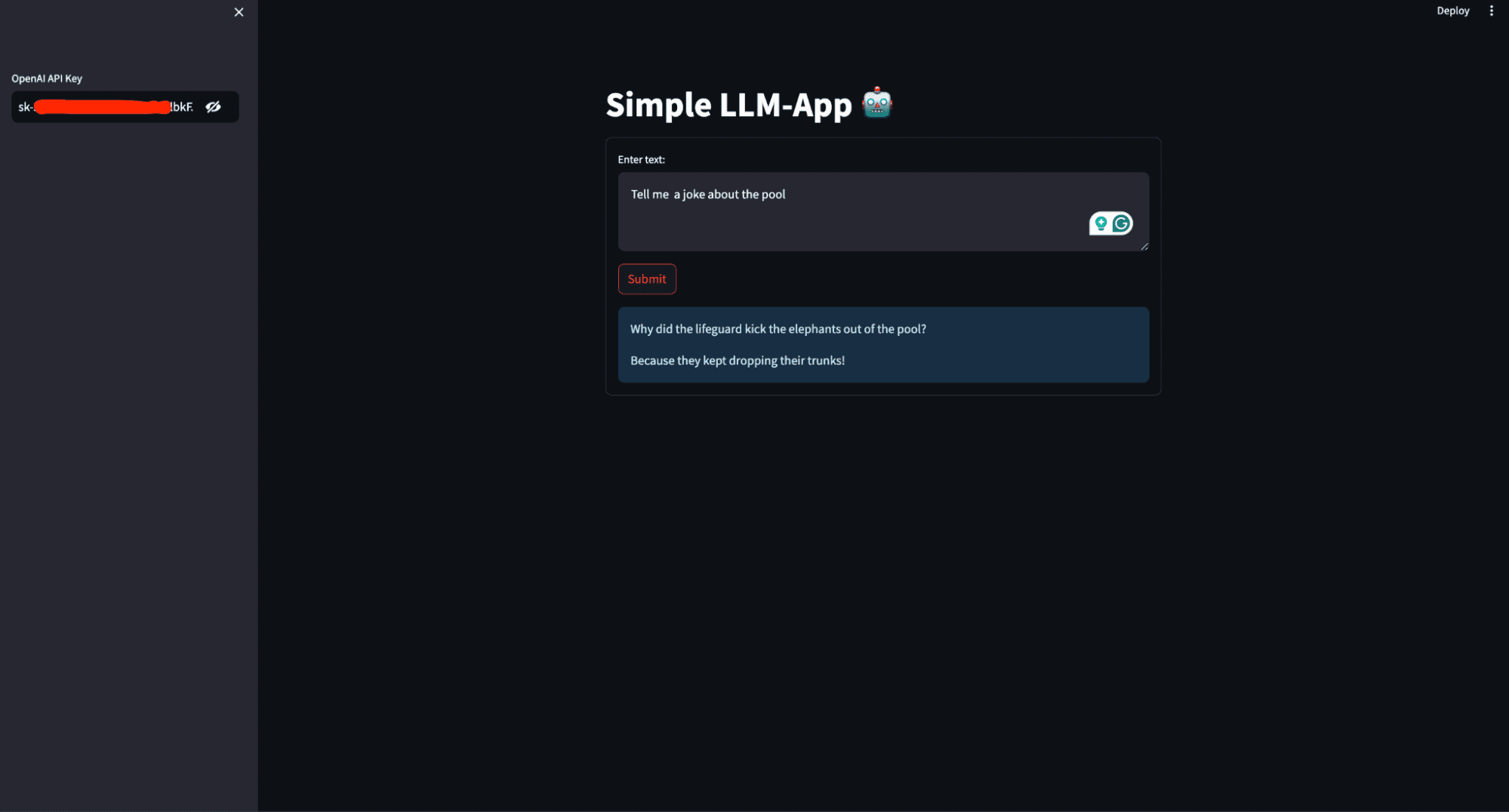
What will you build in this article? You will create a simple AI personal assistant that generates a response based on the user's prompt and deploys it to access it globally. The image below shows what the finished application looks like.
This image shows the user interface of the AI personal assistant that will be built in this article
Prerequisites
For you to follow through with this article, there are a few things you need to have on lock. This includes:
Python (3.5+), and background writing Python scripts.
OpenAI: OpenAI is a research organization and technology company that aims to ensure artificial general intelligence (AGI) benefits all of humanity. One of its key contributions is the development of advanced LLMs such as GPT-3 and GPT-4. These models can understand and generate human-like text, making them powerful tools for various applications like chatbots, content creation, and more. Sign up for OpenAI and copy your API keys from the API section in your account so that you can access the models. Install OpenAI on your computer using the command below:
pip install openai
LangChain:LangChain is a framework designed to simplify the development of applications that leverage LLMs. It provides tools and utilities to manage and streamline the various aspects of working with LLMs, making building complex and robust applications easier.
Install LangChain on your computer using the command below:
pip install langchain
Streamlit: Streamlit is a powerful and easy-to-use Python library for creating web applications. Streamlit allows you to create interactive web applications using Python alone. You don't need expertise in web development (HTML, CSS, JavaScript) to build functional and visually appealing web apps.
It's beneficial for building machine learning and data science apps, including those that utilize LLMs. Install streamlit on your computer using the command below:
pip install streamlit
Code Along
With all the required packages and libraries installed, it is time to start building the LLM application. Create a requirement.txt in the root directory of your working directory and save the dependencies.
streamlit openai langchain
Create an app.py file and add the code below.
# Importing the necessary modules from the Streamlit and LangChain packages import streamlit as st from langchain.llms import OpenAI
Imports the Streamlit library, which is used to create interactive web applications.
from langchain.llms import OpenAI imports the OpenAI class from the langchain.llms module, which is used to interact with OpenAI's language models.
# Setting the title of the Streamlit application st.title('Simple LLM-App 🤖')
st.title('Simple LLM-App 🤖') sets the title of the Streamlit web.
# Creating a sidebar input widget for the OpenAI API key, input type is password for security openai_api_key = st.sidebar.text_input('OpenAI API Key', type='password')
openai_api_key = st.sidebar.text_input('OpenAI API Key', type='password') creates a text input widget in the sidebar for the user to input their OpenAI API key. The input type is set to 'password' to hide the entered text for security.
# Defining a function to generate a response using the OpenAI language model def generate_response(input_text): # Initializing the OpenAI language model with a specified temperature and API key llm = OpenAI(temperature=0.7, openai_api_key=openai_api_key) # Displaying the generated response as an informational message in the Streamlit app st.info(llm(input_text))
def generate_response(input_text) defines a function named generate_response that takes input_text as an argument.
llm = OpenAI(temperature=0.7, openai_api_key=openai_api_key) initializes the OpenAI class with a temperature setting of 0.7 and the provided API key.
Temperature is a parameter used to control the randomness or creativity of the text generated by a language model. It determines how much variability the model introduces into its predictions.
Low Temperature (0.0 — 0.5): This makes the model more deterministic and focused.
Medium Temperature (0.5 — 1.0): Provides a balance between randomness and determinism.
High Temperature (1.0 and above): Increases the randomness of the output. Higher values make the model more creative and diverse in its responses, but this can also lead to less coherence and more nonsensical or off-topic outputs.
st.info(llm(input_text)) calls the language model with the provided input_text and displays the generated response as an informational message in the Streamlit app.
# Creating a form in the Streamlit app for user input with st.form('my_form'): # Adding a text area for user input text = st.text_area('Enter text:', '') # Adding a submit button for the form submitted = st.form_submit_button('Submit') # Displaying a warning if the entered API key does not start with 'sk-' if not openai_api_key.startswith('sk-'): st.warning('Please enter your OpenAI API key!', icon='⚠') # If the form is submitted and the API key is valid, generate a response if submitted and openai_api_key.startswith('sk-'): generate_response(text)
with st.form('my_form') creates a form container named my_form.
text = st.text_area('Enter text:', '') adds a text area input widget within the form for the user to enter text.
submitted = st.form_submit_button('Submit') adds a submit button to the form.
if not openai_api_key.startswith('sk-') checks if the entered API key does not start with sk-.
st.warning('Please enter your OpenAI API key!', icon='⚠') displays a warning message if the API key is invalid.
if submitted and openai_api_key.startswith('sk-') checks if the form is submitted and the API key is valid.
generate_response(text) calls the generate_response function with the entered text to generate and display the response.
Putting it together here is what you have:
# Importing the necessary modules from the Streamlit and LangChain packages import streamlit as st from langchain.llms import OpenAI # Setting the title of the Streamlit application st.title('Simple LLM-App 🤖') # Creating a sidebar input widget for the OpenAI API key, input type is password for security openai_api_key = st.sidebar.text_input('OpenAI API Key', type='password') # Defining a function to generate a response using the OpenAI model def generate_response(input_text): # Initializing the OpenAI model with a specified temperature and API key llm = OpenAI(temperature=0.7, openai_api_key=openai_api_key) # Displaying the generated response as an informational message in the Streamlit app st.info(llm(input_text)) # Creating a form in the Streamlit app for user input with st.form('my_form'): # Adding a text area for user input with a default prompt text = st.text_area('Enter text:', '') # Adding a submit button for the form submitted = st.form_submit_button('Submit') # Displaying a warning if the entered API key does not start with 'sk-' if not openai_api_key.startswith('sk-'): st.warning('Please enter your OpenAI API key!', icon='⚠') # If the form is submitted and the API key is valid, generate a response if submitted and openai_api_key.startswith('sk-'): generate_response(text)
Running the application
The application is ready; you need to execute the application script using the appropriate command for the framework you're using.
streamlit run app.py
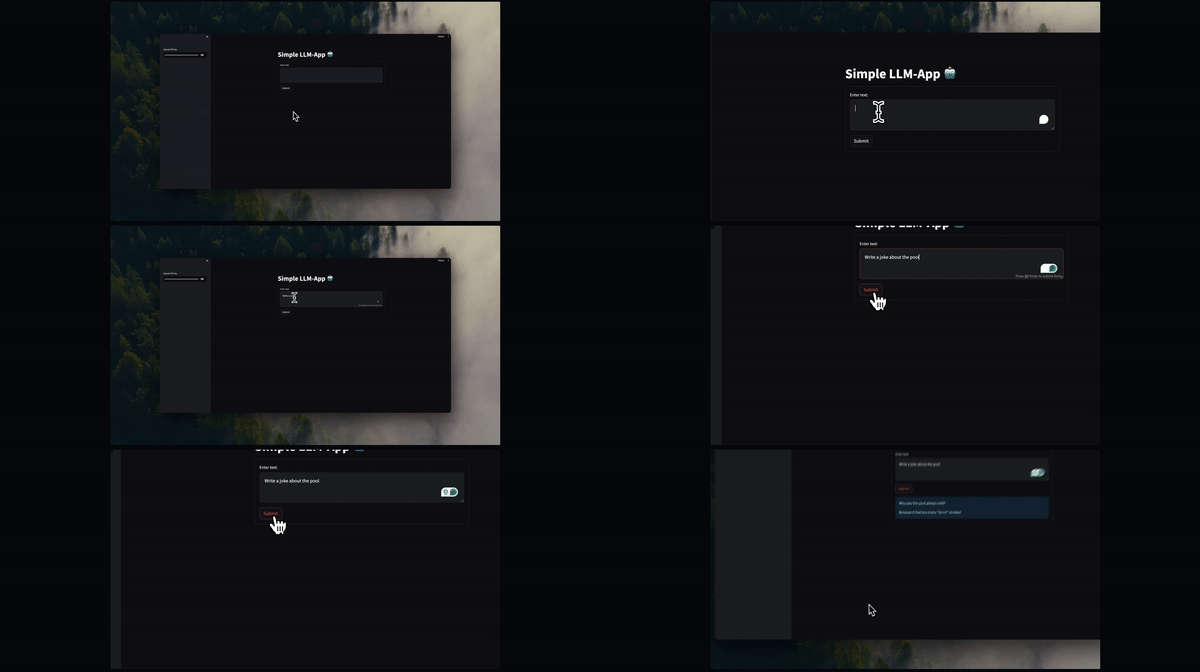
By running this code using streamlit run app.py, you create an interactive web application where users can enter prompts and receive LLM-generated text responses.
When you execute streamlit run app.py, the following happens:
Streamlit server starts: Streamlit starts a local web server on your machine, typically accessible at `http://localhost:8501` by default.
Code execution: Streamlit reads and executes the code in `app.py,` rendering the app as defined in the script.
Web interface: Your web browser automatically opens (or you can manually navigate) to the URL provided by Streamlit (usually http://localhost:8501), where you can interact with your LLM app.
Deploying your LLM application
Deploying an LLM app means making it accessible over the internet so others can use and test it without requiring access to your local computer. This is important for collaboration, user feedback, and real-world testing, ensuring the app performs well in diverse environments.
To deploy the app to the Streamlit Cloud, follow these steps:
Create a GitHub repository for your app. Make sure your repository includes two files: app.py and requirements.txt
Go to Streamlit Community Cloud, click the "New app" button from your workspace, and specify the repository, branch, and main file path.
Click the Deploy button, and your LLM application will now be deployed to Streamlit Community Cloud and can be accessed globally.
Conclusion
Congratulations! You've taken your first steps in building and deploying a LLM application with Python. Starting from understanding the prerequisites, installing necessary libraries, and writing the core application code, you have now created a functional AI personal assistant. By using Streamlit, you've made your app interactive and easy to use, and by deploying it to the Streamlit Community Cloud, you've made it accessible to users worldwide.
With the skills you've learned in this guide, you can dive deeper into LLMs and AI, exploring more advanced features and building even more sophisticated applications. Keep experimenting, learning, and sharing your knowledge with the community. The possibilities with LLMs are vast, and your journey has just begun. Happy coding!
Shittu Olumide is a software engineer and technical writer passionate about leveraging cutting-edge technologies to craft compelling narratives, with a keen eye for detail and a knack for simplifying complex concepts. You can also find Shittu on Twitter.
More On This Topic
Python Vector Databases and Vector Indexes: Architecting LLM Apps
5 Tools to Help Build Your LLM Apps
Building Data Pipelines to Create Apps with Large Language Models
A Beginner’s Guide to Web Scraping Using Python
Making Predictions: A Beginner's Guide to Linear Regression in Python
Mastering GPUs: A Beginner's Guide to GPU-Accelerated DataFrames in Python
Onsemi, has unveiled a power solution that promises to significantly improve data centre energy efficiency.
The combination of onsemi’s latest generation T10 PowerTrench family and EliteSiC 650V MOSFETs offers unparalleled efficiency and high thermal performance in a smaller footprint, potentially reducing global data center energy consumption by up to 10 TeraWatts annually.
As data centers become increasingly power-hungry due to the growing processing requirements of AI workloads, the need for energy efficiency is paramount. AI-supported engine requests require more than 10 times the power compared to typical search engine requests, and data centre power needs are expected to reach an estimated 1,000 TWh globally within the next two years.
onsemi’s solution addresses the power losses that occur during the energy conversion process, which can result in an energy loss of approximately 12%. By implementing the T10 PowerTrench family and EliteSiC 650V solution, data centres can reduce these power losses by an estimated 1%.
If adopted globally, this could lead to a reduction in energy consumption equivalent to the power required to fully power nearly one million homes per year.
The EliteSiC 650V MOSFET offers superior switching performance and lower device capacitances, enabling higher efficiency in data centres and energy storage systems. Compared to the previous generation, these new silicon carbide (SiC) MOSFETs have halved the gate charge and reduced both the energy stored in output capacitance (Eoss) and the output charge (Qoss) by 44%.
The T10 PowerTrench Family, engineered to handle high currents crucial for DC-DC power conversion stages, offers increased power density and superior thermal performance in a compact footprint.
“AI and electrification are reshaping our world and skyrocketing power demands. Accelerating innovation in power semiconductors to improve energy efficiency is key to enabling these technological megatrends,” said Simon Keeton, group president, Power Solutions Group, onsemi.
He also added that their “latest solution can significantly reduce power losses that occur during the energy conversion process and have a meaningful impact on the demands for the next generation of data centers.”
The combined solution also meets the stringent Open Rack V3 (ORV3) base specification required by hyperscale operators to support the next generation of high-power processors. onsemi, recognized as a Fortune 500® company and included in the Nasdaq-100 Index® and S&P 500® index, is driving disruptive innovations to help build a better future, focusing on automotive and industrial end-markets.
The post onsemi Unveils Solutions for Massive Energy Savings in Data Centres appeared first on AIM.
JFrog and GitHub have announced a new partnership to create an integrated platform for managing the entire software supply chain, including DevOps, DevSecOps, MLOps, and GenAI-powered applications.
The partnership aims to provide a seamless experience for developers and DevOps engineers by combining JFrog’s artefact management capabilities with GitHub’s source code platform.
The key features of the integrated platform include bi-directional navigation and traceability between source code and binaries, continuous integration and deployment with GitHub Actions and JFrog Artifactory, a unified view of security findings across both platforms, and integration with GitHub Copilot for chatting and querying artefact and pipeline status.
The partnership has received strong endorsement from industry analysts and customers alike. J.P. Morgan’s Pinjalim Bora noted that GitHub and JFrog are increasingly considered best-of-breed platforms for DevOps, with 50% of JFrog customers using GitHub as their primary code repository.
Major customers like Morgan Stanley, AT&T, Vimeo, and Fidelity Investments have expressed excitement about the collaboration, citing benefits such as enhanced development experience, improved security posture, and streamlined software supply chain management.
JFrog and GitHub have outlined a joint roadmap for continuous enhancements, ensuring users can efficiently manage code and binaries.
Upcoming features include a single pane of glass for JFrog and GitHub Advanced Security findings, and Copilot Chat integration for interactive package recommendations and project setup.
Analysts from IDC and customers like Phillips have highlighted the partnership’s potential to transform the DevOps and DevSecOps market by consolidating tools and driving efficiency for developers and platform engineering teams.
As developer responsibilities expand across DevOps, ML, AI, and security, the push for tool consolidation and efficiency has become a priority for many organisations, making this partnership a significant development in the industry.
The post JFrog and GitHub Partner to Enhance Software Supply Chain Management and Security appeared first on AIM.