Databricks Marketplace Partners with Shutterstock to Avail its Vast Image Library

Data migration from on-prem to cloud at scale using Databricks

In a groundbreaking collaboration, Shutterstock, a leading provider of stock photography and creative assets, has made its extensive collection of nearly a billion images available on the Databricks Marketplace.

This integration provides unprecedented access to Shutterstock’s ethically-sourced visual content, empowering businesses to drive responsible AI and machine learning initiatives across various industries.

The free sample dataset, consisting of 1,000 images and accompanying metadata, is sourced from Shutterstock’s library of over 550 million images and is immediately accessible on the Databricks Marketplace. This partnership marks the first listing of non-tabular datasets, known as Volumes, on the marketplace.

Aimee Egan, Chief Enterprise Officer at Shutterstock, emphasised the significance of this collaboration, stating, “Customers utilising our rich dataset on Databricks can tap into new opportunities, catalyse product innovations, and secure a competitive advantage.”

Shutterstock’s datasets incorporate comprehensive metadata, including keywords, descriptions, geo-locations, and categories, simplifying image organisation and search. The image library plays a crucial role in Generative AI (GenAI), serving as a foundational resource for training advanced AI models and multimodal models like OpenAI Dall-E.

The integration unlocks new possibilities and use cases across industries, such as media and entertainment, retail, and AI startups.

For example, media organisations can leverage Shutterstock-enhanced machine learning models to interpret user-generated images, refining customer data for targeted advertising and increased engagement.

Databricks Marketplace, known for fostering open data and AI collaboration, enables the sharing and exchange of data assets across clouds, regions, and platforms.

With the introduction of Volume Sharing, data providers like Shutterstock can now securely share extensive collections of non-tabular data, accelerating collaboration and democratising data access.

As businesses harness the power of Shutterstock’s image library on Databricks Marketplace, the landscape of technology and creativity is set to transform, driving innovation and opening up new opportunities for data-driven success.

The post Databricks Marketplace Partners with Shutterstock to Avail its Vast Image Library appeared first on AIM.

AI advancements in medicine and education lead ZDNET’s Innovation Index

gettyimages-1487920406

Welcome to ZDNET's Innovation Index, which identifies the most innovative developments in tech from the past week and ranks the top four, based on votes from our panel of editors and experts. Our mission is to help you identify the trends that will have the biggest impact on the future.

Once again, AI leads with three out of four of this week's top innovations, most notably in improving support for doctors and changing the future of education.

Researchers at Germany's Heidelberg University Hospital landed at #1 by linking gen AI models to an external database of information, which supercharged the models' ability to accurately answer queries about oncology. By using retrieval-augmented generation (RAG) to amplify what gen AI can do, this development could significantly lessen the administrative load on doctors searching ever-expanding literature for treatments — especially during a global oncologist shortage. The result could mean more efficiently-sourced care (and more bandwidth for clinicians).

In second place is OpenAI's education-specific ChatGPT. Complete with bespoke pricing, the move is intended to make the company's enterprise-level chatbot more accessible to students and educators as universities increasingly embrace the reality of gen AI. Schools can take a while to adopt new technology — they don't have the luxury of moving fast and breaking things. By becoming an early partner to institutions with ChatGPT Edu, OpenAI is well-positioned to lead the future of AI's inevitable influence on education.

Coming in third: could 3D-printed homes solve housing inequality, one of humanity's most pressing issues? It's an inventive application of a highly-capable technology — once you get past the incredible visual of a gigantic machine printing homes brick by brick, it's got pros and cons. In short, the idea cuts costs, but might not be scalable. Even so, it's a valuable approach to a problem in dire need of a solution.

In last place this week is a smaller — but still crucial — development: an AI fix for your busted Amazon package. The company's new Project P.I. will now detect product defects before they arrive at your door, and double-check your order details with computer vision to avoid misshipments. Amazon claims this climate-forward initiative will help reduce packaging waste and transport emissions; while that might be hard to gauge right now, it's definitely a customer service improvement.

Featured

Alibaba Releases Qwen2, Outperforms Llama 3 on Several Benchmarks 

Alibaba Releases Qwen2, Outperforms Llama 3 on Several Benchmarks

In a significant leap for open source AI, Alibaba’s Qwen team has announced the release of Qwen2, an advanced version of its mother of LLMs, Qwen1.5.

Qwen2 introduces five new models—Qwen2-0.5B, Qwen2-1.5B, Qwen2-7B, Qwen2-57B-A14B, and Qwen2-72B—each optimized for state-of-the-art performance across a variety of benchmarks.

Click here to check out the model on Hugging Face.

These models offer substantial improvements, including training on data from 27 additional languages beyond English and Chinese, including Hindi, Bengali, and Urdu. This multilingual training enhances Qwen2’s capabilities in diverse linguistic contexts, addressing common issues like code-switching with greater proficiency.

Qwen2 also excels in coding and mathematics, with significantly improved performance in these areas.

A standout feature of Qwen2 is its extended context length support, with Qwen2-7B-Instruct and Qwen2-72B-Instruct models capable of handling up to 128K tokens. This makes them particularly adept at processing and understanding long text sequences.

Qwen2’s release includes various technical enhancements such as Group Query Attention (GQA) for faster speed and reduced memory usage, and optimized embeddings for smaller models.

Performance evaluations show that Qwen2-72B, the largest model in the series, outperforms leading competitors like Llama-3-70B in natural language understanding, coding proficiency, mathematical skills, and multilingual abilities.

Despite having fewer parameters, Qwen2-72B surpasses its predecessor, Qwen1.5-110B, demonstrating the effectiveness of the new training methodologies.

Safety and responsibility remain a priority, with Qwen2-72B-Instruct performing comparably to GPT-4 in terms of safety across various categories of harmful queries. The model exhibits significantly lower proportions of harmful responses compared to other large models.

The Qwen2 models, licensed under Apache 2.0 and Qianwen License for different versions, are set to accelerate the application and commercial use of AI technologies worldwide. Future plans include training larger models and extending Qwen2 to multimodal capabilities, integrating vision and audio understanding.

The post Alibaba Releases Qwen2, Outperforms Llama 3 on Several Benchmarks appeared first on AIM.

Intuit’s WiDS 2024: Celebrating Women’s Achievements in Data Science

Intuit, the global financial technology platform that makes Intuit TurboTax, Credit Karma, QuickBooks, and Mailchimp is back with its inspiring ‘Women in Data Science’ (WiDS) conference, scheduled to be held in Bangalore on June 27. The event promotes women’s involvement and highlights their success in the field of data science.

WiDS, initiated by Stanford University, began as a one-day conference and has grown into a global data science movement. It now features conferences, a datathon, podcasts, workshops, and programs for future data scientists, reaching over 100,000 professionals annually.

The event promises to be a convergence of brilliant minds from academia and industry, offering talks from distinguished visionaries, presentations by the industry’s leading female data scientists, and ample networking opportunities.

Though the spotlight is on women, the conference is open to all genders to foster inclusivity and collaboration.

This year, the theme for paper presentations is ‘AI for Content Generation and Personalisation’. There will be discussions around ethical AI and AI applications in fintech, healthcare, and business analytics, besides experimentation with generative AI, and content generation in advertising and marketing.

Intuit is globally recognised for its user-friendly applications and commitment to leveraging technology to solve financial challenges.

There are limited spots; register here.

Under the Hood

The day will begin with a warm reception and breakfast at 8.30 am, setting a welcoming tone for the attendees. Anusha Mujumdar, senior manager (AI/ML) at Intuit, will deliver the welcome note at 9 am, followed by a keynote session by Arpita Patra from the Indian Institute of Science.

As the day progresses, participants will be treated to a variety of tech talks and hands-on workshops. Neela Sawant from Amazon will talk about improving in-car voice assistants, while Shreya Khare from Microsoft and Sravyasri Garapati from Intuit will lead a workshop on mastering automated prompt optimisation in language models.

The event’s afternoon sessions will spotlight cutting-edge research through paper presentations.

Chaitanya L from BMSCE will discuss tackling data challenges in the energy domain; Harini Anand from PES University will delve into Bitcoin price prediction using LSTM and VADER sentiment analysis; Yashaswini Viswanath from Mindtree will explore machine unlearning for generative AI; and Sanjana Adapala from BITS Pilani will present on lighting estimation in virtual environments using generative models.

The day will conclude with an awards ceremony celebrating the contributions and achievements of the participants.

Through this event, Intuit aims to bring diversity in hiring and foster a vibrant community of analytics, AI, and data science enthusiasts in Bangalore.

The WiDS conference at Intuit stands testament to the growing influence and recognition of women in the tech industry, offering a platform for learning, inspiration, and networking.

Through this event, Intuit aims to bring diversity in hiring and also to foster a vibrant community of analytics, AI, and data science enthusiasts in Bangalore.

The Women in Data Science conference at Intuit stands as a testament to the growing influence and recognition of women in the tech industry, offering a platform for learning, inspiration, and networking.

There are limited spots; register here.

The post Intuit’s WiDS 2024: Celebrating Women’s Achievements in Data Science appeared first on AIM.

5 Machine Learning Models Explained in 5 Minutes

5 Machine Learning Models Explained in 5 Minutes
Image by author

Machine learning is a type of computer algorithm that helps machines learn without the need for explicit programming.

Today, we see applications of machine learning everywhere — in navigation systems, movie streaming platforms, and ecommerce applications.

In fact, from the time you wake up in the morning until you go to bed, you are likely to have interacted with dozens of machine learning models without even realizing it.

The machine learning industry is projected to grow by over 36% between 2024 to 2030.

Given that almost every large organization is actively investing in AI, you only stand to benefit from honing your machine learning skills.

Whether you are a data science enthusiast, developer, or an everyday person who wants to improve your knowledge in the subject, here are 5 commonly-used machine learning models you should know about:

1. Linear Regression

Linear regression is the most popular machine learning model used to perform quantitative tasks.

This algorithm is used to predict a continuous outcome (y) using one or more independent variables (X).

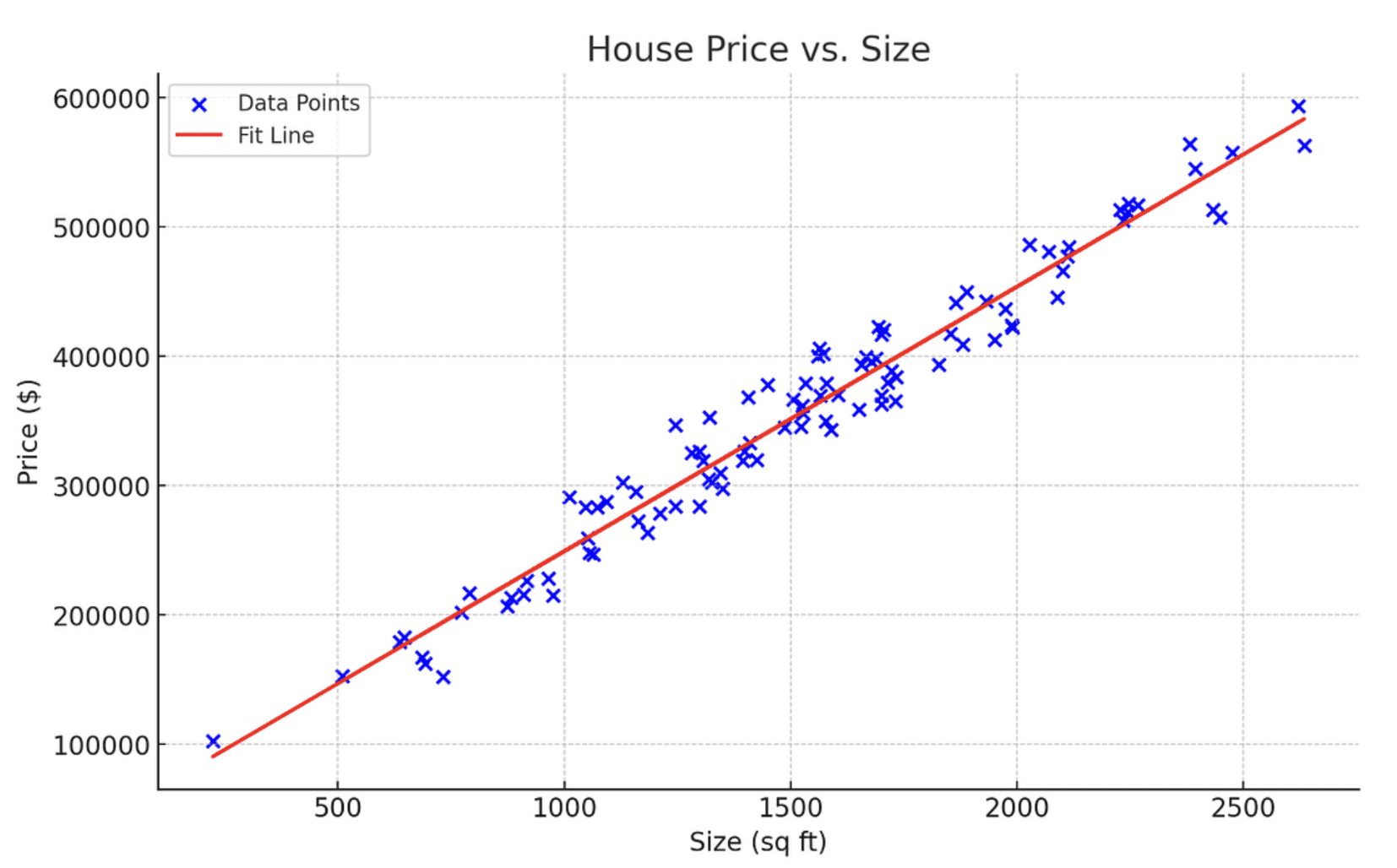
For example, you would use linear regression if given the task to predict house prices based on their size.

In this case, the house size is your independent variable X which will be used to predict the house price, which is the independent variable.

This is done by fitting a linear equation that models the relationship between X and y, represented by y=mX+c.

Here is a diagram representing a linear regression that models the relationship between house price and size:

Visual Representation of Linear Regression
Image by author

Learning Resource

To learn more about the intuition behind linear regression and how it works mathematically, I recommend watching Krish Naik’s YouTube tutorial on the subject.

2. Logistic Regression

Logistic regression is a classification model used to predict a discrete outcome given one or more independent variables.

For example, given the number of negative keywords in a sentence, logistic regression can be used to predict whether a given message should be classified as legitimate or spam.

Here is a chart displaying how logistic regression works:

Visual Representation of the Logistic Curve
Image by author

Notice that unlike linear regression which represents a straight line, logistic regression is modeled as an S-shape curve.

As indicated in the curve above, as the number of negative keywords increases, so does the probability of the message being classified as spam.

The x-axis of this curve represents the number of negative keywords, and the y-axis shows the probability of the email being spam.

Typically, in logistic regression, a probability of 0.5 or greater indicates a positive outcome — in this context, it means that the message is spam.

Conversely, a probability of less than 0.5 indicates a negative outcome, meaning the message is not spam.

Learning Resource

If you’d like to learn more about logistic regression, StatQuest’s logistic regression tutorial is a great place to start.

3. Decision Trees

Decision trees are a popular machine learning model used for both classification and regression tasks.

They work by breaking the dataset down based on its features, creating a tree-like structure to model this data.

In simple terms, decision trees allow us to continuously split data based on specific parameters until a final decision is made.

Here is an example of a simple decision tree determining whether a person should eat ice-cream on a given day:

Visual Representation of Decision Trees
Image by author

  • The tree starts with the weather, identifying whether it is conducive to eat ice-cream.
  • If the weather is warm, then you proceed to the next node, health. Otherwise, the decision is no and there are no more splits.
  • At the next node, if the person is healthy, they can eat the ice-cream. Otherwise, they should refrain from doing so.

Notice how the data splits on each node in the decision tree, breaking the classification process down into simple, manageable questions.

You can draw a similar decision tree for regression tasks with a quantitative outcome, and the intuition behind the process would remain the same.

Learning Resource

To learn more about decision trees, I suggest watching StatsQuest’s video tutorial on the topic.

4. Random Forests

The random forest model combines the predictions made by multiple decision trees and returns a single output.

Intuitively, this model should perform better than a single decision tree because it leverages the capabilities of multiple predictive models.

This is done with the help of a technique known as bagging, or bootstrap aggregation.

Here’s how bagging works:

A statistical technique called bootstrap is used to sample the dataset multiple times with replacement.

Then, a decision tree is trained on each sample dataset. The output of all the trees are finally combined to render a single prediction.

In the case of a regression problem, the final output is generated by averaging the predictions made by each decision tree. For classification problems, a majority class prediction is made.

Learning Resource
You can watch Krish Naik’s tutorial on random forests to learn more about the theory and intuition behind the model.

5. K-Means Clustering

So far, all the machine learning models we’ve discussed fall under the umbrella of a method called supervised learning.

Supervised learning is a technique that uses a labeled dataset to train algorithms to predict an outcome.

In contrast, unsupervised learning is a technique that doesn’t deal with labeled data. Instead, it identifies patterns in data without being trained on what specific outcomes to look for.

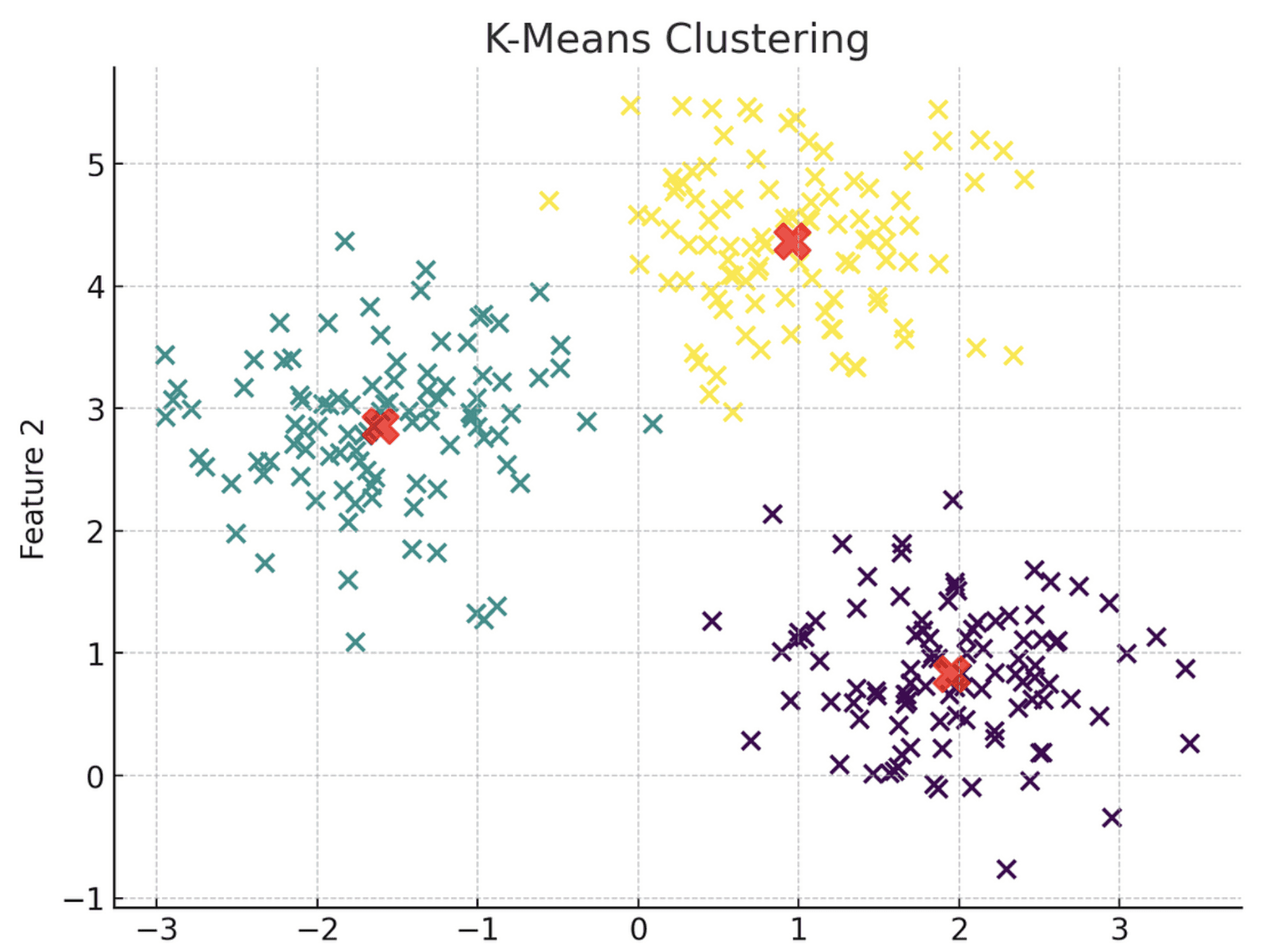
K-Means clustering is an unsupervised learning model that essentially ingests unlabeled data and assigns each data point to a cluster.

The observations belong to the cluster with the nearest mean.

Here is a visual representation of the K-Means clustering model:

Visual Representation of K-Means Clustering
Image by author

Notice how the algorithm has grouped each data point into three distinct clusters, each represented by a different color. These clusters are grouped based on their proximity to the centroid, denoted by a red X-mark.

Simply put, all data points within Cluster 1 share similar characteristics, which is why they are grouped together. The same principle applies to Clusters 2 and 3.

When building a K-Means clustering model, you must explicitly specify the number of clusters you’d like to generate.

This can be accomplished using a technique called the elbow method, which simply plots the model’s error scores with various cluster values on a line chart. Then, you choose the inflection point of the curve, or its “elbow” as the optimal number of clusters.

Here is a visual representation of the elbow method:

Visual Representation of the Elbow Method
Image by author

Notice that the inflection point on this curve is at the 3-cluster mark, which means that the optimal number of clusters for this algorithm is 3.

Learning Resource

If you’d like to learn more about the topic, StatQuest has an
8-minute video that clearly explains the workings behind K-Means clustering.

Next Steps

The machine learning algorithms explained in this article are commonly used in industry-wide applications such as forecasting, spam detection, loan approval, and customer segmentation.

If you’ve managed to follow along till here, congratulations! You now have a solid grasp of the most widely used predictive algorithms, and have taken the first step to venture into the field of machine learning.

But the journey doesn’t end here.

To cement your understanding of machine learning models and be able to apply them to real-world applications, I suggest learning a programming language like Python or R.

Freecodecamp’s Python for Beginners course
course is a great starting point. If you find yourself stuck in your programming journey, I have a YouTube video that explains how to learn to code from scratch.

Once you learn to code, you will be able to implement these models in practice using libraries like Scikit-Learn and Keras.

To enhance your data science and machine learning skills, I suggest creating a tailored learning path for yourself using generative AI models like ChatGPT. Here is a more detailed roadmap to help you get started with utilizing ChatGPT to learn data science.

Natassha Selvaraj is a self-taught data scientist with a passion for writing. Natassha writes on everything data science-related, a true master of all data topics. You can connect with her on LinkedIn or check out her YouTube channel.

More On This Topic

  • Build a Machine Learning Web App in 5 Minutes
  • KDnuggets News March 9, 2022: Build a Machine Learning Web App in 5…
  • Large Language Models Explained in 3 Levels of Difficulty
  • Multimodal Models Explained
  • Understanding Bias-Variance Trade-Off in 3 Minutes
  • Build a Web Scraper with Python in 5 Minutes

Cohere Picks Enterprise AI Needs Over ‘Abstract Concepts Like AGI’

Recently, Silicon Valley displayed a rare mixed emotion towards achieving AGI. This became more apparent during the recent banter between Meta’s Yann LeCun and xAI’s Elon Musk.

However, unlike its contemporaries like OpenAI or Antropic, Google DeepMind or even xAI, the Canadian startup Cohere’s AI ambitions are not focussed on AGI, at least for now.

“We remain concentrated on designing AI solutions that deliver better workforce and customer experiences for businesses today rather than pursuing abstract concepts like AGI,” Saurabh Baji, SVP of engineering, Cohere, told AIM.

Some experts predict it will arrive next year, others say by 2029, and some think it will never happen. Some claimed that AGI has already been achieved multiple times in 2024 with projects like Devin and Claude-3 Opus, leading to the belief that future achievements might be overlooked.

Cohere offers models in three categories: Embed, Command, and Rerank, each designed for specific use cases and customisable.

At CouldWorld 2023, co-founder and chief executive officer Aidan Gomez stated that the company is focusing more on embedding models, which are expected to perform twice as well as competitors on varied and noisy datasets.

Unlike generative models trained on public internet data, embedding models are trained on enterprise data, retrieving information from specific data sources.

Enterprise Needs is Cohere’s Focus

In April, the startup launched Command-R, a language model for enterprise use with a 128k context window and support for ten languages, performing tasks like RAG and tool integration.

Building on its success, they introduced Command R+, which ranked 6th on the Arena leaderboard, matching GPT-4-0314 based on over 13,000 human votes. It is regarded as one of the best open models.

“Command R+ is our most powerful model to date targeted for use cases needing complex reasoning and is highly performant for tool use and building AI agents,” said Baji. “We are seeing growing demand from customers for scalable models that customers can use to bring AI applications into large-scale production,” he added.

This focus on enterprise-critical features allows Cohere to cater to both large, and complex enterprises like Oracle, Accenture, and McKinsey and fast-growing startups like Borderless AI and AtomicWork, helping them streamline operations and boost productivity.

For example, Oracle integrates Cohere’s models into applications for finance, supply chain, HR, sales, marketing, and customer service, while AtomicWork uses Command R+ and Rerank models to boost IT support efficiency.

The company recently introduced fine-tuning for Command R, which surpasses larger, more expensive models.

The company’s technology enhances business processes in financial services, technology, and retail through enterprise search, copy generation, and AI assistants. It offers flexible deployment options, including on-premises solutions for highly regulated industries, ensuring data privacy and security.

Up Next

“At Cohere, we are continually working to iterate and improve our models to adapt to the unique needs of our enterprise customers. We want to ensure that our products solve real-world business problems today and are designed to excel in an enterprise environment,” said Baji.

The company is currently working on making the latest Command R models widely available on platforms like Microsoft Azure, Amazon Bedrock and Oracle Cloud Infrastructure (OCI).

Looking ahead, Cohere wants to continue to innovate, focusing on refining its models to better meet enterprise customers’ needs. It also unveiled the Cohere Toolkit, which aims to speed up the development of generative AI applications.

By the end of March, the company generated $35 million in annualised revenue, up from $13 million last year. The startup recently raised $450 million from investors, including NVIDIA, Salesforce Ventures, Cisco, and PSP Investments, pushing the valuation to $5 billion.

Based in Seattle, Washington, Baji has been with Cohere for about two years. “With Cohere’s world-class team, singular focus and clear strategy, it is well positioned to lead the effort to accelerate wider enterprise adoption,” concluded Baji.

The post Cohere Picks Enterprise AI Needs Over ‘Abstract Concepts Like AGI’ appeared first on AIM.

Udio Launches ‘Audio Uploads’ Feature to Extend and Remix User Clips

Udio AI Music Generation

After months in closed beta, Udio moved to a public launch on Wednesday , enabling anyone to access the new music generator from the Udio website for free with a new feature called “Audio Uploads”. Users can upload an audio clip of their choice, and extend this clip either forward or backward by 32 seconds using up to 2 minutes of context.

Udio just dropped Audio Prompting, and it's mind blowing.
People can "Upload" their own music/sound and it will extend it.
10 wild examples:
1. @udiomusicpic.twitter.com/PTDpd0KD9a

— Min Choi (@minchoi) June 6, 2024

The new feature allows users to upload their own audio files to extend or remix their songs to use as inspiration for AI-generated songs. This can include household sounds, music, instrument recordings or even their own voice by adding various sections, changing genres, and modifying the lyrics.

The feature also includes quality of life updates such as downloadable WAV files and mobile improvements while requiring its users to confirm that they own the rights to the uploaded audio and that they have the right to use and distribute it.

🤯 So Udio just released a dope feature that allows you to "Upload" music and extend or remix it. This is super super insane.
🚀 What makes it more insane is if we pair this AI technology with the AI step separator called MVSep, available on @Replicate.com, we enter an entirely… pic.twitter.com/cl6FF9mou5

— Micah Berkley (@MicahBerkley) June 6, 2024

“There is nothing available that comes close to the ease of use, voice quality, and musicality of what we’ve achieved with Udio — it’s a real testament to the folks we have involved,” said David Ding, co-founder and CEO of Udio.

The audio upload feature in Udio provides users with a new level of creative control and flexibility in generating music.

Recently, there’s been a stream of new AI text-to-audio applications similar to the surge of AI chatbots that emerged after ChatGPT was released.

Former Google Deepmind researchers launched an AI music generator called Udio in December 2023. Udio is a generative artificial intelligence model that produces music based on simple text prompts. It can generate vocals and instrumentation.

Initially it received financial backing from venture capital firms and musicians. Critics praised its ability to create realistic-sounding vocals, but raised concerns over the possibility that its training data contained copyrighted music.

Apart from Udio, there is Suno.ai which is a generative AI music creation program, engineered to create authentic songs, blending vocals and instrumentation seamlessly. It has been readily accessible since December 20, 2023, following the rollout of a web application and a collaboration with Microsoft.

The post Udio Launches ‘Audio Uploads’ Feature to Extend and Remix User Clips appeared first on AIM.

Diffusion and Denoising: Explaining Text-to-Image Generative AI

Diffusion and Denoising: Explaining Text-to-Image Generative AI

The Concept of Diffusion

Denoising diffusion models are trained to pull patterns out of noise, to generate a desirable image. The training process involves showing model examples of images (or other data) with varying levels of noise determined according to a noise scheduling algorithm, intending to predict what parts of the data are noise. If successful, the noise prediction model will be able to gradually build up a realistic-looking image from pure noise, subtracting increments of noise from the image at each time step.
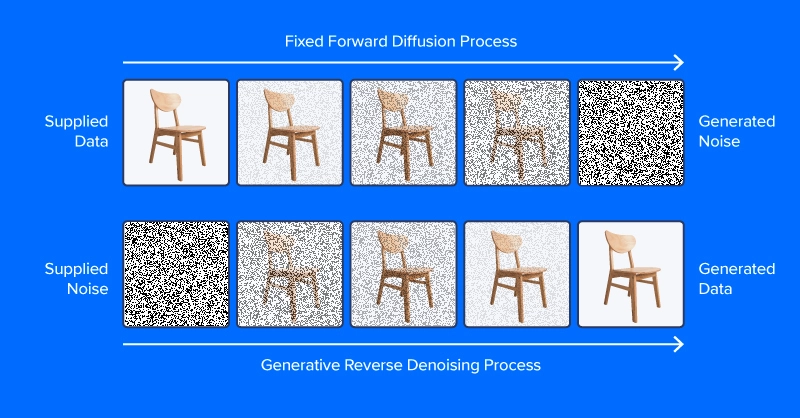
diffusion and denoising process

Unlike the image at the top of this section, modern diffusion models don’t predict noise from an image with added noise, at least not directly. Instead, they predict noise in a latent space representation of the image. Latent space represents images in a compressed set of numerical features, the output of an encoding module from a variational autoencoder, or VAE. This trick put the “latent” in latent diffusion, and greatly reduced the time and computational requirements for generating images. As reported by the paper authors, latent diffusion speeds up inference by at least ~2.7X over direct diffusion and trains about three times faster.

People working with latent diffusion often talk of using a “diffusion model,” but in fact, the diffusion process employs several modules. As in the diagram above, a diffusion pipeline for text-to-image workflows typically includes a text embedding model (and its tokenizer), a denoise prediction/diffusion model, and an image decoder. Another important part of latent diffusion is the scheduler, which determines how the noise is scaled and updated over a series of “time steps” (a series of iterative updates that gradually remove noise from latent space).
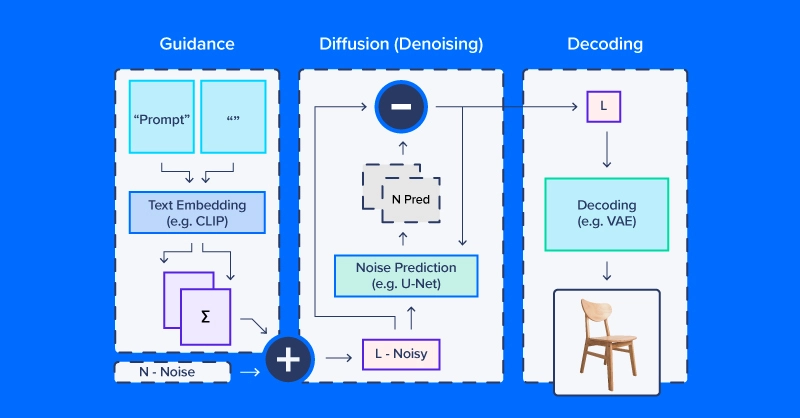
latent diffusion model architecture diagram

Latent Diffusion Code Example

We’ll use CompVis/latent-diffusion-v1-4 for most of our examples. Text embedding is handled by a CLIPTextModel and CLIPTokenizer. Noise prediction uses a ‘U-Net,’ a type of image-to-image model that originally gained traction as a model for applications in biomedical images (especially segmentation). To generate images from denoised latent arrays, the pipeline uses a variational autoencoder (VAE) for image decoding, turning those arrays into images.

We’ll start by building our version of this pipeline from HuggingFace components.

# local setup  virtualenv diff_env –python=python3.8  source diff_env/bin/activate  pip install diffusers transformers huggingface-hub  pip install torch --index-url https://download.pytorch.org/whl/cu118

Make sure to check pytorch.org to ensure the right version for your system if you’re working locally. Our imports are relatively straightforward, and the code snippet below suffices for all the following demos.

import os  import numpy as np  import torch  from diffusers import StableDiffusionPipeline, AutoPipelineForImage2Image  from diffusers.pipelines.pipeline_utils import numpy_to_pil  from transformers import CLIPTokenizer, CLIPTextModel  from diffusers import AutoencoderKL, UNet2DConditionModel,          PNDMScheduler, LMSDiscreteScheduler    from PIL import Image  import matplotlib.pyplot as plt

Now for the details. Start by defining image and diffusion parameters and a prompt.

prompt = [" "]    # image settings  height, width = 512, 512    # diffusion settings  number_inference_steps = 64  guidance_scale = 9.0  batch_size = 1

Initialize your pseudorandom number generator with a seed of your choice for reproducing your results.

def seed_all(seed):      torch.manual_seed(seed)      np.random.seed(seed)    seed_all(193)

Now we can initialize the text embedding model, autoencoder, a U-Net, and the time step scheduler.

tokenizer = CLIPTokenizer.from_pretrained("openai/clip-vit-large-patch14")  text_encoder = CLIPTextModel.from_pretrained("openai/clip-vit-large-patch14")  vae = AutoencoderKL.from_pretrained("CompVis/stable-diffusion-v1-4",           subfolder="vae")  unet = UNet2DConditionModel.from_pretrained("CompVis/stable-diffusion-v1-4",          subfolder="unet")  scheduler = PNDMScheduler()  scheduler.set_timesteps(number_inference_steps)    my_device = torch.device("cuda") if torch.cuda.is_available() else torch.device("cpu")  vae = vae.to(my_device)  text_encoder = text_encoder.to(my_device)  unet = unet.to(my_device)

Encoding the text prompt as an embedding requires first tokenizing the string input. Tokenization replaces characters with integer codes corresponding to a vocabulary of semantic units, e.g. via byte pair encoding (BPE). Our pipeline embeds a null prompt (no text) alongside the textual prompt for our image. This balances the diffusion process between the provided description and natural-appearing images in general. We’ll see how to change the relative weighting of these components later in this article.

prompt = prompt * batch_size  tokens = tokenizer(prompt, padding="max_length",  max_length=tokenizer.model_max_length, truncation=True,          return_tensors="pt")    empty_tokens = tokenizer([""] * batch_size, padding="max_length",  max_length=tokenizer.model_max_length, truncation=True,          return_tensors="pt")  with torch.no_grad():      text_embeddings = text_encoder(tokens.input_ids.to(my_device))[0]      max_length = tokens.input_ids.shape[-1]      notext_embeddings = text_encoder(empty_tokens.input_ids.to(my_device))[0]      text_embeddings = torch.cat([notext_embeddings, text_embeddings])

We initialize latent space as random normal noise and scale it according to our diffusion time step scheduler.

latents = torch.randn(batch_size, unet.config.in_channels,           height//8, width//8)  latents = (latents * scheduler.init_noise_sigma).to(my_device)

Everything is ready to go, and we can dive into the diffusion loop itself. We can keep track of images by sampling periodically throughout so we can see how noise is gradually decreased.

images = []  display_every = number_inference_steps // 8    # diffusion loop  for step_idx, timestep in enumerate(scheduler.timesteps):      with torch.no_grad():          # concatenate latents, to run null/text prompt in parallel.          model_in = torch.cat([latents] * 2)          model_in = scheduler.scale_model_input(model_in,                  timestep).to(my_device)          predicted_noise = unet(model_in, timestep,                   encoder_hidden_states=text_embeddings).sample          # pnu - empty prompt unconditioned noise prediction          # pnc - text prompt conditioned noise prediction          pnu, pnc = predicted_noise.chunk(2)          # weight noise predictions according to guidance scale          predicted_noise = pnu + guidance_scale * (pnc - pnu)          # update the latents          latents = scheduler.step(predicted_noise,                   timestep, latents).prev_sample          # Periodically log images and print progress during diffusion          if step_idx % display_every == 0                  or step_idx + 1 == len(scheduler.timesteps):             image = vae.decode(latents / 0.18215).sample[0]             image = ((image / 2.) + 0.5).cpu().permute(1,2,0).numpy()             image = np.clip(image, 0, 1.0)             images.extend(numpy_to_pil(image))             print(f"step {step_idx}/{number_inference_steps}: {timestep:.4f}")

At the end of the diffusion process, we have a decent rendering of what you wanted to generate. Next, we’ll go over additional techniques for greater control. As we’ve already made our diffusion pipeline, we can use the streamlined diffusion pipeline from HuggingFace for the rest of our examples.

Controlling the Diffusion Pipeline

We’ll use a set of helper functions in this section:

def seed_all(seed):      torch.manual_seed(seed)      np.random.seed(seed)    def grid_show(images, rows=3):      number_images = len(images)      height, width = images[0].size      columns = int(np.ceil(number_images / rows))      grid = np.zeros((height*rows,width*columns,3))      for ii, image in enumerate(images):          grid[ii//columns*height:ii//columns*height+height,                   ii%columns*width:ii%columns*width+width] = image          fig, ax = plt.subplots(1,1, figsize=(3*columns, 3*rows))          ax.imshow(grid / grid.max())      return grid, fig, ax    def callback_stash_latents(ii, tt, latents):      # adapted from fastai/diffusion-nbs/stable_diffusion.ipynb      latents = 1.0 / 0.18215 * latents      image = pipe.vae.decode(latents).sample[0]      image = (image / 2. + 0.5).cpu().permute(1,2,0).numpy()      image = np.clip(image, 0, 1.0)      images.extend(pipe.numpy_to_pil(image))    my_seed = 193

We’ll start with the most well-known and straightforward application of diffusion models: image generation from textual prompts, known as text-to-image generation. The model we’ll use was released into the wild (of the Hugging Face Hub) by the academic lab that published the latent diffusion paper. Hugging Face coordinates workflows like latent diffusion via the convenient pipeline API. We want to define what device and what floating point to calculate based on if we have or do not have a GPU.

if (1):      #Run CompVis/stable-diffusion-v1-4 on GPU      pipe_name = "CompVis/stable-diffusion-v1-4"      my_dtype = torch.float16      my_device = torch.device("cuda")      my_variant = "fp16"      pipe = StableDiffusionPipeline.from_pretrained(pipe_name,      safety_checker=None, variant=my_variant,          torch_dtype=my_dtype).to(my_device)  else:      #Run CompVis/stable-diffusion-v1-4 on CPU      pipe_name = "CompVis/stable-diffusion-v1-4"      my_dtype = torch.float32      my_device = torch.device("cpu")      pipe = StableDiffusionPipeline.from_pretrained(pipe_name,               torch_dtype=my_dtype).to(my_device)

Guidance Scale

If you use a very unusual text prompt (very unlike those in the dataset), it’s possible to end up in a less-traveled part of latent space. The null prompt embedding provides a balance and combining the two according to guidance_scale allows you to trade off the specificity of your prompt against common image characteristics.

guidance_images = []  for guidance in [0.25, 0.5, 1.0, 2.0, 4.0, 6.0, 8.0, 10.0, 20.0]:      seed_all(my_seed)      my_output = pipe(my_prompt, num_inference_steps=50,       num_images_per_prompt=1, guidance_scale=guidance)      guidance_images.append(my_output.images[0])      for ii, img in enumerate(my_output.images):          img.save(f"prompt_{my_seed}_g{int(guidance*2)}_{ii}.jpg")    temp = grid_show(guidance_images, rows=3)  plt.savefig("prompt_guidance.jpg")  plt.show()

Since we generated the prompt using the 9 guidance coefficients, you can plot the prompt and view how the diffusion developed. The default guidance coefficient is 0.75 so on the 7th image would be the default image output.

Negative Prompts

Sometimes latent diffusion really “wants” to produce an image that doesn’t match your intentions. In these scenarios, you can use a negative prompt to push the diffusion process away from undesirable outputs. For example, we could use a negative prompt to make our Martian astronaut diffusion outputs a little less human.

my_prompt = " "  my_negative_prompt = " "    output_x = pipe(my_prompt, num_inference_steps=50, num_images_per_prompt=9,           negative_prompt=my_negative_prompt)    temp = grid_show(output_x)  plt.show()

You should receive outputs that follow your prompt while avoiding outputting the things described in your negative prompt.

Image Variation

Text-to-image generation from scratch is not the only application for diffusion pipelines. Actually, diffusion is well-suited for image modification, starting from an initial image. We’ll use a slightly different pipeline and pre-trained model tuned for image-to-image diffusion.

pipe_img2img = AutoPipelineForImage2Image.from_pretrained(            "runwayml/stable-diffusion-v1-5", safety_checker=None,    torch_dtype=my_dtype, use_safetensors=True).to(my_device)

One application of this approach is to generate variations on a theme. A concept artist might use this technique to quickly iterate different ideas for illustrating an exoplanet based on the latest research.

We’ll first download a public domain artist’s concept of planet 1e in the TRAPPIST system (credit: NASA/JPL-Caltech).
Then, after downscaling to remove details, we’ll use a diffusion pipeline to make several different versions of the exoplanet TRAPPIST-1e.

url =   "https://upload.wikimedia.org/wikipedia/commons/thumb/3/38/TRAPPIST-1e_artist_impression_2018.png/600px-TRAPPIST-1e_artist_impression_2018.png"  img_path = url.split("/")[-1]  if not (os.path.exists("600px-TRAPPIST-1e_artist_impression_2018.png")):      os.system(f"wget      '{url}'")      init_image = Image.open(img_path)    seed_all(my_seed)    trappist_prompt = "Artist's impression of TRAPPIST-1e"                    "large Earth-like water-world exoplanet with oceans,"                    "NASA, artist concept, realistic, detailed, intricate"    my_negative_prompt = "cartoon, sketch, orbiting moon"    my_output_trappist1e = pipe_img2img(prompt=trappist_prompt, num_images_per_prompt=9,        image=init_image, negative_prompt=my_negative_prompt, guidance_scale=6.0)    grid_show(my_output_trappist1e.images)  plt.show()
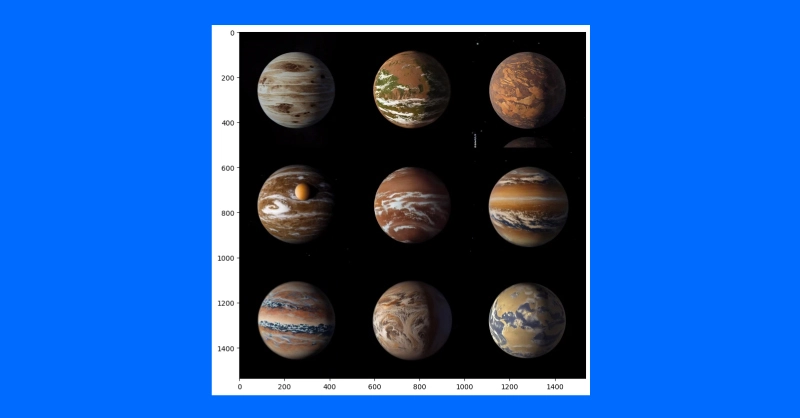
diffusion image variation test

By feeding the model an example initial image, we can generate similar images. You can also use a text-guided image-to-image pipeline to change the style of an image by increasing the guidance, adding negative prompts and more such as “non-realistic” or “watercolor” or “paper sketch.” Your mile may vary and adjusting your prompts will be the easiest way to find the right image you want to create.

Conclusions

Despite the discourse behind diffusion systems and imitating human generated art, diffusion models have other more impactful purposes. It has been applied to protein folding prediction for protein design and drug development. Text-to-video is also an active area of research and is offered by several companies (e.g. Stability AI, Google). Diffusion is also an emerging approach for text-to-speech applications.

It’s clear that the diffusion process is taking a central role in the evolution of AI and the interaction of technology with the global human environment. While the intricacies of copyright, other intellectual property laws, and the impact on human art and science are evident in both positive and negative ways. But what is truly a positive is the unprecedented capability AI has to understand language and generate images. It was AlexNet that had computers analyze an image and output text, and only now computers can analyze textual prompts and output coherent images.

Original. Republished with permission.

Kevin Vu manages Exxact Corp blog and works with many of its talented authors who write about different aspects of Deep Learning.

More On This Topic

  • Generative AI Playground: Text-to-Image Stable Diffusion with…
  • Stable Diffusion: Basic Intuition Behind Generative AI
  • Become an AI Artist Using Phraser and Stable Diffusion
  • Between Dreams and Reality: Generative Text and Hallucinations
  • 3 Ways to Generate Hyper-Realistic Faces Using Stable Diffusion
  • Top 7 Diffusion-Based Applications with Demos

Get an Introduction to AI Services Like ChatGPT for Just $50

TL;DR: Learn how to thrive in the world of AI with the Introduction to AI: ChatGPT & Midjourney Overview Bundle, now just $49.99 (reg. $149).

Artificial intelligence has caught on like gangbusters in the business world. Since OpenAI revolutionized work with ChatGPT, generative AI has been an incredibly buzzy topic in tech and beyond. But how can AI services like ChatGPT and Midjourney actually help you? Find out in the Introduction to AI: ChatGPT & Midjourney Overview Bundle, now $100 off.

This three-part bundle is taught by Yassin Marco (4.2/5-star instructor rating), an online instructor who has helped more than 1.5 million people worldwide hone their skills online. In these courses, he’ll focus on two of the most popular consumer AI tools, ChatGPT and Midjourney.

What you’ll learn

In the ChatGPT course, you’ll learn how to leverage the tool’s language capabilities to answer questions, create content and much more. You’ll explore a wide range of applications, from summarizing books and eliminating bugs in code to breaking down complex topics you’re struggling to understand. The course will help you maximize ChatGPT’s potential.

In the Midjourney course, you’ll learn the basics of this leading AI image generator and discover how to hone settings to get artistic, creative outputs that you love. Through practice, you’ll create a complete gallery of work that showcases your creativity and helps you scale your marketing.

Ultimately, it all leads to the final course, teaching you ways to monetize your work in ChatGPT and Midjourney. Not only can AI save you time, but it can also be a lucrative side hustle or revenue stream for your business.

Get familiar with the leading consumer-facing generative AI tools. Right now, you can get the Introduction to AI: ChatGPT & Midjourney Overview Bundle for $100 off at just $49.99.

Start Learning Now

Prices and availability are subject to change.

Ascendion Elevates Chennai as Global Hub for GenAI Innovation

Ascendion Elevates Chennai as Global Hub for GenAI Innovation

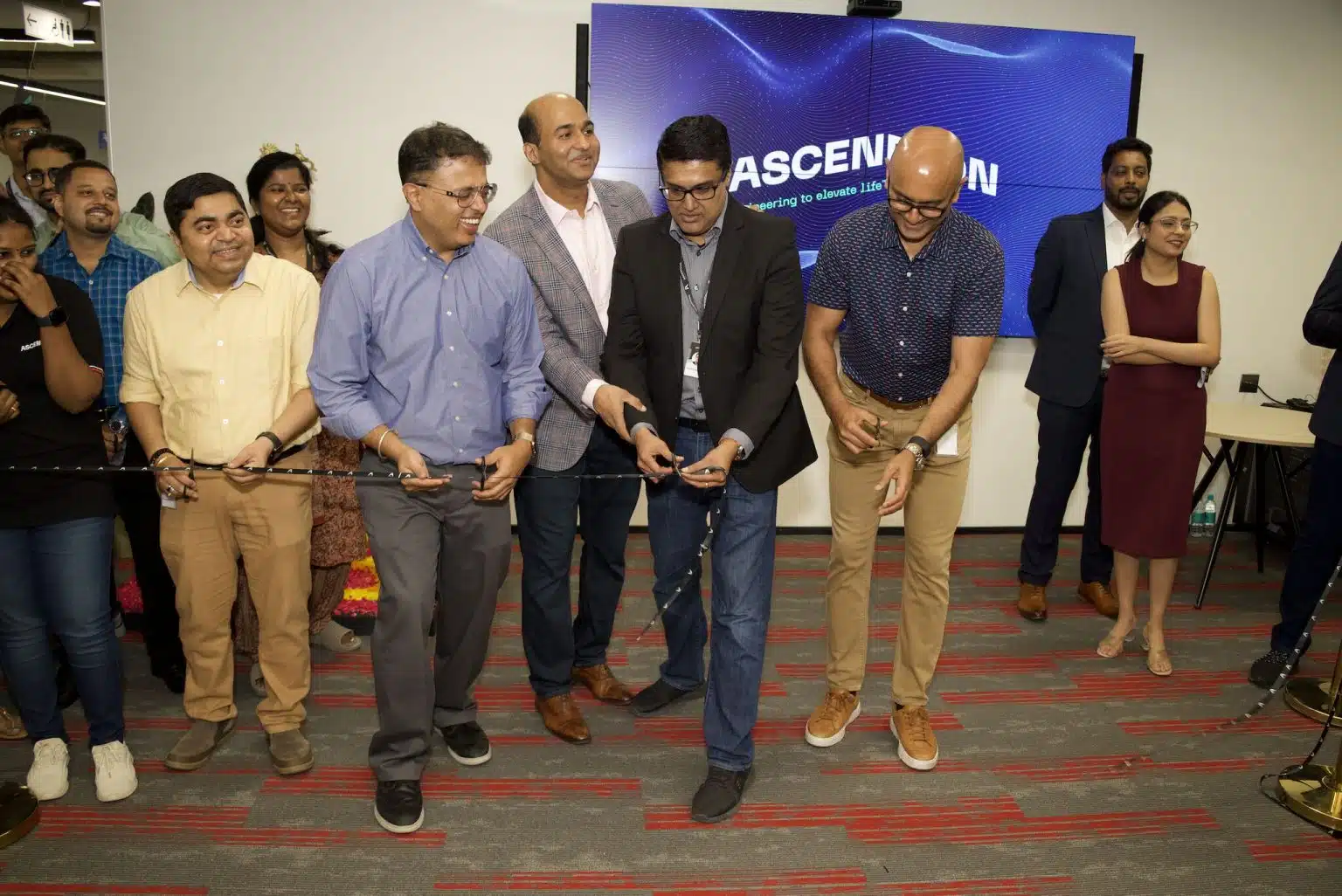
Ascendion has inaugurated its GenAI Studio in Chennai, bringing the city at the forefront of generative AI innovation for global clients. This new facility will leverage Chennai’s rich talent pool and favourable business environment to drive significant advancements in AI.

The Chennai hub is spearheaded by Prakash Balasubramanian, executive vice president of engineering management and head of India engineering operations.

In an interview with AIM, Balasubramanian elaborated on why Chennai was selected as the hub for Ascendion’s AI efforts. “We started with Chennai because we have extremely talented folks here, who possess deep engineering and mathematics knowledge.”

Additionally, key AI and data leaders within the company are already based in Chennai, making it a logical starting point. On a personal note, he added, “I’m from Chennai, and the CEO is from Chennai, so we thought we’d give something back to the city where we’ve all started.”

CEO Karthik Krishnamurthy said, “Our new AI studio in Chennai is filled with expert talent, hands-on technology, and inspiration, all designed to excite, provoke, and generate applied GenAI solutions that will drive business forward and positively impact lives all over the world.”

Balasubramanian said that the company plans to expand to more cities globally and is currently aiming for five more AI studios. The Chennai studio boasts a 3D printed LLM-powered robot, called Diva, for interaction on the front desk.

The Vision for India

The AI studio in Chennai is envisioned as the hub for Ascendion’s global AI innovations. Balasubramanian outlines the primary objectives for the studio. One of them is engineering platform development. The studio will be the birthplace for Ascendion’s engineering platform, AVA+, designed to simplify software engineering.

“All the AI capabilities we are building on this platform will originate from Chennai,” he noted. Critical AI programs will be managed and driven from Chennai. “We are already doing this, but we will continue to drive a lot of the critical programs around AI from here,” Balasubramanian stated.

A key component of Ascendion’s strategy is upskilling its workforce to adeptly handle generative AI.

“We want our engineers to be very good consumers of GenAI, leveraging it to enhance their day-to-day work. We also aim to transform many of our engineers into creators of GenAI, developing LLMs and solving complex business problems,” Balasubramanian explained.

The GenAI studio will also serve as a training ground for new talent. “We are hiring 300 freshers this year, with 150 to 160 of them being trained on AI in Chennai in the next couple of months.”

Along with all this, it will also act as a collaboration hub where clients can bring their problem statements, brainstorm solutions, and leave with a minimum viable product. “It will serve as a client Innovation Centre where we can model solutions and scale them subsequently.”

Michelangelo of AI

Central to Ascendion’s AI strategy is the AVA+ platform, particularly the Michelangelo studio, which dramatically shortens the time from concept to a functional software application. Balasubramanian describes Michelangelo’s capabilities: “In a matter of a couple of hours, you can have a fully functional application from the time you started with just an idea.”

The company has integrated it within their operations and is not serving it as products to its customers.

In a demo with AIM, Balasubramanian showed how Michelangelo allows engineers to upload simple sketches or wireframes and automatically generate functional code, significantly reducing the traditional iterative process that can take weeks. “We believe this can disrupt the way engineering happens, making the process faster, better, and more efficient,” he asserted.

When asked about competition, Balasubramanian emphasised the tangible impact Ascendion’s solutions have made. “We are driving productivity improvements of 30 to 40% on an average, and our clients are seeing significant business benefits,” he said.

Ascendion’s proactive approach to integrating AI into all aspects of software engineering sets it apart in a rapidly evolving market.

Ascendion is committed to staying ahead of the curve in AI innovation. “The field of AI is very hot, and we are going to see more and more innovation in the coming days. We are prepared to disrupt the traditional ways of working and lead the charge in AI-driven engineering,” Balasubramanian concludes.

Along similar lines, Accenture and Tech Mahindra also unveiled their Generative AI Studios last year to boost its employees’ generative AI confidence and upskill them.

The post Ascendion Elevates Chennai as Global Hub for GenAI Innovation appeared first on AIM.