Can governments turn AI safety talk into action?

AI depicted on screens

At the Asia Tech x Singapore 2024 summit, several speakers were ready for high-level discussions and heightened awareness about the importance of artificial intelligence (AI) safety to turn into action. Many are looking to prepare everyone from organizations to individuals with the tools to deploy this tech properly.

Also: How to use ChatGPT to analyze PDFs for free

"Pragmatic and practical move to action. That's what is missing," said Ieva Martinekaite, head of research and innovation at Telenor Group, who spoke to ZDNET on the sidelines of the summit. Martinekaite is a board member of Norwegian Open AI Lab and a member of Singapore's Advisory Council on the Ethical Use of AI and Data. She also served as an Expert Member in the European Commission's High-Level Expert Group on AI from 2018 to 2020.

Martinekaite noted that top officials are also starting to recognize this issue.

Delegates at the conference, which included top government ministers from various nations, quipped that they were simply burning jet fuel by attending high-level meetings on AI safety summits, most recently in South Korea and the UK, given that they have little yet to show in terms of concrete steps.

Martinekaite said it is time for governments and international bodies to start rolling out playbooks, frameworks, and benchmarking tools to help businesses and users ensure they are deploying and consuming AI safely. She added that continued investments are also needed to facilitate such efforts.

AI-generated deepfakes, in particular, carry significant risks and can impact critical infrastructures, she cautioned. They are already a reality today: images and videos of politicians, public figures, and even Taylor Swift have surfaced.

Also: More political deepfakes exist than you think

Martinekaite added that the technology is now more sophisticated than it was a year ago, making it increasingly difficult to identify deepfakes. Cybercriminals can exploit this technology to help them steal credentials and illegally gain access to systems and data.

"Hackers aren't hacking, they're logging in," she said. This is a critical issue in some sectors, such as telecommunications, where deepfakes can be used to penetrate critical infrastructures and amplify cyber attacks. Martinekaite noted that employee IDs can be faked and used to access data centers and IT systems, adding that if this inertia remains unaddressed, the world risks experiencing a potentially devastating attack.

Users need to be equipped with the necessary training and tools to identify and combat such risks, she said. The technology to detect and prevent such AI-generated content, including text and images, also needs to be developed, such as digital watermarking and media forensics. Martinekaite thinks these should be implemented alongside legislation and international collaboration.

However, she noted that legislative frameworks should not regulate technology, or AI innovation could be stifled and impact potential advancements in healthcare, for example.

Instead, regulations should address where deepfake technology has the greatest impact, such as critical infrastructures and government services. Requirements such as watermarking, authenticating sources, and putting guardrails around data access and tracing can then be implemented for high-risk sectors and relevant technology providers, Martinekaite said.

According to Microsoft's chief responsible AI officer Natasha Crampton, the company has seen an uptick in deepfakes, non-consensual imagery, and cyber bullying. During a panel discussion at the summit, she said Microsoft is focusing on tracking deceptive online content around elections, especially with several elections taking place this year.

Stefan Schnorr, state secretary of Germany's Federal Ministry for Digital and Transport, said deepfakes can potentially spread false information and mislead voters, resulting in a loss of trust in democratic institutions.

Also: What TikTok's Content Credentials mean for you

Protecting against this also involves a commitment to safeguarding personal data and privacy, Schnorr added. He underscored the need for international cooperation and technology companies to adhere to cyber laws put in place to drive AI safety, such as the EU's AI Act.

If allowed to perpetuate unfettered, deepfakes could affect decision-making, said Zeng Yi, director of the Brain-inspired Cognitive Intelligence Lab and The International Research Center for AI Ethics and Governance, Institute of Automation, Chinese Academy of Sciences.

Also stressing the need for international cooperation, Zeng suggested that a deepfake "observatory" facility should be established worldwide to drive better understanding and exchange information on disinformation in an effort to prevent such content from running rampant across countries.

A global infrastructure that checks against facts and disinformation also can help inform the general public on deepfakes, he said.

Singapore updates gen AI governance framework

Meanwhile, Singapore has released the final version of its governance framework for generative AI, which expands on its existing AI governance framework, first introduced in 2019 and last updated in 2020.

The Model AI Governance Framework for GenAI sets a "systematic and balanced" approach that Singapore says balances the need to address GenAI concerns and drive innovation. It encompasses nine dimensions, including incident reporting, content provenance, security, and testing and assurance, and provides suggestions on initial steps to take.

At a later stage, AI Verify, the group behind the framework, will add more detailed guidelines and resources under the nine dimensions. To support interoperability, they will also map the governance framework onto international AI guidelines, such as the G7 Hiroshima Principles.

Also: Apple's AI features and Nvidia's AI training speed top the Innovation Index

Good governance is as important as innovation in fulfilling Singapore's vision of AI for good, and can help enable sustained innovation, said Josephine Teo, Singapore's Minister for Communications and Information and Minister-in-charge of Smart Nation and Cybersecurity, during her speech at the summit.

"We need to recognize that it's one thing to deal with the harmful effects of AI, but another to prevent them from happening in the first place…through proper design and upstream measures," Teo said. She added that risk mitigation measures are essential, and new regulations that are "grounded on evidence" can result in more meaningful and impactful AI governance.

Alongside establishing AI governance, Singapore is also looking to grow its governance capabilities, such as building a center for advanced technology in online safety that focuses on malicious AI-generated online content.

Users, too, need to understand the risks. Teo noted that it is in the public interest for organizations that use AI to understand its advantages as well as its limitations.

Teo believes businesses should then equip themselves with the right mindset, capabilities, and tools to do so. She added that Singapore's model AI governance framework offers practical guidelines on what should be implemented as safeguards. It also sets baseline requirements on AI deployments, regardless of the company's size or resources.

According to Martinekaite, for Telenor, AI governance also means monitoring its use of new AI tools and reassessing potential risks. The Norwegian telco is currently trialing Microsoft Copilot, which is built on OpenAI's technology, against Telenor's own ethical AI principles.

Asked if OpenAI's recent tussle involving its Voice Mode had impacted her trust in using technology, Martinekaite said major enterprises that run critical infrastructures such as Telenor have the capacity and checks in place to ensure they are deploying trusted AI tools, including third-party platforms such as OpenAI. This also includes working with partners such as cloud providers and smaller solution providers to understand and learn about the tools it is using.

Telenor created a task force last year to oversee its adoption of responsible AI. Martinekaite explained that this entails establishing principles its employees must observe, creating rulebooks and tools to guide its AI use, and setting standards its partners, including Microsoft, should observe.

These are meant to ensure the technology the company uses is lawful and secure, she added. Telenor also has an internal team reviewing its risk management and governance structures to take into consideration its GenAI use. It will assess tools and remedies required to ensure it has the right governance structure to manage its AI use in high-risk areas, Martinekaite noted.

Also: Businesses' cloud security fails are 'concerning' as AI threats accelerate

As organizations use their own data to train and fine-tune large language models and smaller AI models, Martinekaite thinks businesses and AI developers will increasingly discuss how this data is used and managed.

She also thinks the need to comply with new laws, such as the EU AI Act, will further fuel such conversations, as companies work to ensure they meet the additional requirements for high-risk AI deployments. For instance, they will need to know how their AI training data is curated and traced.

There is a lot more scrutiny and concerns from organizations, which will want to look closely at their contractual agreements with AI developers.

Artificial Intelligence

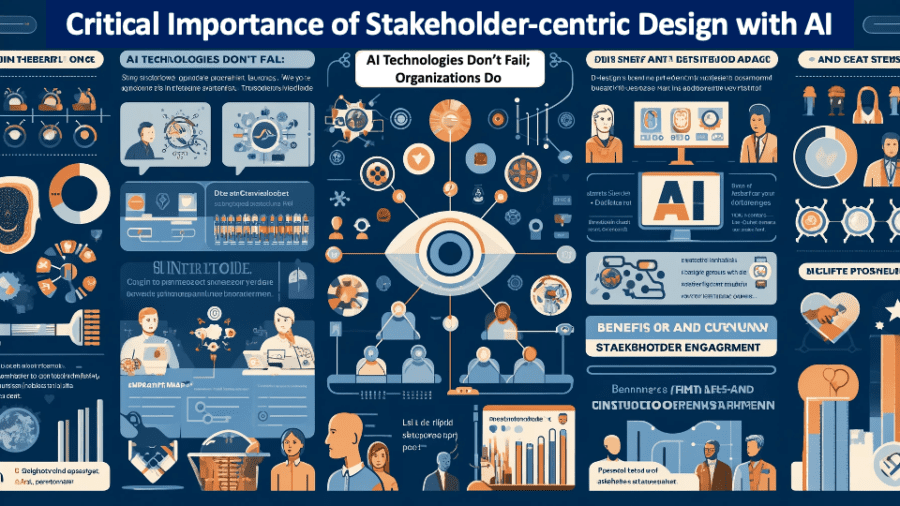
Critical Importance of Stakeholder-centric Design with AI

Slide1-2

“It’s not the AI technologies that fail; it’s the organization.”

That might be a somewhat controversial viewpoint, but it emphasizes an important truth: Artificial Intelligence (AI) is a tool, not a living entity (apologies to movie enthusiasts) that will do what it is instructed and trained to do, thanks to the AI Utility Function. To ensure that AI behaves as intended, the organization must collaborate and clearly define the AI model’s intentions, desired outcomes, and key performance indicators (KPIs)/metrics to measure the effectiveness of intentions and outcomes. To ensure AI success, the AI definition and design process must involve all stakeholders impacted by the decisions and actions of the AI model and drive the necessary cross-organizational alignment.

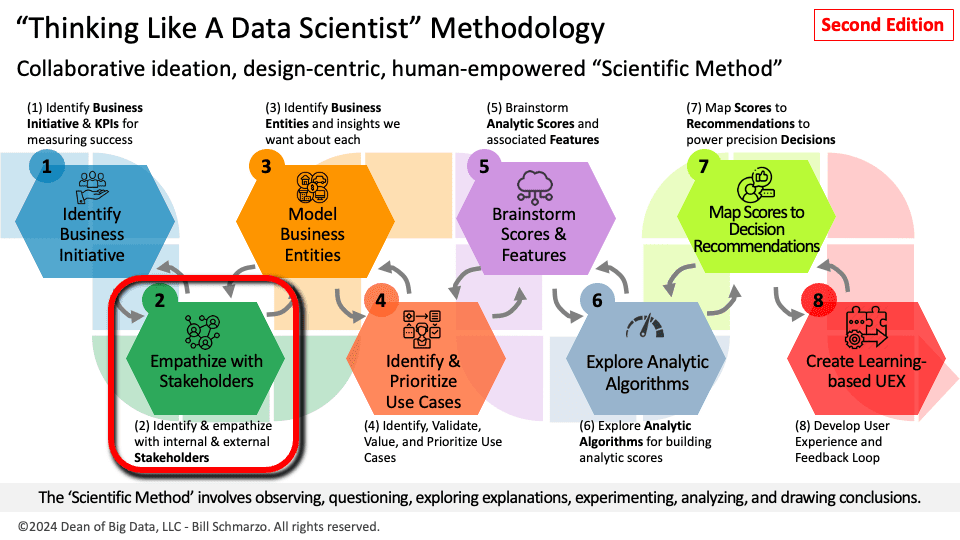
The vital importance of early stakeholder engagement in the definition and design of our AI models is why “Empathize with Stakeholders” is the second step in the “Thinking Like a Data Scientist” (TLADS) methodology; after we clearly understand and assess the targeted business initiative or business challenge we are seeking to address with AI (Figure 1).

Slide2-2

Figure 1: The Art of Thinking Like a Data Scientist – Second Edition

Remember, it’s never too early to start driving the organizational alignment and empowerment necessary to ensure that your AI models deliver more relevant, meaningful, responsible, and ethical outcomes.

Data Science Development Challenges

Mastering data science to leverage AI tools to transform raw data into actionable insights that enhance customer experience, products, services, and operations is a complex process fraught with numerous challenges, including:

  • Dealing with messy and incomplete data necessitates sophisticated data cleaning, preprocessing, and transformation techniques to ensure data quality and reliability.
  • Mastering many tools and technologies, including programming languages like Python and R, data manipulation frameworks like Pandas and SQL, and machine learning libraries like TensorFlow and Scikit-learn.
  • Mastering various data engineering tasks, including data ingestion, storage, and transformation, ensures a robust and scalable data pipeline.

Yeah, a lot can go wrong on the data science journey.

To increase the chances of successfully navigating the AI/Data Science journey, one should start, deliver, and continuously learn in close collaboration with key stakeholders. Embrace a stakeholder-centric approach to data science and AI development.

Embracing Stakeholder-centric AI Development

Stakeholders are those constituents or functions (Customers, Partners, Sales, Marketing, Finance, Logistics, etc.) that either impact or are impacted by the targeted business initiative.

One of the keys to successfully navigating the “Thinking like a data scientist” process is identifying and empathizing with the key stakeholders who influence organizational value creation. Unfortunately, many AI and data science projects severely underinvest in stakeholder engagement. This disconnect leads to several issues:

  • The initial requirements gathered from stakeholders may be incomplete or misinterpreted, leading to models that do not fully address the operational needs in light of the stakeholders’ intentions and desired outcomes.
  • The lack of continuous stakeholder input means the model development does not reflect essential changes in operational processes or priorities.
  • Stakeholders may feel a lack of ownership and connection to the project, which results in resistance to adopting the final AI solutions.

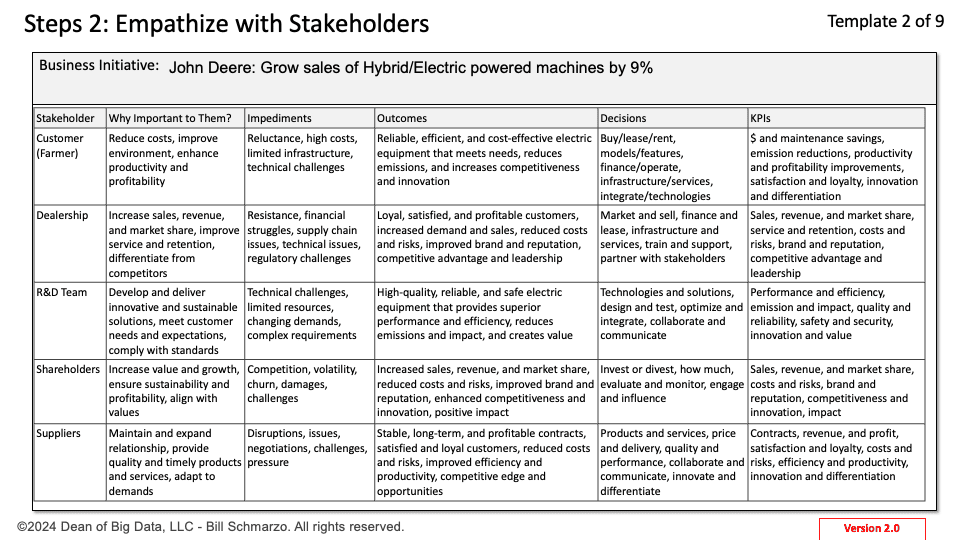
To address these issues, I use several design thinking techniques – such as Personas, Journey Maps, and Empathy Maps – to ensure that key stakeholders are involved and engaged early in defining, designing, and implementing AI. The TLADS “Empathize with Stakeholders” design canvas documents the outcomes (Figure 2).

Slide4-3

Figure 2: “Empathize with Stakeholders” Design Canvas

Figure 2 shows the “Empathize with Stakeholders” design canvas my Iowa State University MBA students completed to support John Deere’s business initiative to increase hybrid and EV equipment sales.

  • Identify Key Stakeholders: Recognize individuals or groups who either impact or are impacted by the targeted business initiative. For example, in the John Deere initiative to increase hybrid/electric product sales, stakeholders include customers, dealers, R&D teams, shareholders, and suppliers.
  • Understand Business Initiative Importance: Document why the initiative is essential for each stakeholder. For instance, customers seek better cost efficiency and environmental sustainability, while dealers are interested in new revenue streams and maintaining strong customer relationships.
  • Identify Stakeholder Impediments: Document any factors that might hinder stakeholders from realizing the benefits of the targeted business initiative. For example, lacking training on the resulting analytics could limit stakeholder benefits.
  • Brainstorm Stakeholders’ Desired Outcomes: Capture what success looks like from each stakeholder’s perspective. For John Deere’s initiative, desired outcomes include high-quality, efficient electric machines for customers, increased sales for dealers, and innovative advancements for the R&D team.
  • Identify Key Stakeholder Decisions: Determine the critical decisions stakeholders must make regarding the business initiative. For example, customers might need to choose the best models that suit their operational needs. In contrast, dealers might need to determine the new electric products’ inventory levels and marketing strategies.
  • Brainstorm KPIs and Metrics: Identify the key performance indicators (KPIs) and metrics each stakeholder will use to measure progress and success. Customers might focus on cost savings and maintenance efficiency, while dealers might look at sales growth and customer satisfaction ratings.

Summary: Five Benefits of Early Stakeholder Engagement

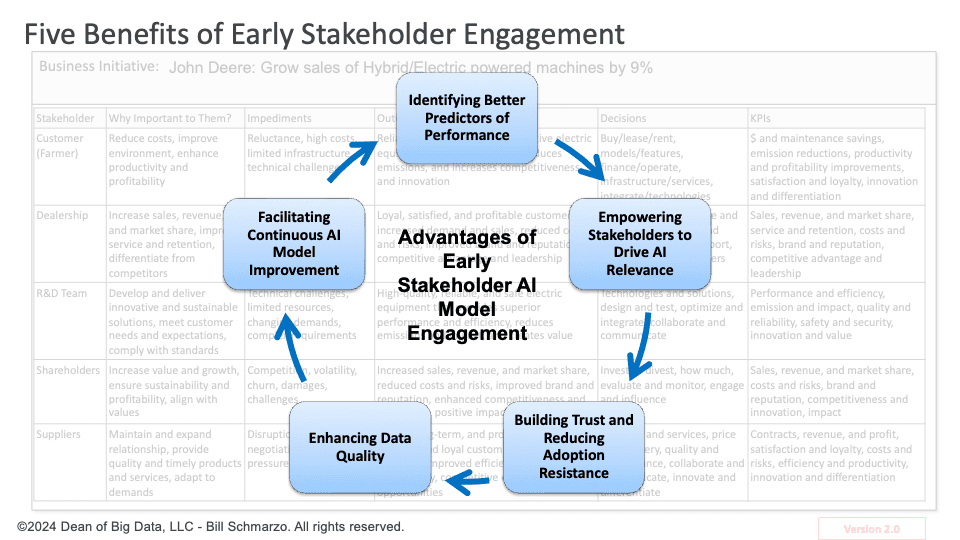
User adoption starts during the AI model definition and development processes. This early engagement helps identify more effective machine learning features, uncover potential usability issues, and align the AI model outputs with user needs and expectations. The five benefits of early stakeholder engagement include (Figure 3):

  1. Identifying Better Predictors of Performance. Stakeholders possess invaluable “tribal” knowledge about the variables, metrics, and features that can serve as better predictors of performance. Their hands-on experience and domain expertise provide critical insights for crafting a more holistic and relevant AI Utility Function.
  2. Empowering Stakeholders to Drive AI Relevance. Involving stakeholders early in the model definition and development phases fosters a sense of ownership and ensures that the AI models address real business needs. This ultimately leads to more robust stakeholder adoption of the analytic insights.
  3. Building Trust and Reducing Adoption Resistance. Early involvement of stakeholders helps build trust and reduce resistance to change. When stakeholders are part of the AI definition and development process, they are more likely to understand and trust the models, leading to smoother implementation and higher acceptance rates.
  4. Enhancing Data Quality. Stakeholders can provide critical insights into data sources and quality. Their input can help identify gaps, inconsistencies, and areas for improvement in the data, ensuring that the models are built on high-quality, comprehensive datasets.
  5. Facilitating Continuous AI Model Improvement. Stakeholders’ feedback is vital for fine-tuning AI models to support operational execution. Ongoing collaboration ensures that the AI models remain relevant and practical, ultimately leading to improved operational outcomes.
Slide5-3

Figure 3: Five Benefits of Early Stakeholder AI Model Engagement

Understanding and empathizing with stakeholders is crucial for the success of AI initiatives. Organizations can use stakeholder insights early and continuously to create more accurate and relevant AI models.

This MagSafe accessory lets you use iOS 18’s most underrated feature before it’s released

Magmo Pro Magnetic Snap-On Call Recorder for iPhone

ZDNET's key takeaways

  • The Magmo Pro Magnetic Snap-On Call Recorder is available on Amazon for $129 in Starlight (white), Navy, and Space Black.
  • If you want to record phone calls without relying on a third-party app or waiting until iOS 18 finally launches, this gadget will get the job done.
  • The device excels at recording, not transcribing, so depending on your needs, it may not be worth the investment.

Recording a phone call can be handy in many instances, such as conducting an interview or collecting evidence. However, on iPhones, there is currently no native or easy way to record phone calls. This gadget can help.

Users have highly requested the ability to record calls on an iPhone, so much so that at Apple's Worldwide Developer's Conference (WWDC) this year, the company unveiled a feature that uses Apple Intelligence to record, transcribe, and summarize iPhone calls.

Also: Apple's iOS 18 will let you record phone calls without a third-party app

However, iOS 18 will not be released until the fall, and not all iPhone users will be eligible for the full iOS 18 experience. Many advanced Apple Intelligence features require the A17 Pro chip, which is currently only found on the iPhone 15 Pro and iPhone Pro Max.

Until then, users interested in recording calls will either need to record from a separate device or rely on third-party phone call apps that usually conference into the call and let the parties know it is present, ruining the discreetness factor. That is where the Magmo Pro iPhone Call Recorder can help.

View at Amazon

I first encountered the gadget at CES, which was recognized as a CES 2024 Innovation Awards Honoree in the Mobile Devices, Accessories & Apps category. The gadget uses MagSafe to snap on the back of your iPhone and record calls for you. Sound too good to be true? Well, I put it to the test.

In the box, you get the accessory and a USB-C to USB-A charger. The charger is impressively thin at 6.88mm, much thinner than any of my MagSafe power banks, and very light, weighing only 50g. It takes no time to fully charge.

Once you snap the device onto the back of your phone, follow the directions on the screen and pair it to Bluetooth. Then, you can set the device in Auto mode, which records every call you get automatically, or manual mode, in which you move the toggle to record a call. I started with auto mode.

The first call I recorded was promising but could have been better. The device started recording automatically when I got the call, which I loved. However, the other person on my call sounded very distant, and you could hear some muffling from me accidentally placing my hand on the mic.

Also: How to record a call on your iPhone (and check if it's legal in your state)

In the next call, I made the volume as high as possible and held my phone so that my palm didn't block the microphone. You'll want to be mindful of this for the best results. The quality of the call was significantly better, and when I played it back, the call sounded as if it had been recorded natively, even though it wasn't.

Despite accomplishing its recording function well, there are downsides to the device, including the fact that the battery life dies quickly when it is in Auto mode, which it even warns you about, as seen below. I don't find this to be a deal breaker because I can't think of many situations where you'd need every call to be recorded for long periods.

There's also a manual mode that greatly reduces battery consumption, and it worked as advertised. You simply switch the toggle on the back of the device when you want to start recording. Even if the accessory isn't paired to your phone at the time of recording, it still syncs the on-device recording to your app once you do.

One downside is the app's user interface, which looks like something I would have found on my iPod Touch in 2009. It isn't intuitive, looks clunky, and is unnecessarily difficult to complete simple tasks.

Also: Don't wait for iOS 18's AI. ChatGPT offers these same 4 features now

For example, to listen to your recordings, you first need to refresh your app, click on the recording you need to download, click through several popups, and then download it to give it a listen. Again, this isn't a dealbreaker for me because all I want is the ability to listen to crisp phone call recordings and export them.

Lastly, the app's transcription feature, which is still in beta, shows promise but is unreliable. To power the AI transcriptions, the application uses "Apple's very own API to transcribe audio to written text," as stated below. As a result, the transcriptions are just as unformatted and jumbled as the ones found on your iPhone's Voicemails. Here's to hoping they'll improve with time.

The biggest problem with the Magmo Pro is that, at the moment, the device doesn't transcribe the entire call but rather just a paragraph. Magmo says the recorder will be upgraded shortly, but it may not be suitable for you if you want a transcription first, recording second device.

ZDNET's buying advice

If you need to record phone calls daily, whether for professional or personal reasons, the Magmo Pro Call Recorder can help you do so discreetly. Of course, you would still have to check your state's laws to see if it is legal to record another party without disclosing the fact.

As a reporter, I am excited because, typically, I would have to record phone interviews on another device, such as my iPad or Mac, and now all I have to do is slap the recorder on the back of my phone. However, if you buy it for accurate transcriptions, as advertised, you may want to reconsider because the technology is not ready yet.

Featured reviews

Why Developers Are Finally Loving Apple

A few years ago, the developer community was divided, with most considering Apple to be extremely hostile to developers. “As a developer, I hate it. As a consumer, I love it,” said one user. However, Apple’s developments over the past year are changing that perception.

At the recently concluded Apple WWDC, where AI updates were announced, a key theme that emerged was Apple’s continuous focus on making the company developer-centric.

“Upgraded App Intents API will unlock Apple devices as the ultimate playground for AI agents,” said Alex Reibman, co-founder and CEO of AgentOps, an AI agent startup.

Apple Opens Up For Developers

With a plethora of new advancements for developers to be intrigued by, the announcement of the latest visionOS 2, which is a major upgrade for Apple Vision Pro, aims to create a much better experience.

Apple’s vice president Mike Rockwell said, “Apple Vision Pro delivers revolutionary experiences for users and developers, and we’re excited to advance spatial computing even further with visionOS 2 just months after its initial release.

Vision OS 2 offers new APIs and frameworks, enabling developers to create sophisticated spatial apps. The advanced volumetric APIs enhance the spatial experience by utilising 3D space effectively, allowing objects to appear closer or farther from the user.

Developer Customisation

Additionally, the complex 3D apps can run side by side with other regular apps in the same space. Developers can resize the 3D spaces using a new tool called windowResizability in SwiftUI. Moreover, developers can add ornaments (decorative objects) making the visual experience more appealing.

TabletopKit allows developers to quickly create apps for flat surfaces, like workstations or board and card games. It offers collaborative experiences for manipulating virtual cards, pieces, and game boards, defining their arrangement and providing tools to customise the game layout and appearance.

Developers can leverage these built-in capabilities instead of building them from scratch, allowing them to focus on the core gameplay or collaborative aspects of their application.

The Apple Vision Pro has over 2,000 special apps and more than 1.5 million iOS and iPad OS apps that work with it. Upgrading it with visionOS 2 helps developers make better and more interesting apps that will be easy to share.

Developers Can Innovate

To level up the experience in AirPods while playing games, Apple expanded the personalised Spatial Audio, to enhance gaming experiences. A new API has been built that easily delivers the most immersive listening experience.

Early last week, it was announced at WWDC that the members of the Apple developer programme can access the AirPods developer beta starting that day.

Last year Apple also introduced Smart Stack, a way to keep connected to important information. Meanwhile, with WatchOS 11, developers can use context cues like time, date, location, daily routines etc. to make the widget smarter, as to show the right widgets at the right time.

Apps that support Live Activities on iOS will now automatically display them within the Smart Stack on the Apple Watch as well.

Moreover, a new Double Tap API allows developers to define primary actions within their watchOS apps that users can trigger with just a double tap gesture. These new APIs and capabilities give developers more tools to make their watchOS apps more contextually aware, interactive, and accessible.

Apple has made it possible for their computers, iPhones, and iPads with certain chips to play more modern games. For game developers, this is great news because they can now create games that work on all these devices without having to make separate versions for each.

What Do Users Want?

There are several discussions on Hacker News, appreciating the Vision Pro for its immersive and high-quality viewing experience for movies, TV shows, and video content. Some employ it in their work setup as an external display for coding, emails, and other tasks, valuing its large screen.

However, multiple users have returned or stopped using the Vision Pro due to factors like a lack of content, discomfort, control issues, and inability to use third-party accessories.

Interestingly, Apple has been developer-centric for a while now. The company expanded opportunities for developers to engage with experts in 2023, connecting creators from over 160 countries. Ahead of WWDC24, it also launched new ways to reach developers worldwide, including updated developer forums, pathways, and more.

At the same time, other big tech companies are also making strides to bridge this gap. For example, Microsoft and OpenAI have both launched initiatives aimed at upskilling developers in AI in India.

Exploring Generative AI Responsibly with SAS

Sponsored Content

Courses with SAS

There’s no doubt that AI adoption is booming, and demand for AI and Machine Learning Specialists is expected to grow by 40%, or 1 million jobs, by 2027 (World Economic Forum, 2023 Future of Jobs Report). With this growth also comes awareness and responsibility. Read on to learn more about Generative AI and Responsible Innovation.

You have seen the impact of generative AI at home, at work, or in school. Whether it’s kick-starting the creative process, outlining a new approach to a problem, or making some sample code, if you’ve used generative AI tools a few times, then you know that the hype around Generative AI, is more than a little overstated. It has enormous potential for practical use, but it is important to know when it is and is not useful.

Generative AI, as part of a broader analytics and AI strategy, is transforming the world. Less well-known is how those techniques work. A data scientist can make better use of these tools by understanding the models behind the machine, and how to combine these techniques with others in the analytics and AI toolbox. Understanding a bit about types of GenAI systems, synthetic data generation, transformers, and large language models helps to enable smarter, more effective use of the methods, and hopefully prevents you trying to cram generative AI into places where it’s not likely to be helpful.

Want to learn more?

The Free E-Learning Course's by SAS

Generative AI Using SAS

SAS developed the free e-learning course, Generative AI Using SAS, for analytics professionals who need to know more than how to write a prompt in an LLM. If you want to learn a bit about how generative AI works and how it can be integrated into the analytics lifecycle, then check it out.

Knowing how to use generative AI is not enough; it is just as important to know how to develop AI systems responsibly. Any sort of AI, and especially generative AI, may pose risks for business, for humanity, for the environment, and more. Sometimes the risks of AI are negligible, and sometimes they are unacceptable. There are myriad real-world examples illustrating both the importance of assessing and mitigating bias and risk, as well as the need for trustworthy AI.

Responsible Innovation and Trustworthy AI

SAS developed another free e-learning course, Responsible Innovation and Trustworthy AI, for data scientists, business leaders, analysts, consumers, and targets of AI systems. Anyone who implements AI should have a fundamental understanding of the principles of trustworthy AI, including transparency, accountability, and human-centricity.

The urgency to build trustworthy AI is growing with the passage of the European Union Artificial Intelligence Act in March 2024 and the US Executive Order on Safe, Secure, and Trustworthy Artificial Intelligence in October 2023. Just as GDPR has ushered in industry-wide reforms in data privacy since 2016, the EU AI Act impacts not only companies in the EU, but companies that do business with EU citizens.

In other words, nearly all of us. While the idea of legislation makes some business leaders uncomfortable, it's great to see governments take seriously the risks and opportunities of AI. Such regulations are designed to keep everyone safe from unacceptable and high-risk AI systems, while encouraging the responsible innovation of low risk AI to make the world better.

Expand your AI knowledge by taking both Generative AI Using SAS and Responsible Innovation and Trustworthy AI from SAS.

In order to learn how generative AI works and how it can be integrated into the analytics lifecycle, we must also gather an understanding of the principles of trustworthy AI.

More learning resources:

  • What is Generative AI?
  • Browse the SAS learning catalog at learn.sas.com
  • Learn more about Responsible Innovation
  • Free e-book: A Comprehensive Approach to Trustworthy AI Governance

More On This Topic

  • SAS Analytics Pro – now available for on-site or containerized…
  • The Future of AI: Exploring the Next Generation of Generative Models
  • Exploring Data Cleaning Techniques With Python
  • Exploring Unsupervised Learning Metrics
  • Exploring Tree of Thought Prompting: How AI Can Learn to Reason…
  • Exploring the Power and Limitations of GPT-4

Databricks is Taking the Ultimate Risk of Building ‘USB for AI’ 

Databricks acquiring Tabular was the talk of the Bay Area at the recent Data + AI Summit.

Whether by coincidence or not, the announcement was made during Snowflake’s Data Cloud Summit, held last week.

Databricks chief Ali Ghodsi definitely has some answers, or maybe not?

“Now, at Databricks, we have employees from both of these projects, Delta and Iceberg. We really want to double down on ensuring that Delta Lake UniForm has full 100% compatibility and interoperability for both of those,” Ghodsi said, admitting they don’t understand all the intricacies of the Iceberg format, but the original creators of Apache Iceberg do.

Talking about Databricks’ mission to democratise data and AI, Ghodsi started his keynote by saying that every company today wants GenAI but at the same time everybody is worried about the security and privacy of their data estate which is highly fragmented.

He pointed out that the data estate of every company is placed into several data warehouses and the data is siloed everywhere. This ends up bringing a lot of complexity and huge costs to the companies and ultimately gets them locked into these proprietary system silos.

Databricks’ Delta Lake Project (+ Apache Iceberg) to the Rescue!

With a focus on addressing these issues, Databricks announced the open-source Delta Lake Project a few years back.

Ghodsi explained that the idea was to let users own their data and store it in data lakes where any vendor can then plug their data platforms into that data, allowing users to decide which platform suits them best. This removes lock-in, reduces the cost, and also lets users get many more use cases by giving them the choice to use different engines for different purposes if they want.

“This was our vision and we almost succeeded but unfortunately there are now two camps. At Databricks we have Delta Lake, but a lot of other vendors are using this other format called Apache Iceberg,” said Ghodsi.

Delta Lake and Apache Iceberg emerged as the two leading open-source standards for data lakehouse formats. Despite sharing similar goals and designs, they became incompatible due to their independent development.

Over time, various open-source and proprietary engines adopted these formats. However, they typically adopted only one of the standards, and frequently, only aspects of it. This selective adoption effectively fragmented and siloed enterprise data, undermining the value of the lakehouse architecture.

Now, with the Tabular acquisition, Databricks intends to work closely with the Iceberg and Delta Lake communities to bring interoperability to the formats themselves as highlighted by Ghodsi.

Tabular, Inc, a data management company was founded by Ryan Blue, Daniel Weeks, and Jason Reid. Blue and Weeks had developed the Iceberg project at Netflix and donated it to the Apache Software Foundation.

As the largest contributor to Iceberg, Tabular is seen as the company driving Iceberg, playing a key role in advancing Iceberg within data management frameworks.

“I’ve known Ryan for a long time. We worked closely with him when he was back at Netflix, and some of the team members were working with him even before that when he was at Cloudera. So it’s been a very close collaboration,” Ghodsi said.

Databricks’ UniForm, now generally available, offers interoperability among Delta Lake, Iceberg, and Hudi. It supports the Iceberg restful catalogue interface so that companies can use their existing analytics engines and tools across all their data.

Furthermore, with the inclusion of the original Iceberg team, the company plans to expand the scope and ambitions of Delta Lake UniForm. It envisions bringing both the Delta Lake and Iceberg formats closer in the future to a point where their differences won’t matter, according to Ghodsi.

So basically, with the Tabular acquisition, Databricks seems to be trying to build this pendrive or USB port of sorts that can be plugged into AI systems in the future — achieving 100% interoperability.

“It will simplify the developer experience and allow them to move up the stack in the value chain. As, instead of worrying about which version of Iceberg or Delta they are using, developers can be rest assured that all of that is solved through the UniForm format,” said Databricks’ vice president of field engineering APJ Nick Eayrs in an exclusive interview with AIM.

Eayrs explained that with this, developers will now be able to spend more time on analysis, enrichment, and transformation of the data rather than worrying about version conflicts.

“Our commitment is reinforced to open source. We have open-sourced our Unity Catalog, and we continue to build the default open standard when it comes to the data format,” he added.

The Other Side of the Acquisition

The tabular acquisition development came just after Databricks’ competitor Snowflake announced it had adopted Apache Iceberg tables as a native format and also introduced Polaris, a catalogue for Iceberg tables accessible by any data processing engine that could read the format, such as Spark, Dremio, and even Snowflake itself.

In addition, Microsoft announced an expanded partnership with Snowflake. As part of this, Microsoft Fabric’s OneLake will now support Snowflake’s Iceberg tables and facilitate bi-directional data access between Snowflake and Fabric.

Databricks’ decision to acquire Tabular was spurred by customer demand for better interoperability among data lake formats. People have also weighed in on the significance of Databricks’ Tabular purchase in light of Snowflake’s activity.

While the acquisition of Tabular indicates that both Databricks and Snowflake are positioning for the influence of AI on data infrastructure, the purchase has clearly put new pressure on Databricks’ competitors including Snowflake.

When asked if Databricks is planning to work closely with Snowflake to bring Iceberg and Delta Lake together, Ghodsi added, “Governance in open-source projects involves working closely with the community and those that have committers in the project. And if some of these committers happen to be employed by Snowflake, we’ll work with them as well.”

Every new feature Apple unveiled for iPhone, iPad, Mac, and more this fall (including AI)

Apple Watch Ultra 2, captured by iPhone 15 Pro Max

Apple's 2024 Worldwide Developer Conference (WWDC) earlier this week shaped up to be one of the company's biggest events in recent years. The opening keynote, which took place on Monday, focused almost entirely on the buzzword we can't stop talking about — artificial intelligence (AI).

Also: Everything to know about Apple's AI features coming to iPhones, Macs, and iPads

After trailing behind major players like OpenAI, Google, and Microsoft, Apple unveiled a slew of AI features spread across the company's most popular operating systems. While AI was the event's main focus, Apple executives also announced this year's software upgrades for the iPhone, iPad, Apple Watch, Mac, and Vision Pro.

If you couldn't tune into the two-hour-long event, ZDNET has you covered. Here's a complete breakdown of all the announcements from earlier this week.

Apple Intelligence (AI)

  • Apple unveiled what it calls its new "personal intelligence" system under the name Apple Intelligence. The release puts generative models at the heart of the ecosystem of Apple devices.

  • With Apple Intelligence, your iPhone can prioritize notifications to ensure you get notified only when it's crucial throughout your day.

  • The release includes writing tools that leverage AI, including rewriting, proofreading, and summarizing text features available across mail, keynotes, third-party apps, and more.

  • Users can now create personalized images in the photo library, including sketches, illustrations, and animations. This feature is available in Messages, Apps, Freeform, Keynote, and Pages.

  • Apple Intelligence can tap into tools and carry out tasks on your behalf, such as "Show me all the photos," "Play the podcast," or "Pull the files that my coworker shared with me last week."

  • Because it's grounded in your personal information and context, and can retrieve data from across your apps and reference the content on your screen, Apple Intelligence is positioned to be your personal assistant.

  • Apple emphasized the safety and privacy precautions built into Apple Intelligence, particularly for on-device intelligence processing. The company touted the security of Apple's silicon, A17 Pro, and its M family of chips (M1, M2, M3, and M4).

  • For tasks that are too large for on-device processing and need to be completed in the cloud, Apple unveiled Private Cloud Compute, which protects users' privacy by running on servers specially created using Apple Silicon. When users make requests, Apple Intelligence first tests on-device capability, but calls on Private Cloud Compute if the task requires more power. Apple reiterated that user data is never stored or sold to external parties.

  • Siri finally got the AI makeover it deserves, first with a new look: when tapped, light wraps around the edges of your screen. Siri can now better understand users, even if they stutter, due to more advanced natural language processing (NLP). It now has conversational context, remembering what you just said and using it to complete the next task. Users can also type requests to Siri. Because it has in-depth product knowledge, Siri can answer questions about functionality on iPad, iPhone, and Mac. Siri will also have Apple Intelligence's on-screen awareness, allowing it to act on what it sees. The voice assistant can also take actions across apps, including photo editing. With access to your personal context, Siri can understand and complete new commands, such as pulling your driver's license information from a photo and inputting it into a form. The Siri updates are coming to iPad and Mac, too.

  • Apple Intelligence also powers new features in Mail, including Rewrite, which offers users different versions of what they have already drafted. Suggestions are shown in-line, and Proofread edits forgrammar, word choice, and sentence structure. You can also use Summarize to convert your text into bullet points. Smart Reply identifies relevant selections of an email and uses them to help craft a custom message. Summaries will now appear at the top of emails, making browsing an inbox easier. Apple Intelligence can even help prioritize your emails, placing what is most important at the top of your inbox.

  • There is an all-new focus option: reduce interruptions. When in this setting, your phone will only show you what is most important based on your personal activity and context.

  • Genmoji allows users to create AI-generated emojis based on what they type. You can also create a Genmoji based on a photo of a friend. Genmojis can be included in-line in Messages and even used for Tapbacks.

  • Image Playground allows users to leverage AI on-device to create images from text prompts, which can be easily shared in iMessage and elsewhere. The feature is also available in Keynote, Pages, and Freeform, and as a stand-alone Image Playground app.

  • Image Wand in the Notes app transforms a rough sketch into a polished image and is available directly in the tool palette. For example, you can circle a rough sketch in Notes and open Image Playground to transform your doodle into a fully-fledged image.

  • Apple Intelligence will also upgrade the Photos app with a new clean-up tool that removes unwanted objects. Search in videos allows users to easily find specific snippets of content, and users can create Memories on-demand, using text to edit and organize photos into movies.

  • In the Notes app, users can record and transcribe audio, which Apple Intelligence will generate a text summary of. This experience is also available in the Notes phone app.

  • Apple Intelligence is free on iOS 18, iPadOS 18, and MacOS Sequoia, and will be available to try in English only this summer.

Partnership with OpenAI

  • Apple also confirmed its partnership with OpenAI by integrating ChatGPT with Siri. With a user's permission, Siri can send a request to ChatGPT for help. For example, if you ask Siri for assistance on a task it deems better for ChatGPT, Siri will suggest you use the chatbot instead and forward your request. ChatGPT's writing capabilities can also be leveraged within certain writing tasks.

  • Users can access ChatGPT via this integration for free, and OpenAI will not log their data. ChatGPT Plus users can connect their subscriptions to access more advanced features, in which case OpenAI's data usage policies apply.

  • The ChatGPT integration will be coming to iOS 18, iPadOS 18, and MacOS Sequoia later this year.

iOS 18

  • iPhone and iPad users will be able to customize their home screen further by placing apps wherever they'd like on the screen, as opposed to the usual fixed grid. App icon colors will also be customizable, allowing users to make apps any color they want or even match their home screen. Users can also change app icons to dark mode.

  • After five years of remaining untouched, the Control Center received several upgrades, including the ability to customize its toggles, such as flashlight, screen recording, calculator, auto-rotate, screen mirroring, and more, by tapping, holding, and rearranging. The Control Center toggle will also feature different pages with completely customizable user controls, and users can switch controls on the bottom of the Lock Screen.

  • Apple also added privacy options, including the ability to lock an app, which requires users to authenticate with Face ID or passcode before accessing the app. Users can also hide an app, which makes it disappear from the home screen to a hidden part of their app library.

  • Messages received several upgrades. Tapbacks, the feature allowing users to react to messages by holding them down, was upgraded to feature different colors and include emojis. Users can add text effects to specific phrases or words instead of the entire phrase. Texts can also be customized further with formatting options like bold, underline, italics, and strikethrough. Lastly, users will be able to schedule messages.

  • iPhone 14 and later models will have a new Messages via Satellite feature, which allows users to send messages via satellite when they don't have Wi-Fi or cellular service.

  • The Mail app will automatically categorize emails, a feature that will be available later this year.

  • The Wallet app now allows users to tap phones together to exchange Apple Cash without requiring them to share personal information like phone numbers.

  • The Journal app will now show more statistics and insights, including how many entries you've had this year, how many days you journaled, and more.

  • There is a new Game Mode for iPhone, meant to help gamers optimize their gaming experience. This includes minimizing background activity and using more responsive accessories, such as controllers.

  • The Photos app got what Apple dubbed its "biggest ever redesign," featuring a cleaner design, a new carousel with highlights that update each day, the ability to pin collections, and an improved search.

  • The Messages app now supports Rich Communication Services (RCS).

  • The Safari app was upgraded to include key information about a webpage. You can read more about the Safari upgrades under the MacOS section of this article.

  • The Calendar app can now pull from the Reminders app for a more seamless schedule overview.

WatchOS 11

  • The new training load allows users to gain insights into how their workouts' intensity impacts their long-term performance.

  • The new Vitals app will give users a quick look at their most important health metrics, including heart rate, respiratory rate, wrist temperature, sleep duration, and blood oxygen. It will also provide context to help them make more informed decisions. If something seems out of the ordinary, users will receive pings alerting them of the anomaly.

  • When a user logs a pregnancy in the Health App on iPhone or iPad, the Cycle Tracking app on Apple Watch is upgraded to show gestational age, and allows users to log symptoms experienced during pregnancy. Pregnant users can also ask to be reminded to take a mental health assessment every month. Using the Walking Steadiness feature, users can also be alerted of increased fall risk.

  • Users will also experience more customizable Activity Rings, which allow them to pause their rings when they want to take a day off without impacting their award streaks.

  • Apple Fitness+ was upgraded to include personalized For You tabs, Explore and Library tabs, search features, and enhanced awards.

  • Smart Stack is also getting more intelligent: it's now able to suggest widgets when needed automatically, among other improvements.

  • With watchOS, users will get suggestions on the best photo options for their watch face from their photo library based on criteria such as aesthetics, composition, facial expressions, and more. The face can also be customized with different sizes, layouts, and fonts.

  • Check In is available on Apple Watch, even during workouts, to help users stay safe. Translate is also coming to Apple Watch so users can translate text right from their wrists.

  • Another notable change is that the double tap gesture can be used to scroll through apps.

iPadOS 18

  • The update will feature a redesigned tab bar that floats above app content. Users can customize it to showcase their favorite apps and access the most important sections of an app. You can also long-tap the bar to move it around. The tab bar also morphs into the sidebar for added insights.

  • Shareplay will allow users to remotely control someone else's iPad or iPhone and share drawings on their screens.

  • In a long-awaited release, iPads will now have a calculator app for the first time, complete with the same interface as the one currently found on iPhones. Plus, users can use it with the Apple Pencil through a new Math Notes experience, which allows users to write expressions that the calculator app will solve for them once they type the equal sign, in their own handwriting,

  • Handwriting in Notes also got an upgrade with Smart Script, which refines users' writing to make it more legible while keeping the authenticity of the user's handwriting style. The feature can also match copied and pasted text to the user's handwriting. Typed text was also enhanced, with five new highlight colors and the ability to toggle sections under headings or subheadings.

  • iPadOS 18 supports screen-sharing via SharePlay and the same Control Center customizations, Photos app upgrades, Safari updates, and emoji Tapbacks found in iOS 18.

MacOS 15 (Sequoia)

  • Apple unveiled MacOS Sequoia, which will include many of the new features that were added to iOS 18 and iPadOS 18, including the updated Safari, Photos, Messages, and the new Passwords management app.

  • The new iPhone mirroring capability on Mac allows users to experience their phone almost entirely from their Mac. For example, iPhone notifications will now be available on Mac, allowing users to interact with them and open corresponding apps, though the iPhone itself will appear locked.

  • Window tiling was made possible to help users stay more organized. When users drag a window to the edge of the screen, macOS automatically suggests a tile position.

  • Video meetings are also getting an upgrade, with new backgrounds and a preview experience that allows you to see what you are about to share before sharing it. This feature works with popular video conferencing applications such as FaceTime and Zoom.

  • The AI summarization tool will live in Safari to help users process content like web pages and articles more efficiently. Safari will also assist users in discovering more helpful information about a page they are browsing when relevant, such as directions.

  • Apple also launched a new Viewer experience, which does for video what Reader does for text.

VisionOS 2

  • Apple unveiled the first major upgrade to its recently released VisionOS — VisionOS 2.

  • In Vision OS 2, Photos gets an upgrade that allows users to transform any 2D photo into a Spatial Photo, with added depth from moments already in their camera rolls.

  • Spatial Personas in the Photos app lets users view photos together, creating a more shared experience.

  • VisionOS 2 also supports new hand motion gestures, allowing users to access some settings more easily. For example, users can open their hands and tap to reach the home screen or turn their wrists to see the battery level.

  • Users who mirror their MacOS to their Vision Pro will soon get a higher resolution and bigger size, creating an ultrawide monitor view equal to two 4K monitors side by side.

  • The Vision Pro will also include train support for travel mode, making working during your commute easier.

  • Vision Pro will now feature a Guest User option that allows additional users to save their eye and hand data for 30 days.

  • Users can now personalize their Home View, placing apps wherever they want.

  • Users will now be able to watch videos in an Environment when using Safari, even on sites such as YouTube and Netflix.

  • Apple TV brings multiview to Vision Pro, which is especially useful when watching sports games.

  • Users can cast content from their iPhone, iPad, or Mac to the Vision Pro using AirPlay.

  • Apple is also making the Vision Pro available in more countries starting June 28. You can see the full list here.

AirPods

  • AirPods Pro are getting Voice Isolation to enhance call quality in noisier environments.

  • With the new Siri Interactions, users can now nod or shake their head "yes" or "no" when responding to Siri.

  • Apple is also releasing a Personalized Spatial Audio API for game developers to build around the AirPods' audio technology.

tvOS 18

Actor and music title insights on tvOS

  • When users watch an Apple TV+ show or movie, the new InSight feature on tvOS will include additional information such as actor names and music titles. Users can then easily add those music titles to their Apple Music playlist. When using an iPhone as a remote, the InSight information will also appear on the smartphone.

  • The Enhance Dialogue feature was upgraded to deliver greater vocal clarity over other elements of the movie or show, such as music or background noise, on Apple TV 4K.

  • Subtitles were optimized to automatically appear when the language does not match one of the devices, when users mute, or when skipping back.

  • Apple added support for 21:9 formatting for viewing content on projectors.

  • There are new, fun screensavers, including Portraits, TV and movies, and Snoopy.

  • When FaceTiming on tvOS 18, users will now have the option of Live Captions for English in the US and Canada.

  • tvOS will also feature a redesigned Apple Fitness+ experience, including new For You, Explore, and Library spaces.

Featured

“I See No Sign that Large Language Models Are Sentient. They are not Creative,” Says GitHub CEO

GitHub CEO Thomas Dohmke is a busy man, not only found wandering the streets of Bengaluru, reminiscing old memories, but also captivating developers and enterprises alike in the city.

The company, which recently announced the technical preview of GitHub’s newest product- Copilot Workspace, showed live demos of how Copilot Workspace to developers in India.

Developers can interact with Copilot Workspace through chat as well as with a voice interface in multiple languages like Hindi, Kannada, and other Indian languages.

However, not everyone has access to this newest tool from GitHub. When AIM asked Dohmke if GitHub could announce the general availability of Copilot Workspace during their flagship event, GitHub Universe 2024, which is taking place in October, he said- no promises.

But when we posed the same question to Sharryn Napier, vice president of Asia Pacific, India, Japan & China, and GitHub, who accompanied Dohmke to India, her response was a little bit more optimistic. “Hopefully,” she said.

( Dohmke in Brigade Road, Bengaluru in 2008 and 2024)

GitHub is Wooing Customers in India

During his visit, Dohmke visited Infosys’ campus and launched the first GitHub Centre of Excellence in Bengaluru. At Universe 2023, held in San Francisco, Dohmke told AIM that Infosys was one of the early adopters of GitHub.

Moreover, Dohmke was also hobnobbing with executives from Paytm and Indian IT companies such as Tech Mahindra and HCLTech.

Some other notable customers for GitHub Copilot enterprise include LambdaTest, MakeMyTrip, Swiggy, Cognizant, Air India, Glance, and the Indian government-owned public portal Government e-Marketplace (GeM).

Given India’s ever-evolving tech landscape and the growing number of developers, it makes sense for GitHub to position India as an important market.

According to GitHub, over 15.4 million developers in India are building on GitHub, growing 33% year over year (YoY). Moreover, the Microsoft-owned company also revealed that India is set to overtake the US in terms of the number of developers by 2027.

Another interesting piece of data from that report is that Indian developers are the second-biggest contributors to generative AI projects on GitHub after the US.

Hence, it makes perfect sense for GitHub to become aggressive with sales activities in the country. Interestingly, GitHub also strongly positions itself in other Asian markets, such as Singapore.

( Dohmke at Github Constellation 2024)

Defining the ‘G’ in AGI

Given that GitHub is positioning AI as critical throughout the software development lifecycle, we asked Dohmke what his thoughts were on artificial general intelligence (AGI).

“Today I see no sign that machine learning models or Large Language Models (LLMs) have sentience. They are not creative. They are machines created by us that help us with the things that we want to do or don’t want to do,” he told AIM in an exclusive interaction.

However, this does not mean AI today can’t be transformative. Taking the example of code scanning, Dohmke said, “We shipped code scanning in public preview earlier this year that helps developers to fix their security vulnerabilities. So I think we are more focused on what we can do today with AI and how we can help developers write better codes without worrying much about the future.”

Nonetheless, Dohmke does make a very good point about AGI. He said everybody has a different understanding of what AGI even means and what the ‘G’ in AGI really stands for.

What Dohmke is indicating is how we even know when an AI system becomes conscious. Today, LLMs encompass all the knowledge available in the world, a trait unattainable by humans. Yet, does this superiority over human capabilities make them inherently better or even sentient?

Copilot Workspace vs Devin

GitHub’s attempt to woo developers and enterprises in India also makes sense, given that many alternatives to GitHub Copilot have emerged recently.

Most notably, Cognition Lab’s Devin, which the startup positioned as the world’s first ‘AI Engineer, ‘ is gaining prominence. Other tools, such as StarCoder 2 and Amazon Q for Developers ( previously Codewhisper), are also gaining prominence.

Previously, we have asked GitHub how Copilot Whisperer differs from Devin. Even though they are designed to solve similar problems, there are some fundamental differences, said Jonathan Carter, head of GitHub Next, in an earlier interaction before the technical preview announcement of Copilot Workspace.

“We don’t view GitHub Copilot Workplace as an ‘AI engineer’; we view it as an AI assistant to help developers be more productive and happier,” Carter said.

At GitHub Galaxy, we asked Dohmke his thoughts on Devin, and he gave a very CEO-esque answer. “First of all, competition is great. You don’t want to play a sport without any competitor, so we embrace competition.”

But he did share his thoughts on what makes Copilot different from Devin. The difference is the approach. While others [Devin] have taken an autonomous first approach, Copilot Workspace helps the developers through the software development life cycle. I think both of these approaches are valid and they’re probably just on different timescales when they’re leading to success,” Dohmke said.

AI is not taking over jobs, but it is redefining job roles?

At Galaxy, most of the questions directed towards Dohmke were concerned with AI’s impact on jobs. Dohmke’s response to those questions was reassuring.

“In many ways this new age of AI has actually created more demand on developers because now somebody has also to build all the AI systems,,” he said.

The recent boom in AI is creating newer AI companies in Silicon Valley, and likewise in India. In the last year or so, we have many generative AI companies mushrooming in India.

“Humanity has so many problems to solve and there is so much work to be done. We are not going to run out of work.”

However, many experts AIM has spoken to earlier are of the opinion that AI will be able to do what an entry level coder is required to do in an organisation. However, Dohmke had a different opinion.

“When you embark on a new job, whether fresh out of college or transitioning from another company, the primary challenge is understanding the company’s operations and code bases, which could be thousands of files.”

A tool like Copilot could be very useful for entry-level coders. Moreover, Dohmke believes that going forward, applicants will be expected to be adept at leveraging AI tools like Copilot and ChatGPT.

“Some software companies have even begun incorporating Copilot into their interview processes, replacing traditional coding exercises with tasks that assess applicants’ ability to utilise these tools effectively.

“This shift underscores the evolving skill sets required in the workforce, emphasising adaptability and proficiency in leveraging AI technologies over rote memorisation of coding syntax.”

Moreover, Dohmke also advocates for teaching students in colleges the integration of AI coding assistants.

“I believe graduates will emerge from university with a much stronger skill set. We’ve already observed this trend in colleges transitioning from teaching Python to Rust, a more intricate programming language. This shift is driven by the substantial opportunities it presents for developers, particularly those proficient in Python. I anticipate witnessing more such transitions in educational institutions.”

Insure codes?

According to GitHub, using AI makes coders 55% faster than those who don’t use any AI coding assistant. GitHub Copilot has also become the most widely used AI tool by developers.

However, concerns have been raised about the efficiency of the codes generated by these tools. Findings from the code reviewing tool GitClear indicate that the proliferation of AI coding assistants in 2022 and 2023 coincided with an increase in the frequency of code requiring correction within two weeks of its creation.

Dohmke shared an anecdote to respond to this. “I spoke with a CEO who was coding with his son. They needed to convert binary to decimal and initially wrote 150 lines of code. Upon consulting Copilot, it condensed the solution to just two lines by leveraging an open-source library.”

He pointed out that this demonstrates increased efficiency in code management, a crucial aspect for companies. “Moreover, if you don’t want to use that open-source library, it still gives you code without the open-source library.”

The trick, according to Dohmke, is in prompting.

“While the best programmers may outperform the model, the focus in larger companies is on raising the average skill level. Studies also show improvements in pull request and merge rates, indicating enhanced developer focus and quality during the development process,” he added.

The 5 Best Laptop Deals for June 2024

  • Best Mac deal: Apple 2022 MacBook Air
  • Best entry-level laptop deal: Dell Inspiron 3420
  • Best midrange laptop deal: Acer Aspire 3
  • Best deal for creative work: Lenovo Yoga 9i 2-in-1
  • Best high-end laptop deal: Lenovo ThinkPad E16 Gen 1

The right laptop can make your workday more comfortable and let you move at a faster pace. The best machines can be pricey, though, so we’ve found the balance between performance and deep discounts to point you in the right direction. We aim to provide a variety of options, from high-end laptops on sale to affordable models with proven reliability.

These deals were active as of June 11, 2024. This article may be updated to reflect current pricing and new deals as they arise.

Best laptop deals for June 2024: Comparison table

OS Storage Memory CPU GPU Display Weight Price (while on sale)
Apple 2022 MacBook Air macOS 256 GB 8 GB M2 M2 13.6” 2.7 pounds $829
Dell Inspiron 3420 Windows 11 256 GB 8 GB Qualcomm Snapdragon Qualcomm Adreno 618 14” 3.29 pounds $299.99
Acer Aspire 3 Windows 11 512 GB 16 GB AMD Ryzen 7 5700U AMD Radeon 15.6” 3.92 pounds $359
Lenovo Yoga 9i 2-in-1 Windows 11 Home 1 TB 16 GB Intel 13th Generation Core i7 Evo Platform Intel Iris Xe Graphics 14” 3.09 pounds $1,249.99
Lenovo ThinkPad E16 Gen 1 Windows 11 Pro 64 512 GB 16 GB Intel 13th Generation on Core i7-1355U Processor Intel Iris Xe Graphics 16” 3.99 pounds

Apple 2022 MacBook Air: Best Mac deal

Apple 2022 MacBook Air.
Image: Amazon

Price on sale: $829

Apple’s ease of use, device ecosystem and longevity make these laptops popular for a reason, but they can be much pricier than equivalent machines. Amazon is offering the 2022 MacBook Air for $161 under its listing price. This is still a relatively new model, with 8 GB RAM, 256 GB SSD storage and Apple’s own M2 chip, the predecessor to the current M4.

Visit Amazon

Dell Inspiron 3420: Best entry-level laptop deal

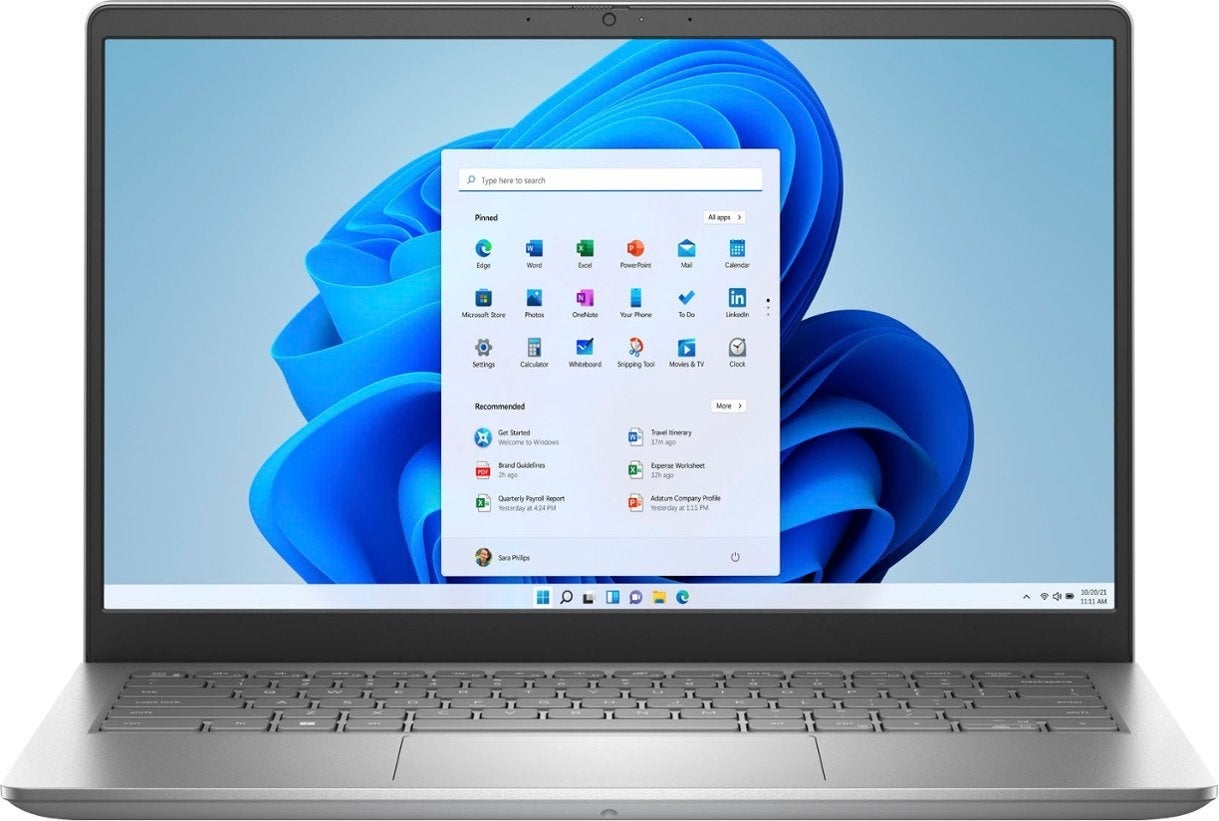
Dell Inspiron 3420.
Image: Best Buy

Price on sale: $299.99

Best Buy has this Dell on sale for $299.99, which is $250 less than the usual price. The Inspiron 3420 has 256 GB total storage and 8 GB RAM for solid performance for most basic workday tasks. One highlight of this machine is the Full HD resolution, which is optimized for movies and gaming, although you’ll only be able to do the most basic gaming or light-duty creative work on this model.

Visit Best Buy

Acer Aspire 3: Best midrange laptop deal

Acer Aspire 3.
Image: Walmart

Price on sale: $359

Walmart took $140 off this midrange machine. The Acer Aspire 3 has 512 GB storage and 16 GB RAM, which are pretty good for the sale price of $359. The AMD Ryzen 7 5700U Octa-Core Processor makes this laptop suitable for business, some gaming and some creative work. It’s a little bit bigger and heavier than the previous laptops on this list at 15.6″ and 3.92 pounds.

Visit Walmart

Lenovo Yoga 9i 2-in-1: Best deal for creative work

Lenovo Yoga 9i 2-in-1.
Image: Best Buy

Price on sale: $1,249.99

The Lenovo Yoga 9i is a high-performance laptop in a foldable format that can run Windows Copilot. The Intel 13th Generation Core i7 Evo Platform enables high-end creative performance, helped by the 16 GB RAM. Storage capacity is a good 1024 GB. This laptop is pricey to start at $1,649.99, but if that’s your price range, it’s still a good deal to take off the $400 discount Best Buy is offering, leaving the total price tag at $1,249.99.

Visit Best Buy

Lenovo ThinkPad E16 Gen 1: Best high-end laptop deal

Lenovo ThinkPad E16 Gen 1
Image: Lenovo

Price on sale: $862.68

Lenovo is holding a flash sale that puts this 2023 high-performance laptop at nearly half off. The price is down to $862.68 from $1,659.00, savings of $796.32. The Lenovo ThinkPad E16 has 16 GB memory, 512 GB storage and a 13th Generation Intel Core i7-1355U Processor. Reviews praise this laptop’s speed and the 16” display. It’s a versatile machine for work and personal computing.

Visit Lenovo