The interest in Microsoft Copilot is high, with many major Australian organizations signing on to be part of Microsoft’s early access and pre-launch testing process.
According to Microsoft, 70% of Copilot users say they are more productive, and overall, there’s a 29% increase in speed with tasks like searching, writing and summarising. Copilot use is only going to accelerate, as Microsoft and its partners embed the AI product directly into PCs and processes.
Gartner recently published a series of “gotchas” with Copilot, and these are things Australian organizations need to consider in order to fully think through implementations and to benefit from what Copilot offers.
What are Microsoft Copilot’s gotchas?
Gartner’s list of gotchas across four categories essentially highlights where an implementation of Copilot might fail to deliver, or “surprise” the company with challenges that hadn’t been anticipated. The gotchas are grouped into four categories: administration, security, information governance and user experience.
Administration
Organizations can be exposed to greater risk and cost if:
They fail to consider the proper configuration settings.
The reporting tools lack granularity.
The options for extending Copilot and managing costs are not well understood.
Security
Poor management of the use of Copilot can result in an increased risk of overshared information becoming exposed. Also, there are new attack surfaces that need to be monitored.
Information governance
Without first developing the ability to prioritise content sources, mitigate the risk of content and app sprawl, and manage the new retention and compliance challenges introduced by Copilot, organizations may not get the quality responses out of Copilot they were expecting.
User experience
The assumption that people will embrace Copilot and start using it as though they were comfortable with it seems to be misguided, and many organizations report a higher-than-expected change management effort.
Due diligence
The sum of these gotchas indicate that Australian organizations need to first fully canvas what Copilot brings to the business, how it will be used, and who in the organization will have access to it and why they need it.
Without that due diligence and then strategic deployment, it’s likely the organization will be surprised by something unexpected from the AI, resulting in inefficiencies, expense or even a lowering of productivity.
DOWNLOAD this AI Resource Pack from TechRepublic Premium
Australia’s position on the AI adoption curve
Australia isn’t significantly different from the rest of the world in terms of the uptake of Copilot or the potential gotchas, Gartner Senior Director Analyst Nate Suda said in an interview with TechRepublic.
What these gotchas essentially point to is that Copilot and other AI applications are not that dissimilar to digital transformation a few years ago, or cloud computing a decade before that. In each instance, there’s a recognition of the value of the technology but not an understanding of the costs and the value the technology will deliver.
SEE: Australia Is Adapting Fast to a Generative AI World (TechRepublic)
“There’s a lot of pressure on everyone in the C-suite. It’s not just a CIO thing. If you are a CEO, you’re under pressure from your shareholders to explain what the company is doing with AI,” Suda said.
“Most people understand that there is an enormous potential here, and the conversation has been going on for a year now. So for many organizations, it’s a matter of getting going now. 2023 was a year where it was all new, and we could marvel and wonder about it and play around with it a little. The conversation that we’re seeing in 2024, meanwhile, is more along the lines of ‘we’ve been playing for a year, now we don’t want POCs. We don’t want MVPs. We want to start seeing the ROI.”
Copilot is seen as a strong opportunity to start to move forward on AI projects; however, it’s chasing that ROI that can lead organizations to fall for one or more of the Copilot gotchas.
How are Australian organisations using Copilot?
Microsoft has engaged deeply with Australian businesses through the development of Copilot. In September 2023, Microsoft announced that through its invitation-only Early Access Program, a broad suite of organisations were using Copilot, including AGL, Data#3, Bupa, NAB, Powerlink Queensland, Rest Super and Suncorp.
In April 2024, Microsoft announced several Australian organisations, including Australian Super, Powerlink Queensland and TAL, had adopted Copilot specifically to strengthen their cyber security capabilities. The ROI here, according to Microsoft, is that experienced security analysts are 22% faster with Copilot and 7% more accurate.
Copilot is also being cited as a tool that can help upskill less experienced cyber security professionals and teams, and address the ongoing skills shortage in security.
SEE: Will Australia Ever Dig Itself Out of the Cybersecurity Skills Shortage?
The public service is also now moving on Copilot, with more than 50 agencies announcing they have commenced a six-month trial of Copilot. The program involved more than 7,400 public servants using the technology.
This project is being coordinated by the Digital Transformation Agency, again highlighting the parallels that AI and transformation have in terms of their impact on organisations as they adopt solutions.
As the CEO of the Digitally Transformation Agency, Chris Fechner is quoted as saying at the time: “The APS and the DTA will keep looking for opportunities to lift our Digital Government performance as evidenced by our inaugural OECD ranking and strive to improve on it in future years for the benefit of all Australians.”
“These goals go hand in hand with the Government for the Future mission that strives to take advantage of emerging technologies to deliver secure, ethical, and modern data and digital technologies by 2030.”
Will Microsoft Copilot deliver?
Now that businesses are moving beyond the trial of Copilot and starting to integrate it into their processes, it remains to be seen whether these projects will deliver, or whether organizations will fall into the gotchas.
Digital transformation was notoriously difficult when it was the “big thing” that CIOs were throwing money at, often without the proper due diligence, simply because it was expected that IT would be investing in digital transformation. The consequence of that was, according to data published in 2020, 70% of projects failed to deliver value.
Organizations need to be strategic about how they review, deploy and then measure the outcomes that they get from their Copilot investments.
Summer is officially here — and with the season changing, naturally, you are thinking about your next hairstyle. Will it be bangs? Dyed hair? A haircut? Before committing to an expensive and potentially regrettable change, you can use artificial intelligence (AI) to see exactly how you would look with the new hairstyle.
In the past, I have dyed my hair nearly every shade from the black to bleach-blonde spectrum. Now that I have the hair-change bug again, I consulted AI before making the same mistake I have made in the past of picking a style or color that does not suit me.
Also: The best AI image generators
I used FaceApp, an AI photo-editing app that can transform your face into different looks, including using makeup, accessories, hairstyles, and more. This application stands out because the results are realistic, unlike other apps I've tried.
Although the app, available for iPhone and Android, is free to download, it requires a FaceApp Pro subscription to access most of the functions, which costs $10 per month. Even though that cost may seem steep, $10 is less risky than a failed $300 hair-styling session you can't easily undo.
So, just how easy is FaceApp to use? Keep reading to find out.
1. Download FaceApp
First, you will need to install the application on your device. FaceApp can be downloaded for free on the Apple App Store and Google Play Store.
2. Select your photo from the camera roll
Then, you can upload a photo of yourself to start the AI magic. If you are using the app to test out different hairstyles, I recommend using a well-lit photo that frames your face and displays all your facial features. This means no hats, sunglasses, hair on your face, etc. You can use my original photo above as a reference.
Although many generative AI applications take user inputs and use them to train their models, FaceApp assures users in its privacy policy posted on its website that the company does not "use photographs or videos you provide when you use the Apps for any reason other than to provide you with the editing functionality of the Apps."
Also: Two ways you can build custom AI assistants with GPT-4o — and one is free!
However, the company has faced some controversy regarding its security and privacy practices, so investigate to see if you feel comfortable uploading your images into the app.
3. Subscribe to FaceApp Pro
Once you select your photo, you will see a bar at the bottom of the app with all the edits you can make, including impressions (one-click makeovers), hairstyles, sizes, skin, makeup, smiles, hair colors, age, and more.
You will likely use the "hairstyles" and "hair color" options (or a combination of both) for hair makeovers. Because you have a free account, those options will be locked, and you must subscribe to the FaceApp Pro $10.00 subscription for access. Even though the exact process will depend on whether you use an Apple or Android phone, you can click on the locked style, opt into the FaceApp Pro popup, and follow the instructions to subscribe.
4. Start trying out new hairstyles
The app is intuitive. You can browse the different options, selecting new hairstyles, colors, haircuts, textures, volume, and more.
Also: How my 4 favorite AI tools help me get more done at work
When you click on some styles, numbered options pop up; those control the filter intensity. You will also see a transfer option allowing you to upload a reference image, such as a picture of a celebrity, and have FaceApp recreate the style on your photo.
Beware: the results are so realistic that after trying the tool in the office, my colleague is ready to finally take the plunge on a hairstyle she has wanted for about a year. Happy makeovers!
Microsoft made its newest operating system, Windows 11, publicly available on October 5, 2021 — a little more than six years after Windows 10 debuted. Windows 11 offers updates and new features, including a simpler design intended to increase productivity, ways to connect to people faster, an all-new Microsoft Store, and a more open ecosystem that unlocks new opportunities for developers and other creators.
This Microsoft Windows 11 cheat sheet details the operating system’s main features, lists system requirements, explains how and when to get it, and more.
What is Windows 11?
Windows 11 is Microsoft’s newest major release of its operating system and the successor to Windows 10. The OS features an all-new simplified yet modernized interface designed to inspire productivity and creativity.
While the March 2022 Windows 11 Patch is not classified as a “feature update” to the operating system by Microsoft, the patch did contain a few unannounced features. For example, if you run Windows 11 with Widgets turned on, you will notice a new icon in the lower left corner of the desktop that provides a summary of your local weather conditions. Microsoft also updated Notepad and rebranded the Groove media player.
As of May 2024, Windows 11 is the second most popular Windows version in use after Windows 10.
What is the Windows 11 version timeline?
Version 21H2
The original version of Windows 11 was released to the public in October 2021. This version, also referred to as version 21H2 and codenamed “Sun Valley,” was made available as a preview build to Windows Insiders in the development channel in June 2021. During its approximately one year existence, Windows 11 version 21H2 was updated and patched over two dozen times.
Version 22H2
The Windows 11 2022 Update, often referred to as 22H2 and codenamed “Sun Valley 2,” was the first major update to Windows 11. The first preview of this version of Windows 11 22H2 was released to Windows Insiders in the Dev Channel on September 2, 2021. The update began rolling out to the public on September 20, 2022.
The Windows 11 2022 Update included several feature updates, improvements and enhancements. These included hypervisor-protected code integrity security, sync status of OneDrive displayed in File Explorer, Windows Studio Effects, and streamlining changes for future Windows 11 updates and patches. Since its release, Windows 11 22H2 has been patched and updated numerous times.
SEE: Check out these Windows 11 22H2 enterprise features you need to know.
Version 23H2
The Windows 11 2023 Update, often referred to as 23H2, was released to the public with eligible computers on September 26, 2023. In September 2023, Microsoft began rolling out a new Windows 11 update to eligible computers. Known as Windows 11 23H2, this latest major update adds new features, applications and security protocols to the operating system, including Windows Copilot, File Explorer enhancements, Windows backup app, taskbar improvements, new volume mixer, 7-Zip and RAR support and RGB peripheral customization.
SEE: Everything you need to know about Microsoft Copilot in this TechRepublic cheat sheet.
Version 24H2
The Windows 11 24H2 Update is an upcoming update to the operating system. A preview was released through the Windows Insider Program to developers on February 8, 2024. Some notable enhancements will include HDR Backgrounds, Wi-Fi 7 support, AI Voice Clarity and AI CoWriter in Notepad.
What new features come with Windows 11?
New Start layout
In Windows 11, the newly centered Start button uses the cloud and Microsoft 365 to show recent files, no matter what platform or device they were being viewed on previously, including an Android or iOS device.
Snap Layouts, Snap Groups and Desktops
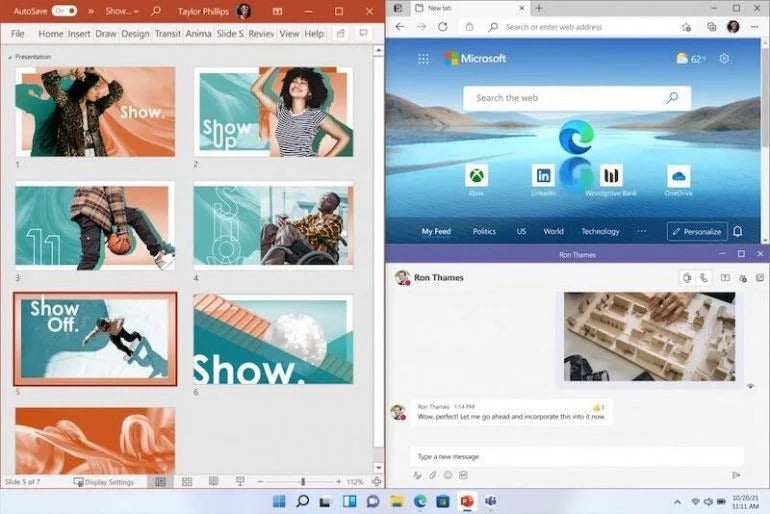
A new set of features in Microsoft Windows 11 is the introduction of Snap Layouts, Snap Groups and Desktops. These offer a “powerful way to multitask and stay on top of what you need to get done,” according to Microsoft’s press release. With these Windows 11 features, users can organize windows and optimize screen real estate for a cleaner visual layout (Figure A). Users can create and customize separate Desktops for each part of their life — like one for work and one for personal use.
Figure A
The new Windows 11 Desktops feature. Image: Microsoft
Chat from Microsoft Teams
In Windows 11, Microsoft integrates Chat from Microsoft Teams into the taskbar, so users can instantly connect via text, chat, voice or video with personal contacts, regardless of which platform or device is being used across Microsoft Windows, Android or iOS. Through Microsoft Teams, users can now instantly mute and unmute or start a presentation directly from the taskbar in the new OS.
Lockscreen Widgets
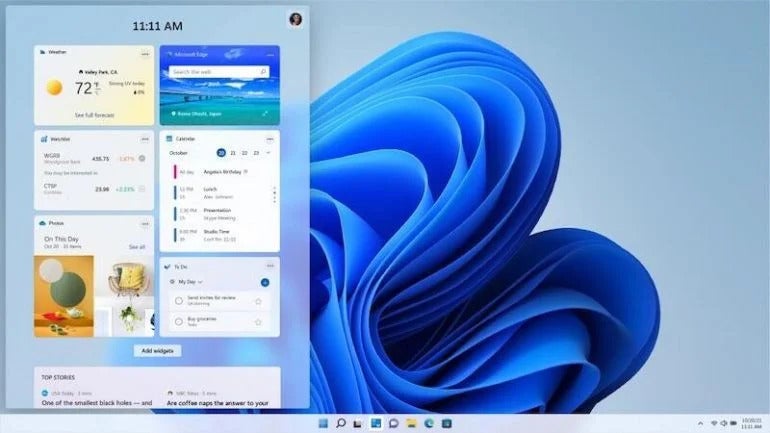
Windows 11’s new Widgets are a personalized feed powered by artificial intelligence and Microsoft Edge. Instead of using a phone to check news, weather or notifications, now users can open their Windows 11 desktop to see a similarly curated view (Figure B). Widgets offers new opportunities within Windows 11 to deliver personalized content for creators and publishers.
Figure B
The new Widgets feature in Windows 11. Image: Microsoft
Microsoft Store overhaul
The Microsoft Store has undergone a major overhaul; users now have one safe location for apps and content to watch, create, play, work and learn. According to Microsoft, the Store “has been rebuilt for speed and with an all-new design that is beautiful and simple to use. Not only will we bring you more apps than ever before, we’re also making all content — apps, games, shows, movies — easier to search for and discover with curated stories and collections.”
Leading first- and third-party apps such as Microsoft Teams, Visual Studio, Disney+, Adobe Creative Cloud, Zoom and Canva have also been added to the Microsoft Store.
Android apps
Through its partnership with Amazon and Intel, the Microsoft Store allows users to discover Android apps, which can be downloaded via the Amazon Appstore. Microsoft is enabling developers and independent software vendors to bring apps to the Microsoft Store, no matter what app framework is used to create them.
What new features come with Windows 11 22H2?
The first major content patch, known as Windows 11 22H2, added several new features and applications to the operating system.
For enterprise users, Windows 11 22H2 improved File Explore functionality to integrate OneDrive status, which improves team collaboration and cooperation. The update also added a new feature called Windows Studio Effects, which will improve virtual meetings with AI-powered processing efficiency.
At the user level, Windows 11 22H2 added new quality-of-life features like voice activated navigation, Start Menu feature improvements, additional personalization themes and the Clipchamp app. Further, Windows 11 22H2 added new live captioning features for automatically transcribing virtual meetings.
What new features come with Windows 11 23H2?
The latest major content patch, known as Windows 11 23H2, adds several new features and applications to the operating system.
The highlight of Windows 11 23H2 Update is the addition of Windows Copilot, which integrates an on-demand generative AI feature directly into the operating system. Windows Copilot will be accessible to users as they work with Mail, Paint, Notepad and any other Windows app.
Windows 11 23H2 includes the often asked for ability to control RGB peripherals natively through Windows settings instead of relying on third-party software and utilities. The update also supports several common open-sourced archiving protocols, including 7-Zip and RAR. The 23H2 update includes quality-of-life improvements for Windows File Explorer and the taskbar.
SEE: How to Enable Windows Copilot in Windows 11 23H2
What AI features have been added to Windows 11?
Microsoft has added a number of features based on artificial intelligence to Windows 11 since its initial release, including Live Captions, background noise removal in videoconferencing, webcam autoframing and the Bing Chat chatbot in the taskbar’s search field.
Copilot
In January 2024, Microsoft announced that the new Windows 11 PCs, including the Surface line coming out through Spring 2024, will include a Copilot key. The Copilot key enables easy access to Microsoft’s AI assistant, Copilot, in Windows.
Copilot assists with a variety of tasks, such as transforming documents into presentations, editing photos, summarizing emails and meetings, managing PC settings like enabling battery saver and accessing information from different apps and platforms.
SEE: Windows 11 Update Brings New Tricks to Microsoft Copilot
Recall
Recall, announced at Microsoft Build on May 20, 2024, is a new AI-powered feature that allows users to quickly and intuitively search through their device’s history using natural language questions. While this is included as a part of Windows 11, it will only work on Copilot+ PCs that have built in neural processing units.
Recall runs locally, logging everything the computer has done, including web browsing, file creation and voice chats, so anything the user has come across via that PC can be called upon. Recall is incorporated with Timeline — the existing Windows feature that shows running apps and past activities — to give an easy-to-use scrollable interface.
How to disable Recall
Recall has proven a controversial feature since it was announced, primarily due to privacy and security concerns. Microsoft has since made it an opt-in feature rather than being enabled by default, and committed to enhancing the security measures around the data it stores.
Despite this, the tech giant delayed Recall’s rollout with the new Copilot+ PCs on June 18, 2024, so it can “ensure the experience meets our high standards for quality and security.”
While Recall is still unreleased, some members of the Windows Insider program have had the chance to explore a preview version of the feature and have shared how it can be disabled.
Open Windows Settings and navigate to Privacy & Security in the sidebar.
Select Recall & Snapshots to view the Recall settings.
Click Delete Snapshots and then Delete All to clear Recall’s history.
Click the Save Snapshots switch to turn it to the Off settings to disable Recall.
What do developers need to know about Windows 11?
PWABuilder3
Windows 11 features the new PWABuilder3, so developers can build a PWA from their web app in minutes (Figure C). WebView2 runtime is included with Windows 11, which makes it easier to take advantage of its web platform as a secure way to build hybrid web apps. Offerings like Windows Terminal and the new Microsoft Edge DevTools can still be used, as they are now included in Windows 11.
Figure C
PWA Shortcuts integrated with Windows 11. Image: Microsoft
Windows App SDK
Released March 29, 2021, the Windows App SDK, previously known as Project Reunion, makes it easier to integrate Windows 11 features into apps, but it still allows developers to reach more than a billion users on Windows 10.
Windows on ARM
Developers can build apps that run natively on Windows on ARM with the new ARM64 Emulation Compatible ABI. Using the ARM64EC, native ARM and emulated x64 code can be mixed in the same process or module. This interoperability means developers can optimize apps to run on Windows on ARM — even if the app has x64 dependencies or loads x64 plugins they don’t control.
WinUI3
To rejuvenate app designs, developers can use WinUI3 in Windows 11, which offers built-in UI updates such as rounded geometry, refreshed iconography, new typography, fun micro-interactions like Lottie animation and refreshed color palette. The Snap layouts feature will help with maximum productivity in Windows 11.
Reunion Windowing
Reunion Windowing allows developers to easily manage and create app windows. The feature works with existing app codes, simplifies common operations and brings new functionality to desktop apps like Light-Dismiss Behavior, Picture-In-Picture mode and easier titlebar customization.
SEE: Learn how to install Windows 11 from Microsoft’s ISO file.
Microsoft Store commerce availability
Along with the major changes to the Microsoft Store, Microsoft is taking steps to unlock greater economic opportunity for creators and developers. Microsoft now allows developers and independent software vendors to advertise their apps on the platform regardless of whether they’re built as a Win32, Progressive Web App, Universal Windows App or any other app framework, so they can reach and engage a larger audience.
The revenue share policies have changed, too. Developers can now bring their own non-gaming apps into the Microsoft Store with their own commerce platform and keep 100% of the revenue — Microsoft takes nothing. Developers can still use Microsoft’s commerce platform, with competitive revenue share of 15% for apps and 12% for games.
Is Windows 11 free?
Windows 11 is available through a free upgrade for eligible Windows 10 PCs and on new PCs as of October 5, 2021. To see if your Windows 10 PC is eligible for the free upgrade to Windows 11, download the PC Health Check app.
Train your team and become a Windows 11 power user with The Essential Windows 11 Course and The Ultimate Windows 11 Training Video Course from TechRepublic Academy.
How do I upgrade to Windows 11?
Microsoft Windows 11 is available as a general release to the public. Assuming your personal computer meets the prerequisite requirements, including installation of Windows 10 1909 or later, you can upgrade to Windows 11 by navigating to the Update & Security settings screen.
Users may also take advantage of the Windows 11 Installation Assistant to bypass the Windows 10 Update & Security screen and upgrade to Windows 11 directly.
Can you set up Windows 11 without a Microsoft Account?
Microsoft requires the user to log in to a free Microsoft account to download and install Windows 11; however, this step can be avoided by creating a local account — i.e., one that only applies to that machine and does not involve an internet connection — during the setup process.
Follow these steps to create a local account and install Windows 11.
Follow the Windows 11 installation process until you are presented with the Let’s Connect You To A Network box.
Press Shift + F10 to open command prompt, type “OOBEBYPASSNRO” and press enter. The PC will reboot.
Restart the installation process. When you reach the Let’s Connect You To A Network box, click I Don’t Have Internet and then Continue With Limited Setup.
Create a local account when prompted, and then finish the installation. You can connect to the internet once the installation has completed.
Why is my PC not eligible for Windows 11?
To install Windows 11, your PC must meet system requirements that it may not currently satisfy. These requirements include:
Processor: 1GHz or faster with two or more cores on a compatible 64-bit processor or System on a Chip.
RAM: 4GB.
Storage: 64GB or larger storage device.
System firmware: UEFI, Secure Boot capable.
Graphics card: Compatible with DirectX 12 or later with WDDM 2.0 driver.
Display: High-definition (720p) display that is greater than 9″ diagonally, 8 bits per color channel.
Internet connection: Windows 11 Home edition requires internet connectivity and a Microsoft account to complete device setup on first use. Switching a device out of Windows 11 Home in S mode requires internet connectivity.
SEE: Here’s how to tell if your PC can run Windows 11.
What are the feature-specific requirements for Windows 11?
Some features in Windows 11 have increased requirements beyond those listed above. Here are additional details regarding requirements for key features per Microsoft.
5G support: Requires a 5G-capable modem.
Auto HDR: Requires an HDR monitor.
BitLocker to Go: Requires a USB flash drive (available in Windows Pro and above editions).
Client Hyper-V: Requires a processor with second level address translation capabilities (available in Windows Pro and above editions).
Cortana: Requires a microphone and speaker and is currently available on Windows 11 for Australia, Brazil, Canada, China, France, Germany, India, Italy, Japan, Mexico, Spain, the U.K. and the U.S.
DirectStorage: Requires an NVMe SSD to store and run games that use the Standard NVM Express Controller driver and a DirectX12 GPU with Shader Model 6.0 support.
DirectX 12 Ultimate: Available with supported games and graphics chips.
Presence: Requires a sensor that can detect human distance from device or intent to interact with device.
Intelligent Video Conferencing: Requires video camera, microphone and speaker for audio output.
Multiple Voice Assistant (MVA): Requires a microphone and speaker.
Snap: Three-column layouts require a screen that is 1920 effective pixels or greater in width.
Mute and Unmute from Taskbar: Requires video camera, microphone and speaker for audio output.
Spatial Sound: Requires supporting hardware and software.
Teams: Requires video camera, microphone and speaker for audio output.
Touch: Requires a screen or monitor that supports multi-touch.
Two-factor authentication: Requires use of PIN, biometric (fingerprint reader or illuminated infrared camera), or a phone with Wi-Fi or Bluetooth capabilities.
Voice Typing: Requires a PC with a microphone.
Wake on Voice: Requires Modern Standby power model and microphone.
Wi-Fi 6E: Requires new WLAN IHV hardware and driver and a Wi-Fi 6E capable AP or router.
Windows Hello: Requires a camera configured for near infrared imaging or fingerprint reader for biometric authentication. Devices without biometric sensors can use Windows Hello with a PIN or portable Microsoft compatible security key.
Windows Projection: Requires a display adapter that supports Windows Display Driver Model (WDDM) 2.0 and a Wi-Fi adapter that supports Wi-Fi Direct.
Is Windows 11 worth it?
According to Microsoft’s current support plan, Windows 10 will lose support for future feature and security updates on October 14, 2025. After that date, any business, regardless of size, will incur a significant risk of liability for using Windows 10. With that in mind, upgrading to Windows 11 is obviously necessary and entirely worth the time and effort.
Windows 11 is designed to take advantage of the latest in both hardware and software security protocols, something Windows 10 is not able to do. These security measures help the operating system fend off various cyberattacks and malware including software viruses and ransomware. Because Windows 11 is a free upgrade to Windows 10, for most businesses and individuals there is little reason not to upgrade.
SEE: Here’s how to find and install the new Windows 11 22H2 update.
After staying silent for two years about its AI developments, Apple finally played catch-up last week and shared its latest projects with the public during its annual developer conference, WWDC. At the event, Apple unveiled a variety of features that will significantly impact your device experience — but only if you have one of the newest iPhone models.
The upgrades include a new and improved Siri, new summarization tools, a more customizable home screen, AI-powered photo editing, and more. However, you'll need an iPhone 15 Pro (or a newer model, coming out this year) to use these features.
Also: I'm an Android user, but these three iPhone 16 features would win me over
While requiring Apple's latest hardware to experience these new features may seem like planned obsolescence or a money grab, the provision is due to the processing hardware needed to support the AI features — especially for tasks that require on-device processing.
Processing AI tasks on-device offers two key benefits: It keeps information more secure and ensures less latency. However, not all iPhones, especially older models, have the processing power to handle those tasks. The new AI features will rely on both on-device and cloud-based processing, depending on the complexity of the task.
Specifically, these tasks require the A17 Pro chipset, which is currently found only in the iPhone 15 Pro and iPhone 15 Pro Max. Even the iPhone 15 and iPhone 15 Plus won't support the AI upgrades, as they run on the A16 Bionic.
The good news is that you won't need the newest model if you are a Mac or iPad user. To use the AI features on a Mac or iPad, your device will need at least an M1 chip; considering Apple is currently manufacturing M4-chip iPads and M3-chip Macs, most users with older devices should have some wiggle room.
Also: iOS 18: All the iPhone changes Apple announced at WWDC 2024
Additionally, if you don't own the iPhone 15 Pro and don't plan on upgrading anytime soon, don't worry; you will get to experience some of iOS 18's AI features, specifically those that run on the cloud. However, if you want the full iOS 18 experience, you may want to start preparing for an upgrade.
Hume AI has unveiled EVI, an advanced voice AI with emotional intelligence, available as an iOS app. EVI now features a new AI voice, Kora, and is powered by Anthropic’s Claude 3.5 Sonnet.
EVI, the frontier voice AI with emotional intelligence, is now a lot smarter—and available as an iOS app! Featuring a bold new and improved AI voice named Kora and integrating Claude 3.5 Sonnet into its responses, EVI is ready to listen, answer, and explore →… pic.twitter.com/hC4wNA7jXD
— Hume (@hume_ai) June 20, 2024
The model promises enhanced user interaction by understanding and responding to human emotions.
Developed by top emotion scientists and AI researchers at Hume AI, EVI is the first AI designed to understand and emulate human emotions.
EVI can understand 53 different human emotions, including amusement, anger, confusion, and even deceit. The AI’s empathic large language model (eLLM) is adept at interpreting tones of voice, word emphasis, and non-verbal cues to optimise interactions.
The new voice, Kora, is also available to developers through the EVI API, which currently supports Anthropic, OpenAI, and open-source language models, with plans to add Google model support soon. Developers can start building their applications and join EVI’s Discord for updates.
The emotional intelligence of EVI stems from Hume AI’s extensive research into ‘vocal bursts’—non-verbal sounds that convey emotions. Hume AI has collected thousands of audio clips from over 16,000 individuals across the United States, China, India, South Africa, and Venezuela to decode the emotional meanings of these sounds.
Looking ahead, Hume AI plans to expand EVI’s capabilities to recognise facial expressions globally, enhancing the model’s understanding of user emotions through facial cues.
“What we’ve done at Hume is build models that understand expressions a lot better and we’ve integrated those into large language models,” said Hume AI chief Alan Cowen. “These models understand beyond language—what’s going on in the voice, what’s going on in facial expression… and it can learn from that.”
Last month, OpenAI announced its latest model, GPT-4o, which also has voice capabilities that let users ask it to sing, talk faster, use different voices, and speak various languages. This feature will be available to users in the coming months.
Welcome to ZDNET's Innovation Index, which identifies the most innovative developments in tech from the past week and ranks the top four, based on votes from our panel of editors and experts. Our mission is to help you identify the trends that will have the biggest impact on the future.
Microsoft's consumer AI tops the Index this week, followed by some interesting developments on the AI job front.
Topping the charts this week was Microsoft's new Surface Copilot+ PC. The ZDNET team was impressed when the company first released the laptops at Build last month. After testing the baked-in AI against the M3 Macbook Air, Senior Editor Kerry Wan finds Microsoft outperforming Apple — especially considering the consumer AI laptop is still a relatively new market, the company is right where it wants to be with seamless on-device AI, speed, and touchscreen support. At least until we can compare capabilities with what Apple Intelligence has coming down the pike, Microsoft certainly made an impression.
At #2 is a new wave of AI-related job roles that promise shakeups in the future. According to one researcher, openings for roles like "prompt whisperer" and "data DJ" could be making the rounds on LinkedIn soon. While these new titles are experimental — and even sound a little half-baked at times — they tell us something about how tech careers are evolving to meet the demands of AI.
In third place is Apple, which is making progress on extra-secure data centers for Private Cloud Compute, the differentiating bedrock of its move into AI. By announcing its plans to let security researchers verify its privacy claims, Apple might just avoid the issues another big tech company ran into around one unfortunately-named feature. If the data centers pass the test, the company could set a new privacy standard for consumer AI.
Closing out the week is A.I. Oscar, a new stockpicker from Singapore bank OCBC. Trained on stock exchange data from several markets, the AI platform ingests a user's risk profile and trading habits to identify personalized stock picks. It's yet another instance of the little tools AI can give consumers — arguably a much more impactful shift in our day-to-day than bigger, industry-sized announcements.
Though he is a little older now, Adarsh Shirawalmath, the creator of Kannada Llama and founder of Tensoic, revealed in his post on LinkedIn that he mailed Greg Brockman from OpenAI in 2020 asking for GPT-3 access, and he got it as well.
The most interesting part is that he wanted to predict JEE exam questions using GPT-3, and had also mentioned that to Brockman.
At that time, GPT-3 was only known to people who were deep into AI/ML space. “The peculiar idea of generating the next words (tokens) given an input was fascinating. Essentially ‘predicting anything’ felt possible,” said Shirawalmath.
He had already applied for the API access earlier, but given the rush to prepare for the exam, Shirawalmath mailed Brockman for an early access to the model, and surprisingly within a few days got it. Earlier, Shirawalmath had also told AIM about this in an episode of Tech Talks.
“Now that I look back I do realise it just might be one of the first instances of few shot prompting and even RAG. I made it work by passing in a few questions from the previous year papers and asking it to predict what could be the next set of questions. Surprisingly, it did work to some extent,” said Shirawalamth, but he did not save the results of the experiment.
But the repository for the JEE question paper predictor still exists. Click here to check it out.
We at AIM had also tested out ChatGPT and Ola Krutrim if they can pass the UPSC Prelims exam.
Building AI assistants and AI agents is super popular among developers currently. Regardless of the area in which you work—data analytics, machine learning, DevOps, and more—you can always improve your workflow with AI. So where do you start?
Well, you can start by diving right into building AI applications and learn in the process. But learning the foundations of AI is just as important. And we have compiled a list of free university courses to help you learn AI fundamentals.
So let's go over these courses.
1. CS50’s Introduction to Artificial Intelligence with Python – Harvard
CS50's Introduction to Artificial Intelligence with Python from Harvard is a great first course that will help you build the algorithmic foundations of artificial intelligence.
To follow along with this course (and for the other courses) that follow, you should be comfortable programming with Python. In this course, you’ll get to explore search algorithms, machine learning, large language models, and more. The course spans about 7 weeks and you can work on projects in each of the modules.
Here’s an overview the topics covered in this course:
Graph Search algorithms
Advanced search
Knowledge representation
Logical inference
Bayesian networks
Markov model
Machine learning
Neural networks
Natural language processing
Link: CS50's Introduction to Artificial Intelligence with Python
2. Artificial Intelligence – MIT
Artificial Intelligence (6.034) by Massachusetts Institute of Technology is an undergraduate level AI course that helps you learn the foundations you need to start building intelligent systems.
The focus is on the following:
Knowledge representation
Problem solving
Learning methodologies for AI
You can access all the course contents for free on MIT OpenCourseWare. This course covers the following topics:
Reasoning
Search
Constraints
Learning algorithms
Deep neural networks
Probabilistic inference
Link: Artificial Intelligence
3. Artificial Intelligence: Principles and Techniques – Stanford University
Artificial Intelligence: Principles and Techniques (CS221) from Stanford is a comprehensive course to get an overview of the AI landscape. You’ll learn machine learning, search, game playing, and much more.
The topics that this course covers are as follows:
Machine learning
Search algorithms
Markov decision processes
Game playing
Factor graphs
Bayesian networks
Logic
Deep learning
Link: Stanford CS221: Artificial Intelligence: Principles and Techniques
4. AI in Healthcare Specialization – Stanford University
Healthcare remains one of the important areas that can benefit from the applications of AI. From efficient prognosis and diagnosis to making healthcare more accessible, AI applications—with AI safety and AI ethics—can be immensely helpful.
So if you’re looking to learn AI applications in healthcare, check out the AI in Healthcare specialization offered by Stanford University on Coursera. This specialization includes the following courses and a capstone project:
Introduction to Healthcare
Introduction to Clinical Data
Fundamentals of Machine Learning for Healthcare
Evaluations of AI Applications in Healthcare
Link: AI in Healthcare Specialization
5. Introduction to Generative AI – Duke University
Generative AI has become super popular with the recent advances and ongoing research in the field. And building useful applications with large language models is what developers are currently enjoying the most.
Introduction to Generative AI, offered by Duke University on Coursera, will introduce you to the generative AI landscape: working with open-source and closed-source large language models, cloud APIs, and more. The modules in this course are as follows:
Introduction to Generative AI
Interacting with models
Building robust generative AI systems
Applications of LLMs
Link: Introduction to Generative AI
Wrapping Up
I hope you found this round-up of free AI courses helpful. For courses that are offered on platforms such as Coursera and edX, you can sign up for a free account and audit the course to access the course contents for free.
If you're interested in learning machine learning foundations, read 5 Free University Courses to Learn Machine Learning.
Bala Priya C is a developer and technical writer from India. She likes working at the intersection of math, programming, data science, and content creation. Her areas of interest and expertise include DevOps, data science, and natural language processing. She enjoys reading, writing, coding, and coffee! Currently, she's working on learning and sharing her knowledge with the developer community by authoring tutorials, how-to guides, opinion pieces, and more. Bala also creates engaging resource overviews and coding tutorials.
More On This Topic
10 Free Machine Learning Courses from Top Universities
The Best Courses for AI from Universities with YouTube Playlists
Free Artificial Intelligence And Deep Learning Crash Course
Uncertainty Quantification in Artificial Intelligence-based Systems
How Artificial Intelligence Can Transform Data Integration
Most In-demand Artificial Intelligence Skills To Learn In 2022
Hugging Face recently acquired Spanish-based startup Argilla for $10 million. With this acquisition of a collaboration platform for AI engineers and experts, the company has closed four acquisitions.
“The volume of acquisition opportunities really skyrocketed in the past few months. We are receiving over ten acquisition opportunities a week these days,” said Hugging Face CEO Clem Delangue, in an interview with Bloomberg.
It’s not just them, but a number of big companies are being bombarded with acquisition requests from startups, ringing in the question of whether all AI startups will eventually face the indispensable fate of acquisition?
Spike in Acquisition Requests
“We’re always interested in interesting acquisitions,” said co-founder and CEO of Databricks Ali Ghodsi, in the backdrop of the recently concluded Data + AI Summit.
Considering themselves to be ‘really picky’, Ghodsi said that they invest a lot of time on acquisitions every week.
“We’re just looking at what’s strategic for us at any given time. If there’s really good synergy, we will do it,” said Ghodsi, commenting on an ongoing joke that Databricks will have to announce a big billion-dollar acquisition for its Data + AI Summit every year.
Databricks chiefalsoclarified his acquisition strategy with ‘people’ being the prime focus. “We start with the people. Are they going to work out culturally at Databricks? Is that going to be a match? There’s no point in acquiring a company, and the employees hating each other. Then it’s just a matter of time before they leave. So that’s really important for us,” he said.
Ghodsi considers product experience for users, and financials as other important factors for any acquisition.
The Viable Option
Given the large compute requirements and the need for access to a huge customer base, emerging AI startups may best survive under the umbrella of an existing thriving company.
“Companies like Hugging Face and others are becoming sort of magnets because of the visibility, talent and compute that we have,” said Delangue, who also mentioned how startup founders are reaching out to him via emails and even social media with acquisition pitches.
Startups with great teams and good traction might not receive the level of VC funding required. In such cases, acquisition opportunities may be a viable option.
Interestingly, big tech companies that have the money to invest heavily, can continue to pour funds into AI developments. Meta chief Mark Zuckerberg had recently said that they are investing “to stay at the leading edge,” and that they are also “scaling the product before it is making money”.
However, this lee-way is not available to all emerging startups. The recent example of Stability AI, where the founder left the company, showed the world how a promising AI startup that failed to receive adequate fundings last year started facing problems.
Preparing for the Wave
Delangue spoke about how companies are investing in hot topics such as LLMs and referenced Mistral’s recent funding. However, Hugging Face is placing its bets on startups working on less hyped topics such as datasets. “Argilla, working on datasets, on data, in my opinion, is now becoming the bottleneck or the most important.”
While Hugging Face’s recent acquisition route is investing in the outliers, big-tech companies’ acquisition style has been pretty straight-forward. If not acquisition, big-tech companies pump hefty amounts into companies making massive progress.
Microsoft recently made a $650 million deal to use Inflection’s models and even hired the startups’s top talent, including Mustafa Suleyman, to lead their AI division.
Likewise, Apple recently acquired a Canadian-based computer vision company Darwin AI to further their AI venture, with the company acquiring 32 AI startups in 2023.
As per a recent report by AIM Research, Indian AI startups alone have raised a funding of $560 million across 25 funding rounds. Going by the influx of acquisition requests big techs are receiving, it seems almost clear that all AI startups will be eventually acquired. All eyes on OpenAI!
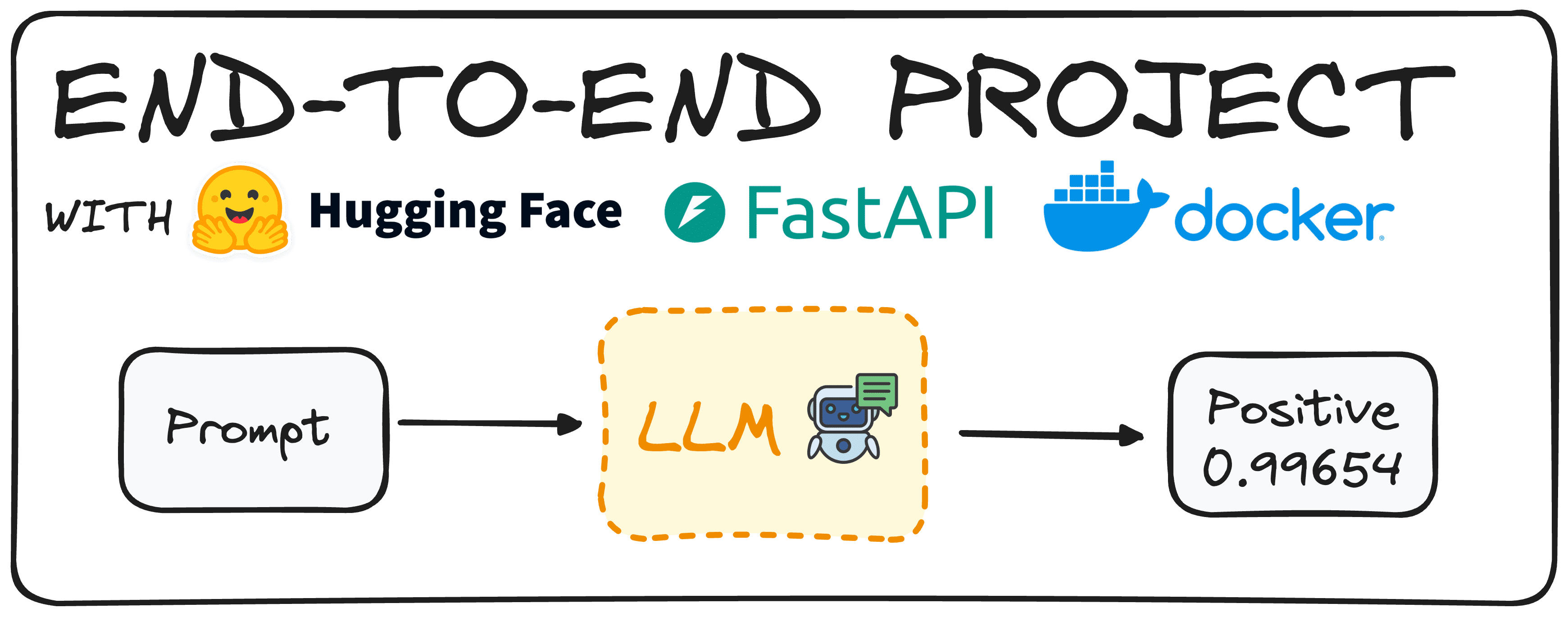
Imagine taking advantage of a Hugging Face model to determine the sentiment of reviews. Traditionally, the first step would involve crafting such a model and ensuring it works properly. However, today’s pre-trained models allow us to have such Large Language Models (LLMs) ready with minimal effort.
Once we have this model ready to be used, our main goal is to enable colleagues within a company to use this model without needing to download or implement it from scratch.
To do so, we would create an endpoint API, enabling users to call and use the model independently. This is what we refer to as an end-to-end project, built from start to finish.
Today, we will deploy a simple model using Hugging Face, FastAPI, and Docker, demonstrating how to achieve this goal efficiently.
Step 1: Choosing our HuggingFace Model
The first thing to do is to pick a Hugging Face Model that adapts to our needs. To do so, we can easily install hugging face in our environment using the following command:
pip install transformers # remember to work with transformers we need either tensorflow or pytorch installed as well pip install torch pip install tensorflow
Now we need to import the pipeline command of the transformers library.
from transformers import pipeline
Then using the pipeline command we can easily generate a model that defines the sentiment of a given text. We can do so using two different approaches: By defining the task “sentiment analysis” or by defining the model, as can be seen in the following piece of code.
# Defining directly the task we want to implement. pipe = pipeline(task="sentiment-analysis") # Defining the model we choose. pipe = pipeline(model="model-to-be-used")
It is important to note that using the task-based approach is not recommended, as it limits our control over the specific model being used.
In my case I chose the “distilbert-base-uncased-fine tuned-sst-2-english” but you are free to browse the Hugging Face Hub and choose any model that suits your needs. You can find a simple guide to Hugging Face in the following article.
Now that we have our pipe model defined, just sending a simple prompt we will get our result back. For instance, for the following command:
print(pipe("This tutorial is great!"))
We would get [{'label': 'POSITIVE', 'score': 0.9998689889907837}]
Let’s imagine that we prefer that our users get a natural language sentence regarding this classification. We can implement a simple Python code that does this too:
def generate_response(prompt:str): response = pipe("This is a great tutorial!") label = response[0]["label"] score = response[0]["score"] return f"The '{prompt}' input is {label} with a score of {score}" print(generate_response("This tutorial is great!"))
And repeating the same experiment we would get:
The 'This tutorial is great!' input is POSITIVE with a score of 0.9997909665107727
So now we have a working model and we can proceed to define our API.
Step 2: Write API endpoint for the Model with FastAPI
To define our API we will use FastAPI. It is a Python framework for building high-performance web APIs. First, install the FastAPI library using the pip command and import it into our environment. Additionally, we will utilize the pydantic library to ensure our inputs are of the desired type.
The following code will generate a working API that our colleagues can directly use.
from fastapi import FastAPI from pydantic import BaseModel from transformers import pipeline # You can check any other model in the Hugging Face Hub pipe = pipeline(model="distilbert/distilbert-base-uncased-finetuned-sst-2-english") # We define the app app = FastAPI() # We define that we expect our input to be a string class RequestModel(BaseModel): input: str # Now we define that we accept post requests @app.post("/sentiment") def get_response(request: RequestModel): prompt = request.input response = pipe(prompt) label = response[0]["label"] score = response[0]["score"] return f"The '{prompt}' input is {label} with a score of {score}"
Here's what happens step-by-step in the code:
Importing Necessary Libraries: The code starts by importing FastAPI, and Pydantic, which ensures that the data we receive and send is structured correctly.
Loading the Model: Then we load a pre-trained sentiment analysis model, as we have already done in the first step.
Setting Up the FastAPI Application: app = FastAPI() initializes our FastAPI app, making it ready to handle requests.
Defining the Request Model: Using Pydantic, a RequestModel class is defined. This class specifies that we expect an input string, ensuring that our API only accepts data in the correct format.
Creating the Endpoint: The @app.post("/sentiment") decorator tells FastAPI that this function should be triggered when a POST request is made to the /sentiment endpoint. The get_response function takes a RequestModel object as input, which contains the text we want to analyze.
Processing the Request: Inside the get_response function, the text from the request is extracted and passed to the model (pipe(prompt)). The model returns a response with the sentiment label (like "POSITIVE" or "NEGATIVE") and a score indicating the confidence of the prediction.
Returning the Response: Finally, the function returns a formatted string that includes the input text, the sentiment label, and the confidence score, providing a clear and concise result for the user.
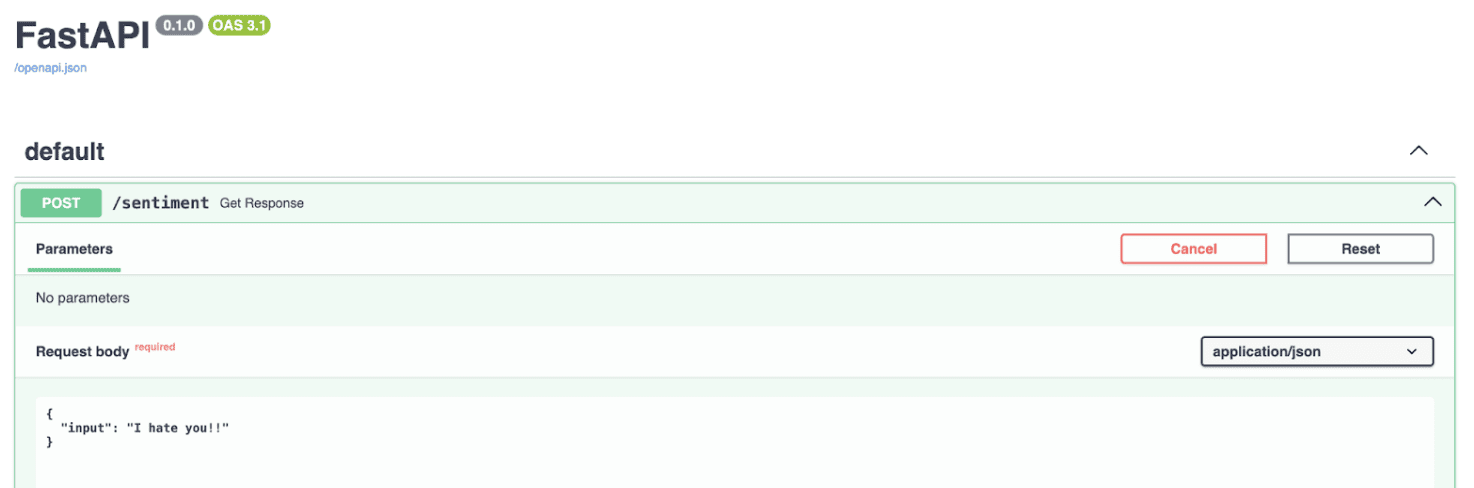
If we execute the code, the API will be available in our local host, as can be observed in the image below.
Screenshot of local host end point with FastAPI
To put it simply, this code sets up a simple web service, where you can send a piece of text to, and it will reply with an analysis of the sentiment of that text, leveraging the powerful capabilities of the Hugging Face model via FastAPI.
Next, we should containerize our application so that it can be executed anywhere, not just on our local computer. This will ensure greater portability and ease of deployment.
Step 3: Use Docker to Run our Model
Containerization involves placing your application into a container. A Docker container runs an instance of a Docker image, which includes its own operating system and all necessary dependencies for the application.
For example, you can install Python and all required packages within the container, so it can run everywhere without the need of installing such libraries.
To run our sentiment analysis app in a Docker container, we first need to create a Docker image. This process involves writing a Dockerfile, which acts as a recipe specifying what the Docker image should contain.
If Docker is not installed on your system, you can download it from Docker’s website. Here's the Dockerfile we'll use for this project, named Dockerfile in the repository.
# Use an official Python runtime as a parent image FROM python:3.10-slim # Set the working directory in the container WORKDIR /sentiment # Copy the requirements.txt file into the root COPY requirements.txt . # Copy the current directory contents into the container at /app as well COPY ./app ./app # Install any needed packages specified in requirements.txt RUN pip install -r requirements.txt # Make port 8000 available to the world outside this container EXPOSE 8000 # Run main.py when the container launches, as it is contained under the app folder, we define app.main CMD ["uvicorn", "app.main:app", "--host", "0.0.0.0", "--port", "8000"]
Then we just need to run the following command in the terminal to build the docker image.
docker build -t sentiment-app .
And then to execute we have two options:
Using our terminal with commands.
docker run -p 8000:8000 --name name_of_cointainer sentiment-hf
Using the docker hub. We can easily go to the docker hub and click on the run button of the image.
Screenshot of the Dockerhub
And this is all! Now we have a working sentiment classification model what can work anywhere and can be executed using an API.
In Brief
Model Selection and Setup: Choose and configure a Hugging Face pre-trained model for sentiment analysis, ensuring it meets your needs.
API Development with FastAPI: Create an API endpoint using FastAPI, enabling easy interaction with the sentiment analysis model.
Containerization with Docker: Containerize the application using Docker to ensure portability and seamless deployment across different environments.
You can check my whole code in the following GitHub repo.
Josep Ferrer is an analytics engineer from Barcelona. He graduated in physics engineering and is currently working in the data science field applied to human mobility. He is a part-time content creator focused on data science and technology. Josep writes on all things AI, covering the application of the ongoing explosion in the field.
More On This Topic
Simple NLP Pipelines with HuggingFace Transformers
How to Implement a Federated Learning Project with Healthcare Data
A Beginner's Guide to End to End Machine Learning
A Full End-to-End Deployment of a Machine Learning Algorithm into a…




 and integrating Claude 3.5 Sonnet into its responses, EVI is ready to listen, answer, and explore →… pic.twitter.com/hC4wNA7jXD