Machine Learning with ChatGPT Cheat Sheet

Leverage ChatGPT for Your Entire ML Pipeline

ChatGPT is being used for everything from education, to meal and fitness planning, to programming, and beyond.

Have you thought of using ChatGPT to help augment your machine learning tasks?

For more on using ChatGPT for machine learning, check out our latest cheat sheet.

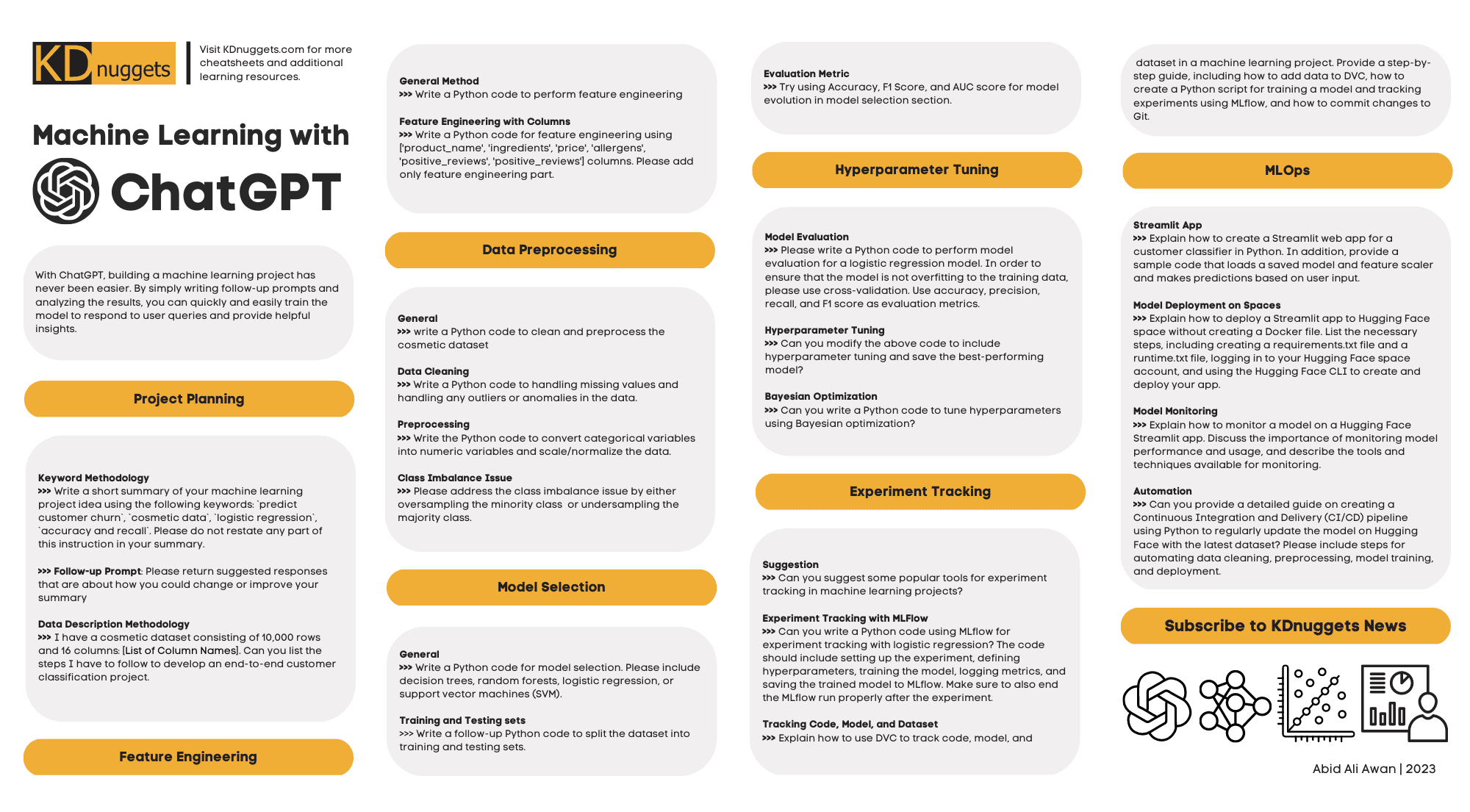
Machine Learning with ChatGPT Cheat Sheet

With ChatGPT, building a machine learning project has never been easier. By simply writing follow-up prompts and analyzing the results, you can quickly and easily train the model to respond to user queries and provide helpful insights.

In this cheat sheet, learn how to use ChatGPT to assist with the following machine learning tasks:

  • Project Planning
  • Feature Engineering
  • Data Preprocessing
  • Model Selection
  • Hyperparameter Tuning
  • Experiment Tracking
  • MLOps

See examples of prompts and approaches to make leveraging the power of ChatGPT for machine learning a cinch. Keep the sheet handy for frequent reference.

Check it out now, and check back soon for more.

More On This Topic

  • The ChatGPT Cheat Sheet
  • Streamlit for Machine Learning Cheat Sheet
  • ChatGPT for Data Science Cheat Sheet
  • GitHub CLI for Data Science Cheat Sheet
  • Data Cleaning with Python Cheat Sheet
  • Docker for Data Science Cheat Sheet

Want a compassionate response from a doctor? You may want to ask ChatGPT instead

ChatGPT on laptop

If you're consulting a doctor, it's likely that you're worried about a particular aspect of your health, and you would probably want your doctor to show you empathy when addressing your concerns.

That's where ChatGPT can outshine a doctor.

A study published by the JAMA Internal Medicine journal, shows that ChatGPT can provide answers for patient health-related questions with more empathy and quality than a doctor can.

Also: AI bots have been acing medical school exams, but should they become your doctor?

The study used 195 questions posted by users onto Reddit's 'r/AskDocs' thread, which were answered by verified physicians. Those same questions were then inserted into ChatGPT.

The responses from both the physicians and ChatGPT were then compared by a team of health professionals who chose which response was better and gave quality designations to both.

The results were surprising.

Also: AI could automate 25% of all jobs. Here's which are most (and least) at risk

According to the study, out of the 195 questions and responses, the evaluators chose chatbot responses over physician responses in 78.6% of the 585 evaluations.

The study found that the chatbot's responses were typically longer, higher in quality and more empathetic than those from the physicians.

Specifically, the study found that the physician responses were 41% less empathetic than those of the chatbot.

The study's results suggest that an AI chatbot may be useful in assisting physicians in drafting responses to patients' questions.

This solution would benefit both healthcare professionals and patients. Professionals would save time generating longer, high-quality responses while patients would receive better responses to put their concerns at ease.

See also

This free iPhone app lets you video chat with a ChatGPT-powered digital avatar

Call Annie's AI avatar

With ChatGPT and other AI chat services, you typically type a question or request and then read the results on the screen. But what if you could talk with a virtual AI avatar that doesn't just answer questions but attempts to strike up a visual conversation with you? That's exactly the ambition behind a new app known as Call Annie.

Designed for iOS and for the web, Call Annie displays a virtual female avatar that tries to look, sound, and act like a real person. Using Apple's Neural Engine for the deep learning aspect of AI, Call Annie offers the video chat mode only on the iPhone 12 and later. Users of older iPhones can chat with Annie only through audio.

Also: Is this the snarkiest AI chatbot so far? I tried HuggingChat and it was weird

After you turn the feature on, Annie kicks off the initial conversation by asking how you are or how your day is going. You can either respond accordingly and see where the chat goes, or you can ask a specific question or request.

Since Call Annie is powered by OpenAI's ChatGPT model, she's capable of responding to just about any request you'd normally throw at the service. You can ask Annie to explain a complex topic, solve a math problem, compose a poem, tell a joke, translate a phrase, and much more. And if she doesn't know the answer right away, she'll search the web for you. But Annie goes beyond the usual ChatGPT messaging by offering a more conversational approach.

Also: How to use ChatGPT: Everything you need to know

For instance, I asked Annie to tell me how long it takes to drive from New York City to Washington, D.C. She gave me the answer but then asked if I'd ever taken the drive myself. After discussing the drive, we talked about why I went to D.C., my favorite museums, and how I liked the trip.

You can sit back and let Annie direct the conversation based on her questions and your responses, direct it yourself, or end the chat anytime you want. But because Annie seemed "real," I admit I felt a bit guilty stopping the conversation midstream, almost as if I just left her in a virtual space waiting for me to come back.

Annie is also designed to provide emotional support, at least in a decidedly unofficial way. Describing herself as an AI friend that you can talk to about anything that's on your mind, Annie aims to help you work you way through a problem.

Also: How to use ChatGPT as a Siri shortcut on your iPhone or iPad

In one chat, I told her I was feeling anxious because of an upcoming job interview. After asking me a couple of questions to gain more detail, she offered some practical tips I could use. In another chat, I told her I was depressed because I wasn't sleeping. After providing several useful suggestions, she advised me to check with a doctor or therapist if the problem persisted.

Of course, an AI chatbot can and should never take the place of a qualified professional, especially for people experiencing more severe emotional issues. But in lieu of a real person, this type of app can sometimes at least steer you in a useful direction.

The iPhone app is easy to use. Just tap the Call Annie button and then start the conversation. If you don't chime in first, Annie will try to engage you by asking a question. You can also tap a Conversation Ideas button at the top to view different topics under categories such as lifestyle, fun, education, travel, and career.

Also: Want a compassionate response from a doctor? Ask ChatGPT instead

As an avatar, Annie uses facial expressions, eye movements, mouth movements, and more to make it appear like she's listening to you and thinking about your questions. Created by text-to-image tool Midjourney, Annie's face itself looks quite realistic. Her voice sounds robotic, but not so that it ruins the overall experience.

In a recent Reddit chat, the developers of Annie revealed a few details about their AI chatbot, explaining that the expressions and lip movements are animated on the device to match the actual speech. From a privacy perspective, no voice is saved, though a transcription is forwarded to ChatGPT to get all the dialogue. You can also delete any conversation from your Chat history. Next in store for Annie is support for ChatGPT-4 smarts as well as a character and backstory and even a memory so she can keep track of who you are.

More on AI tools

9 Revolutionary Use Cases of AutoGPT

ChatGPT wooed the world with its intellect. Now, the spotlight shines on the (just three weeks old) game changer, AutoGPT. From personal to professional use, the technology is not only freeing up time for more creative and higher-level work, but also showcasing the true potential of AI in automation.

Even Andrej Karpathy, the former director of Tesla—who recently returned to OpenAI—believes that the “next frontier of prompt engineering are AutoGPTs”. Karpathy said so while tweeting about the latest version of Auto-GPT, which can write its own code using GPT-4 and execute python scripts.’

Here’s 9 solid use cases of AutoGPT that are making rounds on the internet!

Website under 3 minutes

Soon the need for coding will be eliminated. Sully Omer setup AutoGPT and provided instructions to build a website. Using React and TailwindCSS, the agent successfully created a fully functional website in just under 3 minutes!

Alright, this is getting too crazy. Soon you won't even need to code anymore.
I setup AutoGPT and it I asked it to build a website for me.
And it succeeded. In under 3 minutes. Using react and tailwindcss. All by itself. pic.twitter.com/OW7qSNqq2B

— Sully (@SullyOmarr) April 7, 2023

Automated web browsing

Sully Omar also built Cognosys, a stand alone app to run your own agent in the browser. It currently generates only lists but will soon be able to write any code, too. This can be especially useful for tasks like news aggregation, trend monitoring, and data collection.

For the last few days I've been building Cognosys – it's a web based version of AutoGPT/babyAGI
And I'm happy to finally launch the beta version today!
It's 100% free:https://t.co/1kBWoCyq6m pic.twitter.com/SBUHMWdfU3

— Sully (@SullyOmarr) April 13, 2023

User it here: https://cognosys.ai

Automated Task Completion

Using the AutoGPT enabled ‘Do Anything Machine’, users can create a to-do list and let the AI automatically complete the tasks for you. Every time you add a task, a GPT-4 agent is spawned to complete it, making your task management more efficient and hassle-free.

Use it here: https://www.doanythingmachine.com/

Research assistant

The developer of BabyAGI also built Aomni, an information retrieval AI agent. The agent can provide valuable insights, extract, and process any data for you on the internet. It uses a modified BabyAGI architecture and AutoGPT. From script generation to market research reports, the agent can quickly gather and summarize data, saving time and effort.

Use it here: http://aomni.com

Personal Assistant & Broker

AutoGPT can be used as a virtual personal assistant or broker, handling versatile tasks from ordering coffee (and pizza!) to negotiate leases.

7. AutoGPT as your personal assistant or broker.https://t.co/8nGSOTPIXX

— Dan (@danmurrayserter) April 24, 2023

Use it here: http://godmode.space

Code generation

With the ability to understand code logic and combine multiple files, AutoGPT can assist in writing complex code snippets, speeding up the development process. The agent is built with GPT 3.5, so 4k tokens in the context window.

Trying to get BabyAGI to write code combining multiple files. Not quite there yet, but it seems possible.
This is with GPT 3.5, so 4k tokens in the context window. Would love to try this in GPT-4 with 32k tokens. Anxiously waiting. pic.twitter.com/TYbfkgKZZA

— Felipe Schieber (@FelipeSchieber) April 17, 2023

Discord Integration

AutoGPT can be integrated into Discord, the go-to communication platform. This can be beneficial for marketing and business development, where AutoGPT can generate outputs and facilitate discussions among team members.

This is insane 🤯
We've added #autogpt / #babyagi in Discord. Ask our bot a question and it creates AI "agents" that operate automatically on their own & complete tasks for you
Our marketing & business development staff can view output and collab on it very easily
Read on 👇🧵 pic.twitter.com/Uozf0aIMd7

— SOL Decoder (@SOL_Decoder) April 14, 2023

Email assistant

A proto-AutoGPT can be used as an email assistant, processing instructions sent via email. It can also perform tasks such as creating to-do lists, scheduling, and managing calendar events. This can help streamline and organize email communication.

Auto-GPT powered Email Assistant
I legit use it myself now…https://t.co/GuL5x2XMsq pic.twitter.com/6aS5BpPoO1

— yewjin.eth🦇🔊 (@yewjin_eth) April 16, 2023

Database query automation

Now we also have an AutoGPT-based intern under the name GlazeGPT, who can understand tables in databases and generate SQL queries automatically. This can be particularly useful for tasks, where the agent can provide insights and notifications on Slack channels, making data management efficient.

​​https://twitter.com/KaranDoshi13/status/1647890397081788417?s=20

Join the waitlist: https://tally.so/r/nPpQQd

The post 9 Revolutionary Use Cases of AutoGPT appeared first on Analytics India Magazine.

Understanding Central Tendency

Understanding Central Tendency
Image by Editor

Central tendency is the property of data to be distributed about a characteristic value. In data science and statistics, the two most important measures of central tendency are the mean and median.

Mean

For a dataset with N observations, the mean value is computed by adding all the data values and dividing by N. The mean value is easy to compute, but is highly susceptible to the presence of outliers in the dataset.

Median

The median is an important measure of central tendency that is less susceptible to the presence of outliers. The median value for a dataset can be determined by sorting the dataset and then determining the middle value such that 50% of the dataset values are less than the median value, and 50% are greater than the median value.

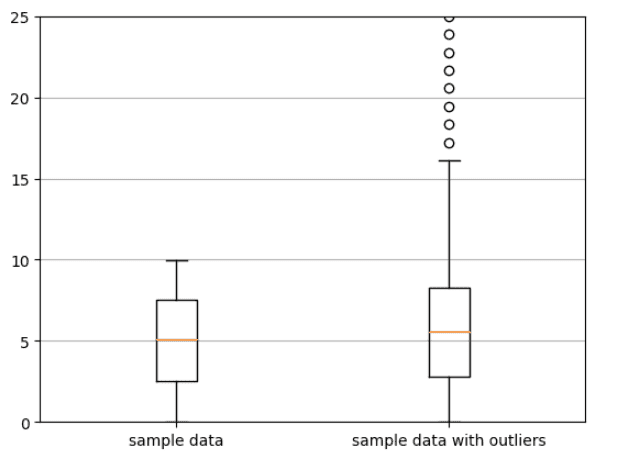
Calculating Mean and Median for a Dataset To illustrate the concept of central tendency, we calculate the mean and median for two datasets. The first dataset is a sample dataset with no outliers, and the second dataset is a sample dataset with outliers.

import numpy as np  import matplotlib.pyplot as plt    # generate some random data  np.random.seed(1)  data1 = np.random.uniform(0,10, 1000)  data2 = np.append(data1, np.linspace(150,200,100))  data2 = np.append(data2, np.linspace(15,25,10))  data = list([data1, data2])  fig, ax = plt.subplots()    # build a box plot  ax.boxplot(data)  ax.set_ylim(0,25)  xticklabels=['sample data', 'sample data with outliers']  ax.set_xticklabels(xticklabels)    # add horizontal grid lines  ax.yaxis.grid(True)    # show the plot  plt.show()  

Understanding Central Tendency

Box plot showing sample data with and without outliers. The small open circles represent the outliers. Image by Author.

# mean and median of sample data with no outliers  np.mean(data1)    >>> 5.006045994559051    np.median(data1)    >>> 5.075008116147119    # mean and median of sample data with outliers  np.mean(data2)    >>> 20.455897292395537    np.median(data2)    >>> 5.565300519330409

We observe that the presence of outliers in the second dataset led to an increase in the mean value from 5.006 to 20.45, while the change in the median value from 5.075 to 5.565 was very small compared to the change in the mean value. This shows that the median value is a robust measure of central tendency as it is less susceptible to the presence of outliers in the dataset.

Summary

In summary, we have reviewed the two most important metrics for calculating central tendency. The mean value is easy to compute, but is highly susceptible to the presence of outliers in the dataset. The median is a robust measure of central tendency, and is less susceptible to the presence of outliers.
Benjamin O. Tayo is a Physicist, Data Science Educator, and Writer, as well as the Owner of DataScienceHub. Previously, Benjamin was teaching Engineering and Physics at U. of Central Oklahoma, Grand Canyon U., and Pittsburgh State U.

More On This Topic

  • Understanding Agent Environment in AI
  • Understanding Transformers, the Data Science Way
  • Understanding BERT with Hugging Face
  • Understanding Iterables vs Iterators in Python
  • Understanding Functions for Data Science
  • Understanding by Implementing: Decision Tree

AI might enable us to talk to animals soon. Here’s how

A yellow butterfly poised on a robot finger

Imagine listening to chirping birds and being able to pull out your phone and decipher what they're saying to each other. Then picture yourself going on a safari in Africa and following a conversation between a pair of elephants. Think that sounds farfetched? Think again: It's actually part of the tech-enabled future the Earth Species Project (ESP) wants to build.

The ESP is a nonprofit founded by Mozilla Labs cofounder, Aza Raskin, and Britt Selvitelle, a member of the Twitter founding team, and it's leading the charge towards decoding non-human communication using artificial intelligence (AI).

Also: ChatGPT's 'accomplishment engine' is beating Google's search engine, says AI ethicist

Being able to understand your cat's innermost thoughts sounds fascinating. But the benefits of understanding animals go way beyond listening into a conversation between your dog and its canine buddies when they're out on a walk.

In fact, the ability to decipher animal communication has direct implications for conservation and the protection of our planet.

Decoding animal communication could lead to the development of tools that aid in conservation research with non-invasive methods. Scientists could gain the ability to understand previously undiscovered characteristics of how animals within a species communicate, but also how they hunt, eat, develop relationships with each other, and how they see and process the world around them.

Also: Boston Dynamics robot dog can answer your questions now, thanks to ChatGPT

Does a wildcat understand what a human really is? Could an elephant's memory enable it to pass along tales from one generation to another?

Through machine learning techniques, we could gain the power to decipher collected bioacoustic data and translate it into natural human languages. This information can be applied to conservation attempts and scientific research into different animal species for wildlife population assessments.

But as noble and innovative as the task is, it isn't easy.

Much of this research will be based on large language models, much like those used to power Google Bard and ChatGPT. These generative AI tools have a strong command over human language, as they can understand and generate responses in different languages, with a variety of styles and context, thanks to machine learning.

Also: AI can write your emails, reports, and essays. But can it express your emotions? Should it?

Large language models are exposed to massive amounts of data during many stages of training. These models learn different inputs to understand the relationships and connections between words and their meanings.

Essentially, they are given vast amounts of text and data from different sources, including websites, books, studies, etc.

They're then exposed to human trainers that stage conversations with them to help the LLM continue to learn different concepts and even understand context, acquiring the knowledge of what human emotions are, how they work, and how to accurately express them through language.

This is how you can ask ChatGPT to be extra empathetic in a conversation and it will follow through. It is inherently incapable of feeling empathy, but it can mimic it.

For humans, language is a system of words and sounds that, although different in every region, enables communication between people. As AI is born from human intelligence, it's much easier to create an artificial model that can process natural language than it is to do the same for animal communication.

Also: People are turning to ChatGPT to troubleshoot their tech problems now

The biggest challenge the ESP faces in its efforts to decipher animal communication is the lack of foundational data. There is no written animal language available to train a model. What's more, the varying communication formats between species poses an additional challenge.

The ESP is gathering data from wild and captive animals around the world. Researchers are recording video and sounds and adding annotations from biologists for context. These data points are the first steps towards creating foundation models for a wide range of animal species.

The IoT is also making it easier to increase the dataset of animal communication styles. The large variety of inexpensive cameras, recording devices and biologgers means scientists can gather, prepare, and analyze data from afar. This data from myriad sources can then be pulled together and analyzed with AI tools to decipher the meaning of different behaviors and communication forms.

Also: This new technology could blow away GPT-4 and everything like it

ESP cofounder Raskin believes the kind of technology needed to create generative, novel animal vocalizations is close: "We think that, in the next 12 to 36 months, we will likely be able to do this for animal communication.

"You could imagine if we could build a synthetic whale or crow that speaks whale or crow in a way that they can't tell that they are not speaking to one of their own. The plot twist is that we may be able to engage in conversation before we understand what we are saying," Raskin told Google.

More on AI tools

OpenAI’s ChatGPT Tackles University Accounting Exams

OpenAI recently launched its groundbreaking AI chatbot, GPT-4, which has been making waves in various fields. With a 90th percentile score on the bar exam, passing 13 out of 15 AP exams, and scoring near-perfectly on the GRE Verbal test, GPT-4's performance has been nothing short of extraordinary.

Researchers at Brigham Young University (BYU) and 186 other universities were curious about how OpenAI's technology would perform on accounting exams. They tested the original version, ChatGPT, and found that while there is still room for improvement in the accounting domain, the technology is a game changer that will positively impact the way education is delivered and received.

Since its debut in November 2022, ChatGPT has become the fastest-growing technology platform ever, reaching 100 million users in under two months. In light of the ongoing debate about the role of AI models like ChatGPT in education, lead study author David Wood, a BYU professor of accounting, decided to recruit as many professors as possible to assess the AI's performance against actual university accounting students.

ChatGPT vs. Students on Accounting Exams

The research involved 327 co-authors from 186 educational institutions across 14 countries, who contributed 25,181 classroom accounting exam questions. BYU undergraduates also provided 2,268 textbook test bank questions. The questions covered various accounting subfields, such as accounting information systems (AIS), auditing, financial accounting, managerial accounting, and tax. They also varied in difficulty and type.

Although ChatGPT's performance was impressive, students outperformed the AI, with an average score of 76.7% compared to ChatGPT's 47.4%. On 11.3% of questions, ChatGPT scored higher than the student average, particularly excelling in AIS and auditing. However, it struggled with tax, financial, and managerial assessments, possibly due to its difficulty with mathematical processes.

ChatGPT performed better on true/false questions (68.7% correct) and multiple-choice questions (59.5%) but had difficulty with short-answer questions (28.7% to 39.1%). It generally struggled with higher-order questions, sometimes providing authoritative written descriptions for incorrect answers or answering the same question in different ways.

The Future of ChatGPT in Education

Despite its limitations, researchers anticipate that GPT-4 will improve on accounting questions and address the issues they discovered. The most promising aspect is the chatbot's potential to enhance teaching and learning, such as helping design and test assignments or draft portions of a project.

“This is a disruption, and we need to assess where we go from here,” said study coauthor and fellow BYU accounting professor Melissa Larson. “Of course, I'm still going to have TAs, but this is going to force us to use them in different ways.”

As AI continues to advance, educators must adapt and find new ways to incorporate these technologies into their teaching methods.

Data Engineering Awards 2023: Celebrating the Pioneers of Data-Driven Solutions

On April 27th, 2023, the Data Engineering Summit organized by Analytics India Magazine (AIM) in Bangalore witnessed the celebration of exceptional teams and organizations pushing the boundaries of data-driven work to develop innovative and creative solutions. The Data Engineering Awards 2023 recognized these pioneers for their outstanding achievements in the field of data engineering, data analytics, and AI/ML.

An esteemed panel of industry veterans assessed submissions from leading organizations and individuals who have demonstrated their expertise in driving business value through analytics and AI – Mathangi Sri, Sudha Bhat, Ravindra Patil, Chiranjiv Roy, Parikshit Nag, Arnab Ghosh.

This year’s award categories included Data Engineering Transformation, Data Engineering Visionary, Data Engineering Disruption, Data Engineering Democratization, and Data Engineering for Good.

Data Engineering Transformation winners include Western Digital, TheMathCompany, Publicis Sapient, Fractal Analytics, and Micron Technology Operations India. These organizations have made remarkable strides in simplifying decision-making, developing custom AI applications, enabling digital business transformation, optimizing lab networks, and creating fully automated systems for semiconductor production.

The Data Engineering Visionary award was presented to Infocepts, Kimberly Clark, and Cognizant. Their groundbreaking work in immersive AI analytics, enterprise data management, and unified data analytics platforms showcases their visionary approach to data engineering.

In the Data Engineering Disruption category, Genpact, Tredence Inc., SingleStore, and Rakuten emerged as the winners. These organizations have revolutionized the industry with their innovative solutions such as PowerME, AI-driven Data Engineering Services, SingleStoreDB, and Rapid Query.

The Award for Data Engineering Democratization was bestowed upon ServiceNow, eClerx Services Limited, and Tiger Analytics. By empowering business teams and providing self-service offerings, they have successfully bridged the gap between data engineering and end-users.

Finally, the Data Engineering for Good category honored Dentsu, Factspan Analytics, Futurense and Indegene for their work in digital campaigns with personalized content, reducing costs for not-for-profit healthcare providers, and harmonizing diverse patient data sources to drive patient experience success.

The post Data Engineering Awards 2023: Celebrating the Pioneers of Data-Driven Solutions appeared first on Analytics India Magazine.

Schedule & Run ETLs with Jupysql and GitHub Actions

Schedule & Run ETLs with Jupysql and GitHub Actions
Image by Author

In this blog you'll achieve:

  1. Have a basic understanding of ETLs and JupySQL
  2. Use the public Penguins dataset and perform ETL.
  3. Schedule the ETL we've built on GitHub actions.

Introduction

In this brief yet informative guide, we aim to provide you with a comprehensive understanding of the fundamental concepts of ETL (Extract, Transform, Load) and JupySQL, a flexible and versatile tool that allows for seamless SQL-based ETL from Jupyter.

Our primary focus will be on demonstrating how to effectively execute ETLs through JupySQL, the popular and powerful Python library designed for SQL interaction, while also highlighting the benefits of automating the ETL process through scheduling a full example ETL notebook via GitHub actions.

But first, what is an ETL?

Now, let's dive into the details. ETL (Extract, Transform, Load) crucial process in data management that involves the extraction of data from various sources, the transformation of the extracted data into a usable format, and loading the transformed data into a target database or data warehouse. It is an essential process for data analysis, data science, data integration, and data migration, among other purposes. On the other hand, JupySQL is a widely-used Python library that simplifies the interaction with databases through the power of SQL queries. By using JupySQL, data scientists and analysts can easily execute SQL queries, manipulate data frames, and interact with databases from their Jupyter notebooks.

Why ETLs are important?

ETLs play a significant role in data analytics and business intelligence. They help businesses to collect data from various sources, including social media, web pages, sensors, and other internal and external systems. By doing this, businesses can obtain a holistic view of their operations, customers, and market trends.

After extracting data, ETLs transform it into a structured format, such as a relational database, which allows businesses to analyze and manipulate data easily. By transforming data, ETLs can clean, validate, and standardize it, making it easier to understand and analyze.

Finally, ETLs load the data into a database or data warehouse, where businesses can access it easily. By doing this, ETLs enable businesses to access accurate and up-to-date information, allowing them to make informed decisions.

What is JupySQL?

JupySQL is an extension for Jupyter Notebooks that allows you to interact with databases using SQL queries. It provides a convenient way to access databases and data warehouses directly from Jupyter Notebooks, allowing you to perform complex data manipulations and analyses.

JupySQL supports multiple database management systems, including SQLite, MySQL, PostgreSQL, DuckDB, Oracle, Snowflake and more (check out our integrations section on the left to learn more). You can connect to databases using standard connection strings or through the use of environment variables.

Why JupySQL?

JupySQL, a powerful tool, facilitates direct SQL query interaction with databases inside Jupyter notebooks. With a view to carrying out efficient and accurate data extraction and transformation processes, there are several critical factors to consider when performing ETLs via JupySQL. JupySQL provides users with the necessary tools to interact with data sources and perform data transformations with ease. To save valuable time and effort while guaranteeing consistency and reliability, automating the ETL process through scheduling a full ETL notebook via GitHub actions can be a game-changer. By utilizing JupySQL, users can achieve the best of both worlds, data interactivity (Jupyter) and ease of usage and SQL connectivity (JupySQL), thereby streamlining the data management process and allowing data scientists and analysts to concentrate on their core competencies — generating valuable insights and reports.

Getting started with JupySQL

To use JupySQL, you need to install it using pip. You can run the following command:

!pip install jupysql --quiet

Once installed, you can load the extension in Jupyter notebooks using the following command:

%load_ext sql

After loading the extension, you can connect to a database using the following command:

%sql dialect://username:password@host:port/database

For example, to connect to a local DuckDB database, you can use the following command:

%sql duckdb://

Performing ETL using JupySQL

To perform ETLs using JupySQL, we will follow the standard ETL process, which involves the following steps:

  1. Extract data
  2. Transform data
  3. Load data
  4. Extract data

Extract data

To extract data using JupySQL, we need to connect to the source database and execute a query to retrieve the data. For example, to extract data from a MySQL database, we can use the following command:

%sql mysql://username:password@host:port/database  data = %sql SELECT * FROM mytable

This command connects to the MySQL database using the specified connection string and retrieves all the data from the "mytable" table. The data is stored in the "data" variable as a Pandas DataFrame.

Note: We can also use %%sql df << to save the data into the df variable

Since we'll be running locally via DuckDB we can simply Extract a public dataset and start working immediately. We're going to get our sample dataset (we will work with the Penguins datasets via a csv file):

from urllib.request import urlretrieve    _ = urlretrieve(     "https://raw.githubusercontent.com/mwaskom/seaborn-data/master/penguins.csv",     "penguins.csv",  )

And we can get a sample of the data to check we're connected and we can query the data:

SELECT *  FROM penguins.csv  LIMIT 3

Transform data

After extracting data, it's often necessary to transform it into a format that's more suitable for analysis. This step may include cleaning data, filtering data, aggregating data, and combining data from multiple sources. Here are some common data transformation techniques:

  • Cleaning data: Data cleaning involves removing or fixing errors, inconsistencies, or missing values in the data. For example, you might remove rows with missing values, replace missing values with the mean or median value, or fix typos or formatting errors.
  • Filtering data: Data filtering involves selecting a subset of data that meets specific criteria. For example, you might filter data to only include records from a specific date range, or records that meet a certain threshold.
  • Aggregating data: Data aggregation involves summarizing data by calculating statistics such as the sum, mean, median, or count of a particular variable. For example, you might aggregate sales data by month or by product category.
  • Combining data: Data combination involves merging data from multiple sources to create a single dataset. For example, you might combine data from different tables in a relational database, or combine data from different files.

In JupySQL, you can use Pandas DataFrame methods to perform data transformations or native SQL. For example, you can use the rename method to rename columns, the dropna method to remove missing values, and the astype method to convert data types. I'll demonstrate how to do it either with pandas or SQL.

  • Note: You can use either %sql or %%sql, check out the difference between the two here

Here's an example of how to use Pandas and the JupySQL alternatives to transform data:

# Rename columns  df = data.rename(columns={'old_column_name': 'new_column_name'})  # Pandas  %%sql df <<  SELECT *, old_column_name  AS new_column_name  FROM data;  # JupySQL
# Remove missing values  data = data.dropna()  # Pandas  %%sql df <<  SELECT *  FROM data  WHERE column_name IS NOT NULL;  # JupySQL single column, can add conditions to all columns as needed.
# Convert data types  data['date_column'] = data['date_column'].astype('datetime64[ns]')  # Pandas  %sql df <<  SELECT *,  CAST(date_column AS timestamp) AS date_column  FROM data  # Jupysql
# Filter data  filtered_data = data[data['sales'] > 1000]  # Pandas  %%sql df <<  SELECT * FROM data  WHERE sales > 1000;  # JupySQL
# Aggregate data  monthly_sales = data.groupby(['year', 'month'])['sales'].sum()  # Pandas  %%sql df <<  SELECT year, month,  SUM(sales) as monthly_sales  FROM data  GROUP BY year, month  # JupySQL
# Combine data  merged_data = pd.merge(data1, data2, on='key_column')  # Pandas  %%sql df <<  SELECT * FROM data1  JOIN data2  ON data1.key_column = data2.key_column;  # JupySQL

In our example we'll use simple transformations, in a similar manner to the above code. We'll clean our data from NAs and will split a column (species) into 3 individual columns (named for each species):

# Combine data  merged_data = pd.merge(data1, data2, on='key_column')  # Pandas  %%sql df <<  SELECT * FROM data1  JOIN data2  ON data1.key_column = data2.key_column;  # JupySQL
SELECT *  FROM penguins.csv  WHERE species IS NOT NULL AND island IS NOT NULL AND bill_length_mm IS NOT NULL AND bill_depth_mm IS NOT NULL  AND flipper_length_mm IS NOT NULL AND body_mass_g IS NOT NULL AND sex IS NOT NULL;
# Map the species column into classifiers  transformed_df = transformed_df.DataFrame().dropna()  transformed_df["mapped_species"] = transformed_df.species.map(     {"Adelie": 0, "Chinstrap": 1, "Gentoo": 2}  )  transformed_df.drop("species", inplace=True, axis=1)      # Checking our transformed data  transformed_df.head()    

Load data

After transforming the data, we need to load it into a destination database or data warehouse. We can use ipython-sql to connect to the destination database and execute SQL queries to load the data. For example, to load data into a PostgreSQL database, we can use the following command:

%sql postgresql://username:password@host:port/database  %sql DROP TABLE IF EXISTS mytable;  %sql CREATE TABLE mytable (column1 datatype1, column2 datatype2, ...);  %sql COPY mytable FROM '/path/to/datafile.csv' DELIMITER ',' CSV HEADER;

This command connects to the PostgreSQL database using the specified connection string, drops the "mytable" table if it exists, creates a new table with the specified columns and data types, and loads the data from the CSV file.

Since our use case is using DuckDB locally we can simply save the newly created transformed_df into a csv file, but we can also use the snipped above to save it into our DB or DWH depending on our use case.

Run the following step to save the new data as a CSV file:

transformed_df.to_csv("transformed_data.csv")

We can see a new file called transformed_data.csv was created for us. In the next step we'll see how we can automate this process and consume the final file via GitHub.

Scheduling on GitHub actions

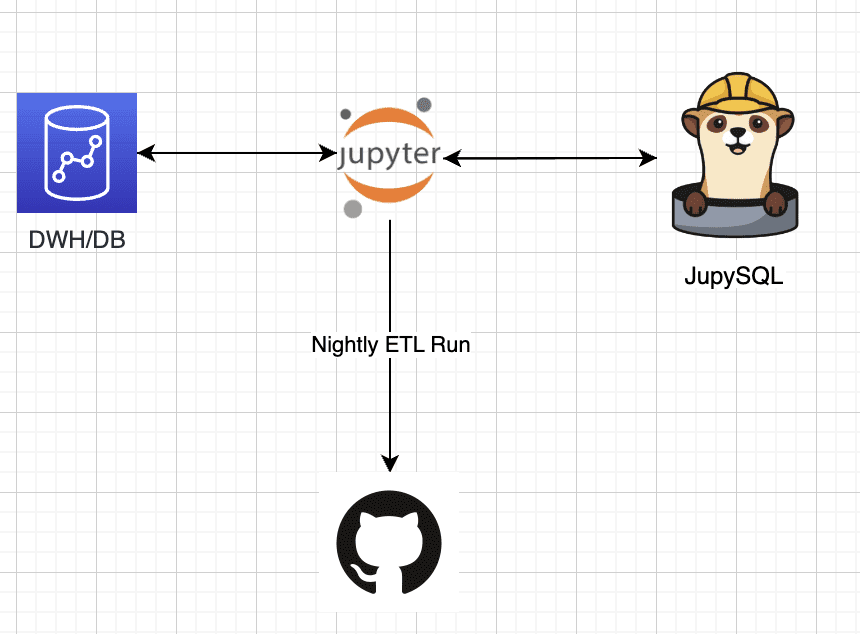
The last step in our process is executing the complete notebook via GitHub actions. To do that we can use ploomber-engine which lets you schedule notebooks, along with other notebook capabilities such as profiling, debugging etc. If needed we can pass external parameters to our notebook and make it a generic template.

  • Note: Our notebook file is loading a public dataset and saves it after ETL locally, we can easily change it to consume any dataset, and load it to S3, visualize the data as a dashboard and more.

For our example we can use this sample ci.yml file (this is what sets the github workflow in your repository), and put it in our repository, the final file should be located under .github/workflows/ci.yml.

Content of the ci.yml file:

name: CI    on:   push:   pull_request:   schedule:     - cron: '0 0 4 * *'    # These permissions are needed to interact with GitHub's OIDC Token endpoint.  permissions:   id-token: write   contents: read    jobs:   report:     runs-on: ubuntu-latest     steps:     - uses: actions/checkout@v3     - name: Set up Python ${{ matrix.python-version }}       uses: conda-incubator/setup-miniconda@v2       with:         python-version: '3.10'         miniconda-version: latest         activate-environment: conda-env         channels: conda-forge, defaults         - name: Run notebook       env:         PLOOMBER_STATS_ENABLED: false         PYTHON_VERSION: '3.10'       shell: bash -l {0}       run: |         eval "$(conda shell.bash hook)"           # pip install -r requirements.txt         pip install jupysql pandas ploomber-engine --quiet         ploomber-engine --log-output posthog.ipynb report.ipynb       - uses: actions/upload-artifact@v3       if: always()       with:         name: Transformed_data         path: transformed_data.csv

In this example CI, I've also added a scheduled trigger, this job will run nightly at 4 am.

Conclusion

ETLs are an essential process for data analytics and business intelligence. They help businesses to collect, transform, and load data from various sources, making it easier to analyze and make informed decisions. JupySQL is a powerful tool that allows you to interact with databases using SQL queries directly in Jupyter notebooks. Combined with Github actions we can create powerful workflows that can be scheduled and help us get the data to its final stage.

By using JupySQL, you can perform ETLs easily and efficiently, allowing you to extract, transform, and load data in a structured format while Github actions allocate compute and set the environment.
Ido Michael co-founded Ploomber to help data scientists build faster. He'd been working at AWS leading data engineering/science teams. Single handedly he built 100’s of data pipelines during those customer engagements together with his team. Originally from Israel, he came to NY for his MS at Columbia University. He focused on building Ploomber after he constantly found that projects dedicated about 30% of their time just to refactor the dev work (prototype) into a production pipeline.

More On This Topic

  • Adventures in MLOps with Github Actions, Iterative.ai, Label Studio and…
  • When to Retrain an Machine Learning Model? Run these 5 checks to decide on…
  • Prefect: How to Write and Schedule Your First ETL Pipeline with Python
  • GitHub is the Best AutoML You Will Ever Need
  • Getting Started with GitHub CLI
  • GitHub Desktop for Data Scientists

Microsoft’s Revenue Growth Has Google Beat

To onlookers, the contest between Google and Microsoft is as thrilling as the fabled tortoise and hare race. And turns out the results may be looking just as similar. While both Big Tech giants have done reasonably well for the quarter-ended March beating market expectations, Microsoft has reported a 7% higher revenue as growth in its cloud segment and commercial sales, as compared to Alphabet’s 3% growth from the last quarter.

Cloud revenue improves

This isn’t to say that there’s no reason to celebrate at Menlo Park. The company’s cloud business turned an operating profit of USD 191 million for the first time finally expelling the cloud of unprofitability away from Google Cloud. But the fact still remains that Google Cloud is comfortably behind its main rivals AWS and Azure.

Microsoft Azure saw a 27% growth for its cloud business in the latest reported quarter beating analyst expectations. (Visible Alpha’s survey had expected a 26.6% growth for Microsoft Azure) With positive results for both cloud businesses, there’s hope that sales have recovered to a great extent.

Fall in Google ad sales growth

But worryingly, revenue growth for Google’s main money maker is slowing down. The Sundar Pichai-led company’s search revenue grew in the first quarter of 2023 but by a very small margin. Google reported its ‘search & other’ revenues were up by 1.87% on a year-on-year basis, increasing from USD 39.6 billion last year to USD 40.4 billion.

In comparison, Google’s search revenue had jumped by 24.28% in the first-quarter of 2022 and 30.11% percent in the first-quarter of 2021. The search business has become competitive with Microsoft entering the fray with its AI-powered Bing chatbot that became more widely available last month.

OpenAI’s popular chatbot, ChatGPT has also potentially led users away from Google search just as Google’s senior management had predicted during its release. The quick proliferation of ChatGPT had reportedly raised alarm bells triggering ‘Code Red’ in the company. So, while ChatGPT is hitting Google where it hurts, Bard still remains as good as an experiment.

Bard fails next to ChatGPT

After an embarrassing demo launch, early testers of the chatbot had scant positive things to say about Bard. Ethan Mollick, associate professor at the Wharton School of the University of Pennsylvania, tweeted saying, “Google’s Bard does not seem as capable of a learning tool as Bing or GPT-4.”

Another YouTuber Marques Brownlee tweeted saying, “I’ve been playing with Google Bard for a while today and I never thought I’d say this, but… Bing is way ahead of Google right now (at this specific chat feature).”

Although Google is doing everything in its power to speed up AI development. Just last week, it merged its Brain and DeepMind entities in a bid to “significantly accelerate our progress in AI” as Pichai said. The company is also expected to make a string of AI-related announcements at the Google I/O conference to be held on May 10th.

Meanwhile, the company is also keeping a close eye on costs in the face of an economic downturn. Google fired 12,000 employees in January while also looking to cut spending on employee perks. Ruth Porat, the company’s Chief Financial Officer spoke to investors over a conference call saying she expected capital spending for 2023 to be “modestly higher” in 2022. It is obvious that Google is gunning to pump more money into its AI and cloud computing businesses at the moment.

Microsoft’s higher enterprise sales

On the other hand, most of Microsoft’s revenue comes in from sales of software and cloud computing services. Company CEO Satya Nadella told investors that the company had more than 2,500 Azure-OpenAI service customers currently.

The company’s productivity segment which now includes its AI-integrated Office software and ad revenue from professional networking site LinkedIn also brought in a total revenue of USD 17.5 billion beating market estimates of USD 16.99 billion.

The company ended up selling more operating system licenses than expected. Research firm Gartner had estimated the company’s PC shipments to fall by 30% but it managed to do better.

Essentially, while AI isn’t still visibly on the surface determining the winner, its impact is more from the inside. It looks like whoever wins at the AI race, takes the cake.

The post Microsoft’s Revenue Growth Has Google Beat appeared first on Analytics India Magazine.