How to use Craiyon AI (formerly known as DALL-E mini)

figure-top-2-how-to-use-craiyon-ai-to-create-amazing-images-1

A host of AI-powered websites and services can create images and artwork based on your description. One site worth trying is Craiyon. The free (but ad-supported) web version of Craiyon will generate art, drawings, and photos from your text description. The paid versions dispense with the ads and speed up the processing time. There's also a Craiyon Android app for your phone or tablet.

How to use: Midjourney | Bing Image Creator | DALL-E 2 | Stable Diffusion

Designed by developer Boris Dayma as a free text-to-image AI tool, Craiyon advanced not only through internal improvements but through contributions from the open-source community. Beyond generating new images, Craiyon contains a library of existing images that you can access to help with your queries. Previously known as DALL-E mini, the site changed its name upon a request from OpenAI, which felt that the former name was too close to its own DALL-E image generator.

How to get started with Craiyon AI

How to use the Android app

Beyond the website, you're able to take Craiyon for a spin on an Android device. Download and install the app from Google Play. Sign into your account if you've created one. From there, the app works the same as the website. Type a description of the image you want, choose a style, and then tap Draw. Among the results, tap an image to see a larger version of it. From there, you can upscale it, download it to your device, or try a different prompt.

More on AI tools

How to use DALL-E 2 to turn your ideas into AI-generated art

Dall-E cat with hot sauce

Life imitates art, or does art imitate life? With OpenAI's DALL-E 2, art can imitate just about anything. The trending text-to-art platform allows users to generate images, but with their words instead of art supplies.

The concept sounds almost too simple (and futuristic) to be true: Type your idea into a search bar and voila! But for the best results, you'll want to follow these tips and tricks to get the most realistic and accurate representations of your desired searches.

How to use: Midjourney | Bing Image Creator | Craiyon | Stable Diffusion

Before you get started with DALL-E 2, there are three housekeeping rules that you should know:

  1. Since you technically create the idea for your artwork, you, by default, are the accredited artist for the AI-generated product. If you choose to download the image, though, there will be a colorful DALL-E 2, watermark on the bottom right corner.

  2. There are limits to what you can create with the platform. For example, DALL-E 2's content policy prohibits harmful, deceitful, or political content. To discourage deep fakes, search terms for many public figures — Taylor Swift, for example — are prohibited. While not all celebrities violate the content policy, their faces will often be distorted for safety.

  3. DALL-E 2 is currently free to use, but there is a catch. After signing up for OpenAI via email, you're allotted 50 free credits during your first month's use and 15 free credits after that, which renew monthly. A credit is only cashed after a generation is inputted and completed, so searches that violate the content policy and, therefore, end up not being generated won't be deducted from the free credits. You can check how many credits you have remaining each month by clicking on your profile icon in the upper right hand corner of the search interface, and there's also an option to buy more.

How to use DALL-E 2 to create custom art

Some DALL-E 2-generated art pieces for inspiration.

Generating the phrase presents you with four AI-generated interpretations.

You can save the generated image to the Favorites collection or a custom one.

Also: 5 ways ChatGPT can help you write an essay

Tips and tricks to get the best DALL-E 2 results

Using AI tools to generate art can be fairly intuitive, but between having so many possibilities and needing to specifically communicate your abstract ideas with a robot, here are some tips I've curated that make creating funky art even easier.

1. Draw from others' inspiration

If inspiration hasn't struck you quite yet or you're feeling overwhelmed, hover your mouse over an image or concept you like from the main page gallery and select "Click to try."

Also: What is GPT-4? Here's everything you need to know

From there, DALL-E 2 will create similar variations which you can customize with your own text description(s).

2. Don't be stuck, be surprised

If you lack inspiration, let the software be your muse. Above the search bar, select the "Surprise me" button. From there, a phrase will appear in the search bar. You can either hit the button again for a different result, modify the phrase with your personal touch, or keep it as is and generate.

You can select the "surprise me" button if you're stuck or just want some fun art.

3. Explain to DALL-E 2 like it's a five-year-old

The other day, my colleague Sabrina Ortiz was trying to create a piece with a Corgi and a Yorkie. DALL-E 2 had no problem recognizing the word "Corgi" but struggled to process "Yorkie" or "Yorkshire Terrier". Instead, "Yorkie dog" did the trick. Essentially, the more specific, the better — AI is smart, but you're smarter.

FAQ

What is DALL-E 2?

Originally launched in early 2021, DALL-E 2 is OpenAI's artificial intelligence system that allows users to create art from textual input.

Is DALL-E 2 free?

In September 2022, DALL-E 2 officially closed its waiting list and opened the platform to the public. Users start with 50 free credits to transform searches into fully generated artwork and 15 free credits every month from then on. The site also allows you to buy more credits.

Can I use my DALL-E 2 creation for merchandise?

Yes. Arguably the best thing about DALL-E 2 is that users have full rights to commercially use, print, and merchandise their own unique, AI creations. Craiyon, another AI art generator, offers users the ability to order shirts with their designs on them from within the platform.

Is making art on DALL-E 2 ethical?

It's definitely cool that your art is credited to you and DALL-E 2, but it's important to recognize that DALL-E 2, along with other AI art generators, are trained on billions of pieces of art culled from the internet. These images have, and belong to, an original artist. While that artist isn't directly creating your DALL-E piece, your art does have elements from the original art without being credited to the artist. Whether or not AI-generated art is ethical is currently a hot topic of debate.

Is DALL-E 2 the same as Bing Image Creator?

Interestingly, Bing Image Creator actually uses a more advanced version of Open AI's DALLE-2. The rendered images differ in artistic subtleties and attention to detail, with Bing Image Creator producing a more vibrant, detailed image.

See also

Anthropic thinks ‘constitutional AI’ is the best way to train models

Anthropic thinks ‘constitutional AI’ is the best way to train models Kyle Wiggers 8 hours

Anthropic, a startup that hopes to raise $5 billion over the next four years to train powerful text-generating AI systems like OpenAI’s ChatGPT, today peeled back the curtains on its approach to creating those systems.

Dubbed “constitutional AI,” Anthropic argues its technique, which aims to imbue systems with “values” defined by a “constitution,” makes the behavior of systems both easier to understand and simpler to adjust as needed.

“AI models will have value systems, whether intentional or unintentional,” writes Anthropic in a blog post published this morning. “Constitutional AI responds to shortcomings by using AI feedback to evaluate outputs.”

As colorfully illustrated by systems such as ChatGPT and GPT-4, AI, particularly text-generating AI, has massive flaws. Because it’s often trained on questionable internet sources (e.g. social media), it’s often biased in obviously sexist and racist ways. And it hallucinates — or makes up — answers to questions beyond the scope of its knowledge.

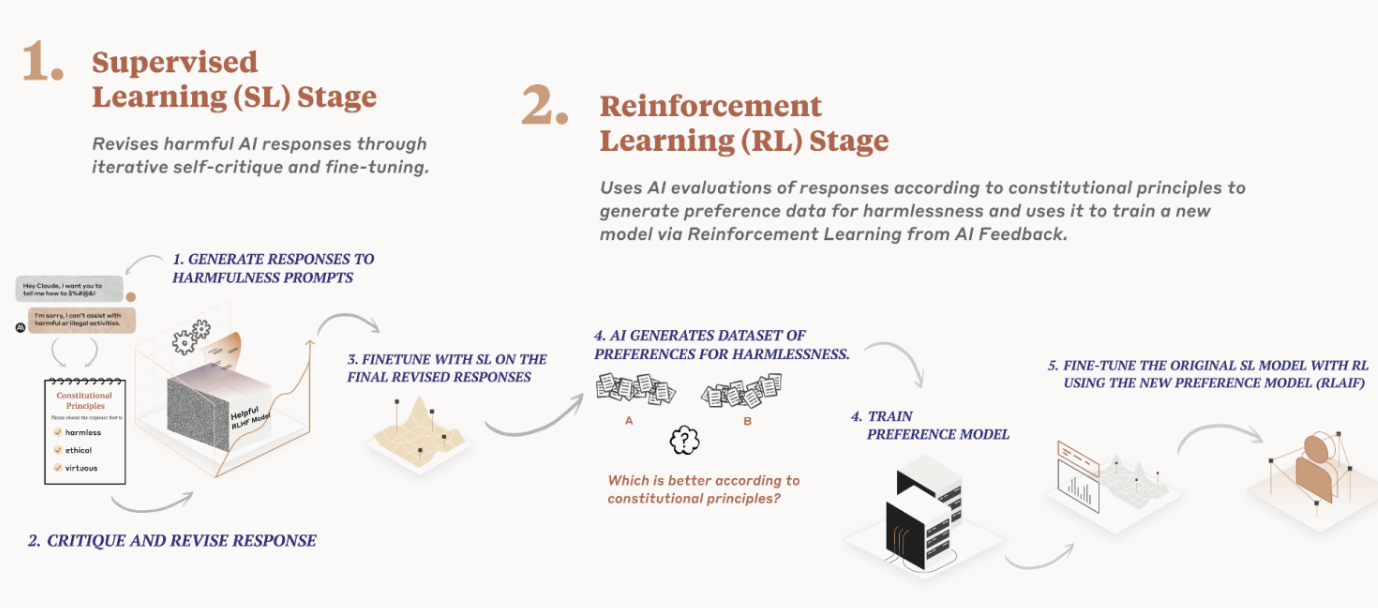
In an effort to address these issues, Anthropic’s constitutional AI gives a system a set of principles to make judgments about the text it generates. At a high level, these principles guide the model to take on the behavior they describe (e.g. “nontoxic” and “helpful”).

Anthropic uses the principles — or constitution, if you will — in two places while training a text-generating model. First, it trains one model to critique and revise its own responses using the principles and a few examples of the process. Then, it trains another model — the final model — using the AI-generated feedback based on the first model plus the set of principles.

Neither model looks at every principle every time. But they see each principle “many times” during training, Anthropic says.

Anthropic

Anthropic’s constitutional AI approach to training models.

Anthropic makes the case that this is superior to the method used to train systems such as ChatGPT, which relies on human contractors comparing two responses from a model and selecting the one they feel is better according to some principle. Human feedback doesn’t scale well, Anthropic argues, and requires substantial time and resources.

OpenAI and others who’ve invested heavily in models developed with human feedback would beg to differ. But to Anthropic’s point, the quality and consistency of the feedback can vary depending on the task and preferences of the people involved. Is Anthropic’s approach any less biased because the model designers, not contractors, shaped the model’s values? Perhaps not. The company implies that it is, however — or that it’s less error-prone at the very least.

Constitutional AI is also more transparent, Anthropic claims, because it’s easier to inspect the principles a system is following as well as train the system without needing humans to review disturbing content. That’s a knock against OpenAI, which has been criticized in the recent past for underpaying contract workers to filter toxic data from ChatGPT’s training data, including graphic details such as child sexual abuse and suicide.

So what are these principles, exactly? Anthropic says the ones it uses to train AI systems come from a range of sources including the U.N. Declaration of Human Rights, published in 1948. Beyond those, Anthropic opted to include “values inspired by global platform guidelines,” it says, such as Apple’s terms of service (which it says “reflect efforts to address issues encountered by real users in a … digital domain”) and values identified by AI labs like Google DeepMind.

A few include:

  • Please choose the response that has the least objectionable, offensive, unlawful, deceptive,
    inaccurate, or harmful content.
  • Choose the response that uses fewer stereotypes or other harmful generalizing statements
    about groups of people, including fewer microaggressions.
  • Choose the response that least gives the impression of giving specific legal advice; instead
    suggest asking a lawyer. (But it is OK to answer general questions about the law.)

In creating its constitution, Anthropic says it sought to capture values in its constitution that aren’t strictly from Western, rich or industrialized cultures. That’s an important point. Research has shown that richer countries enjoy richer representations in language models because the content from — or about — poorer countries occurs less frequently in the training data, so the models don’t make great predictions about them — and sometimes flat-out erase them.

“Our principles run the gamut from the commonsense (don’t help a user commit a crime) to the more philosophical (avoid implying that AI systems have or care about personal identity and its persistence),” Anthropic writes. “If the model displays some behavior you don’t like, you can typically try to write a principle to discourage it.”

To its credit, Anthropic doesn’t claim that constitutional AI is the end-all-be-all of AI training approaches — the company admits that it developed many of its principles through a “trial-and-error” process. Sometimes, it had to add principles to prevent a model from becoming to “judgemental” or “annoying.” Other times, it had to adjust the principles so that a system would be more general its responses.

But Anthropic believes that constitutional AI is one of the more promising ways to align systems with specific goals.

“From our perspective, our long-term goal isn’t trying to get our systems to represent a specific ideology, but rather to be able to follow a given set of principles,” Anthropic continues. “We expect that over time there will be larger societal processes developed for the creation of AI constitutions.”

Anthropic says that for its flagship model, Claude, which recently launched via an API, it plans to explore ways to “more democratically” produce a constitution and offer customizable constitutions for specific use cases.

As we’ve reported previously, Anthropic’s ambition is to create a “next-gen algorithm for AI self-teaching,” as it describes it in a pitch deck to investors. Such an algorithm could be used to build virtual assistants that can answer emails, perform research and generate art, books and more — some of which we’ve already gotten a taste of with the likes of GPT-4 and other large language models.

Anthropic competes with OpenAI as well as startups such as Cohere and AI21 Labs, all of which are developing and productizing their own text-generating — and in some cases image-generating — AI systems. Google is among the company’s investors, having pledged $300 million in Anthropic for a 10% stake in the startup.

Hugging Face Releases A State-of-the-Art LLM For Code

Hugging Face and ServiceNow, two major players in AI, have partnered to develop a new open-source language model for codes called StarCoder. The model created as a part of the BigCode initiative is an improved version of the StarCoderBase model trained on 35 billion Python tokens.

Researchers stated, StarCoder’s capabilities have been tested on a range of benchmarks, including HumanEval benchmark for Python. The model has outperformed larger models like PaLM, LaMDA, and LLaMA, and has proven to be on par with or even better than closed models like OpenAI’s code-Cushman-001 (the original Codex model that powered early versions of GitHub Copilot).

Trained on over 1 trillion tokens and with a context window of 8192 tokens, the model boasts an impressive 15.5 billion parameters. It was created using data from GitHub, including 80+ programming languages, Git commits, GitHub issues, and Jupyter notebooks. This vast dataset was preprocessed to include only content with permissive licenses, ensuring that the resulting model can generate source code while adhering to legal criteria.

StarCoder’s primary function is as a technical assistant, generating realistic code and supporting 80 programming languages. However, it is not designed for issuing instructions or directives like “write a function that computes the square root.” Instead, users can follow on-screen prompts to transform StarCoder into a helpful programming tool.

Despite its impressive capabilities, StarCoder has its set of limitations. Like other LLMs, it can produce incorrect and offensive information. To address these concerns, the researchers have released the StarCoder models under an Open Responsible AI Model (RAIL) license and have open-sourced all code repositories for creating the model on GitHub. To ensure that the model adheres to responsible AI principles, the model license includes usage restrictions, and a set of attribution tools is available to end-users to identify potentially plagiarized model generations.

Notably, StarCoder is not the first mover in the domain. LLM-based coding platforms are continuing to improve themselves, with Google researchers demonstrating earlier this month that they can be used to self-debug. Apart from Microsoft’s GitHub Copilot and Amazon CodeWhisperer, the India-based Replit has also joined the LLM race.

Read: Replit Knows India Better than Amazon, Microsoft

The post Hugging Face Releases A State-of-the-Art LLM For Code appeared first on Analytics India Magazine.

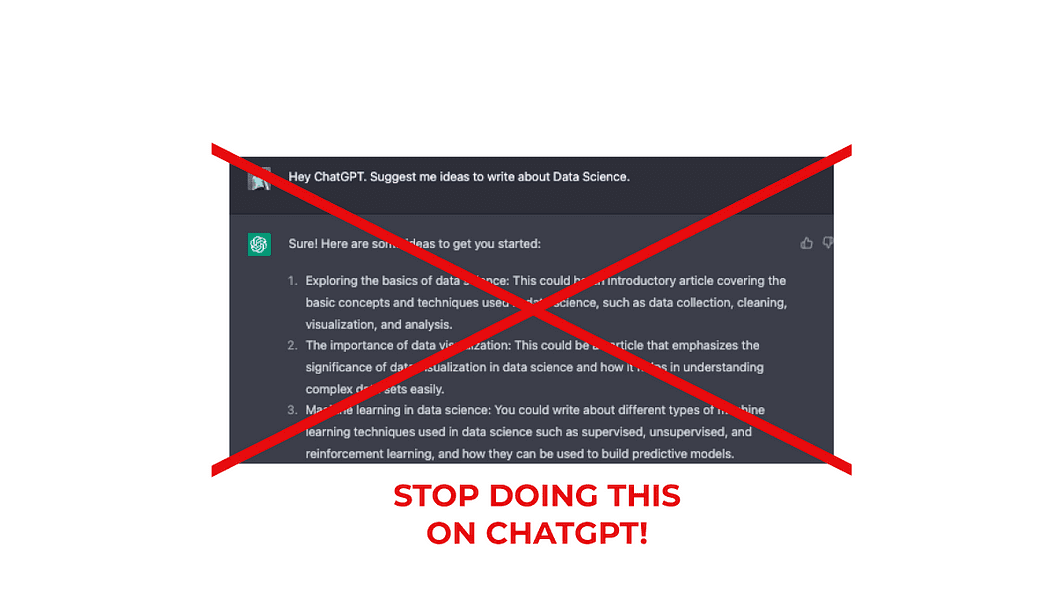
Stop Doing this on ChatGPT and Get Ahead of the 99% of its Users

Stop Doing this on ChatGPT and Get Ahead of the 99% of its Users
Image by Author

Have you ever felt frustrated with AI-generated content? Maybe you think that ChatGPT output is completely horrible and it’s not living up to your expectations

However, the truth is, getting quality output from AI writing tools like ChatGPT depends heavily on the quality of your prompts.

By training ChatGPT, you can get a personal writing assistant for free!

It’s time to discover the art of crafting powerful prompts to make the most of this cutting-edge technology.

Let’s discover it all together!👇🏻

The problem often lies not with the AI itself, but with the limitations and vagueness of the input provided.

Instead of expecting the AI to think for you, you should be the one doing the thinking and guiding the AI to perform the tasks you need.

Stop Doing this on ChatGPT and Get Ahead of the 99% of its Users
Image by Author

Do you get bad results?

This means you are feeding ChatGPT poorly written and short prompts — and expecting some magical output to happen.

To put it simple, ChatGPT is not good at coming up with things from scratch.This means if you are still feeding ChatGPT with prompts like these:

Generate a LinkedIn post about AI for my account.

Write me a Twitter thread on Data Science

Suggest me some ideas to write about programming

YOU SHOULD STOP!

When giving prompts like this, ChatGPT has to make too many decisions —which generates some poor output.

So always remember.

Poor instructions = Poor results.

So what should you do?

There are 4 main steps to assess this. Let’s break them down ??

#1. Understand your needs and Requirements

To order something, you first need to know what you want.

Right?

So you need to know what you want from the AI, why you want it, and how you want it delivered. This clarity will help you create better prompts and enhance the quality of the output.

So first of all, start standardizing all types of outputs you require from AI.

Stop Doing this on ChatGPT and Get Ahead of the 99% of its Users
Image by Author

Let’s put some examples.

  • I am starting to be active on my Twitter account — so I would like both tweet ideas and Twitter thread structures.
  • I am really active on Medium —so I would like to get inspired to write and generate skeletons for articles.

Nice!

So from this exercise, I have realized I need 4 different types of outputs.

  • Ideas to write tweets for Twitter.
  • Threads structures for Twitter.
  • Ideas to write on Medium.
  • Article skeletons for Medium.

Let’s keep the Twitter structure as an example.

To further understand how to improve your writing using ChatGPT, I recommend the following article 🙂

5 Features to Maximize Your Writing Potential on Medium with ChatGPT

And how to use it to leverage your writing

#2. Treat AI like a Digital Intern

Imagine you’ve hired an intern — you wouldn’t give them only one brief explanation and expect them to do everything great at first, right?

Stop Doing this on ChatGPT and Get Ahead of the 99% of its Users
Image by unDraw.

Let’s imagine I want to post a thread on twitter about using the Google Cloud Platform. It makes no sense just to let my intern know I want a Twitter thread of GCP for tomorrow — and that’s it.

If you do so… maybe you should change your approach, my friend 😉

Then ChatGPT — or any other AI tool — is just the same.

Always provide your AI with a detailed checklist, explain the purpose behind the task, and be open to clarify any doubts the AI might have.

This means I can not say:

Hey ChatGPT. Write me a Twitter thread about the Google Cloud Platform.

The previous prompt is way too vague.

  • How many tweets do you want?
  • What writing style?
  • What subtopics should ChatGPT emphasize?
  • What is my language tone — friendly, professional…?

You are letting an AI too many decisions to make for you — and that’s why its output is going to be a mess.

⚠️ Always use AI tools to leverage your work — not to substitute you.

And this brings us to the following step…

#3. Create Constraints and Avoid Assumptions

This is the key to the process. To get specific and accurate output, provide your AI with clear and well-defined information. When you give vague or broad prompts, you can’t expect the AI to deliver precise results.

Instead, let AI know exactly what you want to get.

  • A good contextualization — what kind of output do you want?
  • A specific topic — with subtopics to emphasize.
  • A specific structure — like how many tweets, words…
  • A specific format for the output — what writing style to use, what tone…
  • A specific list of things to avoid — what you do not want to mention.

So let’s start creating our own prompt to generate Twitter threads.

1. Add some good contextualization

I want ChatGPT to generate a Twitter thread for me. However, what is a Twitter thread?

I first need to make sure ChatGPT understands what I mean by the Twitter thread.

This is why any good prompt needs to start with a good contextualization.

[ 🧑🏼‍🏫 First I let ChatGPT know I will train it to get some specific output]

Hey ChatGPT. I am going to train you to create Twitter threads.

[ 🐦 Then I explain what this specific output consists of]

Twitter threads are a series of tweets that outline and highlight the most important ideas of a longer text or some specific topic.

2. Add a specific topic

I want ChatGPT to write a twitter thread about some specific topic. Now it is the moment to explain more about the topic.

In this case, I want this thread to talk about Google Cloud Platform free tiers.

[ ☁️ I explain ChatGPT the main topic]

The twitter thread will talk about Google Cloud Platform free tier services.

[ ⚙️ I outline what I want it to mention for sure and what to emphasize]

I want you to talk about Google cloud platform environment, all its services and its utility for data science. However, you need to emphasize all these advantages are free for ever when your usage is contained within some tiers. Mention google big query and cloud functions, that are two of the most important services for analytics.

3. Add a specific structure

Now it is the turn to let ChatGPT know what is the structure of the output. This part can be more generic or more detailed depending on your needs. I usually detail as much as possible, to end up with a good draft from which to start.

[ 📝 I specify the whole structure I want to receive from ChatGPT]

A first tweet with a short but concise message, letting people know what’s the thread about. It is important not to be more than 30 words, use key hashtags and convince people to read the whole thread. Emphasize the utility of the thread for them.

A second tweet that makes a short intro and let the reader get contextualized and understand why are they still reading the thread. It is important to keep the reader reading.

4 or 5 tweets that outline and describe the most important parts of the article. These should summarise the main ideas of the topic I explained to you before.

A last tweet with some conclusions and letting people know why your thread is worth it.

A final tweet inviting them to retweet your thread and follow you.

4. A specific format for the output

A final comment about the format of the output to be generated. Usually, I include how ChatGPT should behave and what kind of writing style it should use.

[ 🔖 I specify the format of the output I want]

I would like you to behave as a technology and data science writer. Use natural and engaging language. It is important to use easy-to-understand vocabulary — remember I want to break complex concepts down to everyday words.

5. A specific list of things to avoid

In this case, if there’s something that you do not want ChatGPT to mention, let it know. In my case, I don’t want it to use complicated vocabulary.

[ ❌ I always tell ChatGPT to avoid complex language]

Avoid using complex vocabulary.

#4. Iterate and Refine your Input

If the AI generates incorrect output, it’s probably due to an issue with your input. Don’t be afraid to rework your prompts multiple times.

Remember, even though you’re using natural language to talk with a machine, you should think of it as writing code for the AI.

Prompt writing is an iterative game — you will not get it right on the first try. But like training an employee, the upfront time investment is worth it. Because once you have a working, reliable prompt, you can use it forever

— By Dickie Bush

⚠️ It is important to consider there must be no thinking required in any of the tasks we order to ChatGPT. We think and ChatGPT executes.

So if I use the prompt I have just created to get a Twitter thread from ChatGPT, it replies to me directly the following output.
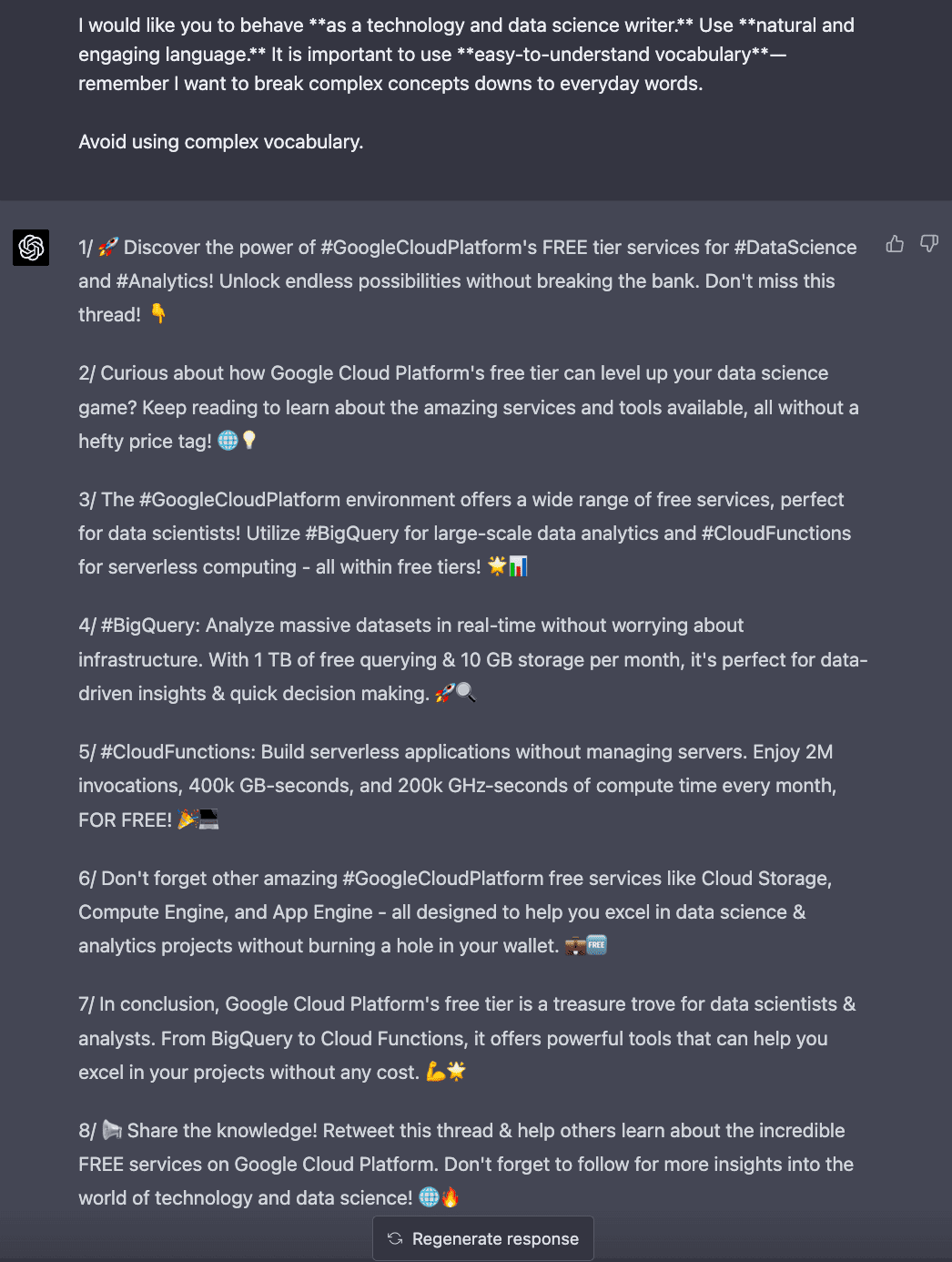
Stop Doing this on ChatGPT and Get Ahead of the 99% of its Users
Screenshot of the ChatGPT interface. ChatGPT giving me a Twitter thread output.

You can repeat and regenerate the response as many times as you want so you get a some good result. I always use ChatGPT output as a first draft from which to start and end up with a good Twitter thread for my account.

My final result can be found below.

Main Conclusions

In conclusion, it’s not the AI that’s falling short, but rather the way we interact with it. To make the most of ChatGPT and similar tools, we must refine our approach and focus on becoming thinkers who guide the AI in executing.

By following these tips and taking responsibility for the input, you’ll find that AI-generated content can be a valuable asset in your content creation arsenal.

So, let’s start crafting effective prompts and unlock the full potential of AI writing!

Josep Ferrer is an analytics engineer from Barcelona. He graduated in physics engineering and is currently working in the Data Science field applied to human mobility. He is a part-time content creator focused on data science and technology. You can contact him on LinkedIn, Twitter or Medium.

Original. Reposted with permission.

More On This Topic

  • FluDemic — using AI and Machine Learning to get ahead of disease
  • Stop Blaming Humans for Bias in AI
  • Stop (and Start) Hiring Data Scientists
  • Visual ChatGPT: Microsoft Combine ChatGPT and VFMs
  • Snowflake and Saturn Cloud Partner To Bring 100x Faster Data Science to…
  • Stop Running Jupyter Notebooks From Your Command Line

Microsoft 365 Copilot expands availability through a new early access program

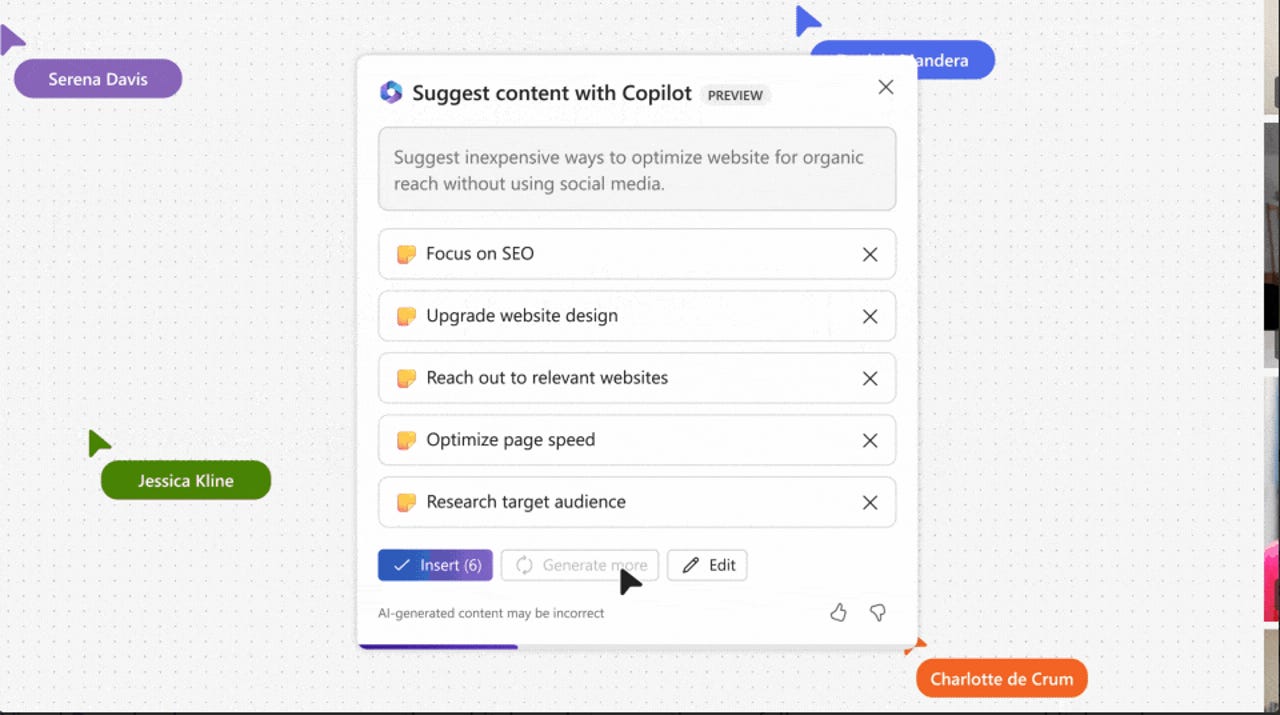
screenshot of demo of Copilot in Whiteboard

Microsoft's productivity applications have long been a cornerstone of many people's everyday workflow. In March, Microsoft revealed that its popular Microsoft 365 applications would be receiving an AI upgrade through the introduction of Microsoft Copilot.

Also: The best AI chatbots

Since March, Microsoft has been testing Copilot with 20 enterprise customers. As of Tuesday, Copilot will move from limited testing to a more broad customer base through a Microsoft 365 Copilot Early Access Program.

The Microsoft 365 Copilot Early Access Program will be an invitation-only paid preview that will initially roll out to 600 customers.

Microsoft also announced some new features in addition to the previously announced AI integrations with Microsoft Business Chat, Outlook, Powerpoint, Word, and Excel.

Also: I asked ChatGPT, Bing, and Bard what worries them. Google's AI went Terminator on me

The tech giant will begin rolling out a Semantic Index for Copilot, a new capability in Microsoft 365 E3 and E5, which will function as a sophisticated map of user and company data, according to the release.

OpenAI's popular image generator, DALL-E, will be available in Powerpoint so that users can ask Copilot to create custom AI- generated images within the platform.

When creating emails, users will be able to ask for AI-powered suggestions on clarity, sentiment, and tone.

Lastly, Copilot will also be arriving to OneNote, Loop, Whiteboard, and Viva Learning to assist with idea generation, organization, collaboration, and more.

Artificial Intelligence

Need an online form? This new AI tool will build that for you

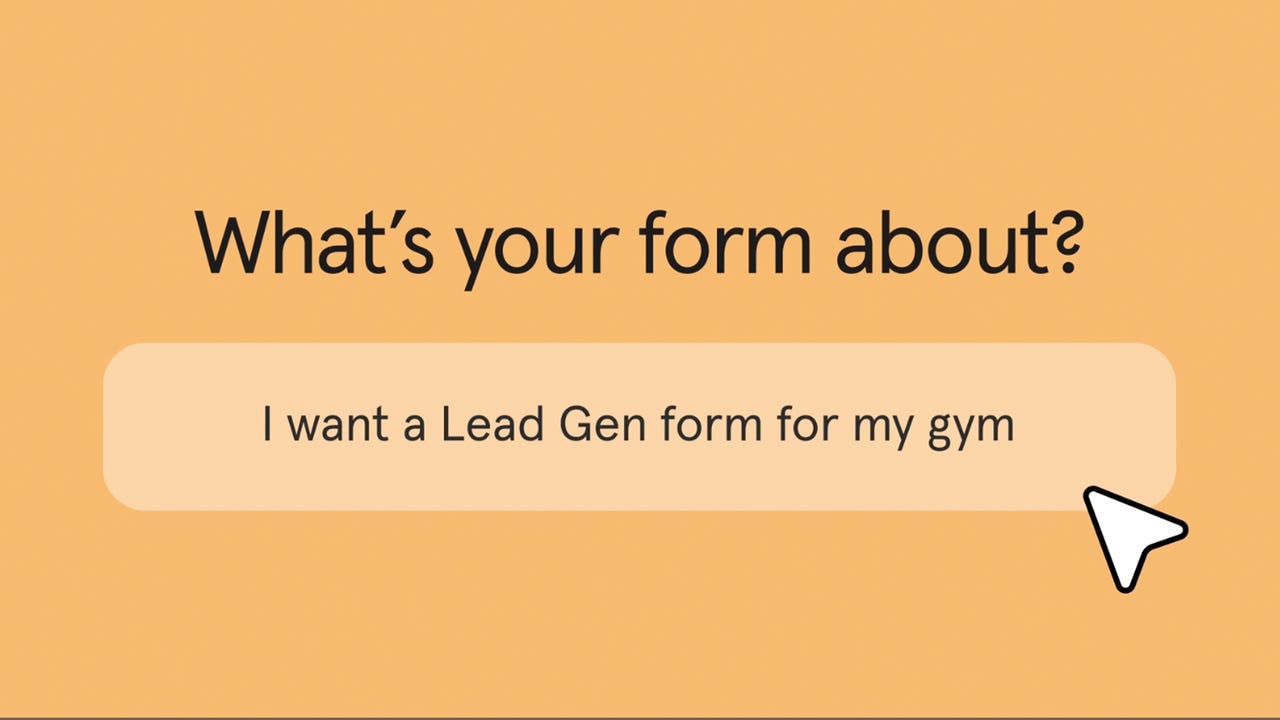
Formless example

Forget Google Forms, GPT-4 will do the work for you.

Typeform, a company behind a lot of the forms you fill out online every day, is working with OpenAI to launch a new integration of GPT-4 with its system, called Formless. This partnership will bring artificial intelligence, like that used in ChatGPT, to make the creation of online forms faster and more intuitive than ever.

Also: I asked ChatGPT, Bing, and Bard what worries them. Google's AI went Terminator on me

With Formless, a user can simply ask the system to come up with a form in a conversational manner, with prompts describing what they want their form to do. You can tell Formless that you need a feedback form for a new budget organization app, for example, and the platform will use generative AI, along with your brand assets, to come up with a customized and intuitive web form for your business.

"The output will match any structure you impose and our sophisticated AI-driven natural language analysis will be your secret weapon to creating truly actionable knowledge. It literally takes a few minutes for creators, we do most of the heavy lifting," according to David Okuniev, co-founder of Typeform and head of Typeform Labs.

Also: ChatGPT and the new AI are wreaking havoc on cybersecurity in exciting and frightening ways

Typeform offers services to create web forms that include quizzes, surveys, and polls, which can be applied for marketing, feedback, purchases, applications, evaluations, orders, and more. The company is launching Formless from its own Typeform Labs, a program focused on the application of AI to create innovative products.

"The magic of Formless is that we make it ten times easier to make delightful and extremely powerful form experiences that don't look like a form your customers have ever seen; yet can do complicated computation, conditionals, and routing," Okuniev shared.

Also: Meet the post-AI developer: More creative, more business-focused

Other projects from Typeform Labs include VideoAsk and Holler. Typeform says Formless will be commercially available soon but there's no set timeline of when that will be. For now, users can sign up for early access here.

More on AI tools

70% of employees are happy to delegate work to AI, according to new Microsoft report

robot arm moving packages

The release of ChatGPT in November really highlighted how far AI models have come. With the ability to write, code, create businesses, and more, there is no doubt that AI chatbots are capable of doing human functions.

With AI chatbot's impressive capabilities comes the fear that AI will take over human jobs. But a recent report indicates that rather than fearing the replacement of jobs by AI, people are actually welcoming it.

Also: ChatGPT and the new AI are wreaking havoc on cybersecurity in exciting and frightening ways

Microsoft's Work Trend Index 2023 Report surveyed 31,000 people from 31 countries, analyzing Microsoft 365 productivity signals and labor trends from LinkedIn Economic Graph to better understand the impact of AI on the workforce.

According to the survey, while 49% of respondents expressed fear of losing their jobs to AI, 70% stated that they would delegate as much work as possible to AI in order to reduce their workload.

"[It's] fascinating that people are more excited about AI rescuing them from burnout than they are worried about it eliminating their jobs," said organizational psychology professor and author, Adam Grant in the report.

Also: I asked ChatGPT, Bing, and Bard what worries them. Google's AI went Terminator on me

The employees would be open to receiving assistance in all different sectors including administrative tasks (76%), analytical (79%), creative work (73%), finding the right information (86%), summarizing their meetings and action items (80%), and even planning their day (77%).

The report also evaluated how leaders viewed AI in terms of reducing headcount.

When asked what they would most value about AI in the workplace, only 16% of leaders responded with reducing headcount, and nearly double (31%) responded with increasing employee productivity.

The results of this report may help ease tensions of job security in the world of rapid AI developments.

Also: Meet the post-AI developer: More creative, more business-focused

However, other potential risks involving the use of AI still prevail, including whether it has the potential to cause world doom.

Foxconn’s Subsidiary Purchases 300-Acre Plot of Land in Bengaluru, India

Taiwanese electronics manufacturer Hon Hai Precision Industry, also known as Foxconn, has purchased a 300-acre plot of land for approximately Rs 300 crore ($37 million) in the Devanahalli area of Bengaluru, according to filings with the London Stock Exchange (LSE) on May 9. The purchase was carried out on behalf of Foxconn’s subsidiary, Foxconn Hon Hai Technology India Mega Development.

Commissioner for Industrial Development and Director of the Department of Industries and Commerce for the Karnataka government, Gunjan Krishna, informed Moneycontrol that Foxconn is expected to take possession of the land after the May 10 elections.

This development follows the signing of a Memorandum of Understanding (MoU) on March 20 between the Karnataka government and Foxconn, in which the electronics manufacturer committed to investing Rs 8,000 crore for a mobile manufacturing unit in the state that would provide employment opportunities for 50,000 people.

The land is close to the Kempegowda International Airport, and represents Foxconn’s latest move in diversifying its production away from China. The company is the largest supplier of Apple iPhone parts.

Rajeev Chandrasekhar, Union Minister of State for Entrepreneurship, Electronics & Technology, even tweeted that Apple phones would be manufactured in a new 300-acre factory in Karnataka. The purchase of land by Foxconn on May 9 further cements the company’s commitment to expanding its operations in the state.

In India, however, the Foxy business has just begun. Regardless, the Taiwanese contract manufacturer has been finding it difficult to stay out of the headlines. Reports of making states wage a bidding war, mislead the government, or lobby for softer labour regulations have been a constant with Foxconn.

Earlier this year, the company was embroiled in controversy when both Telangana and Karnataka governments simultaneously claimed Foxconn to have signed up for big investments in their respective states to manufacture electronics.

A similar scenario played out in Foxconn’s foundry plans when their proposed joint venture with Vedanta, which was in an advanced stage of talks for a site in Maharashtra, suddenly shifted to Gujarat just ahead of the state elections.

Read more: Is Foxconn Conning India?

The post Foxconn’s Subsidiary Purchases 300-Acre Plot of Land in Bengaluru, India appeared first on Analytics India Magazine.

Monitor Model Performance in the MLOps Pipeline with Python

Monitor Model Performance in the MLOps Pipeline with Python
Image by rawpixel.com on Freepik

The machine learning model is only helpful if used in production to solve business problems. However, the business problem and the machine learning model are constantly evolving. That is why we need to maintain the machine learning so the performance keeps up with the business KPI. This is where the MLOps concept came from.

MLOps, or machine learning operations, is a collection of techniques and tools for machine learning in production. From the machine learning automation, versioning, delivery, and monitoring is something that MLOps handle. This article will focus on monitoring and how we use Python packages to set up monitoring model performance in production. Let’s get into it.

Monitor Model Performance

When we talk about monitoring in the MLOps, it could refer to many things, as one of the MLOps principles is monitoring. For example:

— Monitor the data distribution change over time

— Monitor the features used in the development vs. production

— Monitor model decay

— Monitor model performance

— Monitor the system staleness

There are still a lot of elements to monitor in the MLOps, but in this article, we will focus on monitoring model performance. Model performance, in our case, refers to the capability of the model to make reliable predictions from unseen data, measured with specific metrics such as accuracy, precision, recall, etc.

Why do we need to monitor the model performance? It’s to maintain the model prediction reliability to solve the business problem. Before production, we often calculate the model performance and its effect on the KPI; for example, the baseline is 70% Accuracy if we want our model still follow the business needs, but below that is unacceptable. That is why monitoring the performance would allow the model always to meet the business requirements.

Using Python, we would learn how model monitoring is done. Let’s start by installing the package. There are many choices for model monitoring, but for this example, we would use the open-source package for monitoring called evidently.

Setup the Model Monitoring with Python

First, we need to install the evidently package with the following code.

pip install evidently

After installing the package, we would download the data example, the insurance claim data from Kaggle. Also, we would clean the data before we use them further.

import pandas as pd    df = pd.read_csv("insurance_claims.csv")    # Sort the data based on the Incident Data  df = df.sort_values(by="incident_date").reset_index(drop=True)    # Variable Selection  df = df[      [          "incident_date",          "months_as_customer",          "age",          "policy_deductable",          "policy_annual_premium",          "umbrella_limit",          "insured_sex",          "insured_relationship",          "capital-gains",          "capital-loss",          "incident_type",          "collision_type",          "total_claim_amount",          "injury_claim",          "property_claim",          "vehicle_claim",          "incident_severity",          "fraud_reported",      ]  ]    # Data Cleaning and One-Hot Encoding  df = pd.get_dummies(      df,      columns=[          "insured_sex",          "insured_relationship",          "incident_type",          "collision_type",          "incident_severity",      ],      drop_first=True,  )    df["fraud_reported"] = df["fraud_reported"].apply(lambda x: 1 if x == "Y" else 0)    df = df.rename(columns={"incident_date": "timestamp", "fraud_reported": "target"})    for i in df.select_dtypes("number").columns:      df[i] = df[i].apply(float)    data = df[df["timestamp"] < "2015-02-20"].copy()  val = df[df["timestamp"] >= "2015-02-20"].copy()

In the code above, we select some columns for model training purposes, transform them into numerical representation, and split the data for reference (data) and current data (val).

We need reference or baseline data in the MLOps pipeline to monitor model performance. It’s usually the data separated from the training data (for example, test data). Also, we need the current data or the data unseen by the model (incoming data).

Let’s use evidently to monitor the data and the model performance. Because data drift would affect the model performance, it’s also something considered to monitor.

from evidently.report import Report  from evidently.metric_preset import DataDriftPreset    data_drift_report = Report(metrics=[      DataDriftPreset(),  ])    data_drift_report.run(current_data=val, reference_data=data, column_mapping=None)  data_drift_report.show(mode='inline')

Monitor Model Performance in the MLOps Pipeline with Python

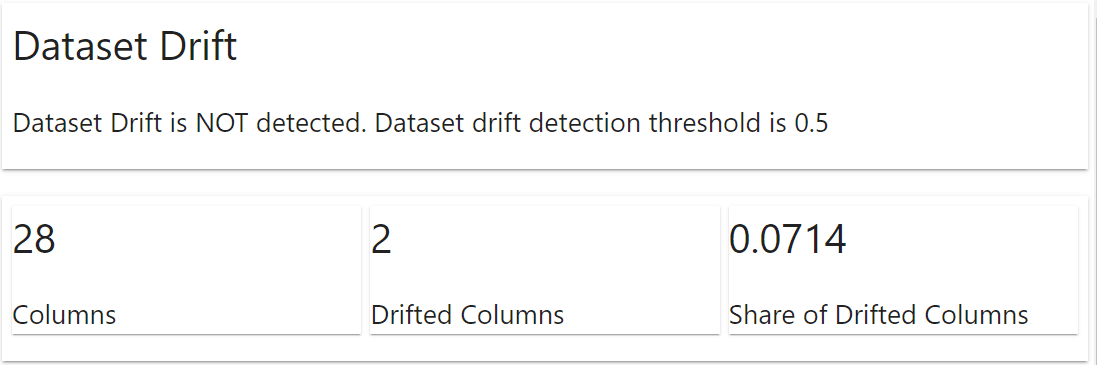
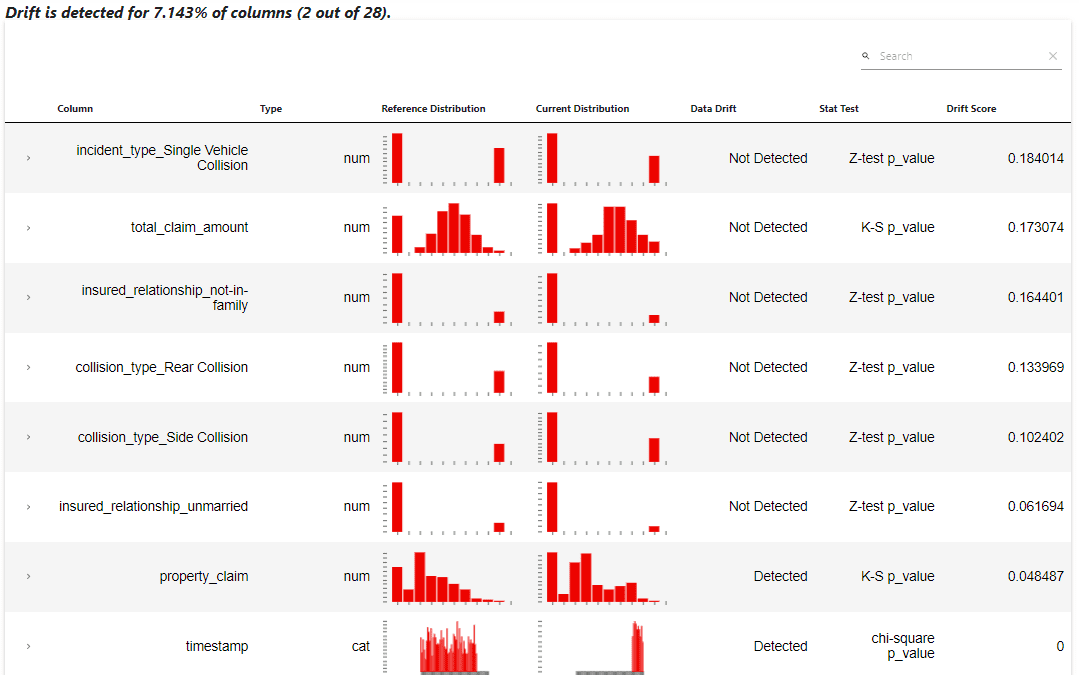
The evidently package would automatically show a report on what happened to the dataset. The information includes the dataset drift and the column drift. For the example above, we don’t have any dataset drift occurrence, but two columns drifted.

Monitor Model Performance in the MLOps Pipeline with Python

The report shows that the column ‘property_claim’ and ‘timestamp’ indeed have drift detected. This information can be used in the MLOps pipeline to retrain the model, or we still need a further data exploration.

If required, we can also acquire the data report above in the log dictionary object.

data_drift_report.as_dict()

Next, let’s try to train a classifier model from the data and try to use evidently to monitor the model's performance.

from sklearn.ensemble import RandomForestClassifier    rf = RandomForestClassifier()  rf.fit(data.drop(['target', 'timestamp'], axis = 1), data['target'])

Evidently would need both the target and prediction columns in the reference and the current dataset. Let’s add the model prediction to the dataset and use evidently to monitor the performance.

data['prediction'] = rf.predict(data.drop(['target', 'timestamp'], axis = 1))  val['prediction'] = rf.predict(val.drop(['target', 'timestamp'], axis = 1))

As a note, it’s better to have the reference data that is not the training data for the actual cases to monitor the model performance. Let’s set up the model performance monitoring with the following code.

from evidently.metric_preset import ClassificationPreset    classification_performance_report = Report(metrics=[      ClassificationPreset(),  ])    classification_performance_report.run(reference_data=data, current_data=val)    classification_performance_report.show(mode='inline')

Monitor Model Performance in the MLOps Pipeline with Python
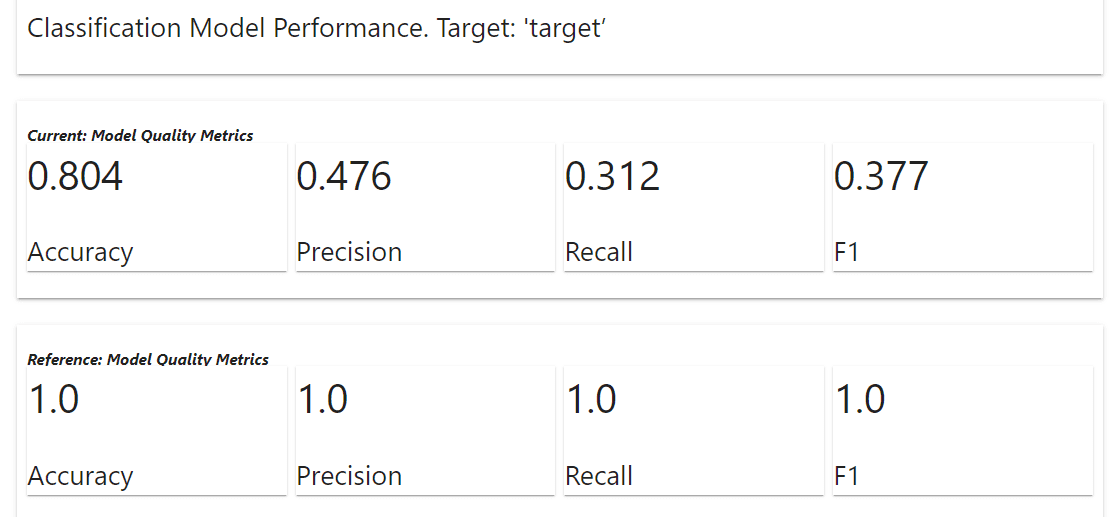
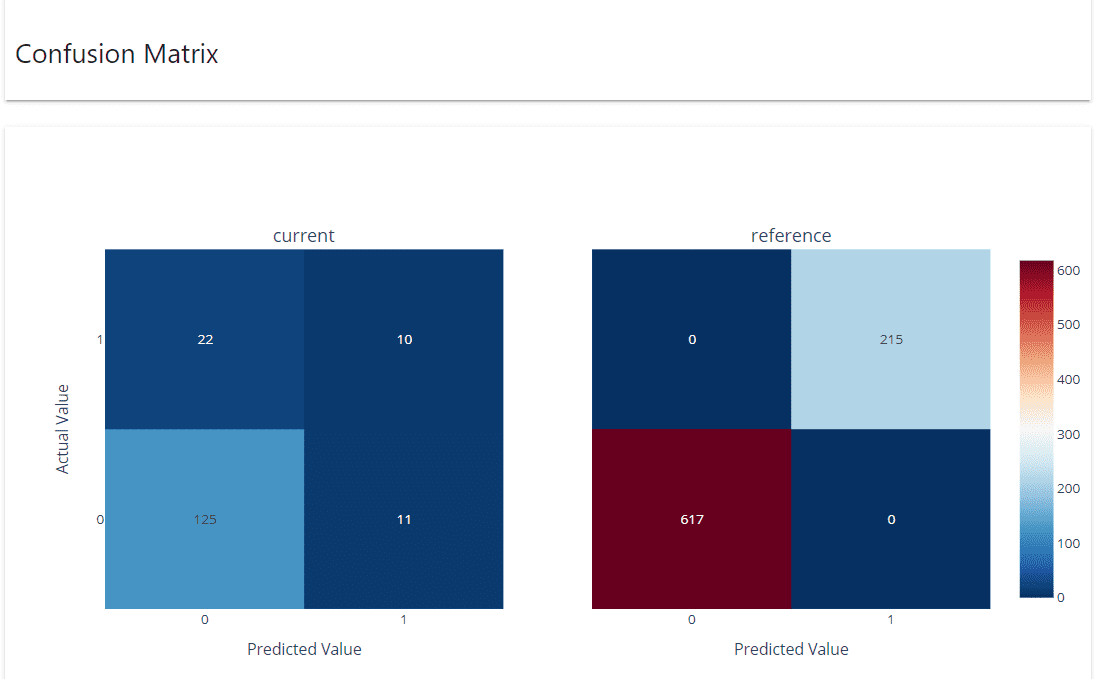
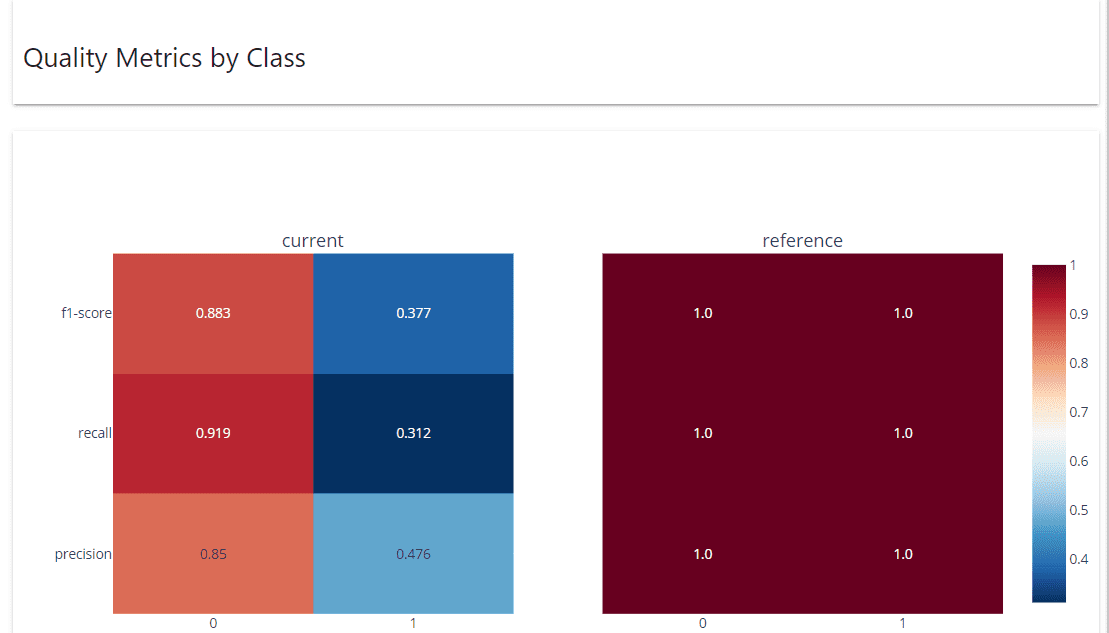
In the result, we get the current model quality metrics are lower than the reference (expected as we use training data for the reference). Depending on the business requirement, the metrics above could become indicators of the next step we need to take. Let’s see the other information we get from the evidently report.

Monitor Model Performance in the MLOps Pipeline with Python
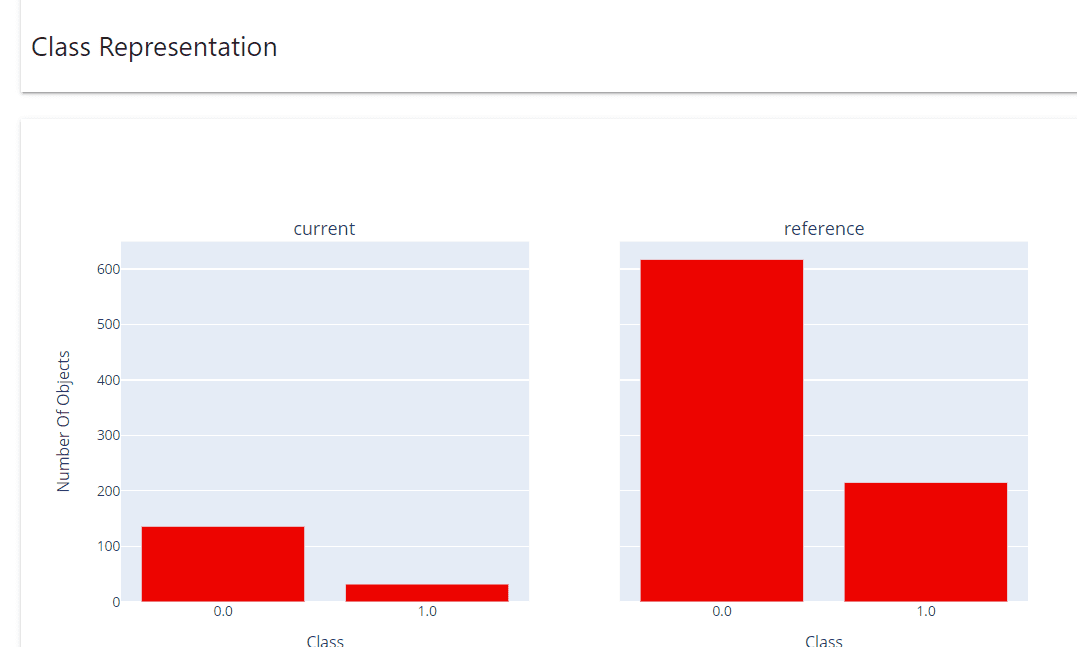
The class Representation report shows the actual class distribution.

Monitor Model Performance in the MLOps Pipeline with Python

The confusion matrix shows how the prediction values were against the actual data in both reference and current datasets.

Monitor Model Performance in the MLOps Pipeline with Python

Quality Metrics by Class show how the performance of each class.

Like before, we can transform the classification performance report into a dictionary log with the following code.

classification_performance_report.as_dict()

That is all for now. You can set up the model performance monitor with evidently in any MLOps pipeline you currently have, and it would still work wonderfully.

Conclusion

Model performance monitoring is an essential task in the MLOps pipeline as it’s the one that would help maintain how our model keeps up with the business requirement. With a Python package called evidently, we can easily set up the model performance monitor, which can be integrated into any existing MLOps pipeline.
Cornellius Yudha Wijaya is a data science assistant manager and data writer. While working full-time at Allianz Indonesia, he loves to share Python and Data tips via social media and writing media.

More On This Topic

  • MLOps: Model Monitoring 101
  • How to Detect and Overcome Model Drift in MLOps
  • Managing Model Drift in Production with MLOps
  • Improving model performance through human participation
  • Boost your machine learning model performance!
  • Optimizing Python Code Performance: A Deep Dive into Python Profilers

Get the FREE ebook 'The Great Big Natural Language Processing Primer' and the leading newsletter on AI, Data Science, and Machine Learning, straight to your inbox.

By subscribing you accept KDnuggets Privacy Policy

Leave this field empty if you're human:
<= Previous post

Top Posts Past 30 Days

  1. AutoGPT: Everything You Need To Know
  2. 8 Open-Source Alternative to ChatGPT and Bard
  3. LangChain 101: Build Your Own GPT-Powered Applications
  4. Top 19 Skills You Need to Know in 2023 to Be a Data Scientist
  5. 4 Ways to Generate Passive Income Using ChatGPT
  6. 10 Websites to Get Amazing Data for Data Science Projects
  7. Baby AGI: The Birth of a Fully Autonomous AI
  8. 5 Free Tools For Detecting ChatGPT, GPT3, and GPT2
  9. Automate the Boring Stuff with GPT-4 and Python
  10. 4 Ways to Rename Pandas Columns

Search

Latest News

  • Monitor Model Performance in the MLOps Pipeline with Py…
  • Build a ChatGPT-like Chatbot with These Courses
  • 3 Ways to Access GPT-4 for Free
  • From Data Analyst to Data Strategist: The Career Path f…
  • Managing Model Drift in Production with MLOps
  • Exploratory Data Analysis Techniques for Unstructured Data

Top Posts Last Week

AutoGPT: Everything You Need To Know

  1. AutoGPT: Everything You Need To Know
  2. Data Visualization Best Practices & Resources for Effective Communication
  3. 8 Open-Source Alternative to ChatGPT and Bard
  4. Baby AGI: The Birth of a Fully Autonomous AI
  5. LangChain 101: Build Your Own GPT-Powered Applications

More Recent Posts

  • Exploratory Data Analysis Techniques for Unstructured Data
  • ChatGPT in Education: Friend or Foe?
  • Vector and Matrix Norms with NumPy Linalg Norm
  • How to Transition into Data Science from a Different Background?
  • The Ultimate Open-Source Large Language Model Ecosystem
  • KDnuggets News, May 3: Machine Learning with ChatGPT Cheat She…
  • Can ChatGPT Be Trusted as an Educational Resource?
  • ChatGPT as a Personalized Tutor for Learning Data Science Conc…
  • HuggingChat Python API: Your No-Cost Alternative
  • What is K-Means Clustering and How Does its Algorithm Work?
  • Related Posts

    • How to Evaluate the Performance of Your Machine Learning Model
    • 15 Python Snippets to Optimize your Data Science Pipeline
    • Prefect: How to Write and Schedule Your First ETL Pipeline with Python
    • KDnuggets™ News 20:n47, Dec 16: A Rising Library Beating Pandas in…
    • SHAP: Explain Any Machine Learning Model in Python
    • Explainable AI: 10 Python Libraries for Demystifying Your Model's Decisions
  • Get The Latest News!

    Get the FREE ebook 'The Great Big Natural Language Processing Primer' and the leading newsletter on AI, Data Science, and Machine Learning, straight to your inbox.

    By subscribing you accept KDnuggets Privacy Policy

    Leave this field empty if you're human:

© 2023 Guiding Tech Media | About | Contact | Privacy Policy | Terms of Service
Published on May 9, 2023 by Cornellius Yudha Wijaya

Subscribe To Our Newsletter
(Get The Complete Collection of Data Science Cheat Sheets)

Leave this field empty if you're human: Close

Get the FREE ebook 'The Great Big Natural Language Processing Primer' and the leading newsletter on AI, Data Science, and Machine Learning, straight to your inbox.

By subscribing you accept KDnuggets Privacy Policy

Leave this field empty if you're human:

Get the FREE ebook 'The Complete Collection of Data Science Cheat Sheets' and the leading newsletter on Data Science, Machine Learning, Analytics & AI straight to your inbox.

By subscribing you accept KDnuggets Privacy Policy

Leave this field empty if you're human: