Microsoft, in partnership with OpenAI, is launching an extensibility for Microsoft 365 Copilot with plugins. These plugins will empower developers to integrate their apps and services into Microsoft 365 Copilot, allowing them to reach millions of users in their everyday work environments. This integration will be facilitated by three types of plugins: ChatGPT plugins, Teams message extensions, and Power Platform connectors.
The announcement was made by Rajesh Jha, the executive Vice President of Experiences and Devices at Microsoft during their annual conference for Developers – Build.
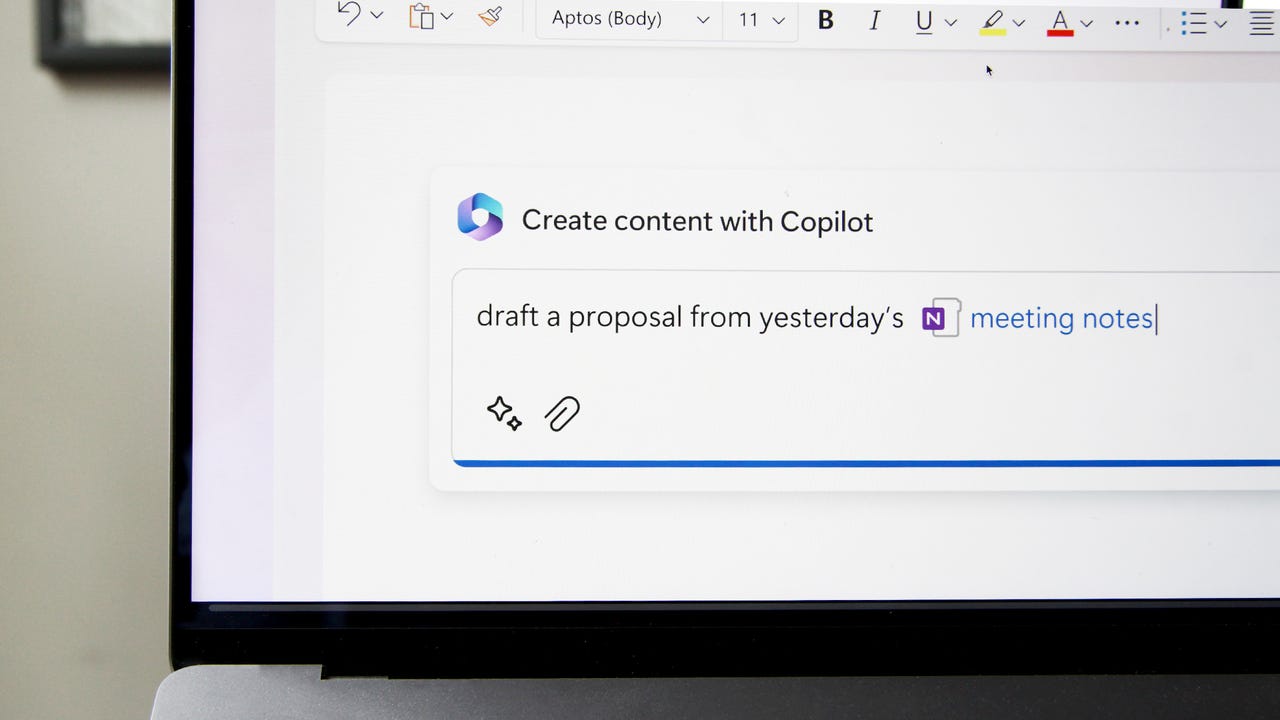
Earlier in March they announced Microsoft 365 Copilot which brings the power of next-generation AI to Microsoft 365 products like Teams, Outlook etc. The plugin integration seeks to combat the growing volume of digital debt that impedes productivity and innovation. These plugins also offer a significant opportunity for developers to leverage AI to enhance user experience and work efficiency.
Figure 3: Simulated scenario of a user invoking plugins with Microsoft 365 Copilot Accelerating success for every developer
How does it work?
Developers will be able to integrate their apps and services into Microsoft 365 Copilot with plugins. The plugins will interact with APIs from other software and services, enabling them to retrieve real-time information, incorporate company and business data, and perform new types of computations.
Developers with existing Teams message extensions will not have to write new code to extend Microsoft 365 Copilot, and the plugin creation experience will be streamlined through the Teams Toolkit, which is available in private preview. The user experience can be customised with adaptive cards when the plugin is invoked. The integration will be secured and governed by the Microsoft Graph, which will also serve as a source for user prompts and responses.
The post Microsoft Launches Microsoft 365 Copilot Plugins appeared first on Analytics India Magazine.
Image from Adobe Firefly What Are Foundation Models?
Foundation models are pre-trained machine learning models built on vast amounts of data. This is a ground-breaking development in the world of artificial intelligence (AI). They serve as the base for various AI applications, thanks to their ability to learn from vast amounts of data and adapt to a wide range of tasks. These models are pre-trained on enormous datasets and can be fine-tuned to perform specific tasks, making them highly versatile and efficient.
Examples of foundation models include GPT-3 for natural language processing and CLIP for computer vision. In this blog post, we’ll explore what foundation models are, how they work, and the impact they have on the ever-evolving field of AI.
How Foundation Models Work
Foundation models, like GPT-4, work by pre-training a massive neural network on a large corpus of data and then fine-tuning the model on specific tasks, enabling them to perform a wide range of language tasks with minimal task-specific training data.
Pre-training and fine-tuning
Pre-training on large-scale unsupervised data: Foundation models begin their journey by learning from vast amounts of unsupervised data, such as text from the internet or large collections of images. This pre-training phase enables the models to grasp the underlying structures, patterns, and relationships within the data, helping them form a strong knowledge base.
Fine-tuning on task-specific labeled data: After pre-training, foundation models are fine-tuned using smaller, labeled datasets tailored to specific tasks, such as sentiment analysis or object detection. This fine-tuning process allows the models to hone their skills and deliver high performance on the target tasks.
Transfer learning and zero-shot capabilities
Foundation models excel in transfer learning, which refers to their ability to apply knowledge gained from one task to new, related tasks. Some models even demonstrate zero-shot learning capabilities, meaning they can tackle tasks without any fine-tuning, relying solely on the knowledge acquired during pre-training.
Model architectures and techniques
Transformers in NLP (e.g., GPT-3, BERT): Transformers have revolutionized natural language processing (NLP) with their innovative architecture that allows for efficient and flexible handling of language data. Examples of NLP foundation models include GPT-3, which excels in generating coherent text, and BERT, which has shown impressive performance in various language understanding tasks.
Vision transformers and multimodal models (e.g., CLIP, DALL-E): In the realm of computer vision, vision transformers have emerged as a powerful approach for processing image data. CLIP is an example of a multimodal foundation model, capable of understanding both images and text. DALL-E, another multimodal model, demonstrates the ability to generate images from textual descriptions, showcasing the potential of combining NLP and computer vision techniques in foundation models.
Applications of Foundation Models
Natural Language Processing
Sentiment analysis: Foundation models have proven effective in sentiment analysis tasks, where they classify text based on its sentiment, such as positive, negative, or neutral. This capability has been widely applied in areas like social media monitoring, customer feedback analysis, and market research.
Text summarization: These models can also generate concise summaries of long documents or articles, making it easier for users to grasp the main points quickly. Text summarization has numerous applications, including news aggregation, content curation, and research assistance.
Computer Vision
Object detection: Foundation models excel in identifying and locating objects within images. This ability is particularly valuable in applications like autonomous vehicles, security and surveillance systems, and robotics, where accurate real-time object detection is crucial.
Image classification: Another common application is image classification, where foundation models categorize images based on their content. This capability has been used in various domains, from organizing large photo collections to diagnosing medical conditions using medical imaging data.
Multimodal tasks
Image captioning: By leveraging their understanding of both text and images, multimodal foundation models can generate descriptive captions for images. Image captioning has potential uses in accessibility tools for visually impaired users, content management systems, and educational materials.
Visual question answering: Foundation models can also tackle visual question-answering tasks, where they provide answers to questions about the content of images. This ability opens up new possibilities for applications like customer support, interactive learning environments, and intelligent search engines.
Future Prospects and Developments
Advances in model compression and efficiency
As foundation models grow larger and more complex, researchers are exploring ways to compress and optimize them, enabling deployment on devices with limited resources and reducing their energy footprint.
Improved techniques for addressing bias and fairness
Addressing biases in foundation models is crucial for ensuring fair and ethical AI applications. Future research will likely focus on developing methods to identify, measure, and mitigate biases in both training data and model behavior.
Collaborative efforts for open-source foundation models
The AI community is increasingly working together to create open-source foundation models, fostering collaboration, knowledge sharing, and broad access to cutting-edge AI technologies.
Conclusion
Foundation models represent a significant advancement in AI, enabling versatile and high-performing models that can be applied across various domains, such as NLP, computer vision, and multimodal tasks.
The potential impact of foundation models on AI research and applications
As foundation models continue to evolve, they will likely reshape AI research and drive innovation across numerous fields. Their potential for enabling new applications and solving complex problems is vast, promising a future where AI is increasingly integral to our lives. Saturn Cloud is a data science and machine learning platform flexible enough for any team supporting Python, R, and more. Scale, collaborate, and utilize built-in management capabilities to aid you when you run your code. Spin up a notebook with 4TB of RAM, add a GPU, connect to a distributed cluster of workers, and more. Saturn also automates DevOps and ML infrastructure engineering, so your team can focus on analytics.
Original. Reposted with permission.
More On This Topic
What are Large Language Models and How Do They Work?
Feature Store as a Foundation for Machine Learning
What is Clustering and How Does it Work?
What Is ChatGPT Doing and Why Does It Work?
How Does Logistic Regression Work?
How to Get Your First Job in Data Science without Any Work Experience
With the release of Bing Chat and its partnership with OpenAI, Microsoft has managed to place itself at the forefront of artificial intelligence (AI) and is outperforming tech rivals such as Google. As a result, most of the announcements made at the Microsoft Build 2023 developer conference relate to AI.
Unsurprisingly, many of these updates focus on AI-powered Bing, including features that expand Bing Chat's functionalities and reach across Microsoft's platforms.
Also: The best AI chatbots: ChatGPT and other noteworthy alternatives
However, there was much more than just Bing Chat news. Microsoft spread its generative AI technology across many of its platforms and even created a couple of new ones.
With so many AI announcements, it is easy to lose track of what new features are coming, and how you can take advantage of them.
To make that task easier, we've rounded-up some of the major AI announcements at Build, as well as some of the ones made leading up to the event.
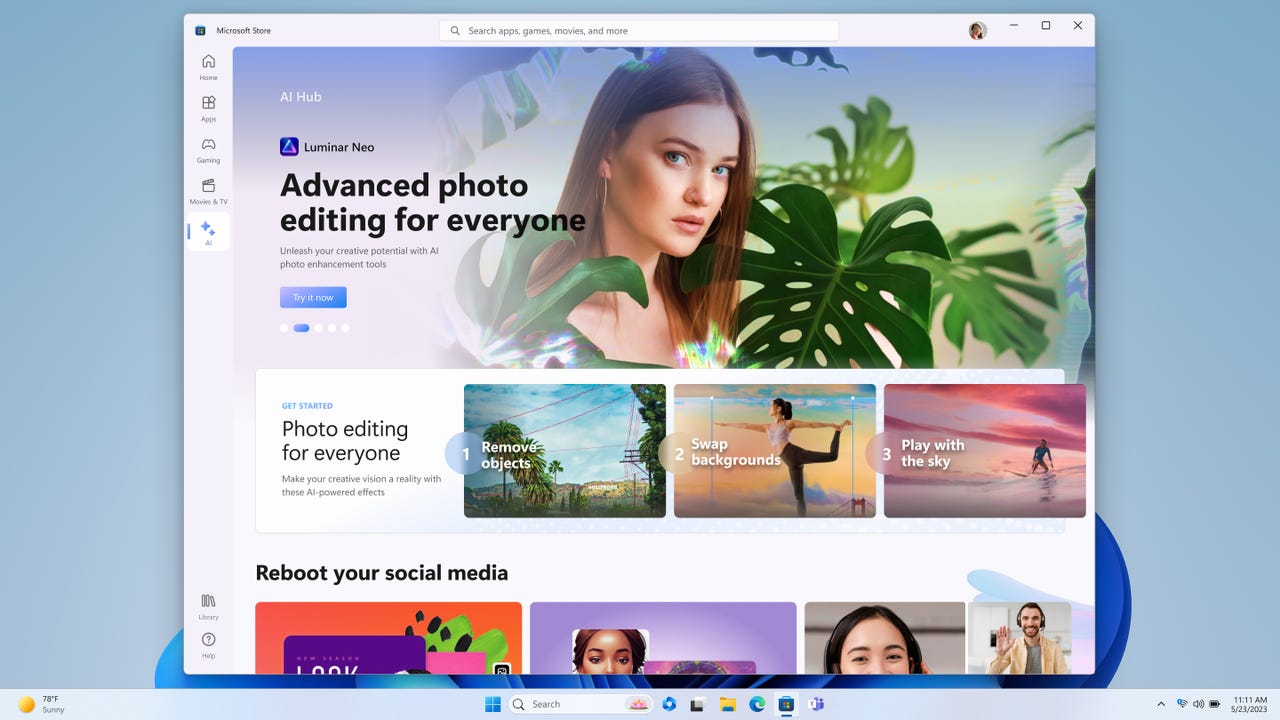
You will soon be able to explore curated artificial intelligence tools within the Microsoft Store, the tech company announced on Tuesday during its Microsoft Build event.
Microsoft's new AI Hub will be located in the Microsoft Store and will promote the best AI experiences, as well as educate customers on how to start or expand their AI journey.
Also: All the major Bing Chat and AI announcements from Microsoft Build 2023
Microsoft said tools like Luminar Neo, Lensa, Descript, Krisp, Podcastle, Gamma, Copy.ai, Tripnotes, and more will be available to use. This means you can do everything from building your resume to planning a trip.
The Hub will be especially useful for those who haven't yet tried the benefits of AI or just don't know where to start. Microsoft said it plans to add more tools to the Hub in the future as they become available to allow customers to become even more productive by using new AI experiences.
Also:The best AI chabots
Microsoft said all content and tools in the AI hub will be tested for security, family safety, and device compatibility. The company did not specify when the AI Hub will go live in the Microsoft Store.
The Microsoft Store is also getting more AI features to help customers make better decisions when choosing which games or apps to download. The new AI-generated review summarizes the most useful reviews of a game or an app to decrease the amount of time you spend sifting through thousands of reviews to decide if you want to download something or not.
On the developer side, Microsoft is introducing a developer tool to leverage AI to generate and suggest Search Tags for apps. Microsoft said the new AI-generated keywords will help improve the discoverability of apps within the search results. In addition, Microsoft is making Store Ads discoverable in Bing.com search results.
Also: AI Safety: Microsoft pushes for AI responsibility through Azure
All of these announcements are a part of Microsoft's bigger plan to incorporate more AI in the customer experience. The company also revealed that its Microsoft 365 applications would be receiving a major AI upgrade through the introduction of Microsoft 365 Copilot, an application that runs on OpenAI. Copilot will even be natively integrated into the Microsoft Edge browser to assist with tasks like emails, calendars, and more.
Microsoft is aiming to beef up Windows 11 with AI tools designed for users, developers, and IT pros alike. At Day One of its Build 2023 developers conference, the company announced new AI initiatives and integration for its latest flavor of Windows.
Also: Microsoft Build 2023: How to watch and why you should
Windows Copilot
First on the list is Windows Copilot. Expanding on existing copilots for Microsoft 365 and other products, Windows Copilot will use current AI technology and large language models (LLMs) like GPT-4 to offer help for specific tasks, such as answering questions, providing information, and generating content.
Windows Copilot
Accessible as a button on the Windows 11 Taskbar, Copilot will appear as a sidebar on the screen after you launch it, the goal being that it will be available across all your apps and programs. Calling Windows Copilot "your personal assistant," Microsoft described various tasks where the tool can prove effective.
In one scenario, Copilot can help you run specific commands, customize Windows settings, and take care of tasks in Windows apps, such as Snap Assist and the Snipping Tool. In another scenario, Copilot could generate specific content for you. Pairing the different tasks, you might ask the tool to not only copy and paste text for you but rewrite, summarize, or explain the content.
Further, Copilot will act as a more advanced and personalized type of search feature, letting you ask simple or complex questions. In one example cited by Microsoft, imagine you want to call your family in another country. Using Copilot, you ask for the local time to make sure they're awake. Now, you want to make plans to visit your family. Again using Copilot, you inquire about flights and accommodations for an upcoming break.
Built to respond to specific questions and requests with AI-based information, copilots have already surfaced in other Microsoft products, such as Dynamics 365 Copilot, Microsoft 365 Copilot, and Copilot for Power Platform. Microsoft's version of a copilot actually debuted a couple of years ago with GitHub Copilot, an AI that helps developers write code.
Also: Microsoft 365 Copilot expands availability through a new early access program
Windows Copilot will start rolling out in a preview build for Windows 11 in June. Users and developers who want to stay abreast on the progress of Windows Copilot can head to the team's update page.
Bing Chat plugins
To beef up Windows Copilot, Microsoft is also adding Bing Chat plugins to Windows. With plugins, developers will be able to integrate third-party apps with the Windows AI chatbot so that users can take advantage of a wider array of services.
Recently unveiled for ChatGPT and for Bing, plugins are similar to extensions for a web browser. But backed by AI, plugins provide even greater capabilities. Using a plugin with the Bing Chat in Windows, users will be able to access real-time information, integrate company and business data, and perform calculations and computations.
Also: What is Bing Chat? Here's everything you need to know
Suggesting that people "think of plugins as the connection between copilots and the rest of the digital world," Microsoft announced several third-party plugins that Bing will support, including OpenTable, Wolfram Alpha, Kayak, Klarna, Redfin, and Zillow.
To make work simpler and easier on the development side, Microsoft also revealed that developers will be able to use one platform with a single open standard to create consumer and business plugins. This means that developers can design the same plugins to work with ChatGPT, Bing, Dynamics 365 Copilot, and Microsoft 365 Copilot. Further, any AI-based applications that developers create via Azure OpenAI Service will support the same plugin standard.
Dev Home
Another tool designed to ease the workload for developers is Dev Home. Supported in Windows 11 and available at the Microsoft Store, Dev Home will offer developers a way to manage their projects and track different workflows. With this new product, you can connect to GitHub and set up cloud development environments such as Microsoft Dev Box and GitHub Codespaces. You can then add GitHub widgets to keep track of your coding tasks and pull requests and monitor CPU and GPU performance from one location.
Microsoft's Windows Dev Home dashboard
The goal is to help you install the packages you need and set up your system so that you can more easily code for your desired repositories. As Dev Home will be open source and customizable, developers will also be able to tweak the dashboard, add customized extensions, and set up access to the necessary tools.
Also: The developer role is changing radically, and these figures show how
Interested developers can join the Dev Home GitHub community. The preview of Dev Home is currently available in the Microsoft Store.
Windows Terminal gets AI savvy
Developers who use Windows Terminal will be able to tap into GitHub Copilot to get AI-generated assistance. With the new integration, you can use natural language queries to engage with a chatbot and get recommendations for commands to use, explanations of errors, and suggested actions to take within the Terminal program.
Also: GitHub built a new search engine for code 'from scratch' in Rust
Microsoft said it's also testing GitHub Copilot in other developer tools such as WinDBG. Developers who'd like to receive updates on these new team-ups can join the GitHub Copilot Chat waitlist.
Other Windows enhancements
Beyond the major new features, Microsoft teased other improvements to Windows 11 aimed at developers and users.
Windows users will be able to identify and access any instance of each app on the Taskbar with a single click. By default, all instances of an app will be ungrouped with taskbar labels. You'll now be able to hide the date and time through a setting on the taskbar, letting you stay focused on your current task.
Users will be able to more quickly shut down applications by right-clicking on an app directly on the taskbar without having to launch Task Manager. To expand beyond the standard ZIP format, Microsoft is also adding native Windows support for more archive formats, including tar, 7-zip, rar, gz, and others.
Also: How to screen record in Windows 10 or Windows 11
To help users check on their privacy and security, Windows 11 will offer a dedicated VPN icon on the taskbar. By glancing at the icon, you'll be able to glance at the status of your VPN connection to make sure you're secure. The new glanceable VPN will be available this Wednesday and can be controlled via Quick Settings.
Starting in June, a new feature called account badging will alert you via the Start menu if your account needs attention.
Microsoft is also incorporating Bluetooth Low Energy Audio into Windows 11. Developed through a partnership with Samsung Galaxy and Intel, this new type of wireless audio aims to bring higher quality sound from connected Bluetooth devices with lower power consumption.
IT innovations
Finally, Microsoft is providing new and improved features for IT professionals who need to manage Windows PCs and users.
To help protect printed documents that contain confidential information, a cloud print feature called Universal Print will let you release a print job only to the employee authenticated to receive it.
To better connect with employees working in a remote or hybrid environment, admins will be able to send company messages from Microsoft Intune through Windows 11 Enterprise to let workers know about important events, such as changes to their devices or upcoming security training.
Also: Microsoft to Windows 10 users: No more feature updates for you
On the upgrade front, Microsoft will expand its Windows Autopatch update feature to help admins upgrade PCs from Windows 10 to Windows 11.
Timeframe for new features
Many of the new privacy and security features will kick off on Wednesday. Windows 11 computers will receive certain features at different times with several new ones gradually rolling out to consumers over the next few weeks. The specific features will be enabled by default in the June 2023 optional non-security preview release for all editions of Windows 11 22H2. Users who want to install the new features can go to Windows Update on their PCs and choose the latest updates.
Also: Microsoft just added this 'top requested feature' to Windows 11
As different experts, ethicists, and even the government push for increased safety in the development and use of artificial intelligence tools, Microsoft took to the Build stage to announce new measures for AI content safety.
Included in a series of updates aiming for responsible AI, Microsoft launched Azure AI Content Safety, currently in a preview stage, as well as other measures such as media provenance capabilities for its AI tools, like Designer and Bing.
Also: Today's AI boom will amplify social problems if we don't act now, says AI ethicist
Microsoft Designer and the Bing Image Creator will both give users the ability to determine whether an image or video was AI-generated, through upcoming media origin updates. This will be achieved through cryptographic methods that will be able to flag AI-generated media using metadata about its creation.
During the Microsoft Build developer conference, the company also announced easier, more streamlined ways to develop copilots and plugins on its platform. Sarah Bird, a partner group product manager at Microsoft, leads responsible AI for foundational technologies.
Also:Bing Chat gets a new wave of updates, including (finally) chat history
Bird explained that developers carry the responsibility of ensuring these tools render accurate, intended results and not biased, sexist, racist, hateful, or violent prompts.
"It's the safety system powering GitHub Copilot, it's part of the safety system that's powering the new Bing. We're now launching it as a product that third-party customers can use," said Bird.
Also:Google's Bard AI says urgent action should be taken to limit (*checks notes*) Google's power
The responsible development of artificial intelligence is a big topic for tech companies. Dr. Vishal Sikka, CEO of Vianai Systems, a high-performance machine learning company, explains there is an urgent need for AI systems that are safe, reliable, and amplify our humanity.
"Ensuring humans are centered in the development, implementation, and use of AI tools paired with a robust framework for monitoring, diagnosing, improving and validating AI models will help to mitigate the risks and dangers inherent in these types of systems," Sikka added.
Also: 6 harmful ways ChatGPT can be used
Microsoft's new Azure AI service will be integrated into the Azure OpenAI Service and will help programmers develop safer online platforms and communities by employing models specifically created to recognize inappropriate content within images and text.
The models would flag the inappropriate content and assign a severity score, guiding human moderators to determine what content requires urgent intervention.
Also: ChatGPT and the new AI are wreaking havoc on cybersecurity
Furthermore, Bird explained that the Azure AI Content Safety's filters can be adjusted for context, as the system can also be used in non-AI systems, like gaming platforms that require context to make inferences in data.
The responsible development of AI has even reached the Biden administration. Microsoft, Google, OpenAI, and other AI company CEOs held a two-hour meeting with Vice President Kamala Harris to discuss AI regulations at the beginning of this month, and an AI Bill of Rights is in the works.
ChatGPT has proven to be an incredible AI tool capable of assisting with tasks as simple as putting together a to-do list or as complicated as starting up your own business. However, its lack of knowledge about current events has been its one major downside — until now.
At Microsoft Build 2023, Microsoft announced that it is bringing the new Bing to ChatGPT as the default search experience.
Also: All the major Bing Chat and AI announcements from Microsoft Build 2023
This means that now ChatGPT is no longer limited to its knowledge prior to 2021 that it was trained on. Rather, ChatGPT will be able to answer any questions you have by indexing the entirety of the internet, like Bing Chat does.
"ChatGPT will now have a world-class search engine built-in to provide timelier and more up-to-date answers with access from the web," said Yusuf Mehdi, Microsoft CVP & Consumer CMO.
This partnership will also help solve the second major issue with ChatGPT — the lack of citations. Now users will be able to see where the answers ChatGPT provides are coming from, allowing users to learn more from those answers.
Also:Microsoft embraces OpenAI's ChatGPT plugin standard
Starting on Tuesday, the feature will roll out to all ChatGPT Plus subscribers.
If you are not a subscriber, no worries, all users will soon have access to the feature for free simply by enabling a plugin that will bring Bing to ChatGPT.
It's the hottest duo in 2023, and no, I'm not talking about Gen Z and their old-school flip phones.
I'm talking about generative AI, the learning models that have sparked a boom for creative (and sometimes harmful) text, images, videos, and even audio generation.
Also: Today's AI boom will amplify social problems if we don't act now, says AI ethicist
For what feels like a while now, generative AI has only been accessible through servers of data connected to the internet. But during the company's annual Build event, Microsoft announced that it's partnering with Qualcomm to accelerate the wireless technology maker's on-device computing efforts.
Basically, your next smartphone, laptop, or even car may have the chipsets and systems needed to generate content at will, even with Airplane Mode turned on.
"For generative AI to become truly mainstream, much of the inference will need to be executed on edge devices," said Ziad Asghar, Senior Vice President of Product Management at Qualcomm Technologies, in a Tuesday press release. These "edge devices" that Asghar refers to include smartphones, tablets, laptops, cars, and other IoT products.
Also: AI art generator: Qualcomm gets Stable Diffusion running on a smartphone
To enable most, if not all, future Qualcomm-powered devices to perform generative AI tasks, the company is promoting its own AI Stack, a unified developer platform that allows OEMs and developers to create, test, and mass distribute their applications. Programs developed by the Qualcomm AI Stack can be deployed across all the aforementioned edge devices.
Stable Diffusion allows a Windows on Snapdragon device to generate images from text locally.
Another solution for scaling on-device AI: Windows on Snapdragon, a Qualcomm-Microsoft collaboration that was first introduced with the Surface Pro X. Future Windows 11 PCs will boost Qualcomm's latest Snapdragon 8cx Gen 3 processor, which features a built-in neural processing unit (NPU) for dedicated AI experiences that's more efficient than traditional CPUs and GPUs.
In fact, if you own a Microsoft Surface Pro 9 5G or Lenovo ThinkPad X13S, you can take advantage of Qualcomm's on-device AI features today.
Also: All the major Bing Chat and AI announcements from Microsoft Build 2023
Besides gaining the benefit of creating images, paragraphs of text, and other visual assets from your personal devices without needing to connect to the internet, Qualcomm's advancements in Stable Diffusion and on-device generative AI point to a future where machine-learning workloads require less time and resources, and are more secure thanks to all the data being localized.
That alone should excite consumers, developers, and business users alike about the future of generative AI.
During the latest iteration of its annual Build developers conference, Microsoft made a series of announcements that aim to simplify the development of artificial intelligence apps and copilots, as well as the adoption of the same open plugin standard introduced by OpenAI for ChatGPT.
This move will make it easier for developers to create plugins and use the new Bing Chat's powerful structure, built with OpenAI's GPT-4. These plugins can have Bing help users easily order groceries, find a new house, or make restaurant reservations, all from within the Bing chat window.
Also:Microsoft just supercharged ChatGPT with Bing's AI-powered search
In turn, this will empower developers to create plugins that work seamlessly across both business and consumer interfaces.
"A plugin is about how you, the copilot developer, give your copilot or an AI system the ability to have capabilities that it's not manifesting right now and to connect it to data and connect it to systems that you're building," according to Kevin Scott, Microsoft's chief technology officer. "I think there's going to eventually be an incredibly rich ecosystem of plugins."
Also:Microsoft Edge gets AI-powered upgrades and these other new features
In addition to the previously announced OpenTable and Wolfram Alpha plugins, Bing is now incorporating plugins from Zillow, Klarna, Instacart, Kayak, Redfin, and more. This integration will give users access to these services directly from within Bing Chat.
Developers create plugins to act as bridges between information sources and programs, in this case, AI systems. They enable copilots to retrieve real-time data, incorporate proprietary business data, perform complex computations, and execute actions on behalf of users.
Also: OpenAI unveils ChatGPT plugins, but there's a catch
The adoption of the same plugin standard as ChatGPT will guarantee interoperability across ChatGPT and Microsoft's wide array of Copilot programs, including Dynamics 365 Copilot, Microsoft 365 Copilot, and Windows Copilot.
Microsoft also announced an expansion to its Copilot programs, with Copilot in Power BI and Copilot in Power Pages currently in preview stages. Copilot in Microsoft Fabric and Windows Copilot will also become available for preview soon.
Also: Bolstered Dev Box leads developer delights at Microsoft Build 2023
"You may look at Bing Chat and think this is some super magical complicated thing, but Microsoft is giving developers everything they need to get started to go build a copilot of their own," Scott said. "I think over the coming years, this will become an expectation for how all software works."
As Microsoft extends the plugin capabilities to Copilot, it offers developers the opportunity to leverage Teams message extensions and Power Platform connectors within Microsoft 365. This will empower them to strengthen existing investments and easily create new plugins using the Microsoft Teams Toolkit for Visual Studio Code and Visual Studio.
Developers will build most copilots in the world
These updates from Microsoft will give programmers the ability to develop, test, and deploy their own plugins, and customize the abilities of Microsoft Copilots to enhance their own generative AI applications.
A copilot trained on a large language model, for example, can have access to businesses' data and backend systems, giving it the power to respond to queries from employees based on specific company knowledge.
Also: Microsoft adding more AI smarts to Windows 11 via Copilot and Dev Home
Though the expansion of its Copilot stack continues, Scott claims that independent developers — not the company — will be the ones to create most of the available copilots in existence in the future.
"They will understand a particular thing that they or their users are trying to accomplish, and they will use this AI software development pattern to go build those things for those users," Scott said.
This will considerably accelerate the pace of innovation for Microsoft's customers, as Visual Studio Code, GitHub Copilot, and GitHub Codespaces simplify the plugin development process, offering tools for creation, debugging, and deployment.
Also:Microsoft announces Azure tools to help developers deploy complex environments and secure their apps
"The point where we are today is just fantastic. You can take a large language model like GPT-4 and start using that to build applications," Scott said. "We've established this new application platform called Copilot."
With the Azure AI Studio, developers will be able to run and test plugins on private enterprise data, to make for a smooth integration experience. Once complete, the plugins will work across Microsoft's Copilot experiences.
Also:The Microsoft Store will help curate AI tools for you now
The complete Microsoft ecosystem gives developers all the tools they need to build software that is fit for the current AI landscape. With seamless interoperability across various Microsoft offerings and the integration of OpenAI's tools, developers can create a diverse range of plugins for enhanced user experiences.
"We have everything you need on Azure for making a copilot," Scott added. "And those things work super well together, so trying your idea and iterating quickly will be easier to do on top of Azure than it will be any other way."
Google to experiment with ads that appear in its AI chatbot in Search Sarah Perez @sarahintampa / 8 hours
AI chatbots have only just been put into consumers’ hands, but tech giants are rushing to monetize them. Shortly after Bing Chat’s arrival, Microsoft began slipping ads into the experience, for instance. Today, Google says it will do something similar, detailing its plans for running Search and Shopping ads inside its conversational AI experience in Search, via the recently announced Search Generative Experience (SGE) in the U.S.
At the company’s I/O developer event earlier this month, Google showed how ads could run above and below this new experience. For instance, if you were searching for a new bike on Google using the generative AI feature, you may get information about what factors to consider when buying and then matching products that fit your interests. You could then ask a follow-up question or be guided to other suggested next steps. In this experience, Search ads would continue to appear in dedicated ad slots throughout the page.
Image Credits: Google, SGE experience showing ads above and below the conversational AI
With the changes announced today at Google’s Marketing Live event for advertisers, the company says it will also soon begin to experiment with ads that are “directly integrated” within the AI-powered snapshot and conversational mode. Available in the coming months, these ads will appear alongside relevant queries.
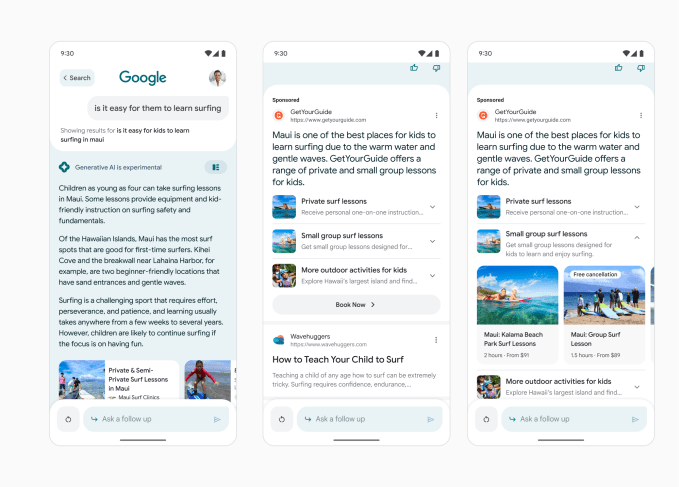
Google offers the example of someone searching for “outdoor activities to do in Maui,” which they then refine further to ask about “activities for kids” and “surfing.” After doing so, the consumer may be shown a fully customized ad for a travel brand that’s promoting surfing lessons for kids in that location. These ads that accompany the AI chatbot’s responses will still be clearly labeled as “Sponsored” results, using bold, black text, Google notes.
Image Credits: Google — ads inside the conversational AI experience
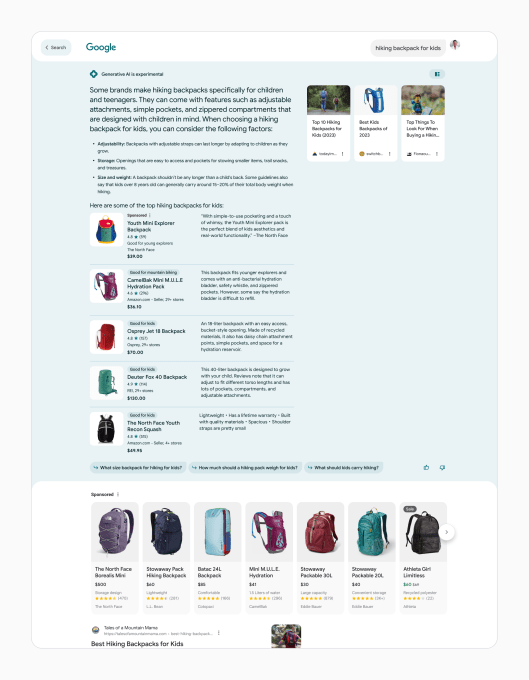
Despite this labeling, some ads could be mistaken for AI chatbot responses. For instance, in a query for hiking backpacks, where Google’s AI already makes specific product recommendations, the “Sponsored” results may appear in the same list. (See below image).
Image Credits: Google — Ads in the conversational AI as well as below
The company says it will also experiment with new ad formats that will be native to SGE and that use generative AI to create high-quality, customized ads.
Google’s plans were announced today alongside other marketing initiatives involving AI, including the use of generative AI to adapt Search ads to users’ queries. That means Google will use content from a website’s landing page to create new headlines that better match with users’ Search queries.
Plus, Google said it will bring generative AI to Performance Max — Google’s goal-based campaigns that let advertisers leverage all their Google Ads inventory in a single campaign to reach customers across YouTube, Display, Search, Discover, Gmail, and Maps. After advertisers provide Google with their website, Google AI will learn about the brand and populate the campaign with text and other relevant assets, even suggesting images.
Image Credits: Google — Performance Max generating images via AI
This capability will also be available through the new conversational experience in Google Ads, where advertisers feed Google AI a landing page, and it summarizes the page, generating relevant keywords, headlines, descriptions, images, and other assets for the ad campaign.
Google is experimenting with a new AI-powered conversational mode in Search