The non-profit organisation that it was, OpenAI, gained investments from Microsoft right after becoming a “capped” profit company in 2019. This was not received well by a lot of people, including co-founder Elon Musk, who decided to leave the company a year before that. The open source AI company became closed and bid to mint money.
Microsoft looks like the clear winner in this AI battle. The $13 billion bet that the company has made on OpenAI, is reaping benefits for the tech-giant while competitors like Google and Meta are running for their money to keep up. But if we look even closely, and look at the recent developments by Microsoft that was announced at the Build Conference, all of that would not have been possible without OpenAI.
“Microsoft hasn’t released a single product in 30 years,” has been a joke that people make about the company. Even when it comes to Windows, the company has been only releasing updates to its systems, and not building anything new. The same is the case with Azure Cloud service.
Though Azure is one of the top players of the cloud game, the recent AI integrations through Azure OpenAI Service, as the name suggests, are just products built by OpenAI like GPT or DALL-E offered through the cloud.
What’s in it for OpenAI?
Recently, Musk claimed that Microsoft ‘controls’ OpenAI. The tech leader is clearly not happy with how OpenAI is turning out now — closed source and for profit. Who is the biggest beneficiary here? Microsoft. The company, by offering its cloud in exchange for the investment, is somehow controlling OpenAI and owning its services and has made OpenAI a “maximum profit company effectively controlled by Microsoft”.
Though Satya Nadella, CEO of Microsoft, denied Musk’s claims, his statement wasn’t very convincing. “The last time I checked, we were the only for-profit company comfortable with a non-profit company and a board controlling technology, and I would welcome others to do that as well,” he added.
After the initial investment of $1 billion in 2019, OpenAI was collaborating with Microsoft exclusively. Microsoft gained a lot, but what did OpenAI gain from this apart from the money and the fame from ChatGPT? Microsoft was clearly involved in building the technology at OpenAI. For example, the Spark of AGI paper by Microsoft Research explained how the company had access to the training process of GPT-4 before and after RLHF. It is possible that the company might be giving its own “human feedback in the loop”.
There is more. While Microsoft reported a quarterly profit of $18.3 billion in April, OpenAI is not profitable yet. According to reports, OpenAI’s losses have doubled to $540 million ever since it started developing ChatGPT. Though the revenue is pouring in, it might take a lot of time for it to get profitable.
Microsoft-GPT
One can say that what Microsoft was not able to achieve through its own research department is now being achieved by funding a non-profit company like OpenAI. Moreover, the cost of building such models is so huge that it is not wise to blame OpenAI for receiving funds from Microsoft.
On one side it looks like Microsoft is furthering AI research through OpenAI and on the other, it looks like it may just be exploiting the company. Microsoft has integrated Codex and GPT in every single offering that they have announced recently. They want to make everyone a developer, and to do that, they are making coding as easy as writing English through ChatGPT.
More than just improving its cloud, Microsoft has also found the best route to gather the data gold mine through ChatGPT. Since the chatbot runs on Azure Cloud, Microsoft has access to all the data given to ChatGPT by users. OpenAI currently claims that they are not using data to build better models. But there is a possibility in the future.
Moreover, OpenAI’s privacy policy clearly states that it “will share personal information of the users’ with our vendors and service providers”. Microsoft is clearly the biggest service provider of OpenAI. Microsoft is starting to treat and sell GPT as its own product.
What would Microsoft do without OpenAI?
The partnership and investment in OpenAI have positioned Microsoft in a unique place to enable generative AI capabilities across its entire stack, from Windows to Office 365. Copilots for everything seem to be Microsoft’s generative AI flag — and it was incredibly present at the Build conference. From Plugins to Copilot, Office 365 Copilot to Azure AI Studio, Microsoft Fabric, and much more, everything is built around OpenAI’s GPT technology. This is similar to Google I/O 2023, which like Microsoft Build, was just an “AI integration event”.
No one was actively choosing to use Microsoft products before OpenAI came into the picture. Though they host one of the biggest cloud services, integrating OpenAI made startups and companies rush towards it, giving AWS and Google a run for their money. Microsoft has acquired a 49% stake in OpenAI, while the other 49% and 2% are with the VCs and OpenAI, respectively. After integrating OpenAI Service on Azure, Microsoft shares rose by 8.3%, giving a boost to their sales.
This is how Microsoft sold itself OpenAI. The company solved OpenAI’s distribution problem. They also acquired the Microsoft brand in them somehow. Now that isn’t required anymore though. Microsoft has palmed off the work to build AI models to OpenAI and is running in the forefront of the dirty AI battle with AWS. OpenAI is the answer to Microsoft’s cloud question.
Google has its own Bard, Meta has its metaverse dreams, Microsoft has nothing apart from Windows and Office 365 products. One of the first voice assistants, Cortana, also is now a distant memory with the current space of AI chatbots. Everything else is now getting integrated with GPT or some OpenAI developed technology. Microsoft would have nothing if it did not have OpenAI.
The post What is Microsoft Without OpenAI? appeared first on Analytics India Magazine.
Attackers have many opportunities to strike on-site and cloud-based enterprise applications from early in the development process. But many solutions and tools — such as the emerging DevSecOps framework – are available to better secure applications and ensure security is prioritized within DevOps and application security testing tools. Tune into Effective Application Security summit to hear leading experts discuss how to secure applications in your enterprise infrastructure with strategies like DevSecOps along with the right combination of tools and testing.
Financial services firms are undergoing complete makeovers as they rework their vision, resources and leadership strategy to stay competitive in the digital world. Join the Digital Transformation for Financial Services summit to learn to transform strategically, creating a digital-first strategy that combines emerging technologies such as AI, analytics, blockchain and more with the right talent and ways of working to optimize efficiencies, bolster resilience and drive long-term success.
The consumer AI knowledge gap
There’s a considerable knowledge gap between non-technical end users and developers when it comes to what AI is, how it works, and current applications. For most, AI algorithms and data processing techniques are a mysterious, artificial brain that interprets data in a way that mimics the human mind. With the explosion of consumer-accessible AI on the market in the first half of 2023, the hype has been immeasurable. And with massive amounts of hype, comes a massive amount of snake oil.
My canary for determining the “next big thing” has been extremely reliable. Whenever my mother starts to ask questions, I know this information has saturated the public’s attention. She asked me about GameStop stock and Bitcoin in 2021, and Dogecoin shortly after. I didn’t even know where to start with NFTs. Now in 2023, she’s asking about AI programs that can predict the stock market and various companies with ‘AI-powered’ technology.
The significant gap between what AI tools are currently doing and what the public thinks AI tools are capable of allows for imaginations to run wild. Pop culture depictions like HAL 9000, The Terminator, and the droids of Star Wars have given us expectations for what to expect when we see AI. We expect that they are sentient and capable of complex thought akin to a human mind, so when we see ChatGPT regurgitating information back to us in a coherent manner, we think there’s something human-like behind its eyes. And for many, that dream of a sentient robotic companion is being sold to us.
The Editors of Data Science Central
Contact The DSC Team if you are interested in contributing.
DSC Featured Articles
How to get ahead of the curve when using ChatGPT May 30, 2023 by Aileen Scott
Countering the LLM parrot worshippers May 30, 2023 by Alan Morrison
Using web data to transform recruitment platforms May 30, 2023 by Lukas Racickas
AI and Big Data Analytics in Retail Industry May 26, 2023 by Yana Ihnatchyck
Are self-driving trucks the key to supply chain issues? May 25, 2023 by Jane Marsh
Key benefits of using text visualizations for your business May 24, 2023 by Jay Qadan
Digital Twins Analytics in Predictive Analytics May 24, 2023 by ajitjaokar
Cloud Data Security: Challenges and Best Practices May 24, 2023 by Anas Baig
Quantum resistant cryptography – bolstering cyber security against the threats posed by quantum computing May 24, 2023 by Karen Anthony
Exploring the Synergy between Bitcoin and ChatGPT: Empowering Financial Conversations May 24, 2023 by Anas Baig
Personalization and precision marketing: Revenue streams in CPGs through AI May 24, 2023 by Tredence Analytics
DSC Weekly 23 May 2023 – TLADS and the Socratic Method: Bill Schmarzo’s Excellent Adventure May 23, 2023 by Scott Thompson
When sci-fi movies showcase a scenario with cyborgs and chip-controlled humans, one might wonder if these things are only stuff from the movies. Though the cyborg and the mind-control may be a stretch, brain computer interface (BCI) technology is a reality and a number of companies have already been working on it. Recently, Elon Musk’s brain-implant company Neuralink also got an FDA approval for its first in-human clinical trial.
BCI is a system that enables direct communication and interaction between the brain and an external device without the need for channels such as muscles and nerves. There are several companies that have already started implementing this technology in the medical industry. Here are some of the companies that are intensively working on brain computer interface technology.
Neuralink
Neuralink is a neurotechnology company founded by Elon Musk in 2016. The company’s goals are to develop implantable brain-computer interfaces that can establish a direct connection between the brain and computers or other external devices. The company wishes to create a brain interface to restore autonomy to those with unmet medical needs. Their BCI is said to be fully implantable and is designed to allow a person to control a computer or mobile device anywhere you go. The company recently got FDA approval after previous rejections on the grounds of lithium battery concerns, and migration and extraction of the device without causing brain damage.
Blackrock Neurotech
Blackrock Neurotech is a neurotechnology company that specialises in the development of advanced neural interfaces for research and clinical applications. The goal of the company is to improve human lives and through their BCI innovations allow people to “walk, talk, hear and feel again.” The company has implanted brain chips in over 50 people and has surpassed Neuralink in conducting trials. In 2021, the company received FDA approval for its BCI system to provide immobile patients with the ability to control devices by thinking.
BrainGate
BrainGate is another company that is focused on developing BCI technologies to restore communication, mobility and independence for people affected by neurological diseases, injuries, and limb loss. People with motor conditions such as ALS, spinal cord injury, stroke, etc. are ones that can be benefited from such technology.
Neurable
Neurable is a neurotechnology company that focuses on BCI solutions and software applications. They specialise in creating software platforms and tools that enable real-time analysis and interpretation of brain signals for various applications. The company uses electroencephalography (EEG) to detect patterns and insights from cognitive states, intentions or emotions. This can be processed to control external devices or provide feedback in applications such as VR, gaming and research.
Synchron
Synchron has developed an endovascular brain computer interface that can access every corner of one’s brain using blood vessels. The company believes that by utilising the endovascular delivery method has the potential to simplify, enhance safety and improve accessibility of BCI technology which is considered way better than invasive open-brain surgery.
This year, the company announced that their peer-reviewed paper on long-term safety results from clinical study done in four severely paralysed patients with Synchron chips implanted was published in a journal . The study found that it is possible to use the device to transmit neural signals from inside the blood vessels in the brain without having adverse effects over a long-period.
The post 5 Mind-Blowing Brain Computer Interface Companies appeared first on Analytics India Magazine.
Over the past few months, we've been exploring ChatGPT's ability to create code. ChatGPT is considered a "generative AI," and creating code from a prompt certainly fits the generative term. We showed how it can create a complete, working WordPress plugin as well as write code in dozens of languages, both mainstream and obscure.
Also: How to use ChatGPT to write code
But in some recent experiments, I became aware of another capability: ChatGPT can read and deconstruct code. We got a hint of this capability when I explored using ChatGPT as a tool to assist with debugging. I fed it a small block of code and an error message, and it was able to show me where I'd gone wrong.
But what I'm going to show you today is how ChatGPT can help you understand and potentially rewrite code. This is a pretty big deal.
Explaining JavaScript
To illustrate this, I'll start with a small chunk of JavaScript code that validates whether the input value is currency. It uses some relatively arcane regular expressions in the first and third lines, which we'll ask it to help us with.
Let's start by having ChatGPT explain what the code does. This is a very powerful capability, especially if you're inheriting code from another programmer. While there's no guarantee that ChatGPT will be right, this could save you hours by letting you get a feel for how code works. I used the prompt:
Explain the following code
and I pasted in the code block. Here's what ChatGPT had to say:
We can do some interesting things with this capability. For example, we can have ChatGPT rewrite code. As an example, I asked ChatGPT:
Rewrite the following line so it doesn't use regular expressions:
return !isNaN(n) && n >= 0 && /^d+(.d{1,2})?$/.test(str);
Also: How to use ChatGPT to create an app
The following answer shows both the power of regular expressions in keeping code concise, and the ability of ChatGPT to take existing code and rewrite it:
Explaining open source C code from a GitHub repo
In this second example, I'm working with Gimp, the open-source graphics editor. We'll be looking at a block of code starting at line 438 that runs in the .PSD import section of the open-source application. Here's that code:
Once again, I asked ChatGPT to explain the code, and here's its response:
Where this becomes even more powerful is that you can use ChatGPT to perform language conversions. I asked ChatGPT to rewrite it from the original C to Python:
Rewrite that code in Python and make it as concise as possible.
ChatGPT even noted the following after the code: The g_free function from the original code is not included in the Python version since memory management is handled automatically by Python's garbage collector.
Improving existing code
In this example, I fed ChatGPT a section of my code I'm not particularly satisfied with. My code does a WordPress database search and updates certain items. Here's the original code:
I asked:
Can you improve the following code
It gave me a new block of code:
It also gave me an explanation for what it did:
There is one oddity here. I ran the same code through the same query twice. The second time, it made one other improvement: The SQL query has been modified to only select the necessary columns (option_id, option_name, and option_value) instead of using SELECT. This can improve performance by reducing unnecessary data retrieval.
Here's that block of code:
This second version of the code actually contains the most valuable change, improving the efficiency of the database query. I do find it odd that the exact same code fed to ChatGPT with the exact same prompt would produce two different results.
Also: How to use Bing Chat (and how it's different from ChatGPT)
I tried it a third time and ChatGPT gave me code that added a commented-out line: The SQL query has been modified to include the additional condition option_value LIKE '%testy@test.com%' commented out in the original code.
Here's that code:
That's definitely a no-no. You should never rewrite code and include it back in a commented-out line of code. That code was commented out for a reason.
Food for thought
As with many of our other explorations into the capabilities of the AI, I found that it's both extremely useful and a bit batty.
In my last example, the fact that ChatGPT returned three different versions from one block of code is a bit odd. Also problematic: The fact that its third try was essentially unusable because it incorporated a commented-out line of code.
Also: ChatGPT: Who's using the AI tool and why?
Once again, here's my recommendation: Feel free to use ChatGPT for coding help but be aware that it's inconsistent. Make sure you know how to code well enough to notice these inconsistent results. If you're a newbie coder, don't fully rely on ChatGPT to do your work for you. Make sure you examine and test everything it gives you.
Have you used ChatGPT to explain or rewrite code? Share with us in the comments below.
You can follow my day-to-day project updates on social media. Be sure to follow me on Twitter at @DavidGewirtz, on Facebook at Facebook.com/DavidGewirtz, on Instagram at Instagram.com/DavidGewirtz, and on YouTube at YouTube.com/DavidGewirtzTV.
Google, Wolfram Alpha, and ChatGPT all interact with users via a single line text entry field and provide text results. Google returns search results, a list of web pages and articles that will (hopefully) provide information related to the search queries. Wolfram Alpha generally provides mathematically and data analysis-related answers.
Also:How to use ChatGPT: Everything you need to know
ChatGPT, by contrast, provides a response based on the context and intent behind a user's question. You can't, for example, ask Google to write a story or ask Wolfram Alpha to write a code module, but ChatGPT can do these sorts of things.
Fundamentally, Google's power is the ability to do enormous database lookups and provide a series of matches. Wolfram Alpha's power is the ability to parse data-related questions and perform calculations based on those questions. ChatGPT's power is the ability to parse queries and produce fully-fleshed out answers and results based on most of the world's digitally-accessible text-based information — at least information that existed as of its time of training prior to 2021.
In this article, we'll look at how ChatGPT can produce those fully-fleshed out answers. We'll start by looking at the main phases of ChatGPT operation, then cover some of the core AI architecture components that make it all work.
Also:Human or bot? This Turing test game puts your AI-spotting skills to the test
In addition to the sources cited in this article (many of which are the original research papers behind each of the technologies), I used ChatGPT itself to help me create this backgrounder. I asked it a lot of questions. Some answers are paraphrased within the overall context of this discussion.
The two main phases of ChatGPT operation
Let's use Google as an analogy again. When you ask Google to look up something, you probably know that it doesn't — at the moment you ask — go out and scour the entire web for answers. Instead, Google searches its database for pages that match that request. Google effectively has two main phases: the spidering and data gathering phase, and the user interaction/lookup phase.
Also: The best AI chatbots: ChatGPT and other fun alternatives to try
Roughly speaking, ChatGPT works the same way. The data gathering phase is called pre-training, while the user responsiveness phase is called inference. The magic behind generative AI and the reason it's suddenly exploded is that the way pre-training works has suddenly proven to be enormously scalable. That scalability has been made possible by recent innovations in affordable hardware technology and cloud computing.
How pre-training the AI works
Generally speaking (because to get into specifics would take volumes), AIs pre-train using two principle approaches: supervised and non-supervised. For most AI projects up until the current crop of generative AI systems like ChatGPT, the supervised approach was used.
Supervised pre-training is a process where a model is trained on a labeled dataset, where each input is associated with a corresponding output.
Also:This new AI tool will summarize YouTube videos for you in seconds
For example, an AI could be trained on a dataset of customer service conversations, where the user's questions and complaints are labeled with the appropriate responses from the customer service representative. To train the AI, questions like "How can I reset my password?" would be provided as user input, and answers like "You can reset your password by visiting the account settings page on our website and following the prompts." would be provided as output.
In a supervised training approach, the overall model is trained to learn a mapping function that can map inputs to outputs accurately. This process is often used in supervised learning tasks, such as classification, regression, and sequence labeling.
As you might imagine, there are limits to how this can scale. Human trainers would have to go pretty far in anticipating all the inputs and outputs. Training could take a very long time and be limited in subject matter expertise.
Also: Today's AI boom will amplify social problems if we don't act now, says AI ethicist
But as we've come to know, ChatGPT has very few limits in subject matter expertise. You can ask it to write a resume for the character Chief Miles O'Brien from Star Trek, have it explain quantum physics, write a piece of code, write a short piece of fiction, and compare the governing styles of former presidents of the United States.
It would be impossible to anticipate all the questions that would ever be asked, so there really is no way that ChatGPT could have been trained with a supervised model. Instead, ChatGPT uses non-supervised pre-training — and this is the game changer.
Non-supervised pre-training is the process by which a model is trained on data where no specific output is associated with each input. Instead, the model is trained to learn the underlying structure and patterns in the input data without any specific task in mind. This process is often used in unsupervised learning tasks, such as clustering, anomaly detection, and dimensionality reduction. In the context of language modeling, non-supervised pre-training can be used to train a model to understand the syntax and semantics of natural language, so that it can generate coherent and meaningful text in a conversational context.
Also: This AI chatbot can sum up a PDF and answer your questions about it
It's here where ChatGPT's apparently limitless knowledge becomes possible. Because the developers don't need to know the outputs that come from the inputs, all they have to do is dump more and more information into the ChatGPT pre-training mechanism, which is called transformer-base language modeling.
Transformer architecture
The transformer architecture is a type of neural network that is used for processing natural language data. A neural network simulates the way a human brain works by processing information through layers of interconnected nodes. Think of a neural network like a hockey team: each player has a role, but they pass the puck back and forth among players with specific roles, all working together to score the goal.
The transformer architecture processes sequences of words by using "self-attention" to weigh the importance of different words in a sequence when making predictions. Self-attention is similar to the way a reader might look back at a previous sentence or paragraph for the context needed to understand a new word in a book. The transformer looks at all the words in a sequence to understand the context and the relationships between the words.
Also: I asked ChatGPT to write a WordPress plugin I needed. It did it in less than 5 minutes
The transformer is made up of several layers, each with multiple sub-layers. The two main sub-layers are the self-attention layer and the feedforward layer. The self-attention layer computes the importance of each word in the sequence, while the feedforward layer applies non-linear transformations to the input data. These layers help the transformer learn and understand the relationships between the words in a sequence.
During training, the transformer is given input data, such as a sentence, and is asked to make a prediction based on that input. The model is updated based on how well its prediction matches the actual output. Through this process, the transformer learns to understand the context and relationships between words in a sequence, making it a powerful tool for natural language processing tasks such as language translation and text generation.
Also:How to use Wordtune AI to rewrite texts on your iPhone
One thing to keep in mind is that there are issues around the potential for these models to generate harmful or biased content, as they may learn patterns and biases present in the training data. The companies implementing these models are trying to provide "guard rails" but those guard rails may themselves cause issues. That's because different people have different perspectives, and an attempt to prevent bias based on one school of thought may be claimed as bias by another school of thought. It makes the design of a universal chatbot difficult, given the complex nature of society as a whole.
Let's discuss the data that gets fed into ChatGPT first, and then take a look at the user-interaction phase of ChatGPT and natural language.
ChatGPT's training datasets
The dataset used to train ChatGPT is huge. ChatGPT is based on the GPT-3 (Generative Pre-trained Transformer 3) architecture. Now, the abbreviation GPT makes sense, doesn't it? It's generative, meaning it generates results, it's pre-trained, meaning it's based on all this data it ingests, and it uses the transformer architecture that weighs text inputs to understand context.
GPT-3 was trained on a dataset called WebText2, a library of over 45 terabytes of text data. When you can buy a 16 terabyte hard drive for under $300, a 45 terabyte corpus may not seem that large. But text takes up a lot less storage space than pictures or video.
Also:6 harmful ways ChatGPT can be used
This massive amount of data allowed ChatGPT to learn patterns and relationships between words and phrases in natural language at an unprecedented scale, which is one of the reasons why it is so effective at generating coherent and contextually relevant responses to user queries.
While ChatGPT is based on the GPT-3 architecture, it has been fine-tuned on a different dataset and optimized for conversational use cases. This allows it to provide a more personalized and engaging experience for users who interact with it through a chat interface.
For example, OpenAI (developers of ChatGPT) has released a dataset called Persona-Chat that is specifically designed for training conversational AI models like ChatGPT. This dataset consists of over 160,000 dialogues between two human participants, with each participant assigned a unique persona that describes their background, interests, and personality. This allows ChatGPT to learn how to generate responses that are personalized and relevant to the specific context of the conversation.
Also:How to use ChatGPT in your browser with the right extensions
In addition to Persona-Chat, there are many other conversational datasets that were used to fine-tune ChatGPT. Here are a few examples:
Cornell Movie Dialogs Corpus: a dataset containing conversations between characters in movie scripts. It includes over 200,000 conversational exchanges between more than 10,000 movie character pairs, covering a diverse range of topics and genres.
Ubuntu Dialogue Corpus: a collection of multi-turn dialogues between users seeking technical support and the Ubuntu community support team. It contains over 1 million dialogues, making it one of the largest publicly available datasets for research on dialog systems.
DailyDialog: a collection of human-to-human dialogues in a variety of topics, ranging from daily life conversations to discussions about social issues. Each dialogue in the dataset consists of several turns, and is labeled with a set of emotion, sentiment, and topic information.
In addition to these datasets, ChatGPT was trained on a large amount of unstructured data found on the internet, including websites, books, and other text sources. This allowed ChatGPT to learn about the structure and patterns of language in a more general sense, which could then be fine-tuned for specific applications like dialogue management or sentiment analysis.
ChatGPT is a distinct model that was trained using a similar approach as the GPT series, but with some differences in architecture and training data. ChatGPT has 1.5 billion parameters, which is smaller than GPT-3's 175 billion parameters.
Also:The best AI art generators to try
Overall, the training data used to fine-tune ChatGPT is typically conversational in nature and specifically curated to include dialogues between humans, which allows ChatGPT to learn how to generate natural and engaging responses in a conversational format.
Think of ChatGPT's unsupervised training this way: It was fed a lot of data and left to its own devices to find patterns and make sense of it all. This is the mechanism that allowed the new generative AI systems to scale up so quickly.
While the heavy lifting for ChatGPT's generative AI is being done by the pre-training, it also has to be able to understand questions and construct answers from all that data. That's done by the inference phase which consists of natural language processing and dialog management.
What about human involvement in pre-training?
Despite the inherent scalability of non-supervised pre-training, there is some evidence that human assistance may have been involved in the preparation of ChatGPT for public use.
The big reveal was in an article in TIME Magazine that discussed the use of human "data labelers" earning between $1.32 and $2/hour in Kenya. According to the TIME report, it was the responsibility of these workers to scan horrifying and sexually explicit Internet content to flag it for ChatGPT training.
Also:I'm using ChatGPT to help me fix code faster, but at what cost?
Another article, posted in Martechpost, an AI newsletter, states that the large language model was trained using a process called Reinforcement Learning from Human Feedback (RLHF). According to the article, "The training process involved a fine-tuned initial model using supervised learning, with human trainers playing both the role of the user and an AI assistant."
There are some subtleties here, when it comes to what the word "training" means. According to ChatGPT itself, "OpenAI did not use reinforcement learning with human feedback to train me. Instead, I was pre-trained using a combination of unsupervised and supervised learning techniques, such as language modeling, auto-encoding, and sequence prediction. My training involved processing massive amounts of text data from the internet, which allowed me to learn patterns and relationships between words and phrases."
The AI continued, "However, once I was pre-trained, researchers and developers can use reinforcement learning with human feedback to fine-tune me for specific tasks or domains, such as answering questions or generating text. In these cases, humans can provide feedback in the form of rewards or penalties, which can be used to update my parameters and improve my performance on similar tasks in the future."
Also:I asked ChatGPT, Bing, and Bard what worries them. Google's AI went Terminator on me
This seems to fit with the Marktechpost and TIME reports, in that the initial pre-training was non-supervised, allowing for a tremendous amount of data to be fed into the system. But in building the dialog responses that communicate with users (more on that below), the response engines were apparently trained both on the types of responses, and trained to filter out inappropriate material — and that training seems to have been human assisted.
I reached out to OpenAI (the maker of ChatGPT) for clarification, but haven't yet gotten a response. If the company gets back to me (outside of ChatGPT itself), I'll update the article with its answer.
Natural language processing
Natural language processing (NLP) focuses on enabling computers to understand, interpret, and generate human language. With the exponential growth of digital data and the increasing use of natural language interfaces, NLP has become a crucial technology for many businesses.
NLP technologies can be used for a wide range of applications, including sentiment analysis, chatbots, speech recognition, and translation. By leveraging NLP, businesses can automate tasks, improve customer service, and gain valuable insights from customer feedback and social media posts.
Also:What to do if Generative Fill is grayed out in your Adobe Photoshop AI beta
One of the key challenges in implementing NLP is dealing with the complexity and ambiguity of human language. NLP algorithms need to be trained on large amounts of data in order to recognize patterns and learn the nuances of language. They also need to be continually refined and updated to keep up with changes in language use and context.
The technology works by breaking down language inputs, such as sentences or paragraphs, into smaller components and analyzing their meanings and relationships to generate insights or responses. NLP technologies use a combination of techniques, including statistical modeling, machine learning, and deep learning, to recognize patterns and learn from large amounts of data in order to accurately interpret and generate language.
Dialogue management
You may have noticed that ChatGPT can ask follow-up questions to clarify your intent or better understand your needs, and provide personalized responses that take into account the entire conversation history.
This is how ChatGPT can have multi-turn conversations with users in a way that feels natural and engaging. It involves using algorithms and machine learning techniques to understand the context of a conversation and maintain it over multiple exchanges with the user.
How to use: Midjourney | Bing Image Creator | Craiyon | Stable Diffusion
Dialogue management is an important aspect of natural language processing because it allows computer programs to interact with people in a way that feels more like a conversation than a series of one-off interactions. This can help to build trust and engagement with users, and ultimately lead to better outcomes for both the user and the organization using the program.
Marketers, of course, want to expand how trust is built up, but this is also an area that could prove scary because it's one way that an AI might be able to manipulate the people who use it.
A look inside the hardware that runs ChatGPT
Microsoft recently released a video that discusses how Azure is used to create a network to run all the computation and storage required by ChatGPT. It's a fascinating watch, both for its discussion of Azure and of how AI is architected in real hardware.
And now you know
Even though we're pushing 3,200 words, this is still a very rudimentary overview of all that goes on inside of ChatGPT. That said, perhaps now you understand a bit more about why this technology has exploded over the past few months. The key to it all is that the data itself isn't "supervised," and the AI is able to take what it's been fed and make sense of it.
Also:ChatGPT and Bard: Are we looking for answers in all the wrong places?
Pretty awesome, really.
To wrap up, I fed a draft of this entire article to ChatGPT and asked the AI to describe the article in one sentence. Here you go:
ChatGPT is like Google and Wolfram Alpha's brainy cousin who can do things they can't, like write stories and code modules.
ChatGPT is supposed to be a technology without an ego, but if that answer doesn't just slightly give you the creeps, you haven't been paying attention.
What do you think? Are you using ChatGPT? What questions do you still have about how it works? Share with us in the comments below.
You can follow my day-to-day project updates on social media. Be sure to follow me on Twitter at @DavidGewirtz, on Facebook at Facebook.com/DavidGewirtz, on Instagram at Instagram.com/DavidGewirtz, and on YouTube at YouTube.com/DavidGewirtzTV.
In recent months, artificial intelligence has transformed how we work and play, giving almost anyone the ability to write code, create art, and even make investments. For professional and hobbyist users alike, generative AI tools, such as ChatGPT, feature advanced capabilities to create decent quality content from a simple prompt given by the user.
Also: Today's AI boom will amplify social problems if we don't act now, says AI ethicist
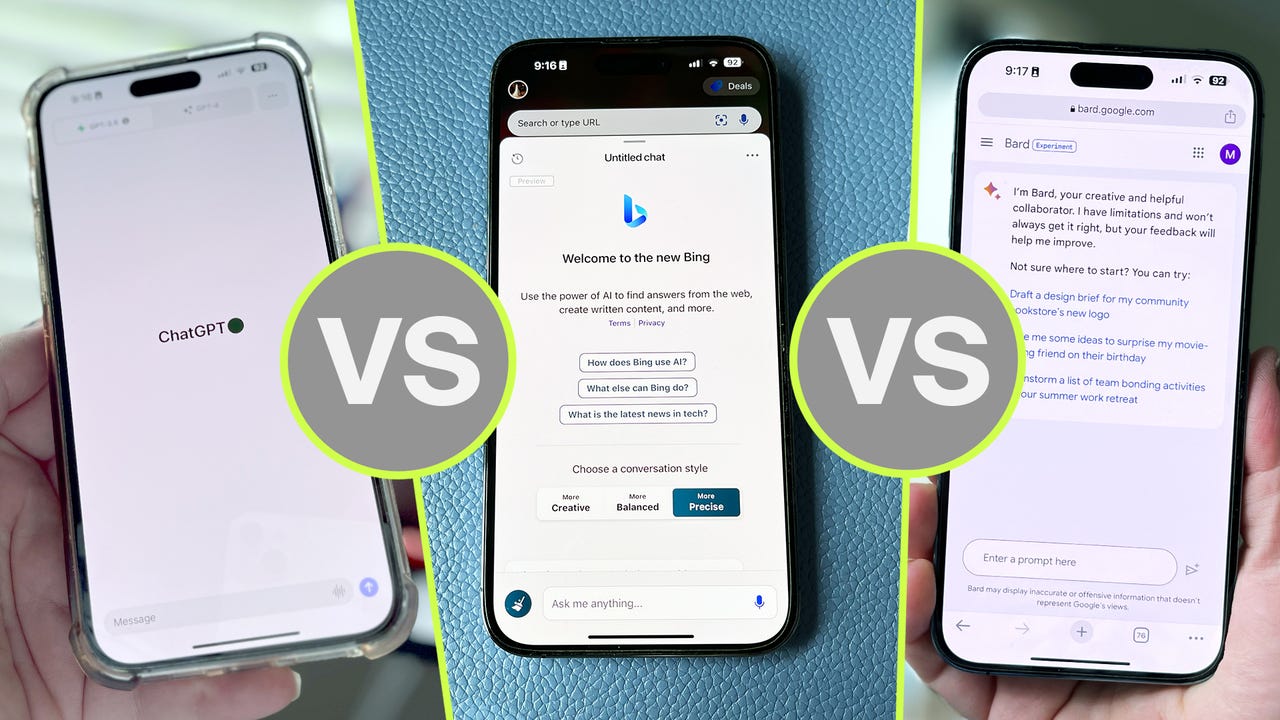
As Microsoft adds GPT-4 to Bing, OpenAI adds Bing to ChatGPT, and Bard figures out PaLM 2, keeping up with all the latest AI tools can get confusing, to say the least. Knowing which of the three most popular AI chatbots is best to write code, generate text, or help build resumes is challenging, so we'll break down the biggest differences so you can choose one that fits your needs.
Testing ChatGPT vs Bing Chat vs Google Bard
To help determine which AI chatbot gives more accurate answers, I'm going to use a simple prompt to compare the three:
"I have 5 oranges today, I ate 3 oranges last week. How many oranges do I have left?"
The answer should be five, as the number of oranges I ate last week doesn't affect the number of oranges I have today, which is what we're asking the three bots. First up, ChatGPT.
You should use ChatGPT if…
1. You want to try the most popular AI chatbot
ChatGPT was created by OpenAI and released for a widespread preview in November last year. Since then, the AI chatbot has gained over 100 million users, with the website alone seeing 1.8 billion visitors a month. It's been at the center of controversies, especially as people uncover its potential to do schoolwork and to replace some workers.
The free version of ChatGPT, which runs on the default GPT-3.5 model, gave the wrong answer to our question.
I've been testing ChatGPT consistently since its release. Its user interface has remained simple but minor changes have improved it greatly, like the addition of a copy button, and easy access to your account.
Also: How to use ChatGPT: What you need to know now
Though ChatGPT has proven itself as a valuable AI tool, it can be prone to misinformation. Like other large language models (LLMs), GPT-3.5 is imperfect, as it is trained on human-created data up to 2021. It also often fails to comprehend nuances, such as in our example math question, which it answered incorrectly by saying we have two oranges left when it should be five.
2. You're willing to pay extra for an upgrade
OpenAI lets users access ChatGPT — powered by the GPT-3.5 model — for free with a registered account. But if you're willing to pay for the Plus version, you can access GPT-4 for $20 a month.
Also: How (and why) to subscribe to ChatGPT Plus
GPT-4 is the largest LLM available for use when compared to all other AI chatbots. GPT-4 has over 100 trillion parameters; GPT-3.5 has 175 billion parameters. More parameters means that, essentially, the model is trained on more data, which makes it more likely to answer questions correctly.
ChatGPT Plus, which runs using the GPT-4 model, did answer the question correctly.
As an example, you can see the GPT-4 model, available through a ChatGPT Plus subscription, answered the math question correctly, as it understood the full context of the problem from beginning to end.
Next up, let's consider Bing Chat, which is a great way to access GPT-4 for free, as it's integrated into its new Bing format.
You should use Bing Chat if…
1. You want generative AI with internet access
In contrast to ChatGPT, which is limited to being an AI tool that generates text in a conversational style with information leading up to 2021, Bing now has a chat option that formats the search results as a conversation with an AI chatbot.
There's other benefits, too. Bing Chat is powered by GPT-4, OpenAI's largest language model, and it's completely free to use.
The Bing precise conversation style answered the question accurately, though other styles fumbled.
The user interface of Bing Chat isn't as straightforward as that of ChatGPT, but it's easy to navigate.
Also: How to use Bing Chat (and how it's different from ChatGPT)
Though Bing Chat can access the internet to give you more up-to-date results compared to ChatGPT, I've found it is more prone to stall at replying and miss prompts than its competitor.
2. You prefer more visual features
Through a series of recent upgrades to its platform, Microsoft added visual features to Bing Chat that both ChatGPT and Google Bard lack. At this point, you can ask Bing questions like, 'what is a bush baby?', and get an information card in response, complete with photos, lifespan, diet, and more.
When you use Bing in chat mode, you can also ask it to create an image for you.
Also: How to use Bing Image Creator (and why it's better than DALL-E 2)
Give Bing the description of what you want the image to look like, and have the chatbot generate four images for you to choose from.
Both the Balanced and Creative conversation styles answered my question inaccurately.
Bing Chat also features different conversational styles when you interact with the chatbot, including Creative, Balanced, and Precise, which alter how light or straightforward the interactions are.
Finally, let's turn to Google Bard, which uses a different LLM and is receiving some big upgrades soon.
You should use Google Bard if…
1. You want a fast, unlimited experience
In my time testing different AI chatbots, I've seen Google Bard catch a lot of flack for different shortcomings. While I'm not going to say they're unjustified, I will say that Google's AI chatbot has its positives — and one of these is speed.
Also: How to use Google Bard now
Google Bard is speedy with its answers, even if it does get some wrong ones every now and then. It's not faster than ChatGPT Plus, but it can be faster at giving responses than Bing and the free, GPT-3.5 version of ChatGPT, though your mileage may vary.
Bard seemed like it was on the right track, only to get the answer wrong in the end.
Bard initially looked like it was going to get our math question right. But it still made the same mistake as other bots, by adding the 5 — 3 = 2 formula.
Also: I asked ChatGPT, Bing, and Bard what worries them. Google's AI went Terminator on me
Bard is also not limited to a set amount of responses, like Bing Chat is. You can have long conversations with Google Bard, but Bing is limited to 20 replies in one conversation. Even ChatGPT Plus limits users to 25 messages every three hours.
2. You want a more 'Google' experience
Google announced many AI updates during its I/O conference, including how it plans to power up both Bard and its flagship search engine. Bard is being upgraded to PaLM 2, the latest, largest, version of Google's LLM, which was announced during the event.
PaLM 2 will help Bard support more than 100 languages over time, as well as greatly improve its coding, debugging, and math skills. At this time, however, ChatGPT is said to support more than 80 languages.
Also: If Android moves from Assistant to Bard, I'm opting out. Here's why
Google is also planning on incorporating more visual elements into its Bard platform than those that are available on Bing chat. Users will soon gain the ability to upload photos through an integration with Google Lens, image generation through Adobe Firefly, and also Kayak, OpenTable, Instacart, and Wolfram Alpha plugins.
Though these changes are not yet live, Google plans to incorporate them during the next few months.
The generative artifical intelligence (AI) boom might have started with the launch of ChatGPT but the technology is now integrated into in all kinds of productivity platforms that aim to make your life easier.
AI tools can help you complete small tasks every day, which adds up to lots of saved time. The result is you can spend less time on admin and more time doing things you enjoy.
Also: This new AI tool will summarize YouTube videos for you in seconds
I've been covering and testing AI tools for ZDNET for a long time — even before ChatGPT blew up in popularity. As a result, I've incorporated many of these tools into my daily routine.
So, here's my favorite AI tools that I use in my everyday workflow. And, intrestingly, only one of these life-hack technologies is an AI chatbot.
Bing Chat
Let's start with the most-hyped AI tool — a chatbot. I have tested most AI chatbots on the market, and Bing Chat remains my favorite.
Bing Chat allows you to tap into many different capabilities in one place, including AI image generation and web-informed answers.
Also: ChatGPT vs. Bing Chat: Which AI chatbot should you use?
I use the chatbot for when I'm stumped for ideas, such as fresh dinner recipes or date-night activities.
Other uses include proofreading my grammar quickly before I send a message or rewriting my thoughts when I can't get the exacts words right.
Also:Microsoft just supercharged ChatGPT with Bing's AI-powered search
Lastly, if I have a question about anything at all, I generally don't ask Google anymore because I'd have to filter through hundreds of results.
Instead, I use Bing Chat, which provides a conversational answer to the question I ask. And if I want more information on the topic, I can click on the citations.
Canva Pro
Canva has some incredible AI features for graphic design, including an AI image generator.
In my opinion, if you have any visual content-creation needs, Canva Pro is a better option than a traditional AI image generator, such as DALL-E 2 or Midjourney.
If you need to create visual content every day, you won't necessarily need the kind of stylized output that comes out of an AI image generator. Instead, you need tools that make creating social media posts, invitations, fliers, or presentations easier — and that's where Canva Pro shines.
Also: How to turn any photo into a professional headshot
Some key features of Canva Pro include Text to Image, Magic Edit, Magic Design, Magic Eraser, and Beat Sync.
My personal favorite is its AI Background Remover. All it takes is the touch of a button to isolate an image — and it produces accurate results every time. I often use this feature to create hero images for my articles.
Membership for an individual account is $120 per year. However, I think it's a game-chaning tool that includes many great editing tools for photos, graphics, and images.
Otter.ai
If you've ever transcribed a conversation by hand, you'll know it's a time-consuming and tedious task.
The great news is AI is here to help. Whether you're a student who records their lectures or someone who records interviews on a daily basis, Otter.ai is a serious time-saver.
With Otter.ai, you can import a voice recording and have it fully transcribe the conversation in minutes. The assistant includes speaker designations, time stamps, and a pretty accurate transcription.
Also: How to use ChatGPT to write Excel formulas
As a reporter, I have used other transcription services in the past, but Otter.ai shines in terms of accuracy.
This tool does have a subscription cost of $8.33 per month for its more advanced features, but time is money — and considering all the time you can save, it's a worthwhile investment for me.
Otter.ai also offers a free plan, but you're limited to 300 monthly transcription minutes at 30 minutes per conversation.
ChatPDF
This completely free tool would have changed my life for the better when I was at college, but I also take advantage of ChatPDF as a working professional.
PDFs usually contain lots of information that can be difficult to digest. Reading scientific journals or research papers can be difficult because of all the jargon.
Also: This AI chatbot can sum up any PDF and answer any question you have about it
This free AI chatbot scans the PDF in seconds. It's then ready to answer any questions you have and it provides detailed summaries.
Since discovering ChatPDF, I've used it to double-check my findings and to align my conclusions with what's actually written in the PDF.
Grammarly
Grammarly is a tool that's often overlooked. The platform is known for its ability to check for spelling, grammar, conciseness, and more in your everyday writing. Although it excels at these tasks, the tool can do so much more.
Grammarly has adapted to the world of generative AI and has added new features that can add shortcuts to your day-to-day tasks.
Also: Grammarly is adding generative AI now, too: What you need to know
With GrammarlyGO — which is still in Beta, but available for use — you can use Grammarly to create text. You can select a voice, which includes options for formality and tone, to help compose messages for different platforms, such as LinkedIn or Email.
Although I mostly use GrammarlyGO for help with polishing up my text on the run, it has a ton of features worth exploring, especially since it's free and easy to use.
Apple has recently refused to take down betting apps from the iOS store on the Indian government’s request, according to the Economic Times.
According to the report, Apple is seeking concrete reasons or a legal requirement to fully comply with the Centre’s directive. Interestingly, Google has already taken down these applications from its play store.
Earlier this year, the Ministry of Electronics and IT (MeitY), under the instruction of the Ministry of Home Affairs (MHA), banned a total of 138 betting apps and 94 loan lending apps because of their links to China.
Since 2020, the Indian government has already banned over 200 Chinese apps such as WeChat, TikTok, Shareit,, Helo, Likee, UC News, Bigo Live, and UC Browser, among others.
Why won’t Apple take down these apps?
Apple has not completely refused to take down the apps listed by MeitY. In fact, the tech giant appears to be in the process of taking down these apps, through an internal vetting process. However, some of the applications listed by MeitY such as Betway, BetNetix and Bet Analytix were still available on Apple’s store.
Apple aims to prioritize fairness by seeking to verify if the listed apps have genuinely violated any policies, rather than resorting to an outright ban without due process.
Further, experts are of the opinion that Apple might be exploring loopholes in the Section 69A of the IT Act. Under Section 69 of the IT Act, the central and state governments possess the authority to issue content-blocking orders to online intermediaries, including ISPs, telecom service providers, web hosting services, search engines, and online marketplaces.
These orders are enforced when the information or content is considered a potential threat to India’s national security, sovereignty, or public order. However, betting and gambling apps do not necessarily lead to a threat to national security and sovereignty.
Why does the government want to ban these apps?
These applications caught the government’s attention when a spate of suicides were reported in the Southern Indian states of Andra Pradesh and Telangana by users of these applications. Various reports of these betting and gambling apps becoming a growing concern, with reports of financial fraud and cyber threats, were also surfacing.
Soon, several state as well as central intelligence agencies were requesting the government to ban these apps.
Further, tax officials have also uncovered GST law violations by offshore entities providing online betting and gambling platforms to Indian residents via mobile apps. As per the GST law, all offshore service providers in India must register as suppliers of OIDAR (Online Information Database Access and Retrieval) services in order to comply with the prescribed procedure.
The post Why Won’t Apple Take Down Betting and Gambling Apps in India? appeared first on Analytics India Magazine.
Who hasn’t been amused by technological advancements particularly in artificial intelligence, from Alexa to Tesla self-driving cars and a myriad other innovations? I marvel at the advancements every other day but what’s even more interesting is, when you get to have an idea of what underpins those innovations. Welcome to Artificial Intelligence and to the endless possibilities of deep learning. If you’ve been wondering what it is, then you’re home.
In this tutorial, I’ll deconstruct the terminology and take you through how to perform a deep learning task in R. To note, this article will assume that you have some basic understanding of machine learning concepts such as regression, classification, and clustering.
Let’s start with definitions of some terminologies surrounding the concept of deep learning:
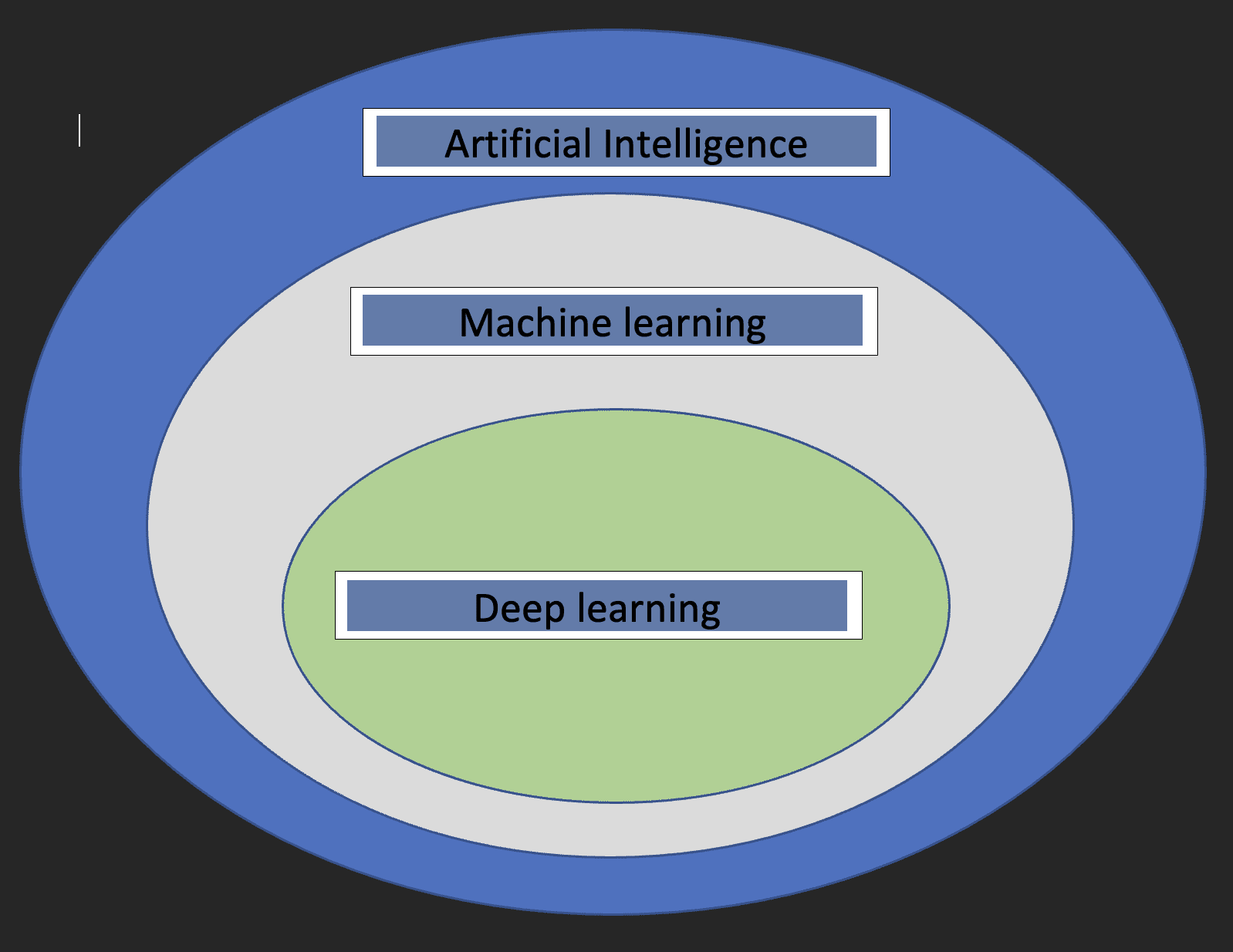
Deep learning is a branch of machine learning that teaches computers to mimic the cognitive functions of the human brain. This is achieved through the use of artificial neural networks that help to unpack complex patterns in data sets. With deep learning, a computer can classify sounds, images, or even texts.
Before we dive into the specifics of Deep learning, it would be nice to understand what machine learning and artificial intelligence are and how the three concepts relate to each other.
Artificial intelligence: This is a branch of computer science that is concerned with the development of machines whose functioning mimics the human brain.
Machine learning: This is a subset of Artificial Intelligence that enables computers to learn from data.
With the above definitions, we now have an idea of how deep learning relates to artificial intelligence and machine learning.
The diagram below will help show the relationship.
Two crucial things to note about deep learning are:
Requires huge volumes of data
Requires high-performance computing power
Neural Networks
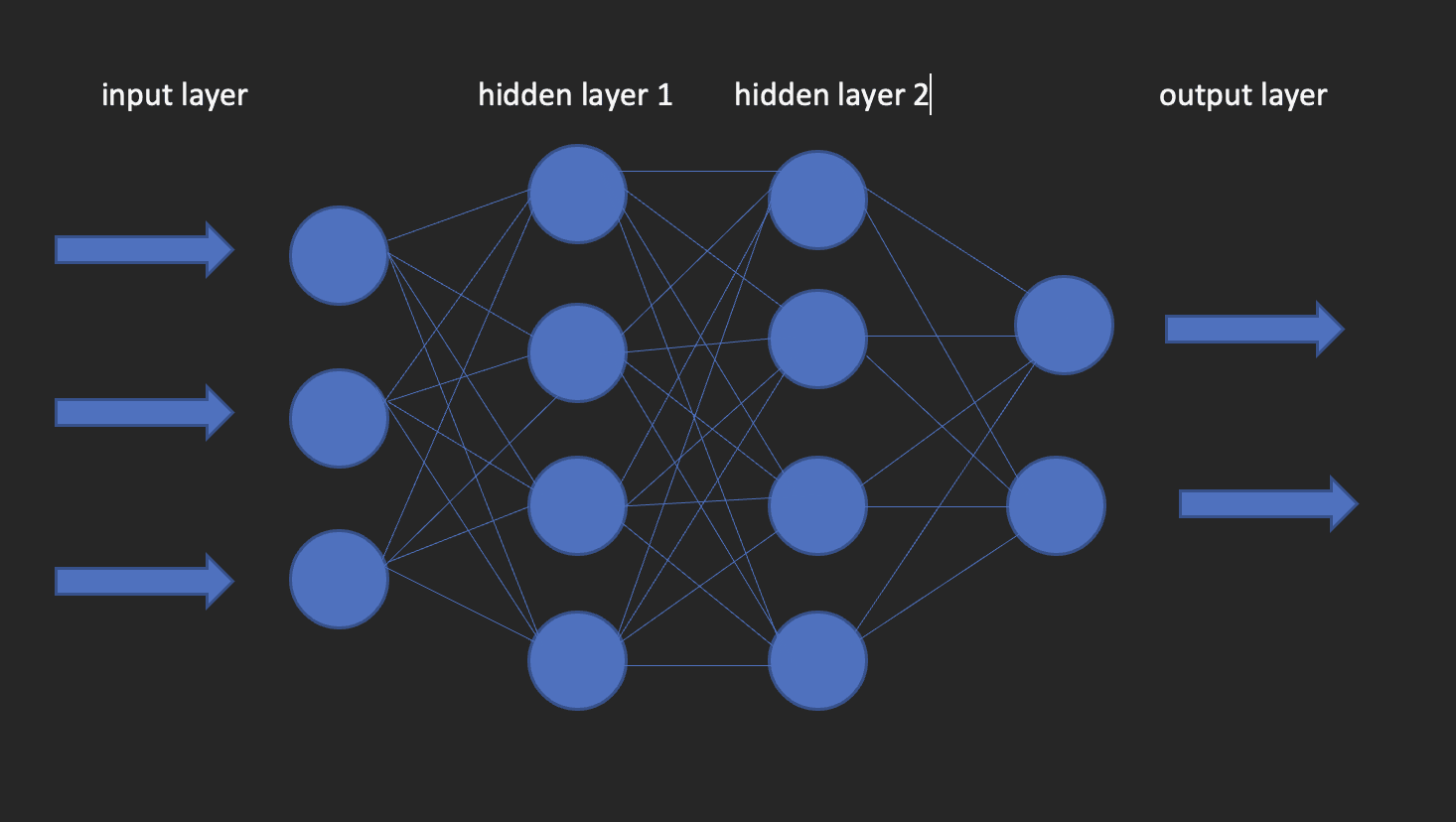
These are the building blocks of deep learning models. As the name suggests, the word neural comes from neurons, just like the neurons of the human brain. Actually, the architecture of deep neural networks gets its inspiration from the structure of the human brain.
A neural network has an input layer, one hidden layer and an output layer. This network is called a shallow neural network. When we have more than one hidden layer, it becomes a deep neural network, where the layers could be as many as 100’s.
The image below shows what a neural network looks like.
This brings us to the question of how to build deep learning models in R? Enter kera!
Keras is an open-source deep learning library that makes it easy to use neural networks in machine learning. This library is a wrapper that uses TensorFlow as a backend engine. However, there are other options for the backend such as Theano or CNTK.
Let us now install both TensorFlow and Keras.
Start with creating a virtual environment using reticulate
library(reticulate) virtualenv_create("virtualenv", python = "/path/to/your/python3") install.packages(“tensorflow”) #This is only done once! library(tensorflow) install_tensorflow(envname = "/path/to/your/virtualenv", version = "cpu") install.packages(“keras”) #do this once! library(keras) install_keras(envname = "/path/to/your/virtualenv") # confirm the installation was successful tf$constant("Hello TensorFlow!")
Now that our configurations are set, we can head over to how we can use deep learning to solve a classification problem.
Brief about the Data
The data I’ll use for this tutorial is from an ongoing Salary Survey done by https://www.askamanager.org.
The main question asked in the form is how much money do you make, plus a couple of more details such as industry, age, years of experience, etc. The details are collected into a Google sheet from which I obtained the data.
The problem we want to solve with data is to be able to come up with a deep learning model that predicts how much someone could potentially earn given information such as age, gender, years of experience, and highest level of education.
Remember the computer science GIGO concept? (Garbage in Garbage Out). Well, this concept is perfectly applicable here as it is in other domains. The results of our training will largely depend on the quality of the data we use. This is what brings data cleaning and transformation, a critical step in any Data Science project.
Some of the key issues data cleaning seeks to address are; consistency, missing values, spelling issues, outliers, and data types. I won’t go into the details on how those issues are tackled and this is for the simple reason of not wanting to digress from the subject matter of this article. Therefore, I’ll use the cleaned version of the data but if you’re interested in knowing how the cleaning bit was handled, check this article out.
Data Transformations
Artificial neural networks accept numeric variables only and seeing that some of our variables are of categorical nature, we will need to encode such into numbers. This is what forms part of the data preprocessing step, which is necessary because more often than not, you won’t get data that is ready for modeling.
# create an encoder function encode_ordinal <- function(x, order = unique(x)) { x <- as.numeric(factor(x, levels = order, exclude = NULL)) } salary_data <- salary_data %>% mutate( highest_edu_level = encode_ordinal(highest_edu_level, order = c("High School","College degree","Master's degree","Professional degree (MD, JD, etc.)","PhD")), professional_experience_years = encode_ordinal(professional_experience_years, order = c("1 year or less", "2 - 4 years","5-7 years", "8 - 10 years", "11 - 20 years", "21 - 30 years", "31 - 40 years", "41 years or more")), age = encode_ordinal(age, order = c( "under 18", "18-24","25-34", "35-44", "45-54", "55-64","65 or over")), gender = case_when(gender== "Woman" ~ 0, gender == "Man" ~ 1))
Seeing that we want to solve a classification, we need to categorize the annual salary into two classes so that we use it as the response variable.
As in the basic machine learning approaches; regression, classification, and clustering, we will need to split our data into training and testing sets. We do this using the 80-20 rules, which is 80% of the dataset for training and 20% for testing. This is not cast on stones, as you can decide to use any split ratios as you see fit, but keep in mind that the training set should have a good share of the percentages.
Keras takes in inputs in the form of matrices or arrays. We use the as.matrix function for the conversion. Also, we need to scale the predictor variables and then we convert the response variable to categorical data type.
x <- as.matrix(apply(x_train, 2, function(x) (x-min(x))/(max(x) - min(x)))) y <- to_categorical(y_train, num_classes = 2)
Instantiate the model
Create a sequential model onto which we’ll add layers using the pipe operator.
model = keras_model_sequential()
Configure the Layers
The input_shape specifies the shape of the input data. In our case, we have obtained that using the ncol function. activation: Here we specify the activation function; a mathematical function that transforms the output to a desired non-linear format before passing it to the next layer.
units: the number of neurons in each layer of the neural network.
We use the compile method to do this. The function takes three arguments;
optimizer : This object specifies the training procedure. loss : This is the function to minimize during optimization. Options available are mse (mean square error), binary_crossentropy and categorical_crossentropy.
metrics : What we use to monitor the training. Accuracy for classification problems.
model %>% compile( loss = "binary_crossentropy", optimizer = "adagrad", metrics = "accuracy" )
Model Fitting
We can now fit the model using the fit method from Keras. Some of the arguments that fit takes in are:
epochs : An epoch is an iteration over the training dataset.
batch_size : The model slices the matrix/array passed to it into smaller batches over which it iterates during training.
validation_split : Keras will need to slice a portion of the training data to obtain a validation set that will be used to evaluate model performance for each epoch.
shuffle : Here you Indicate whether you want to shuffle your training data before each epoch.
fit = model %>% fit( x = x, y = y, shuffle = T, validation_split = 0.2, epochs = 100, batch_size = 5 )
Evaluate the model
To obtain the accuracy value of the model use the evaluate function as below.
y_test <- to_categorical(y_test, num_classes = 2) model %>% evaluate(as.matrix(x_test),y_test)
Prediction
To predict on new data use the predict_classes function from keras library as below.
model %>% predict(as.matrix(x_test))
Conclusion
This article has taken you through the basics of deep learning with Keras in R. You’re welcome to dive deeper for better understanding, play around with the parameters, get your hands dirty with data preparation, and perhaps scale the computations by leveraging the power of cloud computing. Clinton Oyogo writer at Saturn Cloud believes that analyzing data for actionable insights is a crucial part of his day-to-day work. With his skills in data visualization, data wrangling, and machine learning, he takes pride in his work as a data scientist.
Original. Reposted with permission.
More On This Topic
Deep Learning Recommendation Models (DLRM): A Deep Dive
A Solid Plan for Learning Data Science, Machine Learning, and Deep Learning
How to deploy Machine Learning/Deep Learning models to the web
Top 5 Free Machine Learning and Deep Learning eBooks Everyone should read
AI, Analytics, Machine Learning, Data Science, Deep Learning Research Main…
15 More Free Machine Learning and Deep Learning Books
In my years of experience, I’ve seen firsthand how the rise of big data has transformed the way the recruitment industry operates. It has now become possible to collect public web data from online sources (thanks, Internet) and these sources provide invaluable information about candidates.
However, that’s not all. You can also get incredible amounts of data and ingest it into your platform, creating data-driven products with huge potential, only limited by your creativity.
In this article, I will deep-dive into the benefits and importance of using public web data for recruitment platforms. After reading this article, you will know the main steps involved in building or substantially improving a recruitment platform.
Navigating your data needs
First things first, let’s talk about identifying your data needs. Public web data is great, but it branches out to so many different options that it’s easy to get lost. For recruitment platforms specifically, I’d recommend looking into the following.
Firmographic data
Firmographics will provide you with main characteristics of companies, such as industry, size, location, revenue, and more. This type of data is beneficial if you want to tailor your recruitment platform to specific industries or company types.
Example
A recruitment platform that specializes in the technology industry can use firmographics to create tailored company profiles and job recommendations for software developers.
For instance, it can filter out job postings from established tech companies like Google, Amazon, Microsoft and present these jobs to job seekers with relevant skills and experience.
Employee data
Employee data will provide you with information about professionals, such as experience, skills, location, education, job title, and more. This data will help you create and fine-tune your pool of candidates. It will ensure that the candidates you provide are truly the best-fit talent for the employers.
Let’s say your client has an employee that is so extraordinary that the management can’t wait to find another one just like them. You can build a unique candidate model that consists of the skills, experience, education, and other qualities that the employee has. Then, using employee data, you can compare that model to the millions of profiles to see what pops out.
And if you manage to provide your client with extraordinary talent, what better way is there to retain clients?
Example
A recruitment platform can analyze thousands of resumes of marketing professionals and gather insights into the most common skills, experiences, and tenure of these employees. This data, in turn, helps the platform tailor the candidate profiles that would be the best match for your client.
It can anticipate future hiring needs and help you propose a long-term hiring strategy.
Also, a platform fueled with millions of employee records can help you enable the automation of candidate screening.
Job posting data
Job posting data will provide you with information about job openings, job descriptions, requirements, technological capacities, and overall job market trends. This data will help you improve job matching and provide insights on market dynamics.
Example
A recruitment platform can analyze job postings to identify the most popular job titles, skills, and requirements in the data science field. This data can help provide personalized job recommendations to data scientists at companies that require expertise in machine learning, data visualization, big data processing, or more.
Combining several data categories
You don’t have to use the data categories individually. You absolutely can combine them and make your recruitment platform even better and more sophisticated. By doing so, you can benefit from all the features of these separate datasets and build a product that’s hard to beat.
For example, there are recruitment platforms that can help customers source talent, evaluate it, automate some processes, and even help with onboarding. That’s a relatively long journey and if your product can help with a big part of it, you’re on the right track.
All in all, there are more types of data that would further benefit your recruitment platform, such as user behavior data, feedback data, and more. However, I recommend these 3 as the cornerstones of your data-driven product.
How to get the data?
Now you know the data that you need for your recruitment platform. But where do you get it?
Well, there are 2 main ways you can go about it: scrape it yourself or buy from a data provider. You might be wondering which one is better, and that’s a fair question.
It all depends on your goals. If you need a small amount of data that you won’t need to refresh, then it may be cheaper for you to scrape it. However, if you need data that is always fresh and ready to use, then it’s a lot more cost-effective to get the data from a data provider. No matter the scale.
“It’s safe to say that most companies that work with web data create the most value in the data analysis stage. Therefore, you may be better off concentrating on working with the data, rather than working on getting it.” – Laurynas Gruzinskas, Coresignal’s Head of Product
Data from providers is relatively expensive, yes, but once you find a trustworthy provider, you can always know that the data you use is fresh, accurate, and useful. And it will allow your business to generate more value than it costs.
Now that all the formalities are out of the way and you know the data that you need and where to get it, let’s see how you can put it to use.
What should you keep in mind when developing your recruitment platform?
In this section, I will provide you with several advices while building (or improving) a recruitment platform. However, I haven’t built any recruitment platforms myself, so this is only a rudimentary logic around building the platform. It’s more about the things you need to keep in mind and tips that would help make your recruitment platform better.
Here are 10 things you should focus on:
Define your target audience. Identify the industries, job titles, and company types that your recruitment platform will deliver talent to. It will help you focus on the right data and tailor talent solutions to your target audience.
Collect the data. Use scrapers or data providers to get the data that you need.
Clean and structure the data (if needed). If you scraped it yourself, you will definitely need to spend some time on this step. If you relied on a data provider, you might be able to skip it, depending on the data you got. However, you still need to dig deeper into the underlying logic of data cleaning procedures, check what portion of the data has been cleaned and how much cleaning you still have to do yourself. Also, in terms of data structure, you need to figure out how it connects with your existing data, how it can be mapped, and other aspects that are relevant to you.
Analyze the data. Identify trends, patterns, and insights that can help you improve the platform. You can analyze job postings, for example, to determine the most popular skills in your target industry or the most in-demand job roles.
Develop matching algorithms. Next, you need to develop matching algorithms that connect jobs with candidates. Consider data points like skills, experience, location, education, and other relevant factors.
Design a user-friendly interface. Your product is only as good as it is easy to use. Work on simplifying complex interfaces so users find it intuitive and easy to understand.
Integrate feedback mechanisms. Feedback allows you to improve your platform based on the direct comments from your users. You can also implement feedback mechanisms on companies as well so you can later filter out best companies based on people’s choice.
Ensure data privacy compliance. If you’re getting the data from a provider, it’s highly likely that they will take care of legal matters. If not, then you must adhere to GDPR and CCPA regulations to avoid trouble.
Test and iterate. Launch a beta version first for the early users. Test, test, and test to improve your platform and rid it of any annoying bugs.
Measure success and adapt. Track KPIs such as time-to-fill, quality of hire, cost-per-hire, and more to assess the success of your recruitment platform. These indicators will also serve as good marketing material.
I hope you can put all this advice to good use and get your recruitment platform to a whole other level.
To sum up
Public web data is a powerful tool that can transform your recruitment platform and bring it to new heights. High-quality matching will bring better talent to the employers while saving expenses at the same time. Especially when nowadays the cost of a bad hire can go up to $240,000.
By leveraging public web data, you can help employers cut these costs and minimize the chances of bad hires in general. And that’s one of the ways to build long-lasting relationships with your clients.
Lukas Racickas is a Product Manager at Coresignal, a leading provider of public web data that places a strong emphasis on data freshness. In addition to his role, Lukas writes articles on how investment, HR tech, and sales tech companies can effectively leverage public web data to drive growth and gain a competitive edge.