Indian Edtech, Why So Toxic?

About a week ago, a 30-second clip of a security guard locking the main gates of an office went viral. In the video, the security guard can be heard saying that he was following orders from a senior official to lock the gates so that employees do not leave or take breaks “without permission”. The incident happened at the Gurugram office of Coding Ninjas, an online programming platform backed by Info Edge.

Several Reddit users have condemned the act drawing parallels to the Triangle Shirtwaist Factory fire that took place in 1911 in New York City killing 146 workers as the doors were locked from outside. This tragic event raised awareness about dangerous working conditions and led to improved labor laws and safety regulations in the US.

However, if you scratch the surface, you would see that toxic work culture in Indian edtechs is not uncommon. Byju’s, which has jumped onto the AI bandwagon with its own predictive AI model Badri, is not only hailed as the country’s biggest edtech but is also infamous for a lot of things discussed widely.

Read more: Edtech Awakens to GPT-4, Indian Regulators Stay Asleep

Toxic Work Culture Plagues Indian EdTech Giants

Byju’s employees have often reported harsh working conditions, including prolonged working hours, physical and verbal abuse, and the pressure to “mislead customers”. Evidence such as messages, emails, and recordings highlighted how managers coerced employees into working long hours without breaks. Clients also shared experiences of being coerced into purchasing courses even when suffering financial losses.

According to a report by Context, Byju’s former employee Pratik Makhija said, “We are treated like slaves. At what cost are they making their revenue and their valuation? By crushing us.” Similar complaints have been reported in other edtech companies like Vedantu and Unacademy where they revealed stressful work environments, pressure to engage in unethical selling practices, arbitrary salary deductions and the lack of job stability.

Unacademy’s SVP of design Hardik Pandya faced backlash on his Twitter post after he glorified hustle culture and working hard, even beyond stipulated hours. In an earlier conversation with ET, Unacademy employees revealed about toxic work culture, pushy sales and working beyond the hours of the company.

Growing Fast, Falling Faster

The Indian edtech sector witnessed a rapid growth during the pandemic, becoming the lifeline for remote learning. This surge led to significant investments and valuations. India is the home to more than 11,000 edtech startups with six unicorns, namely, Byju’s, Unacademy, PhysicsWallah, Vedantu, Eruditus, and upGrad, as of June 2023. With a surge in funding, the six edtech startups became unicorns in the past three years.

However, as schools reopened, challenges like intense competition, lack of regulation, digital divide, and a decline in demand, caused a drop in engagement and valuations.

From 2014 to March 2020, edtech startups raised $1.32 billion, but in 2020 alone, they raised $1.43 billion, surpassing the previous five years. In 2021, the sector received $4.73 billion in funding, making it the most-funded startup segment in India. However, in 2022, funding declined by 44.18% due to the reopening of schools and tuition classes.

To combat the slowdown, like many other tech counterparts, these edtechs have resorted to handing over pink slips in abundance. Edtech companies have been the most affected, with 18 startups in the sector laying off over 8,200 individuals. After laying off 2,500 employees last year, Byju’s cut jobs of another 1,500 employees primarily from engineering, production and design. Lido Learning, an online education platform, asked over 1,200 employees to resign, primarily from sales and marketing departments.

SoftBank-banked Unacademy followed suit by terminating around 100 employees and later downsizing its workforce by an additional 600 employees. Vedantu shed 11% of jobs.This downsizing trend also impacted other edtech companies like WhiteHat Jr, FrontRow, Udayy, and Eruditus. Udayy had to ultimately shut down.

Education Should be Affordable & Accessible

Edtech struck gold when schools shut down during the pandemic. However, education should be driven by a purpose greater than mere financial gains, focusing on holistic growth and personal development of students.

One of the sticklers to this ideology is Alakh Pandey, the man behind PhysicsWallah that became a unicorn last year. Unlike other struggling edtech companies, PhysicsWallah stands out for its profitability. Pandey started out in 2014 by providing free physics classes on YouTube. With over 10,000 enrolled students and a growing user base, PhysicsWallah earned its success by listening to students’ demands and delivering what they needed.

Krish Naik, the co-founder of iNeuron, provides free online sessions on deep learning and is revered by the masses. Even Andrew Ng, who is considered to be one of the Godfathers of AI, is providing free courses on prompt engineering, among others, to upskill everyone. American edtechs like Coursera and Udemy too provide free courses.

Read more: No Need to Study Maths Anymore

The post Indian Edtech, Why So Toxic? appeared first on Analytics India Magazine.

AI startup Cohere, now valued at over $2.1B, raises $270M

AI startup Cohere, now valued at over $2.1B, raises $270M Kyle Wiggers 7 hours

In a sign that there’s plenty of cash to go around for generative AI startups, Cohere, which is developing an AI model ecosystem for the enterprise, today announced that it raised $270 million as part of its Series C round.

Reuters reported earlier in the year that Cohere was in talks to raise “hundreds of millions” of dollars at a valuation of upwards of just over $6 billion. If there’s credence to that reporting, Cohere appears to have missed the valuation mark substantially; a source familiar with the matter tells TechCrunch that this tranche values the company at between $2.1 billion and $2.2 billion.

“The new capital will fuel continued development of Cohere’s AI platform, which is focused on enterprise customers, allowing companies to use their preferred cloud provider to increase data privacy and make implementation simpler,” president and COO Martin Kon told TechCrunch via email. “The latest round allows us to invest in compute, grow our team, engage with more of the world’s leading enterprises and further advance our world-leading AI, ultimately empowering companies to build incredible products while keeping their data private and secure.”

Alongside Gomez, Ivan Zhang and Nick Frosst, one of the first employees at Google’s Toronto AI lab, co-founded Cohere in 2019. Before starting Cohere, Gomez co-authored the seminal paper “Attention is All You Need,” which introduced the Transformer, the architecture behind popular large language models (LLMs) like OpenAI’s GPT-4.

Kon joined in early 2023, jumping from his previous role as CFO at YouTube.

Cohere, which has developed multilingual language models trained on data from native speakers, among other AI, aims to stand out in the ocean of generative AI startups by focusing on enterprise use cases.

Cohere’s AI platform is cloud agnostic, able to be deployed inside public clouds (e.g. Google Cloud, Amazon Web Services), a customer’s’ existing cloud, virtual private clouds or on-site. The startup takes a hands-on approach, working with customers to create custom LLMs based on their proprietary data.

“Cohere was founded to create a platform that empowers all enterprises to transform their company and products with world-leading AI that’s cloud-agnostic, accessible, customizable and data-secure,” Kon said. “Our mission is to allow enterprises worldwide to leverage this transformational technology.”

Cohere holds its customer numbers close to the chest. But the startup claims that it works with companies like Jasper and Hyperwrite for copywriting generation tasks like creating marketing content, drafting emails and developing product descriptions. Elsewhere, Cohere recently announced a collaboration with LivePerson, the conversational marketing company, to build fine-tuned LLMs to improve explainability. And the startup’s partnering with a handful of organizations, including news outlets and Salesforce Ventures, to help break down, analyze and summarize lengthy text using machine learning algorithms.

“Generally, we can share that we’re experiencing high demand from major enterprises, as both customers and partners,” Kon said.

Cohere, which has around 180 employees, has raised a lot of capital — $445 million — even by generative AI startup standards. Only OpenAI ($11.3 billion) and Anthropic ($450 million) have raised more, ahead of rivals Inflection AI ($225 million) and Adept ($415 million).

But lest it seem excessive, training AI models tends to be capital-intensive. Anthropic, for one, expects to need to raise billions more to train the next generation of its task-accomplishing AI.

“When it comes to AI, building and training language models requires a lot of capital, but we’re mindful and intentional about what we actually need and committed to securing funds that will ensure we can continue providing the best possible solution for our customers,” Kon said. “We’ve been intentional about maintaining a diversity of global investors and not taking one bigger check from one company — especially a cloud provider — because that may limit our ability to remain independent, service enterprises directly, remain cloud-agnostic and deploy data-secure solutions on any cloud according to our customers’ preference.”

That comment about cloud provider investments was a likely dig at startups like OpenAI and Anthropic, which have taken on significant backing from Microsoft and Google, respectively. But it’s curious coming from Cohere, which not long ago was reportedly in advanced talks with Google about an investment in the range of $200 million.

Regardless of where its future capital comes from, Kon says he sees “search and retrieval” as the next core area of growth area for Cohere. Using techniques that give models or chatbots the ability to expand on their knowledge base and search the web for information that’s relevant to a query, like OpenAI’s experimenting with, Kon believes that Cohere can build significantly more powerful AI systems than it offers today.

“Today, chatbots don’t have access to the world. They don’t know about what happened 10 minutes ago. They have to memorize everything within themselves, and they only have memory of what they saw during training,” Kon said. “With search and retrieval, you can require a model to cite sources, so users don’t need to blindly trust a model; everything links out to a site that you can verify and fact check.”

Looking further ahead, Cohere plans to build models that can take action and “do work” for customers, like book a flight, schedule a meeting or file an expense report on a person’s behalf. In that way, it’s chasing after competitors like Adept, Inflection and OpenAI, all of which are building — albeit using different approaches — systems to connect AI with third-party apps, services and products.

Despite the competition, Kon asserts that Cohere’s in a position of strength.

“We’re differentiated as the independent, cloud-agnostic AI platform for enterprises,” he said. “We are solely focused on enabling our customers to create proprietary LLM capabilities leveraging their data and creating strategic differentiation and business value.”

Inovia Capital led the oversubscribed Series C round with participation from Nvidia, Oracle, Salesforce Ventures, DTCP, Mirae Asset, Schroders Capital, SentinelOne, Thomvest Ventures and Index Ventures.

Robot Love, Work Culture, Humans – Bizarre Questions for Sam Altman 

If given a chance to ask Sam Altman anything, what would it be? AGI risks? Its comparison to nuclear bombs? Misuse of data by OpenAI? Security threat? Privacy? Nah, how about ‘love’? Of the questions that were posed by industry experts, government officials and entrepreneurs in an ET interview with Sam Altman in Delhi, only a few of them made OpenAI CEO ponder, but rest of it was a missed opportunity of sorts.

Wasted Opportunity?

In his current agenda of World Tour where OpenAI is seeking to spread the word of ChatGPT as the company continues to expand and create its presence everywhere, the event was a chance to explore OpenAI and probe on questions surrounding the multiple announcements that were released by the company over the last few weeks. However, the majority of the questions were strewn on generic AI information, such as risks of AI, OpenAI company culture and creativity- where ChatGPT couldn’t fit in.

Some of the questions were so poorly framed that one might wonder why even bother. Cred Founder Kunal Shah’s question on what Sam learned about humans after ‘doing’ AI, was not only ridiculous but the answer it garnered was a meandering explanation of how Sam thinks “something strange” and “very important” is going on with humans which he hopes to preserve. There was another ill-fitting question by Prasoon Joshi on ‘creativity’ and how an individual can lose creative satisfaction with these systems, which again had nothing to do with OpenAI or Sam Altman.

Source: Youtube

Déjà Vu

Probably ringing bells were the responses of Sam Altman at various points which were all too familiar with the AI Senate hearing that happened a few weeks ago. It was either the questions that steered him to respond in a similar manner, or that the answers were too familiar. Claims of him not having equity, wanting regulations to build and deploy responsible AGI, and the very famous “future systems can cure all diseases or help us address climate change” was like a well scripted deal.

With announcing 1 million grant offers each for democratising AI and forming cybersecurity programs, the company is now inclining towards being a responsible company and is working for the people and is caring about the world by deflecting any AGI risk.

On the question of what next for OpenAI , Sam was pretty nonchalant in responding with the same saga of how the model will get smarter, multimodal with reduced hallucinations, something the company is already claiming with their last update on process supervision training.

A Few Bouncers

While not all went the dud way, there were a few questions that touched upon the pressing issues of AI regulations and evaluation of AGI. Srivatsa Krishna, IAS, asked about the company’s strategic move to ask the government for regulation knowing how hard it is to bring collective action among nations. The question was obviously the one that crossed all our minds when Sam first mentioned about wanting an AI regulation in the Congress hearing. The response was sort of sour with Sam calling the question a ‘cynical take’ on things and defending the ‘existential risk’ as a need, and said that if governments are not able to act together, then it will be left to companies to cooperate.

A topic on AGI on determining the proximity to it was something Srikant from Fractal brought up. He asked about the tests to know how close we are getting to AGI?’ To which Altman replied that GPT-4 ‘is not close to AGI’ and some of the evaluation parameters will be around the ability of the model to figure things on its own and to discover and learn to solve problems that it’s never seen before. While Altman believes they are nowhere close to AGI, one of the first few things he said at the start of the interview was that “OpenAI is all about the quest for AGI.”

When the tech experts watching would have probably wished for questions that would have nudged on the obscure side of OpenAI, nothing would top the bizarre one posed by a relentless VC’s obsession on the possibility of forming a relationship with a robot- “With AI, can you remove what you find irksome about your lover and program a robot in order to get the perfect lover?” Altman was not only baffled, he sheepishly responded, “I hope we don’t fall in love with robots – that will be deeply depressing!”

The post Robot Love, Work Culture, Humans – Bizarre Questions for Sam Altman appeared first on Analytics India Magazine.

GPT4All is the Local ChatGPT for your Documents and it is Free!

In this article we will learn how to deploy and use GPT4All model on your CPU only computer (I am using a Macbook Pro without GPU!)
GPT4All is the Local ChatGPT for your Documents and it is Free!
Use GPT4All on Your Computer — Picture by the author

In this article we are going to install on our local computer GPT4All (a powerful LLM) and we will discover how to interact with our documents with python. A collection of PDFs or online articles will be the knowledge base for our question/answers.

What is GPT4All

From the official website GPT4All it is described as a free-to-use, locally running, privacy-aware chatbot. No GPU or internet required.

GTP4All is an ecosystem to train and deploy powerful and customized large language models that run locally on consumer grade CPUs.

Our GPT4All model is a 4GB file that you can download and plug into the GPT4All open-source ecosystem software. Nomic AI facilitates high quality and secure software ecosystems, driving the effort to enable individuals and organizations to effortlessly train and implement their own large language models locally.

How it will work?
GPT4All is the Local ChatGPT for your Documents and it is Free!
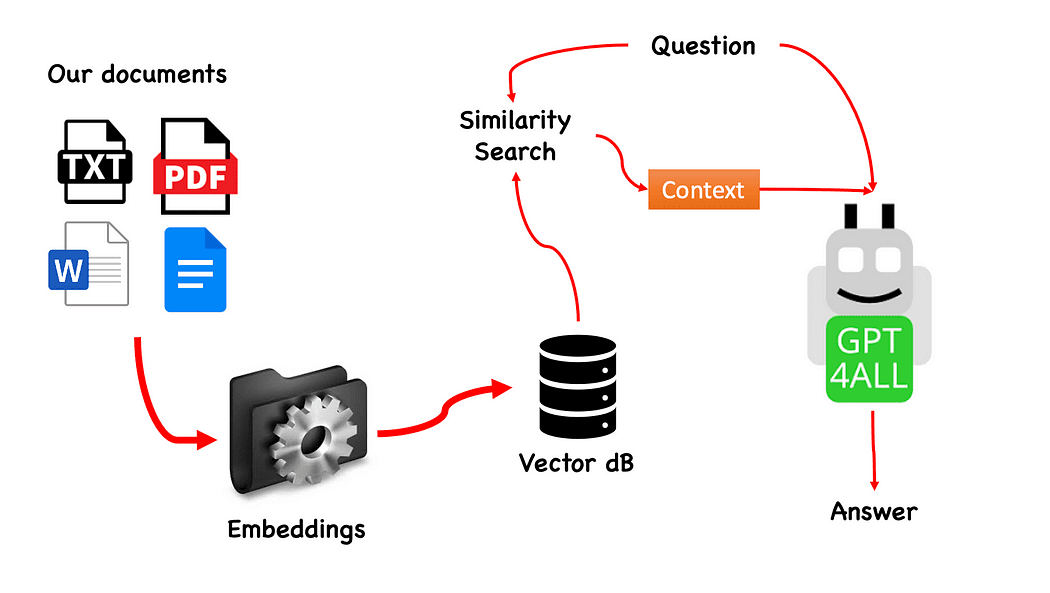
Workflow of the QnA with GPT4All — created by the author

The process is really simple (when you know it) and can be repeated with other models too. The steps are as follows:

  • load the GPT4All model
  • use Langchain to retrieve our documents and Load them
  • split the documents in small chunks digestible by Embeddings
  • Use FAISS to create our vector database with the embeddings
  • Perform a similarity search (semantic search) on our vector database based on the question we want to pass to GPT4All: this will be used as a context for our question
  • Feed the question and the context to GPT4All with Langchain and wait for the the answer.

So what we need is Embeddings. An embedding is a numerical representation of a piece of information, for example, text, documents, images, audio, etc. The representation captures the semantic meaning of what is being embedded, and this is exactly what we need. For this project we cannot rely on heavy GPU models: so we will download the Alpaca native model and use from Langchain the LlamaCppEmbeddings. Don’t worry! Everything is explained step by step

Let’s start coding

Create a Virtual Environment

Create a new folder for your new Python project, for example GPT4ALL_Fabio (put your name…):

mkdir GPT4ALL_Fabio  cd GPT4ALL_Fabio

Next, create a new Python virtual environment. If you have more than one python version installed, specify your desired version: in this case I will use my main installation, associated to python 3.10.

python3 -m venv .venv

The command python3 -m venv .venv creates a new virtual environment named .venv (the dot will create a hidden directory called venv).

A virtual environment provides an isolated Python installation, which allows you to install packages and dependencies just for a specific project without affecting the system-wide Python installation or other projects. This isolation helps maintain consistency and prevent potential conflicts between different project requirements.

Once the virtual environment is created, you can activate it using the following command:

source .venv/bin/activate

GPT4All is the Local ChatGPT for your Documents and it is Free!
Activated virtual environment

The libraries to install

For the project we are building we don’t need too many packages. We need only:

  • python bindings for GPT4All
  • Langchain to interact with our documents

LangChain is a framework for developing applications powered by language models. It allows you not only to call out to a language model via an API, but also connect a language model to other sources of data and allow a language model to interact with its environment.

pip install pygpt4all==1.0.1  pip install pyllamacpp==1.0.6  pip install langchain==0.0.149  pip install unstructured==0.6.5  pip install pdf2image==1.16.3  pip install pytesseract==0.3.10  pip install pypdf==3.8.1  pip install faiss-cpu==1.7.4

For LangChain you see that we specified also the version. This library is receiving a lot of updates recently, so to be certain the our setup is going to work also tomorrow it is better to specify a version we know is working fine. Unstructured is a required dependency for the pdf loader and pytesseract and pdf2image as well.

NOTE: on the GitHub repository there is a requirements.txt file (suggested by jl adcr) with all the versions associated to this project. You can do the installation in one shot, after downloading it into the main project file directory with the following command:

pip install -r requirements.txt

At the end of the article I created a section for the troubleshooting. The GitHub repo has also an updated READ.ME with all these information.

Bear in mind that some libraries have versions available depending on the python version you are running on your virtual environment.

Download on your PC the models

This is a really important step.

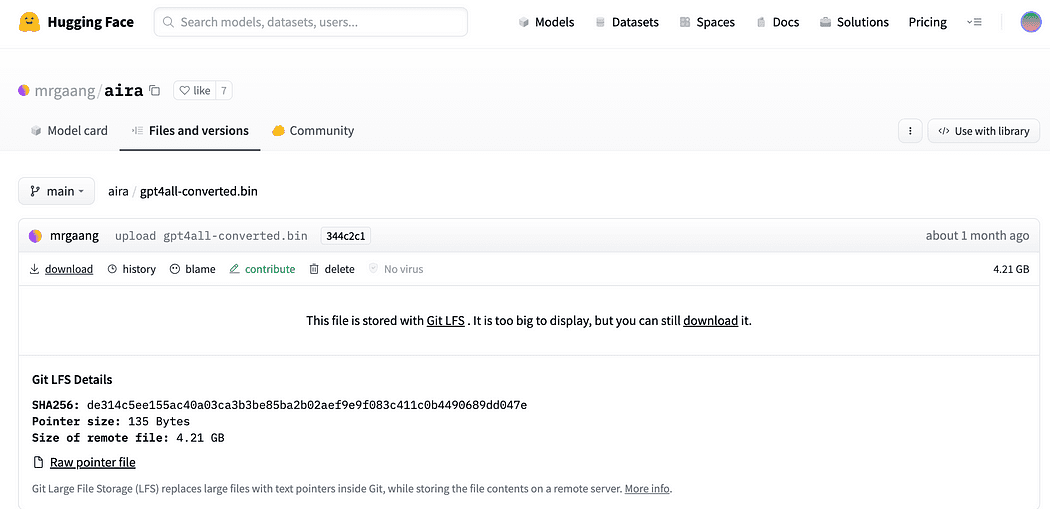
For the project we certainly need GPT4All. The process described on Nomic AI is really complicated and requires hardware that not all of us have (like me). So here is the link to the model already converted and ready to be used. Just click on download.
GPT4All is the Local ChatGPT for your Documents and it is Free!
Download the GPT4All model

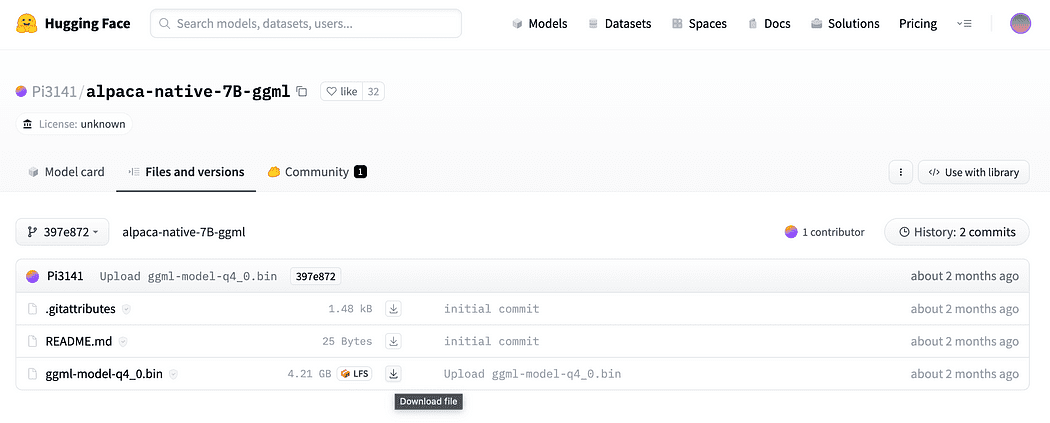
As described briefly in the introduction we need also the model for the embeddings, a model that we can run on our CPU without crushing. Click the link here to download the alpaca-native-7B-ggml already converted to 4-bit and ready to use to act as our model for the embedding.
GPT4All is the Local ChatGPT for your Documents and it is Free!
Click the download arrow next to ggml-model-q4_0.bin

Why we need embeddings? If you remember from the flow diagram the first step required, after we collect the documents for our knowledge base, is to embed them. The LLamaCPP embeddings from this Alpaca model fit the job perfectly and this model is quite small too (4 Gb). By the way you can also use the Alpaca model for your QnA!

Update 2023.05.25: Mani Windows users are facing problems to use the llamaCPP embeddings. This mainly happens because during the installation of the python package llama-cpp-python with:

pip install llama-cpp-python

the pip package is going to compile from source the library. Windows usually does not have CMake or C compiler installed by default on the machine. But don’t warry there is a solution

Running the installation of llama-cpp-python, required by LangChain with the llamaEmbeddings, on windows CMake C complier is not installed by default, so you cannot build from source.

On Mac Users with Xtools and on Linux, usually the C complier is already available on the OS.

To avoid the issue you MUST use pre complied wheel.

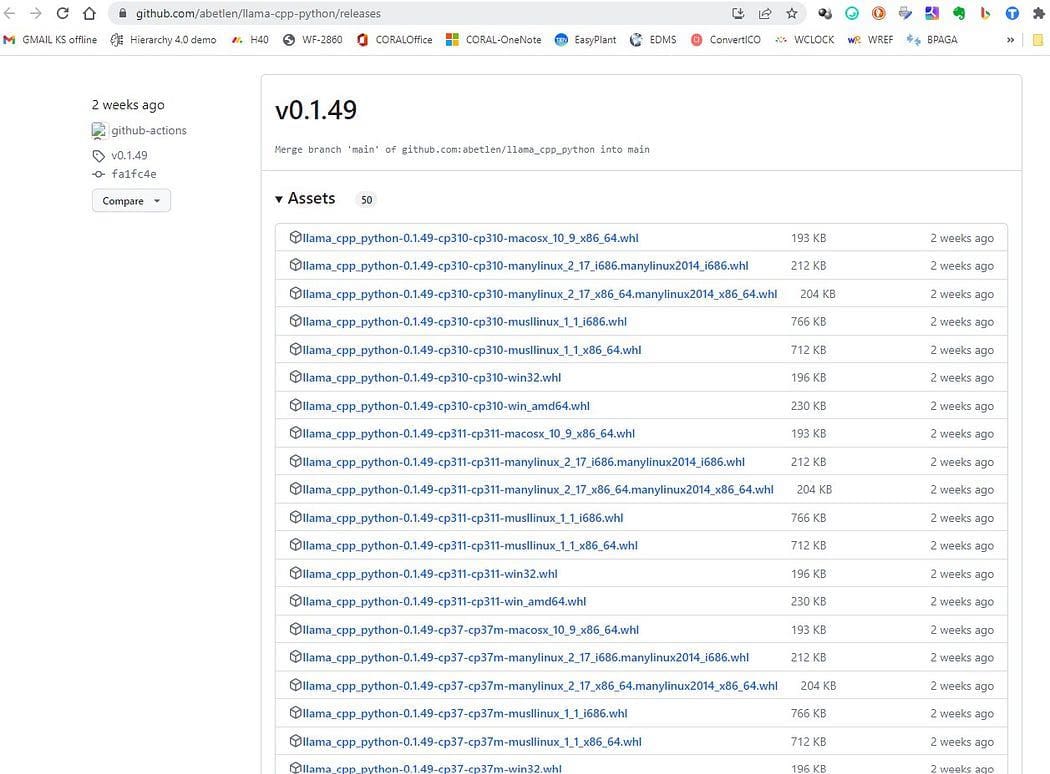
Go here https://github.com/abetlen/llama-cpp-python/releases

and look for the complied wheel for your architecture and python version — you MUST take Weels Version 0.1.49 because higher versions are not compatible.
GPT4All is the Local ChatGPT for your Documents and it is Free!
Screenshot from https://github.com/abetlen/llama-cpp-python/releases

In my case I have Windows 10, 64 bit, python 3.10

so my file is llama_cpp_python-0.1.49-cp310-cp310-win_amd64.whl

This issue is tracked on the GitHub repository

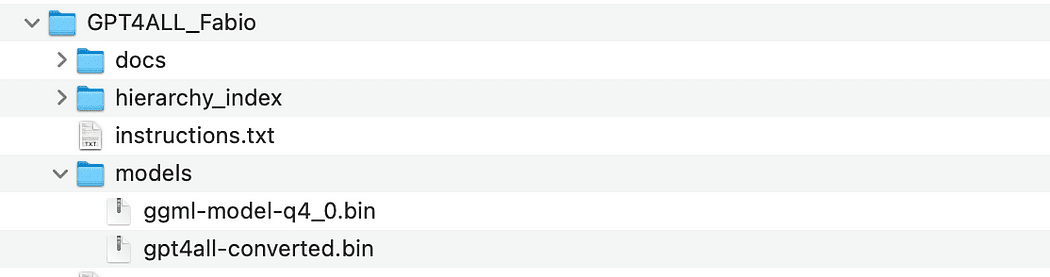
After downloading you need to put the two models in the models directory, as shown below.
GPT4All is the Local ChatGPT for your Documents and it is Free!
Directory structure and where to put the model files
Basic Interaction with GPT4All

Since we want to have control of our interaction the the GPT model, we have to create a python file (let’s call it pygpt4all_test.py), import the dependencies and give the instruction to the model. You will see that is quite easy.

from pygpt4all.models.gpt4all import GPT4All

This is the python binding for our model. Now we can call it and start asking. Let’s try a creative one.

We create a function that read the callback from the model, and we ask GPT4All to complete our sentence.

def new_text_callback(text):      print(text, end="")    model = GPT4All('./models/gpt4all-converted.bin')  model.generate("Once upon a time, ", n_predict=55, new_text_callback=new_text_callback)

The first statement is telling our program where to find the model (remember what we did in the section above)

The second statement is asking the model to generate a response and to complete our prompt "Once upon a time,".

To run it, make sure that the virtual environment is still activated and simply run :

python3 pygpt4all_test.py

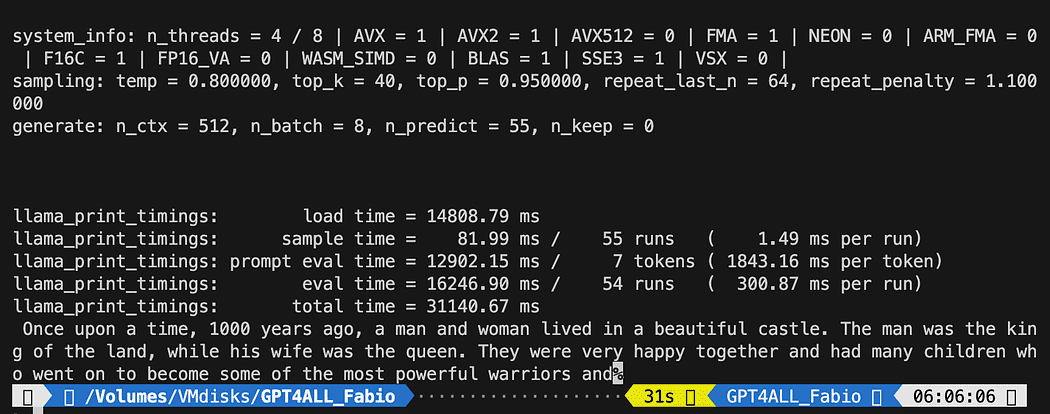
You should se a loading text of the model and the completion of the sentence. Depending on your hardware resources it may take a little time.
GPT4All is the Local ChatGPT for your Documents and it is Free!

The result may be different from yours… But for us the important is that it is working and we can proceed with LangChain to create some advanced stuff.

NOTE (updated 2023.05.23): if you face an error related to pygpt4all, check the troubleshooting section on this topic with the solution given by Rajneesh Aggarwal or by Oscar Jeong.

LangChain template on GPT4All

LangChain framework is a really amazing library. It provides Components to work with language models in a easy to use way, and it also provides Chains. Chains can be thought of as assembling these components in particular ways in order to best accomplish a particular use case. These are intended to be a higher level interface through which people can easily get started with a specific use case. These chains are also designed to be customizable.

In our next python test we will use a Prompt Template. Language models take text as input — that text is commonly referred to as a prompt. Typically this is not simply a hardcoded string but rather a combination of a template, some examples, and user input. LangChain provides several classes and functions to make constructing and working with prompts easy. Let’s see how we can do it too.

Create a new python file and call it my_langchain.py

# Import of langchain Prompt Template and Chain  from langchain import PromptTemplate, LLMChain    # Import llm to be able to interact with GPT4All directly from langchain  from langchain.llms import GPT4All    # Callbacks manager is required for the response handling   from langchain.callbacks.base import CallbackManager  from langchain.callbacks.streaming_stdout import StreamingStdOutCallbackHandler    local_path = './models/gpt4all-converted.bin'   callback_manager = CallbackManager([StreamingStdOutCallbackHandler()])

We imported from LangChain the Prompt Template and Chain and GPT4All llm class to be able to interact directly with our GPT model.

Then, after setting our llm path (as we did before) we instantiate the callback managers so that we are able to catch the responses to our query.

To create a template is really easy: following the documentation tutorial we can use something like this…

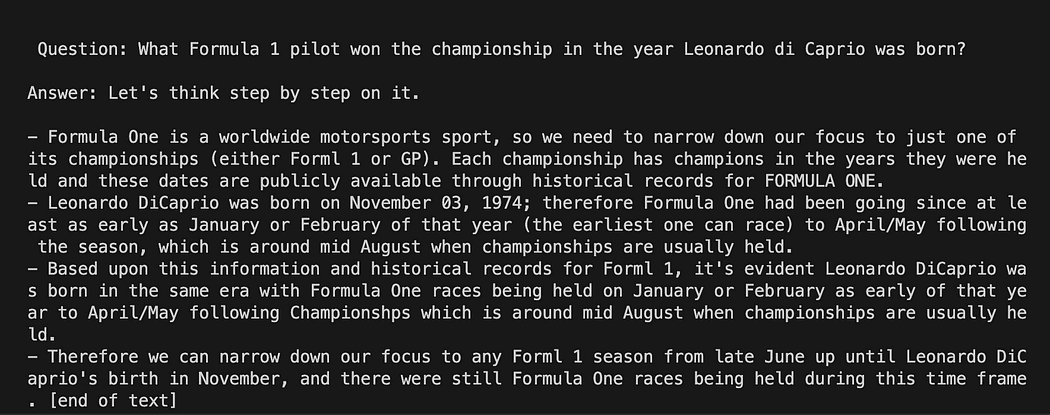
template = """Question: {question}    Answer: Let's think step by step on it.    """  prompt = PromptTemplate(template=template, input_variables=["question"])

The template variable is a multi-line string that contains our interaction structure with the model: in curly braces we insert the external variables to the template, in our scenario is our question.

Since it is a variable you can decide if it is an hard-coded question or an user input question: here the two examples.

# Hardcoded question  question = "What Formula 1 pilot won the championship in the year Leonardo di Caprio was born?"    # User input question...  question = input("Enter your question: ")

For our test run we will comment the user input one. Now we only need to link together our template, the question and the language model.

template = """Question: {question}  Answer: Let's think step by step on it.  """    prompt = PromptTemplate(template=template, input_variables=["question"])    # initialize the GPT4All instance  llm = GPT4All(model=local_path, callback_manager=callback_manager, verbose=True)    # link the language model with our prompt template  llm_chain = LLMChain(prompt=prompt, llm=llm)    # Hardcoded question  question = "What Formula 1 pilot won the championship in the year Leonardo di Caprio was born?"    # User imput question...  # question = input("Enter your question: ")    #Run the query and get the results  llm_chain.run(question)

Remember to verify your virtual environment is still activated and run the command:

python3 my_langchain.py

You may get a different results from mine. What is amazing is that you can see the entire reasoning followed by GPT4All trying to get an answer for you. Adjusting the question may give you better results too.
GPT4All is the Local ChatGPT for your Documents and it is Free!

Langchain with Prompt Template on GPT4All

Answering Question About your Documents Using LangChain and GPT4All

Here we start the amazing part, because we are going to talk to our documents using GPT4All as a chatbot who replies to our questions.

The sequence of steps, referring to Workflow of the QnA with GPT4All, is to load our pdf files, make them into chunks. After that we will need a Vector Store for our embeddings. We need to feed our chunked documents in a vector store for information retrieval and then we will embed them together with the similarity search on this database as a context for our LLM query.

For this purposes we are going to use FAISS directly from Langchain library. FAISS is an open-source library from Facebook AI Research, designed to quickly find similar items in big collections of high-dimensional data. It offers indexing and searching methods to make it easier and faster to spot the most similar items within a dataset. It is particularly convenient for us because it simplifies information retrieval and allow us to save locally the created database: this means that after the first creation it will be loaded very fast for any further usage.

Creation of the vector index db

Create a new file and call it my_knowledge_qna.py

from langchain import PromptTemplate, LLMChain  from langchain.llms import GPT4All  from langchain.callbacks.base import CallbackManager  from langchain.callbacks.streaming_stdout import StreamingStdOutCallbackHandler    # function for loading only TXT files  from langchain.document_loaders import TextLoader    # text splitter for create chunks  from langchain.text_splitter import RecursiveCharacterTextSplitter    # to be able to load the pdf files  from langchain.document_loaders import UnstructuredPDFLoader  from langchain.document_loaders import PyPDFLoader  from langchain.document_loaders import DirectoryLoader    # Vector Store Index to create our database about our knowledge  from langchain.indexes import VectorstoreIndexCreator    # LLamaCpp embeddings from the Alpaca model  from langchain.embeddings import LlamaCppEmbeddings    # FAISS  library for similaarity search  from langchain.vectorstores.faiss import FAISS    import os  #for interaaction with the files  import datetime

The first libraries are the same we used before: in addition we are using Langchain for the vector store index creation, the LlamaCppEmbeddings to interact with our Alpaca model (quantized to 4-bit and compiled with the cpp library) and the PDF loader.

Let’s also load our LLMs with their own paths: one for the embeddings and one for the text generation.

# assign the path for the 2 models GPT4All and Alpaca for the embeddings   gpt4all_path = './models/gpt4all-converted.bin'   llama_path = './models/ggml-model-q4_0.bin'   # Calback manager for handling the calls with  the model  callback_manager = CallbackManager([StreamingStdOutCallbackHandler()])    # create the embedding object  embeddings = LlamaCppEmbeddings(model_path=llama_path)  # create the GPT4All llm object  llm = GPT4All(model=gpt4all_path, callback_manager=callback_manager, verbose=True)

For test let’s see if we managed to read all the pfd files: the first step is to declare 3 functions to be used on each single document. The first is to split the extracted text in chunks, the second is to create the vector index with the metadata (like page numbers etc…) and the last one is for testing the similarity search (I will explain better later).

# Split text   def split_chunks(sources):      chunks = []      splitter = RecursiveCharacterTextSplitter(chunk_size=256, chunk_overlap=32)      for chunk in splitter.split_documents(sources):          chunks.append(chunk)      return chunks      def create_index(chunks):      texts = [doc.page_content for doc in chunks]      metadatas = [doc.metadata for doc in chunks]        search_index = FAISS.from_texts(texts, embeddings, metadatas=metadatas)        return search_index      def similarity_search(query, index):      # k is the number of similarity searched that matches the query      # default is 4      matched_docs = index.similarity_search(query, k=3)       sources = []      for doc in matched_docs:          sources.append(              {                  "page_content": doc.page_content,                  "metadata": doc.metadata,              }          )        return matched_docs, sources

Now we can test the index generation for the documents in the docs directory: we need to put there all our pdfs. Langchain has also a method for loading the entire folder, regardless of the file type: since it is complicated the post process, I will cover it in the next article about LaMini models.

GPT4All is the Local ChatGPT for your Documents and it is Free!

my docs directory contains 4 pdf files

We will apply our functions to the first document in the list

# get the list of pdf files from the docs directory into a list  format  pdf_folder_path = './docs'  doc_list = [s for s in os.listdir(pdf_folder_path) if s.endswith('.pdf')]  num_of_docs = len(doc_list)  # create a loader for the PDFs from the path  loader = PyPDFLoader(os.path.join(pdf_folder_path, doc_list[0]))  # load the documents with Langchain  docs = loader.load()  # Split in chunks  chunks = split_chunks(docs)  # create the db vector index  db0 = create_index(chunks)

In the first lines we use os library to get the list of pdf files inside the docs directory. We then load the first document (doc_list[0]) from the docs folder with Langchain, split in chunks and then we create the vector database with the LLama embeddings.

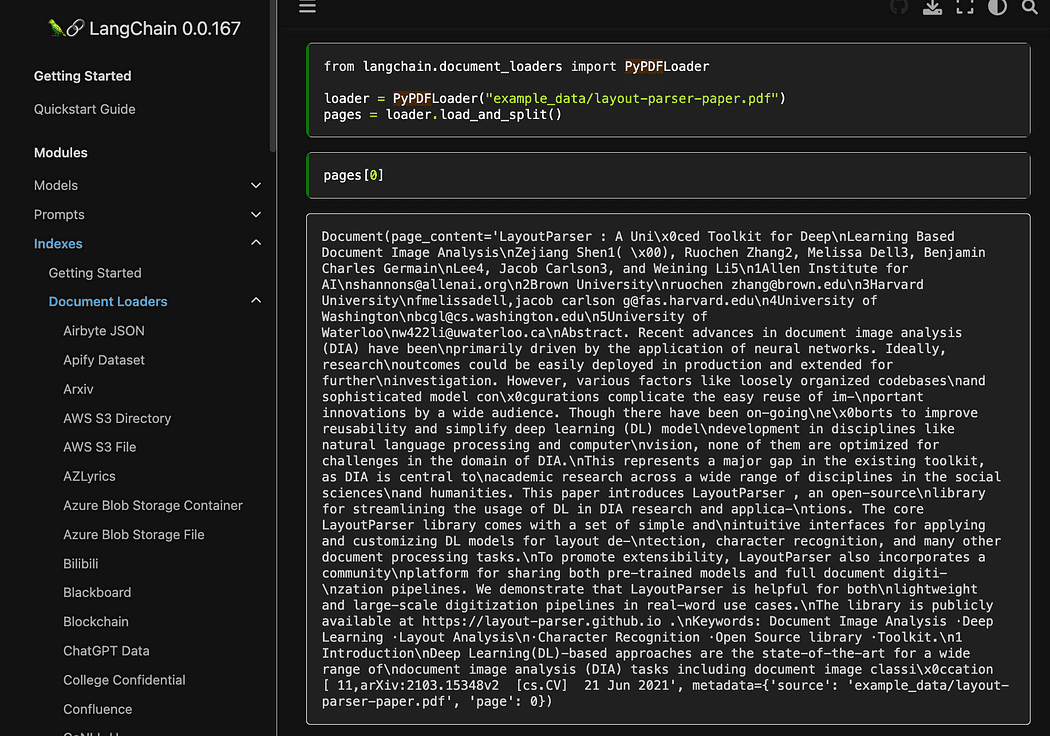
As you saw we are using the pyPDF method. This one is a bit longer to use, since you have to load the files one by one, but loading PDF using pypdf into array of documents allows you to have an array where each document contains the page content and metadata with page number. This is really convenient when you want to know the sources of the context we will give to GPT4All with our query. Here the example from the readthedocs:
GPT4All is the Local ChatGPT for your Documents and it is Free!
Screenshot from Langchain documentation

We can run the python file with the command from terminal:

python3 my_knowledge_qna.py

After the loading of the model for embeddings you will see the tokens at work for the indexing: don’t freak out since it will take time, specially if you run only on CPU, like me (it took 8 minutes).

GPT4All is the Local ChatGPT for your Documents and it is Free!
Completion of the first vector db

As I was explaining the pyPDF method is slower but gives us additional data for the similarity search. To iterate through all our files we will use a convenient method from FAISS that allows us to MERGE different databases together. What we do now is that we use the code above to generate the first db (we will call it db0) and the with a for loop we create the index of the next file in the list and merge it immediately with db0.

Here is the code: note that I added some logs to give you the status of the progress using datetime.datetime.now() and printing the delta of end time and start time to calculate how long the operation took (you can remove it if you don’t like it).

The merge instructions is like this

# merge dbi with the existing db0  db0.merge_from(dbi)

One of the last instructions is for saving our database locally: the entire generation can take even hours (depends on how many documents you have) so it is really good that we have to do it only once!

# Save the databasae locally  db0.save_local("my_faiss_index")

Here the entire code. We will comment many part of it when we interact with GPT4All loading the index directly from our folder.

# get the list of pdf files from the docs directory into a list  format  pdf_folder_path = './docs'  doc_list = [s for s in os.listdir(pdf_folder_path) if s.endswith('.pdf')]  num_of_docs = len(doc_list)  # create a loader for the PDFs from the path  general_start = datetime.datetime.now() #not used now but useful  print("starting the loop...")  loop_start = datetime.datetime.now() #not used now but useful  print("generating fist vector database and then iterate with .merge_from")  loader = PyPDFLoader(os.path.join(pdf_folder_path, doc_list[0]))  docs = loader.load()  chunks = split_chunks(docs)  db0 = create_index(chunks)  print("Main Vector database created. Start iteration and merging...")  for i in range(1,num_of_docs):      print(doc_list[i])      print(f"loop position {i}")      loader = PyPDFLoader(os.path.join(pdf_folder_path, doc_list[i]))      start = datetime.datetime.now() #not used now but useful      docs = loader.load()      chunks = split_chunks(docs)      dbi = create_index(chunks)      print("start merging with db0...")      db0.merge_from(dbi)      end = datetime.datetime.now() #not used now but useful      elapsed = end - start #not used now but useful      #total time      print(f"completed in {elapsed}")      print("-----------------------------------")  loop_end = datetime.datetime.now() #not used now but useful  loop_elapsed = loop_end - loop_start #not used now but useful  print(f"All documents processed in {loop_elapsed}")  print(f"the daatabase is done with {num_of_docs} subset of db index")  print("-----------------------------------")  print(f"Merging completed")  print("-----------------------------------")  print("Saving Merged Database Locally")  # Save the databasae locally  db0.save_local("my_faiss_index")  print("-----------------------------------")  print("merged database saved as my_faiss_index")  general_end = datetime.datetime.now() #not used now but useful  general_elapsed = general_end - general_start #not used now but useful  print(f"All indexing completed in {general_elapsed}")  print("-----------------------------------")
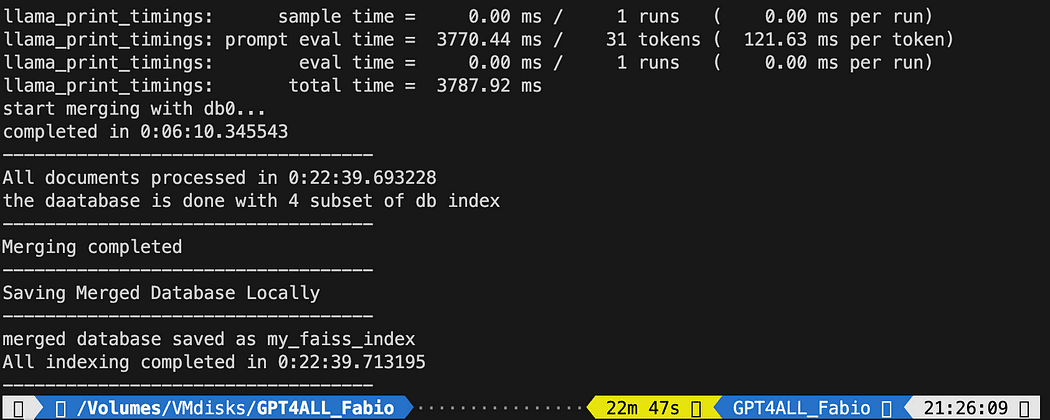
GPT4All is the Local ChatGPT for your Documents and it is Free!Running the python file took 22 minutes

Ask questions to GPT4All on your documents

Now we are here. We have our index, we can load it and with a Prompt Template we can ask GPT4All to answer our questions. We start with an hard-coded question and then we will loop through our input questions.

Put the following code inside a python file db_loading.py and run it with the command from terminal python3 db_loading.py

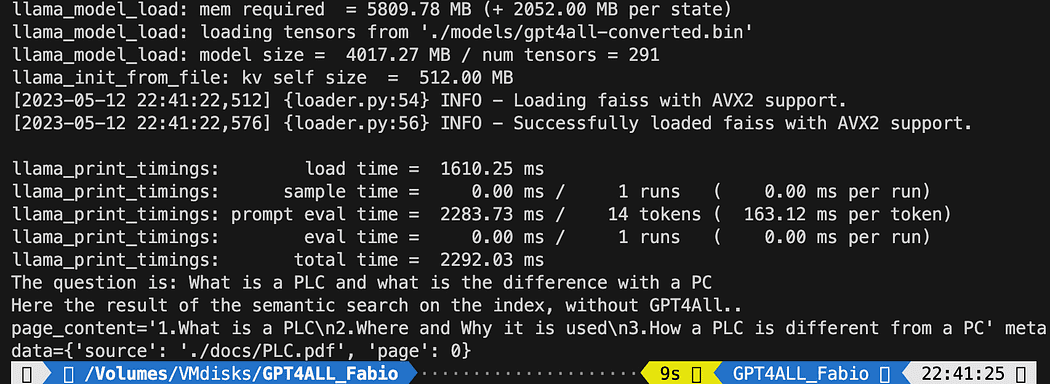
from langchain import PromptTemplate, LLMChain  from langchain.llms import GPT4All  from langchain.callbacks.base import CallbackManager  from langchain.callbacks.streaming_stdout import StreamingStdOutCallbackHandler  # function for loading only TXT files  from langchain.document_loaders import TextLoader  # text splitter for create chunks  from langchain.text_splitter import RecursiveCharacterTextSplitter  # to be able to load the pdf files  from langchain.document_loaders import UnstructuredPDFLoader  from langchain.document_loaders import PyPDFLoader  from langchain.document_loaders import DirectoryLoader  # Vector Store Index to create our database about our knowledge  from langchain.indexes import VectorstoreIndexCreator  # LLamaCpp embeddings from the Alpaca model  from langchain.embeddings import LlamaCppEmbeddings  # FAISS  library for similaarity search  from langchain.vectorstores.faiss import FAISS  import os  #for interaaction with the files  import datetime    # TEST FOR SIMILARITY SEARCH    # assign the path for the 2 models GPT4All and Alpaca for the embeddings   gpt4all_path = './models/gpt4all-converted.bin'   llama_path = './models/ggml-model-q4_0.bin'   # Calback manager for handling the calls with  the model  callback_manager = CallbackManager([StreamingStdOutCallbackHandler()])    # create the embedding object  embeddings = LlamaCppEmbeddings(model_path=llama_path)  # create the GPT4All llm object  llm = GPT4All(model=gpt4all_path, callback_manager=callback_manager, verbose=True)    # Split text   def split_chunks(sources):      chunks = []      splitter = RecursiveCharacterTextSplitter(chunk_size=256, chunk_overlap=32)      for chunk in splitter.split_documents(sources):          chunks.append(chunk)      return chunks      def create_index(chunks):      texts = [doc.page_content for doc in chunks]      metadatas = [doc.metadata for doc in chunks]        search_index = FAISS.from_texts(texts, embeddings, metadatas=metadatas)        return search_index      def similarity_search(query, index):      # k is the number of similarity searched that matches the query      # default is 4      matched_docs = index.similarity_search(query, k=3)       sources = []      for doc in matched_docs:          sources.append(              {                  "page_content": doc.page_content,                  "metadata": doc.metadata,              }          )        return matched_docs, sources    # Load our local index vector db  index = FAISS.load_local("my_faiss_index", embeddings)  # Hardcoded question  query = "What is a PLC and what is the difference with a PC"  docs = index.similarity_search(query)  # Get the matches best 3 results - defined in the function k=3  print(f"The question is: {query}")  print("Here the result of the semantic search on the index, without GPT4All..")  print(docs[0])

The printed text is the list of the 3 sources that best matches with the query, giving us also the document name and the page number.
GPT4All is the Local ChatGPT for your Documents and it is Free!
Results of the semantic search running the file db_loading.py

Now we can use the similarity search as the context for our query using the prompt template. After the 3 functions just replace all the code with the following:

# Load our local index vector db  index = FAISS.load_local("my_faiss_index", embeddings)    # create the prompt template  template = """  Please use the following context to answer questions.  Context: {context}  ---  Question: {question}  Answer: Let's think step by step."""    # Hardcoded question  question = "What is a PLC and what is the difference with a PC"  matched_docs, sources = similarity_search(question, index)  # Creating the context  context = "n".join([doc.page_content for doc in matched_docs])  # instantiating the prompt template and the GPT4All chain  prompt = PromptTemplate(template=template, input_variables=["context", "question"]).partial(context=context)  llm_chain = LLMChain(prompt=prompt, llm=llm)  # Print the result  print(llm_chain.run(question))

After running you will get a result like this (but may vary). Amazing no!?!?

Please use the following context to answer questions.  Context: 1.What is a PLC  2.Where and Why it is used  3.How a PLC is different from a PC  PLC is especially important in industries where safety and reliability are  critical, such as manufacturing plants, chemical plants, and power plants.  How a PLC is different from a PC  Because a PLC is a specialized computer used in industrial and  manufacturing applications to control machinery and processes.,the  hardware components of a typical PLC must be able to interact with  industrial device. So a typical PLC hardware include:  ---  Question: What is a PLC and what is the difference with a PC  Answer: Let's think step by step. 1) A Programmable Logic Controller (PLC),   also called Industrial Control System or ICS, refers to an industrial computer   that controls various automated processes such as manufacturing   machines/assembly lines etcetera through sensors and actuators connected   with it via inputs & outputs. It is a form of digital computers which has   the ability for multiple instruction execution (MIE), built-in memory   registers used by software routines, Input Output interface cards(IOC)   to communicate with other devices electronically/digitally over networks   or buses etcetera  2). A Programmable Logic Controller is widely utilized in industrial   automation as it has the ability for more than one instruction execution.   It can perform tasks automatically and programmed instructions, which allows   it to carry out complex operations that are beyond a   Personal Computer (PC) capacity. So an ICS/PLC contains built-in memory   registers used by software routines or firmware codes etcetera but   PC doesn't contain them so they need external interfaces such as   hard disks drives(HDD), USB ports, serial and parallel   communication protocols to store data for further analysis or   report generation.

If you want a user-input question to replace the line

question = "What is a PLC and what is the difference with a PC"

with something like this:

question = input("Your question: ")

Conclusions

It is time for you to experiment. Ask different questions on all the topics related to your documents, and see the results. There is a big room for improvement, certainly on the prompt and template: you can have a look here for some inspirations. But Langchain documentation is really amazing (I could follow it!!).

You can follow the code from the article or check it on my github repo.

Fabio Matricardi an educator, teacher, engineer and learning enthusiast. He have been teaching for 15 years to young students, and now he train new employees at Key Solution Srl. He started my career as Industrial Automation Engineer in 2010. Passionate about programming since he was a teenager, he discovered the beauty of building software and Human Machine Interfaces to bring something to life. Teaching and coaching is part of my daily routine, as well as studying and learning how to be a passionate leader with up to date management skills. Join me in the journey toward a better design, a predictive system integration using Machine Learning and Artificial Intelligence throughout the entire engineering lifecycle.

Original. Reposted with permission.

More On This Topic

  • Top Free Resources To Learn ChatGPT
  • 3 Free Platforms for Personalized ChatGPT Experience
  • Free ChatGPT Course: Use The OpenAI API to Code 5 Projects
  • 5 Free Tools For Detecting ChatGPT, GPT3, and GPT2
  • Octoparse 8.5: Empowering Local Scraping and More
  • Classifying Long Text Documents Using BERT

Cisco LIVE 2023: AI and security platforms innovations take center stage 

A colourful Cisco LIVE branding from the 2023 Cisco LIVE event in Las Vegas
Image: Cisco

Organizations worldwide are dealing with short-staffed security operations, and a security parasol that stitches together numerous single-point solutions and hampers threat visibility.

At its LIVE 2023 event in Las Vegas this week, Cisco revealed an array of solutions, paving stones on its path to a platform strategy called Cisco Security Cloud. Jeetu Patel, executive vice president and general manager of security and collaboration at Cisco, said simplicity was key to Security Cloud, describing it as a secure way for users to connect to any application they have in a frictionless way.

“It’s about zero trust and zero friction – providing the least privileged access with the least amount of friction to the user,” said Patel.

Cisco also unveiled several generative AI products, visibility tools and collaborations at the event that advance upon the announcements it made at the RSA conference 2023 in April, which focused on its extended detection and response cloud service.

In an interview with TechRepublic about Cisco LIVE 2023, Patel said the new technologies addressed a need to simplify security operations and address security considerations caused by the shift to hybrid work. “It’s the most amount of innovation we’ve had in a decade,” he said.

Jeetu Patel, executive vice president and general manager of security and collaboration at Cisco, gives a keynote presentation at Cisco LIVE 2023.
Jeetu Patel, executive vice president and general manager of security and collaboration at Cisco, gives a keynote presentation at Cisco LIVE. Image: Cisco

Patel said three key products advance the company’s move to Cisco Security Cloud:

  • Cisco XDR.
  • Cisco Secure Access.
  • Cisco Secure Firewall 4200 series.

Cisco’s talking points in Las Vegas this week put large language model interfaces in bold, showing how AI can make it easier for security teams to deal with the proliferation of apps, data and threat surfaces.

Jump to:

  • Cisco Secure Access
  • Firewall focuses on hybrid work
  • New AI-powered solutions from Cisco
  • Collaborations with Apple, AT&T

Cisco Secure Access

A key focus at Cisco LIVE was its approach to simplifying authorization and access through a new security service edge solution, designed to enable hybrid work experiences and simplify access across any location, device and application. The new platform, called Cisco Secure Access:

  • Delivers a single, easy way to access all applications and resources that, in part, use AI to steer traffic to private and public destinations without end-user intervention.
  • Converges multiple functions into one solution, giving administrators and analysts a single interface for traffic, policy settings and analysis of security risks.
  • Includes analysis from Cisco Talos AI-driven threat intelligence.
A large crowd gathered at Cisco LIVE in 2023 in Las Vegas
Cisco LIVE returned to Las Vegas in 2023. Image: Cisco

“With Cisco Secure Access, any user can go to any application, whether it’s cloud SaaS or an order management system or (a media platform). Usually, if you want to do that, you have to use VPNs, zero-trust network access for applications or even the web,” said Patel.

“We think this makes no sense and realized we needed to remove all of that complexity for the user. Our job is to create the most obvious experience for the user with the least cognitive overload.”

Cisco Secure Access launches with limited availability starting in July 2023 and is generally available in October 2023.

Integration with Cisco ThousandEyes

As part of the Cisco Secure Access launch, the company announced that the solution will be integrated with its ThousandEyes visibility engine for digital experience management.

SEE: Here are some of the upsides to observability.

“ThousandEyes gives us end-to-end seamlessness, so, when the user experience goes sideways — perhaps the internet is not working, there is friction access, or there are other issues the user can’t identify — we can detect it and fix it,” said Patel.

Firewall focuses on hybrid work and cloud

The new Secure Firewall 4200 series is, according to the company, designed to address the move to hybrid work, with new cryptographics and AI and machine language-based encrypted threat blocking.

SEE: Hybrid work creates a wide-open threat surface.

The firewall uses zero-trust network access with threat inspection and policy for each application, and new security protocols addressing traffic from remote offices to applications in hybrid data centers.

Cisco said the Secure Firewall 4200 series will be generally available in September 2023 supporting the 7.4 OS, which will be generally available for the rest of the Secure Firewall appliance family in December 2023.

Extending the firewall to the cloud

On the heels of its acquisition of Valtix, Cisco launched Cisco Multicloud Defense for the SaaS multicloud environment. The new system, available now, lets IT operations manage security across AWS, Google Cloud Platform, Microsoft Azure and Oracle Cloud Infrastructure with a single policy in real-time from one SaaS platform. In addition, teams can rapidly spin up security for any cloud environment.

“Multicloud Defense allows you to take any application running in any cloud environment and access only precisely the data that you want, and the environment that you want,” said Patel.

He added that the system applies zero-trust — and a “least privileged access” paradigm — to data and systems. “We want to give customers the least access you need to get the job done, to make sure that, say, an application a customer built in the cloud is able to access this specific data in their data center and nothing else.”

According to Patel, Cisco Multicloud Defense will use the same management console as the new Cisco Secure Firewall 4200 series. “You now have a platform that lets you add each new solution, and every subsequent piece gets to be less of an effort to plug into your ecosystem,” he said.

New AI-powered solutions from Cisco

AI Policy Assistant

Cisco revealed a new AI system designed to automate security policies across numerous interfaces. The company said the AI Policy Assistant will enable teams to describe policies at the granular level and evaluate how to best implement them across different aspects of their security infrastructure.

At Cisco LIVE, the company showed how the assistant can “reason” with a firewall policy and help IT generate and implement rules using Cisco’s Secure Firewall Management Center.

Patel said the solution addresses an inherent flaw in the proliferation of security solutions. “On average, most companies have 50 to 70 vendors in their cyber stack; that’s 70 policy engines, 70 places where contention can occur, and before you know it you have 70 different cracks in the system,” he said.

“Applications can have millions of lines of policy for a firewall. Our policy engine will have reasoning and natural language capability,” said Patel. “Administrators can therefore request access for a person using natural language, using generative AI to interface with the policy engine, have a conversation with it, and make suggestions to administrators about how to simplify the policy rules.”

SEE: Study shows tech leaders are investing big in AI.

AI SOC Assistant

Cisco said the generative AI SOC Assistant is designed to lighten the load on endemically understaffed security teams by parsing alerts across the Cisco Security Cloud platform, and making natural language recommendations on whether to act upon issues as they arise.

According to Cisco, the SOC Assistant will provide broad situation analysis, relaying potential impacts with the goal of reducing threat response time.

Cisco, which is previewing a generative AI solution for Webex at Cisco LIVE 2023, said AI summaries for Webex, policy management and SOC Assistant will be available by the end of 2023, with additional SOC Assistant features available in the first half of 2024.

Collaborations with Apple, AT&T

At LIVE 2023, Cisco announced collaborations with mobile device vendors to enhance users’ experiences. With Apple, it will incorporate zero-trust access through Cisco Secure Access into a native experience on iOS and macOS.

In addition, Cisco announced a partnership with AT&T aimed at hybrid workforces. The partnership is meant to enable Cisco’s Webex Calling and SD-WAN solutions to work with AT&T mobile networks to “let businesses offer employees a simple, secure, consistent experience to thrive in any setting.”

Subscribe to the Innovation Insider Newsletter

Catch up on the latest tech innovations that are changing the world, including IoT, 5G, the latest about phones, security, smart cities, AI, robotics, and more.

Delivered Tuesdays and Fridays Sign up today

Singapore heats up data centers with operating standards for tropical climates

Aisle of a data server room

Singapore has released operating standards that it says will optimize energy efficiency in data centers located in tropical climates.

Developed by the Infocomm Media Development Authority (IMDA), the recommended standards offer a roadmap to increase data center operating temperatures to 26 degrees Celsius and above. These standards can potentially yield energy savings of between 2% and 5% for every 1 degree Celsius increase in such environments, the government agency said, citing research from the University of Toronto.

Also: Green tech is hard work. Here's how to find more support

Several data center operators in Singapore have run pilots on the new standard, including Digital Realty, which pushed their operating temperatures by 2 degrees Celsius at two of its 4.5MW (megawatts) data halls. These spaces within data centers contain server cabinets and are typically built on elevated floors to facilitate airflow and cooling systems.

By increasing the operating temperatures, Digital Realty was able to cut its total energy consumption in the two data halls by 2% to 3% during the trial period, according to IMDA. Trials also have commerced at a government data center as part of its sustainability efforts. The facility is operated by Government Technology Agency, which is the public sector's CIO office.

The ability to sustainably run such infrastructures is critical as Singapore looks to boost its connectivity and compute capacities to support emerging technologies, such as generative artificial intelligence (AI).

"As our businesses scale up adoption of these AI-powered services, demand for high-bandwidth connectivity and compute power will increase significantly, too," said Senior Minister of State, Communications and Information Janil Puthucheary, at the Asia Tech x Singapore summit. "Our digital infrastructure must be ready to support these demands."

Also: Everything is moving to the cloud. But how green is it, really?

The country earlier this week laid a years-long roadmap that includes building 10Gbps nationwide connectivity in the next five years and providing capacity to double subsea cable landings within the next decade.

Incorporating green data centers in this blueprint will support the growth in compute capacity while maintaining environmental sustainability, said Puthucheary.

"As demand for data centers increases, energy efficiency will be critical for ensuring sustainable growth of the industry. These standards will help operators determine the best operating temperature to optimize energy efficiency while safeguarding operational reliability," he said.

The minister added that one data center operator was able to achieve an estimated SG$250,000 in energy cost savings a year from adopting the new standards, which he said were among the world's first for optimizing data center energy efficiency in tropical climate environments.

Also: How to make tech more sustainable: Five practical ways to make it happen

According to IMDA, cooling systems account for up to 40% of total energy consumption in a typical data center, with many operators typically operating their equipment at temperatures of 22 degrees Celsius and below. This presents added challenges for facilities in warmer tropical climates since more energy is used to run the cooling systems.

IMDA noted that while there was increased awareness that data centers could operate at higher temperatures, there was a lack of established industry guidelines on how this could be achieved — and at higher humidity levels — without compromising operational efficiency.

"Singapore's new standard was developed against this background and following consultation with the industry," the agency said.

The new standard offers a set of recommendations for operating data centers in climates where the average temperature clocks at an average of 30 degrees, with peaks of 37 degrees Celsius, and relative humidity levels of 84%, with peaks of above 90%.

The standards are established based on analysis of empirical data collected from production servers monitored by the Tropical Data Centre (TDC) research team. The operating manual is available for purchase online and includes details on the method for application, measurement, and monitoring.

Also: Tech for a sustainable future: The challenges and opportunities ahead

IMDA also is working with the Building & Construction Authority to include the new tropical climate standard in the Green Mark certification scheme for data centers, which outlines the energy efficiency and sustainability benchmarks for the sector.

In 2016, IMDA unveiled plans to work with industry players to assess the feasibility of tropical data centers, in which environmental temperatures would be tested at up to 38 degrees Celsius and ambient humidity at 90% or more. Through these trials, the agency had hoped to slash data center power consumption by up to 40% and reduce carbon emissions.

In 2021, two Singapore universities also established a research fund to develop sustainable cooling technologies for data centers operating in tropical locations. The initiative included a testbed facility and participation from industry players, including Keppel Data Centres, Ascenix, and Red Dot Analytics. Local government agencies also provided feedback on the research.

The Singapore government last year said it would be "more selective" of new data centers it planned to accommodate, with priority given to facilities that could demonstrate high resource efficiency and operate in a sustainable manner consistent with the country's climate change commitments.

Also: These mushroom-based chips could power your devices and help save our planet

Singapore has a 10-year roadmap to drive sustainable developments and achieve its goal of net zero emissions as soon as it is viable. The Singapore Green Plan 2030 outlines various targets across different areas, including plans to deploy enough solar energy to power 350,000 households a year, cut waste sent to landfill by 30%, and have at least 20% of schools be carbon-neutral.

How to use ChatGPT to create an app

cover

I better get the bad news out of the way. If you think ChatGPT can write you an iPhone app with in-app purchases that will make you a million dollars, you're out of luck.

Also: Okay, so ChatGPT just debugged my code. For real.

I'm preempting this expectation because every time I talk about how to build products, there are a few folks out there who either (a) want me to write them a million-dollar app, (b) want me to show them the one class or book that will teach them how to write a million-dollar app, (c) share with them the one secret tool or program that millionaire programmers all hide from the regular folk, or (d) introduce them to my programmer buddies, because surely one of them will write a million-dollar app for a stranger on spec.

Also: How to use ChatGPT: What you need to know

The software business doesn't work that way. Software is very big and complicated. Many apps rely on connections to vast networks of other resources that all need to be integrated together. Essentially, many apps are merely front-ends to enormous computing infrastructures that do their work behind the scenes. Other apps, games for example, take teams of people with a wide range of skills, all working in sync, usually for years, to turn out an app.

How ChatGPT can help you create an app

Now, I do believe ChatGPT can help you with creating an app. But it's not going to do most of the work. That's up to you and your team. But it may be able to save you some time and reduce a lot of effort. And that's a win, all on its own.

So with that, let's look at how ChatGPT might help you create an app.

Don't limit yourself to ChatGPT to do your research here. Certainly involve it, asking questions like "are there iPhone apps that count the days until retirement?"

Also: How to use ChatGPT to write code

But keep in mind that ChatGPT's data ends in 2021, so if you want to, say, produce an app that helps write ChatGPT prompts, ChatGPT wouldn't know what's in the app store — but Google's Bard might. When I asked ChatGPT, it responded "there are no specific iPhone apps that are designed specifically for this purpose," yet Bard responded, "There are a few iPhone apps that can help you create ChatGPT prompts," and then went on to list the apps.

But there's a lot more to planning your app than just basic market research. You'll certainly want to plan out functionality and features, and then craft a user interface mockup. Continuing with the idea of building an app that helps write ChatGPT prompts, you could ask:

I want to build an iPhone app to help write ChatGPT prompts. What should the major and minor features be in such an app?

I recommend you type this into ChatGPT, because the answer it gave was surprisingly complete and useful. It shows how ChatGPT could actually be useful in creating an app. Next up is the user interface. While ChatGPT can't draw out a wireframe (yet), you can ask ChatGPT to guide you with regard to creating its main screens.

Can you describe the screens and user interface elements this app should have?

Again, I recommend you run this prompt, because the AI tool's answers were surprisingly well thought out.

Also: I'm using ChatGPT to help me fix code faster, but at what cost?

Once you have your app idea and planned out some of the elements of the app, you'll need to think about the development and deployment. You might try a prompt like this:

I want to build this app. What do I need to do in order to begin development and prepare for deployment?

I found the answer to be far too general, but probably helpful for a newbie exploring the process. Next I tried:

Help me set up and configure the Xcode development environment to write this app

This got me closer but was still too general. I went one layer deeper:

Help me choose a template and configure the Xcode settings for my project. Also, how should I configure Interface Builder?

That actually helped quite a bit. Keep digging in and asking questions, keep adding elements to your project, and feel free to ask ChatGTP along the way. But don't forget that there is a wealth of help for app development outside the new world of AI. Don't be afraid to use old-school web searches and dig around for examples and guides. This is a big project and you'll need to use all the resources available.

In terms of scope, think of an app as a book or set of books (all the way up to an entire library). Think of a function, method, or subroutine (different terms for what is essentially a small functional unit of code) as a paragraph or a small article, maybe a chapter in a book. ChatGPT can help you at the paragraph level. It can help you structure your chapter. But it has no idea how to handle the entire book.

Also: I asked ChatGPT write a WordPress plugin I needed. It did it in less than 5 minutes

But that doesn't mean it can't be a big help. Earlier, I showed you how it might be used to help define user interface elements. You can use ChatGPT to give you specific instructions to put them together. For example:

Explain how to set up outlets and actions to initiate a search for a prompt in an existing set of saved prompts.

That asks the AI to explain how to set up one function in the user interface. You could repeat that over and over with different elements of your user interface. You can also ask it to write a specific function or set up data elements. Let's create a storage mechanism for saved prompts. Here are two you could use one after the other:

Help me configure a storage mechanism for saved prompts

Walk me through using Core Data to save prompts for later access

The first recommended three storage mechanisms, and I decided to ask it to help with the second, using Core Data. Here, it even wrote some basic code that helps get started with that data storage mechanism.

Also: How ChatGPT can rewrite and improve your existing code

First, it helped to set up the storage mechanism itself:

Then it gave an example of how to save a prompt. You can use these bits of code as a starting point, and then add your own code on top of it. But with ChatGPT's help, you've got a good starting point.

It also showed how to retrieve a prompt. Here's where you'd get the data back, but also format it and present it using your own user interface style.

I'm not going to go into more prompts for generating code, but you should get the idea by now. Use ChatGPT to write small, very well-defined bits of code and give you guidance. Think of it as a very talented junior developer who understands the code, but doesn't really see the big picture.

Also: I tested Google Bard's newest coding skills. It didn't go well…again

Finally, don't expect all of ChatGPT's code to work. As I discussed previously, sometimes the AI's code is perfect and other times it's a complete fail. Kind of like code written by us humans, in fact.

To get started with that, you might want to issue a prompt like this:

Walk me through the steps necessary to deploy my app

When I asked ChatGPT, it gave me these six steps, along with a short paragraph description summarizing the steps:

  1. Register for an Apple Developer account.
  2. Configure your app's settings.
  3. Prepare your app for distribution.
  4. Submit your app to the App Store.
  5. Wait for app review.
  6. Release your app.

Here's another good place you can get more value from ChatGPT. You can take each of those steps and ask for more detailed instructions. For example:

Tell me exactly how to configure my app's settings for deployment

Tell me exactly how to submit my app to the App Store

Keep drilling down. If there's a step that ChatGPT glosses over, ask it for clarification. Think of it as if you're in a court and a witness gives an incomplete answer. Keep digging, asking more and more pointed questions, until you get what you want.

Also: How does ChatGPT work?

Now, if you're very, very lucky, you've positioned your app as unique from all other apps, have built up a customer base, are raking in the big bucks, and are beginning to think about what model Ferrari to buy, as well as what your next app should be. More likely, though, you'll be supporting customers, fixing bugs, adding features, and trying out new marketing approaches.

No matter what, if you've made it this far, congratulations. Back in the day, I wrote 40 silly little iPhone apps, and ChatGPT would have definitely been a huge help. Just think of it as a tool like all your other tools, not as the only tool, and you'll be fine.

FAQ

Is it better to make an iPhone app or an Android app?

Both are huge markets. If your app is successful, you'll probably want to deploy it to both platforms. Depending on what you want your app to do, it may or may not be more suited to one platform than another. For example, one of my favorite Android apps is Tasker, which lets you customize a lot more of the Android experience than Apple's rough equivalent (Shortcuts) lets you do on iOS. If you were building a Tasker-like app, you'd probably focus on Android.

Also: The 5 best AI art generators

Overall, pick the platform you feel most comfortable with and build your app there. Then move it to the other environment.

How can I make sure my app is visible in search results?

If you're talking about search results in the app store, you're going to do a mix of keyword testing and graphics. First, make sure you have a compelling icon and include enough screenshots and videos. Don't leave those out. Then, it's all about the SEO. You're going to need to find the right keywords that make your app stand out. There are many tools for doing just that, and you can ask ChatGPT what some of them are, and for some help.

How long does it take to build an app?

Short answer: anywhere from a week to three years. Longer answer: It all depends. How big is your app? What is it trying to accomplish? How experienced are you and your team? When I built my 40 apps (most of which were very similar to each other), the first one took almost a month, and the others took a day or so each — not counting the 10 or so days it took for Apple to approve each one.

Also: I asked ChatGPT to write a short Star Trek episode. It actually succeeded

But other apps can take years. An app to save and recall ChatGPT prompts is way different from, say, the Facebook app. If you're trying to build a Facebook, an Instacart, an Uber, or anything else big, you've got a long road ahead. But if you have a fun idea, expect the process to take somewhere between a few months to a year.

You can follow my day-to-day project updates on social media. Be sure to follow me on Twitter at @DavidGewirtz, on Facebook at Facebook.com/DavidGewirtz, on Instagram at Instagram.com/DavidGewirtz, and on YouTube at YouTube.com/DavidGewirtzTV.

See also

How Nvidia uses GPT-4 to make AI better at Minecraft

nvidia-voyager-navigates-the-tech-tree-in-minecraft-cropped

A comparison of Nvidia's Voyager against other automated agents proceeding up through the game's so-called tech tree of achievements. The program is measurably faster at accomplishing new tasks, and it's so far the only automation of Minecraft that can unlock the highly prized diamond level of implements. The numbers along the bottom of the graphic represent the number of prompt iterations for the programs.

Like check and mate in chess, the ability to fashion a diamond tool in the video game Minecraft, one of the game's high-level challenges, is becoming mundane for artificial intelligence.

And now, something like memory is coming to AI's ability in the popular computer game.

AI programs have been widely developed to play Minecraft without human intervention, with enormous investment in all kinds of approaches. For example, OpenAI, the creator of ChatGPT, has spent enormous sums of money to hire human players of the game in order to capture video footage that can develop AI to play the game by imitating people's moves.

Also: What is GPT-4? Here's everything you need to know

A team led by Zihao Wang of Peking University in Beijing in February described what the team believes is "the first multi-task agent that can robustly accomplish 70+ Minecraft tasks."

But the state of the art moves fast. A team led by Nvidia last week said they had come up with the first "lifelong learning agent" that refined its approach to the game based on trying out different techniques, and then saving its achievements to a library of techniques.

Matched against other automatic systems, the technology consistently achieves milestones in Minecraft faster.

Also: OpenAI spent $160,000 on Upwork for Minecraft gamers to train a neural net

The program, called Voyager, is described in a paper — posted on the arXiv pre-print server — penned by Guanzhi Wang of Nvidia and Caltech, and colleagues from UT Austin, Stanford, and Arizona State University. An advisor to the team is Nvidia's senior director of AI research Anima Anandkumar. (The paper and additional material are also posted by Nvidia on a companion Web site.)

Voyager makes use of GPT-4, the latest "large language model" from ChatGPT creator OpenAI. GPT-4 was unveiled in March, although OpenAI declined to describe the technical aspects of the program. The GPT-4 code is better than prior versions, and better than many other large language models, or, LLMs, at many tasks for which ChatGPT is used, such as answering natural-language challenges and writing code, according to OpenAI.

GPT-4 is used in three ways in Voyager. One is to take the current inventory of possessions in Minecraft and use them to come up with a new challenge for the Voyager program. Give GPT-4 an inventory description at the prompt in natural language, with formatting for easy parsing, such as,

Inventory (5/36): {'oak_planks': 3, 'stick': 4, 'crafting_table': 1, 'stone': 3, 'wooden_pickaxe': 1},

GPT-4 will output a natural language description of a new challenge, such as to craft a stone pickaxe, along with the statement of why that is an appropriate new task, as, for example,

Reasoning: Since you have a wooden pickaxe and some stones, it would be beneficial to upgrade your pickaxe to a stone pickaxe for better efficiency.

Task: Craft 1 stone pickaxe.

A second function of GPT-4 in Voyager is to input that new challenge and generate code to make the next move in Minecraft. GPT-4 writes program code to run in Minecraft, and each bit of code is tested in Minecraft, and the feedback is then fed back into GPT-4, which then refines the code.

Also: How ChatGPT can rewrite and improve your existing code

It's well-known that GPT-4 can refine program code. The authors describe this trial-and-error process of code as "iterative prompting," because of the loop of code/feedback/recode via the GPT-4 prompt. A second instance of GPT-4 is used as a critic to test each code invention and determine if it is successful. That is known as "self-verification."

For example, if the initial program code is to send the instruction to Minecraft to fashion an "acacia axe," an axe made of the acacia plant, it will fail because there is no such thing as an acacia axe in Minecraft. The failure of that instruction is handled by Voyager as an "execution error," and the program revises its Minecraft code and tries again.

The most interesting part comes with what's called a library, where Voyager stores those bits of code it has tried and tested and found successful, which are known as "skills."

Also: The best AI chatbots: ChatGPT and other noteworthy alternatives

In just the way that GPT-4 predicts the next word in a sentence, Voyager can mine this library for suggested actions in the future. GPT-4 starts with a "query" — something like "craft an iron pickaxe" — then it searches the library for the "key" — the stored description of a skill — and retrieves the required skill as the output, the "value" of that query-key combo, much like a database search.

Using what are called ablation studies — removing parts of the program — Wang and team find that the most critical element in the entire Voyager construction is the critic, the self-verification unit.

Examples of how Voyager can output more sophisticated results when being given human feedback during its gameplay.

"Self-verification is the most important among all the feedback types" that Voyager receives, they write.

"Removing the module leads to a significant drop (−73%) in the discovered item count," from which they deduce that "Self-verification serves as a critical mechanism to decide when to move on to a new task or reattempt a previously unsuccessful task."

To test Voyager against the state of the art in automated Minecraft, the authors cobble together some other AI programs because, as they put it, "there are no LLMs that play Minecraft out of the box."

Also: Game console showdown: PS5, Xbox, Nintendo Switch, and more

The programs they test against, what constitute their baseline, include MineDojo, a program developed by some of the same contributors last year that won an "outstanding paper award" at the NeurIPS AI conference; ReAct, a Google invention introduced this year that prompts a large language model to "perform dynamic reasoning" in problem-solving, in this case, Minecraft; and AutoGPT, an adaptation of GPT-4 that automates the language model's next action, posted on GitHub, developed by contract development house Significant Gravitas.

Compared to these other approaches, the authors write, Voyager reaches goals much faster. "Voyager's superiority is evident in its ability to consistently make new strides, discovering 63 unique items within 160 prompting iterations, 3.3× many novel items compared to its counterparts," they write. "Voyager unlocks the wooden level 15.3× faster (in terms of the prompting iterations), the stone level 8.5× faster, the iron level 6.4× faster."

Also: GPT-4 unveiled: ChatGPT's next big upgrade is here

And, "Voyager is the only one to unlock the diamond level of the tech tree." (Obtaining a diamond pickaxe is one of the hardest tasks in Minecraft. Diamond-based tools last longer and can do more damage, and their power in other ways becomes important for end-game activities such as enchanting tables and making netherite equipment.)

They also found there is a residual capacity of the program to progress in the game even when its library of skills is emptied.

To test what's called "zero-shot generalization," they write, "we clear the agent's inventory, reset it to a newly instantiated world, and test it with unseen tasks," against a plain-vanilla GPT-4. "Voyager can consistently solve all the tasks, while baselines cannot solve any task within 50 prompting iterations."

There's much to be done in future directions, Wang and team write. For one, GPT-4 can't yet process images. If it could, Voyager could get visual feedback from the graphics of the game, they hypothesize.

Also: With GPT-4, OpenAI opts for secrecy versus disclosure

Another direction is to use real-time human feedback as either "critic" or "curriculum" or both, to advance the choices Voyager makes. In fact, in experiments they perform, "We demonstrate that given human feedback, Voyager is able to construct complex 3D structures in Minecraft, such as a Nether Portal and a house."

Voyager is expensive from a compute standpoint, they observe. "The GPT-4 API incurs significant costs. It is 15× more expensive than GPT-3.5. Nevertheless, Voyager requires the quantum leap in code generation quality from GPT-4, which GPT-3.5 and open-source LLMs cannot provide."

And, yes, Voyager is prone to hallucination in this task just as in all things language models do. The acacia axe is one example, and Voyager comes up with other "unachievable tasks," they note, such as crafting a "copper sword" or "copper chest plate," which, they note, "are items that do not exist within the game."

Furthermore, they note, "hallucinations also occur during the code generation process," such as "using cobblestone as a fuel input, despite being an invalid fuel source in the game."

Also: The 5 biggest risks of generative AI, according to an expert

See also

ChatGPT comes to iPad, adds support for Siri and Shortcuts

ChatGPT comes to iPad, adds support for Siri and Shortcuts Sarah Perez @sarahintampa / 8 hours

Less than a month after its release on the App Store, OpenAI’s ChatGPT app is getting its first big update. The new version, out today, brings native iPad support to the AI chatbot app, as well as support for using ChatGPT with Siri and Shortcuts. Drag and drop is also now available, allowing users to drag individual messages from ChatGPT into other apps.

The latter could be useful in iPad’s split-screen mode, for instance, as you could ask ChatGPT for answers in one window and then drag its replies to another.

On iPad, ChatGPT now runs in full-screen mode, optimized for the tablet’s interface. This change, along with drag-and-drop, will likely make it preferable to using the web browser version of the chatbot, which is what many iPad users were still doing ahead of today’s release. The update could also drive incremental new downloads of the ChatGPT app, which had popped to the top of the App Store right out of the gate with half a million installs in less than a week from its debut.

It has since rolled out to other markets outside the U.S., including Albania, Croatia, France, Germany, Ireland, Jamaica, New Zealand, Nicaragua, Nigeria, South Korea, and the U.K., and promised an Android version would arrive soon.

Another new feature of interest with today’s release is ChatGPT’s support for Siri and Shortcuts. While that doesn’t mean you can fully swap out Siri for the OpenAI chatbot as your iOS device’s voice interface, it does mean you can create custom ChatGPT Shortcuts that work with Siri. For instance, you could turn your favorite prompts into Shortcuts and then have those perform an additional step after the query is completed, like saving the response to a different app. You can also now ask Siri to open ChatGPT using voice commands.

Like its iPhone counterpart, iPad users can also opt to upgrade to ChatGPT’s paid subscription, ChatGPT Plus, which starts at $20 per month, providing elevated access to ChatGPT even during peak times, faster response times, and priority access to new features and improvements.

The ChatGPT mobile app has proven to have staying power in the App Store in the weeks since its launch. In the U.S., the app is still the No. 4 app on the App Store’s Top Free charts, for example, and has a 4.8-star rating across 421,000 ratings and reviews — a figure that’s hard to achieve for any app. Estimates from third-party app intelligence provider data.ai indicate the app has now seen 7.3 million worldwide installs on iOS, and hasn’t left the top five in the U.S. since its debut. The app is also now No. 1 overall in 31 countries worldwide.

Apple this week updated its App Store rules with a seeming eye on ChatGPT clones, noting that submitting apps that impersonate others is a violation of the Developer Code of Conduct and may result in removal from the Apple Developer Program. The App Store had been overrun with ChatGPT pretenders ahead of the arrival of the official version.

Altman Meets PM Modi, Regulation, Risks, Potential for AI in India Discussed

OpenAI’s CEO, Sam Altman, met Prime Minister Narendra Modi in Delhi today. The OpenAI CEO expressed his satisfaction with the meeting he had and praised PM Modi’s enthusiasm and thoughtful understanding of Artificial Intelligence. The meeting holds significance as India is in the process of regulating AI through the upcoming Digital Indian Bill, which will replace the Information Technology Act.

During the Digital India Dialogues event, Altman answered questions and praised the PM’s thoughtful understanding of AI and its benefits.

“It was great. It was really fun. He was so enthusiastic, really thoughtful about AI, and the benefits of it. We asked why India has embraced ChatGPT so much and so early. It’s really been fun for us to watch. He had great answers about that,” Altman said, as per media reports.

Altman further mentioned that they discussed the potential opportunities for AI in India and the importance of regulation. They also touched upon the need for global regulations to mitigate potential negative consequences. Altman described the meeting as a productive hour of conversation.

“We talked about the opportunities in front of the country, what the country should do, also the need to think about global regulation to make sure we prevent some of the downsides from happening — but it was a great hour,” the OpenAI CEO said.

It’s noteworthy that at the AWS India Summit, it was disclosed that the Indian government is actively exploring the applications of generative AI, such as OpenAI’s ChatGPT, for government services and administrative tasks. Many government officials were also present at the event organised by Economic Times and they posed pertinent questions to Altman about usage for administrative purposes amongst other things. It’s not far fetched to say that the possible adoption of AI in administrative work may have been a point of discussion.

Altman has a packed schedule during his visit to India, including meetings with government officials and discussions regarding India’s flagship India AI program, among other topics.

Altman had previously suggested the establishment of an international authority to regulate advanced AI. However, Minister of State for Information and Technology, Rajeev Chandrasekhar, expressed a different viewpoint.

“Sam Altman is obviously a smart man. He has his own ideas about how AI should be regulated. We certainly think we have some smart brains in India as well, and we have our own views on how AI should have guardrails,” Chandrasekhar had said.

Chandrasekhar stated that while he supports the idea of a United Nations of AI, India will continue to prioritise the safety and trustworthiness of its digital citizens.

“If there is eventually a United Nations of AI – as Sam Altman wants – more power to it. But that does not stop us from doing what is right for our digital citizens and keeping the internet safe and trusted,” the minister added.

Altman’s visit to India is part of his broader trip to to interact with OpenAI users, developers, and individuals interested in artificial intelligence. The world tour which Altman announced on twitter himself is set to cover 16 cities across five continents, including Toronto, Washington DC, Rio de Janeiro, Lagos, Madrid, Brussels, Munich, London, Paris, Tel Aviv, Dubai, New Delhi, Singapore, Jakarta, Seoul, and Tokyo. Altman plans to not only meet with OpenAI users and developers but also give talks in some cities and engage with policymakers.

Altmans World Tour and Japan

Altman previously paid a visit to Japan and held a meeting with Prime Minister Fumio Kishida to discuss the potential of artificial intelligence and OpenAI’s plans to establish an office in Japan. Altman expressed his interest in collaborating with Japanese talent and improving their AI models specifically for the Japanese language and culture.

Chief Cabinet Secretary Hirokazu Matsuno stated that Japan is considering adopting AI technology, including OpenAI’s ChatGPT, after addressing privacy and cybersecurity concerns.

Matsuno acknowledged the actions taken by other countries, such as Italy’s ban on ChatGPT due to data privacy concerns, and mentioned that Japan is aware of these developments. The Japanese government aims to evaluate the use of AI to reduce the workload of government employees while ensuring the security of sensitive information.

Despite these challenges, Altman’s meeting with Prime Minister Kishida and the government’s interest in AI adoption demonstrate Japan’s willingness to explore the potential benefits of AI while addressing associated risks and concerns.

Japan has also started using OpenAI’s ChatGPT in administrative work, Yokosuka city in Japan’s Kanagawa became the first city to do so.

Around 4,000 employees of the municipal government office participated in a month-long trial to enhance operations. Yokosuka aims to leverage AI tools like ChatGPT to address administrative challenges and optimise human resources for tasks that require personal interaction.

The post Altman Meets PM Modi, Regulation, Risks, Potential for AI in India Discussed appeared first on Analytics India Magazine.