5 ways to explore the use of generative AI at work

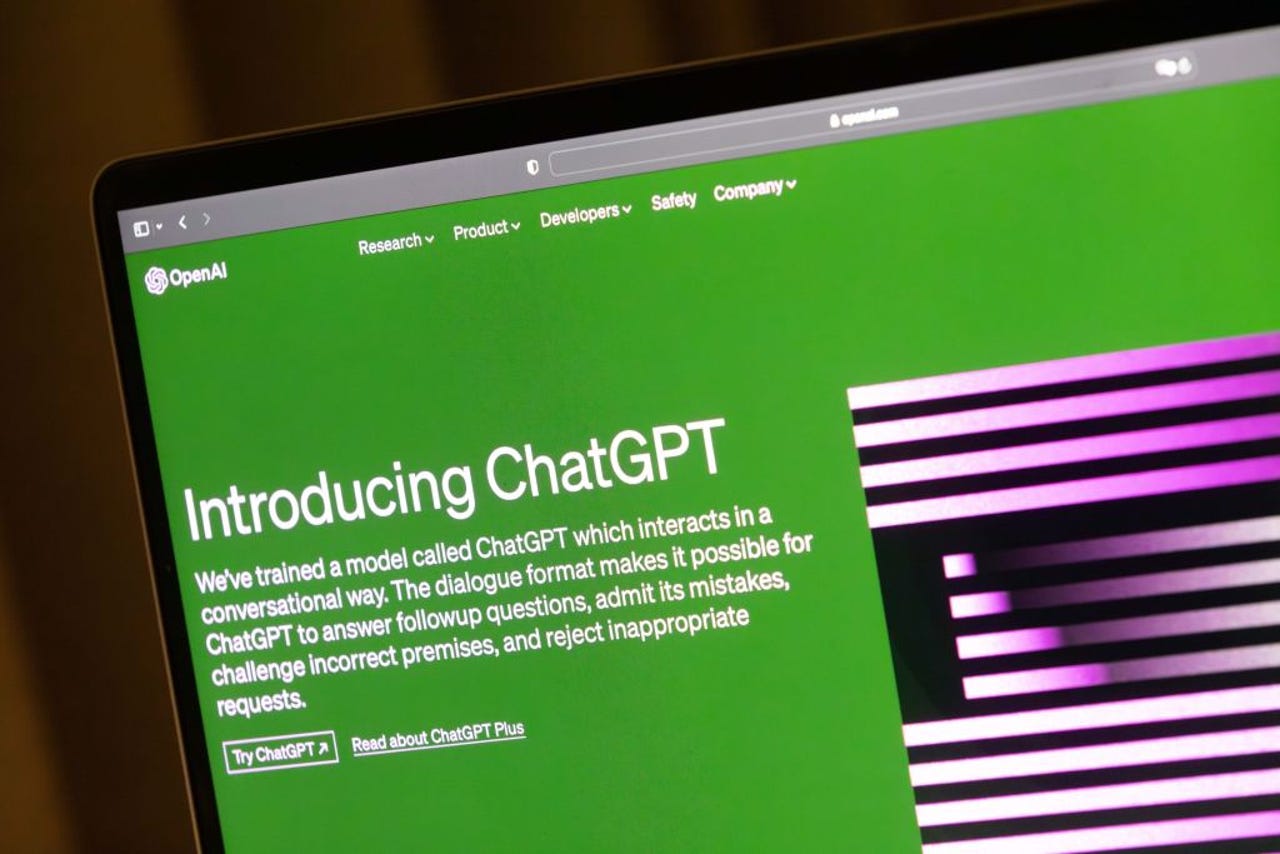
ChatGPT on a computer screen

It's taken just six months since the launch of ChatGPT for generative artificial intelligence (AI) to create a step change in how we view work and complete our tasks every day.

Depending on who you believe, generative AI is going to either help us work more efficiently or leave most of us unemployed.

Also: These are my 5 favorite AI tools for work

The key task for professionals and their businesses right now is to explore how generative AI can be used to make us more productive.

Five business leaders talk about how they and their organizations are beginning to explore and exploit generative AI — and they suggest five ways that you can get involved, too.

1. Play with the technology

Adam Warne, CIO at retailer River Island, says his organization is already beginning to "play" with GPT — and before those explorations go to the next stage, he wants to make sure the technology is ready for customer-facing services.

"I think we are probably in a similar place to lots of people," he says. "We're using it to generate content ideas, whether it's blog posts, marketing posts, or product descriptions. But we're not putting it into a production environment."

Also: This retailer is using RFID tags to make in-person clothes shopping less frustrating

Like other CIOs, Warne is cautious about using AI. Right now, he says there needs to be a "human, fleshy thing" between whatever generative AI is doing within the business and what the customer sees externally.

But he expects to see rapid progress in the level of automation — and he advises all professionals to start exploring generative AI.

Also: Leadership alert: The dust will never settle and generative AI can help

"I think the speed at which it's come to market and is developing means that everybody should be keeping an eye on it," he says. "It's a way of being mainstream, but I think it's going to be production-ready very, very quickly."

2. Use it to make you more efficient

Brad Woodward, head of data at women's lifestyle retailer Hush, says he believes generative AI tools could provide a big boost in productivity for all kinds of professionals, particularly IT developers — and he's already exploring how.

"The way in which we'll be looking at it, and the way we'll train other people to use it, is how we can be more efficient at our jobs," he says.

"The really interesting thing about tools like ChatGPT is about how they can help us do things more efficiently, like writing code and interrogating databases."

Also: How ChatGPT can rewrite and improve your existing code

Woodward gives an example from his own working life, where he recently had to create a prototype of a reporting model.

He didn't want to use live data and, not so long ago, he would have had to produce the sample data for the model by hand. Instead, he just turned to AI.

"I just said to ChatGPT, 'Can you generate me a bunch of database tables and some sample data for this model?' And it gave me 100 rows. And I then said, 'Can I have some more?' And it gave me 1,000 rows," he says.

Also: How to use ChatGPT to write Excel formulas

"It was as easy as that. Whereas in the past, it would have taken maybe an hour or two. Now, I can automate that task. So, the way that we're talking about generative AI within the team is how do we use this tool to make us more efficient."

3. Focus on the business use case

Prakash Rao, group head of supply chain projects at retail and hospitality giant Landmark Group, says ChatGPT has huge potential, but it's crucial to focus on the business case. "Otherwise it's just jargon," he says.

Rao likens the rise of generative AI to innovations plotted on analyst Gartner's Hype Cycle for Emerging Technologies. Every innovation goes through a peak of inflated expectations, where people across the IT industry and other lines of business see the technology as a panacea.

Also: ChatGPT: Who's using the AI tool and why?

Right now, Rao says he's anticipating a "trough of disillusionment", where the hype around AI begins to drop off before reaching a plateau, where widespread acceptance, adoption, and exploitation are commonplace.

"The technologies that really have a business application reach a level where all these use cases come out of this technology," he says.

"There are a lot of useful business cases that will emerge and we're going to see multiplier effects in terms of the benefits for these technologies, too."

Rao says business functions across Landmark Group will be exploring ChatGPT, particularly marketing, and sales, where AI could offer new levels of customer service and interaction.

Also: Generative AI could save marketing pros 5 hours per week, according to research

"And of course, ChatGPT is something we'll also be evaluating in supply chain," he says. "But right now, I have not seen any useful applications."

4. Explore enterprise-ready tools

Robyn Furby, technology adoption manager at insurance firm NFU Mutual, says ChatGPT should be explored cautiously, but she's enthusiastic about the potential for enterprise-ready adaptations from Microsoft.

"We're looking at it in the context of understanding what it means," she says. "Naturally, in any financial services organization, we're going to be cautious. And as a tech enthusiast, I'm interested in supporting people to use it in a safe way. So right now, our focus is around how you can use it in a way that's appropriate today."

Also: 7 ways you didn't know you can use Bing Chat and other AI chatbots

Furby believes the real power from ChatGPT will arrive when it's embedded into enterprise-ready AI services, such as Microsoft Copilot, which will use current language models like GPT-4 to offer help for specific tasks, such as answering questions, providing information, and generating content.

"I think it will be really interesting to see how it's used," she says. Windows Copilot will start rolling out in a preview build for Windows 11 in June.

Also: ChatGPT vs Bing Chat vs Google Bard: Which is the best AI chatbot?

"In the meantime, we need to educate people about the differences between all these AI tools — what can you use external tools like ChatGPT and Bing for, and what can you use Copilot for? And I think that period of education is going to be a massive process."

5. Don't forget to look at other areas of AI

Stephen Wild, engineering manager for observability and automation at 888 William Hill, has started dabbling with ChatGPT, as have other people on his team, particularly younger members of staff.

However, experimentation does not mean production. Wild says professionals must be careful to ensure generative AI is producing strong business benefits.

"It's more of a worry at the moment," he says, reflecting on the fast-moving pace of developments. "The biggest problem I can see with the free version of ChatGPT is that it only really goes to 2021."

Also: The best AI chatbots

Like other digital leaders, Wild believes the launch of enterprise-ready applications will be a tipping point.

"It'll be interesting when Microsoft goes beyond Bing and starts incorporating the technology into the likes of Teams. That will probably be the next big revolution in tech."

Wild says it's also important to recognize that the influence of AI is not just confined to generative systems. For example, his organization is using New Relic's automated application-monitoring and observability platform.

Also: 5 ways ChatGPT can make parenting easier this summer

"Machine learning is already very important to us. We use AI through New Relic and their alerting service, which allows us to cut down on the sheer number of alerts we have to look out for," he says.

"We also use it in terms of checking for bots that are constantly looking for our odds and are trying to take liberties with our promotions. The more bots we can find, the better."

Artificial Intelligence

How to chat with ChatGPT right on your Apple Watch. Meet Petey AI

sample-image-16-9-red.jpg

A host of AI chat apps are available for iPhone users. But maybe you also own an Apple Watch and would like to chat with an AI right from your wrist? One app that's up to this challenge is Petey AI.

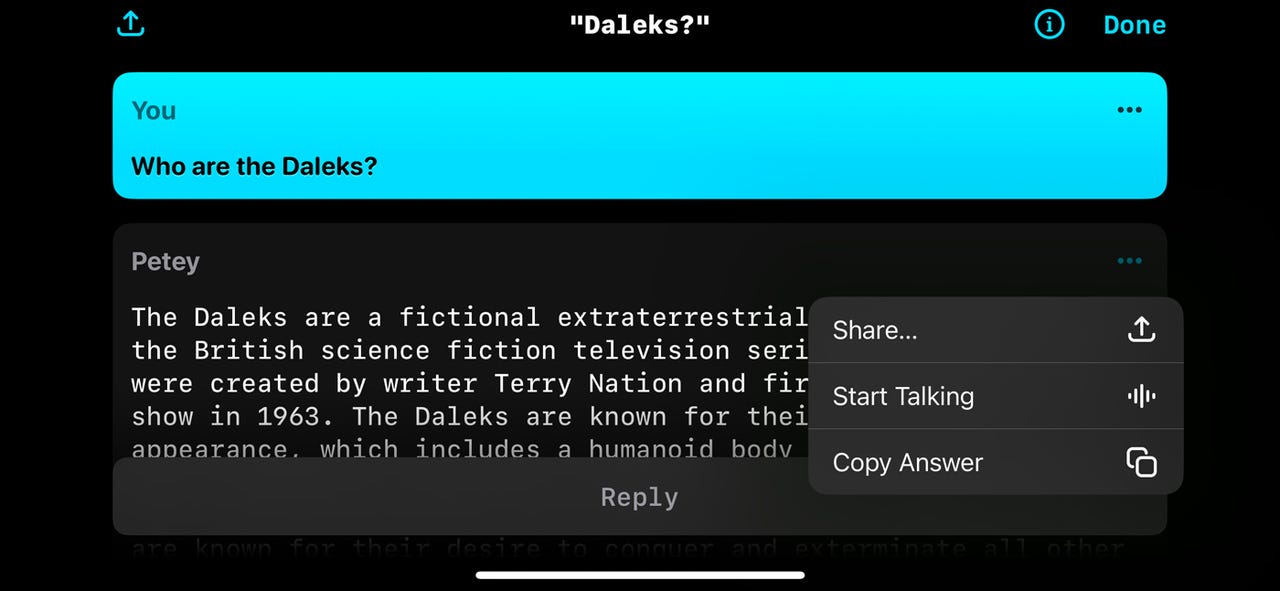
With Petey on your iPhone or Apple Watch, you can type, tap, or speak your requests and then carry on a conversation. The chat not only appears on the screen but can be spoken aloud. You can even share the chat with someone else via email, text message, or social media app.

Also: How to use ChatGPT: Everything you need to know

First, a bit about Petey. Formerly known as watchGPT but forced to change its name to avoid confusion with ChatGPT, Petey communicates with OpenAI's ChatGPT on the backend. Powered by ChatGPT, Petey handles all the usual questions and requests you'd aim at an AI. But the app can also perform other tricks, such as displaying locations on Apple Maps and creating playlists with Apple Music.

Petey keeps a history of your conversations so you can pick up where you left off. The entry for each chat can reveal locations, links, and the number of ChatGPT tokens you've used. On your iPhone and your Apple Watch, you can launch Petey through a Siri shortcut. On the watch, you can set up Petey as a complication, so it's accessible from any watch face.

Also: How to use ChatPDF: The AI chatbot that can tell you everything about your PDF

Petey is available in a few different ways. You can cough up $6.99 a month ($24.99 a month for GPT-4) for a subscription, or you can generate and paste a ChatGPT API key to use the app for free with GPT-3.5. Otherwise, Petey is free if you want to use it just on the Apple Watch and not on your iPhone.

Now, here's how Petey works on an iPhone and an Apple Watch.

12. Use Petey on your Apple Watch

To make sure Petey is on your watch, open the Watch app on your iPhone. Look for Petey in the Installed on Apple Watch section. If it's not there, tap its Install button in the Available Apps section, and it will be deposited on your watch.

Also: How to set up an Apple Watch

Open Petey on the watch. Tap in the Ask Me Anything field. Depending on your model of watch, you have a few ways of entering text. First, with an Apple Watch Series 7 or later, you can activate an on-screen keyboard to tap the characters for your request. Second, you can type the characters on your paired iPhone. Third, you're able to draw the characters. And fourth, you can dictate your question or request.

Choose your preferred option and submit your prompt. The response appears on the screen and is also read aloud. As long as you keep the watch raised on your wrist and the screen active, the text will continue being spoken aloud until finished. To stop the speech, swipe to the bottom of the response and tap the sound icon in the center of the small toolbar or move your hand down.

To share the response with someone else, tap the Share icon at the bottom, and select the person to whom you want to send it.

Finally, the watch app has its own settings to tweak. Tap the Petey icon on the screen. From the Settings screen, you can unlock the option for GPT-4, change the icon and theme for Petey, enable or disable speech, and adjust the volume.

More how-tos

Meta open sources an AI-powered music generator

Meta open sources an AI-powered music generator Kyle Wiggers 7 hours

Not to be outdone by Google, Meta has released its own AI-powered music generator — and, unlike Google, made it available in open source.

Called MusicGen, Meta’s music-generating tool — a demo of which can be found here — can turn a text description (e.g. “An ’80s driving pop song with heavy drums and synth pads in the background”) into about 12 seconds of audio, give or take. MusicGen can optionally be “steered” with reference audio, like an existing song, in which case it’ll try to follow both the description and melody.

We present MusicGen: A simple and controllable music generation model. MusicGen can be prompted by both text and melody.
We release code (MIT) and models (CC-BY NC) for open research, reproducibility, and for the music community: https://t.co/OkYjL4xDN7 pic.twitter.com/h1l4LGzYgf

— Felix Kreuk (@FelixKreuk) June 9, 2023

Meta says that MusicGen was trained on 20,000 hours of music, including 10,000 “high-quality” licensed music tracks and 390,000 instrument-only tracks from ShutterStock and Pond5, a large stock media library. The company hasn’t provided the code it used to train the model, but it has made available pretrained models that anyone with the right hardware — chiefly a GPU with around 16GB of memory — can run.

So how does MusicGen perform? Well, I’d say — though certainly not well enough to put human musicians out of a job. Its songs are reasonably melodic, at least for basic prompts like “ambient chiptunes music,” and — to my ears — on par (if not slightly better) with the results from Google’s AI music generator, MusicLM. But they won’t win any awards.

Here’s the output from MusicGen for “jazzy elevator music”:

And here’s MusicLM’s take:

https://techcrunch.com/wp-content/uploads/2023/06/AI_Test_Kitchen_jazzy_elevator_music.mp3

Next, I gave a more complicated prompt to attempt to throw MusicGen for a loop: “Lo-fi slow BPM electro chill with organic samples.” MusicGen surprisingly outshined MusicLM in terms of musical coherence, producing something that’d easily find a home on Lofi Girl.

Here’s MusicGen’s sample:

And here’s MusicLM’s:

https://techcrunch.com/wp-content/uploads/2023/06/AI_Test_Kitchen_lofi_slow_bpm_electro_chill_with_organic_samp-1.mp3

To switch things up a bit, I tried using both tools to generate a piano ditty in the style of George Gershwin. I say “tried” because, in a effort to forestall the copyright issues around generative music tools, Google implemented a filter in the public version of MusicLM that blocks prompts mentioning specific artists.

MusicGen has no such filter. But the results for “Background piano music in the style of Gershwin,” left something to be desired, I must say:

Generative music is improving, clearly (see Riffusion, Dance Diffusion and OpenAI’s Jukebox). But major ethical and legal issues have yet to be ironed out. AI like MusicGen “learns” from existing music to produce similar effects, a fact with which not all artists — or generative AI users — are comfortable.

Increasingly, homemade tracks that use generative AI to conjure familiar sounds that can be passed off as authentic, or at least close enough, have been going viral. Music labels have been quick to flag them to streaming partners, citing intellectual property concerns — and they’ve generally been victorious. But there’s still a lack of clarity on whether “deepfake” music violates the copyright of artists, labels and other rights holders.

It might not be long before there’s guidance on the matter. Several lawsuits making their way through the courts will likely have a bearing on music-generating AI, including one pertaining to the rights of artists whose work is used to train AI systems without their knowledge or consent.

For its part, Meta, which isn’t imposing restrictions on how MusicGen can be used, says that all the music MusicGen was trained on was “covered by legal agreements with the right holders,” including a deal with Shutterstock.

Meta Releases StableDiffusion For Music, Musicgen

Meta’s MusicGen is an AI model that utilises the Transformer architecture to generate new pieces of music based on text prompts. It has the capability to align the generated music with existing melodies, providing a versatile and creative approach to music composition.

Similar to language models, MusicGen predicts the next section in a piece of music rather than the next characters in a sentence. This enables it to generate coherent and structured musical compositions.

The audio data used for training is decomposed into smaller components using Meta’s EnCodec audio tokeniser. This approach allows the model to process tokens in parallel, making it efficient and fast in generating music.

The training process involved utilising a dataset of 20,000 hours of licensed music, including 10,000 high-quality music tracks from an internal dataset, as well as music data from Shutterstock and Pond5. This extensive training dataset ensures that MusicGen has access to a diverse range of musical styles and compositions.

One of the key features of MusicGen is its ability to handle both text and music prompts. The text prompt sets the basic style, which is then matched with the melody from the audio file. For example, by combining a text prompt describing a specific style of music with the melody of a famous composition, MusicGen can generate a new piece of music that reflects the desired style.

It is important to note that while MusicGen can provide a rough guideline for generating music based on a specific prompt, it does not offer precise control over the orientation to the melody or the ability to hear a melody in different styles. The generated output serves as a creative interpretation rather than an exact replication.

In terms of performance, the researchers experimented with different sizes of the model, ranging from 300 million to 3.3 billion parameters. They found that larger models generally produced higher quality audio, but the 1.5 billion parameter model was rated the best by human evaluators. The 3.3 billion parameter model excelled in accurately matching text input with audio output.

When compared to other music models such as Riffusion, Mousai, MusicLM, and Noise2Music, MusicGen demonstrates superior performance in objective and subjective metrics, which evaluate the match between music and lyrics as well as the plausibility of the composition. Overall, MusicGen ranks higher than Google’s MusicLM—and it could very well be the StableDiffusion Moment for Music.
Meta has released the code and models of MusicGen as open source on GitHub, allowing researchers and commercial users to access and utilise the technology. This move encourages further development, collaboration, and innovation in the field of AI-generated music. A demo of MusicGen is also available on the Huggingface platform, providing a hands-on experience of its capabilities.

The post Meta Releases StableDiffusion For Music, Musicgen appeared first on Analytics India Magazine.

How to MLOps like a Boss: A Guide to Machine Learning without Tears

How to MLOps like a Boss: A Guide to Machine Learning without Tears
Image by Editor

The MLOps market was estimated at $23.2billion in 2019 and is projected to reach $126 billion by 2025 due to rapid adoption.

Introduction

Many data science projects don’t see the light of the day. MLOps is a process that spans from the data stage to deployment stage and ensures the success of machine learning models. In this post, you will learn about the key stages in MLOps (from a data scientist’s perspective) along with some common pitfalls.

Motivation for MLOps

MLOps is a practice that focuses on operationalizing data science models. Usually, in most enterprises, data scientists are responsible for creating the modeling datasets, pre-processing the data, feature engineering, and finally building the model. Then the model is “thrown” over the wall to the engineering team to be deployed into the API/Endpoint. The science and engineering often times happen in silos, which leads to delays in deployment or incorrect deployments in the worst case.

MLOps addresses the challenge of deploying enterprise scale ML models accurately and quickly.

The data science equivalent of the saying “Easier said than done” should probably be “Easier built than deployed”.

MLOps can be the silver bullet to the difficulties enterprises face putting machine learning models into production. For those of us data scientists, the finding that ~90% of ML models don’t make it to production, should not come as a surprise. MLOps brings the discipline and process to the data science and engineering teams to ensure that they collaborate closely and continuously. This collaboration is crucial to ensure successful model deployment.

MLOps in a nutshell

For those familiar with DevOps, MLOps is to machine learning applications that DevOps is to software applications.

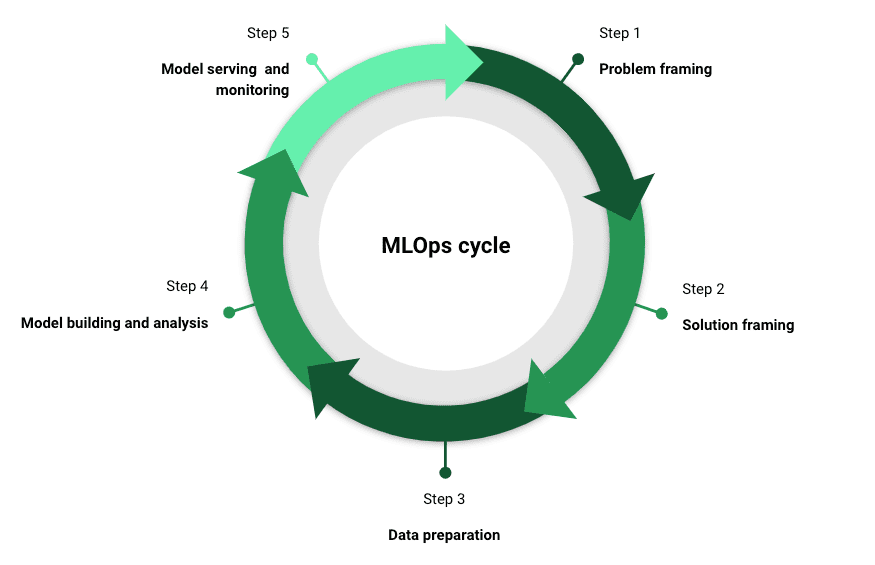
MLOps comes in multiple flavors depending on who you ask. However, there are a five key stages that are critical to a successful MLOps strategy. As a side note, a crucial element that needs to be a part of each of these stages is communication with stakeholders.

Problem framing

Understand the business problem inside out. This is one of the key steps to successful model deployment and usage. Engage with all the stakeholders at this stage to get buy-in for the project. It could be engineering, product, compliance etc.

Solution framing

Only and Only after the problem statement is hashed out, proceed to thinking about the “How”. Is machine learning required to tackle this business problem? At the onset, it might seem weird that as a data scientist, I am suggesting to steer away from machine learning. That’s only because with “great power comes great responsibility”. Responsibility in this case would be to make sure that the machine learning model is built, deployed and monitored carefully to ensure that it satisfies and continues to satisfy the business requirement. The timelines and resources should also be discussed at this stage with the stakeholders.

Data preparation

Once you have decided to go down the route of machine learning, start thinking of the “Data”. This stage includes steps such as data gathering, data cleaning, data transformation, feature engineering and labeling (for supervised learning). Here the adage that needs to be remembered is “garbage in garbage out”. This step is usually the most painstaking step in the process and is critical to ensure model success. Ensure to validate the data and features multiple times to make sure that they are aligned with the business problem. Document all your many assumptions that you take while creating a dataset. Ex: Are the outliers for a feature actually outliers?

Model building and analysis

In this stage, build and evaluate multiple models and select the model architecture that best solves the problem at hand. The chosen metric for optimization should reflect the business requirement. Today, there are numerous machine learning libraries that help expedite this step. Remember to log and track your experiments to ensure reproducibility of your machine learning pipeline.

Model serving and monitoring

Once we have the model object built from the previous stage, we need to think of how we are going to make it “useable” by our end-users. Response latency needs to be minimized while maximizing throughput. Some popular options to serve the model are — REST API endpoint, as a docker container on the cloud or on an edge device. We can’t yet celebrate once we have deployed the model object, as they are very dynamic in nature. For example, the data could drift in production causing model decay or there could be adversarial attacks on the model. We need to have a robust monitoring infrastructure in place for the machine learning application. Two things need to be monitored here:

  • The health of the environment where we deploy (eg: load, usage, latency)
  • The health of the model itself (eg: performance metrics, output distribution).

The cadence of the monitoring process also needs to be determined at this stage. Are you going to monitor your ML application daily, weekly or monthly?

Now, you have a robust machine learning application built, deployed and monitored. But alas, the wheel doesn’t stop spinning, as the above steps need to be iterated upon continuously.

How to MLOps like a Boss: A Guide to Machine Learning without Tears
MLOps cycle for successful data science projects | Image by Author
FinTech Case Study

To put the above five stages in practice, let’s assume for this section that you are a data scientist at a FinTech company in charge of deploying a fraud model to detect fraudulent transactions.

In this case, start with a deep dive into the type of fraud (first party or third party?) you are trying to detect. How are transactions identified as fraud or not? Are they reported by the end user or do you have to use heuristics to identify fraud? Who would be consuming the model? Is it going to be used in real time or in batch mode? Answers to the above questions are crucial to solving this business problem.

Next, think about what solution best addresses this problem. Do you need machine learning to address this or can you start with a simple heuristic to tackle fraud? Is all the fraud coming from a small set of IP addresses?

If you decide to build a machine learning model (assume supervised learning for this case), you will need labels and features. How will you address missing variables? What about outliers? What’s the observation window for fraud labels? i.e how long does it take for a user to report a fraud transaction? Is there a data warehouse you can use to build features? Make sure to validate the data and features before moving ahead. This is also a good time to engage with the stakeholders about the direction of the project.

Once you have the data needed, build the model and perform the necessary analysis. Make sure the model metric is aligned with the business usage. (eg: could be recall at the first decile for this use-case). Does the chosen model algorithm satisfy the latency requirement?

Lastly, coordinate with engineering to deploy and serve the model. Because fraud detection is a very dynamic environment, where fraudsters strive to stay ahead of the system, monitoring is very crucial. Have a monitoring plan for both the data and the model. Measures such as the PSI (population stability index) are common to keep track of data drift. How often will you retrain the model?

You can now successfully create business value by reducing fraudulent transactions using machine learning (if needed!).

Conclusion

Hope that after reading this article, you see the benefits of implementing MLOps at your firm. To summarize, MLOps ensures that the data science team is:

  • solving the right business problem
  • using the right tool to solve the problem
  • leveraging the dataset that represents the problem
  • building the optimal machine learning model
  • and finally deploying and monitoring the model to ensure continued success

However, be mindful of the common pitfalls to ensure that your data science project doesn’t become a tombstone in the data science graveyard! The fact that a data science application is a living and breathing thing should be remembered. The data and model need to be continuously monitored. AI governance should be considered right from the beginning and not as an afterthought.

With these principles in mind, I am confident that you can truly create business value leveraging machine learning (if needed!).

MLOps References

  • Machine Learning Engineering for Production (MLOps)
  • A Gentle Introduction to MLOps
  • MLOps Practices for Data Scientists
  • MLOps: The Upcoming Shining Star

Natesh Babu Arunachalam is a data science leader at Mastercard, currently focused on building innovative AI applications using open banking data.

More On This Topic

  • MLOps And Machine Learning Roadmap
  • Design Patterns in Machine Learning for MLOps
  • MLOps Is Changing How Machine Learning Models Are Developed
  • Top 10 MLOps Tools to Optimize & Manage Machine Learning Lifecycle
  • A Beginner's Guide to End to End Machine Learning
  • A Simple Guide to Machine Learning Visualisations

Salesforce pledges to invest $500M in generative AI startups

Salesforce pledges to invest $500M in generative AI startups Kyle Wiggers 9 hours

Showing it’s playing for keeps in the generative AI race, Salesforce today announced that it’s growing its Generative AI Fund, the part of the company’s Salesforce Ventures VC off-shoot backing startups developing “responsible generative AI,” from $250 million in size to $500 million.

In a canned statement, Salesforce Ventures managing partner Paul Drews said that the expansion would enable Salesforce to “work with even more entrepreneurs … accelerating the development of transformative AI solutions for the enterprise.”

“We’re already seeing AI change the way the world works, and we’re excited to build on the momentum of our Generative AI fund,” Drews continued. “We’re excited to support the next generation of innovative founders.”

Launched in March, the Generative AI Fund has already invested in several firms on the frontier of generative AI tech, including Cohere, Anthropic, You.com, Hearth.AI and newer additions Humane and Tribble. While far from the only fund investing primarily in generative AI, Salesforce aims to differentiate its tranche by prioritizing what it describes as “ethical” AI technologies.

For example, go-to-market function automation platform Tribble recently partnered with Private AI, a privacy-focused AI company, to use Private GPT, a product that redacts personally identifiable information before sending it through OpenAI’s ChatGPT chatbot.

The Generative AI Fund is also distinguished by the diverse range of technologies it’s financing. Humane, for instance, is creating a wearable, screenless AI assistant, while You.com hosts an AI-powered search engine with generative art and text tools.

Salesforce Ventures has a number of vertical-specific investment funds, including funds aimed at particular geographies such as Japan or Canada and a dedicated AI fund. But the Generative AI Fund is among the VC arm’s largest tranches to date; previous funds ranged from $50 million to $125 million.

The expansion of the Generative AI Fund coincides with the debut of Salesforce’s AI for Impact Accelerator, the company’s second-ever accelerator program. AI for Impact will grant $2 million to a cohort of education, workforce and climate organizations to “advance the equitable and ethical use of trusted AI.”

“AI for Impact aims to close the AI access gap by providing flexible funding, pro-bono expertise and technology to purpose-driven organizations, empowering them to accelerate generative AI-based solutions to the world’s most pressing challenges,” Salesforce said in a press release. “AI for Impact [is a] philanthropic initiative to help purpose-driven organizations gain equitable access to trusted generative AI technologies.”

Bloomberg notes that investments from Salesforce’s accelerators and funds may become more important to the company’s bottom line as activist investors, like Elliott Management, discourage large acquisitions. To date, Salesforce Ventures, one of the most active corporate VCs in recent years, has participated in over 140 deals for AI and machine learning startups, particularly in the areas of AI insights for sales, natural language chatbots for service requests, targeted marketing content and personalized ecommerce experiences.

Generative AI — assuming it lives up to the hype — could be a massive market opportunity. Grand View Research predicts that the sector could be worth roughly $109 billion by 2030.

The C-suite in particular expects generative AI to have an enormous impact on business. According to a recent KPMG survey, almost two-thirds (65%) of execs believe that generative AI will have a “high” or “extremely high”” impact on their organization in the next three to five years — far above every other emerging technology.

Beyond the Generative AI Fund and AI for Impact, Salesforce is investing in generative AI technologies internally, piloting tools like EinsteinGPT (which lets Salesforce customers ask questions about Salesforce’s content and services) and SlackGPT (which answers natural language questions about Slack content). In addition, Salesforce has previewed the ability to create landing pages on the fly, compose sales emails and write code in Apex, Salesforce’s programming language, to programmatically trigger certain actions in a workflow, among other tasks.

Write the Bloody Manual!

Write the Bloody Manual!

The developer community is mostly filled with two types of developers: One that does not document their software and technology, providing no scope for others to learn and implement it quickly; and the other that wants to use the technology, but instead of referring to the documentation, ends up on Stack Overflow or Reddit, in an urge to find the answer quickly.

Dos and Don’ts for CTO

Think like a CTO of a company. If you have built an amazing product, the rule of thumb should be to properly document everything. Everything that you don’t write is equivalent to wasted resources and loss of productivity of the employees. Why does it happen? Laziness.

In 2021, the research paper Addressing “Documentation Debt” in Machine Learning pretty much sums up the problem of poor or absence of documentation entails in the ML community. Documentation debt is exactly what it sounds like — a tradeoff developers make to achieve some sort of short-term benefit, and then bearing the brunt for no documentation later on when trying to explain or build again.

What happens then is that other developers, who are using the software and are frustrated with the technology, end up going on Stack Overflow or Reddit to seek help. Given the much discussed “toxicity” of these communities, the users get replied like “RTFM” or “Read the f**** manual”. This makes matter worse for them as there’s no documentation to read it up.

But on the other side, there are a lot of developers who just don’t want to read the documentation. Even if the developers have created documentation for their software, they go directly to the online communities in an urge to find the answer quickly from someone else, instead of reading the tedious documentation.

Obviously, both of these are not the right way.

What can be done?

Documenting what developers / companies are working on is understandably a tedious process. In a blog, The Surprising Power of Documentation, Vadim Kravcenko narrates the right practices to follow while working on a project and writing the documentation.

Kravcenko explains through an example of a meeting. Every meeting that you hold to discuss the problems in an algorithm is “a missed opportunity” that could have been used to refine the system, if there was enough documentation. Think about it like the time spent on properly documenting the work that could be used for people working on the algorithm years from now, could save a lot of time for everyone, instead of going over to community platforms or holding meetings to discuss it.

The same is the case with the open-source community. There can be a lot of repositories and GitHub that everyone can use. But a lot of developers would say, “It’s closed source if there is no open documentation.” Clearly, if there is no explanation for the implementation of the model, there would be no use.

What tools to use for “good” documentation

With new LLM-based models like ChatGPT, there is probably no excuse left to not do documentation. It is easy to say that documentation is important, but there should be tools that make it easy for everyone. This also changes with every programming language. For example, according to the discussion on HackerNews, developers appreciate the way documentation functions in Rust. It involves writing markdown within a special type of comment placed above the module, function, datatype, or method that you want to document. The documentation can then be automatically generated from this markdown.

One of the main challenges in keeping documentation up to date is the increasing complexity of linking the code you’re documenting to its corresponding location in the documentation. However, Rust’s approach of embedding documentation within the code elegantly addresses this problem.

For the Python community, Sphinx document generator offers great help. Documentation is often left out because it takes a lot of time when working on a project. Simply, Sphinx takes the .rst files and converts them to HTML with just a bunch of commands. Most Python libraries like Django, NumPy, Scikit-Learn, and Matplotlib use it for documentation.

Is there any excuse to not document?

“Documentation is where I go to find out the mental model behind the software,” said another user on HackerNews. On the contrary, a lot of people argue against spending time on documentation. One reason is obviously laziness, the other is that they often find the other documents meaningless, filled with “garbage.”

Now with LLMs, up-to-date documentation does not require any superpower. This can also boost many companies to a whole new level. But wait, what about overdocumenting? There can be documents that are hundreds of pages long that narrate things that could have been done in a single line. This is why sometimes people still prefer going to online communities to discuss the problem.

Moreover, a lot of papers with a lot of code does not bode well for the community. Anyway, a lot of research papers these days do not include any code as it is met with a little hesitance and resistance, some even call it dumb.

Ultimately, the point is that “good” documentation takes a lot of willingness, resources, and time, but pays off like a compound interest. “If you are building a tower, the documentation is at the foundation.” So in the end if you have proper documentation, you can tell someone who asks you about your software to read the bloody manual!

The post Write the Bloody Manual! appeared first on Analytics India Magazine.

Three Ways Artificial Intelligence Is Transforming Network Security and User Experience

Three Ways Artificial Intelligence Is Transforming Network Security and User Experience June 12, 2023 by Kumar Ramachandran

Today, we stand on the precipice of a great transformation. Artificial intelligence (AI) and machine learning (ML) are fundamentally shifting the way people work, express themselves, as well as how they get business done. These innovations will not only help organizations be agile and serve their customers better, but it will also help secure them against a never-before-seen threat landscape.

AI is continuing to proliferate in our industry – according to Statista, the global AI in cybersecurity market is expected to reach nearly $47 billion by 2027. Interest in the technology will only continue to increase as we see new innovations emerge.

As organizations across the globe adopt solutions that best leverage AI to fundamentally change the way they approach security, the key question emerging is about how to get to this AI-powered nirvana state. More and more, this means moving away from fragmented and siloed tools in order to unlock the true power of data.

The “Three Cs” of Data Underpin Powerful AI and ML

In addition to the obvious benefit of simplified management, one additional attribute to consolidating your tools is the ability to leverage AI and ML across your security, networking, and user-experience management, all unified from the same data lake. For an organization to realize this full potential, however, there are three principles of data that must be followed:

  • Complete Data. You need all of the data for the problem you’re solving. This means data elements from security, networking and operations have to be collected in one central place.
  • Consistent Data. The formatting, structure and labeling of the data should be unchanged across all collected elements. Any disparities can negatively impact data quality and outcomes.
  • Correct Data. You should have unwavering trust in the data so that any output can also be trusted. The way data is collected and summarized must be the same across all of the sources feeding the data lake.

With these key data principles in place, there is a solid foundation for AI to fundamentally transform network security. Organizations can see this impact in three distinct ways:

1) Reshaping IT Operations

It’s no secret that today’s core IT operations teams, including the security operations center (SOC) and network operations center (NOC), are overworked and understaffed. As an example, the average ops team receives tens of thousands of alerts and events every day, a majority of which are meaningless and simply creating ‘noise.’ For most organizations, however, the current experience for an ops analyst includes combing through these alerts manually, to be sure a real threat isn’t missed. This is a time-consuming activity and causes security and network professionals to pour hours into work that yields very little results.

Introducing AI for IT Operations (AIOps), for example, offers deep visibility and automation across a network, including all users, branches, and applications. With this new AI-powered context, an alert or event can be connected to larger data points for more effective resolution – all within minutes. This means instead of someone needing to sift through thousands of meaningless alerts, AIOps can help pull out the most relevant ones so the team can focus efforts on solving true issues.

2) Unearthing Unknown Threats

Just as cybersecurity tools are evolving with technology, so are the tools available to threat actors. The power of AI can help identify signs of malicious actions or operations introduced in “unknown” or unseen variants, unlike anything a human ever could. Machines are very good at sifting through the mass amount of alerts to pinpoint anomalies by scanning hundreds of thousands of data points and continuously learning hyper-specific details about an organization, which better positions the technology to flag when a new anomaly emerges. Once identified, organizations can proactively categorize and contain emerging threats before they become real problems.

3) Improving the User Experience

Not only can AI alleviate some of the pressure on security and network teams, but it can also help streamline frustrating pain points for end users. For example, troubleshooting access and performance issues have historically been a manual and slow process. When security processes like this get in the way of user experience, it often leads users to become frustrated and circumvent security to quickly solve their issues. This can lead to an organization becoming vulnerable to attacks, with looming threat actors waiting for a user to slip up and bypass security measures. AI has the ability to autonomously manage the digital experience of the end user by proactively fixing the hurdles users face before they even happen. Ultimately, the benefits are twofold – the user has a streamlined and positive experience, while security is kept intact.

Whether it’s helping us write a book, drive a car, or predicting the likelihood of developing certain diseases, AI has the opportunity to impact every aspect of our lives. And, as we begin to apply this new innovation to our organizations, we are beginning to see a future where AI will have an equally profound impact across the security and network operations, and ultimately the experience a person or business team has with technology.

About the Author

Kumar Ramachandran serves as senior vice president of Products for SD-WAN and secure access service edge (SASE) products. Kumar co-founded CloudGenix, establishing the category of SD-WAN, and served as CEO until the company was acquired by Palo Alto Networks in 2020. He has championed AI adoption within the company and the SASE products specifically, which is more important than ever today. Palo Alto Networks recently partnered with Wakefield Research to ask 1,300 C-suite leaders who were responsible for cyber transformation what their priorities, concerns, and opinions for the future were. Nearly half of C-suite leaders (49%) reported they feel AI will have the highest impact on security in the realm of more effective threat detection.

Prior to founding CloudGenix, Kumar held leadership roles in Product Management and Marketing for the multi-billion-dollar branch routing and WAN optimization businesses at Cisco. Prior to Cisco, he managed applications and infrastructure for companies such as Citibank and Providian Financial. Kumar holds an MBA from UC Berkeley Haas School of Business and a master's in computer science from the University of Bombay.

Related

About the author: Tiffany Trader
With over a decade’s experience covering the HPC space, Tiffany Trader is one of the preeminent voices reporting on advanced scale computing today.

How to Optimize SQL Queries for Faster Data Retrieval

How to Optimize SQL Queries for Faster Data Retrieval
Image by Author

SQL (Structured Query Language), as you probably, know, helps you collect data from databases.

It is specifically designed for that. In other words, it works with rows and columns, allowing you to manipulate data from databases using SQL queries.

What is SQL Query?

A SQL query is a bunch of instructions you give to the database to collect information from it.

You can collect and manipulate data from the database by using these queries.

By using them, you can create reports, perform data analysis, and more.

Due to these queries' form and length, execution times might be significant, primarily if you work with larger data tables.

Why Do We Need SQL Query Optimization?

SQL query optimization's purpose is to make sure you efficiently use the resources. In plain English, it reduces execution time, saves costs, and improves performance. It is an important skill for developers and data analysts. It’s not only important to return the right data from the database. It’s also important to know how efficiently you do that.

You should always ask yourself: “Is there a better way to write my query?”

Let’s talk more in-depth about the reasons for that.

Resource efficiency: Poorly optimized SQL queries would consume excessive system resources, like CPU and memory. This might lead to reduced overall system performance. Optimizing SQL queries ensures these resources are used efficiently. This, in turn, leads to better performance and scalability.

Reduced execution time: If the queries run slowly, this will negatively impact user experience. Or on an application performance if you have an application running. Optimizing queries can help reduce execution time, providing faster response times and a better user experience.

Cost savings: Optimized queries can diminish the hardware and infrastructure needed to support the database system. This can lead to cost savings in hardware, energy, and maintenance costs.

Check out “Best Practices to Write SQL Queries” that can help you find out how your code structure can be improved, even if it is correct.

SQL Query Optimization Techniques

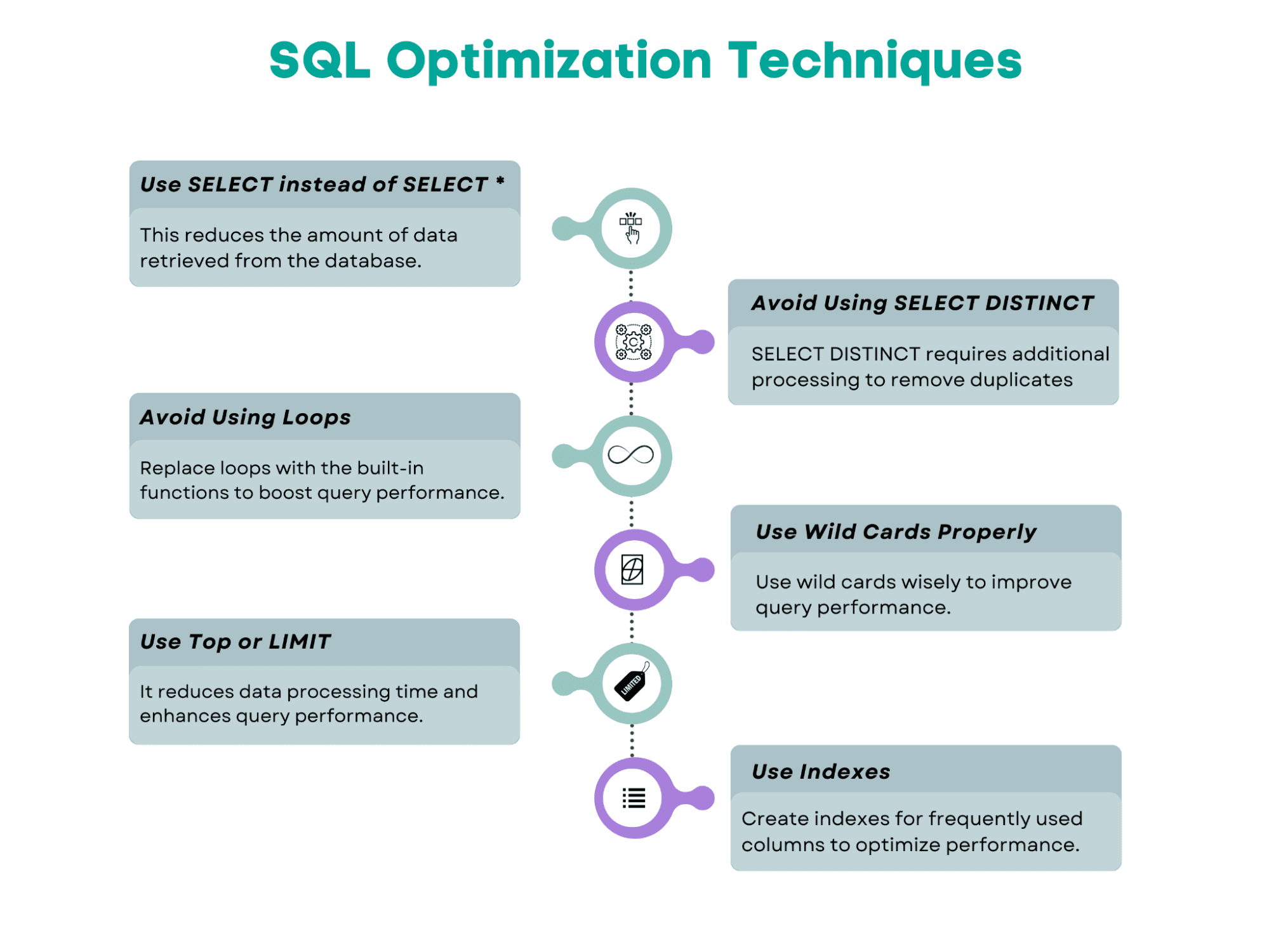
Here’s the overview of the SQL query optimization techniques we’ll cover in this article.

How to Optimize SQL Queries for Faster Data Retrieval
Image by Author

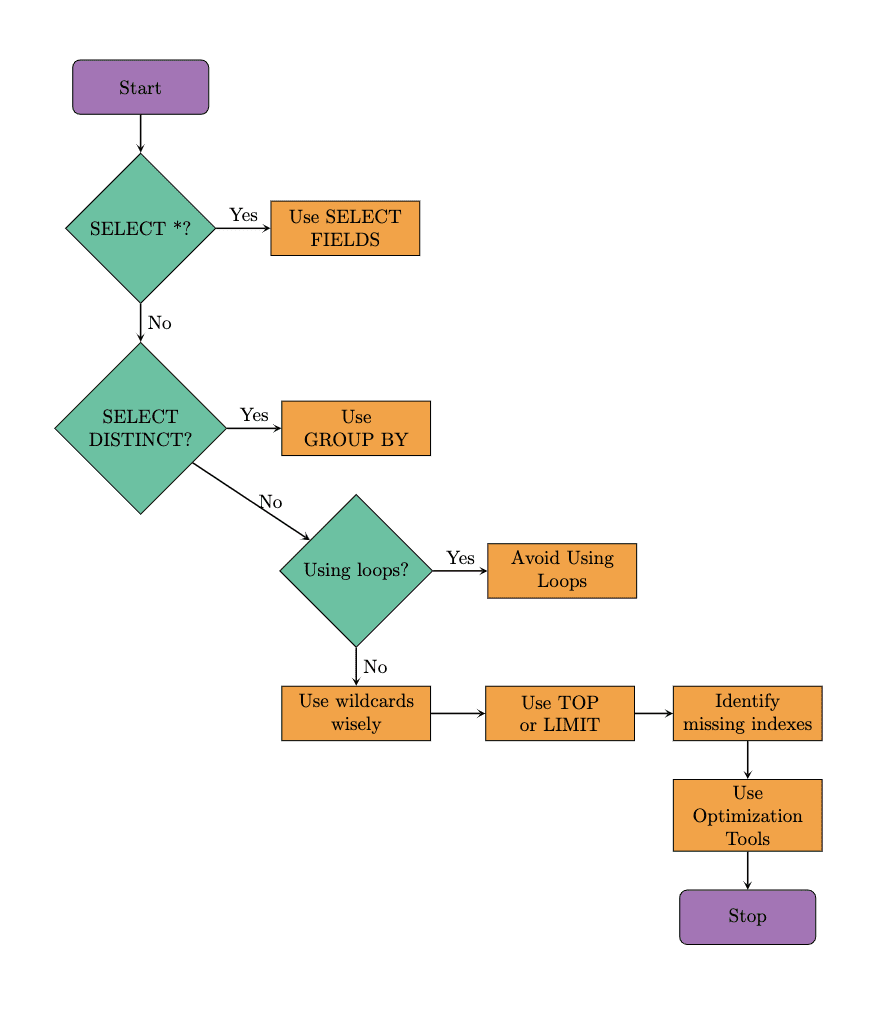
Here's the flowchart that shows the suggested steps to follow when optimizing the SQL query. We will follow the same approach in our examples. It's worth noting that optimization tools can also help improve query performance. So, let's explore these techniques by beginning with the well-known SQL command, SELECT.

How to Optimize SQL Queries for Faster Data Retrieval
Image by Author

Use SELECT With Specified Fields Instead of SELECT *

When you use SELECT *, it will return all the rows and all the columns from the table(s). You need to ask yourself whether you really need that.

Instead of scanning the whole database, use the specific fields after SELECT.

In the example, we will replace SELECT * with specific column names. As you will see, this will reduce the amount of data retrieved.

As a result, queries run more quickly since the database must obtain and provide the requested columns, not all of the table's columns.

This minimizes the I/O burden on the database, which is especially helpful when a table includes lots of columns or plenty of data rows.

Below is the code before the optimization.

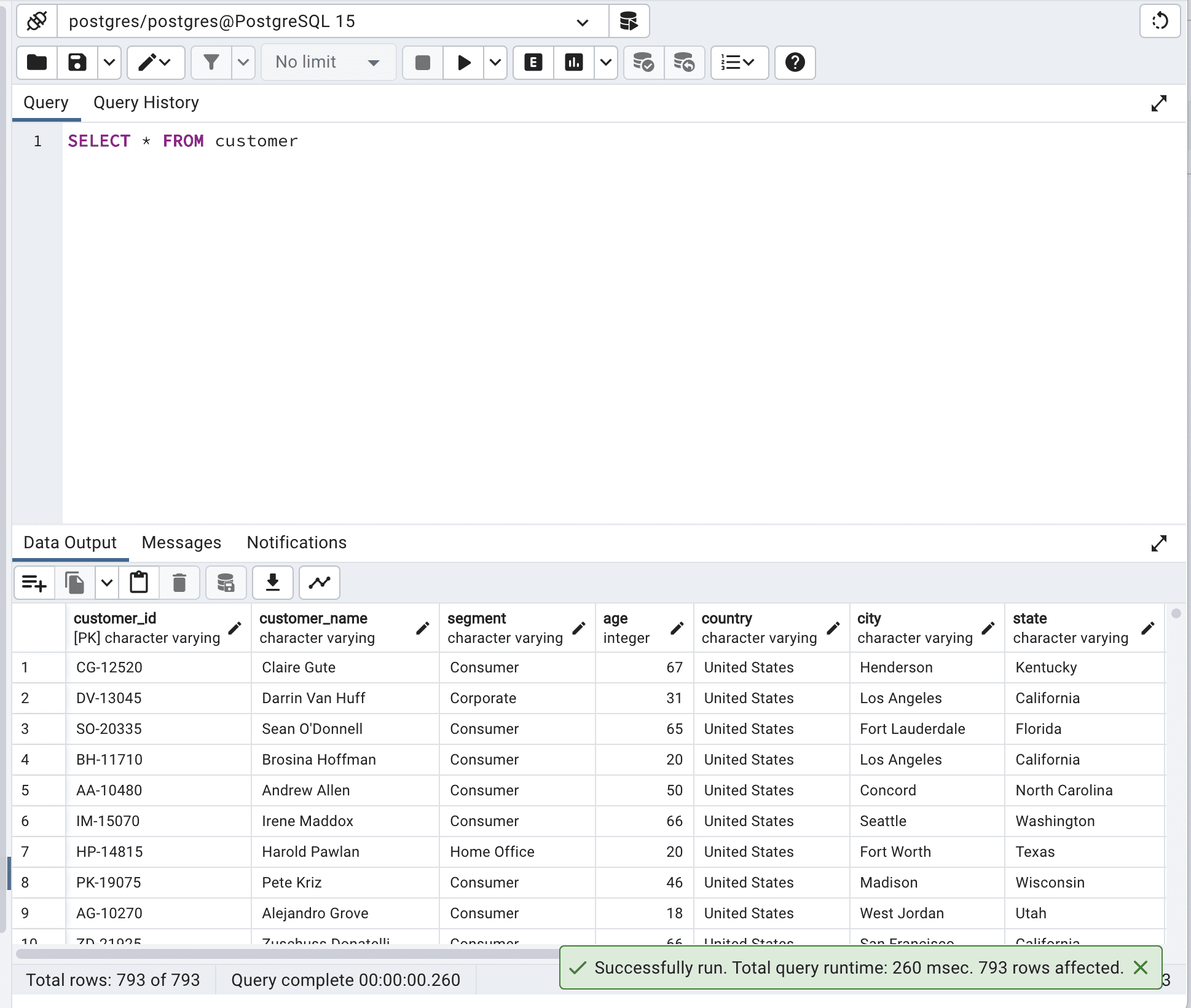
SELECT * FROM customer;

Here is the output.

How to Optimize SQL Queries for Faster Data Retrieval

The total query runtime is 260 msec. This can be improved.

To show you that, I will select only 3 different columns instead of selecting all.

You can select the column you need according to your project needs.

Here is the code.

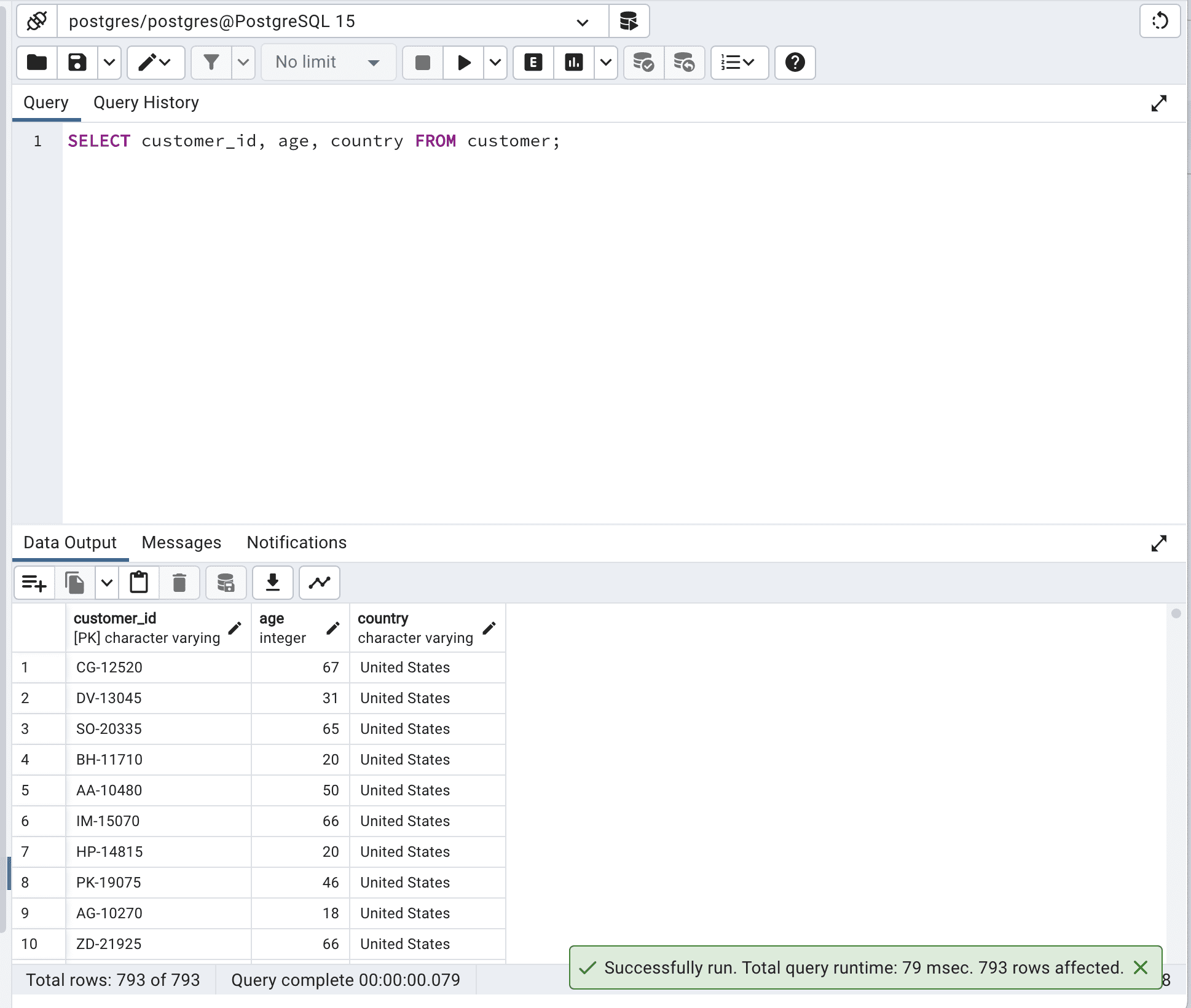
SELECT customer_id,          age,          country   FROM customer;

And this is the output.

How to Optimize SQL Queries for Faster Data Retrieval

As you can see, by defining the fields we want to select, we do not force the database to scan all data it has, so the run time is reduced from 260 to 79msec.

Imagine what the difference would be with millions or billions of rows. Or hundreds of columns.

Avoid Using SELECT DISTINCT

SELECT DISTINCT is used to return unique values in a specified column. To do that, the database engine must scan the entire table and remove duplicate values. In many cases, using an alternative approach like GROUP BY can lead to better performance due to reducing the number of data processed.

Here is the code.

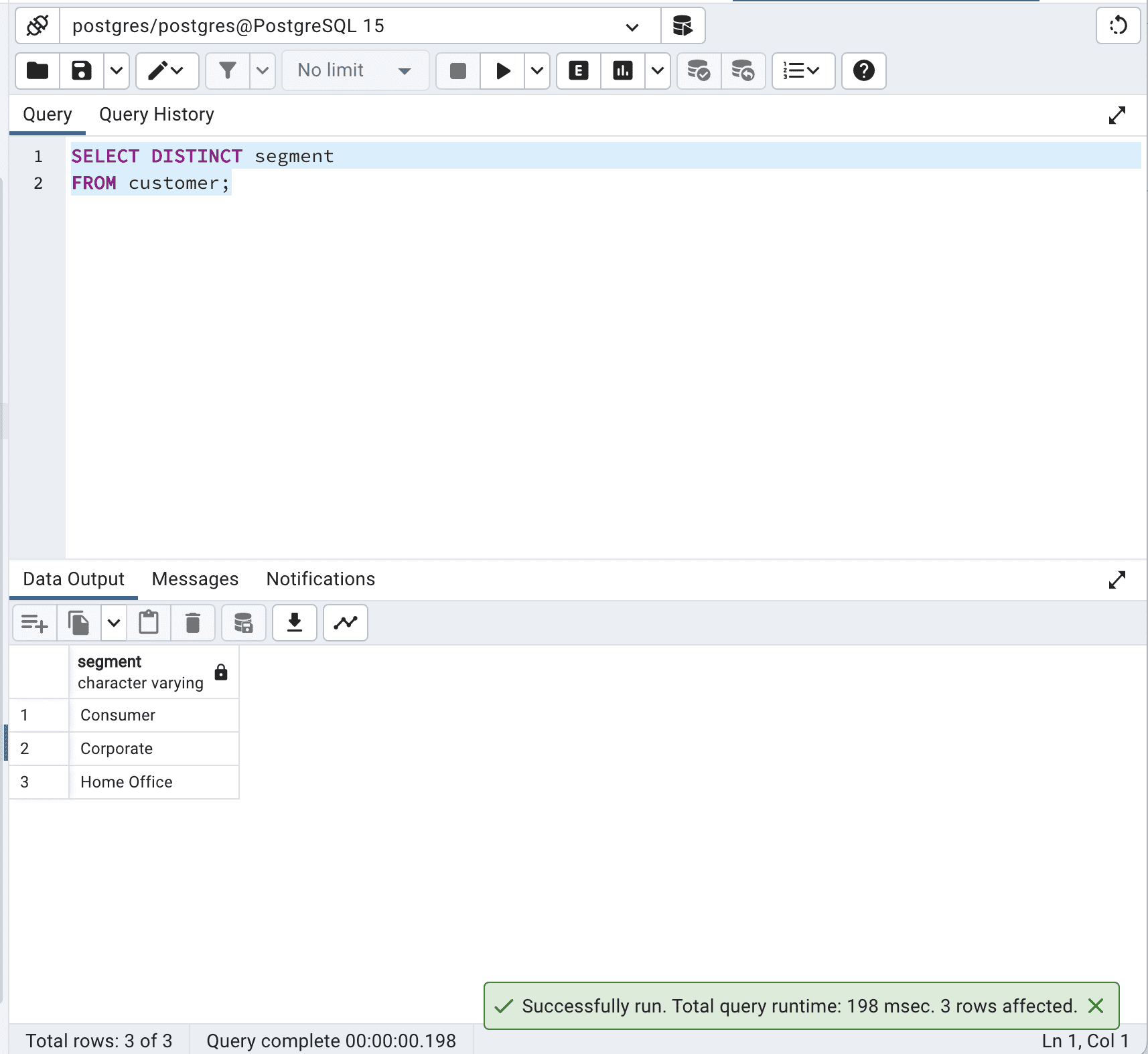
SELECT DISTINCT segment   FROM customer;

Here is the output.

How to Optimize SQL Queries for Faster Data Retrieval

Our code?? retrieves the unique values in the segment column from the customer table. The database engine must process all records in the table, identify duplicate values, and return only unique values. This can be costly in terms of time and resources, particularly for large tables.

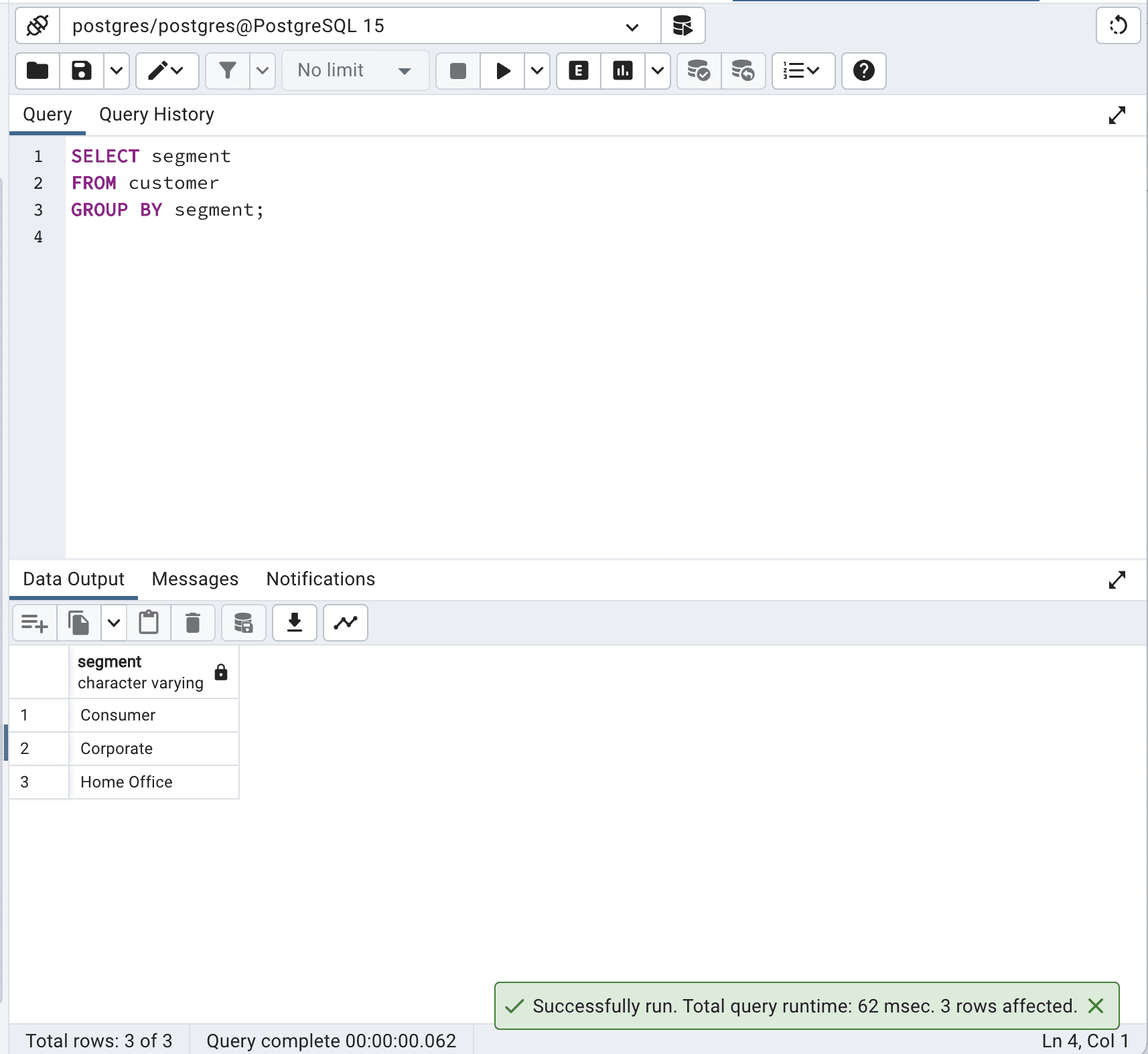
In the alternative version, the following query retrieves the unique values in the segment column by using a GROUP BY clause. The GROUP BY clause groups the records based on the specified column(s) and returns one record for each group.

Here is the code.

SELECT segment  FROM customer  GROUP BY segment;

Here is the output.

How to Optimize SQL Queries for Faster Data Retrieval

In this case, the GROUP BY clause effectively groups the records by the segment column, resulting in the same output as the SELECT DISTINCT query.

By avoiding SELECT DISTINCT and using GROUP BY instead, you can optimize SQL queries and reduce the total query time from 198 to 62 msec which is more than 3 times faster.

Avoid Using Loops

Loops might cause your query to be slower since they force the database to go through the records one by one.

When possible, use built-in operations and SQL functions, which can take advantage of database engine optimizations and process data more efficiently.

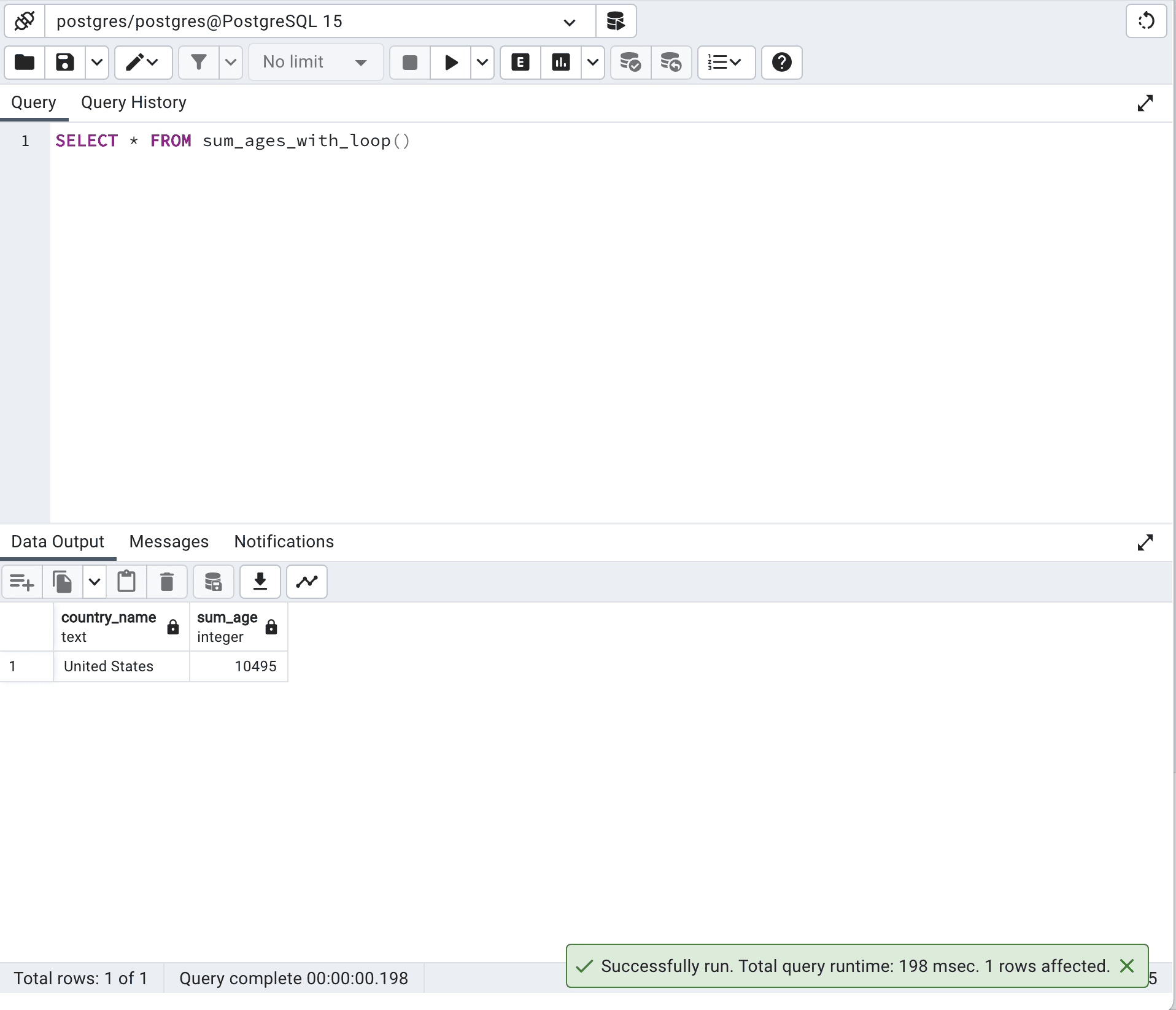
Let’s define a custom function with a loop.

CREATE OR REPLACE FUNCTION sum_ages_with_loop() RETURNS TABLE (country_name TEXT, sum_age INTEGER) AS $$  DECLARE      country_record RECORD;      age_sum INTEGER;  BEGIN      FOR country_record IN SELECT DISTINCT country FROM customer WHERE segment = 'Corporate'      LOOP          SELECT SUM(age) INTO age_sum FROM customer WHERE country = country_record.country AND segment = 'Corporate';          country_name := country_record.country;          sum_age := age_sum;          RETURN NEXT;      END LOOP;  END;  $$ LANGUAGE plpgsql;

The code above uses a loop-based approach to calculate the sum of ages for each country where the customer segment is 'Corporate'.

It first retrieves a list of distinct countries and then iterates through each country using a loop, calculating the sum of the ages of customers in that country. This approach can be slow and inefficient, as it processes the data row by row.

Let’s now run this function.

SELECT *   FROM sum_ages_with_loop()

Here is the output.

How to Optimize SQL Queries for Faster Data Retrieval

The runtime with this approach is 198 milliseconds.

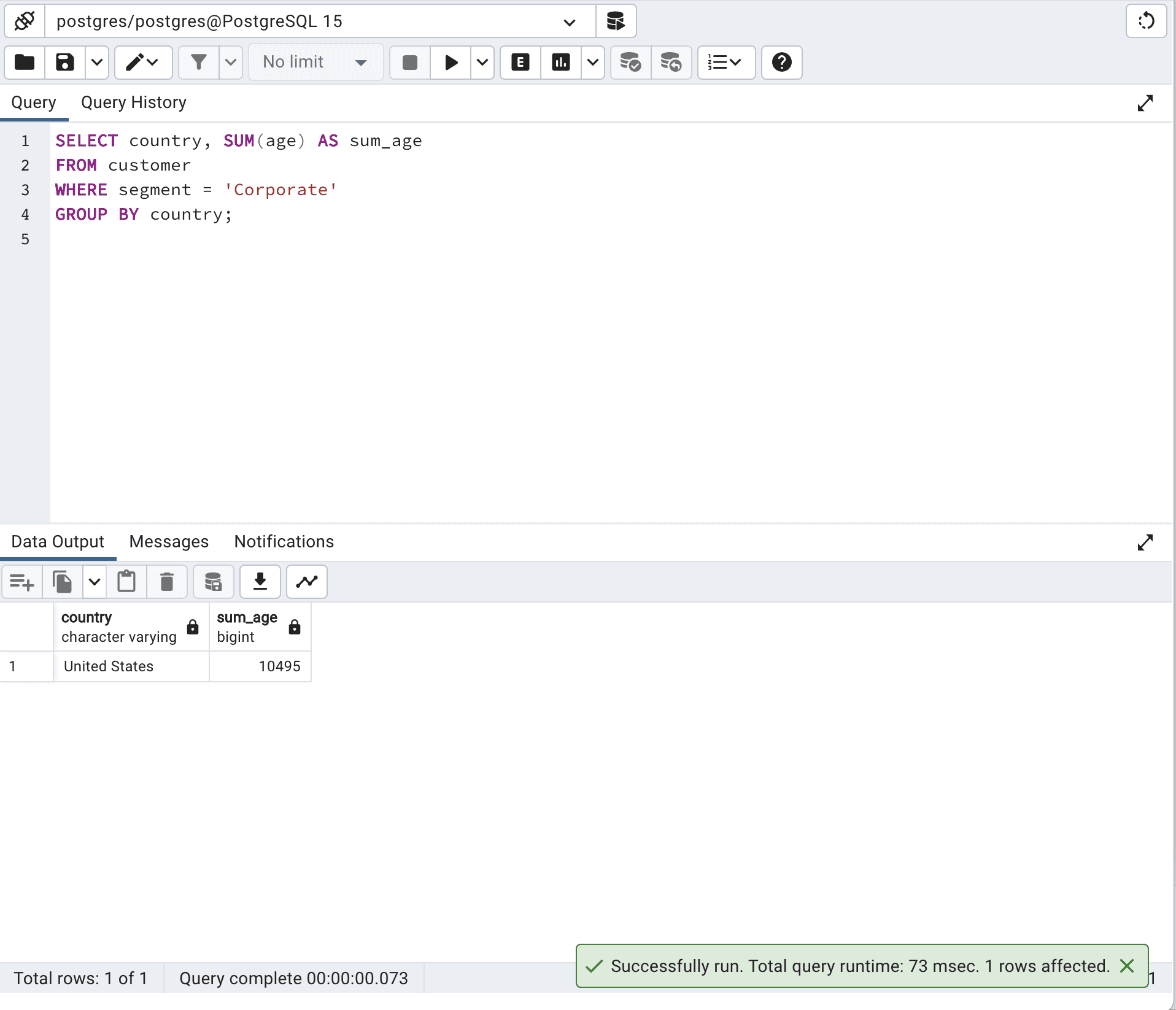
Let’s see our optimized SQL code.

SELECT country,          SUM(age) AS sum_age  FROM customer  WHERE segment = 'Corporate'  GROUP BY country;

Here is its output.

How to Optimize SQL Queries for Faster Data Retrieval

In general, the optimized version using a single SQL query will perform better, as it takes advantage of the database engine's optimization capabilities.

In order to get the same result in our first code, we use a loop in a PL/pgSQL function, which is often slower and less effective than doing it with a single SQL query. And it forces you to write much more lines of code!

Use Wild Cards Properly

The proper use of wildcards is vital for optimizing SQL queries, especially when it comes to matching strings and patterns.

Wildcards are special characters used in SQL queries to find specific patterns.

The most common wildcards in SQL are “%” and ” _”, where “%“ represents any sequence of characters and “_” represents a single character.

Using wildcards wisely is important because improper usage can lead to performance issues, especially in large databases.

However, using them efficiently can greatly improve the performance of string-matching and pattern-matching queries.

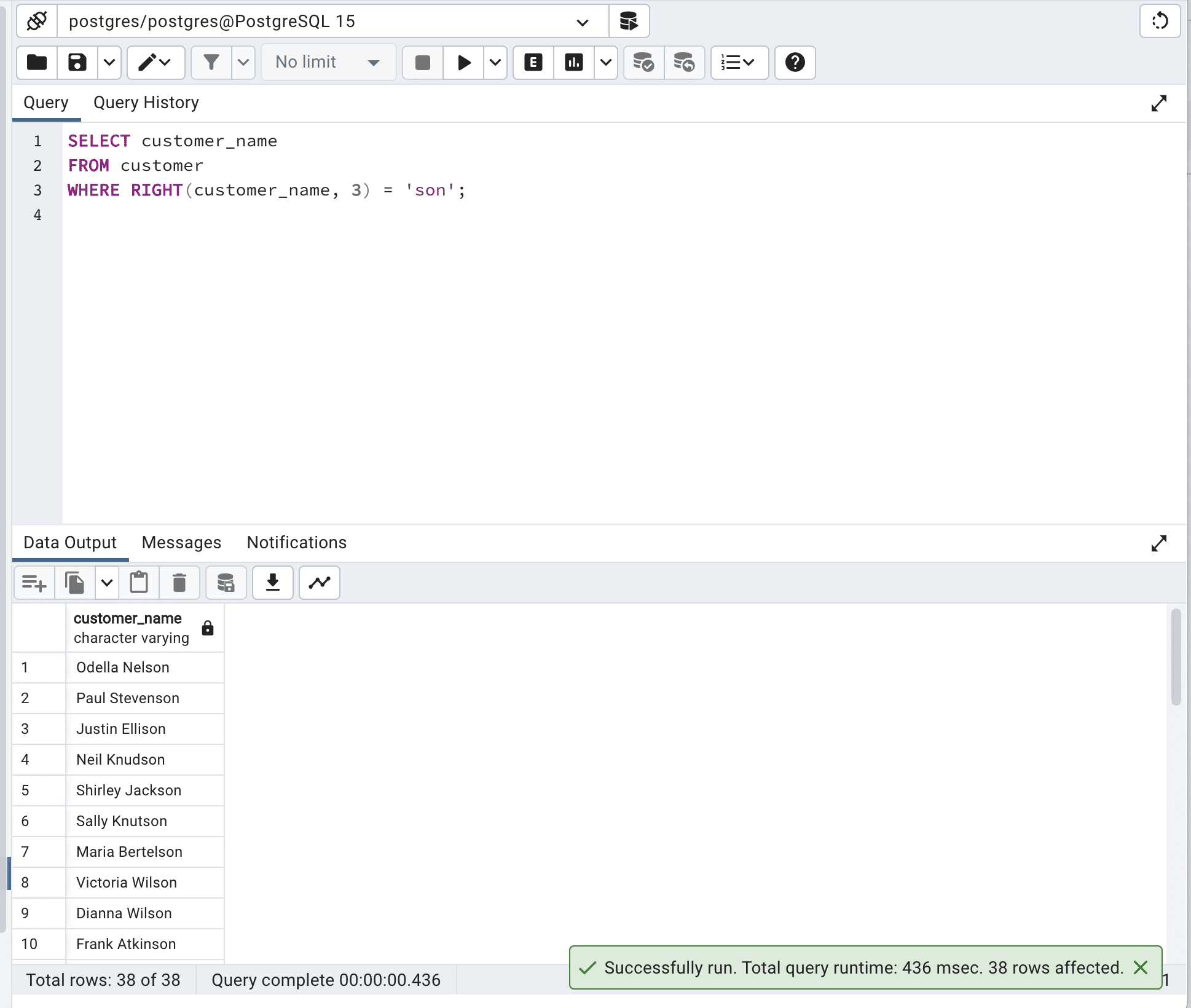
Now let’s see our example.

This query uses the RIGHT() function to extract the last three characters of the customer_name column and then checks if it equals 'son'.

SELECT customer_name  FROM customer  WHERE RIGHT(customer_name, 3) = 'son';

Here is the output.

How to Optimize SQL Queries for Faster Data Retrieval

Although this query achieves the desired result, it is not that efficient because the RIGHT() function has to be applied to every row in the table.

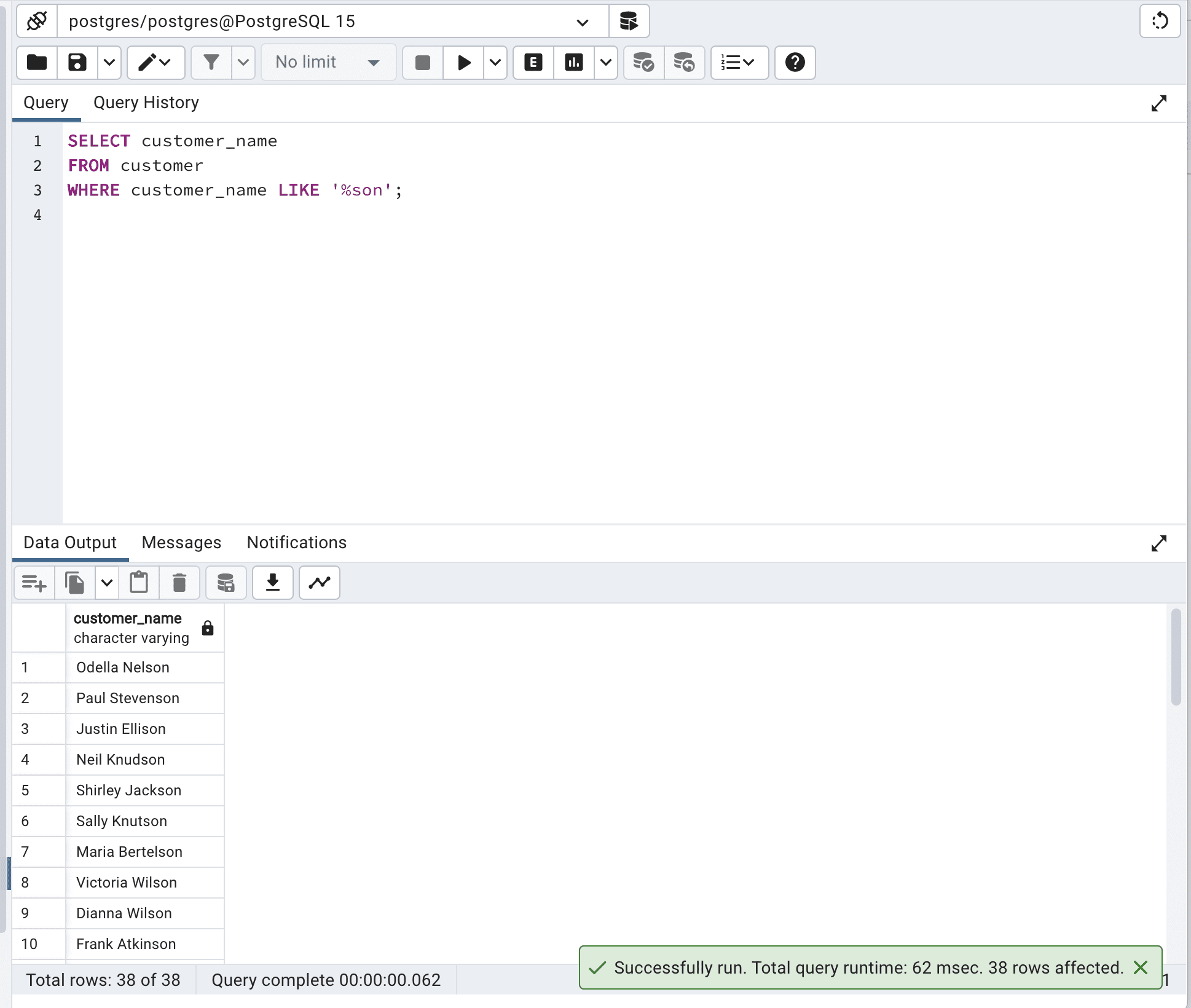
Let’s optimize our code by using wildcards.

SELECT customer_name  FROM customer  WHERE customer_name LIKE '%son';

Here is the output.

How to Optimize SQL Queries for Faster Data Retrieval

This optimized SQL query uses the LIKE operator and the wildcard “%” to search for records where the customer_name column ends with 'son'.

This approach is more efficient because it takes advantage of the database engine's pattern-matching capabilities, and it can make better use of indexes if available.

And as we can see, the total query time is reduced from 436 msec to 62 msec, which is almost 7 times faster.

Use Top or LIMIT to Limit the Number of Sample Results

Using TOP or LIMIT to limit the sample results is vital for optimizing SQL queries, particularly when dealing with large tables.

These clauses allow you to retrieve only a specified number of records from a table rather than all the records, which can be beneficial for performance.

Now, let’s retrieve all information from the customer table.

SELECT *  FROM customer

Here is the output.

How to Optimize SQL Queries for Faster Data Retrieval

When dealing with larger tables, this operation can increase I/O and network latency, which might decrease your SQL query performance.

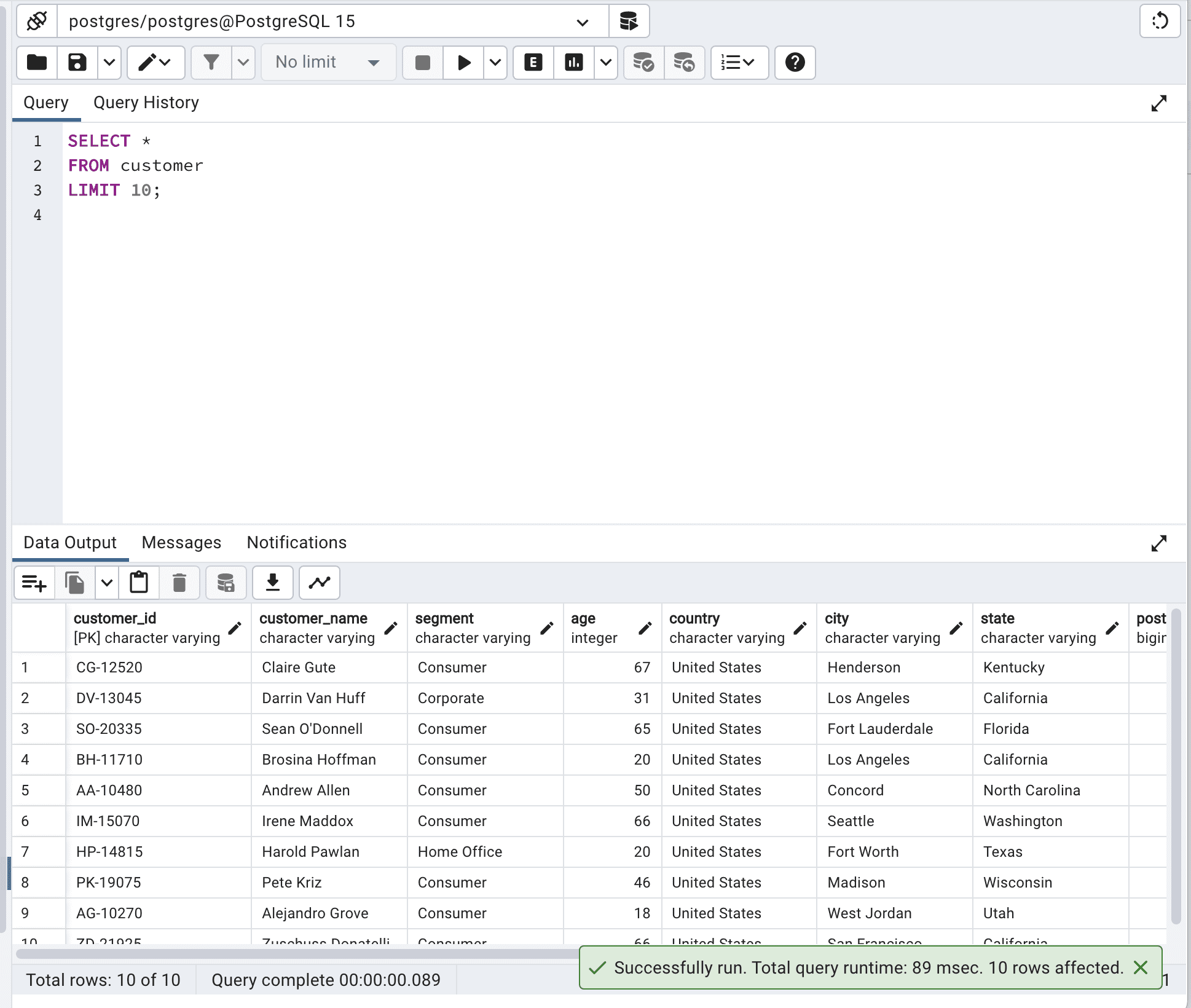
Now let’s optimize our code by limiting the output to 10.

SELECT *  FROM customer  LIMIT 10;

Here is the output.

How to Optimize SQL Queries for Faster Data Retrieval

By limiting output, you will reduce network latency and memory usage and improve response time, especially with larger tables. In our example, after SQL query optimization, the total query runtime decreased from 260msec to 89msec.

So our query becomes almost 3 times faster.

Use Indexes

This time, we will Identify and create appropriate indexes for the columns used in the WHERE, JOIN, and ORDER BY clauses to improve query performance.

By indexing frequently accessed columns, the database can quicker retrieve data.

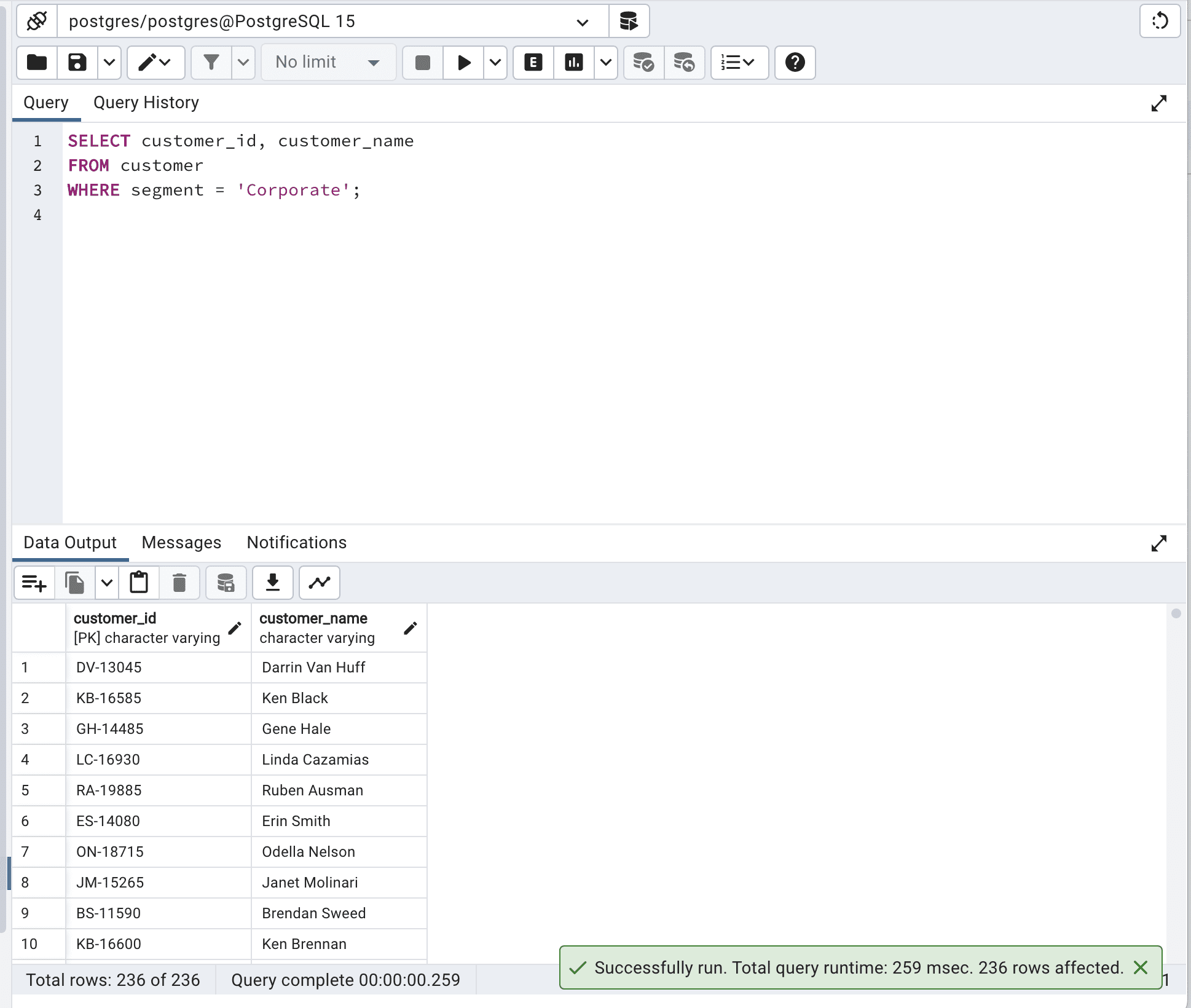
Now, let’s run the following query first.

SELECT customer_id,          customer_name  FROM customer  WHERE segment = 'Corporate';

Here is the output.

How to Optimize SQL Queries for Faster Data Retrieval

Our query runtime is 259 msec.

Let’s try to improve on that by creating the index.

CREATE INDEX idx_segment ON customer (segment);

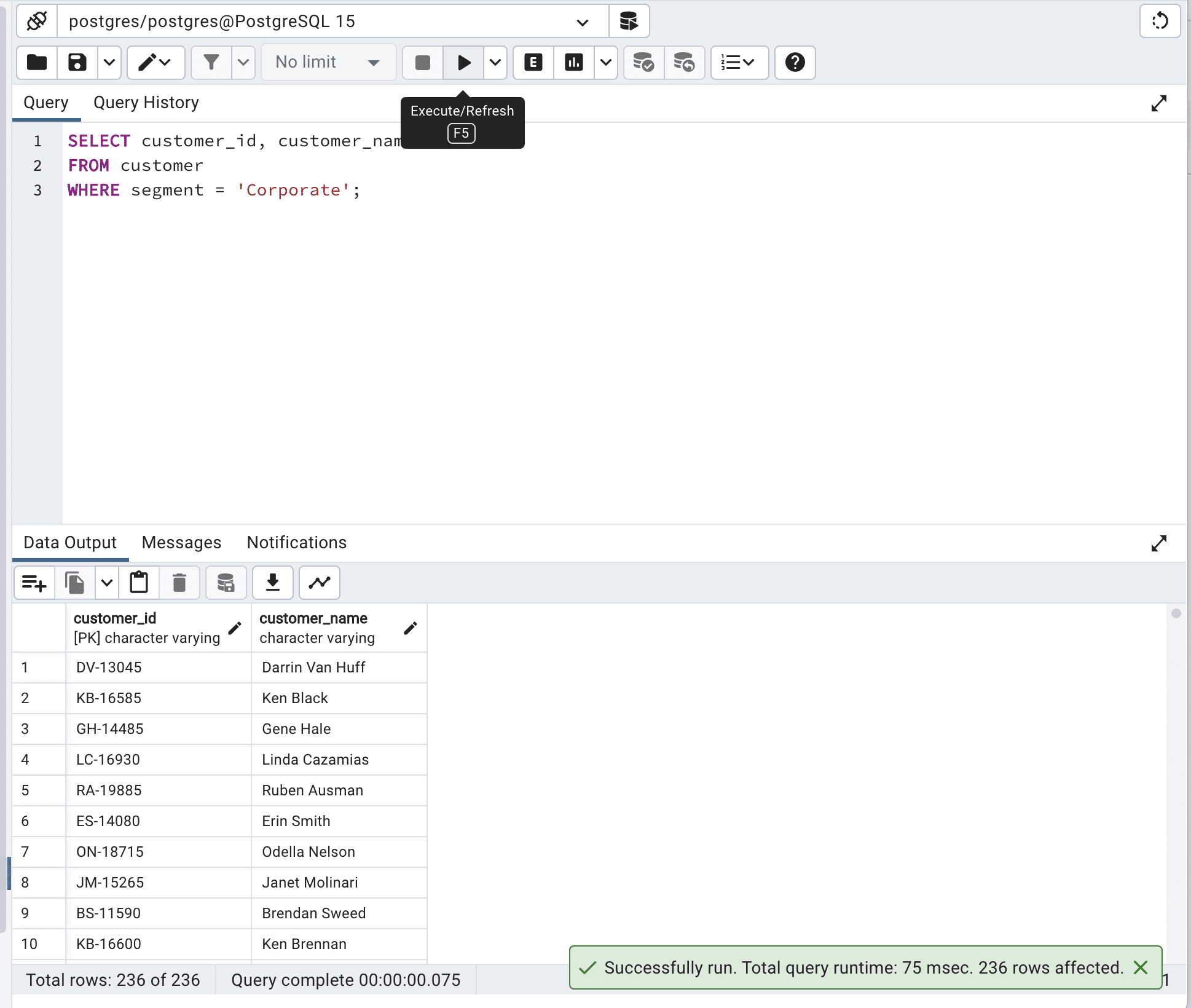
Great, now let’s run our code again.

SELECT customer_id,          customer_name  FROM customer WITH (INDEX(idx_segment))  WHERE segment = 'Corporate';

Here is the output.

How to Optimize SQL Queries for Faster Data Retrieval

By using idx_segment in INDEX(), the database engine was able to efficiently search through the customer table based on the segment column, making the query run faster – it reduced the total query time from 259 msec. to 75 msec.

Bonus Section: Use SQL Query Optimization Tools

Due to the complexity of long codes and highly complex queries, you might consider using query optimization tools.

These tools can analyze your query execution plans, identify missing indexes, and suggest alternative query structures to help optimize your queries. Some popular query optimization tools include:

  1. SolarWinds Database Performance Analyzer: This tool helps you keep an eye on and improve database performance. It shows you problems with queries and how they are run. It works with different database systems like SQL Server, Oracle, and MySQL.

You can find it here.

  1. SQL Query Tuner for SQL Diagnostic Manager: This tool has advanced features for making queries work better, like performance tips, index checking, and showing how queries are run. It helps you make SQL queries better by finding and fixing issues.
  2. SQL Server Management Studio (SSMS): SSMS has built-in tools for checking performance and improving queries, like Activity Monitor, Execution Plan Analysis, and Index Tuning Wizard.
  3. EverSQL: EverSQL is an online tool that automatically improves your queries by looking at the database structure and how queries are run. It gives you advice and rewrites your SQL queries to make them work faster.

Using SQL query optimization tools and resources is vital to improving your queries. With these tools, you can learn how your queries work, find issues, and use best practices to get data faster and improve your applications.

If you want to simplify your complex SQL queries, look at this “How to Simplify Complex SQL Queries”.

Final Notes

The changes we made by optimizing the SQL queries above might seem insignificant due to their scale(ms). But as the amount of data you work with grows, these milliseconds will increase to seconds, minutes, and possibly even hours. You’ll realize then that these SQL query optimization techniques are highly important.

If you seek more, here are the top 30 SQL Query Interview Questions, which will help those who want to also prepare for an interview when learning.

Thanks for reading!
Nate Rosidi is a data scientist and in product strategy. He's also an adjunct professor teaching analytics, and is the founder of StrataScratch, a platform helping data scientists prepare for their interviews with real interview questions from top companies. Connect with him on Twitter: StrataScratch or LinkedIn.

More On This Topic

  • 4 Useful Intermediate SQL Queries for Data Science
  • 15 Python Snippets to Optimize your Data Science Pipeline
  • Book Metadata and Cover Retrieval Using OCR and Google Books API
  • 5 Tricky SQL Queries Solved
  • KDnuggets News, December 7: Top 10 Data Science Myths Busted • 4 Useful…
  • Top 10 MLOps Tools to Optimize & Manage Machine Learning Lifecycle

Salesforce launches AI Cloud to bring models to the enterprise

Salesforce launches AI Cloud to bring models to the enterprise Kyle Wiggers 7 hours

Salesforce is launching a new suite of products aimed at bolstering its position in the ultra-competitive AI space.

Called AI Cloud, the suite, which includes tools designed to deliver “enterprise ready” AI, is Salesforce’s latest cross-disciplinary attempt to augment its product portfolio with AI capabilities. In many ways, it’s a continuation of the generative AI initiative that the company launched in March, which aims to incorporate generative AI across the whole of the Salesforce platform.

“It’s really about bringing generative AI in a trusted fashion to the enterprise,” Adam Caplan, SVP of emerging technology at Salesforce, told TechCrunch in a phone interview. “We’re moving incredibly fast to leverage the history we have in AI and build this into into our stack in a trusted fashion.”

AI Cloud hosts and serves AI models — specifically text-generating models — from a range of partners including Amazon Web Services, Anthropic, Cohere and OpenAI on Salesforce’s cloud infrastructure. First-party models are available from Salesforce’s AI research division, powering capabilities like code generation and business process automation. Or customers can bring a custom-trained model to the platform while storing data on their own infrastructure.

The conceit isn’t far off from Amazon’s recently-launched Bedrock, which provides a family of models trained in-house by AWS as well as pretrained models from startup partners.

“What we’re doing is we’re basically taking an ecosystem approach — an open approach — and working with the best model for the best use case,” Caplan said.

Generative AI everywhere

The Salesforce-built models in AI Cloud power new capabilities in Salesforce’s flagship products, including Data Cloud, Tableau, Flow and MuleSoft. There’s nine models in total: Sales GPT, Service GPT, Marketing GPT, Commerce GPT, Slack GPT, Tableau GPT, Flow GPT and Apex GPT.

Sales GPT can quickly auto-craft personalized emails, while Service GPT can create service briefings, case summaries and work orders based on case data and customer history. Marketing GPT and Commerce GPT, meanwhile, can generate audience segments for targeting and tailor product descriptions to each buyer based on their customer data, or provide recommendations like how to increase average order value.

Salesforce AI Cloud

Image Credits: Salesforce

Slack GPT, Tableau GPT, Flow GPT and Apex GPT are a bit more specialized in nature. Slack GPT and Flow GPT let users build no-code workflows that embed AI actions, whether in Slack or Flow. Tableau GPT can generate visualizations based on natural language prompts, and surface data insights. As for Apex GPT, it can scan for code vulnerabilities and suggest inline code for Apex, Salesforce’s proprietary programming language.

Several of the models are live as of today, including Slack GPT, Commerce GPT, Sales GPT and Service GPT. The rest — minus Flow GPT, which lands in October — are scheduled to arrive as early as this month.

Salesforce AI Cloud

Image Credits: Salesforce

One glaring omission in Cloud AI is an image generation model along the lines of DALL-E 2 and Stable Diffusion. Caplan said that it’s in the works, acknowledging the usefulness for creating marketing campaigns, landing pages emails and more. But he added that there’s a range of barriers — from copyright to toxicity — Salesforce aims to overcome before it releases it.

Trust layer

So what else sets AI Cloud apart? Well, Salesforce is touting Einstein Trust Layer, a new AI moderation and redaction service. Similar to Nvidia’s NeMo Guardrails, Einstein Trust Layer attempts to prevent text-generating models from retaining sensitive data, such as customer purchase orders and phone numbers.

Einstein Trust Layer’s aimed at companies with strict compliance and governance requirements that’d normally preclude them from using generative AI tools, Caplan says. Certainly, it’s timely. A growing list of firms including Amazon, Goldman Sachs, and Verizon have banned or restricted the use of generative AI like ChatGPT, citing privacy risks.

“The number one question from every customer is around trust and security and how we can enable them as enterprise to approach these new technologies — this new world — in a safe fashion,:” Caplan said.

Einstein Trust Layer sits between an app or service and a text-generating model, detecting when a prompt might contain sensitive information and automatically removing it on the backend before it reaches the model. The service can also filter for toxicity (e.g., sexism, racism, and other forms of discrimination), whether in a prompt or in the response from a model.

Users who link models from third-party platforms such as Amazon SageMaker or Google’s Vertex AI to AI Cloud can still tap Einstein Trust Layer, Salesforce says. And for OpenAI customers, Salesforce says that it’s established a “trust partnership” with OpenAI to deliver joint content moderation using OpenAI’s safety tools in conjunction with Einstein Trust Layer.

Moderating models and prompts is tricky business, and Salesforce has plenty in the way of competition. Microsoft, which just last month debuted a new AI service to moderate text and images, including from models, offers model customization options similar to Einstein Trust Layer via its Azure OpenAI Service (albeit only for OpenAI models).

Perhaps that’s why, to further differentiate AI Cloud from the other managed AI service offerings out there, Salesforce is launching an array of prompt “templates” and prompt template building tools. Salesforce says the template’s “optimized” AI prompts use “harmonized” data to ground model-generated outputs in the context of a company’s needs, influencing the quality and relevance of the generated content.

It’s in the interest of reducing the time and cost to adapt a generative AI model in AI Cloud to a particular use case, Caplan said. For example, a customer could create a template that “instructs” a model to word email responses in a way that’s aligned with a house style, or that pulls in specific customer information from a Salesforce database.

“It’s really a fundamental shift in terms of the quality of an email and the difference between more generic copy versus copy grounded in the customer relationship management data,” Caplan said.

Of course, prompt engineering isn’t a new science. And other generative AI platforms, like Writer, Jasper and even Grammarly, provide ways to steer models’ responses toward certain styles. Arguably the real value proposition here — at least the one Salesforce is underlining — is the ease with which Salesforce data can be connected to (and manipulated by) a model.

For customers already entrenched in the Salesforce product ecosystem, it’s probably a compelling sales pitch.

“AI plus data plus customer relationship management is a really powerful combination,” Caplan said. “We can continue to make these prompts smarter and better. And that’s going to be really powerful, as well as training the models and delivering more value to our customers and similar things across the stack.”

AI Cloud will launch sometime this year, Salesforce says, with Einstein Trust Layer set to become generally available later this month.