Cloud Data Systems and Edge AI Make a Major Impact on Today’s Data Science

Silhouette of a digital brain on abstract futuristic background.
Image: kras99/Adobe Stock

Gartner outlines the top trends in machine learning and data science, including the impact of generative AI.

Investors will pour more than $10 billion into AI startups that use foundation models, tech consultancy Gartner found in its August report on top trends in data science and machine learning. In particular, business leaders are interested in edge and data-centric generative AI, plus using generative AI responsibly.

Jump to:

  • Cloud-native solutions take over from self-contained software
  • Edge and AI will move analysis toward IoT endpoints
  • Data-centric AI can include training on synthetic data
  • Responsible AI follows the trend toward regulation
  • AI investment continues to rise

Cloud-native solutions take over from self-contained software

By 2024, 50% of new system deployments in the cloud will reside entirely within a cloud data ecosystem as opposed to manually integrated point solutions, Gartner predicted. Organizations should look out for converged data and analytics platforms that can solve problems over a wide swath of distributed data. That means businesses will continue to see more cloud-native solutions as opposed to self-contained software or blended deployments.

SEE: Explore the best data science tools for any use case (TechRepublic)

Edge and AI will move analysis toward IoT endpoints

“As machine learning adoption continues to grow rapidly across industries, DSML [data science and machine learning] is evolving from just focusing on predictive models toward a more democratized, dynamic and data-centric discipline,” said Peter Krensky, director analyst at Gartner, at the Gartner Data & Analytics Summit on August 1, as quoted in a press release. “This is now also fueled by the fervor around generative AI. While potential risks are emerging, so too are the many new capabilities and use cases for data scientists and their organizations.”

Businesses are keeping an eye on how AI training and inferencing can help transition data analytics to edge environments near IoT endpoints.

More than 55% of all data analysis by deep neural networks (which generative AI is based on) will occur at the point on the edge where the data is captured by 2025, Gartner said. That’s a large jump from the 10% that occurred in 2021, and speaks to the massive increase in AI adoption since the beginning of 2023.

Cloud and edge computing saw a $84 billion equity investment in 2022, McKinsey found in its 2023 tech trends report.

Data-centric AI can include training on synthetic data

Data-centric AI performs tasks such as AI-specific data management, synthetic data and data labeling to solve problems in accessibility, volume, privacy, security, complexity and scope.

Generative AI can also be used to create synthetic data with which to train other applications. Use cases such as simulating real conditions, predicting future scenarios and removing some risk from AI will boost the amount of synthetic data in industry to 60% by 2024, Gartner predicts. That’s up from just 1% in 2021, likely driven again by the commercialization of generative AI in late 2022 and early 2023.

Responsible AI follows the trend toward regulation

Responsible AI is a philosophy that takes into account business and societal value, risk, trust, transparency and accountability, in regards to generative AI. Gartner pointed out that “The concentration of pretrained AI models among 1% of AI vendors by 2025 will make responsible AI a societal concern” – meaning that a problem in one model could rapidly spread across a massive number of clients. Concerns include generative AI introducing factual mistakes into content — accidentally because of hallucinations or on purpose as part of a planned misinformation campaign. People are also concerned about AI introducing bias into content or plagiarizing copyrighted work.

Some organizations, including Salesforce, support recent conversations about government regulation on generative AI.

“Salesforce supports tailored, risk-based AI regulation that differentiates contexts and uses of the technology and ensures the protection of individuals, builds trust, and encourages innovation,” Salesforce’s executive vice president of government affairs, Eric Loeb wrote in a blog post in July.

AI investment continues to rise

Overall, Gartner found that more than $10 billion will have been invested in AI startups that rely on foundation models by 2026. More organizations will implement AI solutions, and more industries will take AI technologies and AI-based businesses into account.

In a pool of 2,500 executive leaders in May, Gartner found that 45% said the hype around ChatGPT spurred them to put more money into generative AI. Most (70%) of those organizations are still exploring their options, while 19% have a pilot program or have put use of generative AI into production.

Person using a laptop computer.

Subscribe to the Daily Tech Insider Newsletter

Stay up to date on the latest in technology with Daily Tech Insider. We bring you news on industry-leading companies, products, and people, as well as highlighted articles, downloads, and top resources. You’ll receive primers on hot tech topics that will help you stay ahead of the game.

Delivered Weekdays Sign up today

Smartphone Sales Slump Hits Qualcomm Hard, Company to Cut Jobs

Qualcomm Snapdragon 888

Smartphone sales are facing a major decline, and this has affected Qualcomm, which supplies components for these devices. In the third quarter of 2023 (Qualcomm’s fiscal year is October-September), the company experienced a 25 percent drop in handset chip sales compared to the previous year, leading to a significant 52 percent decrease in net income year over year.

Their earnings per share were $1.87, and their revenue was $8.44 billion, but experts thought it would be a bit higher at $1.81 and $8.5 billion. Because of this, the company’s stock dropped by 8.5%. Some big banks changed their opinions on the company’s stock after the report: Deutsche Bank downgraded it from “buy” to “hold,” while JPMorgan and UBS kept their ratings the same.

In response to the disappointing earnings, Qualcomm plans to reduce costs through layoffs. Earlier this year, 415 jobs were already cut at their San Diego headquarters, but recent filings reveal that more job cuts are on the horizon.

The company’s securities filing stated, “Given the continued uncertainty in the economy and demand, we expect to take additional restructuring actions.” The plans are likely to involve further workforce reductions, resulting in significant restructuring charges, which are expected to hit during the fourth quarter of fiscal 2023. Qualcomm aims to complete these additional actions by the first half of fiscal 2024. Currently, Qualcomm employs approximately 51,000 people.

Despite the challenges, Qualcomm’s CEO, Cristiano Amon, remains optimistic about the future. He believes the company’s AI work will help them leverage the upcoming on-device Gen AI opportunity. Qualcomm envisions allowing people to run AI-powered applications directly on their phones, hoping it will boost handset sales.

It’s important to note that Qualcomm’s struggles are reflective of the wider handset market. According to Counterpoint Research’s recent market report, the entire industry experienced a 24 percent decline. However, some companies managed to fare better, with Google being the big winner for the quarter, showing a 48 percent increase. On the other hand, Apple’s decline was comparatively less at only 6 percent. Notably, the companies that didn’t use Qualcomm’s SoCs performed better in this tough market environment.

The post Smartphone Sales Slump Hits Qualcomm Hard, Company to Cut Jobs appeared first on Analytics India Magazine.

Could C2PA Cryptography be the Key to Fighting AI-Driven Misinformation?

A colorful robot head representing generative AI.
Image: Sascha/Adobe Stock

With generative AI proliferating throughout the enterprise software space, standards are still being created at both governmental and organizational levels for how to use it. One of these standards is a generative AI content certification known as ​​C2PA.

C2PA has been around for two years, but it’s gained attention recently as generative AI becomes more common. Membership in the organization behind C2PA has doubled in the last six months.

Jump to:

  • What is C2PA?
  • How can AI content be marked?
  • The importance of watermarking to prevent malicious uses of AI

What is C2PA?

The C2PA specification is an open source internet protocol that outlines how to add provenance statements, also known as assertions, to a piece of content. Provenance statements might appear as buttons viewers could click to see whether the piece of media was created partially or totally with AI.

Simply put, provenance data is cryptographically bound to the piece of media, meaning any alteration to either one of them would alert an algorithm that the media can no longer be authenticated. You can learn more about how this cryptography works by reading the C2PA technical specifications.

This protocol was created by the Coalition for Content Provenance and Authenticity, also known as C2PA. Adobe, Arm, Intel, Microsoft and Truepic all support C2PA, which is a joint project that brings together the Content Authenticity Initiative and Project Origin.

The Content Authenticity Initiative is an organization founded by Adobe to encourage providing provenance and context information for digital media. Project Origin, created by Microsoft and the BBC, is a standardized approach to digital provenance technology in order to make sure information — particularly news media — has a provable source and hasn’t been tampered with.

Together, the groups that make up C2PA aim to stop misinformation, specifically AI-generated content that could be mistaken for authentic photographs and video.

How can AI content be marked?

In July 2023, the U.S. government and leading AI companies released a voluntary agreement to disclose when content is created by generative AI. The C2PA standard is one possible way to meet this requirement. Watermarking and AI detection are two other distinctive methods that can flag computer-generated images. In January 2023, OpenAI debuted its own AI classifier for this purpose, but then shut it down in July ” … due to its low rate of accuracy.”

Meanwhile, Google is trying to provide watermarking services alongside its own AI. The PaLM 2 LLM hosted on Google Cloud will be able to label machine-generated images, according to the tech giant in May 2023.

SEE: Cloud-based contact centers are riding the wave of generative AI’s popularity. (TechRepublic)

There are a handful of generative AI detection products on the market now. Many, such as Writefull’s GPT Detector, are created by organizations that also make generative AI writing tools available. They work similarly to the way the AI themselves do. GPTZero, which advertises itself as an AI content detector for education, is described as a “classifier” that uses the same pattern-recognition as the generative pretrained transformer models it detects.

The importance of watermarking to prevent malicious uses of AI

Business leaders should encourage their employees to look out for content generated by AI — which may or may not be labeled as such — in order to encourage proper attribution and trustworthy information. It’s also important that AI-generated content created within the organization be labeled as such.

Dr. Alessandra Sala, senior director of artificial intelligence and data science at Shutterstock, said in a press release, “Joining the CAI and adopting the underlying C2PA standard is a natural step in our ongoing effort to protect our artist community and our users by supporting the development of systems and infrastructure that create greater transparency and help our users to more easily identify what is an artist’s creation versus AI-generated or modified art.”

And it all comes back to making sure people don’t use this technology to spread misinformation.

“As this technology becomes widely implemented, people will come to expect Content Credentials information attached to most content they see online,” said Andy Parsons, senior director of the Content Authenticity Initiative at Adobe. ”That way, if an image didn’t have Content Credentials information attached to it, you might apply extra scrutiny in a decision on trusting and sharing it.”

Content attribution also helps artists retain ownership of their work

For businesses, detecting AI-generated content and marking their own content when appropriate can increase trust and avoid misattribution. Plagiarism, after all, goes both ways. Artists and writers using generative AI to plagiarize need to be detected. At the same time, artists and writers producing original work need to ensure that work won’t crop up in someone else’s AI-generated project.

For graphic design teams and independent artists, Adobe is working on a Do Not Train tag in its content provenance panels in Photoshop and Adobe Firefly content to ensure original art isn’t used to train AI.

Subscribe to the Innovation Insider Newsletter

Catch up on the latest tech innovations that are changing the world, including IoT, 5G, the latest about phones, security, smart cities, AI, robotics, and more.

Delivered Tuesdays and Fridays Sign up today

ChatGPT Plus can mine your corporate data for powerful insights. Here’s how

ChatGPT Plus

In this article, we're going to discuss some amazing things you can do with ChatGPT Plus and OpenAI's Code Interpreter add-on. But first, we need to discuss the giant purple elephant that's about to blink into the room.

Whatever you do, don't think about a giant purple elephant.

What is that giant purple elephant, you ask? Data security. Specifically, we need to discuss your (and, in this case, my) proprietary data. Here's the thing. For ChatGPT Plus to be able to mine your data, it has to have access to it.

Also: 7 advanced ChatGPT prompt-writing tips you need to know

See where I'm going here? To do everything I'm about to tell you about, I had to upload a 22,797 record data set exported from my company's servers. What will OpenAI and ChatGPT do with that data? I have no idea. That's a big risk.

In my case, it's more important to share the process of data analysis with you than safeguard my data. But that's my decision to make. It's my data. I know that I won't be violating any disclosure agreements, or putting my company at risk sharing it with ChatGPT (and, by extension due to this article, with you).

Also: How does ChatGPT actually work?

But if you use these techniques — and make no mistake, they are gobsmackingly powerful — you'll need to decide whether you and your company can comfortably share that data with an AI, and possibly, the rest of the entire internet.

What are we looking at?

Okay, now that we've discussed the purple elephant and you're no longer thinking about it, let's move on. The data set I'm using is uninstall data, gathered when users uninstall my WordPress plugins. Here's how that works.

When a user chooses to uninstall either Seamless Donations or My Private Site, they're presented with the above dialog. Data from each of those uninstalls is sent to my server, where it's stored.

Up until now, I've been able to see the data represented in tabular form, like this:

But that's about as good as it got. I never had the time to build any detailed analytics to chart or create pivot tables. So I could thumb back a few pages and get a rough feel for what was happening with recent uninstalls, but I had no thousand-foot view with which to derive overall insights.

Until now.

Preparing ChatGPT for your file upload

You'll need ChatGPT Plus, which is the version of ChatGPT available via a $20/month subscription.

Also: GPT-3.5 vs GPT-4: Is ChatGPT Plus worth its subscription fee?

You'll also need to go to your ChatGPT settings, and switch on Code Interpreter from the Beta Features tab:

And, finally, when you begin a session, you'll need to select GPT-4 and Code Interpreter. If you do all that, you're set.

The next thing you'll need to do is upload your data. By this point, I'm assuming you and your management team have thought through the giant purple elephant implications (okay, now I'm just doing it for the lulz), and you're okay with uploading data to Skynet. If so, here goes.

Click the plus sign at the bottom of your session screen:

Click Upload to upload your file. When you're done, hit return.

Once that was done, ChatGPT showed me how many records were in the file. To be sure it was able to read what I uploaded, I asked it to describe the fields.

Let's make data analytics magic together

When using Code Interpreter, ChatGPT is…chatty. It's like that enthusiastic geek friend who can't get to the point and has to share everything about how they got to the answer, before giving you an answer — or like that article writer who takes a few thousand words to give you essential backstory before finally getting to the few key "how to" instructions.

Also: How to use ChatGPT to write code

Because ChatGPT is so chatty, I'm going to show you screenshots of its answers. I'm going to cut out all the extended information provided before and after the answers. Otherwise, these screenshots would be a mile long.

And with that, I asked a simple question and got a clear answer.

How many records are there for each product?

To be fair, creating that calculation wouldn't be hard to code, but it would be time-consuming. ChatGPT? 15 seconds, on the fly. Boom.

What percentage of records contain comments?

Most users don't leave comments, and those that do are those who chose to select "Other" rather than one of the pre-defined uninstall reasons. Even so, check out what two simple questions were able to extract from all that raw data.

Examine all relevant comments and conduct a thematic analysis to identify common trends and patterns

For each product, describe the prevalent functionality issues described in the comments.

Based on what I know of my users, that analysis is pretty much spot-on. But more to the point, wow! I mean, this thing chugged through 22,797 records and presented overall issues. And it did it in less than a minute. Do you have any idea how long that would have taken to tabulate by hand or to code? Days.

Also: The best AI chatbots to try right now

To be fair, ChatGPT didn't just generate the most helpful answer right away. I had to negotiate with it, trying a bunch of different prompts until I found the ones that worked. But even so, that process took less than an hour vs. days.

Want some pie?

Next, I decided to see if I could get some charts. The uninstall reasons come in a set of pre-defined categories, so I wanted to see how they compared. I also wanted to see if the uninstall reasons changed over the years. I fed the AI this prompt:

For each product and then for each year, draw a pie chart of uninstall reason codes. Do not include other, nan, and temporary-deactivation. At the end, note any trends or insights observed.

I actually got back the eight pie charts I expected, but I'm only showing one here. Of particular note is that my data was recorded in 2020, 2021, 2022, and 2023. So why did ChatGPT talk about 2017 and 2018?

The charts were drawn for the correct years, and the data it showed makes sense. I first started using My Private Site because I wanted to block a test site I created for grad school from everyone but me and my professors. Once I graduated, I no longer needed the plugin for that purpose. A lot of people probably download it, and use it on a project basis.

The AI also generated some conclusions derived from the data.

The product-specific patterns it identified were fascinating. This is a large language model that theoretically knows nothing of my software apps. Yet its analysis was absolutely spot on. Those two patterns are directly reflective of what I've seen in managing those products.

They don't hate it. They really don't hate it.

Back in February, I shipped a major change in how Seamless Donations handles payment gateways. That version, 5.2, has worried me ever since. I haven't had a lot of user feedback, so it's been hard to tell if users liked it, or hated it, or if it caused them to abandon the product. Usually, when users dislike an upgrade, they're very vocal. But this was huge, and you could hear crickets.

Also: 6 helpful ways to use ChatGPT's Custom Instructions

One of the fields in the uninstall data set is for the version number. So I had ChatGPT do some sentiment analysis to see if users who uninstalled from 5.2 onward were doing so because of something new. Let's look at what the AI was able to tell me.

Comparing all data (including whatever comments are available), do users seem more or less satisfied with Seamless Donations from 5.2 onward? Provide details and insights.

Here's what I got back:

Take a moment to appreciate this. I wrote two sentences and the AI looked through 22,797 records and performed a very detailed analysis, all to conclude that users seemed to have a "slight increase in positive sentiment" in the new release.

Also: How does ChatGPT actually work?

If I'd had to write the code to do the amount of work the AI did, to process the amount of data involved, it would have taken forever. The level of effort in terms of programming I would have had to do to get this information would have been off the charts. Instead, all I had to do was write two prompts.

Sure, if I were a product manager for IBM, I might have been able to bring Watson into the picture and use data crunching teams to create a product analysis. But as one guy, writing two sentences, and getting insights as valuable as this — just wow!

I am blown away.

This is a real tool

There is no doubt room for concern about uploading corporate data to ChatGPT Plus. But for data where such concern doesn't exist (like my data set), this is no longer a novelty. It's not just a fun parlor trick.

Also: How I used ChatGPT to write a custom JavaScript bookmarklet

This is a real productivity tool. This is something we can use to get real work done, that accomplishes something we might not otherwise be able to do, and it does it well. Sure, there's always the concern that the results are wrong, but that's also a fair concern if someone had written a custom program to generate this information.

I paid twenty bucks and did all of this analysis in the space of a few hours (I was kicked off after having asked too many questions and had to come back a few hours later). The amount of work it would have taken and the expense it would have cost to get the insights I got from my sessions with ChatGPT are almost incalculable by comparison.

Also: How I used ChatGPT and AI art tools to launch my Etsy business fast

This is real, folks. Add it to your toolbox alongside your other powerful productivity tools. And try not to think about purple elephants.

Do you have data you feel safe sharing with ChatGPT? Do you have data where you really want it to provide you with some answers? Have you used ChatGPT in this way before? Discuss with us in the comments below.

You can follow my day-to-day project updates on social media. Be sure to subscribe to my weekly update newsletter on Substack, and follow me on Twitter at @DavidGewirtz, on Facebook at Facebook.com/DavidGewirtz, on Instagram at Instagram.com/DavidGewirtz, and on YouTube at YouTube.com/DavidGewirtzTV.

More on AI tools

Meta unveils new text-to-music AI tools to compete with Google’s

Soundwave illustration

Artificial intelligence has slowly crept into the music industry, creating viral songs, bringing back our favorite singers' voices from the dead, and even qualifying for a Grammy (sort of). Meta released new AI tools that will make using AI to generate music even easier.

Also: The best AI chatbots

On Tuesday, Meta revealed AudioCraft, a set of generative AI models that can create "high-quality and realistic" music from text, according to Meta.

Audiocraft consists of three of Meta's generative AI models: MusicGen, AudioGen, and EnCodec. Both MusicGen and AudioGen generate sound from text, with one generating music and the latter generating specific audio and sound effects.

You can visit MusicGen on HuggingFace and play with the demo. For the prompt you can describe any type of music you'd like to hear from any era. For example, Meta shares the example, "An 80s driving pop song with heavy drums and synth pads in the background".

EnCodec is an audio codec comprised of neural networks that compress audio and reconstruct the input signal. As part of the announcement, Meta released the most improved version of Encodec that allows for higher-quality music generations with fewer artifacts, according to the release.

Also: How to achieve hyper-personalization using generative AI platforms

Meta also released the pre-trained AudioGen models, which give users access to generate environmental sounds and sound effects such as a dog barking or floor creaking.

Lastly, Meta shared the weights and code for all three open-source models so researchers and practitioners can leverage it to train other models.

Meta shares in the release that AudioCraft has the potential to become a new type of standard instrument like synthesizers once became.

Also: 4 ways to detect generative AI hype from reality

"With even more controls, we think MusicGen can turn into a new type of instrument — just like synthesizers when they first appeared," said Meta.

This isn't the first generative AI model of this nature. Google released MusicLM in January, its own model that can transform text into music. A recent research paper revealed that Google is also using AI to reconstruct music from human brain activity.

How can Data Scientists use ChatGPT for developing Machine Learning Models?

ChatGPT for developing machine learning models

Introduction

Data Science is a vast field that incorporates several processes. From problem definition to data collection and data cleaning to data visualization, a lot of things are included in the entire data science project development process. Data Scientists are especially responsible for these tasks. They are expert professionals who are well-versed with various data science tools and techniques. And with their efforts, companies are able to drive their businesses ahead with data-driven decisions.

Now, with the introduction of LLMs like Bard and ChatGPT, the entire process has been effectively streamlined. These tools have alleviated the time spent by data scientists in rigorous coding. ChatGPT especially is a great assistance to data scientists in completing their data science projects. In this article let us see various ways in which ChatGPT can be utilized for developing machine learning models.

What is ChatGPT capable of when it comes to generating codes for data scientists?

ChatGPT is a great tool that is capable of producing texts, codes, and summarizing articles. Data Scientists can effectively leverage the power of this LLM tool to generate code snippets for common data science tasks such as loading data, preprocessing of data, model training, and evaluation.

ChatGPT can help data scientists in various processes including automating tasks, generating insights, and explaining models, as well as helping them enhance their learning experience in their data science career. Python and NumPy are some of the mandatory and top skills for data scientists. ChatGPT can help generate codes for these tools which they can practice for their data science or machine learning models.

What are the different ways in which data scientists can use ChatGPT for?

ChatGPT proves to be a valuable tool when it comes to assisting data scientists in various aspects of their work. Here are few ways:

  1. Quick Information Retrieval: ChatGPT can help data scientists to gather information quickly, it can help answer specific questions related to algorithms, and techniques ultimately saving a huge amount of time.
  2. Generating code snippets: This tool can help generate code snippets for the Python library for different processes including data segregation, filtration, etc.
  3. Hyperparameter tuning: ChatGPT can suggest hyperparameter settings for different machine learning models, especially when working with popular frameworks like Scikit-learn or TensorFlow.
  4. Data Preprocessing and Augmentation: ChatGPT can offer suggestions on data preprocessing techniques to handle missing values, feature scaling, one-hot encoding, and more. It can also provide ideas for data augmentation strategies to increase the diversity and size of the training dataset.
  5. Generating insights: A data scientist could use ChatGPT to generate insights from data. For example, they could ask ChatGPT to identify trends in a dataset, or to generate hypotheses about the relationship between two variables.

Few codes generated by ChatGPT for data scientists to build machine learning models

Here are examples of a few codes that data scientists can generate through ChatGPT to devise a machine-learning model:

  • This code will create a linear regression model from a dataset of features and labels. The model can then be used to predict the output for new data.

import numpy as np

import pandas as pd

from sklearn.linear_model import LinearRegression

def create_model(X, y):

“””Creates a linear regression model.”””

model = LinearRegression()

model.fit(X, y)

return model

def predict(model, X):

“””Predicts the output of the model.”””

return model.predict(X)

def main():

# Load the data

data = pd.read_csv(“data.csv”)

# Split the data into features and labels

X = data[[“feature1”, “feature2”]]

y = data[“label”]

# Create the model

model = create_model(X, y)

# Predict the output

predictions = predict(model, X)

# Print the predictions

print(predictions)

if __name__ == “__main__”:

main()

  • This code will create a deep learning model from a dataset of features and labels.

import tensorflow as tf

def create_model():

“””Creates a deep learning model.”””

model = tf.keras.Sequential([

tf.keras.layers.Dense(128, activation=”relu”),

tf.keras.layers.Dense(64, activation=”relu”),

tf.keras.layers.Dense(1, activation=”sigmoid”)

])

return model

def train_model(model, X, y):

“””Trains the model.”””

model.compile(optimizer=”adam”, loss=”binary_crossentropy”, metrics=[“accuracy”])

model.fit(X, y, epochs=10)

def predict(model, X):

“””Predicts the output of the model.”””

return model.predict(X)

if __name__ == “__main__”:

# Create the model

model = create_model()

# Train the model

train_model(model, X, y)

# Predict the output

predictions = predict(model, X)

# Print the predictions

print(predictions)

Conclusion

ChatGPT proves to be a valuable and versatile tool for data scientists during the development of machine learning models. It streamlines the process by providing quick information retrieval, generating code snippets, and offering hyperparameter tuning suggestions. Data preprocessing techniques and insights can be efficiently obtained through ChatGPT. By using ChatGPT, data scientists can save time and effort, and enhance their learning experience. The provided code examples demonstrate how ChatGPT can assist in building both linear regression and deep learning models. With ChatGPT’s support, data scientists can accelerate their workflow and make more informed decisions throughout the data science project development process.

Uber is working on its own AI chatbot, reveals CEO

Uber logo on a phone in car

As generative AI continues to pick up momentum, more and more companies are finding ways to incorporate the technology within their own platforms to optimize their services — and to leverage that popularity for themselves. Now, Uber joins the crowd.

Uber CEO Dara Khosrowshahi told Bloomberg this week that the company is working on its own AI chatbot, with no specific details disclosed.

Also: Samsung, Hyundai back AI startup Tenstorrent: Everyone wants competition to Nvidia, says CEO Keller

"We're working on it right now," said Khosrowshahi in the interview.

Uber isn't new to the AI space, devoting an entire page on their website to Uber AI, delineating its multiple teams and projects relating to AI development.

In the Bloomberg interview, Khosrowshahi reiterated that idea, sharing how Uber has leveraged AI and machine learning within its technology for years, including the algorithms that make it possible to get matched with a ride.

This news followed the release of Uber's Q2 earnings report, which saw the ride-sharing company's first-ever quarterly operating profit even as revenue fell short of expectations

Also: YouTube Shorts will look even more like TikToks with these new features

An AI chatbot could help Uber build on that profit momentum and improve user experience on the app. However, there is also a risk that Uber will implement AI to ride the bandwagon and bring no real value to users, as seen by Snapchat's My AI.

The success of the implementation will depend on whether the chatbot can help users with an actual need and solve a problem they have on the app.

Artificial Intelligence

CoreWeave, which provides cloud infrastructure for AI training, secures $2.3B loan

CoreWeave, which provides cloud infrastructure for AI training, secures $2.3B loan Kyle Wiggers 12 hours

As organizations rush to embrace AI, it’s putting the cloud — or clouds, rather — under strain.

Amazon Web Services, Microsoft, Google and Oracle, facing an unprecedented spike in demand for the server chips that train and run AI-powered software, are limiting their availability for customers. Microsoft has been particularly candid about its struggles, warning of service disruptions if it can’t get enough AI chips for its data centers.

Startups are feeling the pressure, too — including CoreWeave, a GPU-focused cloud compute provider. After raising $221 million in a Series B round in April and a $200 million extension to that round in May, CoreWeave has secured $2.3 billion in debt financing, the company says.

The credit facility, which was led by existing investors Blackstone and Magnetar Capital with participation from Coatue, DigitalBridge Credit and funds and accounts managed by Pimco and Carlyle, comes only weeks after CoreWeave’s announcement that it plans to build a $1.6 billion data center in Plano, Texas. In a blog post provided to TechCrunch, co-founder and CEO Michael Intrator says that the debt facility will provide “financial headroom and flexibility” to meet CoreWeave’s goals of reaching 14 data centers by the end of the year.

“[We’ll commit the loan] entirely toward purchasing and paying for hardware for contracts already executed with clients and continuing to hire the best talent in the industry,” Intrator wrote. “No one was expecting this level of demand for GPU compute, but our strategic investments to increase capacity continue to pay off — and we’re delivering where others cannot.”

CoreWeave was founded in 2017 by Intrator, Brian Venturo and Brannin McBee to address what they saw as “a void” in the cloud market. Venturo, a hobbyist Ethereum miner, cheaply acquired GPUs from insolvent cryptocurrency mining farms, choosing Nvidia hardware for the increased memory (Nvidia is an investor, unsurprisingly).

Initially, CoreWeave was focused exclusively on cryptocurrency applications. But it pivoted within the last several years to general-purpose computing as well as generative AI technologies, like text-generating AI models. CoreWeave’s GPU might was conducive to this, as GPUs’ ability to perform many computations in parallel make them well-suited to training today’s most capable models. (Nvidia benefited massively, briefly becoming a $1 trillion company.)

Fast-forward to today and CoreWeave provides access to over a dozen SKUs of Nvidia GPUs in the cloud, including H100s, A100s, A40s and RTX A6000s, for use cases like AI and machine learning, visual effects and rendering, batch processing and pixel streaming. CoreWeave applies its infrastructure to special projects, as well, like an “AI supercomputer” of over 3,500 H100s it unveiled in partnership with Nvidia last month.

It’s tough for any cloud provider to compete with the incumbents in the space — i.e. Google, Amazon and Microsoft. For perspective, AWS made $80.1 billion in revenue last year, while Google Cloud and Azure made $75.3 billion and $26.28 billion, respectively.

Those figures are multiples above CoreWeave’s valuation (~$2 billion), obviously, let alone its war chest ($576.5 million).

To drive the point home, according to a Statista report from the fourth quarter of 2022, AWS had a 32% market share, Azure had a 23% share and Google Cloud had a 10% share.

Making matters more precarious, as my colleague Ron Miller recently wrote, many companies are looking for ways to cut back on spending in an uncertain economy. In 2023, the market for cloud infrastructure slowed to 21% growth, a precipitous drop from the 36% growth in the year prior.

That’s led to consolidation in the space. In July, DigitalOcean, the cloud hosting business, acquired Paperspace, a New York-based cloud computing and AI development startup, for $111 million in cash.

But that’s not to say it’s impossible for a smaller player to succeed — see Scaleway, Clever Cloud and Vultr. And CoreWeave’s wisely redoubled its efforts to build infrastructure supporting a red-hot sector: generative AI. According to Brian Venturo, CoreWeave’s CTO, the company’s newer data centers host as many as ~20,000 GPUs in one location — well above what cloud providers have traditionally offered.

“The soaring computing demand from generative AI will require significant investment in specialized GPU cloud infrastructure — where CoreWeave is a clear leader in powering innovation,” Jasvinder Khaira, a Blackstone senior managing director, said in an emailed statement.

While tech giants invest in in-house supercomputers and AI chips to train their generative AI models, smaller outfits are turning to cloud providers like CoreWeave. And they have a lot of cash to burn. According to PitchBook data, about $1.7 billion was generated across 46 deals for generative AI startups in Q1 2023, with an additional $10.68 billion worth of deals announced in the quarter but not yet completed.

Inflection AI, an AI startup helmed by DeepMind co-founder Mustafa Suleyman, is one of those outfits. Inflection trained its AI assistant product, Pi, on CoreWeave’s infrastructure. And it’s working with Nvidia and CoreWeave to build an AI training cluster with 22,000 H100 GPUs.

Beyond infrastructure, CoreWeave attempts to differentiate itself with offerings like its accelerator program, which launched in late October. The accelerator — which operates on an open-ended basis, with no deadlines — provides companies compute credits in addition to discounts and other hardware resources on the CoreWeave cloud.

CoreWeave says it employs “just over” 115 people now — up 150% in the last year or so — thanks in part to its acquisition of cloud rendering platform Conductor Technologies in January. Intrator says that the plan is to keep hiring “throughout the year,” bolstered by the debt facility.

SQL For Data Science: Understanding and Leveraging Joins

SQL For Data Science: Understanding and Leveraging Joins
Image by Author

Data science is an interdisciplinary field that relies heavily on extracting insights and making informed decisions from vast amounts of data. One of the fundamental tools in a data scientist's toolbox is SQL (Structured Query Language), a programming language designed for managing and manipulating relational databases.

In this article, I will focus on one of the most powerful features of SQL: joins.

What Are Joins in SQL?

SQL Joins allow you to combine data from multiple database tables based on common columns. That way, you can merge information together and create meaningful connections between related datasets.

Types of Joins in SQL

There are several types of SQL joins:

  • Inner join
  • Left outer join
  • Right outer join
  • Full outer join
  • Cross join

Let’s explain each type.

SQL Inner Join

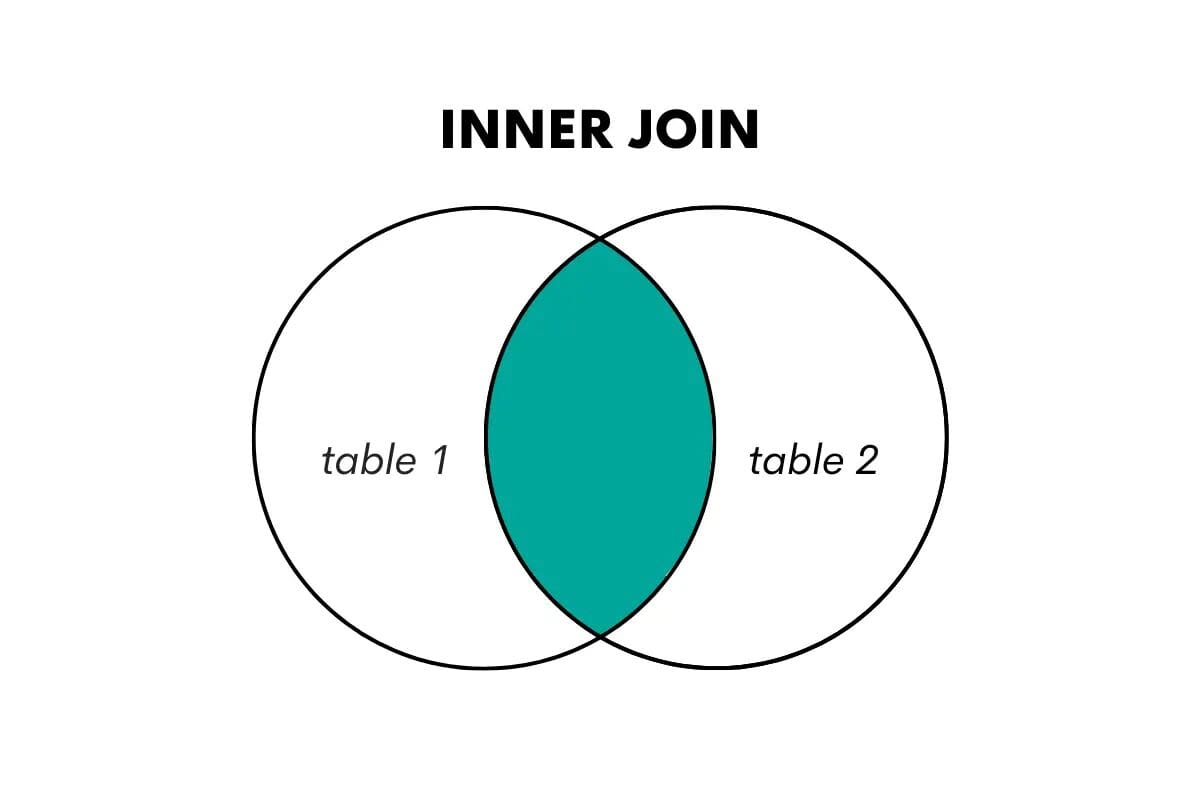
An inner join returns only the rows where there is a match in both tables being joined. It combines rows from two tables based on a shared key or column, discarding non-matching rows.

We visualize this in the following way.
SQL For Data Science: Understanding and Leveraging Joins
Image by Author

In SQL, this type of join is performed using the keywords JOIN or INNER JOIN.

SQL Left Outer Join

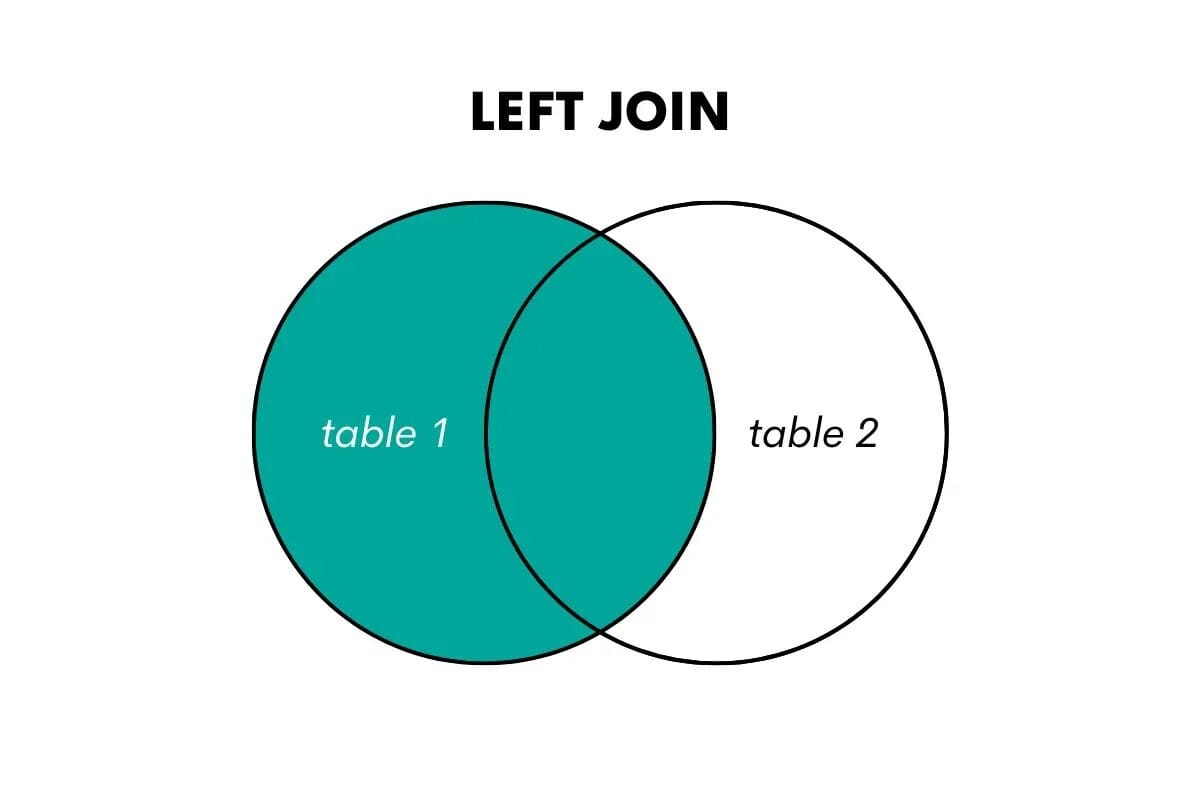
A left outer join returns all the rows from the left (or first) table and the matched rows from the right (or second) table. If there is no match, it returns NULL values for the columns from the right table.

We can visualize it like this.
SQL For Data Science: Understanding and Leveraging Joins
Image by Author

When wanting to use this join in SQL, you can do that by using LEFT OUTER JOIN or LEFT JOIN keywords. Here’s an article that talks about left join vs left outer join.

SQL Right Outer Join

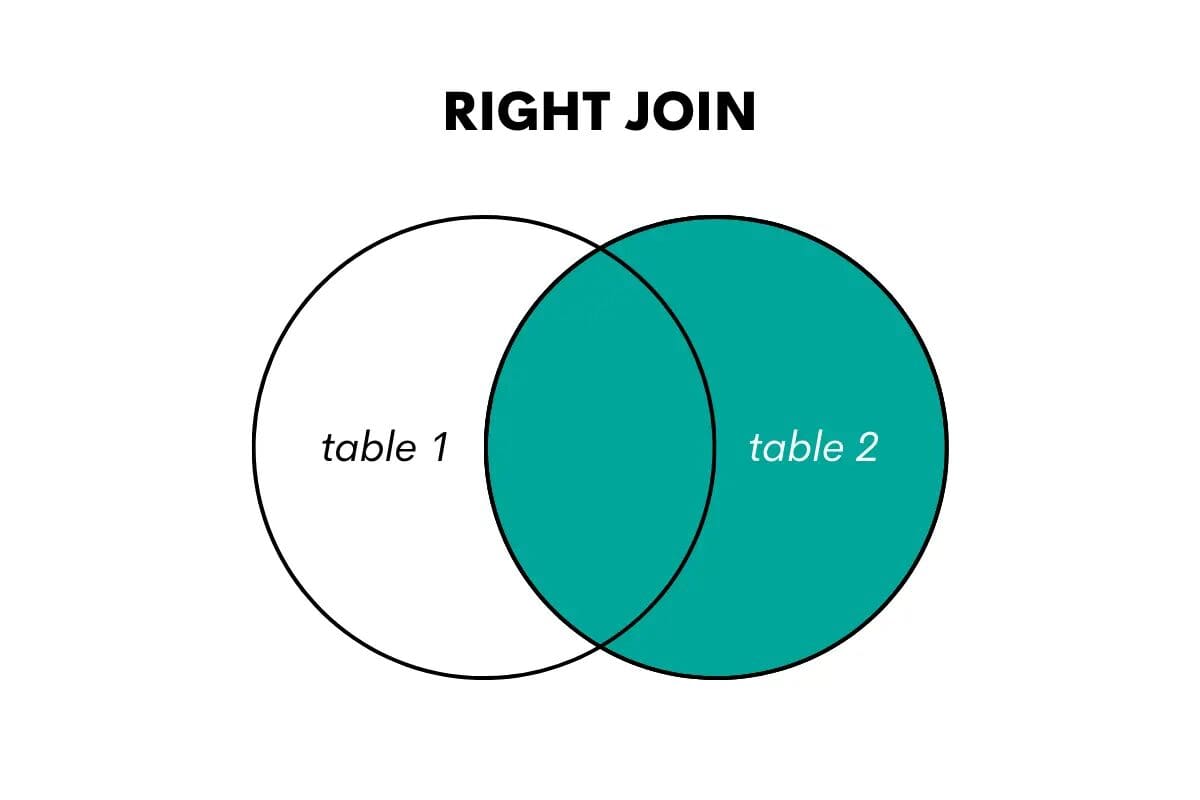
A right join is the opposite of a left join. It returns all the rows from the right table and the matched rows from the left table. If there is no match, it returns NULL values for the columns from the left table.
SQL For Data Science: Understanding and Leveraging Joins
Image by Author

In SQL, this join type is performed using the keywords RIGHT OUTER JOIN or RIGHT JOIN.

SQL Full Outer Join

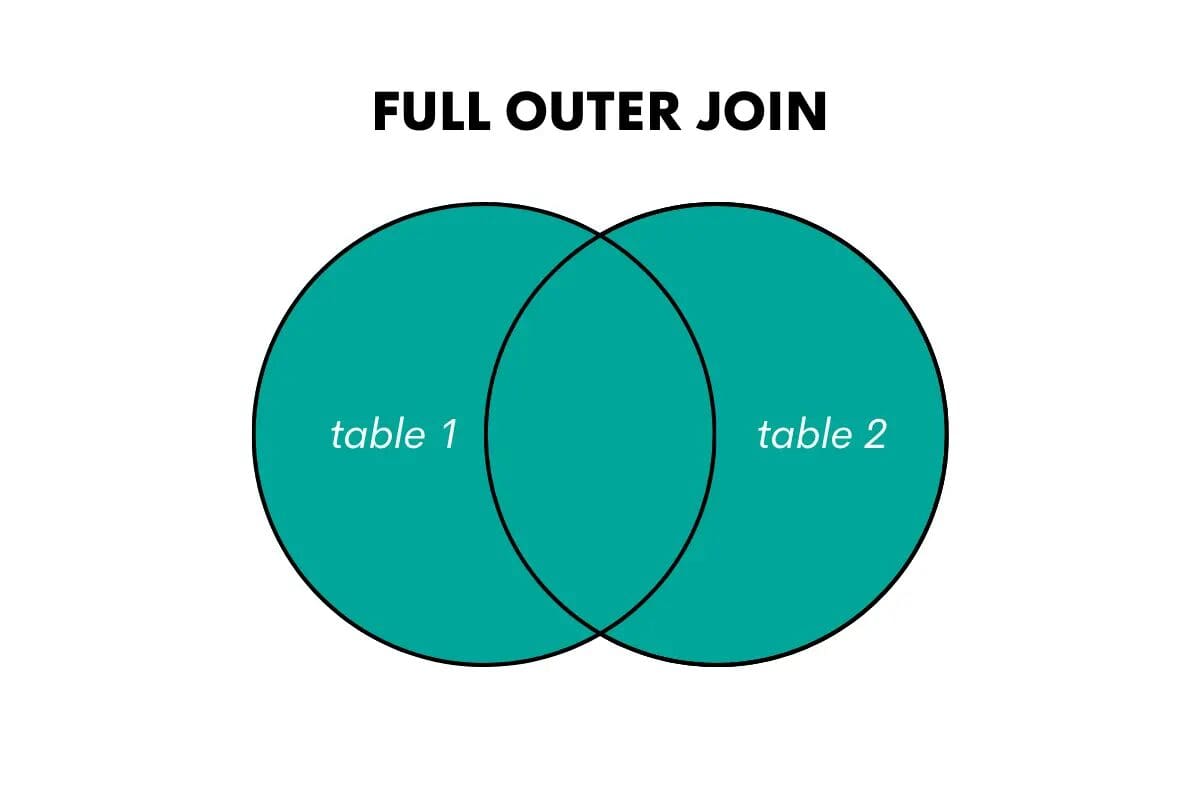
A full outer join returns all the rows from both tables, matching rows where possible and filling in NULL values for non-matching rows.
SQL For Data Science: Understanding and Leveraging Joins
Image by Author

The keywords in SQL for this join are FULL OUTER JOIN or FULL JOIN.

SQL Cross Join

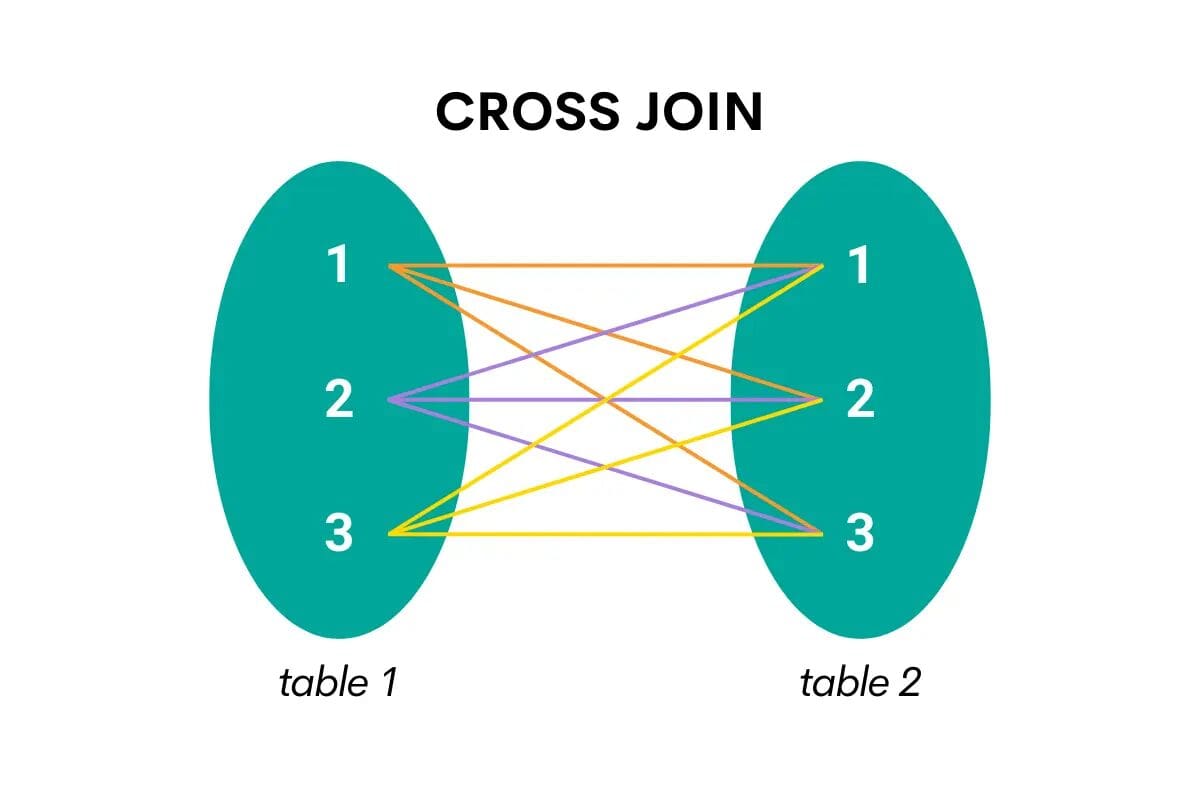
This type of join combines all the rows from one table with all the rows from the second table. In other words, it returns the Cartesian product, i.e., all possible combinations of the two tables’ rows.

Here’s the visualization that will make it easier to understand.
SQL For Data Science: Understanding and Leveraging Joins
Image by Author

When cross-joining in SQL, the keyword is CROSS JOIN.

Understanding SQL Join Syntax

To perform a join in SQL, you need to specify the tables we want to join, the columns used for matching, and the type of join we want to perform. The basic syntax for joining tables in SQL is as follows:

SELECT columns  FROM table1  JOIN table2  ON table1.column = table2.column;

This example shows how to use JOIN.

You reference the first (or left) table in the FROM clause. Then you follow it with JOIN and reference the second (or right) table.

Then comes the joining condition in the ON clause. This is where you specify which columns you’ll use to join the two tables. Usually, it’s a shared column that’s a primary key in one table and the foreign key in the second table.

Note: A primary key is a unique identifier for each record in a table. A foreign key establishes a link between two tables, i.e., it’s a column in the second table that references the first table. We’ll show you in the examples what that means.

If you want to use LEFT JOIN, RIGHT JOIN, or FULL JOIN, you just use these keywords instead of JOIN – everything else in the code is exactly the same!

Things are a little different with the CROSS JOIN. In its nature is to join all the rows’ combinations from both tables. That’s why the ON clause is not needed, and the syntax looks like this.

SELECT columns  FROM table1  CROSS JOIN table2;

In other words, you simply reference one table in FROM and the second in CROSS JOIN.

Alternatively, you can reference both tables in FROM and separate them with a comma – this is a shorthand for CROSS JOIN.

SELECT columns  FROM table1, table2;

Self Join: A Special Type of Join in SQL

There’s also one specific way of joining the tables – joining the table with itself. This is also called self joining the table.

It’s not exactly a distinct type of join, as any of the earlier-mentioned join types can also be used for self joining.

The syntax for self joining is similar to what I showed you earlier. The main difference is the same table is referenced in FROM and JOIN.

SELECT columns  FROM table1 t1  JOIN table1 t2  ON t1.column = t2.column;

Also, you need to give the table two aliases to distinguish between them. What you’re doing is joining the table with itself and treating it as two tables.

I just wanted to mention this here, but I won’t be going into further detail. If you’re interested in self join, please see this illustrated guide on self join in SQL.

SQL Join Examples

It’s time to show you how everything I mentioned works in practice. I’ll use SQL JOIN interview questions from StrataScratch to showcase each distinct type of join in SQL.

1. JOIN Example

This question by Microsoft wants you to list each project and calculate the project’s budget by the employee.

Expensive Projects

“Given a list of projects and employees mapped to each project, calculate by the amount of project budget allocated to each employee . The output should include the project title and the project budget rounded to the closest integer. Order your list by projects with the highest budget per employee first.”

Data

The question gives two tables.

ms_projects

id: int
title: varchar
budget: int

ms_emp_projects

emp_id: int
project_id: int

Now, the column id in the table ms_projects is the table’s primary key. The same column can be found in the table ms_emp_projects, albeit with a different name: project_id. This is the table’s foreign key, referencing the first table.

I’ll use these two columns to join the tables in my solution.

Code

SELECT title AS project,         ROUND((budget/COUNT(emp_id)::FLOAT)::NUMERIC, 0) AS budget_emp_ratio  FROM ms_projects a  JOIN ms_emp_projects b   ON a.id = b.project_id  GROUP BY title, budget  ORDER BY budget_emp_ratio DESC;

I joined the two tables using JOIN. The table ms_projects is referenced in FROM, while ms_emp_projects is referenced after JOIN. I’ve given both tables an alias, allowing me not to use the table’s long names later on.

Now, I need to specify the columns on which I want to join the tables. I already mentioned which columns are the primary key in one table and the foreign key in another table, so I’ll use them here.

I equal these two columns because I want to get all the data where the project ID is the same. I also used the tables’ aliases in front of each column.

Now that I have access to data in both tables, I can list columns in SELECT. The first column is the project name, and the second column is calculated.

This calculation uses the COUNT() function to count the number of employees by each project. Then I divide each project’s budget by the number of employees. I also convert the result to decimal values and round it to zero decimal places.

Output

Here’s what the query returns.
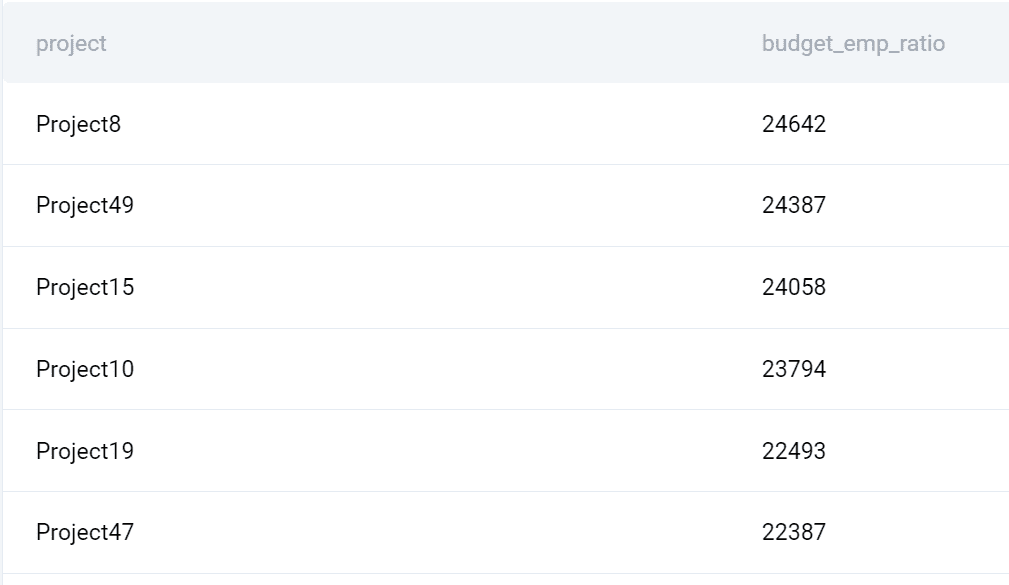
SQL For Data Science: Understanding and Leveraging Joins

2. LEFT JOIN Example

Let’s practice this join on the Airbnb interview question. It wants you to find the number of orders, the number of customers, and the total cost of orders for each city.

Customer Orders and Details

“Find the number of orders, the number of customers, and the total cost of orders for each city. Only include cities that have made at least 5 orders and count all customers in each city even if they did not place an order.

Output each calculation along with the corresponding city name.”

Data

You’re given the tables customers, and orders.

customers

id: int
first_name: varchar
last_name: varchar
city: varchar
address: varchar
phone_number: varchar

orders

id: int
cust_id: int
order_date: datetime
order_details: varchar
total_order_cost: int

The shared columns are id from the table customers and cust_id from the table orders. I’ll use these columns to join the tables.

Code

Here’s how to solve this question using LEFT JOIN.

SELECT c.city,         COUNT(DISTINCT o.id) AS orders_per_city,         COUNT(DISTINCT c.id) AS customers_per_city,         SUM(o.total_order_cost) AS orders_cost_per_city  FROM customers c  LEFT JOIN orders o ON c.id = o.cust_id  GROUP BY c.city  HAVING COUNT(o.id) >=5;

I reference the table customers in FROM (this is our left table) and LEFT JOIN it with orders on the customer ID columns.

Now I can select the city, use COUNT() to get the number of orders and customers by city, and use SUM() to calculate the total orders cost by city.

To get all these calculations by city, I group the output by city.

There’s one extra request in the question: “Only include cities that have made at least 5 orders…” I use HAVING to show only cities with five or more orders to achieve that.

The question is, why did I use LEFT JOIN and not JOIN? The clue is in the question:”…and count all customers in each city even if they did not place an order.” It’s possible that not all customers have placed orders. This means I want to show all customers from the table customers, which perfectly fits the definition of the LEFT JOIN.

Had I used JOIN, the result would’ve been wrong, as I would’ve missed the customers that didn’t place any orders.

Note: The complexity of joins in SQL isn’t reflected in their syntax but in their semantics! As you saw, each join is written the same way, only the keyword changes. However, each join works differently and, therefore, can output different results depending on the data. Because of that, it’s crucial that you fully understand what each join does and choose the one that will return exactly what you want!

Output

Now, let’s have a look at the output.

SQL For Data Science: Understanding and Leveraging Joins

3. RIGHT JOIN Example

The RIGHT JOIN is the mirror image of LEFT JOIN. That’s why I could’ve easily solved the previous problem using RIGHT JOIN. Let me show you how to do it.

Data

The tables stay the same; I’ll just use a different type of join.

Code

SELECT c.city,         COUNT(DISTINCT o.id) AS orders_per_city,         COUNT(DISTINCT c.id) AS customers_per_city,         SUM(o.total_order_cost) AS orders_cost_per_city  FROM orders o  RIGHT JOIN customers c ON o.cust_id = c.id   GROUP BY c.city  HAVING COUNT(o.id) >=5;

Here’s what’s changed. As I’m using RIGHT JOIN, I switched the order of the tables. Now the table orders becomes the left one, and the table customers the right one. The joining condition stays the same. I just switched the order of the columns to reflect the order of the tables, but it’s not necessary to do it.

By switching the order of the tables and using RIGHT JOIN, I again will output all the customers, even if they haven’t placed any orders.

The rest of the query is the same as in the previous example. The same goes for the output.

Note: In practice, RIGHT JOIN is relatively rarely used. The LEFT JOIN seems more natural to SQL users, so they use it much more often. Anything that can be done with RIGHT JOIN can also be done with LEFT JOIN. Because of that, there’s no specific situation where RIGHT JOIN might be preferred.

Output

SQL For Data Science: Understanding and Leveraging Joins

4. FULL JOIN Example

The question by Salesforce and Tesla wants you to count the net difference between the number of products companies launched in 2020 with the number of products companies launched in the previous year.

New Products

“You are given a table of product launches by company by year. Write a query to count the net difference between the number of products companies launched in 2020 with the number of products companies launched in the previous year. Output the name of the companies and a net difference of net products released for 2020 compared to the previous year.”

Data

The question provides one table with the following columns.

car_launches

year: int
company_name: varchar
product_name: varchar

How the hell will I join tables when there’s only one table? Hmm, let’s see that, too!

Code

This query is a little more complicated, so I’ll reveal it gradually.

SELECT company_name,         product_name AS brand_2020  FROM car_launches  WHERE YEAR = 2020;

The first SELECT statement finds the company and the product name in 2020. This query will later be turned into a subquery.

The question wants you to find the difference between 2020 and 2019. So let’s write the same query but for 2019.

SELECT company_name,         product_name AS brand_2019  FROM car_launches  WHERE YEAR = 2019;

I’ll now make these queries into subqueries and join them using the FULL OUTER JOIN.

SELECT *  FROM    (SELECT company_name,            product_name AS brand_2020     FROM car_launches     WHERE YEAR = 2020) a  FULL OUTER JOIN    (SELECT company_name,            product_name AS brand_2019     FROM car_launches     WHERE YEAR = 2019) b   ON a.company_name = b.company_name;

Subqueries can be treated as tables and, therefore, can be joined. I gave the first subquery an alias, and I placed it in the FROM clause. Then I use FULL OUTER JOIN to join it with the second subquery on the company name column.

By using this type of SQL join, I’ll get all the companies and products in 2020 merged with all the companies and products in 2019.
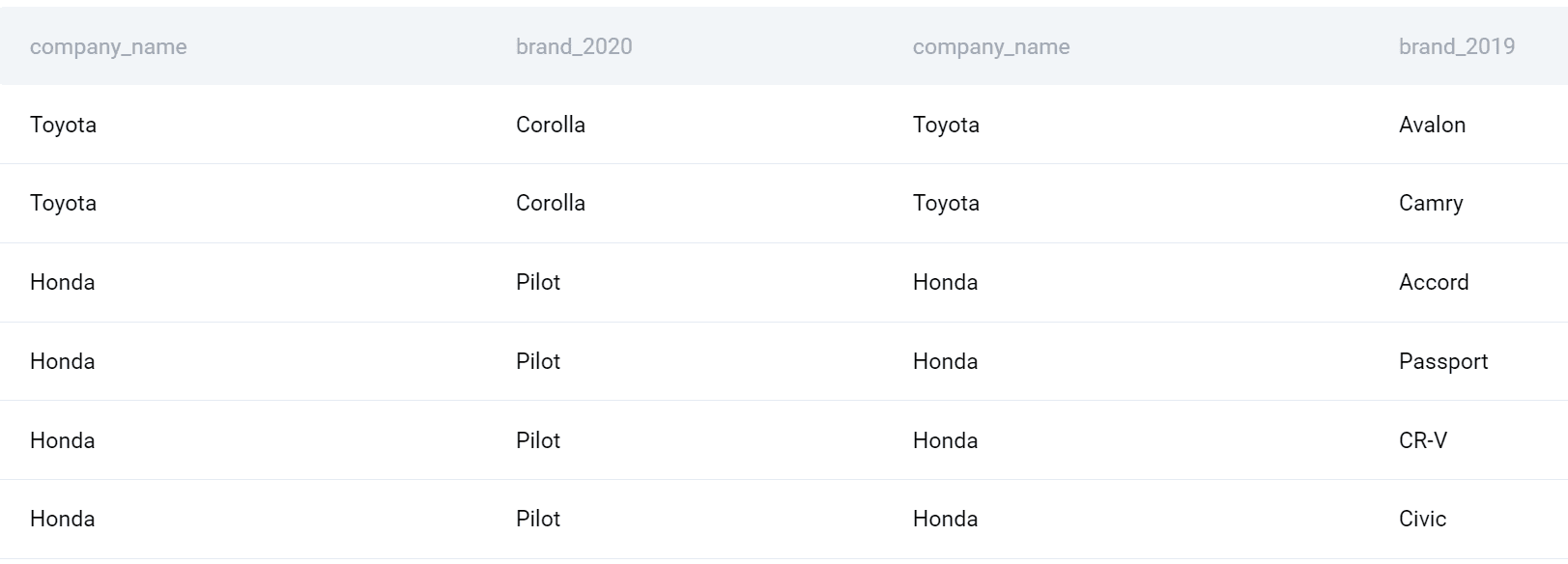
SQL For Data Science: Understanding and Leveraging Joins

Now I can finalize my query. Let’s select the company name. Also, I’ll use the COUNT() function to find the number of products launched in each year and then subtract it to get the difference. Finally, I’ll group the output by company and sort it also by company alphabetically.

Here’s the whole query.

SELECT a.company_name,         (COUNT(DISTINCT a.brand_2020)-COUNT(DISTINCT b.brand_2019)) AS net_products  FROM    (SELECT company_name,            product_name AS brand_2020     FROM car_launches     WHERE YEAR = 2020) a  FULL OUTER JOIN    (SELECT company_name,            product_name AS brand_2019     FROM car_launches     WHERE YEAR = 2019) b   ON a.company_name = b.company_name  GROUP BY a.company_name  ORDER BY company_name;

Output

Here’s the list of companies and the launched products difference between 2020 and 2019.
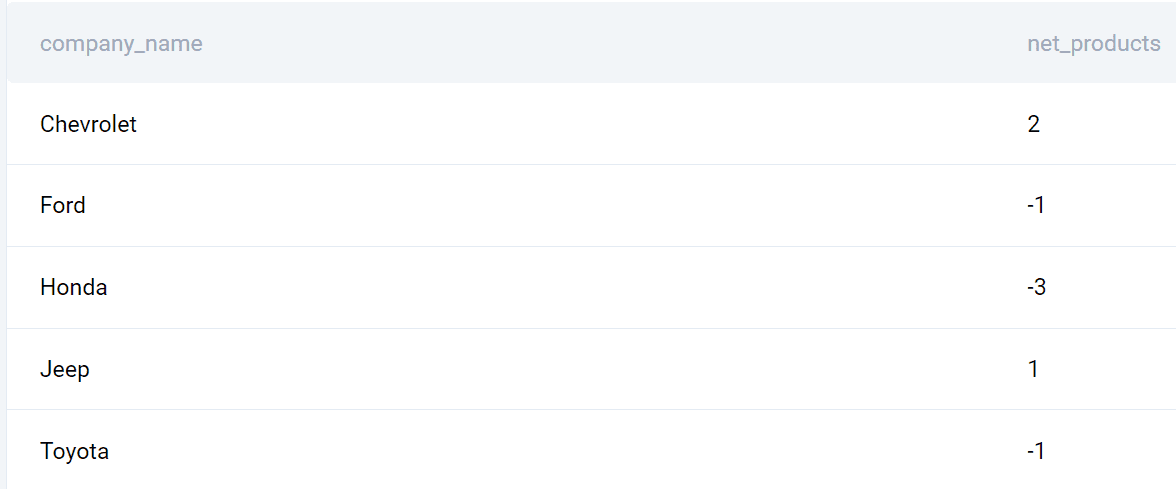
SQL For Data Science: Understanding and Leveraging Joins

5. CROSS JOIN Example

This question by Deloitte is great for showing how CROSS JOIN works.

Maximum of Two Numbers

“Given a single column of numbers, consider all possible permutations of two numbers assuming that pairs of numbers (x,y) and (y,x) are two different permutations. Then, for each permutation, find the maximum of the two numbers.

Output three columns: the first number, the second number and the maximum of the two.”

The question wants you to find all possible permutations of two numbers assuming that pairs of numbers (x,y) and (y,x) are two different permutations. Then, we need to find the maximum of the numbers for each permutation.

Data

The question gives us one table with one column.

deloitte_numbers

number: int

Code

This code is an example of CROSS JOIN, but also of self join.

SELECT dn1.number AS number1,         dn2.number AS number2,         CASE             WHEN dn1.number > dn2.number THEN dn1.number             ELSE dn2.number         END AS max_number  FROM deloitte_numbers AS dn1  CROSS JOIN deloitte_numbers AS dn2;

I reference the table in FROM and give it one alias. Then I CROSS JOIN it with itself by referencing it after CROSS JOIN and giving the table another alias.

Now it’s possible to use one table as they’re two. I select the column number from each table. Then I use the CASE statement to set a condition that will show the maximum number of the two numbers.

Why is CROSS JOIN used here? Remember, it’s a type of SQL join that will show all combinations of all rows from all tables. That’s exactly what the question is asking!

Output

Here’s the snapshot of all the combinations and the higher number of the two.
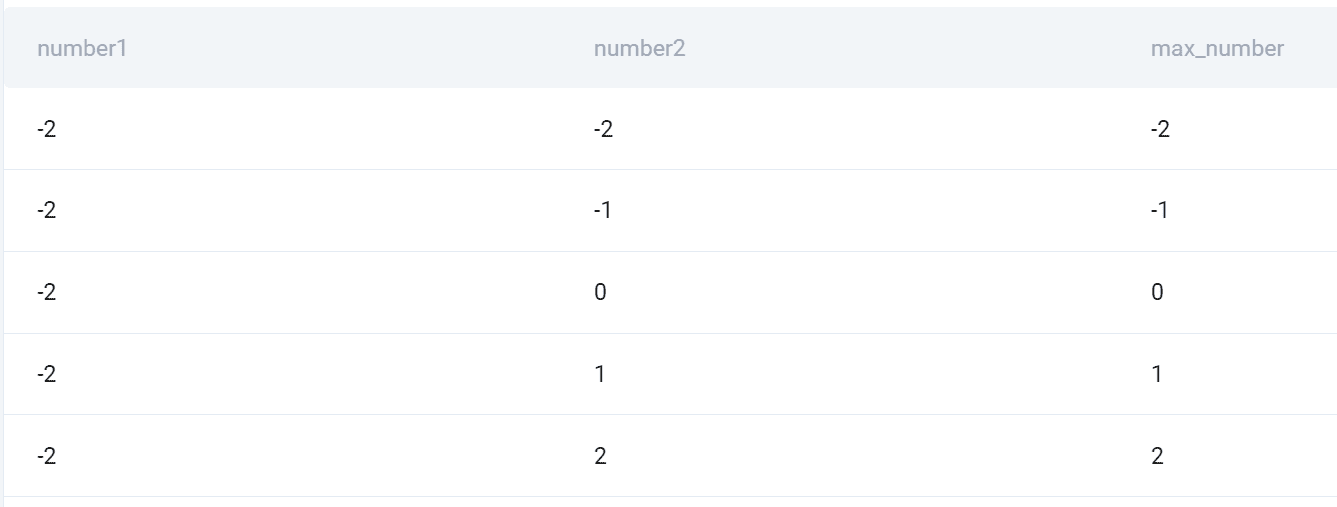
SQL For Data Science: Understanding and Leveraging Joins Utilizing SQL Joins for Data Science

Now that you know how to use SQL joins, the question is how to utilize that knowledge in data science.

SQL Joins play a crucial role in data science tasks such as data exploration, data cleaning, and feature engineering.

Here are a few examples of how SQL joins can be leveraged:

  1. Combining Data: Joining tables allows you to bring together different sources of data, enabling you to analyze relationships and correlations across multiple datasets. For example, joining a customer table with a transaction table can provide insights into customer behavior and purchasing patterns.
  1. Data Validation: Joins can be used to validate data quality and integrity. By comparing data from different tables, you can identify inconsistencies, missing values, or outliers. This helps you in data cleaning and ensures that the data used for analysis is accurate and reliable.
  1. Feature Engineering: Joins can be instrumental in creating new features for machine learning models. By merging relevant tables, you can extract meaningful information and generate features that capture important relationships within the data. This can enhance the predictive power of your models.
  1. Aggregation and Analysis: Joins enable you to perform complex aggregations and analyses across multiple tables. By combining data from various sources, you can gain a comprehensive view of the data and derive valuable insights. For example, joining a sales table with a product table can help you analyze sales performance by product category or region.

Best Practices for SQL Joins

As I already mentioned, the complexity of joins doesn’t show in their syntax. You saw that syntax is relatively straightforward.

The best practices for joins also reflect that, as they are not concerned with coding itself but what join does and how it performs.

To make the most out of joins in SQL, consider the following best practices.

  1. Understand Your Data: Familiarize yourself with the structure and relationships within your data. This will help you choose the appropriate type of join and select the right columns for matching.
  1. Use Indexes: If your tables are large or frequently joined, consider adding indexes on the columns used for joining. Indexes can significantly improve query performance.
  1. Be Mindful of Performance: Joining large tables or multiple tables can be computationally expensive. Optimize your queries by filtering data, using appropriate join types, and considering the use of temporary tables or subqueries.
  1. Test and Validate: Always validate your join results to ensure correctness. Perform sanity checks and verify that the joined data aligns with your expectations and business logic.

Conclusion

SQL Joins are a fundamental concept that empowers you as a data scientist to merge and analyze data from multiple sources. By understanding the different types of SQL joins, mastering their syntax, and leveraging them effectively, data scientists can unlock valuable insights, validate data quality, and drive data-driven decision-making.

I showed you how to do it in five examples. Now it’s up to you to harness the power of SQL and joins for your data science projects and achieve better results.
Nate Rosidi is a data scientist and in product strategy. He's also an adjunct professor teaching analytics, and is the founder of StrataScratch, a platform helping data scientists prepare for their interviews with real interview questions from top companies. Connect with him on Twitter: StrataScratch or LinkedIn.

More On This Topic

  • Understanding Functions for Data Science
  • In-Database Analytics: Leveraging SQL's Analytic Functions
  • 3 Ways Understanding Bayes Theorem Will Improve Your Data Science
  • Speeding up data understanding by interactive exploration
  • Understanding Agent Environment in AI
  • Understanding Central Tendency

Pinterest touts Amazon partnership progress, AI in Q2 earnings beat

Pinterest touts Amazon partnership progress, AI in Q2 earnings beat Sarah Perez @sarahintampa / 7 hours

Popular image pinboarding and shopping inspiration site Pinterest provided an update on its recently announced Amazon partnership and its other efforts around AI during its Q2 2023 earnings this week. The company in April announced a multi-year deal with Amazon that saw the e-commerce giant become Pinterest’s first partner on third-party ads. Those efforts are now progressing faster than expected, Pinterest suggested in a call with investors. It additionally stressed how its AI investments were aiding across the site in areas like engagement, relevance, and ads.

With the Amazon deal underway, when Pinterest users click on an Amazon ad on Pinterest, they’ll be taken directly to Amazon to make the purchase. Investors naturally were keen to get a better understanding of how well those efforts were helping the company now boost its bottom line.

Pinterest, however, stressed that this partnership involves a multi-quarter implementation where meaningful revenue impacts won’t likely be seen until early 2024.

But CEO Bill Ready noted the company had already been testing live traffic with Amazon ads and was “very pleased” with the pace of implementation and the early results. He added that the company believes Amazon will bring more shoppable content to the site.

While the company declined to share the results of the early tests in detail, noting it would share more at its investor day on September 19th, Ready noted the efforts were already paying off.

“One of the biggest things we’re happy about is that we’re seeing improvement and relevancy even beyond what were already very optimistic expectations on our side,” the CEO said. “And so, as we see that it’s contributing to more relevant shopping content that further bolsters our view that we can take ad load much higher.”

The company doesn’t break out its ad load specifically but said it had already been growing at 30% plus year-over-year in terms of overall monetizable supply while also increasing engagement. This, explained Ready, is proving that “we can grow ad load while also making it relevant engagement driving content for our users.”

The exec also told investors the partnership was “pacing ahead of expectations,” but Pinterest was now working to make sure that it got the relevancy right for the user.

AI may help in that regard.

Pinterest said that it’s now using “next-generation AI technologies” to surface more relevant and personalized content and improve ad relevance, drive more intent to action, and focus its content strategy to bring more actionable content from sources like users, creators, publishers, and retailers.

That includes using AI combined with other first-party signals to recommend brands and products that aligned with the individual user’s preferences.

As one example, it launched a new “shop-to-look” module for home decor and fashion Pins that uses AI to recommend shoppable products from merchants.

The company also cited AI as aiding with its 8% global monthly active user growth to 465 million and increased user engagement.

Pinterest had begun moving to next-gen AI a year ago, it told investors, allowing it to use recommender models that were 100x larger than before, which it then combined with its own first-party proprietary data and AI computer vision and search technologies. As a result, perceived relevance has increased 10 points year-over-year to 94%, the company said.

This year, it’s begun recommending content that users are likely to share to improve the retention of core users and grow visits from dormant users.

Pinterest is also leveraging next-gen AI in advertising, resulting in a 5% reduction in cost per action and a 10% lift in click-through rates, it claims.

In response to an investor question that bigger companies like Google, Meta, and Apple would dominate in AI, Ready pointed out that not only are the big players externalizing those capabilities through cloud compute, the open source community is also advancing rapidly.

Pinterest beat on earnings in the quarter with revenue up 6% to $708 million, which topped analysts’ expectations for $696 million, per FactSet. Adjusted earnings per share grew from $0.11 to $0.21, exceeding analysts’ expectations for EPS of $0.12.

However, the stock dropped post-earnings as Wall Street reacted to Q3 guidance that missed the mark.