Top 6 Tools to Improve Your Productivity on Snowflake

Top 6 Tools to Improve Your Productivity on Snowflake
Image by Editor

Snowflake has revolutionized how businesses store, process, and analyze data, offering unparalleled flexibility, scalability, and performance. But as with any powerful technology, to truly harness its potential, it's essential to have the right tools at your disposal.

This article is your guide to the top 6 tools that can supercharge your productivity when working with Snowflake. Whether you're wrangling data, integrating diverse data sources, creating stunning visualizations, or deriving actionable insights, these tools can enhance your efficiency and effectiveness.

So, let's dive in and explore these productivity-boosting tools that can take your Snowflake operations to the next level.

Data Preparation Tools

1. Datameer
Top 6 Tools to Improve Your Productivity on Snowflake
Image from Datameer

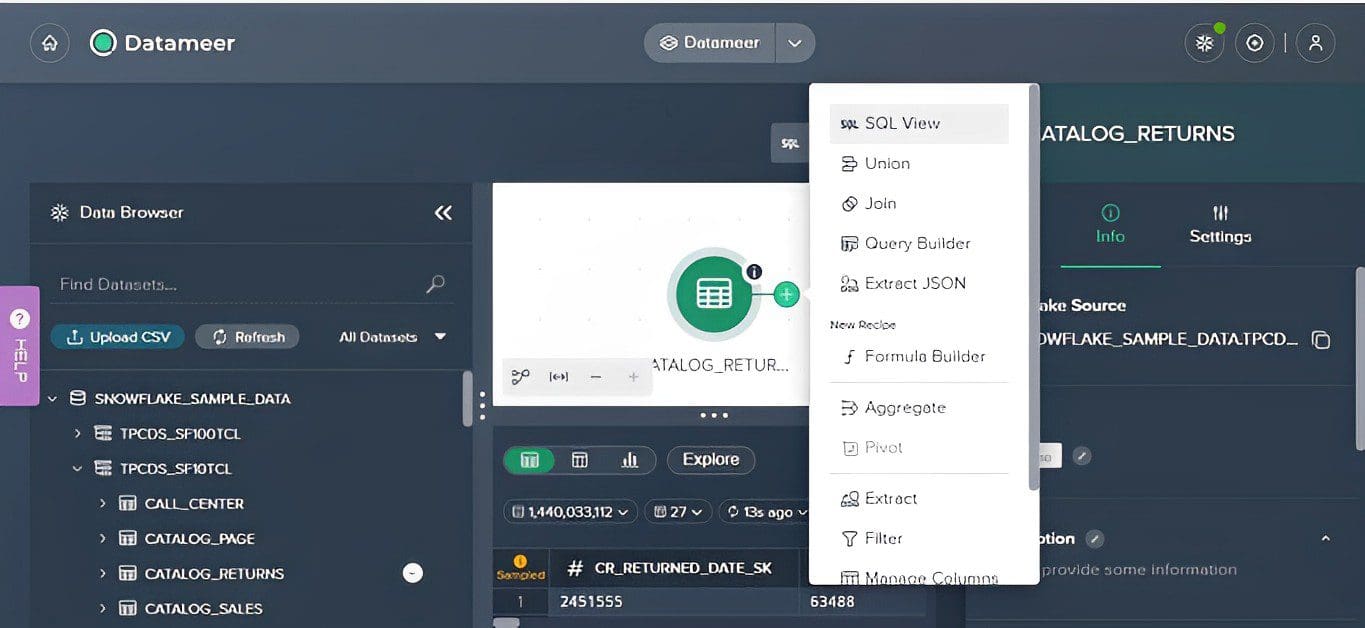
Datameer is a self-service data preparation tool that's designed to make working with big data more manageable. It's all about simplifying the process and saving you time.

Features:

  • Data Discovery: Datameer provides a visual interface that makes it easier to explore and understand your data. It's about turning the complex into something more digestible.
  • Data Preparation: With Datameer, you can clean, transform, and enrich your data, preparing it for analysis. The best part is, you don't need to dive into complex coding or scripting.
  • Data Exploration: Datameer offers a range of data visualization tools that allow you to interact with your data. It's about gaining insights quickly and effectively.
  • Integration: Datameer can connect with a wide range of data sources, from traditional databases to complex cloud-based data lakes. It's about bringing all your data together in one place.

Pros:

  • Datameer's user-friendly interface simplifies data discovery, preparation, and exploration.
  • Its data preparation capabilities allow you to clean, transform, and enrich your data without the need for complex coding.
  • Datameer's ability to integrate with various data sources provides a unified view of all your data.

Cons:

  • While Datameer offers a wide range of features, it might be more than what some small businesses need.

Pricing:

Datameer's pricing isn't publicly disclosed on their website, but you can schedule a quick call with their team to get personalized pricing that meets your team’s needs.

Use Case:

Assuming you're a data analyst working for a large corporation. You're dealing with data from various sources, including traditional databases and complex cloud-based data lakes.

With Datameer, you can connect to these data sources, prepare your data and explore your data in a super interactive environment. It's all about getting insights fast and making data-driven decisions that push your business forward.

The video below discusses a bit of Datameer and Snowflake collaboration.

Data Visualization Tools

2. Tableau

Top 6 Tools to Improve Your Productivity on Snowflake

Tableau is a leading tool in the realm of data visualization. Its intuitive interface and drag-and-drop capabilities make it a user-friendly choice for both technical and non-technical users.

The seamless integration between Tableau and Snowflake enables you to pull data directly from your Snowflake data warehouse, turning it into actionable insights in no time.

Key Features:

  • Interactive Dashboards: Explore and understand your data through interactive dashboards.
  • Data Blending: Blend data from multiple sources for a comprehensive view of your data landscape.
  • Real-Time Data Analysis: Make decisions based on the most up-to-date data with real-time analysis capabilities.

Why is it Recommended:

Tableau's user-friendly interface and powerful data visualization capabilities make it a great choice for businesses looking to democratize data access. The smooth data analysis workflow, courtesy of its integration with Snowflake, is another major plus.

Pricing Details:

Tableau offers a range of pricing options depending on your needs, starting from $70 per user per month for Tableau Creator. Lower price points are available for Tableau Explorer and Tableau Viewer, offering fewer capabilities.

Learning Curve:

Despite its intuitive interface, mastering Tableau requires a learning curve. Thankfully, a wealth of resources, including tutorials, webinars, and a robust community, are available to help users get up to speed.

Community and Support:

A large and active community of users backs Tableau, always ready to lend a helping hand. Additionally, Tableau's customer support is top-notch, featuring a comprehensive knowledge base, live support, and a dedicated support team.

Use Cases:

Businesses of all sizes and across various industries turn to Tableau for data visualization. Whether it's creating interactive dashboards, performing ad-hoc analysis, or generating reports, Tableau has got you covered.

Data Integration/ETL Tools

3. Fivetran
Top 6 Tools to Improve Your Productivity on Snowflake
Image from fivetran

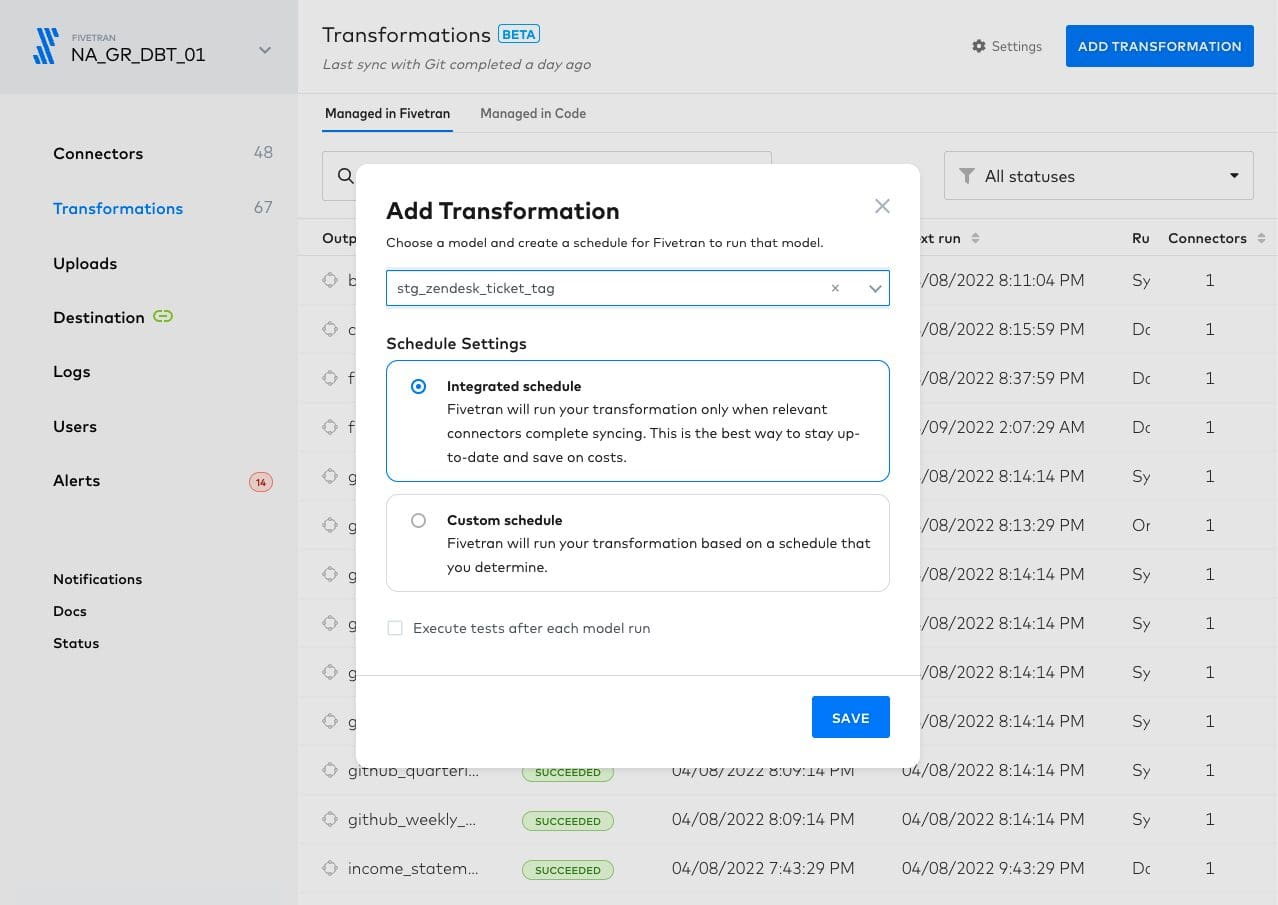
Fivetran is a cloud-based data integration tool that's all about automating your data pipeline. It's designed to take the hassle out of data integration.

Features:

  • Automated Data Pipelines: Fivetran takes care of setting up, maintaining, and scaling your data pipelines. It's like having a personal data pipeline manager.
  • Pre-built Connectors: Fivetran comes with hundreds of pre-built connectors, allowing you to integrate data from various sources, including Snowflake easily.
  • Data Transformation: Fivetran supports in-warehouse data transformation, allowing you to transform your data right where it's stored.

Why It Stands Out:

  • Fivetran's automated data pipelines take the manual work out of data integration.
  • Its pre-built connectors make it easy to integrate data from a wide range of sources.
  • Fivetran's support for in-warehouse data transformation allows for efficient data processing.

Considerations:

  • Fivetran's advanced features may require a learning curve for beginners.
  • The cost of Fivetran can be a barrier for smaller organizations or startups.

Pricing:

The pricing for Fivetran is usage-based, meaning you only pay for the Monthly Active Rows (MAR) you use each month. They offer 14 days of free usage for any new connector, allowing you to project usage and pricing before making a commitment.

Business Intelligence Tools

4. Looker
Top 6 Tools to Improve Your Productivity on Snowflake
Image from getapp

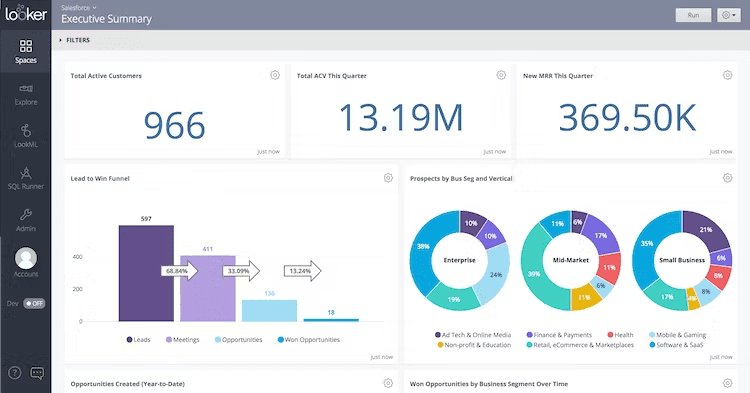
Looker is a modern business intelligence platform that lets everyone in your business make informed decisions — from anywhere. It's all about empowering users with data.

Key Features:

  • Self-Service Analytics: Looker allows users to explore and discover insights in real-time with a few clicks. It's about making data accessible to everyone.
  • Data Modeling: Looker's powerful data modeling layer allows you to define business metrics and logic once, and then use them consistently across the organization.
  • Integration: Looker integrates seamlessly with Snowflake, allowing you to leverage your existing data warehouse.

Why You Might Love It:

Looker's user-friendly interface and powerful data modeling capabilities make it a great choice for businesses looking to democratize data access. Plus, its integration with Snowflake ensures a smooth data analysis workflow.

Pricing Details:

Looker's pricing isn't specifically disclosed on their website, but you can contact them directly to get a quote based on your specific needs.

Data Governance Tools

Data governance involves the management and protection of data, ensuring it's reliable, consistent, and accessible. The ideal qualities we look for in data governance tools are the following:

  • They should provide comprehensive data governance capabilities, including data quality, master data management, data privacy, and data cataloging.
  • They should integrate seamlessly with other data platforms, including Snowflake.
  • They should be user-friendly, enabling organizations to establish a strong data governance framework easily.

There are many options to choose from in this category of tools. Among the most popular are Collibra and Informatica, to name a few.

5. Collibra
Top 6 Tools to Improve Your Productivity on Snowflake
Image from productresources

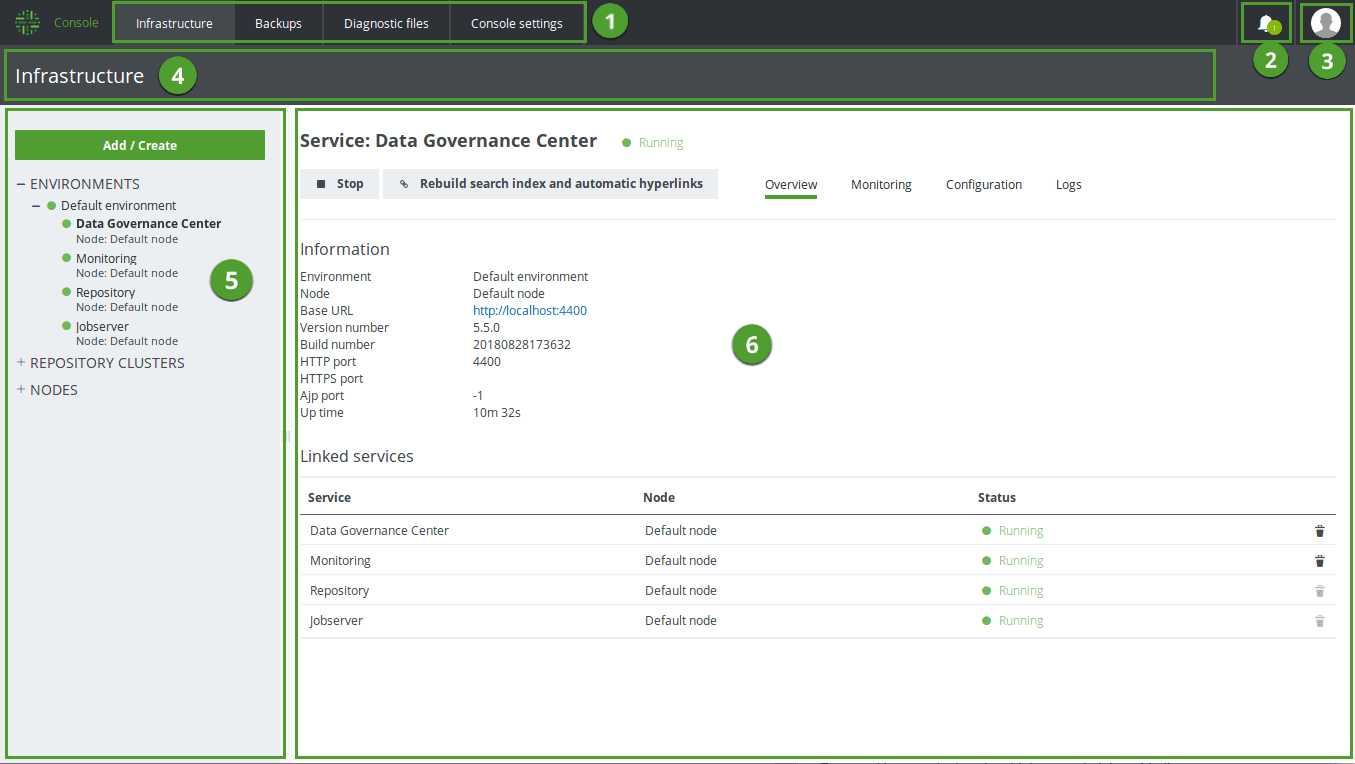
Collibra is a comprehensive data governance platform that provides tools to manage, govern, and understand data. It's designed to help organizations maximize the value of their data.

Collibra stands out for its robust data governance capabilities, user-friendly interface, and extensive integration options, including Snowflake. It's a great choice for organizations looking to establish a strong data governance framework.

Collibra's pricing isn't publicly disclosed on their website, but you can contact them directly to get a quote based on your specific needs.

6. Informatica
Top 6 Tools to Improve Your Productivity on Snowflake
Image from firsteigen

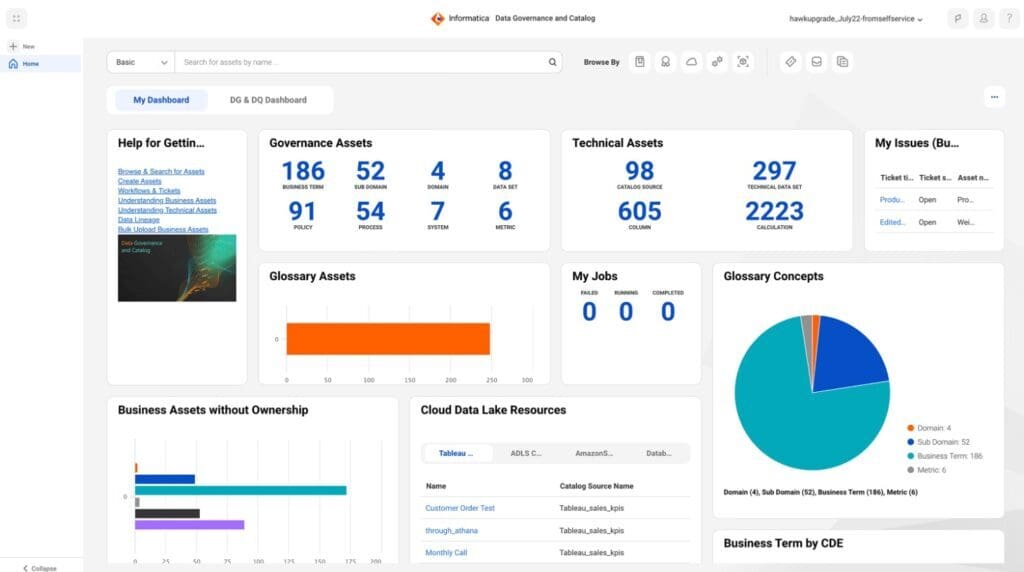
Informatica is a leading provider of data integration software and services. It offers a suite of data governance tools designed to ensure data quality, compliance, and security.

Informatica's comprehensive suite of data governance tools, combined with its robust data integration capabilities, make it a powerful choice for organizations looking to enhance their data governance. Plus, it integrates seamlessly with Snowflake, allowing you to leverage your existing data warehouse.

Informatica prefers to discuss pricing directly with customers to provide a personalized quote.

Conclusion

So, now you know about the useful tools that can supercharge your productivity on Snowflake. These are the tools that data professionals around the world rely on to streamline their workflows, gain insights from their data, and drive decision-making.

But remember, while all these tools offer great features, it's also important to consider how easily they can integrate with Snowflake. For instance, Datameer, to the best of my knowledge, integrates seamlessly with Snowflake. This is so because it is purely built for Snowflake.

Explore these tools, try out their features, and see which ones resonate with you the most. And of course, we'd love to hear about your experiences.

Have you used any of these tools before? Are there any others that you swear by? Share your thoughts in the comments section, and let's continue the conversation!
Ndz Anthony is a senior BI Analyst and tutor. He enjoys educating through writing relating to business intelligence and enterprise analytics.

More On This Topic

  • 7 AI-Powered Tools to Enhance Productivity for Data Scientists
  • Sky's the Limit: Learn how JetBlue uses Monte Carlo and Snowflake to build…
  • Maximize Your Productivity as a Data Scientist by Organizing
  • How to Transform Your Data in Snowflake
  • Data Warehousing with Snowflake for Beginners
  • Building Machine Learning Pipelines using Snowflake and Dask

Top Posts August 7-13: Forget ChatGPT, This New AI Assistant Is Leagues Ahead and Will Change the Way You Work Forever

Forget ChatGPT, This New AI Assistant Is Leagues Ahead and Will Change the Way You Work Forever
Most Popular Posts Last Week

  1. Forget ChatGPT, This New AI Assistant Is Leagues Ahead and Will Change the Way You Work Forever by Abid Ali Awan
  2. Best Python Tools for Building Generative AI Applications Cheat Sheet by KDnuggets
  3. 3 Ways to Access GPT-4 for Free by Abid Ali Awan
  4. 5 Python Packages For Geospatial Data Analysis by Devashree Madhugiri
  5. Time Series Analysis: ARIMA Models in Python by Abid Ali Awan

Most Popular Posts Past 30 Days

  1. Forget ChatGPT, This New AI Assistant Is Leagues Ahead and Will Change the Way You Work Forever by Abid Ali Awan
  2. ChatGPT Dethroned: How Claude Became the New AI Leader by Ignacio de Gregorio Noblejas
  3. 3 Ways to Access GPT-4 for Free by Abid Ali Awan
  4. Free From Google: Generative AI Learning Path by Eugenia Anello
  5. ChatGPT Code Interpreter: Do Data Science in Minutes by Natassha Selvaraj
  6. 7 Best Platforms to Practice SQL by Bala Priya
  7. Introduction to Statistical Learning, Python Edition: Free Book by Bala Priya C
  8. GPT-Engineer: Your New AI Coding Assistant by KDnuggets
  9. Free Generative AI Courses by Google by Nisha Arya
  10. 3 Ways to Access Claude AI for Free by Abid Ali Awan

More On This Topic

  • Forget ChatGPT, This New AI Assistant Is Leagues Ahead and Will Change the…
  • Stop Doing this on ChatGPT and Get Ahead of the 99% of its Users
  • What Is ChatGPT Doing and Why Does It Work?
  • I Used ChatGPT (Every Day) for 5 Months. Here Are Some Hidden Gems That…
  • ChatGPT as a Python Programming Assistant
  • 5 ChatGPT Features to Boost your Daily Work

67% of IT leaders say AI can increase employee efficiency

Focused Caucasian Man Coding On Desktop Computer in Stylish Office Space. Male Software Engineer Developing Innovative Application For Business Customers in Technological Start-up Company.

A new survey conducted by AMD found that 67% of IT leaders believe AI can increase employee efficiency. This could be good news in a fast-changing world where many believe AI will replace IT workers, leaving them jobless.

Also: Low-code and no-code: Meant for citizen developers, but embraced by IT

AMD just released its findings from a survey of 2,500 global IT leaders. The survey discussed enterprise AI adoption and the leaders' current priorities for their IT departments. The results show that 68% of leaders favor using AI to "help work models run more efficiently."

That optimism is notable given that the survey also found that over 50% of IT leaders haven't yet experimented with the newest natural language processing (NLP) applications, like ChatGPT, Bing AI, Google Bard, and others.

Over 50% of IT leaders also indicated that their organizations are not ready to implement AI right now and that a five-year plan to build AI into the enterprise fully is the best course of action. Even so, over two-thirds of IT leaders are already amassing budgets for AI project implementation.

The use of AI tools has grown exponentially over the past eight months since the launch of ChatGPT. This may explain why IT leaders believe organizations can't keep up with enterprise AI adoption.

Also: Most Americans want federal regulation of AI, poll shows

The three biggest factors standing in the way of widespread AI adoption in their departments are security risks, lack of IT infrastructure to handle AI workloads, and the fact that people still need to be trained.

"Security is a big consideration as we deal with lots of sensitive consumer data, and we need to be confident this can be secured," one of the survey's IT leaders explained when discussing some roadblocks for wide enterprise AI adoption.

Also: 'The world is running out of developers', says Salesforce exec

The wariness in adopting AI fully into the enterprise is not surprising, as many companies aren't confident in the new technology and choose to leave it out of their top priorities. Of the IT leaders prioritizing AI, 90% already see improved workplace efficiency, and most believe they can address security and efficiency issues and improve the automated detection capabilities of cybersecurity threats.

However, the AMD survey also found that the current top priority for 66% of IT leaders is increasing system speed and performance, but bolstering data privacy and security was a close second.

Artificial Intelligence

Voiceflow, a platform for building conversational AI experiences, raises $15M

Voiceflow, a platform for building conversational AI experiences, raises $15M Kyle Wiggers 8 hours

The demand for conversational AI — mostly chatbots — has arguably never been higher, riding the publicity wave of systems like OpenAI’s ChatGPT. Last year, Gartner predicted that one in 10 agent-customer exchanges will be automated by 2026, an increase from the estimated 1.6% of chats that were handed off to chatbots in 2022.

Unsurprisingly, the market for tools to build conversational AI experiences is large — and growing. Future Market Insights expects that it’ll be worth $47.6 billion in 2033, up from $9.6 billion in 2023.

Case in point, Voiceflow, a platform for creating conversational AI, today announced that it raised $15 million in a funding round led by VC firm OpenView. Founder and CEO Braden Ream said that the tranche, which bring Voiceflow’s total raised to $35 million, values the startup at $105 million post-money.

“With this latest investment round, Voiceflow will amplify its commitment to product innovation,” Ream told TechCrunch in an email interview. “This includes the addition of an LLM-powered AI builder, which gives customers a place to build and deploy large language model-powered agents for customer support and more.”

Ream co-launched Voiceflow in 2019 alongside Tyler Han, Michael Hood and Andrew Lawrence. After joining forces in college to build apps for Amazon Alexa — and, subsequently, dropping out of college together — the Toronto-based trio had the idea to make a tool to create conversational agents for automating particular customer service use cases.

“Our vision was to build the largest collaborative platform to enable anyone to work together in a team to create amazing AI agents to automate anything,” Ream said. “Today, our primary focus is customer support automation for websites and in-app assistants.”

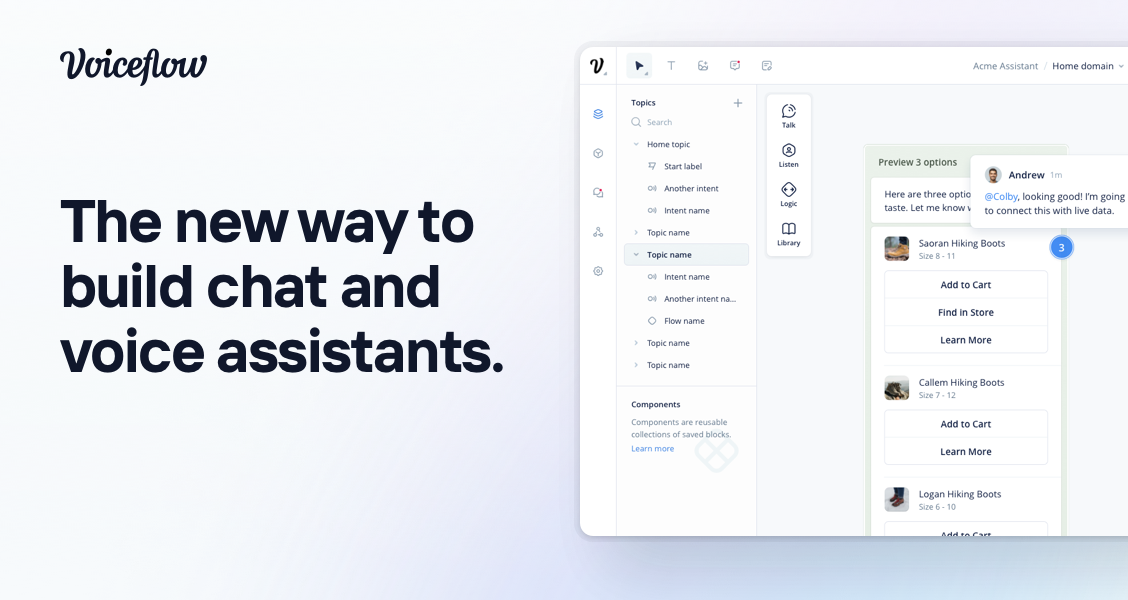
Ream describes Voiceflow as a “Figma-quality” collaborative design platform for building AI agents. To that end, teams can use Voiceflow to deploy agents powered by large language models, including — but not limited to — OpenAI’s GPT-4.

Voiceflow

Image Credits: Voiceflow

With Voiceflow, a company can design, test and deploy an AI agent without being locked in to a particular model or technology, mixing and matching different models — including speech recognition models — to create conversational AI experiences.

“Voiceflow allows for integration with any existing natural language understanding platform or technology stack, allowing teams to supercharge their design and collaboration capabilities without costly vendor replacements or technology changes,” Ream said. “It also lets enterprise customers use any large language model, including their own, as well as popular models via APIs.”

Voiceflow, which has a workforce of around 50 people, has rivals in Google-owned Dialogflow, IBM Watson, AWS Lex and Microsoft Bot Framework, among others. That’s not to mention startups like Quiq, Yellow Messenger, Rasa and Level AI, which collectively have raised over $100 million in capital to date.

But Voiceflow has a respectably large customer base — 450 customers, including Amazon JP Morgan, The Home Depot, State Farm, Vodafone and an unnamed government agency, which combined have around 130,000 users on the platform.

“Voiceflow’s signups and usage have roughly doubled since the launch of ChatGPT in November, as the interest in conversational AI grows,” Ream said. “Voiceflow enables nontechnical and technical stakeholders to work together to collaboratively build AI agents for any use case in a safe, controlled environment. This enables enterprises to rapidly build, test and deploy large language model-powered agents for internal or external use cases faster.”

Beware of Fake AI Gurus & Fraudsters

Fake AI gurus are on the rise, and there is no stopping. These so-called experts, notorious for capitalising on questionable methods, are adapting to the AI hype to attract unsuspecting individuals seeking financial success. However, before jumping on the AI bandwagon, it’s crucial to unravel the intricacies and understand why these opportunities might not be as lucrative as they appear.

Opportunities for remote work and online education are galore, but, a curious trend has caught the attention of savvy users. A user recently raised an alarm about a peculiar phenomenon in the writing industry – a surge of job postings seeking access to ‘ChatGPT University.’

These seemingly attractive gigs promise decent paychecks and require writers to churn out thousands of words using GPT technology within tight deadlines. However, scepticism looms large, with doubts cast upon the legitimacy of these offers, sparking debates and insights from fellow users.

The Deceptive Offer and Skeptical Eyes

At the heart of the matter is a user who, with a healthy dose of scepticism, questioned the authenticity of job postings that clamour for access to the enigmatic ‘ChatGPT University.’ These gigs, often accompanied by alluring budgets and hefty word counts, seemed too good to be true. The user’s scepticism, it turns out, is far from unfounded.

Fellow users joined the conversation with their take on the suspicious trend. One user, in no uncertain terms, declared these offers to be elaborate scams – an attempt to lure unsuspecting writers into paying for courses that promise to unravel the mysteries of ‘ChatGPT University.’ This user didn’t mince words, suggesting that the best response to such shenanigans might involve reporting them on platforms like Upwork and exposing the fraudulence to the folks at gumroad.com. And if that didn’t satisfy the itch for justice, they even pondered more assertive measures, but to no avail.

Echoes of Past, Shades of Doubt

Another user drew parallels to a previous case involving the infamous “articly.ai” spammer. While this new rendition seems to have refined its tactics, the game remains unchanged – convince freelancers that they desperately need ChatGPT University. The suspicion lingered, however, that Upwork might not be the cavalry riding in to save the day.

Amid the discourse, a unanimous chorus emerged – these job postings are, without a shadow of a doubt, scams. The primary motive behind these tantalising opportunities, as one user asserted, is to peddle and push questionable courses that promise more than they can deliver. Genuine job prospects? Few and far between. The air of scepticism was so thick that one user summed it up with an eloquently dry “Obviously.”

The Pipe Dream Peddlers

The realm of dubious AI exploitation doesn’t stop at sketchy job listings. Enterprising students from IIT Kharagpur are capitalising on the fear of AI job displacement. For the seemingly modest fee of INR 199, they’re selling courses that promise to inoculate against AI’s job-replacing prowess. Yet, as their customers vouch for these courses, a glaring irony emerges – these sellers themselves seem to be stumbling in the dark when it comes to understanding the very technology they’re claiming to teach.

When testimonials are dissected, the glaring truth emerges – many of these “AI gurus” are perplexingly unacquainted with the basics of the technology. The tech’s capabilities? A foggy haze. Its limitations? A mystery. The irony is as stark as it is troubling.

Calling Out the Charlatans with Empty Pedigrees

But don’t be fooled, there are few who offer such courses and have no pedigree but few courses by Google and other big tech to show for them. Its obvious that they are selling a pipe dream.

Microsoft’s data scientists have stepped into the ring, exposing the charlatans who, with a touch of arrogance, fancy themselves as jacks of all AI trades. The “grifters” are trying to pocket dollars by exploiting the uninformed.

In the realm of AI courses, creativity doesn’t shine. “Passive Income W/ chatGPT: Sell Online Courses” – unoriginal much? The meta-level of selling courses about selling courses leaves one wondering if they’ve stumbled into a Christopher Nolan screenplay.

The AI course peddlers are adept at crafting attention-grabbing headlines. The catchphrases range from the reassuring (“AI won’t replace you, a person using AI will”) to the panic-inducing (“Time is running out. Reserve your seat now!”). And just when you thought it couldn’t get more absurd, headlines brag about teenagers raking in five figures with AI, prompting eye rolls and a collective sigh.

Then there are others who aren’t even original and use click baits like, “15 year old kids are making $30,000/month using AI. But most people don’t know how to use it to generate income.” Others follow suit with ‘14-year-old kids are making $15,000/month with ChatGPT”.

When AIM reached out to these people, they obviously did not respond.

Beware the Mirage

In a digital world teeming with opportunities and mirages alike, the cautionary tales of dubious job offers and uninformed gurus loom large. The scepticism voiced by users serves as a reminder – not all that glitters is AI gold.

From phoney job opportunities to questionable courses, the digital landscape demands a discerning eye. As AI captures imaginations and exploits fears, it’s paramount to separate the genuine from the gimmickry and equip oneself with the armour of knowledge.

True success in the realm of AI requires effort, discipline, and a realistic grasp of its capabilities and limitations. It’s crucial to approach AI-related money-making opportunities with scepticism and thorough research before diving in.

The post Beware of Fake AI Gurus & Fraudsters appeared first on Analytics India Magazine.

Introducing Superalignment by OpenAI

Introducing Superalignment by OpenAI
Image by Author

OpenAI has been in the media a lot, not only because of the release of ChatGPT, GPT-3, and GPT-4. But also surrounding the ethical concerns of AI systems like ChatGPT to the socioeconomics of today's world.

CEO Sam Altman has addressed the safety around AI several times, such as at a US Senate committee and said:

"I think if this technology goes wrong, it can go quite wrong…we want to be vocal about that. We want to work with the government to prevent that from happening."

With that being said, the team at OpenAI have taken matters into their own hands. Many people are concerned with superintelligence, an AI system that is so intelligent that it surpasses human minds. Some believe that technology could solve a lot of the world's current problems, however with very little information or understanding around it — it is difficult to weigh the pros against the cons.

It may be too soon to talk about superintelligence, but it is definitely a conversation that needs to be had. The best approach to take is to manage these potential risks earlier on before they become a bigger problem that cannot be handled.

OpenAI’s Approach

OpenAI has stated that they do not currently have a solution for superintelligent AI, however, it is something that they are working on with their new team Superalignment. They are currently using techniques such as reinforcement learning from human feedback, which heavily relies on humans to supervise AI. However, there are concerns about the future challenges of humans not being able to reliably supervise AI and the need for new scientific breakthroughs to handle this.

With that being said, OpenAI is looking at building a human-level automated alignment researcher that will be able to learn from human feedback and assist humans in evaluating AI, as well as being able to solve other alignment problems. OpenAI has dedicated 20% of the compute that they have secured to date to this effort, to iteratively align superintelligence.

In order for the superalignment team to be successful in this, they will need to:

1. Develop a Scalable Training Method

They aim to leverage other AI systems to help assist in evaluating other AI systems, along with being able to better understand how models generalize oversight, which humans can’t supervise.

2. Validate the Resulting Model

In order to validate the results of the alignment of the systems, OpenAI plans to automate searches for problematic behavior to refine the robustness of the model, as well as automated interpretability.

3. Stress Test the Entire Alignment Pipeline

Testing, testing, testing! OpenAI plans to test its entire alignment process by deliberately training misaligned models. This will ensure that the techniques used will be able to detect any form of misalignment, specifically the worst kind of adversarial testing.

OpenAI has already gone through preliminary experiments, which have shown good results. They aim to progress on these using useful metrics and the continued work of studying models.

Wrapping it up

OpenAI aims to create a future in which AI systems and humans can live harmoniously without one another feeling endangered. The development of the superalignment team is an ambitious goal, however, it will provide evidence to the wider community about the use of machine learning and being able to create a safe environment.
Nisha Arya is a Data Scientist, Freelance Technical Writer and Community Manager at KDnuggets. She is particularly interested in providing Data Science career advice or tutorials and theory based knowledge around Data Science. She also wishes to explore the different ways Artificial Intelligence is/can benefit the longevity of human life. A keen learner, seeking to broaden her tech knowledge and writing skills, whilst helping guide others.

More On This Topic

  • What is Superalignment & Why It is Important?
  • GPT-2 vs GPT-3: The OpenAI Showdown
  • OpenAI’s Approach to AI Safety
  • OpenAI’s Whisper API for Transcription and Translation
  • New ChatGPT and Whisper APIs from OpenAI
  • Building AI Products with OpenAI: A Free Course from CoRise

Google Health expands AI-powered breast cancer screenings integration

Doctor initiating breast cancer screening

On Monday, iCAD, a global manufacturer of medical devices, announced an amendment to its original agreement with Google Health which will enable iCAD to incorporate Google's AI technology into its ProFound Breast Health Suite for 2D Mammography for a period of 20 years, pending regulatory approval.

ProFound AI for 2D Mammography is a cancer detection solution that leverages AI to analyze a mammography image and alert radiologists of suspicious areas.

Also: Most Americans want federal regulation of AI, poll shows

The solution helps optimize the double-reading workflow that is utilized by most countries, in which a mammogram has to be screened by two individual radiologists.

Google initially signed a strategic development and commercialization agreement with iCAD in November 2022, and today's amendment is further expanding that integration.

"Combining Google's artificial intelligence (AI) technology with our leading-edge ProFound Breast Health Suite of AI solutions will enhance our technology and expand access to the technology to millions of women and providers worldwide," said Dana Brown, President and CEO of iCAD.

In the announcement, iCAD cites an independent research study of six radiologists conducted in 2020 in which "Google's mammography AI system outperformed all of the human readers".

In the same study, a simulation was run in which the AI system participated in a double-reading process, and the results found that the second reader's workload was reduced by 88%.

Also: You can build your own AI chatbot with this drag-and-drop tool

As ZDNET previously covered, a randomized trial involving 80,000 women showed that both AI screenings and the radiologist double screenings produced comparable results in terms of false positives and cancer detection.

The potential of AI in the healthcare system is significant because it will not only reduce radiologist workload, allowing them to focus on more important tasks such as face-to-face care, but should also help give more patients better healthcare access.

Artificial Intelligence

Most Americans want federal regulation of AI, poll shows

US government building

Although AI has existed for decades, ChatGPT took the technology's popularity to a new level, and as a result, AI research and applications are quickly evolving. However, since the widespread growth is so recent, there isn't much regulation around it yet, but people want there to be.

The Artificial Intelligence Policy Institute polled 1,001 US registered voters regarding their thoughts on AI. The results, shared exclusively with Axios, showed a general fear among the public.

Also: We're not ready for the impact of generative AI on elections

Of the participants polled, 62% reported being somewhat or mostly "concerned" about AI, with 86% believing AI could accidentally cause a catastrophic event.

This widespread concern has led people to advocate for safety measures such as slowing developments and establishing regulations.

Despite wanting regulation, the voters are specific in who they want making the regulation with 56% of voters supporting a federal agency regulating AI and a whopping 82% saying they don't trust tech executives to regulate AI themselves.

Regarding AI development, 72% of the voters said they would rather see the development of AI slow down, compared to the 8% who want to see it speed up.

The public's sentiments in the poll parallel what we have seen experts share. For example, tech leaders such as OpenAI CEO Sam Altman, Tesla CEO Elon Musk, "godfather" of AI Geoffrey Hinton, and even President Joe Biden have all talked about the dangers of AI or even called for AI regulation.

Also: Five ways to use AI responsibly

OpenAI has even advocated for the creation of an international organization like the International Atomic Energy Agency dedicated to the topic of AI. The regulation established within the next year will be pivotal in creating safety boundaries and a precedent for the future of the ever-evolving technology.

Artificial Intelligence

OpenAI Faces a Nearly 20% Traffic Drop in 3 Months

OpenAI, a prominent entity in the world of artificial intelligence (AI), has experienced a notable decrease in web traffic in the span of just three months. The organization's monthly visitor count went from a staggering 959.5 million to 780.1 million, representing an 18.7% decline. Such data underscores the volatile nature of online traffic, and it showcases that even AI giants that are backed by Microsoft are not immune to a steep drop in traffic.

These traffic stats come courtesy of SimilarWeb, a digital market intelligence platform that offers insights into website traffic, rankings, and user engagement. With the capability to monitor billions of web pages, SimilarWeb has established itself as a premier tool for marketers, researchers, and businesses aiming to gauge their online presence or assess the competition.

What could be causing this steep traffic decline? One theory could be that users are simply accessing GPT-3.5 and GPT-4 services from alternate sources. Bing would seem to be the most obvious candidate but this does not seem to be the case, as traffic for Bing is down but seems to be maintaining slightly better than OpenAI.

Of course there are numerous AI platforms that are competing with ChatGPT, either indirectly or even by using ChatGPT APIs to offer their own services. For example, users who wish to use an AI writing generator could be turning to Jasper AI. Other notable services that are offering generative AI include the start-up You.com. Nonetheless, even these companies in combination should not be impacting the OpenAI numbers so significantly.

Even Google Bard which was released in February 2023, and Meta Llama 2 which was released in July 2023, still do not have large consumer facing applications that could be siphoning traffic away from OpenAI.

For all of the discussions around OpenAI and the new Bing being a Google killer, it still seems to be the case that users enjoy a search engine that prioritizes linking to websites versus a pure generative AI experience. Google seems fairly unaffected by OpenAI, yet less Bing.

Google may even want to consider these numbers before introducing too many AI features that completely replace the search results page that people have become accustomed to.

Other problems with OpenAI could be the steep price tag. $20 a month for users in North America, and Europe may not seem steep, but for users in most of Africa, and Asia, it may be considered an unaffordable luxury. OpenAI also suffers from a poor user interface. Unlike Google and Bing, you cannot simply type in a one word URL and land on a search bar, using the platform is always several clicks away.

Users may also be exhausted with the following notification for a large percentage of their queries:

While there are ways around the September 2021 training set limitations, it requires the use of plug-ins, a process which is not obvious to users who are not immersed in the world of AI. The concept of plug-ins in itself requires a somewhat technical background to understand, and this additional layer of complexity might be alienating a large segment of society.

Ultimately, it could simply be that with all of the hype around Generative AI, that it was inevitable that there would be a drop in interest and traffic. After all, according to Amara's Law, “We tend to overestimate the effect of a technology in the short run and underestimate the effect in the long run.” The rules for AI are no different, the state of the industry is exponentially growing according to Ray Kurzweil's Law of Accelerating Returns, and this short-term traffic dip could be meaningless in the larger context of how AI will transform society.

How to Use ChatGPT to Convert Text into a PowerPoint Presentation

How to Use ChatGPT to Convert Text into a PowerPoint Presentation
Photo by ThisisEngineering RAEng on Unsplash

Are you tired of spending hours creating PowerPoint presentations from lengthy texts? Do you wish there was a faster way to convert your content into engaging slides? Use ChatGPT to transform your text into a presentation in just minutes. Say goodbye to tedious copy-and-pasting and hello to an efficient and effective solution for all your presentation needs!

To transform your text into a PowerPoint presentation, you must run just two steps:

  • Let ChatGPT summarize your text
  • Let ChatGPT write the Python code to convert the summary into the PPTX format

Step 1: Transform Text into a Slide Presentation

The first step involves instructing ChatGPT to generate a presentation with a specific number of slides based on the given text. First, you must provide ChatGPT with the text you want to convert.

Use the following prompt to instruct ChatGPT to create the presentation:

Please convert the following text into a ten-slide presentation: [enter the text]

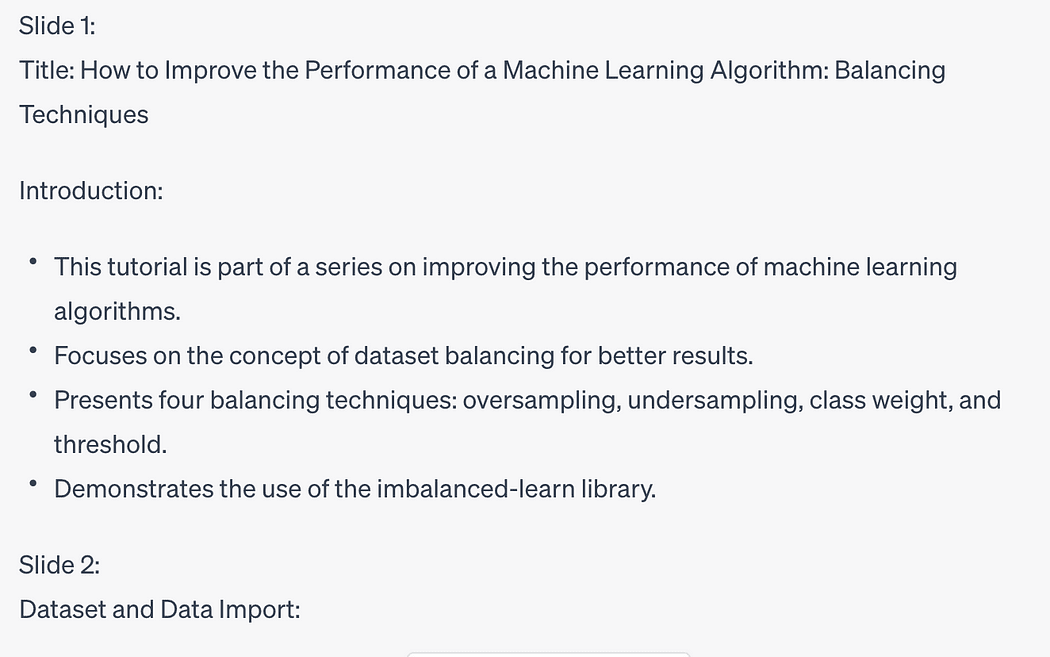
ChatGPT will generate something similar to the text shown in the following figure:

How to Use ChatGPT to Convert Text into a PowerPoint Presentation
Image by Author

It’s important to note that the length and complexity of the text may impact the level of detail and coherence in the generated presentation. Therefore, keeping the original text concise and organized is advisable to obtain optimal results.

Step 2: Converting the Presentation to PowerPoint Format Using Python

Now that you have obtained the generated presentation, it’s time to convert it into the widely used PowerPoint format, .pptx. To accomplish this, we will ask ChatGPT to write the Python code to generate it.

Use the following prompt to instruct ChatGPT to convert the presentation into pptx:

Please write the Python code to transform the previous texts into the pptx format

ChatGPT will generate the Python code for your slides, such as the following one:

from pptx import Presentation    # Create a presentation object  presentation = Presentation()    # Slide 1 - Title slide  slide1 = presentation.slides.add_slide(presentation.slide_layouts[0])  title = slide1.shapes.title  title.text = "Improving the Performance of a Machine Learning Algorithm"    # Slide 2 - Introduction  slide2 = presentation.slides.add_slide(presentation.slide_layouts[1])  content2 = slide2.shapes.title  content2.text = "Introduction"    # Slide 3 - Balancing Techniques  slide3 = presentation.slides.add_slide(presentation.slide_layouts[1])  content3 = slide3.shapes.title  content3.text = "Balancing Techniques"    # Slide 4 - Using imbalanced-learn library  slide4 = presentation.slides.add_slide(presentation.slide_layouts[1])  content4 = slide4.shapes.title  content4.text = "Using imbalanced-learn Library"    # Slide 5 - Data Import  slide5 = presentation.slides.add_slide(presentation.slide_layouts[1])  content5 = slide5.shapes.title  content5.text = "Data Import"    # Slide 6 - Model Building  slide6 = presentation.slides.add_slide(presentation.slide_layouts[1])  content6 = slide6.shapes.title  content6.text = "Model Building"    # Slide 7 - Imbalanced Dataset  slide7 = presentation.slides.add_slide(presentation.slide_layouts[1])  content7 = slide7.shapes.title  content7.text = "Imbalanced Dataset"    # Set the content for each slide  slides = [slide2, slide3, slide4, slide5, slide6, slide7]  content = [      "This tutorial belongs to the series How to improve the performance of a Machine Learning Algorithm.",      "A balanced dataset is a dataset where each output class is represented by the same number of input samples.",      "Balancing techniques include oversampling, undersampling, class weight, and threshold.",      "The imbalanced-learn library, part of the contrib packages of scikit-learn, is used in this tutorial.",      "Data is imported using the pandas library, and the target class is created based on cuisine.",      "The model is built using the Decision Tree algorithm, and evaluation metrics are calculated.",      "The classification report and various plots are generated for the imbalanced dataset."  ]    # Add content to each slide  for slide, content_text in zip(slides, content):      content_placeholder = slide.placeholders[1]      content_placeholder.text = content_text    # Save the presentation  presentation.save("machine_learning_presentation.pptx")

In addition, ChatGPT recommends you install the python-pptx library:

pip install python-pptx

Once the library is installed, you can run the generated code to produce your PowerPoint presentation.

Watch the following video to see ChatGPT in action!


Summary

Congratulations! You have just learned how to convert text to a PowerPoint presentation using ChatGPT!

Thanks to the incredible capabilities of ChatGPT, converting text into a PowerPoint presentation has become a breeze. Following the two-step process outlined in this blog post, you can quickly transform lengthy texts into concise presentations.

Remember to provide clear and organized text to obtain the best results. With ChatGPT and a few lines of Python code, you can captivate your audience with stunning presentations!

Angelica Lo Duca (Medium) (@alod83)is a researcher at the Institute of Informatics and Telematics of the National Research Council (IIT-CNR) in Pisa, Italy. She is a professor of "Data Journalism" for the Master degree course in Digital Humanities at the University of Pisa. Her research interests include Data Science, Data Analysis, Text Analysis, Open Data, Web Applications, Data Engineering, and Data Journalism, applied to society, tourism, and cultural heritage. She is the author of the book Comet for Data Science, published by Packt Ltd., of the upcoming book Data Storytelling in Python Altair and Generative AI, published by Manning, and co-author of the upcoming book Learning and Operating Presto, by O'Reilly Media. Angelica is also an enthusiastic tech writer.

Original. Reposted with permission.

More On This Topic

  • Convert Text Documents to a TF-IDF Matrix with tfidfvectorizer
  • How to Convert an RGB Image to Grayscale
  • Virtual Presentation Tips for Data Scientists
  • Deliver a Killer Presentation in Data Science Interviews
  • Winning The Room: Creating and Delivering an Effective Data-Driven…
  • Visual ChatGPT: Microsoft Combine ChatGPT and VFMs