Wadhwani AI Introduces Krishi 24/7 for AI-Powered Agricultural News Monitoring

In a significant move towards agricultural development and efficient information management, the Ministry of Agriculture and Farmers Welfare (MoAFW) has launched Krishi 24/7—an AI tool for automated news monitoring and analysis.

Developed by Wadhwani AI to address the crucial need for a streamlined mechanism to identify and manage agricultural news articles—Krishi 24/7 has been developed with $1M support from Google.org.

It will prove invaluable to the Directorate of Extension Division under MoAFW, allowing them to identify pertinent news, generate timely alerts, and take swift actions that safeguard the interests of farmers while promoting sustainable agricultural growth through informed decision-making.

The AI tool boasts an impressive range of features, including its ability to scan news articles in multiple languages and translate them into English. Moreover, it extracts essential information from these articles, such as headlines, crop names, event types, dates, locations, severity, summaries, and source links. By doing so, it ensures that the ministry receives real-time updates on relevant events published across the web.

Krishi 24/7 offers several advantages, including providing timely updates on relevant agricultural events through targeted alerts to facilitate comprehension, analysis, and data-driven decision-making with enhanced tracking and analytics. The AI tool is set to enhance response tracking from various divisions, leading to more efficient progress monitoring and offering insightful analytics through a dashboard.

Mr. JP Tripathi, Associate Director (Ag) at Wadhwani AI, emphasised the institute’s commitment to building AI solutions for existing challenges while denoting that “A similar event tracking and analysis solution for disease outbreaks has been successfully deployed by the institute with the National Centre for Disease Control (NCDC).”

The institute also reiterated that it is dedicated to providing effective tools for central government bodies like DA&FW to enhance information flow through data-driven decisions.

A&FW Secretary Manoj Ahuja, during the initiative’s launch, expressed that, “this news monitoring system will not just keep us informed but empower us to shape the narrative.” He stressed the importance of continuous improvement and adaptability in the ever-evolving world, emphasising the need for tools and methods that can evolve in tandem with the changing information landscape.

The post Wadhwani AI Introduces Krishi 24/7 for AI-Powered Agricultural News Monitoring appeared first on Analytics India Magazine.

AI Upsets News Publishers for Good 

Publishers, both established and emerging, have experienced a turbulent few months with AI. There’s a clear love-hate relationship, whether it’s using AI or writing about it—it hurts.

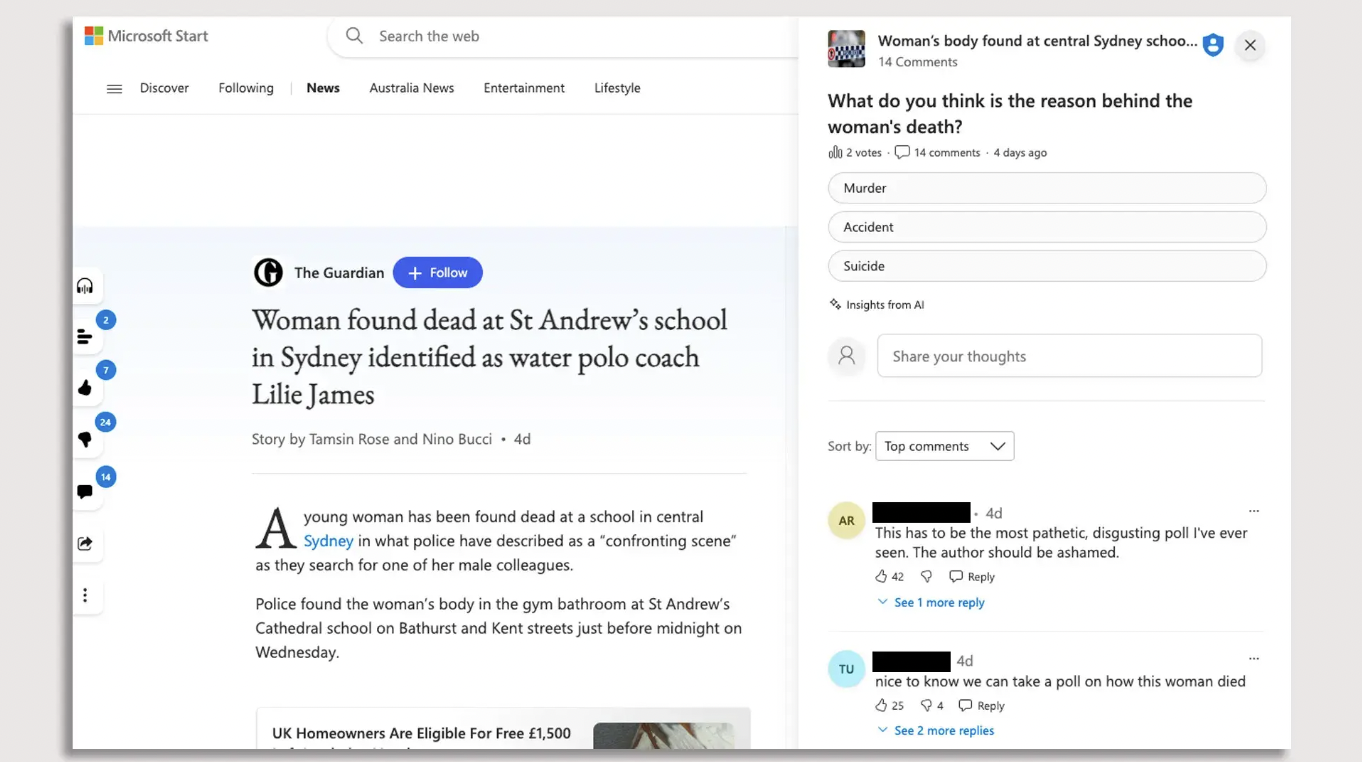
This concern was solidified this past week, as Microsoft’s news aggregation service MSN uploaded an AI-generated poll speculating on the cause of an Australian athlete’s death, besides a news piece by the Guardian. Obviously, this new development was not taken well by the publisher, and Microsoft was accused of damaging its “journalistic reputation.”

The readers too weren’t ready for it – the “insights from AI’ turned the sensitive post into a engaging poll (see below). “This has to be the most pathetic, disgusting poll I’ve ever seen. The author should be ashamed,” read one of the comments from the user.

Microsoft said that the generated polls for all news articles have been deactivated and it is investigating the cause of the inappropriate content. “A poll should not have appeared alongside an article of this nature, and we are taking steps to help prevent this kind of error from reoccurring in the future,” Microsoft general manager Kit Thambiratnam said.

The Pitfalls of Automating News

In MSN’s case, the team slowly shifted from employing over 800 editors human editors in 2018 to replacing them with what is believed to be AI-driven automation, laying off many in the process. The current number of editors—if any, at Microsoft is uncertain, but in 2020, the company laid off numerous journalists and editorial teams to replace them with AI.

Moreover, barely any human intervention in the process has resulted in them republishing articles including a claim that US President Joe Biden fell asleep during a moment of silence for Maui wildfire victims, a conspiracy theory about the Democratic Party orchestrating the latest COVID-19 surge, and an obituary for an NBA player describing him as “useless.”

Additionally, Microsoft Start generated a travel guide suggesting visiting the Ottawa Food Bank in Ottawa, Canada, “on an empty stomach,” though the story was not entirely AI-generated but involved human review.

Microsoft, previously, has also been accused of publishing junk content, such as stories about mermaids and Bigfoot sightings, after replacing human editors with automation. False articles from obscure websites were given greater visibility by Microsoft, and former editors suggest that without AI, such stories would not have been prominently featured.

Same goes for NewsGPT, and humans too make mistakes. But, this is all changing. While MSN is trying to fix the recent concerns, others like Google News, have been trying hard to enhance the news reading experience for the better, where its algorithm is unintentionally biased toward more popular perspectives.

At the same time, OpenAI is pushing hard for its product to be adopted across media outlets. It has already inked a pact with the Associated Press, one of the biggest news agencies in the US. Following that it announced over a $10 million partnership with the American Journalism Project (AJP)—said to explore ways to develop AI to support local news.

Additionally, there are also murmurs of others like Google developing a tool, internally known as Genesis, which is designed to generate news content from provided information, potentially assisting journalists by automating tasks. Google envisions this tool as a responsible technology that could help the publishing industry navigate the challenges of generative AI.

The Birth of New Age Media

On the bright side, AI is finding its place in journalism worldwide. A recent global survey which collected insights from over 105 newsrooms in 46 different countries revealed that about 90% of newsrooms are already using AI in news production. They are using AI for transcription, text extraction from images, writing articles, translating content, proofreading, generating headlines, or making it more engaging (like the one you saw above) – “insights from AI”

The survey conducted by a think tank at the London School of Economics, supported by the Google News Initiative further revealed that 80% of it is being used in news distribution which utilises AI-driven search engine optimization, and 75% in news gathering which includes automated transcription, translation, text extraction from images, and web scraping.

However, over 60% of respondents expressed concerns about the ethical implications of AI integration in journalism—indicating that newsrooms generally view human intervention as vital for mitigating potential issues such as bias and inaccuracy caused by AI systems.

The New York Times, The Washington Post and The Wall Street Journal amongst others are experimenting with AI. Gannett, the largest newspaper publisher in the US is also using AI to write short stories for print based on stories written by human writers. At AIM, we have also been experimenting with integrating a few AI capabilities, mostly for internal use, alongside enhancing productivity, content and engagement. These are surely exciting times.

All in all, we are on the brink of a new media era: the fusion of AI with human creativity, and it’s nothing short of surreal. It’s time we welcomed this union with open arms, just as we’ve embraced SEO, social media, and other information-sharing platforms.

The post AI Upsets News Publishers for Good appeared first on Analytics India Magazine.

Fostering an Empowering Culture that Sparks Powerful Intelligence: Insights from Data & AI Experts at KPI Partners

In recent years, there has been a notable transformation in the realm of employee engagement. Organizations, in their pursuit of fostering improved work environments, have adopted diverse strategies to meet the changing demands of their workforce. Today, many companies, including KPI Partners, are introducing creative solutions such as flexible scheduling, remote work possibilities, and generous vacation policies to promote work-life balance and elevate employee satisfaction.

Founded in 2006 by Sid Goel and Kusal Swarnakar, KPI Partners has emerged as a prominent provider of cloud-native solutions encompassing Generative AI, Analytics, Business intelligence, Data management, and Data engineering. Their team comprises more than 600 experts, delivering cloud-based services designed to prioritize scalability, security, and user-friendliness. Headquartered in Newark, California, KPI Partners serves Fortune 500 companies and maintains a presence across North America and Asia.

In March of this year, KPI Partners achieved its third consecutive ‘Great Place to Work’ certification. An anonymous poll revealed that nearly 91% of employees believe the company is indeed a fantastic workplace. “We believe in setting our new employees up for success from day one with a comprehensive onboarding program,” said Daniel Shaw, who was formerly the Senior Director of HR and Talent Acquisition of the company and currently serves as the Senior Director of Client Services for APAC & Middle East at KPI Partners. “Mentorship opportunities, team-building activities, and continuous training are integral components that equip every team member with the necessary tools to excel.”

What makes KPI a great workplace?

In addition to its focus on the work-life balance of its employees, the company, as stated by Shaw, places a strong emphasis on transparent communication and empathy. This includes offering employees clear guidance, consistent feedback, and unwavering support. They are actively encouraged to take ownership of their roles, fostering a sense of accountability for excellence. Collaboration and striving for excellence are also fundamental values within the company.

“KPI Partners recognizes the significance of upskilling and fostering professional growth. This is why we provide ongoing learning programs and training sessions for our team members. We actively promote and support their pursuit of professional development opportunities, including attending conferences and enrolling in courses, to enrich their skills and knowledge. Our organization offers diverse career advancement paths, allowing our employees to thrive and progress within our company.”

KPI Partners also rewards proactive behaviours, acknowledges outstanding performance, and values innovative ideas. Through regular feedback and performance evaluations, the company helps employees identify their strengths and areas for improvement. “Our engaging work environment is enhanced by social events, team-building activities, and celebrations.”

Moreover, Shaw reveals that KPI emphasises employee well-being through comprehensive wellness programmes encompassing insurance coverage, regular health check-ups, fitness classes, and mindfulness workshops. “Our commitment to a healthy work-life balance encourages breaks, fostering a culture of productivity and creativity. Engaging in social responsibility initiatives enables employees to contribute positively to society,” said Shaw.

KPI culture

Establishing a culture that fosters employee engagement is paramount to the success of any organization. “At KPI Partners, we place a strong emphasis on open communication and a supportive atmosphere where every employee feels valued and heard. We actively collect insights and gain an understanding of employee perceptions by conducting regular team meetings, providing feedback opportunities, administering surveys, and conducting one-on-one check-ins. This ongoing process allows us to continually enhance our company culture.”

Moreover, KPI Partners is committed to promoting employee career growth, offering abundant opportunities for professional development, including training programs and clearly defined career paths. “We place great importance on recognizing and rewarding hard work, actively involving our employees in the company’s success. Additionally, we have instituted various programs to support our employees throughout their journey with our organization. For instance, we initiate an onboarding period called “Parichay” from the moment they join, allowing new hires to acclimate to our organization. After three months, they take part in “Anubhav,” a survey enabling them to share their experiences and provide valuable input that helps us refine our processes. We further have “Bird’s Eye View” sessions where our centre head engages with the team to help align them with our work environment.”

To encourage feedback and suggestions, we have implemented suggestion boxes and maintained regular meetings with managers. We highly value employee feedback, and it has led to the implementation of various initiatives, including providing an internet allowance for remote work, introducing the buddy program, and offering access to specialized doctors in India through “Medi Buddy.”

Providing an inclusive workspace

KPI Partners places a strong emphasis on building a sense of unity and shared purpose among its employees. To achieve this, the company organizes a variety of team-building activities aimed at promoting collaboration and strengthening interpersonal relationships.

“These activities range from group outings to team-building exercises that promote trust and communication. We value the input of every employee and promote an open-door policy where everyone feels comfortable sharing ideas and concerns with their superiors. This, in turn, enhances inclusivity and fosters a collaborative culture.”

Besides, inclusivity in hiring and promotion practices remains a key focus area. KPI Partners provide equal opportunities for all employees to grow and advance in their careers, regardless of their background or identity. This commitment to inclusivity not only creates a more diverse workforce but also fosters a sense of belonging and acceptance among employees, according to Shaw.

Ensuring strong women’s representation

In the contemporary corporate landscape, progressive companies prioritize measures to ensure robust women’s representation in their workforce. Underlining the significance of advancing women’s leadership and presence in the workplace, Daniel Shaw emphasizes that KPI Partners is dedicated to creating an inclusive and diverse environment where women can not only thrive but also excel in their careers.

“To achieve this, we have implemented several strategies. We actively support talented women within our organisation through mentorship programmes and leadership development initiatives. By investing in their professional growth, KPI empowers women to assume leadership positions and make substantial contributions to the company’s success. Our transparent work culture encourages open communication and equal participation in decision-making processes.”

Recognizing the challenges that women may encounter in balancing their professional and personal responsibilities, KPI has introduced various initiatives. This includes providing flexible work arrangements, such as remote work options, and accommodating maternity and sabbatical leave policies. “The safety and well-being of employees are highly valued, leading to the implementation of redressal systems like PoSH. We have also introduced flexible work timings to ensure that client calls after 7 p.m. are handled by other team members. This not only aids in retaining talented women but also enhances their overall well-being and job satisfaction.”

Additionally, KPI also promotes gender diversity in our recruitment and hiring processes, ensuring that the job postings are inclusive and encouraging women to apply. Consequently, KPI has witnessed a positive impact on its hiring procedures, with over 50% of women included in recent cohorts of entry-level recruits. “This year, we have seen a steep increase of 15% in the hiring percentage. Additionally, we have implemented unconscious bias training for our hiring managers to ensure fair and unbiased selection processes.”

Creating an environment of trust, transparency & innovation

Commenting on what makes KPI Partners a Great Place to Work, Daniel Shaw highlights the company’s commitment to values that underpin its long-term success and create a positive work environment. These values are defined as ‘Innovation, Integrate, Influence, and Trust.’ Key to the organization is transparency, as it seeks to provide clear and honest information to its customers. “This approach not only builds trust but also fuels innovation, as KPI openly shares ideas and feedback. The company’s ethos revolves around making the customer experience enjoyable and memorable, infusing fun into interactions, and leaving lasting, positive impressions.”

To support these principles, KPI has introduced several initiatives. Firstly, the company established a dedicated learning and development division known as “Gurukul”.Managed by the human resource and delivery department, Gurukul ensures that employees possess the right skills for their roles. “We identify those who need to reskill or upskill and create personalised learning paths in consultation with their managers. This ensures that our team is always equipped with the latest knowledge and expertise.”

“We believe in building connections and fostering collaboration. That’s why we hold a monthly session called ‘Let’s have a conversation’. This brings together new joiners, existing team members, and managers to create a strong sense of community and support. Furthermore, KPI also conducts early sessions between employees and the managers, offering a comprehensive overview of the work environment.

To further facilitate growth and development, KPI managers meet with the Center Head every month to discuss the learning curve of their team members, ensuring they remain on the right track. We also follow a top-down and bottom-up approach to communication, keeping everyone on the same page. Succession planning is a priority for us, as we identify key roles and positions to ensure business contingency plans.

Furthermore, our Centers of Excellence is a hub for internal career development, fostering mobility and growth within the organization. To boost employee morale and confidence, we organise roadshows, webinars, and demos, creating a well-rounded and supportive environment,” Shaw concluded.

The post Fostering an Empowering Culture that Sparks Powerful Intelligence: Insights from Data & AI Experts at KPI Partners appeared first on Analytics India Magazine.


OpenAI Puts on The Open-Sourcing Act Again

OpenAI has been infamous for its closed door practices but the hottest AI startup appears to be making baby steps to contribute to the open-source community. At the inaugural DevDay, the company announced two open-source updates, which was highly unlikely given how heavily it has been trolled in the recent past year for not openly sharing any of its tech.

The company’s head of developer experience, Romain Huet took the stage at the event to announce ‘large-v3’, the new version of its automatic speech recognition model Whisper. OpenAI also has plans to release an API for the upgraded version in “near future”.

Huet also announced the open sourcing of the Consistency Decoder which is a replacement for the Stable Diffusion VAE decoder. It sounds like a really major improvement for Stable Diffusion (if it does what they say it can!). The company’s official blog mentioned that the decoder works with “1.0+” which ideally should mean “all” but that is not the case. It is only supported by versions v1 and v2, not SDXL.

Though the model was released less than 24 hours ago, developers have already started playing around with it and some are not satisfied with the results. “Faces are far worse than with the vae-ft-mse-840000-ema-pruned in all the tests I made. And it takes something like 20 seconds to decode the latent image when usually it just takes 1 second,” wrote an early user on Reddit.

What’s In A Name?

The creator of ChatGPT was founded as a non-profit but turned towards a more secretive ‘capped for profit’ direction. When GPT-4 was revealed along with a 98-paged document that said nothing about the model, the stunt by OpenAI was grumbled upon by several AI insiders including Elon Musk who has initially invested $100 million dollars in the company and has never missed a chance to mention that.

The irony of the name came up several times on the internet and many even suggested that the company should consider changing its name to “Closed AI”. In an interview with The Verge, OpenAI’s chief scientist and cofounder, Ilya Sutskever made clear the reason for the company’s shift in focus from open-source.

But he also acknowledged that “the safety side is not yet as salient a reason as the competitive side,” noting that “it’s competitive out there” and “there are many, many companies who want to do the same thing.”

While the company has not shared much of its latest slew of products, it has previously open-sourced half a dozen AI models — Evals, Spinning Up, CLIP, Jukebox and Point-E.

Open-Sourcing the Future

The optional sharing of technology by the tech companies has been a long debated topic. Open core has gained momentum since large language models have made a name for themselves in the AI research community. Tech giant Meta has also been advocating for the free and open source software by releasing Llama-2 which has a separate fanbase.

Even investors are heavily betting on open-source today as opposed to what they were doing a year ago. Majority of the technology from your iPhones to Firefox browser has some or the other open sourced material at the heart of it. The open-source culture has long transferred the tech industry but at an enterprise level it remains in a state of flux due to the lack of safety in its nature.

For OpenAI case in point, the closed approach is working out well for the startup since the company is being darted with lawsuits left, right, and centre for copyright infringements. A point that Sutskever missed was that by releasing the inner workings of its models the company will have to pay thousands of artists and creators for using their work to build its AI models. It looks like OpenAI has been contributing to the community as per its convenience, ignorant to its ethos.

The post OpenAI Puts on The Open-Sourcing Act Again appeared first on Analytics India Magazine.

Oracle, Microsoft Join Forces to Enhance Bing 

Oracle, Microsoft Join Forces to Enhance Bing

Oracle has announced a multi-year agreement with Microsoft to bolster the growth of AI services. Microsoft has adopted Oracle Cloud Infrastructure (OCI) AI infrastructure, alongside Microsoft Azure AI infrastructure, to power daily Bing conversational searches.

This utilisation of AI infrastructure is enabled through Oracle’s Interconnect for Microsoft Azure, and Microsoft leverages managed services like Azure Kubernetes Service (AKS) to orchestrate OCI Compute on a massive scale.

The development aims to support the increasing demand for Bing conversational search, which relies on robust computing infrastructure clusters to evaluate and analyse search results using Bing’s inference model.

“Generative AI is a monumental technological leap, and Oracle is facilitating Microsoft and numerous other businesses in creating and running new products with our OCI AI capabilities,” stated Karan Batta, senior vice president of Oracle Cloud Infrastructure. He added, “Our extended collaboration with Microsoft is set to deliver innovative experiences to a global audience.”

Read: Oracle Doesn’t Want You to Care About Data Anymore

Divya Kumar, global head of marketing for Search & AI at Microsoft, emphasised the enhancement this collaboration brings to Microsoft Bing’s search experience: “Microsoft Bing is leveraging the latest advancements in AI to provide a dramatically better search experience for people across the world. Our collaboration with Oracle and the use of Oracle Cloud Infrastructure, in conjunction with Microsoft Azure AI infrastructure, will broaden customer access and enhance the speed of many search results.”

To facilitate inference models, thousands of compute and storage instances and tens of thousands of GPUs operate in parallel as a single supercomputer over a multi-terabit network.

Oracle’s OCI Superclusters offer OCI Compute Bare Metal instances, ultra-low latency RDMA cluster networking, and a choice of HPC storage.

These superclusters can scale up to 4,096 OCI Compute Bare Metal instances with 32,768 A100 GPUs or 16,384 H100 GPUs, coupled with petabytes of high-performance clustered file system storage, ensuring efficient processing of massively parallel applications.

The post Oracle, Microsoft Join Forces to Enhance Bing appeared first on Analytics India Magazine.

Amazon is Building Olympus, to Compete with ChatGPT

Amazon is Building Olympus, to Compete with ChatGPT

Amazon was quiet for a while when it came to developing generative AI chatbots. Now, Amazon is intensifying its efforts in the realm of conversational AI software, positioning itself to rival industry leaders like OpenAI and Microsoft for a share of the corporate customer market.

As per a report from the Information, the e-commerce giant is set to unveil its latest LLM, codenamed “Olympus,” which could also pave the way for enhanced features across multiple Amazon platforms, including its online retail store, the Alexa voice assistant on devices like the Echo, and AWS.

Read: AWS’ Generative AI Play for Bedrock

Expected to be officially announced by AWS in December, Olympus is anticipated to outperform its predecessor, “Titan,” a group of Greek-named LLMs currently offered to cloud customers. The delay of Titan’s launch last year was attributed to its inferior performance compared to OpenAI’s ChatGPT.

The timeline for Olympus’s development and deployment remains uncertain. Presently, AWS provides just one Titan model to its customers for the development of applications featuring personalization and search capabilities.

Meanwhile, two additional Titan models, designed to empower customers in creating applications offering ChatGPT-like text responses or summarizing lengthy text passages, have limited availability. AWS also offers LLMs developed by other providers, including Anthropic.

Overseeing the development of Olympus is Rohit Prasad, Amazon’s Head Scientist for Artificial General Intelligence, as confirmed by a source with direct knowledge of the matter.

The post Amazon is Building Olympus, to Compete with ChatGPT appeared first on Analytics India Magazine.
Samsung unveils its generative AI model Samsung Gauss

1

Image: Samsung

Samsung has for the first time publicly unveiled its own generative AI model dubbed Samsung Gauss on Wednesday.

The South Korean tech giant's generative AI model is named after famed mathematician Carl Friedrich Gauss who established the normal distribution theory, popularly known as the bell curve.

The name "reflects Samsung's ultimate vision for the models, which is to draw from all the phenomena and knowledge in the world in order to harness the power of AI to improve the lives of consumers everywhere," the company said during Samsung AI Forum, an annual AI forum that Samsung Research and Samsung Advanced Institute of Technology has hosted for experts and academics since 2017, in Seoul.

Samsung said the model, which was developed by its research arm Samsung Research, was currently being used on employee productivity within the company but will be expanded to product applications in the future.

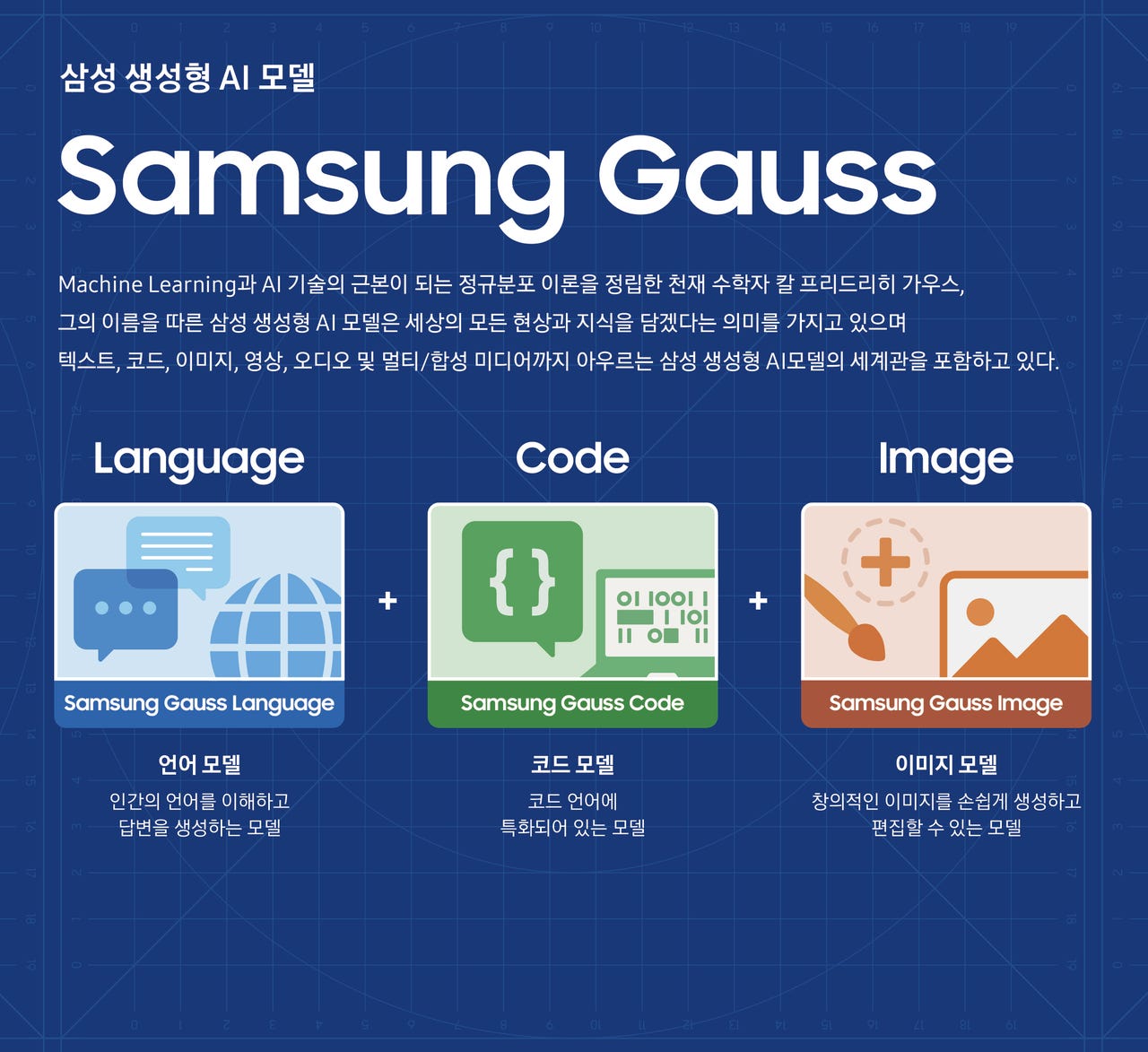
Samsung Gauss consists of Samsung Gauss Language, Samsung Gauss Code, and Samsung Gauss Image.

According to the tech giant, Language is a generative language model designed to enhance work efficiency by helping in tasks such as writing emails, summarizing documents, and translating, Samsung said, and can also enhance consumer experience by providing smarter device control when applied to products. The model itself consists of various models to make it applicable on the cloud and on-device.

Code and the coding assistant called code.i that it is based on it made for in-house software development of companies. It allows developers to code easily and quickly and through an interactive interface supports functions such as code description and test case generation, Samsung said.

Image meanwhile can easily generate and edit images, allowing the application of style changes, additions, and conversion of low-resolution images to high-resolution, the tech giant added.

These models can be applied on-device to protect the private information of consumers while Samsung was also working to ensure safe AI usage through its own AI Red Team that checks security and privacy issues that can occur during data collection, AI model development, service deployment, and through the generated results.

How Google’s AI Bard helped me fix a Gmail technical problem

bard-gettyimages-1464380943

Our story begins with my wife updating her Google password. She got an alert from her iPhone saying her password may have been compromised.

Now, to be fair, we use multi-factor authentication — so a mere password compromise is probably not enough to put her account at risk, but she's appropriately cautious and changed her Google password right away.

Also: The best password managers to save you from login hassle

Over the next few hours she logged back into her various services and everything worked… except Gmail. We each use our consumer Gmail accounts as our primary hubs, but our corporate business email goes out through our company's Google Workspace Enterprise account.

Suddenly, her business email was getting bounced. Mine was still working just fine.

We didn't yet know that the problem had something to do with her connection between her accounts, but we knew we had to test all the possible permutations. So, we started troubleshooting.

First, she logged directly into her corporate Gmail account and sent an email from that. That message went through just fine. Then, she tested sending an email from her @gmail.com account to an outlook.com account to force the system to send outside the Google infrastructure, and that went through just fine.

These two tests told us that the native email addresses themselves, sent from their native accounts, were functional.

Also: Gmail will help you write your emails now: How to access Google's new AI tool

We then tested sending a message to Outlook.com from her corporate Gmail account while she was logged into her consumer Gmail account, and that failed. In fact, any message sent from her corporate Gmail account while logged into the consumer account bounced.

This told us that the linkage between her consumer Gmail account hub and her corporate Google Workspace account was no longer working.

That linking of accounts is controlled in the Settings tab of Gmail. I've set up alternate email addresses through Gmail many times before. Here's how you do that: From the Gmail account, you hit the little gear icon, then go to the Accounts and Import tab, scroll down to Send Mail As, and either edit an existing email linkage or hit Add another email address. You put in the SMTP server (smtp.gmail.com), set the port to 587, set the protocol to TLS, pop in the user name and password, and you're golden.

Except, not so much.

Also: Less typing, fewer mistakes: How Gmail Snippets can save you time and effort

I tried configuring her corporate email address and password, but got an authentication error. That email address and password hadn't changed, so why it would error out was a mystery. But, OK. I tried her consumer Gmail email address and the new password got another authentication error.

At this point, I was thinking about calling Google support. If you have an enterprise account, Google support is actually pretty good. But it takes a very, very long time and I didn't want to devote my entire Saturday night to sitting on the phone.

So, I thought, "What about Google Bard?" After all, if any AI can help diagnose a Google technical problem, it'll be Google's AI.

The first thing I did was explain the situation to Bard. I started with:

I operate a Google Workspace Enterprise account. For years, one of my users used her consumer gmail account to send email through Workspace using the company domain name. This has worked fine until yesterday, when she changed her consumer Gmail account password.

I further explained:

She has two email addresses: the company account routed through Workspace and her consumer gmail account. Yesterday, she changed her Google password. She's able to log into both her consumer gmail and corporate account just fine. But she's getting errors sending mail as her corporate identity via the consumer gmail interface.

These two statements set the stage for the tech support problem I was having. Then I got more specific:

But our problem is in the Accounts and Import tab of her @gmail.com Gmail interface. When I try updating her credentials to send mail through the smtp server, she gets password errors.

At this point, Bard gave me a list of recommendations. The one that stood out was this:

Make sure that she is using the correct username and password. The username and password for the SMTP server are the same as the username and password for her Google Workspace account.

Also: ChatGPT vs. Bing Chat vs. Google Bard: Which is the best AI chatbot?

Before talking to Bard, I hadn't been sure about this. Before enlisting the AI, I had tried both her Gmail consumer account with her new consumer password and her corporate account with her corporate password, because I didn't know which one was expected in that configuration field.

Essentially, I wasn't sure if that configuration dialog was owned by Workspace or by the consumer Gmail interface. Bard's answer eliminated one variable and I now knew it was supposed to be her corporate account.

I again tried using her corporate account and password, and I was still getting an error. So I told Bard. Bard recommended that I double-check all her account usernames and passwords (I had already done that) and try re-creating the connection in the Accounts and Imports tab.

I hadn't thought of that, so I deleted her connection to the Workspace account and recreated it. Once again, I used her Workspace username and password, and once again I got an authentication error. It was different from the previous message, so I told Bard:

I tried that, and got this: Authentication failed. Please check your username/password. Server returned error: "534-5.7.9 Application-specific password required. Learn more at 534 5.7.9 https://support.google.com/mail/?p=InvalidSecondFactor t3-xxxxx.37 — gsmtp , code: 534"

Bard told me I'd need to use an application-specific password, then went into some depth about them. Just briefly, application-specific passwords are passwords assigned for a one-time-only use in a specific application. Bard's rather long discourse was a bit of AI-splaining I didn't really need, since I've used app passwords before. But I did have a question:

Do we do this from her consumer Gmail account or from her Workspace account?

Also: How to optimize your Gmail inbox layout (and why you might want to)

Bard replied that I needed to set up an application password from her Google Workspace account and provided a step-by-step explanation about how to do it. Bard said I'd need to create a new one for this connection and feed that into the password dialog.

I followed those steps, created an application-specific password, plugged it into the new account I was setting up in the Accounts and Import tab, and it worked. We were all set.

What's the value of the AI here?

Because I've done a lot of configuration work with Gmail and Workspace, I undoubtedly could have set this up on my own. It just might have taken me longer, with a lot more trial and error — and frustration.

I could also have called Google tech support. I'm sure they would have helped me figure this out, but I've never gotten off the phone with them in less than two hours, and like I said, I wanted my Saturday night.

Also: How AI reshapes the IT industry will be 'fast and dramatic'

Talking to Bard was fun and easy. It's not quite as intuitive in its responses as ChatGPT Plus with GPT-4, but Bard works for this sort of problem. I had to guide it a few times, and I had to wait for it to spew a lot of suggestions that were the stock trade of every junior tech support person on the planet (i.e., "Try it from a different computer").

But Bard did help me solve the problem, and it took all of 20 minutes. The AI not only answered my questions, but gave me step-by-step instructions, which saved me a bit of time hunting around to figure out how to do some of the things that needed doing.

I'm guessing this problem would have taken me about two hours to solve on my own, with a lot of trial and error. It probably also would have taken about two hours (or more) sitting on the phone with Google tech support. But instead, I was done and ready for some fun in less than half an hour.

Also: AI is transforming organizations everywhere. How these 6 companies are leading the way

My wife had her email back. I had my night back. And we got this story from it. Overall, a definite win-win-win.

Next time you have a bit of a tech support challenge, don't hesitate to ask your closest AI friend. You might not get a good answer, or you might. But it's certainly an easy thing to try and should be something to keep in your kit bag.

You can follow my day-to-day project updates on social media. Be sure to subscribe to my weekly update newsletter on Substack, and follow me on Twitter at @DavidGewirtz, on Facebook at Facebook.com/DavidGewirtz, on Instagram at Instagram.com/DavidGewirtz, and on YouTube at YouTube.com/DavidGewirtzTV.

Artificial Intelligence

How to Make the Most of Duet AI in Google Docs

Duet AI and Google Docs.
Illustration: Andy Wolber/TechRepublic

Google made Duet AI generally available in late August 2023. The features add generative artificial intelligence capabilities into various Google Workspace apps, including Gmail, Google Docs, Google Slides, Google Sheets, Google Chat and Google Meet. Duet AI is an add-on available to many editions of Google Workspace.

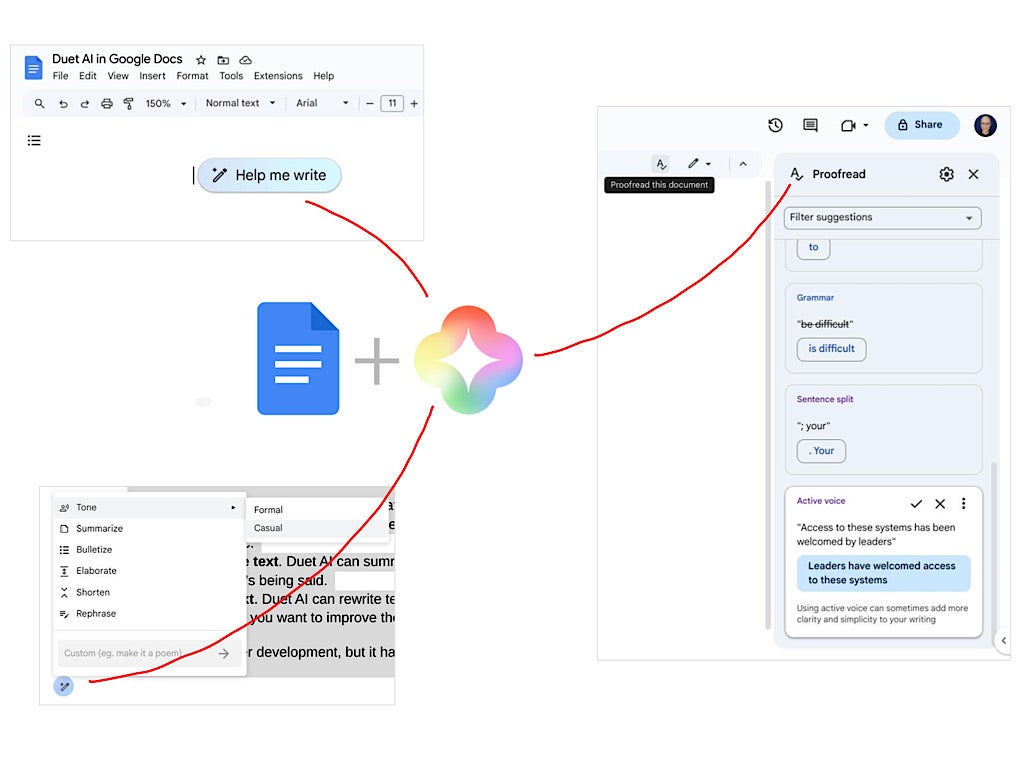
In Google Docs, Duet AI can create, modify and proofread text. If Duet AI has been added to your Google account, try the following features in Google Docs on the web.

Visit Duet AI

Jump to:

  • How to generate text with Help Me Write in Google Docs
  • How to rewrite text with Duet AI in Google Docs
  • How to proofread text with Duet AI in Google Docs
  • Give Duet AI context and guidance
  • Experiment with Duet AI

How to generate text with Help Me Write in Google Docs

1. Select the Help Me Write button to the left of the text.

2. Enter instructions that describe the text you seek. Keep your prompt specific yet brief – a short sentence or two.

3. Choose the Create button when ready.

4. After a few moments, Duet AI will display either:

a. Response text or

b. The message “We’re still learning and can’t help with that. Try another request.” When this appears, edit your entry and try again.

5. Optionally, you may:

  • Select the Refine button, which provides access to a Retry option along with all the features covered in the next section, too. When you make any of these refinements, be aware that the system replaces the initial response text. Because the temporary text gets replaced, it may make sense to Insert generated text, then refine it from within the Google Doc, rather than within the Help Me Write window.
  • Click the initial prompt and modify it to generate different text.

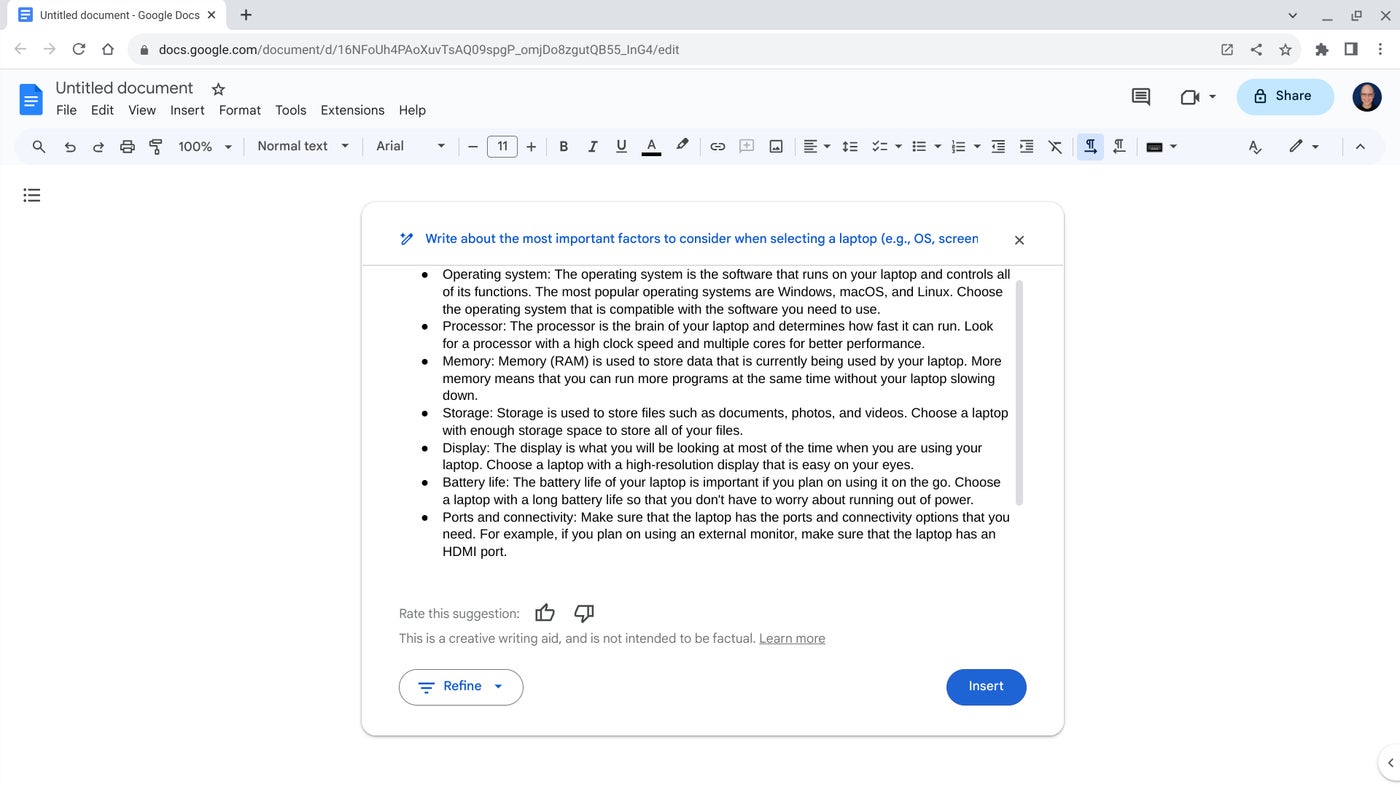
6. If you find the response useful, select Insert (Figure A) to add the text into your Google Doc.

Figure A

Google Duet AI Help me write.
Select the Help Me Write icon, enter a brief prompt, then review the response. You may edit your prompt, refine the result or insert the text. Image: Andy Wolber/TechRepublic

Help Me Write responses tend to be brief and may draw from document content. In testing, responses generated contained fewer than 400 words, so Help Me Write might best be used for starter ideas and drafts. (There’s a reason the feature is called Help Me Write rather than Write It For Me.) Additionally, Duet AI sometimes references document content in the response, which can tilt the text toward relevancy, but at the risk of redundancy.

How to rewrite text with Duet AI in Google Docs

1. Select text within a Google Doc. Often, you’ll want to select a sentence or more.

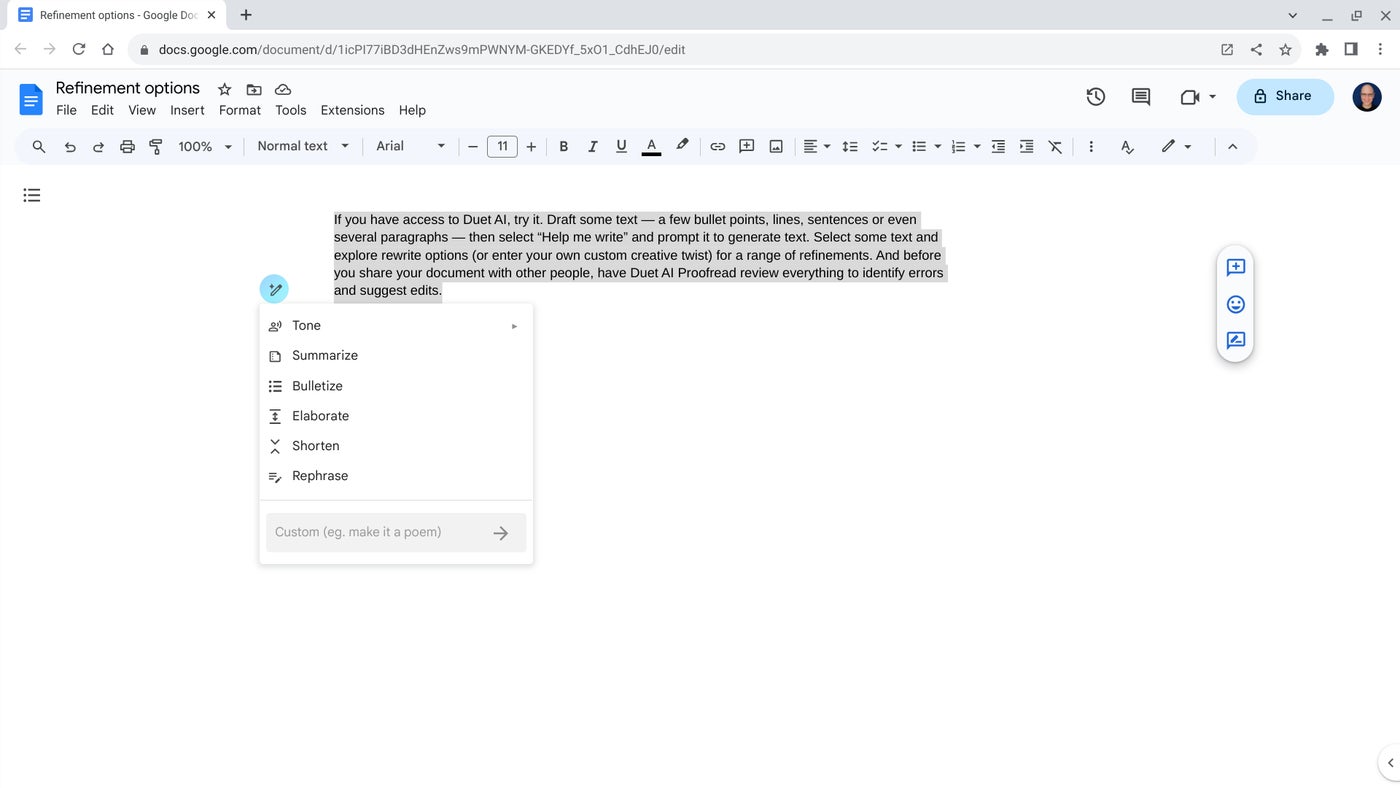
2. Select the Help Me Rewrite button; it is the same icon that serves as the Help Me Rewrite button when no text has been selected.

3. Choose a menu option (Figure B):

  • Tone: Formal or Tone: Casual to tweak word choices as described.
  • Summarize to distill the key points.
  • Bulletize to restructure as bullet points.
  • Elaborate to expand text. This is especially useful for a phrase or sentence or two.
  • Shorten to condense to core concepts.
  • Rephrase to explore alternative wordings.
  • Custom to add your own rewrite approach. This lets you enter a task you want Duet AI to attempt. For example, you might try Make It A Poem, Make It Like Shakespeare or Make It More Encouraging. While not every option works well, the custom option lets you explore creative tweaks to your text.

Figure B

Google Duet AI Docs Rewrite.
Select text, then select the Help Me Rewrite icon. You may choose various ways to act on the selected text. Image: Andy Wolber/TechRepublic

4. The system will display the selected modification.

5. You may then choose from three options:

  • Insert to add the generated text below your originally selected section.
  • Replace to remove the originally selected section and use the generated text instead.
  • Refine which lets you select a rewrite menu option, as above, again.

How to proofread text with Duet AI in Google Docs

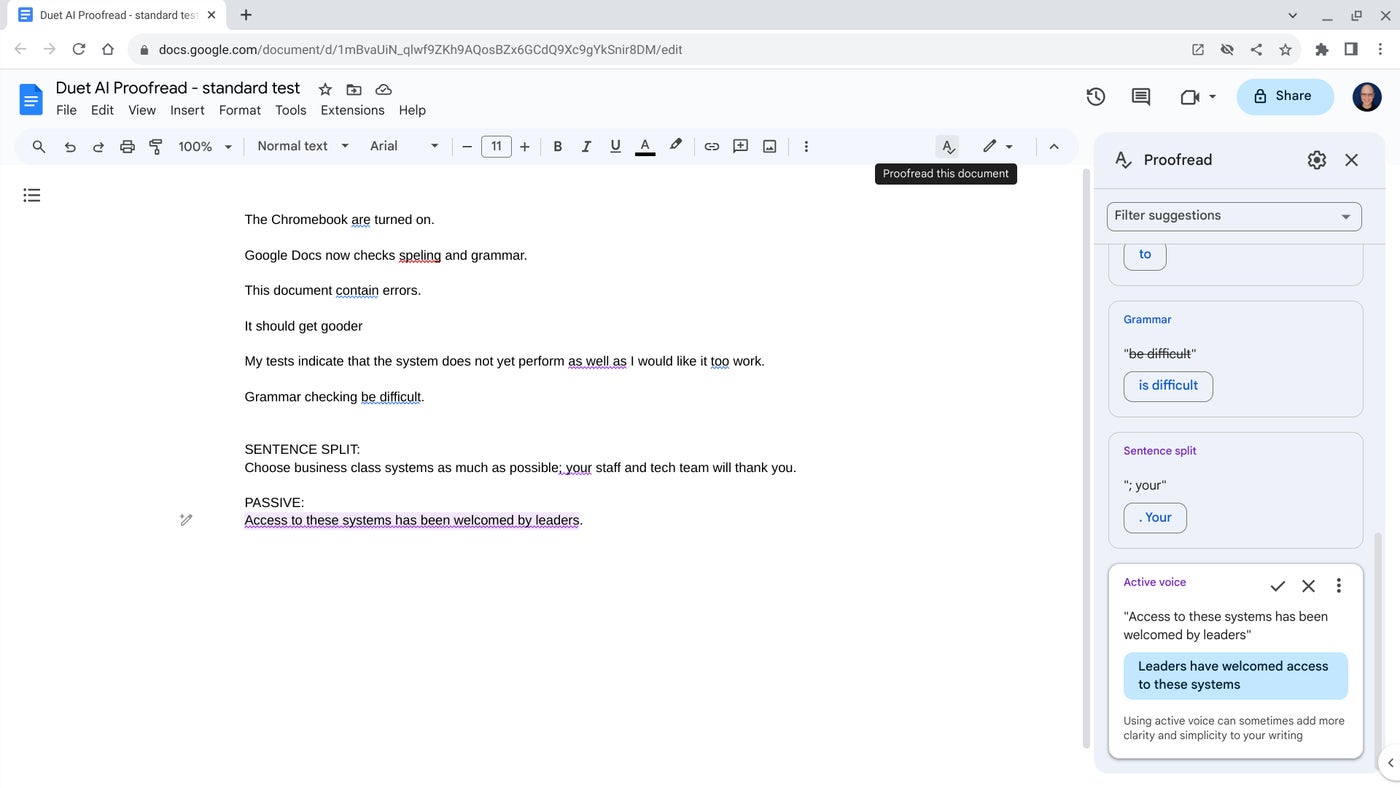
Once your draft is ready for review, use Duet AI Proofread to identify possible errors and suggest improvements. Spelling and grammar detection work much as they have historically in Google Docs. The Duet AI Proofread feature can also review:

  • Wording to suggest different words.
  • Active Voice to replace passive voice with active voice.
  • Conciseness to eliminate extraneous words.
  • Sentence Split to simplify sentence structures.

1. Select Tools | Proofread | Proofread This Document. Alternatively, select the proofread icon — a capital letter A with a checkmark below it — from the menu.

2. The proofread side panel will display to the right of your Google Doc (Figure C).

Figure C

Google Duet Ai Docs Proofread.
Select the Proofread icon and then review the suggestions in the side panel. You may accept or reject each suggestion. Image: Andy Wolber/TechRepublic

3. For each identified issue, you may choose from these options (Figure C):

  • Accept the change either by selecting the checkmark or the changed word or phrase in blue.
  • Reject the change by selecting the X.
  • Access the three-dot more menu to turn off a category of suggestions or give feedback to the development team.

Give Duet AI context and guidance

Duet AI works best with a bit of context and guidance. For example, after I drafted the sections written above, a “Help me write” prompt of “Write an introductory paragraph to the rest of the article” returned the following accurate and straightforward paragraphs (keen observers will notice Duet AI uses the Oxford comma):

Duet AI is a powerful tool that can help you with your writing in Google Docs. It can help you generate text, rewrite text, and proofread your work. In this article, we will cover how to use Duet AI for each of these tasks.

We will start by covering how to generate text with Duet AI. This is a great way to get started on a writing project or to come up with ideas. We will then cover how to rewrite text with Duet AI. This can be helpful if you want to improve the tone, style, or clarity of your writing. Finally, we will cover how to proofread your work with Duet AI. This can help you catch errors in grammar, spelling, and punctuation.

We hope that this article will help you get the most out of Duet AI in Google Docs.

Experiment with Duet AI

If you have access to Duet AI, try it. Draft some text — a few bullet points, lines, sentences or even several paragraphs — then select Help Me Write and prompt it to generate text. Select some text and explore rewrite options, or enter your own custom creative twist for a range of refinements. And before you share your document with other people, have Duet AI Proofread review everything to identify errors and suggest edits.

Mention or message me on Mastodon (@awolber) to let me know what your experience with Duet AI in Google Docs has been. Which of the three sets of features — Proofread, Help me write or rewrite — do you use most often? Which do you find most helpful?

Facebook bans political campaigns from using its new AI-powered ad tools

1megaphones-gettyimages-1277359096-jpg.png

While AI is creeping into just about every aspect of our lives, there's one place it won't be – Facebook political advertisements.

From presidential campaigns to local elections, political misinformation has been rampant over the past few years – and AI only stands to make matters worse. That's why Meta is taking steps to decrease the deluge.

Also: AI boom will amplify social problems if we don't act now, says AI ethicist

In a statement today, Meta announced that political campaigns will not have access to the site's generative AI advertising tools.

"As we continue to test new Generative AI ads creation tools in Ads Manager," the statement said, "advertisers running campaigns that qualify as ads for Housing, Employment or Credit or Social Issues, Elections, or Politics, or related to Health, Pharmaceuticals or Financial Services aren't currently permitted to use these Generative AI features."

While the new policy isn't present in the site's advertising standards (which do actually prohibit ads including information that has been debunked by fact checkers), it's expected to be added very soon.

This policy update comes just a month after Facebook announced an expansion of its AI-powered ad tools that can make changes to images, create backgrounds, write copy, and more — all on the fly. The tool is expected to be available to all advertisers by 2024.

Also: Meta uses your Facebook data to train its AI. Here's how to opt out (sort of)

The announcement also comes not long after Meta blocked its AI virtual assistant from creating images of public figures and committed to watermarking content generated by AI to ensure it doesn't spread false information.

In the wake of the success of ChatGPT and other AI programs, social media companies are racing to include generative AI in their products. Meta's move marks the first real safety guideline for AI on social media to be introduced, making it a pretty important decision. Google introduced a similar tool last week, and in a similar fashion, their product actually prohibits political keywords from being used as a prompt.

Artificial Intelligence