You.com launches new APIs to connect LLMs to the web Kyle Wiggers 14 hours
When OpenAI connected ChatGPT to the internet, it supercharged the AI chatbot’s capabilities. Now, the search engine You.com wants to do the same for every large language model (LLM) out there.
You.com today announced the launch of a set of APIs aimed at giving LLMs like Meta’s Llama 2 real-time access to the open web — or narrower slices of it. Starting at $100 per month, You.com’s APIs augment LLMs’ answers to questions from users (e.g. “Which holidays are this week?”) with up-to-date context from the internet.
Customers including LlamaIndex, Anthropic and Cohere have already integrated it with their models.
“[We’ve] received many requests for an API with these capabilities,” You.com CEO and founder Richard Socher told TechCrunch in an email interview. “When you ask about a recent event, like a Super Bowl score on the day of the Super Bowl, our API will search for those scores on the web and then you can add that information, in that moment, to the … LLM and it can then use it to answer your question more accurately.”
Most LLMs are trained on publicly available, static data scraped from public web pages, e-books and elsewhere. That’s sufficient to get them to perform tasks, from writing emails to drafting cover letters and essays. But it limits the LLMs’ knowledge to the data’s time range; an LLM trained on info prior to September 2021 wouldn’t be aware of events that happened yesterday, of course.
You.com’s new APIs enable LLMs to overcome this limitation by creating an index of long snippets of websites — a key point of differentiation over the standard search APIs provided by Bing and Google, which Socher claims serve only very short snippets “designed to entice someone to click a link.” LLMs can leverage this custom-built index when answering questions, identifying the relevant snippet and summarizing it to provide an updated answer.
“Every LLM gets a prompt — a description for how it should behave and answer questions,” Socher explained. “You can add your own question to the end of that prompt to have a conversation with an LLM. What this API enables is that you can add a lot of up-to-date context from the web into the prompt, after the question is asked.”
You.com is providing three “flavors” of API at launch: Web search, news and RAG. Web search gives LLMs access to the aforementioned index of long snippets, while news — as the name implies — provides exclusively news results. As for RAG (which stands for “retrieval-augmented generation”), it pairs You.com’s web search results with an LLM to generate what Socher claims are “more factual” responses, although the jury’s obviously out on that.
Now, an LLM with web access can be a risky prospect — no matter which APIs it’s tapping. The live web is less curated than a static training dataset and, by implication, less filtered. Search results can be gamed, and they also aren’t necessarily representative of the totality of the web. Because most algorithms prioritize websites that use modern web technologies like encryption, mobile support and schema markup, websites with otherwise quality content get lost in the shuffle.
Socher admitted that You.com’s API has weaknesses particularly in the areas of localized “near me”-style questions (e.g. “Where’s good sushi near me?”), since the API doesn’t know LLM users’ locations. But improvements are already being made, including upgrades that’ll allow You.com’s APIs to code and “produce much more complex answers” with traceable citations, Socher says.
“We’ll soon merge news and general web search to make it even easier for companies using our APIs,” he added. “By incorporating our API into whatever solution is built by creators, their answers will be more relevant and helpful for their end users … [The solution can turn] to the web to verify facts.”
The new APIs have this writer wondering if search is the next battlefield on the generative AI front. As open source LLMs approach the level of some of their closed-source counterparts, the strength of the search engine backing those closed-source LLMs (Bing in ChatGPT’s case, Google in Bard’s) becomes a stronger selling point — unless APIs like You.com’s effectively level the playing field.
That’s a big “if” — no API’s perfect, and You.com’s surely has flaws beyond those Socher mention. But I’d argue that competition is always a good thing.
The new You.com APIs start at $100 per month for 14,200 API calls after a 60-day trial that comes with 1,000 free monthly calls. You.com also offers bespoke packages for larger enterprise deals that come with annual subscriptions and discounts.
Companies face growing obstacles connecting their employees with so many workers now based in multiple locations. The right collaboration solutions are essential to ensure the workforce is engaged and productive. New features enhance the existing options on the market, but buyers must approach their collaboration strategy attuned to what they need in a UCaaS or CPaaS platform. Tune into the Unified Comms for the Future Workforce summit to learn more about the array of emerging collaboration applications on the market to better connect your workforce.
The data security landscape is shifting as organizations embrace SaaS-based applications, public cloud services, data analytics platforms, and AI/ML workloads. Unfortunately, such progress has been met by a resurgence of ransomware attacks and a record-breaking number of data breach disclosures. In light of these revelations, new consumer privacy protection acts have imposed heavier financial penalties, leading to changes in the cybersecurity insurance marketplace and how organizations measure potential risk. Register for the free Data Security Risks and Challenges summit to learn about the latest changes in data security and explore new technologies designed to protect data and customers.
Top Stories
New Book: Statistical Optimization for GenAI and Machine Learning November 14, 2023 by Vincent Granville In the last two years, I published 5 machine learning and AI books, including one on synthetic data by Elsevier. This represents over 800 pages of compact, state-of-the-art material. The new addition features my most recent advances: the problems that I encountered with generative adversarial networks, and how I overcome them with new techniques.
The Danger of Untethered Use Cases November 11, 2023 by Bill Schmarzo Client: “We’ve identified over 60 use cases!” Schmarzo: “You might as well have zero…” I always get very concerned when I see organizations that jump right into the use case inventory process without first considering the organization’s key business initiatives. Every organization has a laundry list of use cases.
Machine learning in marketing: 10 use cases and implementation tips November 14, 2023 by Evan Rogen Given how quickly the digital marketing industry changes, keeping up with the most recent trends and technologies can be challenging. Traditional marketing techniques are no longer enough to connect with and engage your target audience. Machine learning in marketing has got your back.
In-Depth
Beyond the numbers: The soft skills that elevate data analysts to the next level November 14, 2023 Aileen Scott Data analysts must have a strong grasp of practical data visualization skills to paint a clear picture of complex data for a broader audience. Seeing the big picture by delivering coherent and easily comprehensible content is crucial.
Difference between modern and traditional data quality November 14, 2023 by Edwin Walker Modern data quality practices leverage advanced technologies, automation, and machine learning to handle diverse data sources, ensure real-time processing, and foster collaboration across stakeholders. They prioritize data governance, continuous monitoring, and proactive management to ensure accurate, reliable, and fit-for-purpose data for informed decision-making and business success.
Future-proofing advanced data warehouses November 13, 2023 by Ovais Naseem Data warehouses are the linchpins of modern data infrastructure, integral for businesses that rely on informed decision-making. They act as centralized repositories where diverse data from various sources is collated, transformed, and stored for analysis and reporting.
Mastering data management: Efficient strategies for success November 10, 2023 by Ovais Naseem Effective data management is critical to any organization’s success in today’s data-driven world. With the exponential growth of data, businesses need to implement robust strategies to collect, store, process, and utilize data efficiently.
DSC Weekly 7 November 2023 November 7, 2023 by Scott Thompson Read more of the top articles from the Data Science Central community.
Artificial Intelligence: Making waves in the stock market November 7, 2023 by Matthew McMullen Stock trading is an industry that has greatly benefited from artificial intelligence (AI). AI algorithms in stock trading have enabled traders to make better decisions and enhance their trading strategies leading to increased profits and reduced risks.
Modern data quality practices leverage advanced technologies, automation, and machine learning to handle diverse data sources, ensure real-time processing, and foster collaboration across stakeholders. They prioritize data governance, continuous monitoring, and proactive management to ensure accurate, reliable, and fit-for-purpose data for informed decision-making and business success.
Modern data quality practices differ from traditional data quality approaches in several ways:
Data sources and types Traditional data quality primarily focuses on structured data from internal systems or databases. Modern data quality practices encompass a wide range of data sources, including unstructured data, external data, social media data, IoT data, and more. The variety of data types and sources has expanded significantly in the modern data landscape.
Scale and volume With the advent of big data and increased data generation, modern data quality practices address the challenges of processing and managing massive volumes of data. Traditional approaches were not designed to handle such scale, whereas modern practices leverage technologies like distributed processing and cloud computing to manage and analyze large datasets efficiently.
Real-time and near-real-time processing Traditional data quality processes often operated in batch mode, with periodic data cleansing and validation. Modern data quality emphasizes real-time or near-real-time processing, enabling organizations to detect and address data quality issues as they occur. This is crucial in dynamic environments where data is constantly changing and requires immediate attention.
Automation and machine learning Modern data quality practices leverage automation and machine learning techniques to enhance data quality processes. Automation enables the efficient execution of repetitive tasks such as data cleansing, validation, and standardization. Machine learning algorithms can learn patterns and anomalies in data, enabling automated detection of data quality issues and predictive data quality management.
Data governance and data stewardship Modern data quality recognizes the importance of data governance and data stewardship as fundamental components of data quality management. Data governance frameworks establish policies, procedures, and responsibilities for managing data quality throughout the organization. Data stewards are assigned to ensure adherence to these policies and to drive data quality initiatives.
Collaboration and cross-functional involvement Unlike traditional approaches where data quality was primarily an IT function, modern data quality practices involve collaboration among various stakeholders. This includes business users, data analysts, data scientists, and subject matter experts. Collaboration ensures that data quality requirements are aligned with business needs and that data quality efforts address the specific goals of different departments or projects.
Data quality as a continuous process Modern data quality practices emphasize the concept of continuous data quality management. Rather than treating data quality as a one-time activity, organizations continuously monitor, measure, and improve data quality. This involves ongoing data profiling, validation, data quality monitoring, and feedback loops to ensure sustained data quality over time.
Overall, modern data quality practices adapt to the changing data landscape, incorporating new data types, handling larger volumes of data, and leveraging automation and advanced analytics. They prioritize real-time processing, collaboration, and continuous improvement to ensure high-quality data that supports informed decision-making and business success. For more information schedule a demo with the DQLabs Expert.
Let's face it, one of the worst parts about owning pets is the constant shedding. Between my German Shepherd, German Shorthaired Pointer, and cat, the fur dust bunnies in my house are terrifying. The only thing that keeps my floors clean without manually vacuuming every single day is my robot vacuum. Truly, it is one of my favorite items in my home.
Since there are so many robot vacuums to choose from, you may be wondering which is best for your home. From testing multiple robot vacuums at home and through everyday life, my top robot vacuum choice to tackle pet hair at home is the Roomba j7+ due to its self-emptying dust bin and P.O.O.P guarantee. However, depending on your floor type and how much your pet sheds, there are several other robot vacuum options worth considering.
Keep reading to find my list of the best robot vacuums to fight pet hair, keeping your home clean and yourself sane.
You really can't go wrong with any device from Roborock, and that includes the Q5+. With its auto dust emptying base and 2700Pa suction, you can get a lot of the higher-end robot vacuum features for a cheaper price.
View at Amazon
Best robot vacuum and mop combo alternative
Yeedi Cube
With 4,300Pa suction, a mop head that vibrates 2,500 times per minute, and 150 minutes of runtime, you will be impressed. You may be disappointed in the robot's lack of object avoidance, though.
Airbnb acquires secretive firm launched by Siri co-founder Kyle Wiggers 9 hours
Airbnb has acquired a secretive new AI startup, Gameplanner.AI, the company announced this morning. CNBC reports that the purchase price was around $200 million, a figure which TechCrunch was unable to confirm at publication time.
Gameplanner was co-founded by Adam Cheyer and Siamak Hodjat. Cheyer famously helped to co-launch the startup Siri, which Apple acquired and whose technology became the basis for Apple’s AI-powered Siri assistant. Hodjat previously worked with Cheyer at Viv Labs, a firm that Samsung bought and leveraged to launch its own AI assistant, Bixby, in 2017.
It’s not immediately clear what Gameplanner does. A LinkedIn search only turns up two associates: Gabe Greenbaum, a general partner at B Capital who sits on Gameplanner’s board of directors, and Joseph Huang, head of design at Gameplanner. Gameplanner hasn’t had a web presence for sime time; the Internet Archive’s earliest cache of the website (from December 2021) yields a blank page.
But in a canned statement, Airbnb CEO and co-founder Brian Chesky hinted that the 12-person startup combines expertise in AI and design toward crafting AI-driven experiences, sort of like an AI-focused consultancy.
“AI will rapidly alter our world more than any other technology in our lifetime, but we need to ensure that it augments humanity in a positive way,” Chesky said, adding that the Gameplanner team will focus on “accelerating” select AI projects and integrating their tooling into Airbnb’s platform. “Airbnb is one of the more humanistic companies in technology, and I believe that, together with Adam and his team, we can develop some of the best interfaces and practical applications for AI.”
Chesky has made his AI ambitions for Airbnb clear in the recent past, saying that he wants to use generative AI to build a “travel concierge” that learns about — and adapts to — travelers. Given that Gameplanner marks Airbnb’s first acquisition since 2019 (and its first as a public company), it seems he’s serious about bringing that vision to fruition.
Data analysts must have a strong grasp of practical data visualization skills to paint a clear picture of complex data for a broader audience. Seeing the big picture by delivering coherent and easily comprehensible content is crucial. Companies highly value avant-garde data analysts who can not only dig into the data but also connect the dots by crafting data visualizations for informed decision-making. These specialists should sharpen their tools in working with data sets and finding the right strokes to present results. To thrive as a data analyst, you must build expertise in data analytics technology while honing essential soft skills.
Why data visualization is important
Who does not want to understand complex insights in an easy-to-understand format? It is data visualization that does this job by uncovering data patterns previously gone unnoticed. In healthcare, data visualization plays a vital role. Imagine a hospital administrator trying to make critical decisions about resource allocation during a flu outbreak. Raw data might be overwhelming and difficult to interpret. However, through data visualization, they can quickly identify trends inpatient admissions, pinpoint high-risk areas, and allocate resources effectively, ensuring the best patient care. Data visualization simplifies complex healthcare insights, allowing for informed and timely decisions. Moreover, data visualization makes it smooth for organizations to convey findings to stakeholders via visual display of data and make necessary decisions.
Important data visualization skills for data analysts
When individuals think of data analytics skills, their primary focus is often on equipping themselves with the technical skills required to excel in the role. However, it’s the soft skills that frequently take a back seat for data analysts. Here are some crucial skills that deserve attention.
Data interpretation
Profound expertise in data interpretation is an imperative skill set for data analysts, one that enables them to discern intricate patterns, discern emerging trends, and pinpoint aberrations within datasets. This adeptness serves as the linchpin for unraveling the complexities of multifaceted data, ultimately allowing for the extraction of substantive insights. For example, In the course of scrutinizing a monthly website traffic dataset, the analyst astutely detects a recurrent surge in traffic every 15th day of the month. The revelation is profoundly consequential, as it aligns with the release of a monthly newsletter. This discernment underscores an unequivocal correlation between the act of newsletter distribution and the augmentation of website traffic.
Chart selection
The judicious selection of the most appropriate chart type assumes paramount significance in the realm of effective data communication. It is an onerous responsibility that necessitates analytical acumen to determine the chart variant that best encapsulates the nuances of the data and conveys the intended message with unparalleled precision. For instance, when tasked with dissecting the labyrinthine dataset about regional sales for a globally expansive corporation, the analyst’s expertise shines as they opt for the deployment of a geographic heat map. This decision is astute, as it tactically employs visual representation to illuminate the stark disparities.
Design and aesthetics
Embracing the principles of impeccable design, encompassing elements such as astute color palette selections, judicious layout arrangements, and artful typographic choices, emerges as an indispensable facet in the creation of visually captivating and readily comprehensible visualizations. Exemplifying this principle, an analyst endeavoring to convey marketing insights within a comprehensive report diligently adheres to a uniform color scheme, meticulous label placement, and artful spatial arrangement. The aesthetic equilibrium attained elevates the report’s visual appeal, ensuring it becomes an embodiment of informative elegance.
Tool proficiency
Command of the intricacies of data visualization tools and software is nothing short of a requirement for the discriminating data analyst in the domain of data analysis. The ability to use these technologies allows for the efficient construction and precise customization of data visualizations. Consider the following scenario: an analyst is tasked with visualizing detailed website traffic data. The wise pick of Google Data Studio, an industry-standard tool, triumphs here. The analyst uses the tool’s numerous features to import and modify data with ease, eventually opting for the line chart function to portray the temporal evolution of trends with elegance.
Storytelling
A highly skilled data analyst excels not just in data interpretation but also in the art of narrative, because insights are transformed not only into understandable but also actionable through storytelling. The story form is a powerful tool for increasing the resonance and effectiveness of data-driven insights. To illustrate, imagine an analyst providing a report on consumer feedback data. Beginning with a contextual prelude to set the tone, the analyst expertly conducts the audience through a visual trip filled with illuminating charts and graphs. The data-driven conclusion makes real and precise recommendations for change. This artistic tale intertwines the critical elements of data and context, generating a deeper understanding among stakeholders and propelling incisive decision-making.
Closing thoughts
Within the domain of data analytics services, data visualization takes center stage, acting as a transformative force that converts intricate data into a visual format, rendering it highly accessible. This process isn’t just a preference; it’s an absolute necessity for unlocking the power of data, and simplifying the comprehension of patterns and trends. The ability to make well-informed decisions hinges on this critical skill. For data analysts seeking to elevate their professional prowess, the pursuit of data analytics certification is a compelling choice. These certifications not only impart technical expertise but also lay a strong emphasis on cultivating essential soft skills. They promote effective communication, problem-solving, and critical thinking, empowering data analysts to not only analyze data but also convey their insights effectively, thereby significantly improving the decision-making process.
Language models have revolutionized the field of natural language processing. While large models like GPT-3 have grabbed headlines, small language models are also advantageous and accessible for various applications. In this article, we will explore the importance and use cases of small language models with all the implementation steps in detail.
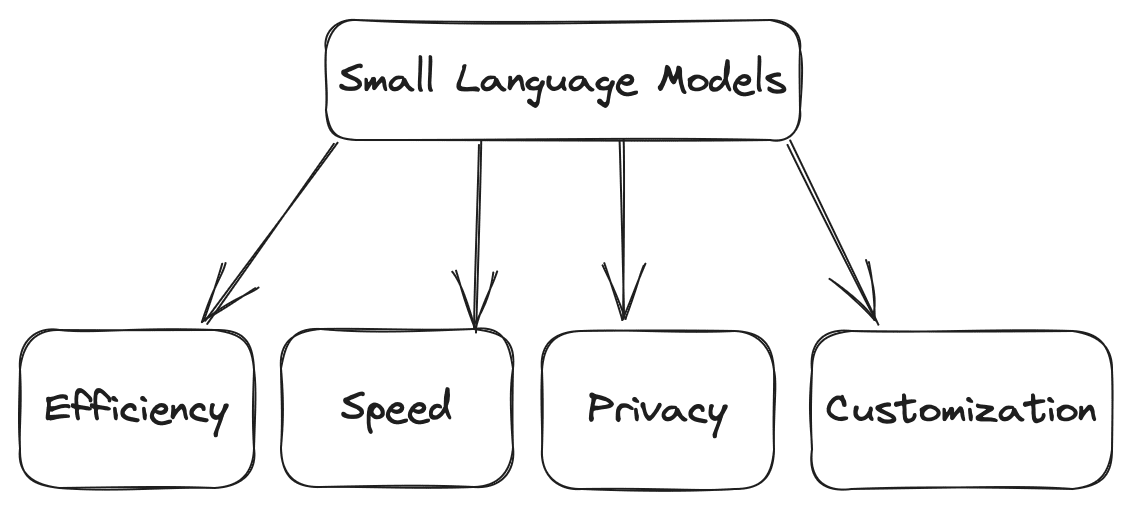
Small language models are compact versions of their larger counterparts. They offer several advantages. Some of the advantages are as follows:
Efficiency: Compared to large models, small models require less computational power, making them suitable for environments with constrained resources.
Speed: They can do the computation faster, such as generating the texts based on given input more quickly, making them ideal for real-time applications where you can have high daily traffic.
Customization: You can fine-tune small models based on your requirements for domain-specific tasks.
Privacy: Smaller models can be used without external servers, which ensures data privacy and integrity.
Image by Author
Several use cases for small language models include chatbots, content generation, sentiment analysis, question-answering, and many more.
Step 2: Setting Up the Environment
Before we start deep diving into the working of small language models, you need to set up your environment, which involves installing the necessary libraries and dependencies. Selecting the right frameworks and libraries to build a language model on your local CPU becomes crucial. Popular choices include Python-based libraries like TensorFlow and PyTorch. These frameworks provide many pre-built tools and resources for machine learning and deep learning-based applications.
Installing Required Libraries
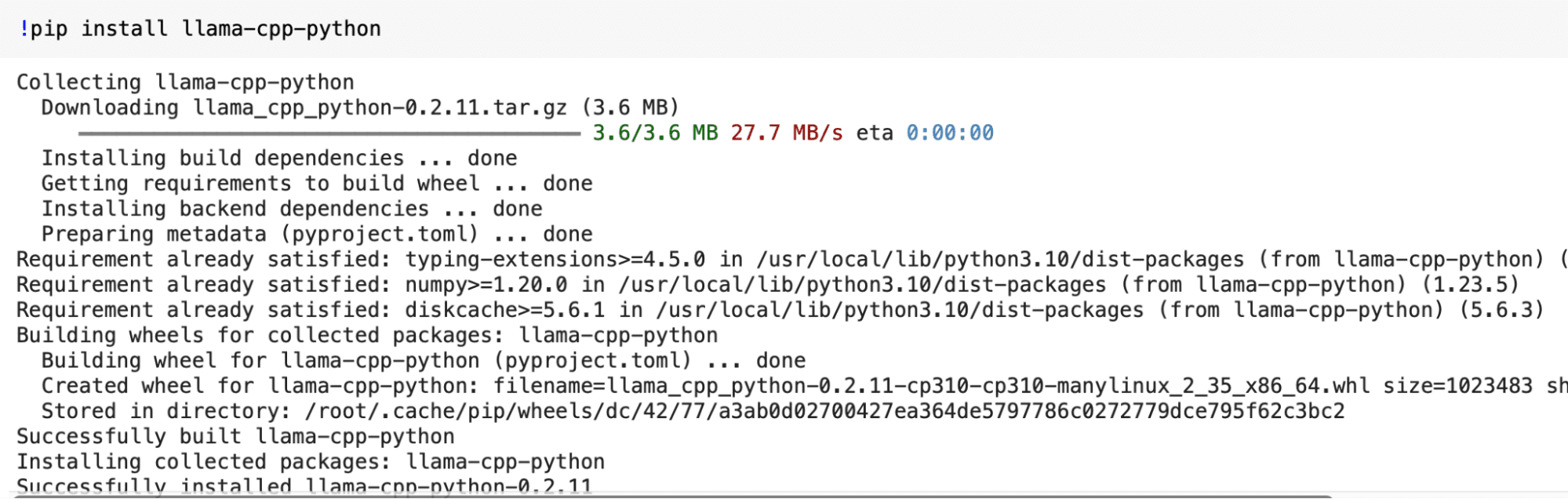
In this step, we will install the "llama-cpp-python" and ctransformers library to introduce you to small language models. You must open your terminal and run the following commands to install it. While running the following commands, ensure you have Python and pip installed on your system.
Step 3: Acquiring a Pre-Trained Small Language Model
Now that our environment is ready, we can get a pre-trained small language model for local use. For a small language model, we can consider simpler architectures like LSTM or GRU, which are computationally less intensive than more complex models like transformers. You can also use pre-trained word embeddings to enhance your model's performance while reducing the training time. But for quick working, we will download a pre-trained model from the web.
Downloading a Pre-trained Model
You can find pretrained small language models on platforms like Hugging Face (https://huggingface.co/models). Here is a quick tour of the website, where you can easily observe the sequences of models provided, which you can download easily by logging into the application as these are open-source.
You can easily download the model you need from this link and save it to your local directory for further use.
from ctransformers import AutoModelForCausalLM
Step 4: Loading the Language Model
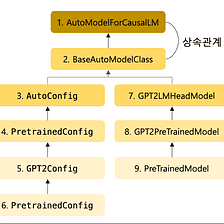
In the above step, we have finalized the pre-trained model from Hugging Face. Now, we can use that model by loading it into our environment. We import the AutoModelForCausalLM class from the ctransformers library in the code below. This class can be used for loading and working with models for causal language modeling.
Image from Medium
# Load the pretrained model llm = AutoModelForCausalLM.from_pretrained('TheBloke/Llama-2-7B-Chat-GGML', model_file = 'llama-2-7b-chat.ggmlv3.q4_K_S.bin' )
Output:
Step 5: Model Configuration
Small language models can be fine-tuned based on your specific needs. If you have to use these models in real-life applications, the main thing to remember is efficiency and scalability. So, to make the small language models efficient compared to large language models, you can adjust the context size and batching(partition data into smaller batches for faster computation), which also results in overcoming the scalability problem.
Modifying Context Size
The context size determines how much text the model considers. Based on your need, you can choose the value of context size. In this example, we will set the value of this hyperparameter as 128 tokens.
model.set_context_size(128)
Batching for Efficiency
By introducing the batching technique, it is possible to process multiple data segments simultaneously, which can handle the queries parallely and help scale the application for a large set of users. But while deciding the batch size, you must carefully check your system's capabilities. Otherwise, your system can cause issues due to heavy load.
model.set_batch_size(16)
Step 6: Generating Text
Up to this step, we are done with making the model, tuning that model, and saving it. Now, we can quickly test it based on our use and check whether it provides the same output we expect. So, let's give some input queries and generate the text based on our loaded and configured model.
for word in llm('Explain something about Kdnuggets', stream = True): print(word, end='')
Output:
Step 7: Optimizations and Troubleshooting
To get the appropriate results for most of the input queries out of your small language model, the following things can be considered.
Fine-Tuning: If your application demands high performance, i.e., the output of the queries to be resolved in significantly less time, then you have to fine-tune your model on your specific dataset, the corpus on which you are training your model.
Caching: By using the caching technique, you can store commonly used data based on the user in RAM so that when the user demands that data again, it can easily be provided instead of fetching again from the disk, which requires relatively more time, due to which it can generate results to speed up future requests.
Common Issues: If you encounter problems while creating, loading, and configuring the model, you can refer to the documentation and user community for troubleshooting tips.
Wrapping it Up
In this article, we discussed how you can create and deploy a small language model on your local CPU by following the seven straightforward steps outlined in this article. This cost-effective approach opens the door to various language processing or computer vision applications and serves as a stepping stone for more advanced projects. But while working on projects, you have to remember the following things to overcome any issues:
Regularly save checkpoints during training to ensure you can continue training or recover your model in case of interruptions.
Optimize your code and data pipelines for efficient memory usage, especially when working on a local CPU.
Consider using GPU acceleration or cloud-based resources if you need to scale up your model in the future.
In conclusion, small language models offer a versatile and efficient solution for various language processing tasks. With the correct setup and optimization, you can leverage their power effectively.
Aryan Garg is a B.Tech. Electrical Engineering student, currently in the final year of his undergrad. His interest lies in the field of Web Development and Machine Learning. He have pursued this interest and am eager to work more in these directions.
More On This Topic
Running Redis on Google Colab
How to Get Up and Running with SQL — A List of Free Learning Resources
GPT4All is the Local ChatGPT for your Documents and it is Free!
LangChain + Streamlit + Llama: Bringing Conversational AI to Your…
Octoparse 8.5: Empowering Local Scraping and More
Effective Small Language Models: Microsoft’s 1.3 Billion Parameter phi-1.5
The generative AI boom might have started with the launch of ChatGPT, but the technology has now been integrated into all kinds of productivity platforms designed to make our everyday workflow easier.
A hesitation many people have when they hear about "AI In the workplace" is that the technology will replace them. However, the tools I'm talking about here won't do the work for you — rather they can increase your work productivity.
These AI tools can help you complete small yet necessary daily tasks that — in the long run — add up to lots of saved time. The result: You spend less time on admin and more time doing things you enjoy or that are more beneficial to your work.
Even before the current AI boom, I'd been covering and testing a variety of AI tools for ZDNET. After seeing what certain tools were capable of, I found it hard to stop using them. As a result, I've incorporated several of these tools into different aspects of my daily workflow.
So, here are my favorite AI tools that I find myself using most every day. Interestingly, only one of these life-hack technologies is an AI chatbot.
1. Bing Chat
Let's start with the most-hyped type of AI tool — the chatbot. I've tested most AI chatbots on the market, and Bing Chat remains my favorite. Here's why.
Bing Chat enables me to tap into many different capabilities in one place, including AI image generation and web-informed answers — without costing me a penny! These free perks are primarily what separates Bing Chat from other subscription-based competitors on the market, including ChatGPT, which requires a Plus subscription to access the internet and real-time information.
The primary way I use the tool in my workflow is as a more conversational search engine. If I have a question about anything at all, I turn to Bing Chat rather than Google. Instead of having to filter through hundreds of results like I would following a Google query, I get one simple, conversational answer that addresses my question directly.
Even better: Bing Chat's answer will include sources from which the chatbot obtained its response, which leaves me the option to verify the information provided and to learn more about the topic.
Even if I don't have a question, I prefer to ask Bing Chat for more information on the topic I need because, unlike Google, it will narrow down the best sources, making it easier for me to find what I am looking for.
For example, I can ask Bing Chat, "Help me find recent research on the effects of caffeine on sleep," and Bing Chat will highlight specific studies and research within the text response, and add additional sources in the footnotes. By contrast, Google will populate thousands of results that can be difficult to parse.
If you are a Google enthusiast, you could also turn to Google Bard instead of Bing Chat. But from my testing, Bing Chat wins in quality, likely because it is powered by GPT-4, OpenAI's most advanced large language model. Bing Chat also offers the option to pick from three conversation styles and to generate images right within the chatbot — options that Google Bard doesn't offer.
Although I don't use these features in my own work, Bing Chat can also help with proofreading grammar, rewriting text when you can't get the exact wording just right, and even writing messages, proposals, or other types of content from scratch.
2. Canva Pro
Canva has nearly every AI tool you can imagine for graphic design, including its own AI image generator. However, if — like me — you create visual content every day, you won't necessarily need the stylized output produced by an AI image generator. Instead, you need tools that make it easier and faster to create social media posts, invitations, flyers, and presentations easier — and that's where Canva Pro shines.
Before October, Canva Pro was already packed with an impressive array of tools for graphic design, including Magic Edit, Magic Design, Magic Eraser, Background Remover, and more — and was therefore already a staple in my everyday visual design toolkit. However, its offerings got even more impressive with the launch of its AI-infused Magic Studio.
The suite of tools in Magic Studio includes Magic Switch, Magic Media, Magic Design, Brand Voice, Magic Morph, Magic Grab, Magic Expand, and more, which all complete a robust range of tasks, automating nearly all of your visual design needs.
My personal favorite tool, and the one that I use every day, is Canva's AI Background Remover. Sound basic? Sure, but if you've ever had to isolate an item in a photo, you know how tedious the process can be using a tool like Photoshop, or how badly some automated tools can botch this task.
With Canva, all it takes is the touch of a button to isolate an image — and the AI produces accurate results every time. I use this feature regularly to create hero images for my articles, product images for ZDNET "best lists", and even Instagram posts.
A Canva Pro individual account costs $120 per year and includes a free trial.
3. Otter.ai
If you've ever transcribed a conversation by hand, you'll know it's a time-consuming and tedious task.
The great news is AI is here to help. Whether you're a student who records their lectures, a professional who needs to create meeting notes and highlights, or someone who records interviews on a daily basis, Otter.ai is a serious time-saver.
With Otter.ai, you can import a voice recording and have it fully transcribe the conversation in minutes. The AI assistant includes speaker designations, time stamps, and a reasonably accurate transcription.
As a reporter, I conduct a lot of interviews as part of my daily workflow. It can be extremely time-consuming to review the audio recordings of these interviews — which can be as short as 15 minutes or as long as an hour and a half — and then either write down the conversations word for word or just jot down time stamps of sections that stood out to me. With Otter.ai, I can simply upload the audio file and have the transcription done in seconds.
I have used other transcription services in the past, but Otter.ai shines in terms of accuracy and efficiency.
Otter.ai offers a free plan, but you're limited to 300 monthly transcription minutes at 30 minutes per conversation for all conversations recorded on the platform itself, and you only get three lifetime imports with a free account. Therefore, if you record the conversations that need transcribing elsewhere, the free plan might not be for you.
If you are like me and need unlimited imports and advanced search, Otter.ai offers a subscription cost of $8.33 per month. Since time is money — and considering all the time that Otter.ai saves me, I consider it a worthwhile investment.
4. ChatPDF
This completely free tool — so simple, yet so useful — is the quintessential example of how AI can optimize your workflow instead of doing the work for you. ChatPDF would have changed my life for the better when I was at college, but I also take advantage of ChatPDF as a working professional.
PDFs often contain lots of information that can be difficult to digest; reading scientific journals and research papers can be especially time-intensive because of all the jargon.
ChatPDF takes a few seconds to scan a PDF and is then ready to answer any questions you have, and to provide a detailed summary. This is particularly useful to further your understanding of any PDF and provide clarity on topics or pages that you may still be confused about.
As a reporter who covers the rapidly evolving topic of artificial intelligence, I often have to read new research on the topic that includes many academic journal articles. Here's my favorite way to leverage ChatPDF: After I've read the entirety of a study, I'll use ChatPDF's summary to confirm my own findings and to inquire further on points I was still cloudy on.
I also like to use ChatPDF to confirm that my initial impressions — after reading through the research — are accurate. For example, I will ask something like, "Is this statement true: According to the study, consuming caffeine before bed will negatively impact the longevity of REM sleep?"
Then ChatPDF will verify that this is, in fact, correct — and provide the page that supports my conclusion. Or, the AI will say something along the lines of "not exactly" and provide its conclusion, while also providing page numbers.
5. Grammarly
Grammarly has been around for quite a while, and AI has been an integral part of its services. The platform is known for its ability to check for spelling, grammar, conciseness, and more in your everyday writing for good reason — it's good at it and helpful.
My favorite way to use the tool is by having the Grammarly for Chrome extension turned on so that the AI can work in the background to catch any mistakes I've missed.
I went to school for journalism, and as a result, I'm fairly confident in my ability to avoid most grammatical errors, but sometimes when writing a quick email or message, I miss little details — and that's where Grammarly can work its polish.
In addition to basic grammar assistance, the tool can offer other more advanced assistance thanks to its integration of generative AI, which added features and shortcuts that can provide shortcuts to your day-to-day tasks.
For example, you can use Grammarly to create or rewrite text, provide ideas, identify gaps in your writing, change the tone of your text, generate quick replies, make outlines, and more. You can even select a voice, which includes options for formality and tone, to help compose messages for different platforms, such as LinkedIn or email.
Although I don't use the write or rewrite features in my own workflow, I can see the value of implementing it into other people's everyday writing processes.
Andreessen Horowitz backs Civitai, a generative AI content marketplace with millions of users Sarah Perez @sarahintampa / 8 hours
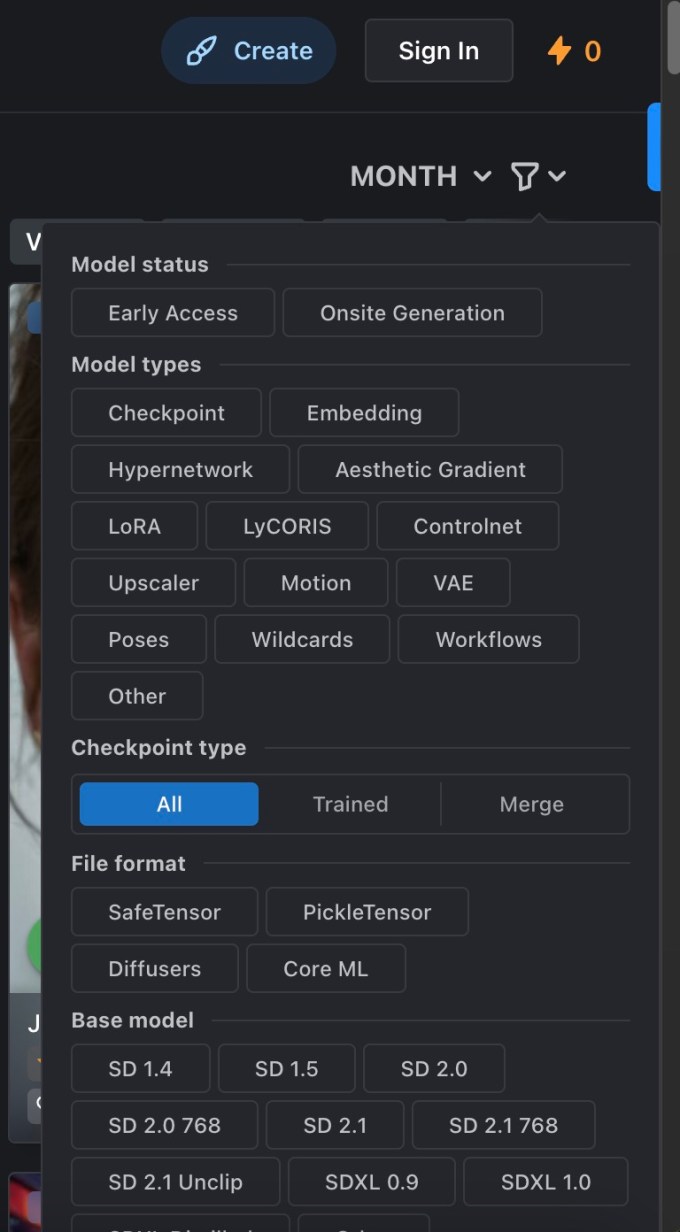
AI image generator Stable Diffusion already has a lot of fans, and now those experimenting with the new AI technology to develop their own models have a place to share their work with other enthusiasts. A startup called Civitai — a play on the word Civitas, meaning community — has created a platform where members can post their own Stable Diffusion-based AI image models for others to discover, as well as the output of their work — AI photos — for consumers to browse and enjoy.
Explain Civitai CEO Justin Maier, the idea for the startup came about because he identified there was a need for a place where people could share their models and others could find them. People, he said, would post images they had made but others didn’t know how to duplicate their work to make their own images.
After wrapping up a project at Microsoft, where he had worked as a contractor on web development projects, Maier found himself intrigued by Midjourney.
“It scratched that same itch that web development had where I saw something — or I had something in my mind — and I could type some text in get something back. It became this collaborative experience where I could explore my creativity and I get pulled in directions maybe I hadn’t planned,” he says.
But Maier soon found himself limited by Midjourney’s credits-based plan that ultimately had him waiting for 5 minutes for each image to be generated. That, he says “was a real bummer because I had fallen so deeply in love with this ability to explore and create anything that I could think of,” Maier tells TechCrunch.
Around the same time, an open-source version came out called Stable Diffusion that basically allows you to do the same thing in terms of AI image generation. As the community around Stable Diffusion grew, people were learning how to do different things with the model through prompting or by adding new concepts into the model, like using images of themselves to make AI-generated selfies, for example. Maier started to see people posting their own models that would let you do cool things — like generating in a synth wave style or a punk style — and merging models together to make other new concepts, as well. But these were being posted around the web in places like Reddit or Discord, not in a centralized community.
That led him to create Civitai (or Model Share, as it was originally called), an online community that organized this content in a way where people could come back and find it later.
Initially, he seeded Civitai by reaching out to model creators and asking them if they could post their work on the site. At first, there were only around 40 or 50 different models available. But over time, the site began to grow.
Image Credits: Civitai
“People were thrilled to be seen for this effort that they had made. And so by about January, we had become the go-to place for sharing these things,” says Maier. “There were other sites that people were posting to, like HuggingFace…but it wasn’t image-centric,” he explains. “So we became the de facto standard for sharing your model and various AI resources and the images that you’d made,” Maier adds.
By January 2023, the site hit 100,000 registered users and it occurred to Maier that it could be more than a community project — it could be a company. So the Civitai was then “officially” founded, and three months later, it hit a million registered users. Today, that number is around 3 million registered users and it sees around 12 to 13 million unique visitors each month.
“It’s wildly how quickly it’s grown — definitely bigger than we thought it would be back in January,” Maier says.
Of the 3 million users, only around 10,000 unique creators each month are actually uploading new models. However, that number has risen by approximately 25% over the last month, after Citivai added the ability for people to train new models on the site, which makes it easier to get started. A larger number of users are consuming the models and the content created.
Image Credits: Civitai
As a result of its growth, Civitai, which is also co-founded by Maxfield Hulker and Briant Diehl, raised a $5.1 million round in June led by Andreessen Horowitz (a16z) at a $20 million valuation. The other participants in the funding were a bit unusual — the legal team that helped them close the round also got on board.
“Civitai is the prime example of a company that’s already built an incredible, engaged community and all without spending a dime on marketing,” said Andreessen Horowitz Partner Brian Kim, in a statement. “Our investment in the company will only supercharge something that’s already working incredibly well, by contributing to a world where any individual can take advantage of what the biggest technological shift of our generation – AI – has to offer.”
To use Civitai, users can upload a series of images that represent the style those images represent, then choose the base model — like the standard model, anime model, or more realistic model, and so on. After about an hour, the new model should be ready and you’ll be able to generate your own images using that style you had captured. The images generated on-site include metadata that detail things like the prompts and resources used, and Civitai encourages those who generate models off-site to do so, too.
There are issues with artists finding out their work has been used to train AI models, which is a concern. To address this, Civitai has created a process that allows artists to flag resources they believe are using their work, which kicks off a negotiation as to the next steps. In some cases, that’s the removal of the resource entirely, or other times, the artist just wants their name removed.
“Ideally what we want to have happen — eventually — is that these artists can…use these styles for themselves. And if they want to give people the ability to create in their style, then they can give people the ability to pay to do that,” says Maier. “But it’s still early days and I haven’t had an opportunity to work with many artists that are interested in doing that,” he admits.
However, Maier believes there could be a market for that sort of work in the future, which would include the use of AI imagery inside things like movies, music videos, applications, and other creative endeavors. In the near term, though, the plan is to create a consumer-facing mobile app that will work as a repository of the AI imagery, as a sort of companion to the experience happening on the main site.
The company is also now planning to focus on allowing users to monetize their work, whether that’s connecting them with brands that want to create unique concepts using AI, or more direct monetization — like paying to access a model or paying for one-off image generation. For now, though, everything on the site is free to use. (The company uses Cloudflare’s R2 to keep costs down around downloads.)
“I’d like to start working with brands and real people and IP to give them the ability to sell their likeness to people that want to be able to use it, to do advertisements and things like that,” says Maier. “And I think that we can set up licensing in a way and set permissions in a way so that they can really constrain what it can and cannot be used for. I think that that’s going to be critical for as we think about how things evolve in this AI era,” he adds.
Over time, the startup aims to expand to other modalities beyond AI image models, but that’s further down the road, Maier says.
Last week marked a significant milestone for OpenAI, as they unveiled GPT-4 Turbo at their OpenAI DevDay. A standout feature of GPT-4 Turbo is its expanded context window of 128,000, a substantial leap from GPT-4's 8,000. This enhancement enables the processing of text 16 times greater than its predecessor, equivalent to around 300 pages of text.
This advancement ties into another significant development: the potential impact on the landscape of SaaS startups.
OpenAI's ChatGPT Enterprise, with its advanced features, poses a challenge to many SaaS startups. These companies, which have been offering products and services around ChatGPT or its APIs, now face competition from a tool with enterprise-level capabilities. ChatGPT Enterprise's offerings, like domain verification, SSO, and usage insights, directly overlap with many existing B2B services, potentially jeopardizing the survival of these startups.
In his keynote, OpenAI's CEO Sam Altman revealed another major development: the extension of GPT-4 Turbo's knowledge cutoff. Unlike GPT-4, which had information only up to 2021, GPT-4 Turbo is updated with knowledge up until April 2023, marking a significant step forward in the AI's relevance and applicability.
ChatGPT Enterprise stands out with features like enhanced security and privacy, high-speed access to GPT-4, and extended context windows for longer inputs. Its advanced data analysis capabilities, customization options, and removal of usage caps make it a superior choice to its predecessors. Its ability to process longer inputs and files, along with unlimited access to advanced data analysis tools like the previously known Code Interpreter, further solidifies its appeal, especially among businesses previously hesitant due to data security concerns.
The era of manually crafting code is giving way to AI-driven systems, trained instead of programmed, signifying a fundamental change in software development.
The mundane tasks of programming may soon fall to AI, reducing the need for deep coding expertise. Tools like GitHub's CoPilot and Replit’s Ghostwriter, which assist in coding, are early indicators of AI's expanding role in programming, suggesting a future where AI extends beyond assistance to fully managing the programming process. Imagine the common scenario where a programmer forgets the syntax for reversing a list in a particular language. Instead of a search through online forums and articles, CoPilot offers immediate assistance, keeping the programmer focused towards to goal.
Transitioning from Low-Code to AI-Driven Development
Low-code & No code tools simplified the programming process, automating the creation of basic coding blocks and liberating developers to focus on creative aspects of their projects. But as we step into this new AI wave, the landscape changes further. The simplicity of user interfaces and the ability to generate code through straightforward commands like “Build me a website to do X” is revolutionizing the process.
AI's influence in programming is already huge. Similar to how early computer scientists transitioned from a focus on electrical engineering to more abstract concepts, future programmers may view detailed coding as obsolete. The rapid advancements in AI, are not limitd to text/code generation. In areas like image generation diffusion model like Runway ML, DALL-E 3, shows massive improvements. Just see the below tweet by Runway showcasing their latest feature.
Introducing, Motion Brush.
A new way to add controlled movement to your generations.
Coming soon to Gen-2. pic.twitter.com/htyjf1gstz
— Runway (@runwayml) November 10, 2023
Extending beyond programming, AI's impact on creative industries is set to be equally transformative. Jeff Katzenberg, a titan in the film industry and former chairman of Walt Disney Studios, has predicted that AI will significantly reduce the cost of producing animated films. According to a recent article from Bloomberg Katzenberg foresees a drastic 90% reduction in costs. This can include automating labor-intensive tasks such as in-betweening in traditional animation, rendering scenes, and even assisting with creative processes like character design and storyboarding.
The Cost-Effectiveness of AI in Coding
Cost Analysis of Employing a Software Engineer:
Total Compensation: The average salary for a software engineer including additional benifits in tech hubs like Silicon Valley or Seattle is approximately $312,000 per year.
Daily Cost Analysis:
Working Days Per Year: Considering there are roughly 260 working days in a year, the daily cost of employing a software engineer is around $1,200.
Code Output: Assuming a generous estimate of 100 finalized, tested, reviewed, and approved lines of code per day, this daily output is the basis for comparison.
Cost Analysis of Using GPT-3 for Code Generation:
Token Cost: The cost of using GPT-3, at the time of the video, was about $0.02 for every 1,000 tokens.
Tokens Per Line of Code: On average, a line of code can be estimated to contain around 10 tokens.
Cost for 100 Lines of Code: Therefore, the cost to generate 100 lines of code (or 1,000 tokens) using GPT-3 would be around $0.12.
Comparative Analysis:
Cost per Line of Code (Human vs. AI): Comparing the costs, generating 100 lines of code per day costs $1,200 when done by a human software engineer, as opposed to just $0.12 using GPT-3.
Cost Factor: This represents a cost factor difference of about 10,000 times, with AI being substantially cheaper.
This analysis points to the economical potential of AI in the field of programming. The low cost of AI-generated code compared to the high expense of human developers suggests a future where AI could become the preferred method for code generation, especially for standard or repetitive tasks. This shift could lead to significant cost savings for companies and a reevaluation of the role of human programmers, potentially focusing their skills on more complex, creative, or oversight tasks that AI cannot yet handle.
ChatGPT's versatility extends to a variety of programming contexts, including complex interactions with web development frameworks. Consider a scenario where a developer is working with React, a popular JavaScript library for building user interfaces. Traditionally, this task would involve delving into extensive documentation and community-provided examples, especially when dealing with intricate components or state management.
With ChatGPT, this process becomes streamlined. The developer can simply describe the functionality they aim to implement in React, and ChatGPT provides relevant, ready-to-use code snippets. This could range from setting up a basic component structure to more advanced features like managing state with hooks or integrating with external APIs. By reducing the time spent on research and trial-and-error, ChatGPT enhances efficiency and accelerates project development in web development contexts.
Challenges in AI-Driven Programming
As AI continues to reshape the programming landscape, it’s essential to recognize the limitations and challenges that come with relying solely on AI for programming tasks. These challenges underscore the need for a balanced approach that leverages AI's strengths while acknowledging its limitations.
Code Quality and Maintainability: AI-generated code can sometimes be verbose or inefficient, potentially leading to maintenance challenges. While AI can write functional code, ensuring that this code adheres to best practices for readability, efficiency, and maintainability remains a human-driven task.
Debugging and Error Handling: AI systems can generate code quickly, but they don't always excel at debugging or understanding nuanced errors in existing code. The subtleties of debugging, particularly in large, complex systems, often require a human's nuanced understanding and experience.
Reliance on Training Data: The effectiveness of AI in programming is largely dependent on the quality and breadth of its training data. If the training data lacks examples of certain bugs, patterns, or scenarios, the AI’s ability to handle these situations is compromised.
Ethical and Security Concerns: With AI taking a more prominent role in coding, ethical and security concerns arise, especially around data privacy and the potential for biases in AI-generated code. Ensuring ethical use and addressing these biases is crucial for the responsible development of AI-driven programming tools.
Balancing AI and Traditional Programming Skills
In future software development teams maybe a hybrid model emerges. Product managers could translate requirements into directives for AI code generators. Human oversight might still be necessary for quality assurance, but the focus would shift from writing and maintaining code to verifying and fine-tuning AI-generated outputs. This change suggests a diminishing emphasis on traditional coding principles like modularity and abstraction, as AI-generated code need not adhere to human-centric maintenance standards.
In this new age, the role of engineers and computer scientists will transform significantly. They'll interact with LLM, providing training data and examples to achieve tasks, shifting the focus from intricate coding to strategically working with AI models.
The basic computation unit will shift from traditional processors to massive, pre-trained LLM models, marking a departure from predictable, static processes to dynamic, adaptive AI agents.
The focus is transitioning from creating and understanding programs to guiding AI models, redefining the roles of computer scientists and engineers and reshaping our interaction with technology.
The Ongoing Need for Human Insight in AI-Generated Code
The future of programming is less about coding and more about directing the intelligence that will drive our technological world.
The belief that natural language processing by AI can fully replace the precision and complexity of formal mathematical notations and traditional programming is, at best, premature. The shift towards AI in programming does not eliminate the need for the rigor and precision that only formal programming and mathematical skills can provide.
Moreover, the challenge of testing AI-generated code for problems that haven't been solved before remains significant. Techniques like property-based testing require a deep understanding programming, skills that AI, in its current state, cannot replicate or replace.
In summary, while AI promises to automate many aspects of programming, the human element remains crucial, particularly in areas requiring creativity, complex problem-solving, and ethical oversight.








 Step 3: Acquiring a Pre-Trained Small Language Model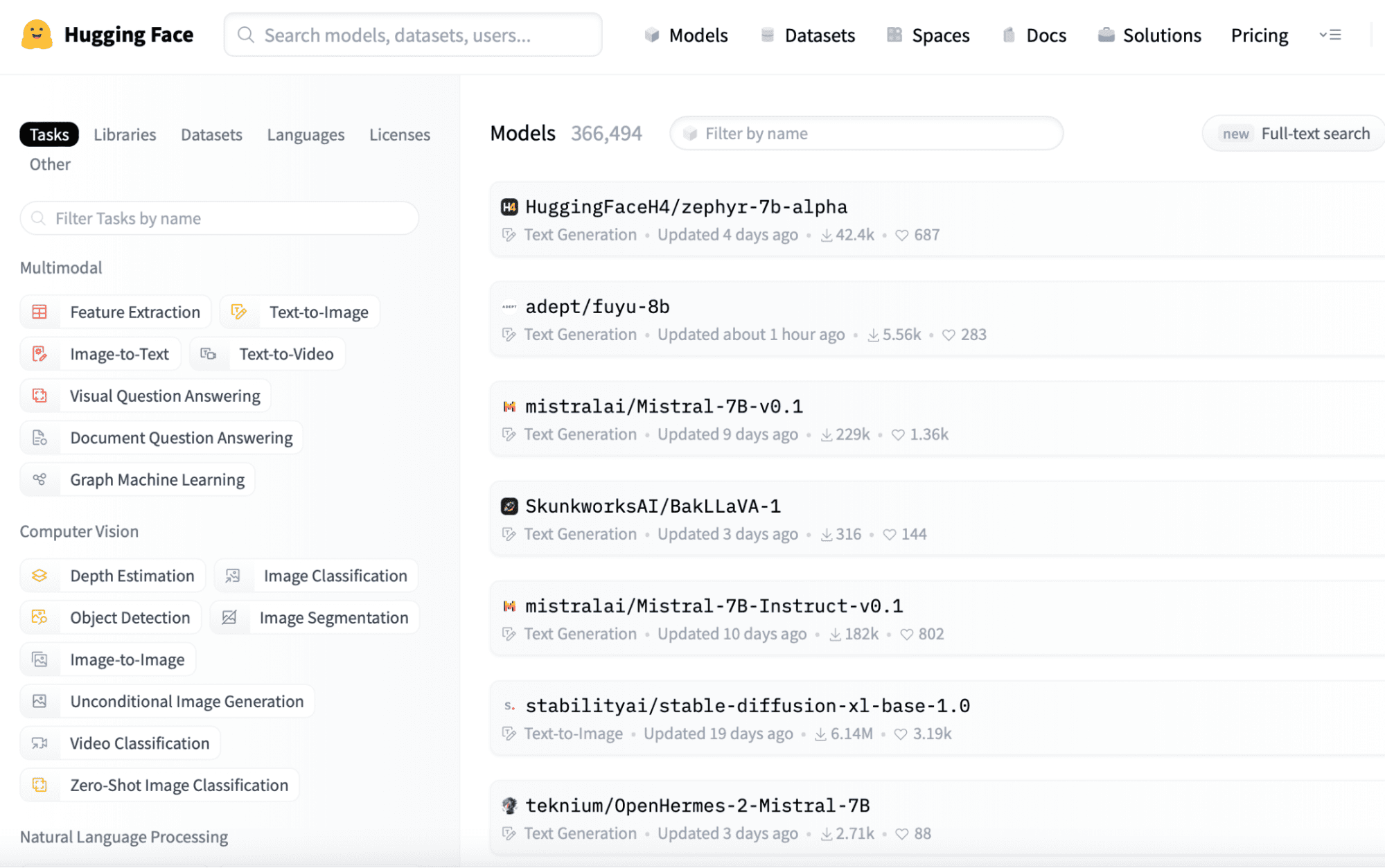
 Step 5: Model Configuration
  Step 7: Optimizations and Troubleshooting