ChatGPT Meets Its Match: The Rise of Anthropic Claude Language Model

Claude, Anthropic

Over the past year, generative AI has exploded in popularity, thanks largely to OpenAI's release of ChatGPT in November 2022. ChatGPT is an impressively capable conversational AI system that can understand natural language prompts and generate thoughtful, human-like responses on a wide range of topics.

However, ChatGPT is not without competition. One of the most promising new contenders aiming to surpass ChatGPT is Claude, created by AI research company Anthropic. Claude was released for limited testing in December 2022, just weeks after ChatGPT. Although Claude has not yet seen as widespread adoption as ChatGPT, it demonstrates some key advantages that may make it the biggest threat to ChatGPT's dominance in the generative AI space.

Background on Anthropic

Before diving into Claude, it is helpful to understand Anthropic, the company behind this AI system. Founded in 2021 by former OpenAI researchers Dario Amodei and Daniela Amodei, Anthropic is a startup focused on developing safe artificial general intelligence (AGI).

The company takes a research-driven approach with a mission to create AI that is harmless, honest, and helpful. Anthropic leverages constitutional AI techniques, which involve setting clear constraints on an AI system's objectives and capabilities during development. This contrasts with OpenAI's preference for scaling up systems rapidly and dealing with safety issues reactively.

Anthropic raised $300 million in funding in 2022. Backers include high-profile tech leaders like Dustin Moskovitz, co-founder of Facebook and Asana. With this financial runway and a team of leading AI safety researchers, Anthropic is well-positioned to compete directly with large organizations like OpenAI.

Overview of Claude

Claude powered by Claude 2 & Claude 2.1 model, is an AI chatbot designed to collaborate, write, and answer questions, much like ChatGPT and Google Bard.

Claude stands out with its advanced technical features. While mirroring the transformer architecture common in other models, it's the training process where Claude diverges, employing methodologies that prioritize ethical guidelines and contextual understanding. This approach has resulted in Claude performing impressively on standardized tests, even surpassing many AI models.

Claude shows an impressive ability to understand context, maintain consistent personalities, and admit mistakes. In many cases, its responses are articulate, nuanced, and human-like. Anthropic credits constitutional AI approaches for allowing Claude to conduct conversations safely, without harmful or unethical content.

Some key capabilities demonstrated in initial Claude tests include:

  • Conversational intelligence – Claude listens to user prompts and asks clarifying questions. It adjusts responses based on the evolving context.
  • Reasoning – Claude can apply logic to answer questions thoughtfully without reciting memorized information.
  • Creativity – Claude can generate novel content like poems, stories, and intellectual perspectives when prompted.
  • Harm avoidance – Claude abstains from harmful, unethical, dangerous, or illegal content, in line with its constitutional AI design.
  • Correction of mistakes – If Claude realizes it has made a factual error, it will retract the mistake graciously when users point it out.

Claude 2.1

In November 2023, Anthropic released an upgraded version called Claude 2.1. One major feature is the expansion of its context window to 200,000 tokens, enabling approximately 150,000 words or over 500 pages of text.

This massive contextual capacity allows Claude 2.1 to handle much larger bodies of data. Users can provide intricate codebases, detailed financial reports, or extensive literary works as prompts. Claude can then summarize long texts coherently, conduct thorough Q&A based on the documents, and extrapolate trends from massive datasets. This huge contextual understanding is a significant advancement, empowering more sophisticated reasoning and document comprehension compared to previous versions.

Enhanced Honesty and Accuracy

 Claude 2.1: Significantly more likely to demur

Claude 2.1: Significantly more likely to demur

Significant Reduction in Model Hallucinations

A key improvement in Claude 2.1 is its enhanced honesty, demonstrated by a remarkable 50% reduction in the rates of false statements compared to the previous model, Claude 2.0. This enhancement ensures that Claude 2.1 provides more reliable and accurate information, essential for enterprises looking to integrate AI into their critical operations.

Improved Comprehension and Summarization

Claude 2.1 shows significant advancements in understanding and summarizing complex, long-form documents. These improvements are crucial for tasks that demand high accuracy, such as analyzing legal documents, financial reports, and technical specifications. The model has shown a 30% reduction in incorrect answers and a significantly lower rate of misinterpreting documents, affirming its reliability in critical thinking and analysis.

Access and Pricing

Claude 2.1 is now accessible via Anthropic’s API and is powering the chat interface at claude.ai for both free and Pro users. The use of the 200K token context window, a feature particularly beneficial for handling large-scale data, is reserved for Pro users. This tiered access ensures that different user groups can leverage Claude 2.1’s capabilities according to their specific needs.

With the recent introduction of Claude 2.1, Anthropic has updated its pricing model to enhance cost efficiency across different user segments. The new pricing structure is designed to cater to various use cases, from low latency, high throughput scenarios to tasks requiring complex reasoning and significant reduction in model hallucination rates.

AI Safety and Ethical Considerations

At the heart of Claude's development is a rigorous focus on AI safety and ethics. Anthropic employs a ‘Constitutional AI' model, incorporating principles from the UN's Declaration of Human Rights and Apple's terms of service, alongside unique rules to discourage biased or unethical responses. This innovative approach is complemented by extensive ‘red teaming' to identify and mitigate potential safety issues.

Claude's integration into platforms like Notion AI, Quora's Poe, and DuckDuckGo's DuckAssist demonstrates its versatility and market appeal. Available through an open beta in the U.S. and U.K., with plans for global expansion, Claude is becoming increasingly accessible to a wider audience.

Advantages of Claude over ChatGPT

While ChatGPT launched first and gained immense popularity right away, Claude demonstrates some key advantages:

  1. More accurate information

One common complaint about ChatGPT is that it sometimes generates plausible-sounding but incorrect or nonsensical information. This is because it is trained primarily to sound human-like, not to be factually correct. In contrast, Claude places a high priority on truthfulness. Although not perfect, it avoids logically contradicting itself or generating blatantly false content.

  1. Increased safety

Given no constraints, large language models like ChatGPT will naturally produce harmful, biased, or unethical content in certain cases. However, Claude's constitutional AI architecture compels it to abstain from dangerous responses. This protects users and limits societal harm from Claude's widespread use.

  1. Can admit ignorance

While ChatGPT aims to always provide a response to user prompts, Claude will politely decline to answer questions when it does not have sufficient knowledge. This honesty helps build user trust and prevent propagation of misinformation.

  1. Ongoing feedback and corrections

The Claude team takes user feedback seriously to continually refine Claude's performance. When Claude makes a mistake, users can point this out so it recalibrates its responses. This training loop of feedback and correction enables rapid improvement.

  1. Focus on coherence

ChatGPT sometimes exhibits logical inconsistencies or contradictions, especially when users attempt to trick it. Claude's responses display greater coherence, as it tracks context and fine-tunes generations to align with previous statements.

Investment and Future Outlook

Recent investments in Anthropic, including significant funding rounds led by Menlo Ventures and contributions from major players like Google and Amazon, underscore the industry's confidence in Claude's potential. These investments are expected to propel Claude's development further, solidifying its position as a major contender in the AI market.

Conclusion

Anthropic's Claude is more than just another AI model; it's a symbol of a new direction in AI development. With its emphasis on safety, ethics, and user experience, Claude stands as a significant competitor to OpenAI's ChatGPT, heralding a new era in AI where safety and ethics are not just afterthoughts but integral to the design and functionality of AI systems.

What’s next for Mozilla?

What’s next for Mozilla? Frederic Lardinois @fredericl / 9 hours

For the longest time, Mozilla was synonymous with the Firefox browser, but for the last few years, Mozilla has started to look beyond Firefox, especially as its browser’s importance continues to wane. Over the last few years, Mozilla also started making startup investments, including into Mastodon’s client Mammoth, for example, and acquired Fakespot, a website and browser extension that helps users identify fake reviews. The organization also launched Mozilla.ai to bring more of its open source ethos into the AI space. It’s no surprise that AI is what the organization is focusing on right now. Indeed, when Mozilla launched its annual report a few weeks ago, it also used that moment to add a number of new members to its board — the majority of which focus on AI.

Late last month, I sat down with Mozilla’s president and executive director, Mark Surman, to discuss what’s next for Mozilla — and what that means for the fans and Firefox.

“In the last year and a half, we’ve been focused on making a pretty dramatic shift at Mozilla — to make it about not just more than the browser but also more than our kind of activist personality and build out a kind of portfolio that sets us up — and sets others up — to go and take our values into the AI era, or to the next era of the internet, however you want to talk about it.”

Mozilla AI

Mozilla launched Mozilla.ai just around the time GPT-4 launched and the first Llama models became widely available. Surman described this as a “focusing moment” for the organization. “Mozilla AI, which had a broad mandate around finding open source, trustworthy AI opportunities and build a business around them. Quickly, Moez [Draief], who runs it, made it about how do we leverage the growing snowball of open source large language models and find a way to both accelerate that snowball but also make sure it rolls in a direction that matches our goals and matches our wallet belt.”

While Mozilla did do some press around launching its AI efforts, we haven’t actually seen a lot of movement in that area from the organization since. Surman told me that the leadership team had been planning these efforts for almost a year, but as public interest in AI grew, he “pushed it out of the door.” But then Draief pretty much moved it right back into stealth mode to focus on what to do next. “At the high level, where we’re positioning ourselves to be about making it easier to use any of the open source large language models in a trustworthy, privacy-sensitive, affordable way.” Right now, Surman argued, it remains hard to for most developers — and even more so for most consumers — to run their own models, even as more open source models seemingly launch every day. “What Mozilla.ai is focused on really is almost building a wrapper that you can put around any open source large language model to fine-tune it, to build data pipelines for it, to make it highly performant.”

Mozilla buys Fakespot, a startup that identifies fake reviews, to bring shopping tools to Firefox

What exactly this will look like remains to be seen, but it sounds like we’ll hear quit a bit more in the coming months. Meanwhile, the open source and AI communities are still figuring out what exactly open source AI is going to look like. Surman believes that no matter the details of that, though, the overall principles of transparency and freedom to study the code, modify it and redistribute it will remain key.

“Is it just the freedom to redistribute the finished model? Is it the ability to study what’s inside? Is it to know what the weights are, to see what the data was? I think we’re still working on all of those questions. We probably lean towards that everything should be open source — at least in a spiritual sense. The licenses aren’t perfect and we are going to do a bunch of work in the first half of next year with some of the other open source projects around clarifying some of those definitions and giving people some mental models.”

SAO PAULO, BRAZIL – JANUARY 28: Executive director Mark Surman from Mozilla holding a Firefox OS phone. (Photo by Mauricio Santana/Getty Images)

Surman believes that open source AI is a necessary component for making the next era of the internet open and accessible for all — but by itself, it is not sufficient. With a small group of very well-funded players currently dominating the AI market, he believes that the various open source groups will need to band together to collectively create alternatives. He likened it to the early era of open source — and especially the Linux movement — which aimed to create an alternative to Microsoft. Then, he noted, when the smartphone arrived, there were a few smaller projects that aimed to create alternatives, including Mozilla (and at its core, Android is obviously also open source, even as Google and others have built walled gardens around the actual user experience). Those efforts weren’t really all that successful, though.

Surman seems to be optimistic about Mozilla’s positioning in this new era of AI, though, and its ability to both use it to further its mission and create a sustainable business model around it. “All this that we are going to do is in the kind of service of our mission. And some of that, I think, will just have to be purely a public good,” he said. “And you can pay for public goods in different kinds of way, from our own resources, from philanthropy, from people pooling resources. […] It’s a kind of a business model but it’s not commercial, per se. And then, the stuff we’re building around communal AI hopefully has a real enterprise value if we can help people take advantage of open source large language models, effectively and quickly, in a way that is valuable to them and is cheaper than using open AI. That’s our hope.”

What’s next for Firefox?

Where does all of this leave the Firefox browser. Surman argued that the organization is very judicious about rolling AI into the browser — but he also believes that AI will become part of everything Mozilla does. “We want to implement AI in a way that’s trustworthy and benefits people,” he said. Fakespot is one example of this, but the overall vision is larger. “I think that’s what you’ll see from us, over the course of the next year, is how do you use the browser as the thing that represents you and how do you build AI into the browser that’s basically on your side as you move through the internet?” He noted that an Edge-like chatbot in a sidebar could be one way of doing this, but he seems to be thinking more in terms of an assistant that helps you summarize articles and maybe notify you proactively. “I think you’ll see the browser evolve. In our case, that’s to be more protective of you and more helpful to you. I think it’s more that you use the predictive and synthesizing capabilities of those tools to make it easier and safer to move through the internet.”

In the early days of Firefox, people moved away from other browsers because Firefox was significantly better at blocking annoying pop-up ads. Now, Surman argues, Mozilla needs to think about what the equivalent of pop-up blocking is for today’s users. “The question that we’re asking ourselves now is: What’s the pop-up blocker for the AI era? What’s the thing that people are really going to want that stands for them and makes the experience of the internet better?”

Mozilla looks to its next chapter

Three years after its revamp, Firefox’s Android browser adds 450+ new extensions

What Junior ML Engineers Actually Need to Know to Get Hired?

What Junior ML Engineers Actually Need to Know to Get Hired?
Photo by Mikhail Nilov

As a seasoned ML developer who has hired many junior engineers across different projects, I have come to realize that there are certain skills essential for a junior developer to be considered for a job in the field. These skills vary depending on the project and the company, but there are some fundamental skills that are universally required.

In this article, we will discuss the key skills that junior ML developers should have in order to be successful in their job search. By the end of this article, you will have a better understanding of what skills are necessary for junior ML developers to land their first job.

What skills do most junior developers who apply for a job have?

Junior developers looking to land their first job often come from other fields, having completed some ML courses. They have learned basic ML but do NOT have a deep background in engineering, computer science, or mathematics. While a math degree is not required to become a programmer, in ML, it is highly recommended. Machine learning and data science are fields that require experimentation and fine-tuning of the existing algorithms or even creating your own ones. And without some knowledge of math, it is hard to do.

College students with a good degree are at an advantage here. However, while they might have a deeper technical knowledge than an average junior without a specialized education, they often lack the necessary practical skills and experience that are vital for a job. College education is wired to give the students fundamental knowledge, often paying little attention to marketable skills.

Most applicants for junior ML engineer positions don’t have any problems with SQL, vector embeddings, and some basic time series analysis algorithms. I also used basic Python libraries such as Scikit-learn and applied basic problem-solving and algorithms (clustering, regression, random forests). But it’s not enough.

What skills do popular courses not provide?

As you now understand, most educational programs are unable to give hands-on experience and a deeper understanding of the subject matter. If you are determined to build a career in the field of ML, there are things you will need to learn on your own to make yourself more marketable. Because if you aren’t willing to learn, and I say that with care, don’t bother ? the days when anybody could land a career in IT are gone. Today it’s a pretty competitive market.

One of the key skills that popular courses may not provide a deep enough understanding of is random forests, which includes pruning, how to select the number of trees/features etc. While courses may cover the basics of how random forests work and how to implement them, they may not delve into important details. Or even talk about some more advanced ensembling methods. These details are crucial for building effective models and optimizing performance.

Another skill that is often overlooked is web scraping. Collecting data from the web is a common task in many ML projects, but it requires knowledge of tools and techniques for scraping data from websites. Popular courses may touch on this topic briefly, but they may not provide enough hands-on experience to truly master this skill.

In addition to technical skills, junior ML developers also need to know how to present their solutions effectively. This includes creating user-friendly interfaces and deploying models to production environments. For example, Flask in conjunction with NGrok gives you a powerful tool for creating web interfaces for ML models, but many courses do not cover these at all.

Another important skill that is often overlooked is Docker. Docker is a containerization tool that allows developers to easily package and deploy applications. Understanding how to use Docker can be valuable for deploying ML models to production environments and scaling applications.

Virtual environments are another important tool for managing dependencies and isolating projects. While many courses may cover virtual environments briefly, they may not provide enough hands-on experience for junior developers to truly understand their importance.

GitHub is an essential tool for version control and collaboration in software development, including ML projects. However, many junior developers may only have a surface-level understanding of GitHub and may not know how to use it effectively for managing ML projects.

Finally, ML tracking systems such as Weights and Biases or MLFlow can help developers keep track of model performance and experiment results. These systems can be valuable for optimizing models and improving performance, but they may not be covered in depth in many courses.

By mastering these skills, junior developers can set themselves apart from the competition and become valuable assets to any ML team.

What do you need to get an ML engineering job?

Young professionals often face a problem: to get a job, they need experience. But how can they get the experience if nobody wants to hire? Luckily, in ML and in programming in general, you can resolve this problem by creating pet projects. They allow you to demonstrate your skills in programming, knowledge of ML, as well as motivation to the potential employer.

Here are some ideas for pet projects that I, honestly, would like to see more among people who apply for jobs in my department:

Web scraping project

The goal of this project is to scrape data from a specific website and store it in a database. The data can be used for various purposes, such as analysis or machine learning. The project can involve the use of libraries like BeautifulSoup or Scrapy for web scraping and SQLite or MySQL for database storage. Additionally, the project can include integration with Google Drive or other cloud services for backup and easy access to the data.

NLP project

Here you need to build a chatbot that can understand and respond to natural language queries. The chatbot can be integrated with additional functionality, such as maps integration, to provide more useful responses. You can also use libraries like NLTK or spaCy for natural language processing and TensorFlow or PyTorch for building the model.

CV project

The objective of this project is to build a computer vision model that can detect objects in images. There is no need to use the most sophisticated models, just use some models that can show your skills with basics of deep learning like U-net or YOLO. The project can include uploading an image to a website using ngrok or a similar tool, and then returning the image with objects detected and highlighted in squares.

Sound project

You can build a text-to-speech model that can convert recorded audio into text. The model can be trained using deep learning algorithms like LSTM or GRU. The project can involve the use of libraries like PyDub or librosa for audio processing and TensorFlow or PyTorch for building the model.

Time series prediction project

The objective of this project is to build a model that can predict future values based on past data. The project can involve the use of libraries like Pandas or NumPy for data manipulation and scikit-learn or TensorFlow for building the model. The data can be sourced from various places, such as stock market data or weather data, and can be integrated with web scraping tools to automate data collection.

What else?

Having a good portfolio that showcases your skills is as valuable (or maybe, even more valuable) than a degree from a renowned university. However, there are other skills that are important for anyone these days: soft skills.

Developing soft skills is important for an ML engineer because it helps them communicate complex technical concepts to non-technical stakeholders, collaborate effectively with team members, and build strong relationships with clients and customers. Some ways to develop soft skills include:

  • Creating a blog. While writing is a solitary practice, it can be quite effective at helping you become better at communication. Writing about technical concepts in a clear and concise manner can help you structure your thoughts better and grasp how to explain complex tasks to different audiences.
  • Speaking at conferences and meetups. Presenting at conferences can help ML engineers improve their public speaking skills and learn how to tailor their message to different audiences.
  • Training to explain concepts to your grandma. Practicing explaining technical concepts in simple terms can help ML engineers improve their ability to communicate with non-technical stakeholders.

Overall, developing both your technical skills and communication skills can help you get your first job in the ML field.

Ivan Mishanin is the co-founder and COO of Brainify.ai, an AI/ML biomarker platform for novel treatment development aimed at psychiatry. His previous tech company, Bright Box, was sold to Zurich Insurance Group for $75M.

More On This Topic

  • 20 Machine Learning Projects That Will Get You Hired
  • How to Get Hired as Data Scientist in the GPT-4 Era
  • Data Science Portfolio Project Ideas That Can Get You Hired (Or Not)
  • We Don't Need Data Scientists, We Need Data Engineers
  • We Don’t Need Data Engineers, We Need Better Tools for Data Scientists
  • ModelOps: What you need to know to get certified

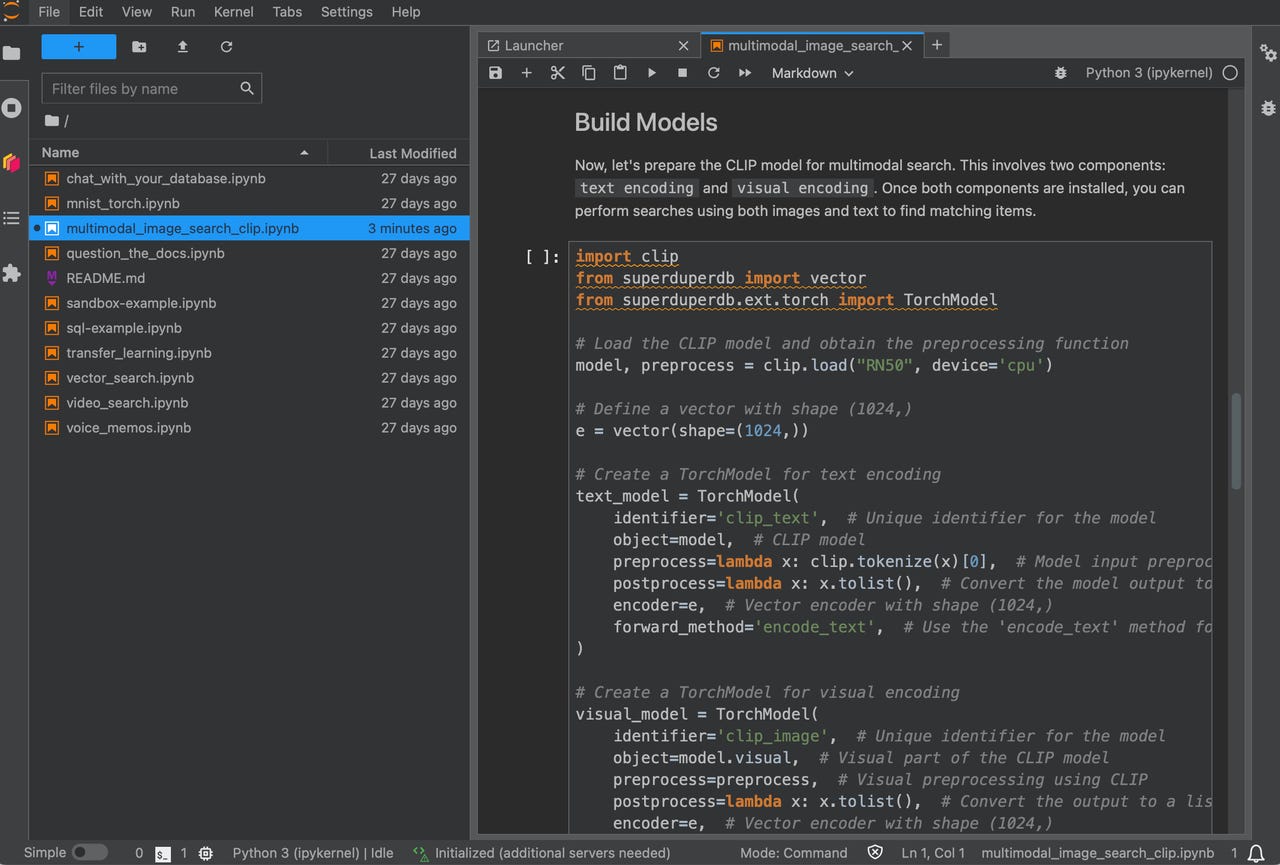
How SuperDuperDB delivers an easy entry to AI apps

superduperdb-demo-2024

Numerous observers have predicted that 2024 will be the year enterprises turn generative AI such as OpenAI's GPT-4 into actual corporate applications. Most likely, such applications will begin with the simplest kinds of infrastructure, stringing together a large language model such as GPT-4 with some basic data management.

Enterprise apps will start with simple tasks such as searching through text or images to find the match to a natural-language search.

Also: Pinecone's CEO is on a quest to give AI something like knowledge

A perfect candidate to make that happen is a Python library called SuperDuperDB, created by the venture capital-backed company of the same name, founded this year.

SuperDuperDB is not a database but an interface that sits between a database such as MongoDB or Snowflake and a large language model or other GenAI program.

That interface layer makes it simple to perform several very basic operations on corporate data. Using natural language queries in a chat prompt, one can query an existing corporate data set — such as documents — more extensively than is possible with a typical keyword search. One can upload images of, say, products to an image database and then query that database by showing an image and looking for a match.

Likewise, moments in videos can be retrieved from an archive of videos, by typing themes or features. Records of voice messages can be searched as a text transcript, making a basic voicemail assistant.

The technology also has uses for data scientists and machine learning engineers who want to refine AI programs using proprietary corporate data.

Also: Microsoft's GitHub Copilot pursues the absolute 'time to value' of AI in programming

For example, to "fine-tune" an AI program such as an image recognition model, one has to hook up an existing database of images to the machine learning program. The challenge is how to get the image data into and out of the machine learning program, and how to define variables of the training process, such as the loss to be minimized. SuperDuperDB offers simple function calls to simplify all those things.

A key aspect of many of those functions is to convert different data types — text, image, video, audio — into vectors, strings of numbers that can be compared against one another. Doing so allows SuperDuperDB to perform "similarity search," where the vector of a text phrase, for example, is compared to a database full of voicemail transcripts to retrieve the message most closely matching the query.

Mind you, SuperDuperDB is not a vector database like Pinecone, a commercial program. It's a simpler form of organizing vectors called a "vector index."

Also: Pinecone's CEO is on a quest to give AI something like knowledge

The SuperDuperDB program, which is open-source, is installed like a typical Python installation from the command line or loaded as a pre-built Docker container.

The first step to working with SuperDuperDB can either be setting up a data store from scratch, or working with an external data store. In either case, you'll want to have a data repository such as MongoDB or a SQL-based database.

SuperDuperDB handles all data, including newly created data and data fetched from the database, via what it calls an "encoder," which lets the programmer define data types. These encoded types — text, audio, image, video, etc. — can be stored in MongoDB as "documents" or in SQL-based databases as a table schema. It's also possible to store very large data items, such as video files, in local storage when they exceed the capacity of either MongoDB or the SQL database.

Also: Bill Gates predicts a 'massive technology boom' from AI coming soon

Once a data set is chosen or created, neural net models can be imported from libraries such as SciKit-Learn or one can use a very basic built-in inventory of neural nets such as the Transformer, the original large language model. One can also call APIs from commercial services such as OpenAI and Anthropic. The core function of having the model make predictions is done with a simple call to a ".predict" function built into SuperDuperDB.

When working with a large language model or an image model like Stable Diffusion or Dall-E, the neural net will seek to retrieve answers from the database by performing the vector similarity search. That's as simple as calling a ".like" function and passing it the query string.

It's possible to make more complex apps by assembling multiple stages of functionality with SuperDuperDB, such as using similarity search to retrieve items from a database and then passing those items to a classifier neural net.

The company has added functions that make an app more of a production system. They include a service called Listeners that re-run predictions whenever the underlying database is updated. Various functions in SuperDuperDB can also be run as separate daemons to improve performance.

Also: How LangChain turns GenAI into a genuinely useful assistant

This year will witness a great deal of evolution in programs such as SuperDuperDB, making them more robust still for production purposes. You can expect SuperDuperDB to evolve alongside other important emerging infrastructures such as the LangChain framework and commercial tools such as the Pinecone vector database.

While there's a lot of ambitious talk about enterprise use of GenAI, it probably starts right here, with the kinds of humble tools that can be picked up by the individual programmer.

If you'd like to get a quick feel for SuperDuperDB, head over to the demo on the company's Web site.

Artificial Intelligence

[Exclusive] Bengaluru Developer Makes Alto Autonomous with Redmi

Bengaluru based developer, Mankaran Singh, recently converted his modified-Maruti Alto K10 into an autonomous vehicle using a second-hand Redmi Note 9 Pro. This was made possible with the help of Flowpilot, an open-source driver assistance system created by him.

My second hand redmi note 9 pro running flowpilot is driving my alto k10 😂Can it get more desi than this ?#flowpilot #openpilot #ai #robotics #autonomous #cars #Android pic.twitter.com/eQa3zHSbFA

— mansin (@Mankaran32) May 14, 2023

Flowpilot is an open-source fork of Comma.ai’s OpenPilot that can run on most Windows/Linux and Android-powered machines. In an exclusive interview with AIM, Singh said that he didn’t train driving models on his own; instead, he used learning models from Comma.ai because one needs tons of data to train models and require millions of dollars for compute clusters to train them.

The idea to start this initiative stems from George Hotz, the founder of Comma.ai, which is also into enabling autonomous vehicles with the help of smartphones and other proprietary devices.

An avid programmer and autonomous system enthusiast, Singh is also into gaming and developing web applications. Besides Ola – which he joined three months ago – he is also working on his passion project Flow Drive, the think-tank behind Flowpilot.

Flowpilot performs the functions of Adaptive Cruise Control (ACC), Automated Lane Centering (ALC), Forward Collision Warning (FCW), Lane Departure Warning (LDW), and Driver Monitoring (DM) for a growing variety of supported car makes, models, and model years maintained by the community.

It records data from road-facing cameras, CAN, GPS, IMU, magnetometer, thermal sensors, crashes, and operating system logs. “All you need is basically actuators, the controller steering and gas brakes to control the car. And if you have that, Flowpilot can essentially run on anything,” said Singh.

“It supports all the phones (Android) that have OpenCL supporting them. That’s basically the GPU drivers, which are used for image processing, like neural networks, exhibiting neural networks.” he added.

Singh said that the quality of the experience definitely depends on the phone you use. “Mostly, if you’re using a phone that costs around 20-25K, that’s enough to run Flowpilot for reasonable performance, but anything less powerful, it’s going to lag, and the system will just show a warning; it just won’t engage,” he explained.

Flowpilot supports over 200 cars, including brands such as Honda, Toyota, Hyundai, Nissan, Kia, Chrysler, Lexus, Acura, Audi, VW, and more. Even if a car is not supported but has adaptive cruise control and lane-keeping assist, it’s likely able to run Flowpilot.

However, Singh said that it does not support cars as of now in India. “In India, none of the cars are supported in a plug-and-play fashion. The only reason people use Flowpilot is because it’s far better than the stock system of the car.” he said

How it Differs from Tesla

“Tesla has a long term vision. They are using eight cameras and complex neural networks, including advanced 3D perception. However, dealing with eight cameras brings a much bigger computational load. While a smartphone can handle images from two or three cameras well, it gets challenging with eight cameras, all running at a fast 50 hertz. This requires real-time processing on a special chip designed for cars,” explained Singh. .

He believes that Flowpilot has great potential on highways. “Highway driving can be automated with as little as one camera or a forward-facing camera and a bunch of other sensors, maybe GPS, IMU,” he said.

Singh said that the immediate use case involves highway driving automation, which is advancing rapidly with features like ADAS (Advanced Driver Assistance Systems) becoming more prevalent in cars. “Many car companies are incorporating highway automation, where highways provide a more structured environment. In this scenario, drivers can sit back, relax, and let the car cover the entire highway.” he explained.

Other safety features include automatic emergency braking and blind spot monitoring. If a driver attempts to change lanes when an obstacle is present, the system will issue a warning. The machine learning-based braking system operates at a much higher rate than human processing, allowing it to brake at the right time and potentially save lives.

As technology continues to advance, autonomous vehicles may find applications in private spaces such as college campuses and tech parks. These environments, with controlled and predictable conditions, make them more suitable for autonomous transportation, shares Singh.

Limitations

Speaking on safety Singh said there will be people who would be retrofitting custom motors on their steering, which he does not recommend at all. “The only recommended approach, given that your car doesn’t support Openpilot or Flowpilot, is to just replace the steering with the one from a supported car. Because these actuators are safety-critical” he explained

Though Flowpilot is a good starting point for autonomous vehicles in India, it has several limitations as well considering the condition of Indian roads. As Flowpilot relies on mobile cameras, unlike higher-end systems employing LiDAR and additional cameras, it struggles with low-light conditions, shadows, and unpredictable objects like cyclists or animals. This vulnerability in perception can lead to misinterpretations of the environment, potentially leading to accidents.

Moreover, India’s road infrastructure varies greatly, with many roads lacking lanes, signage, and proper markings, posing challenges for autonomous vehicles to navigate accurately. Currently, Flowpilot can prove highly beneficial on highways, where traffic is comparatively lighter than in cities, and designated lanes for vehicles are available.

What’s Next?

Singh said that he doesn’t have any interest in commercialising Flow Drive. “It’s not a commercial company. My team and I don’t have any interest in commercialising it. It’s open-source software, given back to the community,” he said, adding that next he plans to open something in the robotics space, focusing on automation, manufacturing, or warehousing because a lot of the underlying tech is the same.

Regarding Flow Drive, he said it will remain alive. “We will be supporting people, helping the community build more stuff on top of it, but it runs on donations, and that’s how it will always be,” he concluded.

The post [Exclusive] Bengaluru Developer Makes Alto Autonomous with Redmi appeared first on Analytics India Magazine.

Too Many Python Versions to Manage? Pyenv to the Rescue

Too Many Python Versions to Manage? Pyenv to the Rescue
Image by Author

Want to spend your morning trying out the new features in the latest Python version…And your lunch break sifting through a legacy Python codebase—all without breaking your development environment?

Yes, it is possible. And Pyenv is here to help. With Pyenv, you can install Python versions, switch between versions, and remove versions that you no longer need.

This tutorial is a quick introduction to setting up and using Pyenv. So let’s get started!

Installing Pyenv

The first step is to install Pyenv. I use Linux: Ubuntu 23.01. So, if you are on a Linux machine, the simplest way to install Pyenv is by running the following curl command:

$ curl https://pyenv.run | bash

This installs Pyenv using the pyenv-installer.

After the installation is complete, you’ll be prompted to finish setting up your shell environment to use Pyenv. To do so, you can add the following command to your ~/.bashrc file:

echo 'export PYENV_ROOT="$HOME/.pyenv"' >> ~/.bashrc    echo 'command -v pyenv >/dev/null || export PATH="$PYENV_ROOT/bin:$PATH"' >> ~/.bashrc    echo 'eval "$(pyenv init -)"' >> ~/.bashrc

And you’re all set to start using Pyenv!

Note: If you are on a Mac or a Windows machine, check out these detailed instructions on how to install Pyenv. On Windows, you need to install Pyenv in the Windows Subsystem for Linux (WSL).

Installing Python Versions with Pyenv

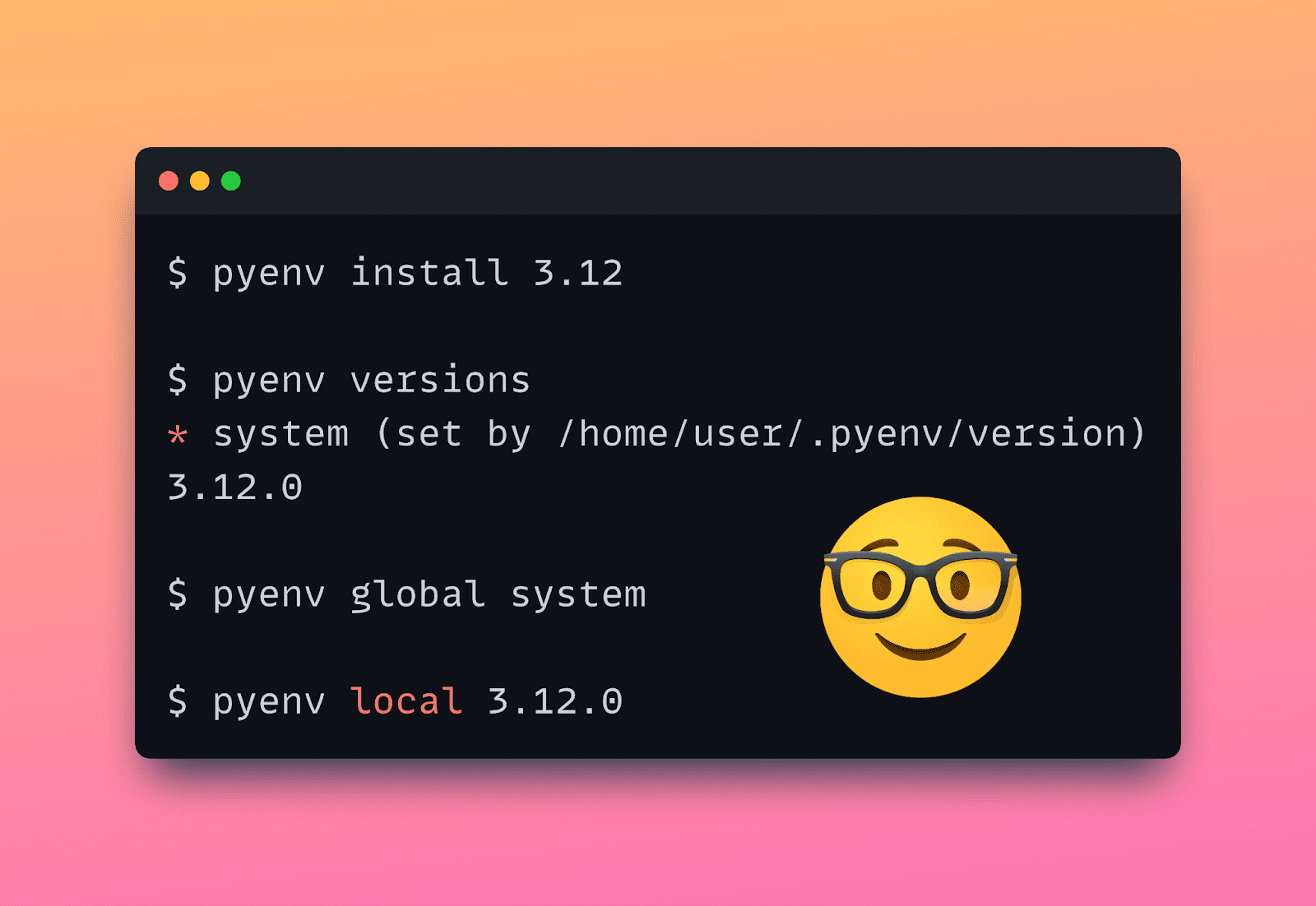
Now that you’ve installed Pyenv, you can install specific Python versions by running the pyenv install command like so:

$ pyenv install version

To check the list of installed Python versions, run the following command:

$ pyenv versions  * system (set by /home/balapriya/.pyenv/version)

I haven’t installed any new version yet, so the only version of Python is the system version. Which is Python 3.11 in my case:

$ python3 –version    Python 3.11.4

Let’s try to install Python 3.8 and 3.12. Try running this command to install Python 3.8:

$ pyenv install 3.8

The first time you try to install a specific version of Python with Pyenv, you may probably run into errors. Because of some missing build dependencies. No worries. It’s easy to fix!

⚙️ Some Troubleshooting Tips

When trying to install Pyenv on my Linux distro using the pyenv install command, I ran into errors because of missing build dependencies.

This StackOverflow thread contains helpful information on installing the required build dependencies for Pyenv. Run the following command to install the missing dependencies:

$ apt-get install build-essential zlib1g-dev libffi-dev libssl-dev libbz2-dev libreadline-dev libsqlite3-dev liblzma-dev

You should now be able to install the Python versions without any errors:

$ pyenv install 3.8

Note: When you install Python 3.x, by default, the most recent release is installed. But you also have more granular control and can specify 3.x.y for installing a specific release of a Python version. You can also run pyenv install --list to get a list of all available Python versions to install. This, however, is a very long list.

Similarly run pyenv install to install Python 3.12:

$ pyenv install 3.12

Now if you run pyenv versions you’ll see Python 3.8 and 3.12 in addition to the system version:

$ pyenv versions  * system (set by /home/balapriya/.pyenv/version)  3.8.18  3.12.0

Setting Global Python Version

With Pyenv, you can set a global Python version. As the name suggests, the global version is the version of Python that’s used anytime you use Python at the command line.

But be careful to set it to a relatively recent version to avoid errors when running projects that use newer Python versions.

For example, let's see what happens if we set the global version to Python 3.8.18.

$ pyenv global 3.8.18

Create a project folder. In it, create a main.py file with the following code:

# main.py    def handle_status_code(status_code):      match status_code:          case 200:               print(f"Success! Status code: {status_code}")          case 404:              print(f"Not Found! Status code: {status_code}")          case 500:              print(f"Server Error! Status code: {status_code}")          case _:              print(f"Unhandled status code: {status_code}")    status_code = 404  # oversimplification, yes. handle_status_code(status_code)

As seen, this code uses the match-case statement which was introduced in Python 3.10. So you need Python 3.10 or a later version for this code to run successfully. If you try running the script, you’ll get the following error:

File "main.py", line 2  	match status_code:        	^  SyntaxError: invalid syntax

In my case, the system Python is version 3.11 which is quite recent. So I can set the global version to the system Python version like so:

$ pyenv global system

When you now running the same script, you should get the following output:

Output >>>  Not Found! Status code: 404

If your system Python is an older version, say Python 3.6 or earlier, it's helpful to install a more recent version of Python and set it as the global version.

Setting Local Python Version for Your Project

When you want to work on projects that use earlier versions of Python, you’ll want to install that version to avoid any errors (like method calls that are no longer supported).

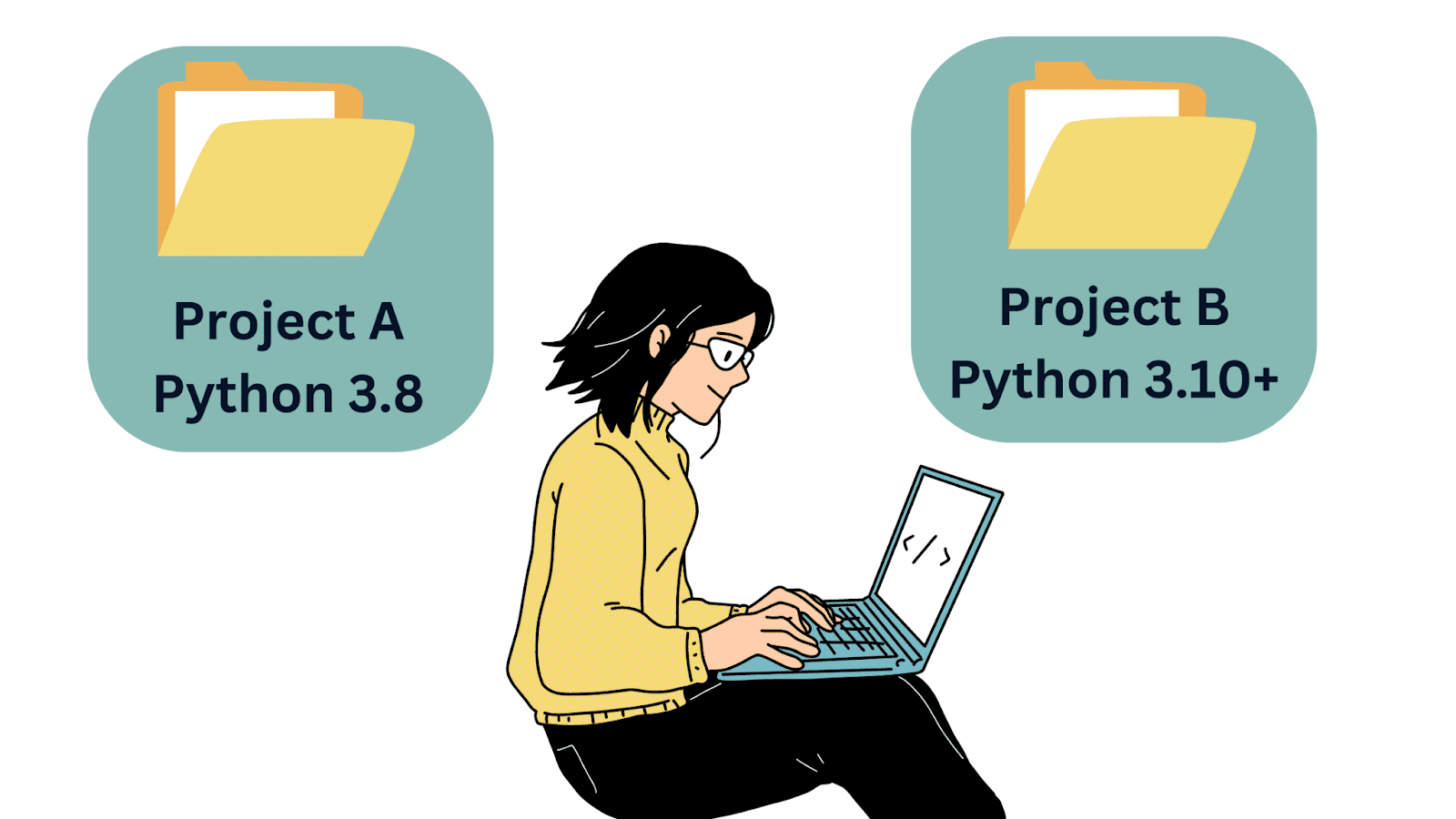
Say you want to use Python 3.8 when working on project A, and Python 3.10 or later when working on project B.

Too Many Python Versions to Manage? Pyenv to the Rescue
Image by Author

In such cases, you can set the local Python version in the project A's directory like so:

$ pyenv local 3.8.18

You can run python --version to check the Python version in the project directory:

$ python --version  Python 3.8.18

This is especially helpful when working on older Python codebases.

Uninstalling a Python Version

If you no longer need a Python version, you can uninstall it by running the pyenv uninstall command. Say we don’t need Python 3.8.18 anymore, so we can uninstall it by running the following command:

$ pyenv uninstall 3.8.18

You should see a similar output at the terminal:

pyenv: remove /home/balapriya/.pyenv/versions/3.8.18? [y|N] y  pyenv: 3.8.18 uninstalled

Wrapping Up

I hope you found this introductory tutorial on Pyenv helpful. Let's review some of the most common commands for quick reference:

Command Function
pyenv versions Lists all Python versions currently installed
pyenv install --list Lists all Python versions available to install
pyenv install 3.x Installs the latest release of Python 3.x
pyenv install 3.x.y Installs release y of Python 3.x
pyenv global 3.x Sets Python 3.x as the global Python version
pyenv local 3.x Sets the local Python version for your project to 3.x
pyenv uninstall 3.x.y Uninstalls release y of Python 3.x

In case you’re wondering. Yes, you can use Docker which is an excellent option to make local development a breeze—without worrying about dependency conflicts. But you’d probably feel it’s overkill to use Docker or other containerization solutions everytime you need to work on a new project.

So I think it is still helpful to be able to install, manage, and switch between Python versions at the command-line. You can also explore the pyenv-virtualenv plug-in to create and manage virtual environments. Happy coding!

Bala Priya C is a developer and technical writer from India. She likes working at the intersection of math, programming, data science, and content creation. Her areas of interest and expertise include DevOps, data science, and natural language processing. She enjoys reading, writing, coding, and coffee! Currently, she's working on learning and sharing her knowledge with the developer community by authoring tutorials, how-to guides, opinion pieces, and more.

More On This Topic

  • How to Manage Multiple Inheritance in Python
  • Be prepared to manage the threat with an MS in Cybersecurity from…
  • Be prepared to manage the threat with an MS in Cybersecurity from…
  • Top 10 MLOps Tools to Optimize & Manage Machine Learning Lifecycle
  • How to Manage Your Complex IT Landscape with AIOps
  • Be prepared to manage the threat with an MS in Cybersecurity from…

How GPT-4 Fast-Tracked Novice Developers to Pros in Less Than a Year

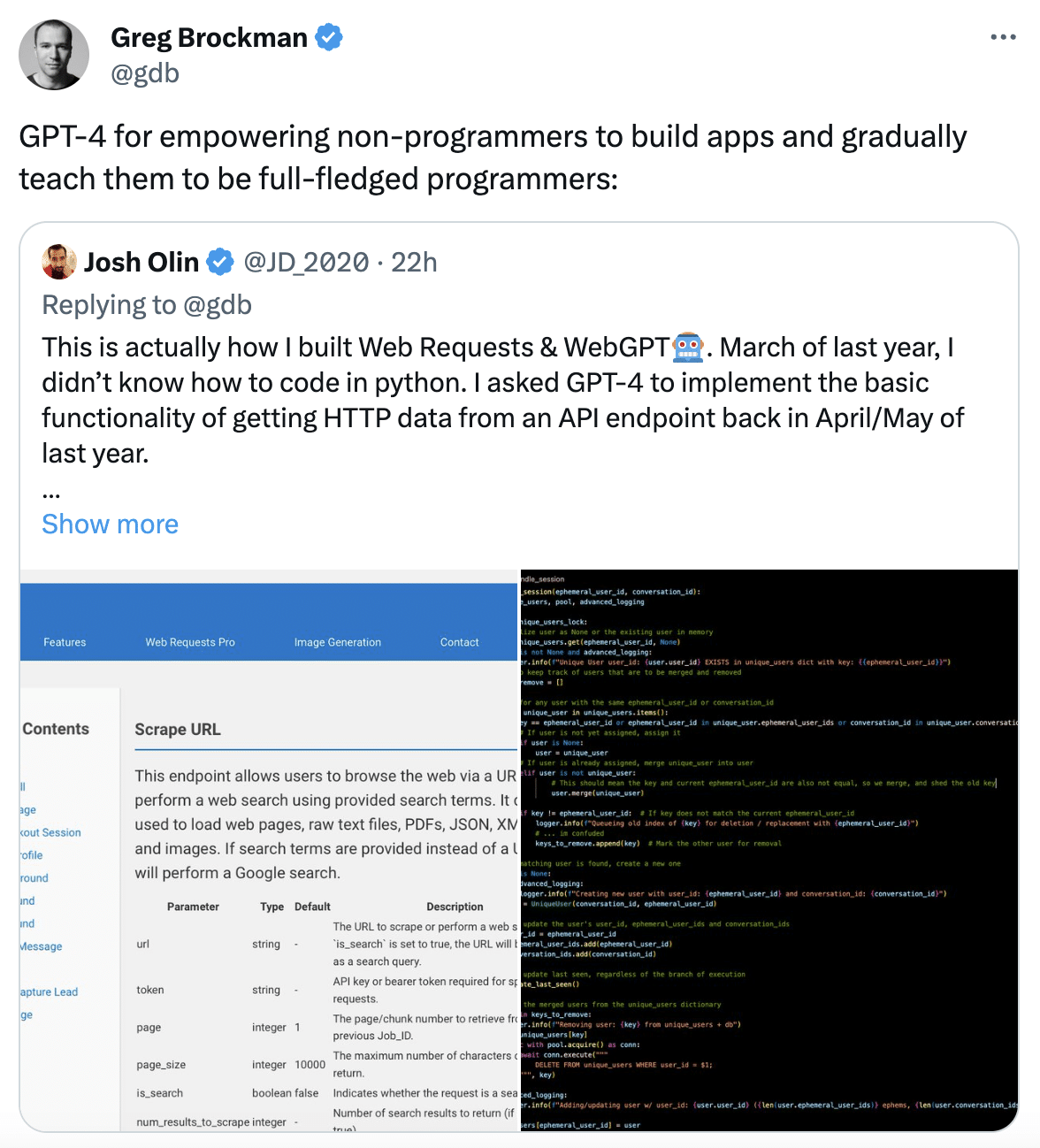
Josh Olin, entrepreneur and founder of WeGPT.ai, recently tweeted about how GPT-4 enabled him to build web requests and applications using GPT-4, and in the process learn Python. In a span of seven months, from last April, Olin used GPT-4 to create the fundamental capability of fetching HTTP data from an API endpoint.

Further, the resulting code was then put in Gist, continuously guiding GPT-4’s attention to its own source code by providing new feature requests, suggesting improvements, and fixing bugs. Olin had no prior knowledge of Python.

As challenging as that sounded, GPT-4’s capability as a coding teacher has resulted in a number of people experimenting with the technology.

OpenAI co-founder Greg Brockman’s tweet on GPT-4’s capabilities. Source: X

Moving Away from the Traditional Route

With the versatility of the model, programming has become one of the prominent real-use cases, allowing anyone, even those without coding knowledge, to build apps, thereby, enabling anyone to become a programmer.

Traditionally, a software engineer who has undergone a formal training of four years of engineering is equipped to become a Python programmer provided the Python course was taught as part of the curriculum. If not through a professional degree, certification and courses can make a person proficient in Python in 6-12 months, and even more for advanced courses.

With GPT-4, one accomplishes the task of programming within minutes and even learn python language in the process. With the investment cost on an OpenAI API or ChatGPT-4 subscription, a user can pretty much program and learn. Furthermore, GPT-4 allows clubbing of features which allows one to tweak the functions as per requirement.

Daniel Ávila Arias, co-founder of CodeGPT, an AI Saas platform enabling developers and companies to build AI-based solutions shared a video on using the CodeGPT extension with OpenAI to review Python code.

Creating your own Copilot in VSCode is ridiculously easy 🤯
In this video, using the CodeGPT extension in VSCode, I select OpenAI and the gpt-4-1106-preview model to review Python 🐍 code.
You can download the extension for FREE at this link: https://t.co/i8lfNwzZ3m pic.twitter.com/L06cCNoewU

— Daniel San (@dani_avila7) December 29, 2023

With GPT-4 Vision, coding is accelerated to another level. With just images of basic drawing or scribbles from a whiteboard, a whole coding program can be generated.

Relevance of Coding Teachers?

GPT-4 and ChatGPT have enabled different forms of self-learning, with the question of the fate of teachers on the line. A study done by the University of Toronto observed that AI coding assistant tools such as OpenAI Codex, enhanced the performance of novice programmers, allowing them to write code more efficiently and with reduced frustrations.

While the tools may not just be a teacher, they work best as a knowledge accelerator. In certain cases, a person with prior knowledge of Python programming will be able to effectively use it as opposed to someone with zero knowledge of it.

A New Era of Effective Accelerationism

Big tech companies’ shift towards educating users and teaching them programming language is gaining pace. Google is not far behind with the company offering cloud platforms that allow Python developers to build applications but also offer exclusive courses to learn the programming language.

With the massive advancements of AI in 2023, learning goals also took a massive shift. Discussions on how people will study for jobs that won’t exist in the future took shape.

IBM’s global managing partner of generative AI Mathew Candy recently said that you don’t need a computer science degree to get a job in tech, and it would be much easier for people without technical skills to build products. Thus, hinting towards a shift in learning and employment that require self-learning, in this case, programming.

It is possible that in 2024, we will witness further developments where more real use-cases and practical applications of GPT-4 in programming will emerge.

The post How GPT-4 Fast-Tracked Novice Developers to Pros in Less Than a Year appeared first on Analytics India Magazine.

Run an LLM Locally with LM Studio

Run an LLM Locally with LM Studio
Screenshot by Editor

It’s been an interesting 12 months. A lot has happened with large language models (LLMs) being at the forefront of everything tech-related. You have LLMs such as ChatGPT, Gemini, and more.

These LLMs are currently run in the cloud, meaning they run somewhere else on someone else's computer. For something to be run elsewhere, you can imagine how expensive it is. Because if it was so cheap, why not run it locally on your own computer?

But that’s all changed now. You can now run different LLMs with LM Studio.

What is LM Studio?

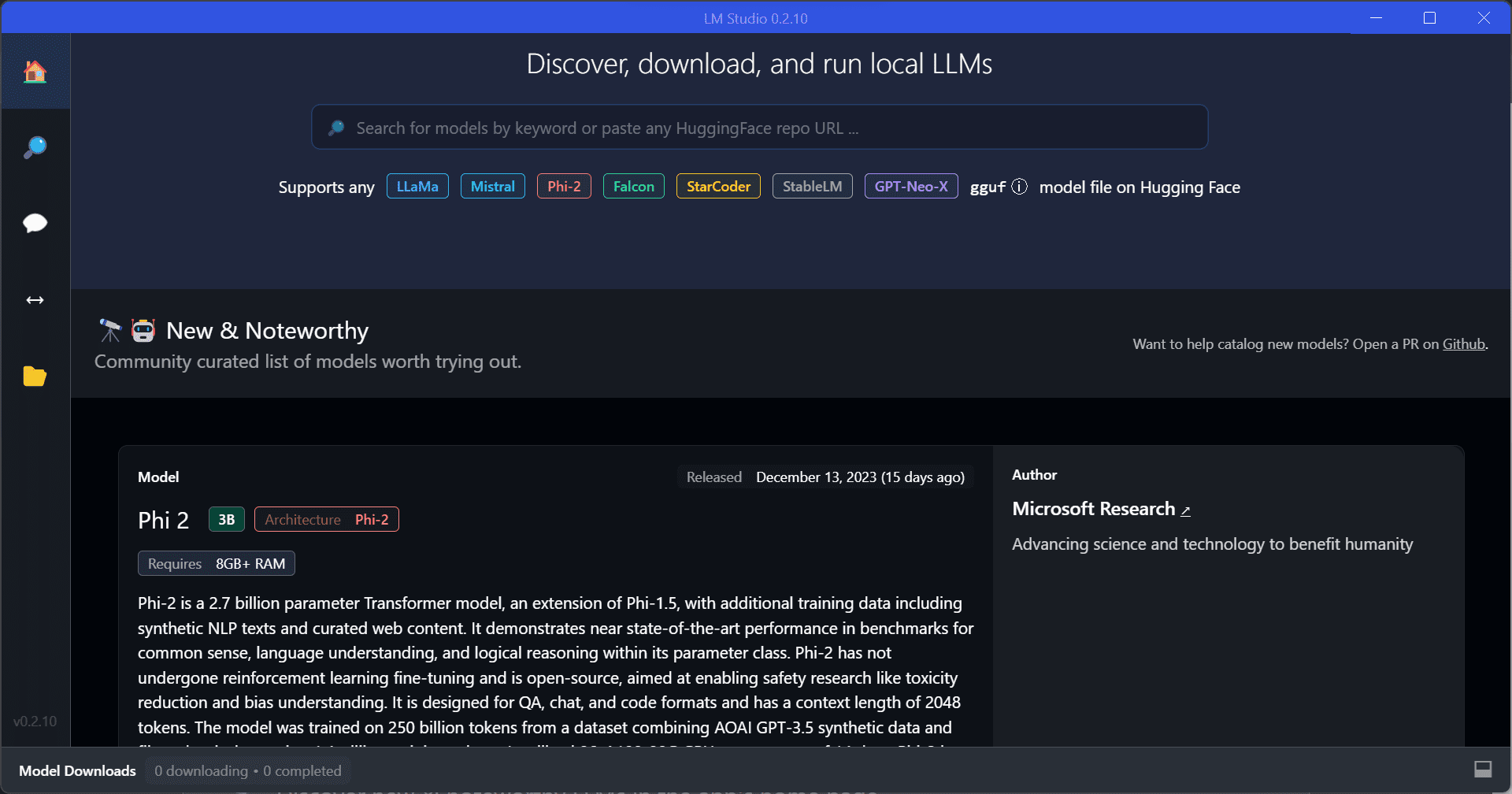
LM studio is a tool that you can use to experiment with local and open-source LLMs. You can run these LLMs on your laptop, entirely off. There are two ways that you can discover, download and run these LLMs locally:

  • Through the in-app Chat UI
  • OpenAI compatible local server

All you have to do is download any model file that is compatible from the HuggingFace repository, and boom done!

So how do I get started?

LM Studio Requirements

Before you can get kickstarted and start delving into discovering all the LLMs locally, you will need these minimum hardware/software requirements:

  • M1/M2/M3 Mac
  • Windows PC with a processor that supports AVX2. (Linux is available in beta)
  • 16GB+ of RAM is recommended
  • For PCs, 6GB+ of VRAM is recommended
  • NVIDIA/AMD GPUs supported

If you have these, you’re ready to go!

So what are the steps?

How to Use LM Studio

Your first step is to download LM Studio for Mac, Windows, or Linux, which you can do here. The download is roughly 400MB, therefore depending on your internet connection, it may take a whole.

Run an LLM Locally with LM Studio

Your next step is to choose a model to download. Once LM Studio has been launched, click on the magnifying glass to skim through the options of models available. Again, take into consideration that these models with be large, therefore it may take a while to download.

Run an LLM Locally with LM Studio

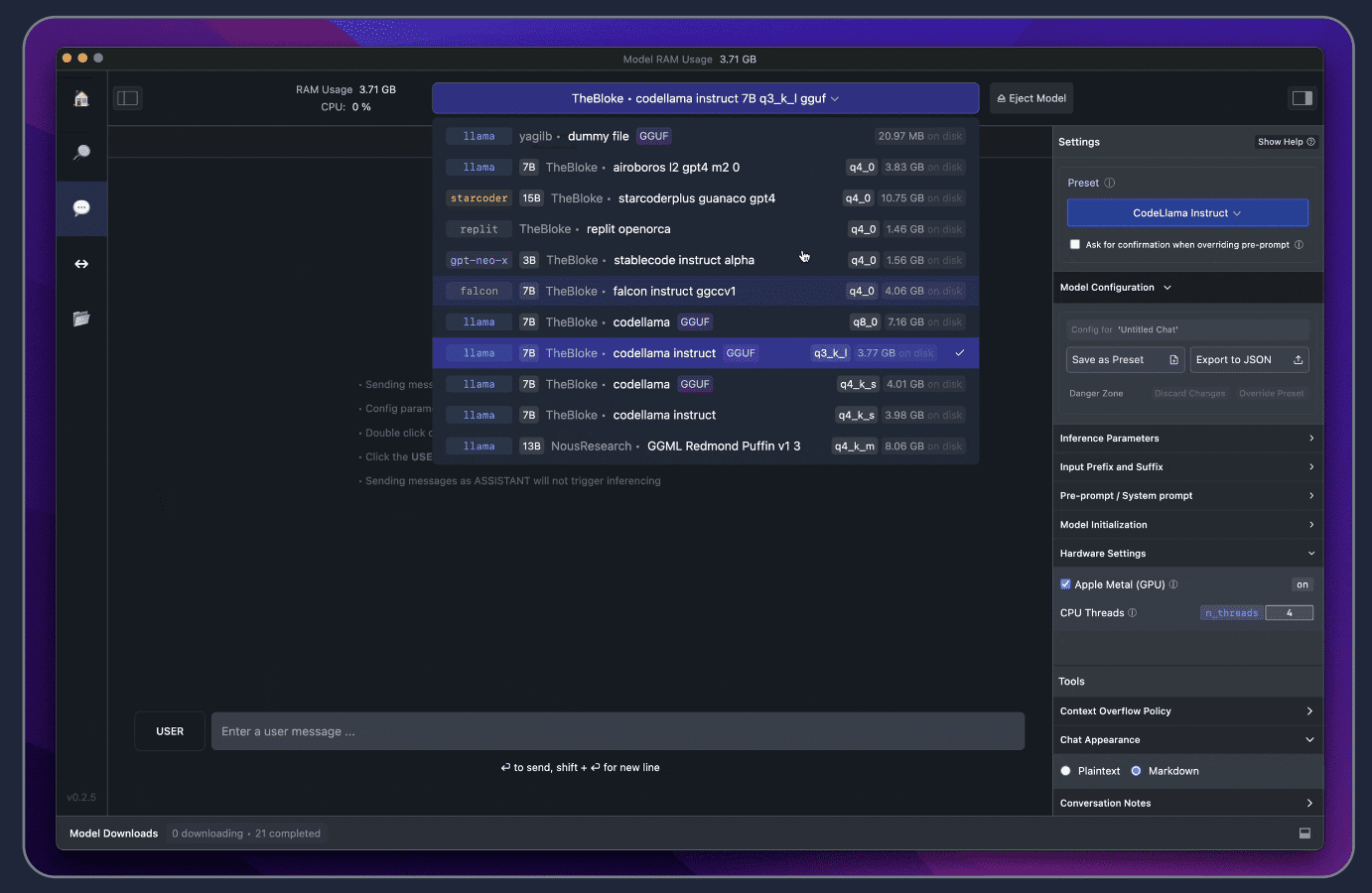
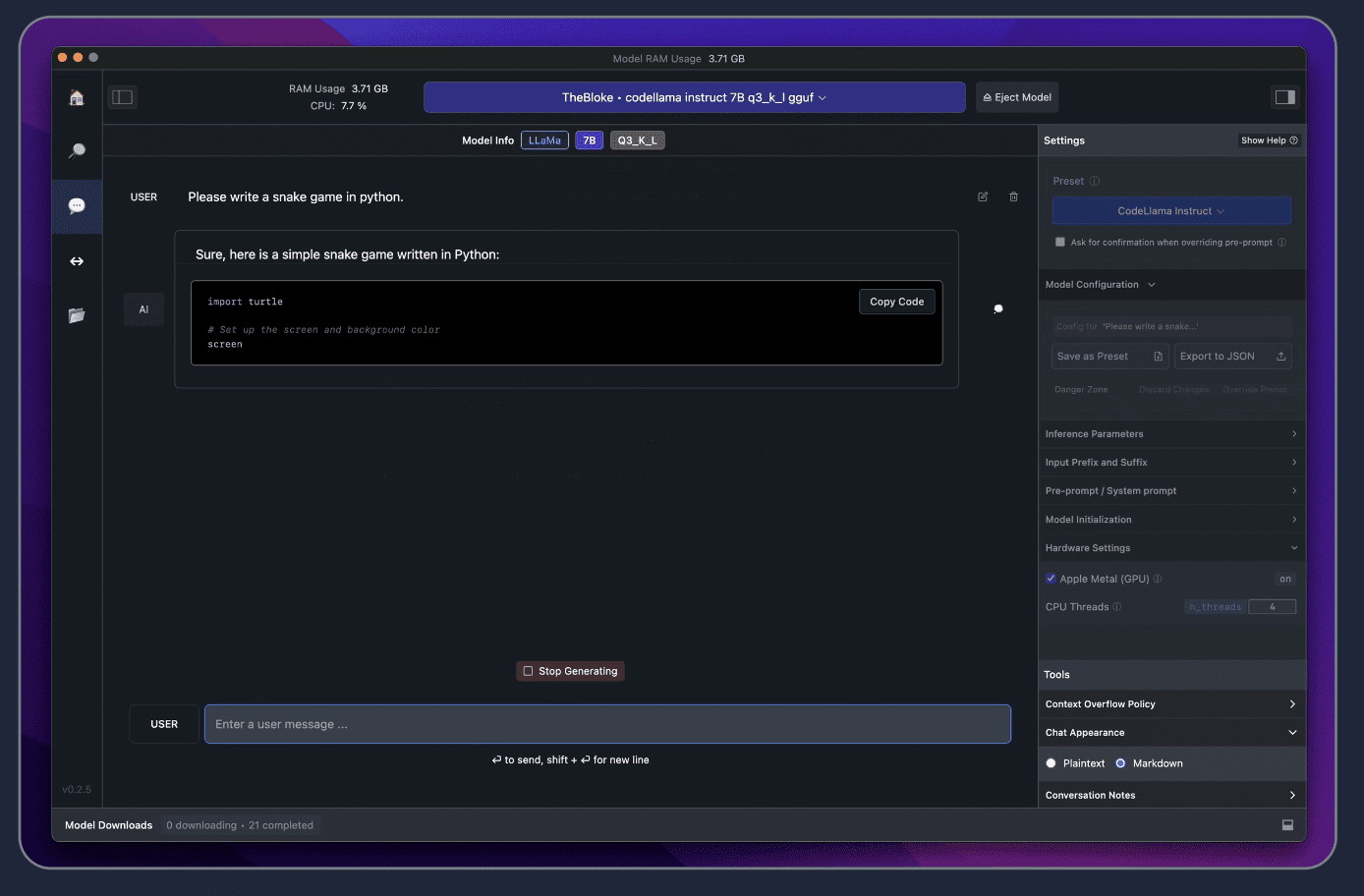
Once the model has been downloaded, click the Speech Bubble on the left and select your model for it to load.

Ready to chit-chat!

There you have it, that quick and simple to set up an LLM locally. If you would like to speed up the response time, you can do so by enabling the GPU acceleration on the right-hand side.

Run an LLM Locally with LM Studio Wrapping it up

Do you see how quick that was? Fast right.

If you are worried about the collection of data, it is good to know that the main reason for being able to use an LLM locally is privacy. Therefore, LM Studio has been designed exactly for that!

Have a go and let us know what you think in the comments!

Nisha Arya is a Data Scientist and Freelance Technical Writer. She is particularly interested in providing Data Science career advice or tutorials and theory based knowledge around Data Science. She also wishes to explore the different ways Artificial Intelligence is/can benefit the longevity of human life. A keen learner, seeking to broaden her tech knowledge and writing skills, whilst helping guide others.

More On This Topic

  • Jurassic-1 Language Models and AI21 Studio
  • Adventures in MLOps with Github Actions, Iterative.ai, Label Studio…
  • When to Retrain an Machine Learning Model? Run these 5 checks to…
  • Schedule & Run ETLs with Jupysql and GitHub Actions
  • Learn How to Run Alpaca-LoRA on Your Device in Just a Few Steps
  • How to Make Python Code Run Incredibly Fast

[Exclusive] Ola Employee Makes Alto Autonomous with Redmi

Ola Electric autonomous systems engineer, Mankaran Singh, recently converted his modified-Maruti Alto K10 into an autonomous vehicle using a second-hand Redmi Note 9 Pro. This was made possible with the help of Flowpilot, an open-source driver assistance system created by him.

My second hand redmi note 9 pro running flowpilot is driving my alto k10 😂Can it get more desi than this ?#flowpilot #openpilot #ai #robotics #autonomous #cars #Android pic.twitter.com/eQa3zHSbFA

— mansin (@Mankaran32) May 14, 2023

Flowpilot is an open-source fork of Comma.ai’s OpenPilot that can run on most Windows/Linux and Android-powered machines. In an exclusive interview with AIM, Singh said that he didn’t train driving models on his own; instead, he used learning models from Comma.ai because one needs tons of data to train models and require millions of dollars for compute clusters to train them.

The idea to start this initiative stems from George Hotz, the founder of Comma.ai, which is also into enabling autonomous vehicles with the help of smartphones and other proprietary devices.

An avid programmer and autonomous system enthusiast, Singh is also into gaming and developing web applications. Besides Ola – which he joined three months ago – he is also working on his passion project Flow Drive, the think-tank behind Flowpilot.

Flowpilot performs the functions of Adaptive Cruise Control (ACC), Automated Lane Centering (ALC), Forward Collision Warning (FCW), Lane Departure Warning (LDW), and Driver Monitoring (DM) for a growing variety of supported car makes, models, and model years maintained by the community.

It records data from road-facing cameras, CAN, GPS, IMU, magnetometer, thermal sensors, crashes, and operating system logs. “All you need is basically actuators, the controller steering and gas brakes to control the car. And if you have that, Flowpilot can essentially run on anything,” said Singh.

“It supports all the phones (Android) that have OpenCL supporting them. That’s basically the GPU drivers, which are used for image processing, like neural networks, exhibiting neural networks.” he added.

Singh said that the quality of the experience definitely depends on the phone you use. “Mostly, if you’re using a phone that costs around 20-25K, that’s enough to run Flowpilot for reasonable performance, but anything less powerful, it’s going to lag, and the system will just show a warning; it just won’t engage,” he explained.

Flowpilot supports over 200 cars, including brands such as Honda, Toyota, Hyundai, Nissan, Kia, Chrysler, Lexus, Acura, Audi, VW, and more. Even if a car is not supported but has adaptive cruise control and lane-keeping assist, it’s likely able to run Flowpilot.

However, Singh said that it does not support cars as of now in India. “In India, none of the cars are supported in a plug-and-play fashion. The only reason people use Flowpilot is because it’s far better than the stock system of the car.” he said

How it Differs from Tesla

“Tesla has a long term vision. They are using eight cameras and complex neural networks, including advanced 3D perception. However, dealing with eight cameras brings a much bigger computational load. While a smartphone can handle images from two or three cameras well, it gets challenging with eight cameras, all running at a fast 50 hertz. This requires real-time processing on a special chip designed for cars,” explained Singh. .

He believes that Flowpilot has great potential on highways. “Highway driving can be automated with as little as one camera or a forward-facing camera and a bunch of other sensors, maybe GPS, IMU,” he said.

Singh said that the immediate use case involves highway driving automation, which is advancing rapidly with features like ADAS (Advanced Driver Assistance Systems) becoming more prevalent in cars. “Many car companies are incorporating highway automation, where highways provide a more structured environment. In this scenario, drivers can sit back, relax, and let the car cover the entire highway.” he explained.

Other safety features include automatic emergency braking and blind spot monitoring. If a driver attempts to change lanes when an obstacle is present, the system will issue a warning. The machine learning-based braking system operates at a much higher rate than human processing, allowing it to brake at the right time and potentially save lives.

As technology continues to advance, autonomous vehicles may find applications in private spaces such as college campuses and tech parks. These environments, with controlled and predictable conditions, make them more suitable for autonomous transportation, shares Singh.

Limitations

Speaking on safety Singh said there will be people who would be retrofitting custom motors on their steering, which he does not recommend at all. “The only recommended approach, given that your car doesn’t support Openpilot or Flowpilot, is to just replace the steering with the one from a supported car. Because these actuators are safety-critical” he explained

Though Flowpilot is a good starting point for autonomous vehicles in India, it has several limitations as well considering the condition of Indian roads. As Flowpilot relies on mobile cameras, unlike higher-end systems employing LiDAR and additional cameras, it struggles with low-light conditions, shadows, and unpredictable objects like cyclists or animals. This vulnerability in perception can lead to misinterpretations of the environment, potentially leading to accidents.

Moreover, India’s road infrastructure varies greatly, with many roads lacking lanes, signage, and proper markings, posing challenges for autonomous vehicles to navigate accurately. Currently, Flowpilot can prove highly beneficial on highways, where traffic is comparatively lighter than in cities, and designated lanes for vehicles are available.

What’s Next?

Singh said that he doesn’t have any interest in commercialising Flow Drive. “It’s not a commercial company. My team and I don’t have any interest in commercialising it. It’s open-source software, given back to the community,” he said, adding that next he plans to open something in the robotics space, focusing on automation, manufacturing, or warehousing because a lot of the underlying tech is the same.

Regarding Flow Drive, he said it will remain alive. “We will be supporting people, helping the community build more stuff on top of it, but it runs on donations, and that’s how it will always be,” he concluded.

The post [Exclusive] Ola Employee Makes Alto Autonomous with Redmi appeared first on Analytics India Magazine.

Top 9 Generative AI Adoptions by Indian Consumer Companies

The flourishing startup ecosystem witnessed the emergence of over 60 generative AI startups, attracting substantial funding and indicating a growing interest in the market. Early success stories from companies like Myntra and Pepperfry, leveraging AI for personalised product recommendations and virtual try-on experiences, added to the optimistic narrative.

However, challenges loomed large, with limited formal adoption across brands, budget constraints affecting investments in new technologies, and prevalent concerns about data privacy and the scarcity of expertise in managing generative AI implementations. Overall, 2023 served as a year of initial exploration and experimentation, showcasing potential avenues while underlining the need to address significant challenges for widespread adoption in the future.

Here is a list of Indian consumer companies that adopted generative AI in 2023.

Zomato

Zomato delved into generative AI in 2023, enhancing customer-facing features and backend tools to personalise interactions and streamline processes. They also appointed a Head of AI Product Development, emphasising commitment to transformative technology. Collaborations with Microsoft Azure showcased strategic partnerships, integrating LLMs from Azure OpenAI Service for data privacy.

Internal projects like Blinkit’s Recipe Rover demonstrated AI success. Zomato introduced Zomato AI, an intelligent foodie companion exclusive to Gold customers. Positioned as more than a typical chatbot, it understands users’ preferences, dietary needs, and moods.

Paytm

Paytm, the leading Indian FinTech, actively incorporates generative AI to optimise operations. Last year, the company streamlined its workforce by replacing 10% with AI-driven automation, focusing on sales, operations, and engineering teams. CEO Vijay Shekhar Sharma outlined Paytm’s ambition to become a “completely AI company.”

The company envisions generative AI transforming customer care through natural conversations, personalised assistance, and proactive issue resolution. Internal initiatives, like the “Nimble Neurons” contest, showcase Paytm’s dedication to fostering innovation using generative AI tools among employees. These efforts underline Paytm’s commitment to leveraging advanced technology to reshape the financial services landscape.

Swiggy

Swiggy embraced generative AI last year to enhance the user experience and streamline operations. They introduced a custom neural search engine for natural queries, providing personalised food recommendations. Experimental features included generating customised food images based on the user’s preferences.

The acquisition of Dineout led to plans for an AI-powered virtual concierge bot, simplifying restaurant selection. Swiggy also explored using generative AI to help restaurants and delivery partners optimize operations and routes. With the help of AI, Swiggy is committing itself to providing a more personalised and efficient food delivery ecosystem.

Myntra

In 2023, Myntra made substantial strides in integrating generative AI into its platform, with MyFashionGPT marking a notable initiative in collaboration with Microsoft. This AI-powered shopping assistant enhances conventional search functionalities and understands abstract user queries, offering complete looks across various categories. Apart from that, it also introduced its first premium virtual fashion influencer, Maya.

Beyond enhancing customer-facing features, Myntra is exploring the potential of generative AI in customer support and creative automation. Combining internally developed models and strategic partnerships, the hybrid model ensures optimal results with a steadfast commitment to security and data privacy.

Flipkart

Flipkart ventured into generative AI, leveraging Flippi and Large Language Models for personalised product recommendations and enhancing shopping efficiency. Semantic search technology deepens user intent understanding, surpassing keyword matching. Exploring image-led discovery and multi-modal search diversifies options for intuitive product discovery. AI in fashion design produces innovative trends, helping sellers stay ahead.

Ola

Ola employed generative AI for dynamic ride pricing, accurately predicting demand and traffic. They introduced Ola Assist, a voice-based AI assistant that enhances rider and driver experiences. Ola’s CEO, Bhavish Aggarwal, also introduced Krutrim, an AI chatbot described as “India’s first full-stack AI” solution.

AI-powered route optimisation algorithms improve driver efficiency by suggesting optimal routes. Ola also explored using generative AI for personalised ride recommendations, showcasing their commitment to a more intuitive and dynamic ride-hailing ecosystem.

Hotstar

Hotstar ventured into generative AI in 2023. focusing on personalised content recommendations and analysing user habits and preferences. They introduced an AI-powered search for natural language queries, improving search accuracy.

Additionally, Hotstar introduced an AI-powered search function that understood natural language queries, improving search accuracy and facilitating users in discovering content based on moods, themes, or specific scenes. The platform also experimented with generative AI for thumbnails and trailers, dynamically adapting visuals based on individual user preferences to attract attention and boost viewership.

Byju’s

In 2023, Byju’s made significant strides in incorporating generative AI through their “BYJU’S WIZ” suite, emphasising personalised learning and efficient education delivery. The suite, featuring BADRI, MathGPT, and TeacherGPT, harnesses AI transformer models to analyse student data and customise learning experiences. Byju’s also explored AI applications in content creation, generating practice questions, adaptive learning paths, and personalised feedback. Overall, Byju’s adoption of generative AI centred on personalised learning, advanced tools, explanations, and streamlining content creation for a more effective and tailored education experience.

Make My Trip

MakeMyTrip stepped into generative AI through a strategic partnership with Microsoft, marking a significant leap in their technological endeavours. Leveraging Azure OpenAI and Azure Cognitive Services, they introduced voice-assisted booking in Indian languages, expanding accessibility for users uncomfortable with text-based interfaces. Generative AI also offers personalised travel recommendations and tips, tailoring suggestions based on individual preferences and real-time data. The platform also utilised AI to analyse and summarise hotel reviews, simplifying user decision-making. Additionally, MakeMyTrip introduced curated holiday packages, allowing users to plan unique trips based on specific criteria.

The post Top 9 Generative AI Adoptions by Indian Consumer Companies appeared first on Analytics India Magazine.