How Apple’s AI advances could make or break the iPhone 16

Apple iPhone 15 Pro (in Blue Titanium) camera lenses

Wall Street is predicting a rough 2024 for Apple's iPhone franchise because of a lack of interesting new hardware features. Could artificial intelligence software make an iPhone 16 shine brighter?

Some Apple stock bulls think so. Morgan Stanley analyst Erik Woodring this month opined that 2024 "will be the year that Apple's 'Edge AI' opportunity comes to fruition," and that it could power the new crop of iPhones this fall to greater heights.

Also: The iPhone 16 Ultra camera will integrate the biggest leap in photos since B&W-to-color

Apple's iPhone sales, led by the current iPhone 15, are expected to decline by about 2% this year, according to estimates compiled by FactSet Systems, to 229 million units, as the current iPhone cycle underwhelms with merely iterative hardware features.

But come 2025, wrote analyst Woodring, current Wall Street expectations for growth of 4%, to 237 million units, could turn out to be 15% higher if an iPhone 16 has enhanced AI capabilities.

"If we are correct, and new LLM-enabled software features drive an upgrade cycle, then we see the potential for up to 15% upside to our FY25 iPhone shipment forecast," wrote Woodring. The acronym "LLM" refers to "large language models" such as OpenAI's GPT-4.

Woodring speculates that the world will see details at Apple's Worldwide Developer Conference this summer, "highlighted by an LLM-powered Siri 2.0 and a broader GenAI-enabled operating system that has the potential to catalyze an iPhone upgrade cycle."

Why is "LLM-powered" such a big deal? To use large language models akin to OpenAI's GPT-4 requires a phone to go back and forth to the network, sending prompts and retrieving responses. Even on a desktop computer with an ethernet connection, the round-trip means waiting a while for a response. In a mobile device on a cellular network, relying on the cloud connection could result in one of those awkward moments where Siri seems brain-dead.

Also: iPhone 15 review: I spent a month with Apple's base model and found it more 'Pro' than ever

Instead, what's needed is to eliminate the cloud reliance and move more of the LLM processing locally, on the device. Apple already has what it calls the "Neural Engine" in the iPhone, a separate collection of circuits for running AI. However, the AI tasks performed by the Neural Engine — tasks much less demanding than an LLM — are likely to involve very carefully defined functions such as face recognition, where the use of the circuits has been carefully curated.

Taking an off-the-shelf large language model and running it locally is bound to be a much more demanding task.

Woodring bases much of his enthusiasm about this year's AI on a paper published this month by Apple researchers Keivan Alizadeh and colleagues, titled, "LLM in a flash: Efficient large language model inference with limited memory," which is posted on the arXiv pre-print server.

Also: Humane's aspiring smartphone-killer 'Ai Pin' may be the most 2023 product yet

The crux of the paper is that LLMs take up a lot of memory, and Apple has found a clever way to use the vast storage of the resident flash memory — the stuff that holds the iPhone's files. With special software, an LLM can be easily moved into and out of main memory, DRAM, with the illusion of having a lot more DRAM than is typical on the phone.

As Alizadeh and colleagues write, the tactics they use with memory "enable running models up to twice the size of the available DRAM," and speed up the making of predictions on a device by as much as 25 times.

The problem the authors tackle is that there just isn't enough DRAM on most mobiles, while LLMs keep getting bigger and bigger. "A 7-billion-parameter model requires over 14GB of memory just to load the parameters in half-precision floating point format, exceeding the capabilities of most edge devices," write Alizadeh and team, referring to the neural "weights" or "parameters," values that are stored in memory that give shape to a trained neural network.

Also: Samsung's new Galaxy S24 beats the iPhone 15 Pro in one very meaningful way

Apple doesn't disclose amounts of onboard DRAM, but the site Everymac cites third-party data suggesting that the iPhone 15 Pro Max has 8GB of DRAM. Samsung's recently unveiled Galaxy S24 Ultra has 12GB of DRAM, according to Samsung.

Much more memory, of course, is available in the NAND flash storage in phones. The Pro Max has a terabyte of memory, as does the S24 Ultra. The greater issue is moving data back and forth. NAND flash is slower than DRAM memory, so fetching data from it each time is slower than operating out of DRAM entirely.

Apple experiments with keeping the neural network in flash memory and putting only some of it in DRAM.

What's more, moving data from the flash memory into the DRAM memory entails a transfer time, which introduces a delay, called latency, between what the user tries to do and the results. That could mean the user waiting seconds between, say, typing into an LLM prompt and getting a response — just as bad as going to the cloud. Even moving from DRAM into the phone's central processor introduces a delay, the authors note.

Their solution is to use a fundamental aspect of neural networks including LLMs: sparsity. Sparsity means that a lot of those neural weights that make up the neural network are actually empty. They have a numeric value of zero. They can be ignored, therefore, so that only a small number of the total weights need to be fetched from memory.

Also: Buying the Samsung Galaxy S24 for its AI features? Read the fine print first

"LLMs exhibit a high degree of sparsity," write Alizadeh and team. "We exploit this sparsity to selectively load only parameters from flash memory that either have non-zero input or are predicted to have non-zero output."

The authors also come up with many clever techniques about which of those non-zero weights to call from flash memory, things such as pre-fetching the weights that are most likely to be needed based on the prediction task that the user may trigger next.

The report demonstrates dramatic speed-ups when running two open-sourceLLMs: Meta's Open Pretrained Transformer, and the Falcon series of language models from the Technology Innovation Institute of Abu Dhabi.

Apple was able to reduce the latency of serving large language models.

There's just one problem with the hopes of Woodring and others for an iPhone 16 as a supercomputer for AI: The work in the research paper was done on a Mac. Specifically, Alizadeh and team developed all of their techniques on Apple's "M1 Max" processor, which is only in the MacBook Pro and Apple's Studio desktop. That chip is substantially bigger and more powerful than the "A17 Pro" found in the iPhone 15.

Moreover, as the authors state, their tests don't touch on one of the things that users of pocket computers care most about: battery life. "A critical aspect for future exploration is the analysis of power consumption and thermal limitations inherent in the methods we propose, particularly for on-device deployment," they write.

Also: Apple Silicon, Rosetta, M1, M2, M3, SoC: Why these terms matter to every computer buyer

Nevertheless, the M-series silicon from Apple has generally found its way into mobile devices. The original M1 and M2 chips have ended up in versions of Apple's iPad Pro and iPad Air tablets. That means there is a continuum to both Apple's chips and software efforts such as the kind Alizadeh and team explore.

It's possible that an "A18" processor in an iPhone 16 Pro Max could strike a balance between running smart sparsity and conserving battery life. It's also possible that the kind of approach discussed in the paper could be used with very small versions of LLMs as a first step. Both models tested in the paper by Alizadeh have 7 billion parameters, which makes them fairly small as LLMs go. Apple could go even smaller, below a billion parameters, to preserve energy and memory usage and CPU usage.

Regardless of what shows up at WWDC, or in September's expected iPhone unveiling, one can presume the structure of the research by Alizadeh and team shows AI is coming out of the cloud and into your pocket sooner or later.


Apple

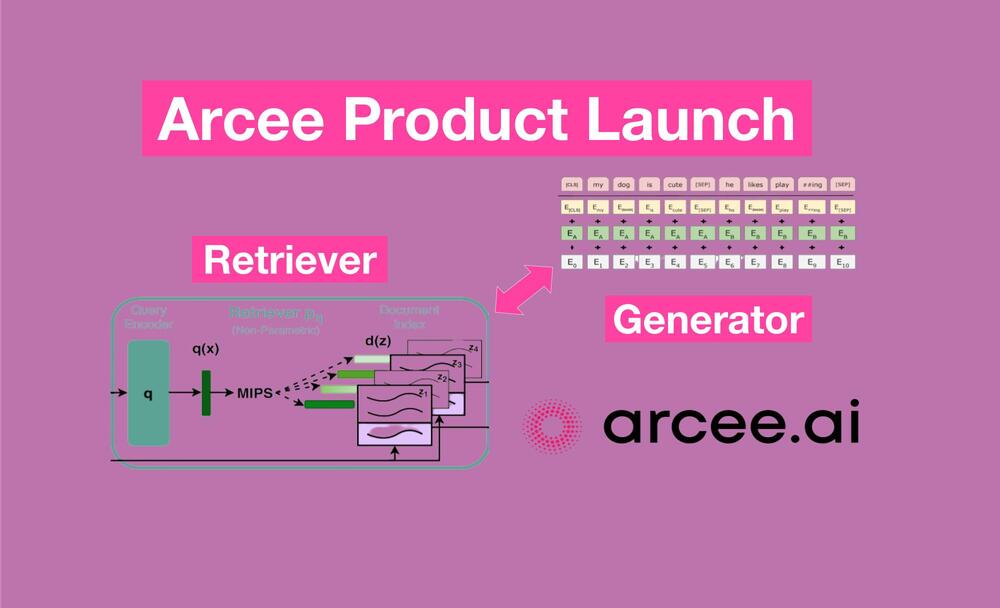
Arcee is a secure, enterprise-focused platform for building GenAI

Arcee is a secure, enterprise-focused platform for building GenAI Kyle Wiggers 15 hours

While working at Hugging Face, engineers Mark McQuade and Brian Benedict ran into challenges helping enterprise customers adopt GenAI. Some companies didn’t want to use closed-source AI APIs due to the perceived lack of transparency — but also resisted open source models over security concerns.

“We came to realize that the primary challenge was overcoming the trust deficit in existing generative AI systems,” McQuade told TechCrunch in an email interview, “particularly regarding performance and security.”

McQuade, who’d also done stints at Rackspace and computer vision startup Roboflow, was inspired to search elsewhere for solutions. After failing to find any, he — along with Roboflow’s head of machine learning Jacob Salowetz and Benedict — developed a platform from the ground up to let organizations build and train GenAI models within a secure compute environment.

Launched last February as Arcee, the platform — maintained by its Miami-based namesake startup — has attracted $5.5 million in venture funding to date from investors including Long Journey Ventures, Flybridge, Centre Street Partners, Wndrco, 35V, AIN Ventures and Hugging Face CEO and co-founder Clément Delangue.

“Arcee revolutionizes AI for highly regulated industries such as legal, healthcare, insurance and financial services,” McQuade said. “Arcee’s platform enables these sectors, as well as all organizations with highly proprietary data, to build specialized language models using their own data securely within their own cloud environment.”

As the GenAI boom continues, a number of startups have emerged to tackle the problem that McQuade describes: training private enterprise models securely and efficiently.

Contextual AI, for example, offers tools to tailor GenAI models — specifically large language models (LLMs) along the lines of OpenAI’s ChatGPT — to business use cases. Giga ML delivers tooling to help companies deploy LLMs offline. There’a also Reka, which builds custom models for corporate applications, such as document analyses.

So how does Arcee differentiate itself? In a few key ways, McQuade claims.

First, Arcee’s platform is end-to-end, employing an “adaptive” system for training, deploying and monitoring GenAI models. It also operates in a virtual private cloud, offering what McQuade describes as “superior” fine-tuning and security to mitigate privacy risks.

Acree.ai

A rough schematic of Acree’s platform, which trains, deploys and maintains GenAI models within a customer’s chosen environment.

The emphasis on security is probably wise, considering surveys show it’s a top issue for enterprises. According to a recent Salesforce poll, 71% of IT leaders expect that generative AI will introduce new security risks to data.

“Arcee’s approach allows organizations to build and train these models within their own secure environments,” McQuade said. “This not only ensures data privacy but also grants businesses full ownership of their AI models and technology stack.”

Now, assuming it’s true that Arcee’s platform is indeed better than the competition’s in some respects, Arcee still has a long road ahead of it to establishing a foothold in the increasingly crowded market for GenAI dev platforms. It’s not just startups it has to contend with. Incumbents like Google, Microsoft and Amazon are competing in the space, too — see Vertex AI for example.

Arcee’s initial backers have faith, however. Here’s Flybridge’s Jesse Middleton:

“Our decision to invest in Arcee was driven by three compelling factors,” he said via email. “Firstly, analysts estimate that 2.5% of all enterprise software spending today is on AI applications. This booming AI market, particularly in industry-specific solutions, positions Arcee uniquely as a standout player. Secondly, the team’s expertise and early success landing multiple Global 2000 customers demonstrate a profound understanding of market demands. Lastly, the current AI landscape demands innovative solutions like Arcee’s, making this the opportune time to invest in the future of AI and small language models within every department of these enterprises.”

But once again: is the demand for GenAI in the enterprise high enough to support yet another platform? It’s a legitimate concern, I think.

In a recent Boston Consulting Group of over 1,400 C-suite executives, only about half of the respondents said that they expect GenAI to bring substantial productivity gains to the workforces that the oversee. Another poll by BCG found that more than half of exec decision-makers were “discouraging” GenAI adoption over worries that it’d encourage bad or illegal decision-making and compromise their employer’s data security.

As you might expect, McQuade is of the strong opinion that Arcee can stand out — and excel, even — with the right customer and investor support. He says that the capital raised so far will enable Arcee to expand its workforce while building out the platform and growing into new markets.

“Our clients’ enthusiastic reception has shown us that we’re not just filling a gap in the market but actually leading the way in AI innovation,” McQuade added — while declining to name those clients. “We’re committed to building value for our investors, partners and customers, and believe that the current focus should remain on our technological and market advancements rather than on specific financial metrics.”

It’s not naive optimism on McQuade’s part necessarily — at least concerning the investment piece. According to Pitchbook, VCs poured $21.4 billion into GenAI startups last year through September, up from $5.1 billion in 2022. Assuming 2024 is more of the same, the dollars should flow relatively freely.

MLCommons wants to create AI benchmarks for laptops, desktops and workstations

MLCommons wants to create AI benchmarks for laptops, desktops and workstations Kyle Wiggers 9 hours

As AI increasingly moves from the cloud to on-device, how, exactly, is one supposed to know whether such and such new laptop will run a GenAI-powered app faster than rival off-the-shelf laptops — or desktops or all-in-ones, for that matter? Knowing could mean the difference between waiting a few seconds for an image to generate versus a few minutes — and as they say, time is money.

MLCommons, the industry group behind a number of AI-related hardware benchmarking standards, wants to make it easier to comparison shop with the launch of performance benchmarks targeted at “client systems” — i.e. consumer PCs.

Today, MLCommons announced the formation of a new working group, MLPerf Client, whose goal is establishing AI benchmarks for desktops, laptops and workstations running Windows, Linux and other operating systems. MLCommons promises that the benchmarks will be “scenario-driven,” focusing on real end-user use cases and “grounded in feedback from the community.”

To that end, MLPerf Client’s first benchmark will focus on text-generating models, specifically Meta’s Llama 2, which MLCommons executive director David Kanter notes has already been incorporated into MLCommons’ other benchmarking suites for datacenter hardware. Meta’s also done extensive work on Llama 2 with Qualcomm and Microsoft to optimize Llama 2 for Windows — much to the benefit of Windows-running devices.

“The time is ripe to bring MLPerf to client systems, as AI is becoming an expected part of computing everywhere,” Kanter said in a press release. “We look forward to teaming up with our members to bring the excellence of MLPerf into client systems and drive new capabilities for the broader community.”

Members of the MLPerf Client working group include AMD, Arm, Asus, Dell, Intel, Lenovo, Microsoft, Nvidia and Qualcomm — but notably not Apple.

Apple isn’t a member of the MLCommons, either, and a Microsoft engineering director (Yannis Minadakis) co-chairs the MLPerf Client group — which makes the company’s absence not entirely surprising. The disappointing outcome, however, is that whatever AI benchmarks MLPerf Client conjures up won’t be tested across Apple devices — at least not in the near-ish term.

Still, this writer’s curious to see what sort of benchmarks and tooling emerge from MLPerf Client, macOS-supporting or no. Assuming GenAI is here to stay — and there’s no indication that the bubble is about to burst anytime soon — I wouldn’t be surprised to see these types of metrics play an increasingly role in device buying decisions.

In my best-case scenario, the MLPerf Client benchmarks are akin to the many PC build comparison tools online, giving an indication as to what AI performance one can expect from a particular machine. Perhaps they’ll expand to cover phones and tablets in the future, even, given Qualcomm’s and Arm’s participation (both are heavily invested in the mobile device ecosystem). It’s clearly early days — but here’s hoping.

AlphaGeometry: How DeepMind’s AI Masters Geometry Problems at Olympian Levels?

In the ever-evolving landscape of artificial intelligence, the conquest of cognitive abilities has been a fascinating journey. Mathematics, with its intricate patterns and creative problem-solving, stands as a testament to human intelligence. While recent advancements in language models have excelled in solving word problems, the realm of geometry has posed a unique challenge. Describing the visual and symbolic nuances of geometry in words creates a void in training data, limiting AI's capacity to learn effective problem-solving. This challenge has prompted DeepMind, a subsidiary of Google, to introduce AlphaGeometry—a groundbreaking AI system designed to master complex geometry problems.

The Limitations of Symbolic AI in Geometry

The prevailing AI approach for geometry relies heavily on rules crafted by humans. While effective for simple problems, this symbolic AI encounters difficulties in flexibility, particularly when faced with unconventional or new geometric scenarios. The inability to predict hidden puzzles or auxiliary points crucial for proving complex geometry problems highlights the limitations of relying solely on predefined rules. Moreover, creating exhaustive rules for every conceivable situation becomes impractical as problems increase in complexity, resulting in limited coverage and scalability issues.

AlphaGeometry's Neuro-Symbolic Approach

DeepMind's AlphaGeometry combines neural large language models (LLMs) with symbolic AI to navigate the intricate world of geometry. This neuro-symbolic approach recognizes that solving geometry problems requires both rule application and intuition. LLMs empower the system with intuitive abilities to predict new geometric constructs, while symbolic AI applies formal logic for rigorous proof generation.

In this dynamic interplay, the LLM analyzes numerous possibilities, predicting constructs crucial for problem-solving. These predictions act as clues, aiding the symbolic engine in making deductions and inching closer to the solution. This innovative combination sets AlphaGeometry apart, enabling it to tackle complex geometry problems beyond conventional scenarios.

AlphaGeometry's neuro-symbolic approach aligns with dual process theory, a concept that divides human cognition into two systems—one providing fast, intuitive ideas, and the other, more deliberate, rational decision-making. LLMs excel at identifying general patterns but often lack rigorous reasoning, while symbolic deduction engines rely on clear rules but can be slow and inflexible. AlphaGeometry harnesses the strengths of both systems, with the LLM guiding the symbolic deduction engine towards likely solutions.

Training with Synthetic Data

To overcome the scarcity of real data, researchers at DeepMind trained AlphaGeometry's language model using synthetic data. Nearly half a billion random geometric diagrams were generated, and the symbolic engine analyzed each diagram, producing statements about its properties. These statements were then organized into 100 million synthetic data points to train the language model. The training occurred in two steps: pretraining the language model on all generated synthetic data and fine-tuning it to predict useful clues required for solving problems using symbolic rules.

AlphaGeometry's Olympiad-Level Performance

AlphaGeometry is tested based on the criteria established by the International Mathematical Olympiad (IMO), a prestigious competition renowned for its exceptionally high standards in mathematical problem-solving. Achieving a commendable performance, AlphaGeometry successfully solved 25 out of 30 problems within the designated time, demonstrating a performance on par with that of an IMO gold medalist. Notably, the preceding state-of-the-art system could only manage to solve 10 problems. The validity of AlphaGeometry's solutions was further affirmed by a USA IMO team coach, an experienced grader, recommending full scores for AlphaGeometry's solutions.

The Impact of AlphaGeometry

AlphaGeometry's remarkable problem-solving skills represent a significant stride in bridging the gap between machine and human thinking. Beyond its proficiency as a valuable tool for personalized education in mathematics, this new AI development carries the potential to impact diverse fields. For example, in computer vision, AlphaGeometry can elevate the understanding of images, enhancing object detection and spatial comprehension for more accurate machine vision. AlphaGeometry's ability for dealing with complicated spatial configurations hold the potential to transform fields like architectural design and structural planning. Beyond its practical applications, AlphaGeometry could be useful exploring theoretical fields like physics. With its capacity to model complex geometric forms, it could play a pivotal role in unraveling intricate theories and uncovering novel insights in the realm of theoretical physics.

Limitations of AlphaGeometry

While AlphaGeometry showcases remarkable advancements in AI’s ability to perform reasoning and solve mathematical problems, it faces certain limitations. The reliance on symbolic engines for generating synthetic data poses challenges for its adaptability in handling a broad range of mathematical scenarios and other application domains. The scarcity of diverse geometric training data poses limitations in addressing nuanced deductions required for advanced mathematical problems. Its reliance on a symbolic engine, characterized by strict rules, could restrict flexibility, particularly in unconventional or abstract problem-solving scenarios. Therefore, although proficient in “elementary” mathematics, AlphaGeometry currently falls short when confronted with advanced, university-level problems. Addressing these limitations will be pivotal for enhancing AlphaGeometry's applicability across diverse mathematical domains.

The Bottom Line

DeepMind's AlphaGeometry represents a groundbreaking leap in AI's ability to master complex geometry problems, showcasing a neuro-symbolic approach that combines large language models with traditional symbolic AI. This innovative fusion allows AlphaGeometry to excel in problem-solving, demonstrated by its impressive performance at the International Mathematical Olympiad. However, the system faces challenges such as reliance on symbolic engines and a scarcity of diverse training data, limiting its adaptability to advanced mathematical scenarios and application domains beyond mathematics. Addressing these limitations is crucial for AlphaGeometry to fulfill its potential in transforming problem-solving across diverse fields and bridging the gap between machine and human thinking.

There’s an AI ‘brain drain’ in academia

There’s an AI ‘brain drain’ in academia Kyle Wiggers 10 hours

As one might expect, lots of students who graduate with a doctorate in an AI-related field end up joining an AI company, whether a startup or big tech giant.

According to Stanford’s 2021 Artificial Intelligence Index Report, the number of new AI Ph.D. graduates in North America entering the AI industry post-graduation grew from 44.4% in 2010 to around 48% in 2019. By contrast, the share of new AI Ph.D.s entering academia dropped by 44% from 42.1% in 2010 to 23.7% in 2019.

Private industry’s willingness to pay top dollar for AI talent is likely a contributing factor.

Jobs from the biggest AI ventures, like OpenAI and Anthropic, list eye-popping salaries ranging from $700,000 to $900,000 for new researchers, per data from salary negotiation service Rora. Google has reportedly gone so far as to offer large grants of restricted stock to incentivize leading data scientists.

While AI graduates are no doubt welcoming the trend — who wouldn’t kill for a starting salary that high? — it’s having a alarming impact on academia.

A 2019 survey co-authored by researchers at the Hebrew University of Jerusalem and Cheung Kong Graduate School of Business in Beijing found that close to 100 AI faculty members left North American universities for industry jobs between 2018 to 2019 — a outsized cohort in the context of a specialized computer science field. Between 2004 and 2019, Carnegie Mellon alone saw 16 AI faculty members depart, and the Georgia Institute of Technology and University of Washington lost roughly a dozen each, the study found.

A Guide to Mastering Large Language Models

Mastering Large Language Models

Large language models (LLMs) have exploded in popularity over the last few years, revolutionizing natural language processing and AI. From chatbots to search engines to creative writing aids, LLMs are powering cutting-edge applications across industries. However, building useful LLM-based products requires specialized skills and knowledge. This guide will provide you with a comprehensive yet accessible overview of the key concepts, architectural patterns, and practical skills needed to effectively leverage the huge potential of LLMs.

What are Large Language Models and Why are They Important?

LLMs are a class of deep learning models that are pretrained on massive text corpora, allowing them to generate human-like text and understand natural language at an unprecedented level. Unlike traditional NLP models which rely on rules and annotations, LLMs like GPT-3 learn language skills in an unsupervised, self-supervised manner by predicting masked words in sentences. Their foundational nature allows them to be fine-tuned for a wide variety of downstream NLP tasks.

LLMs represent a paradigm shift in AI and have enabled applications like chatbots, search engines, and text generators which were previously out of reach. For instance, instead of relying on brittle hand-coded rules, chatbots can now have free-form conversations using LLMs like Anthropic's Claude. The powerful capabilities of LLMs stem from three key innovations:

  1. Scale of data: LLMs are trained on internet-scale corpora with billions of words, e.g. GPT-3 saw 45TB of text data. This provides broad linguistic coverage.
  2. Model size: LLMs like GPT-3 have 175 billion parameters, allowing them to absorb all this data. Large model capacity is key to generalization.
  3. Self-supervision: Rather than costly human labeling, LLMs are trained via self-supervised objectives which create “pseudo-labeled” data from raw text. This enables pretraining at scale.

Mastering the knowledge and skills to properly finetune and deploy LLMs will allow you to innovate new NLP solutions and products.

Key Concepts for Applying LLMs

While LLMs have incredible capabilities right out of the box, effectively utilizing them for downstream tasks requires understanding key concepts like prompting, embeddings, attention, and semantic retrieval.

Prompting Rather than inputs and outputs, LLMs are controlled via prompts – contextual instructions that frame a task. For instance, to summarize a text passage, we would provide examples like:

“Passage: Summary:”

The model then generates a summary in its output. Prompt engineering is crucial to steering LLMs effectively.

Embeddings

Word embeddings represent words as dense vectors encoding semantic meaning, allowing mathematical operations. LLMs utilize embeddings to understand word context.

Techniques like Word2Vec and BERT create embedding models which can be reused. Word2Vec pioneered the use of shallow neural networks to learn embeddings by predicting neighboring words. BERT produces deep contextual embeddings by masking words and predicting them based on bidirectional context.

Recent research has evolved embeddings to capture more semantic relationships. Google's MUM model uses VATT transformer to produce entity-aware BERT embeddings. Anthropic's Constitutional AI learns embeddings sensitive to social contexts. Multilingual models like mT5 produce cross-lingual embeddings by pretraining on over 100 languages simultaneously.

Attention

Attention layers allow LLMs to focus on relevant context when generating text. Multi-head self-attention is key to transformers analyzing word relations across long texts.

For example, a question answering model can learn to assign higher attention weights to input words relevant to finding the answer. Visual attention mechanisms focus on pertinent regions of an image.

Recent variants like sparse attention improve efficiency by reducing redundant attention computations. Models like GShard use mixture-of-experts attention for greater parameter efficiency. The Universal Transformer introduces depth-wise recurrence enabling modeling of longer term dependencies.

Understanding attention innovations provides insight into extending model capabilities.

Retrieval

Large vector databases called semantic indexes store embeddings for efficient similarity search over documents. Retrieval augments LLMs by allowing huge external context.

Powerful approximate nearest neighbor algorithms like HNSW, LSH and PQ enable fast semantic search even with billions of documents. For example, Anthropic's Claude LLM uses HNSW for retrieval over a 500 million document index.

Hybrid retrieval combines dense embeddings and sparse keyword metadata for improved recall. Models like REALM directly optimize embeddings for retrieval objectives via dual encoders.

Recent work also explores cross-modal retrieval between text, images, and video using shared multimodal vector spaces. Mastering semantic retrieval unlocks new applications like multimedia search engines.

These concepts will recure across the architecture patterns and skills covered next.

Architectural Patterns

While model training remains complex, applying pretrained LLMs is more accessible using tried and tested architectural patterns:

Text Generation Pipeline

Leverage LLMs for generative text applications via:

  1. Prompt engineering to frame the task
  2. LLM generation of raw text
  3. Safety filters to catch issues
  4. Post-processing for formatting

For instance, an essay writing aid would use a prompt defining the essay subject, generate text from the LLM, filter for sensicalness, then spellcheck the output.

Search and Retrieval

Build semantic search systems by:

  1. Indexing a document corpus into a vector database for similarities
  2. Accepting search queries and finding relevant hits via approximate nearest neighbor lookup
  3. Feeding hits as context to a LLM to summarize and synthesize an answer

This leverages retrieval over documents at scale rather than relying solely on the LLM's limited context.

Multi-Task Learning

Rather than training individual LLM specialists, multi-task models allow teaching one model multiple skills via:

  1. Prompts framing each task
  2. Joint fine-tuning across tasks
  3. Adding classifiers on LLM encoder to make predictions

This improves overall model performance and reduces training costs.

Hybrid AI Systems

Combines the strengths of LLMs and more symbolic AI via:

  1. LLMs handling open-ended language tasks
  2. Rule-based logic providing constraints
  3. Structured knowledge represented in a KG
  4. LLM & structured data enriching each other in a “virtuous cycle”

This combines the flexibility of neural approaches with robustness of symbolic methods.

Key Skills for Applying LLMs

With these architectural patterns in mind, let's now dig into practical skills for putting LLMs to work:

Prompt Engineering

Being able to effectively prompt LLMs makes or breaks applications. Key skills include:

  • Framing tasks as natural language instructions and examples
  • Controlling length, specificity, and voice of prompts
  • Iteratively refining prompts based on model outputs
  • Curating prompt collections around domains like customer support
  • Studying principles of human-AI interaction

Prompting is part art and part science – expect to incrementally improve through experience.

Orchestration Frameworks

Streamline LLM application development using frameworks like LangChain, Cohere which make it easy to chain models into pipelines, integrate with data sources, and abstract away infrastructure.

LangChain offers a modular architecture for composing prompts, models, pre/post processors and data connectors into customizable workflows. Cohere provides a studio for automating LLM workflows with a GUI, REST API and Python SDK.

These frameworks utilize techniques like:

  • Transformer sharding to split context across GPUs for long sequences
  • Asynchronous model queries for high throughput
  • Caching strategies like Least Recently Used to optimize memory usage
  • Distributed tracing to monitor pipeline bottlenecks
  • A/B testing frameworks to run comparative evaluations
  • Model versioning and release management for experimentation
  • Scaling onto cloud platforms like AWS SageMaker for elastic capacity

AutoML tools like Spell offer optimization of prompts, hparams and model architectures. AI Economist tunes pricing models for API consumption.

Evaluation & Monitoring

Evaluating LLM performance is crucial before deployment:

  • Measure overall output quality via accuracy, fluency, coherence metrics
  • Use benchmarks like GLUE, SuperGLUE comprising NLU/NLG datasets
  • Enable human evaluation via frameworks like scale.com and LionBridge
  • Monitor training dynamics with tools like Weights & Biases
  • Analyze model behavior using techniques like LDA topic modeling
  • Check for biases with libraries like FairLearn and WhatIfTools
  • Continuously run unit tests against key prompts
  • Track real-world model logs and drift using tools like WhyLabs
  • Apply adversarial testing via libraries like TextAttack and Robustness Gym

Recent research improves efficiency of human evaluation via balanced pairing and subset selection algorithms. Models like DELPHI fight adversarial attacks using causality graphs and gradient masking. Responsible AI tooling remains an active area of innovation.

Multimodal Applications

Beyond text, LLMs open new frontiers in multimodal intelligence:

  • Condition LLMs on images, video, speech and other modalities
  • Unified multimodal transformer architectures
  • Cross-modal retrieval across media types
  • Generating captions, visual descriptions, and summaries
  • Multimodal coherence and common sense

This extends LLMs beyond language to reasoning about the physical world.

In Summary

Large language models represent a new era in AI capabilities. Mastering their key concepts, architectural patterns, and hands-on skills will enable you to innovate new intelligent products and services. LLMs lower the barriers for creating capable natural language systems – with the right expertise, you can leverage these powerful models to solve real-world problems.

OpenAI is Trying Really Hard to Attract Young Talent

In the latest episode of ‘Unconfuse Me with Bill Gates’, CEO Sam Altman said that OpenAI was ‘not run by a bunch of 24-year-old programmers’, and agreed that it was concerning. Now, the hottest AI startup is on the lookout for young talent from among those already working in big tech companies earning millions of dollars, or hiding in their basement building the next big tech firm.

“In AI, at least in my opinion, the real 30 under 30 are those you’ve never heard of. They typically exist five layers down the organisational chart from the CEO,” said OpenAI’s Andrej Karpathy, and developers’ all time favourite.

Further, he said that the young geniuses are usually not active on X (formerly Twitter), have an unmaintained LinkedIn, avoid podcasts, and might have been published at one point but no longer do so. “They are today’s Einsteins, directly inventing and building miracles. I wish they weren’t hidden inside big tech and startups, receiving very large paychecks, but here we are,” he added.

Clearly, OpenAI is in a race to attract young talent, and Karpathy is all worried and bored, surrounded mostly by AI engineers in their 30s, 40s and 50s.

“OpenAI recruiters on this thread lol. Well played, Andrej!” quipped Google DeepMind researcher Lucas Beyer.

OpenAI’s effort is clearly visible. For instance, there’s OpenAI Residency, a six-month program that provides a pathway to a full-time role at OpenAI for residents. The program seeks talented individuals from diverse backgrounds, who may not have traditional academic credentials but possess valuable skills and experiences in AI.

Additionally, it also has an online forum, ‘Young people in artificial intelligence’, where users can discuss AI and OpenAI-related topics. This community provides a platform for younger people to engage with others interested in AI and OpenAI, and it may serve as a resource for learning more about the company and its work.

Where are all the young talents hiding?

“I have found 70,000 researchers in AI here on Twitter but you are right, most are quiet and most have very few followers,” said Robert Scoble, former strategist at Microsoft.

Many young and talented engineers often work at renowned big tech companies like Google, Apple, and Microsoft, and they are frequently positioned low the organisational chart. In many cases, the CEO or the top layer isn’t even aware of their contributions and talent, making it challenging to recognise their potential.

“I’ve never met him (Larry Page), never met Sergey Brin either,” said Aravind Srinivasa, founder of Perplexity, who was formerly a researcher at OpenAI for a year and an intern at Google DeepMind in 2019.

“To be honest, if the talent is buried five layers down in the org chart, the organisation might suck,” said Yun-Ta Tsai, senior staff engineer at Tesla.

Further, he said, when he was at NVIDIA, Jensen and him were four degrees apart. At GoogleX, he and Sergey were three degrees apart. At Google Research, he and Larry were initially three degrees apart, but the chain grew larger over time.

“Nokia was the worst. Can’t count how many hops between me and the CEO. Anything above or equal to five becomes very inefficient,” said Tsai.

Finding AI Prodigies

Meta’s chief AI scientist, Yann LeCun, pointed out that currently, several young individuals popular on social media claim to be ‘leading AI experts’ despite making precisely zero contributions to the field. They receive undeserved and hurtful attention from the media and governments.

Further, LeCunn thinks that the open-source community is the best place to find genuine developers. “If a researcher has a Google Scholar page, their publications and citations are available. That’s enough to earn them credit and prestige in the research community. They absolutely don’t need social media,” he said.

Taking a dig at Karpathy and OpenAI, LeCun said, “If they work in a company that practices open research, they’ll have their name on papers and GitHub repos, they will give talks at conferences and workshops, they’ll be invited to give seminars in academia, they may even win awards.”

Going by LeCun’s words, the only way for OpenAI to attract young talent would be to go the open source route, or launch series of open source GPT models, where young talent can experiment.

The post OpenAI is Trying Really Hard to Attract Young Talent appeared first on Analytics India Magazine.

Bhashini Introduces OCR Feature in its App

Bhashini has introduced the OCR feature, called SCENE, in its beta version, allowing users to seamlessly extract text and enhance accessibility. Users can simply tap the camera or image icon to effortlessly scan and retrieve information.

Bhashini was developed to help Indian citizens translate content in different Indian languages. It also helps in effectively communicating with those who do not know your language, helping lower the language barrier in India.

This free mobile app empowers cross-lingual communication within India by translating text, voice, and images between 12 Indian languages. It is available on both the Apple App Store and Google Play Store, and it is continuously being updated to enhance its features and performance.

Bhashini empowers users to effortlessly translate spoken words into text, text into spoken voice, and even website content through its “Browse” feature. This intuitive app fosters understanding and connection across diverse communities.

Recently, open-source AI researcher Vik Paruchuri introduced Surya, a multilingual text line detection model for documents that provides accurate line-level boxes and column breaks.

Announcing surya – a multilingual text line detection model for documents. It gives you accurate line-level bboxes and column breaks.
Find it here – https://t.co/DD2HfwIG9i . pic.twitter.com/HVNkYdCixL

— Vik Paruchuri (@VikParuchuri) January 12, 2024

This model is specialised for document OCR, crafted to provide accurate results for printed text in documents. It’s important to note that Surya is designed for printed text and may not be suitable for photos or other images.

Additionally, it does not support handwriting recognition. One of its notable features is its ability to train itself to ignore advertisements, enhancing its focus on extracting information from the main content of documents.

The post Bhashini Introduces OCR Feature in its App appeared first on Analytics India Magazine.

How Generative AI Can Help You Improve Your Data Visualization Charts

How Generative AI Can Help You Improve Your Data Visualization Charts
Image from DALLE 3

5 Key Takeaways:

  • The basic structure of a data visualization chart
  • Using Python Altair to build a data visualization chart
  • Using GitHub Copilot to speed up chart generation
  • Using ChatGPT to generate relevant content for your chart
  • Using DALL-E to add engaging images to your chart

Are you tired of spending hours creating boring data visualization charts? Use the power of generative AI to improve your data visualization. In this article, we will explore how you can use generative AI to enrich your chart. We’ll use cutting-edge tools like Python Altair, GitHub Copilot, ChatGPT, and DALL-E to implement our chart with the support of generative AI.How Generative AI Can Help You Improve Your Data Visualization Charts

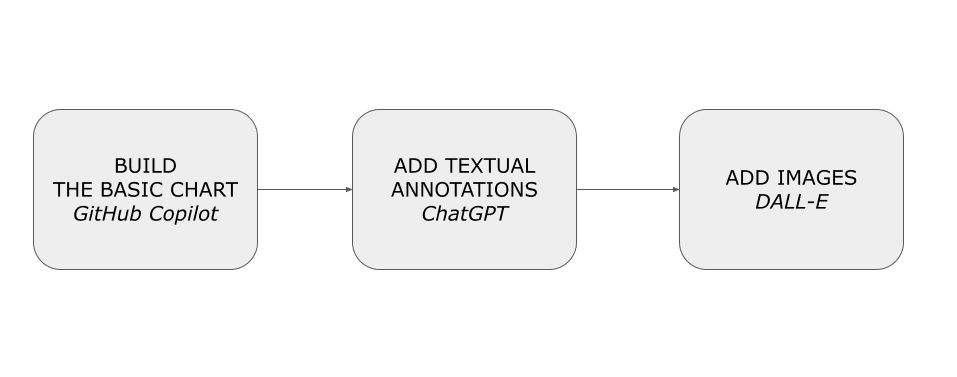
First, let’s implement the basic chart using GitHub Copilot. Next, we add textual annotations (such as the title) using ChatGPT. Finally, we will add images to the chart using DALL-E. As a programming language, we will use Python and the Python Altair visualization library.

We will cover:

  • Defining the use case
  • Building a basic chart: using GitHub Copilot
  • Adding annotations: ChatGPT
  • Adding images: DALL-E.

Use Case: The R&D Expenditure in Italy

As a use case, we will draw a chart representing the Research and development expenditure by performance sectors using the dataset released by Eurostat under an Open Data license. To make the process more accessible, we’ll use a simplified version of the dataset, already converted in CSV. The following table shows an extract of the dataset:

unit sectperf geo 2010 2011 2012 2013 2014 2015 2016 2017 2018 2019 2020 2021
PC_GDP BES AT 1.87 1.84 2.05 2.09 2.2 2.18 2.19 2.14 2.16 2.2 2.23 2.22
PC_GDP BES BA 0.16 0.19 0.05 0.07 0.08
PC_GDP BES BE 1.38 1.49 1.59 1.62 1.66 1.7 1.73 1.87 2.05 2.33 2.48 2.42 p
PC_GDP BES BG 0.28 0.28 0.36 0.39 0.52 0.7 0.56 0.52 0.54 0.56 0.57 0.51

The dataset contains the following columns:

  • unit — the value for this column is always set to Percentage of gross domestic product (PC_GDP)
  • sectperf — performance sectors. Possible values include: business enterprise (BES); government (GOV); higher education (HES); private non-profit (PNP), and TOTAL
  • geo — European countries
  • 2010-2021 — the expenditure value for the specified year.

As a specific case, let’s focus on BES in Italy and draw a chart using Python Altair, a data visualization library.

Building the basic chart: using GitHub Copilot

GitHub Copilot is a generative AI tool you can use as an assistant while writing your code. In GitHub Copilot, you describe the sequence of actions that your software must run, and GitHub Copilot transforms it into runnable code in your preferred programming language. The ability to use GitHub Copilot consists of learning how to describe the sequence of actions.

Installing Copilot

Before using GitHub Copilot, you must first set up a free trial or subscription for your personal GitHub account. If you are a teacher or a student, you can set up a free subscription plan at the following link: https://education.github.com/discount_requests/pack_application.

Once you have activated a subscription plan, you can configure Copilot as an extension of Visual Studio Code (VSC), a free, open-source code editor designed for developers to write and debug code.

Follow the steps described below to configure VSC with Copilot:

  • Download VSC from its official website: https://visualstudio.microsoft.com/it/downloads/
  • Open Visual Studio and navigate to the Extensions tab
  • Download and install the GitHub Copilot extension, and select Connect to your account from the dashboard.
  • Enter your GitHub credentials.
  • Once logged in, the extension will detect existing repositories and provide options for configuring new projects.

Using Copilot as a Code Assistant

Using Copilot, let’s generate the basic chart for our visualization. To build the chart, we perform two steps:

  • Load and preprocess data — load the dataset as a Pandas DataFrame, drop unnecessary columns, select only rows related to Italy, and use the Pandas melt() to convert columns related to 2010-2021 into rows.
  • Build the chart as a line chart.

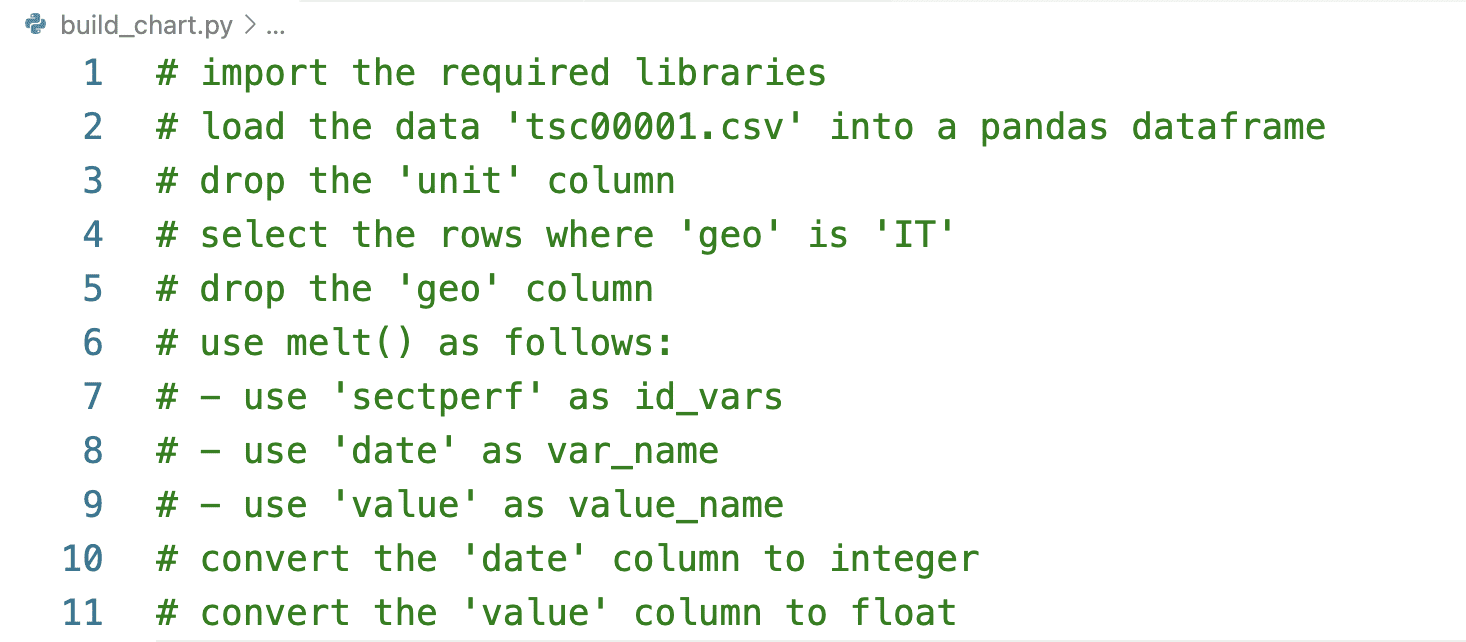
Let’s start with the first step, load and preprocess data. Write the following instructions for Copilot:

How Generative AI Can Help You Improve Your Data Visualization Charts

Press the ENTER button on your keyboard, and Copilot starts generating the code corresponding to the written instructions. The following code snippet shows a possible output produced by Copilot:

import pandas as pd  import altair as alt    df = pd.read_csv('tsc00001.csv')  df = df.drop(columns=['unit'])  df = df[df['geo'] == 'IT']  df = df.drop(columns=['geo'])  df = pd.melt(df, id_vars=['sectperf'], var_name='date', value_name='value')  df['date'] = df['date'].astype(int)  df['value'] = df['value'].astype(float)  

Remember that Copilot is a generative model, so the output produced in your case can be different from the previous one.

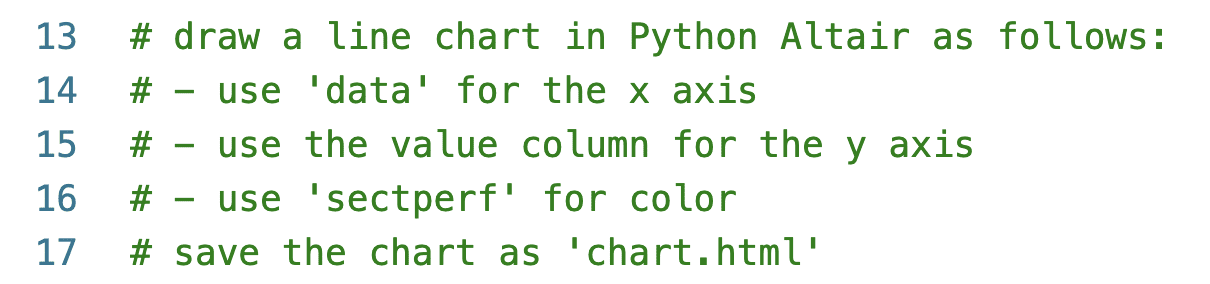
Now, let’s proceed with the instructions to build the chart. Write the following instructions for Copilot:

How Generative AI Can Help You Improve Your Data Visualization Charts

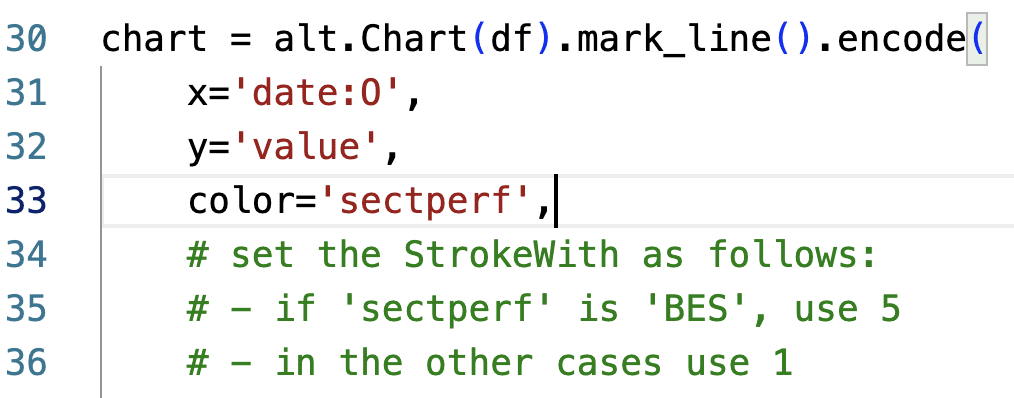
Copilot will produce a Python code similar to the code snippet shown below:

chart = alt.Chart(df).mark_line().encode(      x='date:O',      y='value',      color='sectperf'  )    chart.save('chart.html')  

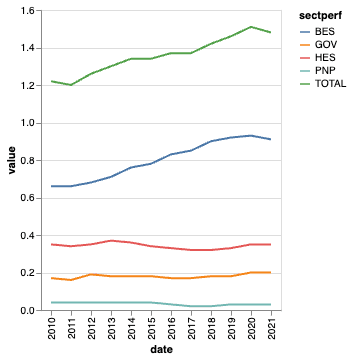
Save the script, and run it from the command line. As an output, the script produces an HTML file named chart.html. Open it using your preferred browser. The following figure shows the produced chart:

How Generative AI Can Help You Improve Your Data Visualization Charts

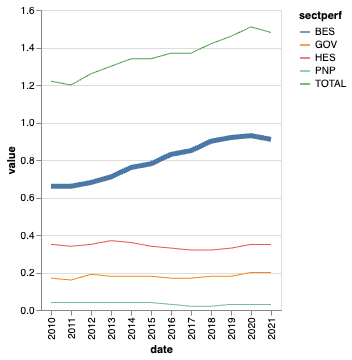
Now that you have built the basic chart, you can improve it manually or using Copilot. For example, you can ask Copilot to generate the code to increase the stroke width for BES. Add a comma after the color line, and start writing the instructions as shown below:

How Generative AI Can Help You Improve Your Data Visualization Charts

Press ENTER and wait for Copilot to write the code for you. The following code snippet shows a possible output generated by Copilot:

strokeWidth=alt.condition(          alt.datum.sectperf == 'BES',          alt.value(5),          alt.value(1)      )  

The following figure shows the improved chart:

How Generative AI Can Help You Improve Your Data Visualization Charts

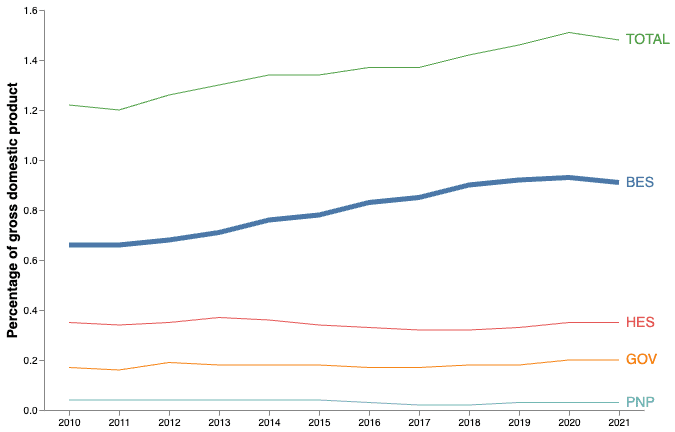
You can further improve the chart by asking Copilot to rotate X labels, set the title, and so on. You can learn more details on how to improve your chart in [1]. The following figure shows the decluttered version of the chart. You can find the complete code at this link.

How Generative AI Can Help You Improve Your Data Visualization Charts

Once the basic chart is ready, we can proceed with the next step, using ChatGPT to set the chart title.

Adding annotations: ChatGPT

ChatGPT is an advanced language model developed by OpenAI. It is designed to engage in human-like conversations and provide intelligent responses. We can use ChatGPT to generate text for our chart, including the title and the annotations.

To use ChatGPT, navigate to https://chat.openai.com/, log in to your account, or create a new one, and start writing your prompts in the input text box like a live chat. Whenever you want to start a new topic, create a new chat session by clicking on the top left button New Chat.

The Web interface also provides a paid account that gives some additional features, such as the possibility to use advanced models, and a suite of additional functionalities, such as priority support, expanded customization options, and exclusive access to beta features and updates. .

To interact with ChatGPT, write an input text (prompt) that defines the instructions to be performed. Different ways exist to structure a prompt for ChatGPT. In this article, we consider a prompt composed of three main consecutive texts:

  • Telling ChatGPT to act in a specific [role] — for example “You are an examiner looking at high school students’ English papers.”
  • Telling ChapGPT to tailor its outputs to an intended [audience] — for example “Explain your gradings in a way that can be understood by high schoolers.”
  • Define the [task] — for example “Grade this text and explain your reasoning.”

In our example, we can formulate the prompt as follows:

Act as a data analyst wanting to communicate to decision makers. Generate 5 titles for the following topic: A chart showing performance sectors from 2010 to 2021. Performance sectors include business enterprise (BES); government (GOV); higher education (HES); and private non-profit (PNP). You want to focus on BES, which has the highest values over time.

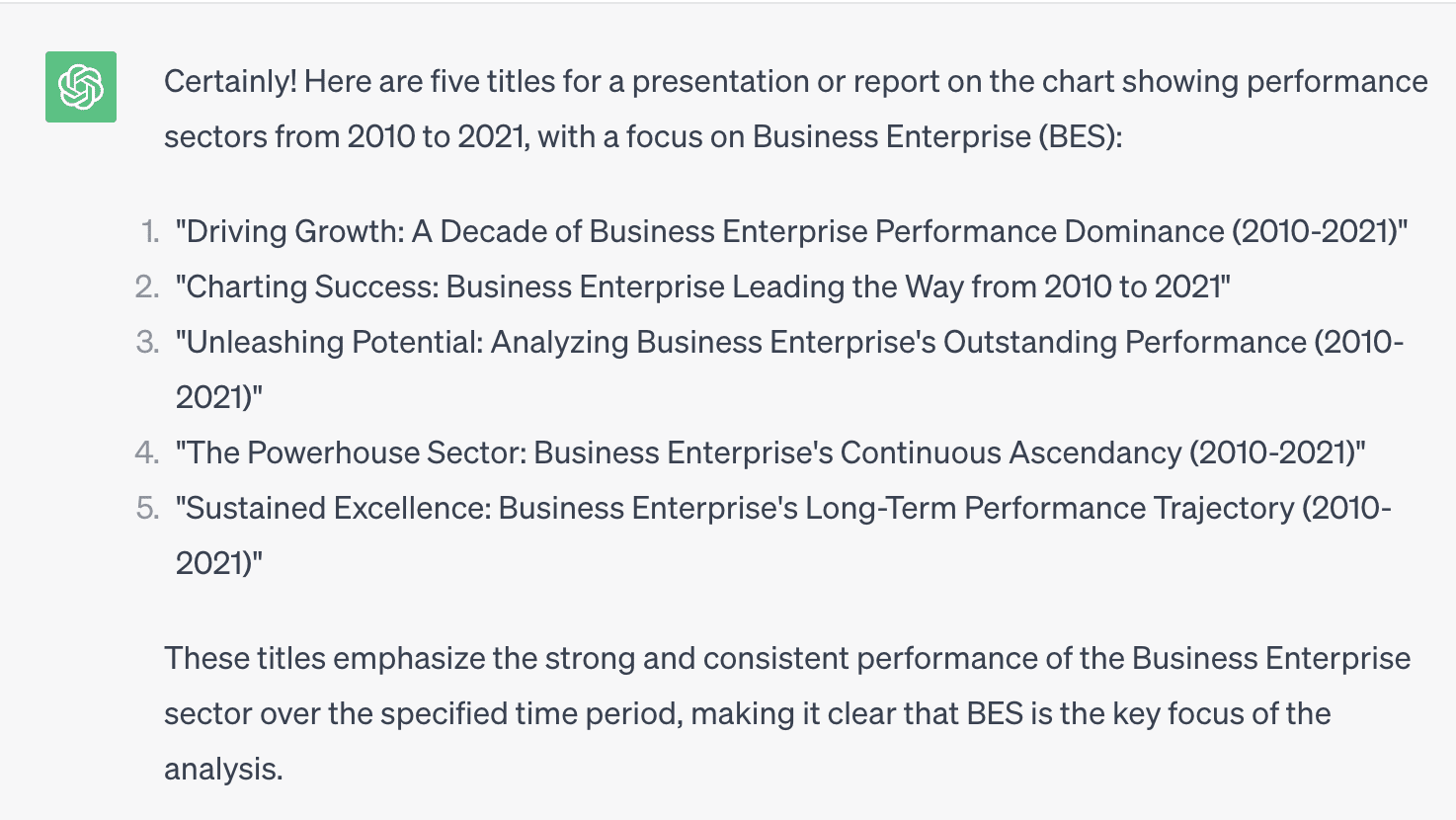
ChatGPT generates five titles, as shown in the following figure:

How Generative AI Can Help You Improve Your Data Visualization Charts

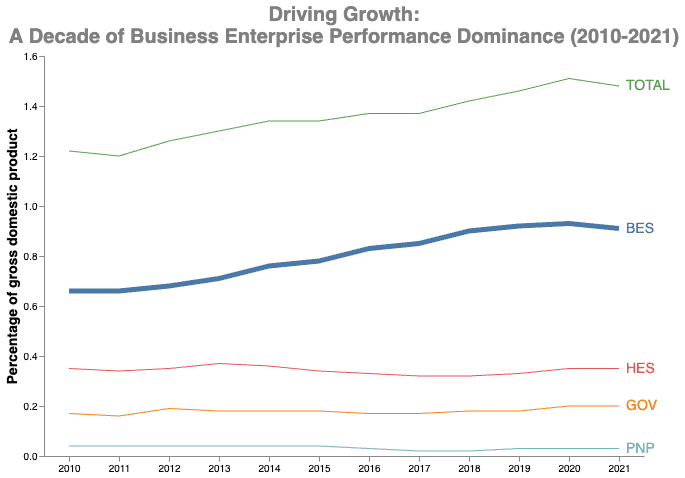
If you run the same prompt again, ChatGPT will generate another five titles. For example, we can choose the first title, Driving Growth: A Decade of Business Enterprise Performance Dominance (2010-2021), and set it as the title of our chart:

chart = alt.Chart(df).mark_line().encode(     …  ).properties(      width=600,      height=400,      title=['Driving Growth:',          'A Decade of Business Enterprise Performance Dominance (2010-2021)']  )  

The following figure shows the resulting chart:

How Generative AI Can Help You Improve Your Data Visualization Charts

The chart is almost ready. To improve our chart readability and engage our audience emotionally, we can add an image.

Adding images: DALL-E

DALL-E is a generative AI model created by OpenAI. It combines the power of GPT-3 with image generation capabilities, allowing it to create realistic images from textual descriptions. To use DALL-E, you must set up an account on the Open AI website and buy some credits.

Different ways exist to structure a prompt for DALL-E. In this article, we consider a prompt composed of:

  • [Subject]
  • [Style].

In our case, we can generate a generic image with the following topic: a black and white icon representing research and development expenditure.

The following figure shows a possible output generated by DALL-E:

How Generative AI Can Help You Improve Your Data Visualization Charts

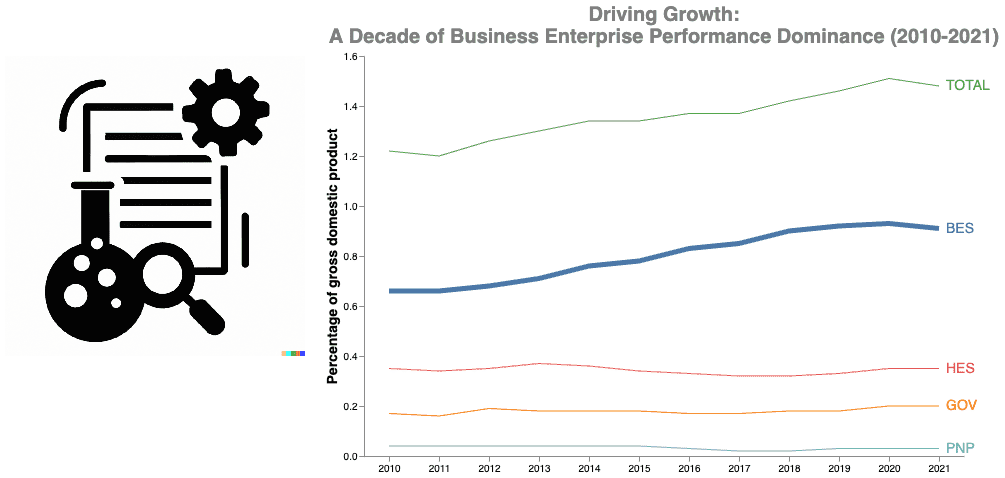
Let’s choose the third image and add it to the chart, as shown in the following code snippet:

df_red = pd.DataFrame({'url': ['red.png']})    red = alt.Chart(df_red).mark_image(      align='center',      baseline='top',      width=300,      height=300  ).encode(      url='url'  )    chart = (red | chart + text)  

To view the image in the chart, you must run it in a web server. Run the following Python command from the directory containing the HTML file to run a simple web server: python3 -m http.server, and then point to localhost:8000/chart.html. You should see a chart similar to the following:

How Generative AI Can Help You Improve Your Data Visualization Charts

You can customize your chart as you prefer. For example, you can generate an icon for each performance sector.

Summary

Congratulations! You have just learned to use generative AI tools to empower your data visualization charts!

  • First, write your basic chart using GitHub Copilot.
  • Next, use ChatGPT to generate textual descriptions for your chart, such as the title and the annotations.
  • Finally, use DALL-E to generate images to include in your chart to improve readability and engage the audience.

You can download the full code described in this example from this GitHub repository. In addition, you can find more details on how to use generative AI in data storytelling in [1].

References

[1] A. Lo Duca.Data Storytelling with Generative AI using Python and Altair. Manning Publications.

[2] A. Lo Duca. Using Python Altair for Data Storytelling. Educative Inc.

Angelica Lo Duca (Medium) (@alod83) is a researcher at the Institute of Informatics and Telematics of the National Research Council (IIT-CNR) in Pisa, Italy. She is a professor of "Data Journalism" for the Master degree course in Digital Humanities at the University of Pisa. Her research interests include Data Science, Data Analysis, Text Analysis, Open Data, Web Applications, Data Engineering, and Data Journalism, applied to society, tourism, and cultural heritage. She is the author of the book Comet for Data Science, published by Packt Ltd., of the upcoming book Data Storytelling in Python Altair and Generative AI, published by Manning, and co-author of the upcoming book Learning and Operating Presto, by O'Reilly Media. Angelica is also an enthusiastic tech writer.

More On This Topic

  • SQL for Data Visualization: How to Prepare Data for Charts and Graphs
  • If You Can Write Functions, You Can Use Dask
  • Data Science Projects That Can Help You Solve Real World Problems
  • 5 Rare Data Science Skills That Can Help You Get Employed
  • Data access is severely lacking in most companies, and 71% believe…
  • How a Level System can Help Forecast AI Costs

TextQL aims to add AI-powered intelligence on top of business data

TextQL aims to add AI-powered intelligence on top of business data Kyle Wiggers 9 hours

Mark Hay and Ethan Ding want to make every corporate decision a data-driven one. Ambitious? For certain. But the two engineers, who met a few years ago during the pandemic, are nothing if not optimistic.

Hay and Ding are the co-founders of TextQL, a platform that connects a company’s existing data stack to large language models along the lines of OpenAI’s ChatGPT and GPT-4. The idea, they say, is to give business teams the ability to ask questions of their data on-demand, leveraging tooling that — in Hay’s words — “understands their teams’ ‘nouns’ and semantics.”

“Data leaders have spent 15 years being sold a false promise … Half the Fortune 500 chief data officers are allergic to the word ‘self service’ at this point,” Hay, TextQL’s CTO, told TechCrunch in an email interview. “Their 400,000 data scientists are spending 40% or more of their time pulling one-off data requests, and their business teams are using words that are represented differently in their databases, resulting in months of lost productivity arguing over numbers.”

Hay, previously an engineer on Facebook’s machine learning team, and Ding, a ex-member of Bessemer Venture Partners’ data team (and a fan of gardening metaphors), thought they could devise a better solution.

In 2022, they launched their attempt in TextQL, which uses a data model to map a company’s database to the “nouns” representing a customer’s business in their language — e.g. words like “order,” “”item,” “dealer,” “SKU,” “inventory” and so on.

TextQL connects to business intelligence tools and points users to existing dashboards when a question has already been asked. It’s able to reference documentation from enterprise data catalogs such as Alation, Hay says, as well as notes in platforms like Confluence or Google Drive.

Concretely, this enables TextQL users to ask questions of a chatbot such as “Can you show me a list of orders that were very late?” and “Calculate the distribution centers with the highest concentration?” Beyond answering questions, TextQL — via an automation component — can take certain actions, for example sending an email to managers about specified data.

“In an economic environment where everyone’s trying to do more with less, we’re able to give enterprise operators superpowers in one platform,” Hay said.

Hay — which sees TextQL competing against vendors like Palantir and C3.ai — says that TextQL has half a dozen customers across healthcare, bio and life sciences, financial services, manufacturing and media presently. Annual recurring revenue is in the “six figures,” he claims, giving TextQL “several years” of runway.

“The slowdown hasn’t affected us as much, if anything — companies are excited about our software since it can help them do more with their lower headcounts,” Hay said. “Our entire team consists of previously venture-backed veteran founders — which is talent that’d be pretty hard to pick up outside of this environment.”

On the subject of venture backing, TextQL, which has a ~10-person team, has raised $4.1 million across pre-seed and seed round sco-led by Neo and DCM with participation from Unshackled Ventures, Worklife Ventures, PageOne Ventures, FirstHand Ventures and Indicator Fund.