This article is more about building better LLM and GPT-like applications, than search. Yet most people use GPT as a substitute for search. Indeed, OpenAI replaced search by prompt (the same thing, in the end) probably because the founders thought that there has to be something better. They could not find anything and created they own solution. So did I (see XLLM here), as well as many others. Yet, millions of websites are missing opportunities because they offer poor search to their customers.
In particular, XLLM is an example of how you can get much better results than those from native search on the original website. Local search boxes probably still rely on 20-year-old technology. They can’t compete with a third party smartly extracting information from your website to return better results to the user. While Google offered good enterprise search that you could use to power your search box ($2,000/year for our website), it discontinued the service. Now many websites have relatively poor search capabilities. And even GPT is far from perfect. There is demand here, waiting for a startup the seize the opportunity (I am working on it).
In this article, I discuss a few key strategies that can dramatically improve all of this. Be it search or GPT. They are easy to implement, without costly neural networks requiring a lot of training. Indeed, without any algorithmic training at all!
1. Customized Embeddings
Break down your information database (what you crawled for instance) in 20 or so top categories. Have a separate embedding table for each category. In my case, it’s not just embeddings but other tables such as local taxonomies. Have a separate one for each top category, allow for overlap. In order words, avoid silos: they will dilute the quality of your output. Twenty embedding tables, each with 50k keywords, is better than a single one with 1 million keywords.
2. High-quality taxonomy
Creating or relying on a good taxonomy helps you create better embeddings and better results. The words found in category and sub-category titles should be added to the embeddings, with a higher weight. Category titles are cleaner than raw text found on web pages. In case of parsing books, sections and subsection titles could carry a higher weight than raw text. When I crawled Wolfram, I retrieve the full taxonomy with 5000+ entries, all man-made by experts. It is one of the main contributors to the output quality.
3. Self-tuning
All GPT-like apps have several parameters, transparent to the user. For instance, the user can’t choose which thresholds to apply to the embeddings. Allow the user to set all the parameters to her liking. This way, you can collect the most popular choices for your parameters, based on user feedback. Of course, this is done automatically on a permanent basis. In the end, you come up with optimum parameters. Trained in real-time by human beings! (this is what I meant by no algorithmic training; it is replaced by humans)
Even better: offer the user the ability to keep his favorite, self-customized set of parameter values. In the end, there is no one-size-fits-all evaluation metric. My XLLM is terrible for the novice looking for basic definitions, while GPT is a lot better. Conversely, for professional users looking for research results or serious references, the opposite is true.
4. Offer two prompt boxes
One for the standard query. And one where the user can suggest a category (or two) of his own. You can offer a selection of 10 or 20 pre-selected categories. But you might as well let the user enter a category himself, and process that information as a standard text string. Then match it to existing categories in your system. And then, process the user query or prompt, and match it to the right category to return the most relevant results. Remember, each top category has its own embeddings! You want to use the correct embedding table(s) before returning results.
5. Multi-agent system
This is becoming a hot topic! Some say 2024 will be the year of the customized GPT. A multi-agent system is simply a top layer in your system, controlling all the top categories and embedding tables. In short, it glues the various customized embeddings together, allowing them to “communicate” with each other. In other words, it controls the cross-interactions. It is similar to multimodal (blending images and text) but for text only (blending multiple top categories).
6. Weighted sources
Your app will blend multiple sources together. Say one of your top categories is statistical science, and it has one specialized embedding table. The content may consist of crawled books and crawled sub-categories both in Wolfram and Wikipedia. Not all sources carry the same weight. You want a well-balanced embedding table. If (say) Wikipedia has more stuff, typically of lower quality, you want to weight that source appropriately.
7. Find structured data
The Internet and most websites are considerably more structured than most people think. You just have to find where the structure is hiding. In the case of Wolfram, it comes with a nice taxonomy, among other structures. Wikipedia has its own too. If you crawl books, look for indexes or glossaries and match index terms back to entries in the text. Indexes also have sub-entries and cross-links between entries, that you can leverage.
Even better: each entry (index term) is in some sections or subsections, in addition to being in sentences. Use the table of content and the sectioning as a pseudo-taxonomy. Associate section keywords with index terms found in it. Et voila! Now you have strong keyword associations, in addition to the loose associations when focusing on raw (unstructured) text only.
Example
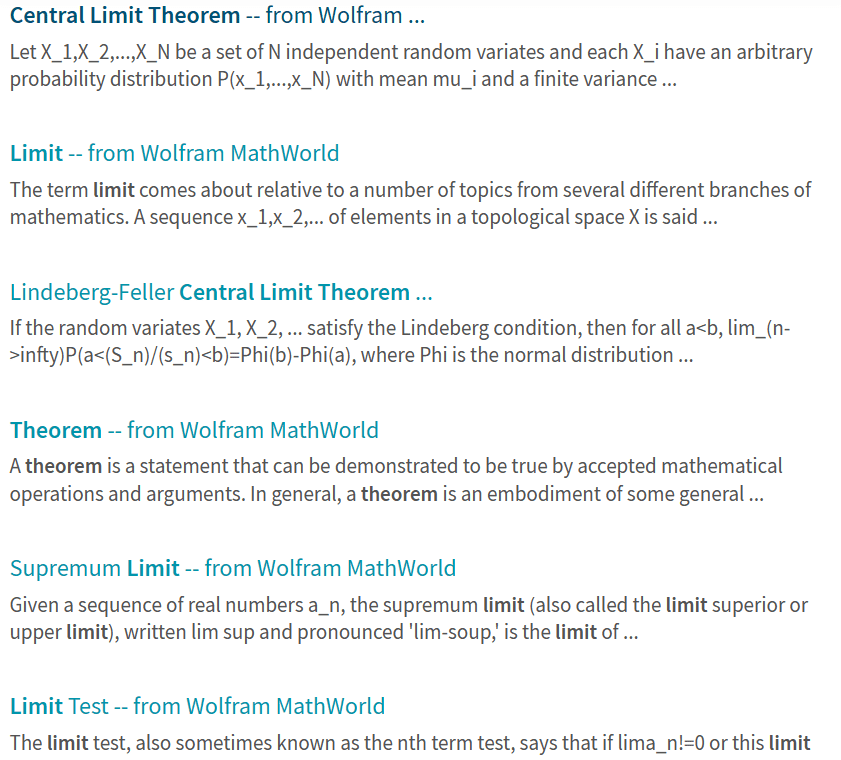
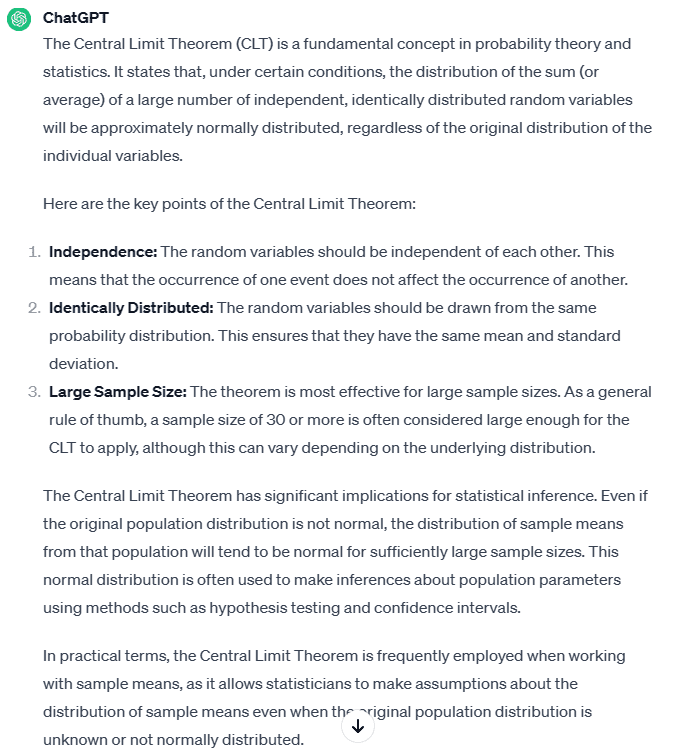
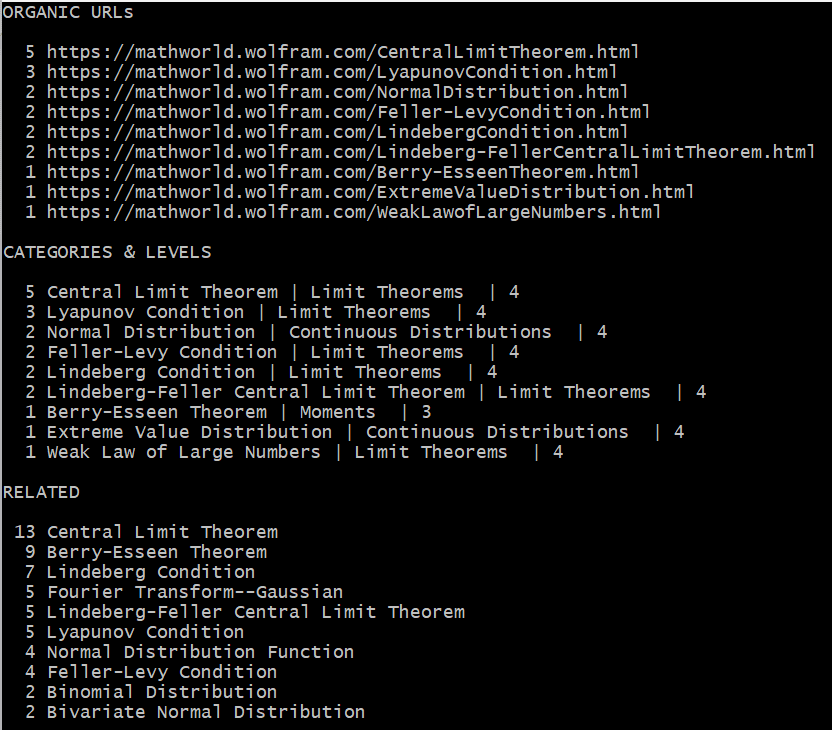
Here I compare the search results from 3 apps, for the query “central limit theorem”. I won’t comment and will let you judge by yourself. In each case, this is the output from a single query. You are welcome to test these tools yourself (contact me for XLLM). I did not include Google search: it returns a bunch of rudimentary articles on the topic.
What is very interesting is the comparison between XLLM and Wolfram. Both are designed to return highly relevant, specialized results related to mathematical or statistical questions. For Wolfram, I use its internal search box. As for XLLM, it is based on my crawl of the entire Wolfram website. This illustrates how a third party can provide much better results (at least for my needs) compared to the tool sitting on the website itself! If you do a Google search and ask to return results only from Wolfram, you get pretty much the same results and poor quality as from the internal Wolfram search box.
Vincent Granville is a pioneering GenAI scientist and machine learning expert, co-founder of Data Science Central (acquired by a publicly traded company in 2020), Chief AI Scientist at MLTechniques.com and GenAItechLab.com, former VC-funded executive, author and patent owner — one related to LLM. Vincent’s past corporate experience includes Visa, Wells Fargo, eBay, NBC, Microsoft, and CNET. Follow Vincent on LinkedIn.
FTC orders AI companies to dish on investments, partnerships and meetings Devin Coldewey @techcrunch / 18 hours
The FTC is aiming to unravel the complex and secretive corporate relationships in the top AI companies out there in a new inquiry. Orders have been sent to Alphabet, Amazon, Anthropic, Microsoft, and OpenAI that will, as Chair Lina Khan said, “shed light on whether investments and partnerships pursued by dominant companies risk distorting innovation and undermining fair competition.”
No wrongdoing is alleged at this stage. But it is just a little suspicious when companies already under investigation for antitrust practices, or who have been fined or settled regarding them, are apparently working to lock down the next big technology for their own use.
That’s apparent in the division between Anthropic (backed by Google and Amazon at billion-dollar levels) and OpenAI (backed by Microsoft at billion-dollar levels). What are these companies but a proxy for the ambitions of the extant tech superpowers?
Or at least, so it appears to the layperson, and to the FTC, which has learned to detect the early stages of market power in development.
“History shows that new technologies can create new markets and healthy competition. As companies race to develop and monetize AI, we must guard against tactics that foreclose this opportunity,” Khan continued in her statement.
AI’s proxy war heats up as Google reportedly backs Anthropic with $2B
The orders sent to the companies listed above compel them to share:
Partnerships, investments, and the “strategic rationale” for them.
Whether these partnerships have “practical implications” such as when or how new products are released.
What they talk about at meetings.
Any analysis they have conducted about competitive impact of these transactions on competition, market share, etc.
How the partnerships shape competition for AI-specific resources (such as compute power, presumably).
Anything provided to other government entities (foreign or domestic) regarding these things.
No doubt this will be derided by the companies in question as a fishing expedition into totally benign business relationships. After all, why shouldn’t companies that have already spent billions pursuing AI spend a few more to prop up promising — but diametrically opposed — new challengers?
After publication, Microsoft told TechCrunch in a statement that its OpenAI deal is “promoting competition and accelerating innovation” — you may judge whether you think that is accurate. Google, for its part, took the opportunity to trash Microsoft with a passive-aggressive swipe at its strategy. Both purport to welcome the inquiry.
Incidentally, today the FTC is hosting a summit on AI and its opportunities and dangers, in the sense of markets and startups. In her opening remarks, Khan noted that training AI models “further incentivizes surveillance,” which is of course the business model adopted by Google, Meta, et al. over the last decade or so, and that companies “can’t use claims of innovation as cover for law-breaking.”
To paraphrase a proverb, an inquiry in time saves nine down the line. Whether this leads to further action on the Commission’s part is anyone’s guess at this point, but the inquiry serves as notice that these companies are being watched.
The age of the modern smartphone, many would argue, began in 2007 with the launch of the original iPhone. After all, that device had the slab screen with a full touch surface instead of keys, cellular, Wi-Fi, and Bluetooth connectivity, access (although terribly slow) to the Internet — and a camera.
Ever since, those attributes have defined all smartphones, save for one common smartphone capability that didn't arrive until the iPhone 3GS in 2008: the App Store. Apps, together with the aforementioned hardware features, define the modern smartphone.
But of all the capabilities and components of these amazing and ubiquitous computing devices, it is the smartphone camera that has seen the most extraordinary evolution. Phone cameras made their first appearance during the era when smartphones started becoming practical, everyday devices. Then, these cameras advanced in an App Store-centric world where companies like Blackmagic Design could create camera apps that redefine how a smartphone camera works. Now, artificial intelligence (AI) and machine learning (ML) are changing the very nature of what a camera can do.
Pre-modern smartphones
Identifying the first anything is always a tricky undertaking. The very first device labeled as a smartphone (they called it a "Smart Phone") was the Ericsson 88 from 1997. Only 200 were made, and it was mostly a personal digital assistant. It most definitely did not have a camera.
But before the modern smartphones, phones with some modern smartphone attributes were introduced. The best known, of course, was the BlackBerry. The earliest BlackBerry devices, the 850 and 857 models weren't even phones. They were pagers with email. It wasn't until 2003 that the BlackBerry 6210, with its famous keyboard and integrated phone, was released. But even then, the BlackBerry didn't have a camera.
Also: The best phones we tested in 2023, including foldables and budget picks
Sharp — the company that makes my microwave oven — introduced what can be considered the world's first camera phone. Released in 2000, it was called the J-SHO4, and was available exclusively in the Japanese market. With its 110,000-pixel sensor, the J-SHO4 was capable of taking very low-res digital images — tiny, almost postage-stamp-sized images, with a 383×287 pixel resolution.
Samsung also lays claim to the title of "first phone with a built-in camera" — the SCH-V200 — also released in 2000. This handset had a 0.35-megapixel sensor and could take up to 20 photos of 640×480 pixels before you had to hook it up to a computer and download the images. Samsung also claims to have invented the selfie camera. In 2002, the company released the SCH-X590, a flip phone with a rotating camera.
This was where the concept of megapixels started to take hold. The more data that could be stored, the more pixels there were. As photos started to get into the millions of pixels, the "megapixel" marketing term was created. Fundamentally, the more pixels, the higher the resolution of the image (and the more tinkering you can do with it).
Another phone — and my personal device for four years — was the Palm Treo 600, released in 2003. This device did a lot, including supporting a camera capable of taking 640×480 resolution images. The Treo didn't have Wi-Fi or Bluetooth, limiting its connectivity to a cable connected to the computer for image downloads. Its big claim to fame was that it could run any of the thousands of PalmOS apps that were available for download. Installing those apps, however, also involved connecting a cable to a computer.
2008: The birth of the modern smartphone
Released on June 29, 2007, the iPhone was explosive. Many of us remember the lines of people waiting to get their first phone. I sat those lines out, happy with my Treo. While the first iPhone had nearly all of the characteristics of a modern smartphone, including a 2.0MP rear-facing camera, the only apps it allowed were crude customized web pages. My Treo had far better native PalmOS apps.
That first generation iPhone was not, in my opinion, the first true modern smartphone. For that, apps need to be installed directly on the handsets. When Apple's iPhone 3G hit the market in July 2008 — along with the App Store — the world was never the same. Smartphone apps enabled billions of non-technical people to customize their phones, making it possible to install new software with a single click.
More specifically, apps can amplify camera functionality. With filter apps, users can easily add special effects or painterly screens over their images. Apps also paved the way for social media juggernauts like Instagram and TikTok. Consequently, social networking has become the force it is today with the ability for users to capture photos and videos, as well as share those with friends, family, and the whole world with the tap of a screen. With apps, photos and videos can go anywhere, instantly.
For serious photographers and videographers, apps can enhance phones' cameras. The Blackmagic Design's Camera app, for example, allows photo-savvy users to customize settings like frame rate, shutter angle, white balance, and ISO — the way professional photographers would in their photo-taking process.
The full-sized screen, high-speed Internet connectivity, fairly good to excellent cameras, and ability to completely customize phones with apps empowered people worldwide and put so much more than a little computer in their pockets. Everyone now has all this amazing power and flexibility, at all times.
Also: The best camera phones: Capture crystal-clear photos, videos, and selfies
Personally, the iPhone 3G was my first iPhone (there was no iPhone 2 or 3). I bought it and an iMac a few weeks after the phone was released, and went on to create 40 iPhone apps. That iPhone 3G didn't improve the camera hardware by much. That wouldn't happen until the iPhone 3GS, which jumped from a 2.0- to a 3.0MP camera and started to record 30 frames-per-second video.
Over in the Android world, its first phone was the HTC Dream, also marketed as the T-Mobile G1. It was released in October 2008 and was noteworthy for its slide-out display that opened to show a BlackBerry-style keyboard. This device came with a rear-facing 3.15MP camera.
With the iPhone 3 and the App Store, along with the first Android phone, it's fair to say that 2008 was the first year of the modern smartphone era.
2010: Smartphones meet narcism, a match made in heaven
Smartphones have evolved with a cadence we're all familiar with. Each year, new capabilities have been added and features improved. Cameras evolved from 3.0MP cameras to 48-50MP monsters like the iPhone 15 Pro Max, Google Pixel 8, OnePlus 11, and Asus ROG Phone 8.
Of particular note is the Sony Xperia smartphone. While all of the higher-end phones have exceptional camera systems, Sony is the only company that makes pro and prosumer cameras in addition to smartphones. Sony's A7 series (I like the Sony A7 IV) is one of the most well-respected pro-level cameras in use, and I use the Sony ZV-E10 camera constantly in the video studio and for product shots here at ZDNET.
Also: How the iPhone 15 Pro Max challenges mirrorless cameras: We compare price and performance
Another slight jump came in 2010 when Apple introduced the iPhone 4 and HTC introduced the Android-based EVO 4G. Both of these featured front-facing cameras, suitable for taking selfies. Neither had much to write home about in terms of resolution, but front-facing cameras also got better over the years.
Of course, as storage has improved both in capacity and speed, it's possible to store even 8K video at 120 frames per second on SSDs connected to cameras over fast USB-C ports. That makes for a huge amount of information to be captured and stored, and lots of devices today handle the requirements with ease.
Then there's the Samsung Galaxy S23 Ultra, which features a ludicrously over-the-top 200MP main camera. That's roughly 16,384 x 12,288 pixels, for those who can even picture such a thing. Each highly-compressed JPEG takes 20-40MB, but an uncompressed RAW image takes 100MB per image or more. That first iPhone 3G came with all of 128MB of storage, which might have held — at most — one or two images from this modern phone.
Also: Storage improvements have outperformed Moore's Law by a factor of 800%
Many smartphones today capture 8K video directly into phone storage. These include the Samsung Galaxy S23 (8K was supported as far back as the S20), the Asus ZenFone 9, the OnePlus 11, and the iPhone 15 Pro Max can all record 8K video directly into the device.
Over time, all the increases in storage capacity, processor speed, battery life, and display resolution were accompanied by improvements to the software inside the phones, with vendors adding all sorts of smarts to their camera applications.
2017: The start of the AI/ML smartphone era
It's difficult to nail down exactly when machine learning found its way into smartphones, but a good case can be made for 2017. That year, Google released the Pixel 2, which got a portrait mode that blurred backgrounds, and improved processing for HDR images.
Apple, too, was focusing on portrait mode photography in 2017, introducing the iPhone 8, 8 Plus, and iPhone X. Each of these devices included both a main processor and a Neural Engine — a processor dedicated to machine learning tasks.
Also: How the iPhone 15 Pro Max challenges mirrorless cameras: We compare price and performance
Overall, these initial machine learning capabilities enhanced overall photo processing, improving aspects like auto-focus, exposure, color balancing, and noise reduction. The integration of machine learning into the Pixel and iPhone's camera systems marked a significant step forward in the quality and capabilities of smartphone photography.
AI and machine learning in today's smartphones
If you think about the stages of photography, we had light and shadow, then we had fixed images stored using chemicals (the film stage), then we had magnetic media (still analog), and then the rise of digital cameras and smartphones. In each of those stages, the one common factor was that the camera was meant as a capture device. It didn't do any of the art.
But all that is changing with modern smartphones. By embedding considerable machine learning technology inside these devices, the camera itself becomes a production partner in the creation of exceptional images and quality video.
Also: The best vlogging cameras you can buy
I asked Bob Caniglia, Blackmagic's director of sales operations, about smartphone camera evolution. Blackmagic makes some key tools for managing the video production process, as well as some very slick cinema-grade cameras. Last year, Blackmagic introduced its Blackmagic Camera app, which takes the iPhone's camera and gives it superpowers.
"Until recently," Caniglia told me, "The discussion was mostly around how a smartphone's camera was limited being in such a small physical device. And there is no doubt that there are still big differences between smartphones and larger professional cameras."
"But the conversation has moved to the different ways cameras like the iPhone can be used," he continued. "I think AI and machine learning features — like the iPhone 15's scene, skin and sky segmentation and detection, periscope zoom lens, and Portrait Mode — have opened up the possibilities of how smartphones can be used by everyone."
Let's now explore the power that machine learning brings to smartphones. Specifically, I'll talk about the machine learning magic incorporated into flagship phones like the iPhone 15 Pro Max, the Google Pixel 8, the Samsung Galaxy S23, and the OnePlus 11.
1. Image quality
Smartphones are now capable of making substantial enhancements to the quality of images as they are captured in the camera. Here are three examples of machine learning in use in the previously listed flagship phones.
Image processing and enhancement: Convolutional neural networks use a mathematical operation called convolution which calculates pixel values based on a sliding filter, helping the algorithm identify specific features like edges, textures, and shapes.
This then helps the machine learning algorithms to analyze and adjust parameters like exposure, contrast, and color balance to enhance quality. This is particularly useful in challenging lighting conditions; it's how smartphones can take low-light and high-glare photos that previously were almost impossible to capture.
Also: Meta's AI luminary LeCun explores deep learning's energy frontier
Low-light photography and night mode: Speaking of tough lighting conditions, machine learning provides a powerful assist in low-light photography, where it helps in noise reduction, detail enhancement, and color accuracy. It does this using neural network technology to process multiple exposures, merging them into a single image while enhancing detail and reducing noise. Of course, decisions about what detail to enhance and what noise to reduce is where the AI comes into play.
HDR processing: High dynamic range (HDR) processing helps balance the dark and bright areas of an image for an improved dynamic range. Algorithms dynamically adjust the exposure of different regions in a photo, merging multiple exposures for a balanced high dynamic range image, keeping the visual fidelity of the image while allowing for blacker blacks, whiter whites, and other darker and lighter colors to better reflect what the photographer originally aimed to capture.
2. Object knowledge
During the film era, some analog techniques were possible for image improvement. Now, AI and ML are critical when it comes to having intelligence about what's in a scene. Here are some of the powerful capabilities built into those smartphones I discussed earlier.
Scene and object recognition: Smartphones can recognize various scenes — landscapes, portraits, or low-light settings — and objects within an image. Based on this recognition, the camera can optimize settings for the best shot. Deep learning algorithms utilizing convolutional neural networks have been trained on vast datasets to accurately recognize and categorize different scenes and objects in images. Often, heavily optimized versions of the results of that training are embedded either in the camera apps or even in the phones' chipsets.
Portrait mode and bokeh effect: Depth estimation models, often using ML techniques like semantic segmentation, can create a depth map of the scene, differentiating the subject from the background. This is how we get portrait mode, where the subject is in focus while the phone creates a seemingly artistically blurred background.
Face detection and beautification: Computer vision algorithms can detect faces in an image and apply subtle enhancements, like skin smoothing or light adjusting, to improve portraits. This process is often done based on a library of learned aesthetic preferences.
Also: AI safety and bias: Untangling the complex chain of AI training
Some early facial recognition applications demonstrated bias. They were using very limited and, therefore, often biased training data. This is less of a problem today, as vendors are using vastly larger and more inclusive training sets. We need to continue to fight against bias in our AI.
AI-powered filters and effects: Some of the earliest smartphone digital app photo features were creative filters and effects. Initially, these filters were mostly algorithmic, based on a programmer's code. Over time, ML techniques like generative adversarial networks were applied.
This technique pits a "generator" algorithm against a "discriminator" algorithm process, where the discriminator provides feedback to the generator to drive improvement. The resulting learned effects, or style transfer processes, mimic the styles of various artists and techniques. This allows users to apply complex artistic styles to their photos, and for the resulting images to appear stylistically relevant. It also has resulted in lawsuits.
Also: Generative AI: Just don't call it an 'artist'
3. Quality-of-life enhancements
Smartphone cameras are not only taking better and better pictures and videos, but they're also becoming easier to use at the same time. Here are a few quality-of-life enhancements that make smartphone cameras more helpful to their users.
Video stabilization: Ever hear the phrase, "We'll fix it in post"? That's the process of repairing a film or video after it leaves filming, with the editor using a combination of smart tools and skills to create a good clip. But now, ML models can fix shaky video dynamically, right in the camera.
Also: This new camera embeds authenticity details in photos, but it doesn't come cheap
ML models in smartphones do this by analyzing motion patterns frame-by-frame to predict and correct camera shake and motion blur, resulting in a smoother clip. Usually, this "consumes" some of the edges of the video frame, creating a cropped but much more stable image.
Autofocus and tracking: Before machine learning, lenses with autofocus used distance sensors and calculations to determine the focus point of the lens. But now, ML has improved autofocus performance, making it substantially faster and more accurate.
Predictive algorithms and object detection models are often used for real-time tracking of moving subjects, maintaining a focus lock while the subjects (or the camera operators) move.
Automatically adapting to user preferences: Some smartphone cameras use reinforcement learning techniques to adapt to user preferences over time, and automatically adjust settings or suggest modes based on past usage.
Also: You can now run Microsoft's AI-powered Copilot as a free Android app
One thing that's important to note: Generative AI is something that occurs outside of the camera.
As Blackmagic Design's Caniglia said, "There's been an incredible evolution of smartphone camera capabilities in comparison to just a couple of years ago. AI machine learning, especially with the new iPhone 15, has been a big driver. A huge part of that is because Apple has focused on developing technologies that do more with the actual information captured by the camera's sensor rather than a focus on creations of "faux images" via generational AI."
Looking to the future
We've been doing a tremendous amount of coverage of generative AI this past year. And every year, phone vendors introduce even more smartphone capabilities. So what does the future hold?
Also: Generative AI filled us with wonder in 2023 — but all magic comes with a price
The simple answer is: ever-increasing capacity and higher and higher quality images. That's the trajectory smartphone machine learning has been on for the past decade or so.
But as I've started to explore VR with the Meta Quest 3 headset, I'm starting to think there's another path for smartphones.
After Apple's WWDC keynote last year, I wrote an analysis the announcement of its Vision Pro XR headset. While I was fairly bullish on the overall idea, I derided its 3D camera playback capability:
Apple showed a ludicrous demo where a father, wearing a Vision Pro, used it to film a 3D "movie" of his kid's birthday. But while that example was aspirationally wacky, capturing 3D video clips could prove hugely beneficial for training courses and other demonstrations, to be embedded inside of point-of-function applications.
Also: Can a claustrophobic guy with glasses learn to stop worrying and love Meta's Quest 3?
I think I was wrong. I've been using the Meta Quest 3 for about a week and have looked at the Quest's relatively rudimentary 3D home movies. There's something there. It's not like just watching a film. Once you enter VR, you really get the feels.
Beyond capturing personal memories, 3D VR camera capture has some enormous potential, especially once we move beyond heavy consoles on our faces and into clear glasses. I expect to see a ton of AI and ML applied to images and videos used in that context.
What are your thoughts about the future of photography and video, and how AI and ML can help? Let me know in the comments below.
You can follow my day-to-day project updates on social media. Be sure to subscribe to my weekly update newsletter on Substack, and follow me on Twitter at @DavidGewirtz, on Facebook at Facebook.com/DavidGewirtz, on Instagram at Instagram.com/DavidGewirtz, and on YouTube at YouTube.com/DavidGewirtzTV.
Microsoft has made a deliberate and undeniable commitment to the integration of generative artificial intelligence into its line of services and products. One of the most prominent examples of this integration is Copilot in Bing, which expands on the open-sourced foundation of ChatGPT and adds large language model capabilities to Microsoft Edge and Bing searches in the form of a ready to use chatbot.
What is Copilot in Bing?
Copilot is an additional feature of the Bing search engine that allows you to search for information on the internet; it was previously called Bing Chat. Searches in Copilot in Bing are conducted using an AI-powered chatbot based on ChatGPT.
Copilot in Bing can also be used to generate content (e.g., reports, images, outlines and poems) based on information gleaned from the internet and Microsoft’s database of Bing search results. As a chatbot, Copilot in Bing is designed to understand complex and natural language queries using AI and LLM technology.
Without getting deep into the specifics of how AI systems work, the basic principle is that the more input data an AI can access, the more accurate and useful information can be produced. Copilot in Bing taps into the millions of searches made on the Microsoft Bing platform daily for its LLM data collection.
How do you access Copilot in Bing?
Copilot in Bing is accessible whenever you use the Bing search engine, which can be reached on the Bing home page; it is also available as a built-in feature of the Microsoft Edge web browser. Other web browsers including Chrome and Safari, along with mobile devices, can add Copilot in Bing through addons and downloadable apps.
Accessing Copilot through the Bing home page
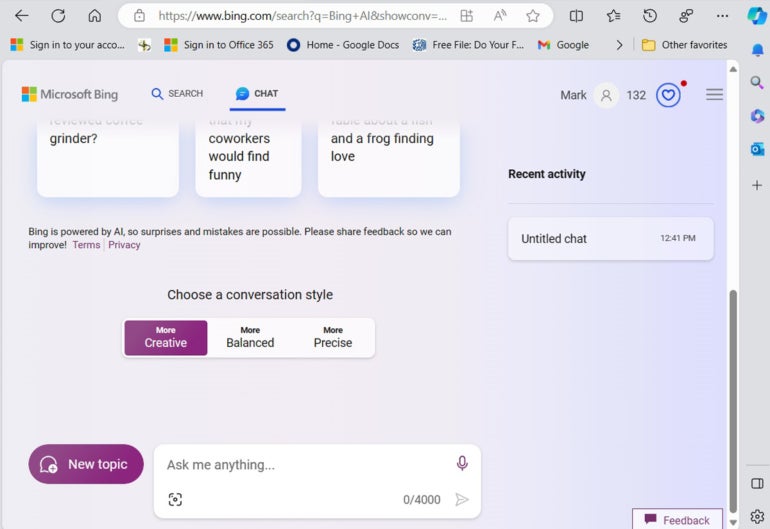
To access Copilot in Bing from the Bing website, open the Bing home page and click the Chat link on the upper menu. Once there, the first thing you will want to do is choose a conversation style.
Figure A
Accessing Copilot through the Bing home page. Image: Mark Kaelin/TechRepublic
Accessing Copilot in Bing through Microsoft Edge
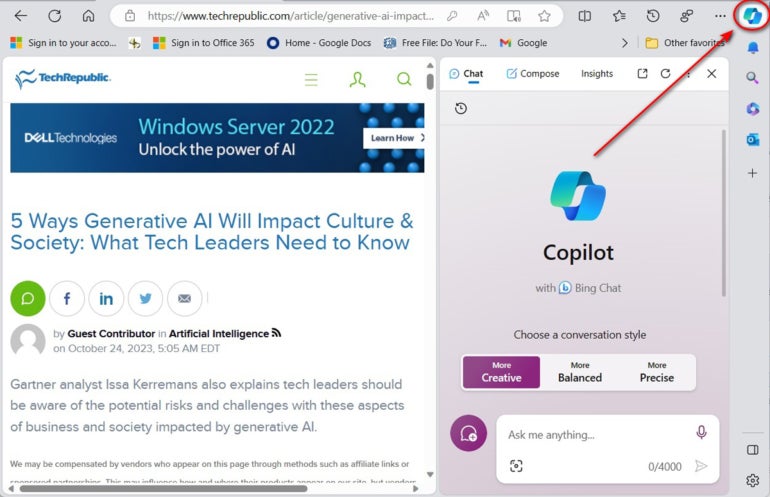
To access Copilot in Bing from the Microsoft Edge web browser, open Edge to any webpage, click the Bing sidebar button in the upper right corner and then select a conversation style.
Figure B
Accessing Copilot in Bing through Microsoft Edge. Image: Mark Kaelin/TechRepublic
How much does Copilot in Bing cost?
Consumers
At the consumer level, Copilot is part of the Bing search engine, and as such it is free for anyone to use.
Large businesses and organizations
As of December 1, 2023, large businesses and organizations are able to opt into Microsoft Copilot 365.
Enterprises
Copilot 365 at the enterprise level costs $30/person/month and keeps all data and results in-house and does not share with the internet or Microsoft.
What are Copilot for Bing’s key features?
Regardless of the chosen conversational style, Copilot in Bing will generally return results that mirror results typically returned by a search engine; in other words, definitions, explanations and statements of fact gleaned from across the internet. However, Copilot is not limited to those kinds of results.
Follow up
For one thing, Copilot allows users to follow up initial answers with more specific questions based on those results. For example, if you ask for the score of last night’s basketball game, you can follow up with a question asking who scored the most points, and the results will know you are referring to the game asked about at the beginning of your conversation. Each subsequent question will remain in the context of your current conversation. This feature alone can be a powerful improvement over conventional search engines.
Ask for specific output
During the course of a conversation with Copilot in Bing, you may ask for a specific form of output. For example, you could ask Copilot to create an image regarding the topic of your conversation or perhaps you would like Copilot to create programming code in C# based on your conversation.
Continuous improvement
Copilot is a major part of Microsoft’s business strategy, so the company is committed to continuously improving and enhancing the features and capabilities of the platform. Improvements to the image and code creation engines have already been made, with additional updates promised in the near future. Generative AI like Copilot is a nascent technology, and new features and improvements are standard operating procedure at this point.
How do you start a conversation with Copilot in Bing?
Each time you load a new conversation in Copilot in Bing, you are presented with a choice of three conversation styles: Creative, Precise and Balanced modes. The characteristics associated with the results of your conversation with Copilot in Bing, and therefore the effectiveness of the answers for your purposes, are determined by this choice. You can freely move between conversation styles during your session with Copilot in Bing.
1. Creative mode
Use the creative mode conversation style in Copilot in Bing when you want to find original and imaginative results. This conversation style will likely result in longer and more detailed responses that may include jokes, stories, poems or images. The creative mode is also how you call on Copilot in Bing’s built in AI-powered image creator.
2. Precise mode
Use the precise mode conversation style in Copilot in Bing when you want answers that are factual and concise. Under the precise mode, Copilot in Bing will use shorter and simpler sentences that avoid unnecessary details or embellishments.
3. Balanced mode
Use the balanced mode conversation style in Copilot in Bing when you want results that are reasonable and coherent. Under the balanced mode, Copilot in Bing will attempt to provide results that strike a balance between accuracy and creativity.
How does Copilot in Bing work?
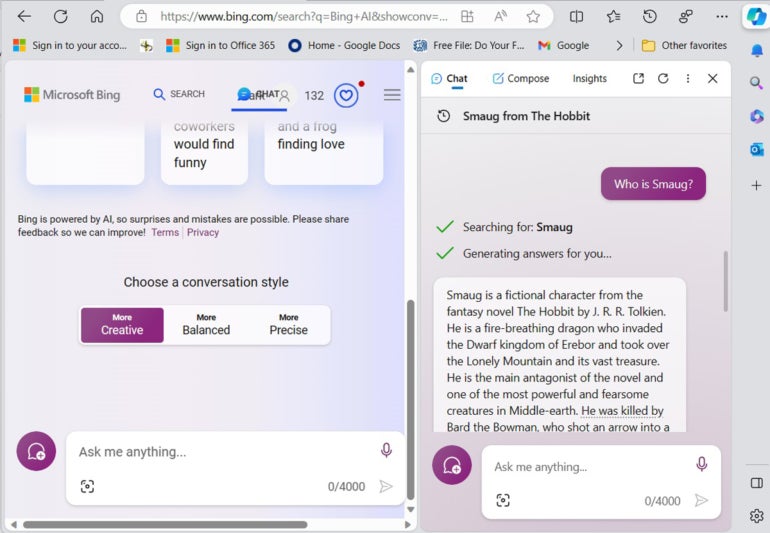
After choosing a conversation style and then entering your query in the chat box, Copilot in Bing will use artificial intelligence to formulate a response. For example, using the precise mode, if you ask “Who is Smaug?” you will get a basic answer.
Figure C
Answering the question Who is Smaug? in precise mode. Image: Mark Kaelin/TechRepublic
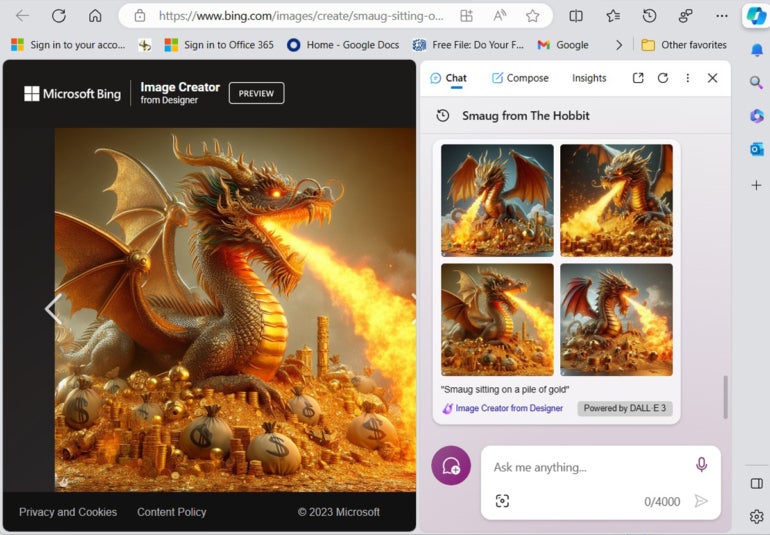
If you use the creative mode conversation style, you can ask Copilot in Bing to create an image of Smaug sitting on a pile of gold.
Figure D
An image of Smaug sitting on a pile of gold generated by the Copilot in Bing AI. Image: Mark Kaelin/TechRepublic
Does Copilot in Bing save chat history?
By default, regardless of web browser or operating system, every search you perform and every website you visit is saved as part of your personal browsing history; this is also true for questions and searches made with Copilot in Bing. You can delete your personal browsing history at any time, and you can change certain settings to reduce the amount of saved data in your browsing history.
In addition, Microsoft collects data concerning Bing and Copilot search results to help its AI platform perform better and more accurately. This data is collected in aggregate and is not associated with an individual. Because of certain regulations and compliance issues, it is likely some large enterprises and organizations will have to opt out of this aggregate AI-related data collection.
Which platforms compete with Copilot in Bing?
Artificial intelligence, especially generative AI, is one of the hottest and most talked about technological innovations of modern times. With that in mind, Copilot in Bing has plenty of competition now and will in the future.
Copilot in Bing is based on ChatGPT, which makes it an obvious competitor for Microsoft. ChatGPT is on its fourth iteration, and the platform should continue to evolve over time, offering a continuing source of both inspiration and competition.
In August 2023, Google’s Bard became generally available to everyone. Like Bing Chat and ChatGPT, Bard helps users search for information on the internet using natural language conversations in the form of a chatbot.
Figure E
Google Bard answering the question Who is Smaug? Image: Mark Kaelin/TechRepublic
Besides competition from other AI-powered chatbots, Copilot in Bing and Microsoft will have to contend with companies providing specialized AI platforms. Companies including Salesforce and Adobe are offering AI-powered systems designed to help users better use the software and services those companies provide. Over time, we can expect many other companies and organizations will offer their own specialized AI systems and services.
Is Copilot in Bing reliable?
Copilot in Bing relies on data aggregated by Microsoft from millions of Bing search results, and that data is tainted by biases, errors, misinformation, disinformation, the bizarre and wild conspiracy theories. Basic questions looking for factual information should be accurate more often than not, but any questions that require interpretation or critical observation should be greeted with a healthy amount of skepticism. All results provided by Copilot in Bing should be scrutinized and vetted for accuracy.
The ever-evolving, rapidly changing landscape of mobile technology means that what's bleeding edge today could become an obsolete vintage piece tomorrow. But looking at 2024 from the lenses of industry analysts, subject-matter experts, and annual trends offers a broader, more nuanced picture.
This year, five topics will likely dominate the headlines, dictate the next industry buzzwords, and be in the minds of every consumer. You'll hear a lot more about the "AI PC", but don't let that name obscure the reality: Our smartphones — the most personal of computers — are also receptive to an artificial intelligence makeover.
And that's just the beginning, as you'll find more notable trends in the list below, all of which have already begun to take shape.
1. On-device AI puts the 'smart' in smartphone
The new Samsung Galaxy S24 series features a live translation feature, powered by on-device AI.
This year, generative AI features will be integrated with smartphones, and in a big way. From real-time, multi-language translation for better communication to summarizing hours of voice memos to enhancing the way our smartphone cameras gather and process light for photos and videos, we're already seeing how the mishmash of AI and mobile computing can coalesce.
Samsung's just-released Galaxy S24 smartphones, for example, all feature generative AI tools that leverage on-device processing and cloud-based servers to help users fulfill general, day-to-day tasks more reliably. Such features are powered by the company's first for-consumer AI model, Galaxy AI, which runs atop Google's Gemini and Imagen 2. "We expect over 1 billion Generative AI smartphones to be shipped cumulatively between 2024 and 2027," says Ritesh Bendre, global content manager at Counterpoint Research.
Also: Apple research reveals some dazzling AI tech could be headed to your iPhone
Qualcomm is playing a major role here as well, with its flagship Snapdragon 8 Gen 3 chipset enabling performance gains across the board on smartphones, from a 20% improvement in CPU, 30% in GPU, and 41% in NPU — the latter of which is critical for devices to perform generative AI tasks in a power-efficient manner. Expect more flagship Android phones this year — as well as VR and XR headsets — to field Qualcomm's new processor, with plenty of AI-enabled capabilities in tow.
2. Foldables are getting better (and cheaper)
The Motorola Razr 2023 was the most affordable foldable phone last year, selling for as low as $499.
Arguably, 2023 was the year of the foldable, with just about every major manufacturer (except Apple) joining the fray with a shape-shifting handset of its own. Google kicked things off with the Pixel Fold, followed by Motorola's Razr comeback and Samsung's Galaxy Z series. To close things out, OnePlus debuted the Open, a $1,699 phone-to-tablet handset that undercut its closest competition.
Now that the major players have entered the competition, the big question this year is: How much more accessible will foldable devices become? Avi Greengart, president and lead analyst at Techsponential, tells ZDNET that as long as consumers are satisfied with the level of performance and high-tech components that they're paying for, there likely won't be a downtrend in pricing anytime soon.
Also: Why foldable phones are still so expensive, according to analysts
"Foldable products have a structure that is inevitably expensive compared to general bar types, even in terms of display alone," adds Jene Park, senior analyst at Counterpoint Research.
But there's hope. Carrier providers, who often discount the latest devices aggressively in exchange for customer loyalty (read: agreement to long-term installment plans), remain a primary source of US smartphone sales. Motorola's standard Razr model, which can be purchased for as low as $499 at the time of writing, is another sign of good things to come. With that in mind, 2024 is looking to be a promising sequel to foldables' breakout year in 2023.
3. Qi2 bridges a long-standing gap in charging
The iPhone 15 Pro (left) next to the Samsung Galaxy S23 Ultra (right).
The Wireless Power Consortium (WPC), a committee that consists of Apple, Samsung, and Google, has been pushing for the standardization of Qi2 wireless charging for more than a year, and 2024 may be the year these efforts come to fruition. The second generation of Qi charging promises improved magnetic coils for more efficient and faster wireless power delivery (up to 15W), both for iOS and Android devices.
Also: iOS 17.2 will add next-gen Qi2 wireless charging support to iPhone 13 and 14
"Qi2's perfect alignment improves energy efficiency by reducing the energy loss that can happen when the phone or the charger is not aligned. Just as important, Qi2 will greatly reduce the landfill waste associated with wired charger replacement due to plugs breaking and the stress placed on cords from daily connecting and disconnecting," said Paul Struhsaker, executive director of WPC, in a statement last year.
The adoption of such technology bridges a longstanding gap between MagSafe-compatible devices (iPhone 12 and up) and ones without the feature, allowing Android users to also reap the benefits of magnet-based charging accessories. Accessory makers like Anker and Satechi have already begun rolling out Qi2-compatible docks and charging pads. Now, it's on phone manufacturers to foot the second half of the bill by integrating the proper coils on the back of their devices. Expect those to arrive very soon.
Also: The best wireless chargers for iPhone and Android phones
4. Periscope lenses push cameras to further distances
The iPhone 15 Pro Max features Apple's first true telephoto lens, which the company calls "Tetraprism".
Periscope lenses have existed on smartphones for some time, but over the past year (and very likely in 2024), we're seeing manufacturers put an even stronger focus on creating the best far-distance cameras.
A periscope camera is composed of a prism, used for magnifying and refracting light, and a vertically aligned lens that's enclosed within the phone. With it, smartphone cameras can capture subjects at a further distance optically and not through a digital zoom that would otherwise result in a loss in detail and sharpness.
Also: The iPhone 16 Ultra camera will integrate the biggest leap in photos since B&W-to-color: report
Companies like Samsung have long adopted periscope lenses to improve their camera performance, and the most recent Galaxy S24 Ultra model is a prime example. While the device has a 200-megapixel main lens, it's the 50MP telephoto lens, capable of 5x optical zoom, that users will rely on the most when taking pictures from far away. Chinese phone maker Oppo also just released the Find X7 Ultra, which features not one but two periscope lenses.
As manufacturers continue to figure out ways to shrink and fit better components within the framework of smartphones, expect better, more capable cameras in 2024 and beyond.
The Rabbit R1 debuted at CES 2024, featuring a design inspired by classic Tamagotchi toys.
In the most intriguing trend of 2024, mobile devices are now being served in form factors that challenge conventional design norms. I experienced one myself just a week ago at CES, when AI startup Rabbit Inc. demoed its R1 pocket device. The R1, made in partnership with design firm Teenage Engineering, is likely one of many mobile gadgets to come in 2024 that make you question the look and feel of your existing smartphone.
Also: Rabbit sells 10,000 of its R1 AI pocket companions in one day
Humane is another rising player in the non-traditional mobile device category, with an AI Pin that latches onto your clothing — not your pocket. Like the Rabbit R1, the Pin favors AI agents over human interaction with apps, meaning instead of having the user tap and scroll through app interfaces, the device utilizes various AI models to communicate with the services.
If an app-less future is on the horizon, expect devices such as the Rabbit R1 and Humane AI Pin to lead the way.
In the swiftly evolving landscape of technology, keeping pace with the latest trends is vital for anyone in the industry. The O'Reilly 2024 Tech Trends Report emerges as a crucial guide in this endeavor, offering a comprehensive overview of the most significant technological advancements and patterns. This annual report, a product of meticulous analysis, is based on the usage data of 2.8 million users on O'Reilly's renowned online learning platform. It presents a unique opportunity to understand which technology tools are gaining traction and which are receding, enabling leaders and professionals to stay ahead in their strategic planning and skill development.
The significance of this report extends beyond mere statistics; it is a barometer for gauging the direction in which the technological winds are blowing. By analyzing the preferences and learning patterns of millions of users, the O'Reilly 2024 Tech Trends Report offers actionable insights into the technologies shaping our future. Whether for individuals looking to upskill, companies aiming to stay competitive, or educators seeking to align curriculums with market demands, the report serves as an invaluable resource. Its data-driven approach not only captures the current state of tech adoption but also hints at the emerging trends poised to define business success in the year ahead.
Surge in Generative AI and GPTs: A New Focus in Tech Development
The tech world is witnessing a seismic shift in focus, as evidenced by the O'Reilly Report, which highlights a staggering 3,600% surge in interest in Generative Pre-trained Transformers (GPT) and generative AI. This unprecedented increase signals a paradigm shift in the realm of technological development, marking generative AI as a cornerstone of innovation in the coming years.
This surge is intricately linked with the advent of ChatGPT in late 2022, a milestone that catalyzed the tech community's interest in generative AI. Developers have since been keenly focused on harnessing the capabilities of GPT and other language models, particularly in building robust APIs that tap into their transformative potential. The fascination with GPT reflects a broader trend where AI's ability to generate human-like text has captured the imagination and ambition of the tech world.
Complementing this trend is the notable rise in popularity of related topics. Natural Language Processing (NLP), a field at the heart of understanding and processing human language, saw a significant increase in interest, with a 195% jump in engagement. This spike in NLP underscores its central role in the development and application of generative AI technologies.
Furthermore, generative models, fundamental in the creation of AI-generated content, witnessed a 900% increase in popularity, highlighting their growing relevance in various tech applications. Transformers, the backbone architecture for many modern NLP models, also experienced a significant rise in interest, with a 325% increase. This data points to a burgeoning interest in the underlying technologies that power generative AI, reflecting a shift towards more sophisticated, AI-driven solutions in tech development.
Prompt Engineering and Security Concerns
The landscape of AI and technology is evolving rapidly, and the O'Reilly 2024 Tech Trends Report sheds light on some intriguing new developments, particularly in the realms of prompt engineering and cybersecurity.
Prompt Engineering: A Rising Star in AI Development
A noteworthy trend highlighted in the report is the rapid emergence of prompt engineering as a significant area of interest among developers. This topic, which didn't even exist in 2022, has quickly gained traction, now garnering nearly as much attention as transformers.
Prompt engineering revolves around the art and science of crafting effective prompts to elicit desired responses from AI models, especially large language models like GPT. This surge in interest underscores the growing recognition of the nuanced skill required to interact efficiently with advanced AI systems. The ability to fine-tune prompts is becoming crucial as businesses and developers look to leverage AI more effectively, driving demand for expertise in this area.
Escalating Focus on Security in Tech Development
Another key insight from the report is the heightened focus on security among developers. Almost all security-related topics showed an increase in interest from 2022 to 2023. This trend is indicative of the tech industry's growing awareness and concern about the security challenges accompanying rapid technological advancements. Network security, the most widely consumed topic in this domain, experienced a 5% year-over-year growth, highlighting its continued relevance in protecting digital assets and information.
Governance also saw significant growth, with a 22% increase, reflecting a greater emphasis on compliance and regulatory frameworks in technology. This shift points to a broader recognition of the need for robust governance structures in an increasingly digitized world. Application security topics rose by 42%, and DevSecOps – which integrates security practices within the DevOps process – experienced a 30% growth in usage. These trends signal a paradigm shift toward incorporating security throughout the software development lifecycle, rather than treating it as an afterthought. This proactive approach to security, integrating it into the very fabric of software development, is becoming a new norm, highlighting the industry's commitment to creating more secure, resilient technologies.
Programming Languages: The Evolving Landscape
The programming language landscape continues to evolve, reflecting the dynamic nature of the technology sector. The O'Reilly 2024 Tech Trends Report also provides valuable insights into the current state and emerging trends in programming languages.
Dominance of Established Languages
Mature programming languages like Python and Java continue to be the mainstays in the technology world, driving the most usage among programming topics on the O'Reilly platform. Their enduring popularity can be attributed to their versatility, extensive libraries, and strong community support. Python, known for its simplicity and efficiency, remains a top choice in fields such as data science, AI, and web development. Java, with its robustness and portability, continues to be a preferred language for enterprise applications and Android app development. The sustained dominance of these languages underscores their fundamental role in the tech ecosystem.
Rising Stars: C++ and Rust
The report notes a significant shift in the programming language landscape, with C++ seeing the most impressive usage growth at 10%. This increase is particularly noteworthy as AI technology becomes mainstream. C++ is renowned for its performance and control over system resources, making it a go-to choice for high-performance applications, including those in AI and machine learning.
Furthermore, the report highlights the rising popularity of newer infrastructure-related languages, particularly Rust. With a 7.8% growth in usage, Rust is gaining attention for its safety and performance. Rust's design prevents common programming errors, making it a reliable choice for system-level programming. Its growing popularity reflects the tech industry's increasing focus on writing safe, concurrent, and fast code, especially for system development.
Implications for the Tech Industry
The evolving landscape of programming languages has several implications for the tech industry. First, it suggests a diversifying skillset is becoming increasingly important for developers. As newer languages like Rust gain traction, developers may need to adapt and learn these languages to stay relevant. Second, the growth in C++ usage, particularly in the context of AI's mainstream adoption, indicates a shift towards more performance-intensive applications. Developers and businesses alike will need to focus on high-efficiency programming to leverage the full potential of advanced technologies.
Data Tools, Cloud Computing, and Certifications
The O'Reilly 2024 Tech Trends Report not only sheds light on the dramatic shifts in AI and programming languages but also highlights key developments in other critical areas of technology. These include advancements in data tools, cloud computing, and professional certifications, each playing a pivotal role in shaping the tech landscape.
Data Tools: Microsoft Power BI's Rising Prominence
One of the standout trends is the significant increase in the usage of Microsoft Power BI, which saw a 36% rise since 2022. Power BI's growing popularity can be attributed to its powerful data visualization and business intelligence capabilities. As organizations continue to prioritize data-driven decision-making, tools like Power BI become essential for transforming complex data sets into actionable insights. This increase reflects the broader trend of organizations leveraging advanced data tools to gain a competitive edge in the market.
Shifts in Cloud Computing: Cloud-Native and Hybrid Cloud
The report also highlights a substantial shift towards cloud-native solutions, evidenced by a 175% growth in this area. This trend underscores the transition of companies towards building and deploying applications primarily in cloud environments. The agility, scalability, and efficiency offered by cloud-native architectures are driving this shift, indicating a future where cloud-centric development is the norm.
Concurrently, there has been a noticeable growth in hybrid cloud usage, with a 145% increase, suggesting a growing preference for a more flexible and balanced approach to cloud adoption. In contrast, both private and public cloud usage have seen declines of 46% and 10%, respectively. This change suggests a nuanced evolution in cloud strategies, with businesses increasingly opting for hybrid solutions that offer the best of both worlds.
Certifications: Security and CompTIA A+ Gains
Security certifications continue to be the most sought-after in the tech industry, reflecting the growing importance of cybersecurity in the digital age. The CompTIA A+ certification, in particular, saw a significant increase in content usage year-over-year (58%). This growth indicates a surge in interest among professionals pursuing IT careers, aligning with the industry's heightened focus on robust security measures.
The rising demand for these certifications mirrors the evolving landscape of tech skills required in the modern workforce. As technology continues to advance rapidly, professionals seek to enhance their qualifications and stay abreast of the latest trends and best practices. The growing emphasis on certifications like CompTIA A+ also points to a broader trend of continuous learning and upskilling, essential for success in the technology sector.
Soft Skills in Focus: Developers' Growing Interest
In an industry often dominated by technical prowess, the O'Reilly 2024 Tech Trends Report unveils a refreshing shift – an increased focus on “soft skills” among developers. This trend underscores the growing recognition of the importance of skills like project communications, professional development, and project management. There's a clear 23% growth in project communication skills and a 22% increase in professional development, while project management saw a 13% rise. These statistics highlight a holistic approach to skill development, acknowledging that technical expertise needs to be complemented with strong interpersonal and management skills to drive successful projects and careers in the evolving tech landscape.
Preparing for Disruptive Changes in Tech
The O'Reilly 2024 Tech Trends Report offers a comprehensive snapshot of the shifting paradigms in technology. From the exponential growth in interest in generative AI and GPTs to the evolving preferences in programming languages and cloud computing strategies, the report paints a picture of a tech landscape in flux. It also brings to light the increasing significance of data tools like Microsoft Power BI, the rise in cloud-native and hybrid cloud solutions, and the growing demand for certifications in security and IT.
Crucially, the report signals a shift in focus towards the development of soft skills, reflecting a more rounded approach to tech professionalism. This trend is particularly notable as it suggests a broader understanding that success in the tech industry is not solely predicated on technical acumen but also on the ability to communicate effectively, manage projects efficiently, and continually develop professionally.
As the report suggests, we are at a rare and disruptive juncture in the industry, largely driven by the advancements in generative AI. These changes are not just redefining business strategies but are also reshaping job prospects, skill requirements, and IT management approaches. In this context, the importance of upskilling cannot be overstated. Professionals and organizations must stay informed and adapt to these emerging trends to remain relevant and competitive. The insights provided by the O'Reilly 2024 Tech Trends Report serve as a valuable guide in this endeavor, helping stakeholders navigate the new innovations poised to transform the tech landscape in the coming year and beyond.
Google first introduced Art Selfie in 2018, a feature in Google's Arts and Culture app in which users could submit a selfie of themselves, and the app would match them to a portrait from history that they resembled. Leveraging generative AI, Google is now introducing Art Selfie 2.
Also: Google's AI video generator tech is pretty amazing. See for yourself
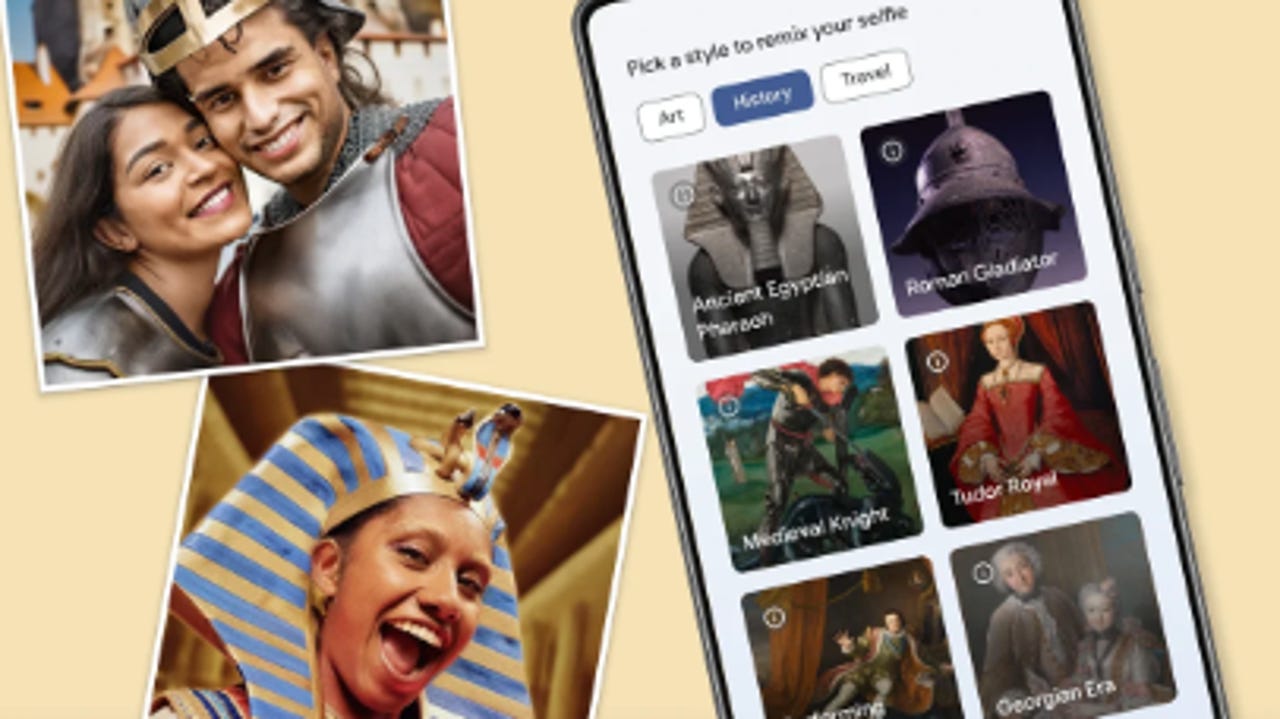
With Art Selfie 2, instead of being matched to a historical portrait, you can transform your selfie into a portrait of whatever era you'd like. All you have to do is either snap a picture of yourself or with a friend and then select a style you'd like your selfie generated in.
There are over 25 styles you can pick from across different categories, including art, history, and travel. For example, in the art category, you can choose to have a selfie rendered in the style of Monet's Garden, Vermeer's Pearl Earring, and more. In the history category, some examples include being depicted as an ancient Egyptian pharaoh, Roman gladiator, Medieval knight, and more.
Also: The best AI image generators right now
Once you pick a style, as your image is generated, you will be presented with topical facts to help you learn more about the style you chose. Then, when the image is generated, you can discover related Stories, Artifacts, and more about the context related to your image.
If you remember the TikTok trend in 2022 where people used MyHeritage's AI Time Machine to transform their photos into historical portraits, Art Selfie 2 is essentially the same concept, except that the results are… vastly different.
I tried Art Selfie 2, and found the results surprising, to say the least. To get started, I had to download the Google Arts & Culture app for Android or iOS, and because I was already logged onto my Google account on my phone, I was able to get started right away.
The process was so quick and intuitive; all I had to do was snap a selfie and pick a style. Then, within seconds, it had generated a result for me. However, in this case, the swiftness of the generation may have been an indication of what I should have expected to see. You can see the results for yourself below.
In each rendition, it just looks like my face was superimposed onto a photo, with no real attempt at blending it in or making it look realistic. In the photos above, from order of left to right, I was supposed to be an ancient Egyptian pharaoh, aviation pioneer, and Vermeer's Pearl Earring.
When compared to MyHeritage's version, Google's results were nowhere near as impressive, but they did give me a good laugh. I'm including a photo below of the MyHeritage results for comparison.
Some renderings of me including in different eras and heritages including Saxon, Ancient Greek, Persian queen, French Royalty, 18th-century bride, and Rembrandt portrait (top left to bottom right)
However, it is worth noting that My Heritage's version is only free during specific windows; otherwise, it is a paid service, and it requires 10-25 photos instead of one. Google's version is free and much simpler to use, but the quality is a tradeoff.
Also: How to use AI to turn any photo into a professional headshot
Interestingly, Google does not address privacy concerns regarding having to submit your photo to a generative AI model, which typically uses what you send them to train their models further. MyHeritage discloses on its site that user-uploaded photos are deleted "immediately after a model has been generated" or kept for a maximum of 24 hours for retries and then deleted.
In addition to Art Selfie 2, Google also made Art Remix, a feature that lets you edit prompts of popular artworks to put your twist on the classics, available in more countries. This feature can also be accessed in the Google Arts & Culture app.
Since the release of DALL-E 2 at the end of 2022, text-to-image generators have been all the rage with plenty of worthy competitors entering the market. Now, over a year later, we are at the dawn of a new technology: AI video generation.
On Tuesday, Google Research released a research paper on Lumiere, a text-to-video diffusion model that can create highly realistic video from text prompts and other images.
Also: The best AI image generators of 2024: DALL-E 2 and alternatives
The model was designed to tackle a significant challenge in video generation synthesis, which is creating "realistic, diverse, and coherent motion," according to the paper. You may have noticed video generation models typically render choppy video, but Google's approach delivers a more seamless viewing experience, as seen in the video below.
Not only are the video clips smooth to watch, but they also look hyper-realistic, a significant upgrade from other models. Lumiere can achieve this through its Space-Time U-Net architecture, which generates the temporal duration of a video at once through a single pass.
This method of generating video deviates from other existing models, which synthesize distant keyframes. That approach inherently makes video consistency challenging to achieve, according to the paper.
Lumiere can generate video from different inputs, including text-to-video, which works like a regular image generator and generates a video from a text prompt, and image-to-video, which takes an image and uses its accompanying prompt to bring the photo to life in a video.
The model can also put a fun spin on video generation through stylized generation, which uses a single reference image to generate video in the target style using a user prompt.
In addition to generating video, the model can be used to edit existing video through various visual stylizations that modify a video to reflect a specific prompt, cinemagraphs that animate a specific area of a photo, and inpainting, which fills in missing or damaged areas in the video.
Also: 7 ways AI can fix your meetings, according to Microsoft
In the paper, Google measured Lumiere's performance to other prominent text-to-video diffusion models, including ImagenVideo, Pika, ZeroScope, and Gen2, by asking a group of testers to select the video they deemed better in terms of visual quality and motion, without knowing which model generated each video.
Google's model outperformed the others across all categories, including text-to-video quality, text-to-video text alignment, and image-to-video quality.
The model has yet to be released to the general public; however, if you are interested in learning more or watching the models in action, you can visit the Lumiere website, where you can see plenty of demos of the model performing the different tasks.
With the recent enhancement of visual instruction tuning methods, Multimodal Large Language Models (MLLMs) have demonstrated remarkable general-purpose vision-language capabilities. These capabilities make them key building blocks for modern general-purpose visual assistants. Recent models, including MiniGPT-4, LLaVA, InstructBLIP, and others, exhibit impressive visual reasoning and instruction-following abilities. Although a majority of them rely on image-text pairs for image-level vision-language alignment, they perform well in this domain. However, their reliance on box-level and image-level understanding is the primary reason MLLMs fall short in replicating their performance on fine-grained vision-language alignment tasks at the pixel level. Additionally, the limited availability of mask-based instruction data for training poses challenges in further enhancing MLLMs.
Osprey is a mask-text instruction training method with the primary aim of extending MLLMs. It incorporates fine-grained masked regions in language instruction to achieve pixel-level visual-language understanding. To accomplish this, the Osprey framework curates a mask-based region-text dataset with over 700 thousand samples. It injects pixel-level representation into Large Language Models (LLMs) to design a vision-language model. Notably, the Osprey framework adopts a convolutional CLIP model as its vision encoder and integrates a mask-aware visual extractor into its architecture. This allows for precise extraction of visual mask features from high-resolution input.
In this article, we will discuss the Osprey framework and delve deeper into its architecture. We will also explore the curated region-text dataset with over 700 thousand samples and compare its performance in various region understanding tasks. So, let’s get started.
Osprey: Pixel Understanding with Visual Instruction Tuning
Multimodal Large Language Models like MiniGPT-4, Otter, Qwen-LV, InstructBLIP and others are the frontrunners for developing general-purpose visual assistants, and they are renowned for their exceptional multimodal and vision generative capabilities. However, Multimodal Large Language Models suffer from a major challenge as they deliver unsatisfactory results on fine-grained image understanding tasks like captioning, region classification, and reasoning. A major reason for the sub-par performance on fine-grained image understanding tasks is the lack of alignment at region-level. Recent MLLMs like GPT4RoI, Shikra and others aim to enable region-level understanding in vision-language models by processing bounding-box specified regions, and leveraging visual instruction tuning with spatial features at object-level.
Although the approach to enable region-level understanding might improve the performance, employing sparse bounding boxes as the referring input region directly might introduce irrelevant background features leading to inaccurate region-text pair alignment for visual instruction tuning on large language models. During the inference process, the box-level referring input might not be able to detect & represent the object precisely; that might result in semantic deviation as demonstrated in the following image.
In comparison, using fine-grained masks instead of coarse bounding boxes as the referring input might be able to represent objects with more precision. Recently developed SAM or Segment Anything Model trains on billions of high-quality masks, demonstrates remarkable segmentation quality on zero-shot objects and supports the use of points or simple bounding boxes as prompts. However, the SAM framework cannot generate primary semantic labels, nor can they provide detailed semantic captions and attributes. As a result, existing models lack inherent multimodal fine-grained information, and have a limited-understanding of scenes in the real-world.
To tackle the challenges faced by the existing MLLMs, Osprey, a novel mask-text instruction training method aims to extend the capabilities of multimodal large language models for fine-grained understanding on pixel-level. The Osprey framework introduces a mask-aware visual extractor that captures visual mask features with varying granularity precisely. The framework then interleaves the visual features with language instructions to generate the input sequence for the large language model, and leverages convolutional CLIP architecture to facilitate the use of high resolution input. Owing to its design and architecture, the Osprey framework is able to achieve fine-grained semantic understanding for object-level and part-level regions, and provides detailed object attributes along with primary object category and enhanced descriptions of complex scenes.
By leveraging the capabilities of visual instruction tuning, the Osprey framework enables new capabilities beyond image-level and box-level understanding of the scenes as the Osprey framework can generate fine-grained semantics using class-agnostic masks from off the shelf SAMs. Additionally, Osprey also shows remarkable capabilities across referring object classification, open-vocabulary recognition, regional-level captioning, and detailed region description tasks.
Osprey : Methodology and Architecture
The following figure demonstrates the architecture overview of the Osprey framework consisting of a large language model, pixel-level mask aware visual extractor, and an image-level vision encoder.
For a given image, the input language, and the referring mask regions, the framework performs conversion and tokenization to generate embeddings before sending the language embedding sequences and interleaved mask features to the large language model to obtain fine-grained semantic understandings.
Convolutional CLIP Vision Encoder
The vision encoder deployed in a majority of multimodal large language models is exemplified using a ViT-based CLIP model. As a result, the framework adopts an image resolution of either 224×224 pixels or 336 x 336 pixels. However, the use of the ViT-based CLIP model makes it difficult for the model to achieve fine-grain image understanding of pixel-level representations, a problem amplified further in small regions. Furthermore, the computational overload associated with the ViT architecture hinders the possibility of increasing the input image resolution.
To tackle the challenge, the Osprey framework implements a convolutional CLIP model as the vision encoder in its architecture. Traditionally, Convolutional Neural Networks based CLIP models have demonstrated remarkable generalization capabilities across different input resolutions when put against vision transformer based CLIP models. Implementing a CNN-based CLIP model makes room for fast inference and efficient training without compromising on the model’s performance. Furthermore, a CNN-based CLIP model is capable of generating multi-scale feature maps that the framework then directly uses for feature extraction in each subsequent object region.
Mask Aware Visual Extractor
In contrast to existing region-based models that use sparse bounding boxes as the referring input, the Osprey framework uses detailed mask regions to implement object-based representations. The Osprey model employs a mask aware visual extractor component to capture pixel-level features within each object region. The mask ware visual extractor component encodes mask-level visual features, and additionally, gathers the spatial position information of each region.
To implement this, Osprey first uses the multi-level image features generated by the vision encoder to adopt the mask-pooling operation, and for every single-;evel feature, the framework pools all the features that lie within the mask region. The model then encodes the features across different layers by passing each feature through a linear projection layer that generates region-level embeddings, and fuses multi-level features by performing summation. The model then uses a MLP layer to produce the visual mask token. Furthermore, Osprey preserves the spatial geometry of the object region by encoding the pixel-level position relationship by implementing a binary mask for each object region. In the end, Osprey includes the visual mask token and its respective spatial tokens for each mask region embedding.
LLM Tokenization
As mentioned earlier, the model extracts the image-level embeddings of an image by feeding it into a pre-trained CNN-based visual encoder. For textual information, the model first uses pre-trained LLM tokenizers to tokenize text sequences, and then projects these tokenized text sequences into text embeddings. For mask-based regions, the model defines a special token as a placeholder, and then substitutes it with a spatial token along with a mask token. When the model refers to an object region in the text input, it appends the placeholder after its region name that allows the mask regions to mix with texts well resulting in complete sentences without the tokenization space. Furthemore, apart from user instructions, the model also includes a prefix prompt, a special token that serves as a placeholder, that is then replaced by the vision encoder’s image-level embeddings. Finally, the framework interleaves the region-level & image-level visual tokens along with text tokens, and feeds it into the large language model to comprehend the user instructions and the image with different regions in the object.
Osprey : Three Stage Training Process
The Osprey framework deploys a three stage training process in which each of the training phases is supervised by minimizing a next-token prediction loss.
Stage 1: Image-Text Alignment Training
In the first stage, the Osprey framework deploys the CNN-based CLIP vision encoder to train the image-level features and language connector to train the model for image-text feature alignment. In the first stage, the framework employs three components: a pre-trained large language model, a pre-trained vision encoder, and an image-level projector. The framework also adopts a MLP layer to serve as the vision-language connector that helps in enhancing Osprey’s multimodal generative capabilities.
Stage 2: Mask-Text Alignment Pre-Training
In the second stage, Osprey loads the weight trained in the first stage, and employs its Mask-Aware Visual Extractor component to capture pixel-level region features. In the second stage, the framework only trains the Mask-Aware Visual Extractor to align language embeddings with mask-based region features. Furthermore, the model collects pixel-level mask pairs and short texts from part-level and publicly-available object-level datasets, and converts them into instruction-following data to further train the model.
Stage 3: End-to-End Fine Tuning
In the third and the final stage, the model fixes the weights of the vision encoder, and finetunes the large language model, mask-based region feature extractor, and the image-level projector components in its architecture. The primary aim of training in the third stage is to extend the model’s capability to follow user instructions accurately, and efficiently perform pixel-level region understanding tasks.
After implementing the three training stages, the Osprey framework is capable of understanding complex scenarios defined by user instructions and based on pixel-level mask regions.
Osprey : Experimental Results
To evaluate its performance, Osprey developers conduct a wide array of experiments to demonstrate the model’s capabilities in classification, pixel-level region-based recognition, and complex descriptions.
Open-Vocabulary Segmentation
The primary goal of open-vocabulary segmentation is to generate mask-based region recognition and its respective category explicitly. To achieve open-vocabulary segmentation, Osprey first uses an input text prompt, following which the model adopts ground-truth mask regions for model interference to assess model’s performance in open-vocabulary recognition tasks. On the basis of the sentence response generated by the multimodal large language model, Osprey calculates the semantic similarity between the vocabulary list and output of each dataset. The following figure compares Osprey against state of the art multimodal large language models.
As it can be observed, the Osprey framework outperforms existing methods by a considerable margin on both the Cityscapes and the ADE20K-150 dataset. The results indicate Osprey’s ability to outperform existing approaches, and achieve robust understanding and recognition on fine-grained object regions.
Referring Object Classification
In the Referring Object Classification task, the model is required to classify the object within a specific region of an image. To evaluate its classification capabilities, the Osprey framework uses two semantic relevance metrics including Semantic IoU or S-IoU and Semantic Similarity or SS. Semantic IoU represents the overlap of words between the ground-truth and the prediction labels whereas Semantic Similarity measures the similarity predicted and/or ground-truth labels in a semantic space. The following image demonstrates Osprey’s performance in the Referring Object Classification task when put against models employing box-level and image-level approaches.
Detailed-Region Description
In the Detailed-Region Description task, the model evaluates its performance on instruction-following detailed description capabilities along with other region-level approaches. The model randomly selects an input inference prompt from a list of predefined prompts, and leverages the GPT-4 LLM framework to measure the quality of the response generated by the model against the input referring regions comprehensively. Using the instruction generation pipeline, the model generates questions, and seeks GPT-4’s answers following which the LLM assesses the correctness of semantics and precision of referring understanding. The following table demonstrates the performance of Osprey against state of the art models on Detailed-Region Description tasks.
Region-Level Captioning
The Osprey framework also outperforms current approaches on Region-Level Captioning tasks with the results contained in the following image.
Final Thoughts
In this article, we have talked about Osprey, a mask-text instruction training method with the primary aim of extending MLLMs by incorporating fine-grained masked regions in language instruction to achieve pixel-level visual-language understanding. To accomplish its goal, the Osprey framework curates a mask-based region-text dataset with over 700 thousand samples, and injects pixel-level representation into LLM to design a vision-language model. The Osprey framework aims to enhance MLLMs for fine-grained visual understanding significantly, and by implementing a CNN-based CLIP model and a mask-aware visual extractor, Osprey attains the capability to understand images at both part-level and object-level regions.
Developers contributing to open source projects constantly face burnout. This issue came to light when a developer detailed the escalating burnout among Rust open source project contributors in a blog post. This is quite concerning as it could put a mental strain on developers enduring one to spend extra time on ‘passion projects’, which get increasingly demanding.
“Open source burnout — apathy and general lack of compassion towards open source work has made it unviable for talented devs,” writes Pavithra Kodmad, a design engineer at GitHub, highlighting the impact of burnouts on open source projects.
In worst-case scenario, there have been many projects that put up messages like this one, apologising to the users of their open source projects for shutting them down. “I needed to choose between ‘keep my open source project’ or ‘keep my mental and physical health’,” writes the developer, wisely choosing the latter.
GitHub offers a helpful post that outlines a balance for open source maintainers. However, the problem persists, prompting developers to constantly write posts that say, “What I hate most about burnout is seeing my projects suffer. More than 160 tools piled up under review, resulting in some unhappy customers,” on X.
Good open source projects have an overwhelming number of issues and pull requests. Developers often require new contributors but guidance and mentorship requires further effort from the maintainers, who are already overworked. This issue is also being addressed with platforms like First Timers Only, which assists young programmers to make their first contribution to open-source projects effectively.
The sustainability of good open source projects over a long period of time depends on more than the initial popularity. GitHub measures this by stars or forks on the platform. Natik Gadzhi explains on X that better measures are, “finding out if the project has robust tooling for contributors, how much time it takes to review and merge a PR and what the issue triage pipeline looks like”.
And to manage some of these factors and ease the workload of the developers, AI can play a crucial role.
AI to the Rescue
Microsoft Copilot has already automated a lot of rote work done by developers and has become the go-to tool for around half of all developers. But apart from this, there are tools like Dependabot, Webhint, GitGuardian, Synk and Renovate that automatically open pull requests for new dependency versions, give alerts on vulnerable dependencies, analyse code and essentially do all the mundane tasks.
There are other tools that relieve the load of developers from the mundane task of code creation. But tools like Dependabot, GreenKeeper, Snyk, AutoFac, FOSSA, and Mend.io go a step further to assist on different parts of the workflow.
For example, Synk automatically finds and fixes security vulnerabilities in open source project’s dependencies. It scans the project to identify security issues and offers solutions or patches to fix them. It also monitors the project continuously for any new vulnerabilities that might appear in the future.
Another platform, AutoFac, helps developers manage different parts of their software applications, organising how they work together to manage the structure of the application. A newer tool developed this year was Codium AI PR Agent, which automates pull request analysis, feedback and suggestions. “CodiumAI gives you a full suite of AI-powered tools integrated into a single tool,” Santiago Valdarrama posted on X.
Startups like InfieldAI, which is an alternative to Dependabot, grew out of the YCombinator accelerator program and is also funded by them to build tools that provide a step-by-step path to safe open source component management.
Mintlify, another startup develops software to automate documentation tasks which take up most of the traffic in an open source project. “For public-facing and open source products, documentation has a direct impact on user adoption,” said Han Wang, CEO of the company.
Maxime Labonne, ML scientist at JP Morgan, told AIM that these tools already help him, “During my Christmas break, I had my laptop next to work on my open source projects. It’s not that time consuming to be honest with you, because my strategy is to automate everything!”
At the end of the day, who’s better at time management than open source developers who are taking up a herculean task of solving the world’s problems? AI-powered features or tools, say like request analyser, automated code review and mentorship bot, cross-project dependency coordinator, AI-assisted user story and requirement generator would change the way open source contributions happen in the coming years.
The post Can AI Be the Balm for Developers’ Burnout Qualm? appeared first on Analytics India Magazine.