Microsoft has inked several partnerships to drive artificial intelligence (AI) adoption and skillsets in Singapore, particularly among small and midsize businesses (SMBs).
The tech giant is working with SkillsFuture Singapore to arm 2,000 SMBs over three years with the knowledge to tap AI tools. Microsoft is also teaming up with the Institute for Adult Learning to integrate AI into the education curriculum, with plans to jointly develop and test AI tools and methodologies to enhance the learning experience, Microsoft said in a statement Wednesday.
Also: Want to work in AI? How to pivot your career in 5 steps
The company will also work with NTUC LearningHub to train up to 100,000 National Trades Union Congress (NTUC) members with fundamental AI skills. The aim is to boost members' AI literacy and prepare them for the evolving workforce, according to Microsoft.
The collaboration has resulted in several online and in-person training programs focused on how AI can be applied in the workplace, said NTUC LearningHub CEO Jeremy Ong. He said this approach will ensure NTUC's members are "ready for the future of work" and part of a workforce that can harness AI.
Also: Is prompt engineer displacing data scientist as the 'sexiest job of the 21st century'?
Microsoft is also working with EnterpriseSG and AI Singapore to drive the adoption of Microsoft Copilot among local SMBs and identify industry-specific use cases for generative AI. The partners will jointly develop resources to help SMB leaders with change management and redesigning business workflows, Microsoft said, adding that it will look to add customized AI use cases for businesses in the longer term.
These efforts will allow SMBs to scale the benefits of AI and boost productivity and operations. In addition, the software vendor will collaborate with Infocomm Media Development Authority to support digitally mature SMBs in accessing expertise and resources to implement generative AI tools.
Soh Leng Wan, EnterpriseSG's assistant CEO for manufacturing and engineering, believes Copilot can be "an easy way" for SMBs to start tapping AI to drive employee productivity and improve business workflows.
Microsoft has also introduced an initiative to develop AI solutions for key industry sectors. Its Microsoft AI Pinnacle Program encompasses the development of roadmaps for strategic AI use cases that provide clear returns on investment and operationalized AI use cases that deliver business impact.
The new initiative will establish an AI Center of Capabilities, comprising AI accelerators and toolsets, responsible AI frameworks, and a governance program. The initiative will also provide training programs.
Also: How to use ChatGPT
Microsoft AI Pinnacle Program was launched with five participating organizations — Certis, HTX, Mediacorp, Seatrium, and Synapxe — from various sectors, including healthcare and maritime.
"The program will facilitate co-creation and co-innovation of AI use cases and foster an AI-first culture and ecosystem," Microsoft said. "Through this, the program aims to inspire new ways of work and support organizations in building capabilities to tap opportunities in the era of AI."
The program will include the rollout of Copilot for business functions such as HR, finance, and marketing. Participating organizations can also work with Microsoft Research and its partners to develop new AI capabilities.
Laurence Liew, AI Singapore's director of AI innovation, has urged generative AI software vendors to incorporate regional and local data models to ensure their products better reflect a diverse global population. For example, integrating the Southeast Asian Languages in One Network (SEA-LION) large language model (LLM) will help these generative AI tools to generate more accurate responses, Liew said.
Liew noted that most public generative AI tools today are non-Asian focused and might have inherent data bias. LLMs such as SEA-LION are more "culturally sensitive", which he said will ensure generative AI responses better reflect the region's societal mix.
Also: 6 AI tools to supercharge your work and everyday life
In January, Singapore released a handbook to help local businesses navigate their adoption of generative AI and acquire the skills to support such initiatives. Dubbed Generative AI for the Tech Workforce, the resource guide aims to assist Singapore organizations, such as SMBs, that want to integrate the technology into their environments.
The Singapore government last month said it's setting aside at least SG$1 billion ($741.97 million) to accelerate AI development in the country, including securing access to the necessary compute power and skillsets. Plans are also underway to upgrade the country's national broadband network and build a new cybersecurity command hub.
The investments aim to support the Singapore government's efforts to tap technology across key sectors and are part of its fiscal 2024 budget, running through to March next year.
CoRover.ai’s BharatGPT has introduced AI Realtor, the world’s first Video Bot designed exclusively for the real estate industry. AI REALTOR streamlines the home-buying process, making it smarter, faster, and more efficient.
AI REALTOR introduces a conversational element to property searches. Users can engage in a chat-like interaction with this virtual real estate assistant. Notably, it offers immersive visual property tours, providing a realistic virtual experience of potential homes.
The standout feature is its smart functionality—it understands user preferences and efficiently suggests properties that align with specific criteria.
You can use this digital twin to ask questions. For instance, Kolkata-based realtor Ajay Agarwal replicated himself, along with his credibility, efficiency, and effectiveness, showcasing the potential for real estate advisors across the industry. You can ask the persona questions such as, “Can you show me the available properties with a swimming pool, gym, and parking space in South Goa?”
The Interactive AI Digital Twin, VideoBot, offers multilingual capabilities, persona precision, strategic lead handling through AI-driven sentiment analysis, and global scalability. This AI persona can speak in over 100 languages and instills trust with a lifelike digital representation, and extends reach worldwide, ensuring scalability and adaptability.
CoRover.ai highlights key facts about the Indian real estate market, projecting it to reach USD 1.04 trillion by 2029 with a 25.60% annual growth rate. Surprisingly, only 3% of the market currently operates online, showing a big opportunity for growth. Given that there are just over 50,000 registered realtors and 7 lakhs real estate advisors in India, there’s an evident need for expansion in the industry.
Ankush Sabharwal, the co-founder of CoRover.ai, has had a busy few months building BharatGPT. Most recently, his company launched an educational tablet called Milkyway, which would be powered by CoRover’s BharatGPT virtual assistant, including video and chatbots for students.
The post CoRover.ai’s BharatGPT Unveils World’s First Real Estate GenAI App appeared first on Analytics India Magazine.
Recently, Elon Musk posted on X that he would drop the lawsuit if OpenAI changed its name to ClosedAI, saying that the company needs to stop living a lie.
Fixed it pic.twitter.com/KPtYLsJU3h
— Elon Musk (@elonmusk) March 6, 2024
However, OpenAI firmly accepts that not open-sourcing the models is the right way to go ahead. In an email dated January 2, 2016, chief scientist Ilya Sutskevar told Musk, “As we get closer to building AI, it will make sense to start being less open.”
“The ‘Open’ in OpenAI means that everyone should benefit from the fruits of AI after it’s built, but it’s totally OK to not share the science [even though sharing everything is definitely the right strategy in the short and possibly medium term for recruitment purposes],” Sutskevar told Musk.
To this, Musk replied with a simple, “Yup!”
Back in 2015, Musk, in a conversation with OpenAI CEO Sam Altman, had said, “No one company or small set of individuals should have control over advanced AI technology; this is very dangerous.” On the contrary, the company claims that both Musk and OpenAI were aligned in making the entity for-profit, and that as they get closer to AGI, the entity would become increasingly ‘more closed’.
Elon has a DeepMind Problem, Not OpenAI
On the surface, Musk appears to strongly dislike OpenAI since it shifted to a for-profit model, choosing to be closed-source. Musk suing the hottest AI startup – now valued at $80 billion – certainly does not make sense, as he went back to the initial conversations accusing it of deviating from its original mission and becoming a de facto subsidiary of its investor company, Microsoft.
However, the reality is that way back in 2015, Musk tried building a Google DeepMind rival in which OpenAI was supposed to play a key role. Musk was close friends with Google founder Larry Page, who used to have deep discussions about AI and its impact on the future.
“I used to be close friends with Page. I would stay at his house in Palo Alto, and we would talk late into the night about AI safety. I would constantly urge him to be careful about the dangers of AI, but he was not really concerned. He was quite cavalier about it,” said Musk in an interview. According to Musk, Page instead ‘wanted a sort of digital super-intelligence’, hoping to become “a digital god, if you will, as soon as possible”.
The Birth of OpenAI
This was the turning point in Musk and Page’s relationship, which led to the birth of OpenAI. OpenAI’s recently published blog, containing the email exchanges between Altman, Musk, Sutskever, and president of OpenAI Greg Brockman kind of completes the puzzle.
Musk built OpenAI to challenge Google’s monopoly. Initially, Brockman and Altman had planned to raise $100M. However, Musk felt that the amount was too little, to begin with, and forwarded an email to OpenAI, saying, “We need to go with a much bigger number than $100M to avoid sounding hopeless… I think we should say that we are starting with a $1B funding commitment… I will cover whatever anyone else doesn’t provide.”
However, according to OpenAI, it only received $45M from Musk and more than $90M from other donors. Cut to 2018, Musk felt that OpenAI would require more money. “My probability assessment of OpenAI being relevant to DeepMind/Google without a dramatic change in execution and resources is 0%. Not 1%. I wish it were otherwise,” Musk told Sutskever, in an email interaction.
He emphasised the need for billions in funding annually, indicating that several hundred million won’t be enough. Musk even proposed merging OpenAI with Tesla. In early February 2018, he forwarded an email suggesting that OpenAI should “attach to Tesla as its cash cow”, commenting that it was “exactly right… Tesla is the only path that could even hope to hold a candle to Google”.
In 2018, Musk, sensing OpenAI’s inability to compete with Google, left the organisation to fend for itself. Subsequently, he accelerated AI development at Tesla and founded an AI entity known as xAI.
In a series of events last year, Altman was dismissed from the board, later rehired, and ultimately took charge by replacing the board at OpenAI, likely moving the board from being fully aligned with the initial mission of open source, non-profit to closed source, for-profit with a strong backing from Microsoft.
Cut to the present, the suing of OpenAI seems a little too intentional or a measure to stall its growth and progress, so Musk’s xAI and other rivals pick up pace with the company. Microsoft is paying the price.
The post OpenAI Might Change its Name Soon appeared first on Analytics India Magazine.
Andrew Ng has come up with a new, free, one-hour course with Hugging Face called “Open Source Models with Hugging Face” which introduces beginners to open-source models. Led by Hugging Face engineers Maria Khalusova, Marc Sun, and Younes Belkada (ML engineer at Hugging Face), the course focuses on leveraging Hugging Face Hub to find and filter open-source models based on task, rankings, and memory requirements.
Participants will learn to write concise code using the Transformers library for text, audio, image, and multimodal tasks. The course emphasises practical applications, allowing users to share their AI apps effortlessly through a user-friendly interface or API, using Gradio and Hugging Face Spaces for cloud execution.
What will you learn?
Throughout the course, attendees will gain the skills to select and employ open-source models from Hugging Face Hub for NLP, audio processing, image analysis, and multimodal tasks.
The primary learnings include creating a chatbot capable of multi-turn conversations, language translation, document summarisation, text similarity measurement, automatic speech recognition (ASR), text-to-speech (TTS), audio classification without fine-tuning, audio narration generation for images, zero-shot image segmentation, visual question answering, image search, image captioning, and other multimodal applications.
Read more: Data Science Hiring Process at Ramco Systems
The post Hugging Face Introduces New Course with Andrew Ng appeared first on Analytics India Magazine.
To help build AI literacy in the enterprise, LinkedIn is offering 250 AI courses for free through April 5th in tandem with its annual 2024 Workplace Learning Report, which highlights the state of learning and development and the skills needed for the future.
There’s little doubt that employees want to develop critical AI skills — four in five people want to learn more about how to use AI in their profession, according to the LinkedIn Learning report (Figure A). That high number was one of the surprise findings of the report, Jill Raines, director of product management at LinkedIn, told TechRepublic in an email interview.
Figure A. Image: LinkedIn
How to access free AI courses through LinkedIn Learning
The 250 free AI courses are available in LinkedIn’s Learning Hub, but through April 5th, they will be free to everyone, whether someone has a Learning subscription or not. These AI courses span seven languages: English, Brazilian Portuguese, French, German, Japanese, Mandarin and Spanish.
“Jobs are changing on us, even if we’re not changing jobs,” Raines explained as to why these AI courses are being offered for free. “Our data shows the skills required to do the average job globally have been projected to change by 51% by 2030 from 2016, and the rise of generative AI is expected to accelerate this change to 68%. Talent leaders have an enormous role to play in helping people develop the skills they need to keep pace with this change and thrive in the AI era.”
The goal was to make sure LinkedIn’s free AI courses spanned various levels of proficiency, Raines added. “So whether you’re aiming to build general fluency in generative AI, empower your teams to make GAI-powered business investments, or upskill engineers to maintain and train AI models, there is content for you.”
Not surprisingly, the company has seen courses on generative AI “skyrocket in popularity,” she said; there has been a 5X increase year-over-year in the number of learners engaging with AI content. Some of the most popular courses about AI on LinkedIn this year are:
What is Generative AI?
Introduction to Prompt Engineering for Generative AI.
Ethics in the Age of Generative AI.
Companies with strong learning cultures see higher rates of retention
Employers must understand that providing skill and career development opportunities isn’t just a “perk” — it’s a business need, a powerful retention strategy, and the key to ensuring employees develop the right skills at the right time for the right roles, Raines said. Employers need to create a culture of learning and utilize L&D pros, she added.
And yet, recent LinkedIn surveys of U.S. executives found only 38% of companies say they’re currently helping their employees become AI literate. At the same time, 90% of organizations are concerned about employee retention and are providing learning opportunities, given that 85% of respondents are looking to change jobs this year.
“We are now actually able to tie desirable business outcomes to having a strong learning culture — a powerful tool for (learning and development) pros and executives making a business case for learning,” she said.
SEE: LinkedIn: 93% of organizations are concerned about employee retention
Raines pointed to the LinkedIn report’s findings that companies with strong learning cultures see:
Higher rates of retention (+57%).
More internal mobility (+23%).
A healthier management pipeline (+7%) compared to those with smaller levels of commitment.
In addition, Raines said, “As skills needed for jobs change, it’s critical for employees to invest in their own skill building, and to be vocal about their own career development.”
Only one-third of organizations offer internal mobility programs
Another significant finding from LinkedIn’s report is that only 33% of organizations offer internal programs to help people advance their careers (Figure B). This may be the case because, even though the benefits of creating cultures that encourage internal mobility are clear, “it’s challenging to get right for many organizations,” Raines said. “In fact, only one in five employees has strong confidence in their ability to make an internal move.”
Figure B. Image: LinkedIn
There are various reasons why, she added. According to recent LinkedIn research, hiring managers say the top three barriers to internal mobility are:
Talent hoarding (40%).
Lack of learning and development opportunities to equip people with the skills needed to pivot careers (39%).
The organization is lacking an effective process for managing internal mobility (35%).
“The reality is there is a mindset shift that needs to happen. Creating a culture that encourages internal moves is everyone’s job — from executives to managers, to the employees themselves.”+
New LinkedIn Learning career development and internal mobility features
LinkedIn is “evolving” its products to better support internal mobility, bringing the company’s learning and hiring tools together to help employees raise their hands for internal jobs and help them get discovered by internal hirers, Raines said.
LinkedIn also rolled out new career development and internal mobility features to its LinkedIn Learning Hub designed to help talent leaders build the skills their organizations need the most. The features are Next Role Explorer, Role Guides and Learning Plans.
“We’ve learned the most effective approach to helping organizations build the right skills is by tying learning to employees’ individual career motivations,” Raines said. “In fact, learners who set career goals spend four times more learning than those who don’t set goals.”
With the new Next Role Explorer, “learners can see potential next roles they should explore based on common transitions that we see LinkedIn members make with their current (job) title,” Raines said. Then they can understand the skills needed to transition into those roles and tailor their learning journey based on specific career goals.
For example, Next Role Explorer visualization can show learners the path to promotion going from a “data analyst” to a “senior data analyst” and the skills they need to learn to progress, she said.
“Employees can also understand what a career pivot might look like, as we recommend new roles based on LinkedIn members who have made a similar job change. So if you’re a data analyst wondering what skills gaps you need to fill to become a software engineer, we can help you on that journey,” Raines said.
Next Role Explorer also points employees to customizable Role Guides to help them understand the specific skills needed to succeed in a role, Raines said. From there, employees will be able to get personalized Learning Plans designed to help them track their progress and close the most critical skill gaps to advance their careers.
In addition, the company is giving employees new ways to opt in to share their interest in open internal roles across LinkedIn Jobs, LinkedIn Learning and on mobile devices. From LinkedIn Jobs, employees can now receive alerts about new internal roles that open up and express their interest. All of these signals go directly into LinkedIn’s recruiter tool, so hiring teams can see internal candidates’ interest immediately, she said.
On LinkedIn Learning, employees can now find all of their employers’ internal open roles, and be directed to the top skills they’ll need, as well as recommended courses to build them, Raines said.
LinkedIn Learning Hub is available to organizations with 20 seats or more, and prices vary depending on their needs.
Methodology for LinkedIn’s 2024 Workplace Learning Report
LinkedIn said it collected billions of data points generated by its 900 million members in more than 200 countries on the site today. Some of the analysis came from LinkedIn’s fastest growing skills and the impact of learning culture data.
Salesforce announced the availability of Einstein 1 Studio, a set of low-code tools that enables Salesforce admins and developers to customize Einstein Copilot – the conversational AI assistant for CRM – and seamlessly embed AI across any app for every customer and employee experience at TrailblazerDX, its conference for developers.
Einstein 1 Studio includes Copilot Builder for creating custom AI actions to accomplish specific business tasks, Prompt Builder for building and activating custom prompts in the flow of work, and Model Builder where you can build or import a variety of AI models, enabling businesses to deliver trusted AI experiences across the Einstein 1 Platform that are deeply tailored to their customers’ needs.
Enterprises face critical challenges in unlocking the power of AI across their business, with 9 in 10 IT professionals saying generative AI has forced them to change the way new technology is onboarded and used. They need intuitive user interfaces that make it easy to interact with AI in the flow of work; AI models to fit their use cases; and access to trusted customer and business data to ground the AI models and ensure accurate, relevant outputs.
Salesforce Einstein 1 integrates the user interface, a variety of AI models and data in a single metadata-driven platform. This is what powers Einstein 1 Studio’s tools, facilitating low-code and no-code customization of Einstein Copilot, as well as building and modifying embedded prompts and actions that seamlessly connect to AI models in the flow of work across every Salesforce app.
Einstein 1 Studio is deeply integrated with Einstein 1 Data Cloud, which safely unlocks and unifies trapped data and grounds AI models with a comprehensive understanding of customers’ data and metadata.
Salesforce admins and developers can use the following new Einstein 1 Studio tools to build the next generation of AI applications by customizing AI across every Salesforce app and workflow, boosting productivity, improving customer experiences and increasing margins:
Copilot Builder: Create AI actions to accomplish business tasks (Beta) — Copilot Builder helps every company configure and customize Einstein Copilot to their business. Salesforce admins and developers can use tools they already have like Apex, Flow and MuleSoft APIs and new generative AI components like prompts to enable Einstein Copilot to complete tasks in the flow of work. Einstein Copilot can leverage these custom actions to complete tasks across any Salesforce application or external system.
Prompt Builder: Craft custom and trusted AI prompts with ease (GA) — Prompt Builder empowers admins and developers to create custom, reusable AI prompts without coding, simplifying complex processes and driving business innovation. This not only broadens the use of generative AI beyond conversational interfaces, but also allows customers to design and repurpose prompts for use across other experiences. For example, a custom prompt can be seamlessly embedded in a contact record as a button, enabling an agent in the contact centre to get a snapshot of all escalated cases for a customer in one click.
Model Builder: Choose an LLM or build an AI model based on the job to be done (GA) — Unlike other solutions that limit businesses to a single LLM, Einstein 1 Studio provides the flexibility to connect to a variety of AI models. And, Model Builder is a no-code, low-code, and pro-code way for companies to build their own predictive AI model. Model Builder allows customers to select from LLMs from Salesforce or use their own models. They can also use predictive and generative AI models from Salesforce partners, including Anthropic, Cohere, Databricks, Google Cloud’s Vertex AI and OpenAI [other partners forthcoming], and train select models on Data Cloud data without moving or copying data.
The post Salesforce Launches Einstein 1 Studio appeared first on Analytics India Magazine.
By now, almost everyone knows about generative AI's impact on the tech industry. And that's not all hype: GenAI has produced genuine benefits and productivity gains. But while logging into ChatGPT Plus and asking DALL-E 3 to generate a portrait of every state is pretty easy, if a bit tedious, there's a great deal more you can do with AI — if you know how.
Also: ChatGPT can now read its responses aloud — how to listen to them
And that's where learning resources come in. Over the past few months, I've been spotlighting courseware offerings that are both free and good. Sure, a ton of folks are trying to take your money in return for training ranging from mediocre to great. But rather than encouraging you to pay out your hard-earned Benjamins, I've been spotlighting a bunch of really excellent free courseware offerings.
LinkedIn Learning is one of the original online courseware providers. Started almost 30 years ago by Lynda Weinman, the site was known as Lynda.com until it was acquired by LinkedIn in 2015. I've been a subscriber to the service since the early days, and now I get my subscription as an alumnus of my grad school. LinkedIn Learning's courses are almost all solid and its teachers are clear and friendly.
Also: The best AI image generators: Tested and reviewed
Normally, the service costs $39/mo if you sign up to pay month-by-month, and $19.95/month if you prepay for a year. There are also team plans. However, as of today, LinkedIn is unlocking 250 AI courses for a month, so everyone can learn for free.
How this differs from LinkedIn's normal free trial
This special 30-day program differs from LinkedIn's 30-day free trial in several important ways:
You don't need to register with LinkedIn.
You don't need a credit card.
If you already used up your free LinkedIn Learning trial time, you can still take these courses, and you can sign up for a free LinkedIn Learning trial after taking these courses, as a separate 30-day period.
I have to give a big shout-out to LinkedIn for this offering. Normally, companies offer free loss-leaders to users as a way to gather a mailing list for later promotion. LinkedIn isn't doing that. If you want to remain completely anonymous, not give up any of your personal details, and not get sold to later down the line, you can!
Also: How to add a new credential to your LinkedIn profile
That turns this from what I originally thought was just another marketing scheme into full-on good work. It's up to you to cram as many courses as you can into the next 30 days, but if you can give up enough sleep, you can learn a lot for free.
The classes I took
In this article, I've spotlighted 14 of the courses I think are most interesting. My favorite (although I'm partial because the author is a colleague) has to be the ChatGPT Tips for the Help Desk by Pam Baker. A seasoned technology journalist, Pam is also the author of ChatGPT for Dummies. She knows her stuff.
I took the full course. In about an hour and a half, she covers not only why a chatbot is ideally suited for a help desk, but also how to use APIs to integrate the two technologies. She goes into an important deep dive about how to prevent hallucinations, which is critical if you want to deploy self-service help solutions to customers. And she explores a wide number of help desk scenarios, including the pros and cons of human help desk agents using ChatGPT in real-time.
Also: What is an AI PC? (And should you buy one?)
I also took the two-hour Machine Learning with Python: Foundations course, which had a great instructor — Prof. Frederick Nwanganga — who was previously unknown to me. I have to hand it to LinkedIn. They choose people who know how to teach.
I learned a lot in this course, especially about how to collect and prepare data for machine learning. I also was able to stretch my Python programming knowledge, specifically about how a machine learning model can be built in Python. In just two hours, I felt like I got a friendly and comprehensive brain dump.
There are many other helpful courses. Let's break them down into categories and look at some examples.
General AI literacy
These two are courses that any professional can take to improve understanding of AI overall.
Integrating Generative AI into Business Strategy 4.7 stars (97 ratings) In this course, Chris McKay presents a comprehensive guide for decision-makers to understand, assess, and implement generative AI effectively in their organization.
Building Career Agility and Resilience in the Age of AI 4.8 stars (244 ratings) In this course, Chris Shipley examines how you can reimagine your career to adapt and find success in the age of AI. Chris takes you through AI technologies and how they may impact work, ways to proactively adapt to these technologies, and skills to develop a "future-proof career mindset."
AI courses for recruiting, finance, and support professionals
AI has some very special capabilities that can be applied in a wide range of professional fields. I chose three — recruiting, support, and finance — to show you how you can learn AI in the context of your profession.
Generative AI, Recruiting, and Talent Acquisition 4.7 stars (1,281 ratings) Join Glen Cathey as he explores what's driving change in the world of recruiting and talent acquisition, and what's likely to happen in the future as generative AI and automation ripples across the space. Glen offers advice on navigating this complex, ever-evolving space as a hiring manager or recruiting lead, with tips on evaluating possible vendor solutions, incorporating new cutting-edge tools, and more.
Leveraging Generative AI in Finance and Accounting 4.7 stars (349 ratings) This course provides a comprehensive exploration of generative AI in finance and accounting. Instructor Glenn Hopper covers the fundamental concepts, models, ethical considerations, and practical applications of generative AI, with a focus on financial forecasting and analysis.
ChatGPT Tips for the Help Desk 4.5 stars (47 ratings) In this course, Pam Baker covers everything from using ChatGPT to help with strategic planning, prompt engineering, and agent scripting, to self-help repositories and problem resolution, as well as other topics of high interest to help desk managers.
For tech professionals and power users
I chose this set of five courses for professionals who need to work with large language models (LLMs) to build or modify AI-powered business investments. You will need some serious geek cred as a prerequisite.
Generative AI: Introduction to Large Language Models 4.7 stars (1,274 ratings) In this course, Jonathan Fernandes walks you through the key LLMs developed since OpenAI first released GPT-3, as well as the key contributions of each of these LLMs.
ChatGPT for Web Developers 4.7 stars (362 ratings) Join Sandy Ludosky for an introduction to ChatGPT for web developers. Explore the basics of how ChatGPT works and how to start using it to generate code. Learn to converse with the ChatGPT UI to create fully realized web applications using JavaScript and ReactJS.
Build Your Own GPTs (So new it doesn't have a rating) Join data scientist Alina Zhang as she creates three custom GPTs. Alina dives into innovative techniques, including the Pentagram framework for prompt engineering, chain-of-thought, few-shot learning, and user intent detection. She also provides strategies to safeguard against prompt injection attacks.
Securing the Use of Generative AI in Your Organization 4.8 stars (85 ratings) This course equips you with the knowledge and skills to navigate the evolving landscape of AI security, enabling you to confidently leverage generative AI while mitigating risks, safeguarding sensitive information, and fortifying your organization's digital resilience.
Azure OpenAI: Generative AI Models and How to Use Them 4.8 stars (217 ratings) In this course, Sammy Deprez introduces you to Azure OpenAI services and dives into the available models, including GPT models, embedding models, codex models, and DALL-E models.
AI courses for Python coders
Python is one of the most popular languages among AI developers. Here I look at four courses that can help you integrate your Python knowledge with AI. According to Ya Xu, VP of engineering and head of data and AI at LinkedIn, "Skills in key programming languages commonly used in the development of AI – Python, Java, and SQL – rank among the top five most sought-after skills on the technical side in the US."
Generative AI for Python Developers 4.7 stars (22 ratings) Join Sandy Ludosky to learn how to use generative AI to create next-generation Python applications, including the OpenAI API, which allows you to build and customize your own AI assistant chatbot directly within an application.
Machine Learning with Python: Foundations 4.7 stars (4,060 ratings) In this course, University of Notre Dame associate professor of analytics Frederick Nwanganga introduces machine learning in an approachable way and provides step-by-step guidance on how to get started with machine learning via Python.
SQL Server Machine Learning Services: Python 4.8 stars (494 ratings) Adam Wilbert shows how to use high-performance Python libraries and the Machine Learning Services add-on, directly inside SQL Server to streamline statistical analysis, generate graphics such as scatterplots and bar charts, and process tabular data.
Training Neural Networks in Python 4.6 stars (219 ratings) This course by Eduardo Corpeño teaches the inner workings of neural networks in Python, giving learners a chance to tap into the makings of algorithms and the steps needed to build and train their own neural networks from scratch using Python.
More free AI training
This article is the latest in my ongoing series of free AI training spotlights. Here are four more:
I'm taking AI image courses for free on Udemy with this little trick
Have 10 hours? IBM will train you in AI fundamentals — for free
I took OpenAI's free AI course for developers in one weekend
I spent a fascinating weekend with Amazon's free AI courses
I am convinced that AI is becoming a game-changer — but with limits and caveats. Do avail yourself of this cornucopia of free courseware while it's available.
Have you taken any courses or used any of these training programs? What did you learn? Are you thinking about taking LinkedIn Learning's courses? Which ones interest you most? Let us know in the comments below.
You can follow my day-to-day project updates on social media. Be sure to subscribe to my weekly update newsletter on Substack, and follow me on Twitter at @DavidGewirtz, on Facebook at Facebook.com/DavidGewirtz, on Instagram at Instagram.com/DavidGewirtz, and on YouTube at YouTube.com/DavidGewirtzTV.
Since ChatGPT popularized generative AI, many new AI models, software, and hardware have emerged, making it difficult for businesses to figure out which are truly helpful and worth adopting. To help address this problem, Amazon Web Services (AWS) today launched a way to validate the helpfulness of these AI models.
AWS' Generative AI Competency program aims to validate generative AI expertise, software, and hardware that meets the Amazon cloud unit's standards. The program's criteria include having four repeatable, proven, and real use cases, according to the press release.
Also: ChatGPT can now read its responses aloud — here's how to listen to them
Generative AI Competency aims to help AWS customers identify and adopt the best-suited AI solutions to develop a successful generative AI strategy within their business and accelerate growth.
"We are excited to recognize and highlight partners with proven customer success with generative AI on AWS through the AWS Generative AI Competency, making it easier for our customers to find and identify the right partners to support their unique needs," AWS executive Swami Sivasubramanian said in a statement.
Amazon's press release says that at launch, AWS Generative AI Competency has over 40 partners that offer tools, services, and infrastructure across different AI sectors, including security and applications. AWS Services Partners offer expertise to help businesses adopt generative AI while AWS Software Partners can automate business domain-specific operations using foundation models.
Also: Brave's AI assistant is now available for Android
Here is the list of AWS Services Partners: Accenture, AllCloud, Booz Allen Hamilton, Capgemini, Caylent, Compass UOL, Crayon, Datastax, Deloitte, Devoteam A Cloud, DoiT International, Firemind, goML, HCLTech, Hugging Face, Innovative Solutions, Loka, Lumiq, Mission Cloud, ML6, Neurons Lab, Nomura Research Institute, Provectus, Quantiphi, Inc., Rackspace Technology, Reply, ScaleCapacity, Inc., Shellkode, SIA Partners, Slalom, SoftServe Inc., Tata Consultancy Services, TensorIoT.
Here is the list of AWS Software Partners: AI21 Labs, AISERA, Anthropic, Bosch Global, Software Technologies Private Limited, Cohere, Elastic, Firemind, MongoDB, NLX, NVIDIA, Quantiphi, Inc., SingleStore, Stability AI, and Weights & Biases.
Salesforce announced the public availability of the Einstein Copilot generative AI assistant just last week, and now the company is rolling out more AI products and developer programs at TrailblazerDX 2024, its developer conference. On March 6, the CRM giant rolled out:
Einstein 1 Studio, which can be used to customize the Einstein AI assistant.
A Slack Developer Program.
Research on how tech leaders and IT workers perceive AI adoption.
Einstein 1 Studio lets organizations customize the Einstein Copilot AI
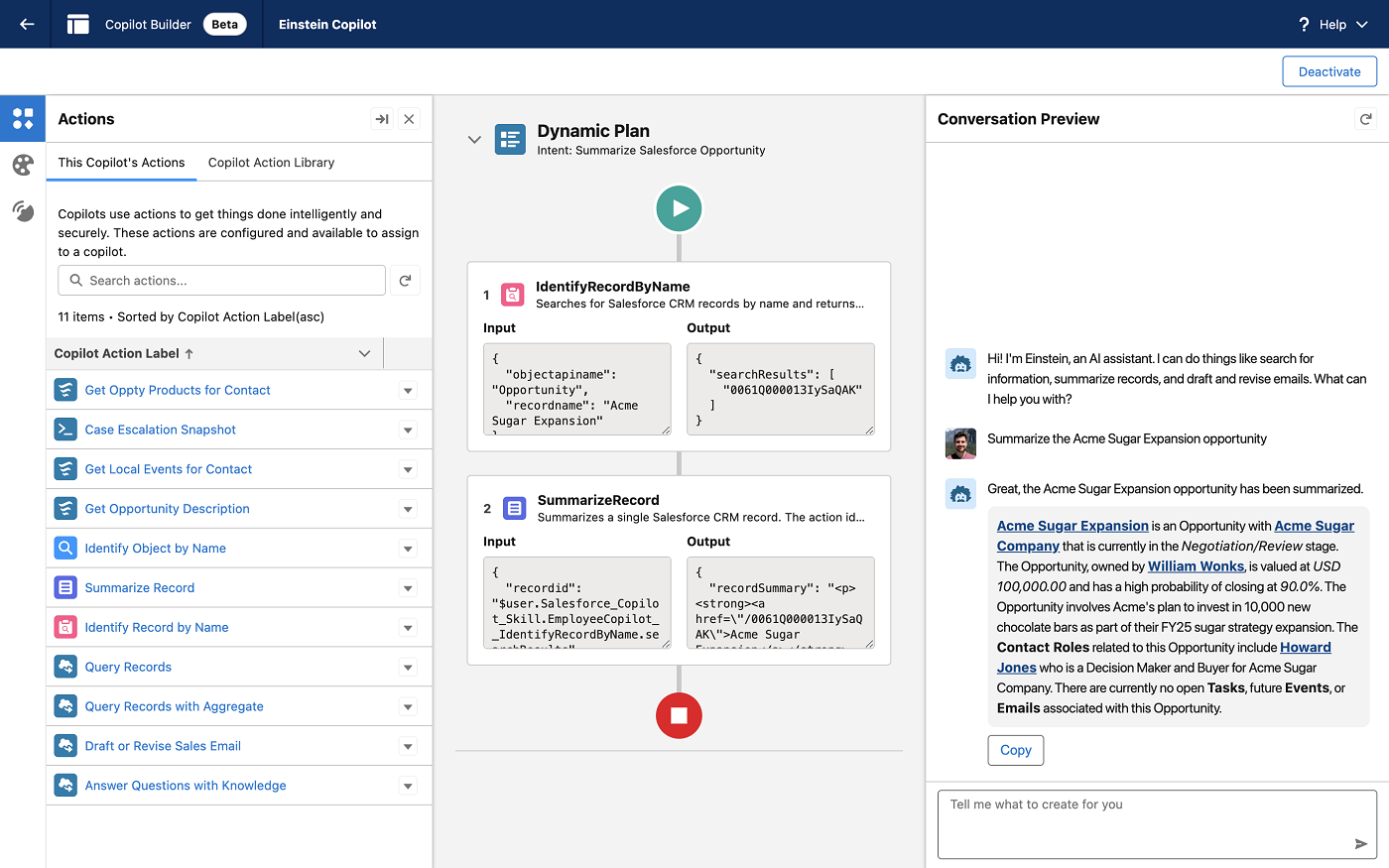
Einstein 1 Studio (Figure A) is a set of low-code AI tools for building, customizing and embedding the Copilot AI assistant into an organization’s custom Salesforce data sets.
Figure A: An example of building a Copilot, a generative AI assistant, in Einstein 1 Studio’s Copilot Builder. Image: Salesforce
“The Einstein 1 platform is how every business can build trusted AI apps of the future built on trusted data and on metadata,” said Clara Shih, chief executive officer of Salesforce AI, during a press briefing on March 4.
Einstein 1 Studio includes three main functions:
Copilot Builder: Lets developers create custom AI actions, instructing Copilot what action to take in the course of work. Copilot Builder is now in beta.
Prompt Builder: Lets admins and developers embed custom generative AI prompts in their workflows. Prompt Builder is now in general availability.
Model Builder: A platform to build or import generative AI models into Salesforce workflows. Model Builder can integrate a wide variety of popular models, including OpenAI and Google Cloud’s Vertex AI. It is now in general availability.
All three functions of Einstein 1 Studio are available globally in multiple languages. Global sovereignty options will become available on a rolling timeline “in the coming weeks and months,” said Shih.
Salesforce’s effort to use company data with AI safely
Salesforce’s plan is to empower developers to work with generative AI, mostly using prompts, and to customize the use of generative AI with private business data. Salesforce emphasizes that, depending on a customer’s needs and preferences, Einstein Copilot and the custom functions built in Einstein 1 will use only proprietary data, not feeding any information out into public models. The idea is to feed information that is already used by an organization in Salesforce, such as IoT devices or data lakes and warehouses stored with Snowflake or Databricks, into Einstein 1 Data Cloud for AI-powered CRM.
SEE: AI helps build a “data culture,” according to one of the digital transformation lessons from Salesforce World Tour Australia. (TechRepublic)
“When I talk to CTOs, they’re saying I want to give myself the flexibility to move with the future as this technology unfolds,” said Alice Steinglass, executive vice president and general manager of Salesforce Platform, during the press briefing. “And I think it’s part of a larger strategy of having multiple layers that fit together.”
She defines the multiple layers as:
A trust layer.
An open data strategy.
Large language models.
AI functionality embedded into the flow of work.
Slack Developer Program provides more options for building Slack apps
Salesforce announced a new developer portal for Slack. The portal is a space to test ideas, explore beta features, access tooling and find resources. The Slack Developer Program is open to developers globally starting March 6.
The Slack Developer Program offers three tools:
Sandboxes, up to 10 Salesforce Enterprise Grid instances at a time.
New custom functions in Bolt for Python or JavaScript.
Support for scripting with the Slack command line interface.
Tech leaders push AI, while some IT pros struggle with implementation
Salesforce showed research conducted by Vanson Bourne and Salesforce among 600 IT pros in Australia, France, Germany, the U.K. and the U.S. between December 2023 and January 2024.
Overall, the report found a disconnect between the needs of business leaders and IT regarding generative AI. Of the IT pros surveyed, 79% say business leaders are “increasingly pressuring them to implement AI.” Balancing speed, business value and security when implementing new tech is a struggle for 48% of those surveyed.
Meanwhile, generative AI is the top technology IT feels pressured to onboard quickly, and 88% of IT pros are unable to support all AI-related requests.
The top five challenges for IT when it comes to implementing AI are:
Lack of relevant skills.
Data security.
Data quality.
Slowing of other initiatives.
Increased cost.
Surveyed IT pros rank security as their top priority when it comes to new device implementation, while business leaders rank speed of implementation as their top priority.
I've been using Android since its first iteration and I remember those early releases felt like they weren't quite ready for the masses. They were clunky, poorly designed, bereft of certain features, and prone to stalling or freezing.
Eventually, Android found its footing and has become one of the most flexible, user-friendly mobile OSes on the market. That doesn't mean Google hasn't been prone to making a misstep here and there.
Also: March Pixel feature drop delivers 10 exciting upgrades to Google's phone and watch
Such is the case with the migration from Assistant to Gemini.
If you've not been keeping up with Google's intention, its goal is to evolve the digital assistant that's been a part of Android for years to an AI-driven technology. What was originally called Bard was renamed and, in a very short time, was rolled out to some Pixel devices.
The idea was to make this change as seamless as possible. Instead of forcing users to dramatically change how they work with their devices, they could still use the tried and true, Hey, Google hot phrase to launch the AI-centric assistant, only they'd enjoy far more power. After all, isn't that the heart of AI?
Also: How to use Gemini: Everything you should know
Yeah, that's a trick question.
So, Google did its Googliest with Gemini, and some Pixel phones were given the gift of an AI assistant.
Naturally, because I write about this stuff, I was happy to give it a go. I assumed if Google was rolling it out, it was ready for prime time.
Funny that… Almost immediately, I discovered Gemini wasn't quite as capable as Assistant. I tried to create a calendar appointment, only to be informed that Gemini wasn't capable of connecting to the Google Calendar.
Send a text? Nope. Compose an email? Are you kidding?
At the time, Gemini could answer questions and take care of some very basic tasks, but it simply wasn't nearly as capable as Assistant. Granted, bit by bit, with each update, Gemini seems to be picking up more features but it's still lacking.
Also: I asked Gemini and GPT-4 to explain deep learning AI, and Gemini won hands down
For example, I used to be able to create Calendar appointments with Assistant. Now, when I attempt to do the same thing, I get a warning with an explanation that doesn't quite make sense. The warning tells me to tap on my avatar in the app, choose Extensions in the drop-down menu, and turn on the Workspace extension.
It took me a while to realize that message was referring to the Gemini app. I'd become so accustomed to configuring Assistant from within the Google app that I immediately defaulted to that app. So, I opened the Gemini app, tapped my profile icon, tapped Extensions, and enabled Google Workspace.
Why was that not enabled by default?
Ah, but there's a bit of a snag here. Let me backpedal for a bit.
One of the reasons why I've stopped using Google Drive for all of my work is that I don't necessarily trust that Google (or some third party) won't use my work to train its AI models. Given that I'm also a novelist, keeping my work safe from such things is rather important to me.
So, when I go to enable the Google Workspaces extension, I see that will "Summarize, find, and get quick answers from your own content to fuel your personal journey".
Also: I've published 60 novels — and these 5 free writing tools helped make it possible
That summary doesn't exactly instill confidence in me that Google isn't going to use my content for its own purposes. And because the Google Workspaces extension requires access to Gmail, Drive, and Docs, I'm most likely not going to enable the extension. Because of that, I'll miss out on features that were once part of Google Assistant.
How is that okay?
Essentially, Google is saying that, unless you give our AI access to your content, you won't get the most out of the new Android assistant. I guess I'm out of luck.
Anyone who takes their privacy seriously and doesn't want AI to have access to the totality of the things they've saved to Google Drive, written with Google Docs, or communicated with Gmail, will find themselves in the same boat.
Sadly, this limits Gemini (currently) to Google Flights, Google Hotels, Google Maps, and YouTube, which is pretty limiting. I'm guessing, if I leave the Workspace extension disabled, I'll find Gemini less than helpful and I'm just going to have to be OK with that.
Also: ChatGPT vs. Microsoft Copilot vs. Gemini: Which is the best AI chatbot?
The silver lining to this is that I tend to default to manually creating appointments in Google Calendar and have no desire to allow AI access to my content. In the end, if I want to stick with Android, I'll have to come to grips that it might be less efficient for me in the future. And the more embedded Gemini gets, I'm guessing the more access it will require.
Maybe I'm wrong. Honestly, I hope I'm wrong because I'd hate to have to switch to iOS at this point.