
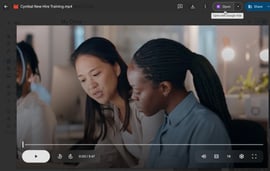
Editing videos you’ve saved to Google Drive just got a lot easier. As of August 21, you can open video files directly in Google Vids, the company’s browser-based editor, without downloading anything first. That means trimming clips, adding music, or layering text is just a click away when you preview a video in Drive.
No extra apps required
Until now, Drive was just a place to store and play back your videos. If you wanted to make changes, you had to download the file and open a separate app. With the new Vids shortcut, you’ll see an Open button when previewing supported videos. Click it, and the file launches inside Google Vids where you can make quick edits.
When you’re done, the finished clip must still be exported out of Vids, but the process cuts out a lot of back-and-forth.
Learn more about Google’s recent AI tool additions.
What you can do
Google Vids isn’t meant to replace a professional editor, but it covers these common needs:
- Trim long clips
- Add music or captions
- Layer text or simple graphics
It’s the kind of functionality that makes it easier to polish up a vacation highlight reel, a class project, or a birthday video before sharing with friends or family.
Limits to Google Vids
There are some catches. Videos must be under 35 minutes and smaller than 4 GB. The Vids shortcut supports popular formats like MP4, QuickTime, OGG and WebM.
The feature is rolling out gradually and may take up to 15 days to appear. It’s on by default for most Workspace and Education users, but it can be disabled by administrators.
Why this matters
Google has been steadily adding media features to Drive. Last year, it updated the video player, and now it’s building in editing to reflect the way people expect to work with media today — fast, lightweight tools built into the apps they already use.
For everyday users, it means one less app to juggle. For students, freelancers, or anyone who saves clips in Drive, it makes the platform more than just a storage locker.
And while this first step focuses on basic edits, Google could easily expand the feature with AI tools, like automatic subtitles or language translations, to keep pace with what people are used to on TikTok and Instagram.