E2E Cloud, a leader in GPU cloud solutions, has entered a strategic partnership with Atal Incubation Centre – Nalanda Institute of Technology Foundation (AIC-NITF), backed by the Atal Innovation Mission under NITI Aayog.
This collaboration aims to enhance innovation and entrepreneurship in India, particularly in AI.
Through a newly signed MoU, E2E Cloud will provide its state-of-the-art GPU infrastructure and expertise to startups incubated at AIC-NITF. This includes access to 64 H100 GPU super pods, expandable to 2048 GPUs, which will support startups in their innovation and scaling efforts.
Tarun Dua, CEO of E2E Cloud, highlighted the importance of this partnership, stating, “Our collaboration with Atal Incubation Centre – Nalanda embodies our shared commitment to nurturing technological innovation. By providing startups at Nalanda with advanced GPU resources at affordable rates, we aim to reduce the barriers for startups to build and scale.”
AIC-NITF, dedicated to promoting innovation and entrepreneurship, will leverage E2E Cloud’s resources to help startups tackle complex challenges and introduce groundbreaking solutions. Durga Prasad Gouda, CEO of AIC-NITF, remarked, “This collaboration with E2E Cloud aligns perfectly with our mission to nurture technology-led startups. Access to cutting-edge GPU technology will enable our incubatees to accelerate their research and development efforts, paving the way for impactful solutions”
Furthermore, E2E Cloud announced a special initiative for incubators: the first 25 incubators will receive GPU credits worth up to 2 lakh rupees each, enhancing their ability to leverage advanced technology and expand their operations.
The post E2E Cloud and AIC-NITF Partner to Boost Indian AI Startup Ecosystem appeared first on AIM.
From being a single-room feature-development centre in 1997 to a global enterprise and the second-largest arm of Adobe, Adobe India, now with over 7,000 employees, has come a long way.
“India is one of the fastest growing markets for Adobe right now. The growth rate of the enterprise business, which is enabling businesses to be digital, is utterly massive,” Prativa Mohapatra, VP and MD of Adobe India, told AIM in an exclusive interaction last week.
The company has positioned itself as a key player in India, assisting numerous businesses across various sectors – BFSI, automotive, retail, and aviation – in adopting digital solutions. This includes major financial institutions such as Kotak Mahindra Bank, HDFC Bank, ICICI Lombard, and Bajaj Allianz General Insurance, as well as prominent retail brands like Tata Cliq, Unilever, Titan, and Aditya Birla Fashion.
Two days ago, the company announced its plans to launch a data centre in India later this year, hosting applications like Adobe Real-Time Customer Data Platform and Adobe Journey Optimiser.
This initiative, aimed at meeting local data residency laws and improving performance, will enable Indian enterprises to offer real-time, personalised customer experiences more efficiently.
According to the recent Intel-IDC report, India is on track to become a major global AI hub, with AI investment projected to grow faster than in any of the seven other markets analysed, including Australia, Japan, and Korea.
By 2027, India’s AI market is expected to reach $5.1 billion.
Mohapatra shared that Tata Capital’s monthly website visitors have increased from 250,000 to 2.5 million,thanks to Adobe Experience Cloud. It has also reduced the time required to launch new digital content by as much as 90%.
Similarly, by leveraging Adobe Campaign, ICICI Lombard has been able to deliver targeted marketing messages and customised service scripts. “This approach has paid dividends, with digital strategies driving approximately a 20% increase in online retention and influencing about 55% of renewals in offline business verticals,” she added.
Tackling Copyright Issues
Since the beginning of text-to-image models, there has been ongoing debate over the legality of scraping personal data to train AI models without a licence. Many artists have filed lawsuits against Stability AI, Midjourney, and Runway for using their copyrighted works without permission to train these AI models, but Adobe has remained unaffected.
Along with its own stock images, Adobe used exclusive fully-licensed images, making up the dataset used to train the model behind Firefly, absolving it of any legal or ethical issues. While introducing Generative Fill, it also added metadata to its images and is trained on its own Adobe Stock images, protecting creators’ rights.
Meanwhile, Adobe is also a part of the Coalition for Content Provenance and Authenticity (C2PA) along with major organisations like OpenAI, BBC, Intel, Microsoft, Google, Publicis Groupe, Sony, and Truepic.
However, when it first released the NVIDIA Picasso-based Firefly, the user feedback was largely negative from the community.
Dr Jim Fan from NVIDIA highlighted that Adobe’s strict approach to avoiding copyrighted content may have led to inferior outputs compared to Midjourney, which has access to a vast and diverse dataset from scraping over five billion images online.
Why Adobe Firefly looks bad compared to Midjourney -Adobe trained on stock, public domain and licensed images Mj is trained on -Artists art -Photographers photos -Models and Actors faces -Public and private social media data (Probably) -Everything it gets its grubby hands on https://t.co/i5BcQUMBbL
— Eric Bourdages (@EZE3D) April 3, 2023
“We want to use AI responsibly and prioritise the protection of intellectual property,” said Mohapatra. “We employ measures like content credentials, which have become the industry standard for digital content provenance.”
Another controversy along similar lines was whether AI-powered tools like those provided by Adobe or Canva would replace human jobs. Short answer: No.
“Fortunately, individuals serve as the primary impetus behind generative AI innovation,” Mohapatra told AIM. This allows Adobe to ensure that its AI deployments are accessible, safe, and well-regulated, leading to equitable and impactful outcomes.
Sharing a similar stance is the Australian design studio Canva. When we spoke to Canva’s head of AI products Danny Wu earlier this year, he said:
“We believe that human creativity is at the core of the design. AI will take it to new heights, not replace it.”
Adobe Barely Made it Out Alive in the GenAI Race
Adobe arrived a little late to the generative AI party, as 2022 saw the rise of generative AI models like Midjourney, Stable Diffusion, and DALL.E, which had already disrupted several creative fields.
The same year, Adobe faced major challenges, including the cancellation of its $20 billion Figma deal, pressures to adapt its business model, artist copyright issues, and more.
Cut to the present, Adobe has become synonymous with generative AI.
The tech giant behind popular products like Adobe Photoshop and Adobe Premiere saw its market value rise from $271.63 billion in January 2023 to $276 billion in January 2024, making it the 34th most valuable public company globally. This growth aligned with Adobe surpassing $5 billion in revenue for the first time in Q4 2023.
Apart from profits, the company diversified its portfolio and positioned itself as an all-round generative AI powered enterprise software platform. So, it began with bringing Firefly to Photoshop.
Adobe entered the generative AI race in March 2023 with Adobe Firefly in collaboration with NVIDIA.
In February 2023, it changed the game by introducing Generative Fill, which allows users to add, remove, or modify image elements based on text prompts.
“Traditionally, creating content assets like visually appealing product descriptions for websites, social media posts, or ad copy can be time-consuming and requires human intervention at large.
“Generative AI automates these tasks, allowing marketers to bring variation in content, personalise at scale, and automate repetitive tasks,” Mohapatra said.
She told AIM that Adobe’s integration of generative AI focuses on three primary areas within its cloud products: Adobe Experience Cloud, Creative Cloud, and Document Cloud to address the need for faster and more effective content workflows, directly benefiting enterprise customers by reducing time-to-market and enabling personalised customer interactions on a large scale.
The company wants to democratise generative AI-powered content creation with product integrations. Its strategy for the same involves a careful blend of user feedback and gradual deployments, focusing on integrating AI into existing workflows to improve user productivity and creativity.
“We focus on looping in user feedback and progressive rollouts over large-scale deployments,” said Mohapatra, adding that it is to make sure that the introduction of AI enhances rather than disrupts current practices.
To facilitate this, the company has also partnered with additional tech giants like Microsoft, Google, and for their LLMs. In the second half of last year, it acquired Bengaluru-based AI startup Rephrase AI to bolster its AI ambitions.
Now, Adobe will integrate third-party AI tools, including OpenAI’s Sora, into Premiere Pro. Partnering with AI providers like OpenAI, RunwayML, and Pika, it aims to offer users flexibility in choosing AI models for their workflows.
The post India is One of the Fastest Growing Markets for Adobe appeared first on AIM.
Cloud computing has promoted the rise of Software as a Service (SaaS) in the world of business. Software as a Service (SaaS) has become the preferred choice for enterprises of all sizes. SaaS applications provide numerous advantages over traditional software, including affordability, scalability, and ease of use. Businesses can use an internet connection to gain access to powerful products and services that streamline workflows, improve collaboration, and raise productivity. This reduces the need for high initial expenses and costly installations, allowing firms to tailor their resources to their individual requirements. In this blog, we will learn about how to develop an AI-enabled SaaS Product.
What is an AI SaaS (AIaaS)?
AI SaaS (AIaaS) stands for Artificial Intelligence as a Service, a cloud-based delivery model in which AI capabilities and functionalities are made available to customers on a subscription basis. When compared to traditional AI software solutions, which require a large initial investment in infrastructure and expertise, AIaaS offers scalable and easily accessible AI resources without requiring expensive development and maintenance.
Artificial Intelligence as a service (AIaaS) helps businesses of different types and sizes to stay competitive in the industry by offering them AI-powered tools and functionality. Businesses using an AI SaaS model can improve their products and services by leveraging a variety of AI technologies such as machine learning, natural language processing, computer vision, and predictive analytics. Organizations can speed time-to-market, save development costs, and focus on key business objectives by leveraging AI features via APIs, SDKs, or pre-built models housed on cloud platforms.
How to develop an AI SaaS product: Step-by-step
Businesses are rapidly using AI-powered Software as a Service (SaaS) solutions in today’s digital environment to improve customer experiences, streamline processes, and achieve a competitive edge. Scalability, efficiency, and creativity are provided by integrating artificial intelligence (AI) into SaaS products. However creating a SaaS product with AI capabilities needs careful design, implementation, and ongoing development. Here are the step-by-step guide outlines and processes involved in developing an AI-powered SaaS solution.
#Step 1: Define your AI-powered SaaS product, vision, and goals
Before you start developing your product, it’s important to carefully define its vision and objectives. Ask yourself these questions:
What problem does your AI SaaS product solve?
Who are your target users and what are their pain points?
What unique value proposition does AI bring to your SaaS solution?
What are your business goals and KPIs (Key Performance Indicators)?
#Step 2: Conduct market research and identify opportunities
Examine the competitive environment, current AI SaaS services, and developing trends by conducting market research. Find the gaps and possibilities that your AI-powered SaaS solution can take advantage of. Take into account elements including client preferences, industry-specific requirements, and technology developments.
#Step 3: Define AI capabilities and use cases
Define the unique AI capabilities and use cases that will set your SaaS offering unique. Common AI applications in SaaS are:
Natural Language Processing (NLP) for text and sentiment analysis.
Computer Vision for picture identification and object detection.
Machine Learning algorithms for predictive analytics and recommendation engines.
Speech Recognition for Voice-Enabled Interfaces and Virtual Assistants.
Align AI capabilities with your product vision and user needs to create significant value.
#Step 4: Data collection and preparation
AI algorithms use high-quality data for training and inference. Determine the data sources needed for your AI SaaS solution and create processes for collecting data, cleaning, and preprocessing. Ensure compliance with data privacy regulations such as GDPR and CCPA in order to safeguard user privacy and foster trust.
#Step 5: Choose the right AI technologies and tools
Choose AI frameworks, libraries, and tools that are compatible with your technical requirements, team skills, and scalability goals. TensorFlow, PyTorch, scikit-learn, and OpenAI’s GPT models are among the most widely used AI technologies. When selecting AI solutions, consider performance, adaptability, and community support.
#Step 6: Develop and train AI models
Build AI models based on specific use cases and data collection. Depending on the complexity of the AI algorithms, you may require knowledge in machine learning, deep learning, or reinforcement learning. Experiment with various topologies, hyperparameters, and training datasets to improve model performance and accuracy.
#Step 7: Integrate AI into your SaaS platform
Integrate AI capabilities seamlessly into your SaaS platform for a consistent user experience. Use APIs (Application Programming Interfaces) and SDKs (Software Development Kits) given by AI providers to facilitate integration. Create user-friendly interfaces and workflows that highlight the value of AI technologies while maintaining usability and accessibility.
#Step 8: Implement scalable infrastructure and deployment
Make sure your AI-powered SaaS application is designed on a scalable and reliable infrastructure that can handle increasing user demand and data volumes. Use cloud services like Amazon Web Services (AWS), Microsoft Azure, or Google Cloud Platform (GCP) to provide flexible computing resources and managed services. Implement DevOps principles for automated testing, continuous integration, and deployment to shorten delivery times.
#Step 9: Monitor performance and iterate
Monitor the performance of your AI SaaS product in production to uncover areas for optimization and improvement. Collect user feedback, assess usage numbers, and iterate to meet changing user needs and market dynamics. A/B testing and experimentation can be used to validate new features and updates before widespread implementation.
#Step 10: Ensure security and ccompliance
Prioritize security and compliance when creating and deploying an AI-powered SaaS application. Use strong encryption, access controls, and authentication measures to protect sensitive data. Conduct frequent security audits and vulnerability assessments to reduce risks and ensure regulatory compliance.
#Step 11: Provide ongoing support and maintenance
Provide full support and maintenance services to ensure that your AI SaaS solution is reliable, performant, and secure. Create channels for user support, troubleshooting, and feature requests to increase customer happiness and loyalty. Proactively resolve bugs, issues, and emerging threats to ensure a great user experience.
#Step 12: Continuously innovate and evolve
Stay ahead of the competition by constantly building and expanding your AI-powered SaaS offering. Invest in R&D to discover new AI technologies, functionalities, and use cases. Create a culture of experimentation, cooperation, and learning within your team to promote innovation and provide value to customers.
Advantages of integrating AI with SaaS
SaaS3 is utilizing AI to boost productivity, automate tedious work, and offer insightful predictions. Combining AI with SaaS enhances customer assistance, leads to more targeted marketing, responds to consumer demand, and makes the most of SaaS features. Around one-third of SaaS companies are utilizing AI at present, and by 2025, it’s expected that AI will be included into almost all new software offerings. Furthermore, the use of AI in SaaS product roles is growing quickly.
Features
AI (Artificial Intelligence)
SaaS (Software as a Service)
AI-SaaS
Definition
A branch of computer science specialized in developing intelligent agents capable of learning, reasoning, understanding, and autonomous action.
In SaaS, software programs are delivered over the internet via subscription and can be accessed through web browsers or mobile apps without requiring local installation.
Artificial intelligence (AI) features are being integrated into SaaS products to provide task automation, experience personalization, and enhanced decision-making.
Used Technology
Machine learning, natural language processing, deep learning, computer vision, and so on.
Web development, cloud computing, and application programming interfaces (APIs).
SaaS delivery model paired with AI technologies.
Benefits
Automation of tasks, better decision-making, tailored experiences, and higher productivity.
Automatic updates, scalability, cost, and user-friendliness.
Combines the automation, personalization, scalability, and affordability of SaaS with AI.
Focus
The creation of systems that replicate human cognitive capacities for a range of applications.
By offering software services online, local installation and maintenance are eliminated.
Integrating AI-powered technologies to improve the capabilities of current SaaS apps.
User
Researchers, developers, and companies looking to enhance their decision-making processes or automated tasks.
Individuals and businesses of various sizes require different software programs.
Companies seeking features for their SaaS apps that are boosted by AI.
Future Trends
Innovations in quantum computing and ethical AI, as well as larger industry adoption.
Enhanced capacity for integration, an emphasis on security, and AI-powered features.
Expansion of AI capabilities and easy interaction with SaaS.
Wrapping up
Establishing an AI-powered SaaS product necessitates a methodical approach, beginning with the definition of the vision and goals and progressing via continual iteration and improvement. By properly leveraging AI technology in AI development services, you can create a compelling SaaS solution that drives business growth, improves user experiences, and maintains competitiveness in a dynamic environment.
AI partnerships took top billing at Dell Technologies World 2024, held in Las Vegas from May 20 to May 23. Major news from the conference so far included:
Five new AI-capable laptops.
More integrations between NVIDIA and Dell’s AI Factory, Dell’s AI enablement program.
New partnerships with Hugging Face, Meta and Microsoft.
Dell reveals AI capabilities on XPS, Latitude and Inspiron Laptops
New Dell PCs are getting in on the generative AI boom, with the Qualcomm Snapdragon X Series processor coming to five new models:
XPS 13, coming later this year with preorders beginning May 20 in the U.S.. The price starts at $1,299. Preorders start May 21 in the U.K., Germany, France and Japan.
Inspiron 14, coming later this year with price to be announced.
Inspiron 14 Plus coming later this year, with preorders beginning May 20 in the U.S.. The price starts at $1,099. Preorders start May 21 in the U.K., Germany, France and Japan.
Latitude 5455, coming later this year with price to be announced.
Latitude 7455, coming later this year with price to be announced.
The Qualcomm processor brings 45 NPU TOPS, essentially meaning 13 billion parameter large language models like Meta’s medium-sized model Llama 2 could run on-device on these PCs, Dell said.
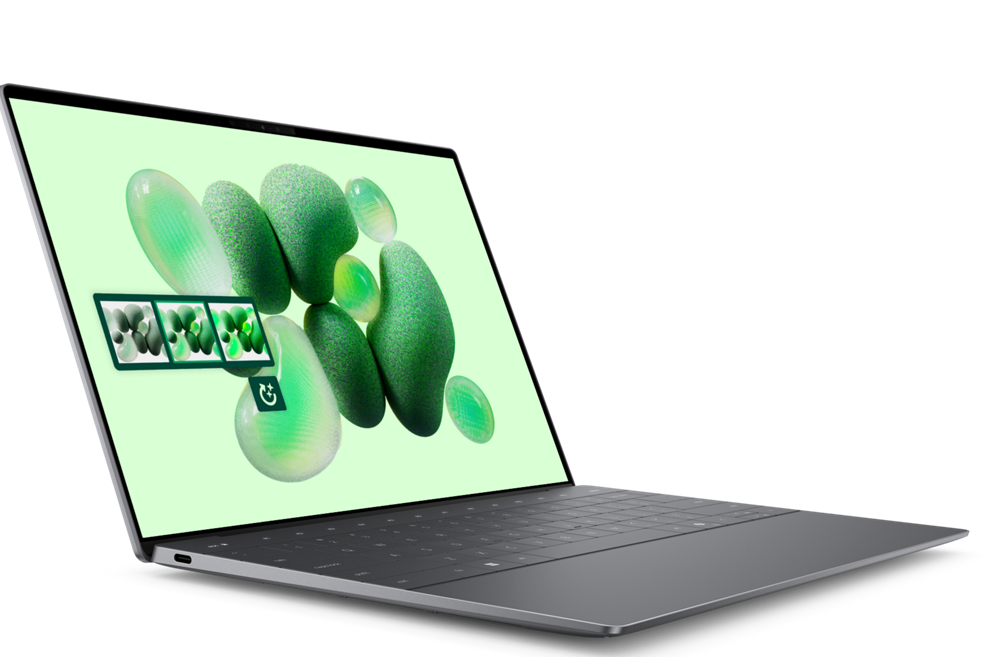
The Dell XPS 13 laptop can run large language models. Image: Dell
AI Factory is a Dell-guided environment for AI deployment
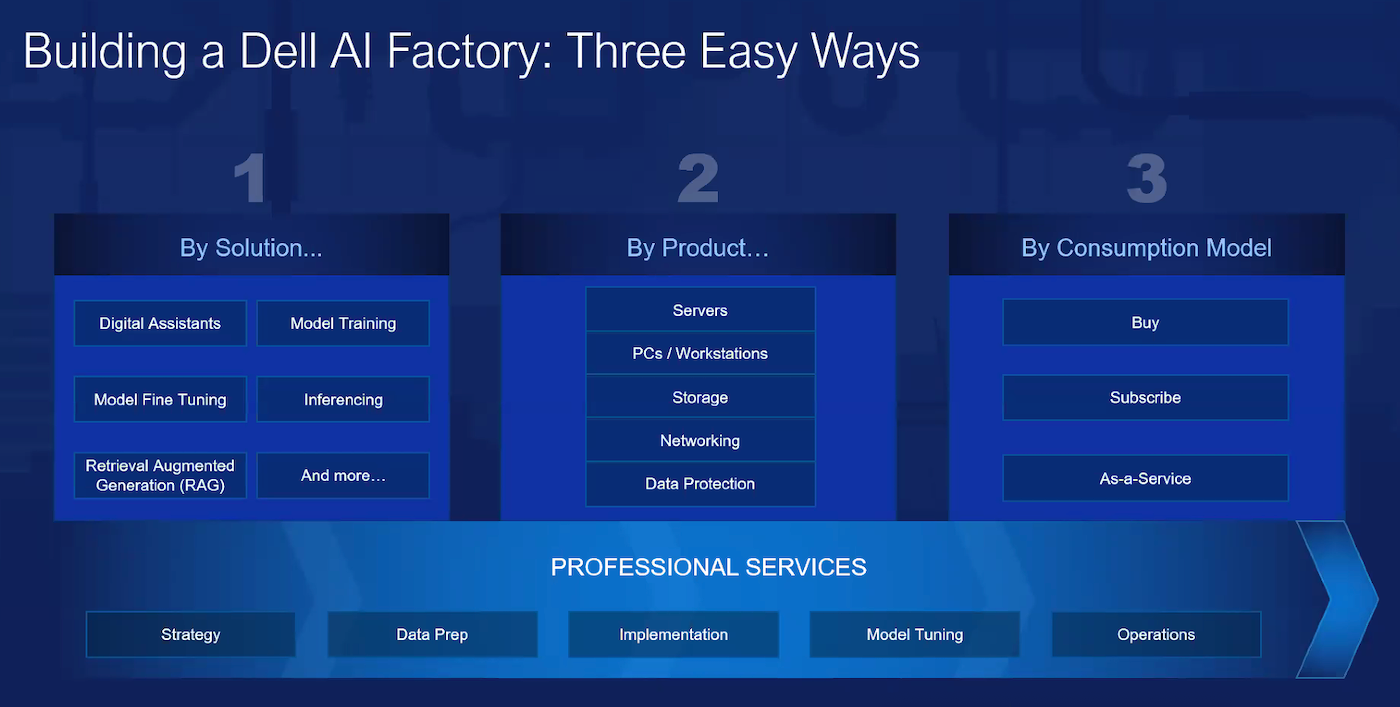
Speaking at a news pre-briefing on May 16, Dell Senior Vice President of Product Marketing Sam Grocott pointed out the AI Factory isn’t a single SKU or product; instead, it’s a roadmap of potential products based on the customer’s use case.
This graph shows different ways to approach the AI Factory concept depending on the use case or needs of the customer. Image: Dell
Professional services from Dell will now include Microsoft Copilot, Copilot for Sales, Copilot for Security and GitHub Copilot. This partnership is part of an effort to make it easier for customers to discover, validate, plan and design generative AI solutions that attach to the tools and workflows teams already use.
Services for digital assistants are designed “to help customers deliver, in a turnkey fashion, digital assistants wherever it makes sense for their business,” said Dell Senior Vice President of Product Marketing Varun Chhabra.
AI Factory With NVIDIA
Dell also offers, separately, AI Factory With NVIDIA, which uses NVIDIA AI, infrastructure and a high-speed NVIDIA networking fabric. Since first announcing the partnership at NVIDIA GTC in March, Dell has added:
Accelerator services for retrieval-augmented generation.
Professional services for digital assistants.
NVIDIA NIM.
Automated deployment of NVIDIA solutions.
Dell PowerEdge.
Dell NativeEdge.
The accelerator services for RAG “enables developers to experiment with and explore generative AI in a convenient mobile format for easy demonstration within their organizations,” said Chhabra.
SEE: Humans outperform AI on many tasks, Stanford researchers found in a study of AI trends in business.
AI heads to the edge
Another new manifestation of the Dell/NVIDIA partnership is that NVIDIA Blackwell GPUs are coming to Dell PowerEdge servers. Specifically, the Dell PowerEdge XE9680L server will have eight NVIDIA Blackwell 200 GPUs and direct liquid cooling.
NVIDIA AI Enterprise software is shaking hands with Dell NativeEdge, which will be able to automate the NVIDIA software right in the Dell edge orchestration platform.
Availability dates for the Dell PowerEdge XE9680L server and other edge hardware had not been released at the time of writing.
Expanded partnerships with Hugging Face, Meta and Microsoft
Dell and Hugging Face expanded their partnership with the Dell + Hugging Face Enterprise Hub, a straightforward pathway with which to deploy open source AI models from Hugging Face to Dell infrastructure.
Dell PowerEdge servers built with Meta AI in mind
With Meta, Dell has optimized select PowerEdge servers for Llama 3. The PowerEdge XE9680 in particular has 8GPU support for better performance and safety when running Llama 3. Dell will publish deployment guides for Llama 3, guiding customers on how to deploy and tune the model.
Azure AI comes to Dell APEX Cloud Platform
With Microsoft, Dell is adding Azure AI capabilities on-prem to the Dell APEX Cloud Platform with Microsoft Azure, the automated infrastructure for linking public and private clouds. Organizations will be able to use Azure AI with the same APIs they may already be used to in Azure; this could make it easier for them to use AI vision, translation and speech services, among other services.
PowerStore and Dell APEX receive upgrades
AI was present across other product portfolios, too. Other major announcements from Dell Technologies World included PowerStore Prime, a performance boost and set of new enhancements for the PowerStore all-flash storage platform. PowerStore customers will receive PowerStore Prime through a free software update. PowerStore Prime brings new synchronous replication for file and block, enhancements to the metro volume feature, and custom, reusable policies for data protection.
Dell APEX has received an AI add-on: AIOps. APEX AIOps is an IT operations management tool meant to increase observability in on-premises or multicloud infrastructure, application observability and incident management through artificial intelligence and machine learning. APEX AIOps comes with a chatbot called AIOps Assistant, which can answer questions about every Dell infrastructure product. Dell APEX AIOps is available in Dell APEX Navigator, a service for block and file storage in the public cloud or persistent storage in Kubernetes.
Release dates for the PowerStore and APEX upgrades were not available at the time of writing.
TechRepublic is covering Dell Technologies World 2024 remotely.
With 23 top projects, 96 subprojects, and 6000 lines of Python code, this vendor-neutral coursebook is a goldmine for any analytic professional or AI/ML engineer interested in developing superior GenAI or LLM enterprise apps using ground-breaking technology, in little time.
This is not another book discussing the same topics that you learn in bootcamps, college classes, Coursera, or at work. Instead, the focus is on implementing solutions that address and fix the main problems encountered in current applications. Using foundational redesign rather than patches such as prompt engineering to fix backend design flaws.
Sub-LLM enriched with specialized knowledge graph
You will learn how to quickly implement from scratch applications actually used by Fortune 100 companies, outperforming OpenAI and the likes by several order of magnitudes, in terms of quality, speed, memory requirements, costs, interpretability (explainable AI), security, latency, and training complexity.
Content
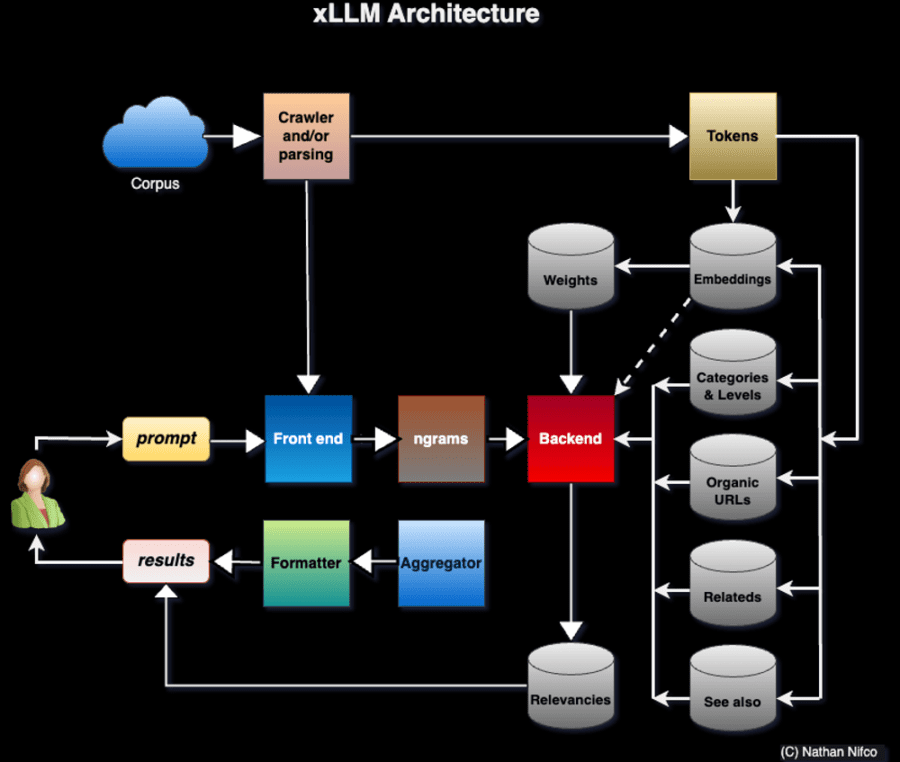
With tutorials, enterprise-grade projects with solutions, and real-world case studies, this coursebook covers state-of-the-art material on GenAI, generative adversarial networks (GAN), data synthetization, and much more, in a compact format with many recent references. It includes deep dives into innovative, ground-breaking AI technologies such a xLLMs (extreme LLMs), invented by the author.
Constrained synthetization of circle dataset
The focus is on explainable AI with faster, simpler, high-performance, automated algorithms. For instance: NoGAN, new evaluation metrics, xLLM (self-tuned multi-LLM based on taxonomies with application to clustering and predictive analytics), variable-length embeddings, generating observations outside the training set range, fast probabilistic vector search, or Python-generated SQL queries. The author also discusses alternatives to traditional methods, for instance to synthesize geospatial data or music.
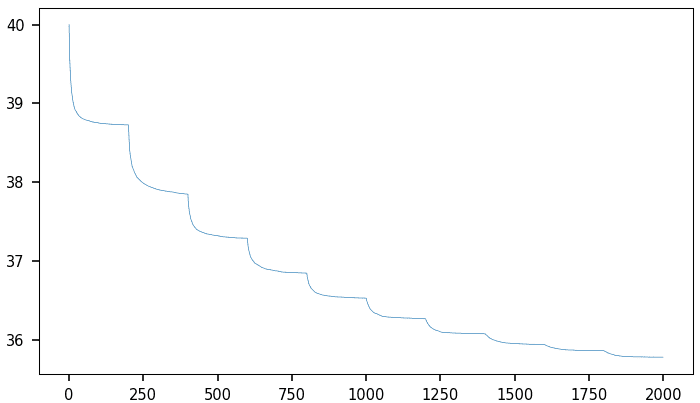
GenAI: adaptive loss function to boost convergence
Some of the topics covered include:
Fast, high-quality NoGAN synthesizer for tabular data
Spectacular use of GenAI evaluation as an adaptive loss function
Synthesizing DNA sequences with LLM techniques
Creating high quality LLM embeddings
Fast probabilistic nearest neighbor search (pANN)
Building and evaluating a taxonomy-enriched LLM
Predicting article performance and clustering using LLMs
Introduction to Extreme LLM and Customized GPT
Comparing xLLM with standard LLMs
Note to Instructors
This textbook is an invaluable resource to instructors and professors teaching AI, or for corporate training. Also, it is useful to prepare for job interviews or to build a robust portfolio. And for hiring managers, there are plenty of original interview questions. The amount of Python code accompanying the solutions is considerable, using a vast array of libraries as well as home-made implementations showing the inner workings and improving existing black-box algorithms. By itself, this book constitutes a solid introduction to Python and scientific programming. The code is also on GitHub.
How to Get Your Copy?
Published in May 2024 by GenAItechLab.com, 206 pages. Includes two glossaries (GenAI and LLM), an index, modern bibliography, dozens of illustrations and tables, and various clickable references both internal and external. Easy to browse in Chrome, Edge or any PDF viewer. See table of contents, here.
The book can be purchased here.
Author
Vincent Granville is a pioneering GenAI scientist and machine learning expert, co-founder of Data Science Central (acquired by a publicly traded company in 2020), Chief AI Scientist at MLTechniques.com and GenAItechLab.com, former VC-funded executive, author (Elsevier) and patent owner — one related to LLM. Vincent’s past corporate experience includes Visa, Wells Fargo, eBay, NBC, Microsoft, and CNET. Follow Vincent on LinkedIn.
The development of OpenAI's ChatGPT-4o and Google's Astra marks a new phase in interactive AI agents: the rise of multimodal interactive AI agents. This journey began with Siri and Alexa, which brought voice-activated AI into mainstream use and transformed our interaction with technology through voice commands. Despite their impact, these early agents were limited to simple tasks and struggled with complex queries and contextual understanding. The inception of ChatGPT marked a significant evolution of this realm. It enables AI agent to engage in natural language interactions, answer questions, draft emails, and analyze documents. Yet, these agents remained confined to processing textual data. Humans, however, naturally communicate using multiple modalities, such as speech, gestures, and visual cues, making multimodal interaction more intuitive and effective. Achieving similar capabilities in AI has long been a goal aimed at creating seamless human-machine interactions. The development of ChatGPT-4o and Astra marks a significant step towards this goal. This article explores the significance of these advancements and their future implications.
Understanding Multimodal Interactive AI
Multimodal interactive AI refers to a system that can process and integrate information from various modalities, including text, images, audio, and video, to enhance interaction. Unlike existing text-only AI assistants like ChatGPT, multimodal AI can understand and generate more nuanced and contextually relevant responses. This capability is crucial for developing more human-like and versatile AI systems that can seamlessly interact with users across different mediums.
In practical terms, multimodal AI can process spoken language, interpret visual inputs like images or videos, and respond appropriately using text, speech, or even visual outputs. For instance, an AI agent with these capabilities could understand a spoken question, analyze an accompanying image for context, and provide a detailed response through both speech and text. This multifaceted interaction makes these AI systems more adaptable and efficient in real-world applications, where communication often involves a blend of different types of information.
The significance of multimodal AI lies in its ability to create more engaging and effective user experiences. By integrating various forms of input and output, these systems can better understand user intent, provide more accurate and relevant information, handle diversified inputs, and interact in a way that feels more natural and intuitive to humans.
The Rise of Multimodal Interactive AI Assistants
Let's dive into the details of ChatGPT-4o and Astra, two leading groundbreaking technologies in this new era of multimodal interactive AI agents.
ChatGPT-4o
GPT-4o (“o” for “omni”) is a multimodal interactive AI system developed by OpenAI. Unlike its predecessor, ChatGPT, which is a text-only interactive AI system, GPT-4o accepts and generates combinations of text, audio, images, and video. In contrast to ChatGPT, which relies on separate models to handle different modalities—resulting in a loss of contextual information such as tone, multiple speakers, and background noises—GPT-4o processes all these modalities using a single model. This unified approach allows GPT-4o to maintain the richness of the input information and produce more coherent and contextually aware responses.
GPT-4o mimics human-like verbal responses, enabling real-time interactions, diverse voice generation, and instant translation. It processes audio inputs in just 232 milliseconds, with an average response time of 320 milliseconds—comparable to human conversation times. Moreover, GPT-4o includes vision capabilities, enabling it to analyze and discuss visual content such as images and videos shared by users, extending its functionality beyond text-based communication.
Astra
Astra is a multimodal AI agent developed by Google DeepMind with the goal of creating an all-purpose AI that can assist humans beyond simple information retrieval. Astra utilizes various types of inputs to seamlessly interact with the physical world, providing a more intuitive and natural user experience. Whether typing a query, speaking a command, showing a picture, or making a gesture, Astra can comprehend and respond efficiently.
Astra is based on its predecessor, Gemini, a large multimodal model designed to work with text, images, audio, video, and code. The Gemini model, known for its dual-core design, combines two distinct but complementary neural network architectures. This allows the model to leverage the strengths of each architecture, resulting in superior performance and versatility.
Astra uses an advanced version of Gemini, trained with even larger amounts of data. This upgrade enhances its ability to handle extensive documents and videos and maintain longer, more complex conversations. The result is a powerful AI assistant capable of providing rich, contextually aware interactions across various mediums.
The Potential of Multimodal Interactive AI
Here, we explore some of the future trends that these multimodal interactive AI agents are expected to bring about.
Enhanced Accessibility
Multimodal interactive AI can improve accessibility for individuals with disabilities by providing alternative ways to interact with technology. Voice commands can assist the visually impaired, while image recognition can aid the hearing impaired. These AI systems can make technology more inclusive and user-friendly.
Improved Decision-Making
By integrating and analyzing data from multiple sources, multimodal interactive AI can offer more accurate and comprehensive insights. This can enhance decision-making across various fields, from business to healthcare. In healthcare, for example, AI can combine patient records, medical images, and real-time data to support more informed clinical decisions.
Innovative Applications
The versatility of multimodal AI opens up new possibilities for innovative applications:
Virtual Reality: Multimodal interactive AI can create more immersive experiences by understanding and responding to multiple types of user inputs.
Advanced Robotics: AI’s ability to process visual, auditory, and textual information enables robots to perform complex tasks with greater autonomy.
Smart Home Systems: Multimodal interactive AI can create more intelligent and responsive living environments by understanding and responding to diverse inputs.
Education: In educational settings, these systems can transform the learning experience by providing personalized and interactive content.
Healthcare: Multimodal AI can enhance patient care by integrating various types of data, assisting healthcare professionals with comprehensive analyses, identifying patterns, and suggesting potential diagnoses and treatments.
Challenges of Multimodal Interactive AI
Despite the recent progress in multimodal interactive AI, several challenges still hinder the realization of its full potential. These challenges include:
Integration of Multiple Modalities
One primary challenge is integrating various modalities—text, images, audio, and video—into a cohesive system. AI must interpret and synchronize diverse inputs to provide contextually accurate responses, which requires sophisticated algorithms and substantial computational power.
Contextual Understanding and Coherence
Maintaining contextual understanding across different modalities is another significant hurdle. The AI must retain and correlate contextual information, such as tone and background noises, to ensure coherent and contextually aware responses. Developing neural network architectures capable of handling these complex interactions is crucial.
Ethical and Societal Implications
The deployment of these AI systems raises ethical and societal questions. Addressing issues related to bias, transparency, and accountability is essential for building trust and ensuring the technology aligns with societal values.
Privacy and Security Concerns
Building these systems involves handling sensitive data, raising privacy and security concerns. Protecting user data and complying with privacy regulations is essential. Multimodal systems expand the potential attack surface, requiring robust security measures and careful data handling practices.
The Bottom Line
The development of OpenAI's ChatGPT-4o and Google's Astra marks a major advancement in AI, introducing a new era of multimodal interactive AI agents. These systems aim to create more natural and effective human-machine interactions by integrating multiple modalities. However, challenges remain, such as integrating these modalities, maintaining contextual coherence, handling large data requirements, and addressing privacy, security, and ethical concerns. Overcoming these hurdles is essential to fully realize the potential of multimodal AI in fields like education, healthcare, and beyond.
Traditional cybersecurity tools like antivirus software and firewalls have always provided a robust foundation for digital security. However, as cyberthreats change, experts must look elsewhere for stronger security outcomes. Sentiment analysis is one method cybersecurity professionals have started integrating with existing protocols. It enables them to gain further insights into potential threats and can offer assistance in various ways.
What is sentiment analysis?
Sentiment analysis uses natural language processing to identify and categorize emotions in text. It works by classifying the emotional tone of the content as positive, negative or neutral.
Key components of this tool include:
Text-preprocessing: This cleans and organizes text data to make it usable for analysis. It also removes irrelevant characters, stop words, and standardized text.
Classification algorithms: These use predefined rules to analyze text sentiment and train models using labeled datasets to classify them. They also utilize neural networks for more accurate sentiment prediction.
Output interpretation: This includes sentiment scores or labels that reflect the emotional tone of the analyzed content.
Sentiment analysis helps organizations gain insights into the emotional tone behind online discussions. It can be valuable for understanding public perception and identifying potential threats.
The importance of sentiment analysis in cybersecurity
Sentiment analysis has proven valuable in many industries, especially in marketing. Marketers once relied on focus groups and surveys to understand people’s opinions about their products and brands. Today, sentiment analysis allows them to quickly gauge public view across social media platforms and review sites. As such, it offers them real-time insights into customer preferences and trends.
This technique is equally important in cybersecurity. Understanding online discussions’ emotional tone and intent becomes crucial as cyber threats grow. For instance, sudden spikes in negative sentiment on social media about a company’s practices can signal an imminent attack.
A study analyzing cybersecurity content on Twitter and Reddit showcases this. Using a tool called VADER, researchers found that at least 48% of Twitter posts and 26.5% of Reddit posts about cybersecurity were positive.
When compared to human classification, VADER achieved an accuracy of 60% for Twitter and 70% for Reddit. Although it requires refinement to improve accuracy, this study shows how sentiment analysis can effectively gauge public opinion.
Furthermore, sentiment analysis helps organizations refine their strategies based on public perception. Monitoring reactions allows companies to tailor their communication and address specific concerns. Additionally, analyzing employee sentiment toward cybersecurity policies can uncover gaps in training and improve overall security posture.
Applications of sentiment analysis in cybersecurity
Sentiment analysis has various uses in cybersecurity, including the following.
1. External threat detection
Sentiment analysis can detect emerging threats by monitoring social media, hacker forums, and the dark web. Tracking shifts in sentiment across these platforms lets cybersecurity experts identify suspicious activity hinting at potential attacks.
Additionally, it can uncover planned exploits by analyzing discussions among cybercriminals. This tool enables organizations to remain proactive and bolster their defenses. Furthermore, using this resource alongside other threat intelligence methods creates a strong security strategy, providing early warning signs and mitigating threats.
2. Vulnerability management
Based on customer feedback and public conversations, organizations can also use sentiment analysis to detect potential security flaws. For instance, 54% of companies that paid ransoms faced data corruption and system issues afterward.
Leveraging natural language processing and emotion detection enables organizations to sift through online conversations. Sentiment analysis helps them uncover frustrations or complaints about software bugs, performance issues, and unusual behavior. For example, if there are repeated mentions of system crashes, this tool can highlight a previously unknown flaw. As such, it prompts them to conduct a thorough investigation and security patch.
3. Incident response
Another significant use of this tool is incident response strategies. Companies can use it to see how a data breach affects public perception. After a security incident, understanding public opinion enables organizations to create messages that reassure people of their safety.
For instance, organizations can use social media or news outlets to find anything related to an incident. They can also identify areas where confusion, fear or frustration arise. Organizations can release guidelines to instill clarity if customers express confusion over how a breach affects their data. Similarly, companies can focus on transparency and demonstrate accountability if it detects widespread anger.
Additionally, sentiment analysis gauges the impact of response efforts. It tracks changes over time, enabling businesses to determine whether their incident response positively influences public perception. This feedback loop allows companies to refine their response strategy, ensuring consistent and effective communication.
4. Insider threat detection
Insider threats often go unnoticed due to their subtle nature. Disgruntled employees or those facing workplace dissatisfaction are more likely to compromise security, whether intentionally or accidentally. Sentiment analysis lets companies analyze workers’ communications to identify early warning signs of insider threats.
For instance, a sudden increase in negative sentiment within emails or chat messages could signal discontent among staff. Repeated mentions of frustration or stress can highlight employees at risk of engaging in malicious behavior or being more susceptible to phishing attempts.
Additionally, it can find patterns or disengagement by monitoring anonymous feedback channels or internal forums. Proactively identifying these emotional cues enables companies to intervene through HR support and enhanced cybersecurity training.
Using sentiment analysis for enhanced cybersecurity
Sentiment analysis provides a powerful tool for understanding and mitigating cyber threats. Organizations that apply it can detect risks and refine their security strategies. Company leaders should integrate it into their toolkits for effective cybersecurity. This way, they can avoid emerging threats by understanding the intent behind digital conversations.
Diffusers is a Python library developed and maintained by HuggingFace. It simplifies the development and inference of Diffusion models for generating images from user-defined prompts. The code is openly available on GitHub with 22.4k stars on the repository. HuggingFace also maintains a wide variety of Stable DIffusion and various other diffusion models can be easily used with their library.
Installation and Setup
It is good to start with a fresh Python environment to avoid clashes between library versions and dependencies.
To set up a fresh Python environment, run the following commands:
python3 -m venv venv source venv/bin/activate
Installing the Diffusers library is straightforward. It is provided as an official pip package and internally uses the PyTorch library. In addition, a lot of diffusion models are based on the Transformers architecture so loading a model will require the transformers pip package as well.
pip install 'diffusers[torch]' transformers
Using Diffusers for AI-Generated Images
The diffuser library makes it extremely easy to generate images from a prompt using stable diffusion models. Here, we will go through a simple code line by line to see different parts of the Diffusers library.
Imports
import torch from diffusers import AutoPipelineForText2Image
The torch package will be required for the general setup and configuration of the diffuser pipeline. The AutoPipelineForText2Image is a class that automatically identifies the model that is being loaded, for example, StableDiffusion1-5, StableDiffusion2.1, or SDXL, and loads the appropriate classes and modules internally. This saves us from the hassle of changing the pipeline whenever we want to load a new model.
Loading the Models
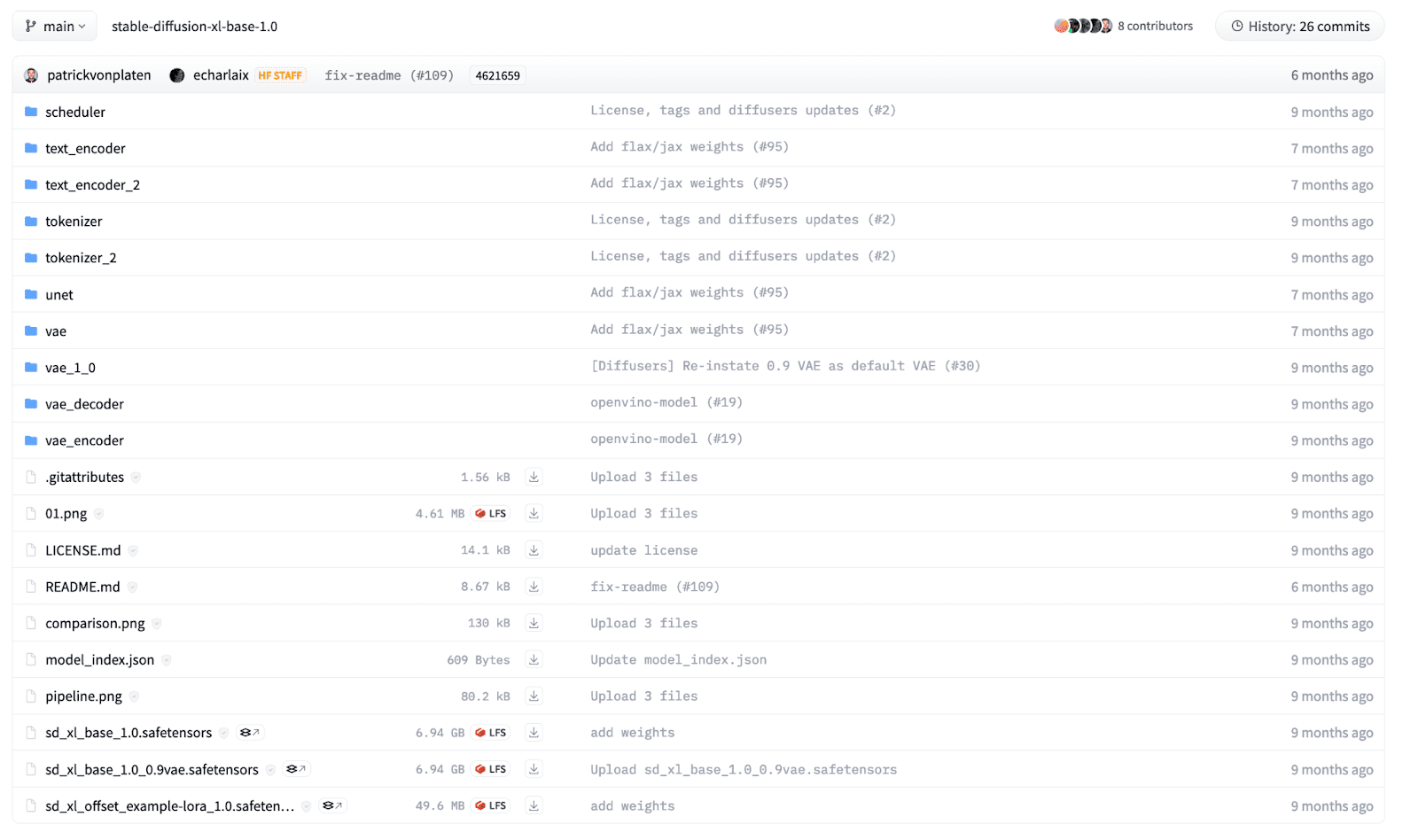
A diffusion model is composed of multiple components, including but not limited to Text Encoder, UNet, Schedulers, and Variational AutoEncoder. We can separately load the modules but the diffusers library provides a builder method that can load a pre-trained model given a structured checkpoint directory. For a beginner, it may be difficult to know which pipeline to use, so AutoPipeline makes it easier to load a model for a specific task.
In this example, we will load an SDXL model that is openly available on HuggingFace, trained by Stability AI. The files in the directory are structured according to their names and each directory has its own safetensors file. The directory structure for the SDXL model looks as below:
To load the model in our code, we use the AutoPipelineForText2Image class and call the from_pretrained function.
pipeline = AutoPipelineForText2Image.from_pretrained( "stability/stable-diffusion-xl-base-1.0", torch_dtype=torch.float32 # Float32 for CPU, Float16 for GPU, )
We provide the model path as the first argument. It can be the HuggingFace model card name as above or a local directory where you have the model downloaded beforehand. Moreover, we define the model weights precisions as a keyword argument. We normally use 32-bit floating-point precision when we have to run the model on a CPU. However, running a diffusion model is computationally expensive, and running an inference on a CPU device will take hours! For GPU, we either use 16-bit or 32-bit data types but 16-bit is preferable as it utilizes lower GPU memory.
The above command will download the model from HuggingFace and it can take time depending on your internet connection. Model sizes can vary from 1GB to over 10GBs.
Once a model is loaded, we will need to move the model to the appropriate hardware device. Use the following code to move the model to CPU or GPU. Note, for Apple Silicon chips, move the model to an MPS device to leverage the GPU on MacOS devices.
# "mps" if on M1/M2 MacOS Device DEVICE = "cuda" if torch.cuda.is_available() else "cpu" pipeline.to(DEVICE)
Inference
Now, we are ready to generate images from textual prompts using the loaded diffusion model. We can run an inference using the below code:
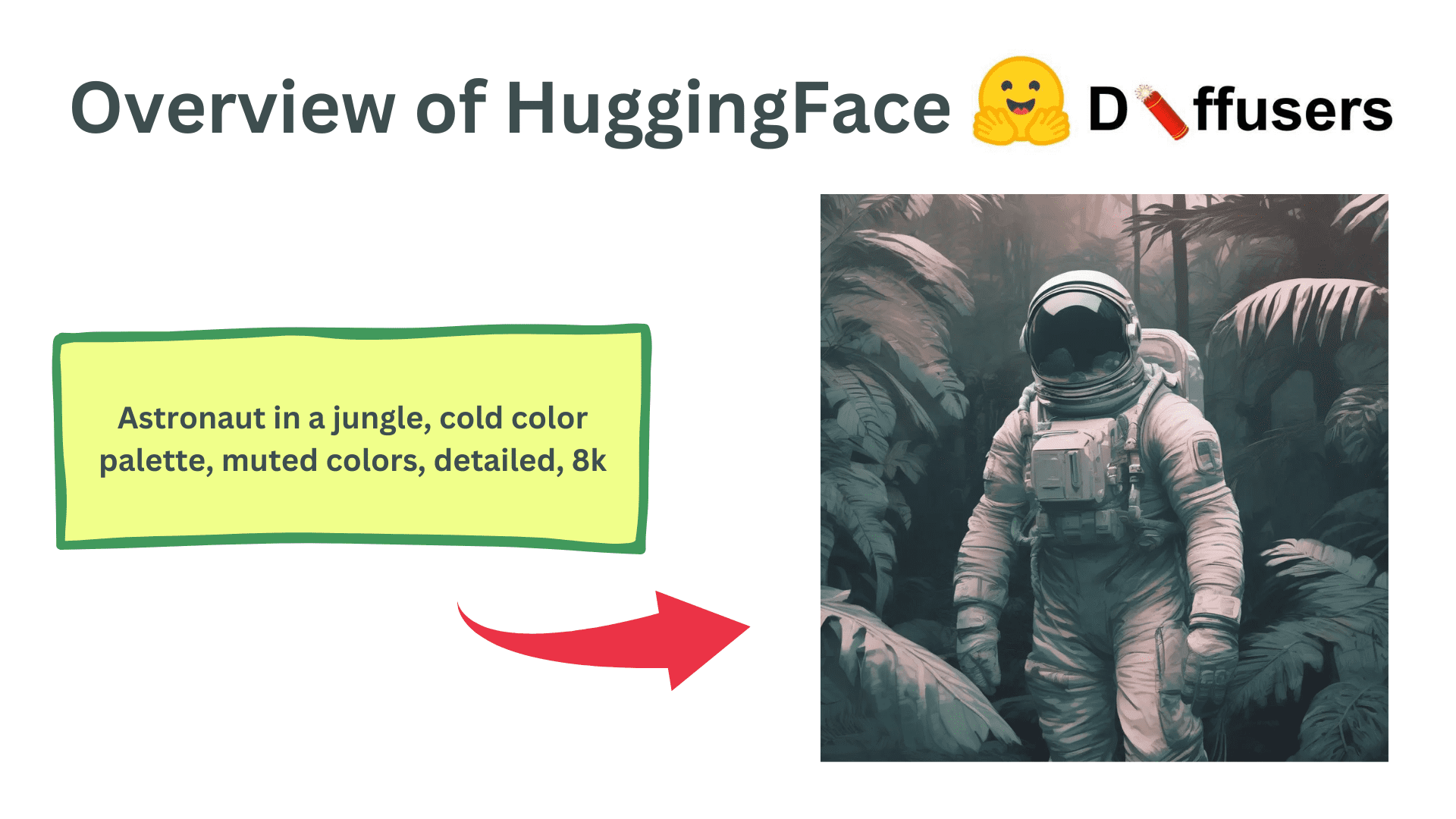
prompt = "Astronaut in a jungle, cold color palette, muted colors, detailed, 8k" results = pipeline( prompt=prompt, height=1024, width=1024, num_inference_steps=20, )
We can use the pipeline object and call it with multiple keyword arguments to control the generated images. We define a prompt as a string parameter describing the image we want to generate. Also, we can define the height and width of the generated image but it should be in multiples of 8 or 16 due to the underlying transformer architecture. In addition, the total inference steps can be tuned to control the final image quality. More denoising steps result in higher-quality images but take longer to generate.
Finally, the pipeline returns a list of generated images. We can access the first image from the array and can manipulate it as a Pillow image to either save or show the image.
img = results.images[0] img.save('result.png') img # To show the image in Jupyter notebook
Generated Image
Advance Uses
The text-2-image example is just a basic tutorial to highlight the underlying usage of the Diffusers library. It also provides multiple other functionalities including Image-2-image generation, inpainting, outpainting, and control-nets. In addition, they provide fine control over each module in the diffusion model. They can be used as small building blocks that can be seamlessly integrated to create your custom diffusion pipelines. Moreover, they also provide additional functionality to train diffusion models on your own datasets and use cases.
Wrapping Up
In this article, we went over the basics of the Diffusers library and how to make a simple inference using a Diffusion model. It is one of the most used Generative AI pipelines in which features and modifications are made every day. There are a lot of different use cases and features you can try and the HuggingFace documentation and GitHub code is the best place for you to get started.
Kanwal Mehreen Kanwal is a machine learning engineer and a technical writer with a profound passion for data science and the intersection of AI with medicine. She co-authored the ebook "Maximizing Productivity with ChatGPT". As a Google Generation Scholar 2022 for APAC, she champions diversity and academic excellence. She's also recognized as a Teradata Diversity in Tech Scholar, Mitacs Globalink Research Scholar, and Harvard WeCode Scholar. Kanwal is an ardent advocate for change, having founded FEMCodes to empower women in STEM fields.
More On This Topic
Training BPE, WordPiece, and Unigram Tokenizers from Scratch using…
Top 10 Machine Learning Demos: Hugging Face Spaces Edition
A community developing a Hugging Face for customer data modeling
Build AI Chatbot in 5 Minutes with Hugging Face and Gradio
How to Use Hugging Face AutoTrain to Fine-tune LLMs
How to Finetune Mistral AI 7B LLM with Hugging Face AutoTrain