AI influencer, author and professor of computer science, Pedro Domingos, famous for sharing his two cents on everything AI, recently said, “We don’t need more data, we need better reasoning.”
While companies have been scavenging for data to train their AI models, talking about ‘n’ billion parameter models during every launch, experts have now started focusing more on the AI model’s capabilities.
Quality Data will Govern Superior Models
Speaking about the future of AI at the AI for Good Global Summit, OpenAI chief Sam Altman touched upon the necessity of having high-quality data.
“There is low-quality synthetic data, and there’s low-quality human data. As long as we can find enough quality data to train our models or ways to train and get better at data efficiency, and learn more from smaller amounts of data or any number of other techniques, I think that’s okay,” said Altman.
He also confirmed that “they have what they need for the next model”, presumably, GPT-5. Altman also said that they have generated enough synthetic data to experiment with training on that.
At the Databrics’ Data + AI Summit, computer scientist Yejin Choi lauded OpenAI’s effort in building quality data. “AI, at least in the end, is as good as the data. The key test of current AI usually depends primarily on generating datasets. If you cannot do this, you should do it in a more innovative way,” she added.
‘Capable’ Models
Making a cameo at the Microsoft Build 2024 event, Altman vaguely spoke about the upcoming model once again, without revealing details. “The most important thing is that the models are just generally going to get smarter across the board,” he said.
Alluding to the model’s increasing reasoning capabilities, Altman spoke about how models are significantly improving over time.
“We actually are seeming to increase the general capability of the model across the board. That’s going to keep happening and the jump that we have seen in the utility that a model can deliver with each of those half-step jumps and smartness, it’s quite significant each time,” he exclaimed.
Models are Only Getting Smarter
In a recent interview with AIM, IIT Bombay professor and computer scientist Pushpak Bhattacharyya, spoke about understanding complex human emotions in LLMs. “Chatbots that are polite and understand sentiment, emotion, etc. give rise to better businesses,” he said.
Bhattacharyya believes that chatbots that are closer to human beings, emotionally and sentimentally are quite motivating.
Promising Research
Going by the recent research papers published in this field, attempts to make models highly reasonable are ongoing. For instance, a team of Stanford and independent researchers recently published a paper titled, ‘How Culturally Aware are Vision-Language Models?’. The idea is to make AI models culturally aware.
“In terms of the Indian context, we wanted to understand how global models like Gemini and GPT recognise our cultural symbols,” said Vinija Jain, ML leader at Amazon, and one of the researchers of the paper.
Concepts such as zero-shot learning aim to handle complex reasoning tasks. Papers such as ‘Large Language Models are Zero-Shot Reasoners’ show that LLMs can handle complex reasoning tasks using a simple prompt like, “let’s think step by step”.
Likewise, Enhancing Zero-Shot Chain-of-Thought Reasoning in Large Language Models introduces logical thought frameworks to improve multi-step reasoning.
Interestingly, any new model launch is compared on a benchmark across parameters including reasoning capabilities. When Anthropic launched its latest model, Claude 3, the AI model was compared with its competitors, GPT-4 and Gemini, and fared much better in reasoning capabilities.
From building large AI models, there has also been a significant shift in building smaller yet powerful models. OpenAI’s GPT-4o, Microsoft’s Phi 2, TII’s Falcon 2 are just a few examples of big tech companies’ foray into small language models.
Despite the smaller parameter size, the models are performing at superior levels. Falcon 2 models were said to even surpass Llama-3.
Interestingly, though the progress towards making models smaller with superior reasoning capabilities will continue, data collection is here to stay. Looking at the number of media publication partnerships of OpenAI, including News Corp, WSJ, Vox, The Atlantic, and many more, it is evident that the tech giant is still reliant on it.
It is possible that nobody has figured out the right approach yet. After all, Altman himself recently said, “We certainly have not solved interpretability,” and admitted that OpenAI doesn’t fully understand how its AI works.
OpenAI has more than doubled its annualised revenue to $3.4 billion in the past six months, OpenAI CEO Sam Altman informed staff, reported The Information.
The majority of OpenAI’s revenue—around $3.2 billion on an annualized basis—comes from subscriptions to its chatbots and fees from developers accessing its models via an application programming interface.
Microsoft takes a cut from some of OpenAI’s AI model sales since they run on Microsoft’s cloud. Additionally, OpenAI receives a share from Microsoft’s sales of OpenAI models to Microsoft’s Azure cloud customers. This share now amounts to about $200 million on an annualised basis, or roughly 20% of the revenue Microsoft generates from that business, according to Altman.
The startup’s financial losses were not disclosed but have been substantial in the past.
Apple’s announcement this week that it will integrate ChatGPT into its products could further boost OpenAI, though the terms of the deal, including whether Apple is paying OpenAI, remain unclear.
Apple is not paying OpenAI. Instead, Apple believes that promoting OpenAI’s brand and technology on hundreds of millions of its devices is of equal or greater value than monetary payments, according to a Bloomberg report.
OpenAI plans to launch several new products, including a search engine, its video-generating model Sora, and AI-powered software capable of taking actions on users’ computers, which could further enhance revenue.
An OpenAI spokeswoman described the financial details as ‘inaccurate,’ without further explanation, according to The Information.
OpenAI’s revenue rate positions it ahead of its competitors. For example, last fall, Anthropic reported generating revenue at a $100 million annualised rate, with plans to reach over $850 million by the end of 2024. Cohere, a Canadian OpenAI rival, reported generating just $22 million in annualized revenue in April.
OpenAI was recently valued at about $86 billion during an employee share sale. The latest revenue figures suggest OpenAI is valued at approximately 25 times forward revenue, which is on the lower end of recent fundraising valuations for private AI startups.
Chinese investor and serial entrepreneur Kai Fu Lee is bullish about OpenAI becoming a trillion-dollar company in the next two-three years. “OpenAI will likely be a trillion-dollar company in the not-too-distant future,” said Lee, adding that GPT-4 and GPT-4 Turbo are unbelievably good and a great balance for performance and cost.
After staying silent for two years about its AI developments, Apple finally played catch-up and shared its latest projects with the public on Monday at its annual developer conference, WWDC. Apple unveiled a variety of features that will significantly impact your device experience — but only if you have one of the newest iPhone models.
The upgrades include a new and improved Siri, new summarization tools, a more customizable home screen, AI-powered photo editing, and more. However, you'll need an iPhone 15 Pro (or a newer model, coming out this year) to use these features.
Also: Live updates: Everything Apple announced at WWDC 2024, including iOS 18, Siri, AI, and more
While requiring Apple's latest hardware to experience these new features may seem like planned obsolescence or a money grab, the provision is due to the processing hardware needed to support the AI features — especially for tasks that require on-device processing.
Processing AI tasks on-device offers two key benefits: It keeps information more secure and ensures less latency. However, not all iPhones, especially older models, have the processing power to handle those tasks. The new AI features will rely on both on-device and cloud-based processing, depending on the complexity of the task.
Specifically, these tasks require the A17 Pro chipset, which is currently found only in the iPhone 15 Pro and iPhone 15 Pro Max. Even the iPhone 15 and iPhone 15 Plus won't support the AI upgrades, as they run on the A16 Bionic.
The good news is that you won't need the newest model if you are a Mac or iPad user. To use the AI features on a Mac or iPad, your device will need at least an M1 chip; considering Apple is currently manufacturing M4-chip iPads and M3-chip Macs, most users with older devices should have some wiggle room.
Also: iOS 18: All the iPhone changes Apple announced at WWDC 2024
Additionally, if you don't own the iPhone 15 Pro and don't plan on upgrading anytime soon, don't worry; you will get to experience some of iOS 18's AI features, specifically those that run on the cloud. However, if you want the full iOS 18 experience, you may want to start preparing for an upgrade.
China’s short-video platform Kuaishou Technology recently launched its text-to-video model called Kling, joining other Chinese tech companies in challenging Western tech giants. The model created quite a storm with users finding Kling to outperform OpenAI’s Sora.
While the US is debating heavily on AI ethics and incorporating ‘Responsible AI’, China seems unperturbed and is probably responding to these AI ethicists with Kling.
Ethics in the Way of Innovation?
“When innovation happens and technology explodes, this explosion creates numerous benefits but also raises questions. If we don’t allow this explosion to occur, there will be no innovation,” said TV Mohandas Pai, chairman at Aarin Capital, at IGIC 2024.
Referencing UPI and its data security concerns, Pai spoke about how the government has access to our data.
“Some may argue that the data is at risk, but frankly, I don’t care if the government sees my data. I want the data to be used productively, and as a sophisticated individual, I want my data protected by the government,” he said.
Pai also highlighted how concerns about government surveillance are secondary considering the vast amount of personal data already being accessible to Google, Facebook, and the NSA on US servers.
Despite pressing concerns about the ethical and privacy implications of AI, China remains a central player on the global stage.
In October 2023, Chinese tech giant Baidu unveiled Ernie 4.0, the latest version of its generative AI model, claiming capabilities comparable to OpenAI’s GPT-4.
This significant advancement highlights China’s rapid progress in AI, driven by substantial government support and strategic initiatives like the ‘New Generation Artificial Development Plan’.
Launched in 2017, this plan aims to position China as a global AI leader by 2023, emphasising research funding, talent recruitment, and infrastructure development. These efforts underscore China’s commitment to dominating the AI sector, often pushing the boundaries of ethical and privacy considerations.
China’s AI development is also fueled by leading companies including Tencent, Alibaba, Baidu, and SenseTime, which attract top group talent and drive innovation.
Meanwhile, China’s strides in hardware and robotics, with companies like Dreame Technology and Fourier Intelligence at the forefront, reflect a comprehensive approach to AI applications.
Additionally, China’s advancements in facial recognition technology, widely deployed in public spaces, illustrate the country’s capability to implement AI solutions on a large scale. These often move rapidly as ethical concerns are not always given paramount importance.
West Focuses on Ethics Over Progress?
Recently, the OpenAI Board formed a safety and security committee. It will be responsible for making recommendations on critical safety and security decisions for all the projects of OpenAI.
This move came amid ongoing debates about AI safety at the San Francisco startup, heightened by the resignations of researcher Jan Leike and co-founder Ilya Sutskever, who criticised the company for prioritising product development over safety.
OpenAI's voluntary AI safety committee pic.twitter.com/THERDdTC59
— Adam Chalmers (@adam_chal) May 30, 2024
Further, Elizabeth Adams, chief AI ethics advisor at Paravison, stated, “We must hold AI developers accountable for their systems’ performance and impacts. To start, let’s educate ourselves on AI’s societal effects through online courses, webinars, and informational videos. Engaging in social media and community forums can raise awareness about ethical AI.”
What’s Next?
China is only two years behind the US in AI development and a formidable player in the global race among developed countries.
Google’s former CEO Eric Schmidt emphasised that while China is focused on dominating several industries, the US still holds a significant lead in AI. Speaking at the AI Expo for National Competitiveness, Schmidt remarked, “In the case of AI, we are probably two or three years ahead of China, which in my world is an eternity.”
It’s clear that new AI advancements might impact ethical standards in one way or another, however, looking at China’s route of development, it is clear that compromising on ethics and privacy is acceptable for progress.
During WWDC 2024, Apple unveiled "Apple Intelligence," which incorporates advanced AI capabilities throughout its ecosystem. However, these features are only available on high-end devices such as the iPhone 15 Pro, iPad Pro with M-series chips, and Macs running on Apple Silicon.
Also: Apple staged the AI comeback we've been hoping for — but here's where it still needs work
Why didn't Apple roll these features out to the entry-level iPhone 15 and earlier models? Although there may be other reasons why the company chose not to do so, the decision is almost certainly influenced by the substantial costs and infrastructure challenges involved in large-scale AI implementation.
The cost of GPU processing
Advanced AI features require substantial computational power, typically provided by high-performance GPUs. For instance, NVIDIA's MGX with GH 200 and Grace Hopper superchip designed for AI training, inference, 5G, and HPC cost around $65,000 each. Deploying these servers regionally to support lower-end devices would be prohibitively expensive. Apple would easily need thousands of these units to support its entire user base, resulting in astronomical costs likely passed on to consumers through service fees.
Also: Apple partners with OpenAI to bring ChatGPT to iOS, iPadOS, and MacOS
Even major AI service providers such as OpenAI, Microsoft, and Google encounter challenges in offering dependable and quick access to LLM and Generative AI models to the general public without downtime and overcommitting resources. The shortage and cost of GPU-enabled servers make these issues worse. To maintain the rapid response times expected by its customers, Apple will need to invest substantially in servers, data centers, and edge infrastructure — an infrastructure level it likely does not currently possess.
Apple's approach to Private Cloud Compute (PCC)
For the initial rollout of Apple Intelligence, the company has chosen a hybrid approach to balance cost and performance, combining on-device processing with Private Cloud Compute (PCC). On-device processing utilizes the A17 Pro chip in the iPhone 15 Pro line and the M-series chips in iPads and Macs to enhance security and privacy. For more demanding tasks, PCC allows cloud operations while maintaining user privacy. PCC is designed with custom Apple silicon and a robust operating system to ensure personal data security and prevent unauthorized access.
Also: Here's how Apple's keeping your cloud-processed AI data safe (and why it matters)
Apple is currently focused on rolling out its Generative AI services to high-end devices as part of the initial phase of Apple Intelligence deployment. This allows Apple to enhance its AI capabilities and infrastructure before expanding to a wider range of devices. To bring Apple Intelligence to the rest of its ecosystem, the company will likely deploy AI-accelerated server appliances at the edge, enabling less capable devices to benefit from advanced AI features. However, this infrastructure is not yet ready for large-scale deployment, as Apple's shift towards AI development is still recent.
The challenges of edge computing
Edge computing, which involves processing data closer to where it is generated rather than relying solely on centralized data centers, could significantly enhance performance and reduce latency. However, deploying edge computing infrastructure is complex and costly, requiring robust hardware and software solutions to ensure seamless integration and security. Apple is known for its meticulous approach to hardware and software development, and the company is likely still testing and refining its edge computing solutions before rolling them out at scale.
Also: Make room for RAG: How Gen AI's balance of power is shifting
While NVIDIA is a major player in the GPU server space, others include traditional x86 Intel-based and Arm-based server providers like Qualcomm and Ampere. These servers can also use NVIDIA GPUs, but Apple likely wants to control the integration with its operating system and silicon to deploy AI computing. Additionally, the supply chain from NVIDIA or any other HPC server vendor is likely insufficient to meet Apple's large-scale deployment requirements.
As reported by The Register, Apple is developing its own AI servers, which are expected to be more cost-effective and better integrated with its ecosystem. These servers are currently being tested in data centers for foundation model use, and a broader rollout is anticipated in 2025. This phased approach ensures Apple can maintain high privacy, security, and user experience standards while gradually expanding its AI capabilities across its device lineup.
Broader implications for IoT and other devices
Apple's decision to limit Apple Intelligence to high-end models is driven by the significant cost and infrastructure challenges associated with deploying AI at scale, allowing the company to ensure a smooth and secure user experience while laying the groundwork for future expansions.
The need for AI-accelerated servers isn't just about older phones and lower-end devices. Apple's IoT products, like the Apple Watch, Apple TV, and HomePod, which lack the computational power for on-device AI, would also benefit from such infrastructure. These devices will unlikely handle on-device AI computation shortly, making cloud and edge solutions even more critical.
Also: Here's every iPhone model that will support Apple's new AI features (for now)
As Apple introduces Apple Intelligence, users with older or non-Pro models may feel left out. Clear communication from Apple regarding the phased rollout strategy and plans for broader deployment will be important in managing user expectations.
As Apple continues developing its AI infrastructure, including potential edge computing solutions, we expect that a broader rollout of Apple Intelligence will be deployed in the coming years. This phased approach ensures that Apple can maintain its high privacy, security, and user experience standards while gradually expanding its AI capabilities across its device lineup.
Apple’s latest version of its mobile operating system, iOS 18, was unveiled during WWDC ‘24 on June 10, 2024, and features many niceties that users have been wanting for years. From AI integration with Siri and throughout the system to a standalone Passwords app, to being able to send messages via satellite when your iPhone doesn’t have service, there’s a feature that will likely appeal to someone.
Whether you’re using an iPhone or an iPad, let’s explore everything that business pros need to know about iOS 18, including release date and other key features.
What is iOS 18?
iOS 18 is the 18th major version of the mobile operating system Apple releases for distribution on iPhone models. Apple’s iOS 18 adds intelligence features to Siri and — through the operating system powered by Apple Intelligence and ChatGPT — offers the ability to fully customize Home Screen and Lock Screen experiences and increases on-device security and privacy features.
SEE: Previous iterations of iOS in these TechRepublic cheat sheets: iOS 17, iOS 16, iOS 15, iOS 14, iOS 13.
When will iOS 18 be released?
Apple is expected to release iOS 18 to the general public in Fall 2024. This is Apple’s standard operating procedure of announcing the latest iOS version during WWDC and then releasing it in September of that year alongside new hardware such as iPhones.
Apple released a beta for developers to install on their test devices on June 10, 2024, after the WWDC keynote address. While not yet announced, we anticipate that Apple will release a public beta of iOS 18 in the next month, based on the company’s previous release cycles.
How can I install the iOS 18 beta?
The iOS 18 developer betas should only be installed on development-specific hardware because features may not be fully implemented at this time, and bugs are common in beta releases. Using this beta on production accounts and devices may result in data loss.
Registered developers should follow these steps to download and install the iOS 18 beta on development devices. Note: Apple requires that any device the beta is installed on is part of the Apple Developer Program.
Log into your Apple Developer account.
Select Downloads and then iOS 18.
Download the profile, and AirDrop it to your iPhone, or perform steps one and two on your device.
Install the profile onto your iPhone and then restart when prompted.
After restarting, navigate to the Settings app | General | Software Update. You will get a prompt to download and install the latest version of the iOS 18 beta.
There are steps non-developer users can take to prepare for when Apple releases a public beta of iOS 18.
Sign up for the Apple Beta Software Program.
Enroll your device: iPhone, iPad, Mac, Apple TV, HomePod mini, HomePod 2nd generation or Apple Watch.
On your device, go to the Settings app | General | Software Update.
Select the iOS Public Beta in the Beta Updates section.
Artificial intelligence runs deep in iOS 18
During this year’s WWDC keynote and iOS 18 introduction, Apple spent a significant amount of time talking about the Apple Intelligence features that are coming throughout the operating system. Beginning with Siri, Apple is making the voice assistant more contextually aware of tasks that you’re currently working on so it can aid those specific tasks and provide information on those tasks compared with other data stored on your iPhone. This feature can help answer questions by surfacing results from Calendar, Messages, Mail and even third-party apps eventually.
The best part is that awkward conversations with Siri don’t have to be voice activated; instead, you can type to Siri by double-tapping the home bar on the iPhone. A window will appear where you can type to your newly smarter virtual assistant in iOS 18.
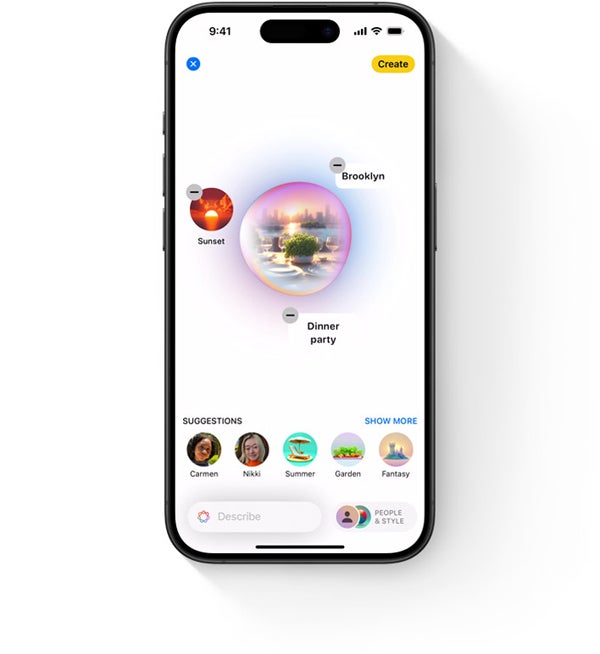
A new generative AI feature in iOS 18 is the ability to custom make an image that is fully generated by Apple Intelligence in a standalone app or in first- and third-party apps. Image: Apple, Inc.
Some additional AI implementations in iOS 18
Apple is beefing up Mail’s ability to sort messages and generate a summary of a long email.
A Photos upgrade allows you to easily sort and filter photos and videos.
Messages will allow users to generate their own emoji using the Genmoji feature to generate AI-crafted emojis that can be shared with others.
Customization in iOS 18
In iOS 16, Apple began embracing more user customization support with new user-generated wallpapers; with iOS 18, Apple is kicking up the customization game thanks to new features that let you rearrange the Home Screen completely and in any way you want. The Home Screen icons will no longer snap in place; instead, they can be placed anywhere you would like on the screen, freeing you up from the old grid system that’s been around since iOS 1.0.
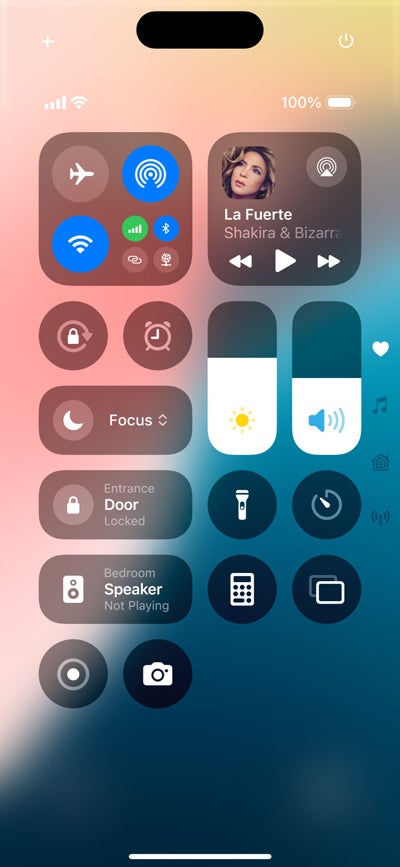
Control Center can be fully customized as well, complete with additional third-party actions thanks to a small “widget” style interface that allows users to drag and drop to rearrange icons and further customize the experience within Control Center. The best part is that these Control Center changes migrate to the Lock Screen, where traditionally there has been a Light and Camera button in the lower left and right corner of the Lock Screen; now users can pick which Control Center feature they want to appear in those action button spots.
The new Control Center in iOS 18 is fully customizable so you can view just the settings and features you’d like. Image: Apple, Inc.
Security and privacy in iOS 18
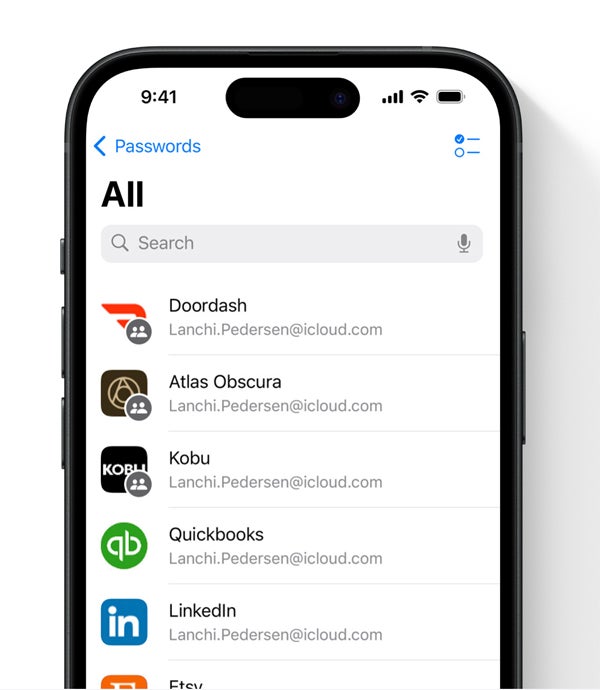
Apple’s iCloud Keychain revolutionized the ability to securely sync passwords and passkeys between your devices. Now Apple is changing the game again by releasing a new Passwords app that is available outside of the Settings app on all its platforms. This allows you to more easily manage your passwords, see passkeys and 2FA codes, and even see which passwords might have been compromised thanks to Apple’s checking of your passwords against known hacking databases. The new Passwords app works on Mac, iPhone, iPad, Vision Pro and Windows, thanks to iCloud sync integration.
The standalone Passwords app will allow users to more easily manage their passwords without navigating to the Settings app thanks to iOS 18. — Image: Apple, Inc.
Apple is also allowing users to lock down specific apps that might be more sensitive than others. Any application can now be locked behind Touch ID or Face ID thanks to this new App Lock feature. When enabled on a specific app, that app must be authenticated before you can use it; plus, any data within the app will not be surfaced to system features like Spotlight or Siri when it is locked.
Messages in iOS 18 includes RCS integration and new satellite feature
The two biggest Messages app features that weren’t mentioned much during the WWDC ‘24 keynote are the ability to send messages via satellite when you don’t have cellular service and the integration with Rich Communication Services.
With RCS integration, your iPhone will be able to send and receive higher quality photos and videos, and long-form messages with Android users and other devices that support the RCS standard over SMS. This is a great addition that will greatly improve interoperability with other platforms.
The Messages via Satellite feature builds on the iPhone 14 and iPhone 15’s ability to send emergency messages via satellite. This feature will allow your iPhone without a cellular connection to reach out to your contacts via iMessage or text message by connecting to a satellite instead of cellular connection. This is an impressive feature that will leave many world travelers, hikers and other off-grid users happy.
In addition, Apple’s new features with the Messages app include the ability to generate your own emoji with AI. These so-called Genmoji can be used to create new emojis or profile pictures automatically within iOS 18 and are available to implement in third-party apps as well.
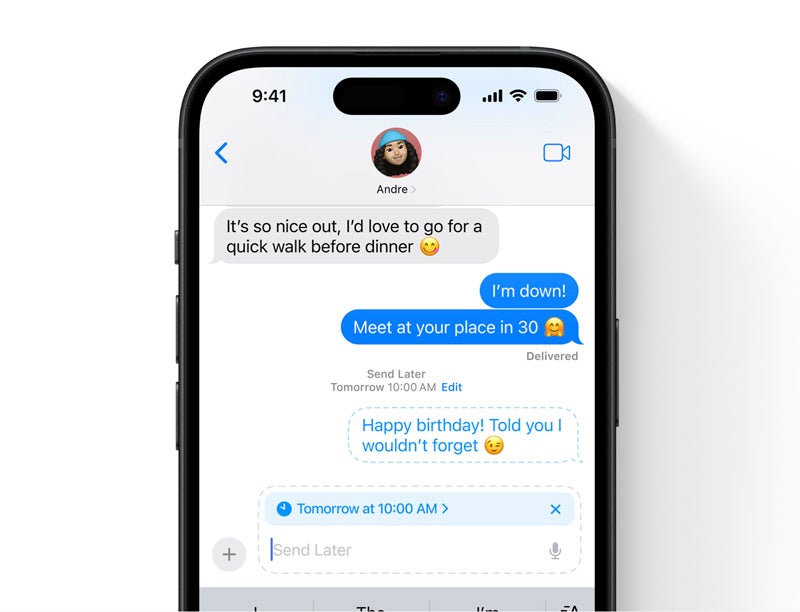
Another new and notable feature is the ability to schedule a message to send later inside of Messages, letting you pick the date and time a specific message or reply should be sent.
Messages in iOS 18 will have the ability to schedule messages for later. This is a feature users have been wanting for a long time. Image: Apple, Inc.
Other notable iOS 18 features
The Phone app now lets you record and transcribe a live call directly.
Mail has a new AI-enabled ability to categorize messages into certain folders, letting you see email in a new way, sorted by type or by sender.
Mail will group receipts, marketing emails and newsletters by sender in order, so you can easily read them.
Writing Tools is a contextual tool that can be used in first- and third-party apps to proofread, write, summarize and more using Apple Intelligence. It can be invoked by selecting a block of text.
Hands-free Siri integration with AirPods Pro lets you shake your head yes or no to answer calls or activate questions from Siri about notifications.
A new Notes feature transcribes live audio and summarizes your audio for meetings.
Notes has the ability to solve math equations just by typing them into a note followed by an equal sign. Then, Notes will solve it for you.
New formatting options in Notes include the ability to highlight text with a specific color and collapse certain sections of a note.
Redesigned Privacy and Security Settings view in the Settings app lets you more easily see what apps have access to what type of privacy setting.
Eye Tracking makes it possible for people to control iPhone with just their eyes in a new Accessibility mode.
Home Screen app icons can be easily customized for light or dark mode, or tint them yourself with a new feature that lets you create monochromatic icons or have them all tinted to your favorite color.
Control Center features a widget-like gallery for browsing available controls that can be used within the new Control Center interface or Lock Screen action buttons.
Control Center’s actions can be rearranged and resized to your liking.
Photos automatically organizes your photos based on the content contained in them with AI. You can now filter or sort your photos to find the ones you’re looking for.
Messages supports the ability for text to be changed to bold, italics, underline and strikethrough.
Messages can animate particular parts of text for emphasis. iOS 18 can automatically suggest specific animations or pick one of your favorites.
Messages tapback feature can work with any emoji, allowing you to express messages more effectively than with the built-in tapbacks.
Safari will use AI to detect specific elements on a page and surface things like directions, quick links, people, music, movies and TV shows.
Reader in Safari has been infused with AI and can summarize a web page for you without needing to read an entire article. Great for on-the-go quick catch ups.
Maps features trail information, trail maps and directions for all 63 U.S. national parks. These maps and trail information can be downloaded for offline use.
Game mode on iOS 18 and iPhone lets your iPhone suspend background tasks and focus solely on providing the screen with the best and most performant graphics output.
Wallet has been upgraded with the ability to display loyalty points and accounts for merchants.
Event tickets inside of the Wallet app features a new design that includes important information like directions and weather for the event.
Wallet lets you easily send money to someone without the need to exchange contact information. With Tap to Cash, just tap your iPhone to another user’s iPhone to exchange money via Apple Cash balance.
Emergency SOS live video lets you stream your camera with a compatible dispatcher in emergency situations.
What devices will iOS 18 run on?
iOS 18 is compatible with the following devices, though some features may require the latest devices, such as the satellite functionality and some machine learning functionality:
Generative AI is an astonishing technology that is not only here to stay but will impact all sectors of work and business, and it has already made unprecedented inroads into our daily lives.
We all have a lot to learn about it. Spewing out a few prompts to ChatGPT may be easy, but before you can turn all these new capabilities into productive tools, you need to grow your skills. Fortunately, there are a wide range of classes that can help.
Also: Want to work in AI? How to pivot your career in 5 steps
Many companies and schools will try to sell you on their AI education programs. But as I'll show in the following compendium of great resources, you can learn a ton about AI and even get some certifications — all for free.
I have taken at least one class from each of the providers below, and they've all been pretty good. Obviously, some teachers are more compelling than others, but it's been a very helpful process. When working on AI projects for ZDNET, I've also sometimes gone back and taken other classes to shore up my knowledge and understanding.
Also: The best AI image generators: Tested and reviewed
So, I recommend you take a quick spin through my short reviews, possibly dig deeper into the linked-to articles, and bookmark all of these, because they're valuable resources. Let's get started.
Other learning resources you'll probably love
View at edXView at YouTube
Artificial Intelligence
You can follow my day-to-day project updates on social media. Be sure to subscribe to my weekly update newsletter, and follow me on Twitter/X at @DavidGewirtz, on Facebook at Facebook.com/DavidGewirtz, on Instagram at Instagram.com/DavidGewirtz, and on YouTube at YouTube.com/DavidGewirtzTV.
As the adoption of generative artificial intelligence (AI) grows, it appears to be running into an issue that has also plagued other industries: a lack of inclusivity and global representation.
Encompassing 11 markets, including Indonesia, Thailand, and the Philippines, Southeast Asia has a total population of some 692.1 million people. Its residents speak more than a dozen main languages, including Filipino, Vietnamese, and Lao. Singapore alone has four official languages: Chinese, English, Tamil, and Malay.
Most major large language models (LLMs) used globally today are non-Asian focused, underrepresenting huge pockets of populations and languages. Countries like Singapore are looking to plug this gap, particularly for Southeast Asia, so the region has LLMs that better understand its diverse contexts, languages, and cultures.
The country is among other nations in the region that have highlighted the need to build foundation models that can mitigate data bias in current LLMs originating from Western countries.
According to Leslie Teo, senior director of AI products at AI Singapore (AISG), Southeast Asia needs models that are powerful and reflect the diversity of its region. AISG believes the solution comes in the form of Southeast Asian Languages in One Network (SEA-LION), an open-source LLM that is touted to be smaller, more flexible, and faster compared to others on the market today.
Also: Connected companies are set up for the AI-powered economy
SEA-LION, which AISG manages and leads development on, currently runs on two base models: a three-billion-parameter model, and a seven-billion-parameter model.
Pre-trained and instruct-tuned for Southeast Asian languages and cultures, they were trained on 981 billion language tokens, which AISG defines as fragments of words created from breaking down text during the tokenization process. These fragments include 623 billion English tokens, 128 billion Southeast Asia tokens, and 91 billion Chinese tokens.
Existing tokenizers of popular LLMs are often English-centric — if very little of their training data reflects that of Southeast Asia, the models will not be able to understand context, Teo said.
He noted that 13% of the data behind SEA-LION is Southeast Asian-focused. By contrast, Meta's Llama 2 only contains 0.5%.
A new seven-billion-parameter model for SEA-LION is slated for release in mid-2024, Teo said, adding that it will run on a different model than its current iteration. Plans are also underway for 13-billion and 30-billion parameter models later this year.
He explained that the goal is to improve the performance of the LLM with bigger models capable of making better connections or that have zero-shot prompting capabilities and stronger contextual understanding of regional nuances.
Teo noted the lack of robust benchmarks available today to evaluate the effectiveness of an AI model, a void Singapore is also looking to address. He added that AISG aims to develop metrics to identify whether there is bias in Asia-focused LLMs.
As new benchmarks emerge and the technology continues to evolve, new iterations of SEA-LION will be released to achieve better performance.
Also: Singapore boosts AI with quantum computing and data centers
Better relevance for organizations
As the driver behind regional LLM development with SEA-LION, Singapore plays a key role in building a more inclusive and culturally aware AI ecosystem, said Charlie Dai, vice president and principal analyst at market research firm Forrester.
He urged the country to collaborate with other regional countries, research institutions, developer communities, and industry partners to further enhance SEA-LION's ability to address specific challenges, as well as promote awareness about its benefits.
According to Biswajeet Mahapatra, a principal analyst at Forrester, India is also looking to build its own foundation model to better support its unique requirements.
"For a country as diverse as India, the models built elsewhere will not meet the varying needs of its diverse population," Mahapatra noted.
By building foundation AI models at a national level, he added that the Indian government would be able to provide larger services to citizens, including welfare schemes based on various parameters, enhanced crop management, and healthcare services for remote parts of the country.
Furthermore, these models ensure data sovereignty, improve public sector efficiency, boost national capacity, and drive economic growth and capabilities across different sectors, such as medicine, defense, and aerospace. He noted that Indian organizations were already working on proofs of concept, and that startups in Bangalore are collaborating with the Indian Space Research Organization and Hindustan Aeronautics to build AI-powered solutions.
Asian foundation models might perform better on tasks related to language and culture, and be context-specific to these regional markets, he explained. Considering these models are able to handle a wide range of languages, including Chinese, Japanese, Korean, and Hindi, leveraging Asian foundational models can be advantageous for organizations operating in multilingual environments, he added.
Dai anticipates that most organizations in the region will adopt a hybrid approach, tapping both Asia-Pacific and US foundation models to power their AI platforms.
Furthermore, he noted that as a general practice, companies follow local regulations around data privacy; tapping models trained specifically for the region supports this, as they may already be finetuned with data that adhere to local privacy laws.
In its recent report on Asia-focused foundation models, of which Dai was the lead author, Forrester described this space as "fast-growing," with competitive offerings that take a different approach to their North American counterparts, which built their models with similar adoption patterns.
"In Asia-Pacific, each country has varied customer requirements, multiple languages, and regulatory compliance needs," the report states. "Foundation models like Baidu's Ernie 3.0 and Alibaba's Tongyi Qianwen have been trained on multilingual data and are adept at understanding the nuances of Asian languages."
Its report highlighted that China currently leads production with more than 200 foundation models. The Chinese government's emphasis on technology self-reliance and data sovereignty are the driving forces behind the growth.
However, other models are emerging quickly across the region, including Wiz.ai for Bahasa Indonesia and Sarvam AI's OpenHathi for regional Indian languages and dialects. According to Forrester, Line, NEC, and venture-backed startup Sakana AI are among those releasing foundation models in Japan.
"For most enterprises, acquiring foundation models from external providers will be the norm," Dai wrote in the report. "These models serve as critical elements in the larger AI framework, yet, it's important to recognize that not every foundation model is of the same [caliber].
Also: Google plans $2B investment for data center and cloud buildout in Malaysia
"Model adaptation toward specific business needs and local availability in the region are especially important for firms in Asia-Pacific," he continued.
Dai also noted that professional services attuned to local business knowledge are required to facilitate data management and model fine-tuning for enterprises in the region. He added that the ecosystem around local foundation models will, therefore, have better support in local markets.
Rowan Curran, Forrester's senior analyst, added: "The management of foundation models is complex and the foundation model itself is not a silver bullet. It requires comprehensive capabilities across data management, model training, finetuning, servicing, application development, and governance, spanning security, privacy, ethics, explainability, and regulatory compliance. And small models are here to stay."
He also advised organizations to have "a holistic view in the evaluation of foundation models" and maintain a "progressive approach" in adopting gen AI. When evaluating foundation models, Curran recommended companies assess three key categories: adaptability and deployment flexibility; business, such as local availability; and ecosystem, such as retrieval-augmented generation (RAG) and API support.
Maintaining human-in-the-loop AI
When asked if it was necessary for major LLMs to be integrated with Asian-focused models — especially as companies increasingly use gen AI to support work processes like recruitment — Teo underscored the importance of responsible AI adoption and governance.
"Whatever the application, how you use it, and the outcomes, humans need to be accountable, not AI," he said. "You're accountable for the outcome, and you need to be able to articulate what you're doing to [keep AI] safe."
He expressed concerns that this might not be adequate as LLMs become a part of everything, from assessing resumes to calculating credit scores.
"It's disconcerting that we don't know how these models work at a deeper level," he said. "We're still at the beginning of LLM development, so explainability is an issue."
He highlighted the need for frameworks to enable responsible AI—not just for compliance but also to ensure that customers and business partners can trust AI models used by organizations.
Also: Generative AI may be creating more work than it saves
As Singapore Prime Minister Lawrence Wong noted during the AI Seoul Summit last month, risks need to be managed to guard against the potential for AI to go rogue — especially when it comes to AI-embedded military weapon systems and fully autonomous AI models.
"One can envisage scenarios where the AI goes rogue or rivalry between countries leads to unintended consequences," he said, as he urged nations to assess AI responsibility and safety measures. He added that "AI safety, inclusivity, and innovation must progress in tandem."
As countries gather over their common interest in developing AI, Wong stressed the need for regulation that does not stifle its potential to fuel innovation and international collaboration. He advocated for pooling research resources, pointing to AI Safety Institutes around the world, including in Singapore, South Korea, the UK, and the US, which should work together to address common concerns.
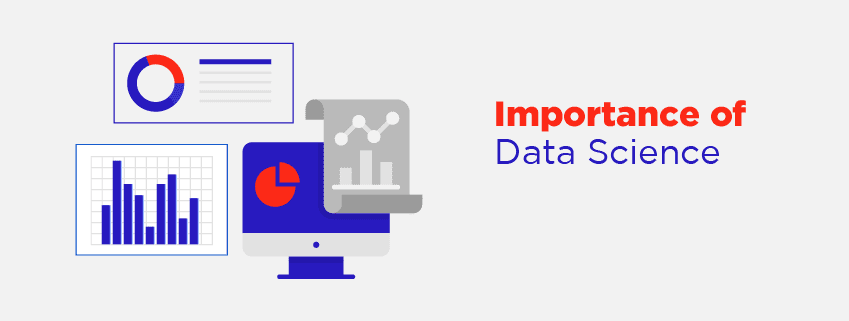
Data science in today’s business world is serving as the lifeblood of decision-making. Be it optimizing marketing campaigns or predicting financial trends, data science comes in handy across all industries to make data-driven decisions. It empowers businesses and organizations to analyze huge amounts of raw data and get meaningful insights that can help them propel their businesses forward.
But what exactly is data science and what are the essential components of data science that make up this amazing domain of technology? Well, if you are looking to make a career in data science, then you must be aware of these essential components in order to excel in your career.
So, let’s get started and explore the fascinating world of data science and its components.
Main components of data science
1. Data and data collection
There’s no point discussing data science if there is no mention of data. Any data science professional, be it an entry-level data engineer or experienced senior data scientist, they are not bereft of data and have to work closely with huge amounts of data, usually known as big data which can be terabytes and zetabytes. Data is the fuel that runs the vehicle of data science and it is of two types:
Structured data: These are the information that have well defined format that resemble a table i.e. having rows and columns. They can be easily stored in relational databases and help with quick searching and analysis.
Unstructured data: They are not properly defined and can exist in various formats including text documents, emails, social media posts, images, audio, video, etc. They require additional processing to get meaningful insights out of them.
Data collection from various sources including web scrapping, company databases, sensors, and any other sources is required to gather a complete set of data for a wholistic data analysis process.
2. Data Engineering
Data engineering refers to the designing, developing, and management of the infrastructure needed for storing, processing, and managing data efficiently.
The data collected by organizations from various sources are not complete, may contain inaccurate and incomplete information, and might be inconsistent. Therefore, they need to be cleaned and organized, a process which is also known as data wrangling. Data engineering helps convert inconsistent and unorganized data into complete data suitable for analysis. This includes:
Checking for missing values
Eliminating duplicate entries
Correcting incorrect data and data types
Applying data normalization techniques
Making inconsistent data consistent through mergers, migrations, etc.
3. Statistics and probability
Statistics are the bedrock of data science. Numerous data science tools are available that help to analyze and interpret huge amounts of data, as a data science professional, you need to be good with techniques like hypothesis testing (that will you derive conclusions from datasets), and correlation and regression (which will help with identification of hidden patterns and relationships within data).
A recent study from Forbes mentioned around 74% hiring managers consider it to be an important data science skill for data scientists.
Along with statistics, probability is another important component helping data science professionals know the likelihood of the events. Therefore, it helps them make an efficient and more accurate data science model.
4. Programming languages
Data science is all about playing with data where you need to manipulate and analyze vast amounts of data efficiently. And this is where the programming languages come into play. They are the tools needed to play with data and derive the required results. Python and R are the two most popular programming language in the world of data science. Python holds the top position because of its user-friendly syntax and huge collection of data science libraries including NumPy, scikit-learn, pandas, etc.
Similarly, R is another popular choice and it is excellent tool for statistical computing and data visualization. As per Kaggle Survery, 88% of data scientists use Python followed by R which is used by 64% data science professionals including senior data scientists.
5. Data visualization
Not everyone working in the industry are well equipped with technical jargons tools and technologies. The stakeholders including customers and decision-makers need to be communicated in simple to understand language and visuals. So, data visualization helps to transform complex datasets into clear and compelling visuals that makes the communication with these non-technical stakeholders easier. Data visualization includes charts, graphs, and interactive dashboards, that bring life into data. According to a HubSpot 2023 study, data visualization helped 90% of senior executives make better decisions.
6. Machine learning
Machine learning is the sub-field of artificial intelligence capable of learning autonomously from data without explicit programming. ML models in data science helps the professionals identify patterns, make predictions, detect anomalies, and even automate some repetitive tasks.
Therefore, it is widely used in several applications including fraud detection, and product recommendations.
7. Domain expertise
Data science isn’t only about data. Data science is used to make business processes easier. Therefore, it is essential to have a solid understanding of domain expertise so that you can understand the business problem clearly for which data science project is initiated. With clear understanding of the domain, you can know your end goal, tune your data science model for that specific goal, and thus make better decision.
Data Science certifications are a great way to master each of these components of data science and take your data science career to the next level. So, enroll in top certification programs and learn these essential data science skills.
Conclusion
So, these were the essential components of data science which every aspiring data science professional must be aware of. These are essential because without any of them, the entire data science project may seem incomplete, and it will be difficult to build the right machine learning or data science model that can help with right output. Moreover, data science certifications will help you master these essential components to get started with your data science career. So, enroll now and start your data science journey.
Since the launch of the first-generation iPad in 2010, Apple has dominated the tablet market. Apple announced during its 2019 Worldwide Developers Conference the company rebranded iOS for iPad as iPadOS, starting with iOS 13, to highlight and target the features that differentiate the iPad from other devices.
TechRepublic’s iPadOS cheat sheet is an overview of the software’s features. This includes details about iPadOS 18, announced during the WWDC 2024 keynote.
What is iPadOS?
Apple’s iPadOS is a superset of the phone-oriented iOS. iPadOS includes all of the improvements available with iOS 13 as well as new features and optimizations specific to the iPad.
iPadOS 16 transformed the iPad into a more desktop-class experience that is on par with what you would expect from macOS; and departs a lot from the previous experience with a bigger iOS operating system.
iPadOS 17 continued the tradition of bringing over a desktop-class experience to iPad by adding better searching, more full-featured options in apps like Notes and Messages, and a built-in webcam in your monitor for video conferencing instead of the iPad’s camera.
With iPadOS 18, Apple refined the user experience, allowing for more customization of the iPad operating system and the ability to deeply integrate first- and third-party apps with Apple Intelligence, a new AI system that’s designed to securely link data from across apps and use it with Siri and other system services to surface data to you more effectively.
What are the main features of iPadOS?
iPadOS brings the iPad closer to feature parity with the entry-level MacBook, making it more possible to use as a laptop replacement. iPadOS includes the following features.
Home screen and Lock Screen
The iPadOS home screen supports persistent widgets. The iPadOS home screen supports Home Screen widgets on iPadOS 15 and newer. Users can place and organize widgets on the home screen the way they would an app — similar to widgets on Android tablets since Android 3.0.
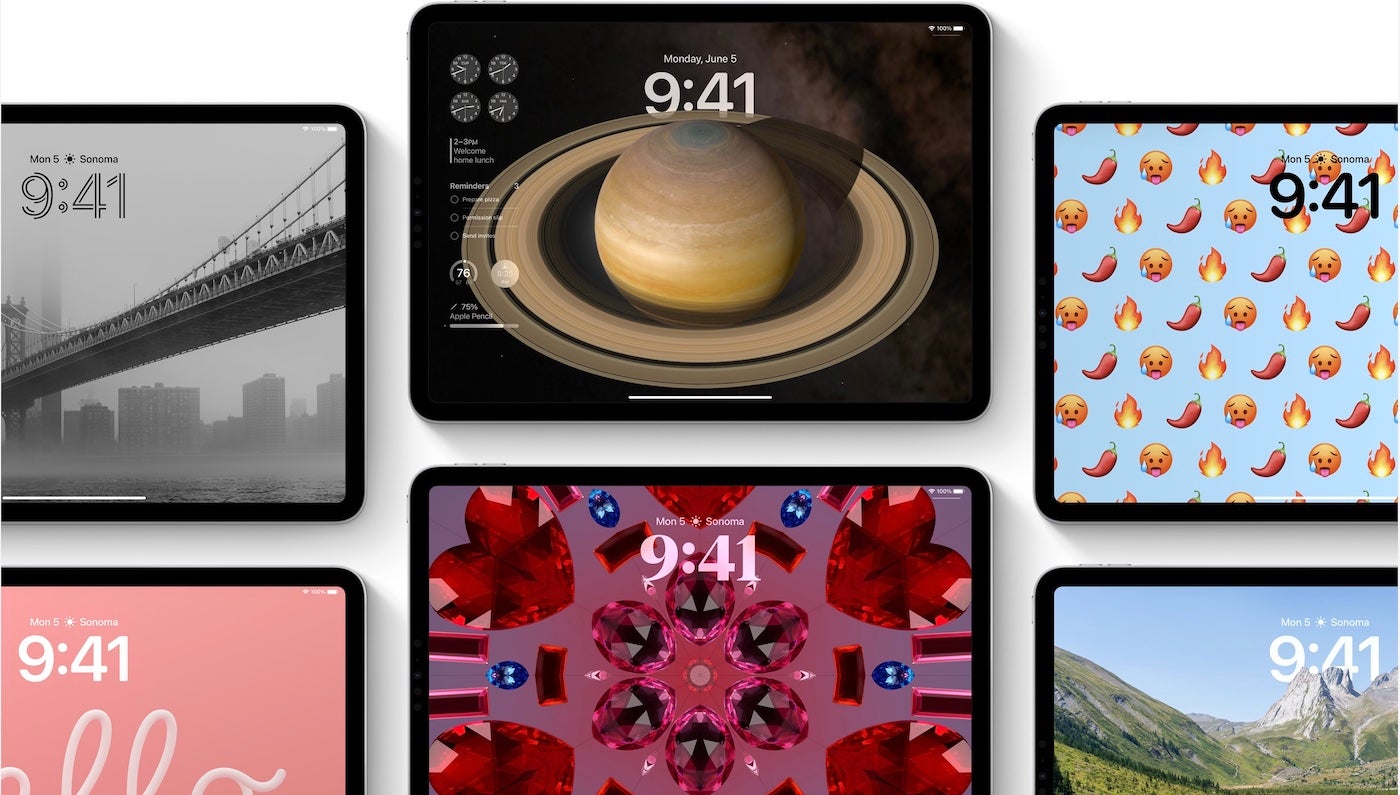
The Lock Screen on iPadOS 17 was redesigned to be just like the one on iPhone and iOS 16 and 17. This new Lock Screen can set matching wallpaper between the Lock Screen and Home Screen.
The Lock Screen has been completely redesigned with widgets in mind for iPadOS 17. Image: Apple, Inc.
Widgets received a major overhaul in iPadOS 17, adding the ability for developers to make them interactive. Instead of launching the user into the application, widgets can perform tasks such as checking off a reminder without leaving the Home Screen or Lock Screen. This is great for the future of widgets and adds back some missing functionality after the iPadOS 15 widgets were announced and released with a new design that removed intractability.
Widgets on the iPad’s Lock Screen are different from the ones offered on iPhone; instead of being smaller versions of full-size widgets, these are more full-featured widgets that can appear alongside the iPadOS 17 Lock Screen, providing at-a-glance information from your apps.
With iPadOS 18, Apple reconfigured the Home Screen on both iOS and iPadOS, allowing users to place widgets and Home Screen app icons in any arrangement they desire. Long gone are the days of app icons and widgets snapping to a grid and flowing into place. Now you can arrange them anywhere on the grid you’d like.
Improved multitasking
Users can move between Slide Over apps by swiping along the bottom or swiping up to see all the apps in the Slide Over view. Slide Over apps can be moved to full screen by dragging them to the top or closed by opening to the app switcher and flicking the app upward.
The Multitasking feature available on iPadOS 15 and newer makes it easier to find and use apps on iPad. Users can use a single app in full screen mode or use multiple apps simultaneously in Split View or Slide Over mode.
The center window feature allows users to touch and hold to bring notes or messages to the center of the screen without leaving the current task. With easy menu options, users can access additional options without interrupting whatever task they’re currently working on.
At WWDC 2021, Apple introduced the “shelf,” a tray that displays open apps users can access at the bottom of their iPad screen.
Desktop Safari
Safari loads the desktop version of web pages, optimized for touchscreens, and offers better support for Google Docs and WordPress editor. Some 30 keyboard shortcuts are available in Safari.
External drive support
USB drives and SD cards are supported in Files, making it possible to plug in to an iPad directly without needing a third-party program or an intermediary Mac for file management.
Improvements to Files app
Files has a column view similar to Finder on macOS as well as support for Server Message Block shares.
Camera support
Cameras can be connected directly to the iPad, and photos can be imported for editing on iPad apps, such as Adobe Lightroom.
Font support
Fonts can be downloaded from the App Store for use in various apps.
New gestures for faster editing
Copy, paste and undo can be performed using three-finger gestures, with three-finger pinch to copy, three-finger spread to paste and three-finger swipe to undo. This feature is available for first-party and third-party apps.
Apple Pencil, Notes and PDF support
Swiping from the corner of the screen with Apple Pencil opens the markup view, allowing users to annotate anything on the screen and export it. Latency for Apple Pencil was also decreased from 20ms to 9ms.
Users can add notes by swiping up on the screen with the Pencil and then writing a Quick Note. Users can also add links/URLs to save a Quick Note for each site they visit. The Quick Note will automatically be available when the user returns to the same website. Quick Notes are also accessible via Notes.
The Apple Pencil Quick Notes feature is available on macOS and iPadOS and can be accessed on iOS.
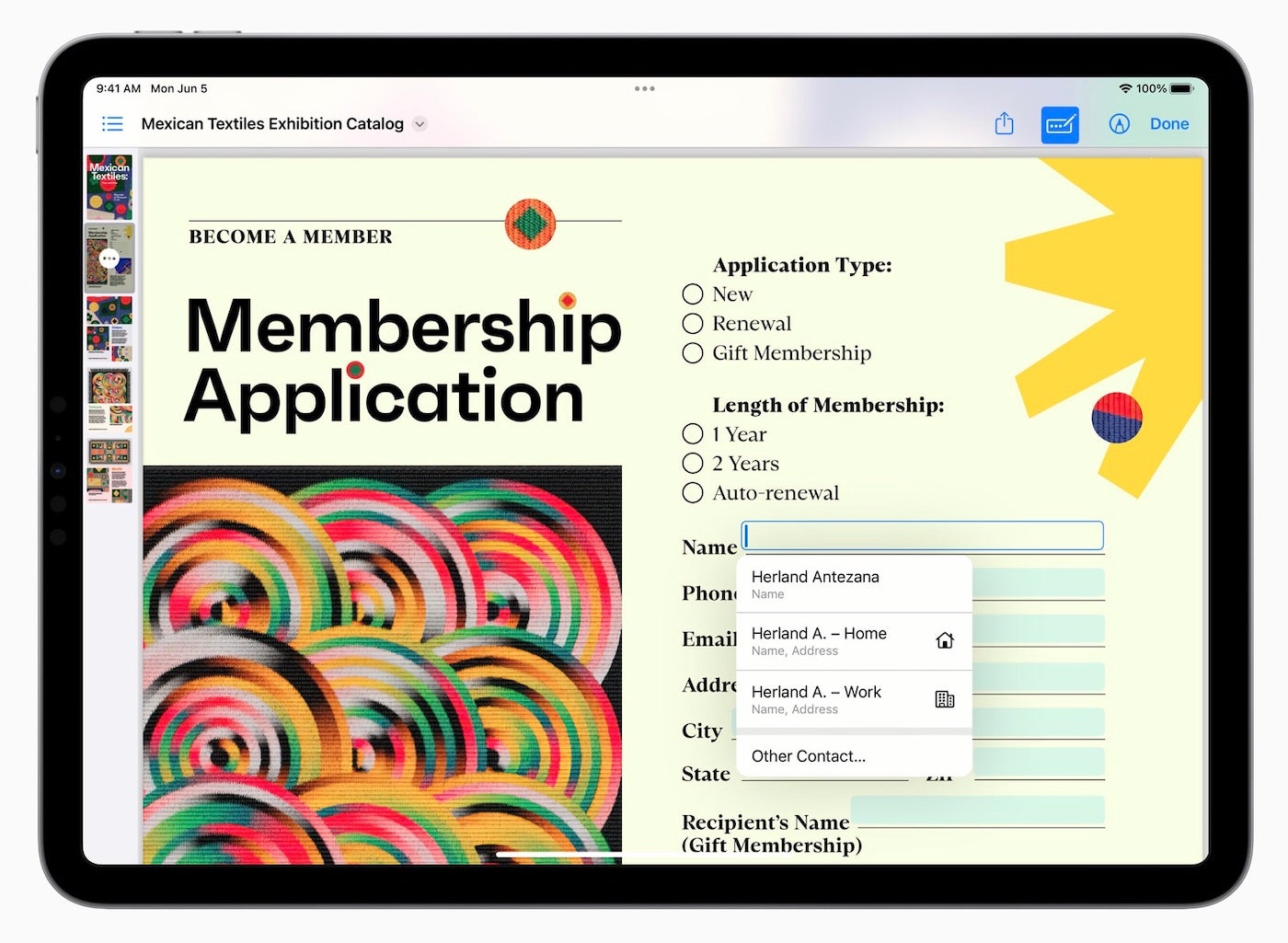
iPadOS 17 includes a PDF editor feature that’s available throughout the system but inside the Notes app. This feature lets users fill out forms with the Apple Pencil or keyboard, making the PDF fields editable automatically.
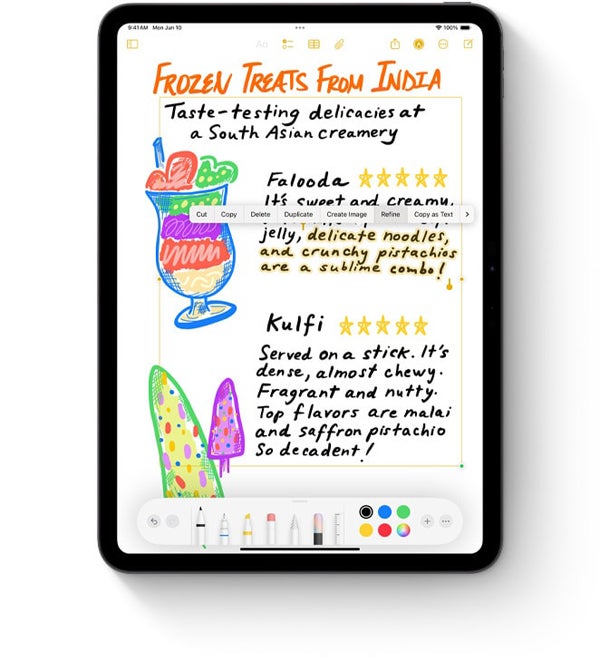
Users can easily refine their handwritten text using the new handwriting smoothing feature in Notes for iPadOS 18. Image: Apple, Inc.
iPadOS 18 introduced the ability for Notes to learn a user’s handwriting and perform smoothing on handwriting to make it look more natural as the user writes a handwritten note. In addition, users can paste text and Notes can translate that to the user’s handwriting and vice versa. Spell check can correct misspelled words using the user’s custom handwriting, too.
SEE: Compare Notes to iPadOS 16’s Scribble.
Machine learning can even identify the type of field, such as a phone number, address, email address and more, and offer auto-completion. When you need to add your signature, sign with an Apple Pencil or choose a synced signature that was already captured.
Now you can edit PDFs with ease in iPadOS 17 thanks to some new machine learning that can automatically find and fill out data using contact info. Image: Apple, Inc.
Sidecar
Users can extend their macOS desktop onto the iPad as a second display or mirror content between both displays. When used in conjunction with the Apple Pencil, Sidecar can make the iPad usable as a drawing tablet. Sidecar works via a wired connection or wirelessly within 10 meters.
Trackpad support
There is support for Apple’s Magic Keyboard, Magic Mouse 2 and Magic Trackpad 2, as well as third-party accessories connected over Bluetooth or USB. When you connect a mouse or trackpad to the iPad, it provides a circular cursor you can move across the screen and interact with elements on the screen. Multitouch gestures also work on the trackpad as well, allowing the user to never need to take their hands off the keyboard and trackpad or mouse.
Scribble
This feature, which was released with iPadOS 14, allows Apple Pencil owners to handwrite in any text field and have it automatically translated from handwriting to type. On launch, it supported English and traditional and simplified Chinese and could even distinguish between the two when used together in the same text field.
Translate
iPadOS added several features to Apple’s Translate app. iPad uses an auto-translate feature that detects when a person is speaking, so no button pushing is required in order to translate spoken words. Users can translate text from anywhere within their iPad screen, such as email, Safari or other web browsers, texts and more.
Swift Playgrounds
Swift Playgrounds allows developers to build apps directly on iPad via Swift UI. Using Swift Playgrounds, developers can immediately see their coding changes reflected in preview mode. Those who are new to app development are in luck — Swift Playgrounds offers a guide to creating your first app, and it can even be submitted directly to the App Store for iPhone and iPad.
Stage Manager
With the iPadOS 16 release, Stage Manager was introduced as a multitasking model for iPad that allows for multiple iPad apps in windows to be displayed at a single time on the iPad. Even multiple overlapping and resizable windows are available to users.
External display support
With iPad Pro or iPad Air with M1 chips, users can connect external monitors and extend or mirror the iPad screen on the larger display to show more apps at a single time, even dragging and dropping files and apps between displays.
Desktop-class apps
With iPadOS 16, Apple added more customizations to iPadOS than typically was shared between iOS and iPadOS. With the new iterations of iPadOS, desktop-class apps are possible, including minor details like being able to customize tab bar items; undo and redo in more places; change file extensions and check file sizes in Files app; and duplicate, rename and export files in more places.
During the WWDC23 keynote, Apple showed off two applications that were made available to the iPad Pro on May 23, 2023. Logic Pro and Final Cut Pro are two professional music and video editing applications, respectively, that have become mainstays on the Mac; the apps were rolled out to iPadOS 16, and they are compatible with iPadOS 17. These additions indicate that Apple is committed to bringing high-quality professional apps over to the iPad and having the iPad Pro be an example of powerful touch-first applications. Final Cut Pro and Logic Pro can be downloaded from the App Store.
Health app for iPad
In iPadOS 17, Apple finally brought the Health app and its data over to the iPad in a meaningful way. The Health app can be used to view synced iCloud Health Data, fitness data and detailed interactive charts surrounding all available health data and medical chart data.
This will be great for many users who rely on metrics for their health and fitness goals, as they can now view this data anytime and anywhere on their iPad or iPhone. This news also unlocks a lot of potential for developers because they can now develop against HealthKit on iPad-specific apps.
Calculator
The new Math Notes feature in the calculator app lets you easily visualize and solve math equations using the Apple Pencil. Image: Apple, Inc.
Calculator is an iOS app that has been notably missing from iPad since the introduction of the iPad. With iPadOS 18, Apple released a scientific calculator for the iPad that is capable of so much more than just simple calculations. It includes a new feature called Math Notes that, when combined with Apple Pencil, allows a user to hand write out a math equation and have the calculator solve the problem in the user’s own handwriting.
Other notable iPadOS 18 features
Apple Intelligence features that are available on iOS 18 are also available on iPadOS, including the contextual-aware version of Siri and the ability to perform large language model tasks like writing assistance and more.
Redesigned tab bar in apps lets you stay focused on the app content and show the sidebar only when needed.
Writing Tools is a contextual tool that can be used in first- and third-party apps to proofread, write, summarize and more using Apple Intelligence. It can be invoked by selecting a block of text.
A new Notes feature transcribes live audio and summarizes your audio for meetings.
Notes has the ability to solve math equations just by typing them into a note followed by an equal sign. Notes will then solve it for you.
Notes gains new formatting options, including the ability to highlight text with a specific color and collapse certain sections of a note.
Redesigned Privacy and Security Settings view in the Settings app lets you more easily see what apps have access to what type of privacy setting.
Eye Tracking makes it possible for people to control iPad with just their eyes in a new Accessibility mode.
Genmoji can be used to create new emojis or profile pictures automatically within iPadOS 18 and is available to implement in third-party apps as well.
Home Screen app icons can be easily customized for light or dark mode, or tint them yourself with a new feature that lets you create monochromatic icons or have them all tinted to your favorite color.
Control Center now features a widget-like gallery for browsing available controls that can be used within the new Control Center interface or Lock Screen action buttons.
Control Center’s actions can be rearranged and resized to your liking.
Photos automatically organizes your photos based on the content contained in them with AI, and you can filter or sort your photos to get the ones you’re looking for.
Messages supports the ability for text to be changed to bold, italics, underline and strikethrough.
Messages can animate particular parts of text for emphasis. iOS 18 can automatically suggest specific animations or pick one of your favorites.
The Messages tapback feature can work with any emoji, allowing you to express messages more effectively than with the built in tapbacks.
You can schedule a message to send later inside of Messages, letting you pick the date and time a specific message or reply should be sent.
Mail has a new AI-enabled ability to categorize messages into certain folders, letting you see email in a new way, sorted by type or by sender.
Mail will group receipts, marketing emails and newsletters by sender in order, so you can easily read them.
Safari will use AI to detect specific elements on a page and surface things like directions, quick links, people, music, movies and TV shows.
Reader in Safari has been infused with AI and can now summarize a web page for you without needing to read an entire article. Great for on-the-go quick catch-ups.
The new Passwords app works on Mac, iPhone, iPad, Vision Pro and Windows thanks to iCloud sync integration.
Game mode on iPadOS 18 lets your iPad suspend background tasks and focus solely on providing the screen with the best and most performant graphics output.
When was iPadOS released?
iPadOS 16 was announced at WWDC ’22 on June 6, 2022; the public beta of iPadOS 16 was released on July 11, 2022; and the public release of iPadOS 16 was made available on October 24, 2022.
iPadOS 17 was announced at WWDC 2023 and was released on September 18, 2023, alongside iOS 17.
iPadOS 18 was announced at WWDC 2024 and released in beta on June 10, 2024 to Apple developers. A public beta is expected later in the summer, with a general public release in September 2024.
What is the release date for iPadOS 18?
The release date for iPadOS 18 is slated for Fall 2024. If tradition holds, we can expect there will be an Apple event this September or October, during which new hardware will be announced alongside the official release date for iPadOS 18.
Which iPads are compatible with iPadOS 18?
The following models of iPad are compatible with iPadOS 18:
iPad Pro M4.
iPad Pro 12.9-inch 3rd generation and later.
iPad Pro 11-inch 1st generation and later.
iPad Air M2.
iPad Air 3rd generation and later.
iPad 7th generation and later.
iPad mini 5th generation and later.
How to download and install iPadOS 18
Apple announced on June 10, 2024 that developers have access to a beta version of iPadOS 18. Any device that has iPadOS 18 beta installed is required to be part of the Apple Developer Program.
Please note that iPadOS 18 should only be installed on development-specific hardware because features may not be fully implemented yet, and bugs are common in beta releases. Using iPadOS 18 on production accounts and devices may result in data loss.
Follow these steps to install the iPadOS 18 beta.
Log into your Apple Developer account.
Select Downloads and then iPadOS 18.
Download the profile and AirDrop it to your iPad, or perform steps one and two on your device.
Install the profile on your iPad, and then restart when prompted.
After restarting, navigate to the Settings app | General | Software Update. You will receive a prompt to download and install the latest version of the iPadOS 18 beta.
It is likely that Apple will unveil a public beta through its AppleSeed program to testing volunteers beginning July 2024. The public beta of iPadOS 18 can be installed on non-development devices for those enrolled in AppleSeed.
What is the latest iPadOS version?
The latest iPadOS version is iPadOS 17. At Apple’s Worldwide Developers Conference this year, Apple unveiled iPadOS 18, which is slated for a Fall 2024 release, likely soon after iOS 18 is released to the public.
How can you tell what version of iPadOS you’re running?
If you’re unsure about which version of iPadOS your iPad is currently running, you can check it by performing these steps.
Open the Settings app.
Select General | About.
Under Software Version, you can see the version your iPad is running.