Nandan Nilekani, the co-founder of Infosys has revealed that its early investment in generative AI, through its Infosys Topaz platform, has positioned it as a leader in AI services, with recognition from seven out of eight leading analysts.
“Infosys is fully prepared to deliver value,” Nilekani stated. “We made an early investment last year in building a strong generative AI offering portfolio through Infosys Topaz. Today, we are ranked as a leader in AI services by seven out of eight leading analysts.”
Infosys is currently managing over 225 generative AI programs for its clients. A key aspect of executing these complex transformations is talent. The acquisition of Danske IT and Support Services in India has strengthened Infosys’ digital talent pool.
“We have invested significantly in hiring talent with proven generative AI skills as well as rapidly upskilling our existing engineering talent,” Nilekani emphasised. Infosys now boasts over 250,000 employees trained in generative AI.
The integration of generative AI components into all service lines and the development of 25 playbooks have allowed Infosys to create significant impacts for its clients. By combining AI with cloud capabilities via Infosys Cobalt, clients are scaling their AI operations more effectively. This effort is part of a broader strategy to drive exponential growth in AI and advance the company’s Chip-to-Cloud strategy.
To bolster this strategy, Infosys acquired InSemi, a semiconductor design services provider, enhancing its domain-relevant enterprise AI capabilities. “We have created 23 AI industry blueprints to solve industry-specific challenges,” Nilekani noted. Strategic acquisitions, such as that of in-tech, an engineering R&D services firm, further deepen Infosys’ capabilities, particularly in the automotive sector with software-defined vehicles.
The Love for Indian Developers
Additionally, Infosys is one of the largest adopters of GitHub Copilot globally, with employees generating over three million lines of code using generative AI large language models.
“We’re working on projects across software engineering, process optimisation, customer support, advisory services, and sales and marketing,” said Salil Parekh, Infosys CEO, during the company’s last quarterly call. “We’re working with market-leading open access and closed large language models,” he added, saying that Infosys feels good about its work with generative AI.
Just this month, in a significant move towards accelerating digital transformation in India, GitHub has partnered with Infosys to launch the first GitHub Centre of Excellence in Bangalore. This initiative aims to leverage AI and advanced software solutions to drive global economic growth.
The post For Infosys, Generative AI is Not Just Fluff Talk appeared first on Analytics India Magazine.
The Windows PC industry has fallen into a rut over the past decade. Microsoft and its OEM partners routinely ship a crop of new devices each year, mostly based on incremental speed bumps to Intel CPUs. If you buy this year's model, you get slightly better battery life and a modest increase in performance over last year's crop. Yawn.
That predictable pattern is why the just-released Copilot+ PCs have so much potential. Yes, they run on Windows 11, but at their core is a new engine, Qualcomm's Snapdragon X series of Arm-based processors.
Also: Microsoft's new laptops' repairability stuns iFixit, sets high bar for rivals
My Surface Pro 11 (I know its official name is "Surface Pro, 11th Edition," but let's keep it simple, OK?) arrived last week. I deliberately ordered the least expensive configuration and had no idea what to expect. Yes, it should get better battery life than an Intel-based alternative, and all the preliminary benchmarks suggested it would deliver impressive performance, but seeing is believing.
After one full week, I can say, without qualification: This machine absolutely rocks.
My original plan was to use the new Surface Pro as a secondary mobile device, while keeping my Dell Precision workstation on the desktop for my everyday activity. I am now using the new Surface Pro as my daily driver.
How did this happen? Let's dive in.
View at Best Buy
The experience is familiar
This is a radical shift in the Windows ecosystem, but it doesn't feel all that different from its predecessors. In fact, it's almost indistinguishable from the Intel-powered Surface Pro 9 that's sitting on my desk alongside it. The slim bezels around the displays of the two devices are nearly the same dimensions. The new device, at 1.9 pounds, is the same weight as the Surface Pro 9 and is a few ounces heavier than the Surface Pro X, although that's not something you really notice until you have to lug it through an airport as you rush to make a connection. The Type Cover from the older Surface Pro clicked into place on the Surface Pro 11, exactly as expected.
And as for the software, well … It's Windows 11, which looks and acts the same on an Arm-based PC as it does on an Intel-powered device.
Also: 7 ways to make Windows 11 less annoying
The big difference is that this next-gen device is extremely cool and quiet. After a three-hour Zoom call the other day, the chassis was barely warm; on an Intel-based machine, it would have been uncomfortably hot. There's a fan inside the Surface Pro 11, but I have yet to hear it run, even under the most demanding conditions. And it's extremely responsive, with none of the hesitation I occasionally noticed on the Surface Pro X. If you've used an M2-equipped MacBook Air, the feeling will be familiar.
Of course, this new device also embodies everything you like and/or dislike about the Surface Pro design. If you're expecting a radical shift that will suddenly make the kickstand comfortable in your lap, I'm sorry to report you will be disappointed. But if you're comfortable with that design, you'll find this iteration completely familiar.
Battery life is a huge win
If the Arm architecture has a killer feature, it's battery life. The Surface Pro X delivered the goods on that score, but it did so at a cost in performance. This generation, on the other hand, ups the battery life impressively and does so without any compromise in speed or responsiveness.
It's still a bit too early to make definitive pronouncements about how long this Surface Pro will allow me to work before I begin to look for a place to plug in. The first week with a new device is never typical, as it involves a lot of downloading, installing, configuring, and futzing that presumably won't be a regular thing.
Also: How to improve your Windows laptop's battery life
But these actual usage numbers, from a report generated by the Windows Powercfg /batteryreport command, speak for themselves.
In real-world usage, the Surface Pro 11 battery lasts twice as long as an equivalent Intel-based model
At an average of more than 10 hours of actual, observed battery life, this Surface Pro is able to run for well over twice as long as my Intel-based Surface Pro 9. That's also at least as long as the M2 MacBook Air in my office.
Compatibility is good but not perfect
For these Snapdragon X PCs, battery life is an unqualified success, but the compatibility story is more mixed.
Microsoft has been developing Windows on Arm for more than a decade, and it's remarkable how well most software just works on an Arm-based PC. If you do most of your work in a web browser and in Microsoft Office, you might never notice a difference. But there are still some rough edges, and you can expect some compatibility headaches, especially when using older hardware or apps that require low-level system drivers.
Also: How to reset Windows 11 without losing your apps, files, and settings
On this PC, every preinstalled Microsoft app is, naturally, compiled to run as native Arm64 code. That includes the Edge browser, the complete collection of Microsoft 365 apps, and every imaginable Windows utility, from PowerShell to Registry Editor to Calculator. Even the semi-official PowerToys collection installs in Arm64 mode. I installed a wide selection of Progressive Web Apps that run in the Arm64 Edge environment and they all worked just fine.
Mainstream x86 apps written for Intel-based machines mostly install without any issues in the Windows on Arm emulation layer, and there was no obvious performance hit for the apps I tried, including my go-to screen capture utility, SnagIt.
Many third-party developers have gone to the trouble of recompiling their apps for Arm64, and if you can find them, they're the preferred option. But you might have to do some digging. The default download for the VLC Media Player, for example, is a 64-bit x86 version, but nightly builds compiled for Arm64 machines are available. Likewise, the normal download options for 1Password will get you the x86 release, which is problem-free, but there's a preview of the Arm64 version if you know where to look.
Also: The best password managers of 2024: Expert tested
But I'm not sure what to make of Adobe, which tweeted earlier this year that it's "excited to announce that your favorite Adobe apps are coming to Copilot+ PCs." What does that even mean? Photoshop has been available in an Arm64 version for three years, albeit with significant limitations, but I can't find a native Arm version of Acrobat. Maybe Adobe just means that the x86 versions are certified to run in emulation mode? Who knows.
And then there's Google, which finally released an Arm64-native version of Chrome back in April. Hooray! But you will not find any version of the Google Drive for Desktop sync client that works on a Copilot+ PC. If you try to install the x86 version, you get this unfriendly error message:
No amount of fussing with compatibility settings will get the Google Drive desktop client to install on an Arm-based PC.
So, if you're a confirmed Google Drive user and you want your cloud-based storage to integrate with File Explorer, you'll need to stick with Intel-based machines for now. Or maybe switch to OneDrive.
The stickiest compatibility problems arise when you try to install an app that requires custom drivers for low-level access to networking and the file system. Most commercial VPNs, including Proton VPN and ExpressVPN, will refuse to run on Windows on Arm for that reason; try Wireguard or Viscosity instead. And if you insist on running a third-party antivirus app, you'll probably be frustrated. (Spoiler: You probably don't need it.)
Also: The best VPN for Windows: Expert tested and reviewed
I had no hardware problems to speak of. My 10-year-old Logitech C930 webcam just worked. So did my trusty Brother laser printer and ScanSnap x1600 scanner. I connected the Surface Pro 11 to a StarTech Thunderbolt 4/USB4 docking station and everything worked exactly as it should have.
Your mileage may vary, of course, especially if you have exotic hardware like video capture cards and ancient multifunction printers that require custom driver packs and won't work with the in-box Windows drivers. Thankfully, I have none of those.
The AI story is incomplete
Every PC in the Copilot+ line includes a powerful neural processing unit designed to accelerate AI-based activities. Because I didn't spring for Microsoft's pricey new Flex Keyboard and stuck with my old Type Cover, I didn't get a dedicated Copilot key. Instead, I had to run the Copilot app, which works exactly like it does on any other Windows 11 PC. If it was chatting faster, I didn't notice.
Also: I tried Microsoft's new Surface Laptop Copilot+ PC and it beat my MacBook Air in 3 ways
And, of course, what was supposed to be the marquee feature of these new PCs, Recall, was pulled at the last minute over security concerns and will be available as a Windows Insider Preview feature later this year.
Some of the app-based AI features were more useful. The front-facing camera on the Surface Pro 11 is one of the best I've ever seen in a laptop, and the AI-powered studio effects (which are accessible from the Quick Settings menu on the taskbar) include some useful options like automatic framing and eye tracking. The neural processing unit helps make background blur options look more natural than on a conventional camera.
These AI studio effects are accessible from the taskbar
The Paint and Photos apps are also loaded with AI-based features for creating and editing images. The options to remove background distractions and use blur effects to simulate portrait mode were useful; the styling options, which transform a photo into an alternate style (Impressionist, Anime, and so on) feel gimmicky.
The real question is whether those features are powerful enough to make you switch from your current image-processing tool to one of Microsoft's built-in options. History says that's a pretty big ask.
Even if you avoid the AI features completely, though, there's more than enough power in this budget PC. And as long as your apps and hardware requirements aren't exotic, you'll appreciate its cool, quiet operation.
If you regularly use ChatGPT, you likely keep ChatGPT open in a tab in your browser for easier access. Now, the ChatGPT application for MacOS offers a much more efficient way to access ChatGPT and optimize your workflow.
In May 2024, OpenAI unveiled its ChatGPT application for MacOS users, but only made it available for ChatGPT Plus subscribers. On Tuesday, the startup announced that it was making the app available to all users, regardless of whether you pay for a subscription.
One of the biggest wins of downloading the application is quicker ChatGPT access. By simply hitting the option and space keys on your keyboard, ChatGPT will open from any screen on your desktop.
Also: How to use ChatGPT to digitize your handwritten notes for free
Additionally, the app can take quick screenshots of your screen to assist with whatever you are working on. For example, if you are coding, you can ask ChatGPT to take a screenshot and ask a question corresponding to the code on the screen. You can do the same with anything you are working on, such as documents, websites, emails, etc.
Uploading files is also easier. When the bar pops up, you can drag and drop files or click on the paperclip icon to upload a file from your computer, again speeding up getting assistance with whatever you need. Another perk is starting a conversation with ChatGPT simply by clicking the headphone icon.
After testing the ChatGPT MacOS application, ZDNET's Maria Diaz found it much more helpful than initially expected.
"The MacOS app features a fast, user-friendly interface that sets itself apart from others with its simplicity," Diaz said.
Also: Gmail users can now ask Google's Gemini AI to help compose and summarize emails
So, how do you get started? To download the application, you need a Mac with Apple Silicon (M1 or higher) and MacOS 14+ installed. Then, all you need to do is visit this OpenAI webpage, click download, and follow the steps when prompted.
If you already have the ChatGPT interface open, you can click on your profile picture in the upper right-hand corner and hit "Download the MacOS app," which will take you through the same installation process. If you are a Windows user, don't worry. OpenAI has said that a ChatGPT desktop application will be released for Windows later in 2024.
Motorola and Google Cloud recently announced a new multi-year relationship to bring Google’s generative AI models to Motorola phones, including the brand-new series of Razr smartphones.
Moto ai technology is built using Google Cloud Vertex AI, Gemini, and Imagen models, and is now deeply integrated across native smartphone applications and brings users an enhanced smartphone experience, including the ability to complete tasks, provide relevant suggestions and reminders, summarise and recall information, and more.
Moto ai aims to transform the smartphone experience by becoming context-aware, personal, collaborative and ubiquitous throughout the phone and ecosystem.
“Moto ai empowers users to intuitively create content, personalize their device, obtain the information they seek, and accomplish more in less time – all made possible by Google’s most advanced AI,” Dan Dery, vice president, AI, ecosystem and internet services, Motorola, said.
Moto ai is present in devices today and can be found everywhere from the camera to battery to display and device performance. Main features are as follows:
Magic Canvas: Creates images from your imagination, turning descriptions into graphics that can be used in messages, on social media, as wallpapers, and more.
Style Sync: Syncs your phone’s look to your personal style by creating wallpapers and themes that match your outfits.
Moto ai learns as you interact with it, and will also add new features over time such as the ability to deliver a prioritized summary of personal communications, transcribe and summarize conversations, and remember important information from those conversations and recall it later on demand.
These new phones will be available starting today in select countries within Latin American and Europe and available for pre-order in North America, India and select countries in Asia Pacific in the coming weeks.
The post Google Gemini, Imagen to be Deeply Integrated in Motorola Smartphones appeared first on Analytics India Magazine.
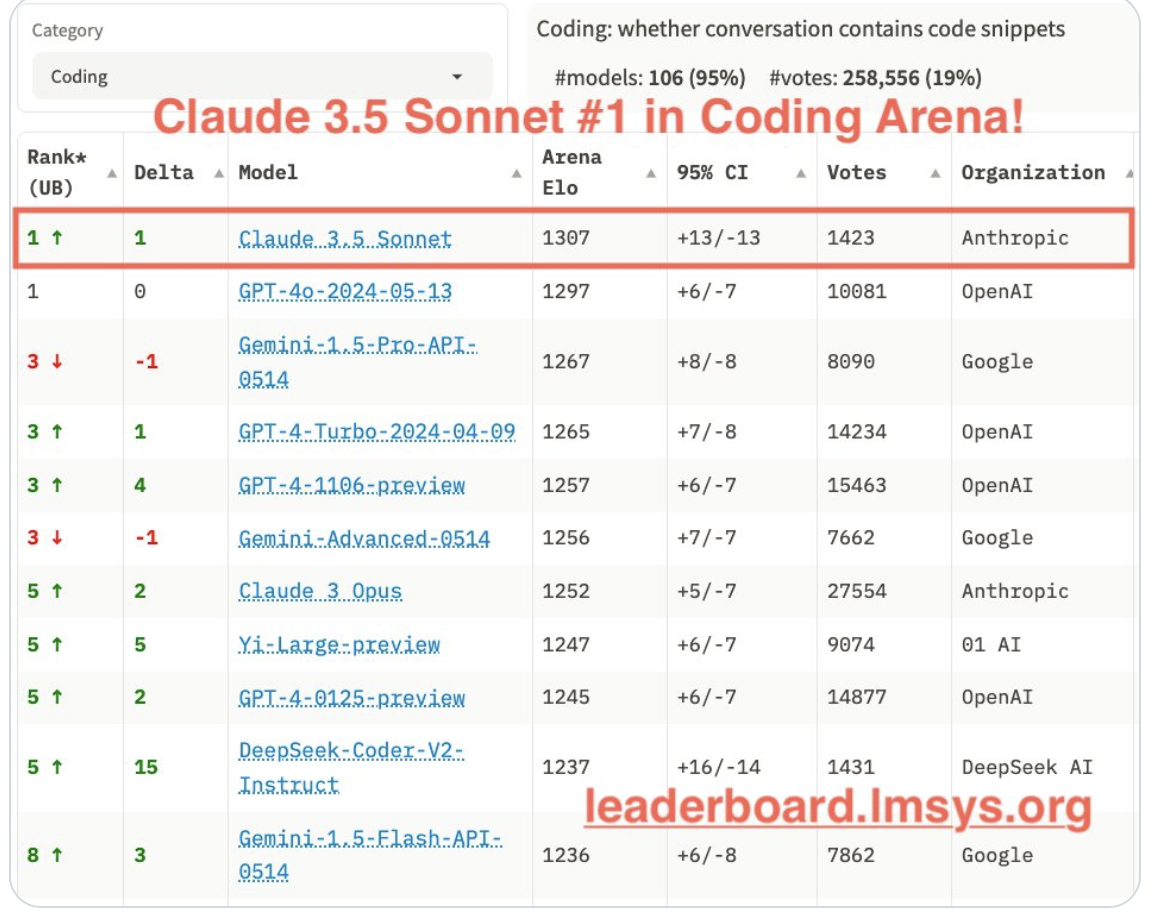
Anthropic’s latest model, Claude 3.5 Sonnet, has dethroned OpenAI’s GPT-4o and secured the top spot in the Coding Arena and Hard Prompts Arena. It was also placed second on the Overall leaderboard. “Claude is so much better at coding than ChatGPT. Night and day difference (sic),” wrote a user on X.
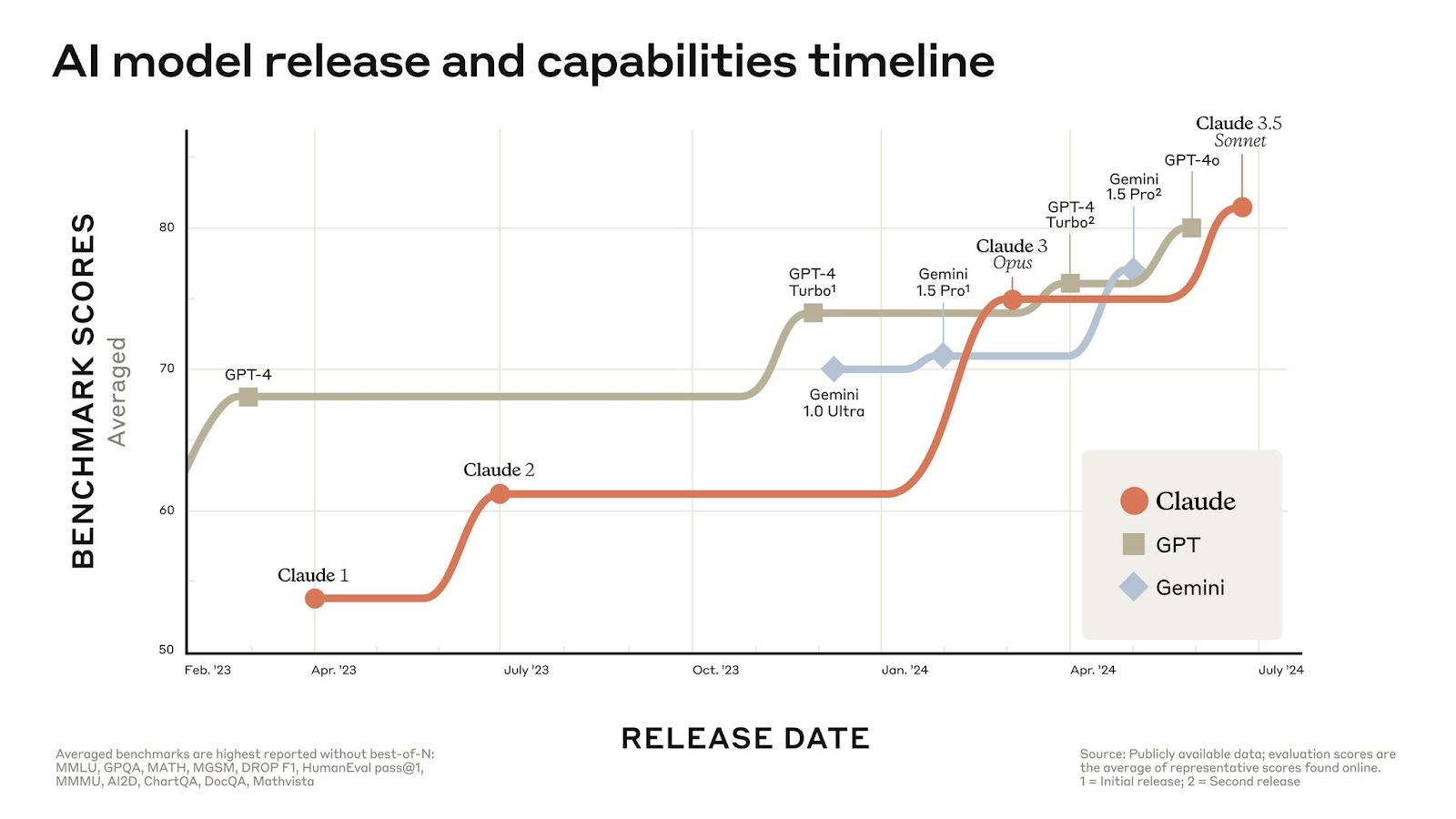
The new Sonnet has surpassed Claude Opus at five times the lower cost and is competitive with frontier models like GPT-4o and Gemini 1.5 Pro across the board.
However, the best is yet to come. Anthropic plans to release Claude 3.5 Haiku and Claude 3.5 Opus later this year, along with developing new features like Memory for personalised user experiences.
Play with Artifacts
The standout feature in Claude 3.5 Sonnet that has captured everyone’s attention is the Artifacts tool. It appears as a separate window in the corner, assisting users in visualising their tasks.
When users request Claude to generate content such as code snippets, text documents, or website designs, the Artifacts feature displays these creations in a dedicated window within their conversation interface. Currently, OpenAI’s ChatGPT does not boast of any such feature, nor has it announced anything similar.
This setup creates a dynamic workspace, allowing users to view, edit, and enhance Claude’s outputs in real-time. It seamlessly integrates AI generated content into their projects and workflows.
Since its release, many users have been experimenting with the model to create games, websites, functional AI sound effects, and simulations.
It literally took me just 5 minutes to create a snake game using Claude 3.5 Sonnet. After that, I asked Claude to create a computer play button in the most efficient algorithm to play. Here we go: the complete implementation, which I could even test in the same window. pic.twitter.com/1e7QR8713b
— Tarek Badr طارق بدر (@tarekbadrsh) June 22, 2024
“Wow! Claude 3.5 Sonnet with Artifacts will revolutionise learning! I asked Claude to create an animation simulating projectile motion, and the result blew me away! Imagine generating custom animations and illustrations for any topic in minutes. Goodbye, static textbooks! @brilliantorg should be scared! ” wrote a user on X.
Wow! Claude 3.5 Sonnet with Artifacts will revolutionize learning! I asked Claude to create an animation simulating projectile motion, and the result blew me away! Imagine generating custom animations and illustrations for any topic in minutes. Goodbye, static… pic.twitter.com/Klsp24uNkt
— Satvik Paramkusham (@satvikps) June 23, 2024
Similarly, AI investor Allie K Miller used Claude 3.5 Sonnet to create an interactive educational tool to teach her ‘daughter’ how AI is used to communicate with animals.
Anthropic has also introduced the ‘Projects’ feature in Claude where users can now organise chats with Claude into shareable projects. Each project includes a 200K context window, equivalent to a 500-page book, allowing users to incorporate all relevant documents, code, and insights to enhance Claude’s effectiveness.
Moreover, users can set custom instructions within each project to further tailor Claude’s responses.
Codes Like Flash
“Claude 3.5 Sonnet is better at writing code than a typical computer science grad,” said former Stability AI chief Emad Mostaque.
Source: X
When equipped with the necessary tools, Claude 3.5 Sonnet can autonomously write, edit, and execute code, showcasing advanced reasoning and troubleshooting abilities. It excels at code translations, making it especially useful for updating legacy applications and migrating codebases.
this multiplayer coding chat prototype suddenly became super fun with release of Claude Sonnet 3.5 – made oauth logins work (still haven't tested with anyone!!) – works best w/ p5 / threejs / music apps rn – dies after 4 sketches – wanted excuse to make this cool video: pic.twitter.com/I5uUL0MlCp
— Brian Jordan (@bcjordan) June 23, 2024
“Been using Claude 3.5 for coding day-to-day and wow, I think this may happen sooner than people imagine. Software is dead. And we have killed him,” posted another user on X.
Furthermore, when combined with Artifacts, Claude 3.5 Sonnet simplifies developers’ tasks by providing real-time visibility into their app development process. This capability makes Claude an ideal pair programmer, enhancing collaboration and efficiency.
One of the most exciting things about artifacts is that it's not just making existing coding jobs easier/faster, it's creating software that would never be written otherwise. Many people are now creating their first apps, with Claude's help. Niche apps that only a few people… pic.twitter.com/iQk2jzyHkL
— Alex Albert (@alexalbert__) June 24, 2024
Wake Up OpenAI!
Lately, OpenAI has faced mounting pressure from its competitors. The company announced the GPT-4o model just before Google I/O, but its voice capabilities have yet to be released. “It’s been a month and a half and there is no new voice or vision functionality available, openai shipped a blog post,” quipped a user on X.
OpenAI has announced that the voice feature will be made available to all Plus users this fall. “We had planned to start rolling this out in alpha to a small group of ChatGPT Plus users in late June, but need one more month to reach our bar to launch,” the company said.
The company is improving the model’s ability to detect and refuse certain content. “We’re also working on improving the user experience and preparing our infrastructure to scale to millions while maintaining real-time responses.”
OpenAI will start the alpha with a small group of users to gather feedback and expand based on what they learn. “We are planning for all Plus users to have access in the fall.”
We're sharing an update on the advanced Voice Mode we demoed during our Spring Update, which we remain very excited about: We had planned to start rolling this out in alpha to a small group of ChatGPT Plus users in late June, but need one more month to reach our bar to launch.…
— OpenAI (@OpenAI) June 25, 2024
“Just a year ago, it was unthinkable that any other model would even remotely approach GPT’s lead. Today, Sonnet-3.5 (not even Anthropic’s biggest Opus model) is already slightly above and Llama-3-400B is around the corner,” posted another user on X.
“I never thought I would have anything on par with the OpenAI models, but Anthropic is killing it with every new model without any drama, focused on APIs and developers instead of giving startup-killing vibes and hubris. And when we hit the wall, Anthropic could be a winner,” said KissanAI founder Pratik Desai.
Meanwhile, Amazon is developing a ChatGPT killer app, internally codenamed Metis. This project uses retrieval-augmented generation to provide up-to-date information and automate tasks.
The same thing happened with OpenAI’s video generation model Sora. “Just 4 months ago, Sora blew everyone’s mind and seemed so out of reach. Today, we have at least 4-5 clones of Sora at 70-80% quality, such as Kling, Luma, and Runway. The clones wouldn’t have rallied without OpenAI’s first move,” posted NVIDIA AI researcher Jim Fan.
One can only hope that OpenAI will keep up with their promises and deliver the new models soon.
The post Farewell, ChatGPT! appeared first on Analytics India Magazine.
After an investigation called out Sports Illustrated (SI) for publishing AI-generated articles under fake bylines, CEO Ross Levinsohn found himself out of a job.
There is some controversy over who was responsible for generating the stories. The Arena Group, SI's parent company, didn't specify a reason for Levinsohn's firing. In any case, people listed as the authors of the articles did not exist and the timing of Levinsohn's exit seemed more than coincidental.
Then there's content company Advon. In a detailed exposé by Futurism (a Knight Foundation grantee), reporters found publications across the Gannett and McClatchy properties used articles produced by Advon to fill their publications.
McClatchy used AI-generated articles attributed to at least 14 fake authors in more than 20 of its outlets, including the Miami Herald and Sacramento Bee, Futurism reported.
According to Futurism's findings, Advon originally used contract writers living in developing countries. In a bid to save more money, the company tasked those writers with critiquing the work generated by the AI. Eventually, the AI became sufficiently trained and Advon terminated its already underpaid authors.
After Futurism's report, McClatchy and Gannett deleted the generated articles and consigned the fake authors to digital purgatory.
As AI becomes more capable and mainstream, it should come as no shock that some executives are looking to it as a much lower-cost replacement for human creatives. While AI can replace some creative tasks, AI-generated content can also diminish quality and increase the generic-feeling nature of the resulting work. And that's to say nothing of the instances AI goes completely off the rails, like when Google's AI search recommended adding glue to pizza to make it stick better.
We'll examine the huge temptation AI offers when it comes to saving money, where and why AIs are limited when it comes to content generation, and legitimate ways AIs can help reduce time and cost without sacrificing originality and quality.
The temptations of employing AI
In my previous roles as software company president and magazine publisher, I hired a fair number of creative professionals. I had programmers, writers, editors, artists, and graphic designers on staff. I spent much of my time focused on one challenge: how to make payroll for the next week.
There's a wide range when it comes to how much creatives are compensated. Some writers get paid on piece work as contractors and barely make minimum wage. Others make six-figure incomes. The same is true for each of the creative professions. But even the least paid still often cost their company hundreds of dollars a week and thousands of dollars per month.
The managerial temptation is compelling. What if you could cut four out of five salaries (or the equivalent contract payments), and keep just one professional whose primary job it is to operate AI services (which, in total, often cost under $100/month)?
For most organizations, the people cost is the largest expense. Replacing humans with a couple of AI subscriptions might seem like the Holy Grail — at least from the point of view of bean counters and others who focus on cost accounting.
As someone whose encore career is now thankfully out of the management arena and is squarely planted in the creative professional category, I can see both sides.
For those of us who make our living as creative professionals, the prospect of being replaced by a bunch of blinking lights is terrifying. Some creatives know they produce enough unique value to justify their continuing employment. But those top-tier skills come with a bigger price tag for employers and clients, which creates yet another temptation paradox.
For outlets like ZDNET, for whom content quality is a competitive advantage, the cost of creatives is necessary and justified. For content farms, and those who hope to strike it rich through spamming affiliate links and crappy reviews all over the web, the need for human content creators seems far less so.
That brings us to a fundamental question: Do consumers of creative output prefer cheap or good? The answer is both. Some consumers gravitate to high-quality work. Others have little ability to distinguish between something of quality created by a human and something just churned out by an AI.
To be clear, not all creative output by humans is brushed with greatness. Humans phone in their work as much as the next AI. And not all creative output by AIs is low quality. Some of the images I created using Midjourney for my record album covers are just spectacular, far and away better than anything I could ever have done on my own, and I simply wasn't going to hire an artist for a personal side project.
While the promise of generative AI appears, on its surface, to be cheap content for everyone, there are costs, challenges, and limitations that prevent AI from being used to easily replace legions of knowledge workers.
AI's costs, challenges, and limitations
Here's something that seems like we're really living in the future: The surge of generative AI content to replace or impersonate what humans create is leading to the growth of another AI to combat that.
Yep, we live in a time of AI wars. In this case, we're talking about the ever-escalating attempts by low-quality volume content producers and spammers to fill the internet with money-generating garbage vs. Google, which has major efforts in place to lower the SEO value of automatically generated content.
Google's blog post on this makes for interesting reading, not only because SEO is so important, but because it showcases how creative work may be judged going into the future.
"Our focus is on the quality of content, rather than how content is produced," the post says. Google's algorithms are tuned to elevate original, high-quality content that demonstrates expertise, experience, authoritativeness, and trustworthiness.
While automation may have a role in, for example, posting up-to-date weather data or sports scores, detailed analysis benefits from a human voice. When it comes to the vast tracts of AI-generated filler designed to raise SEO value or trigger affiliate payments, Google actively fights this lower-quality content and spam.
Google's battle against poor-quality content alone should be enough to give most organizations pause. If you want to have a viable presence on Google, your content has to be good—and that alone helps protect the jobs of creative professionals.
There are other limits outside of concerns over Google SEO juice as well.
One of the biggest is that generative AIs just don't do big projects all that well. I've used ChatGPT to help me with my programming with great success. I've found it very helpful when I ask it for a small, very special-purpose routine. But whenever I've given it a more complex problem, it has failed.
The same is true for writing projects or even academic research. I would love to use ChatGPT to do a full literature review. But the best it usually does is cite one or two websites (and it loves Wikipedia).
Compare that to a real literature review done by a graduate student, digging through thousands of academic papers, journals, and other documents to create a carefully aggregated summary of available research.
There are also liability and legal costs as well. Here at ZDNET, we don't publish images produced by AIs because most of the image-generating AIs were trained on the entire internet, copyright be damned. We certainly don't want to be implicated or sued over the use of copyrighted content, just because it happens to be generated by DALL-E 3 or Midjourney.
The one exception to that rule is when we're reporting on how AIs work. In that context, we use AI-generated images for illustration purposes. Take this article I wrote last year about Midjourney vs. DALL-E 3. I was shocked to find that OpenAI's DALL-E 3 generated images of Snoopy. Yes, that Snoopy. Later in the article, it generated images that could have been pulled right out of TheNightmare Before Christmas.
Then there's the case of Missouri litigant Jonathan Karlen. He was fined $10,000 by an appeals court judge because he used an AI to generate dozens of non-existent citations in a legal brief filed in St. Charles County. Not only were some of his citations fake, but other aspects of his filing had errors, omissions, and formatting mistakes.
"The use of AI may bring about complex legal considerations including but not limited to intellectual property rights and compliance with regulations, which must be carefully navigated to avoid negative and potentially huge legal, financial, and reputational repercussions," said Carl D'Halluin, chief technology officer at data migration and protection company Datadobi.
We've talked about this many times: AIs make mistakes in the most authoritative-sounding ways. About a year ago, I spent an enjoyable if faintly evil afternoon convincing ChatGPT to go beyond its guardrails and lie, pants on fire and all. Don't try this at home, kids. I'm a professional.
The big takeaway here is that AIs make mistakes, as do humans. The use of AI-generated content could easily lead to both copyright claims and much more damaging liability claims.
But fear not. AI can be used by creatives as a force for good.
How creatives can use AI
Let's pause and think about some terms: skills, creativity, and vision. When I taught programming and multimedia (interactive animation and video) in college, most of my students were laser-focused on acquiring the skills that would land them specific jobs.
Skill is about the ability to do the task. Can you create a rough cut in Final Cut by stringing clips together? Can you write a JavaScript program to combine the name and URL of a web page into a bookmark on your browser? Can you create a simple graphic for a social media post?
All of these are about the ability to perform tasks with some level of expertise and precision. They're tasks necessary for doing the job, and in some gigs, they are the job. Humans have often created tools to help perform skills faster and with more precision.
For example, we use software-based video editors now, but back in the day, editors cut pieces of actual film together. Most woodworkers use power tools to get the job done faster, while some purists still prefer doing everything with hand tools.
When I got my first product manager job, we didn't have PowerPoint, but did a lot of presentations. We used old-school carousel projectors and 35mm slides. To put the graphics on those slides, we took weeks, and spent thousands of dollars per deck, working with outside slide production houses.
PowerPoint required those slide services to pivot. Not everyone survived. That's tech natural selection at work.
AI, at the skills level, is another power tool. It can get the job done faster, increase efficiency, reduce repetitiveness, and help lesser-skilled folks produce more skilled output.
But then there's creativity. Creativity is the ability to think of new ideas, new ways of doing things, and new projects. It's much more about imagination, the ability to think across disciplines, and the art of combining existing ideas in interesting and novel ways.
Vision is the ability to use creativity to see a path to a result. It's the ability to see and choose goals, articulate a mission, and describe desired outcomes.
Today, we can use AI to truly help with skills. Removing the background from a photo in Photoshop relies on AI, and it saves a ton of time compared to hand-specifying bezier curves to make that selection. AI can also help generate new ideas and even articulate vision. But it's not really capable of deciding what's good for you or your company.
"Creatives can leverage AI to handle repetitive data creation, customization, and management tasks, ultimately allowing them to focus more on art and innovation and less on administrative duties," Datadobi's D'Halluin told ZDNET.
The farther along you are in your career or your creative journey, the more time AIs can save you. This is because the more advanced you are, the more likely you'll be able to easily identify and define tasks that can be easily delegated, compared to tasks that require your own unique skills, perspective, and experience.
When it comes to corporate cost management, the real challenge lies in managers understanding their markets, unique offerings, and the competitive value their creative professionals provide.
Sure, AIs can reduce the workload of entry-level staffers and even take over some of the work that might have been delegated to those just entering the workforce.
While AIs can assist more senior professionals, years of experience and seasoning produce the key value. If you can't replace a senior creative with someone fresh out of college or art school, you can't replace that senior creative with an AI either.
AI and the future of creative work
An average of about 50 million Americans left their jobs in 2020 and 2021, according to a study from consultancy McKinsey & Company. Much of that was pandemic-era attrition, but there are still 10 million vacant jobs. As a quarter of Americans reach or exceed retirement age by the end of the decade, that number could grow.
While I'd never put it past a short-sighted bean counter to terminate productive workers in favor of a low-quality AI, that may not be the issue. AIs may help augment a workforce, allowing employees to keep up when their employers are unable to find more help.
McKinsey also estimates 30% of hours worked today could be automated by 2030. That could boost employee productivity, but it's also likely to disproportionately impact lower-wage workers, whose jobs are easier to automate or augment.
Meanwhile, a 2024 study by Microsoft and LinkedIn found that 78% of the knowledge workers surveyed are BYOAI (bring your own AI). In other words, they're not using corporate-sanctioned AI services, but logging into ChatGPT, Gemini, or Copilot. Nearly three out of four employees are using AI at work. Almost half of them started using it within the last six months.
In the survey, 66% of company leaders said they wouldn't hire someone without AI skills, and 71% said they'd hire a less experienced candidate who has AI chops over a more experienced candidate who is not AI savvy. Microsoft does have a horse in this race, but part of the reason it has invested so much in AI is because of metrics like these.
Personally, I have found AI to be a huge time saver. I initially started using ChatGPT and its ilk because I write about AI. But now that I have these tools in my kit, I'm never looking back.
While AI has failed miserably at writing full programs for me, there's no doubt ChatGPT has saved me weeks per project writing and assisted me in debugging small segments of code at a time. Midjourney has helped me create social media graphics for my wife's e-commerce business. ChatGPT's analytics processing has helped me do product market analysis I would never otherwise have had the time to do.
Fundamentally, I don't think companies will save money by replacing creatives with AI. However, I think companies would be remiss if they didn't recognize the performance and productivity benefits creatives can gain by augmenting their output using AI tools.
I'll leave you with an intriguing thought from Alex Ambroziak, senior creative producer of, content strategy at Shutterstock. He's coined the phrase the "generative AI paradox," wherein creatives who seem to have the most to lose to AI, may actually be the best qualified to use it.
"There's a misconception that AI, especially in its generative form, is simple to use and will get instant results but the reality is that the same skill set that is needed for composition and design is necessary to use AI creatively, only now, it's supercharged," he told ZDNET.
At least in 2024, AI is still a productivity tool to enhance and not replace.
You can follow my day-to-day project updates on social media. Be sure to subscribe to my weekly update newsletter, and follow me on Twitter/X at @DavidGewirtz, on Facebook at Facebook.com/DavidGewirtz, on Instagram at Instagram.com/DavidGewirtz, and on YouTube at YouTube.com/DavidGewirtzTV.
In a recent post on X, CRED founder Kunal Shah said that AI had raised the bar of ‘deep skill’, a term that refers to the advanced, specialised skills that are in high demand due to AI’s influence, just like the internet did in the past.
It’s interesting to note how this transformation is moving faster than ever.
Defining Deep Skill
Shah is probably right when he says AI has raised the bar for deep skill. The rise of AI is making deep, specialised skills more valuable while also creating new categories of deep skills around AI technologies.
Deep skills are considered high-level capabilities that require extensive training and experience to develop. They are distinct from broad skills, which are more general and transferable across different domains.
They are often domain-specific and not easily interchangeable between industries or skill sets. For example, a C++ programmer cannot easily transition to a nanoparticle scientist role.
Need Much More Than Skill
According to a recent IBM survey, executives believe 40% of their workforce will need to reskill over the next three years due to AI and automation initiatives. “That translates to 1.4 billion of the 3.4 billion people in the global workforce, according to World Bank statistics,” the study’s authors stated.
Until about 40 years ago, it was commonly estimated that skills had a ‘half-life’ of at least ten years before needing refreshment. Today, that half-life is around four years.
So, it’s no surprise that IBM’s AI chief, Matthew Candy, stated that you may no longer need a computer science degree if you want to work in technology. Candy believes that in the age of AI, ‘soft talents’ such as creativity, problem-solving, and adaptability would be more valuable than technical ones.
AI is Reshaping the Skill Market
Those who master the art of developing workflows in which humans and AI complement each other’s capabilities will generate unmatched value.
This “symbiotic intelligence”, which is able to recognise when human intelligence supersedes AI and vice versa, has the potential to become the new standard of excellence.
Generative AI systems like language models can mimic certain aspects of human skills, but they lack true understanding and cannot fully replace human expertise and judgement.
There are also concerns that over-reliance on AI could lead to a decline in deep, hands-on practice and mastery of skills. Most jobs today are about knowing how things work in a company, i.e processes, who does what, team dynamics, past issues in emails etc. All this will go to AI.
AI as a Skill Facilitator
AI is not just a disruptor, it can also be a facilitator in skill transitions and career exploration. A pilot project by the World Economic Forum, in collaboration with Unilever, Walmart, Accenture, and SkyHive, used AI to map individuals’ skills and match them to future career roles, showcasing the practical applications of AI in the job market.
The study revealed a promising aspect of AI—it can help us discover our true potential. Often, we underestimate our skill sets due to inherent bias.
However, when AI analysed the skills, the number of detected skills increased by more than three times. This means that AI can open up hitherto untapped job alternatives, offering a beacon of hope for career exploration and growth.
The study also discovered that it would only take six months to reskill people for new responsibilities in entirely different areas.
AI-powered tools can help identify individuals’ existing skills and match them to emerging job roles, enabling seamless career transitions and reskilling. It is also evident that with AI, the bar for deep skill will only increase.
The post AI Raises the Bar for Deep Skills in Jobs appeared first on Analytics India Magazine.
Fractal has announced the merger of Eugenie AI, an AI company dedicated to providing AI-driven products for climate change and industrial sustainability.
Founded in 2021, Eugenie has established itself as one of the pioneering forces in AI-driven climate solutions. Their clientele includes some of the world’s largest industrial corporations across energy, metals & mining, and other hard-to-abate sectors.
Eugenie’s focus on providing AI solutions to some of the hardest-to-abate sectors aligns perfectly with Fractal’s vision of driving significant value for large enterprises. The company said in a press release that this strategic merger will enhance Fractal’s ability to offer comprehensive AI solutions that optimise business operations and contribute to a more sustainable and resilient industrial ecosystem.
By integrating Eugenie’s expertise in climate-focused AI solutions, Fractal aims to expand its portfolio and deliver even greater value to its clients and communities worldwide.
“We look forward to working together to create a future where technology and nature coexist harmoniously. By integrating our AI-driven solutions with Fractal’s extensive capabilities, we can offer even greater value to our clients, helping them achieve their sustainability goals,” Dr. Soudip Roy Chowdhury, founder and CEO, Eugenie AI, said.
The post Fractal Merges with Eugenie.ai to Strengthen AI-Powered Climate Solutions appeared first on Analytics India Magazine.
Software development and deployment cycles keep accelerating, thanks in large part to artificial intelligence (AI), which helps generate code and makes suggestions as it goes along. Even with such hyper-productivity, IT managers and business leaders remain perplexed about how to measure AI's impact.
That's the word from a new survey of 5,315 executives and IT professionals, conducted by GitLab, covering software development productivity and DevSecOps. AI-assisted development is now the norm — 78% of respondents say they are currently using AI in software development or plan to in the next two years, up from 64% in 2023, the survey confirms. In addition, 67% say their software development lifecycle is now mostly or completely automated.
Also: From AI trainers to ethicists: AI may obsolete some jobs but generate new ones
Bringing in AI may be accelerating software development toward blinding speeds. Stunningly, most executives, 69%, indicate they are shipping software twice as fast as last year. Plus, it's actually taking longer to get IT professionals up to speed with the tasks at hand. More than half, 52%, say it takes more than three months to onboard new developers — up from 42% a year ago.
Upper-level executives are much more wary of AI than their staff members. A majority of executives, 56%, say that introducing AI into the software development lifecycle is risky in terms of privacy and data security. In contrast, only 40% of professionals have such concerns.
Executives also worry more about AI skills, with 35% identifying a lack of appropriate skill sets to employ AI or interpret AI output as an obstacle to using AI. Only 26% of IT professionals agree.
Respondents currently using AI for software development (43%) were much more likely than those not using AI (20%) to say that developer onboarding typically takes less than a month. The same effect was observed for DevSecOps platform usage, with 44% of those currently using a platform saying that developer onboarding takes less than a month, compared to 20% of those not using a platform.
The survey finds that the most popular use for AI within IT shops is code generation, plus providing explanations on how code works. For future work, the largest number would like AI to help them achieve forecasting and productivity metrics.
Also: Meet your new IT superhero: Citizen developers flex their AI muscles
How AI is used in development
Code generation and code suggestion/completion, 47%
Explanations of how a piece of code works, 40%
Summaries of code changes, 38%
Chatbots that allow users to ask questions in documentation using natural language, 35%
Summaries of code reviews, 35%
What IT pros and managers want to see in AI
Forecasting productivity metrics and identifying anomalies across the software development lifecycle, 38%
Explanations of how a vulnerability can be exploited and how to remediate it, 37%
Chatbots that allow users to ask questions in documentation using natural language, 36%
Suggestions for who can review code change, 34%
Fixing failed pipeline jobs, 31%
Software supply chain security is a potential weak spot, with 67% of professionals reporting a quarter or more of the code they work on is from open-source libraries. At the same time, only 21% of organizations currently use a software bill of materials (SBOM) to document the composition of their software.
Also: Apple coders, rejoice! Your programming tools just got a big, free AI boost
Executives say developer productivity is a critical operational metric. However, many are unsure how to measure it. Slightly more than half of executives, 51%, say their current methods for measuring developer productivity are flawed or want to measure it but aren't sure how. At least 45% admit they aren't even measuring developer productivity against business outcomes.
A majority of executives, 55%, agree that developer productivity is important, and 57% agree that measuring this productivity is key to business growth. However, only 42% currently measure developer productivity within their organization and are happy with their approach. More than a third (36%) believe their methods for measuring developer productivity are flawed, while 15% want to measure developer productivity but aren't sure how.
ElevenLabs, a leading artificial intelligence speech platform, has recently released a new iPhone app that allows you to listen to anything from a complete novel to the contents of a website.
The new ElevenLabs Reader App is not just another text-to-speech app. It offers a unique feature-a vast voice library of cloned and synthetic sounds, including the ability to clone your own voice.
Introducing the ElevenLabs Reader App. Listen to any article, PDF, ePub, or any text on the go with the highest quality AI voices. Download now and have your life narrated: https://t.co/hK0myEdZNM pic.twitter.com/A0z8ldqoQI
— ElevenLabs (@elevenlabsio) June 25, 2024
Positive Feedback
The software has received positive feedback from beta testers, with many praising the quality and consistency of the voices, particularly for longer pieces. Some visually impaired users found the programme especially useful, with one describing it as quite helpful for viewing print materials.
However, several viewers reported formatting flaws that made the narration odd, such as pausing at unsuitable periods due to line breaks. Some users also encountered a couple random error messages and failures to convert text to audio.
Was There Really A Need?
Popular apps like Pocket, Matter, and Instapaper already include text-to-speech capabilities. Apple Books already has an AI-based narration capability for eBooks, but ElevenLabs Reader takes the capabilities well beyond digital books. The new programme allows iPhone and iPad users to listen to any article, book, webpage, or document on the go.
ElevenLabs also provides a full-fledged website with capabilities beyond merely converting text to speech, such as turning speech into other voices and languages, AI dubbing, and AI sound effects.
ElevenLabs reader currently only supports narration in English. However, the mobile app will soon include all 29+ languages supported by ElevenLabs’ website.
Future Prospects
With this release, the AI-voice unicorn enters the mainstream consumer market. It illustrates how its technology can be utilised for uses other than audiobook narration and voice acting in video games. The company raised $80 million from a $1.1 billion financing round in January.
So far, most of its deals have focused on audio-centric content, such as a partnership with HarperCollins Publishers to create audio versions of back-catalogue books in many languages.
The business has ambitious plans for its dubbing technology, aiming to sell it to YouTube creators, movie studios, and news publishers. This opens up exciting possibilities for the future of audio-centric content creation.
The post ElevenLabs New iPhone app converts ‘any’ text into audio narration using AI appeared first on Analytics India Magazine.


 طارق بدر (@tarekbadrsh) June 22, 2024