Microsoft Dataverse: Going from Excel to new AI-powered tools

A person typing on a laptop with symbols representing data and ai in front.
Image: stnazkul/Adobe Stock

Microsoft Excel is the original low-code tool, but data and business logic in an Excel spreadsheet are not managed and not necessarily shared with other business users, so they are not something that can be easily reused outside that spreadsheet. Data in the data platform used by Microsoft’s Power Platform, Dataverse, is richer: There’s metadata that tags business objects like email addresses, invoices and order numbers with details of what should be in them and what business do with them, plus support for business logic, authorization, intelligence and analytics.

Jump to:

  • Tool gives Excel data a new home in Dataverse
  • New AI-powered tools in Dataverse
  • How low-code developers can use Power Fx with Dataverse
  • Using SQL with Dataverse
  • Securing data via Microsoft Dataverse

Tool gives Excel data a new home in Dataverse

The generative AI Power Apps Copilot can already be used to build applications in Microsoft Dataverse by describing in natural language what a user wants the app to do. For example, they can ask Copilot to add more screens, controls and features as they get more ideas.

Excel to App is a new tool in preview to help users bring in data they already have in spreadsheets. It does exactly what the name suggests: Users can drag and drop unstructured data from Excel — or give Copilot a link to the file — and the Power Platform will analyze it, enrich it with the extra information Dataverse needs, and turn it into an app, Nirav Shah, the vice president of Dataverse at Microsoft explained to TechRepublic.

“Because it’s Power Apps Copilot-enabled, it’s inferring what the table structure should be, how should it name it, what are the descriptions, what are the columns that need to exist and the data types of those columns,” Shah said. “For enumerations (which are lists of possible values), it even automatically generates the values for the option set in the Dataverse schema for you.”

Giving all that Excel data a new home in Dataverse is great for data governance.

“Taking that unmanaged and citizen data out there that’s ungoverned across the enterprise and turning it into a fully managed, structured cloud back end with full authorization policies, governance and security that can scale as the business needs can help alleviate the shadow IT that exists across the enterprise,” Shah pointed out.

The new elastic tables in Dataverse can handle large volumes of non-relational data, up to ingesting tens of millions of rows an hour.

Enterprises already use tools to find “load-bearing” Excel spreadsheets that business users depend on. Now they can encourage them to bring that critical data into Dataverse where the IT team can back up, version and manage it, and other business users can take advantage of it. But, Shah suggested individual users will also want to bring their Excel data into the Power Platform so they can use tools there — like natural language for building the user interface for their app.

“We think this is going to remove a lot of friction,” Shah said. “It provides folks doing personal productivity (tasks in Excel) with a path forward to see the art of the possible with the richness that Dataverse in the Power Platform can provide them.

“Dataverse is the native backend that’s interconnected across the whole Power Platform and making the transition from Excel, all the richness and capabilities we’ve got across the rest of the Power Platform. The fact that you can do this in under a minute really removes the barriers for developers to start leveraging more and more of those capabilities within Dataverse on top of that data.”

New AI-powered tools in Dataverse

Data in Excel might be easy for users to work with individually, but bringing it to Dataverse connects it to a range of new AI tools.

Power Virtual Agent chatbots

Once data is in Dataverse, it’s available for Power Virtual Agents chatbots to use, including the Teams bots users can now make. If a user keeps a list of company hardware assets like projectors in Excel and brings that into Dataverse instead, it could become part of an onboarding chatbot that helps new employees find out how to do things, alongside the official company HR tools.

Those bots can use the Azure Open AI Service to start answering questions the original creator of the bot didn’t design them to handle. For instance, if someone adds VR headsets and HoloLens to the hardware list, they can tell Copilot to include them in the app, and the bot could answer questions about them without the bot author adding those details manually.

Teams Toolkit for Visual Studio and Visual Studio Code

The Teams Toolkit for Visual Studio and Visual Studio Code simplifies creating apps for Teams that use Adaptive Cards as the interface inside Teams. Along with the ChatGPT plugins that Bing is standardizing for its AI chat and Power Platform connectors, the Teams message extensions that can be created with the Teams Toolkit will work as plugins for Microsoft 365 Copilot — the AI tools coming to the Office applications and services, which will have access to data from Dynamics 365 and Power Platform stored in Dataverse.

If you want to do something specific enough times, it might make sense to create an app in Power Apps to do it. Or once the data is in Dataverse, it might be easier to just ask Copilot to give a status update for the best sales opportunities or a list of the top trending customer issues in the last week. But users don’t have to choose as apps made using Power Apps Copilot have Copilot in them, so they can ask Copilot to do things inside the app.

Data hygiene tools

Now that it’s so easy to use the data in Dataverse for AI what Shah calls “data-driven applications,” it’s vital for it to be clean, complete and correct. This means that it must have full customer details with no missing lines in addresses and all the right details on an invoice. New AI-powered data hygiene tools in Dataverse do deduplication and smart data validation for objects like email addresses and URLs, as well as physical addresses.

“Dataverse has the semantic data model with a deeper knowledge of what the implicit value of the data is for emails and addresses because those are concrete data types, so it can automatically provide a lot more richness in terms of data validation,” said Shah.

Cleaning and normalizing data is something that business users might not think of doing, so having it built into the platform will help them get better results.

“We want to simplify and make it more turnkey for developers to get higher quality data into the system so that the insights, the applications, the business processes are providing as much value as possible for end users of the applications and processes developers are building on top of the system,” Shah said.

SEE: TechRepublic’s cheat sheet about data cleansing

How low-code developers can use Power Fx with Dataverse

Low-code developers can also use the Power Fx language, which will be familiar to anyone who has created Excel functions, to write their own custom validations for any instant or on-demand actions — or to build other reusable plugins for business logic and Dataverse rules with triggers and actions that work with Power Platform connectors and web APIs.

“These are a low-code way to develop business logic and incorporate that into the system without having to go into full-fledged .NET development,” said Shah. “You can trigger on specific records being created or updated within the system and then orchestrate what you want to happen using Power Fx to call other APIs within Dataverse to interact with other data in the system or invoke any of our thousand-plus Power Platform connectors (to other data sources) to orchestrate that logic or even build new APIs using Power FX and then expose those as capabilities that can be leveraged from anything built on top of Dataverse.”

That could send an email to customers thanking them for their orders or replicate anything else that users could do with a SQL stored procedure, but do it directly from Dataverse, rather than needing to know how to program a SQL database.

Users can already create rich custom business logic on events and actions in Dataverse, but this simplifies building that without having to do a lot of bespoke development work.

“We’ve removed a lot of the barrier to entry and made it far easier and more composable to use all the building blocks that already exist within the system,” Shah continued. “It’s leveraging the context that we have within the environment and the data models to make it easier and quicker for developers to add that business logic into the system.”

Using SQL with Dataverse

Dataverse is much more than a SQL database, but developers who already know how to use SQL to write queries to explore, filter, aggregate, sort, join and group data can use the new web-based SQL editor in Power Apps Studio to use those SQL queries against Dataverse tables.

That’s useful because it means existing database developers don’t have to learn a new way to query data, but the same technology is also how the different Microsoft Copilots can work with Dataverse data.

“Behind the scenes, what we’re doing is transforming the query from a logical representation that is manifested through the metadata in Dataverse into the physical storage that we’ve got within Dataverse,” Shah explained. “It’s also a key component to how we support many of the Copilot scenarios being built on top of Dataverse.

“The ability for us to take natural language and translate that into a structured query that can run in the context of the user, with their security and the authorization rules apply to them, to be able to respond to those natural language queries for Power App Copilot, and other Copilots across the Microsoft ecosystem is really, at the core, powered by our support for SQL query on top of Dataverse.”

Again, this helps experienced developers work faster, Shah suggested.

“Professional developers don’t have to build and put all those pieces together themselves,” Shah said. “Because we have that understanding, because we have that native connectivity into the broader Power Platform ecosystem, we’re able to connect the dots automatically, so that they can build these app-specific Copilot experiences in a turnkey fashion and get that value out to their users more quickly, easily, than spending the time to build up that scaffolding themselves.”

SEE: How to query multiple tables in SQL in this TechRepublic tutorial

Securing data via Microsoft Dataverse

With so much important data in Dataverse, organizations may be looking for extra security options. If a user manages their own encryption keys in Azure Key Vault, they can now use this Bring Your Own Key option with Dataverse. They can also limit access based on IP address almost in real time with a new IP firewall that lets the security team choose the IP range users can connect from.

If someone tries to take sensitive actions like deleting their account — which might be legitimate but could also suggest their account has been taken over by an attacker — Azure Active Directory continuous access evaluation takes a look at how the account is authenticated and where it’s connecting from. If a user moved to a different IP address by going home or their machine shows up as connecting from an unfamiliar location, and it’s not in the allowed IP range, their request will be blocked, even though they were already logged in and would usually be allowed to do it.

“Workforces are more remote and hybrid and moving across the world in ways which they haven’t been historically,” Shah pointed out. “If you don’t want users to join from a coffee shop down the street, or you want to keep them in your corporate network, the IP firewall provides a mechanism, another defense in depth capability for folks to secure their infrastructure and protect their precious asset, which is their data.”

The policy for what users are allowed to do with that data might be different depending on which department they work for, and now it can change by what location they’re working in.

Microsoft Weekly Newsletter

Be your company's Microsoft insider by reading these Windows and Office tips, tricks, and cheat sheets.

Delivered Mondays and Wednesdays Sign up today

AI Takes the Centre Stage at Microsoft Build 2023

Microsoft’s investment in OpenAI has emerged as one of its most impactful ventures to date. Following the successful launch of ChatGPT, Microsoft wasted no time integrating this powerful chatbot with its search engine Bing, browser Edge, Github as well as a range of other products and services.

This propelled us into the age of Generative AI and wow, at the highly anticipated Microsoft Build conference, AI takes centre stage once again as the tech giant unveiled a plethora of advancements in the field of AI.

Bing to ChatGPT

One of the most notable announcements made by Microsoft at Build was the integration of Bing with ChatGPT. With Bing integration, ChatGPT will have access to the web and the responses provided by the chatbot will be backed up by citations from the web.

This enhancement aims to provide users with an even more comprehensive and efficient search experience, amplifying the utility and effectiveness of ChatGPT as a powerful information retrieval tool.

While the new feature will be available to ChatGPT Plus subscribers from today, Microsoft will roll out the feature for the users of the free version soon in the form of a plugin.

Windows Copilot

Among the host of other things announced by Microsoft, one of the most significant is Windows Copilot, making Windows 11 the first PC platform to announce centralised AI assistance to help people easily take action and get things done.

“Invoking Windows Copilot is familiar and easy – the button is front and centre on your taskbar – simple to find and use. Once open, the Windows Copilot sidebar stays consistent across your apps, programmes, and windows, always available to act as your personal assistant,” Microsoft said.

By integrating Bing and ChatGPT plugins into Windows Copilot, a world of augmented AI capabilities and experiences opens up for users. This not only benefits individuals by providing enhanced tools and features, but it also creates exciting opportunities for developers to explore and innovate.

Microsoft said they will start rolling out the new feature for Windows 11 users from June.

Azure AI Studio

Microsoft has introduced a new feature called Azure AI Studio which empowers developers to design their own generative AI chatbot copilots by leveraging OpenAI models in conjunction with their own data. Azure AI Studio is built upon Microsoft’s existing Azure OpenAI Service, further expanding its capabilities and offerings in the field of AI.

In January, Microsoft made an official announcement regarding the general availability of its Azure OpenAI Service. Following that, in March, the company shared the news that OpenAI’s GPT-4 is now accessible through the service.

Expanding AI plugin ecosystem

Earlier this year, OpenAI announced plugins for ChatGPT allowing developers to integrate third-party services. Microsoft, too, announced plugins for Bing earlier this month.

At Build, Microsoft said that it is adopting the same open plugin standard that OpenAI introduced for ChatGPT, enabling interoperability across ChatGPT and the breadth of Microsoft’s copilot offerings. This means developers can now use one platform to build plugins that work across both business and consumer surfaces, including ChatGPT, Bing, Dynamics 365 Copilot, Microsoft 365 copilot, and Windows Copilot.

In addition, developers will now be able to extend Microsoft 365 Copilot with plugins. Plugins for Microsoft 365 Copilot include ChatGPT and Bing plugins, as well as Teams message extensions and Power Platform connectors – enabling developers to leverage their existing investments.

Further, developers will be able to easily build new plugins with the Microsoft Teams Toolkit for Visual Studio Code and Visual Studio.

Microsoft Fabric

At Build 2023, Microsoft unveiled Microsoft Fabric, a comprehensive and integrated analytics platform designed to meet the diverse needs of organisations. This all-encompassing solution brings together a wide range of data and analytics tools, providing businesses with a unified and seamless experience, Micrsosoft said.

The Redmond-based tech giant is also infusing Fabric with Azure OpenAI Service at every layer to help customers unlock the full potential of their data, enabling developers to leverage the power of generative AI against their data and assisting business users find insights in their data.

Besides, Fabric integrates technologies like Data Factory, Synapse, Data Activator and Power BI into a single unified product, empowering data and business professionals alike to unlock the potential of their data and lay the foundation for the era of AI.

With a unified experience and architecture, users can leverage Microsoft Fabric to extract valuable insights from data and deliver them to business users efficiently. By delivering the platform as a Software as a Service (SaaS), integration and optimisation are automated, enabling users to quickly sign up and derive immediate business value from the platform.

AI for Microsoft store

Microsoft is introducing AI Hub, a new curated section in the Microsoft Store to promote the best AI experiences built by the developer community and Microsoft.

Microsoft will use the space to educate customers on how to start and expand their AI journey, and help them boost their productivity, spark creativity and much more with AI.

Explaining further, Microsoft said that they will use the platform to help customers leverage AI for different projects on platforms such as Luminar Neo, Lensa, Descript, Krisp, Podcastle, and Copy.ai, among others.

Further, it will help summarise customer reviews of different applications and provide a concise summary highlighting the topline details.

The post AI Takes the Centre Stage at Microsoft Build 2023 appeared first on Analytics India Magazine.

Microsoft goes all in on plug-ins for AI apps

Microsoft goes all in on plug-ins for AI apps Kyle Wiggers 17 hours

Microsoft aims to extend its ecosystem of AI-powered apps and services, called “copilots,” with plug-ins from third-party developers.

Read more about Microsoft Build 2023Today at its annual Build conference, Microsoft announced that it’s adopting the same plug-in standard its close collaborator, OpenAI, introduced for ChatGPT, its AI-powered chatbot — allowing developers to build plug-ins that work across ChatGPT, Bing Chat (on the web and in the Microsoft Edge sidebar), Dynamics 365 Copilot, Microsoft 365 Copilot and the newly launched Windows Copilot.

“I think over the coming years, this will become an expectation for how all software works,” Kevin Scott, Microsoft’s CTO, said in a blog post shared with TechCrunch last week.

Bold pronouncements aside, the new plug-in framework lets Microsoft’s family of “copilots” — apps that use AI to assist users with various tasks, such as writing an email or generating images — interact with a range of different software and services. Using IDEs like Visual Studio, Codespaces and Visual Studio Code, developers can build plug-ins that retrieve real-time information, incorporate company or other business data and take action on a user’s behalf.

A plug-in could let the Microsoft 365 Copilot, for example, make arrangements for a trip in line with a company’s travel policy, query a site like WolframAlpha to solve an equation or answer questions about how certain legal issues at a firm were handled in the past.

Customers in the Microsoft 365 Copilot Early Access Program will gain access to new plug-ins from partners in the coming weeks, including Atlassian, Adobe, ServiceNow, Thomson Reuters, Moveworks and Mural. Bing Chat, meanwhile, will see new plug-ins added to its existing collection from Instacart, Kayak, Klarna, Redfin and Zillow, and those same Bing Chat plug-ins will come to Windows within Windows Copilot.

The OpenTable plug-in allows Bing Chat to search across restaurants for available bookings, for example, while the Instacart plug-in lets the chatbot take a dinner menu, turn it into a shopping list and place an order to get the ingredients delivered. Meanwhile, the new Bing plug-in brings web and search data from Bing into ChatGPT, complete with citations.

A new framework

Scott describes plug-ins as a bridge between an AI system, like ChatGPT, and data a third party wants to keep private or proprietary. A plug-in gives an AI system access to those private files, enabling it to, for example, answer a question about business-specific data.

There’s certainly growing demand for such a bridge as privacy becomes a major issue with generative AI, which has a tendency to leak sensitive data, like phone numbers and email addresses, from the datasets on which it was trained. Looking to minimize risk, companies including Apple and Samsung have banned employees from using ChatGPT and similar AI tools over concerns employees might mishandle and leak confidential data to the system.

“What a plugin does is it says ‘Hey, we want to make that pattern reusable and set some boundaries about how it gets used,” John Montgomery, CVP of AI platform at Microsoft, said in a canned statement.

There are three types of plug-ins within Microsoft’s new framework: ChatGPT plug-ins, Microsoft Teams message extensions and Power Platform connectors.

Microsoft Copilot plugins

Image Credits: Microsoft

Teams message extensions, which allow users to interact with a web service through buttons and forms in Teams, aren’t new. Nor are Power Platform connectors, which act as a wrapper around an API that allows the underlying service to “talk’ to apps in Microsoft’s Power Platform portfolio (e.g. Power Automate). But Microsoft’s expanding their reach, letting developers tap new and existing message extensions and connectors to extend Microsoft 365 Copilot, the company’s assistant feature for Microsoft 365 apps and services like Word, Excel and PowerPoint.

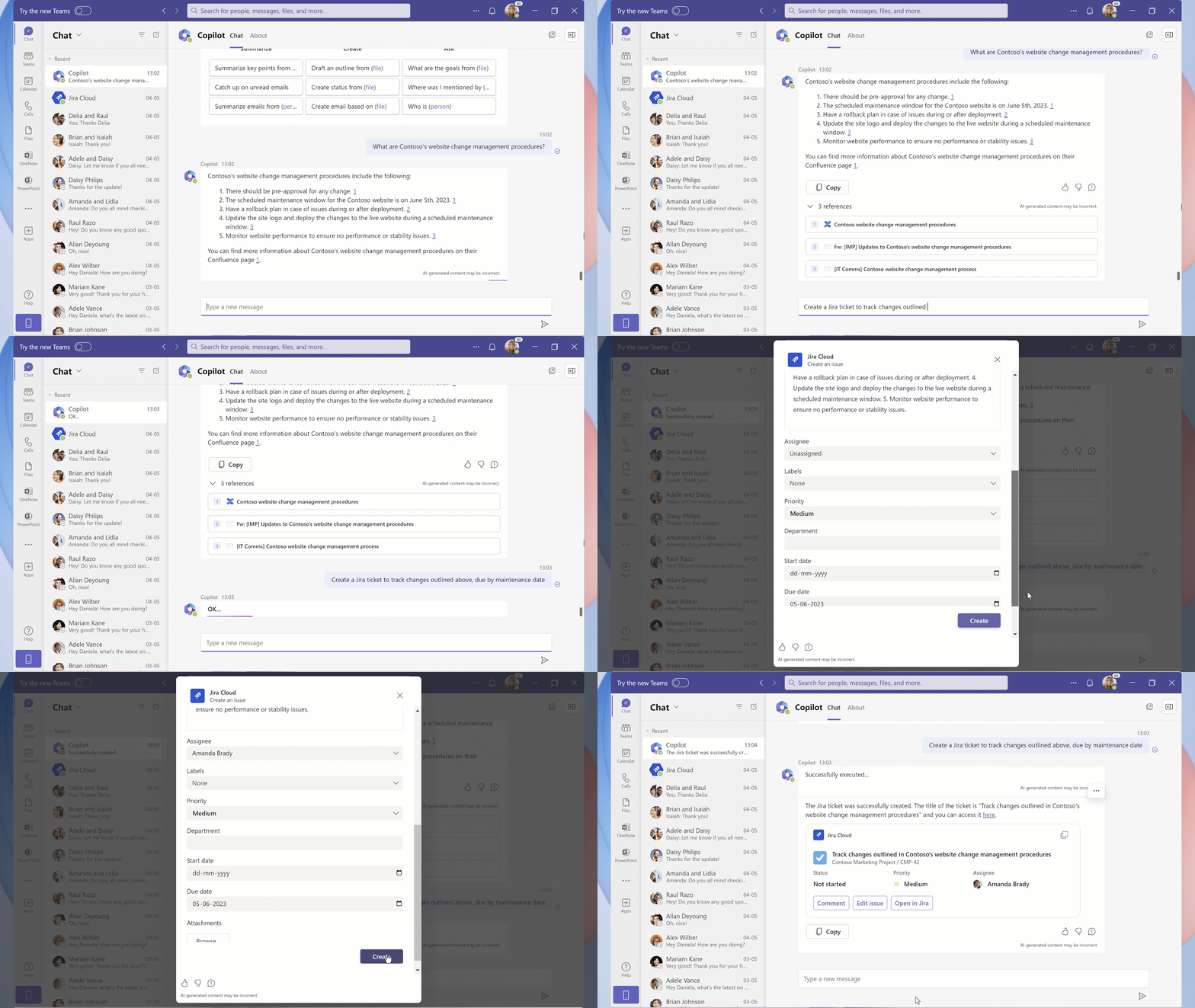
For instance, Power Platform connectors can be used to import structured data into the “Dataverse,” Microsoft’s service that stores and manages data used by internal business apps, that Microsoft 365 Copilot can then access. In a demo during Build, Microsoft showed how Dentsu, a public relations firm, tapped Microsoft 365 Copilot together with a plug-in for Jira and data from Atlassian’s Confluence without having to write new code.

Microsoft says that developers will be able to create and debug their own plug-ins in a number of ways, including through its Azure AI family of apps, which is adding capabilities to run and test plug-ins on private enterprise data. Azure OpenAI Service, Microsoft’s managed, enterprise-focused product designed to give businesses access to OpenAI’s technologies with added governance features, will also support plug-ins. And Teams Toolkit for Visual Studio will gain features for piloting plug-ins.

Transitioning to a platform

As for how they’ll be distributed, Microsoft says that developers will be able to configure, publish and manage plug-ins through the Developer Portal for Teams, among other places. They’ll also be able to monetize them, although the company wasn’t clear on how, exactly, pricing will work.

In any case, with plug-ins, Microsoft’s playing for keeps in the highly competitive generative AI race. Plug-ins transform the company’s “copilots” into aggregators, essentially — putting them on a path to becoming one-stop shops for both enterprise and consumer customers.

Microsoft no doubt perceives the lock-in opportunity as increasingly key as the company faces competitive pressure from startups and tech giants alike building generative AI, including Google and Anthropic. One could imagine plug-ins becoming a lucrative new source of revenue down the line as apps and services rely more and more on generative AI. And it could allay the fears of businesses who claim generative AI trained on their data violates their rights; Getty Images and Reddit, among others, have taken steps to prevent companies from training generative AI on their data without some form of compensation.

I’d expect rivals to answer Microsoft’s and OpenAI’s plug-ins framework with plug-ins frameworks of their own. But Microsoft has a first-mover advantage, as OpenAI had with ChatGPT. And that can’t be underestimated.

Microsoft Makes GitHub Advanced Security for Azure DevOps Available in Public Preview 

Microsoft Build 2023

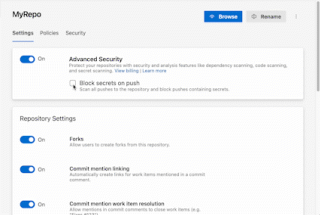
At Microsoft Build, the company announced that GitHub Advanced Security for Azure DevOps has been made accessible to everyone, and is in public preview. GitHub Advanced Security for Azure DevOps brings the same industry-leading developer security capabilities as GitHub Advanced Security to Azure DevOps, integrated directly into Azure Repos and Azure Pipelines. This includes secret scanning, dependency scanning, and CodeQL code scanning capabilities available within GitHub Enterprise, which is a commercial version of GitHub that is designed for enterprise-scale software development and collaboration.

Microsoft said that the GitHub Advanced Security for Azure DevOps has the same pricing as GitHub Advanced Security – i.e. $49 per active user per month.

Secret Scanning

GitHub Advanced Security for Azure DevOps helps users find and prevent the exposure of sensitive information (secrets) in Azure Repos. It detects if any secrets have already been exposed and block any attempts to push code containing secrets, helping enterprises reduce the risk of security breaches.

Dependency Scanning

This feature identifies vulnerabilities in the open-source packages used in code. It checks both direct dependencies and dependencies used by those dependencies. Moreover, it provides guidance on how to upgrade your packages to address these vulnerabilities.

Code Scanning

GitHub Advanced Security includes a powerful analysis engine – CodeQL. It scans your code for security vulnerabilities across various programming languages. It can detect issues like SQL injection and authorisation bypass. For instance, you can run CodeQL scans directly from Azure Pipelines in Azure Repos and take action on the results.

Legal Trouble Mounts

This new announcement comes against the backdrop of scepticism that exists in the enterprise and the IT landscape, particularly related to the usage of platforms powered by foundational models developed by OpenAI and Microsoft – the likes of GPT-4 and CodeX (GitHub), which have been trained on public-domain data and codes to deliver the desired outcomes.

A few days back, Twitter accused Microsoft of using its data without due permission. It has also charged the tech company for sharing Twitter’s data with the US government. This could invite a ‘lawsuit’ from Twitter, as hinted by Elon Musk.

Also, a class action lawsuit was filed against Microsoft, OpenAI, and GitHub for scrapping the licensed code to build AI-powered Copilot in November last year. This has been one of the biggest roadblocks for the company, and it is now desperately looking to escape – asking the court to dismiss a proposed class complaint.

With the latest announcement, Microsoft is looking to remove all the stigma associated with it and give enterprise customers complete control over their security and beyond.

The post Microsoft Makes GitHub Advanced Security for Azure DevOps Available in Public Preview appeared first on Analytics India Magazine.

EY survey: Tech leaders to invest in AI, 5G, cybersecurity, big data, metaverse

An AI hand and business person's hand touching a brain.
Image: peshkova/Adobe Stock

Economic perils notwithstanding, 94% of tech leaders are committed to investing in new tools and technologies, including AI, according to a survey by EY.

The new poll suggests tech leaders view this investment strategy, particularly for cybersecurity, as a way to weather geopolitical uncertainty and the economic downturn. Ninety-four percent of respondents to the poll said innovation will help their firms emerge from the current economic situation stronger.

In addition, 78% of those polled said remote work positively impacted their company’s innovation goals, and 81% said their company plans to make an innovation-related acquisition in the next six months.

SEE: IBM launches watsonx, making AI deployment easier (TechRepublic)

Ken Englund, the technology, media and telecommunications leader for EY Americas, said in the press release about this EY survey that the results suggest resiliency in the face of buffeting uncertainties. “As our most recent technology pulse poll points to, leaders are looking for the right balance between safeguarding their operations and driving ongoing innovation and growth.”

Focus on cybersecurity, 5G, AI, big data, metaverse investments

Ninety percent of the tech leaders polled said their companies are working on generative AI functionality similar to ChatGPT, and 80% of respondents said they will increase investment in various forms of AI in the next year, in spite of calls this year by such tech luminaries as Elon Musk and Yoshua Bengio, an originator of artificial neural networks, for a moratorium on the development and deployment of such systems.

SEE: Gartner found that ChatGPT interest is boosting generative AI investments (TechRepublic)

More than half of tech executives whose companies are experimenting with generative AI said they are doing so for economic savings.

Among tech executives at companies planning to increase technology investments:

  • 74% plan to prioritize cybersecurity.
  • 62% will focus on big data or analytics.
  • 62% will invest in next-generation 5G wireless technologies.
  • 58% said their companies plan to invest in generative AI solutions.
  • 52% said they plan to prioritize metaverse technologies.

The study also found that while 78% of tech executives are more concerned about the cybersecurity threats of today compared to the cybersecurity threats of one year ago, “Our pulse poll reveals a positive outlook — with no signs of a lag in innovation for technology companies,” said Englund. “The momentum and excitement around emerging technologies like generative AI marks a tectonic industry shift, one focused on effectiveness and efficiency.”

The April 2023 poll of 250 U.S. tech leaders was conducted by Atomik Research and commissioned by EY US.

Innovation Insider Newsletter

Catch up on the latest tech innovations that are changing the world, including IoT, 5G, the latest about phones, security, smart cities, AI, robotics, and more.

Delivered Tuesdays and Fridays Sign up today

Microsoft launches an AI tool to take the pain out of building websites

Microsoft launches an AI tool to take the pain out of building websites Kyle Wiggers 15 hours

Microsoft wants to take the pain out of designing web pages. AI is its solution.

Read more about Microsoft Build 2023Today marks the launch of Copilot in Power Pages in preview for U.S. customers, an AI-powered assistant for Microsoft’s low-code business website creation tool, Power Pages. Given prompts, Copilot can generate text, forms, chatbots and web page layouts as well as create and edit image and site design themes.

To create a form, for example, users can simply describe the kind of form that they need and Copilot will build it and auto-generate the necessary back-end database tables. Those tables can then be edited, added to or removed using natural language within Copilot.

“As the maker, you describe what you need in natural language and use Copilot suggestions to design web pages, create content and build complex business data forms for your website,” Sangya Singh, VP of Power Pages at Microsoft, told TechCrunch in an email interview. “You no longer need to start from a blank slate.”

Generating a website with AI isn’t exactly a novel idea — not in this day and age, at least. Tools like Jasper can handle copy, images, layouts and more, while generators like Mixo can create basic splash pages when given a short description.

But Singh paints Copilot in Power Pages as more versatile than the competing solutions out there, while stressing that it’s not a tool that could — or should — be used to generate whole spam sites.

“Power Pages now allows you to go from no code (describing the site via natural language) to low code (editing the website design and layouts using the design studio) to pro code (building advanced customization with familiar web frameworks) seamlessly,” she said. “For Power Pages, crafting Copilot experiences within Power Pages is revolutionary because enabling an AI assistant to build business data-centric sites using natural language has not been done before.”

Copilot in Power Pages

Image Credits: Microsoft

Of course, depending on the domain and use case, adding generative AI to the mix can be a risky proposition. Even if it’s not the original intent, AI can be prompted to generate toxic content. And it can go off the rails if not closely monitored.

Singh claims that Copilot in Power Pages, though, which is powered by OpenAI’s GPT-3.5 model, has “guardrails” to protect against issues that might crop up.

“We take the website maker’s user prompts to the Copilot, get suggestions from the large language model, and do a lot of processing, like offensive content filtering, before displaying suggestions back to the maker,” Singh said. “If Copilot’s suggestions are irrelevant or inappropriate, makers can easily report the AI generated output via a thumbs-down gesture in our experience and provide additional feedback.”

What about the aforementioned chatbot, also powered by GPT-3.5, that Power Pages users can now insert into their websites? According to Singh, it’s similarly built with safeguards, including a whitelist of URLs that it’ll look through to get answers.

“The key thing to note is that Power Pages Copilot is not an ‘automatic’ AI-pilot generating websites, but an ‘AI assistant’ to a human website maker — hence the name Copilot — where the maker can ask for suggestions on how to build different components of a business data-centric site,” she added. “Giving the makers ‘total control’ is a principle we have where the maker is always in control if they want to apply the Copilot suggestion or tweak it further or discard it.”

Microsoft Introduces Windows Copilot at Build 2023

At the ongoing Build conference, Microsoft has introduced Windows Copilot, making Windows the first PC platform to announce centralised AI assistance to help people easily take action and get things done.

“Invoking Windows Copilot is familiar and easy – the button is front and centre on your taskbar – simple to find and use. Once open, the Windows Copilot sidebar stays consistent across your apps, programmes, and windows, always available to act as your personal assistant,” Microsoft said.

By integrating Bing and ChatGPT plugins into Windows Copilot, a world of augmented AI capabilities and experiences opens up for users.

This not only benefits individuals by providing enhanced tools and features, but it also creates exciting opportunities for developers to explore and innovate. Microsoft said they will start rolling out the new feature for Windows 11 users in June.

In March, Microsoft announced the launch of Microsoft Dynamics 365 Copilot, touted to be the world’s first copilot in both customer relationship management (CRM) and enterprise resource planning (ERP).

Dynamics 365 includes installation of Copilot in Customer Service for delivering contextual answers using AI in both chat and email for quick answers.

Moreover, with Copilot in Customer Insights and Marketing, marketers are able to simplify their workflow for content creation, audience segmentation, and data exploration.

The post Microsoft Introduces Windows Copilot at Build 2023 appeared first on Analytics India Magazine.

Getting Started with Apache Flink: First steps to Stateful Stream Processing

Screenshot 2023-05-23 125456

If you’re interested in stateful stream processing and the capabilities it provides, you may have heard of Apache Flink®. It’s well-known for its ability to perform stateful stream processing, but for beginners, it can be a daunting task to get started. So here, we’ll explore the basics of Apache Flink by showing you how to get started with building your first stream processing application. In this case, you’ll be building a Flink pipeline to process data from one Apache Kafka topic to another Kafka topic.

Setting up the Environment

The first step is to set up the environment. In this example, you will be using Redpanda, which is an alternative implementation of the Kafka protocol written in C++. This is a high-performance streaming platform that provides low latency and does not require Zookeeper. While ZooKeeper is very handy for tracking the status of Kafka cluster nodes and maintaining a list of Kafka topics and messages, it’s not easy to run and operate. So, to get up to speed without yak shaving, we’ll use Redpanda.

To work with Redpanda, you’ll use its RPK command-line client to interact with Redpanda clusters. You’ll start by setting up a Redpanda cluster with three nodes and create two topics, an input topic and an output topic, with a replication factor of three and a partition count of 30.

  1. Setting up the Redpanda Cluster:
  • Install the Redpanda command-line client, RPK.
  • Set up a Redpanda cluster with three nodes using RPK commands.
  • Export the Redpanda cluster URLs into an environment variable for easier use.
  • Check the running containers using docker ps.
  • Creating Kafka Topics:
  • Create two topics with a replication factor of three and a partition count of 30: input topic and output topic.
  • Use the RPK cluster metadata command to view information about the cluster and topics.

Building the Flink Project

To get up to speed quickly, you should use the Flink Quickstart archetype to generate a new Apache Maven project. The generated Maven Project Object Model (POM) file can be modified to use Java 11 as the JDK version and add Flink dependencies, including the Flink Connector Kafka.

You’ll then import the project into an IDE.

  • Creating a Flink Project:
  • Generate a new Apache Maven project using the Flink Quickstart archetype.
  • Build the project and import it into your preferred IDE.
  • Update the Maven POM file: set Java 11 as the JDK version and add the Flink Connector Kafka dependency.
  • Remove any unnecessary configuration.

Creating the Flink Job

The job definition starts with configuring checkpointing behavior to ensure the job can restart in case of failures. You’ll then set up a Kafka source to connect to the input topic and define a Watermarking strategy. In Flink, each element needs a Watermark and timestamp to enable the system to track their progress in event time.

A stream will be set up using the “from” source call, and then filter events based on a string and modify the data by converting messages to uppercase. The filtered data will be passed to a sync, and in the first instance, a simple print sync will be used. The stream will be connected to the print sync using the true parameter for the constructor. The Flink job can then be run in the IDE.

  • Defining a Flink Job:
  • Configure checkpointing to ensure proper restart behavior in case of failures.
  • Set up a Kafka source to connect to the input topic and configure it with the bootstrap servers.
  • Define a data stream with the Kafka source, a watermarking strategy, and a name.
  • Filter and modify the data using Flink stream processing API.
  • Replace the print sink with a Kafka sink to return the data to the output topic.

Deploying the Flink Job

The next step is to deploy the job in an actual Flink cluster. You can download the Flink distribution, unpack it, and start up a cluster using the provided .cluster script. Then open the Flink Web UI in the browser to see all the deployed jobs’ statuses, restart them, and so on. You can then build the job using the npm CLI package. This creates a self-contained fetcher of the job with all its dependencies. You can then use the Flink Run command to upload and start the job. You must also specify the job class and the path to the JAR submitted. You can then use Redpanda’s RPK topic producer and consumer to read from the input and output topics and see the messages arriving and being processed in real-time.

  • Running and Testing the Flink Job:
  • Run the Flink job from within your IDE.
  • Use the RPK command to produce and consume messages on the input and output topics.
  • Check the output to ensure that the data has been properly filtered and modified.
  • Deploying the Flink Job in a Flink Cluster:
  • Download the Flink distribution and start a cluster using the provided script.
  • Open the Flink Web UI in your browser to view the deployed jobs and their statuses.
  • Build the Flink job using the Maven CLI package command and submit it using the Flink Run command.
  • Test the deployed job by sending more messages to the input topic and observing the output.

Using Flink SQL

Finally, you can use Flink SQL to deploy the same stream processing logic using a secret. To do this, you’ll need to download the Flink SQL connector for Kafka and use the Flink SQL client to run secret queries against your Flink sources.

Then, with SQL, you can create tables to represent our input and output topics, describe the structure of the topics, and query the tables. You can also apply all the capabilities of SQL, such as filtering and modifying data. You can create another table to represent the output topic and select data from the input table, which will automatically deploy a job to Flink. For database people, all this will sound very familiar. You can then use the RPK topic producer to put messages into the input topic, and the messages will appear on the output topic.

  • Using Flink SQL to Process Data:
  • Download the Flink SQL connector for Kafka and add it to the classpath.
  • Launch the Flink SQL client and create a table representing the input topic.
  • Run SQL queries against the input topic to filter and modify the data.
  • Create another table representing the output topic and write the modified data to it.
  • Monitor the Flink SQL client to observe the data being processed and written to the output topic.

Conclusion

This article uses Decodable senior software engineer Gunnar Morling’s excellent Flink Intro webinar as a guide, which covers the basics of getting started with Flink. You’ll soon discover that there’s so much more power under the Flink hood, and deploying beyond a POC can be more than a little “hairy”—yak-shaving pun intended. If you want to know more, check out this GitHub example repo. There, you’ll find the demo’s source code.

Top 4 Benefits of Modern Data Quality

The company’s product quality certificate is compliant, the chec

The goal of a data quality program is to build trust in data. However, trust is an expansive, and often ill-defined term that can include many topics that control and manage data. Trusted data is possible when all the components of the metadata management platform work as a single unit. For example, without accurate data, it is very difficult to ensure that all the data security and privacy programs will work as envisaged. This should be a primary goal of chief data officers (CDOs).

But so many organizations have failed to deliver on multiple data governance attempts, that this term is now banned. However, the reality is that global compliances are only increasing and irrespective of what we call the data governance program; it is imperative that business quality be addressed.

The benefits of the modern data quality approach are:

1. Accountability: In the decentralized data delivery world of data mesh and data products, the modern approach allows business teams to take charge of data quality. After all, the domain owners are the subject matter experts and know their data the best.

Business users augment the technical aspects of data quality by addressing context to meet critical KPIs. Data quality then becomes a committed SLA in the packaged data products. And it is constantly evolving as the data changes. Hence, data products have new versions. The data consumer no longer has to second-guess whether to trust data or not.

2. Speed of delivery: ‘Data quality latency’ is the time between the arrival of new data and performing data quality checks and remediation on it.

More data is now generated across multiple external data sources, such as SaaS products in multiple formats, and often arriving in real-time streaming than in internal systems. Past techniques of landing the data in a single target location and performing data quality as a batch operation are no longer sufficient. The old static approach treated data quality as a standalone effort on data at rest that ran only at fixed intervals.

The modern ‘continuous quality’ approach is proactive and dynamic. It is in sync with the DataOps principles that include orchestration, automation, and CI / CD. This approach allows data teams to deliver data products faster. It permits organizations that were used to doing one release per quarter to accelerate and deliver many releases a week.

3. Higher Productivity: One reason why traditional approaches to data quality are unsuccessful is because of the enormous amount of effort and time that is needed to achieve the ultimate goal. Precious staff are bogged down in manually fixing data quality problems in downstream systems. Often, the time-consuming reconciliation takes place in a Microsoft Excel spreadsheet. This is treating the symptoms and not the problem.

The modern approach of identifying and remediating the problems close to their origin saves time and cost. Through various automation capabilities offered by DataOps and through integration with the other aspects of data governance, this approach leads to higher productivity of the data teams.

4. Cost: As data volumes keep increasing, to do continuous quality, the system needs to scale automatically. This is typically where cloud-based solutions help. However, even in the cloud, there are two ways to run data quality checks – one is via an agent that constantly monitors data-in-motion, and the other option is to push down data-at-rest in the cloud data warehouse and use pushdown features. Each option serves unique use cases and provides architecture and cost trade-offs.

In the former approach, data quality issues are detected before the data lands in a target analytical system. This is useful for anomaly detection in the case of streaming data. However, it will require a processing engine, such as an Apache Spark cluster.

In the latter case, data first lands into an analytical system, such as Snowflake, and then the data quality product generates SQL queries to perform right inside the storage engine. This option minimizes data movement and hence, may be more secure. Also, it can take advantage of the auto-scale features of the analytical system.

Architects should analyze the total costs of each option to assess the appropriate architecture.

Get started today with DQLabs and explore our Modern Data Quality Platform!

The Future of Facial Recognition: Promoting Responsible Deployment and Ethical Practices

facial-recogition
facial recognition

Smile, you are being watched. Over the past few years, facial recognition technology has captivated the world with its awe and apprehension. Everyone in the tech world knows about it, but few of us know what happens behind the scenes. Similar to celebrity gossip, everyone knows what happens behind the scenes regarding the latest celebrities, but few have a clear understanding of what goes on behind the scenes. The world of facial recognition awaits you as you embark on a thrilling journey where machines attempt to recognize our faces better than our mothers ever could. Throughout this lecture, we will discuss the underlying technology underlying surveillance tactics, the personalization of shopping experiences, and the practical applications, benefits, and ethical dilemmas that are associated with this type of high-tech guessing game. Take the best possible picture of your face, as it is impossible to know when you will be captured by a facial recognition camera. It is true that facial recognition has both good and bad aspects, so who is to say that technology cannot be humorous?

During the past few years, facial recognition technology has gained considerable attention and generated both excitement and concern. A wide range of applications are possible in various industries using this technology, which is capable of analyzing and identifying human faces from images or video footage. As part of the discussion in this article, we will examine the concept of facial recognition, the technology that underlies it, as well as its underlying uses, benefits, and ethical implications.

Understanding Facial Recognition:

An important aspect of biometrics is the ability to identify and authenticate individuals based on the unique characteristics of their faces. Comparing captured facial images or videos to a database of known faces is performed using a database of known faces. An analysis of the shape, distance, and other characteristics of a person’s face is done in order to create a facial template.

Technology Behind Facial Recognition:

Advanced computer vision techniques and machine learning algorithms are used to recognize facial features in facial recognition systems. In order for the system to learn patterns and features that differentiate one face from another, it must first be trained on a large dataset of labeled facial images. A faceprint or face template is created by analyzing and mapping these facial features using machine learning algorithms. The system compares a new face with the stored templates to determine whether it is a match.

Use Cases of Facial Recognition:

Various industries and sectors use facial recognition technology to revolutionize processes and increase security. The following use cases are notable:

Surveillance and security:

A wide range of applications, including access control, surveillance, and monitoring of buildings, airports, and public spaces, are increasingly taking advantage of facial recognition software as security systems evolve. A public’s ability to detect and track potential threats is essential for protecting the public against potential threats and for locating wanted individuals.

Identity Verification and Authentication:

In digital systems and online platforms, facial recognition is used to verify and authenticate identity. When a person registers for an account, makes an online transaction, or accesses secured data, it provides a convenient and secure method of verifying their identity.

Law Enforcement and Criminal Investigations:

The use of facial recognition assists law enforcement agencies in identifying suspects or missing individuals by comparing images or video footage with databases of known individuals. It is possible to solve crimes, locate fugitives, and collect valuable evidence by incorporating this technology into criminal investigations.

Personalized Experiences:

Face recognition technology is commonly used by retailers and marketers to provide a personalized shopping experience for their customers. The software can provide personalized recommendations and improve customer service in addition to analyzing demographics, emotions, and preferences.

Attendance and Time Tracking:

For the purpose of tracking attendance and monitoring employee attendance, facial recognition systems have become increasingly popular in educational institutions and workplaces. Compared to traditional means of checking in, such as manual checks and swipe cards, checking in electronically is more convenient and efficient.

Benefits of Facial Recognition:

It is important to note that facial recognition technology offers a number of benefits, including:

  • In addition to strengthening security measures, facial recognition provides accurate identification of individuals and prevents unauthorized access.
  • Automated facial recognition systems process large amounts of data quickly, reducing time and effort compared to manual identification methods.
  • Customers will be able to receive personalized experiences with facial recognition, personalized recommendations, as well as personalized services customized to their specific preferences and needs.
  • Identification of suspects, the location of missing individuals, as well as the provision of useful evidence are all made possible by facial recognition, which is helpful in crime prevention and law enforcement.

Considering the ethical implications of facial recognition:

There are a number of ethical concerns associated with facial recognition technology in addition to its significant benefits. Consideration should be given to the following points:

  • When facial data is collected and stored, it raises concerns about an individual’s privacy. A clear data protection policy must be established, informed consent must be obtained, and facial data must be stored and handled securely in order to protect individuals’ privacy rights.
  • There may be instances of misidentification or false positives or negatives due to biases in facial recognition algorithms. In order to ensure fairness and accuracy among a variety of demographic groups, biases should be monitored and mitigated on a continuous basis. In order to ensure that algorithms are unbiased and inclusive, it is essential that developers use a variety of representative and diverse training datasets.
  • Concerns have been raised about the potential intrusion of civil liberties and individual freedoms by the widespread use of facial recognition systems in surveillance systems. In order to prevent the misuse or abuse of facial recognition technology, a balance must be struck between the safety of the public and the privacy rights of the individual.

In order for facial recognition systems to be effective, individuals should have the right to control their personal information. Individuals must be provided with clear opt-out options so that they can maintain their autonomy and privacy choices.

  • There should be transparency and explanation of facial recognition algorithms and systems. In order for facial recognition technology to be used ethically and without discrimination, clear guidelines and regulations must be in place.
  • Face recognition systems may be vulnerable to cyberattacks as they store sensitive biometric information. Data breaches must be minimized by rigorous security measures and protocols, protecting the integrity and confidentiality of your facial data.

As a result of the development of frameworks, standards, and guidelines, governments and regulatory bodies play an important role in ensuring the ethical use of facial recognition technology. These frameworks should include considerations such as privacy, consent, data protection, and algorithms that are fair to all.

Final Thoughts:

A variety of industries can benefit from facial recognition technology, improving security and convenience. It is, however, essential to take into account the ethical implications when developing and deploying this technology. To ensure the responsible and ethical use of facial recognition systems, it is imperative to strive for fairness, accuracy, transparency, and privacy protection. In order to reap the benefits of facial recognition technology, we must address ethical considerations and implement appropriate safeguards that will protect individual rights and privacy, as well as the well-being of society as a whole.