AI in the Cloud: Google, Microsoft, and Amazon’s Divergent Strategies

AI in the Cloud: Google, Microsoft, and Amazon’s Divergent Strategies August 1, 2023 by Agam Shah

(Blue Planet Studio/Shutterstock)

There is no one way to buy AI services, but a few purchase models are emerging. One is like shopping for groceries: you can have it delivered to your doorstep or see options in a store and checkout with a customized experience.

The top cloud makers have distinctly different AI storefronts with responsive chatbots, image generators, and soon, multimodal models that can do everything. The difference is in the experience, tools and level of engagement customers want with their large-language models.

Microsoft and Google offer a mix of readymade AI models that companies can rent without wasting time on customizing and finetuning. Both companies have solid foundational models for which customers will have to pay a premium.

Amazon’s approach is to focus on tools and cloud services around third-party foundational models. AWS executives argue the hype around the size and type of models will slip away as AI goes mainstream. Amazon also wants to provide options so customers do not put all their eggs in one AI basket and can play around with models before selecting the best one that suits their needs.

Packaging the Cloud for AI

Decades ago, AI courses in universities talked about the concept of finding answers by recognizing patterns and trends in vast threads of data, resembling the functionality of the brain. Companies have developed vast repositories, but AI became possible only with GPUs and AI chips able to run complicated algorithms that generate answers.

Cloud providers are generating business ideas based on these three structures: gathering data, providing the algorithms and datasets, and providing the hardware that can provide the fastest answers from the datasets.

The differences are in how the cloud makers are packaging the three and presenting them to customers. There are exceptions like Meta’s Llama 2 large-language model, which is available via Microsoft’s Azure and Amazon’s AWS.

AI is not new, and the top cloud providers for years have provided machine-learning technologies specific to applications. AI as a form of general intelligence — in this case large-language models – was not mainstream yet. At the time, Google and Meta were researching their own LLMs, which the companies detailed in academic papers.

But Generative AI burst on the scene late last year with ChatGPT, an OpenAI chatbot that answered questions, provided summaries, wrote poetry, and even generated software code. ChatGPT reached 100 million users in under two months, and cloud providers realized there was money to be made from their homegrown LLMs.

Microsoft's Approach

Microsoft and Google locked down their AI models as centerpieces of their business strategies. Microsoft's GPT-4, which is based on OpenAI models, was first implemented in Bing, and now Windows 11 is being populated with AI features that are driven by the large-language model. The LLM is also being used in the "Co-pilot" feature in Microsoft 365, which will help compile letters, summarize documents, write letters, and create presentations.

ChatGPT is the “iPhone moment” for AI.(SomYuZu/Shutterstock)

The creator of GPT-3.5, which powers ChatGPT and GPT-4, started off as a nonprofit firm with a promise to provide open models. OpenAI changed its status to a for-profit after, just months ahead of Microsoft investing $1 billion in the company. Microsoft is monetizing that investment with an OpenAI Azure service, which provides cloud-based access to the proprietary models developed by OpenAI.

Microsoft is also using OpenAI assets to lock customers to Azure, and the company’s final piece was to build up a GPU infrastructure on which to run those models. The company has built Azure supercomputers with thousands of Nvidia GPUs and is investing billions to build new data centers that are specially wired to meet the horsepower and power consumption of AI applications.

Google Looking at the Long-term

The readiness of OpenAI technologies in Microsoft’s infrastructure caught Google napping, which then played catch up by prematurely announcing plans to commercialize its LLM called PaLM into its search, mapping, imaging, and other products. Google then announced PaLM-2 in May, which is now being quietly integrated in its search products and Workspace applications. The company also combined its various AI groups – including DeepMind and Brain – into a single group.

After the initial panic and AI backlash directed toward Microsoft and OpenAI, Google has focused on safety and ethics and communicated its AI efforts as mostly experimental. But like Microsoft, Google – which is a big proponent of open-source tools — has locked down access to its latest model, called PaLM-2 with the hope to capitalize on it to generate long-term revenue. The company is also training its newer model called Gemini, which was originally developed by DeepMind and will be the foundation of the company’s next-generation AI offerings.

Google’s PaLM-2 has not been commercialized to the extent of Microsoft’s GPT-4, but is available to some customers on Google Cloud via the Vertex AI offering. Google Cloud is a favorite among developers for the ability to customize models to specific needs, and the company has talked about how PaLM-2 could be used to create basic applications with just a few lines of code. Google also talked about Duet, which will allow users to be more productive in Workspace, much like Microsoft 365’s Co-pilot feature.

The company is also embracing an open AI approach via its Built with AI model, which allows companies to partner with ISVs to build software on Google Cloud.

Google’s computational model for its PaLM-2 software stack in the Cloud is built around TPUs, which are homegrown AI chips that are packed into supercomputers. The TPUv4 supercomputers have 4,096 TPUv4 AI chips on 64 racks, which are interconnected via 48 optical circuit switches. Those supercomputers are one of the first known implementations of optical interconnects at the rack level. The company also offers customers Nvidia GPUs via A3 supercomputers, though the GPUs are not tuned to run PaLM-2 models and would generate slow results.

AWS Provides 'Compute at Your Fingertips'

Amazon is taking an alternate approach by providing flexibility at all levels, including the models and the hardware, to run AI on AWS. It is like a typical Amazon shopping experience – drop the AI of your choice, choose the computing required, and then pay on checkout.

Amazon is doubling down on computing with the recent EC2 P5 instances, in which 20,000 Nvidia H100 GPUs can be crammed into clusters that can provide up to 20 exaflops of performance. Users can deploy ML models scaling to billions or trillions of parameters.
Swami Sivasubramanian, VP of analytics, database and machine learning at AWS, delivers a keynote at AWS Summit in NYC.

“Cloud vendors are responsible for two of the drivers. The first one is the availability of compute at your fingertips. It is elastic, it is pay-as-you-go. You spin them up, you train, you pay for it, and then you shut them off, you do not pay for it anymore,” said Vasi Philomin, VP of generative AI at AWS.

The second is to provide the best technologies to get insights from the vast repositories. AWS recently introduced a new concept called Agents, which links independent data to large language models to answer questions. Foundational models can provide more useful answers by linking up to external databases. Agents was among many AI features in the cloud announced by AWS at the AWS Summit held recently in New York City.

But as AI matures, the models will matter less, and what will matter is the value and the capabilities for cloud providers to meet the demands of customers.

“I think the models will not be the differentiator. I think what will be the differentiator is what you can do with them,” Philomin said.

Related

Semicon India 2023: A Boost for India’s Semiconductor Ambitions?

During the Semicon India 2023 event ( between July 28-30), held in Gandhinagar, Gujarat, Prime Minister Narendra Modi pitched India as a viable chip-making hub to global investors. “We are becoming a solid conductor for the semiconductor industry,” said Modi. The three-day long event brought together key stakeholders in the semiconductor industry, including government officials, industry leaders, researchers, and technology experts, to discuss and showcase the advancements and potential of the semiconductor sector in India.

Prime Minister Modi and union ministers expressed intriguing perspectives on India’s semiconductor ambitions. However, even though the government has been pushing hard to bring India on stage in the semiconductor sector, its effort hasn’t yielded any major results. Will Semicon India 2023 change that?

Key announcements at Semicon India 2023

At the event, some promising announcements were made which could give India’s desire to become a semiconductor hub a kickstart. Micron, a US-based chipmaker revealed its plan to invest USD 2.7 billion to develop a new assembly and test facility in Gujarat, which will serve as a hub for assembly and test manufacturing of DRAM and NAND products. The hub will cater to both domestic and international markets and will directly create 5,000 jobs and over 15,000 community jobs in the coming years.

Another US-based chipmaker Advanced Micro Devices (AMD) also said that it will invest USD 400 million over the next five years and will set up its biggest R&D facility in Bengaluru, Karnataka. The centre is expected to come up by the end of this year, and could potentially employ nearly 3,000 engineers in the next five years.

Vedanta chairman Anil Agarwal, during the event, also revealed that his company is in talks with a ‘world-class’ technology partner and said Vedanta remains committed to establish a fab in the country. Similarly, Young Liu, the chairman of Taiwanese manufacturing giant Foxconn, commenting on Modi’s statement, expressed his belief in India being a ‘trusted and reliable partner,’ advocating for collaborative efforts between the two nations to strengthen India’s interests.

Reports from earlier this month suggested that Foxconn is partnering with Taiwan Semiconductor Manufacturing Company (TSMC) to establish a fab in India. Interestingly, Vedanta and Foxconn had previously collaborated to establish a fab in Gujarat. However, they eventually decided to pursue separate paths for setting up fabs in the country.

Entry of semiconductor component players could increase

While the primary goal is to establish a fab, setting up testing and packaging units in the country would also be a positive step forward. Semiconductor packaging holds the potential to become a pivotal moment in India’s chip-making and fabrication efforts, and the country possesses the skilled talent to emerge as a prominent manufacturing centre, Prabu Raja, President of Semiconductor Products Group (SPG) at Applied Materials, told ET in an interview.

Micron’s decision to set up a packaging unit in India could lead to five more players entering India, which are part of the packaging ecosystem. Reportedly, Simmtech, a supplier of printed circuit boards, and Air Liquide, a provider of high-purity industrial gases for chip manufacturing, are in discussions with the government to commence operations in India. Furthermore, Disco, one of the world’s leading makers of tools for cutting and grinding silicon wafers, is reportedly also looking to establish a base in the country.

The Idaho-headquartered firm is also not the only player looking to set up a packaging unit in India. Last year, Tata Sons Chairman Natarajan Chandrasekaran confirmed the conglomerate’s entry into the semiconductor space with the establishment of Tata Electronics. The conglomerate is also expected to set up a test and packaging unit, however, the ultimate goal, nonetheless, is to set up a fab.

India still does not have a fab

Despite some promising announcements at Semicon India 2023, Vedanta, despite numerous setbacks, still remains the most likely candidate to set up a fab in the country with Agarwal claiming his company could launch the first ‘made-in-India’ chip in 2.5 years. Micron, despite its USD 825 million investment plan, is setting up a semiconductor testing and packaging unit, and not a fab.

Meanwhile, even though Foxconn continues to show interest in establishing a fab in India, the company’s dubious reputation makes it unlikely for TSMC to be a potential partner. Recent reports suggest that NXP Semiconductors, a division of Royal Philips NV, has also shown interest in setting up a fab in the country, given they find the right ecosystem.

Previously, along with Vedanta-Foxconn JV, IGSS Ventures, and ISMC also submitted proposals to set up semiconductor fabs. “IGSS Ventures was not able to show a proper technology licence for 28 nm chips and the Indian Semiconductor Mission (ISM) asked them to get a strong Indian business partner. Even though it’s nowhere written in the policy, it kind of makes sense for India to ask for a strong Indian business partner,” Arun Mampazhy, semiconductor analyst, earlier told AIM.

When it comes to ISMC, which is a joint venture between United Arab Emirates-based investment firm Next Orbit Ventures and Israel-based Tower Semiconductor, the government is waiting for Intel’s acquisition of Tower Semiconductor to complete and to see whether Intel will approve the technology transfer. Given the agreement expires on August 15th, 2023, it’s still known whether Intel will seek an extension or the deal will be called off entirely. Intel CEO Pat Gelsinger also decided to not comment on the same during the company quarterly earnings call.

Besides the three, PSMC (Powerchip Semiconductor Manufacturing Corp), earlier showed interest in setting up a fab in India. Chairman Huang Chongren stated that Taiwan’s third largest foundry is ready to sign a cooperation agreement with the Indian government. However, nothing much happened after that. AIM wrote to PSMC earlier inquiring the same, however, they did not respond.

Chandrasekhar, in an interview last month, stated that the government will soon announce a 40 nm semiconductor fabrication unit under the modified semiconductor investment scheme. Whether it’s Vedanta or anyone else is not known, however, Vendata-Foxconn JV’s initial plan was to set up a 40 nm fab. Furthermore, IT Minister Ashwini Vaishnaw told Mint that India should receive two more fab applications in the coming months.

The post Semicon India 2023: A Boost for India’s Semiconductor Ambitions? appeared first on Analytics India Magazine.

Transforming AI with LangChain: A Text Data Game Changer

XXXXX
Image by Author

Over the past few years, Large Language Models?—?or LLMs for friends?—?have taken the world of artificial intelligence by storm.

With the groundbreaking release of OpenAI’s GPT-3 in 2020, we have witnessed a steady surge in the popularity of LLMs, which has only intensified with recent advancements in the field.

These powerful AI models have opened up new possibilities for natural language processing applications, enabling developers to create more sophisticated, human-like interactions.

Isn’t it?

However, when dealing with this AI technology it is hard to scale and generate reliable algorithms.

Amidst this rapidly evolving landscape, LangChain has emerged as a versatile framework designed to help developers harness the full potential of LLMs for a wide range of applications. One of the most important use cases is to deal with large amounts of text data.

Let’s dive in and start harnessing the power of LLMs today!

LangChain can be used in chatbots, question-answering systems, summarization tools, and beyond. However, one of the most useful — and used — applications of LangChain is dealing with text.

Today’s world is flooded with data. And one of the most notorious types is text data.

All websites and apps are being bombed with tons and tons of words every single day. No human can process this amount of information…

But can computers?

LLM techniques together with LangChain are a great way to reduce the amount of text while maintaining the most important parts of the message. This is why today we will cover two basic — but really useful — use cases of LangChain to deal with text.

  • Summarization: Express the most important facts about a body of text or chat interaction. It can reduce the amount of data while maintaining the most important parts.
  • Extraction: Pull structured data from a body of text or some user query. It can detect and extract keywords within the text.

Whether you’re new to the world of LLMs or looking to take your language generation projects to the next level, this guide will provide you with valuable insights and hands-on examples to unlock the full potential of LangChain to deal with text.

⚠️ If you want to have some basic grasp, you can go check 👇🏻

LangChain 101: Build Your Own GPT-Powered Applications — KDnuggets

Always remember that for working with OpenAI and GPT models, we need to have the OpenAI library installed on our local computer and have an active OpenAI key. If you do not know how to do that, you can go check here.

1. Summarization

ChatGPT together with LangChain can summarize information quickly and in a very reliable way.

LLM summarization techniques are a great way to reduce the amount of text while maintaining the most important parts of the message. This is why LLMs can be the best ally to any digital company that needs to process and analyze large volumes of text data.

To perform the following examples, the following libraries are required:

# LangChain & LLM  from langchain.llms import OpenAI  from langchain import PromptTemplate  from langchain.chains.summarize import load_summarize_chain  from langchain.text_splitter import RecursiveCharacterTextSplitter    #Wikipedia API  import wikipediaapi

1.1. Short text summarization

For summaries of short texts, the method is straightforward, in fact, you don’t need to do anything fancy other than simple prompting with instructions.

Which basically means generating a template with an input variable.

I know you might be wondering… what is exactly a prompt template?

A prompt template refers to a reproducible way to generate a prompt. It contains a text string — a template — that can take in a set of parameters from the end user and generates a prompt.

A prompt template contains:

  • instructions to the language model — that allow us to standardize some steps for our LLM.
  • an input variable — that allows us to apply the previous instructions to any input text.

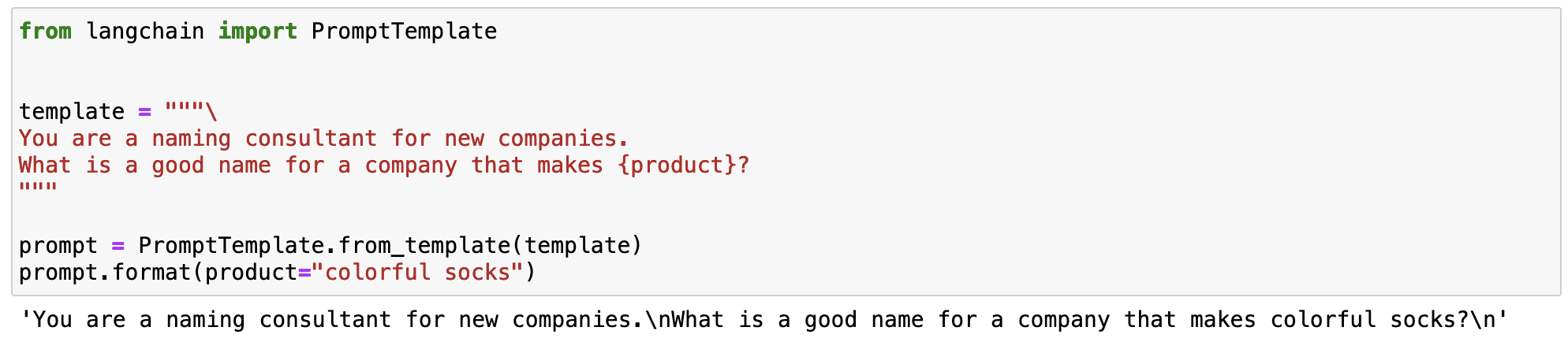
Let’s see this in a simple example. I can standardize a prompt that generates a name of a brand that produces a specific product.

XXXXX
Screenshot of my Jupyter Notebook.

As you can observe in the previous example, the magic of LangChain is that we can define a standardized prompt with a changing input variable.

  • The instructions to generate a name for a brand remain always the same.
  • The product variable works as an input that can be changed.

This allows us to define versatile prompts that can be used in different scenarios.

So now that we know what a prompt template is…

Let’s imagine we want to define a prompt that summarizes any text using super easy-to-understand vocabulary. We can define a prompt template with some specific instructions and a text variable that changes depending on the input variable we define.

# Create our prompt string.  template = """  %INSTRUCTIONS:  Please summarize the following text.  Always use easy-to-understand vocabulary so an elementary school student can understand.    %TEXT:  {input_text}  """    Now we define the LLM we want to work with - OpenAI’s GPT in my case -  and the prompt template.       # The default model is already 'text-davinci-003', but it can be changed.  llm = OpenAI(temperature=0, model_name='text-davinci-003', openai_api_key=openai_api_key)    # Create a LangChain prompt template that we can insert values to later  prompt = PromptTemplate(     input_variables=["input_text"],     template=template,  )  

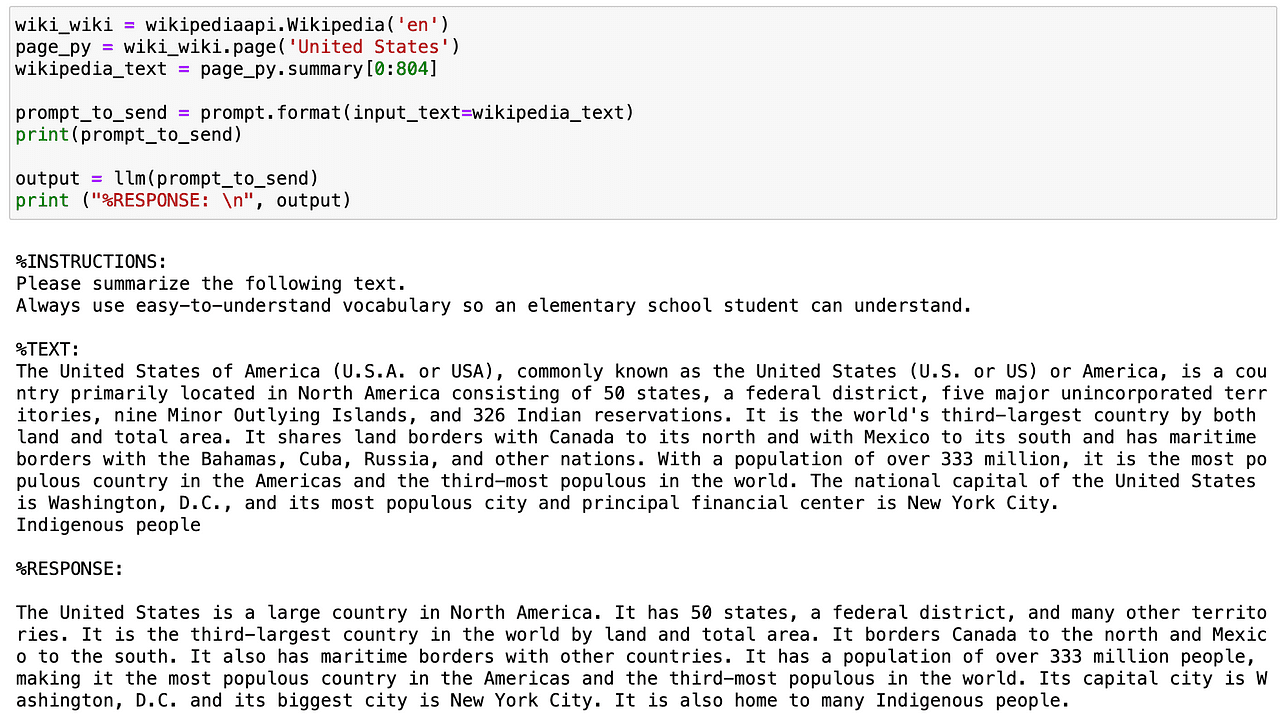
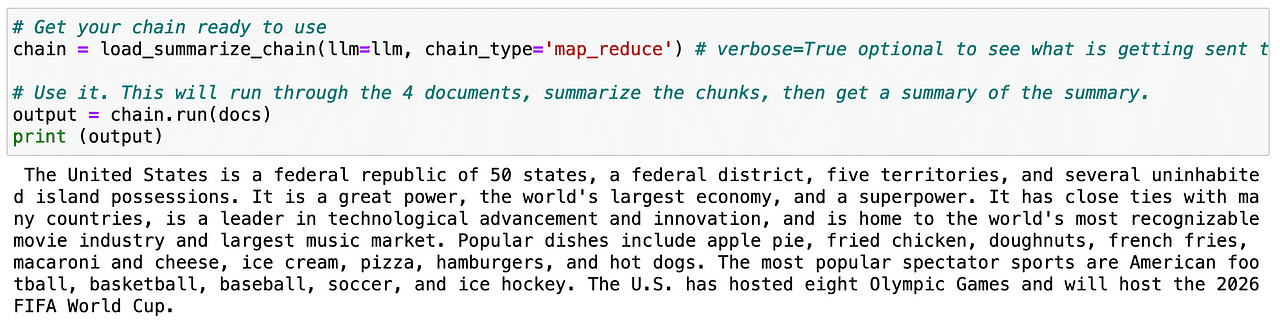
So let’s try this prompt template. Using the wikipedia API, I am going to get the summary of the USA country and further summarize it in a really easy-to-understand tone.

XXXXX
Screenshot of my Jupyter Notebook.

So now that we know how to summarize a short text… can I spice this up a bit?

Sure we can with…

1.2. Long text summarization

When dealing with long texts, the main problem is that we cannot communicate them to our AI model directly via prompt, as they contain too many tokens.

And now you might be wondering… what is a token?

Tokens are how the model sees the input — single characters, words, parts of words, or segments of text. As you can observe, the definition is not really precise and it depends on every model. For instance, OpenAI’s GPT 1000 tokens are approximately 750 words.

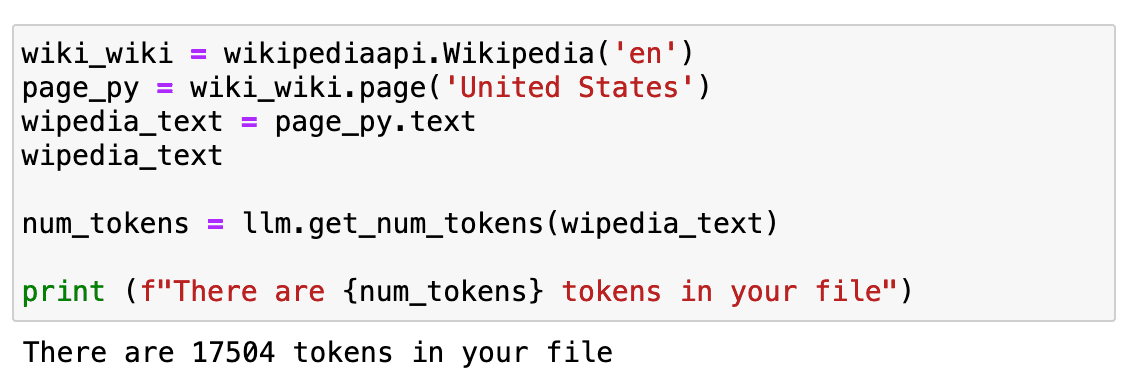
But the most important thing to learn is that our cost depends on the number of tokens and that we cannot send as many tokens as we want in a single prompt. To have a longer text, we will repeat the same example as before but using the whole Wikipedia page text.

XXXXX
Screenshot of my Jupyter Notebook.

If we check how long it is… it is around 17K tokens.

Which is quite a lot to be sent directly to our API.

So what now?

First, we’ll need to split it up. This process is called chunking or splitting your text into smaller pieces. I usually use RecursiveCharacterTextSplitter because it’s easy to control but there are a bunch you can try.

After using it, instead of just having a single piece of text, we get 23 pieces which facilitate the work of our GPT model.

Next we need to load up a chain which will make successive calls to the LLM for us.

LangChain provides the Chain interface for such chained applications. We define a Chain very generically as a sequence of calls to components, which can include other chains. The base interface is simple:

class Chain(BaseModel, ABC):      """Base interface that all chains should implement."""      memory: BaseMemory      callbacks: Callbacks      def __call__(          self,          inputs: Any,          return_only_outputs: bool = False,          callbacks: Callbacks = None,      ) -> Dict[str, Any]:          ...  

If you want to learn more about chains, you can go check directly in the LangChain documentation.

So if we repeat again the same procedure with the splitted text — called docs — the LLM can easily generate a summary of the whole page.

XXXXX
Screenshot of my Jupyter Notebook.

Useful right?

So now that we know how to summarize text, we can move to the second use case!

2. Extraction

Extraction is the process of parsing data from a piece of text. This is commonly used with output parsing to structure our data.

Extracting key data is really useful in order to identify and parse key words within a text. Common use cases are extracting a structured row from a sentence to insert into a database or extracting multiple rows from a long document to insert into a database.

Let’s imagine we are running a digital e-commerce company and we need to process all reviews that are stated on our website.

I could go read all of them one by one… which would be crazy.

Or I can simply EXTRACT the information that I need from each of them and analyze all the data.

Sounds easy… right?

Let’s start with a quite simple example. First, we need to import the following libraries:

# To help construct our Chat Messages  from langchain.schema import HumanMessage  from langchain.prompts import PromptTemplate, ChatPromptTemplate, HumanMessagePromptTemplate    # We will be using a chat model, defaults to gpt-3.5-turbo  from langchain.chat_models import ChatOpenAI    # To parse outputs and get structured data back  from langchain.output_parsers import StructuredOutputParser, ResponseSchema    chat_model = ChatOpenAI(temperature=0, model_name='gpt-3.5-turbo', openai_api_key=openai_api_key)

2.1. Extracting specific words

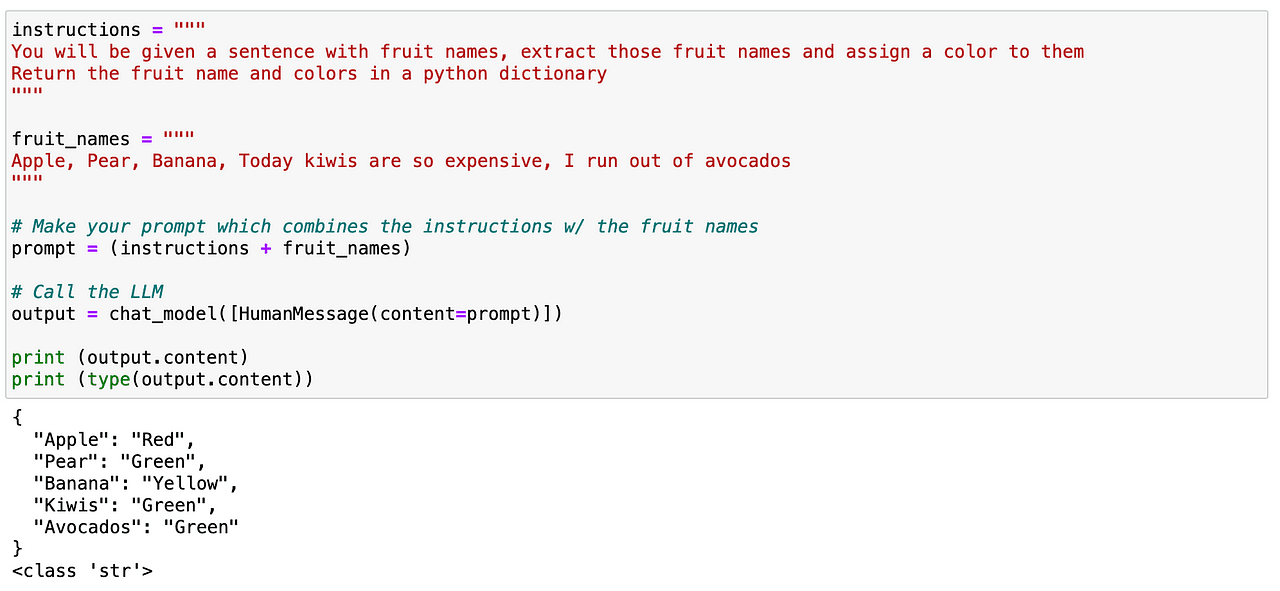
I can try to look for specific words within some text. In this case, I want to parse all fruits that are contained within a text. Again, it is quite straightforward as before. We can easily define a prompt giving clear instructions to our LLM stating that identifies all fruits contained in a text and gives back a JSON-like structure containing such fruits and their corresponding colors.

XXXXX
Screenshot of my Jupyter Notebook.

And as we can see before, it works perfectly!

So now… let’s play a little bit more with it. While this worked this time, it’s not a long term reliable method for more advanced use cases. And this is where a fantastic LangChain concept comes into play…

2.2. Using LangChain’s Response Schema

LangChain’s response schema will do two main things for us:

  1. Generate a prompt with bonafide format instructions. This is great because I don’t need to worry about the prompt engineering side, I’ll leave that up to LangChain!
  2. Read the output from the LLM and turn it into a proper python object for me. Which means, always generate a given structure that is useful and that my system can parse.

And to do so, I just need to define what response I except from the model.

So let’s imagine I want to determine the products and brands that users are stating in their comments. I could easily perform as before with a simple prompt — take advantage of LangChain to generate a more reliable method.

So first I need to define a response_schema where I define every keyword I want to parse with a name and a description.

# The schema I want out  response_schemas = [     ResponseSchema(name="product", description="The name of the product to be bought"),     ResponseSchema(name="brand", description=  "The brand of the product.")  ]  And then I generate an output_parser object that takes as an input my response_schema.   # The parser that will look for the LLM output in my schema and return it back to me  output_parser = StructuredOutputParser.from_response_schemas(response_schemas)  

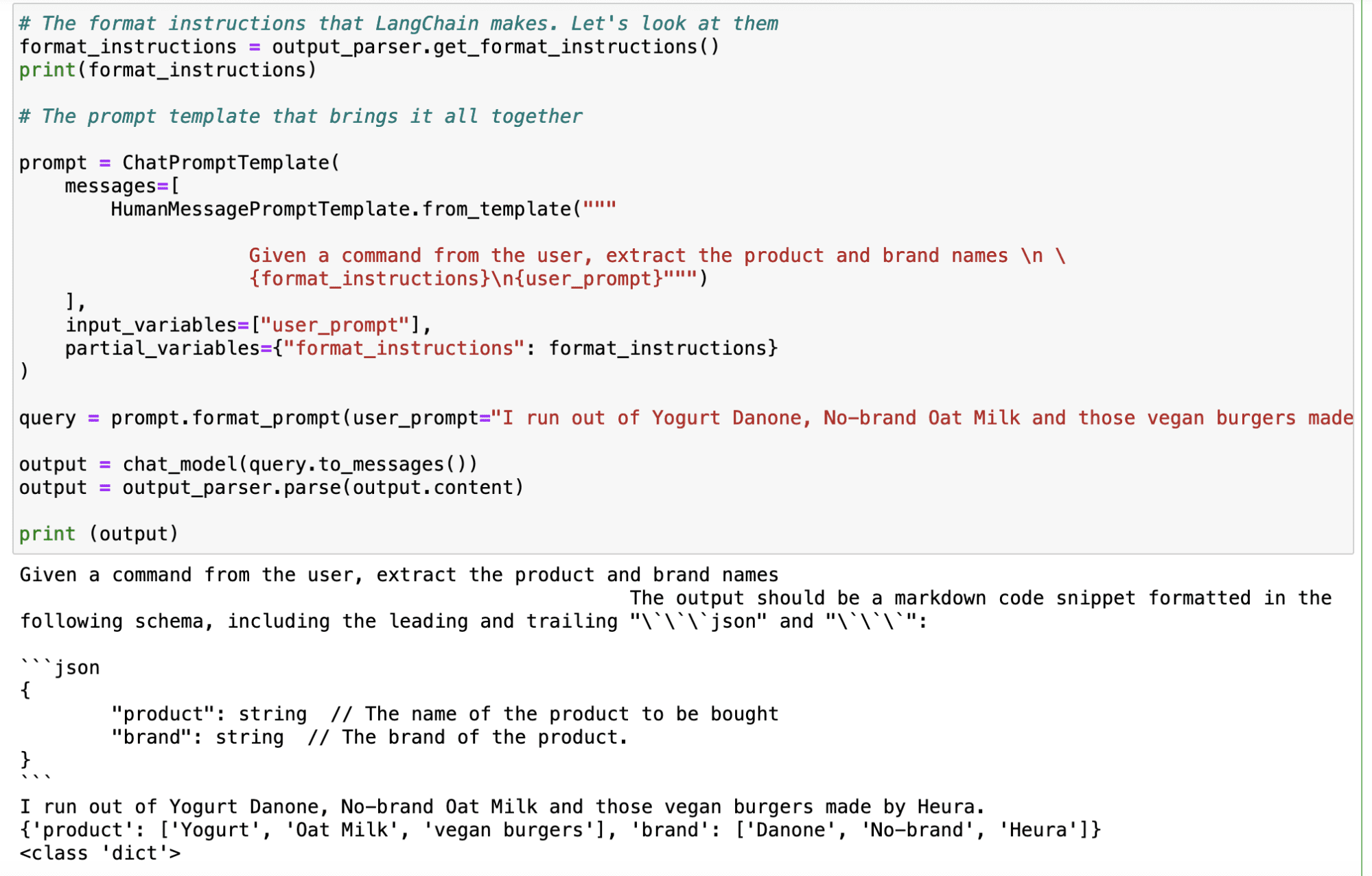
After defining our parser, we generate the format of our instruction using the .get_format_instructions() command from LangChain and define the final prompt using the ChatPromptTemplate. And now it is as easy as using this output_parser object with any input query I can think of, and it will automatically generate an output with my desired keywords.

XXXXX
Screenshot of my Jupyter Notebook.

As you can observe in the example below, with the input of “I run out of Yogurt Danone, No-brand Oat Milk and those vegan bugers made by Heura”, the LLM gives me the following output:

XXXXX
Screenshot of my Jupyter Notebook. Main Takeaways

LangChain is a versatile Python library that helps developers harness the full potential of LLMs, especially for dealing with large amounts of text data. It excels at two main use cases for dealing with text. LLMs enable developers to create more sophisticated and human-like interactions in natural language processing applications.

  1. Summarization: LangChain can quickly and reliably summarize information, reducing the amount of text while preserving the most important parts of the message.
  2. Extraction: The library can parse data from a piece of text, allowing for structured output and enabling tasks like inserting data into a database or making API calls based on extracted parameters.
  3. LangChain facilitates prompt engineering, which is a crucial technique for maximizing the performance of AI models like ChatGPT. With prompt engineering, developers can design standardized prompts that can be reused across different use cases, making the AI application more versatile and effective.

Overall, LangChain serves as a powerful tool to enhance AI usage, especially when dealing with text data, and prompt engineering is a key skill for effectively leveraging AI models like ChatGPT in various applications.
Josep Ferrer is an analytics engineer from Barcelona. He graduated in physics engineering and is currently working in the Data Science field applied to human mobility. He is a part-time content creator focused on data science and technology. You can contact him on LinkedIn, Twitter or Medium.

More On This Topic

  • LangChain 101: Build Your Own GPT-Powered Applications
  • Transforming the Shop Floor: A No-BS Look at Data Science in Manufacturing
  • ETL in the Cloud: Transforming Big Data Analytics with Data Warehouse…
  • How Visualization is Transforming Exploratory Data Analysis
  • The AIoT Revolution: How AI and IoT Are Transforming Our World
  • Transforming your business with SAS® Viya® on Microsoft Azure

Generative AI services pulled from Apple App Store in China ahead of new regulations

Generative AI services pulled from Apple App Store in China ahead of new regulations Rita Liao 9 hours

Multiple generative AI apps have been removed from Apple’s China App Store, two weeks ahead of the country’s new generative AI regulations that are set to take effect on August 15.

The move came after Chinese developers received notices from Apple informing them of their apps’ removal. In its letter to OpenCat, a native ChatGPT client, Apple cited “content that is illegal in China” as the reason for pulling the app.

In July, China announced a set of measures to regulate generative AI services, including API providers. The rules require AI apps operating in China to obtain an administrative license, which is reflected in Apple’s removal notice.

“As you may know, the government has been tightening regulations associated with deep synthesis technologies (DST) and generative AI services, including ChatGPT. DST must fulfill permitting requirements to operate in China, including securing a license from the Ministry of Industry and Information Technology (MIIT),” Apple said to OpenCat. “Based on our review, your app is associated with ChatGPT, which does not have requisite permits to operate in China.”

The popular tech blogger @foxshuo tweeted screenshots showing supposedly over 100 AI apps that have been removed from the China App Store. TechCrunch confirmed that several of those apps indeed couldn’t be found in the China App Store.

TechCrunch has reached out to Apple for comment.

China has been leading the way in regulating the flourishing generative AI space, especially as apps leveraging large language models like ChatGPT have mushroomed in the country. This unpredictable and black-box nature of these LLMs is no doubt a concern for China’s cyberspace censors, whose job is to ensure no illegal or politically sensitive information slips through the crack.

China has already imposed licensing requirements on other areas of the internet, such as video games, and it remains to be seen what criteria will be needed to obtain a generative AI license. In any case, the new regulatory environment will likely deter a lot of developers, especially bootstrapping independent ones, from entering the market, potentially leaving it to deep-pocketed internet giants with the resources to navigate compliance layers.

This is a developing story…

China unveils provisional rules for generative AI, including a licensing regime

Stack Overflow Announces Next-Gen Search Experience With Old Semantic Approach 

‘Questions and answers are the bread and butter of stackoverflow.com‘. When the platform started in 2008, it was using Microsoft SQL’s full-text search capabilities. With the constant rise of traffic on the play the company had to change its approach. Today, to make its search equally intuitive and approachable, the company has decided to switch to semantic search.

In the announcement blog, the company stated, “Semantic search and LLMs go together like cookies and milk.” As organizations are rapidly deploying Retrieval Augmented Generation (RAG) to create intuitive search experiences, Stack Overflow has opted for it, too. With the integration of RAG, the platform claims its tens of millions of questions and answers—curated and moderated by the amazing community—are about as qualified as it gets.

The community based platform has further mentioned that closed-source models are unnecessary or even overkill. For the time being, a pre-tuned open source model that produces 768 dimensions is being used by the company.

Another challenge is to figure out a way(s) to break the text up into tokens for embedding. As embedding models have a fixed context length, the company has added the right text in the embedding: not too little nor too much. With the latest semantic mapping of data, rigidity and strictness of search can be avoided. Users can write their questions in natural language and get relevant results.

The company stated, its ‘ethos is simple: accuracy and attribution’. While large language models (LLMs) out there are generating results from sources unknown, The company has taken charge to clearly attribute questions and answers used in their RAG LLM summaries.

With its latest offering the company is convinced that technologists looking for answers will use their semantic search instead of a search engine or conversational AI. The news comes in the light of a recent event where they announced the integration of generative AI on their platform with Overflow AI — something that the company has been hinting about since April.

Read more: Stack Overflow’s Bumpy Ride to GenAI Adoption

The post Stack Overflow Announces Next-Gen Search Experience With Old Semantic Approach appeared first on Analytics India Magazine.

Meta to Develop Chatbots with Personas to Enhance User Retention

Meta, the parent company of Facebook, is gearing up to introduce a lineup of AI-driven chatbots with distinct personalities for its services including Instagram and Facebook as early as next month, reported Financial Times. The move aims to enhance user engagement on its social media platforms.

Meta has been designing prototypes for chatbots that can have humanlike discussions with its nearly 4bn users, the report added, citing people with the knowledge of the plans.

According to sources, some of the chatbots, referred as “personas” by the staff, embody distinct characters. Meta has considered introducing personas like Abraham Lincoln, while another one might offer travel advice with a surfer-style approach.

The chatbots are set to debut in September, offering a novel search function, personalized recommendations, and providing an enjoyable interactive experience for users.

This development comes after their new Twitter rival app Threads lost more than half of its users in the weeks following its buzzy launch on July 5. According to a report by SimilarWeb, the number of daily active users on Threads fell from 49 million on July 7 to 23.6 million on July 14.

In addition to enhancing user engagement, chatbots could gather substantial new data on users’ interests. This data could enable Meta to deliver more personalized and relevant content and advertisements to its users.

Meta recently reported its most profitable quarter since 2021. In terms of advertising, ad impressions delivered across their Family of Apps increased by 34% year-over-year in Q2 2023. However, the average price per ad decreased by 16% year-over-year.

The post Meta to Develop Chatbots with Personas to Enhance User Retention appeared first on Analytics India Magazine.

Pythia: A Suite of 16 LLMs for In-Depth Research

Pythia: A Suite of 16 LLMs for In-Depth Research
Image by Author

Today large language models and LLM-powered chatbots like ChatGPT and GPT-4 have integrated well into our daily lives.

However, decoder-only autoaggressive transformer models have been used extensively for generative NLP applications long before LLM applications became mainstream. It can be helpful to understand how they evolve during training and how their performance changes as they scale.

Pythia, a project by Eleuther AI is a suite of 16 large language models that provide reproducibility for study, analysis, and further research. This article is an introduction to Pythia.

What Does the Pythia Suite Offer?

As mentioned, Pythia is a suite of 16 large language models— decoder-only autoregressive transformer models—trained on publicly available dataset. The models in the suite have sizes ranging from 70M to 12B parameters.

  • The entire suite was trained on the same data in the same order. This facilitates reproducibility of the training process. So we can not only replicate the training pipeline but also analyze the language models and study their behavior in depth.
  • It also provides facilities for downloading the training data loaders and more than 154 model checkpoints for each of the 16 language models.

Training Data and Training Process

Now let’s delve into the details of the Pythia LLM suite.

Training Dataset

The Pythia LLM suite was trained on the following datasets:

  • Pile dataset with 300B tokens
  • Deduplicate Pile dataset pile data set with 207B tokens

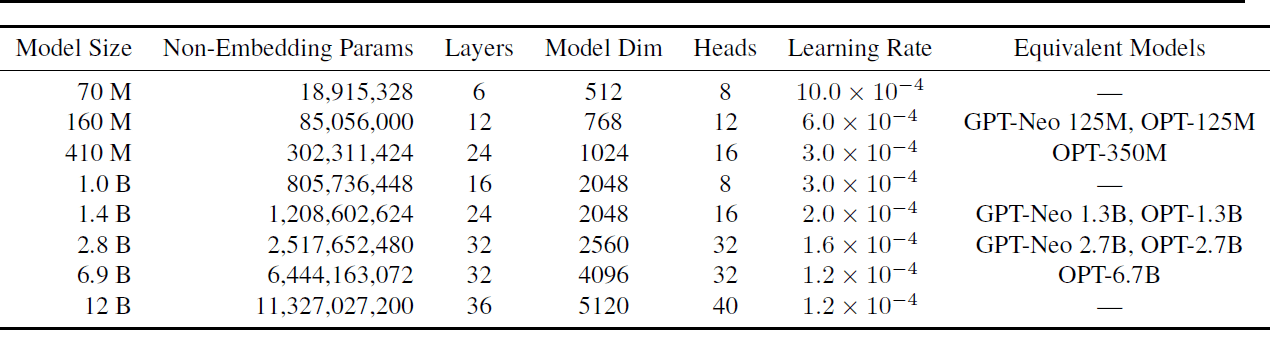
There are 8 different model sizes with the smallest and largest models having 70M and 12B parameters, respectively. Other model sizes include 160M, 410M, 1B, 1.4B, 2.8B, and 6.9B.

Each of these models was trained on both the Pile and the duplicated Pile datasets resulting in a total of 16 models. The following table shows the model sizes and a subset of hyperparameters.

Pythia: A Suite of 16 LLMs for In-Depth Research
Models and hyperparameters | Image source

For full details of the hyperparameters used, read Pythia: A Suite for Analyzing Large Language Models Across Training and Scaling.

Training Process

Here’s an overview of the architecture and training process:

  • All models have fully dense layers and use flash attention.
  • For easier interpretability untied embedding matrices are used.
  • A batch size of 1024 is used with sequence length of 2048. This large batch size substantially reduces the wall-clock training time.
  • The training process also leverages optimization techniques such as data and tensor parallelism

For the training process, the GPT-Neo-X library (includes features from the DeepSpeed library) developed by Eleuther AI is used.

Model Checkpoints

There are 154 checkpoints for each model. There’s one checkpoint every 1000 iterations. In addition, there are checkpoints at log-spaced intervals earlier in the training process: 1, 2, 4, 8, 16, 32, 64, 128, 256, and 512.

How Does Pythia Compare to Other Language Models?

The Pythia LLM suite was evaluated against the available language modeling benchmarks including OpenAI’s LAMBADA variant. It was found that the performance of Pythia is comparable to the OPT and BLOOM language models.

Advantages and Limitations

The key advantage of Pythia LLM suite is the reproducibility. The dataset is publicly available, pre-tokenized data loaders, and 154 model checkpoints are also publicly available. The full list of hyperparameters has been released, too. This makes replicating the model training and analysis simpler.

In [1], the authors explain their rationale for choosing an English language dataset over a multilingual text corpus. But having reproducible training pipelines for multilingual large language models can be helpful. Especially in encouraging more research and study of the dynamics of multilingual large language models.

An Overview of Case Studies

The research also presents interesting case studies leveraging the reproducibility of the training process of large language models in the Pythia suite.

Gender Bias

All large language models are prone to bias and misinformation. The study focuses on mitigating gender bias by modifying the pretraining data such that a fixed percentage has pronouns of a specific gender. This pretraing is also reproducible.

Memorization

Memorization in large language models is also another area that has been widely studied. The sequence memorization is modeled as a Poisson point process. The study aims at understanding if the location of the specific sequence in the training dataset influences memorization. It was observed that the location does not affect memorization.

Effect of Pretraining Term Frequencies

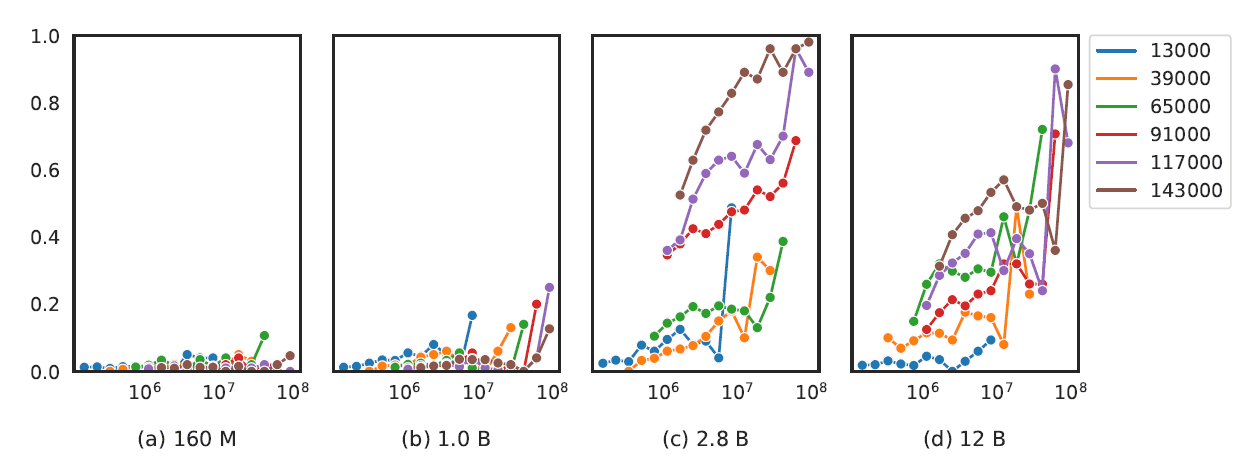
For language models with 2.8B parameters and greater, the occurrence of task-specific terms in the pre-training corpus was found to improve the model’s performance on tasks such as question answering.

There is also a correlation between the model size and the performance on more involved tasks such as arithmetic and mathematical reasoning.

Pythia: A Suite of 16 LLMs for In-Depth Research
Performance on arithmetic addition task | Image source Summary and Next Steps

Let’s sum up the key points in our discussion.

  • Pythia by Eleuther AI is a suite of 16 LLMs trained on publicly available Pile and deduplicated Pile datasets.
  • The size of the LLMs range from 70M to 12B parameters.
  • The training data and model checkpoints are open-source and it is possible to reconstruct the exact training data loaders. So the LLM suite can be helpful in understanding the training dynamics of large language models better.

As a next step, you can explore the Pythia suite of models and model checkpoints on Hugging Face Hub.

Reference

[1] Pythia: A Suite for Analyzing Large Language Models Across Training and Scaling, arXiv, 2023
Bala Priya C is a developer and technical writer from India. She likes working at the intersection of math, programming, data science, and content creation. Her areas of interest and expertise include DevOps, data science, and natural language processing. She enjoys reading, writing, coding, and coffee! Currently, she's working on learning and sharing her knowledge with the developer community by authoring tutorials, how-to guides, opinion pieces, and more.

More On This Topic

  • 8 Free AI and LLMs Playgrounds
  • From Unstructured to Structured Data with LLMs
  • What are Vector Databases and Why Are They Important for LLMs?
  • Falcon LLM: The New King of Open-Source LLMs
  • How Watermarking Can Help Mitigate The Potential Risks Of LLMs?
  • Explore LLMs Easily on Your Laptop with openplayground

6 helpful ways to use ChatGPT’s Custom Instructions

ChatGPT Custom Instructions

ChatGPT has become popular enough to be credited with singlehandedly kicking off the artificial intelligence (AI) boom that we're all experiencing. The key reasons for the popularity of the generative AI tool among users are its easy accessibility and usefulness. And to that second point, ChatGPT maker OpenAI recently added a new feature: the capability to customize how the AI chatbot responds through Custom Instructions.

Also: 4 ways to detect generative AI hype from reality

Currently, the Custom Instructions feature is only available for ChatGPT Plus subscribers. However, OpenAI stated at launch that the feature will become available to all users over the coming weeks.

6 helpful ways to use ChatGPT's Custom Instructions

To use ChatGPT's Custom Instructions with your Plus subscription, go to the Settings & Beta window on the ChatGPT website and select Beta features. Toggle on the Custom Instructions field and add your preferences.

Also: How to use ChatGPT: Everything you need to know

There are two boxes: one to add information about yourself and your role, and the other to add how you'd like ChatGPT to format its responses, including tone and style.

Artificial Intelligence

OpenAI’s Secret Image Generation Tool to Debut Soon

In a battle of who can create realistic AI images, one major player that captured the public attention through their text-to-image model seems to be mum since last year. Though OpenAI has been keeping itself busy with ChatGPT, other players such as Midjourney and Stable Diffusion have overtaken their image generation platform Dall E-2. However, as per latest developments, it looks like Dall E-3 is round the corner – an attempt to catch up on the AI image generation race.

Playing Catchup in Image Race

It is believed that OpenAI is testing a new image generating platform which could be an upgrade of Dall E-2. Through an invite-only preview, an exclusive OpenAI testing server housing 400 people has access to the latest version of the model. Through an explainer video, Youtuber MattVidPro shared the images of the new model that is being tested. The verdict as per users – “I have zero interest in using Midjourney after using this.”

The new model is said to be highly capable and superior in following prompts and coherent details, including coherent text, photorealism and different art styles. The model has been able to create images with detailed features such as hair, lighting, ad copies – and the common problem of hand detailing is also sorted in this model. It has also been compared to other applications such as Midjourney V5.2, and Stability Diffusion XL, where it appears to outperform all of them.

Screenshots of AI generated images from the latest model. Source: Youtube

Not Forgotten, Quietly Fighting

After doing away with user waitlists, Dall E-2 was released to all in September 2022. Since then there have been no major updates to the model. In March this year, it was reported that the company was experimenting with Dall E-2 and solicited feedback from a small group of users for early feedback. The model was experimented with to create sharper and more photorealistic images.

Comparing the existing model of Dall E-2 with the latest version of Midjourney, the images delivered by the former are closer to the prompt provided.

Prompt : Painting of a pink Jester giving a high five to a panda while in a cycling competition. The bikes are made of cheese and the ground is very muddy. They are driving in a foggy forest and the panda is angry.

Dall E-2 (July)

Midjourney V5.2

With GPT-4 having multimodal functions, it is possible that OpenAI’s next version of text-to-image generation model will have enhanced capabilities.

User comments for the new model. Source: Youtube

Midjourney, which has released 5 versions of their text-to-image generation models in a span of 1 year, has stuck to closed-source models all along. On the other hand, Stability Diffusion is open source and their latest model Stability Diffusion XL 1.0 is also available on Amazon Bedrock. Whereas, Adobe Firefly which takes on Midjourney and Dall E with their generative AI capabilities, offers their service as a trial first and then an option to subscribe.

Safety First?

OpenAI recently committed to a set of action points to ensure responsible AI governance. Under the coordination of the US government, OpenAI along with six other big tech companies including Microsoft, Google, Meta, would work towards watermarking AI generated audio and visual content. It is possible that this watermarking will be embedded into the latest version that they are testing out.

If so, OpenAI would become the first major tech company to tag AI-generated images. While safety seems to be their priority, OpenAI’s latest image generation model, at the moment, seems far from safe.

Probably owing to the testing phase, safety features are not present on the current model and images containing blood, gore, and frontal nudity can be generated. Graphic pictures depicting extreme violence can pop up without prompting for the same. Furthermore, it is able to generate copyrighted artworks, characters, and accurate company logos.

Last year, Dall E-2 had come under scrutiny for creating inappropriate images. It was reported to have created images that fortify gender biases, reinforced racial stereotypes and overly sexual images.

While the new model will require fine tuning and nuances to bring in safety features, the community responses for the model have been highly promising. Rating it higher than current image-generation tools. It is estimated that the new model will arrive in December.

The post OpenAI’s Secret Image Generation Tool to Debut Soon appeared first on Analytics India Magazine.

Mastering Regular Expressions with Python

Time to power up regular expressions
Image created by Author with Midjourney Introduction

Regular expressions, or regex, are a powerful tool for manipulating text and data. They provide a concise and flexible means to 'match' (specify and recognize) strings of text, such as particular characters, words, or patterns of characters. Regex are used in various programming languages, but in this article, we will focus on using regex with Python.

Python, with its clear, readable syntax, is a great language for learning and applying regex. The Python re module provides support for regex operations in Python. This module contains functions to search, replace, and split text based on specified patterns. By mastering regex in Python, you can efficiently manipulate and analyze text data.

This article will guide you from the basics to the more complex operations with regex in Python, giving you the tools to handle any text processing challenge that comes your way. We'll start with simple character matches, then explore more complex pattern matching, grouping, and lookaround assertions. Let's get started!

Basic Regex Patterns

At its core, regex operates on the principle of pattern matching in a string. The most straightforward form of these patterns are literal matches, where the pattern sought is a direct sequence of characters. But regex patterns can be more nuanced and capable than simple literal matching.

In Python, the re module provides a suite of functions to handle regular expressions. The re.search() function, for example, scans through a given string, looking for any location where a regex pattern matches. Let's illustrate with an example:

import re    # Define a pattern  pattern = "Python"    # Define a text  text = "I love Python!"    # Search for the pattern  match = re.search(pattern, text)    print(match)

This Python code searches the string in the variable text for the pattern defined in the variable pattern. The re.search() function returns a Match object if the pattern is found within the text, or None if it isn't.

The Match object includes information about the match, including the original input string, the regular expression used, and the location of the match. For instance, using match.start() and match.end() will provide the start and end positions of the match in the string.

However, often we don't just look for exact words — we want to match patterns. That's where special characters come into play. For example, the dot (.) matches any character except a newline. Let's see this in action:

# Define a pattern  pattern = "P.th.n"    # Define a text  text = "I love Python and Pithon!"    # Search for the pattern  matches = re.findall(pattern, text)    print(matches)

This code searches the string for any five-letter word that starts with a "P", ends with an "n", and has "th" in the middle. The dot stands for any character, so it matches both "Python" and "Pithon". As you can see, even with just literal characters and the dot, regex provides a powerful tool for pattern matching.

In subsequent sections, we will delve into more complex patterns and powerful features of regex. By understanding these building blocks, you can construct more complex patterns to match nearly any text processing and manipulation task.

Meta Characters

While literal characters form the backbone of regular expressions, meta characters amplify their power by providing flexible pattern definitions. Meta characters are special symbols with unique meanings, shaping how the regex engine matches patterns. Here are some commonly used meta characters and their significance and usage:

  • . (dot) — The dot is a wildcard that matches any character except a newline. For instance, the pattern "a.b" can match "acb", "a+b", "a2b", etc.
  • ^ (caret) — The caret symbol denotes the start of a string. "^a" would match any string that starts with "a".
  • $ (dollar) — Conversely, the dollar sign corresponds to the end of a string. "a$" would match any string ending with "a".
  • * (asterisk) — The asterisk denotes zero or more occurrences of the preceding element. For instance, "a*" matches "", "a", "aa", "aaa", etc.
  • + (plus) — Similar to the asterisk, the plus sign represents one or more occurrences of the preceding element. "a+" matches "a", "aa", "aaa", etc., but not an empty string.
  • ? (question mark) — The question mark indicates zero or one occurrence of the preceding element. It makes the preceding element optional. For example, "a?" matches "" or "a".
  • { } (curly braces) — Curly braces quantify the number of occurrences. "{n}" denotes exactly n occurrences, "{n,}" means n or more occurrences, and "{n,m}" represents between n and m occurrences.
  • [ ] (square brackets) — Square brackets specify a character set, where any single character enclosed in the brackets can match. For example, "[abc]" matches "a", "b", or "c".
  • (backslash) — The backslash is used to escape special characters, effectively treating the special character as a literal. "$" would match a dollar sign in the string instead of denoting the end of the string.
  • | (pipe) — The pipe works as a logical OR. Matches the pattern before or the pattern after the pipe. For instance, "a|b" matches "a" or "b".
  • ( ) (parentheses) — Parentheses are used for grouping and capturing matches. The regex engine treats everything within parentheses as a single element.

Mastering these meta characters opens up a new level of control over your text processing tasks, allowing you to create more precise and flexible patterns. The true power of regex becomes apparent as you learn to combine these elements into complex expressions. In the following section, we'll explore some of these combinations to showcase the versatility of regular expressions.

Character Sets

Character sets in regex are powerful tools that allow you to specify a group of characters you'd like to match. By placing characters inside square brackets "[]", you create a character set. For example, "[abc]" matches "a", "b", or "c".

But character sets offer more than just specifying individual characters — they provide the flexibility to define ranges of characters and special groups. Let's take a look:

Character ranges: You can specify a range of characters using the dash ("-"). For example, "[a-z]" matches any lowercase alphabetic character. You can even define multiple ranges within a single set, like "[a-zA-Z0-9]" which matches any alphanumeric character.

Special groups: Some predefined character sets represent commonly used groups of characters. These are convenient shorthands:

  • d: Matches any decimal digit; equivalent to [0-9]
  • D: Matches any non-digit character; equivalent to [^0-9]
  • w: Matches any alphanumeric word character (letter, number, underscore); equivalent to [a-zA-Z0-9_]
  • W: Matches any non-word character; equivalent to [^a-zA-Z0-9_]
  • s: Matches any whitespace character (spaces, tabs, line breaks)
  • S: Matches any non-whitespace character

Negated character sets: By placing a caret "^" as the first character inside the brackets, you create a negated set, which matches any character not in the set. For example, "[^abc]" matches any character except "a", "b", or "c".

Let's see some of this in action:

import re    # Create a pattern for a phone number  pattern = "d{3}-d{3}-d{4}"    # Define a text  text = "My phone number is 123-456-7890."    # Search for the pattern  match = re.search(pattern, text)    print(match)

This code searches for a pattern of a U.S. phone number in the text. The pattern "d{3}-d{3}-d{4}" matches any three digits, followed by a hyphen, followed by any three digits, another hyphen, and finally any four digits. It successfully matches "123-456-7890" in the text.

Character sets and the associated special sequences offer a significant boost to your pattern matching capabilities, providing a flexible and efficient way to specify the characters you wish to match. By grasping these elements, you're well on your way to harnessing the full potential of regular expressions.

Some Common Patterns

While regex may seem daunting, you'll find that many tasks require only simple patterns. Here are five common ones:

Emails

Extracting emails is a common task that can be done with regex. The following pattern matches most common email formats:

# Define a pattern  pattern = r'b[A-Za-z0-9._%+-]+@[A-Za-z0-9.-]+.[A-Z|a-z]{2,7}b'    # Search for the pattern  match = re.findall(pattern, text)    print(match)

Phone Numbers

Phone numbers can vary in format, but here's a pattern that matches North American phone numbers:

# Define a pattern  pattern = r'bd{3}[-.s]?d{3}[-.s]?d{4}b'    # Search for the pattern  ...

IP Addresses

To match an IP address, we need four numbers (0-255) separated by periods:

# Define a pattern  pattern = r'b(?:d{1,3}.){3}d{1,3}b'    # Search for the pattern  ...

Web URLs

Web URLs follow a consistent format that can be matched with this pattern:

# Define a pattern  pattern = r'https?://(?:[-w.]|(?:%[da-fA-F]{2}))+'    # Search for the pattern  ...

HTML Tags

HTML tags can be matched with the following pattern. Be careful, as this won't catch attributes within the tags:

# Define a pattern  pattern = r'<[^>]+>'    # Search for the pattern  ...

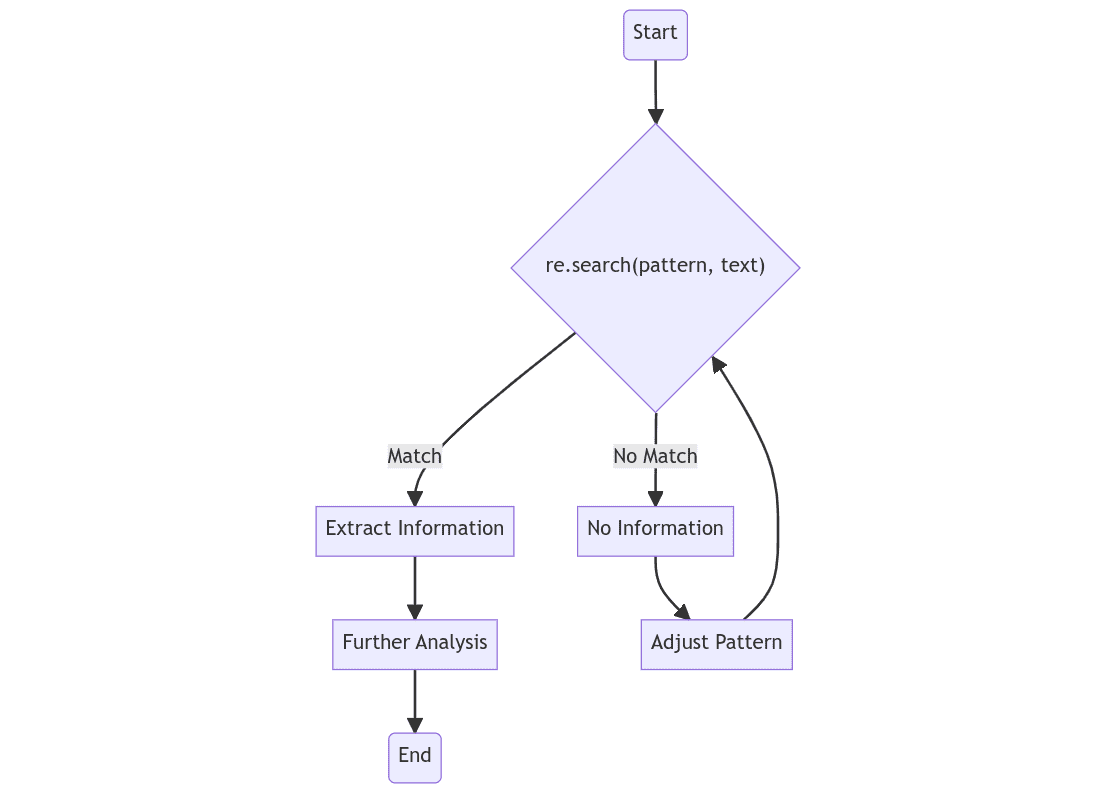
Python regex workflow
A Python regular expression matching workflow Tips & Suggestions

Here are some practical tips and best practices to help you use regex effectively.

  1. Start Simple: Start with simple patterns and gradually add complexity. Trying to solve a complex problem in one go can be overwhelming.
  2. Test Incrementally: After each change, test your regex. This makes it easier to locate and fix problems.
  3. Use Raw Strings: In Python, use raw strings for regex patterns (i.e., r"text"). This ensures that Python interprets the string literally, preventing conflicts with Python's escape sequences.
  4. Be Specific: The more specific your regex, the less likely it will accidentally match unwanted text. For example, instead of .*, consider using .+? to match text in a non-greedy way.
  5. Use Online Tools: Online regex testers can help you build and test your regex. These tools can show real-time matches, groups, and provide explanations for your regex. Some popular ones are regex101 and regextester.
  6. Readability Over Brevity: While regex allows for very compact code, it can quickly become hard to read. Prioritize readability over brevity. Use whitespace and comments when necessary.

Remember, mastering regex is a journey, and is very much an exercise in assembling building blocks. With practice and perseverance, you'll be able to tackle any text manipulation task.

Conclusion

Regular expressions, or regex, is indeed a powerful tool in Python's arsenal. Its complexity might be intimidating at first glance, but once you delve into its intricacies, you start realizing its true potential. It provides an unmatched robustness and versatility for handling, parsing, and manipulating text data, making it an essential utility in numerous fields such as data science, natural language processing, web scraping, and many more.

One of the primary strengths of regex lies in its ability to perform intricate pattern matching and extraction operations on massive volumes of text with minimal code. Think of it as a sophisticated search engine that can locate not only precise strings of text but also patterns, ranges, and specific sequences. This enables it to identify and extract key pieces of information from raw, unstructured text data, which is a common necessity in tasks like information retrieval, data cleaning, and sentiment analysis.

Furthermore, the learning curve of regex, while seemingly steep, shouldn't deter the enthusiastic learner. Yes, regex has its own unique syntax and special characters that may seem cryptic at first. However, with some dedicated learning and practice, you will soon appreciate its logical structure and elegance. The efficiency and time saved in processing text data with regex far outweigh the initial learning investment. Thus, mastery over regex, albeit challenging, provides invaluable rewards that make it a critical skill for any data scientist, programmer, or anyone dealing with text data in their work.

The concepts and examples we've discussed here are just the tip of the iceberg. There are many more regex concepts to explore, such as quantifiers, groups, lookaround assertions, and more. So continue practicing, experimenting, and mastering regex with Python. Happy coding pattern matching!

Matthew Mayo (@mattmayo13) is a Data Scientist and the Editor-in-Chief of KDnuggets, the seminal online Data Science and Machine Learning resource. His interests lie in natural language processing, algorithm design and optimization, unsupervised learning, neural networks, and automated approaches to machine learning. Matthew holds a Master's degree in computer science and a graduate diploma in data mining. He can be reached at editor1 at kdnuggets[dot]com.

More On This Topic

  • 7 Steps to Mastering Python for Data Science
  • 7 Steps to Mastering Machine Learning with Python in 2022
  • Mastering GPUs: A Beginner's Guide to GPU-Accelerated DataFrames in Python
  • KDnuggets™ News 22:n05, Feb 2: 7 Steps to Mastering Machine Learning…
  • KDnuggets™ News 20:n42, Nov 4: Top Python Libraries for Data Science,…
  • Mastering NLP Job Interviews