OpenAI Launches ChatGPT Enterprise

OpenAI Launches ChatGPT Enterprise August 28, 2023 by Alex Woodie

OpenAI today announced the launch of ChatGPT Enterprise, a new GPT-4-based service that offers stronger security and privacy protections, support for longer inputs, and new data analysis capabilities, among other new features.

OpenAI kicked off the generative AI craze in late 2022 with the launch of ChatGPT, which provided a conversational interface to GPT-3.5, the company’s biggest large language model (LLM) at the time. Over the ensuing months, OpenAI has bolstered the offering with other capabilities, including the launch of ChatGPT Plus in February, the launch of API integration in early March, and the launch of GPT-4 in mid-March.

With today’s launch of ChatGPT Enterprise, the company is positioning its AI service as an enterprise offering. Customers can expect strong encryption, with AES-256 used for data at rest and TLS 1.2+ used for data in transit. ChatGPT Enterprise is also certified complaint with SOC2, a standard maintained by the American Institute of CPAs that sets the security, availability, processing integrity, confidentiality and privacy of data.

Privacy is turned on by default with ChatGPT Enterprise, and the company says that “customer prompts or data are not used for training OpenAI models.” Non-enterprise users can also turn off data sharing by going into the ChatGPT settings in Data Controls, the company tells Datanami.

“For those with training enabled, we use data to make our models more helpful for people—we don’t use data for selling our services, advertising, or building profiles of people,” an OpenAI spokesperson says. “When data is shared with us, it helps our models become more accurate and helps improve their general capabilities and safety.”

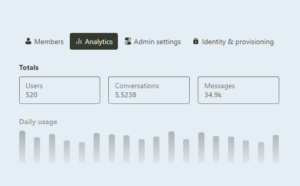
ChatGPT Enterprise features an admin console

Customers will see faster interaction with ChatGPT Enterprise thanks to unlimited, high-speed access to GPT-4, which means they can leverage the full 32,000 maximum token limit. That’s 4x higher than the previous limit for ChatGPT, but the same limit GPT-4 has sported since it was launched. This release also brings “shareable conversation templates,” which will make tools more available for data analysts, marketers, and customer support.

Users also get unlimited access to advanced data analysis, which you might know by its previous name, Code Interpreter. This feature, which we wrote about last month, gives users the ability to run code and analyze their own data. OpenAI says it will help technical and non-technical folks accomplish a range of data tasks.

Finally, ChatGPT Enterprise also brings an admin console designed to help manage large number of users. The new service sports single sign-on (SSO) capabilities and domain verification, as well as a new analytics dashboard for usage insights.

OpenAI, which says that 80% of the Fortune 500 have adopted ChatGPT, says ChatGPT Enterprise is a response to demands for an easier way to manage the service. “We’ve heard from business leaders that they’d like a simple and safe way of deploying it in their organization,” the company says in a blog post today.

Pricing was not disclosed by the company.

Related Items:

OpenAI Releases ChatGPT Code Interpreter, ‘Your Personal Data Analyst’

GPT-4 Has Arrived: Here’s What to Know

You Can Now Get Priority Access to ChatGPT for $20 a Month

Related

About the author: Alex Woodie

Alex Woodie has written about IT as a technology journalist for more than a decade. He brings extensive experience from the IBM midrange marketplace, including topics such as servers, ERP applications, programming, databases, security, high availability, storage, business intelligence, cloud, and mobile enablement. He resides in the San Diego area.

OpenAI finally introduces a business version of ChatGPT

OpenAI on phone

No one would have guessed in October 2022 that artificial intelligence (AI) would shortly revolutionize the world. Then, on November 30, 2022, OpenAI launched ChatGPT and everything changed. Now, AI is everywhere. The next major step was when ChatGPT would shift from a largely free experimental service to a commercial one. That day is today.

OpenAI has announced the launch of ChatGPT Enterprise, a new and improved version of its popular AI chatbot. This enterprise-grade version boasts enhanced security, privacy, and a range of powerful features tailored for businesses.

Also: 4 things Claude AI can do that ChatGPT can't

And what exactly will you get from ChatGPT Enterprise?

Enterprise-grade security and privacy. OpenAI says that businesses will have full control over their data without training on business-specific conversations. All interactions are encrypted, and the platform is System and Organization Controls, (SOC) 2 compliant. This is a Certified Public Accountants (CPA) privacy standard. However, you should note that if you use the free or Plus versions of ChatGPT, your queries may be used to train OpenAI.

In addition, with Enterprise, all your conversations will be encrypted in transit, with Transport Layer Security (TLS) 1.2+ and at rest with Advanced Encryption Standard (AES) 256. The ChatGPT new admin console also enables you to manage your team members with domain verification, Single Sign-on (SSO), and usage reporting.

ChatGPT Enterprise offers faster response times — up to twice as fast as before. It can also process longer inputs and files of up to 32K tokens. In practice, this means you can enter queries up to four times larger than before. It also removes all usage caps. And, of course, it uses the latest large language model (LLM), GPT-4.

Also: How to use ChatGPT

This Enterprise edition also provides unlimited access to advanced data analysis tools. If you want to build applications around ChatGPT, which you almost certainly do, it also comes with shareable chat templates. You can use these to build common workflows for your companies. For more advanced users with programmers, you also get free credits to use OpenAI's Application Programming Interfaces (API) to write your own custom AI programs.

Since its inception just nine months ago, ChatGPT has seen rapid adoption, with over 80% of Fortune 500 companies integrating it into their operations, according to OpenAI. The new enterprise version aims to meet the growing demand for a secure and efficient AI assistant in the workplace, and, needless to say, to make a profit.

Also: 40% of workers will have to reskill in the next three years due to AI, says IBM study

After all, even with its hundreds of millions of users and a limited commercial release, ChatGPT Plus, OpenAI needs to start making returns to its substantial investors. Microsoft, for example, has invested $10 billion in OpenAI. And, in April, OpenAI closed a $300 million share sale, with investments from Sequoia Capital and Andreessen Horowitz.

Will companies invest in it? It seems likely. According to OpenAI, companies such as The Estée Lauder Companies, PwC, and Zapier are already using "ChatGPT to craft clearer communications, accelerate coding tasks, rapidly explore answers to complex business questions, assist with creative work, and much more."

OpenAI isn't releasing any pricing. While the service is available today, you must talk to a sales representative to get the price for your company. Will you be subscribing? Let us know if you'll use it and how much you pay. We're all curious. This is one question ChatGPT won't answer!

Featured

OpenAI launches a ChatGPT plan for enterprise customers

OpenAI launches a ChatGPT plan for enterprise customers Kyle Wiggers 11 hours

Seeking to capitalize on ChatGPT’s viral success, OpenAI today announced the launch of ChatGPT Enterprise, a business-focused edition of the company’s AI-powered chatbot app.

ChatGPT Enterprise, which OpenAI first teased in a blog post earlier this year, can perform the same tasks as ChatGPT, such as writing emails, drafting essays and debugging computer code. But the new offering also adds “enterprise-grade” privacy and data analysis capabilities on top of the vanilla ChatGPT, as well as enhanced performance and customization options.

That puts ChatGPT Enterprise on par, feature-wise, with Bing Chat Enterprise, Microsoft’s recently launched take on an enterprise-oriented chatbot service.

“Today marks another step towards an AI assistant for work that helps with any task, protects your company data and is customized for your organization,” OpenAI writes in a blog post shared with TechCrunch. “Businesses interested in ChatGPT Enterprise should get in contact with us. While we aren’t disclosing pricing, it’ll be dependent on each company’s usage and use cases.”

ChatGPT Enterprise provides a new admin console with tools to manage how employees within an organization use ChatGPT, including integrations for single sign-on, domain verification and a dashboard with usage statistics. Shareable conversation templates allow employees to build internal workflows leveraging ChatGPT, while credits to OpenAI’s API platform let companies create fully custom ChatGPT-powered solutions if they choose.

ChatGPT Enterprise, in addition, comes with unlimited access to Advanced Data Analysis, the ChatGPT feature formerly known as Code Interpreter, which allows ChatGPT to analyze data, create charts, solve math problems and more, including from uploaded files. For example, given a prompt like “Tell me what’s interesting about this data,” ChatGPT’s Advanced Data Analysis capability can look through the data — financial, health or location information, for example — to generate insights.

Advanced Data Analysis was previously available only to subscribers to ChatGPT Plus, the $20-per-month premium tier of the consumer ChatGPT web and mobile apps. To be clear, ChatGPT Plus is sticking around — OpenAI sees ChatGPT Enterprise as complementary to it, the company says.

ChatGPT Enterprise is powered by GPT-4, OpenAI’s flagship AI model, as is ChatGPT Plus. But ChatGPT Enterprise customers get priority access to GPT-4, delivering performance that’s twice as fast as the standard GPT-4 and with an expanded 32,000-token (~25,000-word) context window.

Context window refers to the text the model considers before generating additional text, while tokens represent raw text (e.g. the word “fantastic” would be split into the tokens “fan,” “tas” and “tic”). Generally speaking, models with large context windows are less likely to “forget” the content of recent conversations.

OpenAI — no doubt attempting to allay the fears of businesses that have restricted their employees from using the consumer version of ChatGPT — emphasizes that it won’t train models on business data sent to ChatGPT Enterprise or any usage data and that all conversations with ChatGPT Enterprise are encrypted in transit and at rest.

“We believe AI can assist and elevate every aspect of our working lives and make teams more creative and productive,” writes OpenAI in the blog post.

OpenAI claims that there’s acute interest from businesses in an enterprise-focused ChatGPT, claiming that ChatGPT, one of the fastest-growing consumer apps in history, has been adopted by teams in more than 80% of Fortune 500 companies.

But it’s not clear that ChatGPT has staying power.

According to analytics company Similarweb, ChatGPT traffic dropped 9.7% globally from May to June, while average time spent on the web app went down by 8.5%. The dip could be due to the launch of OpenAI’s ChatGPT app for iOS and Android — and summer vacation (i.e. fewer kids turning to ChatGPT for homework help). But it wouldn’t be surprising if increased competition was playing a part.

OpenAI’s under pressure to monetize the tool regardless.

The company reportedly spent upward of $540 million last year to develop ChatGPT, including funds it used to poach talent from the likes of Google, according to The Information. And according to some estimates, ChatGPT is costing OpenAI $700,000 a day to run.

Yet OpenAI made only $30 million in revenue in fiscal year 2022.

CEO Sam Altman has reportedly told investors that the company intends to boost that figure to $200 million this year and $1 billion next year, and he’s presumably figuring ChatGPT Enterprise into those plans.

OpenAI says that its future plans for ChatGPT Enterprise include a ChatGPT Business offering for smaller teams, allowing companies to connect apps to ChatGPT Enterprise, “more powerful” and “enterprise-grade” versions of Advanced Data Analysis and web browsing, and tools designed for data analysts, marketers and customer support.

“We look forward to sharing an even more detailed roadmap with prospective customers and continuing to evolve ChatGPT Enterprise based on your feedback,” OpenAI writes.

Everyone wants responsible AI, but few people are doing anything about it

illustration of robot hand holding brain

While almost nine in 10 business leaders agree it's important to have clear guidelines on artifical intelligence (AI) ethics and corporate responsibility, barely a handful admit they have such guidelines, a recent survey shows.

Such findings suggest there's confusion about what approaches need to be taken to govern AI adoption, and technology professionals need to step forward and take leadership for the safe and ethical development of their data-led initiatives.

Also: Five ways to use AI responsibly

The results are from a survey based on the views of 500 business leaders released by technology company Conversica, which says: "A resounding message emerges from the survey: a majority of respondents recognize the paramount importance of well-defined guidelines for the responsible use of AI within companies, especially those that have already embraced the technology."

Almost three-quarters (73%) of respondents said AI guidelines are indispensable. However, just 6% have established clear ethical guidelines for AI use, and 36% indicate they might put guidelines in place during the next 12 months.

Even among companies with AI in production, one in five leaders at companies currently using AI admitted to limited or no knowledge about their organization's AI-related policies. More than a third (36%) claimed to be only "somewhat familiar" with policy-related concerns.

Guidelines and policies for addressing responsible AI should incorporate governance, unbiased training data, bias detection, bias mitigation, transparency, accuracy, and the inclusion of human oversight, the report's authors state.

Also: The best AI chatbots: ChatGPT and other noteworthy alternatives

About two-thirds (65%) of the executives surveyed said they already have or plan to have AI-powered services in place during the next 12 months. Leading use cases for AI include powering engagement functions, such as customer service and marketing (cited by 39%), and producing analytic insights (35%).

The survey found the top concerns about AI outputs are the accuracy of current-day data models, false information, and lack of transparency. More than three-quarters (77%) of executives expressed concern about AI generating false information.

AI providers aren't providing enough information to help formulate guidelines, the business leaders said — especially when it comes to data security and transparency, and the creation of strong ethical policies.

Also: Today's AI boom will amplify social problems if we don't act now

Around two-thirds (36%) of respondents said their businesses have rules about using generative AI tools, such as Chat GPT. But 20% said their companies are giving individual employees free rein regarding the use of AI tools for the foreseeable future.

The Conversica survey shows there is a leadership gap when it comes to making responsible AI a reality. So, how can technology leaders and line-of-business professionals step up to ensure responsible AI practices are in place? Here are some of the key guidelines shared by Google's AI team:

  • Use a human-centered design approach: "The way actual users experience your system is essential to assessing the true impact of its predictions, recommendations, and decisions. Design features with appropriate disclosures built-in: clarity and control is crucial to a good user experience. Model potential adverse feedback early in the design process, followed by specific live testing and iteration for a small fraction of traffic before full deployment."
  • Engage with a diverse set of users and use-case scenarios: "Incorporate feedback before and throughout project development. This will build a rich variety of user perspectives into the project and increase the number of people who benefit from the technology."
  • Design your model using concrete goals for fairness and inclusion: "Consider how the technology and its development over time will impact different use cases: Whose views are represented? What types of data are represented? What's being left out?"
  • Check the system for unfair biases: "For example, organize a pool of trusted, diverse testers who can adversarially test the system, and incorporate a variety of adversarial inputs into unit tests. This can help to identify who may experience unexpected adverse impacts. Even a low error rate can allow for the occasional very bad mistake."
  • Stress test the system on difficult cases: "This will enable you to quickly evaluate how well your system is doing on examples that can be particularly hurtful or problematic each time you update your system. As with all test sets, you should continuously update this set as your system evolves, features are added or removed and you have more feedback from users."
  • Test, test, test: "Learn from software engineering best test practices and quality engineering to make sure the AI system is working as intended and can be trusted. Conduct rigorous unit tests to test each component of the system in isolation. Conduct integration tests to understand how individual ML components interact with other parts of the overall system."
  • Use a gold standard dataset to test the system and ensure that it continues to behave as expected: "Update this test set regularly in line with changing users and use cases, and to reduce the likelihood of training on the test set. Conduct iterative user testing to incorporate a diverse set of users' needs in the development cycles."
  • Apply the quality engineering principle of poka-yoke: "Build quality checks into a system, so that unintended failures either cannot happen or trigger an immediate response — e.g., if an important feature is unexpectedly missing, the AI system won't output a prediction."

The business might want to implement AI quickly, but caution must be taken to ensure the tools and their models are accurate and fair. While businesses are looking for AI to advance, the technology must deliver responsible results every time.

Artificial Intelligence

We don’t have to reinvent the wheel to regulate AI responsibly

We don’t have to reinvent the wheel to regulate AI responsibly Daniel Marcous 8 hours Daniel Marcous Contributor Share on Twitter Daniel Marcous is the co-founder and CTO of april, an AI-driven tax platform. Daniel was previously the CTO of AI-driven navigation platform Waze, which was acquired by Google in 2013.

We are living through one of the most transformative tech revolutions of the past century. For the first time since the tech boom of the 2000s (or even since the Industrial Revolution), our essential societal functions are being disrupted by tools deemed innovative by some and unsettling to others. While the perceived benefits will continue to polarize public opinion, there is little debate about AI’s widespread impact across the future of work and communication.

Institutional investors tend to agree. In the past three years alone, venture capital investment into generative AI has increased by 425%, reaching up to $4.5 billion in 2022, according to PitchBook. This recent funding craze is primarily driven by widespread technological convergence across different industries. Consulting behemoths like KPMG and Accenture are investing billions into generative AI to bolster their client services. Airlines are utilizing new AI models to optimize their route offerings. Even biotechnology firms now use generative AI to improve antibody therapies for life-threatening diseases.

Naturally, this disruptive technology has sailed onto the regulatory radar, and fast. Figures like Lina Khan of the Federal Trade Commission have argued that AI poses serious societal risks across verticals, citing increased fraud incidence, automated discrimination, and collusive price inflation if left unchecked.

Perhaps the most widely discussed example of AI’s regulatory spotlight is Sam Altman’s recent testimony before Congress, where he argued that “regulatory intervention by governments will be critical to mitigate the risks of increasingly powerful models.” As the CEO of one of the world’s largest AI startups, Altman has quickly engaged with lawmakers to ensure that the regulation question evolves into a discussion between the public and private sectors. He’s since joined other industry leaders in penning a joint open letter claiming that “[m]itigating the risk of extinction from A.I. should be a global priority alongside other societal-scale risks, such as pandemics and nuclear war.”

Naturally, this disruptive technology has sailed onto the regulatory radar, and fast.

Technologists like Altman and regulators like Khan agree that regulation is critical to ensuring safer technological applications, but neither party tends to settle on scope. Generally, founders and entrepreneurs seek limited restrictions to provide an economic environment conducive to innovation, while government officials strive for more widespread limits to protect consumers.

However, both sides fail to realize that in some areas regulation has been a smooth sail for years. The advent of the internet, search engines, and social media ushered in a wave of government oversight like the Telecommunications Act, The Children’s Online Privacy Protection Act (COPPA), and The California Consumer Privacy Act (CCPA). Rather than institute a broad-stroke, blanket framework of restrictive policies that arguably hinder tech innovation, the U.S. maintains a patchwork of policies that incorporate long-standing fundamental laws like intellectual property, privacy, contract, harassment, cybercrime, data protection, and cybersecurity.

These frameworks often draw inspiration from established and well-accepted technological standards and promote their adoption and use in services and nascent technologies. They also ensure the existence of trusted organizations that apply these standards on an operational level.

Take the Secure Sockets Layer (SSL)/Transport Layer Security (TLS) protocols, for example. At their core, SSL/TLS are encryption protocols that ensure that data transferred between browsers and servers remains secure (enabling compliance with the encryption mandates in CCPA, the EU’s General Data Protection Regulation, etc.). This applies to customer information, credit card details, and all forms of personal data that malicious actors can exploit. SSL certificates are issued by certificate authorities (CAs), which serve as validators to prove that the information being transferred is genuine and secure.

The same symbiotic relationship can and should exist for AI. Following aggressive licensing standards from government entities will bring the industry to a halt and only benefit the most widely used players like OpenAI, Google, and Meta, creating an anticompetitive environment. A lightweight and easy-to-use SSL-like certification standard governed by independent CAs would protect consumer interests while still leaving room for innovation.

These could be made to keep AI usage transparent to consumers and make clear whether a model is being operated, what foundational model is at play, and whether it has originated from a trusted source. In such a scenario, the government still has a role to play by co-creating and promoting such protocols to render them widely used and accepted standards.

At a foundational level, regulation is in place to protect basic fundamentals like consumer privacy, data security, and intellectual property, not to curb technology that users choose to engage with daily. These fundamentals are already being protected on the internet and can be protected with AI using similar structures.

Since the advent of the internet, regulation has successfully maintained a middle ground of consumer protection and incentivized innovation, and government actors shouldn’t take a different approach simply because of rapid technological development. Regulating AI shouldn’t be reinventing the wheel, regardless of polarized political discourse.

This robot vacuum connects to your home’s water supply for full automation

SwitchBot

If you're looking for a way to automate your window curtains or blinds, get a button-pushing robot, or a smart lock without changing your existing lock, you'll do well to go with SwitchBot's products. But one thing you may not associate SwitchBot with is the robot vacuum and mop market — until now.

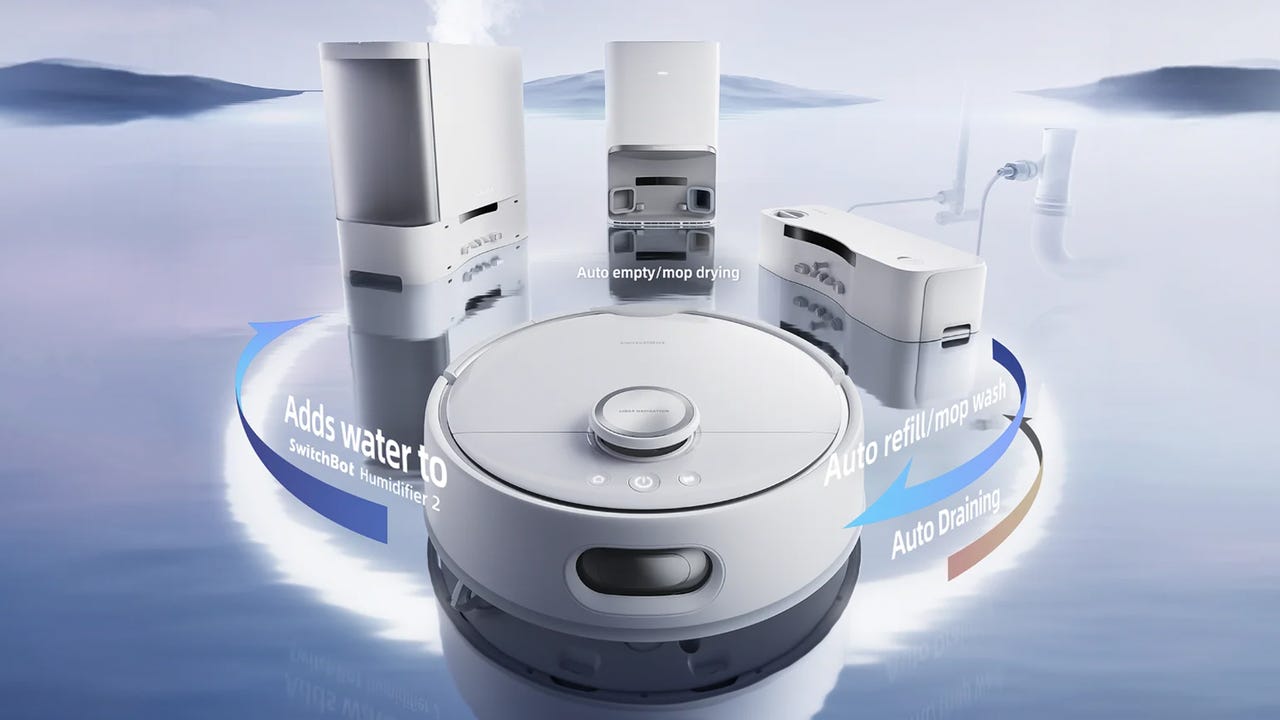
SwitchBot is reportedly working on a unique robot vacuum and mop that will connect to your home's plumbing to refill its water tanks and drain dirty water. It can also autonomously add water to a new SwitchBot Humidifier 2 to complete the Jetsons reenactment.

Also: The best robot vacuum mops right now: Expert tested and reviewed

The SwitchBot S10 comes with a charging dock where the robot automatically empties the dustbin after vacuuming and a separate station that you can set up in a bathroom or kitchen to connect to the water supply. The robot goes out to clean and stops by the plumbed station to refill and drain, powering the station with its battery.

No pricing information has been released at this time, but the S10 is set to be launched as a crowdfunding campaign on Kickstarter this October.

According to The Verge, the S10 will be announced this week during IFA 2023 in Berlin and will feature lidar mapping, obstacle avoidance, virtual no-go zones, and room-specific cleaning. The SwitchBot S10 will be the company's first robot vacuum in the US market.

Also: 5 things I learned while building my smart home

It will also detect carpet and lift its mop fixture to stop spraying water automatically until it's back on hard floors. The rolling mop accessory on the SwitchBot S10 won't need to be removed for cleaning, as the robot vacuum's self-cleaning feature takes care of it.

The Verge also reported that SwitchBot will launch a new humidifier to work seamlessly with the S10, as the robot vacuum will be able to fill it with fresh water from the water station.

See also

Create a Dashboard Using Python and Dash

Introduction

In the realm of data science and analytics, the power of data is unleashed not just by extracting insights but also by effectively communicating these insights; this is where data visualization comes into play.

Create a Dashboard Using Python and Dash

Data visualization is a graphical representation of information and data. It uses visual elements like charts, graphs, and maps, which make it easier to see patterns, trends, and outliers in the raw data. For data scientists and analysts, data visualization is an essential tool that facilitates a quicker and more precise understanding of the data, supports storytelling with data, and aids in making data-driven decisions.

In this article, you’ll learn to use Python and the Dash framework to create a dashboard to visualize Netflix’s content distribution and classification.

Create a Dashboard Using Python and Dash
What is Dash?

Dash is an open-source low-code framework developed by Plotly to create analytical web applications in pure Python. Traditionally, for such purposes, one might need to use JavaScript and HTML, requiring you to have expertise in both backend (Python) and frontend (JavaScript, HTML) technologies.

However, Dash bridges this gap, enabling Data Scientists and Analysts to build interactive, aesthetic dashboards only using Python. This aspect of low-code development makes Dash a suitable choice for creating analytical dashboards, especially for those primarily comfortable with Python.

Dataset Analysis

Now that you’ve been acquainted with Dash, let’s begin our hands-on project. You’ll use the Netflix Movies and TV Shows dataset available on Kaggle, created by Shivam Bansal.

This dataset comprises details about the movies and TV shows available on Netflix as of 2021, such as the type of content, title, director, cast, country of production, release year, rating, duration, and more.

Even though the dataset was created in 2021, it’s still a valuable resource for developing data visualization skills and understanding trends in media entertainment.

Using this dataset, you’ll aim to create a dashboard that allows visualizing the following points:

  1. Geographical content distribution: A map graph showcasing how content production varies across different countries over the years.
  2. Content classification: This visualization divides Netflix’s content into TV shows and movies to see which genres are most prominent.

Setting up the Project Workspace

Let’s start creating a directory for the project named netflix-dashboard, then initialize and activate a Python virtual environment via the following commands:

# Linux & MacOS  mkdir netflix-dashboard && cd netflix-dashboard  python3 -m venv netflix-venv && source netflix-venv/bin/activate
# Windows Powershell  mkdir netflix-dashboard && cd netflix-dashboard  python -m venv netflix-venv && .netflix-venvScriptsactivate

Next, you’ll need to install some external packages. You’ll be using pandas for data manipulation, dash for creating the dashboard, plotly for creating the graphs, and dash-bootstrap-components to add some style to the dashboard:

# Linux & MacOS  pip3 install pandas dash plotly dash-bootstrap-components
# Windows Powershell  pip install pandas dash plotly dash-bootstrap-components

Cleaning the Dataset

Going through the Netflix dataset, you’ll find missing values in the director, cast, and country columns. It would also be convenient to convert the date_added column string values to datetime for easier analysis.

To clean the dataset, you can create a new file clean_netflix_dataset.py, with the following code and then run it:

import pandas as pd    # Load the dataset  df = pd.read_csv('netflix_titles.csv')    # Fill missing values  df['director'].fillna('No director', inplace=True)  df['cast'].fillna('No cast', inplace=True)  df['country'].fillna('No country', inplace=True)    # Drop missing and duplicate values  df.dropna(inplace=True)  df.drop_duplicates(inplace=True)    # Strip whitespaces from the `date_added` col and convert values to `datetime`  df['date_added'] = pd.to_datetime(df['date_added'].str.strip())    # Save the cleaned dataset  df.to_csv('netflix_titles.csv', index=False)

Getting started with Dash

With the workspace set up and the dataset cleaned, you’re ready to start working on your dashboard. Create a new file app.py, with the following code:

from dash import Dash, dash_table, html  import pandas as pd    # Initialize a Dash app  app = Dash(__name__)    # Define the app layout  app.layout = html.Div([          html.H1('Netflix Movies and TV Shows Dashboard'),          html.Hr(),  ])    # Start the Dash app in local development mode  if __name__ == '__main__':      app.run_server(debug=True)

Let’s break down the code within app.py:

  • app = Dash(__name__): This line initializes a new Dash app. Think of it as the foundation of your application.
  • app.layout = html.Div(…): The app.layout attribute lets you write HTML-like code to design your application’s user interface. The above layout uses a html.H1(…) heading element for the dashboard title and a horizontal rule html.Hr() element below the title.
  • app.run(debug=True): This line starts a development server that serves your Dash app in local development mode. Dash uses Flask, a lightweight web server framework, to serve your applications to web browsers.

After running app.py, you’ll see a message in your terminal indicating that your Dash app is running and accessible at http://127.0.0.1:8050/. Open this URL in your web browser to view it:

Create a Dashboard Using Python and Dash
Your first Dash app!

The result looks very plain, right? Don’t worry! This section aimed to showcase the most basic Dash app structure and components. You’ll soon add more features and components to make it an awesome dashboard!

Incorporating Dash Bootstrap Components

The next step is to write the code for the layout of your dashboard and add some style to it! For this, you can use Dash Bootstrap Components (DBC), a library that provides Bootstrap components for Dash, enabling you to develop styled apps with responsive layouts.

The dashboard will be styled in a tab layout, which provides a compact way to organize different types of information within the same space. Each tab will correspond to a distinct visualization.

Let’s go ahead and modify the contents of app.py to incorporate DBC:

from dash import Dash,dcc, html  import pandas as pd  import dash_bootstrap_components as dbc    # Initialize the Dash app and import the Bootstrap theme to style the dashboard  app = Dash(__name__, external_stylesheets=[dbc.themes.BOOTSTRAP])    app.layout = dbc.Container(      [          dcc.Store(id='store'),          html.H1('Netflix Movies and TV Shows Dashboard'),          html.Hr(),          dbc.Tabs(              [                  dbc.Tab(label='Geographical content distribution', tab_id='tab1'),                  dbc.Tab(label='Content classification', tab_id='tab2'),              ],              id='tabs',              active_tab='tab1',          ),          html.Div(id='tab-content', className='p-4'),      ]  )    if __name__ == '__main__':      app.run(debug=True)

In this modified layout, you’ll see new components:

  • dbc.Container: Using dbc.Container as the top-level component wraps the entire dashboard layout in a responsive and flexible container.
  • dcc.Store: This Dash Core component allows you to store data client-side (on the user’s browser), enhancing the application’s performance by keeping the data locally.
  • dbc.Tabs and dbc.Tab: Each dbc.Tab represents an individual tab, which will contain different visualizations. The label property is what appears on the tab itself, and the tab_id is used to identify the tab. The active_tab property of dbc.Tabs is used to specify the active tab when the Dash app starts.

Now run app.py. The resulting dashboard will now have a Bootstrap-styled layout with two empty tabs:

Create a Dashboard Using Python and Dash
Incorporating Bootstrap for a tab-styled layout

Good going! You’re finally ready to add visualizations to the dashboard.

Adding Callbacks and Visualizations

When working with Dash, interactivity is achieved through callback functions. A callback function is a function that gets automatically called when an input property changes. It’s named “callback” because it’s a function that is “called back” by Dash whenever a change happens in the application.

In this dashboard, you will use callbacks to render the relevant visualization in the selected tab, and each visualization will be stored within its own Python file under a new components directory for better organization and modularity of the project structure.

Geographical content distribution visualization

Let’s create a new directory named components, and within it, create the geographical_content.py file that will generate a choropleth map illustrating how Netflix’s content production varies by country over the years:

import pandas as pd  import plotly.express as px  from dash import dcc, html    df = pd.read_csv('netflix_titles.csv')    # Filter out entries without country information and if there are multiple production countries,  # consider the first one as the production country  df['country'] = df['country'].str.split(',').apply(lambda x: x[0].strip() if isinstance(x, list) else None)    # Extract the year from the date_added column  df['year_added'] = pd.to_datetime(df['date_added']).dt.year  df = df.dropna(subset=['country', 'year_added'])    # Compute the count of content produced by each country for each year  df_counts = df.groupby(['country', 'year_added']).size().reset_index(name='count')    # Sort the DataFrame by 'year_added' to ensure the animation frames are in ascending order  df_counts = df_counts.sort_values('year_added')    # Create the choropleth map with a slider for the year  fig1 = px.choropleth(df_counts,                       locations='country',                       locationmode='country names',                       color='count',                       hover_name='country',                       animation_frame='year_added',                       projection='natural earth',                       title='Content produced by countries over the years',                       color_continuous_scale='YlGnBu',                       range_color=[0, df_counts['count'].max()])  fig1.update_layout(width=1280, height=720, title_x=0.5)    # Compute the count of content produced for each year by type and fill zeros for missing type-year pairs  df_year_counts = df.groupby(['year_added', 'type']).size().reset_index(name='count')    # Create the line chart using plotly express  fig2 = px.line(df_year_counts, x='year_added', y='count', color='type',                 title='Content distribution by type over the years',                 markers=True, color_discrete_map={'Movie': 'dodgerblue', 'TV Show': 'darkblue'})  fig2.update_traces(marker=dict(size=12))  fig2.update_layout(width=1280, height=720, title_x=0.5)    layout = html.Div([      dcc.Graph(figure=fig1),      html.Hr(),      dcc.Graph(figure=fig2)  ])

The above code filters and groups the data by 'country' and 'year_added' , then computes the count of content produced by each country for each year within the df_counts DataFrame.

Then, the px.choroplet function builds the map graph using the columns from the df_counts DataFrame as values for its arguments:

  • locations='country': Allows you to specify the geographic location values contained in the 'country' column.
  • locationmode='country names': This argument “tells the function” that the provided locations are country names since Plotly Express also supports other location modes like ISO-3 country codes or USA states.
  • color='count': It is used to specify the numeric data used to color the map. Here, it refers to the 'count' column, which contains the count of content produced by each country for each year.
  • color_continous_scale='YlGnBu': Builds a continuous color scale for each country in the map when the column denoted by color contains numeric data.
  • animation_frame='year_added': This argument creates an animation over the 'year_added' column. It adds a year slider to the map graph, allowing you to view an animation that represents the evolution of this content production in each country year after year.
  • projection='natural earth': This argument doesn’t use any columns from the df_counts DataFrame; however, the 'natural earth' value is required to set the projection with the Earth's world map.

And right below the choropleth map, a line chart with markers is included showcasing the change in the content volume, categorized by type (TV shows or movies), over the years.

To generate the line chart, a new DataFrame df_year_counts is created, which groups the original df data by 'year_added' and 'type' columns, tallying the content count for each combination.

This grouped data is then used with px.line where the 'x' and 'y' arguments are assigned to the 'year_added' and 'count' columns respectively, and the 'color' argument is set to 'type' to differentiate between TV shows and movies.

Content classification visualization

The next step is to create a new file named content_classification.py, which will generate a treemap graph to visualize Netflix’s content from a type and genre perspective:

import pandas as pd  import plotly.express as px  from dash import dcc, html    df = pd.read_csv('netflix_titles.csv')    # Split the listed_in column and explode to handle multiple genres  df['listed_in'] = df['listed_in'].str.split(', ')  df = df.explode('listed_in')    # Compute the count of each combination of type and genre  df_counts = df.groupby(['type', 'listed_in']).size().reset_index(name='count')    fig = px.treemap(df_counts, path=['type', 'listed_in'], values='count', color='count',                   color_continuous_scale='Ice', title='Content by type and genre')    fig.update_layout(width=1280, height=960, title_x=0.5)  fig.update_traces(textinfo='label+percent entry', textfont_size=14)    layout = html.Div([      dcc.Graph(figure=fig),  ])

In the above code, after loading the data, the 'listed_in' column is adjusted to handle multiple genres per content by splitting and exploding the genres, creating a new row for each genre per content.

Next, the df_counts DataFrame is created to group the data by 'type', and 'listed_in' columns, and calculate the count of each type-genre combination.

Then, the columns from the df_counts DataFrame are used as values for the px.treemap function arguments as follows:

  • path=['type', 'listed_in']: These are the hierarchical categories represented in the treemap. The 'type' and 'listed_in' columns contain the types of content (TV shows or movies) and genres, respectively.
  • values='count': The size of each rectangle in the treemap corresponds to the 'count' column, representing the content amount for each type-genre combination.
  • color='count': The 'count' column is also used to color the rectangles in the treemap.
  • color_continous_scale='Ice': Builds a continuous color scale for each rectangle in the treemap when the column denoted by color contains numeric data.

After creating the two new visualization files, here is how your current project structure should look like:

netflix-dashboard  ├── app.py  ├── clean_netflix_dataset.py  ├── components  │   ├── content_classification.py  │   └── geographical_content.py  ├── netflix-venv  │   ├── bin  │   ├── etc  │   ├── include  │   ├── lib  │   ├── pyvenv.cfg  │   └── share  └── netflix_titles.csv

Implementing callbacks

The last step is to modify app.py to import the two new visualizations within the components directory and implement callback functions to render the graphs when selecting the tabs:

from dash import Dash, dcc, html, Input, Output  import dash_bootstrap_components as dbc  from components import (      geographical_content,      content_classification  )    app = Dash(__name__, external_stylesheets=[dbc.themes.BOOTSTRAP])    app.layout = dbc.Container(      [          dcc.Store(id='store'),          html.H1('Netflix Movies and TV Shows Dashboard'),          html.Hr(),          dbc.Tabs(              [                  dbc.Tab(label='Geographical content distribution', tab_id='tab1'),                  dbc.Tab(label='Content classification', tab_id='tab2'),              ],              id='tabs',              active_tab='tab1',          ),          html.Div(id='tab-content', className='p-4'),      ]  )      # This callback function switches between tabs in a dashboard based on user selection.  # It updates the 'tab-content' component with the layout of the newly selected tab.  @app.callback(Output('tab-content', 'children'), [Input('tabs', 'active_tab')])  def switch_tab(at):      if at == 'tab1':          return geographical_content.layout      elif at == 'tab2':          return content_classification.layout      if __name__ == '__main__':      app.run(debug=True)

The callback decorator @app.callback listen to changes in the 'active_tab' property of the 'tabs' component, represented by the Input object.

Whenever the 'active_tab' changes, the switch_tab function gets triggered. This function checks the 'active_tab' id and returns the corresponding layout to be rendered in the 'tab-content' Div, as indicated by the Output object. Therefore, when you switch tabs, the relevant visualization appears.

Finally, run app.py once again to view the updated dashboard with the new visualizations:

Create a Dashboard Using Python and Dash
Netflix Movies and TV Shows Dashboard — Final result
Wrapping up

This article taught you how to create a dashboard to explore and visualize Netflix’s content distribution and classification. By harnessing the power of Python and Dash, you’re now equipped to create your own visualizations, providing invaluable insights into your data.

You can take a look at the entire code of this project in the following GitHub repository: https://github.com/gutyoh/netflix-dashboard

If you found this article helpful and want to expand your knowledge on Python and Data Science, consider checking out the Introduction to Data Science track on Hyperskill.

Let me know in the comments below if you have any questions or feedback regarding this blog.

Hermann Rösch is a Technical Author for the Go programming track at Hyperskill, where he blend my passion for EdTech to empower the next generation of software engineers. Simultaneously, delving into the world of data as a Master's student at the University of Illinois at Urbana-Champaign.

Original. Reposted with permission.

More On This Topic

  • How to Create an Interactive Dashboard in Three Steps with KNIME Analytics…
  • Create a Time Series Ratio Analysis Dashboard
  • Create and Deploy Dashboards using Voila and Saturn Cloud
  • How to create stunning visualizations using python from scratch
  • Create Synthetic Time-series with Anomaly Signatures in Python
  • How to create an interactive 3D chart and share it easily with anyone

How trusted generative AI can improve the connected customer experience

chatbot on laptop

Although evolving technologies like generative AI promise to elevate their experiences, customers are wary of the risks involved, according to the sixth edition of Salesforce's State of the Connected Customer report — a survey of 11,000 consumers and 3,300 business buyers worldwide.

In the latest research from Salesforce, rising costs and shifting priorities have customers rethinking their relationships with brands. Meanwhile, companies are feeling pressure to increase efficiency. Here is the executive summary of the State of Connected Customer 2023 report:

Also: 73% of consumers trust what generative AI wants us to see

  1. A changing world shakes up customer expectations. Economic and technological shifts are changing customer priorities, behaviors, and expectations. The pressure is on for brands to step up. Eighty-one percent of customers expect faster service as technology advances.
  2. The customer engagement playbook evolves. Customers have revealed the recipe for companies to earn their loyalty: consistency, efficiency, and a human touch. Seventy-nine percent of customers expect consistent interactions across departments.
  3. The trust gap widens as AI goes mainstream. Brands are turning to generative AI to boost efficiency while improving customer engagement. Customers — wary of the technology risks — demand a thoughtful approach built on trust. Eighty percent of customers say it's important for humans to validate AI's outputs.

Here are 12 important statistics and key trends from the report:

  1. Customer experience matters: Eighty percent of customers say the experience a company provides is as important as its products and services.
  2. Customers are switching brands for better deals (72%), product quality (55%), product availability (41%), product selection (41%) and changing needs/expectations (39%).
  3. Personalization gives brands a favorability boost: Personalization is a tenet of modern customer engagement, as almost 66% of customers say they expect companies to adapt experiences to match their changing needs and preferences.
  4. The better the customer data, the better the engagement quality: Technological breakthroughs like generative AI can help businesses scale support and personalization, and are further raising customers' standards: Eighty-one percent of customers expect faster service as technology advances, and 73% expect better personalization. The more data customers provide, the better an experience they expect.
  5. The online experience must match the in-person experience: Seventy-four percent of customers expect to be able to do anything online that they can do in person or by phone.
  6. On average, business buyers engage with companies across 10 channels, and 71% of customers prefer different channels depending on context.
  7. Business buyers expect more from brands: Sixty-three percent of business buyers say most customer experiences fall short of what they know is possible.
  8. B2B sales is harder now: B2B sales cycles have lengthened as the number of stakeholders grows and budgets come under scrutiny. Companies are focused on extracting maximum value from every purchase, and 69% of sales professionals say selling is increasingly difficult.
  9. Customers expect self-service for simple tasks: Self-service tools do require thoughtful implementation, though. Case in point: Over two-thirds of customers won't use a company's chatbot again after just one negative experience. The report found that 72% of customers have used self-service portals, and 55% have used self-service chatbots.
  10. The human touch is the differentiator: Nearly half of customers — including three-fifths of millennials — are willing to pay extra for better customer service, underscoring the importance of customer experience even in an age of price sensitivity. And speed matters: Seventy-seven percent of customers expect to interact with someone immediately when they contact a company.
  11. Customer service determines customer advocacy: Companies that prioritize good customer service don't just grow their reputation — they grow their business. Important fact: Eight-eight percent of customers say good customer service makes them more likely to purchase again.
  12. Proactive service is rare and prized: Today, 53% of customers expect companies to anticipate their needs, and yet only 29% of business buyers say most companies address service issues proactively.

Also: Measuring trust: Why every AI model needs a FICO score

    Channels used to engage with companies.

A deeper look into the widening trust gap as AI goes mainstream reveals that customers remain cautious. As companies focus on efficiency, generative AI promises time and resource savings by scaling content creation. Six in 10 desk workers use or plan to use generative AI.

The report revealed the importance of trust as a key driver for adoption of generative AI. While there is room for companies to improve trust across the board, one impactful area is ethical AI. Just over half of customers trust companies to use AI ethically.68% of customers say advances in AI make it more important for companies to be trustworthy.

Also: Trust in ChatGPT is wavering amid plagiarism and security concerns

Customers also stressed the importance of human touch in the AI era. A mere 37% of customers trust AI's outputs to be as accurate as those of an employee. Accordingly, 81% want a human to be in the loop, reviewing and validating those outputs.

The state of customer trust.

In a recent survey of IT leaders, concerns around generative AI included security risks (79%), bias (73%), and its carbon footprint (71%). AI and automation underpin efficiency and innovation. Process automation is on the rise as businesses tighten their belts and seek efficiency boosts, while advances in AI prompt IT to determine how — not if — to responsibly propel their organizations forward. Eighty-six percent of IT leaders believe generative AI will have a prominent role in their organizations in the near future.

So how can companies prepare for the use of generative AI?

Also: Employee skills gap and trust are biggest impediments to business adoption of generative AI

The report included AI trust and ethical use of software expert advice:

"It's always been important to collect quality data and ensure transparency and consent in the collection process. But it's not just about taking data in. It's also about what happens to that data once we have it. We protect the people whose information enables our AI models by ensuring their data is never left in a repository that can be easily breached or misused. Companies may need data as much as ever, but the best thing they can do to protect customers is to build methodologies that prioritize keeping that data — and their customers' trust — safe."

— Paula Goldman, chief ethical and humane use officer, Salesforce

AI business adoption will be driven by trust and ethics. The State of Connected Customer report concludes by advising businesses to develop their AI strategies by focusing on customer priorities — trust, ethics, and responsible use of technology. "Transparency is the foundation of what customers want," the report notes. "Over half of customers say greater visibility into how AI is applied would boost their trust. Human validation of AI's outputs follows closely, just ahead of increased control of where and how AI is applied in their engagement — such as opportunities to opt-out."

Also: The best AI chatbots of 2023: ChatGPT and alternatives

Consumers' #1 frustration with organizations is disconnected experiences. Poorly integrated technology and processes leave 55% of customers feeling like they generally engage with separate departments rather than holistically with one unified company. New technologies like generative trusted data and AI foundational models can help improve the connected customer experience. What matters most is delivering value at the speed of trust. To learn more about the research you can visit here.

Artificial Intelligence

Reliance Jio to Build Proprietary AI Models for India

At Reliance’s 46th Annual General Meeting (AGM), Mukesh Ambani announced that his networking giant Jio is set to build “India-specific AI models” that will benefit different verticals of the country including government, business and consumers to make accessible for “everyone, everywhere”. The company is also investing in developing up to 2,000 MW of AI-ready computing capacity.

Last year, Reliance acquired a 25% stake in Silicon Valley-based Two Platforms, a company focused on advanced technological projects aimed at creating interactive and immersive experiences through AI interactions with a sum of $15 million.

“India has scale. India has data. India has talent. But we also need AI-ready digital infrastructure that can handle AI’s immense computational demands” said Ambani.

Ambani added that seven years ago, Jio had pledged to provide broadband connectivity to everyone, and they had delivered on that promise. He mentioned that today, Jio was promising AI accessibility to everyone, everywhere, and he assured that they would fulfil this commitment.

The update comes soon after Indian IT Tech Mahindra announced that they are building their proprietary large language model called Project Indus. The open-source large language model aims to speak over 40 Indic languages in the first phase, including Kinnauri, Kangri, Chambeli, Garhwali, Kumaoni, Jaunsari and more. The initiative will be carried out by the Makers Lab of Tech Mahindra to develop India’s foundational model for various Indian languages, starting with Hindi.

Read more: Generative AI is Just Fluff Talk for Indian IT

The post Reliance Jio to Build Proprietary AI Models for India appeared first on Analytics India Magazine.

The Power of Collaboration: How Open-Source Projects are Advancing AI

The Power of Collaboration: How Open-Source Projects are Advancing AI
Photo by Google DeepMind

Artificial intelligence (AI) has been one of the fastest-rising technologies in the last couple of years. AI-based products, like ChatGPT, have achieved record-breaking success by amassing over 100 million users in less than two months. Developing AI-based products involves utilizing several software tools, some of which are open-source.

For those unfamiliar with the concept, open-source software or projects are those that avail their source code to the general public, allowing them to view, use, and modify it. Using open-source software and tools offers several advantages, especially when constructing complex AI-based products.

In this article, we will explore the profound impact of open-source projects on the creation of innovative AI solutions. But first, let’s share some popular open-source AI projects that might be interesting to learn about.

Popular AI Open-Source Projects

  • Tensorflow
  • Hugging Face Transformers
  • Pytorch
  • Stable Diffusion
  • Deepfacelab
  • Apache Mxnet
  • 10 Fastai
  • Keras

How Open-Source Projects Affect Innovation in AI

Faster Time to Market

Open-source projects have a significant impact on innovation in AI by enabling faster time to market for new products and services. When developers and startups have access to existing open-source AI tools, frameworks, and libraries, they can avoid the need to build everything from scratch. This accelerates the development process, as they can leverage the collective efforts of the open-source community, which has already contributed code, algorithms, and solutions.

By not reinventing the wheel, developers can focus on adding value to existing tools and customizing them to suit the needs of their products. This not only speeds up the development process but also reduces costs since they don't have to allocate resources to build foundational components that already exist in open-source projects. Besides reducing time and costs, bringing your product to the market faster is crucial as it enables you to get feedback from real users and avoid the need to add unnecessary features to your products.

Reducing AI Bias

One of the major challenges of AI products is that their performance and reliability are largely dependent on the data used to train their algorithms. This means that training your algorithm with biased data will result in biased performance, which could have negative impacts. AI bias is a significant concern in the deployment of artificial intelligence systems. The good news is that there are several open-source AI tools that can play a crucial role in addressing this issue.

For instance, open-source projects like IBM's AI Fairness 360 or Microsoft's Fairlearn provide accessible and well-documented resources that make it easier for developers to detect and mitigate bias in AI algorithms. The transparency of open-source software allows developers to understand the inner workings of these tools, which is essential for identifying and rectifying biases.

By utilizing such open-source tools, developers can create AI systems that treat all individuals fairly and equitably. The open-source nature of these tools also ensures that their code is accessed and modified by developers from different backgrounds and cultures, further enhancing its fairness.

Speeding AI Adoption

Implementing AI algorithms and models often involves complex mathematical concepts and technical knowledge. Open-source projects simplify the process of adopting AI technologies by providing pre-built tools and libraries. This enables data scientists and developers to access these resources and easily integrate them into their applications, saving time and effort.

For instance, Python AI-related open-source libraries like Microsoft CNTK, Apple Core ML, and Keras Python have helped thousands of AI developers and data scientists easily integrate AI features into their products. This accessibility lowers the barrier of entry for AI adoption, allowing more individuals and organizations to benefit from AI technologies without having to be AI experts themselves. As a result, the overall adoption and integration of AI into various industries are accelerated.

Transparency and Trust

As AI becomes increasingly pervasive in our lives, concerns about its transparency and trustworthiness have grown. The trust among big tech companies has gradually reduced as many of them have been involved in multiple data privacy and security scandals. Open-source AI projects offer a solution to this challenge by providing transparency through the availability of source code.

When the source code of AI algorithms is publicly accessible, it becomes possible for researchers, developers, and the general public to scrutinize and understand how the algorithms work. This transparency helps in identifying potential biases, vulnerabilities, or errors in AI systems, promoting accountability and trust among users and stakeholders. This approach has already been used by Twitter, whose ranking algorithm is now open source after Elon Musk took over the company.

Fostering a Sense of Community among AI Developers

Open-source software in AI fosters a collaborative and community-driven environment among AI developers. By sharing their work openly, developers can receive valuable feedback, suggestions, and contributions from other members of the community. Of course, the quality and volume of this feedback largely depend on the size of the community.

This collaborative approach encourages exchanging ideas and knowledge, leading to continuous improvement and innovation in AI technologies. It also helps in breaking down the barriers between academia and industry, as researchers and developers from both sectors can actively participate in open-source projects, collaborate on cutting-edge research, and collectively advance the field of AI.

Conclusion

Open-source projects have played a pivotal role in the development and advancement of AI-enabled products, and their importance is expected to persist in the future. These projects provide a wealth of readily available AI tools and resources that developers can utilize without having to start building everything from the ground up. For instance, they can leverage pre-existing large language models and other complex AI libraries and tools, significantly reducing the time and effort required to integrate AI capabilities into their applications.

The accessibility of open-source AI projects is a key factor in democratizing AI adoption. As more individuals participate in these projects, the collective knowledge and expertise in the AI community grow. This means that AI solutions become increasingly accessible to a broader audience of developers and IT professionals, regardless of their level of expertise in AI. This accessibility breaks down barriers and allows more people to leverage AI's potential to solve real-world problems.

References

  1. https://www.ibm.com/opensource/open/projects/ai-fairness-360/
  2. https://ts2.space/en/harnessing-the-power-of-open-source-in-ai-development/#
  3. https://www.brookings.edu/articles/how-open-source-software-shapes-ai-policy/
  4. https://www.visualcapitalist.com/threads-100-million-users/
  5. https://blog.hubspot.com/marketing/open-source-ai
  6. https://web3.career/learn-web3/top-ai-open-source-projects

https://fairlearn.org
Vijayasarathi Balasubramanian is an AI/data science expert with seventeen years of experience and specializes in developing data ingestion and inventive solutions. As an avid professional, he is always closely watching changes in data science and technology and is now exploring Generative AI, ChatGPT, and graph based recommendation engines. Vijay currently works at Microsoft,a leading cloud solution provider as a Senior Data Scientist, contributes his knowledge to a number of open source communities including Apache Airflow, Beam and Tensorflow, and mentors science startup founders. He is also affiliated with a number of technical organizations such as IEEE, IET, and BCS and has served as a judge at the Golden Bridge Awards and the UK IT Awards.

More On This Topic

  • 5 Data Science Open-source Projects You Should Consider Contributing to
  • Context, Consistency, And Collaboration Are Essential For Data Science…
  • Where Collaboration Fails Around Data (And 4 Tips for Fixing It)
  • 5 Best Practices for Data Science Team Collaboration
  • Introducing PostHog: An open-source product analytics platform
  • How to Build Data Frameworks with Open Source Tools to Enhance Agility and…