Python Basics: Syntax, Data Types, and Control Structures

Python Basics: Syntax, Data Types, and Control Structures
Image by Author

Are you a beginner looking to learn programming with Python? If so, this beginner-friendly tutorial is for you to familiarize yourself with the basics of the language.

This tutorial will introduce you to Python’s—rather English-friendly—syntax. You’ll also learn to work with different data types, conditional statements, and loops in Python.

If you already have Python installed in your development and environment, start a Python REPL and code along. Or if you want to skip the installation—and start coding right away—I recommend heading over to Google Colab and coding along.

Hello, Python!

Before we write the classic “Hello, world!” program in Python, here’s a bit about the language. Python is an interpreted language. What does this mean?

In any programming language, all source code that you write should be translated into machine language. While compiled languages like C and C++ need the entire machine code before the program is run, an interpreter parses the source code and interprets it on the fly.

Create a Python script, type in the following code, and run it:

print("Hello, World!")

To print out Hello, World!, we've used the `print()` function, one of the many built-in functions in Python.

In this super simple example, notice that "Hello, World!" is a sequence—a string of characters. Python strings are delimited by a pair of single or double quotes. So to print out any message string, you can use `print("<message_string>")`.

Reading in User Input

Now let's go a step further and read in some input from the user using the `input()` function. You should always prompt the user to let them know what they should input.

Here’s a simple program that takes in the user’s name as input and greets them.

Comments help improve readability of your code by providing additional context to the user. Single-line comments in Python start with a #.

Notice that the string in the code snippet below is preceded by an `f`. Such strings are called formatted strings or f-strings. To replace the value of a variable in an f-string, specify name of the variable within a pair of curly braces as shown:

# Get user input  user_name = input("Please enter your name: ")    # Greet the user  print(f"Hello, {user_name}! Nice to meet you!")

When you run the program, you’ll be prompted for the input first, and then the greeting message will be printed out:

Please enter your name: Bala  Hello, Bala! Nice to meet you!

Let's move on to learning about variables and data types in Python.

Variables and Data Types in Python

Variables, in any programming language, are like containers that store information. In the code that we’ve written so far, we’ve already created a variable `user_name`. When the user inputs their name (a string), it is stored in the `user_name` variable.

Basic Data Types in Python

Let's go through the basic data types in Python: `int`, `float`, `str`, and `bool`, using simple examples that build on each other:

Integer (`int`): Integers are whole numbers without a decimal point. You can create integers and assign them to variables like so:

age = 25  discount= 10

These are assignment statements that assign a value to the variable. In languages like C, you’ll have to specify the data type when declaring variables, but Python is a dynamically typed language. It infers data type from the value. So you can re-assign a variable to hold a value of a totally different data type:

number = 1  number = 'one'

You can check the data type of any variable in Python using the `type` function:

number = 1  print(type(number))

`number` is an integer:

Output >>> 

We’re now assigning a string value to `number`:

number = 'one'  print(type(number))
Output >>> 

Floating-Point Number (`float`): Floating-point numbers represent real numbers with a decimal point. You can create variables of `float` data type like so:

height = 5.8  pi = 3.14159

You can perform various operations—addition, subtraction, floor division, exponentiation, and more—on numeric data types. Here are some examples:

# Define numeric variables  x = 10  y = 5    # Addition  add_result = x + y  print("Addition:", add_result)  # Output: 15    # Subtraction  sub_result = x - y  print("Subtraction:", sub_result)  # Output: 5    # Multiplication  mul_result = x * y  print("Multiplication:", mul_result)  # Output: 50    # Division (floating-point result)  div_result = x / y  print("Division:", div_result)  # Output: 2.0    # Integer Division (floor division)  int_div_result = x // y  print("Integer Division:", int_div_result)  # Output: 2    # Modulo (remainder of division)  mod_result = x % y  print("Modulo:", mod_result)  # Output: 0    # Exponentiation  exp_result = x ** y  print("Exponentiation:", exp_result)  # Output: 100000

String (`str`): Strings are sequences of characters, enclosed in single or double quotes.

name = "Alice"  quote = 'Hello, world!'

Boolean (`bool`): Booleans represent either `True` or `False`, indicating the truth value of a condition.

is_student = True  has_license = False

Python's flexibility in working with different data types allows you to store, perform a wide range of operations, and manipulate data effectively.

Here’s an example putting together all the data types we’ve learned so far:

# Using different data types together  age = 30  score = 89.5  name = "Bob"  is_student = True    # Checking if score is above passing threshold  passing_threshold = 60.0  is_passing = score >= passing_threshold    print(f"{name=}")  print(f"{age=}")  print(f"{is_student=}")  print(f"{score=}")  print(f"{is_passing=}")

And here’s the output:

Output >>>    name='Bob'  age=30  is_student=True  score=89.5  is_passing=True

Beyond the Basic Data Types

Say you're managing information about students in a classroom. It’d help to create a collection—to store info for all students—than to repeatedly define variables for each student.

Lists

Lists are ordered collections of items—enclosed within a pair of square brackets. The items in a list can all be of the same or different data types. Lists are mutable, meaning you can change their content after creation.

Here, `student_names` contains the names of students:

# List  student_names = ["Alice", "Bob", "Charlie", "David"]

Tuples

Tuples are ordered collections similar to lists, but they are immutable, meaning you cannot change their content after creation.

Say you want `student_scores` to be an immutable collection that contains the exam scores of students.

# Tuple  student_scores = (85, 92, 78, 88)

Dictionaries

Dictionaries are collections of key-value pairs. The keys of a dictionary should be unique, and they map to corresponding values. They are mutable and allow you to associate information with specific keys.

Here, `student_info` contains information about each student—names and scores—as key-value pairs:

student_info = {'Alice': 85, 'Bob': 92, 'Charlie': 78, 'David': 88}

But wait, there’s a more elegant way to create dictionaries in Python.

We’re about to learn a new concept: dictionary comprehension. Don't worry if it's not clear right away. You can always learn more and work on it later.

But comprehensions are pretty intuitive to understand. If you want the `student_info` dictionary to have student names as keys and their corresponding exam scores as values, you can create the dictionary like this:

# Using a dictionary comprehension to create the student_info dictionary  student_info = {name: score for name, score in zip(student_names, student_scores)}    print(student_info)

Notice how we’ve used the `zip()` function to iterate through both `student_names` list and `student_scores` tuple simultaneously.

Output >>>    {'Alice': 85, 'Bob': 92, 'Charlie': 78, 'David': 88}

In this example, the dictionary comprehension directly pairs each student name from the `student_names` list with the corresponding exam score from the `student_scores` tuple to create the `student_info` dictionary with names as keys and scores as values.

Now that you’re familiar with the primitive data types and some sequences/iterables, let's move on to the next part of the discussion: control structures.

Control Structures in Python

When you run a Python script, the code execution occurs—sequentially—in the same order in which they occur in the script.

Sometimes, you’d need to implement logic to control the flow of execution based on certain conditions or loop through an iterable to process the items in it.

We’ll learn how the if-else statements facilitate branching and conditional execution. We’ll also learn how to iterate over sequences using loops and the loop control statements break and continue.

If Statement

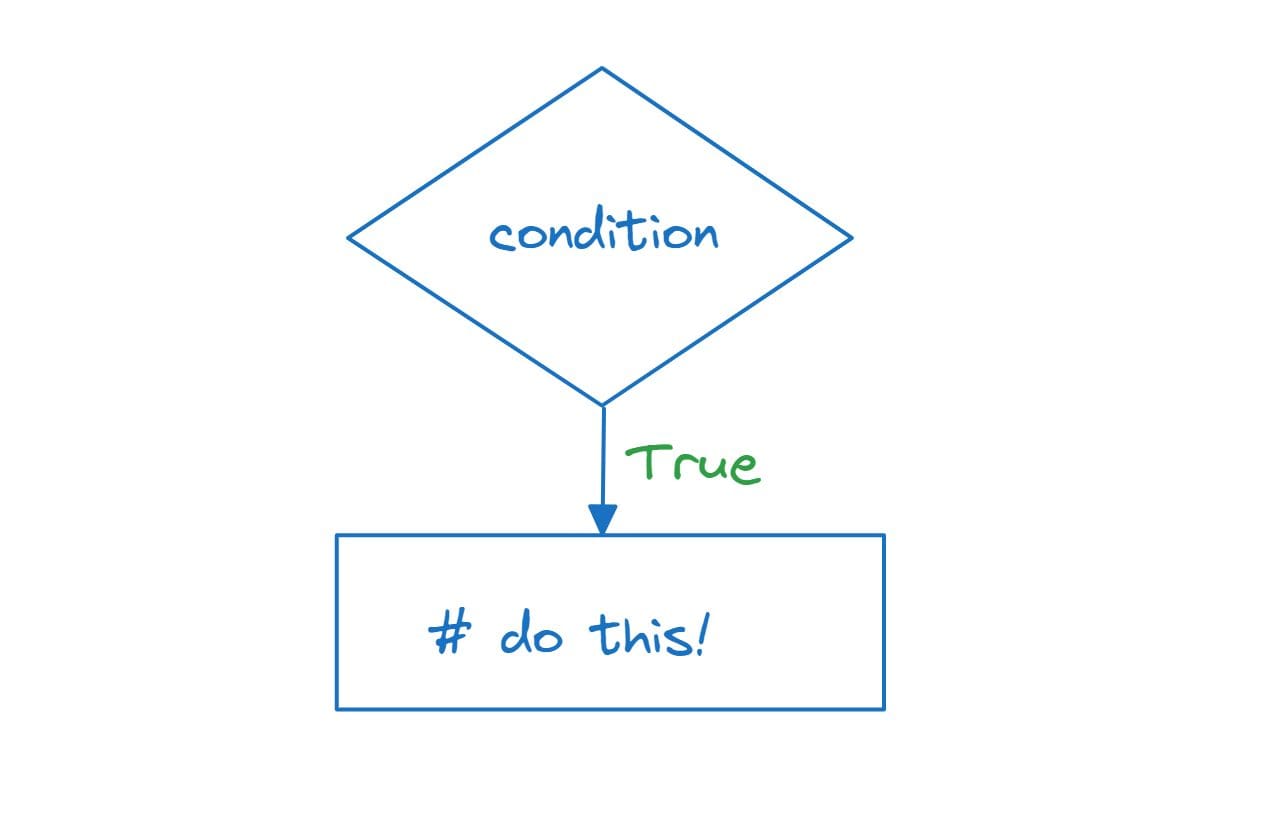
When you need to execute a block of code only if a particular condition is true, you can use the `if` statement. If the condition evaluates to false, the block of code is not executed.
Python Basics: Syntax, Data Types, and Control Structures
Image by Author

Consider this example:

score = 75    if score >= 60:      print("Congratulations! You passed the exam.")

In this example, the code inside the `if` block will be executed only if the `score` is greater than or equal to 60. Since the `score` is 75, the message "Congratulations! You passed the exam." will be printed.

Output >>> Congratulations! You passed the exam.

If-else Conditional Statements

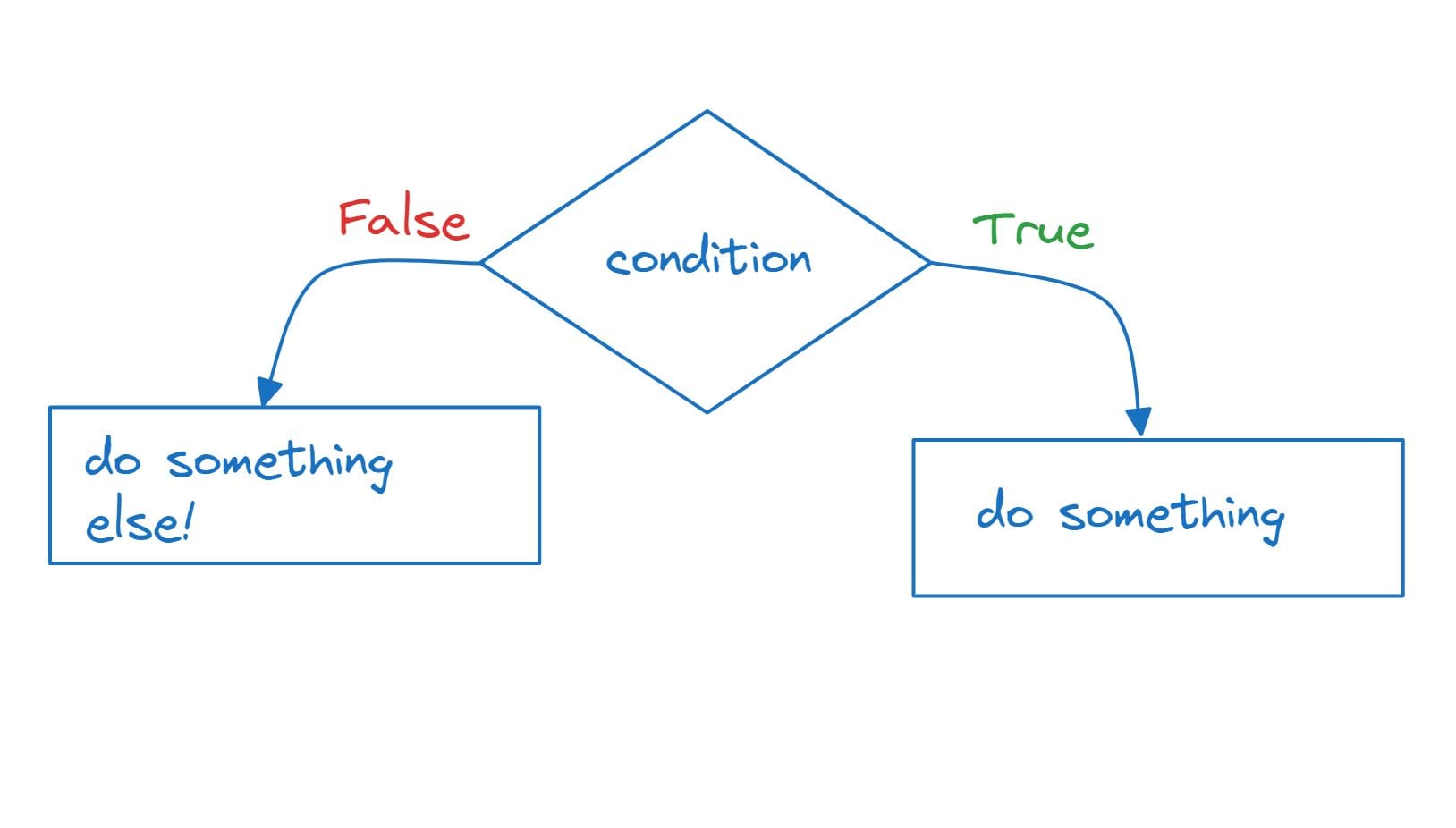
The `if-else` statement allows you to execute one block of code if the condition is true, and a different block if the condition is false.
Python Basics: Syntax, Data Types, and Control Structures
Image by Author

Let’s build on the test scores example:

score = 45    if score >= 60:      print("Congratulations! You passed the exam.")  else:      print("Sorry, you did not pass the exam.")

Here, if the `score` is less than 60, the code inside the `else` block will be executed:

Output >>> Sorry, you did not pass the exam.

If-elif-else Ladder

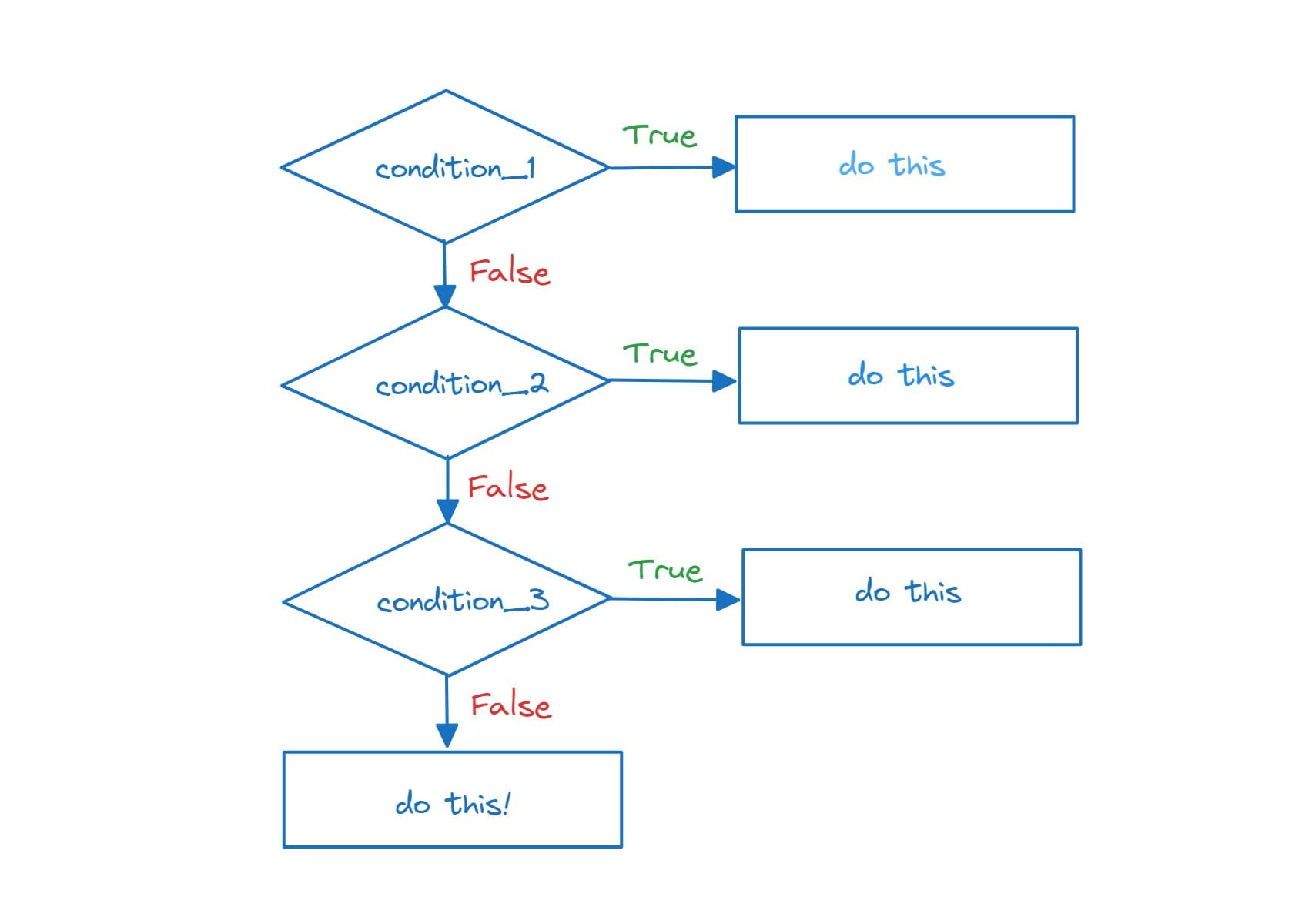
The `if-elif-else` statement is used when you have multiple conditions to check. It allows you to test multiple conditions and execute the corresponding block of code for the first true condition encountered.

If the conditions in the `if` and all `elif` statements evaluate to false, the `else` block is executed.
Python Basics: Syntax, Data Types, and Control Structures
Image by Author

score = 82    if score >= 90:      print("Excellent! You got an A.")  elif score >= 80:      print("Good job! You got a B.")  elif score >= 70:      print("Not bad! You got a C.")  else:      print("You need to improve. You got an F.")

In this example, the program checks the `score` against multiple conditions. The code inside the first true condition's block will be executed. Since the `score` is 82, we get:

Output >>> Good job! You got a B.

Nested If Statements

Nested `if` statements are used when you need to check multiple conditions within another condition.

name = "Alice"  score = 78    if name == "Alice":      if score >= 80:          print("Great job, Alice! You got an A.")      else:          print("Good effort, Alice! Keep it up.")  else:      print("You're doing well, but this message is for Alice.")

In this example, there is a nested `if` statement. First, the program checks if `name` is "Alice". If true, it checks the `score`. Since the `score` is 78, the inner `else` block is executed, printing "Good effort, Alice! Keep it up."

Output >>> Good effort, Alice! Keep it up.

Python offers several loop constructs to iterate over collections or perform repetitive tasks.

For Loop

In Python, the `for` loop provides a concise syntax to let us iterate over existing iterables. We can iterate over `student_names` list like so:

student_names = ["Alice", "Bob", "Charlie", "David"]    for name in student_names:      print("Student:", name)

The above code outputs:

Output >>>    Student: Alice  Student: Bob  Student: Charlie  Student: David

While Loop

If you want to execute a piece of code as long as a condition is true, you can use a `while` loop.

Let’s use the same `student_names` list:

# Using a while loop with an existing iterable    student_names = ["Alice", "Bob", "Charlie", "David"]  index = 0    while index < len(student_names):      print("Student:", student_names[index])      index += 1

In this example, we have a list `student_names` containing the names of students. We use a `while` loop to iterate through the list by keeping track of the `index` variable.

The loop continues as long as the `index` is less than the length of the list. Inside the loop, we print each student's name and increment the `index` to move to the next student. Notice the use of `len()` function to get the length of the list.

This achieves the same result as using a `for` loop to iterate over the list:

Output >>>    Student: Alice  Student: Bob  Student: Charlie  Student: David

Let's use a `while` loop that pops elements from a list until the list is empty:

student_names = ["Alice", "Bob", "Charlie", "David"]    while student_names:      current_student = student_names.pop()      print("Current Student:", current_student)    print("All students have been processed.")

The list method `pop` removes and returns the last element present in the list.

In this example, the `while` loop continues as long as there are elements in the `student_names` list. Inside the loop, the `pop()` method is used to remove and return the last element from the list, and the name of the current student is printed.

The loop continues until all students have been processed, and a final message is printed outside the loop.

Output >>>    Current Student: David  Current Student: Charlie  Current Student: Bob  Current Student: Alice  All students have been processed.

The `for` loop is generally more concise and easier to read for iterating over existing iterables like lists. But the `while` loop can offer more control when the looping condition is more complex.

Loop Control Statements

`break` exits the loop prematurely, and `continue` skips the rest of the current iteration and moves to the next one.

Here’s an example:

student_names = ["Alice", "Bob", "Charlie", "David"]    for name in student_names:      if name == "Charlie":          break      print(name)

The control breaks out of the loop when the `name` is Charlie, giving us the output:

Output >>>  Alice  Bob

Emulating Do-While Loop Behavior

In Python, there is no built-in `do-while` loop like in some other programming languages. However, you can achieve the same behavior using a `while` loop with a `break` statement. Here's how you can emulate a `do-while` loop in Python:

while True:      user_input = input("Enter 'exit' to stop: ")      if user_input == 'exit':          break

In this example, the loop will continue running indefinitely until the user enters 'exit'. The loop runs at least once because the condition is initially set to `True`, and then the user's input is checked inside the loop. If the user enters 'exit', the `break` statement is executed, which exits the loop.

Here’s a sample output:

Output >>>  Enter 'exit' to stop: hi  Enter 'exit' to stop: hello  Enter 'exit' to stop: bye  Enter 'exit' to stop: try harder!  Enter 'exit' to stop: exit

Note that this approach is similar to a `do-while` loop in other languages, where the loop body is guaranteed to execute at least once before the condition is checked.

Wrap-up and Next Steps

I hope you were able to code along to this tutorial without any difficulty. Now that you’ve gained an understanding of the basics of Python, it's time to start coding some super simple projects applying all the concepts that you’ve learned.
Bala Priya C is a developer and technical writer from India. She likes working at the intersection of math, programming, data science, and content creation. Her areas of interest and expertise include DevOps, data science, and natural language processing. She enjoys reading, writing, coding, and coffee! Currently, she's working on learning and sharing her knowledge with the developer community by authoring tutorials, how-to guides, opinion pieces, and more.

More On This Topic

  • Python String Matching Without Complex RegEx Syntax
  • Python Control Flow Cheatsheet
  • An overview of synthetic data types and generation methods
  • Five types of thinking for a high performing data scientist
  • Python Data Structures Compared
  • Super Study Guide: A Free Algorithms and Data Structures eBook

Social Media is Dying

Social Media is Dying

Adam Mosseri, the head of Instagram admitted that, “If you look at how teens spend their time on Instagram, they spend more time in DMs than they do in stories, and they spend more time in stories than they do in feed.” Because not many people are actually posting anything anymore, and rather use the platform to send direct messages and talk in group chats.

Platforms that were built for staying connected with our family and friends are showing little content produced by them. Last year, in an Instagram story, Kylie Jenner, the second biggest celebrity on the platform, shared her concern. “Make Instagram Instagram Again. Stop trying to be TikTok, I just want to see cute photos of my friends. Sincerely, Everyone,” she wrote.

Ironically, some people don’t even want to see photos of Jenner on their feeds. If only social media apps had ad blockers that could block promotional and influencer content, it would have been a truer “social” experience where we see and interact with posts of our family and friends.

This is mostly because instead of a “timeline”, we are bombarded with a “feed”, which is just an algorithm trying to push posts filled with companies trying to promote their products, or content creators filling up the spaces with self-promoting content. Engagement is all that matters. But was engagement ever really the point of getting on social media for the users?

Users are the product

For companies that are building the platforms such as Meta, Google, and Twitter, it is most definitely about earning the bucks. And ads are the best, if not the only, way to do it. But the approach feels like a trap. The users came onto the platform to “connect with people they know,” which was always the tagline for all the platforms, but now what they get is such “suggested” posts and promotions.

Take the case of Instagram, which started out as a simple square shaped photo-sharing platform, and only had likes and comments, not even messages, is now the central platform for any company to push their promotions. It is as if people have started making products that would look good on Instagram.

It is not really the fault of the platforms themselves that they are focusing on money. Surely, if you are building a “social” media platform, the most important thing to focus-on should be the users. But the social media platform faces a big challenge of monetisation as the platforms are free to use and that’s why they feel dependent on ads and investors.

AI Behind the Feed

The algorithm that these platforms are using is no less than an AI marvel. It is a surprise how many times we end up seeing the topic that we have been talking about and seeing Reels that relate our interests. On the other hand, it is as if we are increasingly pushed into our echo chambers. When you get comfortable in your bubble, Instagram shows you a post about something, and if you like it, you’ll see more posts like it all day. Even if you say you’re not interested in it and prefer something else, like Y, you still end up seeing X posts again after a couple of days, and you get stuck in this cycle.

Why wouldn’t it be if that is what the platform wants — more engagement and more scrolling time. Honestly, we wouldn’t want our feed to end some day and there is no content to watch after this. This is something that used to happen with Instagram when it had a chronological timeline with posts from people we follow, it would eventually come to an end, and we wouldn’t have anything new to see, as no one posts 1000 times a day.

This is what Meta wanted with Threads. Endless scrolling with branded content in your face every time. It started straight out as an advertising platform. Thus, it died as a social media platform. Same can end up happening with X if Elon Musk continues to push creators’ content on the platform. This is why a lot of people are also shifting to platforms like Mastodon, as it offers a more closed and private circle of conversations, and no bombardment of unwanted content.

There is still hope though

The more people are shifting towards WhatsApp group chats and other closed platforms instead of posting their day on their feeds of social media, the more enclosed circles are becoming, which comes with formation of less outward interaction, which has downsides, but definitely ups as well. The social media platforms have already tapped into this potential and have started pushing for “subscriber only content” on platforms like X and Instagram.

More than a platform to connect with people, these platforms were becoming a platform to consume content and spike your dopamine levels, and eventually get addicted to scrolling. It is countless how many times we end up closing Instagram Reels because we are bored of them, just to open the app again because we are bored without them. These tech giants did a great job hacking into our minds.

It seems as if the communities and small group talks need to come back. Ditching the algorithmic mess that these platforms create in our heads, it is time to snap out of them. The younger generation is already doing that.

An online community should feel like an online pub. It should have a vibe, some regulars, inside jokes, and a decorum that is somewhat well enforced. They’re cosy places where a sense of belonging encourages participation and good behaviour. “But now every social media website has become like that one pedestrian street with H&M and a McDonalds,” said a user on HackerNews. “A generic commercial space built around spending money. It has no personality, it’s not safe, and no one feels at home there.” Why would you invest yourself in a space like that?

An awesome, but risky, business idea would be to build a social media platform that does not host advertisers on its platform and limits the number of people your posts will reach to just your followers. For money, just a dollar per month would work.

The post Social Media is Dying appeared first on Analytics India Magazine.

Google is Being Responsible Irresponsibly

Last week at the Google Cloud Next 2023, the tech giant unveiled SynthID, a tool for watermarking and identifying AI-generated images, in lieu of their motto of keeping responsible AI at the forefront of all that they do. After generating images using Imagen, users can decide whether to include a watermark or not.

As decided in the last White House hearing, Google pledged to watermark AI-generated content to protect intellectual property rights and prevent any misleading representation of the content’s authenticity. This helps prevent incidents like the viral spread of misleading images, such as Pope’s Midjourney altered image in a stylish jacket or Trump’s fake arrest photo. SynthID is a step towards it.

However, there is a slight hiccup.

Although Google has come up with the “experimental” watermarking technique, the company is not addressing the main issue at hand – copyright.

The tech conglomerate, which is the flagbearer of the “bold and responsible” approach, recently revised its privacy policy stating that it will be extracting public data from web sources to improve its AI offering such as Bard and Cloud. The updated policy regarding “publicly accessible sources” is somewhat hidden behind a link inside the “Your Local Information” section of the blog post.

The Google situation is a bit tricky. It’s as if they want to use copyrighted data for training and then claim it’s copyrighted themselves.

To understand this better, imagine Google as a chef. They take your secret recipe, use it to cook delicious dishes, and then slap their own logo on the plates, claiming it as their own special creation. It’s like a never-ending cycle where they keep borrowing your recipes and pretending they came up with them, ignoring the whole conversation around copyright.

Google is Leading a Double Life

However, these tech giants don’t really care about lawsuits regardless of the issue. Back in July of this year, a class action lawsuit was filed against Google, alleging that the tech giant unlawfully appropriated the IP of “countless Americans” to develop innovations like the AI-driven chatbot Bard and that Google illicitly acquired their information, including personal and work-related data, images, and electronic correspondence, without obtaining user consent over an extended period.

Well, this is not the first time that Google has tried to hold up its “Good Kid” image but failed.

Its tryst with copyright controversies began in 2005 by launching Google Print, later known as Google Books, a project aiming to scan and share nearly every printed book globally. This move sparked opposition from publishers and authors who saw it as intellectual property theft. Google’s response was to shift the burden of enforcement onto copyright holders, adopting a “we’ll do it until someone tells us not to” approach.

Fast forward 18 years later, Google’s updated privacy policy states that they have full control over publicly available data unless the entity explicitly requests to exclude their data from being crawled.

Google’s extensive lobbying efforts to influence policy, including copyright and competition rules, costed them around $20 million to settle legal disputes. Again, in 2020, France demanded that Google should negotiate fair compensation for using copyrighted content, highlighting international regulatory disparities compared to the U.S. And now we have similar problems with AI-generated content.

Other AI Art Generators Don’t Really Care

Google recently launched Visualising AI as well. While not directly involved in image generation, Visualising AI has expanded into the global stock image and video market. However, unlike Google, companies behind AI image generators like Stability AI and Midjourney are taking a different route for copyright, often angering the artists. They don’t really care about responsible AI or copyright, either.

In a Forbes interview dated from last September, Midjourney’s founder, David Holz disclosed that their AI-image generator was trained using artworks and photos without the creators’ consent, sparking anger among artists and photographers. He openly acknowledged that the company used existing artworks and photos without permission, with no option for creators to opt out.

On the other hand, stock photo agency Getty Images initiated a lawsuit against Emaad Mostaque’s Stability AI alleging that the company trained their open source image generator Stability Diffusion on more than 12 million images from Getty’s database with no permission leading to copyright and trademark infringement. Additionally, Getty claimed that the inclusion of its watermark on some AI-generated images tarnished its trademark, further complicating the dispute.

Meanwhile, compared to Stable Diffusion’s over 10 million and Midjourney’s 15 million daily users, Imagen has a very limited user base. However, even though Google’s reach is low in the image generation market compared to other key competitors, considering the immense power it holds over the tech ecosystem, its every step needs to be mindful.

To prevent legal implications, the big techs are now going for partnerships as a new strategy. On one hand, Google is teaming up with Adobe for Firefly and Express integration while DeepMind is collaborating with artists to provide images on platforms like Pexels and Unsplash and maybe this is how Google will continue to be responsible, irresponsibly.

Read more: Google Turns AI ‘Bold & Responsible’

The post Google is Being Responsible Irresponsibly appeared first on Analytics India Magazine.

7 APIs to Access Environmental Data

In response to the growing environmental concerns, technology companies are directing their efforts towards sustainability. Companies release Application Programming Interfaces (APIs) that focus on crucial environmental issues such as air pollution, water pollution, and waste management and make them available for enterprises.

Furthermore, tech companies have invested substantial resources in supporting startups in accessing and utilising environmental data, thus amplifying the impact of their collective commitment. Additionally, the concept of a ‘sustainable cloud’ reflects the industry’s efforts to provide cloud services that reduce environmental footprints and contribute to a greener digital landscape.

APIs automate data movement, reducing errors. Besides, manual work and reusing them save resources and ensure consistent data across apps. Optimised APIs use less data, lowering energy use in processing and storage. This approach is explored further to reduce waste and enhance reuse using API-led integration.

Here is a list of 7 APIs that are used for environmental purposes.

Project Sunroof

Recently, Google shared mapping and computing resources on Project Sunroof’s foundation covering 320 million buildings across 40 countries with advanced AI models. It estimates solar panel output using rooftop angles, shade, weather, and energy costs, eliminating on-site assessments.

In addition, the Air Quality API processes terabytes of data hourly, offering real-time pollution insights from various sources, including traffic data. The expanded Pollen API tracks pollen in 65+ countries, aiding those allergic to it. These APIs aid sectors like healthcare and travel planning, fostering accurate air quality and pollen information.

AirVisual API

The AirVisual API offers real-time and historical air quality data from 10,000+ monitoring stations globally, including AQI, pollutants, weather, and forecasts. The API documentation guides usage, and it supports various programming languages. It provides current/historical AQI, pollutant info, weather, and forecasts. Benefits include global accuracy, easy integration, affordability, and expert support.

However, the free plan limits to 100 calls/day, doesn’t cover all pollutants, and may lack some features compared to other APIs. Overall, AirVisual API is reliable for air quality data.

Carbon Interface API

Carbon Interface is a data-rich API estimating carbon emissions from various activities like travel and food. Backed by scientific data, it offers two main endpoints: ‘Estimates’ for specific activities and ‘Ledger’ for transaction sets. It’s user-friendly, and suitable for integration, with reasonable pricing.

The API’s strengths include accuracy, ease of use, affordability, and expert support. It suits those seeking precise carbon emission estimates. It aids individuals, businesses, and governments in battling climate change by curbing carbon emissions. You can calculate carbon emissions, track trends, compare products, and strategize emission reduction.

Cloverly API

With Cloverly API businesses and developers can integrate sustainability into their applications and services seamlessly. Through a RESTful API, Cloverly facilitates the calculation, purchase, and offsetting of carbon emissions for various activities, such as shipping, travel, and e-commerce transactions.

The API provides real-time carbon offset estimates and allows for the selection of renewable energy sources for offsetting. Cloverly offers a range of endpoints to support these functionalities, including calculating emissions, obtaining offset options, and making offset purchases. The company announced a $2.1 million funding in the seed round to continue building the APIs in 2021.

OpenAQ API

OpenAQ is a free and open-source air quality data platform that aggregates information from over 6,000 monitoring stations globally, accessible through its REST API. It offers data on air quality index (AQI), pollutants like PM2.5, PM10, ozone, nitrogen dioxide, sulphur dioxide, coordinates, date/time, and metadata.

The API aids air quality tracking, pollution source identification, visualisation creation, and mitigation strategies. To access it, register and acquire an API key. The OpenAQ API documentation and examples facilitate usage, including benefits like global data access, easy integration, free usage, and open-source contribution. However, currently it does not cover all locations and pollutants compared to some other air quality APIs.

PVWatts API

The PVWatts API, developed by NREL, estimates energy production of grid-connected PV systems worldwide with simple inputs. It considers location, system size, module type, inverter type, and climate. It’s used for energy estimation, system comparison, design optimization, and performance tracking. It requires an account and API key. The API is accurate, user-friendly, integrates well, and free.

It has been online since 1999, and since then, several versions have been released.

TERI Greenfacts API

The TERI GreenFacts API, spawned by the Tata Group, operates as a not-for-profit, non-governmental organisation. It offers access to environmental data from The Energy and Resources Institute (TERI), covering energy, climate change, water, air, waste, and sustainable development. It assists in tracking trends, identifying challenges, and creating visualisations. To use it, create an account and acquire an API key. The documentation explains usage and provides examples. It can be used to track energy consumption, analyse climate change data, monitor water quality, visualise air pollution, and develop waste reduction strategies.

The API is valuable for informed decisions on environmental matters, available for individuals, businesses, and governments to improve the environment and sustainable development.

The post 7 APIs to Access Environmental Data appeared first on Analytics India Magazine.

Cerebras and Abu Dhabi build world’s most powerful Arabic-language AI model

neural-net-as-calligraphy-2.png

Jais-Chat, named for the highest mountain in the United Arab Emirates, can take an Arabic or English prompt and complete the phrase, just as Chat-GPT does.

In an age when, supposedly, language is all the rage, artificial intelligence programs such as ChatGPT are conspicuously narrow: they mostly deal with English to the exclusion of the world's hundreds of other commonly spoken languages.

In a sign of things to come, AI computer startup Cerebras Systems this week announced it has partnered with Abu Dhabi's Inception, a subsidiary of investment firm G42 of the United Arab Emirates, to create what it calls the world's most powerful open-source large language model for Arabic, a language spoken by approximately 400 million people worldwide.

Also: 4 ways to increase the usability of AI, according to industry experts

Using the program — called Jais-Chat — is just like typing into Chat-GPT's prompt, except that Jais-Chat can take and produce Arabic-language writing as input and output. It can, for example, write a letter in Arabic when prompted in English:

Or it can take an Arabic-language prompt and generate a response in Arabic:

Trained on a special corpus of Arabic texts much larger than what's commonly available, the program eschews the typical approach of building a generalist program that handles hundreds of languages, in many cases poorly, and instead focuses exclusively on English and Arabic translations.

Also: Cerebras just built a gargantuan computer system with 27 million AI 'cores'

When performing tests in Arabic of knowledge and reasoning and bias— tests such as The University of California at Berkeley's MMLU test, a set of multiple-choice questions, and the Allen Institute for AI's HellaSwag, a sentence completion task — Jais-Chat scored a full 10 points higher than leading state-of-the-art language models such as Meta's LlaMA 2. It beat out top open-source programs such as this year's Bloom from Big Science Workshop, and it also beat out specialized language models built exclusively for Arabic.

Jais-Chat scores better on several tests in Arabic compared to models that are much larger such as Meta's LlaMA 2.

"Lots of companies talk about democratizing AI," said Andrew Feldman, co-founder and CEO of Cerebras, in an interview with ZDNET. "Here, we're giving the experience of 400 million Arabic speakers a voice in AI — that is democratizing AI. It is the primary language of 25 nations, so, we thought it was an extraordinary sort of project."

The language disparity in AI has been observed and given considerable attention for some time now. In last year's "No Language Left Behind" (NLLB) effort by Meta Properties, the company's scientists strove to advance the state of the art in handling 200 languages simultaneously, with a special focus on so-called "low-resource" languages, those without a large corpus of online text that can be used to train the models.

As the Meta authors noted, studies of the field "indicate that while only 25.9 percent of internet users speak English, 63.7 percent of all websites are in English."

"The truth is, the biggest data sets rely on scraping the internet, and the internet's mostly in English, and this is a really unfortunate sort of situation," said Feldman.

Attempts to close the language gap in AI have typically involved generalist AI programs, things such as Meta's NLLB. However, the programs fail to show improvement in a number of languages, including not only low-resource languages such as Oromo (native to Ethiopia and Kenya) but even languages with prevalent translation material such as Greek and Icelandic.

Also: Meta unveils 'Seamless' speech-to-speech translator

And so-called multi-modal programs such as the NLLB successor, SeamlessM4T from Meta, unveiled this month, try to do many different tasks with dozens of languages using just one model, including text-to-speech transcription and speech-to-text generation. That can weigh down the whole process with extra goals.

Instead of a generalist or a multi-modal approach, lead author Neha Sengupta of Inception, along with the Cerebras team and scholars at the UAE's Mohamed bin Zayed University of Artificial Intelligence, built a program that only trains the program on Arabic and English together.

And, they constructed a special data set of Arabic language texts. They compiled 55 billion tokens' worth of data from myriad sources such as Abu El-Khair, a collection of over 5 million articles, spanning 14 years, from major news sources; the Arabic-language version of Wikipedia; and United Nations transcripts, among others.

Then, in an approach that is likely to become exemplary for languages with fewer resources, the authors managed to increase Arabic-language training data from the 55 billion original tokens to 72 billion by performing machine translation of English texts into Arabic. As they describe it, "We further augment the Arabic data by translating 3 billion tokens from English Wikipedia and 15 billion tokens from the Books3 corpus."

The authors then up-sampled the Arabic language text by 1.6 times, further augmenting the Arabic-language data to a total of 116 billion tokens.

Also: Meta's massive multilingual translation opus still stumbles on Greek, Armenian, Oromo

The authors took another novel approach: They combined the Arabic and English texts with billions of tokens from computer code snippets, in various languages, gathered from GitHub. The final data set is 29% Arabic, 59% English, and 12% code.

Sengupta and team went beyond simply using a special data set. They also employed several special techniques to represent the vocabulary of Arabic.

The researchers built their own "tokenizer," the algorithm for cutting up text into individual units. The typical tokenizer used by programs such as GPT-3 "is primarily trained on English corpora," they write, so that common Arabic words "are over-segmented into individual characters [which] lowers the performance of the model and increases the computational cost."

They also employed a state-of-the-art "embedding" algorithm, ALiBi, developed last year by the Allen Institute and Meta. This algorithm is much better at handling very long context — that is, inputs to a language model typed at the prompt or recalled from memory.

Also: ElevenLab's AI voice-generating technology is expanding to 30 languages

"What we were looking to do was to capture the linguistic nuances in Arabic and the cultural references," said Feldman, who has spent extensive time traveling in the Middle East. "And that's not easy when most of the model is in English."

Enhanced with these and other modifications, the result is a language model called Jais, and its companion chat app, Jais-Chat, measuring 13 billion in "parameters," the neural weights that form the critical active elements of the neural net. Jais is based on the GPT-3 architecture designed by OpenAI, a so-called decoder-only version of Google's Transformer from 2017.

Jais is named for Jebel Jais, a mountain, according to Wikipedia, "considered the highest point in the United Arab Emirates, at 1,892 m (6,207 ft) above sea level." (Arabic-language article).

The Jais program code is being released under the Apache 2.0 source code license and is available for download on Hugging Face. A demo of Jais can be used by joining a waitlist. The authors plan to make the dataset public "in the near future," according to Feldman.

The programs were run on what Cerebras calls "the world's largest supercomputer for AI," named Condor Galaxy 1, which was built for G42 and was unveiled last month.

Also: Generative AI should be more inclusive as it evolves, according to OpenAI's CEO

The machine is composed of 32 of Cerebras's special-purpose AI computers, the CS-2, whose chips, the "Wafer-Scale-Engine," collectively hold a total of 27 million compute cores, 41 terabytes of memory, and 194 trillion bits per second of bandwidth. They are overseen by 36,352 of AMD's EPYC x86 server processors.

The researchers used a slice of that capacity, 16 machines, to train and "fine-tune" Jais.

The program punches above its weight at 13 billion parameters. That is a relatively small neural network, compared to things such as the 175-billion-parameter GPT-3, and larger programs with more parameters are generally viewed as more powerful.

"Its pre-trained and fine-tuned capabilities outperform all known open-source Arabic models," write Sengupta and team, "and are comparable to state-of-the-art open-source English models that were trained on larger datasets."

Also: The best AI chatbots of 2023: ChatGPT and alternatives

As the authors note, the original Arabic data set of 72 billion tokens wouldn't ordinarily be enough for a model larger than 4 billion parameters, according to the AI rule of thumb known as The Chinchilla Law, formulated by researchers at Google's DeepMind.

In fact, not only does Jais-Chat in its 13 billion-parameter form top LlAMA 2 and others, in a smaller version of their program with just 6.7 billion parameters, they are also able to achieve higher scores on the same standardized tests such as MMLU and HellaSwag.

Jais-Chat scores better on several tests in Arabic compared to models that are much larger such as Meta's LlaMA 2.

"What was interesting was that the Arabic made the English better, too," said Feldman, referring to Jais's performance on the evaluations. "We ended up with a model that's as good as LlaMA in English, even though we trained it on about a tenth of the data."

The work not only sets new benchmark scores in Arabic but also speeds up dramatically the time taken to train such a model compared to what would be required with standard GPU chips of the kind Nvidia, the dominant AI vendor, sells.

It is estimated that to distribute the work and train Jais it would take a 512-node GPU cluster between 60 and 100 days, said Cerebras, versus just 21 days on the Condor Galaxy 1.

Also: China wants to use supercomputing to accelerate digital transformation

"It would have taken 20 days just to configure a GPU cluster before you ran the model," quipped Feldman. "And that's an extraordinarily expensive cluster."

The Jais programs are the latest in a string of contributions by Cerebras to the open-source software effort in the wake of OpenAI and Google scaling back their disclosure. Another program trained on Condor Galaxy 1, called BTLM-3B-8K, is the number one model for a 3-billion-parameter configuration on Hugging Face at the moment, with over a million downloads, noted Feldman.

"We built a supercomputer, we've got people using it, we're moving the open-source community forward," said Feldman, "that's all goodness."

Artificial Intelligence

UK’s NCSC Warns Against Cybersecurity Attacks on AI

Cybersecurity EDR tools comparison.
Image: Michael Traitov/Adobe Stock

Large language models used in artificial intelligence, such as ChatGPT or Google Bard, are prone to different cybersecurity attacks, in particular prompt injection and data poisoning. The U.K.’s National Cyber Security Centre published information and advice on how businesses can protect against these two threats to AI models when developing or implementing machine-learning models.

Jump to:

  • What are prompt injection attacks?
  • What are data poisoning attacks?
  • Risk mitigation for these cybersecurity attacks

What are prompt injection attacks?

AIs are trained not to provide offensive or harmful content, unethical answers or confidential information; prompt injection attacks create an output that generates those unintended behaviors.

Prompt injection attacks work the same way as SQL injection attacks, which enable an attacker to manipulate text input to execute unintended queries on a database.

Several examples of prompt injection attacks have been published on the internet. A less dangerous prompt injection attack consists of having the AI provide unethical content such as using bad or rude words, but it can also be used to bypass filters and create harmful content such as malware code.

But prompt injection attacks may also target the inner working of the AI and trigger vulnerabilities in its infrastructure itself. One example of such an attack has been reported by Rich Harang, principal security architect at NVIDIA. Harang discovered that plug-ins included in the LangChain library used by many AIs were prone to prompt injection attacks that could execute code inside the system. As a proof of concept, he produced a prompt that made the system reveal the content of its /etc/shadow file, which is critical to Linux systems and might allow an attacker to know all user names of the system and possibly access more parts of it. Harang also showed how to introduce SQL queries via the prompt. The vulnerabilities have been fixed.

Another example is a vulnerability that targeted MathGPT, which works by converting the user’s natural language into Python code that is executed. A malicious user has produced code to gain access to the application host system’s environment variables and the application’s GPT-3 API key and execute a denial of service attack.

NCSC concluded about prompt injection: “As LLMs are increasingly used to pass data to third-party applications and services, the risks from malicious prompt injection will grow. At present, there are no failsafe security measures that will remove this risk. Consider your system architecture carefully and take care before introducing an LLM into a high-risk system.”

What are data poisoning attacks?

Data poisoning attacks consist of altering data from any source that is used as a feed for machine learning. These attacks exist because large machine-learning models need so much data to be trained that the usual current process to feed them consists of scraping a huge part of the internet, which most certainly will contain offensive, inaccurate or controversial content.

Researchers from Google, NVIDIA, Robust Intelligence and ETH Zurich published research showing two data poisoning attacks. The first one, split view data poisoning, takes advantage of the fact that data changes constantly on the internet. There is no guarantee that a website’s content collected six months ago is still the same. The researchers state that domain name expiration is exceptionally common in large datasets and that “the adversary does not need to know the exact time at which clients will download the resource in the future: by owning the domain, the adversary guarantees that any future download will collect poisoned data.”

The second attack revealed by the researchers is called front-running attack. The researchers take the example of Wikipedia, which can be easily edited with malicious content that will stay online for a few minutes on average. Yet in some cases, an adversary may know exactly when such a website will be accessed for inclusion in a dataset.

Risk mitigation for these cybersecurity attacks

If your company decides to implement an AI model, the whole system should be designed with security in mind.

Input validation and sanitization should always be implemented, and rules should be created to prevent the ML model from taking damaging actions, even when prompted to do so.

Systems that download pretrained models for their machine-learning workflow might be at risk. The U.K.’s NCSC highlighted the use of the Python Pickle library, which is used to save and load model architectures. As stated by the organization, that library was designed for efficiency and ease of use, but is inherently insecure, as deserializing files allows the running of arbitrary code. To mitigate this risk, NCSC advised using a different serialization format such as safetensors and using a Python Pickle malware scanner.

Most importantly, applying standard supply chain security practices is mandatory. Only known valid hashes and signatures should be trusted, and no content should come from untrusted sources. Many machine-learning workflows download packages from public repositories, yet attackers might publish packages with malicious content that could be triggered. Some datasets — such as CC3M, CC12M and LAION-2B-en, to name a few — now provide a SHA-256 hash of their images’ content.

Software should be upgraded and patched to avoid being compromised by common vulnerabilities.

Disclosure: I work for Trend Micro, but the views expressed in this article are mine.

Person using a laptop computer.

Subscribe to the Daily Tech Insider Newsletter

Stay up to date on the latest in technology with Daily Tech Insider. We bring you news on industry-leading companies, products, and people, as well as highlighted articles, downloads, and top resources. You’ll receive primers on hot tech topics that will help you stay ahead of the game.

Delivered Weekdays Sign up today

These new midrange Roborock vacuums might make you rethink more expensive robovacs

Roborock Q8 Max

Roborock is adding two new midrange robot vacuum mops to its lineup: the Roborock Q5 Pro and Q8 Max, with prices ranging from $429 to $819. Both models feature strong 5,500Pa suction with a dual roller sweeping system and mop for a lower price than competitors like iRobot, Eufy, and DreameTech.

These are the first Roborock robot vacuums outside the company's S line to feature the DuoRoller system, combining two bristle-free rubber brushes that spin in opposite directions to pick up debris more effectively. The Q5 Pro and Q8 Max robot vacuums join five other Roborock releases this year, releasing seven new robot vacuums by the end of 2023.

Also: The best robot mops: Keep your floors clean without the work

The Q5 Pro and Q8 Max boast AI-based no-go zone detection, which ensures the robot vacuum automatically detects and avoids steps, ledges, and tight spaces — even suggesting areas in the app for you to set up as no-go zones. A combination of lidar sensors to determine the most efficient cleaning route across the area makes for quick mapping of entire floors or rooms.

Though the Q5 Pro doesn't have obstacle avoidance to go around your charging cables or your dog's mess, the Roborock Q8 Max boasts Reactive Tech. This feature enables it to react to obstacles in real time and troubleshoot to work out a route around them.

The robot vacuums can be set up to clean in a specific direction along the floor, parallel lines on wooden floors, or along the seams on tiles for a deeper clean.

Customers can purchase the 'plus' (+) version of each model, which includes a self-emptying feature for the robot vacuum's dustbin. This would enable the robot vacuum to automatically empty its dustbin into a 2.5L bag at the charging station, which Roborock says only needs emptying every seven weeks.

Also: The Narwal Freo converted me to robot vacuums, and I'm not turning back

The Q8 Max has a 470mL dustbin and 350mL water tank and will be priced at $599, with the Q8 Max+ with a self-emptying dustbin dock priced at $819.

The Q5 Pro has a 770mL dustbin and 180mL water tank and starts at $429 for the standard version or $699 for the Q5 Pro+ version with a self-emptying dustbin.

Roborock also announced a new upright multifaceted 5-in-1 wet and dry vacuum, the Dyad Pro Combo. It's a handheld, stick, multisurface, and wet and dry vacuum all in one, with multiple attachments and cleaning heads. The Dyad Pro Combo, available for $550, can automatically adjust cleaning power and water flow depending on how dirty the floor is, features 17,000Pa of suction power, and performs self-cleaning and self-drying when docked.

Both robot vacuum mops and the Dyad Pro Combo will launch in October.

Artificial Intelligence

Google’s new tool can detect AI-generated images, but it’s not that simple

Google DeepMind's tool to detect AI-generated images

The tool can detect AI-generated images even after editing, changing colors, or adding filters.

Images generated by artificial intelligence tools are becoming harder to distinguish from those humans have created. AI-generated images can proliferate misinformation in massive proportions, leading to the irresponsible use of AI. To that purpose, Google unveiled a new SynthID tool that can differentiate AI-generated images from human-created ones.

The tool, created by the DeepMind team, adds an imperceptible digital watermark to AI-generated images — like a signature. The same tool can later detect this watermark to point out which images were created by AI, even after modifications, like adding filters, compressing, changing colors, and more.

Also: How Google, UCLA are prompting AI to choose the next action for a better answer

SynthID combines two deep learning models into one tool. One visually adds the watermark to the original content in an imperceptible manner to the naked eye and another identifies the watermarked images.

Currently, SynthID cannot detect all AI-generated images, as it is limited to those created with Google's text-to-image tool, Imagen. But this is a sign of a promising future for responsible AI, especially if other companies adopt SynthID into their generative AI tools.

Also: Google's AI-powered search summary now points you to its online sources

The tool will gradually roll out to Vertex AI customers using Imagen and is only available on this platform. However, Google DeepMind hopes to make it available in other Google products and to third parties soon.

Artificial Intelligence

4 ways teachers can use ChatGPT in their classrooms, according to OpenAI

Books illustration with a chair

This year's back-to-school season brings a new challenge — managing the impact of ChatGPT and other AI tools. To help ease the transition for both teachers and students, OpenAI shared ways that teachers can leverage the technology to optimize their workflow and learning.

OpenAI's blog post identifies four ways real teachers are using ChatGPT, including role-playing conversations, building classroom materials, providing English language assistance for non-English speakers, and teaching students about critical thinking.

Also: Grammarly's new AI tools for students roll out for back-to-school season

Through the role-playing conversations use case, teachers can use ChatGPT as a stand-in for different personas that can help them prepare for questions or reactions that others may have about the lessons.

For example, a teacher can ask ChatGPT to spot weaknesses in the lesson delivery or areas that need more reinforcement by role-playing a student or a school superintendent. This can help them prepare for when students have the same questions and prevent gaps of understanding in the classroom.

Teachers can also leverage ChatGPT's advanced writing and conversational skills to build quizzes, tests, and lesson plans from curriculum materials.

Also: How to use Claude AI (and how it's different from ChatGPT)

For example, in the blog post, Fran Bellas, a professor at Universidade da Coruña in Spain, shared his curriculum with ChatGPT and asked it to generate fresh quizzes, lesson plans, and test questions.

One of the lesser-known features of ChatGPT is its ability to translate over 20 languages well. Teachers can use this ability to help assist students who are non-English speakers by encouraging them to use the AI tool for translating, proofreading, and even practicing conversation by role-playing with the chatbot.

Lastly, OpenAI suggests that teachers can use ChatGPT to teach students about critical thinking. The company encourages teachers to help students deduce which AI answers are credible and how to confirm them with other sources.

The blog post also includes four carefully crafted, lengthy prompts that educators can simply copy and paste into ChatGPT to develop lesson plans, create effective explanations, examples, and analogies, help students learn by teaching, and even create an AI tutor.

Also: Microsoft filed a patent for an AI backpack straight out of a sci-fi movie

In all four of the prompts, first, the user would have to tell ChatGPT who it is and what it does, for example, "an upbeat, encouraging tutor" or "a friendly and helpful instructional designer." Then, the prompts specifically list and delineate each one of the tasks that are expected from ChatGPT.

Even if you don't want to use those exact prompts, you can use the sample prompts as inspiration for your future prompts and as guidelines for what you need to include to have the best results.

Artificial Intelligence