China and Middle East to Checkmate US in AI

Huawei Technologies recently opened a cloud data centre in the Saudi’s capital Riyadh in a bid to grow its online service offerings in the Middle East and North Africa.

The Riyadh-based cloud data center, Huawei’s 30th globally, is set to bolster government services in Saudi Arabia. Furthermore, it will serve as a platform for the development of AI applications and language models in Arabic.

This development provides a significant boost to Saudi Arabia’s Vision 2030 initiative, which was initiated seven years ago. Furthermore, in 2020, Saudi Arabia had unveiled ambitious plans to invest $20 billion in artificial intelligence, as part of its efforts to diversify its economy in alignment with the goals of Vision 2030.

Saudi Arabia is bullish on developing and investing in AI initiatives however lacks hardware infrastructure for which it is majorly dependent on the US. Currently, NVIDIA is the only sole provider of GPUs that can be used to train LLMs. Even China’s Baidu is dependent on NVIDIA for its GPU supply.

According to a recent Financial Times report, China’s leading internet giants Baidu, ByteDance, Tencent, and Alibaba, have made substantial orders totaling $1 billion for the acquisition of roughly 100,000 A800 processors from a U.S. chip manufacturer, with delivery scheduled for later this year.

However, things are changing as China’s Huawei has cracked the code to manufacture its own GPU which outperforms NVIDIA’s A100. Huawei will not just stop at catering to its domestic players like Baidu and Tencent and the company might set its sights on the Middle East as well.

Middle East and China Together can hurt US

All of this is happening amidst the geopolitical tensions among the three countries. Huawei’s decision to open a cloud data center in Saudi Arabia gives the Chinese tech giant an edge as Saudi Arabia currently is an unexplored market when it comes to generative AI.

The US is trying its best to suppress the developments happening in both China and the Middle East by not letting its domestic chipmakers sell AI chips and GPUs across the borders. Notably, Huawei was also placed on a trade blacklist in May 2019 over national security concerns. Meanwhile, the US’s chair of the House of Representatives’committee is contemplating restricting all technology exports to Huawei after it recently launched a phone called the Mate 60 Pro which contains a chip which China locally developed.

There is no denying the fact that China is a huge market for NVIDIA and other chip makers as it imports about 53.7% of the world’s supply of chips worth around $240 billion. In its attempt to race ahead in the LLM race by depriving China of GPUs, the US hurt itself more.

Notably, the US chipmakers were smart enough and they outwitted the US government and supplied H800 and A800 which were nothing but modified versions of H100 and A100 respectively.

In May, NVIDIA CEO Jensen Huang warned that China will cultivate its own chip companies in response to tensions with the U.S. and that existing chip players will have to work hard to stay competitive. It appears that his prediction has come true.

Now that Huawei has GPUs under its arsenal, it has got a solid customer in Saudi Arabia who has got enough capital to avail the services of the Chinese giant. According to a report Saudi Arabia makes $1 billion from oil exports everyday. What else does China need? If it is able to crack the GPU code, it has got a perfect customer in Saudi Arabia who has enough capital in return.

Earlier this year Saudi Arabia secured no less than 3000 H100 GPUs from NVIDIA. These processors are valued at $40,000 each. A little number-crunching and it becomes apparent that Saudi invested a staggering $120 million to secure this impressive array of GPUs.

Saudi Arabia is not alone among the Middle East nations who are aiming high in the field of AI. Recently UAE’s TII launched Falcon 180B which is supposedly fueled by money that the country earns from oil exports.

This definitely suggests that the United States should step up its game and look at the Middle East as a growing market and not as a threat. Otherwise, China might take the lead.

The post China and Middle East to Checkmate US in AI appeared first on Analytics India Magazine.

NVIDIA Boosts LLM Inference Performance With New TensorRT-LLM Software Library

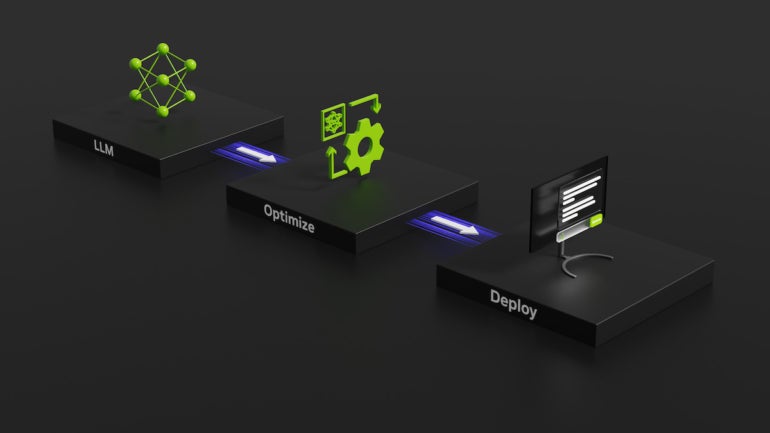
An illustration of LLM inferencing.
An illustration of LLM inferencing. Image credit: NVIDIA

As companies like d-Matrix squeeze into the lucrative artificial intelligence market with coveted inferencing infrastructure, AI leader NVIDIA today announced TensorRT-LLM software, a library of LLM inference tech designed to speed up AI inference processing.

Jump to:

  • What is TensorRT-LLM?
  • How TensorRT-LLM improves performance on NVIDIA GPUs
  • NVIDIA’s plan to reduce total cost of AI ownership

What is TensorRT-LLM?

TensorRT-LLM is an open-source library that runs on NVIDIA Tensor Core GPUs. It is designed to give developers a space to experiment with building new large language models, the bedrock of generative AI like ChatGPT.

In particular, TensorRT-LLM covers inference — a refinement of an AI’s training or the way the system learns how to connect concepts and make predictions — and defining, optimizing and executing LLMs. TensorRT-LLM aims to speed up how fast inference can be performed on NVIDIA GPUS, NVIDIA said.

TensorRT-LLM will be used to build versions of today’s heavyweight LLMs like Meta Llama 2, OpenAI GPT-2 and GPT-3, Falcon, Mosaic MPT, BLOOM and others.

To do this, TensorRT-LLM includes the TensorRT deep learning compiler, optimized kernels, pre- and post-processing, multi-GPU and multi-node communication and an open-source Python application programming interface.

NVIDIA notes that part of the appeal is that developers don’t need deep knowledge of C++ or NVIDIA CUDA to work with TensorRT-LLM.

SEE: Microsoft offers free coursework for people who want to learn how to apply generative AI to their business. (TechRepublic)

“TensorRT-LLM is easy to use; feature-packed with streaming of tokens, in-flight batching, paged-attention, quantization and more; and is efficient,” Naveen Rao, vice president of engineering at Databricks, told NVIDIA in the press release. “It delivers state-of-the-art performance for LLM serving using NVIDIA GPUs and allows us to pass on the cost savings to our customers.”

Databricks was among the companies given an early look at TensorRT-LLM.

Early access to TensorRT-LLM is available now for people who have signed up for the NVIDIA Developer Program. NVIDIA says it will be available for wider release “in the coming weeks,” according to the initial press release.

How TensorRT-LLM improves performance on NVIDIA GPUs

LLMs performing article summarization do so faster on TensorRT-LLM and a NVIDIA H100 GPU compared to the same task on a previous-generation NVIDIA A100 chip without the LLM library, NVIDIA said. With just the H100, the performance of GPT-J 6B LLM inferencing saw a 4 times jump in improvement. The TensorRT-LLM software brought an 8 times improvement.

In particular, the inference can be done quickly because TensorRT-LLM uses a technique that splits different weight matrices across devices. (Weighting teaches an AI model which digital neurons should be associated with each other.) Known as tensor parallelism, the technique means inference can be performed in parallel across multiple GPUs and across multiple servers at the same time.

In-flight batching improves the efficiency of the inference, NVIDIA said. Put simply, completed batches of generated text can be produced one at a time instead of all at once. In-flight batching and other optimizations are designed to improve GPU usage and cut down on the total cost of ownership.

NVIDIA’s plan to reduce total cost of AI ownership

LLM use is expensive. In fact, LLMs change the way data centers and AI training fit into a company’s balance sheet, NVIDIA suggested. The idea behind TensorRT-LLM is that companies will be able to build complex generative AI without the total cost of ownership skyrocketing.

Subscribe to the Innovation Insider Newsletter

Catch up on the latest tech innovations that are changing the world, including IoT, 5G, the latest about phones, security, smart cities, AI, robotics, and more.

Delivered Tuesdays and Fridays Sign up today

eBay’s new ‘magical’ AI tool writes product descriptions for you from a single photo

eBay new AI features

Second-hand websites are a great way to get rid of the things you don't want while still making some money. However, listing an item can be a lot of work, and eBay's new AI tool can help.

On Thursday, eBay announced its new image-based magical listing tool that uses AI to generate a product description for a listing from a single product photo.

Also: Is Temu legit? What to know before you place an order

All the user has to do is snap a picture and have AI fill in item information details, including titles, descriptions, product release dates, and sub-categories. It will even suggest a price and shipping cost for the item.

The magical image-based listing tool will be available in the eBay app for iOS users only. However, in the blog post, the company shared that it is excited to release the feature to the wider public soon.

The first version of this magical listing tool took a user-entered title and converted that into a product description.

That version had positive feedback, according to the blog post, with 30% of US sellers on the app trying the feature at least once on any given day, and over 95% of the users who tried it opted to use the AI-generated descriptions.

Also: How to use ChatGPT to make charts and tables

The purpose of these generative AI assistants is to remove some of the barriers to entry that prevent people from listing items in the first place, such as not even knowing where to start.

"This addresses what we call the "cold start" issue, in which first-time sellers can feel overwhelmed with the amount of information required to create a competitive listing," said eBay in the blog post. "There's no need to work through a cold start with AI: as soon as you're ready to sell, your listing is ready to post."

As someone who has been listing products on second-hand websites recently to make room in my closet for the season change, I was intrigued by the feature and decided to test it out because product listings are something I find tedious and time-consuming.

Also: Temu vs. Amazon: Which shopping site is best for your buying needs?

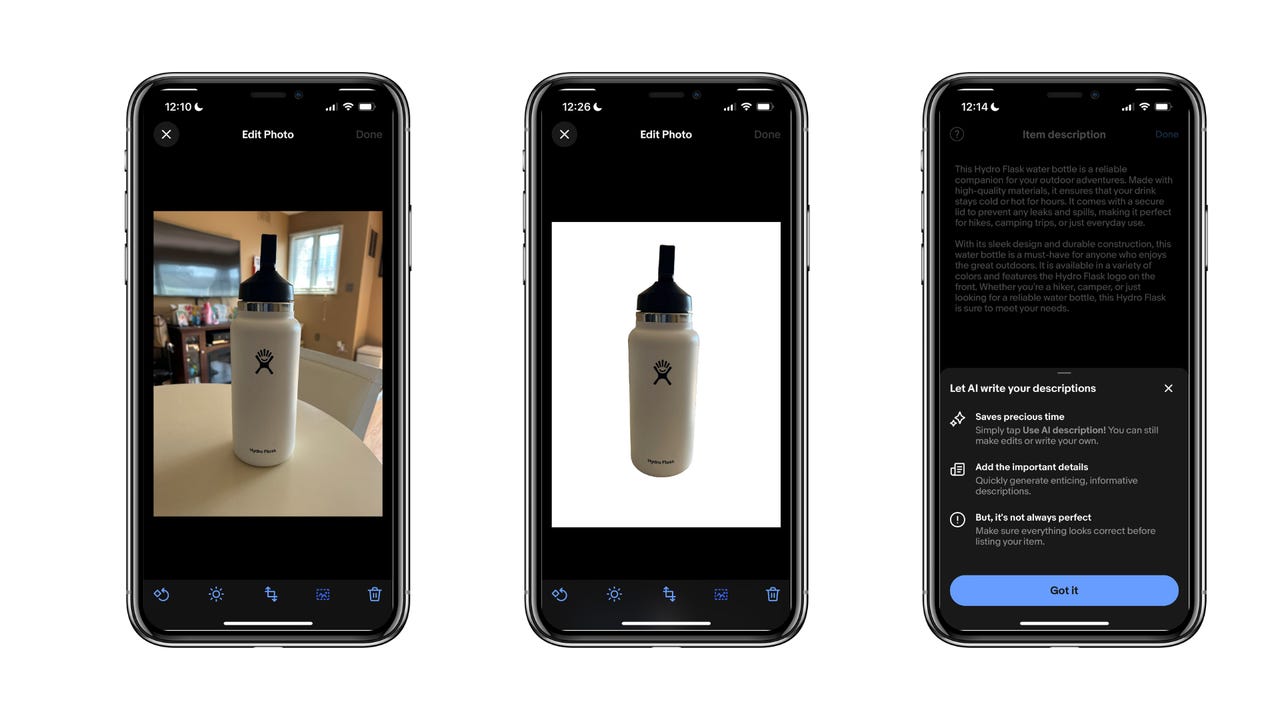
I had to download the app, create an account, and start a listing. For the product photo listing, I took a picture of my Hydroflask since I always keep it next to me when working. Then, for the description, I clicked on the AI-automated option, and I was impressed with the results.

This Hydro Flask water bottle is a reliable companion for your outdoor adventures. Made with high-quality materials, it ensures that your drink stays cold or hot for hours. It comes with a secure lid to prevent any leaks and spills, making it perfect for hikes, camping trips, or just everyday use.

With its sleek design and durable construction, this water bottle is a must-have for anyone who enjoys the great outdoors. It is available in a variety of colors and features the Hydro Flask logo on the front. Whether you're a hiker, camper, or just looking for a reliable water bottle, this Hydro Flask is sure to meet your needs.

As seen by the text above, the tool generated two paragraphs of sensical text that described the uses of a Hydroflask, had proper grammar, and almost looked like a company description you would on the site. If I were actually listing the Hydroflask, I would have felt comfortable using it.

Also: Here's why everything on Temu is so cheap

In the blog post, eBay also announced the addition of a more seamless background-removing tool. With one click, the tool removed my busy living room background and replaced it with a clean white backdrop, as seen by the hero image.

Overall, these tools make the listing experience easier for sellers. It is especially impressive to see an e-commerce company that has been around as long as eBay readjust its platform to reflect the latest technology.

Artificial Intelligence

American students are saving ChatGPT from traffic freefall

Person using ChatGPT on a phone

ChatGPT was the first AI chatbot to become really popular, but many rivals have entered the scene, creating generative AI models just as capable. Over the past few months, ChatGPT's traffic has been hurting, but back-to-school season might be its saving grace.

The analytics firm SimiliarWeb tracked ChatGPT's performance, which has been dropping in traffic for three consecutive months. In the US, ChatGPT's traffic dropped 10% in May, 15% in June, and 4% in July, according to the data.

Also: My 5 favorite AI tools for school

August stopped the downward decline, leveling the growth chart with a 0.4% increase in the US, as seen in the photo below.

This shift in the trend could be attributed to students in the US going back to school during that time.

"One theory about why ChatGPT's web traffic dropped over the summer is that school was out, which would help explain why the traffic trend stabilized in August as schoolchildren in the US were back in class in greater numbers toward the end of the month," said Similiarweb in the blog post.

Also: Meet generative AI's 'super users': 70% of Gen Z use GenAI

To further support that conclusion, the months of May, June, and July saw a 3% decrease in users between the 18-24 bracket, which had been pushing 30% in April. That drop in use from that demographic is likely because most US universities recess for the summer in early May.

The same slight growth was seen amongst the 18-24 ChatGPT user bracket in August, leveling out the decline from the previous months.

Students use ChatGPT for school because AI chatbots can help eliminate pointless tasks and answer questions on the material learned in class.

Also: How to use ChatGPT

For example, ChatGPT can help with writing essays, researching information for papers, solving math equations, debugging code, creating Excel formulas, conversationally explaining any topic, and much more.

Artificial Intelligence

When scaring us is great for business

When scaring us is great for business Haje Jan Kamps 9 hours

Welcome to Startups Weekly. Sign up here to get it in your inbox every Friday.

All right, all right, all right. Over the past few days, I’ve been listening to Matthew McConaughey’s memoir Greenlights, as read by the author. I honestly don’t know what compelled me to listen to it or how it ended up on my Audible app. I don’t even really like audio books. I knew the man had depth, but I swear I’m still reeling. Of course he has led a wild, crazy, outlaw life. Of course he has a bunch of great stories. But I’d never expect him to throw me for a considerable spin. It has little to do with startups and everything to do with finding yourself in the world — which means it has everything to do with startups. In any case: highly recommended.

It was, indirectly, the inspiration for my column this week, where I was reflecting on how app activation metrics are at odds with our mental health in many ways. That is particularly true for apps like Nextdoor, Citizen and the Ring doorbell app, which pipes fresh hot terror to your pocket 24/7. And, like the gullible, amygdala-powered animals we are, we respond. Maybe it’s time to opt out.

The TechCrunch team is getting pretty psyched about TechCrunch Disrupt in San Francisco in a couple of weeks. I’ll be onstage, among other things, interviewing Rajeev Rajan, the new(ish) CTO of Atlassian, and begrudgingly accepting sartorial advice from random strangers — that could be you!

On those cheerful notes . . . onward to what’s happening in startup land this week!

The highest lows and the lowest highs

Red ball on curved light blue paper, blue background

Image Credits: PM Images / Getty Images

Ho’boy, startup life sure ain’t for the fainthearted, and there’s a lot of highs and lows happening all around us at the moment.

Medobed, an startup that promises medicine delivery in 10 minutes, was initially selected in Y Combinator’s S23 batch. The accelerator changed its tune, severing its ties with the Indian firm. A partner at the venture firm has also suggested to many prospective investors to not engage with the startup.

Apropos changing its mind — Chamet is a popular but controversial live video chat app. Google decided to yank the app from the Play Store. Big Goog didn’t give a specific reason but waved in the general direction of its “questionable user-generated content” policy.

Someone get a crash cart: Ingrid reported on Babylon Health succumbing to insolvency — after it was valued at almost $2 billion not that long ago. Today, it’s worth about $5,000 on paper. Yowzers.

Self-protesting protestors: People love a good scandal, and protestors rallied at Cruise HQ in San Francisco this week. But it appears that the particular incident they were protesting may have been overblown. It was alleged that an ambulance was blocked by a Cruise self-driving vehicle, but TechCrunch saw video footage of an incident where an ambulance was unimpeded in this case.

Sell, sell, sell: Benitago raised $380 million or so to buy up a bunch of e-commerce brands that do business on Amazon. This week, it filed for bankruptcy as the market contracted.

The ghost in the shell

ai assisted translation

Image Credits: Bryce Durbin / TechCrunch

The deal pace might be slowing a little (maybe?) but AI continues to be sizzling.

One interesting trend in the market is that we continue to see incumbents adding new features and functionality. A lot of our readers were curious about Kyle’s report that Zoom is rebranding and expanding its generative AI features, amid some privacy concerns along the way.

OpenAI wants its conversational AI agent ChatGPT everywhere, and that includes classrooms — despite the immense potential for misuse and confusion there. Taking the bull by the horns, the company has proposed a few ways for teachers to put the system to use. In addition to students rampantly cheating on their work with AI, that is.

Drop in, tune out, make shit up: My favorite AI piece this week came from Kyle. It’s well documented that AI models can “hallucinate” plausible-sounding information that’s extrapolated incorrectly from existing data. That may not be solvable with current-gen systems, but it may not be as bad as we think, he writes.

It knows if you’ve been tweeting, it knows when you’re asleep: Sarah reports that X’s privacy policy confirms it will use public data to train its AI models.

The lean startup gets faster, smarter, AI-ier: Last week, I spoke with the father of the lean startup, Steve Blank. He’s pretty psyched by AI and says it will revolutionize the “lean startup” movement, making startups leaner, meaner, and, well, AI-ier.

A healthy dose of startup news

Hands holding green happy smile face paper cut, good feedback rating and positive customer review, experience, satisfaction survey ,mental health assessment, child wellness,world mental health day concept

Image Credits: ThitareeSarmkasat (opens in a new window) / Getty Images

As someone who is more than a little neuro-spicy myself, I’m pretty excited about Sam Altman backing Mentra, which aims to match neurodivergent jobseekers with ideal jobs. It’ll be interesting to see how that one shakes out (and whether the hirers are able to absorb hiring specifically for neurodivergent folks).

Bladder health isn’t the sexiest subject in the world, so it probably won’t surprise you there are so few startups focused on the area. Just one, in fact, according to its founder Peony Li — who’s just closed a $4.24 million seed round for her London-based bladder health startup set to expand into the U.S.

Fitter. Happier. More productive: Teale has secured a funding round of $11 million earlier this summer. The company provides a mental health platform for employees and helps HR managers when it comes to preventing burnout or quiet quitting.

A roof over your head: Hiring isn’t that similar to renting an apartment — or is it? Rent Butter believes that figuring out how risky a tenant is goes beyond your standard background check and credit score, and wants to help landlords rethink risk when it comes to screening tenants.

P-AI-n killers: The opioid epidemic has had a whack-a-mole kind of complexity, stumping researchers for the better part of two decades. Assistant professor at UC Berkeley School of Public Health Jerel Ezell argues that AI might be the spark that ends the opioid epidemic.

Top reads on TechCrunch this week

As ever, a slew of our most-read stories are already included above, but here are a few of the shining beacons on the hill (or, at least, those that climbed the rankings in our analytics tool) over the past week:

Pause for laws: Free Fire, by Garena, was banned in India over national security concerns. Now Free Fire is relaunching a year after it was banned.

Paws for faux pas: Oh dear, bargain supermarket chain Lidl got itself into a lidl bit of trouble after its aimed-at-kids Paw Patrol snacks listed a website on the packaging that showed adult content.

Pause just because: Texas passed a law that requires those who want to enjoy some internet smut have to go through an ID check. It turns out that’s hard to do, and the state cannot yet enforce ID checks on porn sites.

Pause for applause: Anker introduces some clever new travel chargers that make it easier to take your gadgets on the road. Just in time for Disrupt, too!

Grab your pass to TC Disrupt 2023

Join 10,000 startup leaders in San Francisco at TechCrunch Disrupt on September 19–21. Last-minute passes are still available. Save 15% with code STARTUPS. Register now!

DeepFace for Advanced Facial Recognition

Facial recognition has been a trending field in AI and ML for several years now, and the widespread cultural & social implications of facial recognition are far reaching. However, there exists a performance gap between human visual systems and machines that currently limits the applications of facial recognition.

To overcome the buffer created by the performance gap, and deliver human level accuracy, Meta introduced DeepFace, a facial recognition framework. The DeepFace model is trained on a large facial dataset that differs significantly from the datasets used to construct the evaluation benchmarks, and it has the potential to outperform existing frameworks with minimal adaptations. Furthermore, the DeepFace framework produces compact face representations when compared to other systems that produce thousands of facial appearance features.

The proposed DeepFace framework uses Deep Learning to train on a large dataset consisting of different forms of data including images, videos, and graphics. The DeepFace network architecture assumes that once the alignment is completed, the location of every facial region is fixed at the pixel level. Therefore, it is possible to use the raw pixel RGB values without using multiple convolutional layers as done in other frameworks.

The conventional pipeline of modern facial recognition frameworks comprises four stages: Detection, Alignment, Representation, and Classification. The DeepFace framework employs explicit 3D face modeling to apply a piecewise transformation, and uses a nine-layer deep neural network to derive a facial representation. The DeepFace framework attempts to make the following contributions

  1. Develop an effective DNN or Deep Neural Network architecture that can leverage a large dataset to create a facial representation that can be generalized to other datasets.
  2. Use explicit 3D modeling to develop an effective facial alignment system.

Understanding the Working of the DeepFace Model

Face Alignment

Face Alignment is a technique that rotates the image of a person according to the angle of the eyes. Face Alignment is a popular practice that is used to preprocess data for facial recognition, and facially aligned datasets help in improving the accuracy of recognition algorithms by giving a normalized input. However, aligning faces in an unconstrained manner can be a challenging task because of the multiple factors involved like non-rigid expressions, body poses, and more. Several sophisticated alignment techniques like using an analytical 3D model of the face or searching for fiducial-points from external dataset might allow developers to overcome the challenges.

Although alignment is the most popular method for dealing with unconstrained face verification & recognition, there is no perfect solution at the moment. 3D models are also used, but their popularity has gone down significantly in the past few years especially when working in an unconstrained environment. However, because human faces are 3D objects, it might be the right approach if used correctly. The DeepFace model uses a system that uses fiducial points to create an analytical 3D modeling of the face. This 3D modeling is then used to warp a facial crop to a 3D frontal mode.

Furthermore, just like most alignment practices, the DeepFace alignment also uses fiducial point detectors to direct the alignment process. Although the DeepFace model uses a simple point detector, it applies it in several iterations to refine the output. A Support Vector Regressor or SVR trained to prejudice point configurations extracts the fiducial points from an image descriptor at each iteration. DeepFace’s image descriptor is based on LBP Histograms although it also considers other features.

2D Alignment

The DeepFace model initiates the alignment process by detecting six fiducial points within the detection crop, centered at the middle of the eyes, mouth locations, and tip of the nose. They are used to rotate, scale, and translate the image into six anchor locations, and iterate on the warped image until there is no visible change. The aggregated transformation then generates a 2D aligned corp. The alignment method is quite similar to the one used in LFW-a, and it has been used over the years in an attempt to boost the model accuracy.

3D Alignment

To align faces with out of plane rotations, the DeepFace framework uses a generic 3D shape model, and registers a 3D camera that can be used to wrap the 2D aligned corp to the 3D shape in its image plane. As a result, the model generates the 3D-aligned version of the corp, and it is achieved by localizing an additional 67 fiducial points in the 2D-aligned corp using a second SVR or Support Vector Regressor.

The model then manually places the 67 anchor points on the 3D shape and is thus able to achieve full correspondence between 3D references and their corresponding fiducial points. In the next step, a 3D-to-2D affine camera is added using generalized least squares solution to the linear systems with a known covariance matrix that minimizes certain losses.

Frontalization

Since non-rigid deformations and full perspective projections are not modeled, the fitted 3D to 2D camera serves only as an approximation. In an attempt to reduce the corruption of important identity-bearing factors to the final warp, the DeepFace model adds the corresponding residuals to the x-y components of each reference fiducial point. Such relaxation for the purpose of warping the 2D image with less distortions to the identity is plausible, and without it, the faces would have been warped into the same shape in 3D, and losing important discriminative factors in the process.

Finally, the model achieves frontalization by using a piecewise affine transformation directed by the Delaunay triangulation derived from 67 fiducial points.

  1. Detected face with 6 fiducial points.
  2. Induced 2D-aligned corp.
  3. 67 fiducial points on the 2D-aligned corp.
  4. Reference 3D shape transformed to 2D-aligned corp image.
  5. Triangle visibility with respect to the 3D-2D camera.
  6. 67 fiducial points induced by the 3D model.
  7. 3D-aligned version of the final corp.
  8. New view generated by the 3D model.

Representation

With an increase in the amount of training data, learning based methods have proved to be more efficient & accurate when compared with engineered features primarily because learning based methods can discover and optimize features for a specific task.

DNN Architecture and Training

The DeepFace DNN is trained on a multi-class facial recognition task that classifies the identity of a face image.

The above figure represents the overall architecture of the DeepFace model. The model has a convolutional layer (C1) with 32 filters of size 11x11x3 that is fed a 3D aligned 3-channels RGB image of size 152×152 pixels, and it results in 32 feature maps. These feature maps are then fed to a Max Pooling layer or M2 that takes the maximum over 3×3 spatial neighborhoods, and has a stride of 2, separately for each channel. Following it up is another convolutional layer (C3) that comprises 16 filters each of size 9x9x16. The primary purpose of these layers is to extract low level features like texture and simple edges. The advantage of using Max Pooling layers is that it makes the output generated by the convolutional layers more robust to local translations, and when applied to aligned face images, they make the network much more robust to registration errors on a small scale.

Multiple levels of pooling does make the network more robust to certain situations, but it also causes the network to lose information regarding the precise position of micro textures and detailed facial structures. To avoid the network losing the information, the DeepFace model uses a max pooling layer only with the first convolutional layer. These layers are then interpreted by the model as a front-end adaptive pre-processing step. Although they do most of the computation, they have limited parameters on their own, and they merely expand the input into a set of local features.

The following layers L4, L5, and L6 are connected locally, and just like a convolutional layer, they apply a filter bank where every location in the feature map learns a unique set of filters. As different regions in an aligned image have different local statistics, it cannot hold the spatial stationarity assumption. For example, the area between the eyebrows and the eyes have a higher discrimination ability when compared to the area between the mouth and the nose. The use of loyal layers affects the number of parameters subject to training but does not affect the computational burden during the feature extraction.

The DeepFace model uses three layers in the first place only because it has a large amount of well-labeled training data. The use of locally connected layers can be justified further as each output unit of a locally connected layer can be affected by a large patch of input data.

Finally, the top layers are connected fully with each output unit being connected to all inputs. The two layers can capture the correlations between features captured in different parts of the face images like position and shape of mouth, and position and shape of the eyes. The output of the first fully connected layer (F7) will be used by the network as its raw face representation feature vector. The model will then feed the output of the last fully connected layer (F8) to a K-way softmax that produces a distribution over class labels.

Datasets

The DeepFace model uses a combination of datasets with the Social Face Classification or SFC dataset being the primary one. Furthermore, the DeepFace model also uses the LFW dataset, and the YTF dataset.

SFC Dataset

The SFC dataset is learned from a collection of pictures from Facebook, and it consists of 4.4 million labeled images of 4,030 people with each of them having 800 to 1200 faces. The most recent 5% of the SFC dataset’s face images of each identity are left out for testing purposes.

LFW Dataset

The LFW dataset consists of 13,323 photos of over five thousand celebrities that are then divided into 6,000 face pairs across 10 splits.

YTF Dataset

The YTF dataset consists of 3,425 videos of 1,595 subjects, and it is a subset of the celebrities in the LFW dataset.

Results

Without frontalization and when using only the 2D alignment the model achieves an accuracy score of only about 94.3%. When the model uses the center corp of face detection, it does not use any alignment, and in this case, the model returns an accuracy score of 87.9% because some parts of the facial region may fall out of the center corp. The evaluate the it’s discriminative capability of face representation in isolation, the model follows the unsupervised learning setting to compare the inner product of normalized features. It boosts the mean accuracy of the model to 95.92%

The above model compares the performance of the DeepFace model when compared with other state of the art facial recognition models.

The above picture depicts the ROC curves on the dataset.

Conclusion

Ideally, a face classifier will be able to recognize faces with the accuracy of a human, and it will be able to return high accuracy irrespective of the image quality, pose, expression, or illumination. Furthermore, an ideal facial recognition framework will be able to be applied to a variety of applications with little or no modifications. Although DeepFace is one of the most advanced and efficient facial recognition frameworks currently, it is not perfect, and it might not be able to deliver accurate results in certain situations. But the DeepFace framework is a significant milestone in the facial recognition industry, and it closes the performance gap by making use of a powerful metric learning technique, and it will continue to get more efficient over time.

Meet MetaGPT: The ChatGPT-Powered AI Assistant That Turns Text Into Web Apps

As a data scientist by day and freelancer by night, my schedule is jam-packed.

When ChatGPT was first released last year, it was a godsend for my daily routine. I used it to learn data science concepts faster, write programming tutorials, create data visualizations, and even draft emails.

The release of GPT-4 and the Code Interpreter blew my mind and brought unparalleled efficiency gains to my workflow.

And just when I thought things couldn’t get any better, I stumbled upon something that was even more groundbreaking: MetaGPT.

What is MetaGPT?

MetaGPT by Pico allows users to build any kind of app they envision using the power of natural language.

All you need to do is type in a text prompt, and MetaGPT automatically turns your input into a functional web application.

The tool uses GPT-4 under the hood, which gives it the ability to understand nuanced prompts and craft the underlying logic for the web app.

And although the current capabilities of MetaGPT may seem impressive, this is just the tip of the iceberg of what lies ahead in the field of generative AI. As we continue to refine AI models, the functionalities that no-code platforms can offer will expand, democratizing the tech development landscape.

We are paving the way to a future where anyone can bring their app ideas to life without hefty investments or having to spend years learning programming languages.

How to Use MetaGPT to Build Your Own Web Apps?

Here are 6 steps you can take to build your own ChatGPT-powered web application in minutes:

Step 1: Accessing MetaGPT

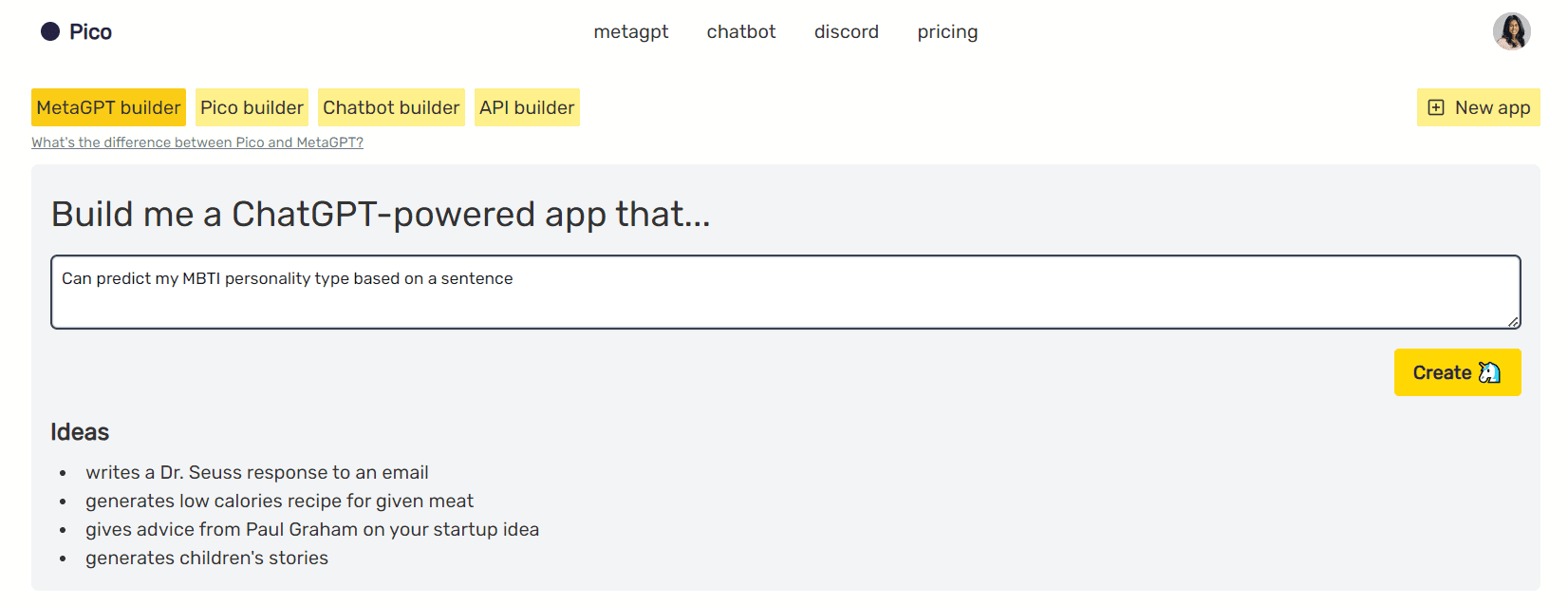
To access MetaGPT, navigate to the Pico website and create a free account. You will then see a screen that looks like this:

Meet MetaGPT: The ChatGPT-Powered AI Assistant That Turns Text Into Web Apps

You can type in any app idea you’d like into the text box and select “Create.”

Step 2: Creating a Prompt

Since I’ve developed a newfound interest in learning about the different MBTI personality types and how they influence our day-to-day interactions, I prompted MetaGPT with the following app idea:

Build me a ChatGPT-powered app that…

“Can predict my MBTI personality type based on a sentence”

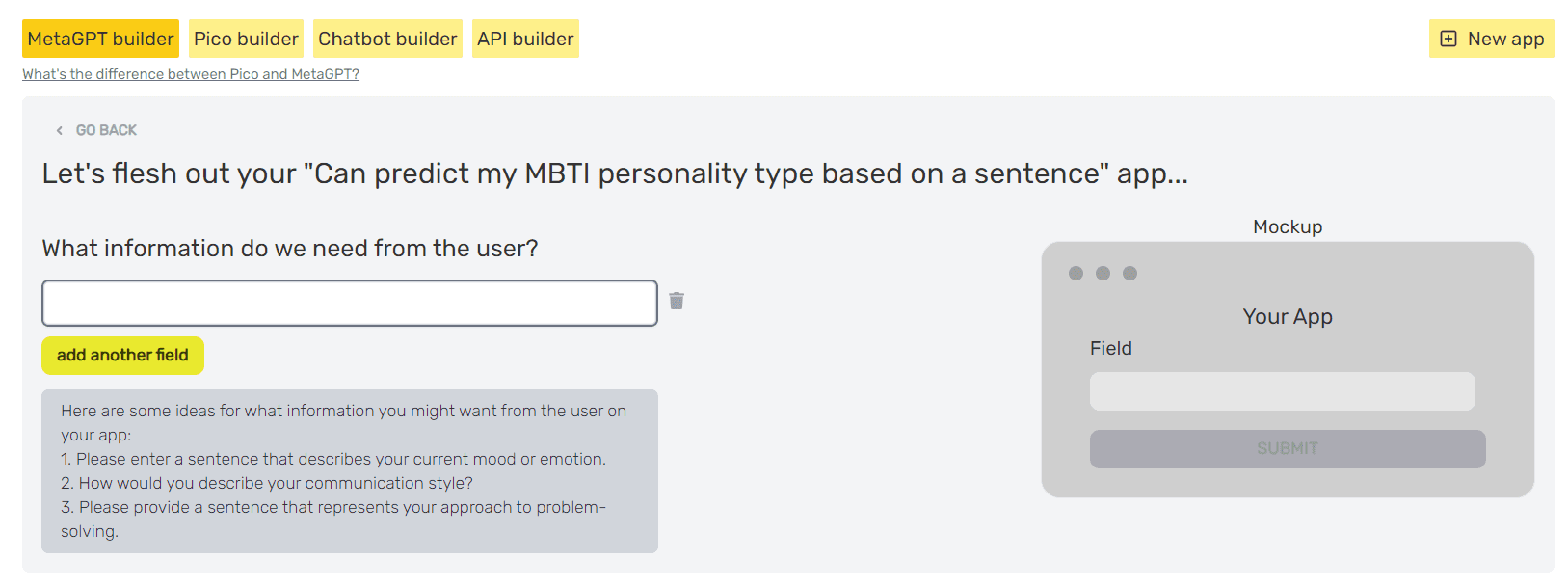
After entering this prompt into MetaGPT and clicking on “Create,” the following screen shows up:

Meet MetaGPT: The ChatGPT-Powered AI Assistant That Turns Text Into Web Apps

Step 3: Entering User Input Details to MetaGPT

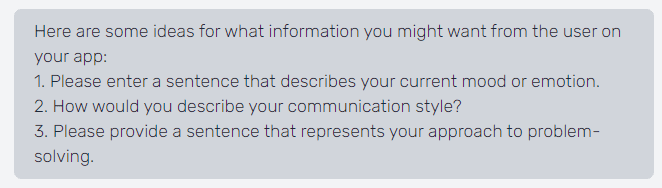
The tool is asking us about what information we’d need from the user to build this app out.

It has also come up with a few AI-generated recommendations based on the prompt we entered:

Meet MetaGPT: The ChatGPT-Powered AI Assistant That Turns Text Into Web Apps
I’m going to go with the third prompt — let's build an app that predicts the user’s personality type based on their approach to problem-solving.

Step 4: Customizing Your MetaGPT App

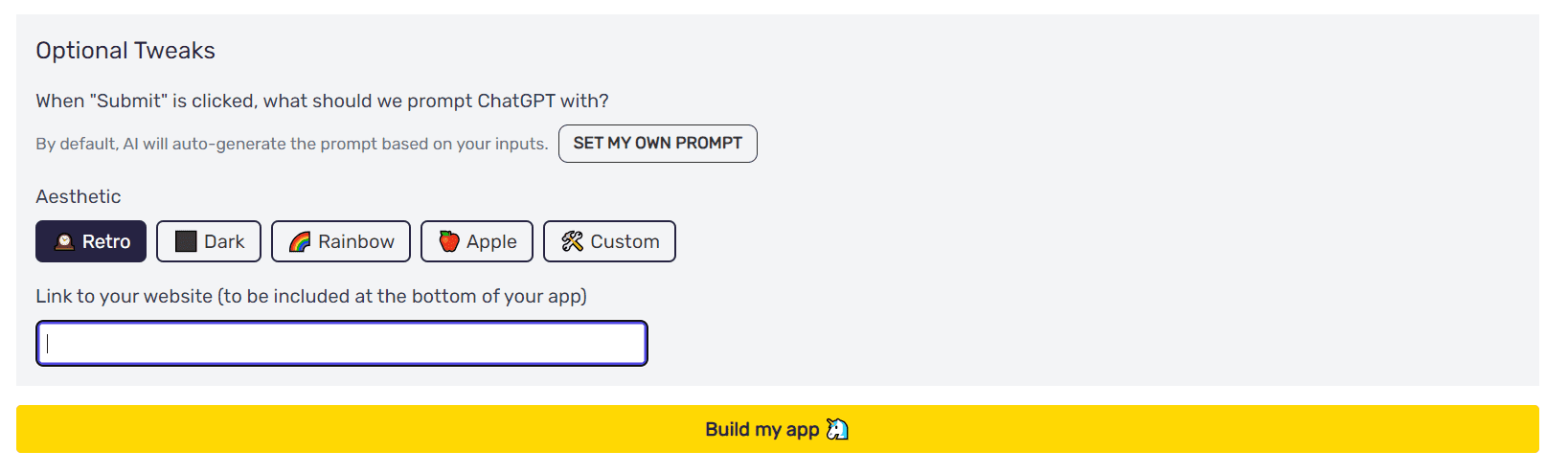
MetaGPT also lets you create a customized ChatGPT prompt, allowing you to specify how you’d like the app to be created.

You can also choose an aesthetic (what you want the app to look like), and can even enter a link to your website, which will be included at the bottom of your app.

Meet MetaGPT: The ChatGPT-Powered AI Assistant That Turns Text Into Web Apps

Now, let’s click on “Build my app” to see what MetaGPT comes up with.

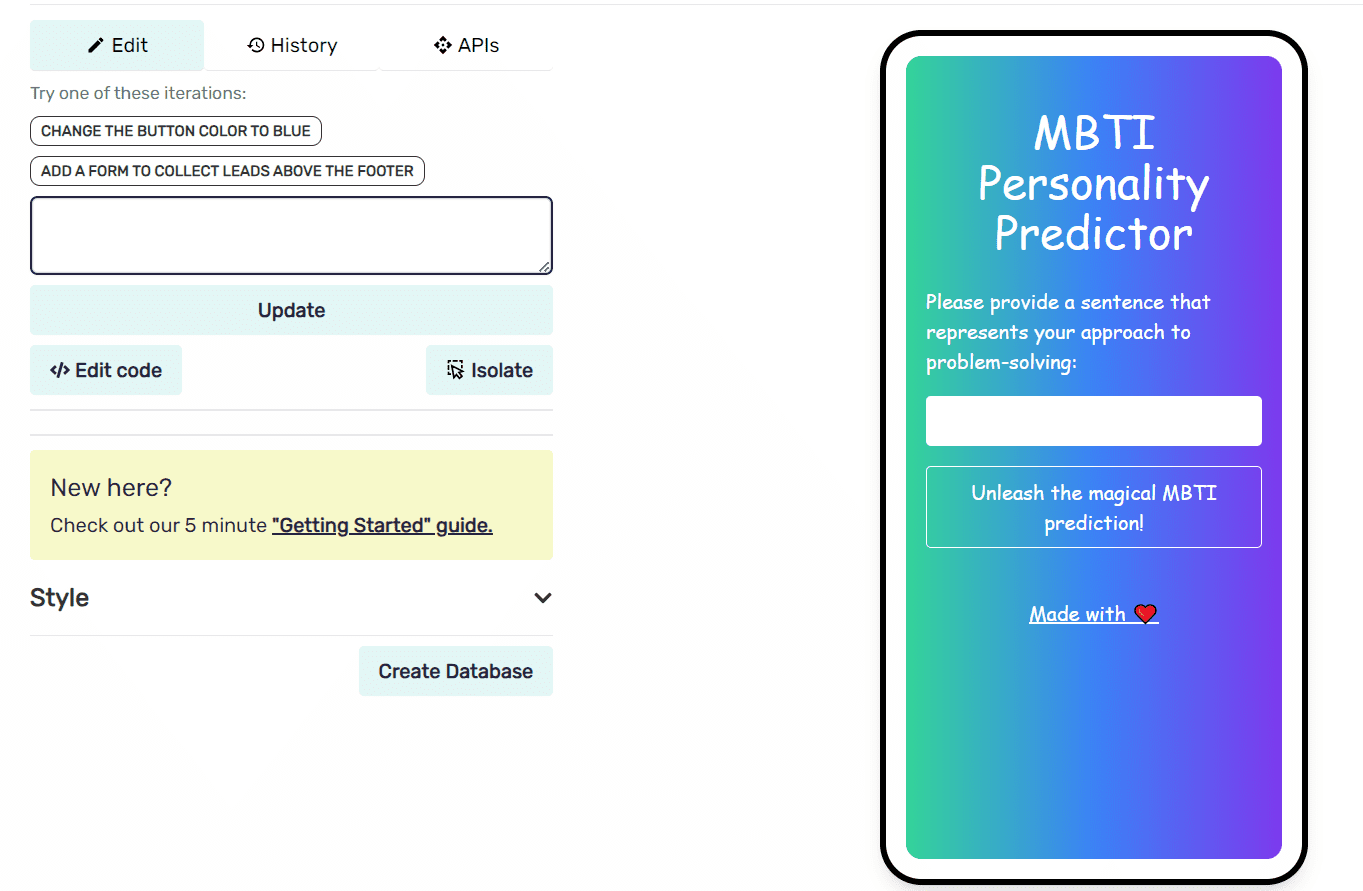
In just seconds, MetaGPT generates an app that is specific to our requirements:

Meet MetaGPT: The ChatGPT-Powered AI Assistant That Turns Text Into Web Apps

On the right-hand side of the screen is a visual representation of the app generated by the tool. You can make adjustments to the app’s interface on the left, by typing in a prompt to specify any design changes you want reflected.

For instance, you can ask MetaGPT to “Change the button color to blue,” and it will generate code that does just that. This allows non-programmers to specify design changes without having to write a single line of code.

Step 5: Editing MetaGPT-Generated Code

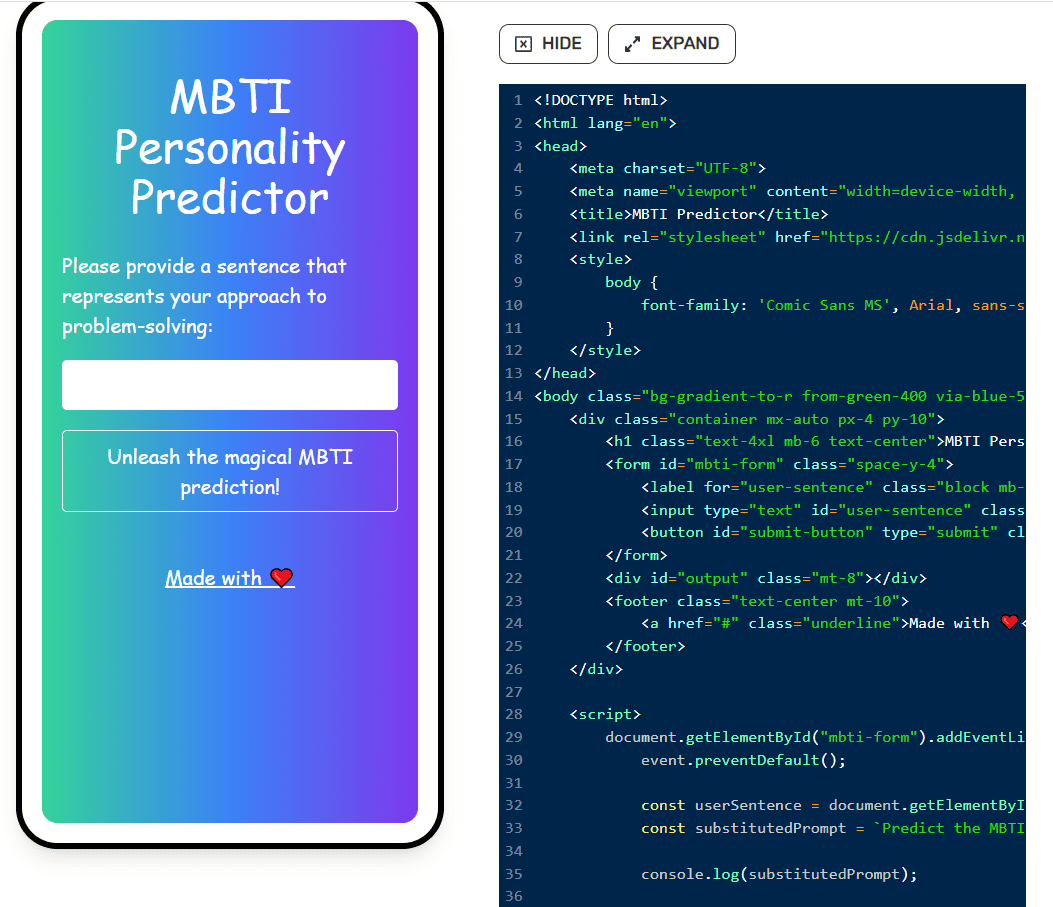
The platform also gives you the option to view and modify the code used to build the web application.

You can click on the “Edit Code” button, which lets you see and make changes to the code within the interface:

Meet MetaGPT: The ChatGPT-Powered AI Assistant That Turns Text Into Web Apps

Step 6: Sharing Your MetaGPT Web App

Finally, MetaGPT creates a shareable URL and hosts your web application on a temporary domain, letting you deploy your web app and share it with others.

You can click on this link to access the MBTI personality prediction app I just built with the help of MetaGPT.

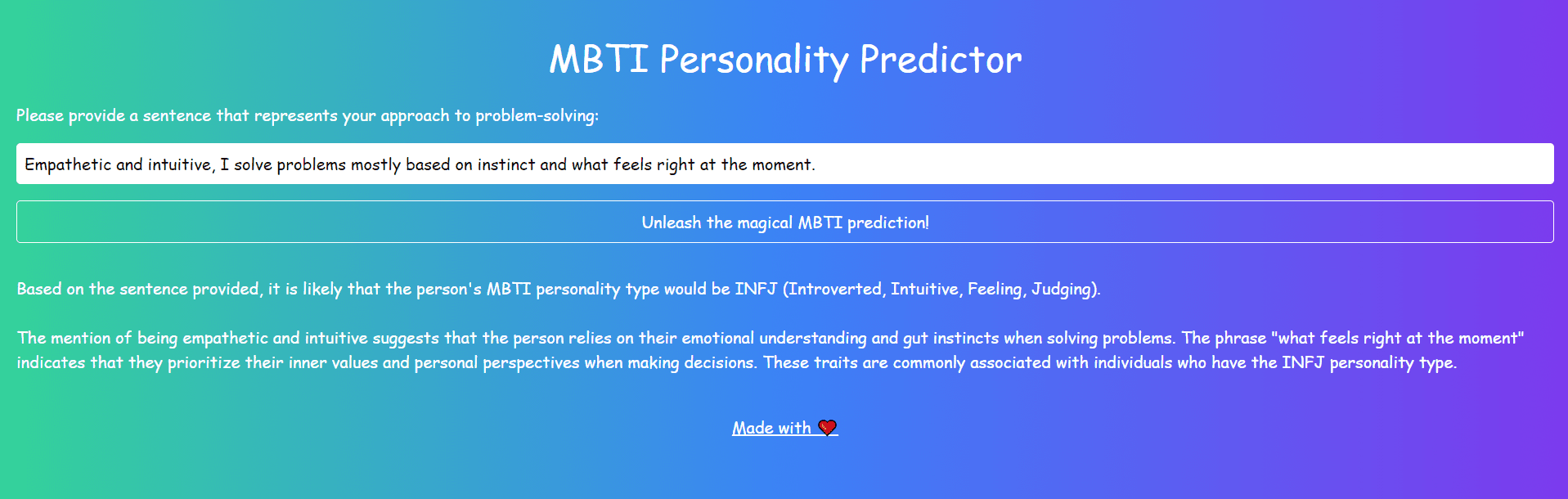
All you need to do is type in a prompt explaining your approach to problem-solving, and the app generates a personality-type prediction based on your sentence.

This is my result:

Meet MetaGPT: The ChatGPT-Powered AI Assistant That Turns Text Into Web Apps

The app almost got my personality type right! I am an INFP, and it discerned my type as an INFJ, which is pretty close.

Since MetaGPT is powered by ChatGPT, the natural language and reasoning capabilities of the underlying language model play a crucial role in driving such nuanced predictions.

MetaGPT For ChatGPT-Powered Web Apps — Next Steps

MetaGPT is a powerful no-code application that allows you to turn text input into a web application.

Here are some ways in which you can use the tool for data science and analytics:

1. Model Deployment

You can use MetaGPT to build a prototype of a machine-learning application to see how it performs in a real environment.

In the past, prototypes like these required the creator to possess knowledge of web development frameworks like HTML, CSS, and Javascript, which data scientists often lack.

Tools like MetaGPT help remove this barrier of entry, allowing you to speed up the transition from an idea to building a functional prototype.

2. Simplified Database Interaction

One of the most innovative applications I’ve seen of MetaGPT is this SQL Query Generator tool.

When I joined my first company as a data science intern, I didn’t know how to write SQL queries and had to go through a steep learning curve to be able to successfully access and manipulate data from databases.

A query generator app like this is a boon for other data professionals like me who might not be well-versed in SQL but need to use it for everyday tasks.

All you need to do is upload an existing database schema and specify the table you want to use.

Then, in plain text, type in what you want the query to do, and click on “Generate Query.”

In just seconds, the web app will write an SQL query that accomplishes the intended operation.

3. Cross-Team Collaboration

If you are a data scientist, you can use platforms like MetaGPT to build data science applications and share them across different teams within the organization.

This democratizes data science and analytical capabilities, making them more accessible to other departments.

For instance, if the marketing team has a data analysis requirement, they can simply upload their dataset to the application and get the desired output instead of approaching the data science team every time.

This way, as a data scientist, you get to focus your efforts on more complex tasks like refining model performance and researching new algorithms instead of performing repetitive analytical tasks.

That’s all for this article, thanks for reading. I’d love to hear your comments about MetaGPT and how you plan to use the platform to turn your app ideas into reality!
Natassha Selvaraj is a self-taught data scientist with a passion for writing. You can connect with her on LinkedIn.

More On This Topic

  • How to Create Stunning Web Apps for your Data Science Projects
  • How to Use ChatGPT to Convert Text into a PowerPoint Presentation
  • ChatGPT CLI: Transform Your Command-Line Interface Into ChatGPT
  • ChatGPT-Powered Data Exploration: Unlock Hidden Insights in Your Dataset
  • ChatGPT as a Python Programming Assistant
  • Forget ChatGPT, This New AI Assistant Is Leagues Ahead and Will Change the…

After Reliance, NVIDIA Now Partners with Tata

NVIDIA Announces its Partnership with Tata

In an interesting and breakthrough development, NVIDIA, the generative AI giant has announced its partnership with TCS, Tata Communications, and Tata Motors. This move comes after NVIDIA has been planning to expand to India and extend the country’s AI capabilities and harness its potential.

This collaboration aims to make cutting-edge AI capabilities accessible to a wide range of organisations, businesses, AI researchers, and startups in India. Together, these companies will join forces to construct a powerful AI supercomputer, utilising the advanced NVIDIA GH200 Grace Hopper Superchip, with the goal of achieving top-tier performance in the field.

This partnership with NVIDIA will further empower TCS to collaborate with its customers, embracing an AI-first approach to drive innovation. Furthermore, TCS plans to enhance the skills of its extensive workforce, numbering 600,000, through this partnership.

“The global generative AI race is in full steam,” said Jensen Huang, founder and CEO of NVIDIA. “Data centers worldwide are shifting to GPU computing to build energy-efficient infrastructure to support the exponential demand for generative AI.

This is not the first time that NVIDIA is partnering with a Tata enterprise. Last year, Jaguar Land Rover had formed a multi-year strategic partnership with NVIDIA to jointly develop and deliver next-generation automated driving systems plus AI-enabled services and experiences for its customers.

Starting in 2025, all new Jaguar and Land Rover vehicles will be built on the NVIDIA DRIVE™ software-defined platform-delivering a wide spectrum of active safety, automated driving and parking systems as well as driver assistance systems. Inside the vehicle, the system will deliver AI features, including driver and occupant monitoring as well as advanced visualisation of the vehicle’s environment.

Additionally, to make India’s move in AI even further, NVIDIA has also announced its partnership with Mukesh Ambani’s Reliance Industries to develop India’s foundational large language model trained on the nation’s diverse languages and tailored for generative AI applications to serve the world’s most populous nation.

The post After Reliance, NVIDIA Now Partners with Tata appeared first on Analytics India Magazine.

Glass Health is building an AI for suggesting medical diagnoses

Glass Health is building an AI for suggesting medical diagnoses Kyle Wiggers 8 hours

While a medical student at UC San Francisco, Dereck Paul grew concerned that innovation in medical software was lagging behind other sectors, like finance and aerospace. He came to believe that patients are best served when doctors are equipped with software that reflects the cutting edge of tech, and dreamed of starting a company that’d prioritize the needs of patients and doctors over hospital administrators or insurance companies.

So Paul teamed up with Graham Ramsey, his friend and an engineer at Modern Fertility, the women’s’ health tech company, to launch Glass Health in 2021. Glass Health provides a notebook physicians can use to store, organize and share their approaches for diagnosing and treating conditions throughout their careers; Ramsey describes it as a “personal knowledgement management system” for learning and practicing medicine.

“During the pandemic, Ramsey and I witnessed the overwhelming burdens on our healthcare system and the worsening crisis of healthcare provider burnout,” Paul said. “I experienced provider burnout firsthand as a medical student on hospital rotations and later as an internal medicine resident physician at Brigham and Women’s Hospital. Our empathy for frontline providers catalyzed us to create a company committed to fully leveraging technology to improve the practice of medicine.”

Glass Health gained early traction on social media, particularly X (formerly Twitter), among physicians, nurses and physicians-in-training, and this translated to the company’s first funding tranche, a $1.5M pre-seed round led by Breyer Capital in 2022. Glass Health was then accepted into Y Combinator’s Winter 2023 batch. But early this year, Paul and Ramsey decided to pivot the company to generative AI — embracing the growing trend.

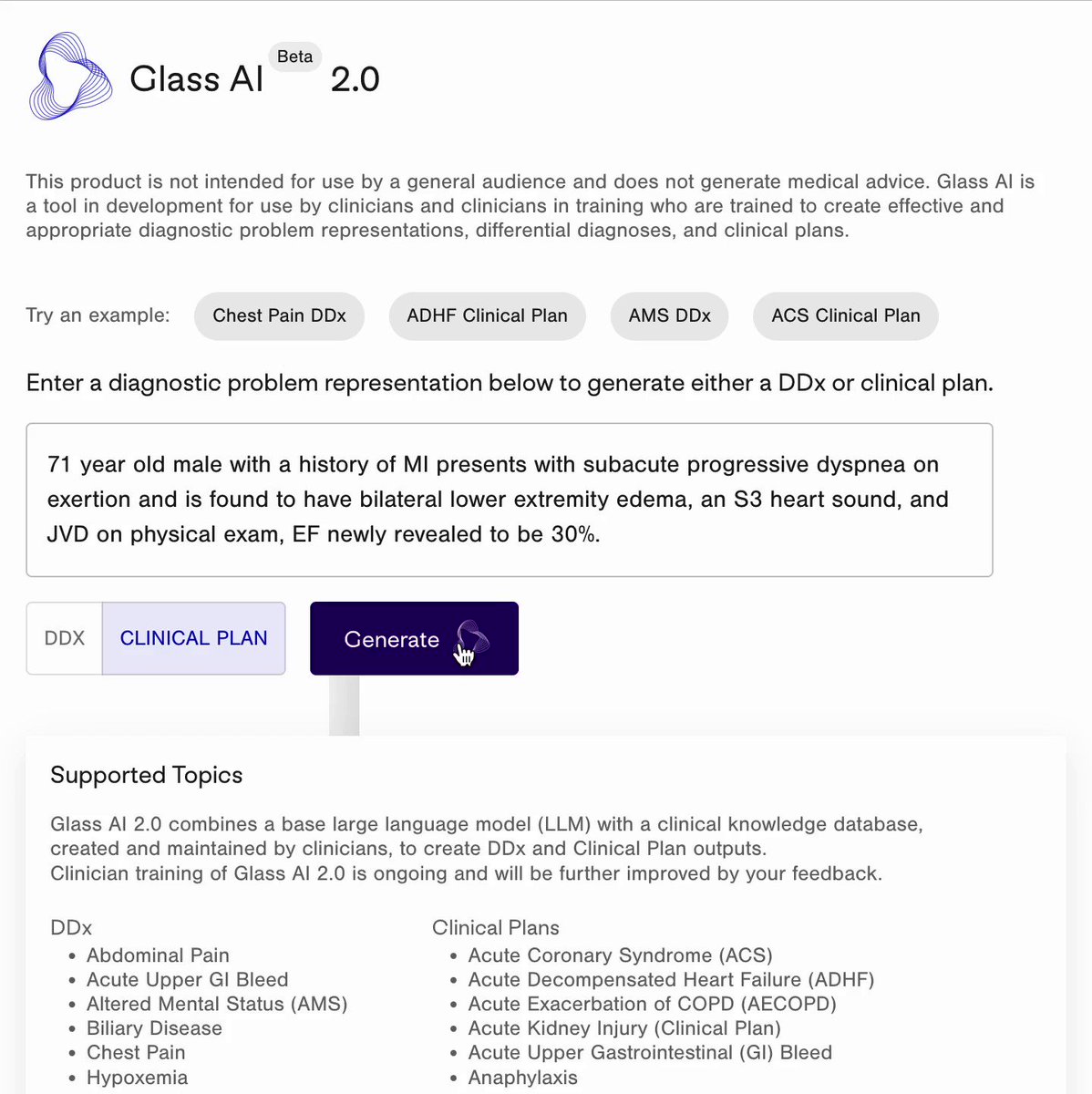
Glass Health now offers an AI tool powered by a large language model (LLM), tech similar to that behind OpenAI’s ChatGPT, to generate diagnoses and “evidence-based” treatment options to consider for patients. Physicians can type in descriptions like “71-year-old male with a history of myocardial infarction presents with subacute progressive dyspnea on exertion” or “65-year-old women with a history of diabetes and hyperlipidemia presents with acute-onset chest pain and diaphoresis,” and Glass Health’s AI will provide a likely prognosis and clinical plan.

“Clinicians enter a patient summary, also known as a problem representation, that describes the relevant demographics, past medical history, signs and symptoms and descriptions of laboratory and radiology findings related to a patient’s presentation — the information they might use to present a patient to another clinician,” Paul explained. “Glass analyzes the patient summary and recommends five to ten diagnoses that the clinician may want to consider and further investigate.”

Glass Health can also draft a case assessment paragraph for clinicians to review, which includes explanations about possibly relevant diagnostic studies. These explanations can be edited and used for clinical notes and records down the line, or shared with the wider Glass Health community.

In theory, Glass Health’s tool seems incredibly useful. But even cutting-edge LLMs have proven to be exceptionally bad at giving health advice.

Babylon Health, an AI startup backed by the U.K.’s National Health Service, has found itself under repeated scrutiny for making claims that its disease-diagnosing tech can perform better than doctors.

In an ill-fated experiment, the National Eating Disorders Association (NEDA) launched a chatbot in partnership with AI startup Cass to provide support to people suffering from eating disorders. As a result of a generative AI systems upgrade, Cass began to parrot harmful “diet culture” suggestions like calorie restriction, leading NEDA to shut down the tool.

Elsewhere, Health News recently recruited a medical professional to evaluate the soundness of ChatGPT’s health advice in a wide range of subjects. The expert found that the chatbot missed recent studies, made misleading statements (like that “wine might prevent cancer” and that prostate cancer screenings should be based on “personal values”) and plagiarized content from several health news sources.

In a more charitable piece in Stat News, a research assistant and two Harvard professors found that ChatGPT listed the correct diagnosis (within the top three options) in 39 of 45 different vignettes. But the researchers caveated that the vignettes were the kind typically used to test medical students and might not reflect how people — particularly those for whom English is a second language — describe their symptoms in the real world.

It hasn’t been studied much. But I wonder if bias, too, could play a role in causing an LLM to incorrectly diagnose a patient. Because medical LLMs like Glass’ are often trained on health records, which only show what doctors and nurses notice (and only in patients who can afford to see them), they could have dangerous blind spots that aren’t immediately apparent. Moreover, doctors may unwittingly encode their own racial, gender or socioeconomic biases in writing the records LLMs train on, leading the models to prioritize certain demographics over others.

Paul seemed well aware of the scrutiny surrounding generative AI in medicine — and asserted that Glass Health’s AI is superior to many of the solutions already on the market.

Glass Health

Image Credits: Glass Health

“Glass connects LLMs with clinical guidelines that are created and peer-reviewed by our academic physician team,” he said. “Our physician team members are from major academic medical centers around the country and work part-time for Glass Health, like they would for a medical journal, creating guidelines for our AI and fine-tuning our AI’s ability to follow them … We ask our clinician users to supervise all of our our LLM application’s outputs closely, treating it like an assistant that can offer helpful recommendations and options that they may consider but never replaces directs or replaces their clinical judgment.”

In the course of our interview, Paul repeatedly emphasized that Glass Health’s AI — while focused on providing potential diagnoses — shouldn’t be interpreted as definitive or prescriptive in its answers. Here’s my guess as to the unspoken reason: If it were, Glass Health would be subject to greater legal scrutiny — and potentially even regulation by the FDA.

Paul isn’t the only one hedging. Google, which is testing a medical-focused language model called Med-PaLM 2, has been careful in its marketing materials to avoid suggesting that the model can supplant the experience of health professionals in a clinical setting. So has Hippocratic, a startup building an LLM specially tuned for healthcare applications (but not diagnosing).

Still, Paul argues that Glass Health’s approach gives it “fine control” over its AI’s outputs and guides its AI to “reflect state-of-the-art medical knowledge and guidelines.” Part of that approach involves collecting user data to improve Glass’ underlying LLMs — a move that might not sit well with every patient.

Paul says that users can request the deletion of all of their stored data at any time.

“Our LLM application retrieves physician-validated clinical guidelines as AI context at the time it generates outputs,” he said. “Glass is different from LLMs applications like ChatGPT that rely solely on their pre-training to produce outputs, and can more easily produce medical information that is inaccurate or out of date … We have tight control over the information and guidelines used by our AI to create outputs and the ability to apply a rigorous editorial process to our guidelines that aims to address bias and align our recommendations with the goal of achieving health equity.”

We’ll see if that turns out to be the case.

In the meantime, Glass Health isn’t struggling to find early adopters. To date, the platform has signed up over 59,000 users and already has a “direct-to-clinician” offering for a monthly subscription. This year, Glass will begin to pilot an electronic health record-integrated enterprise offering with HIPAA compliance; 15 unnamed health systems and companies are on the waitlist, Paul claims.

“Institutions like hospitals and health systems will be able to provide an instance of Glass to their doctors to empower their clinicians with AI-powered clinical decision support in the form of recommendations about diagnoses, diagnostic studies and treatment steps they can consider,” Paul said. “We’re also able to customize Glass AI outputs to a health system’s specific clinical guidelines or care delivery practices.”

With a total of $6.5 million in funding, Glass plans to spend on physician creation, review and updating of clinical the guidelines used by the platform, AI fine-tuning and general R&D. Paul claims that Glass has four years of runway.

Leveraging Geospatial Data in Python with GeoPandas

Spatial data consists of records associated with locations. This data can come from GPS tracks, earth observation imagery, and maps. Each spatial data point can be precisely placed on a map using coordinate reference systems like latitude/longitude pairs for exact placement on maps, which enables us to investigate relationships among them.

Spatial data's true potential lies in its ability to connect data points and their respective locations, creating endless possibilities for advanced analysis. Geospatial data science is an emerging field within data science that seeks to harness geospatial information and extract valuable insights through spatial algorithms and advanced techniques such as machine learning or deep learning to draw meaningful conclusions about what events have taken place and their causes. Geospatial data science gives us insight into where events happen as well as why they happen.

GeoPandas is an open-source Python package specifically tailored for working with information. It expands upon pandas' array of datatypes by providing spatial operations on geometric objects — which facilitates spatial analyses in Python using pandas' data-manipulation tool, pandas. Since GeoPandas is built upon Pandas it offers an easy path for professionals familiar with Python syntax to become acquainted with GeoPandas syntax quickly.
Leveraging Geospatial Data in Python with GeoPandas 1. Installing GeoPandas

We have to install the GeoPandas package to be able to use it. However, it is critical to note that GeoPandas depends on other libraries that must be installed to use it without problems. These dependencies are shapely, Fiona, pyproj, and rtree.

There are two ways you can download the GeoPandas package. First, you can use conda to install the GeoPandas conda package. This method is recommended as it will provide the dependencies of GeoPandas without the need to install them on your own. You can run the following command to install GeoPandas:

conda install geopandas

The second method is to use pip which is the standard package installer in Python. However, using this method will require installing the rest of the mentioned dependencies.

pip install geopandas

Once the GeoPandas package is installed you can import it into your Python code using the following command:

import geopandas as gpd

2. Reading & Writing Spatial Data

GeoPandas is used to read spatial data and convert it into GeoDataFrame. However, it is important to note that there are two main types of spatial data:

  • Vector data: The vector data describes the features of the geography of earth locations using discrete geometry using the following terms point, line, and polygon.
  • Raster data: The raster data encodes the world as a surface represented by a grid. Each pixel of this grid is represented by a continuous value or categorical class.

GeoPandas mainly works with vector data. However, it can be used in conjunction with other Python packages to handle raster data, such as rasterio. You can use the powerful geopandas.read_file() function to read most of the vector-based spatial data. There are two main data types of vector-based partial data:

  • Shapefile: Shapfile is the most common data format and is considered the industry-level data type. It consists of three files that are compressed and usually provided as a zip file:

    The .shp file: This file contains the shape geometry.

    The .dbf file: This file holds attributes for each geometry,

    The .shx file: This is the shape index file that helps link the attributes to the shapes.

  • GeoJSON: This is a new file format of geospatial data released in 2016. Since it consists of only a single file it is easier to use it compared to the Shapefile.

In this article, we will use the geopandas.read_file() function to read a GeoJSON file hosted in GitHub containing geospatial data about the different districts of the city of Barcelona.

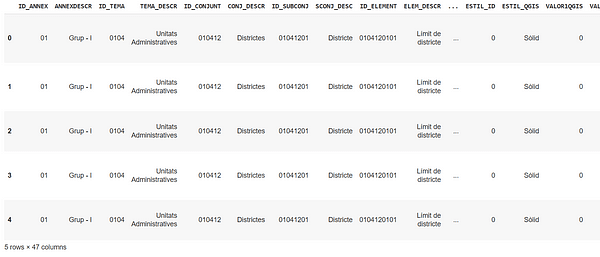
Let first start by loading the data and printing the first five columns of it using the code below:

url = 'https://raw.githubusercontent.com/jcanalesluna/bcn-geodata/master/districtes/districtes.geojson'  districts = gpd.read_file(url)  districts.head()
Leveraging Geospatial Data in Python with GeoPandas
Next, to write the data into a file we can use the GeoDataFrame.to_file() function to write the data into a Shapefile by default but you can convert it into GeoJSON using the driver parameter.

districts.to_file("districts.geojson", driver="GeoJSON")

3. GeoDataFrames Properties

Since GeoDataFrames is a subclass of pandas DataFrame it inherits a lot of its properties. However, there are some differences the main difference is that it can store geometry columns (also known as GeoSeries) and perform spatial operations. The geometry column in a GeoDataFrame can contain various types of vector data, including points, lines, and polygons. However, only one column is considered the active geometry, and all spatial operations will be based on that column.

Another critical feature of it is that every column comes with its associated CRS information that tells us where the candidates are located on Earth. The reason why this feature is critical is that if you need to combine two spatial datasets you will need to make sure that they are expressed in the same CRS otherwise you will get the wrong results. The CRS information is stored in the crs attribute in GeoPandas:

districts.crs
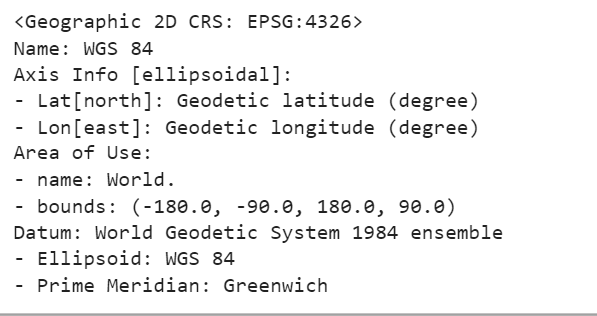
Leveraging Geospatial Data in Python with GeoPandas

Now that we have set the right projected CRS, we’re ready to explore the attributes of GeoDataFrames.

4. Exploring GeoDataFrames

GeoPandas has four useful methods and attributes that can be used to explore the data. We will explore these four methods:

  • Area
  • Centroid
  • Boundary
  • Distance

4.1. Area

The area attribute returns the calculated area of a geometry. In the example below we will calculate the area of every district in km2.

districts['area'] = districts.area / 1000000  districts['area']
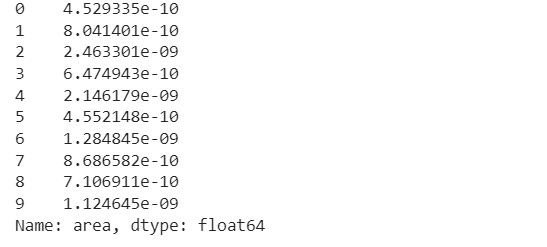
Leveraging Geospatial Data in Python with GeoPandas

4.2. Centroid

The second attribute is the centroid which returns the center point of the geometry. In the code snippet below we will add a new column and save the centroid for each district:

districts['centroid']=districts.centroid  districts['centroid']
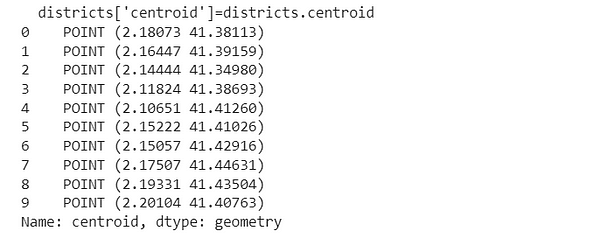
Leveraging Geospatial Data in Python with GeoPandas

4.3. Boundary

The third method is the boundary attribute which calculates the boundary of a polygon for every district. The code below returns it and saves it into a separate column:

districts['boundary']=districts.boundary
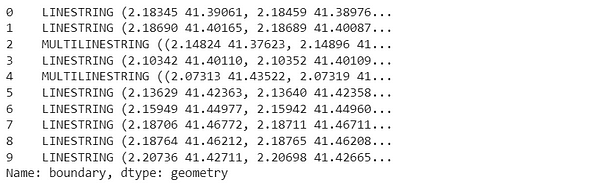
Leveraging Geospatial Data in Python with GeoPandas

4.4. Distance

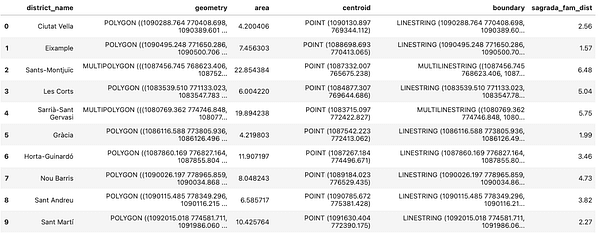
The distance method calculates the minimum distance from a certain geometry to a specific location. So for example in the code below we will calculate the distance from the Sagrada Familia church to the centroids of every district in Barcelona. After that, we will add the distance in km2 and save it in a new column.

from shapely.geometry import Point    sagrada_fam = Point(2.1743680500855005, 41.403656946781304)  sagrada_fam = gpd.GeoSeries(sagrada_fam, crs=4326)  sagrada_fam= sagrada_fam.to_crs(epsg=2062)  districts['sagrada_fam_dist'] = [float(sagrada_fam.distance(centroid)) / 1000 for centroid in districts.centroid]
Leveraging Geospatial Data in Python with GeoPandas 5. Plotting Data with GeoPandas

Plotting and visualizing your data is a critical step to better understand your data. Plotting with GeoPandas is the same as plotting with Pandas pretty easy and super forward. This is done through the GeoDataFrame.plot() function that is built on the matplotlib python package.

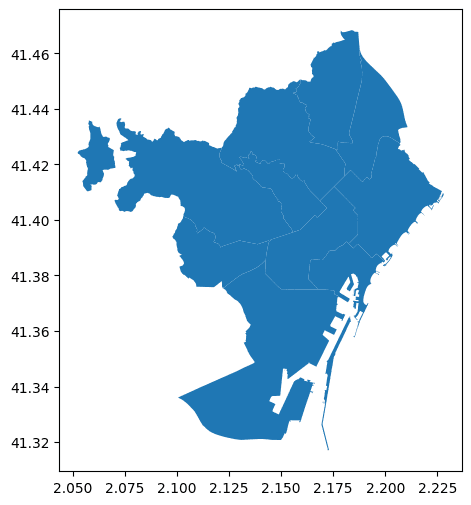
Let's start by exploring Barcelona by plotting a basic plot for its districts:

ax= districts.plot(figsize=(10,6))
Leveraging Geospatial Data in Python with GeoPandas

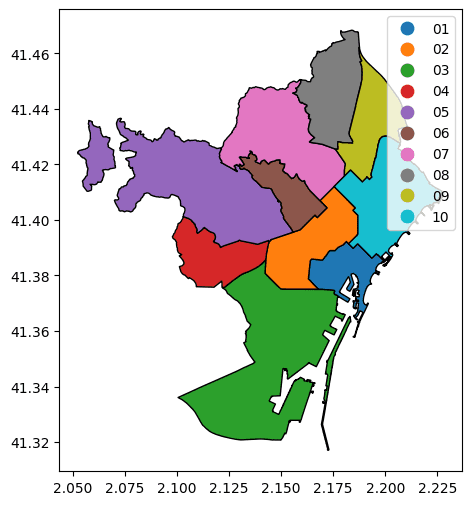
This is a very basic plot that does not tell us a lot of information. However, we can make it more informative by coloring each district with a different color.

ax= districts.plot(column='DISTRICTE', figsize=(10,6), edgecolor='black', legend=True)
Leveraging Geospatial Data in Python with GeoPandas

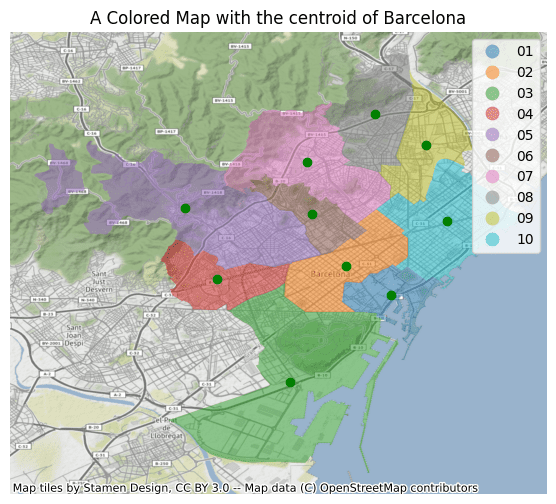
Finally, we can add more information to our plot by adding the centroids of the districts.

import contextily  import matplotlib.pyplot as plt    ax= districts.plot(column='DISTRICTE', figsize=(12,6), alpha=0.5, legend=True)  districts["centroid"].plot(ax=ax, color="green")  contextily.add_basemap(ax, crs=districts.crs.to_string())  plt.title('A Colored Map with the centroid of Barcelona')  plt.axis('off')  plt.show()
Leveraging Geospatial Data in Python with GeoPandas

Next, we will explore a very important feature of GeoPandas which is the spatial relation and how they can relate to each other.

6. Defining Spatial Relationships

Geospatial data relate to each other in space. GeoPandas uses pandas and shapely packages for spatial relationships. This section covers common operations. There are two main ways to merge GeoPandas DataFrames which are attribute and spatial joins. In this section, we will explore both of them.

6.1.Attribute Joins

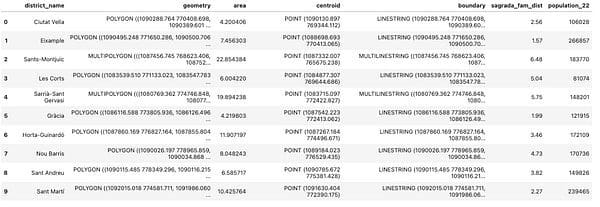
Attribute joins allow you to join two GeoPandas DataFrames using non-geometry variables which makes it similar to the regular join operations in Pandas. The joining operation is done using the pandas.merge() method as shown in the example below. In this example, we will join the Barcelona population data to our geospatial data to add more information to it.

import pandas as pd  pop =pd.read_csv('2022_padro_sexe.csv', usecols=['Nom_Districte','Nombre'])  pop = pd.DataFrame(pop.groupby('Nom_Districte')['Nombre'].sum()).reset_index()  pop.columns=['NOM','population_22']  districts = districts.merge(pop)  districts
Leveraging Geospatial Data in Python with GeoPandas

6.2. Spatial Joins

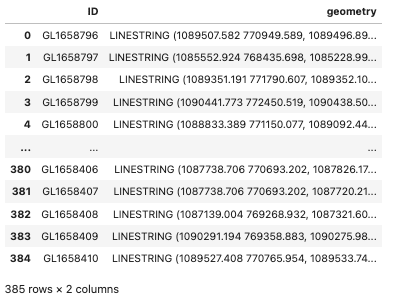
On the other hand spatial joins merge dataframes based on spatial relationships. In the example below we will identify the districts that have bicycle lanes. We will first load the data as shown in the code below:

url = 'https://opendata-ajuntament.barcelona.cat/resources/bcn/CarrilsBici/CARRIL_BICI.geojson'  bike_lane = gpd.read_file(url)  bike_lane = bike_lane.loc[:,['ID','geometry']]  bike_lane.to_crs(epsg=2062, inplace=True)
Leveraging Geospatial Data in Python with GeoPandas

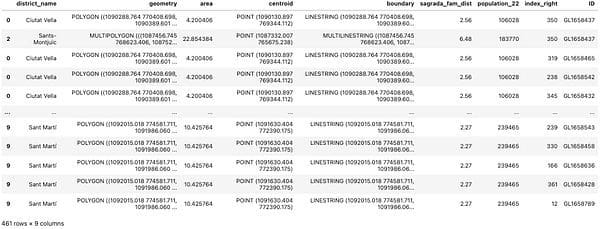
To spatially join two dataframes we can use the sjoin() function. The sjoin() function takes four main arguments: the first one is the GeoDataFrame, the second argument is the GeoDataFrame that we will add to the first GeoDataFrame, the third argument is the type of join and the final argument is the predicate which defines the spatial relation we want to use to match the two GeoDataFrames. The most common partial relationships are intersects, contains, and within. In this example, we will the intersects parameter.

lanes_districts = gpd.sjoin(districts, bike_lane, how='inner', predicate='intersects')  lanes_districts
Leveraging Geospatial Data in Python with GeoPandas

In this article, I introduced you to Geospatial data analysis using the open-source GeoPandas library. We started with downloading the GeoPandas package, and then we discussed different types of Geospatial data and how to load them. Finally, we will explore basic operations to get your hands on the geospatial dataset. Although there is still to explore with the geospatial data analysis, this blog acts as a starting point in your learning journey.
Youssef Rafaat is a computer vision researcher & data scientist. His research focuses on developing real-time computer vision algorithms for healthcare applications. He also worked as a data scientist for more than 3 years in the marketing, finance, and healthcare domain.

More On This Topic

  • 5 Python Packages For Geospatial Data Analysis
  • Building a Geospatial Application in Python with Google Earth Engine and…
  • SQL For Data Science: Understanding and Leveraging Joins
  • In-Database Analytics: Leveraging SQL's Analytic Functions
  • Leveraging XGBoost for Time-Series Forecasting
  • Step up your Python game with Fast Python for Data Science!