This week in AI: OpenAI plays for keeps with GPTs

This week in AI: OpenAI plays for keeps with GPTs Kyle Wiggers Devin Coldewey 9 hours

Keeping up with an industry as fast-moving as AI is a tall order. So until an AI can do it for you, here’s a handy roundup of recent stories in the world of machine learning, along with notable research and experiments we didn’t cover on their own.

This week in AI, OpenAI held the first of what will presumably be many developer conferences to come. During the keynote, the company showed off a slew of new products, including an improved version of GPT-4, new text-to-speech models and an API for the image-generating DALL-E 3, among others.

But without a doubt the most significant announcement was GPTs.

OpenAI’s GPTs provide a way for developers to build their own conversational AI systems powered by OpenAI’s models and publish them on an OpenAI-hosted marketplace called the GPT Store. Soon, developers will even be able to monetize GPTs based on how many people use them, OpenAI CEO Sam Altman said onstage at the conference.

“We believe that if you give people better tools, they will do amazing things,” Altman said. “You can build a GPT … and then you can publish it for others to use, and because they combine instructions, expanded knowledge and actions, they can be more helpful to you.”

OpenAI’s shift from AI model provider to platform has been an interesting one, to be sure — but not exactly unanticipated. The startup telegraphed its ambitions in March with the launch of plugins for ChatGPT, its AI-powered chatbot, which brought third parties into OpenAI’s model ecosystem for the first time.

But what caught this writer off guard was the breadth and depth of OpenAI’s GPT building — and commercializing — tools out of the gate.

My colleague Devin Coldewey, who attended OpenAI’s conference in person, tells me the GPT experience was “a little glitchy” in demos — but works as advertised, more or less. GPTs don’t require coding experience and can be as simple or complex as a developer wishes. For example, a GPT can be trained on a cookbook collection so that it can ask answer questions about ingredients for a specific recipe. Or a GPT could ingest a company’s proprietary codebases so that developers can check their style or generate code in line with best practices.

GPTs effectively democratize generative AI app creation — at least for apps that use OpenAI’s family of models. And if I were OpenAI’s rivals — at least the rivals without backing from Big Tech — I’d be racing to the figurative warroom to muster a response.

GPT could kill consultancies whose business models revolve around building what are essentially GPTs for customers. And for customers with developer talent, it could make model providers that don’t offer any form of app-building tools less attractive given the complexities of having to weave a provider’s APIs into existing apps and services.

Is that a good thing? I’d argue not necessarily — and I’m worried about the potential for monopoly. But OpenAI has first-mover advantage, and it’s leveraging it — for better or worse.

Here are some other AI stories of note from the past few days:

  • Samsung unveils generative AI: Just a few days after OpenAI’s dev event, Samsung unveiled its own generative AI family, Samsung Gauss, at the Samsung AI Forum 2023. Consisting of three models — a large language model similar to ChatGPT, a code-generating model and an image generation and editing model — Samsung Gauss is now being used internally with Samsung’s staff, the tech company said, and will be available to public users “in the near future.”
  • Microsoft gives startups free AI compute: Microsoft this week announced that it’s updating its startup program, Microsoft for Startups Founders Hub, to include a no-cost Azure AI infrastructure option for “high-end,” Nvidia-based GPU virtual machine clusters to train and run generative models. Y Combinator and its community of startup founders will be the first to gain access to the clusters in private preview, followed by M12, Microsoft’s venture fund, and startups in M12’s portfolio — and potentially other startup investors and accelerators after that.
  • YouTube tests generative AI features: YouTube will soon begin to experiment with new generative AI features, the company announced this week. As part of the premium package available to paying YouTube subscribers, users will be able to try out a conversational tool that uses AI to answer questions about YouTube’s content and makes recommendations, as well as a feature that summarizes topics in the comments of a video.
  • An interview with DeepMind’s head of robotics: Brian spoke with Vincent Vanhoucke, Google DeepMind’s head of robotics, about Google’s grand robotic ambitions. The interview touched on a range of topics, including general-purpose robots, generative AI and — of all things — office Wi-Fi.
  • Kai-Fu Lee’s AI startup unveils model: Kai-Fu Lee, the computer scientist known in the West for his bestseller “AI Superpowers” and in China for his bets on AI unicorns, is gaining impressive ground with his own AI startup, 01.AI. Seven months after its founding, 01.AI — valued at $1 billion — has released its first model, the open source Yi-34B.
  • GitHub teases customizable Copilot plan: GitHub this week announced plans for an enterprise subscription tier that will let companies fine-tune its Copilot pair-programmer based on their internal codebase. The news constituted part of a number of notable tidbits the Microsoft-owned company revealed at its annual GitHub Universe developer conference on Wednesday, including a new partner program as well as providing more clarity on when Copilot Chat — Copilot’s recently unveiled chatbot-like capability — will officially be available.
  • Hugging Face’s two-person model team: AI startup Hugging Face offers a wide range of data science hosting and development tools. But some of the company’s most impressive — and capable — tools these days come from a two-person team that was formed just in January, called H4.
  • Mozilla releases an AI chatbot: Earlier this year, Mozilla acquired Fakespot, a startup that leverages AI and machine learning to identify fake and deceptive product reviews. Now, Mozilla is launching its first large language model with the arrival of Fakespot Chat, an AI agent that helps consumers as they shop online by answering questions about products and even suggesting questions that could be useful in product research.

More machine learnings

We’ve seen in many disciplines how machine learning models are able to make really good short term predictions for complex data structures after perusing many previous examples. For example it could extend the warning period for upcoming earthquakes, giving people a crucial extra 20-30 seconds to get to cover. And Google has shown that it’s a dab hand at predicting weather patterns as well.

Several figured from the post showing how MetNet integrates data into its ML-based predictions. Image Credits: Google

MetNet-3 is the latest in a series of physics-based weather models that look at a variety of variables, like precipitation, temperature, wind, and cloud cover, and produce surprisingly high-resolution (temporal and spatial) predictions for what will likely come next. A lot of this kind of prediction is based on fairly old models, which are accurate some times but not others, or can be made more accurate by combining their data with other sources — which is what MetNet-3 does. I won’t get too far into the details, but they put up a really interesting post on the topic last week that gives a great sense of how modern weather prediction engines work.

In other highly specific sciences news, researchers from the University of Kansas have made a detector for AI-generated text… for journal articles about chemistry. Sure, it isn’t useful to most people, but after OpenAI and others hit the brakes on detector models, it’s useful to show that at the very least, something more limited is possible. “Most of the field of text analysis wants a really general detector that will work on anything,” said co-author Heather Desaire. “We were really going after accuracy.”

OpenAI scuttles AI-written text detector over ‘low rate of accuracy’

Their model was trained on articles from the American Chemical Society journal, learning to write introduction sections from just the title and just the abstract. It was later able to identify ChatGPT-3.5-written intros with near-perfect accuracy. Obviously this is an extremely narrow use case, but the team points out they were able to set it up fairly quickly and easily, meaning a detector could be set up for different sciences, journals, and languages.

There isn’t one for college admission essays yet, but AI might be on the other side of that process soon, not deciding who gets in but helping admissions officers identify diamonds in the rough. Researchers from Colorado University and UPenn showed that an ML model was able to successfully identify passages in student essays that indicated interests and qualities, like leadership or “prosocial purpose.”

Students won’t be scored this way (again, yet) but it’s a much-needed tool in the toolbox of administrators, who must go through thousands of applications and could use a hand now and then. They could use a layer of analysis like this to group essays or even randomize them better so all the ones who talk about camping don’t end up in a row. And the research exposed that the language students used was surprisingly predictive of certain academic factors, like graduation rate. They’ll be looking more deeply into that, of course, but it’s clear that ML-based stylometry is going to stay important.

It wouldn’t do to lose track of AI’s limitations, though, as highlighted by a group of researchers at the University of Washington who tested out AI tools’ compatibility with their own accessibility needs. Their experiences were decidedly mixed, with summarizing systems adding biases or hallucinating details (making them inappropriate for people unable to read the source material) and inconsistently applying accessibility content rules.

Employee people with disabilities and inclusion work together in office.

At the same time, however, one person on the autism spectrum found that using a language model to generate messages on Slack helped them overcome a lack of confidence in their ability to communicate normally. Even though her coworkers found the messages somewhat “robotic,” it was a net benefit for the user, which is a start. You can find more info on this study here.

Both preceding items bring up thorny issues of bias and general AI weirdness in a sensitive area, though, so it’s not surprising that some states and municipalities are looking at establishing rules for what AI can be used for in official duties. Seattle, for instance, just released a set of “governing principles” and toolkits that must be consulted or applied before an AI model can be used for official purposes. No doubt we’ll see differing — and perhaps contradictory — such rulesets put into play at all levels of governance.

Inside VR, a machine learning model that acted as a flexible gesture detector helped create a set of really interesting ways to interact with virtual objects. “If using VR is just like using a keyboard and a mouse, then what’s the point of using it?” asked lead author Per Ola Kristensson. “It needs to give you almost superhuman powers that you can’t get elsewhere.” Good point!

You can see in the video above exactly how it works, which when you think about it makes perfect intuitive sense. I don’t want to select “copy” then “paste” from a menu using my mouse finger. I want to hold an object in one hand, then open the palm of the other and boom, a duplicate! Then if I want to cut them, I just make my hand into scissors?! This is awesome!

Image Credits: EPFL

Last, speaking of Cut/Paste, that’s the name of a new exhibition at Swiss university EPFL, where students and professors looked into the history of comics from the 1950s on and how AI might enhance or interpret them. Obviously generative art isn’t quite taking over just yet, but some artists are obviously keen to test out the new tech, despite its ethical and copyright conundra, and explore its interpretations of historic material. If you’re lucky enough to be in Lausanne, check out Couper/Coller (the catchy local version of the ubiquitous digital actions).

Humane’s AI Pin is a Step Forward in Wearable Tech, But With Drawbacks

In a significant development within the wearable technology sector, Humane has introduced its first product, the AI Pin. This device, emerging after a series of demos and hints, marks a notable entry into the AI-integrated gadget market. The AI Pin combines advanced technology with user-centric design, aiming to offer a unique experience in the realm of personal tech.

Design and Pricing

The AI Pin by Humane makes a bold statement in design but comes with a price that might raise eyebrows. Its two-part structure, featuring a square device and a battery pack that attaches magnetically to clothes, speaks to a futuristic aesthetic. However, the practicality of this design in everyday use remains to be seen, especially in various social and work environments.

The price tag of $699, coupled with a $24 monthly subscription for additional services like a phone number and data coverage through T-Mobile, places the AI Pin in the higher echelon of wearable technology. This pricing strategy could potentially limit its accessibility to a broader audience, raising questions about its viability in a competitive market where affordability often drives consumer choices.

Tech Specifications

The AI Pin's reliance on a Snapdragon processor promises robust performance, yet without specifics, it's hard to gauge its true capability. The control mechanisms – voice, gestures, camera, and a small built-in projector – are innovative on paper, but their real-world effectiveness and user-friendliness are yet to be tested. While these features aim to set the AI Pin apart, they also venture into largely uncharted territory in terms of user acceptance and practicality.

The device's weight and camera features are commendable, with a 34-gram main unit and a 20-gram battery booster, coupled with a 13-megapixel camera. However, the decision to delay video capabilities to a future software update could be seen as a drawback, potentially hindering early adoption among users who expect complete functionality from the outset.

While the AI Pin showcases forward-thinking technology and design, its success in the market will heavily depend on user acceptance of its unique features and willingness to invest in a high-priced, subscription-based model. Its real-world application and practicality will ultimately determine whether it becomes a staple in wearable tech or remains a novel, yet niche product.

Image: Humane

User Interaction and Privacy

The AI Pin introduces a unique approach to user interaction, primarily through manual activation. Unlike many modern devices that are always listening for a wake word, users need to actively engage with the AI Pin by tapping and dragging on its touchpad. This design choice might slow down the interaction process, potentially affecting the user experience for those accustomed to more responsive tech.

Privacy is a paramount concern in today's tech landscape, and the AI Pin attempts to address this with its “Trust Light” feature. This indicator light signals when the device is collecting data, ostensibly to inform both the user and those around them. However, the effectiveness of this feature in providing real assurance of privacy and data security is debatable. The onus is on Humane to demonstrate how this light, beyond being a visual cue, contributes to a robust privacy framework, especially in scenarios where discreet data collection is essential.

AI and Software Integration

At the heart of the AI Pin's functionality is its integration with AI models, particularly through its partnerships with Microsoft and OpenAI. This collaboration positions the AI Pin as a forefront device in wearable technology, tapping into the advanced capabilities of AI systems like GPT-4. The potential here is immense, offering users a range of sophisticated functionalities accessible through intuitive voice commands and queries.

The AI Pin's operating system, Cosmos, is an integral part of this integration. Designed to automatically route user queries to the most relevant tools, Cosmos aims to simplify the user experience significantly. This system eliminates the need for downloading and managing multiple apps, streamlining interactions in a way that could set a new standard for wearable devices.

This integration of AI and software is not just about enhancing the functionality of a wearable device; it represents a forward leap in how we interact with technology. By combining the computational prowess of leading AI models with a user-centric operating system, the AI Pin stands as a testament to what the future of personal technology could look like – smarter, more intuitive, and seamlessly integrated into our daily lives.

Simplifying User Interface

Humane's AI Pin stands out for its commitment to a simplified user interface, a stark contrast to the screen-heavy and settings-laden devices currently dominating the market. By doing away with traditional screens and complex menus, the AI Pin aims to offer a more intuitive and direct interaction with technology. This approach aligns well with current AI trends, where the focus is shifting towards more natural, conversation-based interactions. The absence of a conventional interface in the AI Pin suggests a future where technology blends more seamlessly into our lives, facilitating tasks without the need for navigating through multiple layers of digital interfaces.

Capabilities and Features

The AI Pin's array of features is a showcase of its ambition to be more than just a voice-activated gadget. Voice messaging and calling capabilities are just the tip of the iceberg. The device offers unique features like email summarization, which could be a game-changer for managing digital communications more efficiently. The inclusion of a camera that can scan food for nutritional information and the promise of real-time translation capabilities reflect a keen understanding of everyday needs and the potential of AI to address them.

Looking to the future, Humane plans to expand the AI Pin's capabilities to include navigation and shopping assistance, which would further cement its role as a versatile assistant. The possibility of opening the platform to developers also hints at a future where the device's capabilities could grow exponentially, driven by the creativity and innovation of the broader tech community.

The Larger Vision and Future Prospects

Humane's AI Pin is not just a new product; it's a glimpse into a future where AI is deeply woven into the fabric of our daily lives. This vision extends beyond the immediate functionalities of the device, suggesting a future where technology becomes more of an intelligent companion than a mere tool. The trajectory for the AI Pin could follow that of smartphones, where continuous advancements in hardware and software have significantly expanded their roles in our lives.

However, this optimistic outlook comes with its share of challenges. Integrating AI so fundamentally into personal devices raises questions about privacy, user autonomy, and the readiness of society to adapt to such rapid technological changes. While the potential for more personalized and sophisticated user experiences is exciting, it also demands careful consideration of ethical implications and the impact on digital literacy and human interaction.

The AI Pin represents both the immense possibilities and the complex challenges of integrating advanced AI into wearable technology. It's a bold step forward, but one that must be navigated with an awareness of both its transformative potential and the responsibilities that come with it. As we move into this new era of tech, the AI Pin serves as a marker of progress and a reminder of the careful balance that must be struck as we integrate increasingly intelligent technology into our daily lives.

Top 7 Essential Cheat Sheets To Ace Your Data Science Interview

Top 7 Essential Cheat Sheets To Ace Your Data Science Interview
Image by Author

Landing a data science job is no easy feat. With companies receiving hundreds of applications for each opening, you need to stand out from the competition to get an interview. And once you land the interview, you need to demonstrate both technical competence and communication skills to prove you're the right person for the role.

That's why having the right preparation and materials can give you a critical edge. In his new blog we will cover the most important cheat sheets that every data science candidate should review before an upcoming interview. The cheat sheets cover a wide range of key data science topics, from statistics and Python to SQL and machine learning algorithms.

1. SQL

Structured Query Language (SQL) is used for managing and accessing the database. It is the most important skill that data scientists need. Apart from accessing the data, data professionals use it for running data analysis queries on a large amount of the data.

No matter which technical data interview you are preparing for, the Getting Started with SQL cheat sheet will be a handy guide for you. It will help you revise common syntax and teach you how to use them. Moreover, it will also assist you with coding interviews.

2. Probability and Statistics

Many data scientists do not use probability or statistical tests in their daily work. It can be difficult to stay updated with all the important terminologies. However, it is important to note that you may be asked about concepts such as A/B testing, confidence intervals, hypothesis testing, correlation analysis, and more.

If you are afraid of feeling embarrassed during an interview, you can refresh your memory by referring to the Probability and Statistics cheat sheet. Provided by Stanford University, this cheat sheet includes all the essential terminology that may be used during the interview.

3. Pandas

Pandas is a Python library that is primarily used for data cleaning, wrangling, analysis, processing, and saving. During an interview, you may be asked about various components of this library and how to analyze data using pandas. You may also be asked to perform data analysis and write a report based on your findings.

The Pandas Data Wrangling cheat sheet provides byte-sized information on various pandas functions with visual representation, helping you in technical and coding interviews.

4. Data Visualization

Data visualization is an important skill for data scientists. While data scientists may be good at analyzing data, choosing the right type of plot to effectively communicate insights is a bit tricky. During interviews, failing to select the optimal chart to showcase analysis can create a poor impression on interviewers.

To avoid this pitfall, data scientists must have a look at the Data Visualization cheat sheet in order to instinctively select the ideal plot to convey the message they aim to deliver to stakeholders. This will help you with coding interviews and take-home assignments.

5. Scikit-learn

Scikit-learn is a widely used Python library that offers a broad array of tools and functionalities for implementing different machine learning algorithms. As a data scientist, you may be required to solve basic regression problems using various Scikit-learn functions for data augmentation, processing, model training, and optimization.

Building and evaluating machine learning models is a crucial part of a data scientist's job. It is natural to learn various functions of Scikit-learn by reviewing the Scikit-learn for Machine Learning cheat sheet.

6. Git

Git is an essential skill for data scientists to master, especially those working on collaborative teams. On any data science project with multiple contributors, Git enables version control and code merging so team members can concurrently work on code without runtime conflicts.

You must demonstrate your Git skills before being invited to work on the project. So, it is essential to review the Git for Data Science cheat sheet to learn the most commonly used syntax and functions.

7. Data Science Super Cheat Sheet

The Data Science Super cheat sheet is a bit different. You will review it to learn all of the important theoretical concepts.

You will learn about:

  1. Distributions
  2. Various machine learning concept
  3. Model evaluation
  4. Linear Regression
  5. Logistic Regression
  6. Decision Tree
  7. Support Vector Machine
  8. Clustering
  9. Dimensionality Reduction
  10. Natural Language processing
  11. Neural Networks
  12. Convolutional Neural Network
  13. Recurrent Neural network
  14. Boosting
  15. Reinforcement Learning
  16. Anomaly Detection
  17. Time Series
  18. Statistics
  19. A/B Testing

With one hour left before your interview, this cheat sheet is all you need to review. It will help you go over the most commonly asked interview questions.

I hope you enjoy the list of the seven essential cheat sheets. Let me know if you'd like to see more similar content.

Abid Ali Awan (@1abidaliawan) is a certified data scientist professional who loves building machine learning models. Currently, he is focusing on content creation and writing technical blogs on machine learning and data science technologies. Abid holds a Master's degree in Technology Management and a bachelor's degree in Telecommunication Engineering. His vision is to build an AI product using a graph neural network for students struggling with mental illness.

More On This Topic

  • 10 Cheat Sheets You Need To Ace Data Science Interview
  • 7 Super Cheat Sheets You Need To Ace Machine Learning Interview
  • 7 Essential Cheat Sheets for Data Engineering
  • KDnuggets News, June 8: 21 Cheat Sheets for Data Science…
  • 21 Must-Have Cheat Sheets for Data Science Interviews: Unlocking…
  • How to Ace Data Science Interview by Working on Portfolio Projects

YC-backed productivity app Superpowered pivots to become a voice API platform for bots

YC-backed productivity app Superpowered pivots to become a voice API platform for bots Ivan Mehta 9 hours

Calendar apps are essential for productivity but it is hard to differentiate enough to have sustained growth from just the core usage. Y Combinator-backed Superpowered, which is an AI-powered notetaker for your meetings that doesn’t involve recording bots, hit this roadblock and is now pivoting to become Vapi, an API provider so anyone can easily create a natural-sounding voice-based AI-powered assistant.

Superpowered was founded in 2020 by Jordan Dearsley and Nikhil Gupta. But after three years of working on it, Dearsley said the team wanted to work on the more challenging product. The company is not shutting down the initial product as the startup said that Superpowered is profitable — it is in the process of bringing someone in to run it. Y Combinator said in June that more than 10,000 people were using the product weekly, but the company didn’t provide any updated numbers.

Image Credits: Vapi

To date, Superpowered/Vapi has raised $2.1 in seed money from investors including Kleiner Perkins and Abstract Ventures.

Pivot to Vapi

The company offers Vapi as an API to let developers create a bot using just prompts — it then put it behind a phone number. Additionally, it offers an SDK integration so developers can embed the bot on websites and mobile apps.

Dearsley told TechCrunch over email that the idea to build Vapi stemmed from a personal problem. He had moved to San Fransisco and started missing his friends and family, who were in a different time zone. He built an AI bot attached to a phone number on the other end to talk to someone in order to sort his thoughts.

“I liked it, but I was continually frustrated with how unnatural it was. It wasn’t like talking to a person. The voice sounded off, there would be long delays before it responded, and it would interrupt me while I was speaking.” he said.

“So I kept working on it and going for my walks with it. Eventually, we got fascinated with this conversation problem. It’s really hard to make something feel human. Voice assistants today are clunky and turn-based, we want to build something that feels human.”

Technically, Vapi is currently stringing a bunch of third-party APIs to build a robust voice conversation platform. For instance, it uses solutions from Twilio for telephony, Deepgram for transcription, Daily for audio streaming, OpenAI for responses, and PlayHT for text-to-speech.

ScaleConvo, a startup in the YC winter batch for 2024, is already using Vapi to launch conversational bots for sales teams and property management companies. However, Vapi didn’t disclose its other clients. The company is opening up its API with Vapi Phone and Vapi Web products today.

Challenges for Vapi

One of the biggest challenges the startup has is to reduce latency, according to Magnus Revan, an ex-Gartner analyst and chief product officer at multimodal conversation startup Openstream.ai.

“OpenAI models need between 2-10 seconds to generate an answer – while on the phone the gold standard is to have 700ms between the user finishing talking and then the ‘bot’ starting to talk. And getting to sub 1-second latency with capable models (high parameter count open-source models like LLaMA2 70B) is really hard,” Revan said.

Currently, Vapi has a latency of 1.2-2 seconds depending on various factors. Dearsley expects to bring down latency to under one second in the next month thanks to Vapi’s own work and OpenAI’s improvements.

Mohamed Musbah, an angel investor in Vapi also said that the startup’s solution will improve with overall advances in API.

“As OpenAI and others improve their models, Vapi’s platform will become more powerful, equipped with better knowledge bases, code execution capabilities, and larger context windows. Vapi’s focus on solving the greatest friction areas in voice communication will be its edge as user demand grows for voice assistants,” he said.

However, this puts the onus on the improvement of other solutions rather than Vapi itself. Dearsley said that reliance on other APIs reduces Vapi’s defensibility if big companies start moving into that area. However, the team said that it has an edge in terms of having built infrastructure to handle thousands of calls simultaneously. Dearsley emphasized that with Vapi’s web and phone API launch for the public, the team will also look to build its own models for audio-to-audio solutions.

Foxconn to Steer the Electric Wheel 

The shift towards electric vehicles (EVs) has been vividly evident in the past decade. Car companies had been working on clean energy long before Elon Musk from Tesla brought attention to it. But in the recent past, every tech company, be it the phone developers or chipmaker Foxconn, has been trying to put their own model on the road.

Last week, the Taiwanese electronics giant announced last week that it is taking a gamble on the EV business.

Diversification opportunities are ample for Foxconn and the company is going all-in on cars next. The Taiwanese company has already set up fabs and plans further expansion through several automotive production sites across the globe — including India.

The Desi Connection

India boasts millions of EV owners, with motorbikes, scooters, and rickshaws constituting over 90% of the automotives. As per a Bloomberg report, the sales rose to 75,000 in the nine months through September — more than double the volume during the same period in 2022.

A report by the International Energy Agency (IEA) revealed that in 2022, more than half of India’s three-wheeler registrations were electric-powered.

One of the reasons for the company to embark on an affair with India can be the rise in demand for passenger EVs in the country.

The surge in the EV market can be attributed, in part, to a government initiative, a $1.3 billion scheme aimed at prompting EV manufacturing within the country while offering discounts to customers. Moreover, charging points across the nation have increased tenfold, reported Elizabeth Connolly, an analyst specializing in energy technology and transport at the IEA.

As Foxconn charts a course to become an assembler of electricity powered vehicles in India, it has long been indecisive about its relationship with India. The chipmaker company in India has a track record of waging bid wars, misleading state governments and denying deals after governments officially announcing a deal with the chip company.

Machine Hopping

The second reason for Foxconn to shift from making cars to iPhones is the dip in market for smartphones in recent years. It seems that the company plans to diversify its business.

Similar to Foxconn, Apple has also been building an autonomous EV — dubbed Titan — for almost a decade which finally may be on the way. But thanks to its founder Steve Jobs, the company has long maintained its mysterious personality. Hence, no information whatsoever about the project has made it to mainstream media yet.

The last insider information on the internet dates back to almost a year ago which is highly unlikely for similar significant projects in limbo. Interestingly, in a little over two decades, Apple has applied for 248 car-related patents and even hired Lamborghini’s top executive, Luigi Taraborrelli, to help them design their product in the car space.

While Apple has been regularly launching refreshed versions of its slate products, the company’s car project has an uncertain future. Prominent Apple analyst Ming-Chi Kuo says Apple’s car plans have “lost all visibility,” and the Cupertino-based tech company must look at alternate strategies to make headways into a highly competitive automotive space.

As the single-largest manufacturer of electronics ambitiously forges in the market, news from Apple should also be expected some time soon. But with Foxconn’s leap forward in the EV sector, there are a lot of ‘ifs’ involved. Even though the Apple-Foxconn relationship has long stood the tides of the tech industry, Foxconn has a registered history of making plans and backing out at the last moment.

“Foxconn has the reputation for being one of the most opaque companies in an opaque world,” Lawrence Tabak, the author of ‘Foxconned: Imaginary Jobs, Bulldozed Homes, and the Sacking of Local Government’ described Foxconn’s habit of backing out of deals. “It is very normal for them to make stagey announcements that involve politicians, business executives, pomp, and circumstance purely based on speculation,” Tabak added.

As of now, all that the stakeholders can do is to keep their fingers crossed and hope it does not turn out to be one of the company’s usual false promises to steer the electronic wheel.

The post Foxconn to Steer the Electric Wheel appeared first on Analytics India Magazine.

10 Essential Pandas Functions Every Data Scientist Should Know

10 Essential Pandas Functions Every Data Scientist Should Know
Image by Author

In today's data-driven world, data analysis and insights help you get the most out of it and help you make better decisions. From a company's perspective, it gives a Competitive Advantage and personaliz?s the whole process.

This tutorial will explore the most potent Python library pandas, and we will discuss the most important functions of this library that are important for data analysis. Beginners can also follow this tutorial due to its simplicity and efficiency. If you don’t have python installed in your system, you can use Google Colaboratory.

Importing Data

You can download the dataset from that link.

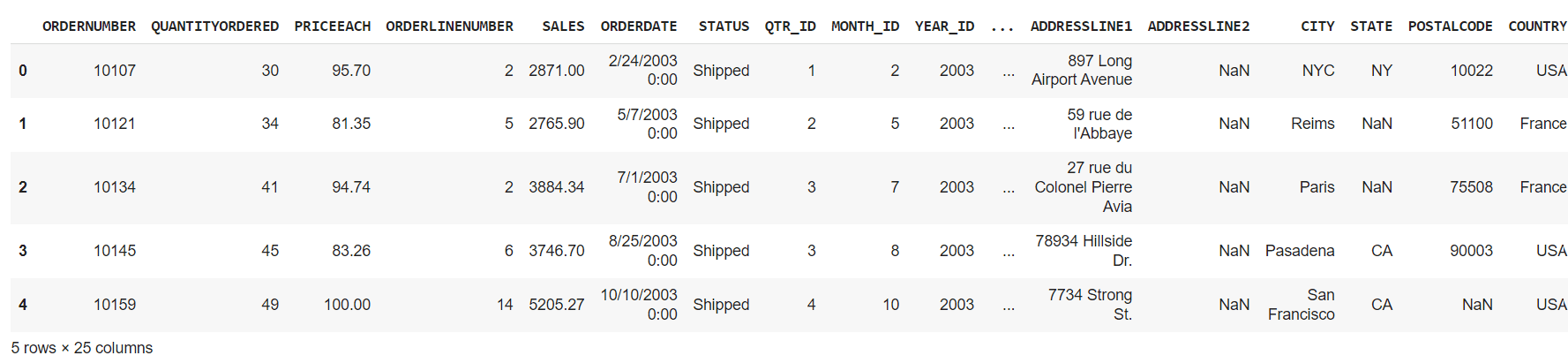
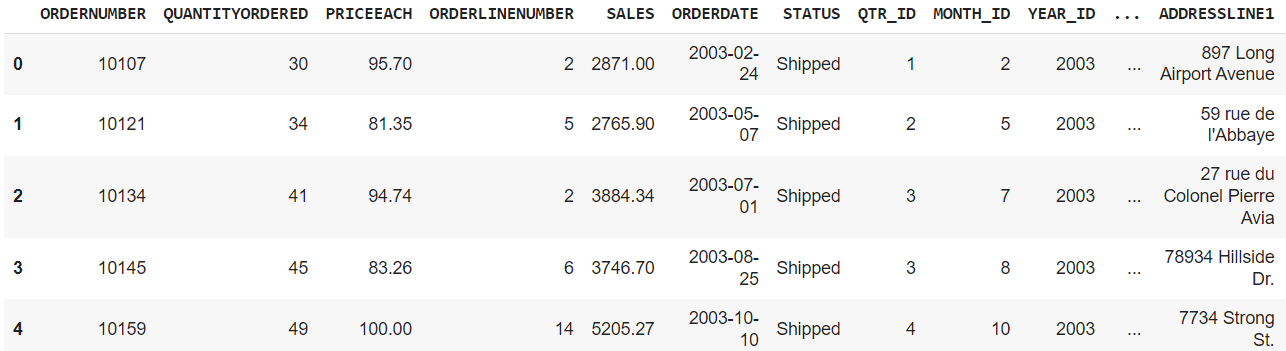
import pandas as pd  df = pd.read_csv("kaggle_sales_data.csv", encoding="Latin-1")  # Load the data    df.head()  # Show first five rows

Output:

10 Essential Pandas Functions Every Data Scientist Should Know Data Exploration

In this section, we will discuss various functions that help you to get more about your data. Like viewing it or getting the mean, average, min/max, or getting information about the dataframe.

1. Data Viewing

  1. df.head(): It displays the first five rows of the sample data

10 Essential Pandas Functions Every Data Scientist Should Know

  1. df.tail(): It displays the last five rows of the sample data

10 Essential Pandas Functions Every Data Scientist Should Know

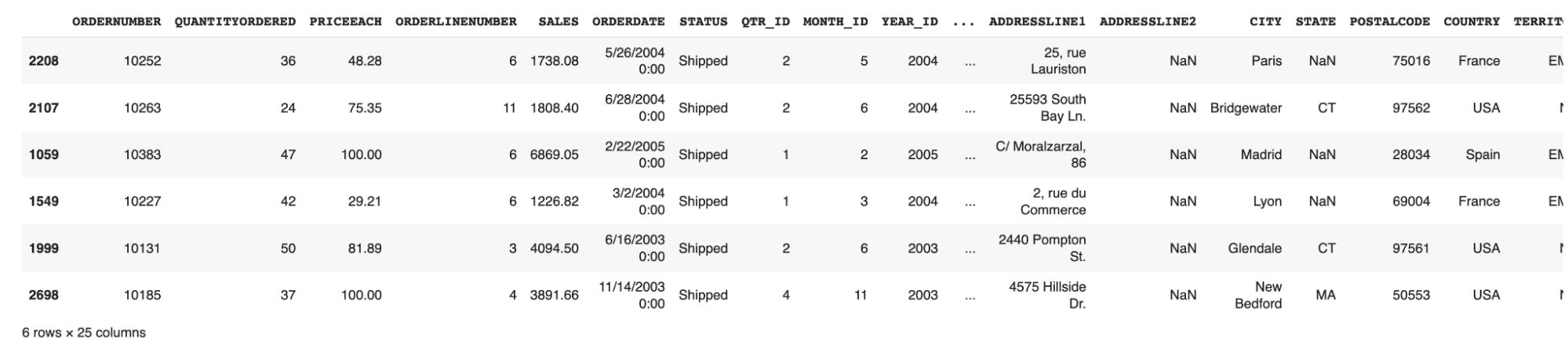
  1. df.sample(n): It displays the random n number of rows in the sample data
df.sample(6)

10 Essential Pandas Functions Every Data Scientist Should Know

  1. df.shape: It displays the sample data's rows and columns (dimensions).
(2823, 25)

It signifies that our dataset has 2823 rows, each containing 25 columns.

2. Statistics

This section contains the functions that help you perform statistics like average, min/max, and quartiles on your data.

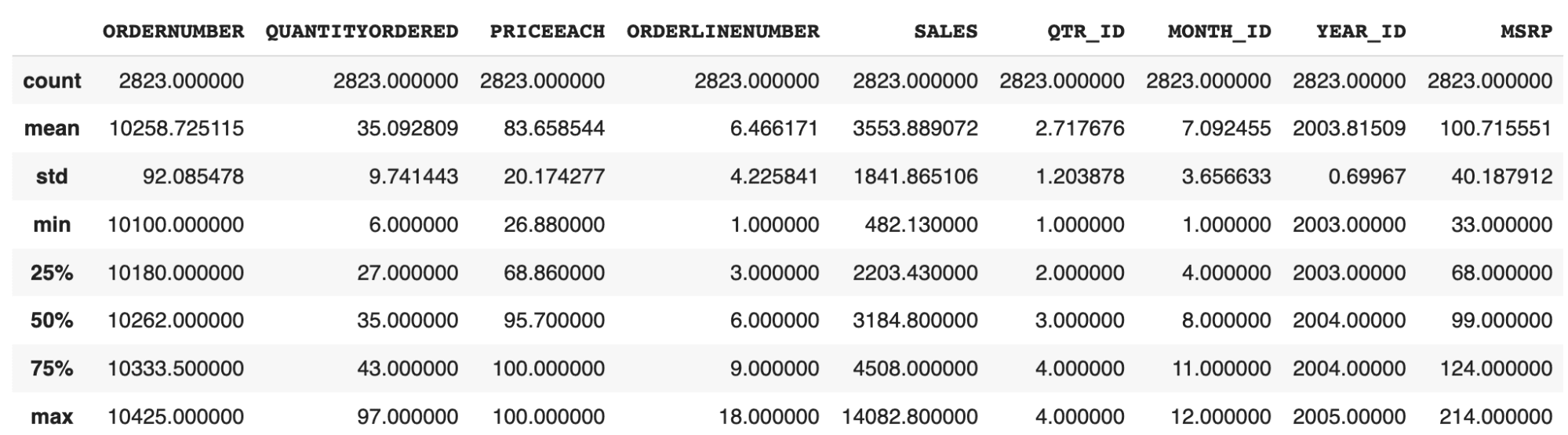
  1. df.describe(): Get the basic statistics of each column of the sample data

10 Essential Pandas Functions Every Data Scientist Should Know

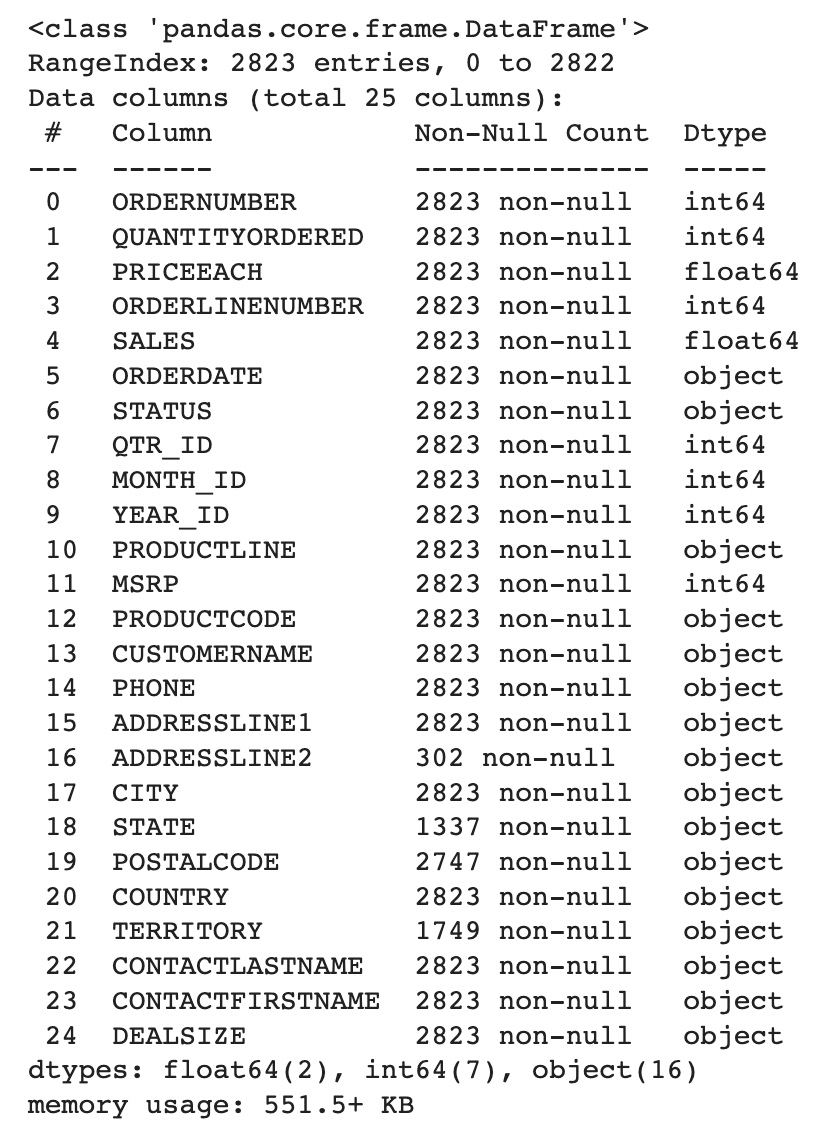
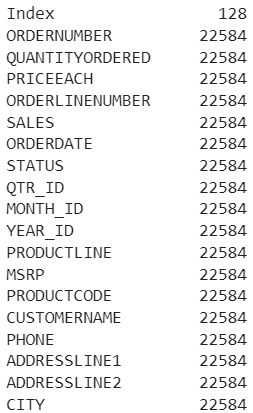
  1. df.info(): Get the information about the various data types used and the non-null count of each column.

    10 Essential Pandas Functions Every Data Scientist Should Know

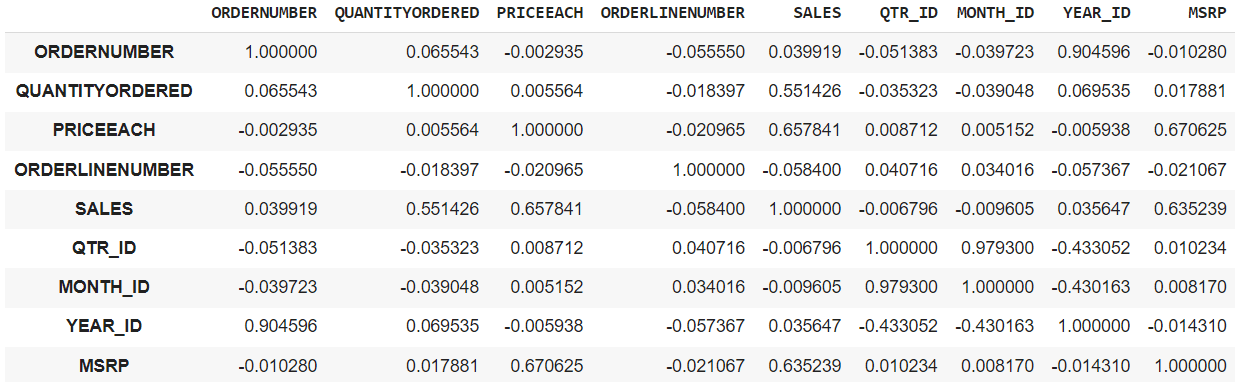
  2. df.corr(): This can give you the correlation matrix between all the integer columns in the data frame.

10 Essential Pandas Functions Every Data Scientist Should Know

  1. df.memory_usage(): It will tell you how much memory is being consumed by each column.

10 Essential Pandas Functions Every Data Scientist Should Know

3. Data Selection

You can also select the data of any specific row, column, or even multiple columns.

  1. df.iloc[row_num]: It will select a particular row based on its index

For ex-,

df.iloc[0]
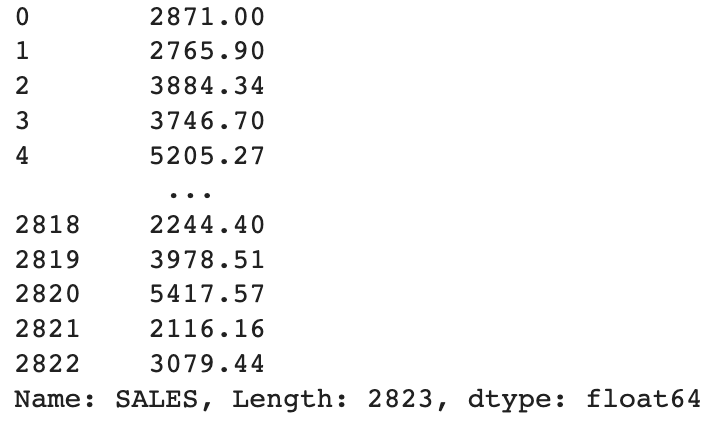
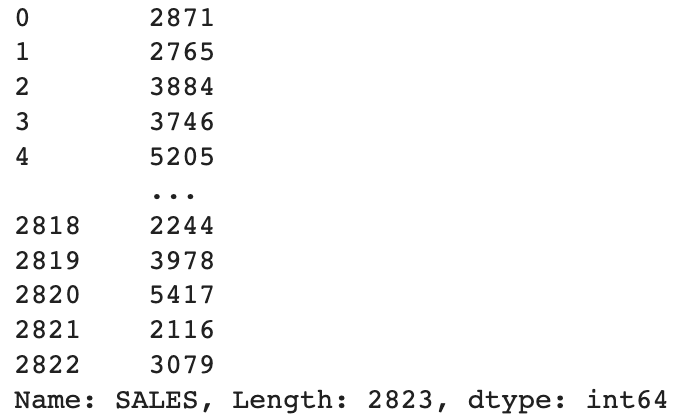
  1. df[col_name]: It will select the particular column

For ex-,

df["SALES"]

Output:

10 Essential Pandas Functions Every Data Scientist Should Know

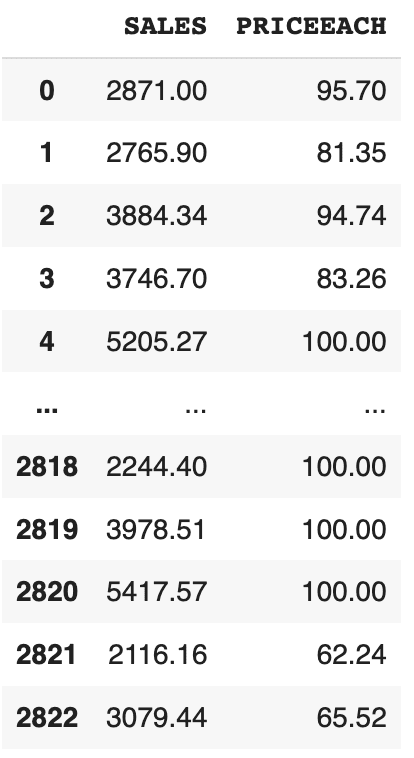
  1. df[[‘col1’, ‘col2’]]: It will select multiple columns given

For ex-,

df[["SALES", "PRICEEACH"]]

Output:

10 Essential Pandas Functions Every Data Scientist Should Know 4. Data Cleaning

These functions are used to handle the missing data. Some rows in the data contain some null and garbage values, which can hamper the performance of our trained model. So, it is always better to correct or remove these missing values.

  1. df.isnull(): This will identify the missing values in your dataframe.
  2. df.dropna(): This will remove the rows containing missing values in any column.
  3. df.fillna(val): This will fill the missing values with val given in the argument.
  4. df[‘col’].astype(new_data_type): It can convert the data type of the selected columns to a different data type.

For ex-,

df["SALES"].astype(int)

We are converting the data type of the SALES column from float to int.

10 Essential Pandas Functions Every Data Scientist Should Know 5. Data Analysis

Here, we will use some helpful functions in data analysis, like grouping, sorting, and filtering.

  1. Aggregation Functions:

You can group a column by its name and then apply some aggregation functions like sum, min/max, mean, etc.

df.groupby("col_name_1").agg({"col_name_2": "sum"})

For ex-,

df.groupby("CITY").agg({"SALES": "sum"})

It will give you the total sales of each city.

10 Essential Pandas Functions Every Data Scientist Should Know

If you want to apply multiple aggregations at a single time, you can write them like that.

For ex-,

aggregation = df.agg({"SALES": "sum", "QUANTITYORDERED": "mean"})

Output:

SALES              1.003263e+07    QUANTITYORDERED    3.509281e+01    dtype: float64
  1. Filtering Data:

We can filter the data in rows based on a specific value or a condition.

For ex-,

df[df["SALES"] > 5000]

Displays the rows where the value of sales is greater than 5000

You can also filter the dataframe using the query() function. It will also generate a similar output as above.

For ex,

df.query("SALES" > 5000)
  1. Sorting Data:

You can sort the data based on a specific column, either in the ascending order or in the descending order.

For ex-,

df.sort_values("SALES", ascending=False)  # Sorts the data in descending order
  1. Pivot Tables:

We can create pivot tables that summarize the data using specific columns. This is very useful in analyzing the data when you only want to consider the effect of particular columns.

For ex-,

pd.pivot_table(df, values="SALES", index="CITY", columns="YEAR_ID", aggfunc="sum")

Let me break this for you.

  1. values: It contains the column for which you want to populate the table's cells.
  2. index: The column used in it will become the row index of the pivot table, and each unique category of this column will become a row in the pivot table.
  3. columns: It contains the headers of the pivot table, and each unique element will become the column in the pivot table.
  4. aggfunc: This is the same aggregator function we discussed earlier.

Output:

10 Essential Pandas Functions Every Data Scientist Should Know

This output shows a chart which depicts the total sales in a particular city for a specific year.

6. Combining Data Frames

We can combine and merge several data frames either horizontally or vertically. It will concatenate two data frames and return a single merged data frame.

For ex-,

combined_df = pd.concat([df1, df2])

You can merge two data frames based on a common column. It is useful when you want to combine two data frames that share a common identifier.

For ex,

merged_df = pd.merge(df1, df2, on="common_col")

7. Applying Custom Functions

You can apply custom functions according to your needs in either a row or a column.

For ex-,

def cus_fun(x):      return x * 3    df["Sales_Tripled"] = df["SALES"].apply(cus_fun, axis=0)

We have written a custom function that will triple the sales value for each row. axis=0 means that we want to apply the custom function on a column, and axis=1 implies that we want to apply the function on a row.

In the earlier method you have to write a separate function and then to call it from the apply() method. Lambda function helps you to use the custom function inside the apply() method itself. Let’s see how we can do that.

df["Sales_Tripled"] = df["SALES"].apply(lambda x: x * 3)

Applymap:

We can also apply a custom function to every element of the dataframe in a single line of code. But a point to remember is that it is applicable to all the elements in the dataframe.

For ex-,

df = df.applymap(lambda x: str(x))

It will convert the data type to a string of all the elements in the dataframe.

8. Time Series Analysis

In mathematics, time series analysis means analyzing the data collected over a specific time interval, and pandas have functions to perform this type of analysis.

Conversion to DateTime Object Model:

We can convert the date column into a datetime format for easier data manipulation.

For ex-,

df["ORDERDATE"] = pd.to_datetime(df["ORDERDATE"])

Output:

10 Essential Pandas Functions Every Data Scientist Should Know

Calculate Rolling Average:

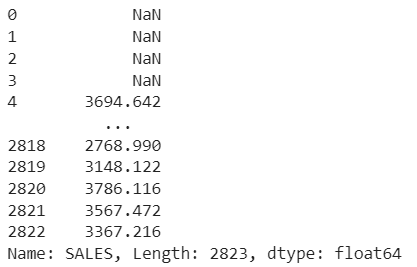
Using this method, we can create a rolling window to view data. We can specify a rolling window of any size. If the window size is 5, then it means a 5-day data window at that time. It can help you remove fluctuations in your data and help identify patterns over time.

For ex-

rolling_avg = df["SALES"].rolling(window=5).mean()

Output:

10 Essential Pandas Functions Every Data Scientist Should Know

9. Cross Tabulation

We can perform cross-tabulation between two columns of a table. It is generally a frequency table that shows the frequency of occurrences of various categories. It can help you to understand the distribution of categories across different regions.

For ex-,

Getting a cross-tabulation between the COUNTRY and DEALSIZE.

cross_tab = pd.crosstab(df["COUNTRY"], df["DEALSIZE"])

It can show you the order size (‘DEALSIZE’) ordered by different countries.

10 Essential Pandas Functions Every Data Scientist Should Know

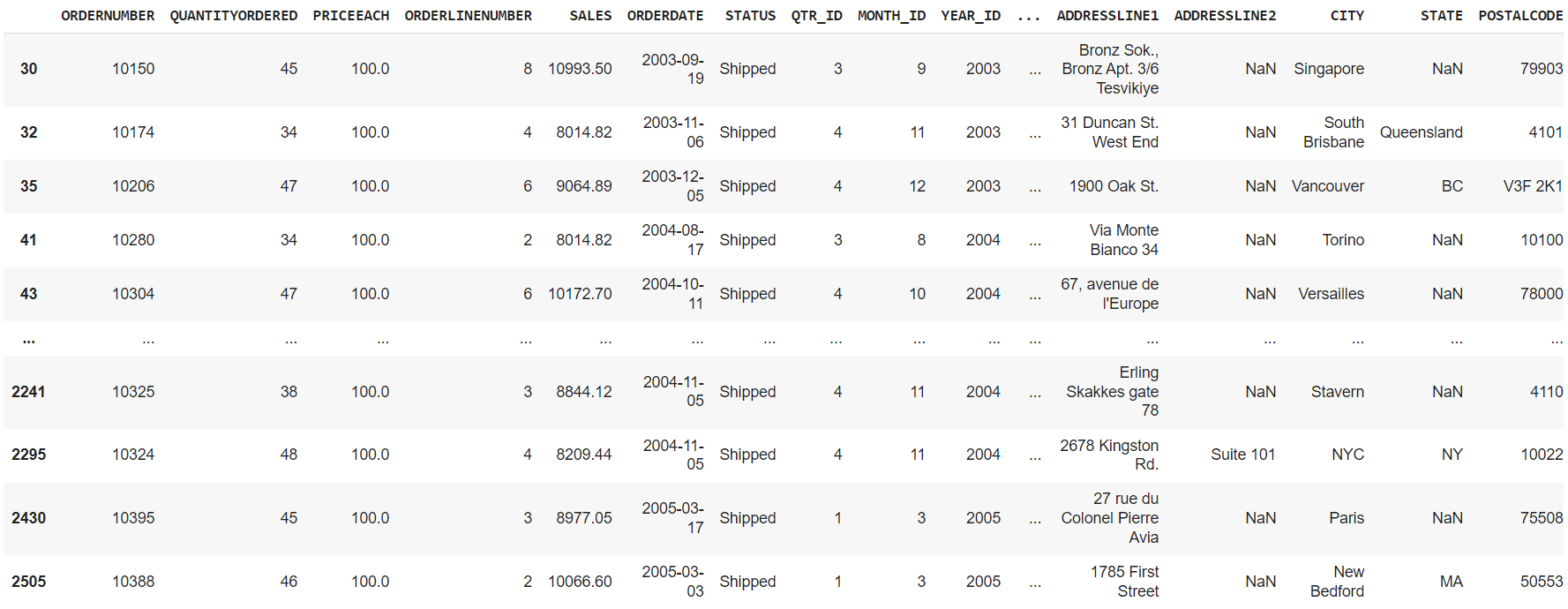
10. Handling Outliers

Outliers in data means that a particular point goes far beyond the average range. Let’s understand it through an example. Suppose you have 5 points, say 3, 5, 6, 46, 8. Then we can clearly say that the number 46 is an outlier because it is far beyond the average of the rest of the points. These outliers can lead to wrong statistics and should be removed from the dataset.

Here pandas come to the rescue to find these potential outliers. We can use a method called Interquartile Range(IQR), which is a common method for finding and handling these outliers. You can also read about this method if you want information on it. You can read more about them here.

Let’s see how we can do that using pandas.

Q1 = df["SALES"].quantile(0.25)  Q3 = df["SALES"].quantile(0.75)  IQR = Q3 - Q1  lower_bound = Q1 - 1.5 * IQR  upper_bound = Q3 + 1.5 * IQR    outliers = df[(df["SALES"] < lower_bound) | (df["SALES"] > upper_bound)]

Q1 is the first quartile representing the 25th percentile of the data and Q3 is the third quartile representing the 75th percentile of the data.

lower_bound variable stores the lower bound that is used for finding potential outliers. Its value is set to 1.5 times the IQR below Q1. Similarly, upper_bound calculates the upper bound, 1.5 times the IQR above Q3.

After which, you filter out the outliers that are less than the lower or greater than the upper bound.

10 Essential Pandas Functions Every Data Scientist Should Know Wrapping it Up

Python pandas library enables us to perform advanced data analysis and manipulations. These are only a few of them. You can find some more tools in this pandas documentation. One important thing to remember is that the selection of techniques can be specific which caters to your needs and the dataset you are using.

Aryan Garg is a B.Tech. Electrical Engineering student, currently in the final year of his undergrad. His interest lies in the field of Web Development and Machine Learning. He have pursued this interest and am eager to work more in these directions.

More On This Topic

  • KDnuggets™ News 22:n03, Jan 19: A Deep Look Into 13 Data…
  • KDnuggets News, May 25: The 6 Python Machine Learning Tools Every…
  • The 6 Python Machine Learning Tools Every Data Scientist Should Know About
  • 12 Docker Commands Every Data Scientist Should Know
  • Three R Libraries Every Data Scientist Should Know (Even if You Use Python)
  • Top Five SQL Window Functions You Should Know For Data Science Interviews

Humane Ai Pin Marks the Beginning of the End of  Smartphones 

Humane Ai recently released a demo video of their Ai Pin, which is expected to launch on November 16, 2023 for US customers, and most likely to follow global customers, starting next year, priced at $699 (INR 58K).

The device strikingly resembles Star Trek’s insignia badge that is used for communication. It has no screen, and users can interact with it using voice, touchpad, gestures, or by holding up objects in front of it to capture. It also has a laser projector that can display text on your hand.

“We were able to pack a lot of technology into something really small. AI can create an experience that allows the computer to essentially take a back seat” said Chaudhari in the demo video.

The $24 per month subscription plan includes a dedicated phone number, and it works independently without needing a phone, paving the way for what is known as, ambient computing.

“Ai Pin is the embodiment of our vision to integrate AI into the fabric of daily life, enhancing our capabilities without overshadowing our humanity,” the founders said during the release.

Founded in 2018 by former Apple employees and innovators Imran Chaudhri and Bethany Bongiorno, Humane looks to remove the barrier of communications and engage seamlessly.

Chaudhri has spent more than 20 years helping build the Mac, iPod, iPad, Apple Watch, and iPhone and has more than thousand patents to his name. Bongiorno has led teams as a Director of Software Engineering at Apple during her eight year tenure.

Change is coming…

Many believe that a Humane Ai Pin would make smartphones redundant soon. “This is blowing my mind. Just the kind of wearable that would get me off of many phone for a while. This is going to change the game,” said one of the users on YouTube, who goes by the name, docmantis9863.

The former employees of a company that manufactured iPhones said the goal was to recreate the functionality of the iPhone without the addictive elements, such as the dopamine effect from refreshing a Facebook feed or swiping to view TikTok videos. Ken Kocienda, Humane’s head of product engineering, said, “It’s more of a pull than pushing content at you in the way iPhones do.”

The Humane Ai Pin is a device equipped with a camera, motion sensors, depth sensors, and a microphone, allowing it to record surroundings and respond to voice commands. It also features a ‘personic speaker’ and supports Bluetooth headphones.

It lacks a traditional screen and compensates for it with a projector that displays

green-coloured content on the user’s hand, as demonstrated in the video release. The device includes a touchpad on the smartphone and requires physical activation of the voice assistant with a button.

The operating system, Cosmos, focuses on security, intelligent technology, and a user-friendly interface.

The unique two-piece design offers a choice in 3 colours, with wireless and magnetic attachment options. “The device is powered by a Snapdragon CPU and Qualcomm AI Engine, the Ai Pin provides quick and reliable performance for AI interactions,” explained Chaudhari.

Bongiorno emphasised in the demo video that privacy is the priority. The device lights up only when prompted by the user with voice or tap commands. The Trust Light blinks during audio or video recording, and recorded content is accessible on Humane.center. Bongiorno clarified that, “If the device is being tampered with physically, the Ai Pin shuts down, and can only be restored by Humane.”

First impression

The brooch-like device was seen worn by Naomi Campbell on the ramp of Paris Fashion Week at the end of last month. The clever marketing campaign piqued interest in the device but, “What does it really do?” is the question users on social media are asking.

The internet has seen mixed reactions to this new technology from its users. While some were impressed with the new approach of the device and its integration with multiple AI tools.

Some were not impressed and X users were quick to point out the multiple errors spouted by the pin in the demo video. Gary Marcus posed the question, “One key question, aside from the use case questions many have rightly raised, is how reliable the AI underneath is.” Hallucinations have been a persistent issue dogging AI and it occurs in every device it inhabits.

The comparisons to the efficiency of current smartphones seem a little unfair as this is only the first iteration of the product. Humane AI will see further versions of their device as they’re getting major investments from Microsoft, Sam Altman and are the recipients of a generous $230 million in 4 rounds of funding.

Altman said in an interview that being the first AI device is no guarantee of success. “That will be up to customers to decide. Maybe it’s a bridge too far or maybe people will like it better than their phones,” he said.

The post Humane Ai Pin Marks the Beginning of the End of Smartphones appeared first on Analytics India Magazine.

Amazon is working on its own ChatGPT competitor. Meet project Olympus

Amazon and AI logos

While Amazon has not shied away from developing and adopting generative AI across its different platforms, the company is yet to unveil its own rival to ChatGPT. However, a new report suggests the company is investing millions into a new large language model (LLM).

On Wednesday, The Information published a report that revealed Amazon is building its own conversational LLM, codenamed 'Olympus'. The report was informed by a person with direct knowledge.

Also: Watch out: Generative AI will level up cyber attacks, according to new Google report

Olympus is being developed to be sold to corporate customers, much like the enterprise solutions that OpenAI and Microsoft offer, such as ChatGPT Enterprise or Microsoft Copliot, according to the report.

Amazon's new LLM will supposedly be used to power new features in its online retail store, Alexa voice assistant across its Echo devices, and its Amazon Web Services unit, according to the insider.

Olympus could be announced as soon as the upcoming AWS re:Invent 2023 event and is slated to perform better than Titan, a group of LLMs that AWS is currently selling to cloud customers and whose capacity is inferior to competitors, such as OpenAI's GPT-4.

According to a Reuters report informed by two people familiar with the matter, Olympus will have two trillion parameters.

Also: Google's Performance Max gets new AI tools to help automate ad creation even further

For context, GPT-4, OpenAI's most advanced LLM, has one one trillion parameters, making Amazon's model twice as big and potentially one of the largest LLMs ever built, according to the report

ZDNET reported rumors of Amazon building its own AI chatbot as early as May, which was based on job listings that Amazon posted that pointed to an AI chatbot-building initiative.

After BloombergGPT, Bloomberg Unveils IB Connect, Improving Digital Transformation

Financial giant Bloomberg has introduced a new service called IB Connect: Intra-Firm Chatbots to enhance clients’ digital transformation efforts. This service allows Bloomberg Terminal users to incorporate proprietary chatbots into IB chat rooms exclusively for members of the same firm. Intra-firm chatbots assist in surfacing crucial information from internal systems within IB, aiding in-house business intelligence discoverability.

IB Connect, a suite of services, facilitates seamless integration between Bloomberg Terminal and firms’ in-house workflow tools, thereby improving collaboration among colleagues.

The Intra-Firm Chatbots service offers two-way integration, linking a client’s applicable IB chat rooms with their internal systems. It employs natural language processing to organise unstructured IB data and makes the enriched information available to the client’s Intra-Firm Chatbots. Clients can use a provided software development kit to customise these chatbots according to their firm’s tech stack and internal workflow.

Bloomberg offers two types of client chatbot capabilities via IB Connect: Q&A Intra-Firm Chatbots and Notification Intra-Firm Chatbots. Q&A Chatbots enable two-way communication to fetch actionable intelligence from clients’ systems, while Notification Chatbots provide timely alerts and business intelligence within the IB environment without disrupting ongoing team communication.

Back in April, Bloomberg had unveiled BloombergGPT, a specialised LLM tailored for the finance industry. With training based on 700 billion tokens from both Bloomberg’s vast financial data archives and public datasets, this 50-billion parameter model is designed to enhance existing NLP tasks like sentiment analysis, news classification, and query-related tasks in the financial domain.

However, it has limitations, including being monolingual (English only) and potentially carrying biases and toxicity, issues common in LLMs. Unlike its multilingual counterparts like BLOOM and GPT-3, BloombergGPT’s singular language focus could limit its training input diversity.

Read more: What BloombergGPT Brings to the Finance Table

The post After BloombergGPT, Bloomberg Unveils IB Connect, Improving Digital Transformation appeared first on Analytics India Magazine.

Using ChatGPT to Help Land a Data Science Job

https://www.kdnuggets.com/wp-content/uploads/wijaya_chatgpt_help_land_data_science_job_14.png
Image by jcomp on Freepik

Data science job is a competitive field where thousands of people fight for that one spot, especially for junior positions. Every data science job that was posted was usually swarmed by applicants. Even when announcing an internship position, there would be so many applicants.

With so much competition, we need to stand out from the others. How is it exactly to stand out in the sea of applicants? There are many ways, such as having a stellar resume, a great portfolio, or a fantastic interview. It’s hard to perform everything I mentioned, but now we can rely on ChatGPT.

How could ChatGPT help us land a data science job? Let’s get into it.

As a side note, I would use ChatGPT Plus for this article. You can still follow the article, but there are a few things you can’t replicate.

Creating Resume

A resume is an essential tool for any employment candidate as it summarises everything employers need to know about you professionally. With a resume, you would get anywhere with the employment. Many people need help creating an appropriate resume for a data scientist. That’s why we would ask ChatGPT to help us create them.

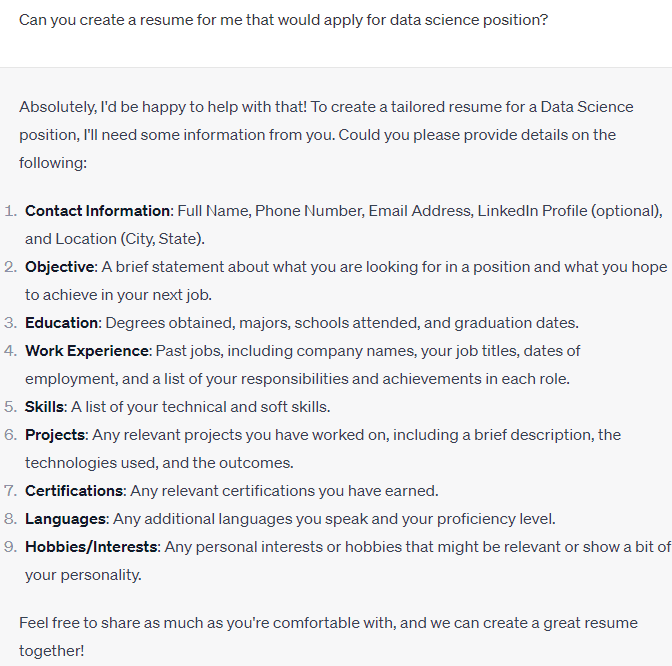
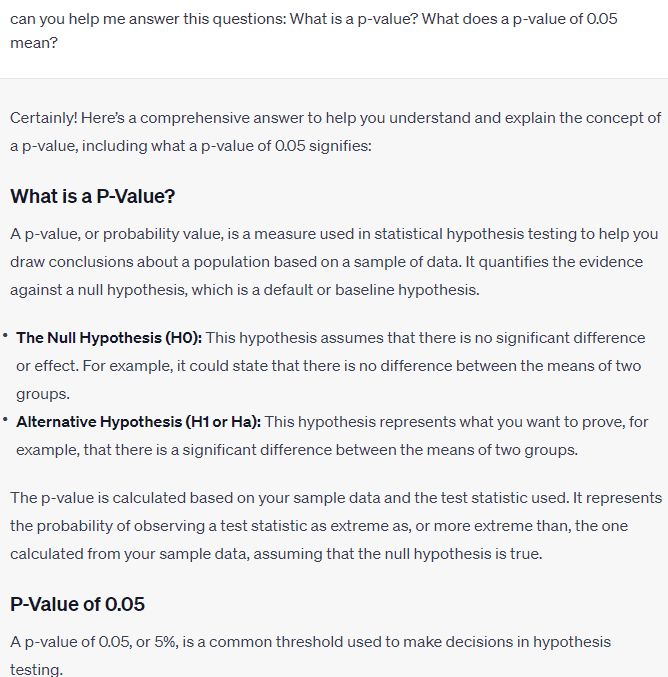
For example, I asked ChatGPT to create a resume for me, and the model asked for your information so they could fill it out.

https://www.kdnuggets.com/wp-content/uploads/wijaya_chatgpt_help_land_data_science_job_14.png

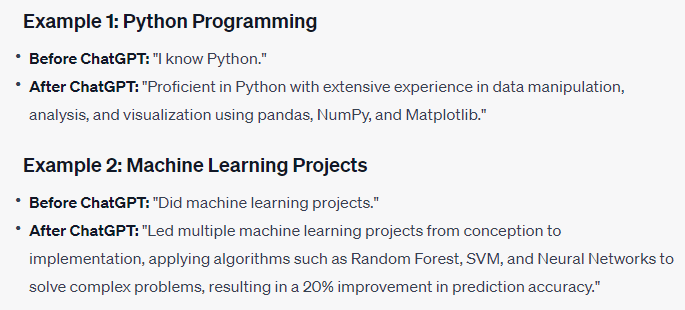
Also, we can use ChatGPT to improve the language used in the Resume to be more eye-catching. For example, here are suggestions that ChatGPT could give to expand your experience.

https://www.kdnuggets.com/wp-content/uploads/wijaya_chatgpt_help_land_data_science_job_14.png

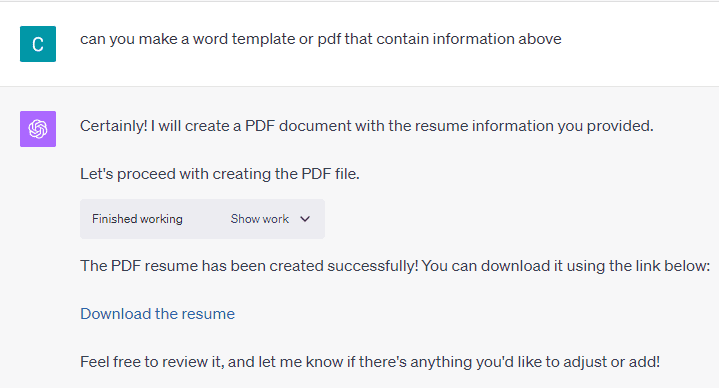
If you are using ChatGPT Plus, you can use the advanced data analysis to create the template based on the information you have given.

https://www.kdnuggets.com/wp-content/uploads/wijaya_chatgpt_help_land_data_science_job_14.png

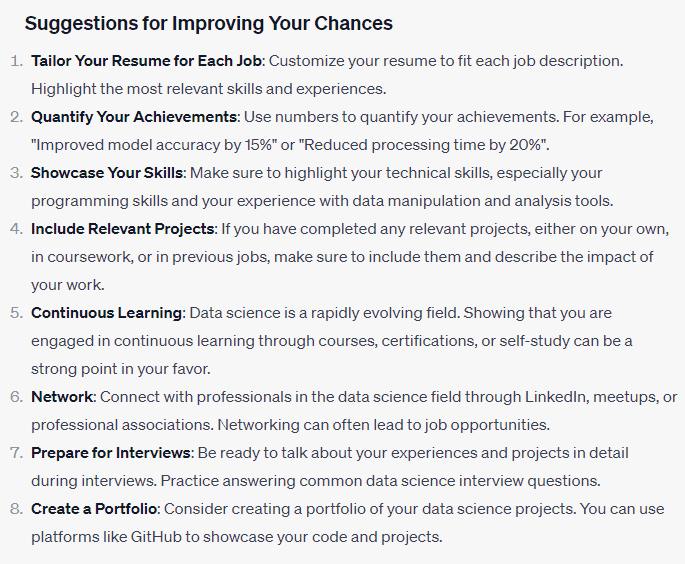
Additionally, you could ask ChatGPT for tips to improve your chance of landing a data science job.

https://www.kdnuggets.com/wp-content/uploads/wijaya_chatgpt_help_land_data_science_job_14.png

With all the templates and suggestions provided, ChatGPT would help increase your chance of landing a data science job.

Skill Improvement and Portfolio Preparation

ChatGPT allows users to improve their chances of landing a data science job by identifying the essential skills and giving resources for upskilling. We can also provide the job link or description to the ChatGPT and ask the model to analyse how we can land the job.

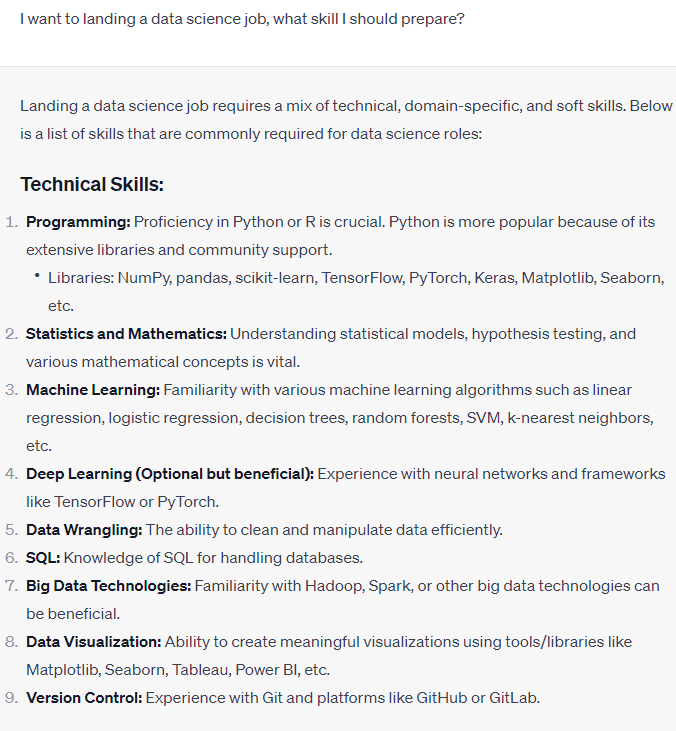
For example, I asked ChatGPT to identify skills necessary for a Data Science job.

https://www.kdnuggets.com/wp-content/uploads/wijaya_chatgpt_help_land_data_science_job_14.png

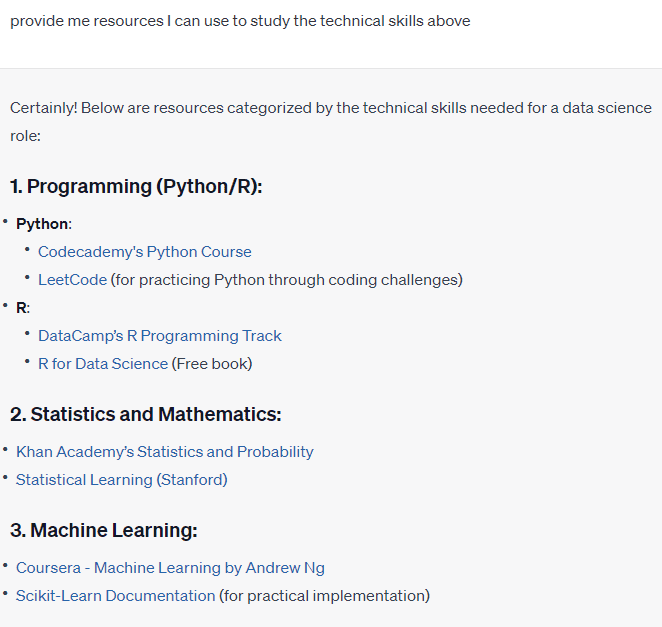
We get a complete list of skills essential to land the data science job. With the list in hand, we can ask ChatGPT to provide the references for all these skills. Below is the example prompt I ask ChatGPT.

https://www.kdnuggets.com/wp-content/uploads/wijaya_chatgpt_help_land_data_science_job_14.png

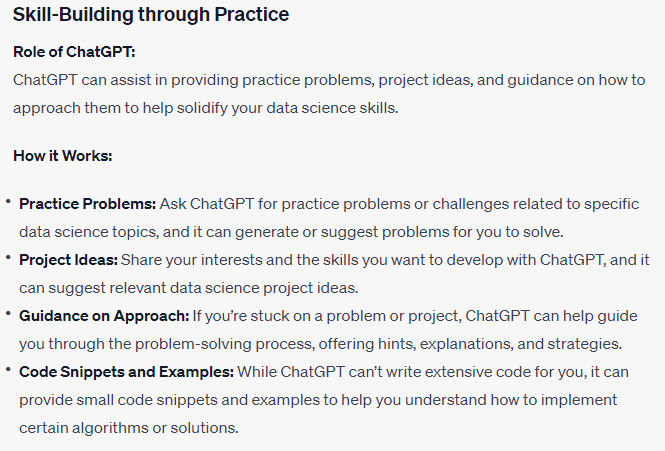
Lastly, ChatGPT can act as your personal data science tutor and give you feedback based on your performance. I have previously written more about it in my previous article here. The following is an example of ChatGPT's explanation of how it could act as your tutor.

https://www.kdnuggets.com/wp-content/uploads/wijaya_chatgpt_help_land_data_science_job_14.png

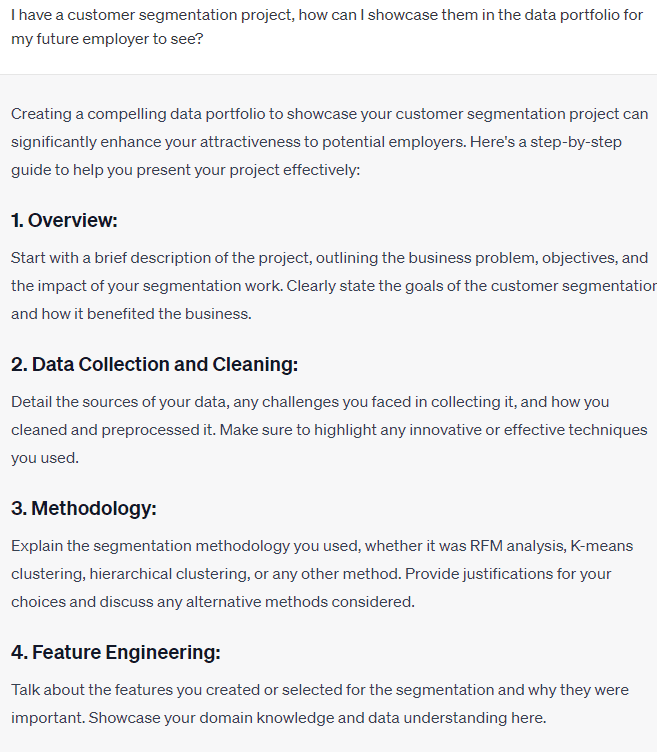
You have learned the skills, but it would be nothing if you did not show it as a Portfolio. That’s why we can ask ChatGPT to guide us in setting up our Data Science Portfolio. For example, I asked ChatGPT how to set up my customer segmentation project portfolio.

https://www.kdnuggets.com/wp-content/uploads/wijaya_chatgpt_help_land_data_science_job_14.png

The steps are long, but we can ask for further details from ChatGPT if we have any problem understanding them.

Job Information Searching

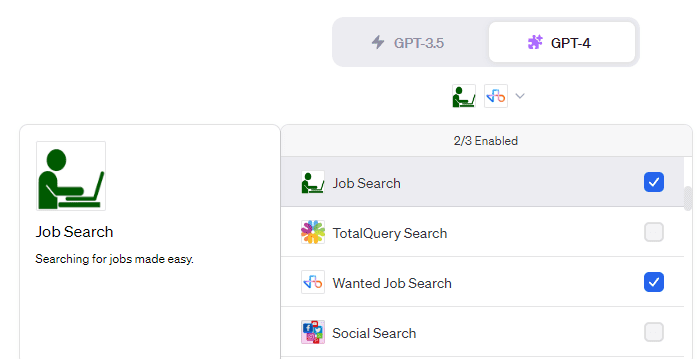
We can optimally direct ChatGPT to look for the job listing information. With the help of web browsing and the plugin, we can transform the ChatGPT into a job search engine. For example, I set the Job Search and Wanted Job Search plugin like in the below image.

https://www.kdnuggets.com/wp-content/uploads/wijaya_chatgpt_help_land_data_science_job_14.png

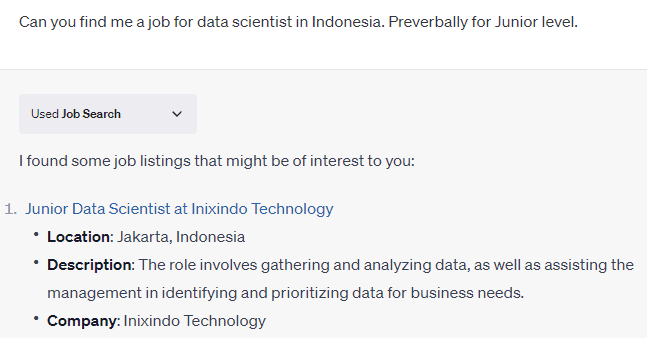
Then I asked ChatGPT to find me a job for a Junior Data Scientist Position in Indonesia. The result is shown in the image below.

https://www.kdnuggets.com/wp-content/uploads/wijaya_chatgpt_help_land_data_science_job_14.png

ChatGPT would then provide links for the available job and bring out the basic description of the role. You can tweak the prompt to see if job listings suit your situation.

Interview Preparations

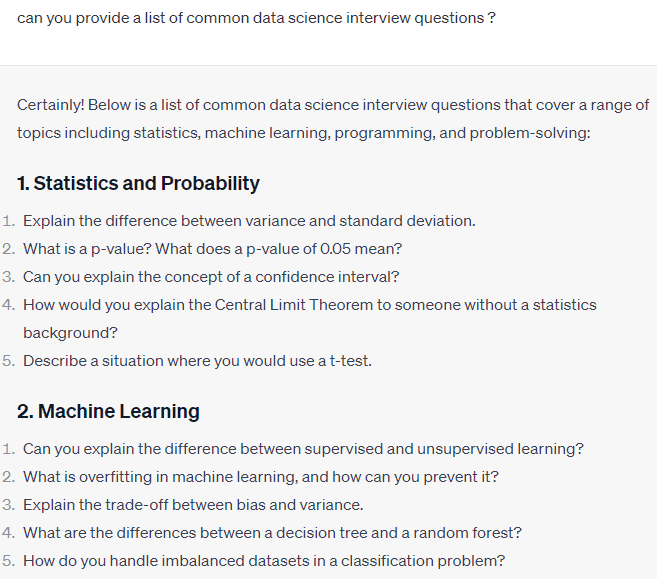
ChatGPT can help prepare your interview by providing common questions during the interview process and how to answer them. Additionally, we can also ask for suggestions on how to act during the interview. For example, we ask ChatGPT to provide the questions in the image below.

https://www.kdnuggets.com/wp-content/uploads/wijaya_chatgpt_help_land_data_science_job_14.png

With the list of common questions, we can answer them independently or ask ChatGPT to help us answer them. For example, ChatGPT would explain one of the questions above.

https://www.kdnuggets.com/wp-content/uploads/wijaya_chatgpt_help_land_data_science_job_14.png

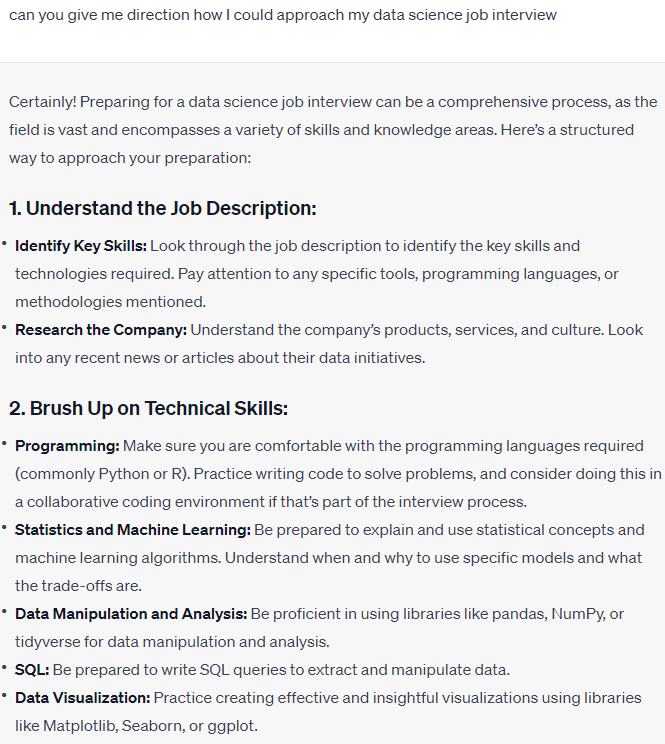
We can also use ChatGPT to provide us with suggestions on how to approach the interview. For example, I asked ChatGPT how to approach my data science interview.

https://www.kdnuggets.com/wp-content/uploads/wijaya_chatgpt_help_land_data_science_job_14.png

ChatGPT would give us actionable tips on what we should do and provide us with the way to approach it.

Conclusion

Data Science is a competitive field with thousands of applicants coming for one job essentially. To stand out from the other applicants, we need to be innovative. That’s why we can use ChatGPT to help us gain an edge. Using ChatGPT, we can have a better resume, improve our skills, prepare our portfolio, find the job listing, and practice for the interview. With all these uses, ChatGPT would undoubtedly help you land a data science job.

Cornellius Yudha Wijaya is a data science assistant manager and data writer. While working full-time at Allianz Indonesia, he loves to share Python and Data tips via social media and writing media.

More On This Topic

  • A Data Science Portfolio That Will Land You The Job
  • Unable to Land a Data Science Job? Here’s Why
  • KDnuggets™ News 22:n05, Feb 2: 7 Steps to Mastering Machine…
  • Data Science Projects That Will Land You The Job in 2022
  • A Data Science Portfolio That Will Land You The Job in 2022
  • 3 Data Science Projects Guaranteed to Land You That Job