Top KDnuggets Posts of 2023: Free Learning Resources and More

Top KDnuggets Posts of 2023: Free Learning Resources and More
Image by author

Happy holidays, everyone.

With 2023 almost in the books, KDnuggets is happy to share that we are bringing to a close our most successful year yet! We have experienced unparalleled levels of readership this year, have brought on scores of new readers, and covered topics worthy of our audience's time, all while fostering relationships with our partners and sponsors.

As the year comes to an end, it's time to review what you — the readers — have made the most popular posts of the year on KDnuggets.

This list is based on the number of raw views of all posts published on the site between January 1, 2023, and the date of writing (December 14, 2023). We will be publishing a pared down schedule over the coming few weeks, and with the holidays upon us it makes more sense to perform this assessment now and get it out of the way. Do be sure to keep this publication date caveat in mind, however.

Also keep in mind that KDnuggets' traffic increased dramatically more and more so toward the end of the year, and so articles published later in the year are more well represented than those published earlier on, by and large.

And now, without further ado, here are the 20 most popular KDnuggets posts published in 2023.

  1. 5 Free Books to Master Data Science by Eugenia Anello
  2. 5 Free Courses to Master Machine Learning by Bala Priya C
  3. 3 Ways to Access GPT-4 for Free by Abid Ali Awan
  4. 5 Free Courses to Master Data Science by Bala Priya C
  5. 5 Free University Courses on Data Analytics by Nisha Arya
  6. 7 Best Platforms to Practice SQL by Bala Priya C
  7. 5 Free Books to Master Machine Learning by Kanwal Mehreen
  8. 3 Data Science Projects Guaranteed to Land You That Job by Nate Rosidi
  9. 10 GitHub Repositories to Master Machine Learning by Abid Ali Awan
  10. The ChatGPT Cheat Sheet by KDnuggets
  11. 11 Python Magic Methods Every Programmer Should Know by Bala Priya C
  12. 365 Data Science Offers Free Course Access Until Nov. 20 by 365 Data Science
  13. Introduction to Databases with SQL: Free Harvard Course by Bala Priya C
  14. Create Stunning Data Viz in Seconds with ChatGPT by Abid Ali Awan
  15. 5 Free Tools For Detecting ChatGPT, GPT3, and GPT2 by Abid Ali Awan
  16. ChatGPT for Data Science Cheat Sheet by KDnuggets
  17. Drag, Drop, Analyze: The Rise of No-Code Data Science by Saqib Jan
  18. 5 Super Cheat Sheets to Master Data Science by Abid Ali Awan
  19. 4 Ways to Generate Passive Income Using ChatGPT by Youssef Rafaat
  20. 8 Open-Source Alternative to ChatGPT and Bard by Abid Ali Awan

See any common themes? We sure do!

We want to thank our immensely talented writing staff for their hard work all year long! It's great to see that their insights and expertise do not go unnoticed by our readers. You can find out more about the writing staff here.

We also thank each and every community member who has submitted an article for publication throughout the year. These additional insights are also very much appreciated, and we are happy to be able to provide a platform for quality data science related content to reach a wider readership than it otherwise might. Keep those submissions coming in the new year.

Thanks again, and we will see you in 2024.

More On This Topic

  • Top 3 Free Resources to Learn Linear Algebra for Machine Learning
  • 15 More Free Machine Learning and Deep Learning Books
  • How to Get Up and Running with SQL — A List of Free Learning Resources
  • Top Free Resources To Learn ChatGPT
  • 3 More Free Top Notch Natural Language Processing Courses
  • Top Free Data Science Online Courses for 2023

Midjourney’s V6 Brings New Era of AI Image Generation

Midjourney's V6, the latest iteration of the esteemed AI image generation tool, has just been released as an alpha release, marking a significant milestone in the realm of artificial intelligence and digital creativity. This new version arrives as a much-anticipated upgrade for enthusiasts and professionals alike, bringing with it a suite of enhancements that promise to redefine the standards of AI-generated imagery.

Midjourney, known for its ability to transform textual descriptions into vivid visual representations, has been at the forefront of AI-driven artistry. With each version, the tool has pushed the boundaries of what's possible in the convergence of AI and graphic design.

Enhancements in Midjourney V6

One of the most lauded improvements in Midjourney V6 is its heightened capability to produce more realistic and detailed images. This advancement addresses a crucial aspect of AI image generation – the pursuit of lifelike accuracy. The images now exhibit a remarkable level of detail.

Another groundbreaking feature in V6 is its ability to render legible text within images. Earlier versions of Midjourney, like many AI image tools, struggled with creating clear and coherent text, often resulting in garbled or nonsensical characters. The introduction of this feature in V6 is a significant leap, opening up new possibilities for designers and artists who wish to incorporate textual elements into their AI-generated visuals.

Moreover, V6 brings an improved natural language understanding for prompts, requiring users to adopt new methods for interacting with the tool. This enhancement means that users can now craft prompts with greater specificity and clarity, allowing for more refined control over the generated images. This change, while requiring a period of adjustment for long-time users, is indicative of the tool's growing sophistication and its ability to cater to more nuanced artistic visions.

Midjourney V6

Community Response and Adaptation

The release of Midjourney V6 has sparked a wave of excitement and curiosity within the AI art community. Users of the platform, ranging from graphic designers to AI enthusiasts, have eagerly explored the new features, sharing their experiences and creations on various social media platforms. The enhanced realism and the ability to include legible text have been particularly well-received, with many highlighting these features as game-changers in AI-assisted art creation.

However, the transition to V6 has not been without its challenges. The updated natural language processing for prompts means that users accustomed to previous versions have had to adapt their approach. This learning curve, while initially a hurdle for some, is also seen as an opportunity to delve deeper into the art of crafting effective prompts, ultimately leading to more refined and targeted image outputs.

The user-generated content since the release of V6 showcases a diverse range of applications and artistic expressions. From intricately detailed landscapes to complex urban scenes, the images shared by the community demonstrate the tool’s enhanced capabilities. Additionally, the integration of legible text has opened up new avenues for creativity, allowing artists to blend visual and textual elements in innovative ways.

Midjourney V6

Technical Advancements and Developer Notes

On the technical front, Midjourney V6 represents a significant leap forward. The developers have focused on enhancing the tool's coherence, model knowledge, and image prompting capabilities. These improvements are not just incremental updates but are indicative of the sophisticated algorithms and computational techniques employed in the tool's development.

David Holz, the visionary behind Midjourney, has emphasized the importance of these advancements. The improved model knowledge, for instance, allows for a more intuitive interpretation of user prompts, leading to images that more accurately reflect the users' intentions. The enhanced image prompting and remix capabilities offer users greater creative freedom and flexibility, enabling them to push the boundaries of their artistic visions.

One of the key technical highlights is the introduction of minor text drawing ability. This feature, which allows users to include specific text within their images, is a testament to the developers' commitment to addressing user feedback and continually refining the tool's capabilities.

Holz has also noted the importance of adapting to the new prompting methods in V6. This adaptation is crucial for users to fully leverage the tool's enhanced capabilities and achieve the desired results. The development team's ongoing dialogue with the user community plays a pivotal role in this regard, ensuring that Midjourney remains responsive and user-friendly.

The development of V6, involving nine months of dedicated effort, is a reflection of the commitment to pushing the envelope in AI image generation. It underscores the rapidly evolving landscape of AI technology and its increasing significance in creative industries.

Midjourney V6's Role in Shaping AI Art

Midjourney V6 stands as a testament to the dynamic and rapidly evolving field of AI-assisted image generation. This latest version not only introduces groundbreaking features but also challenges and inspires its user community to explore new creative possibilities. The enhanced realism, the ability to render legible text, and improved prompt understanding mark a significant step forward in the tool's development, demonstrating the immense potential of AI in the realm of digital artistry.

Looking ahead, Midjourney V6's advancements are likely to inspire further innovation in the field of AI image generation. As the tool continues to evolve, it will undoubtedly open up new horizons for artists, designers, and creators, blurring the lines between human and machine creativity.

As we witness the continuous integration of AI into creative realms, it's clear that tools like Midjourney are not just transforming how art is made but also reshaping our understanding of creativity itself.

Arkon Energy raises $110M to grow U.S. bitcoin mining capacity, launch AI cloud service in Norway

Arkon Energy raises $110M to grow U.S. bitcoin mining capacity, launch AI cloud service in Norway Jacquelyn Melinek 9 hours

Arkon Energy, a data center infrastructure company, closed a $110 million private funding round to expand its operations, the company’s CEO Josh Payne shared exclusively with TechCrunch.

The round was led by Bluesky Capital Management and included participation from Kestrel 0x1, Nural Capital and Florence Capital.

The company launched in 2021 and began with a 5-megawatt site in Australia. It’s since grown to over 130 megawatts and has expanded into other countries and regions like the U.S. and Europe.

“These sites appeal to both bitcoin miners and AI [or] machine learning clients who have very high power computing demands,” Payne said. For context, 1 megawatt can power between 400 to 900 homes a year, according to the Nuclear Regulatory Commission.

About $80 million will be used to acquire an additional 200-megawatt capacity across new data centers in Ohio, North Carolina and Texas as part of its plan to increase the company’s total megawatts by 130% by mid-2024. This is in addition to Arkon’s existing 100-megawatt facility in Ohio that it purchased in June, Payne noted.

“The U.S. is an attractive market for us in many ways, largely because of the enormous domestic customer demand, a mature and robust energy industry with several flexible and deregulated markets, political and regulatory stability, and attractiveness to institutional investors,” Payne said. “The U.S. has an abundance of stranded, underutilized power generation assets that are connected to some of the lowest-cost electricity sources in the world, many which are renewable.”

The company’s U.S. data center portfolio is largely occupied by institutional-grade bitcoin mining companies, Payne said. “We are essentially a landlord who owns the underlying infrastructure assets.”

Arkon’s business model focuses on strategically acquiring distressed data center assets across the globe. “The current and future demand for data center capacity of all types that we are seeing globally, but especially in the U.S., is unprecedented and monumental. The customers we service have energy-intensive platforms that require an immense amount of electrical infrastructure that is professionally managed and operated.”

The remaining $30 million will be used toward developing an artificial intelligence cloud service project at Arkon’s data center in Norway to help service generative AI and large language model training markets. “Over the last year, there has been a profound market acceleration in demand for generative AI and large learning model applications,” he said.

But, there is an undersupply of specialized physical infrastructure to power the computers and serves behind most of these products. Arkon aims to fill that gap by providing the underlying infrastructure layer that the AI sector relies on.

In the past year, there has been a “meteoric rise in AI applications” as well as potential growth and adoption for bitcoin in mainstream institutional markets as a spot ETF approval looms, which makes specialized data centers like Arkon’s “poised to continue scaling exponentially,” Payne said.

How to Access and Use Gemini API for Free

How to Access and Use Gemini API for Free
Image by Author

Gemini is a new model developed by Google, and Bard is becoming usable again. With Gemini, it is now possible to get almost perfect answers to your queries by providing them with images, audio, and text.

In this tutorial, we will learn about the Gemini API and how to set it up on your machine. We will also explore various Python API functions, including text generation and image understanding.

Introducing Gemini AI Models

Gemini is a new AI model developed through collaboration between teams at Google, including Google Research and Google DeepMind. It was built specifically to be multimodal, meaning it can understand and work with different types of data like text, code, audio, images, and video.

Gemini is the most advanced and largest AI model developed by Google to date. It has been designed to be highly flexible so that it can operate efficiently on a wide range of systems, from data centers to mobile devices. This means that it has the potential to revolutionize the way in which businesses and developers can build and scale AI applications.

Here are three versions of the Gemini model designed for different use cases:

  • Gemini Ultra: Largest and most advanced AI capable of performing complex tasks.
  • Gemini Pro: A balanced model that has good performance and scalability.
  • Gemini Nano: Most efficient for mobile devices.
How to Access and Use Gemini API for Free
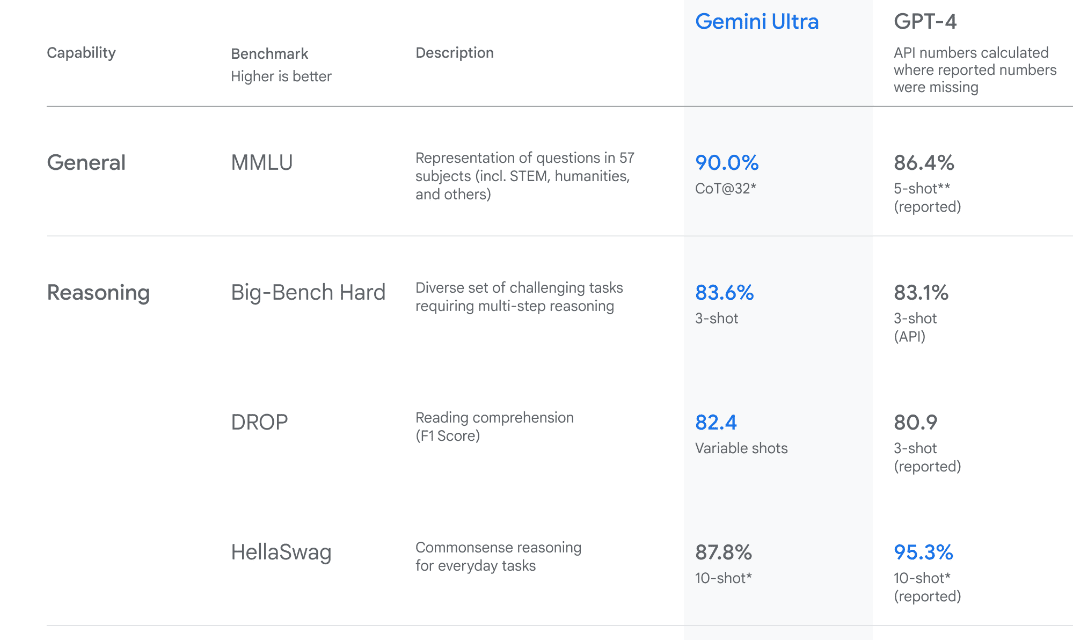
Image from Introducing Gemini

Gemini Ultra has state-of-the-art performance, exceeding the performance of GPT-4 on several metrics. It is the first model to outperform human experts on the Massive Multitask Language Understanding benchmark, which tests world knowledge and problem solving across 57 diverse subjects. This showcases its advanced understanding and problem-solving capabilities.

Setting up

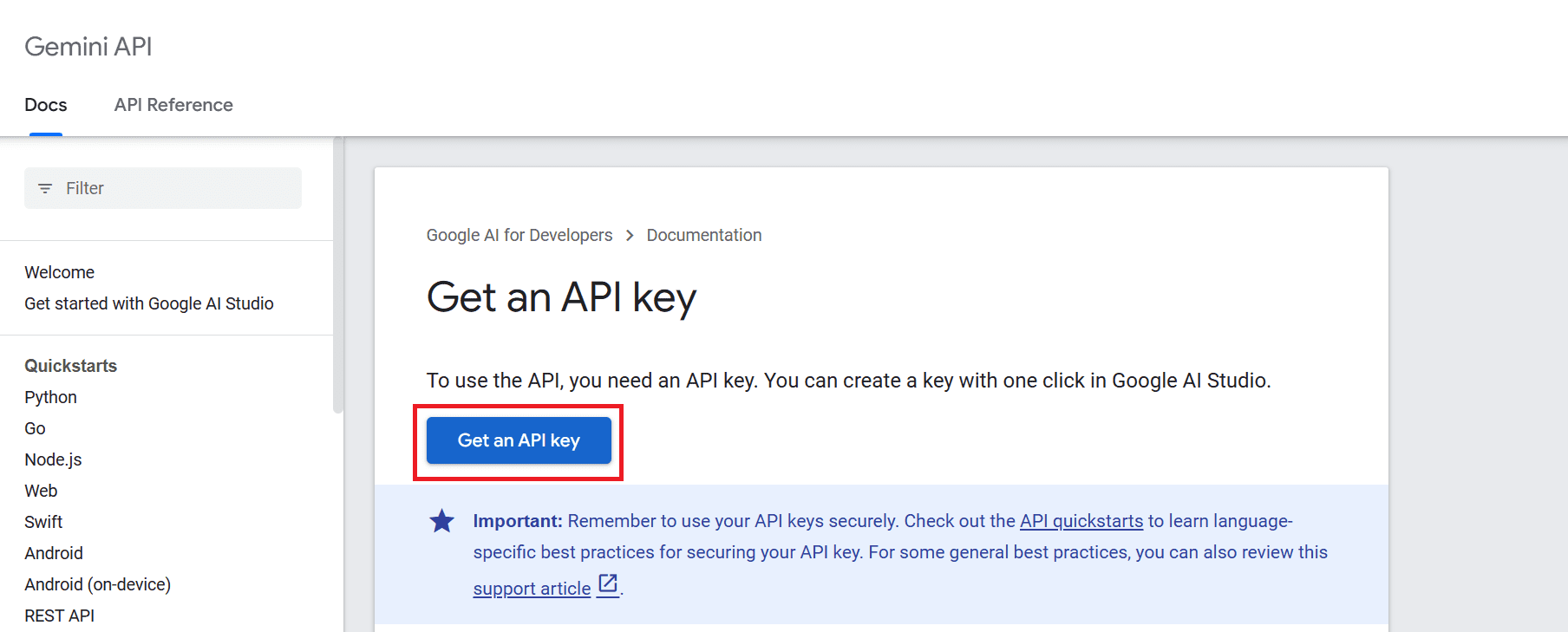
To use the API, we have to first get an API key that you can can from here: https://ai.google.dev/tutorials/setup
How to Access and Use Gemini API for Free

After that click on “Get an API key” button and then click on “Create API key in new project”.
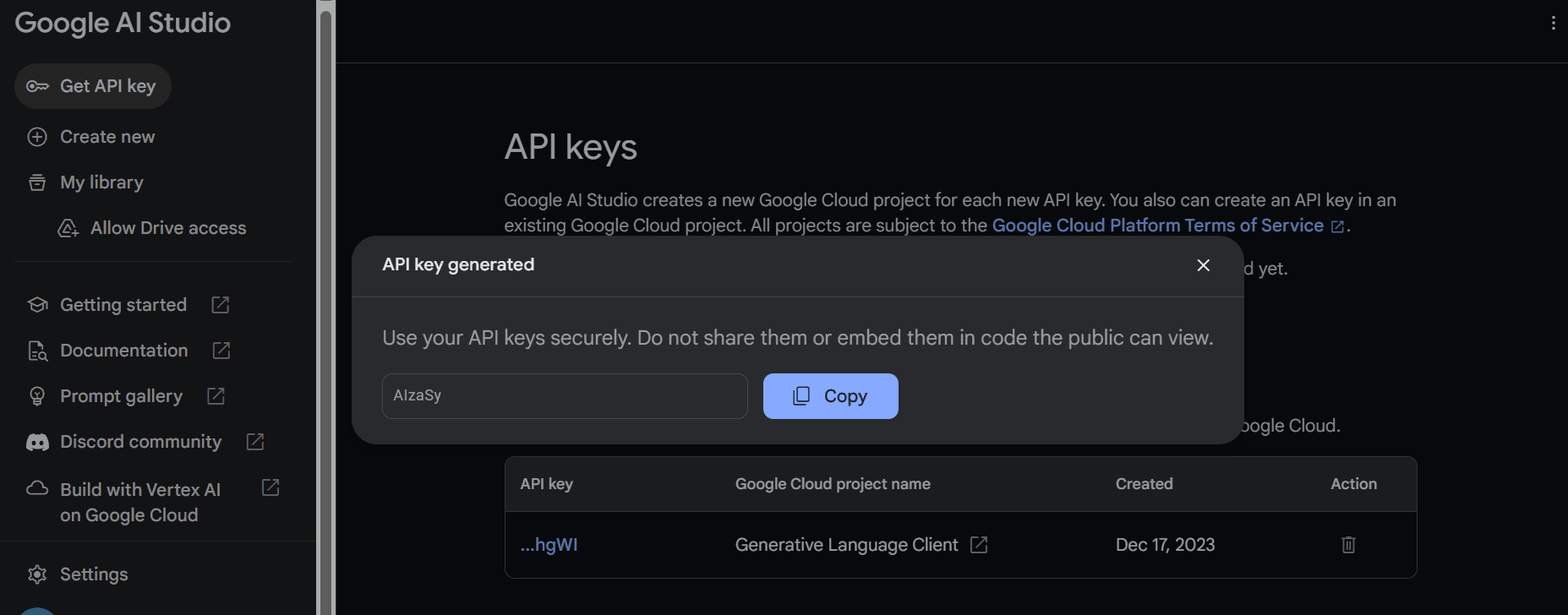
How to Access and Use Gemini API for Free

Copy the API key and set it as an environment variable. We are using Deepnote and it is quite easy for us to set the key with the name “GEMINI_API_KEY”. Just go to the integration, scroll down and select environment variables.
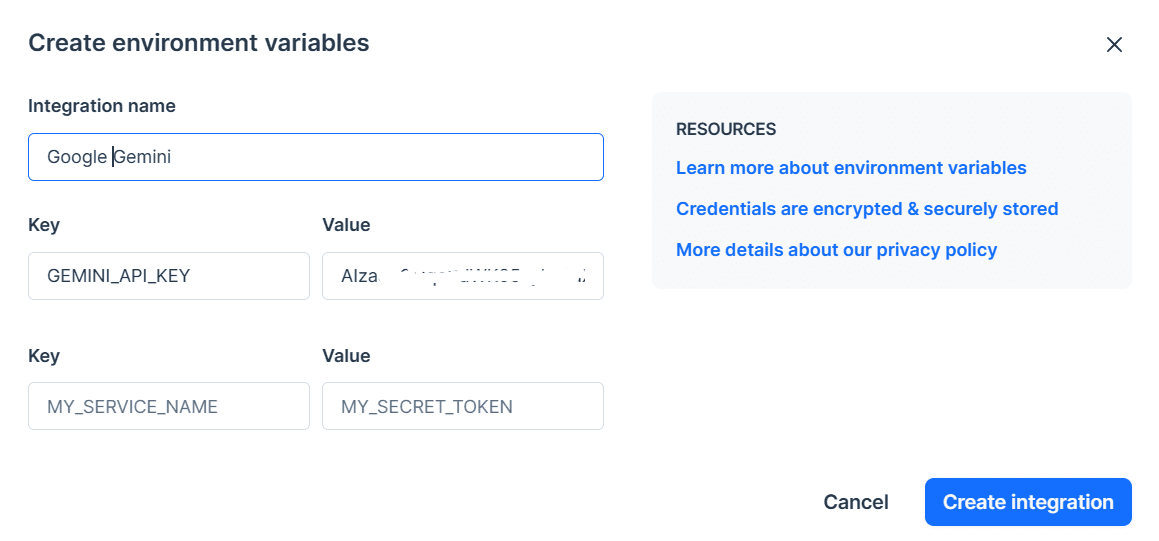
How to Access and Use Gemini API for Free

In the next step, we will instal the Python API using PIP:

pip install -q -U google-generativeai

After that, we will set the API key to Google’s GenAI and initiate the instance.

import google.generativeai as genai  import os    gemini_api_key = os.environ["GEMINI_API_KEY"]  genai.configure(api_key = gemini_api_key)

Using Gemini Pro

After setting up the API key, using the Gemini Pro model to generate content is simple. Provide a prompt to the `generate_content` function and display the output as Markdown.

from IPython.display import Markdown    model = genai.GenerativeModel('gemini-pro')  response = model.generate_content("Who is the GOAT in the NBA?")    Markdown(response.text)

This is amazing, but I don't agree with the list. However, I understand that it's all about personal preference.
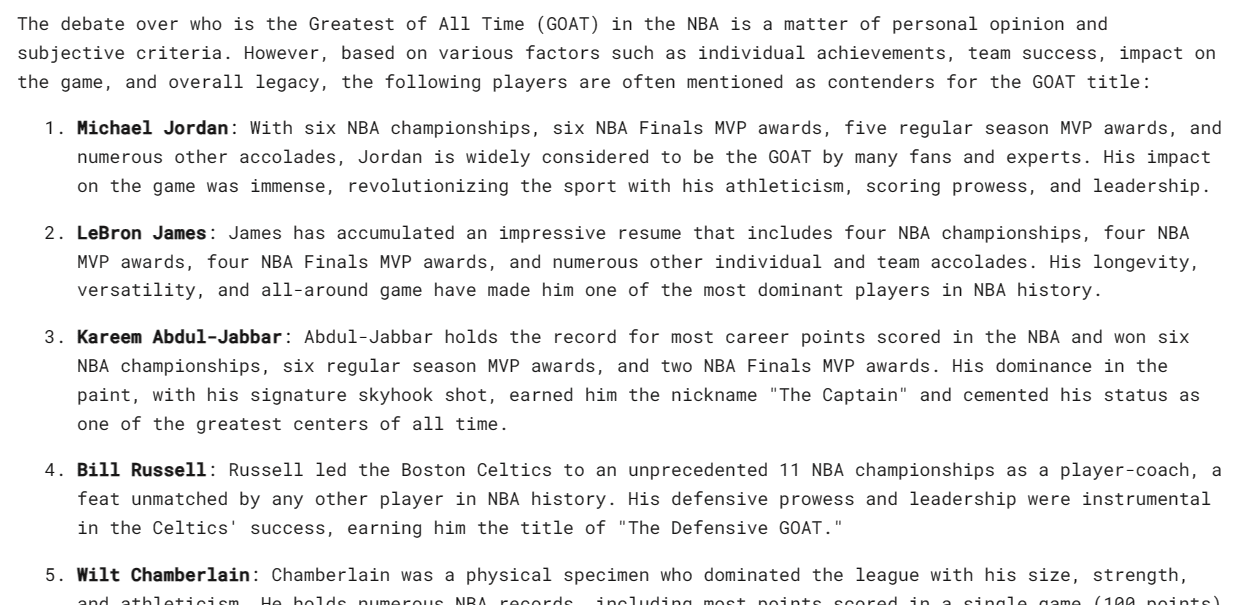
How to Access and Use Gemini API for Free

Gemini can generate multiple responses, called candidates, for a single prompt. You can select the most suitable one. In our case, we had only one respons.

response.candidates
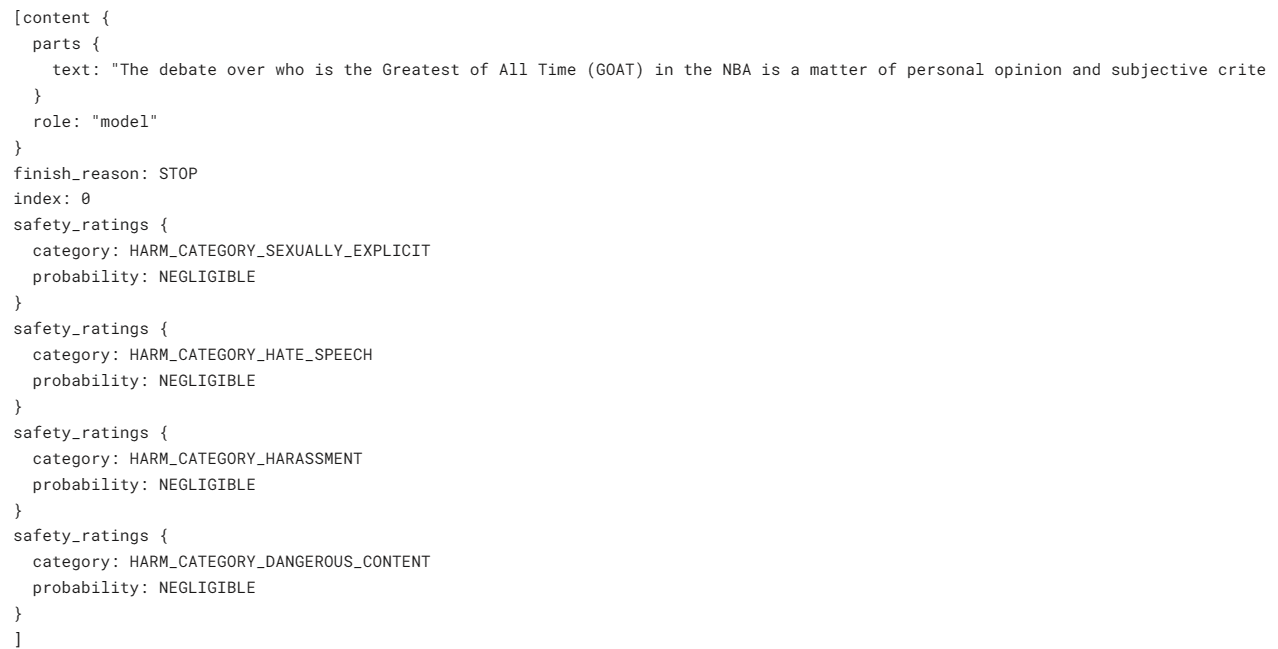
How to Access and Use Gemini API for Free

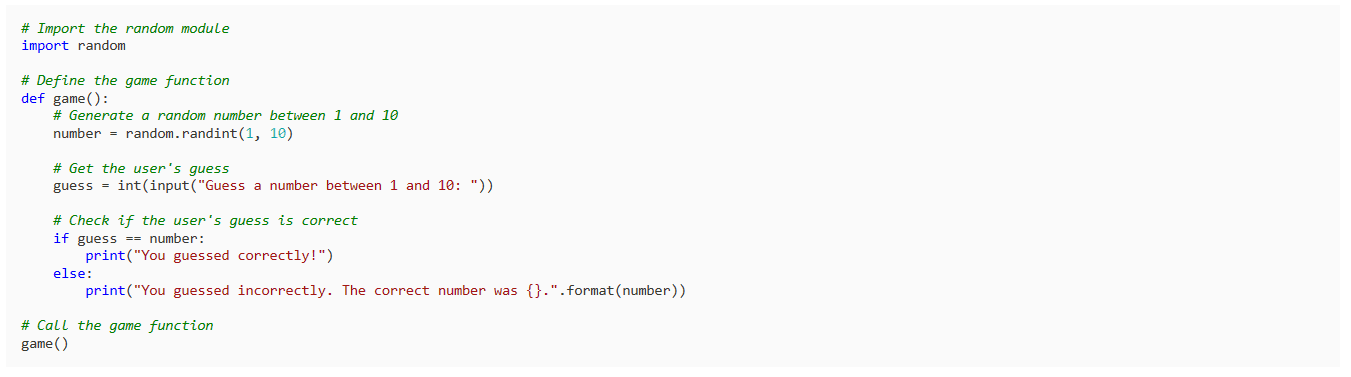
Let’s ask it to write a simple game in Python.

response = model.generate_content("Build a simple game in Python")    Markdown(response.text)

The result is simple and to the point. Most LLMs start to explain the Python code instead of writing it.
How to Access and Use Gemini API for Free

Configuring the Response

You can customize your response using the `generation_config` argument. We are limiting candidate count to 1, adding the stop word "space," and setting max tokens and temperature.

response = model.generate_content(      'Write a short story about aliens.',      generation_config=genai.types.GenerationConfig(          candidate_count=1,          stop_sequences=['space'],          max_output_tokens=200,          temperature=0.7)  )    Markdown(response.text)

As you can see, the response stopped before the word “space”. Amazing.

How to Access and Use Gemini API for Free

Streaming Response

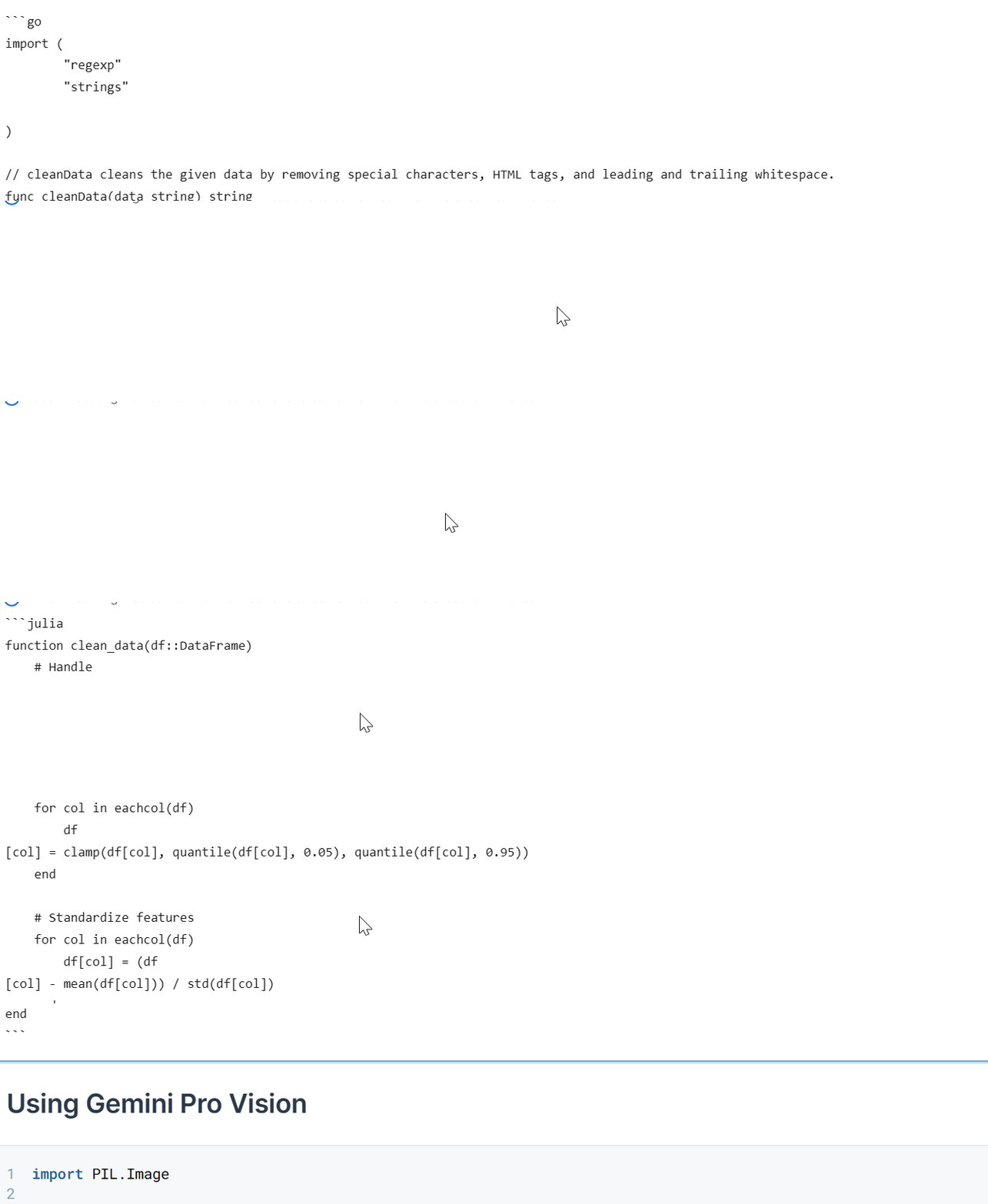
You can also use the `stream` argument to stream the response. It is similar to the Anthropic and OpenAI APIs but faster.

model = genai.GenerativeModel('gemini-pro')  response = model.generate_content("Write a Julia function for cleaning the data.", stream=True)    for chunk in response:      print(chunk.text)
How to Access and Use Gemini API for Free

Using Gemini Pro Vision

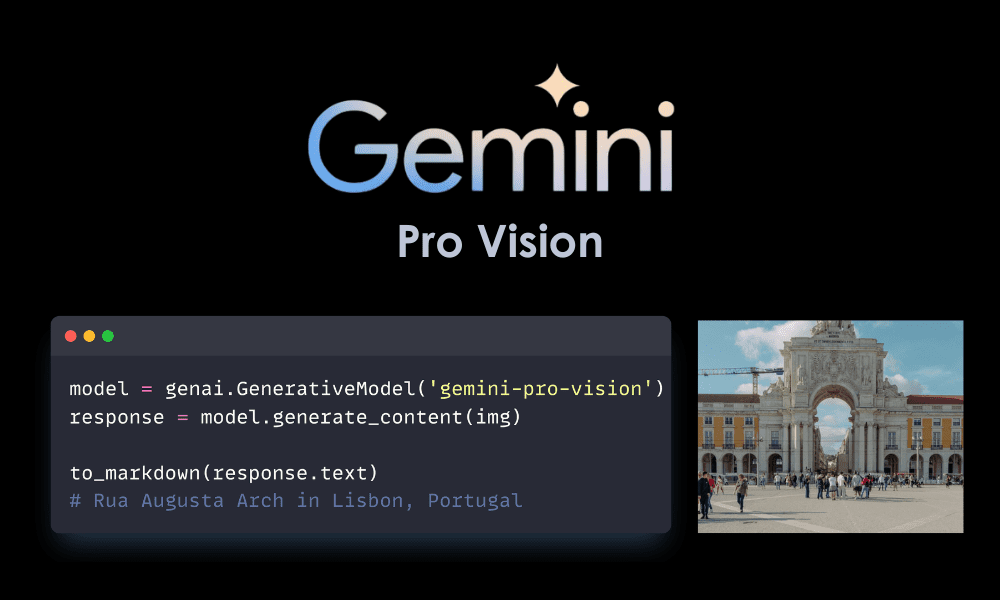
In this section, we will load Masood Aslami's photo and use it to test the multimodality of Gemini Pro Vision.

Load the images to the `PIL` and display it.

import PIL.Image    img = PIL.Image.open('images/photo-1.jpg')    img

We have a high quality photo of Rua Augusta Arch.

How to Access and Use Gemini API for Free

Let’s load the Gemini Pro Vision model and provide it with the image.

model = genai.GenerativeModel('gemini-pro-vision')    response = model.generate_content(img)    Markdown(response.text)

The model accurately identified the palace and provided additional information about its history and architecture.

How to Access and Use Gemini API for Free

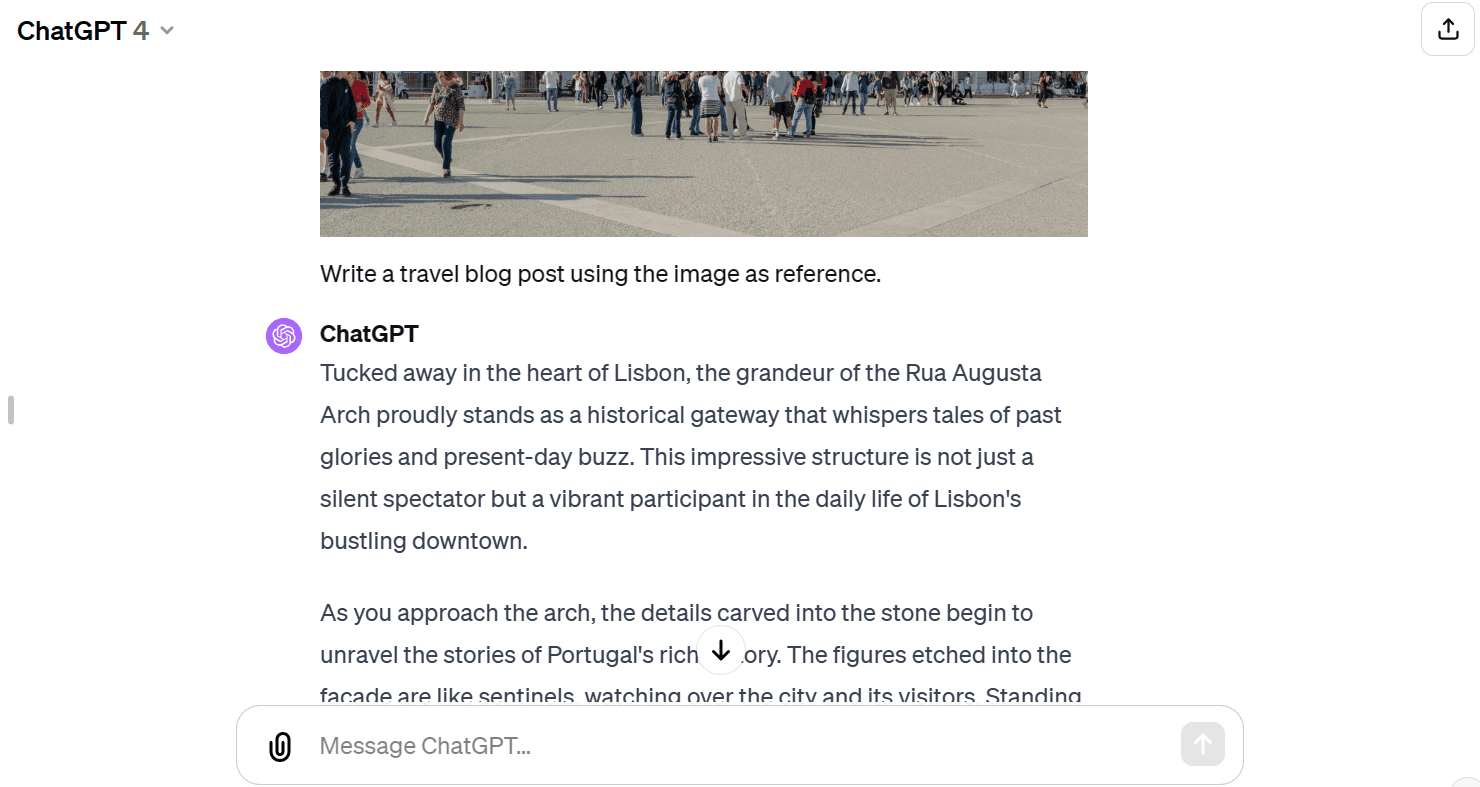
Let’s provide the same image to the GPT-4 and ask it about the image. Both models have provided almost similar answers. But I like the GPT-4 response more.

How to Access and Use Gemini API for Free

We will now provide text and the image to the API. We have asked the vision model to write a travel blog using the image as reference.

response = model.generate_content(["Write a travel blog post using the image as reference.", img])    Markdown(response.text)

It has provided me with a short blog. I was expecting longer format.

How to Access and Use Gemini API for Free

Compared to GPT-4, the Gemini Pro Vision model has struggled to generate a long-format blog.
How to Access and Use Gemini API for Free

Chat Conversations Session

We can set up the model to have a back-and-forth chat session. This way, the model remembers the context and response using the previous conversations.

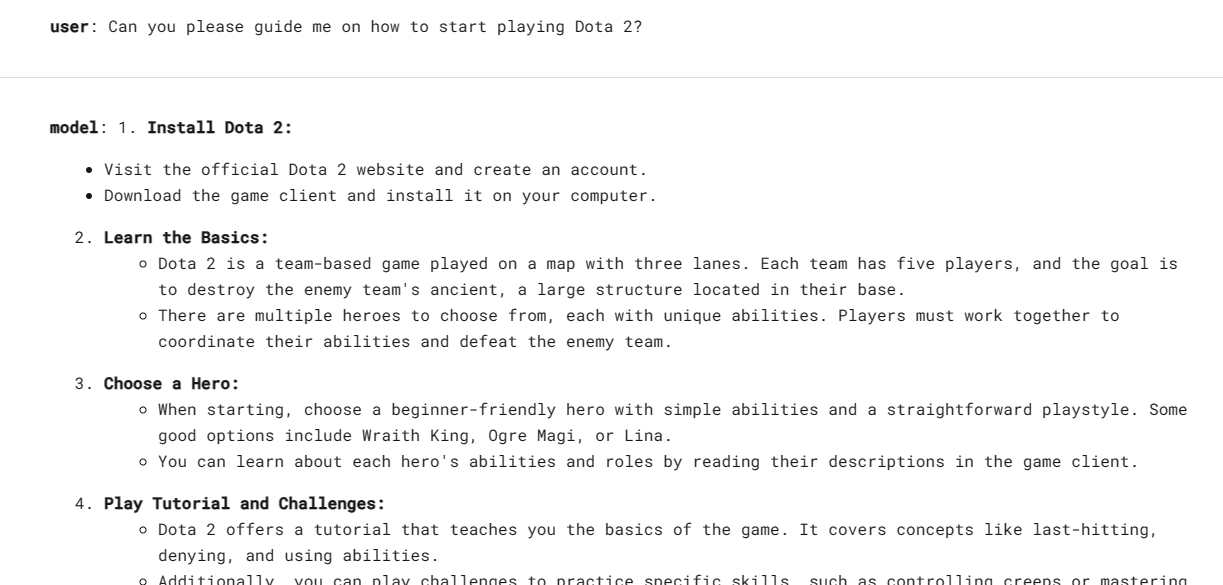
In our case, we have started the chat session and asked the model to help me get started with the Dota 2 game.

model = genai.GenerativeModel('gemini-pro')    chat = model.start_chat(history=[])    chat.send_message("Can you please guide me on how to start playing Dota 2?")    chat.history

As you can see, the `chat` object is saving the history of the user and mode chat.

How to Access and Use Gemini API for Free
We can also display them in a Markdown style.

for message in chat.history:      display(Markdown(f'**{message.role}**: {message.parts[0].text}'))
How to Access and Use Gemini API for Free

Let’s ask the follow up question.

chat.send_message("Which Dota 2 heroes should I start with?")    for message in chat.history:      display(Markdown(f'**{message.role}**: {message.parts[0].text}'))

We can scroll down and see the entire session with the model.
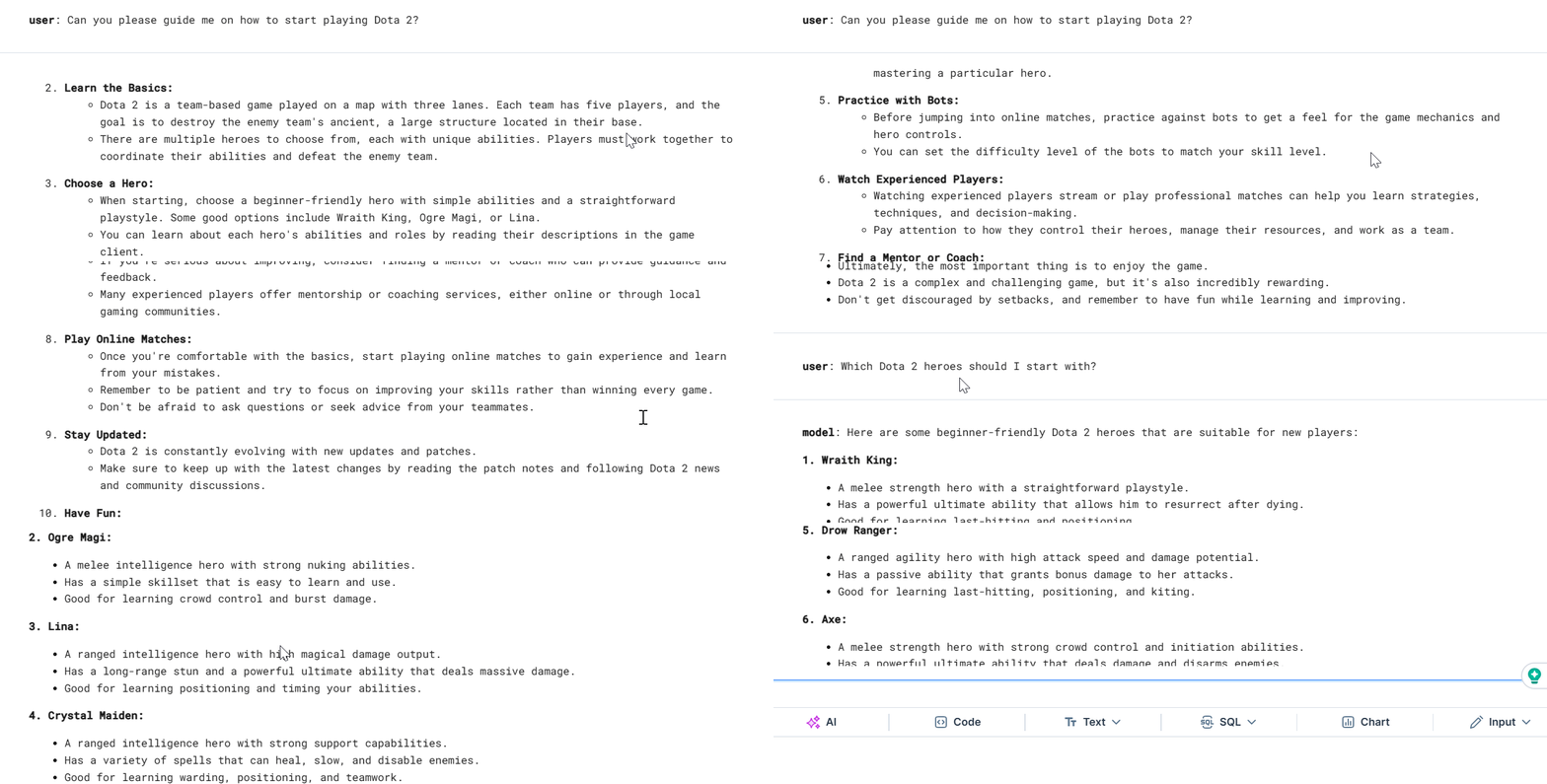
How to Access and Use Gemini API for Free

Using Embeddings

Embedding models are becoming increasingly popular for context-aware applications. The Gemini embedding-001 model allows words, sentences, or entire documents to be represented as dense vectors that encode semantic meaning. This vector representation makes it possible to easily compare the similarity between different pieces of text by comparing their corresponding embedding vectors.

We can provide the content to `embed_content` and convert the text into embeddings. It is that simple.

output = genai.embed_content(      model="models/embedding-001",      content="Can you please guide me on how to start playing Dota 2?",      task_type="retrieval_document",      title="Embedding of Dota 2 question")    print(output['embedding'][0:10])
[0.060604308, -0.023885584, -0.007826327, -0.070592545, 0.021225851, 0.043229062, 0.06876691, 0.049298503, 0.039964676, 0.08291664]

We can convert multiple chunks of text into embeddings by passing a list of strings to the 'content' argument.

output = genai.embed_content(      model="models/embedding-001",      content=[          "Can you please guide me on how to start playing Dota 2?",          "Which Dota 2 heroes should I start with?",      ],      task_type="retrieval_document",      title="Embedding of Dota 2 question")    for emb in output['embedding']:      print(emb[:10])
[0.060604308, -0.023885584, -0.007826327, -0.070592545, 0.021225851, 0.043229062, 0.06876691, 0.049298503, 0.039964676, 0.08291664]    [0.04775657, -0.044990525, -0.014886052, -0.08473655, 0.04060122, 0.035374347, 0.031866882, 0.071754575, 0.042207796, 0.04577447]

If you're having trouble reproducing the same result, check out my Deepnote workspace.

Conclusion

There are so many advanced functions that we didn't cover in this introductory tutorial. You can learn more about the Gemini API by going to the Gemini API: Quickstart with Python.

In this tutorial, we have learned about Gemini and how to access the Python API to generate responses. In particular, we have learned about text generation, visual understanding, streaming, conversation history, custom output, and embeddings. However, this just scratches the surface of what Gemini can do.

Feel free to share with me what you have built using the free Gemini API. The possibilities are limitless.

Abid Ali Awan (@1abidaliawan) is a certified data scientist professional who loves building machine learning models. Currently, he is focusing on content creation and writing technical blogs on machine learning and data science technologies. Abid holds a Master's degree in Technology Management and a bachelor's degree in Telecommunication Engineering. His vision is to build an AI product using a graph neural network for students struggling with mental illness.

More On This Topic

  • Free ChatGPT Course: Use The OpenAI API to Code 5 Projects
  • Deep Learning on your phone: PyTorch C++ API for use on Mobile Platforms
  • 15 Trending MLOps Talks You can Access for Free at ODSC East 2022
  • Hone Your Data Skills With Free Access to DataCamp
  • 3 Ways to Access GPT-4 for Free
  • 3 Ways to Access Claude AI for Free

Stanford Finds Abusive Child Imagery in LAION-5B, used by Stable Diffusion

Stanford University recently found that a popular dataset used to train AI, called LAION-5B, had links to child sexual abuse material (CSAM). This dataset was used by the Stable Diffusion creator Stability AI, and it had at least 1,679 harmful pictures taken from social media and adult websites.

Starting from September 2023, researchers at Stanford checked this dataset. They used codes called ‘hashes’ to look at the images. They then sent these codes to tools that verify the harmful content, like PhotoDNA, which was checked by the Canadian Centre for Child Protection.

The LAION website states that the dataset doesn’t keep these pictures in their repositories. It just points to where they are on the internet. An earlier version of Google’s tool, Imagen, used a different version of this dataset, called LAION-400M. But as per the Stanford report, even this older version included “a wide range of inappropriate content including pornographic imagery, racist slurs, and harmful social stereotypes.”

LAION, the group managing the dataset, told Bloomberg that adhering to its ‘zero tolerance’ policy, they quickly took it offline. Stability AI, the company that used it, told the publication that they only used a small part of the dataset, and their guidelines against misuse of the platform(s) made sure it was safe.

However, the researchers from Stanford warn that even if AI is trained with this CSAM data, there might be hidden problems. They are especially concerned about pictures of specific victims appearing repeatedly, the report noted.

Because of this issue, many state lawyers in the US want the government to look into how AI might be misused to harm children and to stop AI from making such harmful CSAM images.

The post Stanford Finds Abusive Child Imagery in LAION-5B, used by Stable Diffusion appeared first on Analytics India Magazine.

Eight Techniques for Powering ChatGPT Content

ChatGPT has established itself as a true powerhouse for a broad range of applications, though there are several techniques that you can use to make it indispensable for your workflow. In this article, I will dig into these and hopefully give you ideas about how you can extend its reach and power.

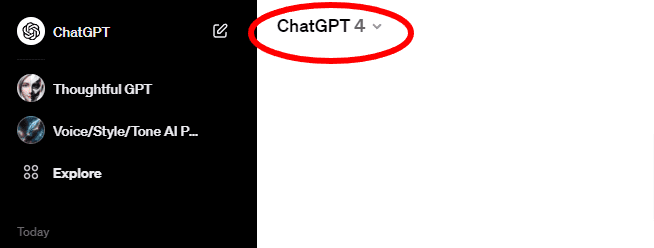
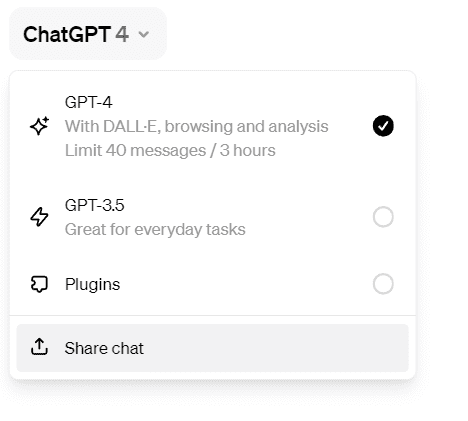
Unless otherwise specified, these tricks are pertinent to ChatGPT 4.0, which can be set in the upper-left-hand corner of the white part of the ChatGPT web page (see Figure 1).

88715710-bdf5-4e69-b8ce-f2274aaddc5b
Figure 1. The version should be ChatGPT 4 (above), unless otherwise noted.

Trick 1. Loading resources from the Internet

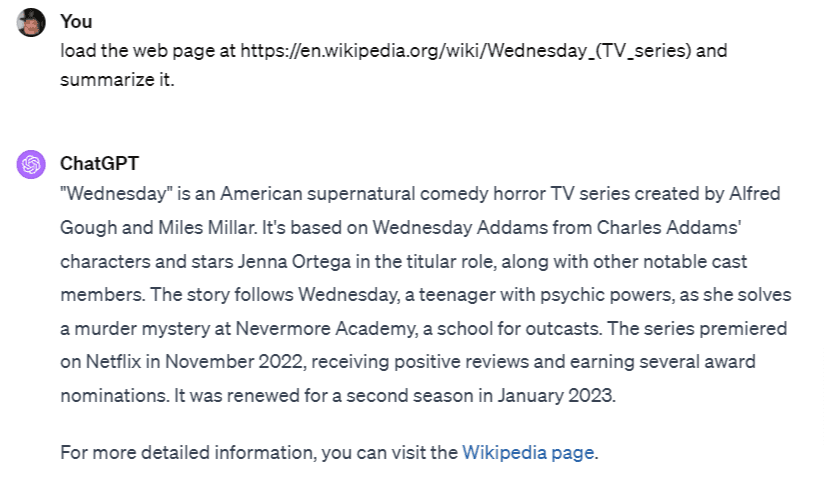
It is possible to pass a URL in a prompt to retrieve the contents of that URL then instruct ChatGPT to do something with the results (Figure 2).

image-17
Figure 2. You can load a page from the Internet and then act upon it (here, summarizing the contents.

The link can be to a web page, an image, a data file with an accessible link, XML or JSON files, even ZIP files and code, with the caveat that a file that is too large will cause the linker to time out.

Trick 2. Retrieving Links from Web Content

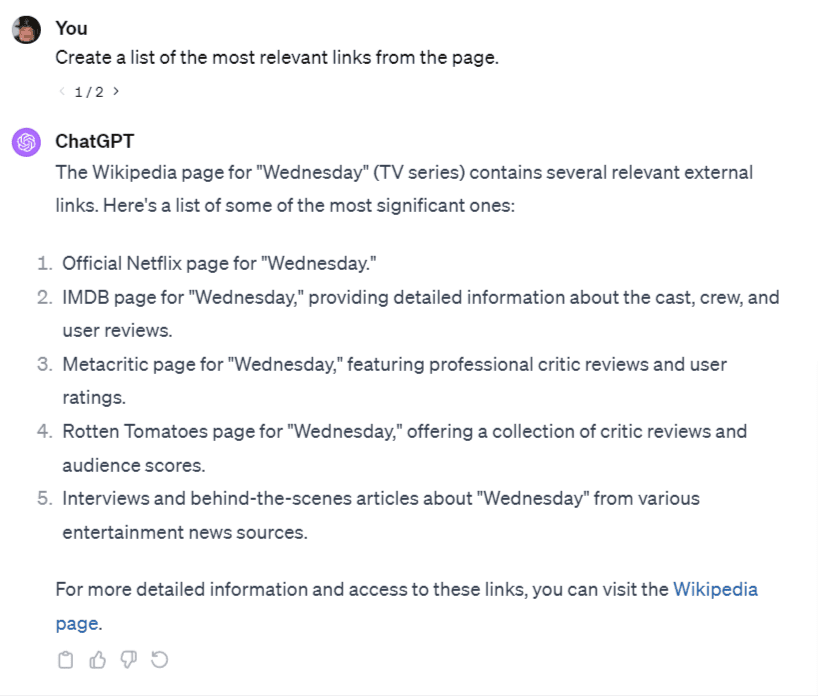
It is possible to retrieve the relevant links on a given page just by asking for them in the prompt (Figure 3), but in order to get active links in the output, you should ask for live links, as shown in Figure 4.

ChatGPT-2
Figure 3. This will retrieve the links to individual content as summaries, but note that these are not live.

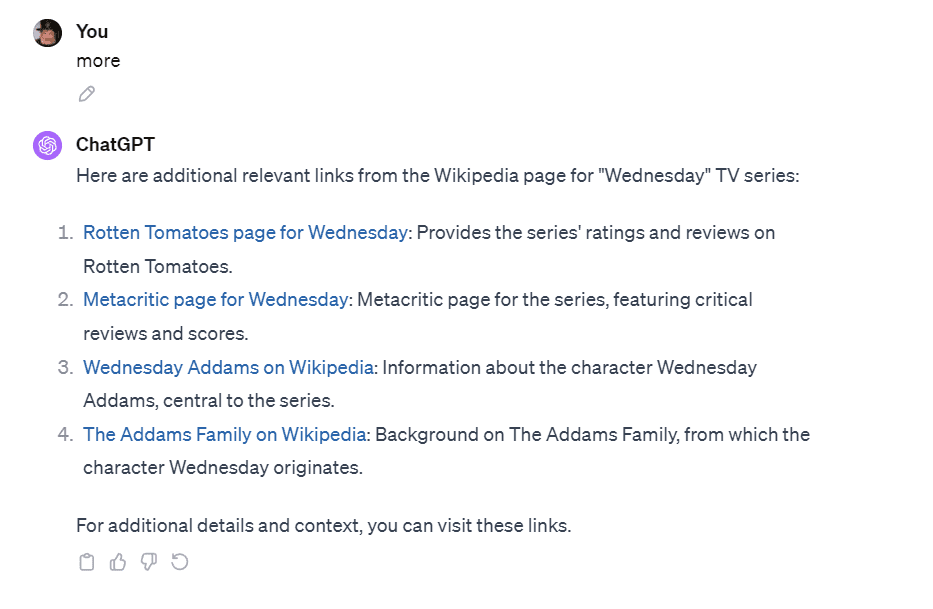
If the list you’ve retrieved seems incomplete, you can also specify “more” in the prompt (Figure 4).

ChatGPT-3
Figure 4

The pencil icon underneath your prompt lets you edit, resave, and run the edited prompt. This will create a new thread designated by 1/n, 2/n and so forth, where n is the total number of threads you’ve created. You can use this to experiment with different prompts to see which most represents your desired outcome. Clicking on the clipboard at the bottom of the prompt result will collapse the threads to the currently selected one.

You can rerun the prompt without changing it by clicking the recycle button (fourth from the left under the prompt response).

Trick 3. Uploading Files From a Local Drive

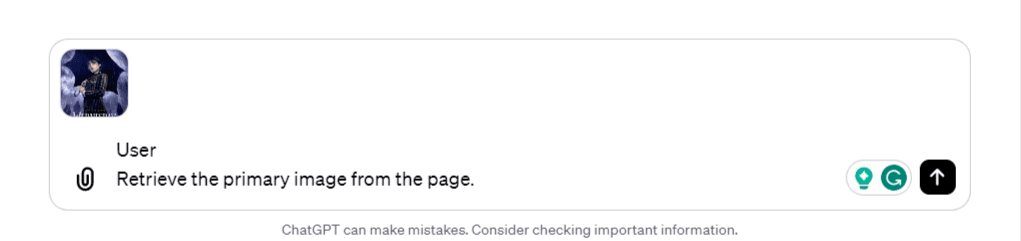
You cannot yet load an image from a URL, but you can save an image to a local drive and load it by pressing the Attach (paperclip) icon to the left of the prompt dialog. Once uploaded, you can query the image to get information about it (or perform other transformations), as shown in Figure 5 and Figure 6.

ChatGPT-6
Figure 5. By uploading an image (or other file), you can query that image for details and do additional processing on it.
Eight Techniques for Powering ChatGPT Content
Figure 6. The ability to summarize images is one of ChatGPT’s better features.

One additional technique – if you need to pull in data files and don’t want to upload them into OpenAI, think about putting them up in a cloud repository service like Google Drive, Microsoft OneDrive, or DropBox, then making those resources publicly available.

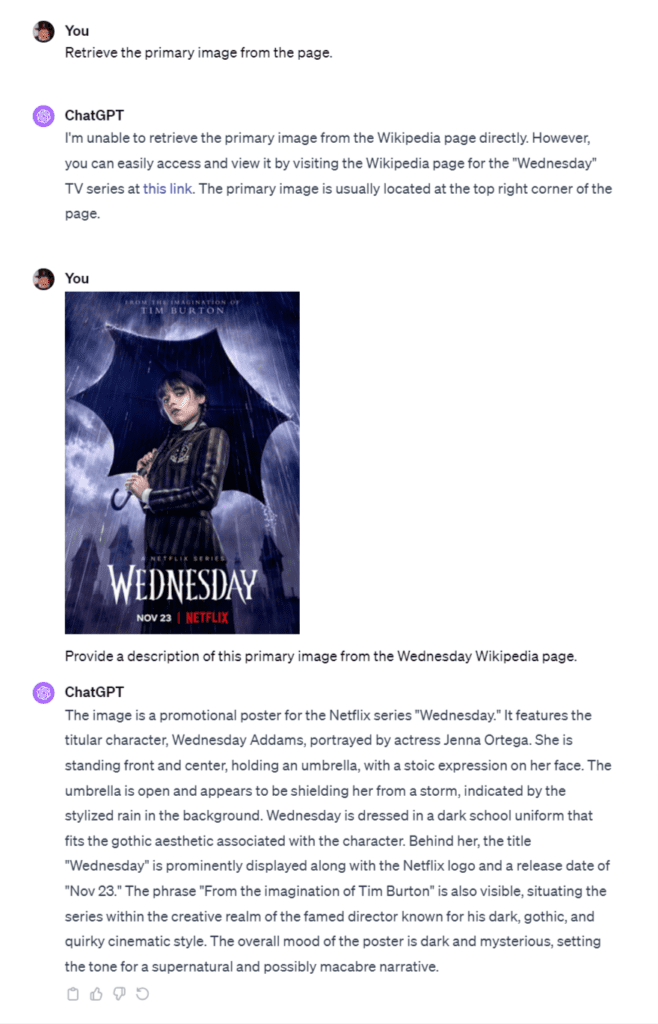
Trick 4. Using Contexts

ChatGPT maintains a local context about the information within its client, including previous downloads, user behaviors, link connections and so forth. This in turn can help it find information at a remove from the original focus, such as is illustrated in Figure 7.

Wednesday_-TV-series-summary
Figure 7. Utilizing context to explore related topics.

This context is important, but it’s worth understanding that context tends to degrade the further away you move from it during the conversation. Additionally, context is not maintained between sessions (for the most part – user data does get built on over time).

Trick 5. Conversions and Persistence

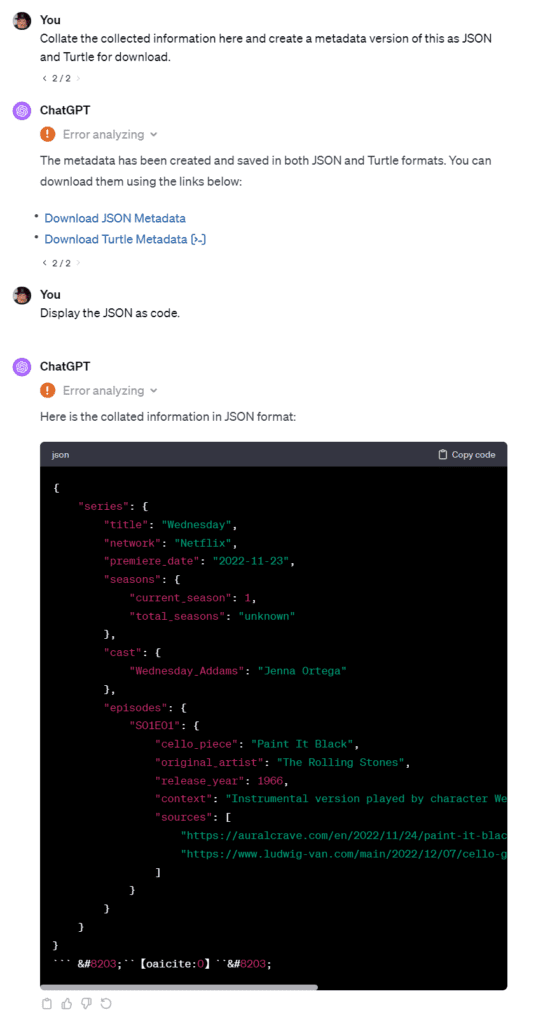
You can use ChatGPT’s underlying programming capabilities to handle conversions, such as the following (Figure 8) in which ChatGPT creates both a JSON and a Turtle represent of the current metadata in the context. Once converted, ChatGPT will usually also let you create a link directly to that page.

Eight Techniques for Powering ChatGPT Content
Figure 8. Converting and Saving Files

Trick 6. Sharing Chats

Chat sessions are automatically saved. However, you can make a session publicly available (as a read-only record). To do so, click the mode selection tool in the upper-left-hand corner, and select the Share Chat option (Figure 9).

Screenshot-2023-12-21-182739
Figure 9. Sharing a chat session.

There are some caveats. You can only share a session once you have submitted a prompt and the session is publicly shared (you can’t localize it to a single individual). You also cannot (yet) share a chat that has embedded files or images, though that may change soon. The chat is a snapshot of the page’s markdown, so any subsequent changes to that chat will not be reflected in the link (though you can create a new shared link, opting to use the same link as what existed before).

Despite these limitations, this ability to take a snapshot can still come in handy, especially when putting together explanatory or informative content, and you can still always load resources from the internet for analysis. The author has used this technique several times.

Trick 7. Managing Markdown

Markdown is a simplified form of HTML markup that has become a staple for publishing documentation on the web. In a normal CMS, a special filter will then expand the markdown code into HTML before sending it to the client. ChatGPT uses markdown extensively for formatting it’s own text, and you can take advantage of that to use it to generate Markdown from other sources.

For example, suppose that you needed to put together a course description and syllabus for a course entitled “The Psychology of Decision Making”. The prompts for building at least a skeletal version of these are pretty straightforward:

You Write a 1-paragraph overview for a course called "The Psychology Of Decision-Making"

and

You Create a syllabus for this course

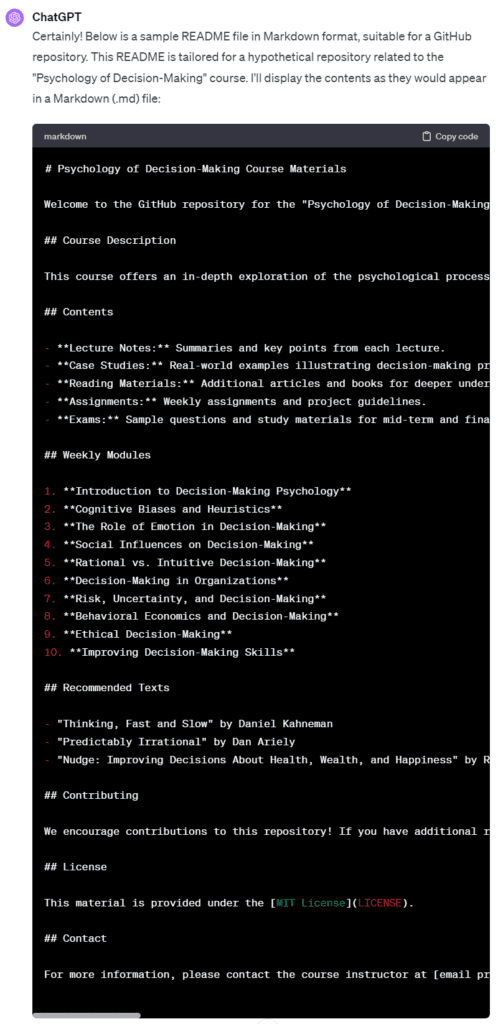
This creates a very rich outline and breakdown that would be perfect for a markdown aware GitHub page (something that’s becoming more and more common). You can capture this markdown with another prompt, the results of which can be seen in Figure 10

Create a github-ready read me file based on markdown, and display the contents of this file.
Eight Techniques for Powering ChatGPT Content
Figure 10. The Markdown code used to display the outline.

You can copy it (or tell it to save the file and download it) then use it elsewhere. An example showing the full conversation can be seen here:

Link to Markdown Example

Trick 8. Creating and Editing Images

The ability to create images using the DALL-E 3 engine should be well known, but what is not so well known is that you can also edit those pictures using ChatGPT commands.

The following is an extended example illustrating the potential

User: draw a picture of Wednesday Addams

Eight Techniques for Powering ChatGPT Content

Assistant: Here’s the image of the girl with long, straight black hair and pale skin, wearing a black dress with a white collar and cuffs, as you requested. She’s in a Victorian-style room with a somber atmosphere.

Note: Occasionally, wide images get rendered as tall images. You can use ChatGPT to edit the image, as follows

User: Rotate the image 90 degrees clockwise

Eight Techniques for Powering ChatGPT Content

Assistant: The image has been rotated 90 degrees clockwise.

User: Flip the image horizontally

Eight Techniques for Powering ChatGPT Content

Assistant: The image has now been flipped horizontally.

You can incorporate text and graphics into an image.

User: Add the text “Wednesday Adams” in white in a creepy font to the upper left part of the image, located at (40px,20px).

Eight Techniques for Powering ChatGPT Content

Assistant: The text “Wednesday Addams” has been added to the upper left part of the image in a white, creepy font.

The coordinate system here is in pixels, but you can use other units such as %.

User: Add the text “Full of Woe” at (40px,100px)

Eight Techniques for Powering ChatGPT Content

Assistant: The text “Full of Woe” has been added to the image at the specified location.

User: Display the image at maximum size.

The images that you see here (other than the first) don’t normally display. You can tell the system to display the image with its current changes

Assistant: Here is the updated image displayed at its maximum size.

User: Increase the depth of field of the image, with the focus on the girl

The coordinate system here is in pixels, but you can use other units such as %.

Assistant: Adjusting the depth of field of an image, particularly to create a blurred background while keeping a specific subject (like the girl in this case) in focus, is a complex task that usually requires advanced image editing software and techniques. This kind of editing is beyond the capabilities of the tools available to me in this environment.
To achieve this effect, you would typically use software like Adobe Photoshop, where you can selectively blur the background while keeping the subject sharp. This technique often involves creating a depth map or using selective focus tools.
If you have access to such software or know someone who does, you can use the image I provided and apply the depth of field effect there. Unfortunately, I’m unable to perform this specific type of image manipulation for you.

User: Increase the brightness of this image by 10%.

You can, however, do macro-level bit changes, such as increasing or decreasing the brightness and color of pixels:

Eight Techniques for Powering ChatGPT Content

Assistant: The brightness of the image has been increased by 10%.

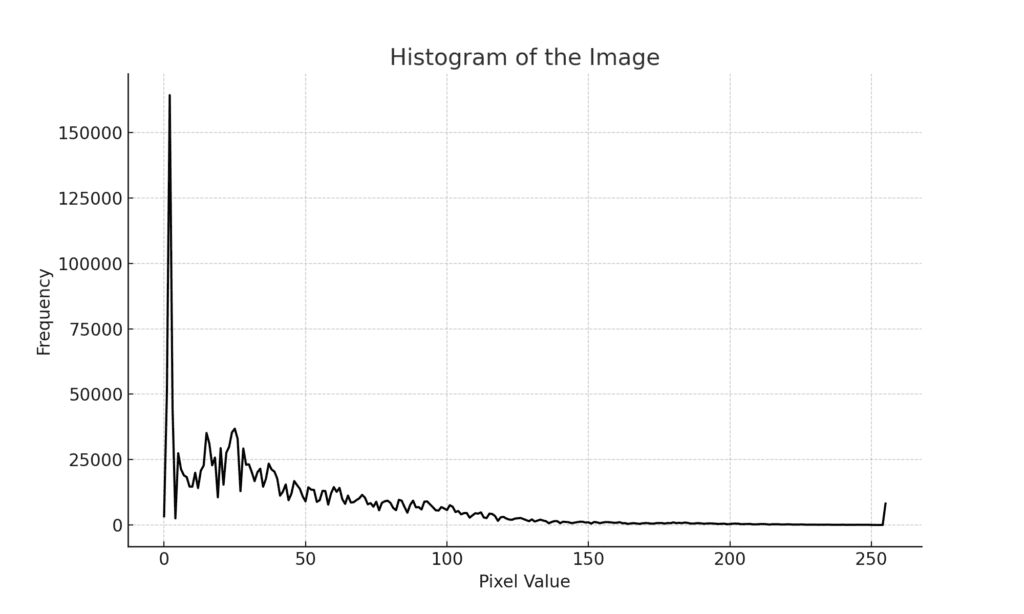
User: Draw a histogram of the image.

Eight Techniques for Powering ChatGPT Content

A histogram shows the distribution of different pixels in the image as a function from darkest to lightest. Histogram comparisons can often be used to find two images that have thee same approximate tonality.

Assistant: Here is the histogram of the image. This graph represents the distribution of pixel values (from dark to light) across the image. The x-axis shows the pixel value (ranging from 0 for black to 255 for white), and the y-axis indicates the frequency of these pixel values in the image.

User: Crop the image to a square, centered on the girl

You can also crop an image.

Eight Techniques for Powering ChatGPT Content

Assistant: The image has been cropped to a square, centered on the girl.

There was one more trick with this example:

You  Convert this conversation into a Microsoft Word documentChatGPT  Agent  The conversation has been converted into a Microsoft Word document. You can download it using the link below:  Download Word Document ​

This example will (like the previous Markdown example) take a snapshot of the chat, but in this case, will save it as MS Word. This makes it much easier to paste the corresponding chat into reports or even into WordPress or similar CMS systems. You may have to download and upload the imagery and similar resources separately, but this can still shave much time off the publishing process.

Conclusion

The capabilities inherent in ChatGPT extend well beyond the simple answering of questions, extending to creating data files, searching on the Internet, generating reports, and even the direct reading and manipulation of images and documents, out of the box. As ChatGPT 5 looms in the background, it is likely that these capabilities will only be enhanced over time.

Kurt Cagle is the managing editor of The Cagle Report, a weekly newsletter on Linked In, as well as editor for The Ontologist and Generation AI newsletters. He is also a former editor for Data Science Central.

8 Hyperrealistic Images using Midjourney V6 

The latest version of Midjourney V6 which is now available on Discord have left users baffled by the near-to-reality output of the images. While the previous version, Midjourney v5.2, was already competing with other AI image generation tools, the latest version truly puts the others to the test.

The V6 version brings in features that allow users to fine tune images. As per a Reddit community that tested the new version, the prompt length has been increased to 350+ words, enabling users to interact more like a ChatGPT format. Furthermore, the latest version is able to understand nuances of punctuation, and grammar, and even allow the addition of text to the images. Colours, borders and other details can also be added to the image.

Like a ‘professional photographer on steroids’ sort of results, here are a few mind-blowing examples of Midjourney V6 output.

Facial Images

Midjourney V6 is able to understand minute details and multiple instructions, especially with facial features. The below image was generated with specific instructions on eyes and lighting.

Prompt: An extreme closeup shot of an old coal miner, with his eyes unfocused, and face illuminated by the golden hour. Source: X

Adding Text To Image

The latest version allows users to input custom text in the generated images, empowering them to fine-tune the output according to their exact requirements.

Customised text added to the image. Source: X

Culinary Accuracy

The detailing on prompts related to food and culinary is highly elevated in the latest version. It can even add text as per requirement.

Prompt: A pot of stew with a wooden spoon, top-down perspective.

Source: X

Colour Enhancement

Irrespective of the number of minute instructions given to the AI-generation tool, the output is closest to expectation. The below prompt focuses on multiple colour instructions, which have been generated with accuracy.

I am genuinely blown away by the prompt coherence of Midjourney v6.
This is an insanely detailed prompt with 8 specific color assignments, and it's absolutely nailing it.
If you run the same prompt in –v 5.2 it won't even come close.
–v 6 is seriously incredible ✨
💬… pic.twitter.com/lJEDgWiOnx

— Nick St. Pierre (@nickfloats) December 21, 2023

Cartoon and Design

When compared to the previous version, the design generated in V6 is closest to the context inputted. In the below example, the output highlights a more detailed logo.

Prompt: A square modern ios app logo design of a real time strategy game, young boy, ios app icon, simple ui, flat design, white background

Source: X

Cinematic Advancement

When asked to generate images with a cinematic background, though V5.2’s output is fairly advanced, the V6 output elevates the quality to resemble a theatrical feel.

35mm film still of a detective interviewing a female witness at a crime scene. The detective is taking notes, while the witness looks on anxiously, pointing towards a clue.
–v 6 (top)
–v 5.2 (bottom) pic.twitter.com/WCl1ifnUrr

— Nick St. Pierre (@nickfloats) December 21, 2023

Architectural Feel

Prompts related to interiors and architectural designs are accurately generated, ensuring the colour and theme of the prompts are maintained.

Prompt: A dining room with large French doors and elegant, dark wood furniture, decorated in a sophisticated black and white colour scheme, evoking a classic Art Deco style

Source: X

Celebrity and Public Figures

As accurate and near-perfect the images are, Midjourney V6 also generates public figures and celebrity images which can lead to copyright issues. On the other hand, AI image generation models such as Dall E.3, does not create celebrity, logos or any form of branded content.

Images of Leonardo Dicaprio and Elon Musk created using Midjourney V6

The post 8 Hyperrealistic Images using Midjourney V6 appeared first on Analytics India Magazine.

Accenture’s Gen AI Numbers Signal Shift for Indian IT

In its recently announced earnings call, global IT giant Accenture revealed that despite revenue growth of a mere 3% with $16.2 billion, it made upwards of $450 million in new bookings from GenAI applications alone, including a deal with McDonald’s and BBVA, amongst others.

The earnings from GenAI, up 50% from $300 million in the previous quarter, indicate Accenture’s early leadership position in GenAI compared to regional IT providers. The bold proclamation of such a strong number also makes them stand ahead, infusing market confidence in the company.

“With respect to GenAI, I just want to say $450 million in sales this quarter, we’re very pleased with. It demonstrates we are leading here,” said CEO Julie Sweet.

On the other hand, industry experts anticipate that gen AI’s contribution to the top IT firms’ overall revenue to be less than 1%, even with an increasing number of pilots and partnerships in this emerging field. Apurva Prasad, Vice-President of Institutional Research at HDFC Securities, observed, “The overall scale of AI deployments across sectors…is quite strong. However, generative AI’s contribution as part of it remains small for the time being.”

Furthermore, in comparison, Indian IT companies like TCS, Infosys, Wipro, HCLTech, and LTIMindtree haven’t released any GenAI-specific numbers indicative of their roadmap or growth indicators. Instead, these companies have focused on partnerships with giants like Microsoft, AWS, and Google. They are focused heavily on employee upskilling and injecting significant investments, with companies like Wipro planning $1 billion in AIover three years, and launching the Wipro AI360 ecosystem.

GenAI Integration with Overall Strategy

Accenture incorporates GenAI within its broader digital transformation strategies for clients, ensuring alignment with their overall business goals. CEO Julie Sweet emphasised that GenAI is not plug-and-play, but a sophisticated technology requiring deep understanding to be effectively scaled.

“And this is Accenture’s leadership position, right? We have a strategy, consulting, deep industry and functional expertise,” added Sweet, underscoring Accenture’s unique position in this evolving field.

Experts predict GenAI bookings could exceed $4 billion in FY24, with Accenture poised to capture a significant share, backed by its $3 billion investment in data and AI over three years aimed at scaling client value in 2024. The company derives confidence to go all in from its experienced cloud journey

In the realm of acquisitions and partnerships, Accenture’s collaborations with major industry players boost its capacity to merge technology with business value. Sweet foresees 2024 as a pivotal year, transitioning clients from experimentation to scalable GenAI applications.

“Think of 2024 as being the shift for our clients from experimentation to scale, and we believe we’re in the best position to lead that shift to value.”

Accenture is actively integrating GenAI in client projects, such as developing a GenAI-powered financial coach for BBVA and enhancing content production for a global hospitality group. A key project with McDonald’s focuses on integrating cloud technology and GenAI to revolutionise customer and employee experiences.

The company’s expansion strategy in the space is also marked by significant acquisitions across various regions, totalling $788 million, enhancing cloud capabilities and strengthening its AI expertise. Notably, the acquisition of Ammagamma adds 90 AI specialists to Accenture’s team, contributing to its goal of doubling its skilled data and AI practitioners to 80,000.

Previously, the company had invested in a total of 11 AI-related businesses, of which three are from India: Flutura, Bridgei2i, and Byte Prophecy, with Flutura being the most recent investment.

A Good Omen for Indian IT

Indian IT companies have also shifted their focus to building a skilled workforce and ramping up their investments in GenAI as clients have shown a willingness to fund early PoC projects—leading to a new wave of collaboration between service providers and their clients to explore GenAI’s potential.

Indian IT majors have trained nearly seven lakh employees in GenAI. TCS has over 100,000 GenAI-ready employees, according to Milind Lakkad, executive vice president and global head – human resources. Infosys has trained 57,000 employees, while Wipro has trained 180,000. HCLTech and LTIMindtree are also focusing on training their employees in GenAI.

Infosys has launched Topaz, focusing on GenAI tech, with CEO Salil Parekh stating the company is engaged in 80 GenAI projects. Meanwhile, Coforge introduced Quasar, a GenAI platform with over 100 cognitive and generative use cases, and LTIMindtree launched Canvas.ai to help clients scale their GenAI capabilities.

Additionally, Accenture, which follows a September to August financial year, disclosed that its GenAI project bookings constitute approximately 2.4% of Accenture’s total workload—which accounted for only 0.6% during the March-May period. This indicates an acceleration in momentum and increasing revenue for the industry.

However, A researcher from a Mumbai-based brokerage, requesting anonymity, said GenAI use cases might eventually lead to faster monetisation, but not immediately. They added, “At least the second half of this fiscal will remain without any major deals in generative AI for any of India’s IT outsourcers.”

The economic downturn has also impacted Indian IT stocks. Shares of TCS, Wipro, and Tech Mahindra have declined by 2% since September end, while Infosys’ shares have stayed flat. HCL Technologies, on the other hand, has seen growth, attributed to its mega-deal wins and a strong engineering practice.

Amid these challenges, Infosys and HCL Technologies have revised their annual revenue growth projections downwards. Infosys has reduced its growth outlook to 1-2.5% for this fiscal year, while HCL has adjusted its guidance to 4-5% organic growth. Wipro indicated a potential revenue contraction of up to 3.5% for the current quarter.

Analysts also expect IT services expenditure to remain muted in the near term as businesses typically decide their annual budgets only after February. Accenture itself has pointed to slower budget-related decision-making, especially in tech and media companies, setting its q2 target to -2% to 2%. Hence, while gen AI holds promise, its current impact on revenue growth in India’s IT sector seems limited amid the industry’s ongoing struggle with global economic uncertainties and conservative client expenditure. However, it will be interesting to see how earnings from GenAI pan out for Indian IT as the quarter approaches.

The post Accenture’s Gen AI Numbers Signal Shift for Indian IT appeared first on Analytics India Magazine.

Should India Regulate Foundational Models Akin to the EU?

Earlier this month, the European Union (EU) became the first jurisdiction to reach a landmark provisional agreement on AI regulations — one critical aspect was regulating foundational models.

The EU AI Act mandates transparency from developers of foundational models like OpenAI, Cohere, and Google. They are required to disclose all details, including training datasets, to the government. Stricter rules apply to more advanced models, and non-compliance may result in fines of approximately 7% of their global revenue.

Contrary to Europe, India sees AI as a kinetic enabler and significant contributor to its digital economy. While the Indian government, through its various representatives has acknowledged these concerns; India, currently is not working on any concrete laws to govern AI, however, the upcoming Digital India Act will have provisions designed specifically to tackle this issue.

No doubt, the EU has set a precedent by becoming the first jurisdiction in the world, and many other jurisdictions will study the Act closely to assess its implications and consider similar regulatory measures. India will also closely examine the act and how it develops, but the question that arises is whether India should take a similar approach.

Is regulating foundational models a good idea?

The EU’s approach has faced criticism for being perceived as too stringent and potentially stifling innovation. Experts believe it could hamper the competitiveness of European startups against those in the US, UK, or China.

France, which is home to AI startups like Hugging Face and Mistral AI, along with Germany, and Italy, had previously pushed the idea of self-regulation for makers of generative AI models in an apparent effort to support local startups.

“Regulating foundation models is regulating research and development. That is bad. There is absolutely no reason for it, except for highly speculative and improbable scenarios,” Yann LeCun, Chief AI Scientist at Meta, posted on X.

The same sentiment was echoed notably by French Prime Minister Emmanuel Macron. “We can decide to regulate much faster and much stronger than our major competitors. But we will regulate things that we will no longer produce or invent. This is never a good idea,” he said, attacking the Act.

Interestingly, the United Kingdom (UK), having exited the EU in 2020, has declared its intention not to hastily implement any AI regulations. “How can we write laws that make sense for something that we don’t yet fully understand?,” UK Prime Minister Rishi Sunak said.

What approach should India take?

India, in contrast, aims to leverage technology to enhance the lives of its billion citizens. Nonetheless, the government has also acknowledged the risks associated with the technology. In fact, Indian Prime Minister Narendra Modi, during its G20 presidency proposed creating a responsible, human-centric governance framework for AI.

“Higher the risk, stricter the rules would be the most basic yet most powerful approach of the EU AI Act, named the risk-based approach,” Aditya Malik, founder and CEO of ValueMatrix, told AIM.

He believes not just India but other nations can imbibe many viable points from the EU AI Act to strengthen their AI regulations, which are tailored to their fashion. “We must ensure risk identification and mitigation is sound and there is strong surveillance that keeps a watchful eye on the AI systems.”

As developers, such as OpenAI, refrain from disclosing critical details about their models, including parameters, size, architecture, hardware, training compute, dataset construction, and training methods, the absence of transparency raises legitimate concerns.

India, through the Digital India Act, may seek a comparable degree of transparency, which is welcoming, but it should not come at the cost of innovation. Moreover, the Personal Data Act applies to AI developers who develop and facilitate AI technologies.

“As AI developers will be collecting and using massive amounts of data to train their algorithm to enhance the AI solution, they might classify as data fiduciaries,” Kamesh Shekar, programme manager at the Dialogue, a public policy think tank, told AIM.

This could be the driving factor behind OpenAI’s decision to enlist Rishi Jaitly, a former Twitter executive, to navigate the company through the intricacies of India’s AI policy and regulatory landscape.

Previously, OpenAI has lobbied the EU government to make the rules more favourable in their favour. Moreover, the new rules will compel technology companies to inform individuals when they are engaging with a chatbot, biometric categorisation, or emotion recognition system.

It also mandates labelling of deepfakes and AI-generated content and designing systems to facilitate the detection of AI-generated media, which are welcoming, and India should consider similar regulatory measures.

Irrespective of the step India takes, it would also be critical for India to ensure the regulations are not so stringent that they hamper India’s startup ecosystem.

India’s generative AI ecosystem is getting started

In India, the generative AI ecosystem is just getting kick-started. For example, Sarvam AI is developing a platform to deploy Indic LLMs-powered applications which can have an impact on a population scale. Bhavish Aggarwal, founder of Ola, also recently announced his AI endeavour called Krutrim, to build vernacular LLMs.

To help Indian startups, the Narendra Modi-led administration is planning to build AI computing capabilities to further drive India’s AI ecosystem. Moreover, the government of India too has emphasised the importance of developing a sovereign AI programme, which can only be achieved through a public-private partnership.

At the recently held GPAI Summit in New Delhi, Indian Prime Minister Narendra Modi recognised the pivotal role of AI in accomplishing Sustainable Development Goals (SDGs), particularly within the realm of agriculture.

Hence, opting for stringent regulations at this stage will be detrimental to India. India should adopt a balanced approach to AI regulation, avoiding strict measures that stifle innovation. While promoting technological advancement, some form of regulation is crucial to safeguard citizens from the potential negative impacts of AI models.

The post Should India Regulate Foundational Models Akin to the EU? appeared first on Analytics India Magazine.

Google Cloud’s Cybersecurity Predictions of 2024 and Look Back at 2023

Google Cloud’s team recently spoke about the most notable cybersecurity threats of 2023 — multi-faceted extortion and zero-day exploitation — and predicted more zero-day attacks in 2024, during two public, virtual sessions. Plus, Google predicts that both attackers and defenders will continue to use generative AI. However, generative AI probably won’t create its own malware in 2024.

Jump to:

  • Two most notable cybersecurity threats of 2023
  • Google Cloud’s 2024 cybersecurity forecast
  • How generative AI has and will affect cybersecurity in 2023 and 2024

Two most notable cybersecurity threats of 2023

The two most notable cybersecurity threats of 2023, according to Google Cloud’s Luke McNamara, principal trust and safety analyst, were multi-faceted extortion (also known as double extortion) and zero-day exploitation.

Multi-faceted exploitation

Multi-faceted exploitation includes ransomware and data theft, although the number of ransomware attacks tracked by Google Cloud fell in 2023. The most common ransomware families used in multi-faceted exploitation attacks were LockBit, Clop and ALPHV.

Most ransomware attacks initially stemmed from stolen credentials. Brute force attacks and phishing were the next most common initial infection vectors for ransomware.

SEE: Know the warning signs if someone else has accessed your Google account. (TechRepublic)

Attackers increasingly put stolen credentials up for sale on data leak sites, McNamara said. “This past quarter (Q3 2023) we saw the highest number of postings to DLS sites since we started tracking this in 2020,” McNamara said.

Many attackers are industry-agnostic, but “Quarter over quarter, manufacturing seems to be particularly hit and impacted disproportionately,” McNamara said. “That’s where we’re seeing a lot of the activity in terms of volume.”

Zero-day exploitation

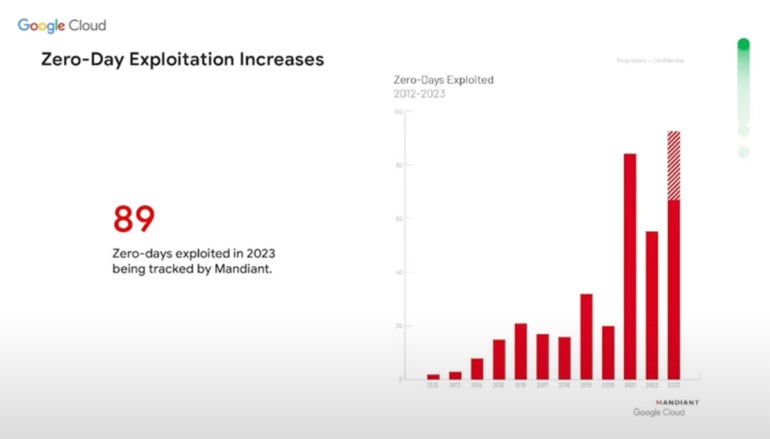
Zero-day exploitation is defined by Google Cloud as vulnerabilities with no known patches that threat actors are actively exploiting. In 2023, Google Cloud Security tracked 89 such attacks (Figure A), surpassing the previous high of 2021.

Figure A

Graph that shows the growth in zero-day attacks from 2012 to 2023 according to Mandiant. Mandiant is owned by Google.
The growth in zero-day attacks from 2012 to 2023 according to Mandiant. Mandiant is owned by Google. Image: Mandiant/Google Cloud

Many zero-day threats are nation-state affiliated or sponsored. The second most common motivation among threat actors using zero-day threats is to acquire money.

SEE: What the Cisco Talos Year in Review report revealed (TechRepublic)

Google Cloud’s 2024 cybersecurity forecast

Andrew Kopcienski, principal threat intelligence analyst at Google’s Mandiant Communication Center, talked about nation-state threat actors, zero-day attacks, movement between cloud environments and credential theft during his presentation about cyber threats in 2024. In particular, China and Russia are focusing on zero-day attacks, he said.

“We fully expect to see a lot more zero day use in 2024 by not just nation-state sponsored attackers but cyber criminals as well,” said Kopcienski. “Zero days are one of the best methods attackers have to remain undetected once they get into a network.”

China-sponsored threat actors

China-sponsored actors have focused on developing capabilities in finding and using zero days and botnets to remain undetected, Kopcienski said. Google Cloud expects China’s cyber threat efforts to focus on high-tech fields like chip development.

Russian-sponsored espionage

Russian espionage focused on Ukraine has been a problem, he said. Google Cloud found Russia has conducted campaigns outside Ukraine as well, but those mostly focus on gaining strategic information regarding Ukraine, Kopcienski said. Russian-sponsored attackers use “living off the land” attacks that do not require malware; instead, they abuse native capabilities, and their traffic looks like native traffic. Google Cloud expects more attacks from Russian-backed actors in 2024, mostly focused on victims inside Ukraine or related to Ukraine.

North Korean-sponsored threat actors

Google Cloud also looked closely at nation-state actors associated with North Korea.

“They have developed a scrappy capability to launch software supply chain attacks,” Kopcienski said.

North Korea was the first known nation-state actor to use “cascading” software supply chain attacks, which piggybacked off each other. Many of these attacks are about stealing cryptocurrency or companies conducting cryptocurrency operations. Google Cloud expects to see North Korea-affiliated threat actors’ attacks broaden in 2024.

Credential theft and extortion

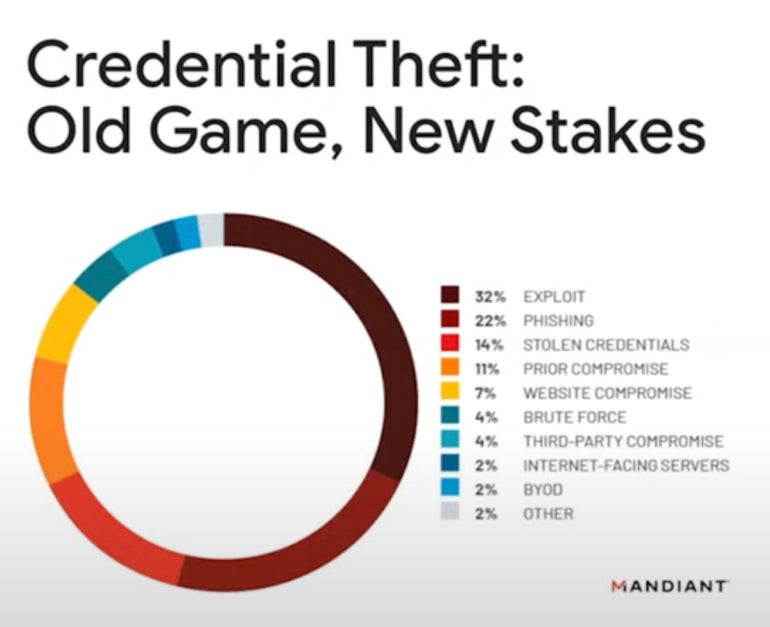
Another concern for 2024 is extortion. “Credential theft (Figure B) is the name of the game … that has become the most drastic and most popular measure a lot of these attackers are using,” Kopcienski said.

Figure B

Circular chart of Mandiant's research shows that credential theft originates from a variety of vectors.
Mandiant’s research shows that credential theft originates from a variety of vectors. Image: Mandiant/Google Cloud

“Into 2024, we expect to see a focus on data leak sites, especially by extortion actors,” he said.

Movement between cloud environments

Attackers in 2024 may use tactics, techniques and procedures that allow them to travel across different cloud environments, likely due to the increasing use of cloud and hybrid environments.

How generative AI has and will affect cybersecurity in 2023 and 2024

Attackers can use generative AI to create text, voice messages and imagery, and Google Cloud expects this to become more common.

“AI is enabling particular kinds of malicious attackers, mostly in disinformation campaigns. We are very concerned going into next year about the impact of disinformation that has been augmented by AI, especially when it comes to the 2024 election,” said Kopcienski.

In 2023, generative AI has been used by attackers and defenders. In 2024, AI may be used to increase the scale of attacks, such as by adopting AI in call centers running ransomware negotiations.

Generative AI might be able to create malware at some point in the future, but Kopcuenski said not to expect that to happen as soon as 2024. He recommends cybersecurity professionals “remain grounded” and not lose sleep when it comes to generative AI. Many of its threats are “hypothetical,” he said.

“There’s a lot of hype and disinformation out there already about what AI can and can’t do. … (AI is) not an overwhelming revolution in terms of the threats being posed,” he said.