Applications make our everyday lives easier, enabling us to perform all sorts of tasks, from ordering food to booking a trip right from our phones. But what if all those apps could be replaced by one seamless AI assistant that performs every task for you instead?
At Mobile World Congress (MWC) next week, Deutsche Telekom — T-Mobile's majority stakeholder — will present a concept AI phone that uses an AI assistant to perform tasks on your phone, bypassing the need for apps.
Also: This new AI Assistant from Adobe lets you chat with your PDFs at no additional cost
The phone's generative AI interface, powered by Brain.ai, can take over the function of a wide range of apps, predicting and generating what to do next to carry out the end goal prompted by the user.
"An assistant based on artificial intelligence (AI) replaces the countless apps on the smartphone," said Deutsche Telekom in its press release. "Like a concierge, the assistant understands your goals and takes care of the details."
For example, if you wanted to book a trip, instead of having to visit several apps yourself to complete the task, you would ask your phone via voice or text to do it for you, and it would take the necessary steps to do so, without you having to open any apps.
The concept will be showcased at MWC on Deutsche Telekom's T Phone, which is already available for purchase in European markets, and on the Snapdragon 8 Gen 3 Reference Design, in which the AI processing is done on the device.
As eager as you may be to try a smartphone that could streamline all your everyday tasks, don't get too excited. At MWC, Deutsche Telekom will be showcasing prototypes, with the actual product taking "some time" before they are available in stores for customers, according to the company.
Also: Samsung collaborates with Arm to offer Cortex-X CPU using GAA process
This smartphone's approach to tasks resembles that of the Rabbit R1, a $199 handheld device that leverages AI and natural language processing to replace apps and complete all sorts of tasks for you.
The sixth batch of the Rabbit R1 is available for pre-order now, with the first five batches having sold out already. If you pre-order today, you can expect the Rabbit R1 to ship to US and Canada addresses in June and July 2024. As noted above, the T Phone's AI assistant does not yet have a release date.
The fast-paced digital world requires effective and user-friendly software solutions more than ever. Custom software development is changing business communication, especially email design. This blog explores the specialized but crucial field of-—the creation of no-code tools for email design. These tools represent the core of digital-age strategic marketing and communication, not just aesthetics.
The shift from custom email designs to no-code platforms represents a significant change in software development services. It enables people and organizations to create polished emails without requiring a high level of technical expertise. Accessibility, effectiveness, and customization are significant forces behind innovation and user happiness in custom software development services, and this evolution reflects a larger trend in this direction.
The rise of no-code platforms in email design
The email design landscape has completely changed with the advent of no-code platforms. With the help of these tools, people with little to no coding experience can design eye-catching and successful email campaigns. This democratization of email design is evidence of how software development services are changing and how the goal is to make technology more widely available.
User experience and simplicity are the two main design goals of no-code tools for email design. With their drag-and-drop interfaces, pre-made templates, and interactive features, creating unique emails is now simpler than before. This method frees up a space for creativity and customization that was previously exclusive to professional developers while also saving time and money.
Customization and personalization
The degree of personalization and customization offered by custom, no-code email design tools is one of its best qualities. These tools, in contrast to generic email templates, let users customize every element of their emails to match their brand identity and target audience’s particular requirements. From color palettes and typefaces to layout and content, the options are virtually limitless.
Customization goes beyond appearances. It entails developing messages that appeal to the intended audience in order to raise response and engagement rates. Businesses can now create more focused and successful email campaigns by using custom software solutions in email design, which increasingly use data analytics and machine learning to provide insights into user preferences and behaviors.
Interface user-friendly and accessible
The intuitive interface of personalized no-code tools for email design is one of their main benefits. Because of their user-friendly layout and intuitive design, these platforms are suitable for users of all experience levels. For example, the drag-and-drop feature makes it unnecessary to learn complicated coding, enabling users to create visual layouts for their emails easily.
The inclusiveness of these tools is also a part of their accessibility. Because of their broad user base support, even those with little technical experience can make good use of them. In today’s inclusive digital world, where one’s technical skill should allow one to communicate effectively, this feature of custom software solutions is critical.
Integrations and compatibility
In custom software development services, integration and compatibility play crucial roles. Tools like Unlayer, which offer custom no-code solutions for email design, are often designed to integrate seamlessly with various marketing platforms and CRM systems. This interoperability is essential for businesses to maintain cohesive and synchronized marketing efforts across different channels.
Moreover, compatibility with various devices and email clients is another vital consideration. Emails designed using tools such as Unlayer need to render effectively on a wide range of devices, ensuring a consistent user experience. This compatibility is key to reaching a broader audience and is a hallmark of well-developed custom software solutions in email marketing.
Efficiency and cost-effectiveness
Tools for designing custom no-code emails are affordable, effective, and easy to use. By streamlining the email creation process, these tools drastically cut down on the time and effort needed to plan and implement email campaigns. This means that companies can react to market trends and customer needs more quickly and complete tasks more quickly.
The affordability of these tools is especially advantageous for new and small enterprises. These organizations can create high-quality email campaigns on a tight budget by utilizing custom, no-code solutions instead of making a sizable investment in software development services. Smaller players can now effectively compete in the digital marketplace thanks to the democratization of technology
Analytics and monitoring
A critical component of any email marketing strategy is the ability to track and analyze the performance of email campaigns. Custom no-code email design tools often have advanced analytics and monitoring features. These features enable users to gain insights into key metrics such as open rates, click-through rates, and engagement patterns.
Businesses can make data-driven decisions to optimize their email campaigns by leveraging these analytics. Understanding how recipients interact with emails helps in refining content, design, and targeting strategies. This aspect of custom software solutions in email design aligns with the broader trend in software development services towards more data-centric approaches.
Scalability and flexibility
Scalability is essential in custom software development services, and no-code email design tools are no exception. As businesses grow, their email marketing needs evolve, requiring more sophisticated and varied email campaigns. Custom no-code tools are designed with scalability in mind, offering the flexibility to expand and adapt as business needs change.
These tools also provide the flexibility to experiment with designs and strategies with minimal overheads. Whether it’s a small-scale campaign or a large-scale marketing initiative, custom no-code email design tools can scale to meet diverse requirements, making them a versatile choice in the toolkits of modern marketers.
Security and compliance
In an era where data security and privacy are paramount, custom no-code email design tools must adhere to stringent security standards. These tools are developed to focus on protecting sensitive information for the users and their email recipients. Compliance with regulations like GDPR and CCPA is not just a legal requirement but a critical aspect of building user trust.
Security features in these tools often include data encryption, secure access controls, and regular security audits. For businesses, this means peace of mind, knowing that their email campaigns are practical but also secure and compliant with global standards. This attention to security and compliance is a testament to the maturity and responsibility embedded in modern custom software development services.
Customer support and training
Another vital aspect of custom no-code tools for email design is the availability of robust customer support and training resources. Providers of these tools often offer comprehensive support services, including tutorials, FAQs, live chat, and phone support. This level of assistance ensures that users can effectively utilize the tools and resolve issues promptly.
Training resources are equally important, especially for users new to no-code platforms. Webinars, instructional videos, and user guides help users quickly get up to speed with the tool’s features and best practices. This emphasis on customer support and training highlights the user-centric approach of custom software solutions in email marketing.
Collaboration and teamwork
Modern email design often involves collaboration among team members, including marketers, designers, and content creators. Custom no-code email design tools cater to this need by facilitating seamless collaboration. Features like multi-user access, real-time editing, and feedback mechanisms enable teams to work together effectively, regardless of location.
This collaborative aspect of the tools enhances efficiency and ensures that various perspectives are considered in the email design process. It reflects a broader trend in software development services toward fostering teamwork and collective creativity, essential in producing compelling and successful email campaigns.
Enhanced creativity and design flexibility
Custom no-code email design tools are revolutionizing how businesses approach their email marketing strategies by offering unparalleled creativity and design flexibility. These tools provide many design elements, including diverse templates and extensive customization options. This empowers users to craft unique and visually engaging emails that stand out in an often overcrowded inbox. The ability to tailor emails to specific branding styles and audience preferences enables a level of personalization and visual appeal previously only attainable by professional designers.
This design flexibility is not just about aesthetics; it plays a crucial role in the effectiveness of email marketing campaigns. With these tools, businesses can quickly adapt their designs based on user feedback, market trends, or seasonal changes. This agile approach to design ensures that email campaigns remain relevant and engaging, fostering better connections with the audience. Custom no-code tools have thus become indispensable in creating dynamic and impactful email marketing campaigns that resonate with today’s digitally savvy audience.
The future of email design
Looking toward the future, the field of email design is set to evolve further with advancements in technology and changes in user behavior. Custom no-code tools will likely incorporate more AI-driven features, enabling more personalized and dynamic email content. Integrating interactive elements like polls, surveys, and animations is expected to become more prevalent, enhancing user engagement.
The role of custom software solutions in email design is also expanding beyond mere marketing. Email is crucial for customer relationship management, community building, and brand storytelling. As these trends continue, custom no-code email design tools will play an increasingly vital role in how businesses communicate and connect with their audiences.
Conclusion
Custom no-code email design tools are a game-changer in email marketing, offering simplicity, creativity, and influential audience engagement for businesses and individuals alike.
When the Samsung Galaxy S24 launched last month, it came packed with AI-powered features, including Magic Editor, Circle to Search, live language translation, and more.
At the same time, Google announced several new AI features for Assistant – among them the ability to summarize long messages and group chats while connected to Android Auto.
Also: A smartphone without apps? This AI assistant aims to replace them all
That feature hasn't officially launched yet, but thanks to a new support document on the Google Community help page, we have a better look at how it's going to work.
First up, Google addresses a big privacy concern and explains that Assistant will not log messages or summaries, and that interactions will not be used to train large language models. However, since AI is being used to generate message summaries, the company admitted that there may be mistakes.
Once this feature is live, you'll need to opt-in to use it. This can be done either in the Android Auto settings or in the notifications menu under the traditional settings area, and the feature can be turned off at any time.
You'll also have an opportunity to turn on this feature the first time you receive a message longer than 40 words while connected to Android Auto.
What kind of messages will this feature summarize? Google explained that if you get one long message from a single person or multiple messages in succession from a single sender or group text, those messages will be summarized when you tap "Play aloud." Otherwise, the company noted, the messages will be read without AI summarization. If you receive multiple messages from multiple conversations, those will be read one by one.
Also: 2024 may be the year AI learns in the palm of your hand
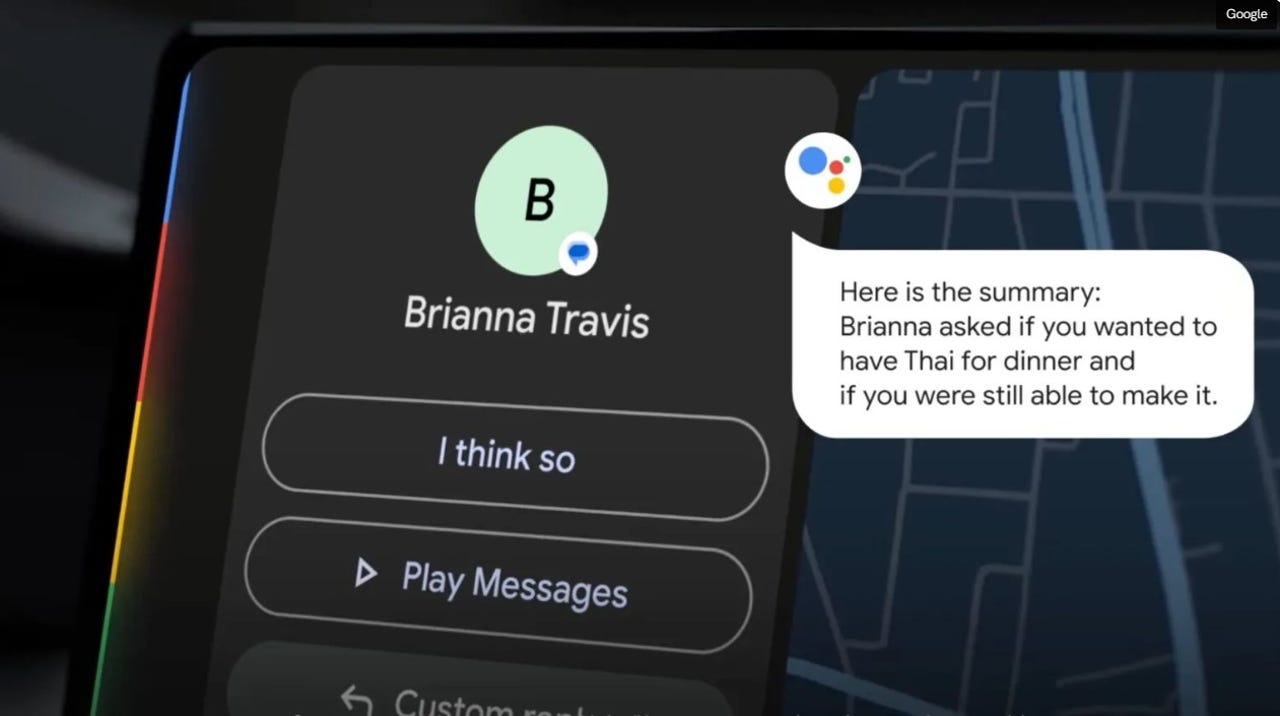
In an example provided by Google, a contact sends a long message asking about dinner plans. Instead of reading out the entire message, Android Auto simply says, "Here is the summary: Brianna asked if you wanted to have Thai for dinner and if you were still able to make it." Several quick response answers are provided.
There's no word as to when this feature will roll out, but given that a support document exists already, it shouldn't be too far in the future.
Data loss is an inescapable reality in the digital business world. Data backup techniques are conceptually simple, but implementing a robust disaster recovery plan that both protects data from cyberattacks and maintains business continuity during a breach can be difficult. Register for the free Advancing Data Backup Tools and Techniques summit to gain insights from leading experts on the future of data backup solutions to help design a disaster recovery plan that protects your most critical data and mitigates the effects of attacks when they do occur.
As cloud adoption has become the norm, cyber threats are a constant concern. Cloud detection and response (CDR) is growing in significance, serving as a vital means to monitor and remediate cloud security issues while safeguarding valuable assets. This new acronym in the detection and response category is designed to address cybersecurity threats and incidents that target cloud environments and support cloud-based tools. But as CDR is an emerging technology, security teams must understand it first. At the Best Practices for Cloud Detection and Response Summit, hear advice from industry leaders, experts and practitioners to help evaluate CDR products and create an implementation plan with confidence.
Top Stories
The extensive scope of knowledge graph use cases February 20, 2024 by Alan Morrison February’s Enterprise Data Transformation Symposium, hosted by Semantic Arts, featured talks from two prominent members of pharma’s Pistoia Alliance: Martin Romacker of Roche and Ben Gardner of AstraZeneca. It’s been evident for years now that the Pistoia Alliance, organized originally in 2008 by Pfizer, GlaxoSmithKline and Novartis for industry data sharing purposes, has been seeing benefits from its members’ efforts, particularly when it comes to learning from each others’ new best practices.
Transparency? What the Heck is That!? February 18, 2024 by Bill Schmarzo During Season 5 of Saturday Night Live, Steve Martin and Bill Murray performed a skit in which they comically pointed at something in the distance and asked, “What the hell is that…?” While the humor in the skit may have been somewhat obscure, their confusion accurately mirrors today’s confusion with the concept of “transparency.”
30 Python Libraries that I Often Use February 17, 2024 by Vincent Granville This list covers well-known as well as specialized libraries that I use rather frequently. Applications include GenAI, data animations, LLM, synthetic data generation and evaluation, ML optimization, scientific computing, statistics, web crawling, APIs, SQL, and more. I also mention my owns, and issues that I faced with standard libraries.
In-Depth
Custom Software Development for No-Code Tool Email Design February 20, 2024 by Pritesh Patel The fast-paced digital world requires effective and user-friendly software solutions more than ever. Custom software development is changing business communication, especially email design. This blog explores the specialized but crucial field of-—the creation of no-code tools for email design. These tools represent the core of digital-age strategic marketing and communication, not just aesthetics.
The importance of cybersecurity at home and 5 tips to secure your network February 20, 2024 by Jane Marsh Those working in technology, security and data know protecting critical infrastructure from cybersecurity threats is a non-negotiable aspect of a functioning, modern society. However, the same mentality must apply to households. They are just as vulnerable and deserve protection. What are advanced strategies to deter threat actors and maintain privacy and data integrity?
Decoding different types of databases: A comparison February 20, 2024 by Ovais Naseem In the digital landscape, the backbone of any robust application or system resides in its database architecture. Choosing the appropriate database, considering the Relational vs. Non-Relational Databases debate, is pivotal for businesses in determining performance, scalability, and the ability to handle diverse data categories. However, choosing the right database can be really tricky.
Meet Sora, OpenAI’s impressive new video generation tool February 16, 2024 by Scott Thompson OpenAI made waves in 2021 when they announced DALL-E, a text-to-image generative AI tool that gave select beta participants the ability to generate images in real time. The results were crude, visually distinct as AI-generated, and certainly needed more time. But despite the quality of the images, there were hopes that the model could be refined. For many, this first generation of DALL-E was like a toddler first making human figures.
DSC Weekly 13 February 2024 February 13, 2024 by Scott Thompson Read more of the top articles from the Data Science Central community.
I only use AI for one purpose… research for writing fiction. On that front, AI has helped me quite a bit (especially when needing to quickly understand a concept that I didn't previously know about or even the entomology of a word). But that's it.
However, when you're writing four to six books every year, research is a key component in the process. To that end, I've leaned heavily into Opera's Aria. Until a couple of weeks ago, I hadn't even bothered with Microsoft's Copilot. It wasn't until I installed the Edge browser on Linux (for testing purposes) that I saw how handy Microsoft's AI is. Even better, using Copilot with Edge has a few advantages over even what Opera's Aria includes, and it made me think Edge could (at some point) become my default browser.
Also: How to use Copilot (formerly called Bing Chat)
But what about using Edge with Copilot makes it special? Let me paint a picture for you.
1. Browser usage
Let's face it, you spend the majority of your computer time in a browser. Whether you're working, playing, being social, communicating, or designing, your digital lives have become browser-centric over the last decade. Since you're already spending that much time within a browser, why would you want to bother adding yet another application into the mix?
Seeing as how our lives are becoming busier by the day, every time we sit in front of our PCs or laptops, the goal should be working as efficiently as possible. If Copilot is your AI of choice, the most efficient means of interacting with it is Edge. It's like having two tools in one. And because Copilot works very similar to Aria on Opera, it opens in a sidebar within the browser itself, so there are no pop-up windows to deal with and it's always there, ready for action.
2. Easy interactions with tabs
One of the things I like about how Copilot is laid out in Edge is that it gives you three tabs: Chat, Compose, and Insights. Chat is the usual query feature, where you ask questions and Copilot answers them. Compose is where you can have Copilot write about something (such as a paragraph, email, ideas, etc.).
Also: Microsoft Copilot vs. Copilot Pro: Is the subscription fee worth it?
Finally, there's the Insights tab, where you can view trending searches. Although Insights isn't really AI, it can be a good place to start your research and see what searches are trending on Bing. On the official Copilot site, you don't have access to these three options.
3. Profiles
One very handy feature found in Edge is Profiles. The reason this applies to Copilot is that you might have a profile you use that includes Copilot and one that doesn't. For instance, if you use the same computer for both work and personal purposes, you might have a profile for work, with Copilot disabled, and a profile for personal usage with Copilot enabled.
Also: How to use Copilot Pro to write, edit, and analyze your Word documents
This might seem insignificant, but if your employer doesn't want you using AI, not having the temptation right there in front of you can make a big difference. Or maybe you don't want your children using Copilot. For that, create a profile for your kids that doesn't have Copilot enabled. There are plenty of reasons why you might want Microsoft's AI enabled or disabled. With Edge, that choice is yours to make.
4. Plugins
With Copilot on Edge, you get easy access to Plugins you can install for different conversations. At the moment, the Plugins feature is fairly limited to Search, Instacart, Kayak, Klarna, OpenTable, and Shop, but I would assume this list will continue to grow as Copilot gains traction. With a free account, you can only add up to three plugins but I would venture to say (at least at the onset), you'll only be using the Search plugin. One thing to keep in mind is that data is shared with any company associated with a plugin you enable, so choose wisely.
How do these plugins help? For example, with the Instacart plugin, you can ask about recipes, discover the ingredients you need, and have it all delivered from local stores.
Also: ChatGPT vs. Copilot: Which AI chatbot is better for you?
Hopefully, Microsoft will see to it to add more useful plugins in the future.
You might not have started your journey with AI and that's great. But if you have dipped your toes into those waters, and you're looking for the best method of interacting with Microsoft's take on the technology, you can't go wrong with Edge. Couple that with the browser's outstanding layout and plethora of features, and it makes for an all-around outstanding experience.
In the digital landscape, the backbone of any robust application or system resides in its database architecture. Choosing the appropriate database, considering the Relational vs. Non-Relational Databases debate, is pivotal for businesses in determining performance, scalability, and the ability to handle diverse data categories.
However, choosing the right database can be really tricky. There are so many options out there, and it’s tough to figure out which one fits your needs.
In this article, we’ll break down the differences between different types of databases, making it easy to understand how they handle data, grow with your business, and perform in different situations.
Relational vs. non-relational
Relational databases
Databases like PostgreSQL organize data into tables with rows and columns, guided by predefined schemas and enforced relationships. They use SQL for standardized data manipulation and ensure robustness through ACID compliance, making them ideal for structured data with complex relationships and transactional integrity.
Non-relational databases (NoSQL)
NoSQL databases, like MongoDB, are diverse in models like document-based, key-value, columnar, and graph structures, catering to unstructured or semi-structured data. They offer scalability, flexibility, and varied consistency models, allowing trade-offs between performance and consistency. NoSQL databases excel in scenarios requiring high-speed processing, scalability, and managing dynamic data structures.
Choosing between them
Relational databases suit structured data with strict schemas and complex relationships, ensuring data integrity in transactions. In contrast, non-relational databases excel in managing unstructured or rapidly changing data, offering scalability and flexibility. The choice between Relational vs. Non-Relational Databases hinges on aligning each database type’s strengths with the specific needs of the application or business, ensuring optimal data management and performance.
Data models and flexibility
Relational model
Relational databases organize data into tables with rows and columns governed by fixed schemas defining data types and relationships. While ensuring data integrity and consistency, the rigid schema can make adapting to evolving data patterns challenging.
Non-relational models
Non-relational databases, like MongoDB (document-based), key-value stores, columnar, and graph databases, offer diverse structures catering to specific data needs.
Document-Based: MongoDB’s schema-less documents enable flexible data structures that quickly adapt to changes without strict schema constraints, ideal for dynamic or unstructured data.
Key-Value Stores: These databases provide simplicity and rapid data retrieval but offer limited query capabilities compared to other models suitable for caching and quick data access.
Columnar Databases: Systems like Cassandra optimize query performance for analytics and handling large datasets efficiently.
Graph Databases: Designed for complex relationships between data points, they excel in network analysis and recommendation systems.
Scalability and performance
Relational database scaling
Relational databases often scale vertically by upgrading hardware, limiting their ability to handle sudden surges in data or traffic. Horizontal scaling is challenging due to rigid schemas and architectures.
Non-relational database scaling:
Non-relational databases shine in horizontal scalability, distributing data across multiple servers seamlessly. Models like document-based and key-value stores excel in handling unstructured data, allowing effortless scaling to accommodate growing demands.
Performance characteristics:
Relational databases prioritize transactional consistency and excel in managing complex transactions. Non-relational databases offer varied performance traits based on their models, optimizing data access and query capabilities for specific needs.
Choosing for scalability and performance:
Relational databases suit scenarios needing strict transactional integrity, while non-relational databases, with their horizontal scaling prowess, are ideal for dynamic applications. Balancing scalability and performance involves aligning database capabilities with anticipated growth, ensuring an efficient and adaptable architecture.
Query languages and indexing
Relational database query language (SQL):
SQL enables complex operations like joins and aggregations across multiple tables, making it robust for structured data handling in systems like PostgreSQL and MySQL.
Non-relational database query languages:
Non-relational databases use tailored query languages like MongoDB Query Language (MQL) to navigate their unique structures efficiently, optimizing data retrieval.
Indexing capabilities:
Relational databases offer diverse indexing techniques (B-tree, hash) to enhance query performance. Non-relational databases provide specialized indexes (e.g., single field, compound) catering to varied data models.
Choosing the right fit:
Relational databases excel in intricate data relationships, while non-relational databases offer flexibility for unstructured data. The choice hinges on aligning querying needs with the database’s capabilities.
Consistency and durability
Relational databases adhere to ACID (Atomicity, Consistency, Isolation, Durability) principles, ensuring transactional integrity and data consistency even in concurrent operations. Non-relational databases often offer flexibility in consistency models, allowing trade-offs between performance and data integrity based on application needs.
Choosing based on needs:
Relational databases suit applications needing strong consistency. Non-relational databases offer flexibility, allowing the choice of consistency levels based on specific requirements.
Use cases and applicability
Ideal for structured data with complex relationships:
Financial Systems
Inventory Management
CRM Systems
E-commerce Platforms
Non-relational database use cases:
Flexible and scalable for varied data structures:
Real-Time Analytics
Content Management Systems
IoT Environments
Social Media and Recommendations
Choosing based on applicability:
Relational databases suit structured data with established relationships, ensuring transactional integrity. Non-relational databases manage evolving data structures and unstructured data, offering scalability and adaptability.
Community support and ecosystem
The community and ecosystem surrounding a database are crucial for its development, support, and evolution.
Relational database communities:
Relational databases like PostgreSQL and MySQL boast extensive communities with decades of development and refinement. They offer:
Mature Ecosystems: Rich with documentation, forums, and resources aiding developers.
Vast Toolsets: A wide array of tools and extensions enhancing database functionality.
Active Contributions: Regular updates and enhancements driven by a committed user base.
Non-relational database communities:
Non-relational databases like MongoDB and Cassandra also thrive on active and evolving communities:
Vibrant Development: Constant evolution to meet modern data challenges and user needs.
Growing Communities: Expanding user base contributing to innovative solutions.
Adaptive Tools: Evolving toolsets and integrations catering to diverse data models.
Choosing based on community support:
Relational databases offer mature ecosystems with established tools and robust support, ensuring stability and reliability.
Non-relational databases, while newer, boast dynamic communities and tools adapting to modern data demands, providing innovative solutions and rapid evolution.
Selecting between a non-relational and relational database, like MongoDB vs PostgreSQL, involves considering the ecosystem and surrounding community, aligning with the application’s long-term support and development needs.
Conclusion
The world of databases presents a diverse landscape, offering a spectrum of choices catering to varying data needs and application requirements. The selection process demands a deep understanding of the nuances between relational vs non-relational databases, considering factors like data structure, scalability, performance, and the specific use case.
Ultimately, the optimal database choice hinges on aligning these technical aspects with the unique demands of the business or application. This nuanced understanding empowers organizations to make informed decisions, laying the foundation for efficient data management, scalability, and robust application performance in the dynamic digital realm.
TechCrunch highlights notable women in the field of AI
Kyle Wiggers Dominic-Madori Davis 11 hours
To give AI-focused women academics and others their well-deserved — and overdue — time in the spotlight, TechCrunch is launching a series of interviews focusing on remarkable women who’ve contributed to the AI revolution. We’ll publish several pieces throughout the year as the AI boom continues, highlighting key work that often goes unrecognized. Read more profiles here.
As a reader, if you see a name we’ve missed and feel should be on the list, please email us and we’ll seek to add them. Here are some key people you should know:
Irene Solaiman, head of global policy at Hugging Face
Eva Maydell, member of European Parliament and EU AI Act advisor
Women in AI: Lee Tiedrich, AI expert at the Global Partnership on AI
Women in AI: Rashida Richardson, senior counsel at Mastercard focusing on AI and privacy
The gender gap in AI
In a New York Times piece late last year, the Gray Lady broke down how the current boom in AI came to be — highlighting many of the usual suspects like Sam Altman, Elon Musk and Larry Page. The journalism went viral — not for what was reported, but instead for what it failed to mention: women.
The Times’ list featured 12 men — most of them leaders of AI or tech companies. Many had no training or education, formal or otherwise, in AI.
Contrary to the Times’ suggestion, the AI craze didn’t start with Musk sitting adjacent to Page at a mansion in the Bay. It began long before that, with academics, regulators, ethicists and hobbyists working tirelessly in relative obscurity to build the foundations for the AI and GenAI systems we have today.
Elaine Rich, a retired computer scientist formerly at the University of Texas at Austin, published one of the first textbooks on AI in 1983, and later went on to become the director of a corporate AI lab in 1988. Harvard professor Cynthia Dwork made waves decades ago in the fields of AI fairness, differential privacy and distributed computing. And Cynthia Breazeal, a roboticist and professor at MIT and the co-founder of Jibo, the robotics startup, worked to develop one of the earliest “social robots,” Kismet, in the late ’90s and early 2000s.
Despite the many ways in which women have advanced AI tech, they make up a tiny sliver of the global AI workforce. According to a 2021 Stanford study, just 16% of tenure-track faculty focused on AI are women. In a separate study released the same year by the World Economic Forum, the co-authors find that women only hold 26% of analytics-related and AI positions.
In worse news, the gender gap in AI is widening — not narrowing.
Nesta, the U.K.’s innovation agency for social good, conducted a 2019 analysis that concluded that the proportion of AI academic papers co-authored by at least one woman hadn’t improved since the 1990s. As of 2019, just 13.8% of the AI research papers on Arxiv.org, a repository for preprint scientific papers, were authored or co-authored by women, with the numbers steadily decreasing over the preceding decade.
Reasons for disparity
The reasons for the disparity are many. But a Deloitte survey of women in AI highlights a few of the more prominent (and obvious) ones, including judgment from male peers and discrimination as a result of not fitting into established male-dominated molds in AI.
It starts in college: 78% of women responding to the Deloitte survey said they didn’t have a chance to intern in AI or machine learning while they were undergraduates. Over half (58%) said they ended up leaving at least one employer because of how men and women were treated differently, while 73% considered leaving the tech industry altogether due to unequal pay and an inability to advance in their careers.
The lack of women is hurting the AI field.
Nesta’s analysis found that women are more likely than men to consider societal, ethical and political implications in their work on AI — which isn’t surprising considering women live in a world where they’re belittled on the basis of their gender, products in the market have been designed for men and women with children are often expected to balance work with their role as primary caregivers.
With any luck, TechCrunch’s humble contribution — a series on accomplished women in AI — will help move the needle in the right direction. But there’s clearly a lot of work to be done.
The women we profile share many suggestions for those who wish to grow and evolve the AI field for the better. But a common thread runs throughout: strong mentorship, commitment and leading by example. Organizations can affect change by enacting policies — hiring, education or otherwise — that elevate women already in, or looking to break into, the AI industry. And decision-makers in positions of power can wield that power to push for more diverse, supportive workplaces for women.
Change won’t happen overnight. But every revolution begins with a small step.
In the rapidly evolving landscape of artificial intelligence, Google continues to lead with its pioneering developments in multimodal AI technologies. Shortly after the debut of Gemini 1.0, their cutting-edge multimodal large language model, Google has now unveiled Gemini 1.5. This iteration not only enhances the capacity established by Gemini 1.0 but also brings about significant improvements in Google's methodology for processing and integrating multimodal data. This article provides an exploration of Gemini 1.5, shedding light on its innovative approach and distinctive features.
Gemini 1.0: Laying the Foundation
Launched by Google DeepMind and Google Research on December 6, 2023, Gemini 1.0 introduced a new breed of multimodal AI models capable of understanding and generating content in various formats, such as text, audio, images, and video. This marked a significant step in AI, broadening the scope for managing diverse information types.
Gemini's standout feature is its capacity to seamlessly blend multiple data types. Unlike conventional AI models that may specialize in a single data format, Gemini integrates text, visuals, and audio. This integration enables it to perform tasks like analyzing handwritten notes or deciphering complex diagrams, thereby solving a broad spectrum of complex challenges.
The Gemini family offers models for various applications: the Ultra model for complex tasks, the Pro model for speed and scalability on major platforms like Google Bard, and the Nano models (Nano-1 and Nano-2) with 1.8 billion and 3.25 billion parameters, respectively, designed for integration into devices like the Google Pixel 8 Pro smartphone.
The Leap to Gemini 1.5
Google's latest release, Gemini 1.5, enhances the functionality and operational efficiency of its predecessor, Gemini 1.0. This version adopts a novel Mixture-of-Experts (MoE) architecture, a departure from the unified, large model approach seen in its predecessor. This architecture incorporates a collection of smaller, specialized transformer models, each adept at managing specific segments of data or distinct tasks. This setup allows Gemini 1.5 to dynamically engage the most appropriate expert based on the incoming data, streamlining the model’s ability to learn and process information.
This innovative approach significantly elevates the model's training and deployment efficiency by activating only the necessary experts for tasks. Consequently, Gemini 1.5 is capable of rapidly mastering complex tasks and delivering high-quality results more efficiently than conventional models. Such advancements allow Google's research teams to accelerate the development and enhancement of the Gemini model, extending the possibilities within the AI domain.
Expanding Capabilities
A notable advancement in Gemini 1.5 is its expanded information processing capability. The model's context window, which is the amount of user data it can analyses to generate responses, now extends to up to 1 million tokens — a substantial increase from the 32,000 tokens of Gemini 1.0. This enhancement means Gemini 1.5 Pro can simultaneously process extensive amounts of data, such as an hour of video content, eleven hours of audio, or large codebases and textual documents. It has also been successfully tested with up to 10 million tokens, showcasing its exceptional ability to comprehend and interpret enormous datasets.
A Glimpse into Gemini 1.5's Capabilities
Gemini 1.5's architectural improvements and the expanded context window empower it to perform sophisticated analysis over large information sets. Whether it's delving into the intricate details of the Apollo 11 mission transcripts or interpreting a silent film, Gemini 1.5 demonstrates unparalleled problem-solving abilities, especially with lengthy code blocks.
Developed on Google's advanced TPUv4 accelerators, Gemini 1.5 Pro has been trained on a diverse dataset, encompassing various domains and including multimodal and multilingual content. This broad training base, combined with fine-tuning based on human preference data, ensures that Gemini 1.5 Pro's outputs resonate well with human perceptions.
Through rigorous benchmark testing against a plethora of tasks, Gemini 1.5 Pro not only outperforms its predecessor in a vast majority of evaluations but also stands toe-to-toe with the larger Gemini 1.0 Ultra model. Gemini 1.5 Pro exhibits strong “in-context learning” abilities, effectively gaining new knowledge from detailed prompts without the need for further adjustments. This was particularly evident in its performance on the Machine Translation from One Book (MTOB) benchmark, where it translated from English to Kalamang—a language spoken by a small number of people—with proficiency comparable to that of human learning, underscoring its adaptability and learning efficiency.
Limited Preview Access
Gemini 1.5 Pro is now available in a limited preview for developers and enterprise customers through AI Studio and Vertex AI, with plans for a wider release and customizable options on the horizon. This preview phase offers a unique opportunity to explore its expanded context window, with improvements in processing speed anticipated. Developers and enterprise customers interested in Gemini 1.5 Pro can register through AI Studio or contact their Vertex AI account teams for further information.
The Bottom Line
Gemini 1.5 represents a notable step forward in the development of multimodal AI. Building on the foundation laid by Gemini 1.0, this new version brings improved methods for processing and integrating different types of data. Its introduction of a novel architectural approach and expanded data processing capabilities highlight Google's ongoing effort to enhance AI technology. With its potential for more efficient task handling and advanced learning, Gemini 1.5 showcases the continuous evolution of AI. Currently available for a select group of developers and enterprise customers, it signals exciting possibilities for the future of AI, with wider availability and further advancements on the horizon.
Google is poised to unveil Gemini Enterprise and Gemini Business plans, providing Google Workspace customers with access to Gemini Ultra 1.0, along with enterprise-grade data protections, according to a leaked update posted on X by Dylan Roussel, an Android developer.
Uhoh! New Gemini release updates Ability to edit and run Python code snippets directly from Gemini is really neat! The new plans are also awesome. What a crazy month for Gemini! pic.twitter.com/pb954EsJ4e
— Dylan Roussel (@evowizz) February 19, 2024
With this plan, Google won’t use conversations or enterprise data to train the Gemini model, allowing businesses to confidently utilise Gemini in their work environments. Administrators would be able manage Gemini settings via the Google Workspace admin console.
Moreover, in the recently released Gemini Advanced, users can now edit and run Python code snippets directly in Gemini’s user interface. This allows them to experiment with the code, observe how changes affect the output, and verify that the code works as intended.
This functionality is designed to cater to both learning and verification needs. Students can leverage this capability to experiment with code examples, gaining a deeper understanding of how modifications impact outputs.
Meanwhile, developers can efficiently verify the functionality of generated code within Gemini before implementation, saving time and ensuring the reliability of the code.
Google recently released Gemini 1.5. This new model outperforms ChatGPT and Claude with 1 million token context window — the largest ever seen in natural processing models. In contrast, GPT-4 Turbo has 128K context window and Claude 2.1 has 200K context window.
The post Google to Introduce Gemini Enterprise and Gemini Business Plans for Workspace appeared first on Analytics India Magazine.
Sequoia Capital, a venture capital firm from Silicon Valley, has launched the Sequoia Open Source Fellowship. This program plans to fund up to three developers each year. It allows them to work full-time on their projects without worrying about money and without giving up any ownership of their work.
In 2023 their first and only Fellow was Sebastián Ramírez Montaño who created FastAPI, an open source tool that allows developers to create applications quickly and maintain them easily.
This initiative addresses the problem of not enough funding in the open source community, a problem made clear by major security issues in the past.
Open source software development is important for technology, yet, developers often have to balance their open source work with jobs that pay, leading to a lack of funding and support. The Sequoia fellowship aims to close this gap by giving developers money to cover their living costs for up to a year, so they can focus on their open source projects.
The fellowship is available to any developer working on an open source project, with ongoing application acceptance. Sequoia wants to support projects that are widely used and make a difference, showing the importance of open source software in technology. By funding these projects, Sequoia not only helps the wider tech community but also follows its strategy of investing in companies rooted in open source, like MongoDB, Confluent, and Temporal.
Sequoia’s move is part of a larger trend where tech companies and venture capital firms offer grants and funding to support open source development. These efforts aim to make the software supply chain safer and recognise the importance of open source contributions to technology.
The post Sequoia Capital Innovates with Open Source Fellowship for Developers appeared first on Analytics India Magazine.















 pic.twitter.com/pb954EsJ4e
