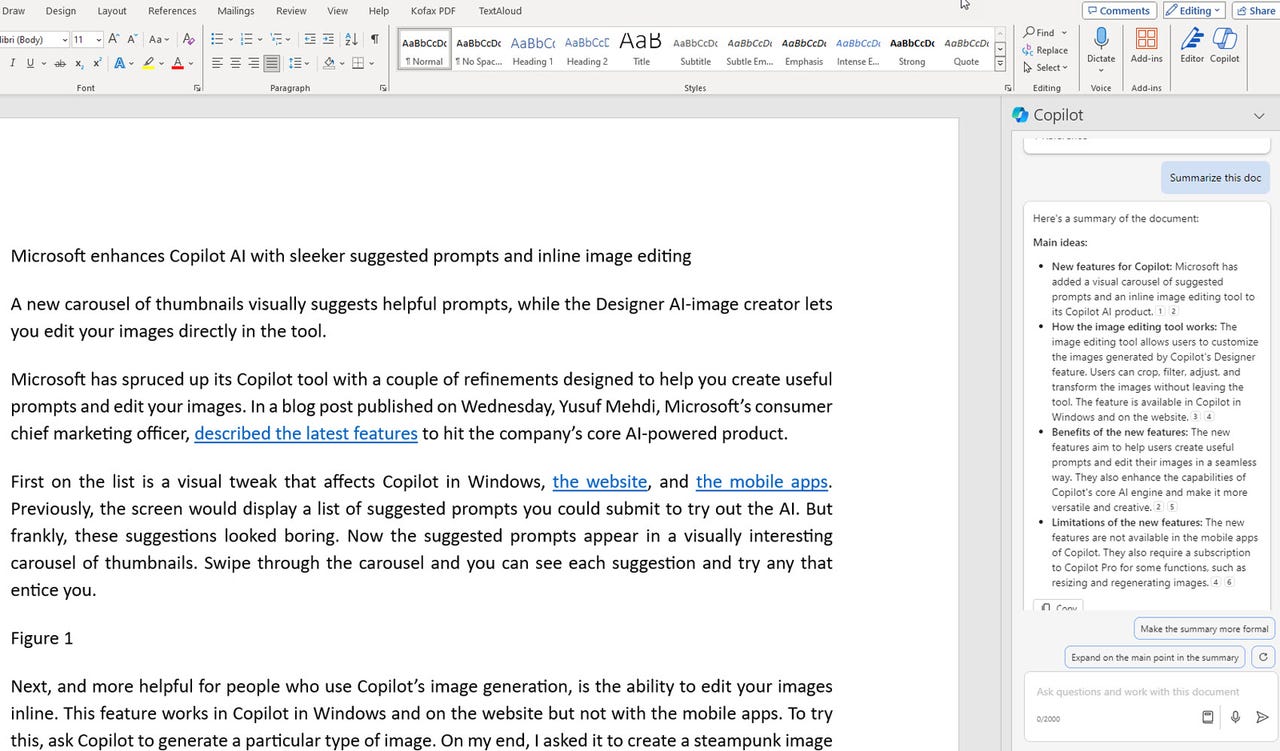
Microsoft's Copilot Pro AI offers a few benefits for $20 per month. But the most helpful one is the AI-powered integration with the different Microsoft 365 apps. For those of you who use Microsoft Word, for instance, Copilot Pro can help you write and revise your text, provide summaries of your documents, and answer questions about any document.
First, you'll need a subscription to either Microsoft 365 Personal or Family. Priced at $70 per year, the Personal edition is geared for one individual signed into as many as five devices. At $100 per year, the Family edition is aimed at up to six people on as many as five devices. The core apps in the suite include Word, Excel, PowerPoint, Outlook, and OneNote.
Also: Microsoft Copilot vs. Copilot Pro: Is the subscription fee worth it?
Second, you'll need the subscription to Copilot Pro if you don't already have one. To sign up, head to the Copilot Pro website. Click the Get Copilot Pro button. Confirm the subscription and the payment. The next time you use Copilot on the website, in Windows, or with the mobile apps, the Pro version will be in effect.
How to use Copilot Pro in Word
Open Word.
Submit your request.
Review the response and your options.
Keep, regenerate, or remove the draft.
Alter the draft.
Revise existing text.
Review the different versions.
Replace or Insert.
Adjust the tone.
Turn text into a table.
Respond to the table.
Summarize a document.
Review the summary.
Revise the summary.
Ask questions about a document.